Vendor Products Portal v.16
The tool to motivate vendors to prepare product catalogs in Odoo






This Odoo tool aims to force suppliers to administrate their products in the Odoo portal. The app lets vendor contacts create, update, and import products they sell, related prices, and stock levels by their locations. Purchase managers might do the same and use that information for administrating procurement.
Vendor products catalog
The tool introduces a new stand-alone classifier of vendor products which is manageable either internally by purchase managers or in the Odoo portal by supplier representatives. As installed the app automatically creates vendor products based on existing Odoo products' supplier prices
Odoo sales based on supplies
Any vendor product might be linked to any Odoo product. In such a way, a purchase manager's goal becomes to match 'their' products with 'ours'. Each of our product variants might have a few linked vendor products
Supplier prices management
Portal users manage their company prices in the Odoo portal, while purchase managers might update them in the Odoo backend interface. Those prices are considered as standard Odoo 'supplier info' which correspondingly are used in purchase orders
Vendor stocks control
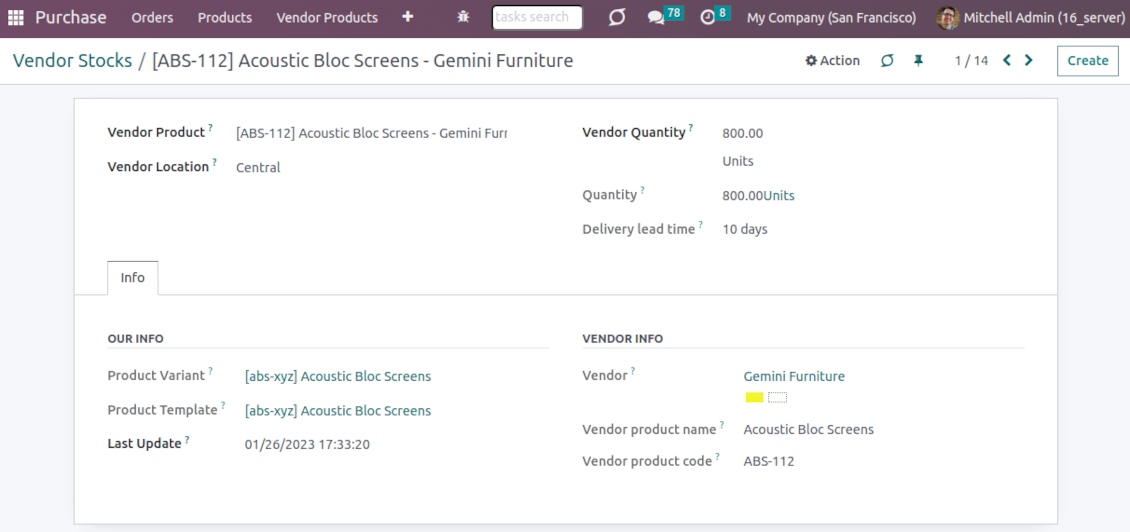
Both vendor representatives and purchase users register and update inventory levels for supplier locations. Vendor products' stocks data is available both in the Odoo portal and from the product variant, product template, and supplier backend form views
Vendor data import
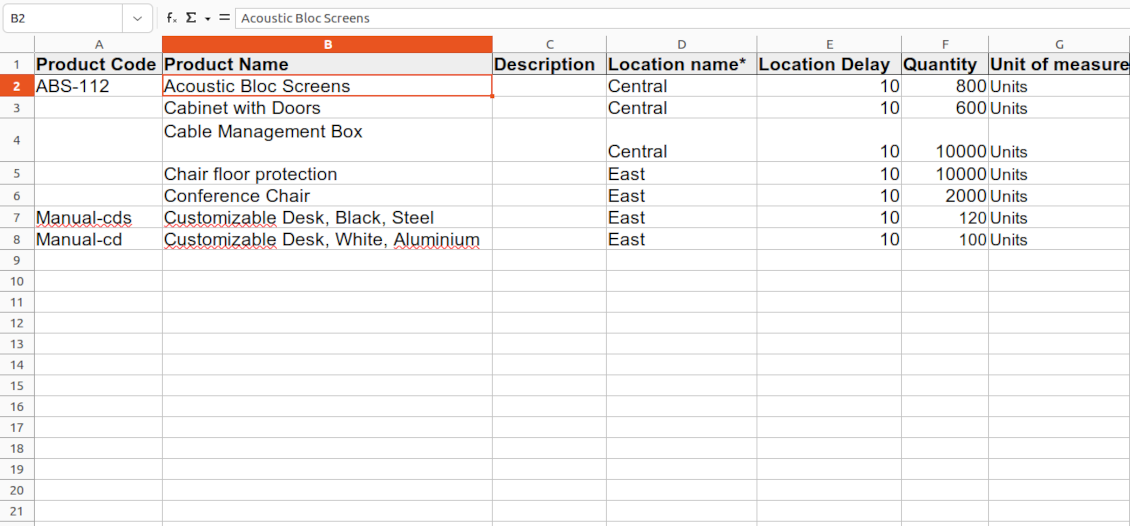
The tool lets import vendor products, prices, and stock levels as Excel tables of predefined formats. In such a way, suppliers may quickly prepare commercial offers in the Odoo portal, while purchase managers - import those in the Odoo backend
Secured access and shared use
Any portal user may create, update, and archive products related to their company. Any Odoo user with access to products might rely upon vendor data for informational purposes. Any purchase manager may create, update, and archive vendor-related objects. Such managers might also get notifications of newly registered vendor products, their price changes, and inventory updates.
Odoo supplier portal
-
The Odoo portal allows searching and managing vendor products, locations, and stocks
-
Portal users may register, update, and import new items for their product catalog at any moment
-
Vendor representatives might manage their price lists, including registering new offers; modifying their validity period and minimum rules; deleting prices
-
Vendor users may import products and prices in a form of the predefined Excel table
-
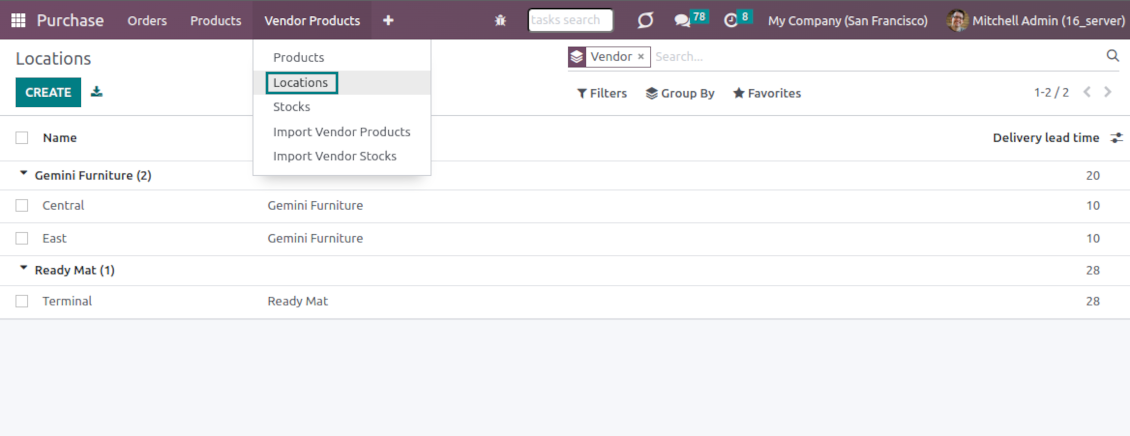
Vendor representatives might manage their warehouses, including registering new locations; modifying their titles, descriptions, addresses, and delivery time; deleting warehouses
-
Suppliers can update inventory data, in particular register new and change stock levels per each location
-
Vendor users may import inventory levels in a form of the predefined Excel table
-
Suppliers can archive and restore products, prices, warehouses, and stocks.
Vendor inventories control
-
Each vendor stock level is provided per definite vendor location (warehouse). Vendors might create, edit, and archive their own warehouses
-
The tool allows an unlimited number of vendor locations per supplier. Locations are distinguished by name, address, and average delivery time
-
Keep stock levels in vendor units of measure, but purchase managers should make sure it has the same category as a linked Odoo product. The idea is to support conversion in order for internal users to work with habitual figures. For example, dozens and units are fine, while dozens and hours might lead to inconsistent procurement
-
Vendor stocks and locations might be switched off for portal users on the app configuration page
-
Stock levels are not used in Odoo operations, but they are provided for general information. Inventory levels are updated either manually by purchase managers/vendor representatives or through the import
-
Odoo warehouses' stocks are not linked to vendor stocks. Vendor stocks are absolutely independent since it is not possible to control supplier moves, and, hence, to support the double-entry system
-
Vendor inventories might be of special importance in the case of make-to-order logistics or drop shipping.
Vendor data import
Vendor products and prices
-
The tool lets vendor representatives and purchase users import vendor products and supplier prices as an Excel table in the predefined format. The table format is supplied with this tool source code and would be available on the configuration page as the 'Template for vendor products import' and in the import wizard under the section 'Help'
-
In the wizard, users can select whether previous products of this vendor should be archived. It lets fully replace this supplier product catalog with a new one
-
In the wizard, users can select whether previous prices should be marked as outdated. It lets remove misleading data.
Vendor products and stocks
-
The tool lets vendor representatives and purchase users import vendor products and stock levels as an Excel table in the predefined format. The table format is supplied with this tool source code and would be available on the configuration page as the 'Template for vendor stocks import' and in the import wizard under the section 'Help'
-
In the wizard, users can select whether previous products of this vendor should be archived. It lets fully replace this supplier product catalog with a new one
-
In the wizard, users can select whether previous stocks are not correct. It lets you have fully topical data after each import.
General import rules
-
Change the tables' content to provide more specific examples and labels. However, do not modify the columns' order and do not remove those: it will lead to inevitable mistakes
-
The import wizards offer useful tips to make a correct import. You may edit those recommendations on the configuration page, but make sure you do not remove critical advice
-
Each import finishes with a special popup of the results and the errors. It lets control of what has been actually done
-
In the wizards select which table lines should be imported. It is useful in case the number of lines is too big to import them all
-
While preparing the table for import be cautious with cell formats and make sure portal users know that. Dates should be dates, numbers should be numbers, currencies, and units of measure should be chosen among active in Odoo
-
In case import can't be fully finished until Odoo stops it, contact your system administrator to increase configured time-outs or split an imported table into a few ones.
Ofte stillede spørgsmål om Vendor Products Portal Odoo v.16
Hvad er forskellen mellem Vendor Products Management og Vendors Product Portal?
Vendor Products Portal er et tillæg til Vendor Products Management. Sidstnævnte styrer leverandorprodukter, priser og lager kun i Odoo-backend (interne brugere). Forstnævnte lader portalbrugere (leverandorer) selv indtaste kataloget og opdatere/importere priser, lagre og niveauer. Vendor Product Management er et pakraevet afhængighed for Vendor Products Portal.
Hvad er opdateringspolitikken for jeres vaerktojer?
Ifolge de gaeldende regler for Odoo Apps Store:
- Hvert modul kobt til version 12.0 eller tidligere giver adgang til alle versioner op til 12.0.
- Fra version 13.0 skal hver modulversion kobes separat.
- Uanset version giver kobet ret til alle opdateringer og fejlrettelser inden for en hovedversion.
faOtools-teamet styrer ikke disse regler. Ved sporgsmaal, kontakt Odoo Apps Store-representanterne direkte.
Hvordan installerer jeg jeres app pa Odoo.sh?
Den mest direkte tilgang er Odoo-butikkens indbyggede arbejdsgang:
1. Abn modulets side, og klik pa Deploy on odoo.sh
2. Du bliver omdirigeret til GitHub. Log ind, og klik pa Create a new repo, eller brug et eksisterende. Repot skal vaere privat. Apps under OPL-1 ma ikke offentliggores. Opret om nodvendigt et nyt repo til Odoo.sh-projektet
3. Ga derefter til odoo.sh, klik pa Deploy, bekraeft, og klik pa Continue. Installationen starter.
Disse trin installerer appen pa production-grenen. Til andre grene eller opdatering:
1. Download kildekoden fra Odoo-butikken
2. Commit modulet til GitHub-repot. Ingen app-mapper/filer ma sta i .gitignore. Repoer oprettet af odoo.sh kan ignorere vigtige stier (f.eks. /lib). Upload alle modulmapper og -filer
3. Deploy malgrenen i odoo.sh-projektet, eller vent pa det automatiske build, hvis indstillingerne angiver det.
Hvordan installerer jeg jeres app pa min egen server?
2. Genstart Odoo-serveren;
3. Sla udviklertilstand til (tekniske indstillinger);
4. Opdater applisten (Apps-menuen);
5. Find appen, og klik pa Activate/Install;
6. Folg retningslinjerne pa appsiden, hvis de findes.
Jeres app har ekstra tilfojelser. Kan jeg kobe dem senere?
Ja. Odoo laegger automatisk alle afhaengigheder i indkobskurven: udelad allerede kobte vaerktojer, sa du ikke betaler to gange.
Jeg deployede jeres app pa Odoo.sh og ser advarsel/fejl i testene
En rod/orange advarsel pavirker ikke appens funktioner. Nogle gange består vores moduler ikke de standard automatiske tests, fordi de forventer en adfaerd, der er i konflikt med appens mal. Vi aendrer f.eks. prisberegningen, mens Odoo-testene sammenligner slutprisen med standardalgoritmen.
Tjek forst funktionerne i den deployede database. Virker alt?
Hvis du stadig mener, at advarslen pavirker reelle funktioner, kontakt os, og send de fulde installationslogfiler og den fulde liste over deployede moduler (kerne og tredjepart).
Kan jeg kobe jeres app direkte hos jer?
Nej, vi distribuerer kun vaerktojerne via den officielle Odoo-appbutik.
Jeg vil gerne have rabat
Desvaerre har vi ikke tekniske midler til individuelle priser.
Kan jeg installere appen pa min Odoo Online (SaaS)-database?
Nej, tredjepartsapps kan ikke bruges pa Odoo Online. Odoo SaaS blokerer den mulighed.
Jeres vaerktoj afhaenger af andre apps. Skal jeg kobe dem?
Ja, vaerktojet kraver alle moduler markeret som afhaengigheder. Prisen pa appsiden inkluderer allerede disse afhaengigheder.
Hvad koster modulet i amerikanske dollar? Hvorfor aendrede den sig?
Prisen pa vores moduler er sat i euro. Odoo-butikken omregner til andre valutaer efter den interne valutakurs. Derfor kan prisen i amerikanske dollar aendre sig, nar kursen opdateres.
App- og webstedstekster på andre sprog end engelsk er AI-assisterede og afstemt med officielle Odoo-oversættelser. Hvis du opdager en fejl, send en sag om oversættelseskorrekthed så retter vi det.
Odoo-demodatabaser (livedemoer)
Til denne app kan vi tilbyde en gratis personlig demodatabase.
Du behøver hverken telefonnummer eller kreditkort for at kontakte os. Det er nok med en kort e-mailtilmelding, der tager under 30 sekunder.
På din anmodning forbereder vi en individuel live-forhåndsvisningsdatabase, hvor du i ca. to uger kan teste og tjekke antagelser.
Fejlrapportering
Hvis du støder på fejl eller inkonsistent adfærd, så kontakt os. Vi garanterer rettelser inden 60 dage efter køb og forbedrer værktøjerne også bagefter.
Du behøver hverken telefonnummer eller kreditkort for at kontakte os. Det er nok med en kort e-mailtilmelding, der tager under 30 sekunder.
Medtag så mange detaljer som muligt: skærmbilleder, Odoo-serverlogs og en fuld beskrivelse af, hvordan problemet genskabes. Det tager som regel nogle hverdage at lave en arbejdsplan (hvis fejlen bekræftes) eller retningslinjer (ellers).
Offentlige funktionsønsker og modulidéer (gratis udvikling)
Vi er stærkt motiverede til at forbedre vores værktøjer og taknemmelige for al feedback. Hvis kravene er til offentlig nytte og kan implementeres effektivt, tager teamet dem med på opgavelisten.
En sådan opgaveliste behandles regelmæssigt og indebærer ingen ekstra gebyrer. Selvom vi ikke kan love frister og endeligt design, kan det være en god måde at få ønskede funktioner uden investeringer og risici.
Du behøver hverken telefonnummer eller kreditkort for at kontakte os. Det er nok med en kort e-mailtilmelding, der tager under 30 sekunder.

The tool to flexibly structure Odoo attachments in folders and synchronize directories with cloud clients: Google Drive, OneDrive/SharePoint, Nextcloud/ownCloud, and Dropbox. DMS. File Manager. Document management system
398€

The tool to build a deep and structured knowledge base for internal and external use. Knowledge System. KMS. Wiki-like revisions.
398€
The tool to automatically synchronize Odoo attachments with OneDrive files in both ways
487€
The tool to set up KPI targets and control their fulfillment by periods. KPI dashboards. Dashboard designer. KPI charts

The tool for time-based service management from booking appointments to sales and reviews
398€
The tool to automatically synchronize Odoo attachments with Google Drive files in both ways
487€
The tool to configure variant prices based on attributes coefficients and surpluses
98€