Vendor Products Portal v.16
The tool to motivate vendors to prepare product catalogs in Odoo






This Odoo tool aims to force suppliers to administrate their products in the Odoo portal. The app lets vendor contacts create, update, and import products they sell, related prices, and stock levels by their locations. Purchase managers might do the same and use that information for administrating procurement.
Vendor products catalog
The tool introduces a new stand-alone classifier of vendor products which is manageable either internally by purchase managers or in the Odoo portal by supplier representatives. As installed the app automatically creates vendor products based on existing Odoo products' supplier prices
Odoo sales based on supplies
Any vendor product might be linked to any Odoo product. In such a way, a purchase manager's goal becomes to match 'their' products with 'ours'. Each of our product variants might have a few linked vendor products
Supplier prices management
Portal users manage their company prices in the Odoo portal, while purchase managers might update them in the Odoo backend interface. Those prices are considered as standard Odoo 'supplier info' which correspondingly are used in purchase orders
Vendor stocks control
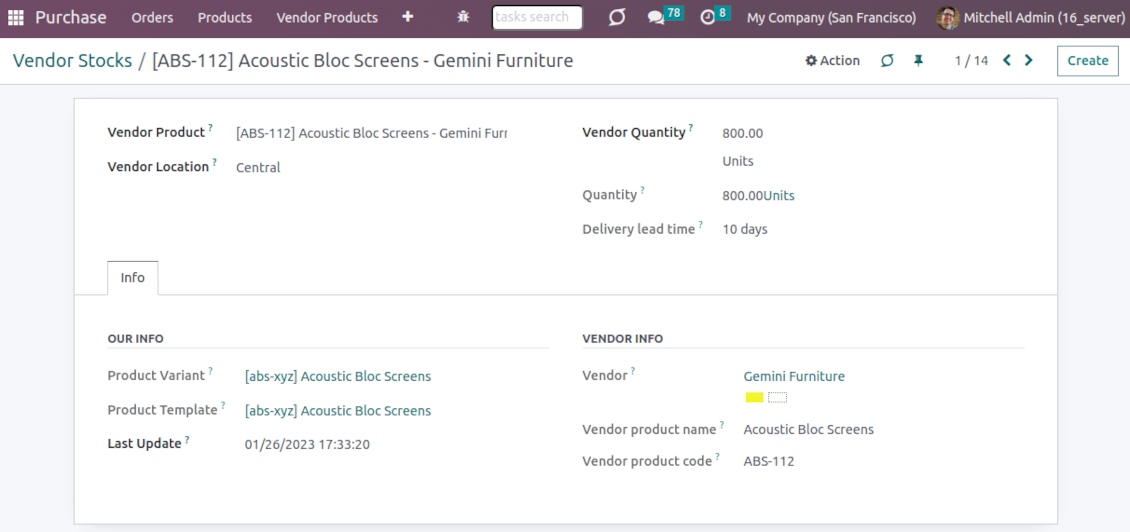
Both vendor representatives and purchase users register and update inventory levels for supplier locations. Vendor products' stocks data is available both in the Odoo portal and from the product variant, product template, and supplier backend form views
Vendor data import
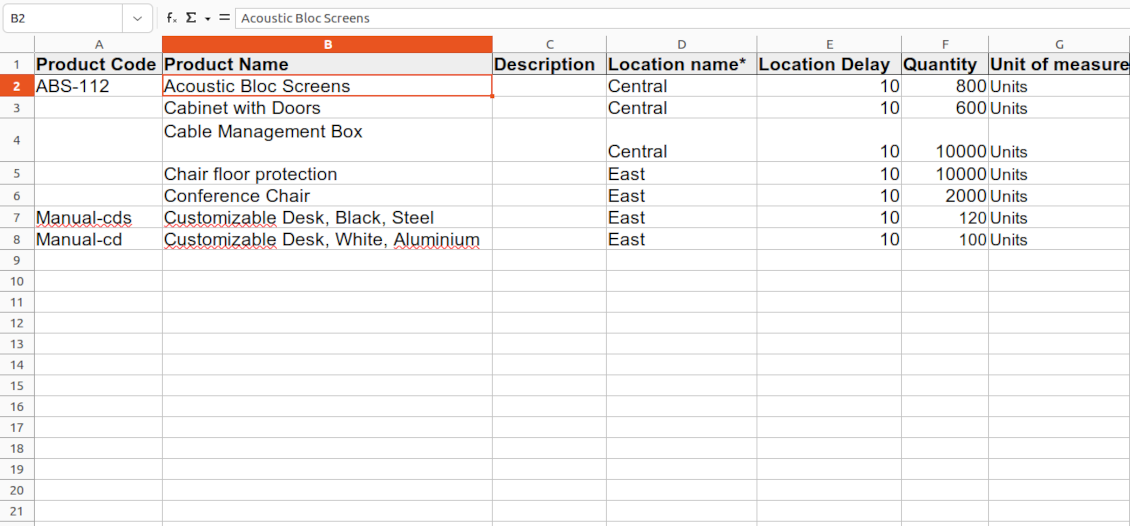
The tool lets import vendor products, prices, and stock levels as Excel tables of predefined formats. In such a way, suppliers may quickly prepare commercial offers in the Odoo portal, while purchase managers - import those in the Odoo backend
Secured access and shared use
Any portal user may create, update, and archive products related to their company. Any Odoo user with access to products might rely upon vendor data for informational purposes. Any purchase manager may create, update, and archive vendor-related objects. Such managers might also get notifications of newly registered vendor products, their price changes, and inventory updates.
Odoo supplier portal
-
The Odoo portal allows searching and managing vendor products, locations, and stocks
-
Portal users may register, update, and import new items for their product catalog at any moment
-
Vendor representatives might manage their price lists, including registering new offers; modifying their validity period and minimum rules; deleting prices
-
Vendor users may import products and prices in a form of the predefined Excel table
-
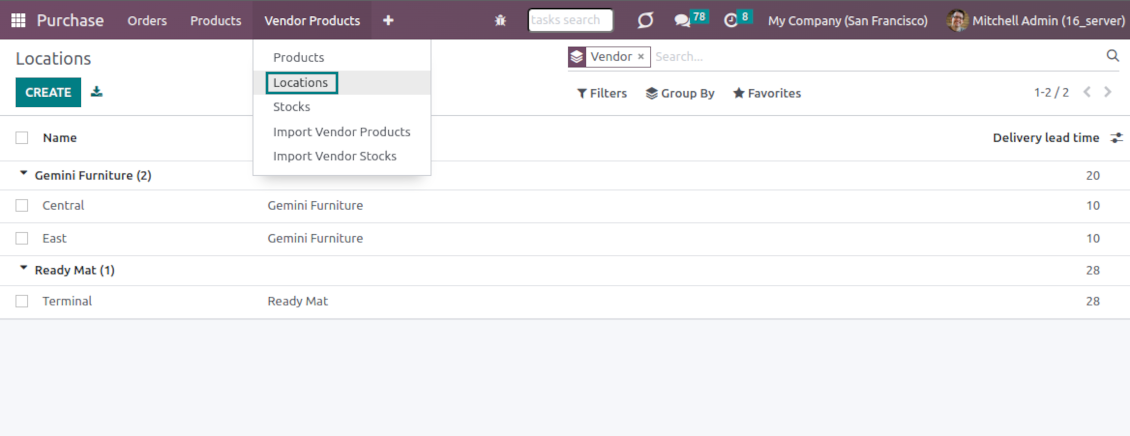
Vendor representatives might manage their warehouses, including registering new locations; modifying their titles, descriptions, addresses, and delivery time; deleting warehouses
-
Suppliers can update inventory data, in particular register new and change stock levels per each location
-
Vendor users may import inventory levels in a form of the predefined Excel table
-
Suppliers can archive and restore products, prices, warehouses, and stocks.
Vendor inventories control
-
Each vendor stock level is provided per definite vendor location (warehouse). Vendors might create, edit, and archive their own warehouses
-
The tool allows an unlimited number of vendor locations per supplier. Locations are distinguished by name, address, and average delivery time
-
Keep stock levels in vendor units of measure, but purchase managers should make sure it has the same category as a linked Odoo product. The idea is to support conversion in order for internal users to work with habitual figures. For example, dozens and units are fine, while dozens and hours might lead to inconsistent procurement
-
Vendor stocks and locations might be switched off for portal users on the app configuration page
-
Stock levels are not used in Odoo operations, but they are provided for general information. Inventory levels are updated either manually by purchase managers/vendor representatives or through the import
-
Odoo warehouses' stocks are not linked to vendor stocks. Vendor stocks are absolutely independent since it is not possible to control supplier moves, and, hence, to support the double-entry system
-
Vendor inventories might be of special importance in the case of make-to-order logistics or drop shipping.
Vendor data import
Vendor products and prices
-
The tool lets vendor representatives and purchase users import vendor products and supplier prices as an Excel table in the predefined format. The table format is supplied with this tool source code and would be available on the configuration page as the 'Template for vendor products import' and in the import wizard under the section 'Help'
-
In the wizard, users can select whether previous products of this vendor should be archived. It lets fully replace this supplier product catalog with a new one
-
In the wizard, users can select whether previous prices should be marked as outdated. It lets remove misleading data.
Vendor products and stocks
-
The tool lets vendor representatives and purchase users import vendor products and stock levels as an Excel table in the predefined format. The table format is supplied with this tool source code and would be available on the configuration page as the 'Template for vendor stocks import' and in the import wizard under the section 'Help'
-
In the wizard, users can select whether previous products of this vendor should be archived. It lets fully replace this supplier product catalog with a new one
-
In the wizard, users can select whether previous stocks are not correct. It lets you have fully topical data after each import.
General import rules
-
Change the tables' content to provide more specific examples and labels. However, do not modify the columns' order and do not remove those: it will lead to inevitable mistakes
-
The import wizards offer useful tips to make a correct import. You may edit those recommendations on the configuration page, but make sure you do not remove critical advice
-
Each import finishes with a special popup of the results and the errors. It lets control of what has been actually done
-
In the wizards select which table lines should be imported. It is useful in case the number of lines is too big to import them all
-
While preparing the table for import be cautious with cell formats and make sure portal users know that. Dates should be dates, numbers should be numbers, currencies, and units of measure should be chosen among active in Odoo
-
In case import can't be fully finished until Odoo stops it, contact your system administrator to increase configured time-outs or split an imported table into a few ones.
Soalan lazim tentang Vendor Products Portal Odoo v.16
Apakah perbezaan antara modul Vendor Products Management & Vendors Product Portal?
Aplikasi Vendor Products Portal ialah tambahan aplikasi Vendor Products Management. Yang kedua mengurus produk vendor, harga dan stok hanya di bahagian belakang Odoo (pengguna dalaman). Yang pertama meluaskannya dengan membenarkan pengguna portal (pembekal) sendiri memasukkan katalog dan mengemas kini/mengimport dokumen berkaitan: harga, gudang, tahap stok. Vendor Product Management ialah kebergantungan wajib modul Vendor Products Portal.
Apakah dasar kemas kini alat anda?
Mengikut dasar Odoo Apps Store semasa:
- Setiap modul yang dibeli untuk versi 12.0 dan sebelumnya memberi akses ke semua versi sehingga 12.0.
- Bermula versi 13.0, setiap versi modul perlu dibeli berasingan.
- Tanpa mengira versi, pembelian memberi hak kepada semua kemas kini dan pembetulan pepijat dalam versi utama.
Sila ambil perhatian bahawa pasukan faOtools tidak mengawal dasar itu. Untuk soalan, hubungi terus wakil Odoo Apps Store.
Bagaimana memasang aplikasi anda di Odoo.sh?
Pendekatan paling terus ialah menggunakan aliran kerja terbina dalam kedai Odoo:
1. Buka halaman modul dan klik butang Deploy on odoo.sh
2. Selepas itu anda akan dihalakan ke halaman GitHub. Log masuk ke akaun, kemudian klik 'Create a new repo' atau guna yang sedia ada. Pastikan repositori bersifat peribadi. Tidak dibenarkan menerbitkan aplikasi di bawah lesen OPL-1. Jika perlu, cipta repo baharu untuk projek Odoo.sh
3. Kemudian pergi ke odoo.sh dan klik butang Deploy. Dalam tetingkap pop timbul, hantar keputusan dan klik 'Continue.' Tindakan ini akan mencetuskan pemasangan.
Langkah ini akan memasang aplikasi pada cabang pengeluaran projek. Jika anda mahu men-deploy aplikasi ke cabang lain atau mengemas kini modul, lakukan tindakan berikut:
1. Muat naik kod sumber aplikasi dari kedai Odoo
2. Commit modul ke repositori GitHub yang diperlukan. Pastikan tiada folder/fail aplikasi diabaikan (iaitu tidak termasuk dalam .gitignore repo). Repositori dicipta secara automatik oleh odoo.sh dan secara lalai mungkin termasuk item penting (cth., /lib). Muat naik semua direktori, subdirektori dan fail modul tanpa pengecualian
3. Deploy cabang sasaran projek odoo.sh atau, jika tetapan anda mengandaikan demikian, tunggu sehingga ia dibina secara automatik.
Bagaimana memasang aplikasi anda pada pelayan saya sendiri?
2. Mulakan semula pelayan Odoo;
3. Hidupkan mod pembangun (tetapan teknikal);
4. Kemas kini senarai aplikasi (menu aplikasi);
5. Cari aplikasi dan tekan 'Activate'/'Install';
6. Ikuti garis panduan pada halaman aplikasi jika ada.
Saya perasan aplikasi anda ada add-on tambahan. Boleh beli kemudian?
Ya, sudah tentu. Pada masa yang sama Odoo secara automatik menambah semua kebergantungan ke troli, jadi anda harus kecualikan alat yang sudah dibeli untuk elak bayaran berganda.
Saya menyebarkan aplikasi anda di Odoo.sh dan nampak amaran/ralat dalam ujian
Amaran merah/oren tidak mempengaruhi ciri aplikasi. Malangnya, modul kami kadang-kadang tidak lulus ujian automatik standard kerana ujian itu mengandaikan tingkah laku yang bercanggah dengan matlamat aplikasi. Contohnya kami mengubah pengiraan harga, manakala ujian modul Odoo standard membandingkan harga akhir dengan algoritma standard.
Pertama sekali, semak ciri pangkalan data yang dilancarkan. Adakah semuanya berfungsi dengan betul?
Jika anda masih menganggap amaran mempengaruhi ciri sebenar, hubungi kami dan hantar log pemasangan penuh serta senarai penuh modul yang dilancarkan (termasuk teras dan pihak ketiga).
Bolehkah saya membeli aplikasi terus daripada syarikat anda?
Tidak, kami hanya mengedarkan alat melalui kedai aplikasi Odoo rasmi.
Saya ingin mendapat diskaun
Malangnya, kami tidak mempunyai cara teknikal untuk memberikan harga individu.
Bolehkah saya memasang aplikasi pada pangkalan data Odoo Online (SaaS) saya?
Tidak, aplikasi pihak ketiga tidak boleh digunakan di Odoo Online. Malangnya Odoo SaaS menyekat kemungkinan itu.
Alat anda bergantung pada aplikasi lain. Patutkah saya membelinya?
Ya, alat memerlukan semua modul yang ditanda dalam kebergantungan untuk berfungsi dengan betul. Harga pada halaman aplikasi sudah merangkumi semua kebergantungan yang diperlukan.
Berapakah harga modul dalam dolar AS? Mengapa ia berubah?
Harga modul kami ditetapkan dalam euro. Kedai Odoo menukar harga ke mata wang lain mengikut kadar pertukaran dalamannya. Jadi harga dalam dolar AS mungkin berubah apabila kadar dikemas kini.
Teks aplikasi dan laman web dalam bahasa selain Inggeris dibantu AI dan diselaraskan dengan terjemahan rasmi Odoo. Jika anda nampak kesilapan, hantar tiket ketepatan terjemahan dan kami akan membetulkannya.
Pangkalan data demonstrasi Odoo (pratonton langsung)
Untuk aplikasi ini, kami mungkin sediakan pangkalan data demo peribadi percuma.
Anda tidak memerlukan nombor telefon atau kad kredit untuk menghubungi kami. Hanya pendaftaran e-mel ringkas yang tidak mengambil lebih daripada 30 saat.
Atas permintaan anda, kami sediakan pangkalan data pratonton langsung individu, di mana anda boleh menguji dan semak andaian selama kira-kira dua minggu.
Pelaporan pepijat
Jika anda menemui pepijat atau tingkah laku tidak konsisten, sila hubungi kami. Kami jamin pembetulan dalam 60 hari selepas belian dan masih berminat menambah baik alat selepas tempoh itu.
Anda tidak memerlukan nombor telefon atau kad kredit untuk menghubungi kami. Hanya pendaftaran e-mel ringkas yang tidak mengambil lebih daripada 30 saat.
Sertakan sebanyak mungkin butiran dalam permintaan: tangkapan skrin, log pelayan Odoo, penerangan penuh cara menghasilkan semula masalah, dan sebagainya. Biasanya mengambil beberapa hari bekerja untuk menyediakan pelan kerja (jika pepijat disahkan) atau memberi garis panduan apa yang perlu dilakukan (jika tidak).
Permintaan ciri awam dan idea modul (pembangunan percuma)
Kami sangat bermotivasi untuk menambah baik alat kami dan berterima kasih atas sebarang maklum balas. Jika keperluan anda berguna secara awam dan boleh dilaksanakan dengan cekap, pasukan akan memasukkannya ke senarai tugasan kami.
Senarai tugasan sebegini diproses secara berkala dan tidak melibatkan yuran tambahan. Walaupun kami tidak dapat menjanjikan tarikh akhir dan reka bentuk muktamad, ini mungkin cara baik untuk mendapat ciri yang diingini tanpa pelaburan dan risiko.
Anda tidak memerlukan nombor telefon atau kad kredit untuk menghubungi kami. Hanya pendaftaran e-mel ringkas yang tidak mengambil lebih daripada 30 saat.

The tool to flexibly structure Odoo attachments in folders and synchronize directories with cloud clients: Google Drive, OneDrive/SharePoint, Nextcloud/ownCloud, and Dropbox. DMS. File Manager. Document management system
398€

The tool to build a deep and structured knowledge base for internal and external use. Knowledge System. KMS. Wiki-like revisions.
398€
The tool to automatically synchronize Odoo attachments with OneDrive files in both ways
487€
The tool to set up KPI targets and control their fulfillment by periods. KPI dashboards. Dashboard designer. KPI charts

The tool to automatically synchronize Odoo attachments with Google Drive files in both ways
487€
The tool for time-based service management from booking appointments to sales and reviews
398€

The tool to make inventory data essential and comfortable for elaboration. Stocks analysis
38€