Customer Scoring and Evaluation v.18
The app to evaluate, score, and rank Odoo customers
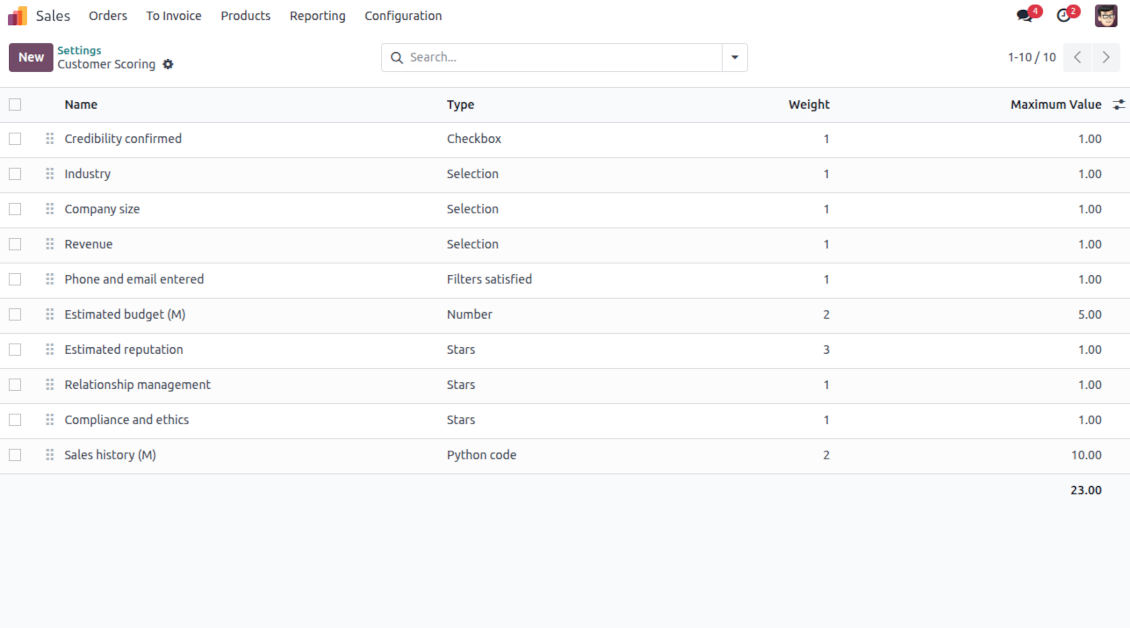
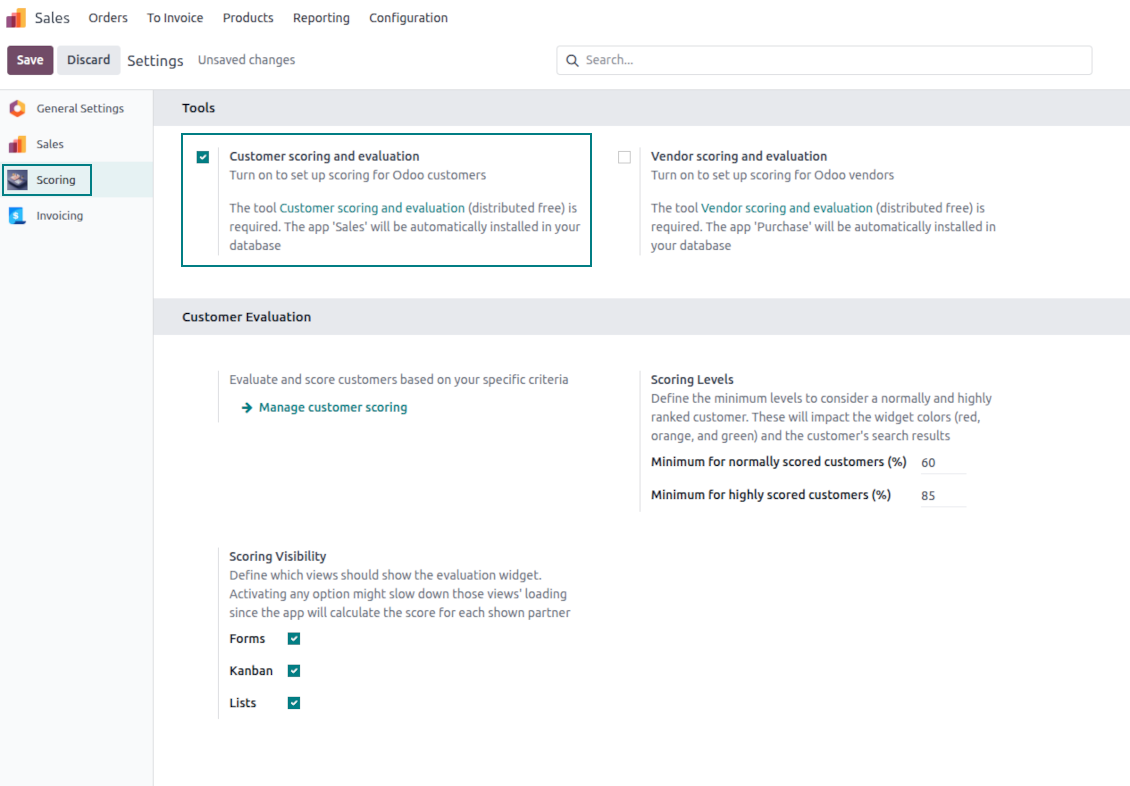
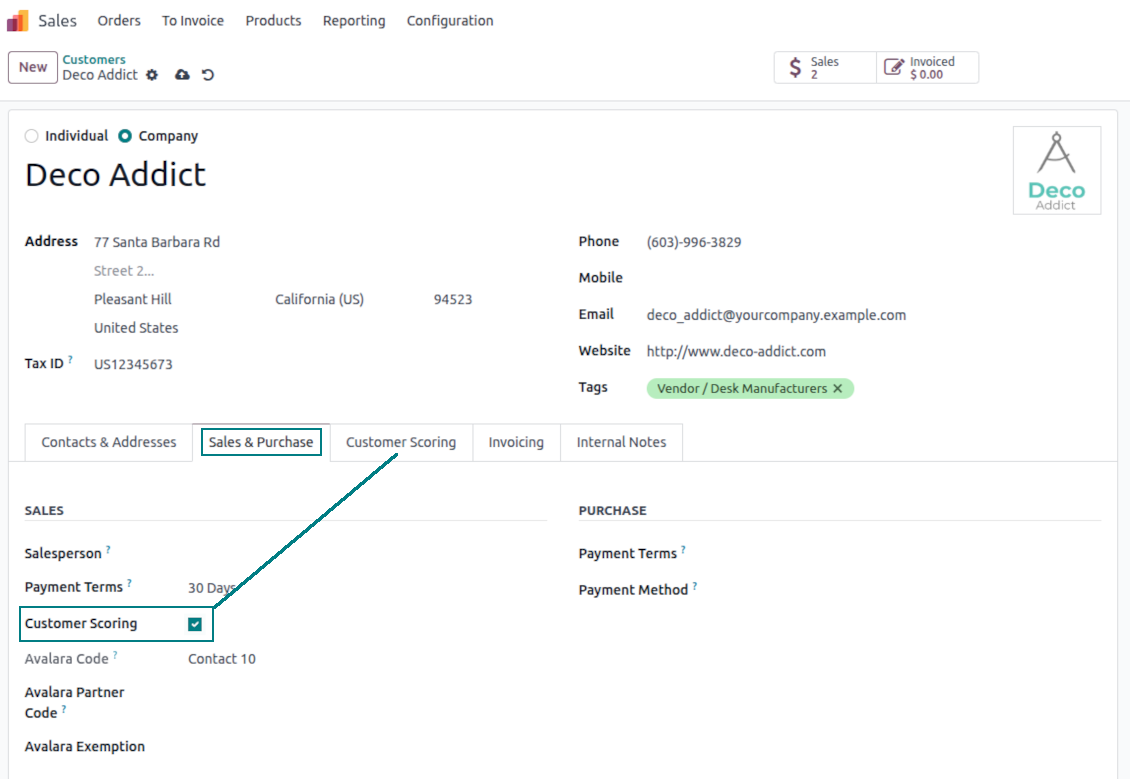
Indicative rankings
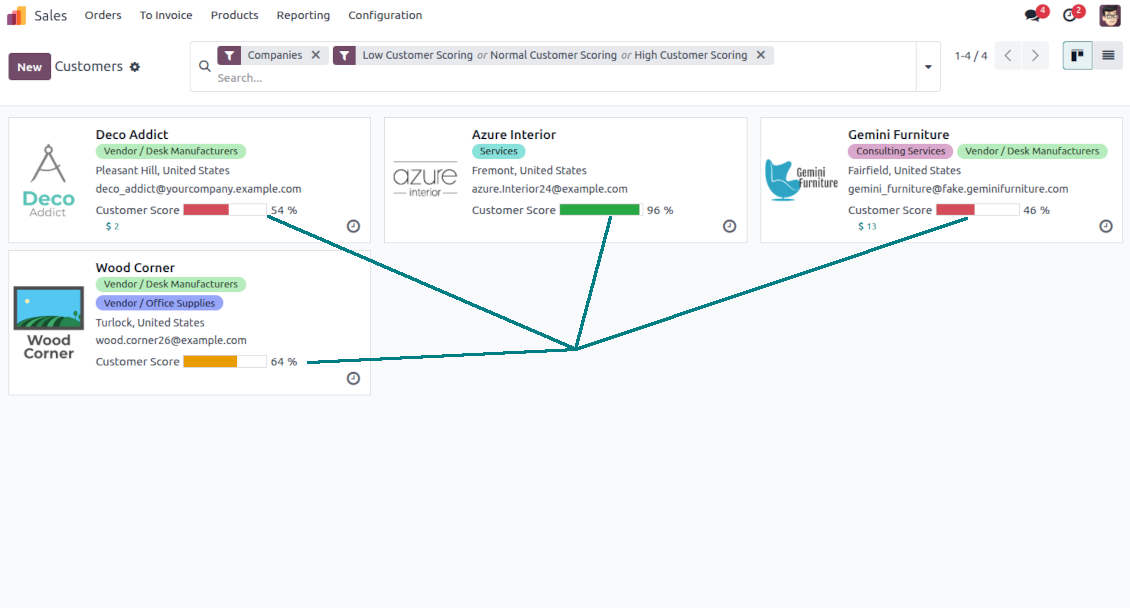
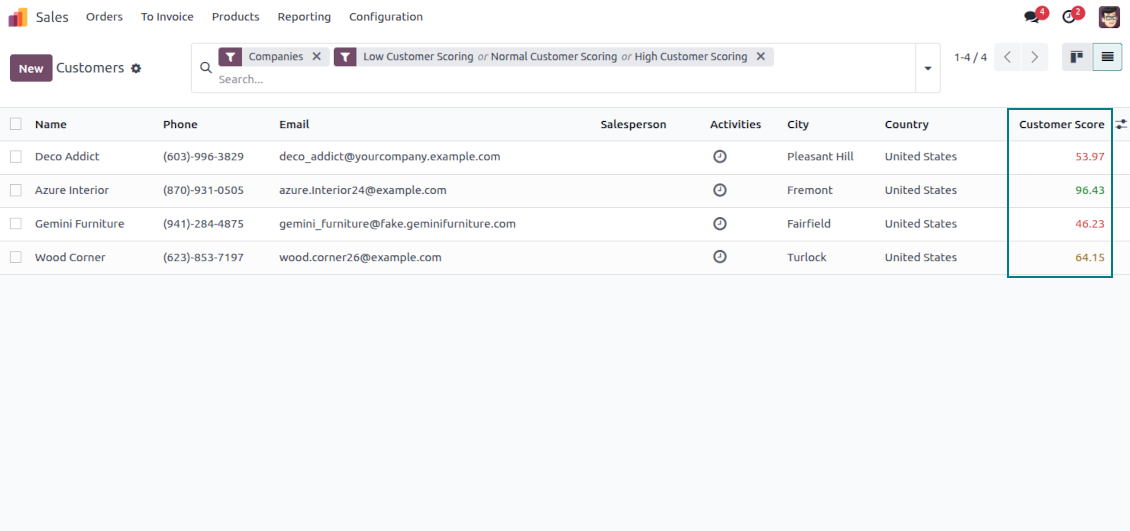
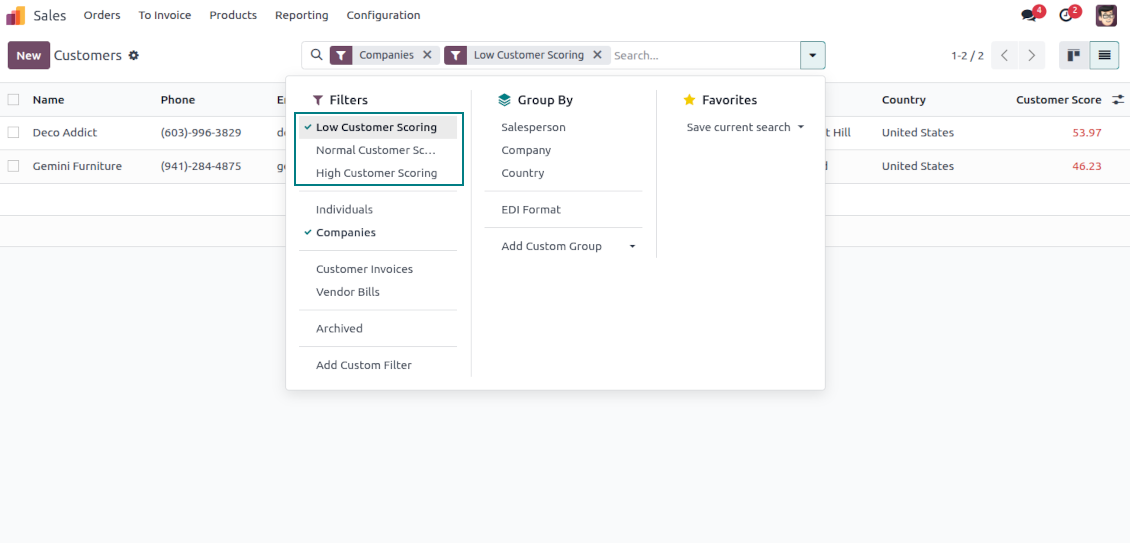
Show or hide rating progress bars on kanban, tree, and form views. Search low, normal, and high-ranked clients using standard Odoo filters
Unlimited and specific questions
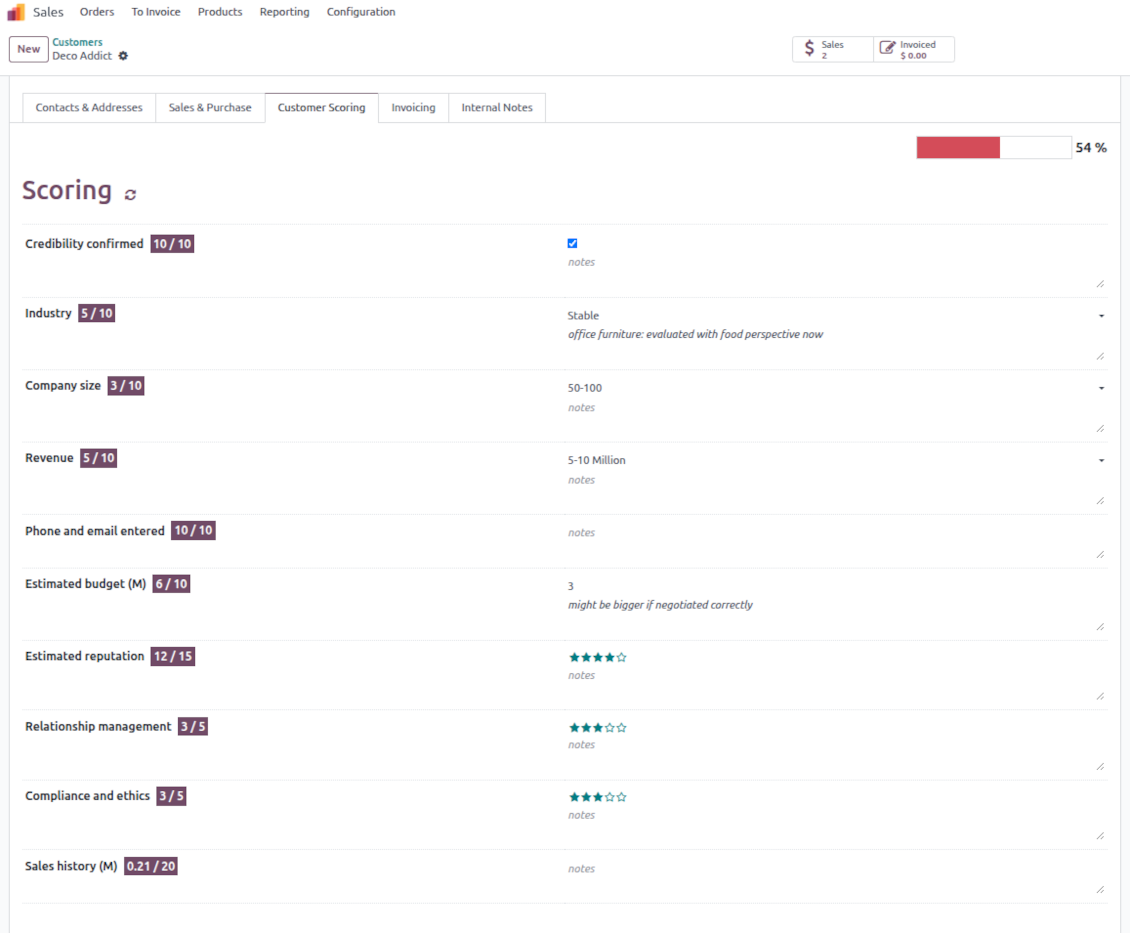
Introduce any number of evaluation points with various weights, answer bonuses, or answer penalties. Complete or change surveys right from a customer form
Flexible survey points
Apply suitable question types: checkboxes (e.g., True - plus 5 points, False - minus 2), drop-down selections (e.g., option 1 - plus 10 points, option 2 - plus 5 points, option 3 - minus 5 points), rankings (e.g., one star - 1 point, 3 stars - 5, no stars - minus 5 points), or numbers (e.g., each 5 - plust one point, but no more than 20)
Automatic evaluation types
Configure the rules to assign scores based on auto rules: when a customer suits specific filters (e.g., when a customer has a particular tag, add 3 points), when a customer has specific fields entered/not entered (e.g., no email or phone - minus 5 points), or calculate results based on complex and entirely flexible Python code
Your ranking levels
Define when a customer should be ranked high, normal, or low. For example, from 80% - highly scored; from 60% - normally scored
Topical quantitative analysis
Optionally turn on evaluation for customers and/or vendors. Choose specific customers to evaluate: others will be excluded from surveys.
Flexibly configurable surveys scoring points
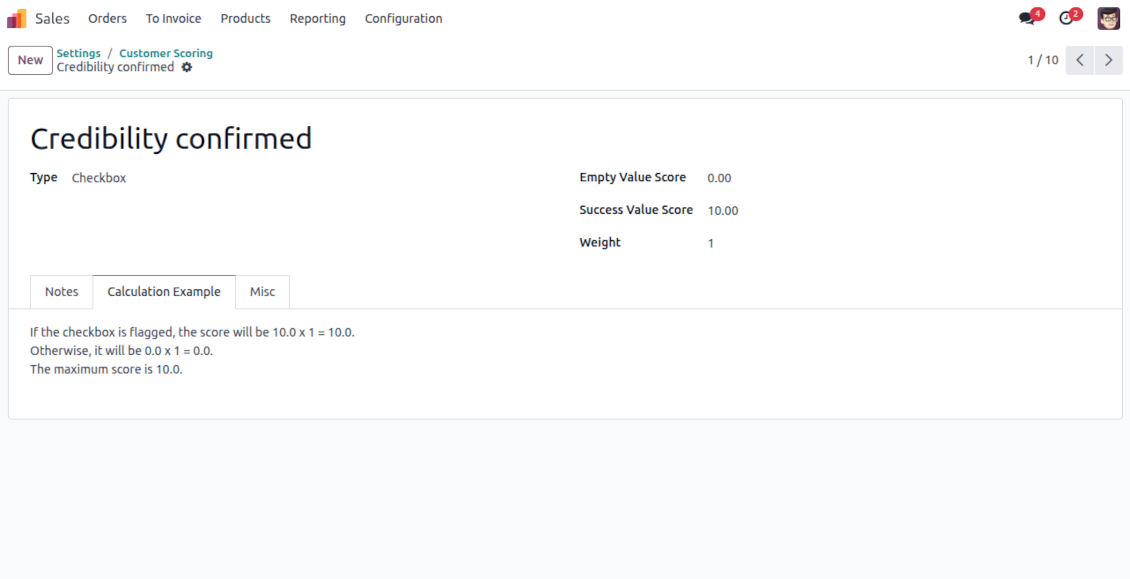
Checkboxes
-
Use this question type when the answer is True or False (default)
-
Assign the score for both options: True - "Success Value Score" (e.g., +10); False - "Empty Value Score" (e.g., -5)
-
Assign the weight for this evaluation point, e.g., 2. For example, the calculated result would be -5 x 2 = -10 for the client with the unchecked flag
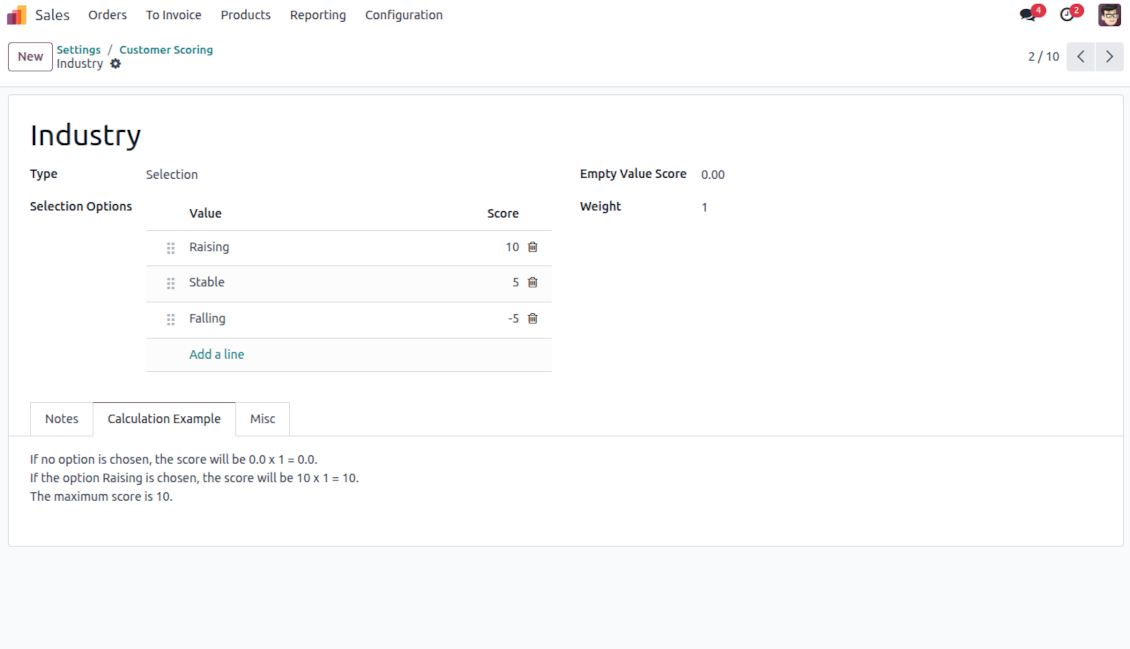
Dropdown selections
-
Use this question type when there are multiple options to select. For instance, the estimated reputation is chosen between three possible values
-
Assign the score for each option: Great (+10), Normal (+5), or Low (-5). The default value is empty (e.g., 0 points)
-
Assign the weight for this evaluation point, e.g., 3. For example, the calculated result would be 10 x 3 = 30 for a customer with the "Great reputation"
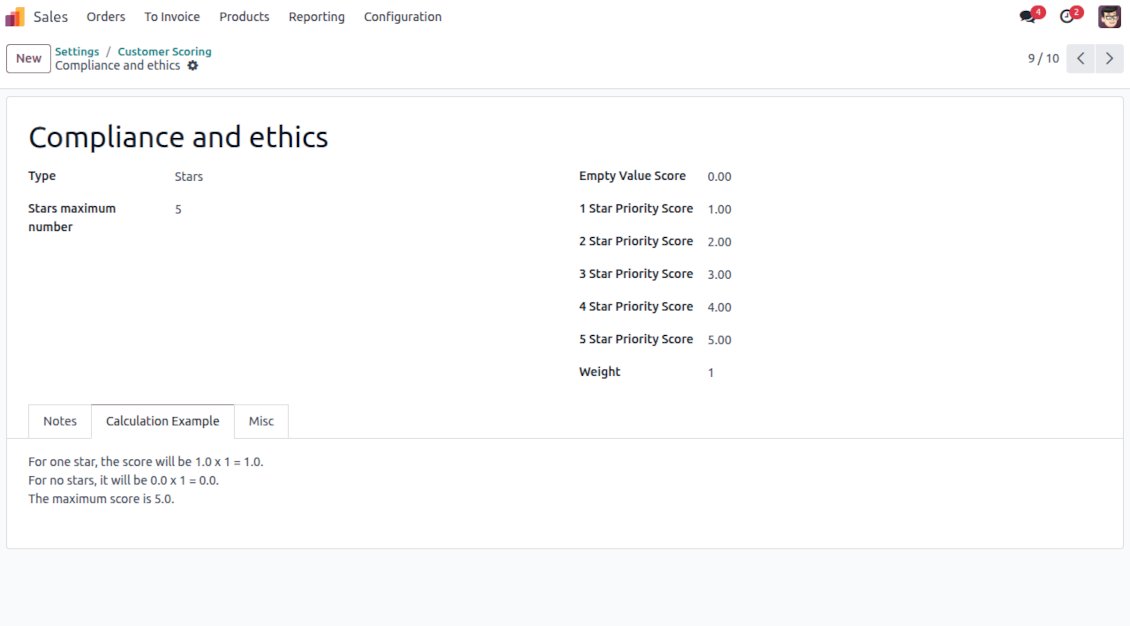
Stars/Ratings
-
Use this question type when evaluating a specific parameter from 0 to a particular number up to 10. For example, "Compliance and ethics" to be scored from zero to three stars
-
Assign the score for each option: 1 star (-1), 2 stars (1), 3 stars (2). The default value is 0 (e.g., 0 points)
-
Assign the weight for this evaluation point, e.g., 2. For example, the calculated result would be 3 x 2 = 6 for a customer with 3 stars
Numbers
-
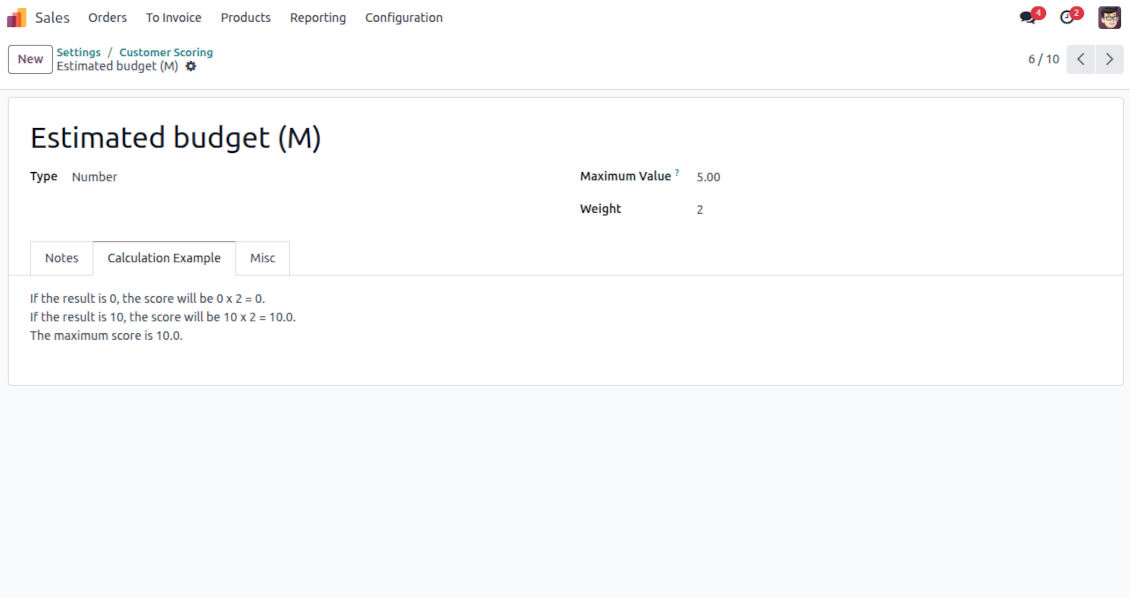
Use this question when users should enter an open-ended float number that is restricted only by a maximum. For example, the company revenue might be stated as any number in Millions, but the value for calculation is up to 10 Million
-
Assign the weight for this evaluation point, e.g., 2. For example, the calculated result would be 3.5 x 2 = 7 for a customer with 3 million revenue. However, if the revenue is 15, it will be 10 x 2, since 10 is the maximum for calculations
Filters
-
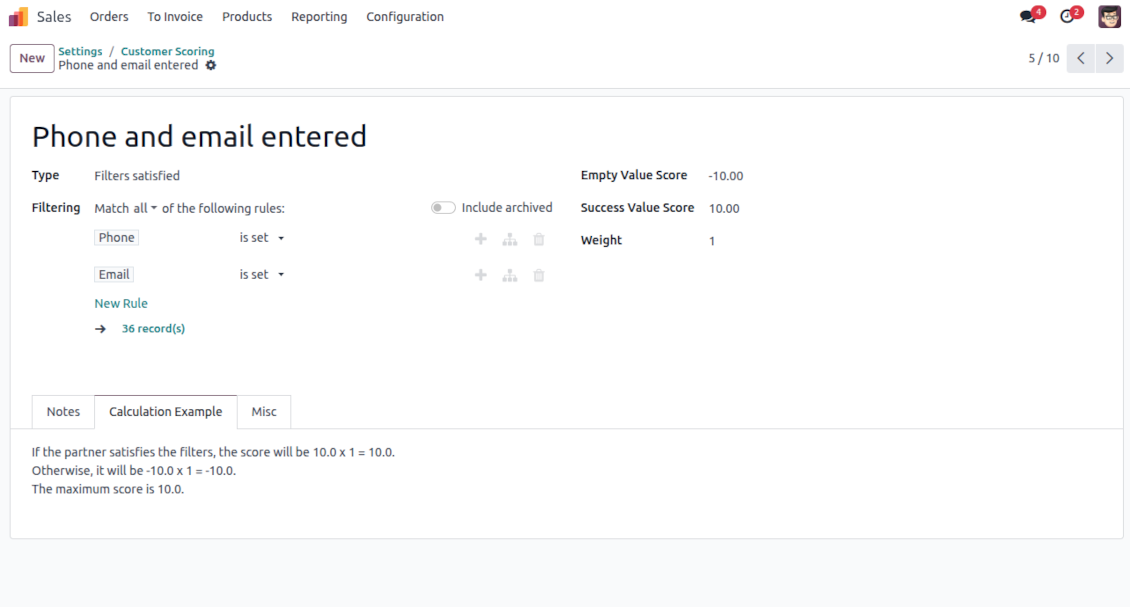
Use this question type to automatically assign a specific score based on whether a customer suits particular rules. For example, when a client has a specific tag and/or fields entered
-
Assign the score for both possibilities: True - "Success Value Score" (e.g., +5); False - "Empty Value Score" (e.g., -5)
-
Assign the weight for this evaluation point, e.g., 1. For example, the calculated result would be -5 x 1 = -5 for the client that doesn't satisfy the filters
Fields entered
-
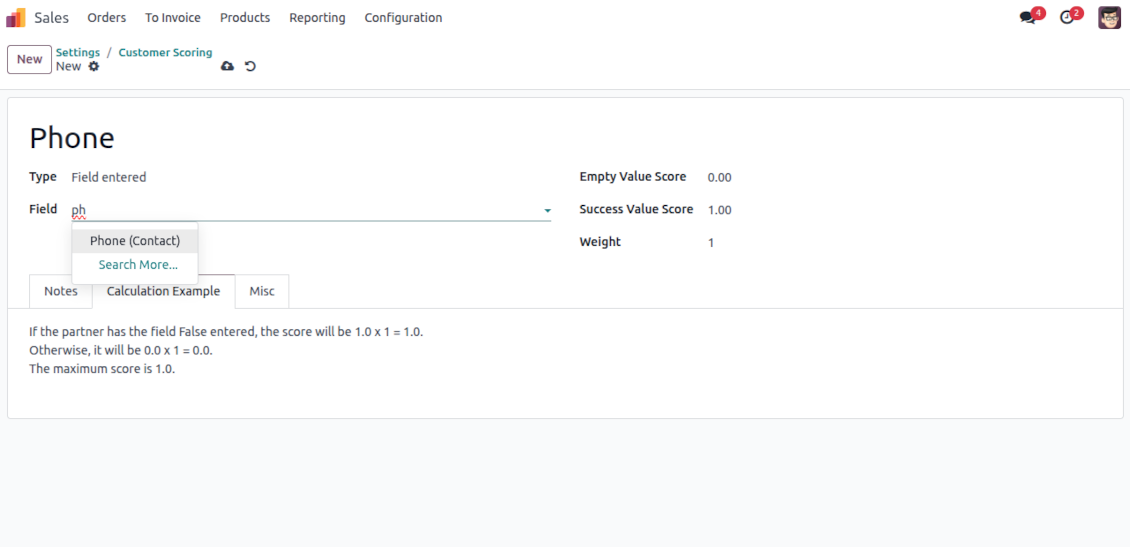
Use this question type to automatically assign a specific score based on whether a customer has a particular field entered. For example, when a client has a phone in Odoo
-
Assign the score for both possibilities: True - "Success Value Score" (e.g., 0); False - "Empty Value Score" (e.g., -10)
-
Assign the weight for this evaluation point, e.g., 2. For example, the calculated result would be -10 x 2 = -20 for the client that has an empty phone field
Python code
-
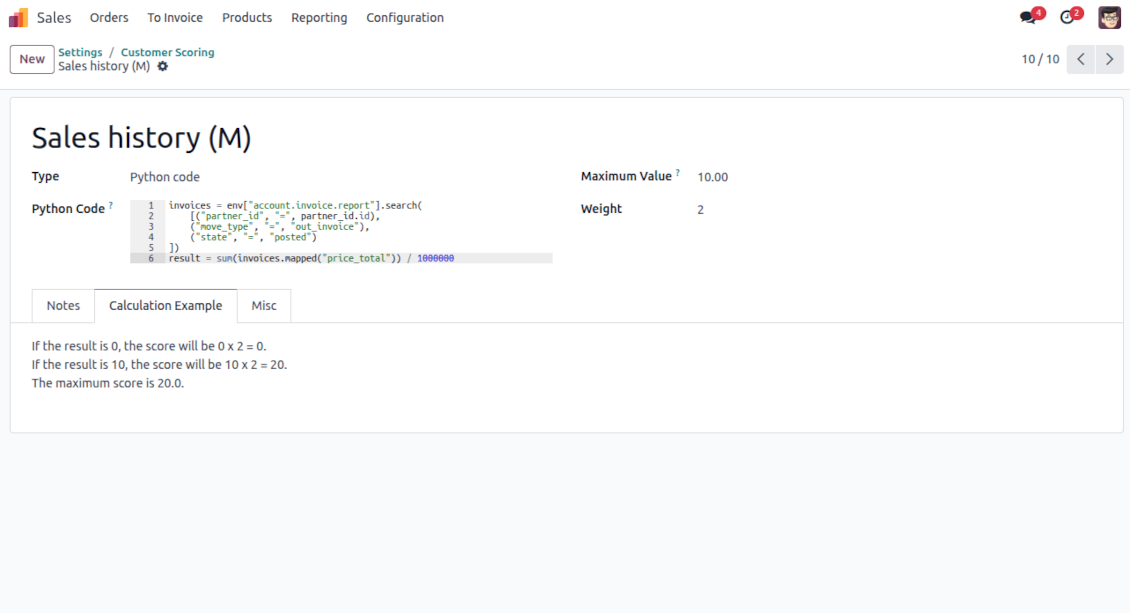
Use this question type to calculate a score point automatically based on any Odoo data. For example, to find all paid invoices of the current customer and get their untaxed total
-
Assign the weight for this evaluation point, e.g., 2. For example, the calculated result would be 2 x 2 = 4 for a customer with the calculated result 2
-
Assign the maximum possible result. For example, if it is set as 5, the calculated result "7" will be replaced with 5. So, the score will be 5 x 2 = 10 (instead of 7 x 2 = 14)
-
Feature description and details in short
-
In the code use the variable "partner_id" that contains the currently evaluated Odoo client (res.partner instance). Also, Python date, datetime, and timedelta are available
-
Apply Odoo "env" to work with database data. For example, env["sale.order"] for quotations or env["account.move"] for invoices
-
Save the calculation total in your code to the special "result" variable
Score calculations
-
Each scoring point is summed up for a currently evaluated customer. For example, five existing questions led to the weighted scores: +10 - 5 + 2 + 7 + 5 = 19
-
All the scoring questions also have their maximum possible values. For instance, 10 + 10 + 10 + 20 + 5 = 55
-
Then, a specific customer score is calculated as total points divided by the maximum points. So, 19/55 = 34.55%
-
Based on the calculated score, the app lets you define the high (marked green, e.g., 75%) and normal (marked yellow, e.g., 30%) levels. Others are low (marked red). Then, in our calculation, a customer is "normally" evaluated since 34.55% is between 30% and 75%.
Pogosta vprašanja o Customer Scoring and Evaluation Odoo v.18
Kakšne so politike posodobitev vaših orodij?
Glede na veljavna pravila Odoo Apps Store:
- Vsak modul, kupljen za različico 12.0 in starejše, omogoča dostop do vseh različic do 12.0.
- Od različice 13.0 je treba vsako različico modula kupiti posebej.
- Ne glede na različico nakup daje pravico do vseh posodobitev in popravkov znotraj glavne različice.
Upoštevajte, da ekipa faOtools teh pravil ne nadzoruje. Za vprašanja se obrnite neposredno na predstavnike Odoo Apps Store.
Kako namestim vašo aplikacijo na Odoo.sh?
Najbolj neposreden pristop je uporaba vgrajenega poteka dela trgovine Odoo:
1. Odprite stran modula in kliknite gumb Deploy on odoo.sh
2. Nato boste preusmerjeni na stran GitHub. Prijavite se v račun, nato kliknite 'Create a new repo' ali uporabite obstoječega. Poskrbite, da je skladišče zasebno. Objavljanje aplikacij pod licenco OPL-1 ni dovoljeno. Po potrebi ustvarite nov repo za projekt Odoo.sh
3. Nato pojdite na odoo.sh in kliknite gumb Deploy. V pojavnem oknu potrdite odločitev in kliknite 'Continue.' To sproži namestitev.
Ti koraki namestijo aplikacijo na produkcijsko vejo projekta. Če želite aplikacije namestiti na druge veje ali posodobiti modul, opravite naslednje:
1. Naložite izvorno kodo aplikacije iz trgovine Odoo
2. Naredite commit modula v zahtevano skladišče GitHub. Poskrbite, da ni nobena mapa/datoteka aplikacije prezrta (tj. ni v .gitignore skladišča). Skladišča samodejno ustvari odoo.sh in lahko privzeto vsebujejo ključne elemente (npr. /lib). Naložite vse imenike, podimenike in datoteke modula brez izjem
3. Namestite ciljno vejo projekta odoo.sh ali, če to predvidevajo nastavitve, počakajte, da se samodejno izgradi.
Kako namestim vašo aplikacijo na lastnem strežniku?
2. Znova zaženite strežnik Odoo;
3. Vklopite način za razvijalce (tehnične nastavitve);
4. Posodobite seznam aplikacij (meni aplikacij);
5. Poiščite aplikacijo in pritisnite „Activate“/„Install“;
6. Sledite smernicam na strani aplikacije, če obstajajo.
Opazil sem, da ima vaša aplikacija dodatne dodatke. Jih smem kupiti pozneje?
Da, seveda. Hkrati Odoo samodejno doda vse odvisnosti v košarico, zato morate predhodno kupljena orodja izključiti, da se izognete dvojnemu plačilu.
Namestil sem vašo aplikacijo na Odoo.sh in v testih vidim opozorilo/napako
Rdeče/oranžno opozorilo ne vpliva na funkcije aplikacije. Žal naši moduli včasih ne opravijo standardnih samodejnih testov, ker ti predvidevajo vedenje, ki je v nasprotju s cilji aplikacije. Na primer spreminjamo izračun cene, medtem ko testi standardnega modula Odoo primerjajo končno ceno s standardnim algoritmom.
Najprej preverite funkcije nameščene zbirke. Ali vse deluje pravilno?
Če še vedno menite, da opozorilo vpliva na resnične funkcije, nas kontaktirajte in pošljite popolne dnevnike namestitve ter popoln seznam nameščenih modulov (vključno z jedrom in tretjimi).
Ali lahko kupim aplikacijo neposredno pri vašem podjetju?
Ne, orodja razširjamo samo prek uradne trgovine aplikacij Odoo.
Rad bi dobil popust
Žal nimamo tehničnih sredstev za individualne cene.
Ali lahko namestim aplikacijo v svojo zbirko Odoo Online (SaaS)?
Ne, aplikacij tretjih oseb ni mogoče uporabljati na Odoo Online. Žal Odoo SaaS to preprečuje.
Vaše orodje je odvisno od drugih aplikacij. Ali jih moram kupiti?
Da, orodje potrebuje vse module, označene v odvisnostih, da deluje pravilno. Cena na strani aplikacije že vključuje vse potrebne odvisnosti.
Kakšna je cena modula v ameriških dolarjih? Zakaj se je spremenila?
Cena naših modulov je v evrih. Trgovina Odoo pretvarja cene v druge valute po notranjem tečaju. Zato se lahko cena v ameriških dolarjih spremeni, ko se tečaj posodobi.
Besedila aplikacije in spletnega mesta v jezikih, ki niso angleščina, so pripravljena z UI in usklajena z uradnimi prevodi Odoo. Če opazite napako, pošljite zahtevek o pravilnosti prevodov in jo bomo popravili.
Predstavitvene zbirke Odoo (predogledi v živo)
Za to aplikacijo lahko zagotovimo brezplačno prilagojeno demo zbirko.
Za stik ne potrebujete telefonske številke niti kreditne kartice. Potrebna je le kratka prijava z e-pošto, ki ne traja več kot 30 sekund.
Na vašo zahtevo pripravimo individualno zbirko za predogled v živo, kjer lahko približno dva tedna izvajate teste in preverjate predpostavke.
Prijavljanje napak
Če naletite na napake ali nedosledno vedenje, nas ne oklevajte kontaktirati. Zagotavljamo popravke v 60 dneh od nakupa in tudi po tem obdobju želimo izboljševati orodja.
Za stik ne potrebujete telefonske številke niti kreditne kartice. Potrebna je le kratka prijava z e-pošto, ki ne traja več kot 30 sekund.
V zahtevo vključite čim več podrobnosti: posnetke zaslona, dnevnike strežnika Odoo, celoten opis ponovitve težave in podobno. Običajno traja nekaj delovnih dni, da pripravimo delovni načrt (če je napaka potrjena) ali smernice, kaj storiti (sicer).
Javne zahteve za funkcije in ideje modulov (brezplačen razvoj)
Močno nas žene izboljševanje orodij in hvaležni smo za vsako povratno informacijo. Če so vaše zahteve v splošno korist in jih je mogoče učinkovito uresničiti, jih bo ekipa vključila na naš seznam opravil.
Tak seznam opravil obdelujemo redno in ne predvideva dodatnih stroškov. Čeprav ne moremo obljubiti rokov in končne zasnove, je to lahko dober način, da dobite želene funkcije brez naložb in tveganj.
Za stik ne potrebujete telefonske številke niti kreditne kartice. Potrebna je le kratka prijava z e-pošto, ki ne traja več kot 30 sekund.

Orodje za prilagodljivo razvrščanje prilog Odoo v mape in sinhronizacijo imenikov z oblačnimi odjemalci: Google Drive, OneDrive/SharePoint, Nextcloud/ownCloud, Dropbox, Amazon S3, Box in NAS. DMS. Upravitelj datotek. Sistem za upravljanje dokumentov
398€

The tool to build a deep and structured knowledge base for internal and external use. Knowledge System. KMS. Wiki-like revisions.
398€
The tool to automatically synchronize Odoo attachments with OneDrive files in both ways
487€
The tool to set up KPI targets and control their fulfillment by periods. KPI dashboards. Dashboard designer. KPI charts

The tool for time-based service management from booking appointments to sales and reviews
398€
The tool to automatically synchronize Odoo attachments with Google Drive files in both ways
487€
The tool to make sure a sale order is ready for the next stage. Sale checklists. Sale approval. Multi quotation confirmation

The tool to make sure required jobs are carefully done on each CRM pipeline stage. CRM checklists