DropBox Odoo Integration v.12
The tool to automatically synchronize Odoo attachments with DropBox files in both ways
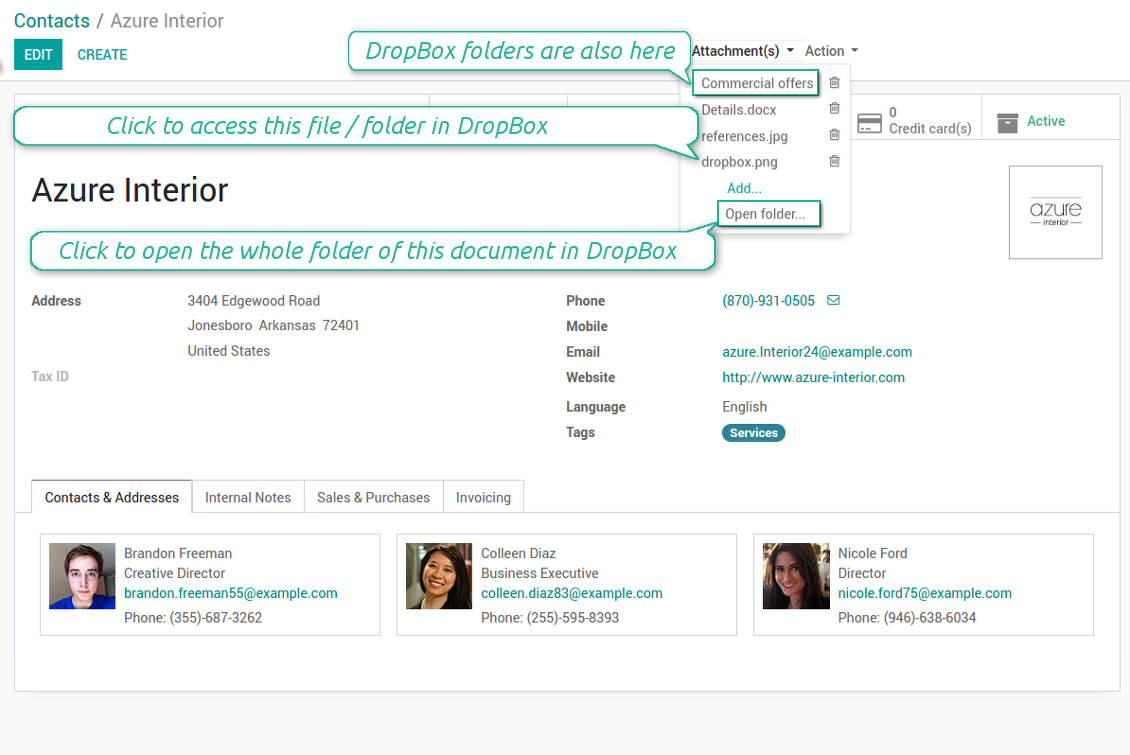
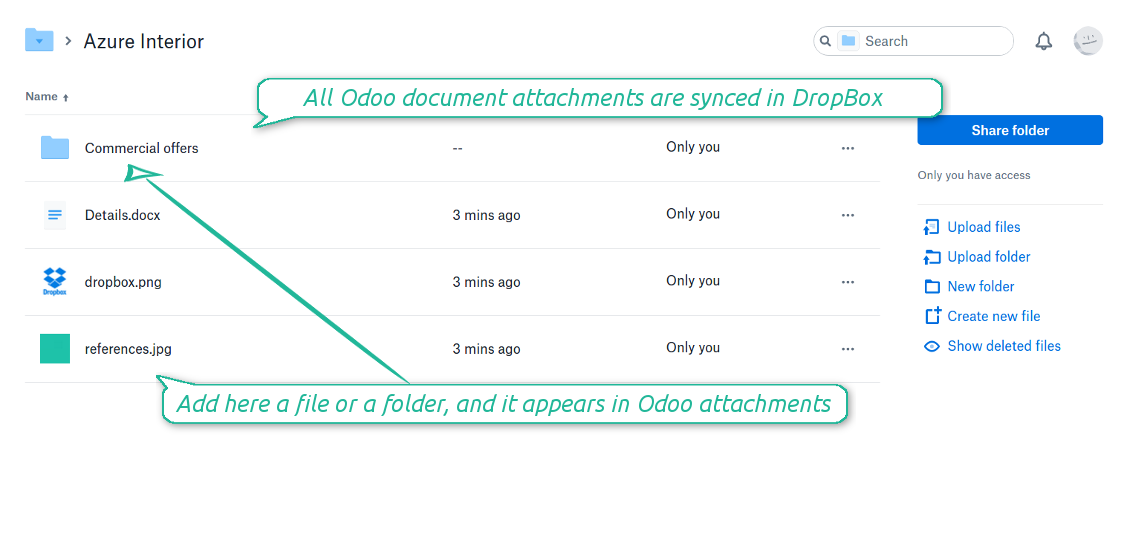
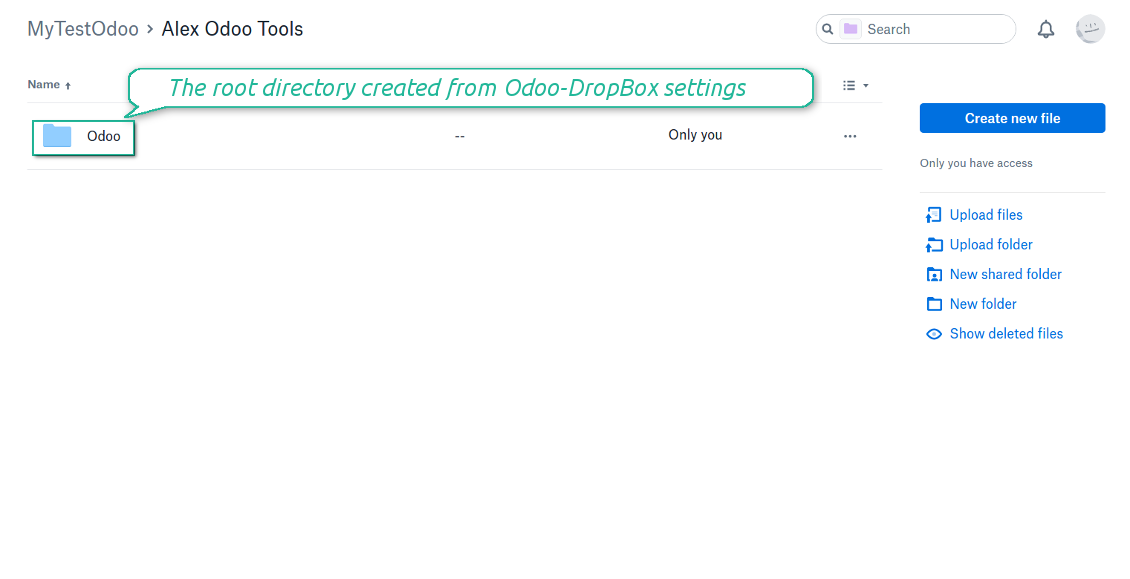
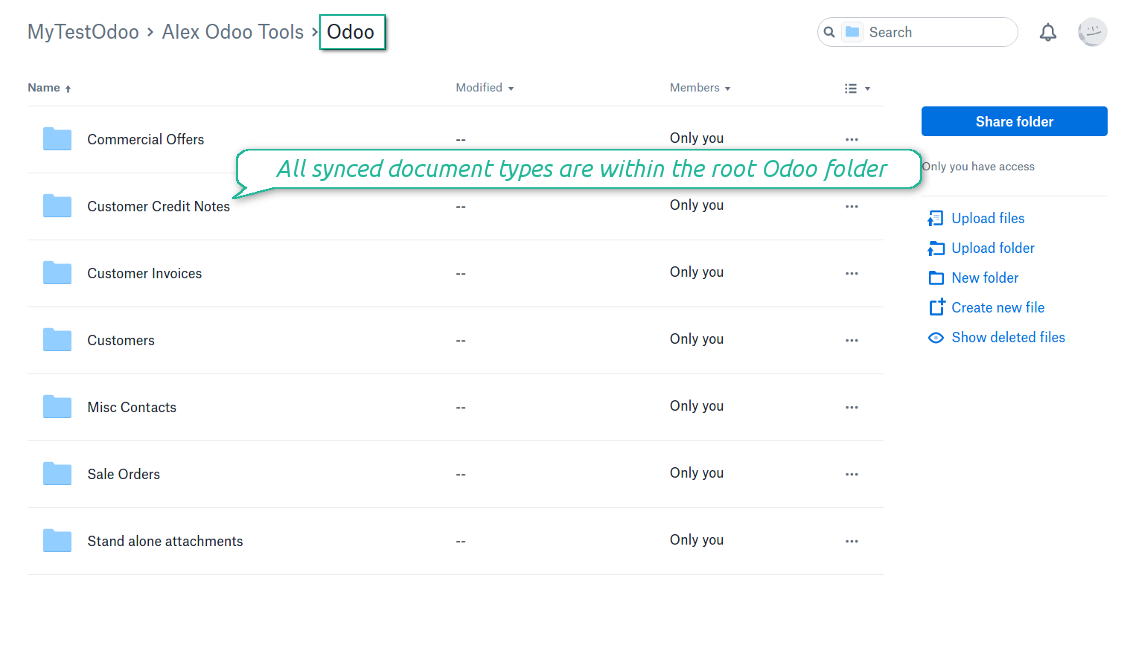
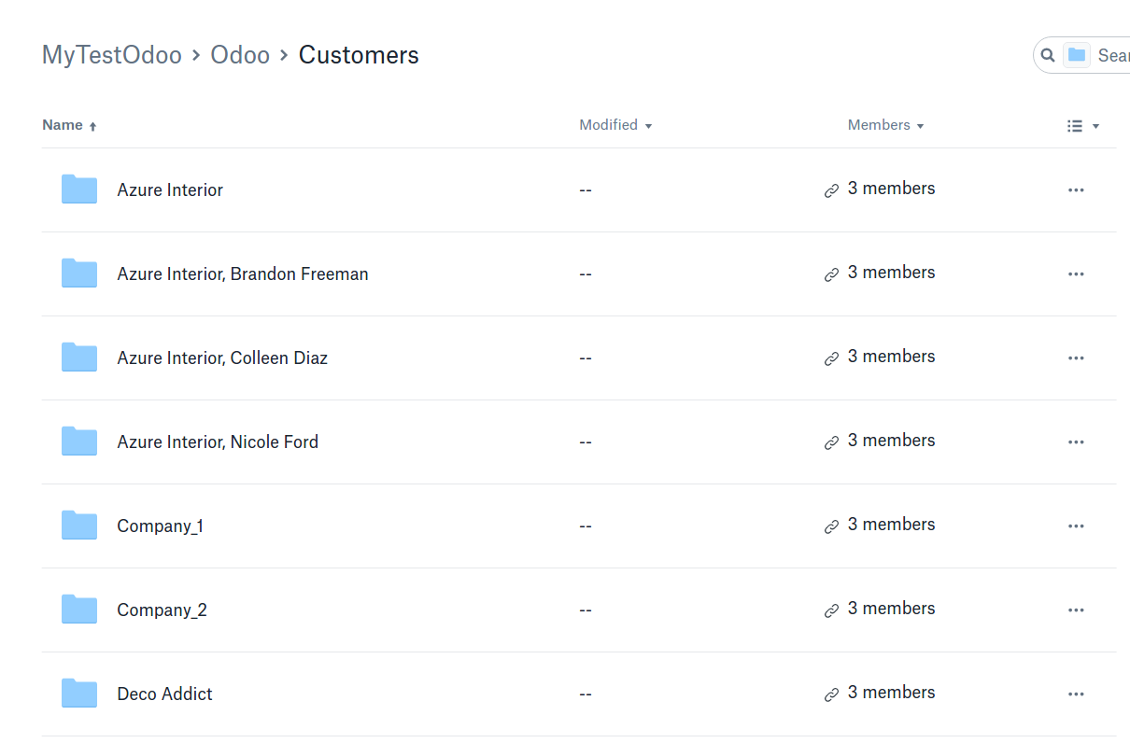
Synchronization is bilateral. All Odoo attachments are put in DropBox regularly. DropBox files create attachments in Odoo in case they are placed in a correct folder. Look at the sections From Odoo to DropBox and From DropBox to Odoo
Integration is automatic in both ways. Based on scheduled jobs, Odoo send attachments to DropBox and retrieve files from there
Any Odoo document might be synced: customers, opportunities, sale or purchase orders, tasks or issues, employees or users, etc. You decide by your own which records should be in DropBox, and which should be left in Odoo
Synchronization works for any DropBox tariff, including Personal DropBox (Basic, Plus, Family) and business DropBox (Professional, Standard, Advanced)
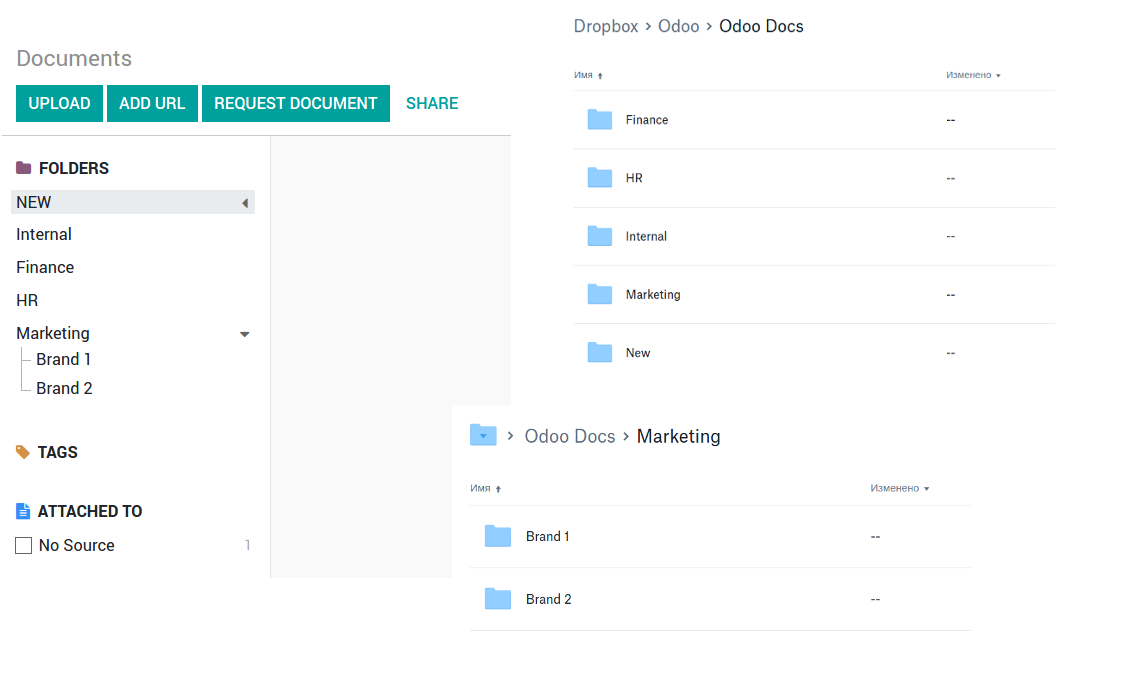
The tool works fine with the Odoo Enterprise Documents module. For full compatibility and to reflect new module directories structure use the app Cloud Sync for Enterprise Documents. Look also at the section Odoo Enterprise Documents
All synced files are easily accessible though clicking on an attachment. You might also open a whole document folder by clicking on 'Open folder' on the attachment widget. This feature migth be optionally turned off: look at the section DropBox URLs
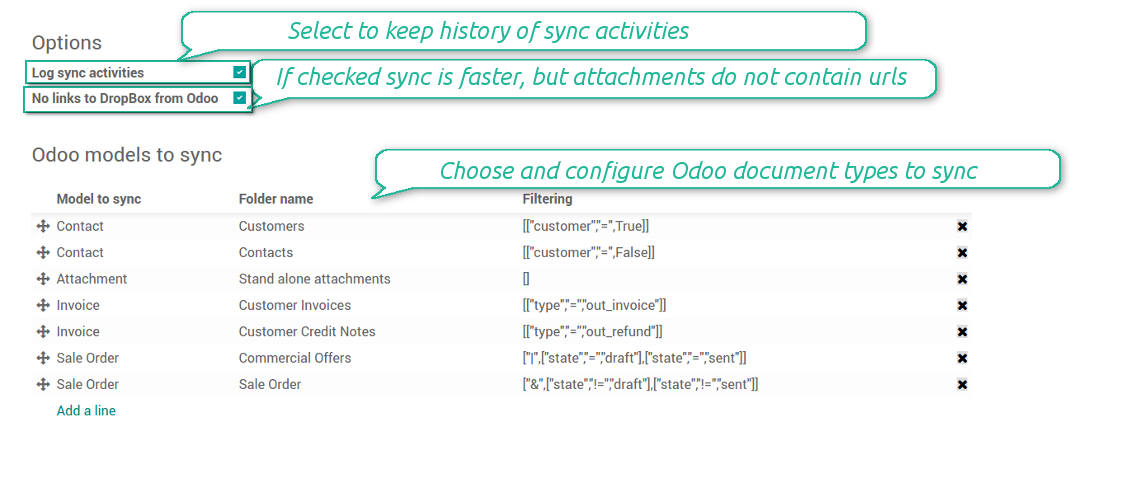
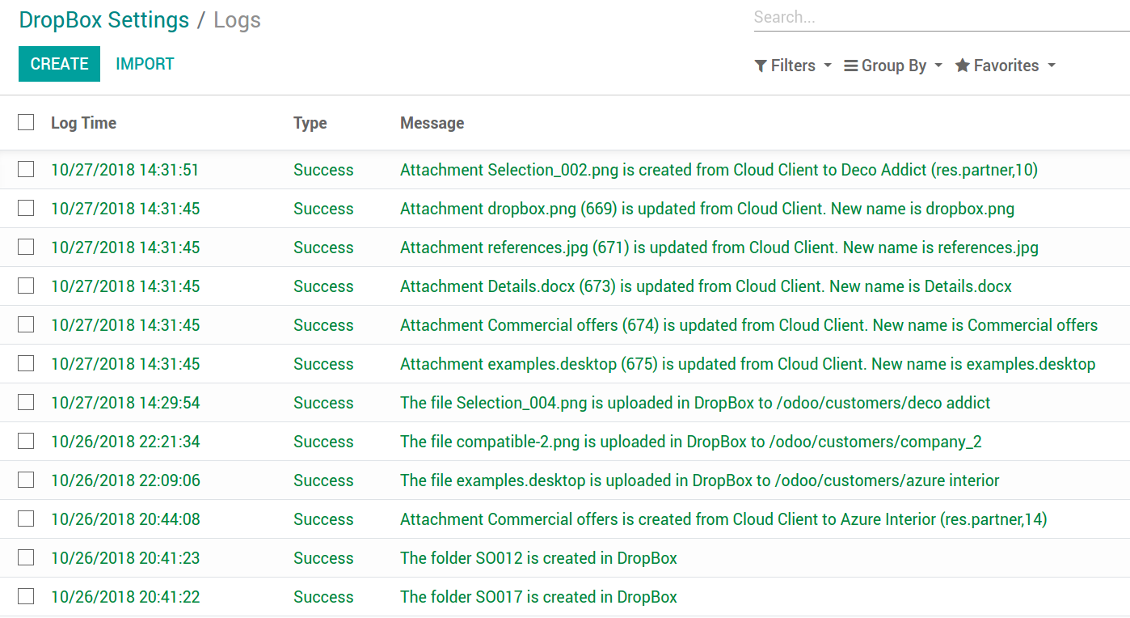
All sync activities might be logged. Control over files and folders creations, moves, name changes and removals. Just turn on the option 'Log sync activities' and access history through the button 'Sync logs'
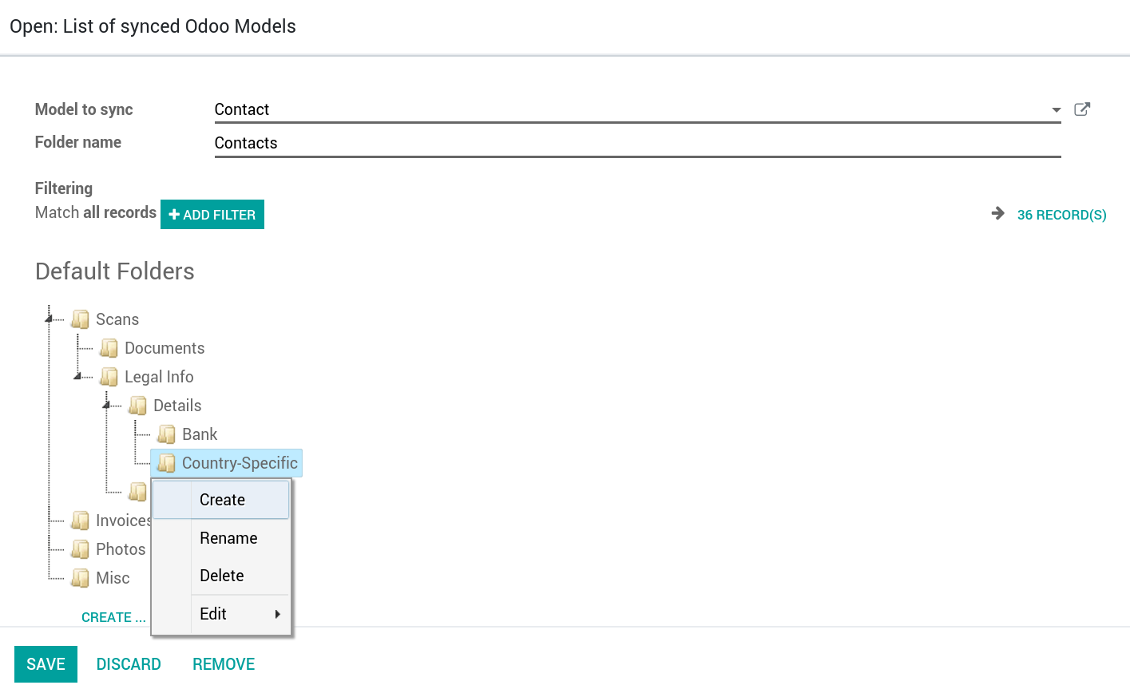
New For each document of this type you may create a default directories' structure. When this folder is firstly synced, Odoo would generate default folders. For example, for all employees you may have pre-defined folders 'Scans', 'Scans/Official', 'Photos', etc.
The tool is compatible with Odoo reporting and mailing apps. If such an app faces a synced file, it retrieves a real content from DropBox. In particular, the reports 'always reload' feature and messages & mass mailing attachments work properly
Integration is based on a single user endpoint. It means that a single user login/password of DropBox is used. Afterwards for integrations Odoo would use that credentials disregarding an actual Odoo user
- Prepare and keep updated folders' structure in DropBox
- Upload new attachments to a correct folder
Odoo creates a convenient directory structure in DropBox: Odoo / Document type name / Document name / Files, where:
- Odoo is a central directory for Odoo Sync in your cloud storage.
- Document type is a synced Odoo model, for example, 'Sale orders', 'Opportunities', 'Customers'
- You select document types by yourself. It might be any document type
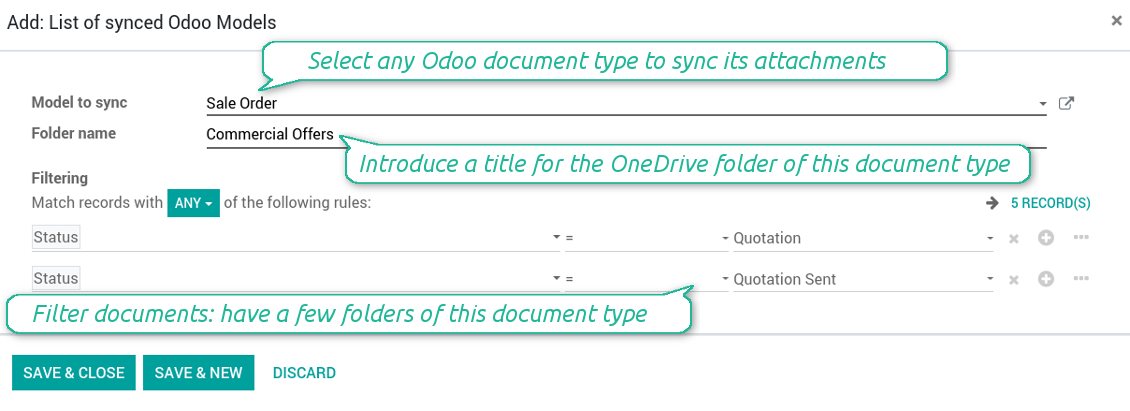
- Moreover, you might have a few folders for a single document type. Use Odoo domains to have not global 'Partners, but 'Customers' and 'Suppliers', not just 'Sale orders' but 'Commercial offers', 'To deliver', and 'Done orders'
- With each sync Odoo would try to update document types' folders. Add a new document type at any moment. It will appear in DropBox with a next sync
- You are welcome to introduce or change document types folder names at any moment in Odoo. Take into account: renaming in DropBox will be recovered to Odoo names
- If you remove a model from integration, it will not be deleted from DropBox to keep already synced files safe. However, new documents of this type would not be synced
- In case you removed a directory in DropBox, but it is still configured in Odoo, with a next sync a folder structure is going to be recovered (not files, surely).
- Document is an exact object to sync. For instance, 'Agrolait' or 'SO019'
- Documents are synced in case they relate to a synced document type and satisfy its filters. For example, you are not obliged to sync all partners, you may integrate only 'Customers' and 'Vendors' or only 'Companies', not 'Contacts'
- Odoo would generate a folder in DropBox for each suitable document even for documents without attachments. It is needed for a backward sync to easily add new files
- DropBox folder name equals a real document name. It relies upon Odoo name_get method. Thus, Odoo 'Michael Fletcher' (a contact of 'Agrolait') would be DropBox 'Agrolait, Michael Fletcher'
- If an exact document changes its document type (e.g. a quotation is now confirmed), Odoo will automatically relocate its related folder to a proper parent directory (in the example: from 'Commercial offers' to 'To deliver')
- In case a document relates to a few types (for instance, you have 'Vendors' and 'Customers', while Agrolait is both), this document folder would be put into the most prioritized document type. A document type priority is higher as closer to the top in Odoo interfaces it is
- If an Odoo document is removed, the next sync will remove a corresponding DropBox directory
- In case you remove a directory in DropBox, but it still exists in Odoo, DropBox folder structure would be recovered (while files would be unlinked in both Odoo and DropBox)
- Folders renaming in DropBox will be replaced with Odoo names, Odoo document names are more important
- Files are real files taken from Odoo attachments
The resulted path would be, for example, 'Odoo / Quotations / SO019 / commercial offer.png'.
The only exclusion of the rule are stand alone attachments which do not relate to any Odoo documents (their document type is 'ir.attachment'). Such attachments' path is 'Odoo / Stand Alone Attachments / image.png'.
The direct sync might take quite a long, since a lot of folders should be created. It is not recommended to make sync too frequent: once an hour or two hours is fine.
FilesWith each direct sync, Odoo tries to find not yet synced attachments. If such attachments suit any document type to sync, a file will be uploaded to DropBox to a proper folder. In Odoo such attachments will become of 'url' type (look also at the section DropBox URLs). It means that a file is not any more kept in Odoo server space, but now it is in DropBox. Until sync is done, Odoo attachment remains binary and stores an actual file. Such approach helps Odoo to work faster.
If you unlinked an attachment from Odoo, it would be deleted in DropBox as well.
Take into account that file names should be managed in DropBox: each backward sync would recover DropBox names, Odoo is here less important.
- If a new file is added to a proper document folder (e.g. to 'Odoo / Customers / Agrolait'), the same attachment will be added to Odoo document (in the example - to 'Agrolait')
- In document folders you can put not only files but also child folders. In that case a link for this folder (not its content) is kept in attachments
- In case you rename a file in DropBox, it will be renamed in Odoo as well
- Files' removal from DropBox leads to related Odoo attachments' removal
- If you move a file to another document folder, in Odoo a related attachment would be re-attached to this new document. Take into account: if you move a file for a not document folder, this Odoo attachment will be deleted as it has been removed from DropBox
- If you deleted a document type or document folder, their child files are deleted as well. Thus, Odoo would remove related attachments. The folders, however, will be recovered with a next direct sync. Folders' move to another directory is also considered as a removal. Avoid such situations by following the simple rule: folders are managed mostly by Odoo, files - mostly by DropBox.
Backward DropBox might take quite much time, since each folder should be checked (the more folders, the more time the backward sync requires). It is recommended to make frequency oftener than once an hour or two hours.
DropBox has a specific way to generate links for existing files and folders. In particular, there are no concepts of internal or private URLs. Instead, each DropBox item might get so-called shared URLs. Such shared links are either public or team-only. Moreover, the latter feature is available only for DropBox business account.
This tool relies upon share links' mechanics. It means, that each attachment link is either public (all personal DropBox accounts) or team-only (all business DropBox accounts).
Sometimes it is considered to be not fully safe. Although website URLs will be hardly known by external users, there is a slight chance that they become available as a result of some user actions. Besides, sharing links generation is not super fast and might make a sync process slower. That is why the feature to switch off sharing urls is introduced.
If checked, all DropBox urls in Odoo will be of type https://www.dropbox.com/home/Odoo/[PATH]. Such links will not work in quite a many cases. Thus, if you need to open DropBox files / folders from Odoo, do not switch off the feature 'No links to DropBox from Odoo'.
- Try to avoid the following symbols in folders' and files' names: *, ?, ", ', :, <, >, |, +, %, !, @, \, /,. Direct sync will replace such symbols with '-'. It is done to avoid conflicts with file systems.
This tool is not in conflict with the 'documents' module provided by the Enterprise license. Attachments related to Enterprise folders would be synced as any other files: according to a document they relate to. In the most cases it means they would be linked to stand-alone attachments.
It is not always comfortable, and you might be interested in reflecting directories' structure introduced by the module 'Documents'. To this end the extension Cloud Sync for Enterprise Documents (its standard price is 44 Euros) is developed. This tool has the following features:
- The documents hierarchy is reflected within the folder 'Odoo / Odoo Docs'
- Each Odoo folder has a linked cloud folder. Take into account that folders created in the cloud storage will be synced as Odoo attachments. The key principle is: folders are managed by Odoo, files are managed by the cloud client
- All files are synced with the same logic as usual attachments. Files created in Odoo will be added to the cloud storage and will be replaced with links in Odoo. Files created in cloud storage will generate attachments within a paired directory
- Please do not name synced models as 'Odoo Docs'. This is the reserved name for Odoo Enterprise Documents
Configuration and Login
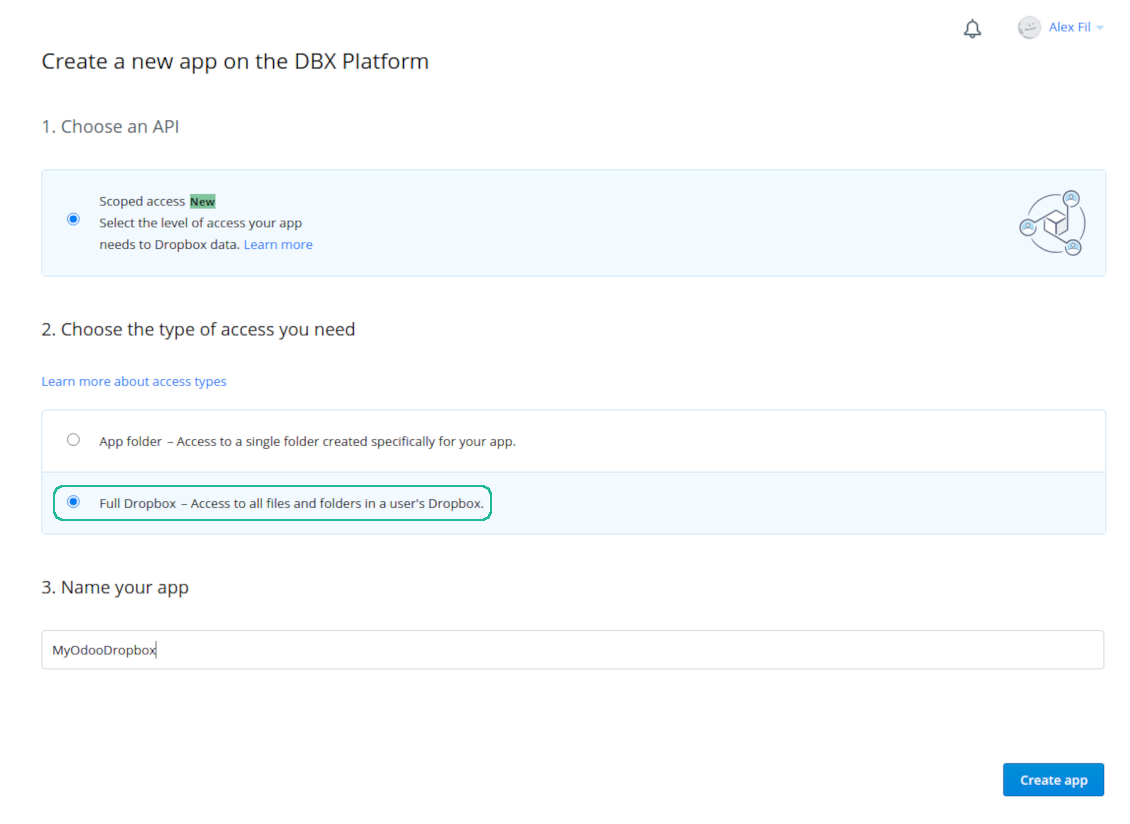
- Follow the url https://www.dropbox.com/developers/apps/create
- Choose an API as 'Scoped access'
- Choose the type of access as 'Full Dropbox'
- Select any suitable name for the app and push the button 'Create app'
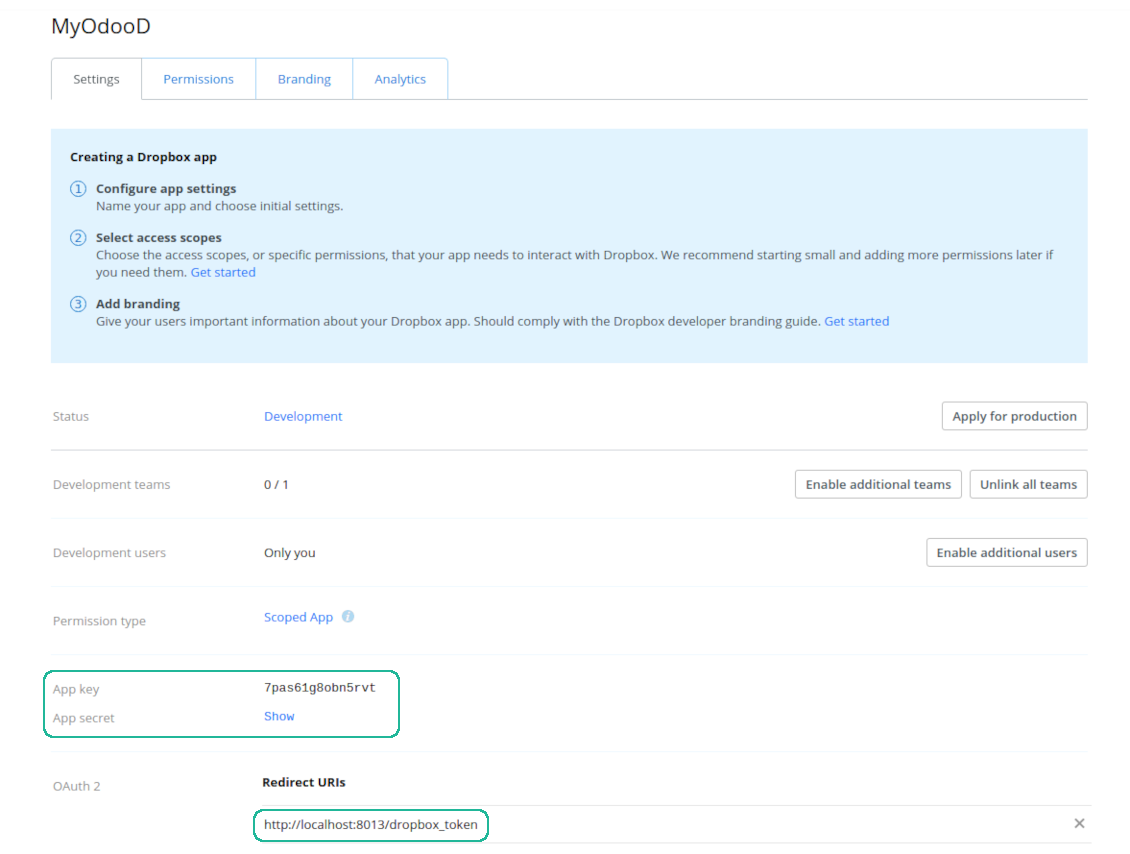
- Add the redirect URI as YOURODOOSITENAME]/dropbox_token (e.g. https://faotools.com/dropbox_token). A valid SSL certificate (https) is required
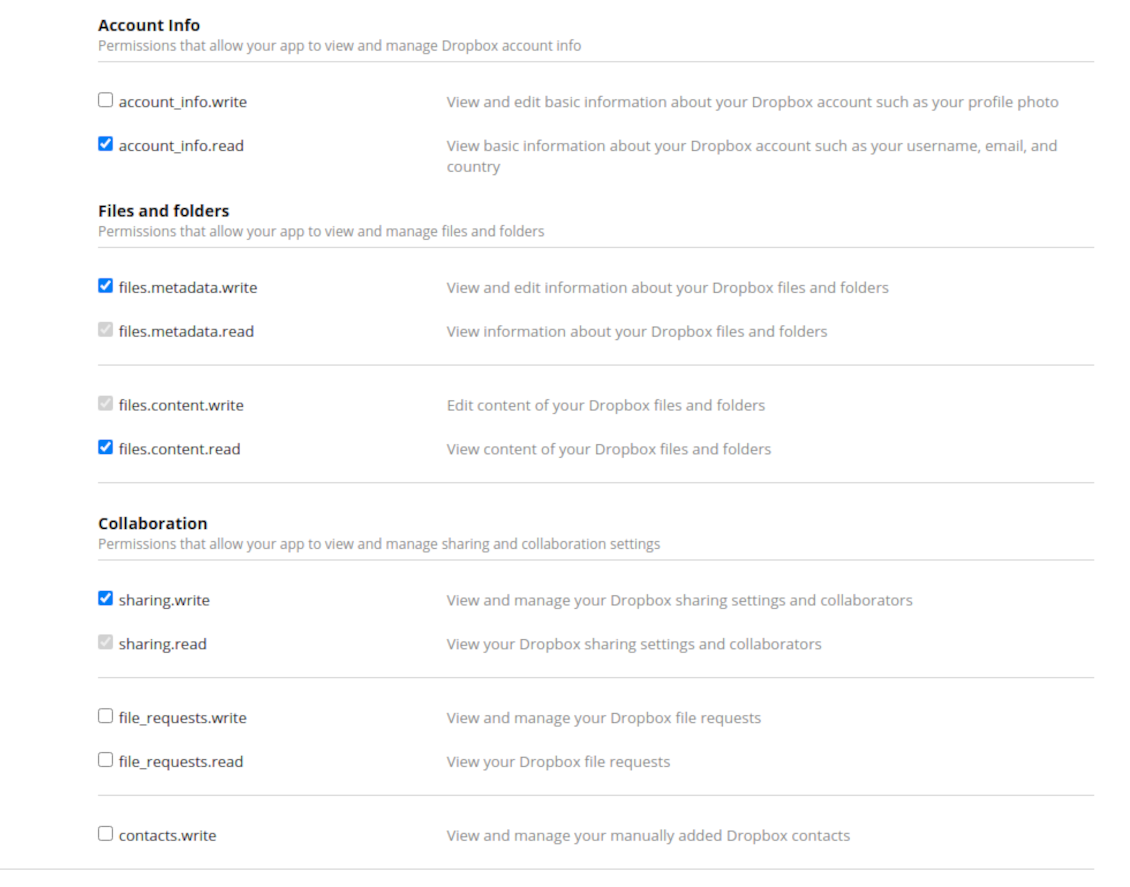
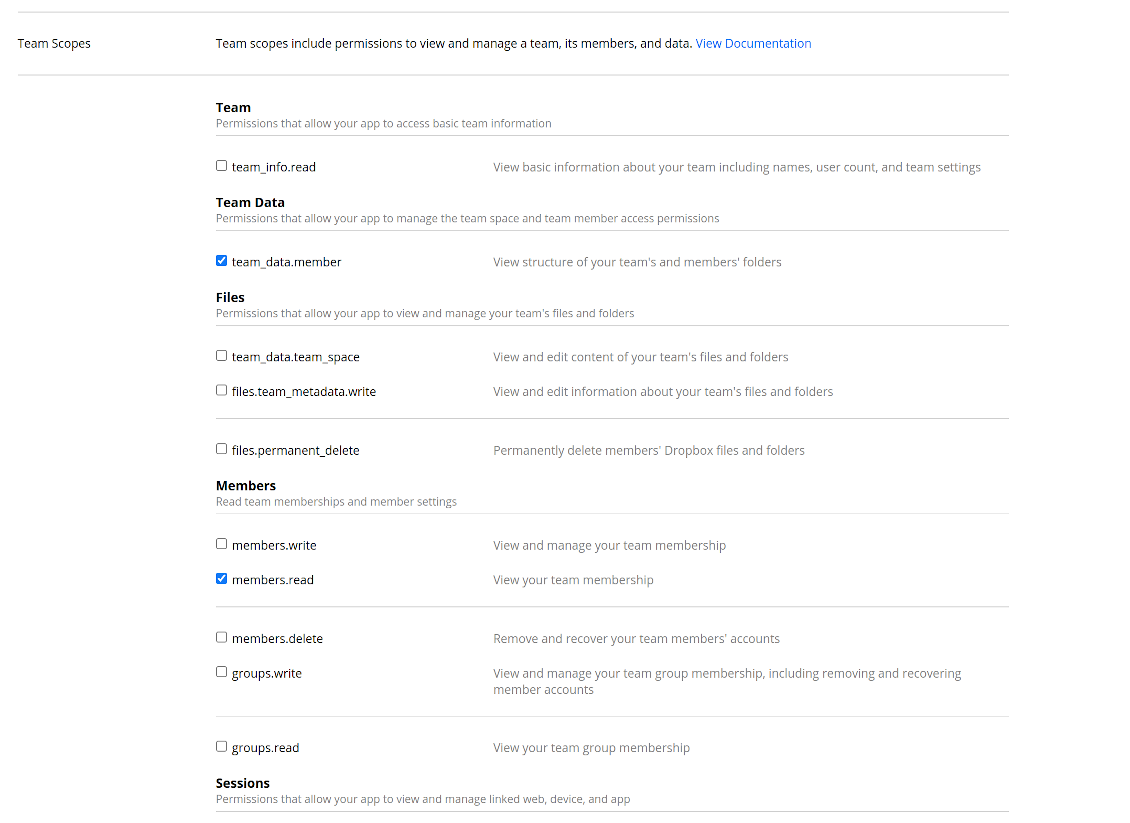
- Grant permissions to the app: 'Account Info (Read)', 'Files and folders Metadata (Write)', 'Files Content (Write)', 'Collaboration (Write)'. For team DropBox assign also 'Team Data Members', 'Members (Read)'. Make sure no other permissions are assigned.
- Submit App
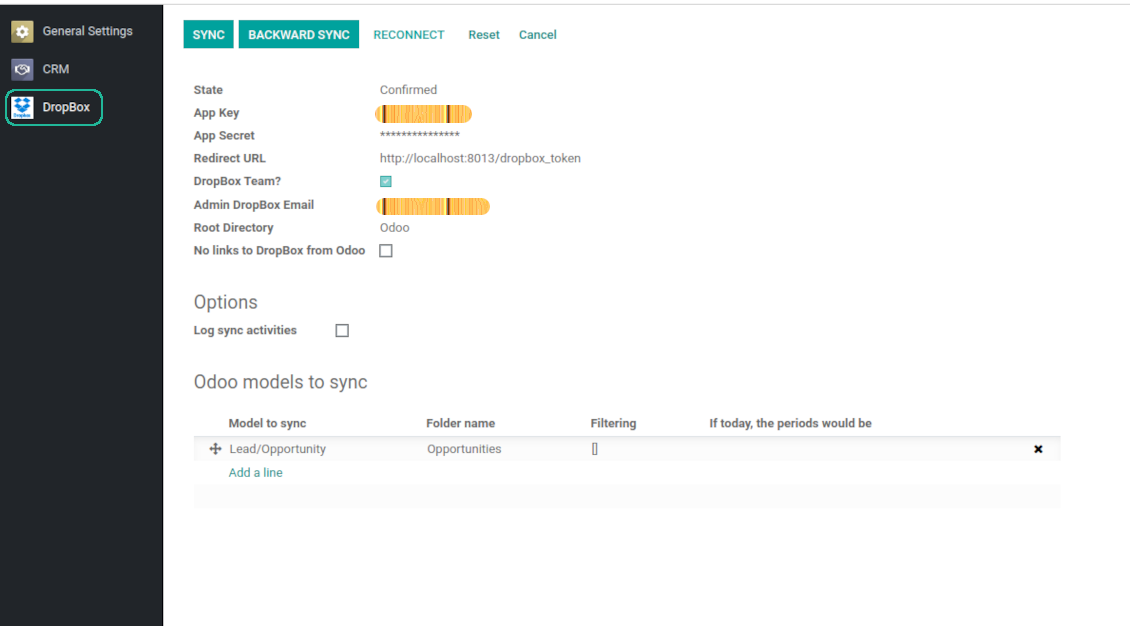
- Go to Odoo general settings - DropBox
- Copy App Key, App secret, and redirect URI to the Odoo configuration page
-
For team DropBoxes only
- Check the box 'DropBox Team'
- Set an email of DropBox user. Inside this user folder all Odoo related items would be created and only after that they are shared to all other users. Under this user all files and folders are created, changed, moved, and deleted
- Choose a suitable name for the root Odoo folder, e.g. 'Odoo' or 'ERP'
- Press Save
- Press 'Login and Confirm'
Create a DropBox app
Set up DropBox App: redirection URL
DropBox permissions for personal accounts
DropBox permissions for business accounts
Set up Odoo for DropBox integration
Odoo server configuration and cron job configuration
To make sure the synchronization works correctly apply proper timeouts to the Odoo configuration file: LIMIT_TIME_CPU, LIMIT_TIME_REAL should be more than 900 seconds.
For Odoo.sh this should not be done, since timeouts are predefined and are not configurable.
Then, timeout should be entered to your Odoo. To that goal find the section 'Settings' on the app configuration page and copy the number there.
Afterwards, it is needed to make the cron jobs suit the applied timeouts. In the debug mode go to the Settings > Technical > Automation > Scheduled Jobs:
- Set up the job 'Synchronize attachments with cloud' as (a) frequency - 2*timeout; (b) the next execution as the next hour +timeout. For example, for 900seconds timeout: frequency - as 30minutes; the next execution - at 08:15
- Set up the job 'Synchronize attachments from cloud' as (a) frequency - 2*timeout; (b) the next execution as the next hour + timeout*2. For example, for 900seconds timeout: frequency - as 30minutes; the next execution- at 08:30.
Pogosta vprašanja o DropBox Odoo Integration Odoo v.12
Ali lahko spremenim pogostost sinhronizacijskih opravil?
Da, lahko. V ta namen:
Vklopite način za odpravljanje napak
Pojdite v tehnične nastavitve > Avtomatizacija > Načrtovana opravila
Poiščite opravila 'Synchronize attachments with cloud' in 'Update attachments from cloud'.
Ne nastavljajte jih preveč pogosto. Zaželeno je, da se opravilo konča, preden se začne naslednje. Nastavitev je odvisna od tega, koliko elementov morate sinhronizirati. Pogostost je običajno med 15 minutami in 4 urami.
Prepričajte se tudi, da ste v konfiguracijski datoteki Odoo nastavili dovolj dolge časovne omejitve. Parametra LIMIT_TIME_CPU in LIMIT_TIME_REAL morata biti enaka ali večja od načrtovanega časa cron opravila. Od različice 13 upoštevajte tudi parameter LIMIT_TIME_REAL_CRON.
Pomembno obvestilo za stranke Odoo.sh: najdaljši čas cron opravila je lahko le 15 minut.
Ali lahko nastavim drugačno strukturo sinhroniziranih imenikov, kot jo predvideva sinhronizacija?
Ne, ta funkcija je na voljo šele od različice 15. Pred to različico modul deluje z vnaprej določeno strukturo map:
Odoo - osrednja mapa za sinhronizacijo
Models - mape za vsak tip dokumenta Odoo. Na primer 'Projects', 'Partners'. Po domeni so lahko bolj specifične mape: npr. 'Customer 1 Projects', 'Projects of the Customer 2', 'Internal Projects' itd.
Objects - mape za vsak dokument, npr. 'Project 1' ali 'Customer 1'
Datoteke in mape, povezane s tem dokumentom Odoo, ki se sinhronizirajo.
Kot rezultat lahko imate na primer:
Odoo / Projects / Project 1 / datoteke in mape, povezane s project 1
Odoo / Customer 1 Projects / Project 1; Odoo / Customer 2 Projects / Project 3, ...
Odoo / Customers / Customer 1 / datoteke in mape, povezane s customer 1
Ta struktura je vedno ploščata, kar pomeni, da obstajajo samo te ravni hierarhije. Zato drži, da različnih tipov dokumentov ni mogoče imeti v isti strukturi. V mapi 'Customer 1' ne moremo hraniti datotek, povezanih hkrati s prodajnimi naročili, računi in projekti. Vsak od teh tipov dokumentov ima lastno mapo (ali nekaj lastnih). Sicer povratne sinhronizacije ne bi mogli narediti, ker ne bi bilo merila, na katero bi se oprli.
Ali naj v Odoo nastavim dostope določenih uporabnikov?
Ne, orodje temelji na eni uporabniški končni točki. Vsi sinhronizacijski procesi potekajo pod enim skrbnikom oblaka (aplikacijo). Pravice dostopa za ustvarjene mape / datoteke niso avtomatizirane. Te pravice morate upravljati v svoji rešitvi za shranjevanje v oblaku.
Kje so shranjena sinhronizirana polja? Ali so podvojena v Odoo in clouds?
Aplikacija predvideva, da je binarna vsebina priponk shranjena v Cloud Client namesto na strežniku Odoo. Take priponke v Odoo postanejo vrste URL in do njih lahko kadar koli dostopate iz polja priponk ali iz Cloud Client.
Po nastavitvi ročna dejanja niso potrebna, saj je sinhronizacija povsem samodejna. Odločite se, kateri tipi dokumentov Odoo naj se sinhronizirajo, in za vsakega nastavite povezan model (stranke, prodajni ali nabavni nalogi, opravila, projekti itd.).
Ali lahko imam več map za isti tip dokumenta? Na primer notranji projekti in projekti strank?
Da, lahko. V ta namen pripravite pravilo za vsakega in nato uporabite filtre: na primer po tipu projekta.
Filtre naredite medsebojno izključujoče, da se dokument lahko nedvoumno dodeli. Na primer „stranka, vendar ne dobavitelj“, „dobavitelj, vendar ne stranka“. Sicer mapa določenega dokumenta skače z enega modela na drugega.
Ali potrebujem samo aplikacijo Cloud Storage Solution?
Ne, orodje je le tehnično jedro. Potrebujete tudi konektor za svoj cloud client.
Je v redu, če imam veliko objektov za sinhronizacijo, na primer 10000?
Da, čeprav je pri mnogih mapah/priponkah za sinhronizacijo postopek lahko počasen. Hkrati so stranke poročale o okoljih z >10k partnerji in ~5k različicami izdelkov za sinhronizacijo, postopki pa so bili sprejemljivi.
Nekaj poudarkov:
- Sinhronizacija je zasnovana tako, da se vsak element sinhronizira in ne izgubi, čeprav morda ni hitra. To zagotavljajo vrste FIFO in vsako potrjeno opravilo.
- Število objektov je mogoče logično omejiti. Konfiguracija modelov omogoča omejitev sinhronizacije zastarelih elementov (npr. ni smiselno sinhronizirati arhiviranih partnerjev ali nalogov, starih 2 leti).
Ali je mogoča sinhronizacija v realnem času?
Ne. Imamo tehtne razloge, da se izognemo sinhronizaciji v realnem času:
Težave z zmogljivostjo. Če je sinhronizacija v realnem času, vsak prenos datoteke prikaže zaslon nalaganja.
Težave s konflikti. Če 2 uporabnika hkrati spremenita element, lahko nastanejo nerešene situacije. Pri rednih opravilih to lahko popravimo pozneje; v realnem času bi to morali shraniti kot vrsto, kar bi uporabnike še bolj zmedlo.
Težave s funkcionalnostjo. Zlasti preimenovanje in prestrukturiranje elementov. Pri povratni sinhronizaciji se orodje strogo opira na logiko imenikov in pri vsaki sinhronizaciji preveri 100 % elementov. Če bi to potekalo po vsaki posodobitvi, bi bilo tisoče zahtev na sekundo. Če ne: spremembe bi se izgubile.
Ali lahko sinhroniziram priloge z nekaj oblačnimi odjemalci
Ne, ta funkcija je na voljo šele od različice 15.
V naših oblakih uporabljamo poseben urejevalnik (npr. OnlyOffice, Office 365 itd.). Bi se datoteke odprle v tem urejevalniku?
Da, odvisno od konfiguracije cloud client.
Kakšne so politike posodobitev vaših orodij?
Glede na veljavna pravila Odoo Apps Store:
- Vsak modul, kupljen za različico 12.0 in starejše, omogoča dostop do vseh različic do 12.0.
- Od različice 13.0 je treba vsako različico modula kupiti posebej.
- Ne glede na različico nakup daje pravico do vseh posodobitev in popravkov znotraj glavne različice.
Upoštevajte, da ekipa faOtools teh pravil ne nadzoruje. Za vprašanja se obrnite neposredno na predstavnike Odoo Apps Store.
Kako namestim vašo aplikacijo na Odoo.sh?
Najbolj neposreden pristop je uporaba vgrajenega poteka dela trgovine Odoo:
1. Odprite stran modula in kliknite gumb Deploy on odoo.sh
2. Nato boste preusmerjeni na stran GitHub. Prijavite se v račun, nato kliknite 'Create a new repo' ali uporabite obstoječega. Poskrbite, da je skladišče zasebno. Objavljanje aplikacij pod licenco OPL-1 ni dovoljeno. Po potrebi ustvarite nov repo za projekt Odoo.sh
3. Nato pojdite na odoo.sh in kliknite gumb Deploy. V pojavnem oknu potrdite odločitev in kliknite 'Continue.' To sproži namestitev.
Ti koraki namestijo aplikacijo na produkcijsko vejo projekta. Če želite aplikacije namestiti na druge veje ali posodobiti modul, opravite naslednje:
1. Naložite izvorno kodo aplikacije iz trgovine Odoo
2. Naredite commit modula v zahtevano skladišče GitHub. Poskrbite, da ni nobena mapa/datoteka aplikacije prezrta (tj. ni v .gitignore skladišča). Skladišča samodejno ustvari odoo.sh in lahko privzeto vsebujejo ključne elemente (npr. /lib). Naložite vse imenike, podimenike in datoteke modula brez izjem
3. Namestite ciljno vejo projekta odoo.sh ali, če to predvidevajo nastavitve, počakajte, da se samodejno izgradi.
Kako namestim vašo aplikacijo na lastnem strežniku?
2. Znova zaženite strežnik Odoo;
3. Vklopite način za razvijalce (tehnične nastavitve);
4. Posodobite seznam aplikacij (meni aplikacij);
5. Poiščite aplikacijo in pritisnite „Activate“/„Install“;
6. Sledite smernicam na strani aplikacije, če obstajajo.
Opazil sem, da ima vaša aplikacija dodatne dodatke. Jih smem kupiti pozneje?
Da, seveda. Hkrati Odoo samodejno doda vse odvisnosti v košarico, zato morate predhodno kupljena orodja izključiti, da se izognete dvojnemu plačilu.
Namestil sem vašo aplikacijo na Odoo.sh in v testih vidim opozorilo/napako
Rdeče/oranžno opozorilo ne vpliva na funkcije aplikacije. Žal naši moduli včasih ne opravijo standardnih samodejnih testov, ker ti predvidevajo vedenje, ki je v nasprotju s cilji aplikacije. Na primer spreminjamo izračun cene, medtem ko testi standardnega modula Odoo primerjajo končno ceno s standardnim algoritmom.
Najprej preverite funkcije nameščene zbirke. Ali vse deluje pravilno?
Če še vedno menite, da opozorilo vpliva na resnične funkcije, nas kontaktirajte in pošljite popolne dnevnike namestitve ter popoln seznam nameščenih modulov (vključno z jedrom in tretjimi).
Ali lahko kupim aplikacijo neposredno pri vašem podjetju?
Ne, orodja razširjamo samo prek uradne trgovine aplikacij Odoo.
Rad bi dobil popust
Žal nimamo tehničnih sredstev za individualne cene.
Ali lahko namestim aplikacijo v svojo zbirko Odoo Online (SaaS)?
Ne, aplikacij tretjih oseb ni mogoče uporabljati na Odoo Online. Žal Odoo SaaS to preprečuje.
Vaše orodje je odvisno od drugih aplikacij. Ali jih moram kupiti?
Da, orodje potrebuje vse module, označene v odvisnostih, da deluje pravilno. Cena na strani aplikacije že vključuje vse potrebne odvisnosti.
Kakšna je cena modula v ameriških dolarjih? Zakaj se je spremenila?
Cena naših modulov je v evrih. Trgovina Odoo pretvarja cene v druge valute po notranjem tečaju. Zato se lahko cena v ameriških dolarjih spremeni, ko se tečaj posodobi.
Besedila aplikacije in spletnega mesta v jezikih, ki niso angleščina, so pripravljena z UI in usklajena z uradnimi prevodi Odoo. Če opazite napako, pošljite zahtevek o pravilnosti prevodov in jo bomo popravili.
Prijavljanje napak
Če naletite na napake ali nedosledno vedenje, nas ne oklevajte kontaktirati. Zagotavljamo popravke v 60 dneh od nakupa in tudi po tem obdobju želimo izboljševati orodja.
Za stik ne potrebujete telefonske številke niti kreditne kartice. Potrebna je le kratka prijava z e-pošto, ki ne traja več kot 30 sekund.
V zahtevo vključite čim več podrobnosti: posnetke zaslona, dnevnike strežnika Odoo, celoten opis ponovitve težave in podobno. Običajno traja nekaj delovnih dni, da pripravimo delovni načrt (če je napaka potrjena) ali smernice, kaj storiti (sicer).
Javne zahteve za funkcije in ideje modulov (brezplačen razvoj)
Močno nas žene izboljševanje orodij in hvaležni smo za vsako povratno informacijo. Če so vaše zahteve v splošno korist in jih je mogoče učinkovito uresničiti, jih bo ekipa vključila na naš seznam opravil.
Tak seznam opravil obdelujemo redno in ne predvideva dodatnih stroškov. Čeprav ne moremo obljubiti rokov in končne zasnove, je to lahko dober način, da dobite želene funkcije brez naložb in tveganj.
Za stik ne potrebujete telefonske številke niti kreditne kartice. Potrebna je le kratka prijava z e-pošto, ki ne traja več kot 30 sekund.

Orodje za varno shranjevanje gesel v Odoo za skupno rabo. Deljeni trezorji

Orodje za izgradnjo globoke in strukturirane baze znanja za notranjo in zunanjo rabo. Knowledge System. KMS. Revizije v slogu wikija.
398€
Orodje za nastavitev ciljev KPI in nadzor izpolnitve po obdobjih. Nadzorne plošče KPI. Oblikovalec plošč. Grafikoni KPI

Orodje za časovno upravljanje storitev od rezervacije terminov do prodaje in ocen
398€
Orodje za upravljanje Odoo iz priljubljenih AI klepetov prek MCP. Claude. Kateri koli AI s podporo MCP.

Orodje za prilagodljivo razvrščanje prilog Odoo v mape in sinhronizacijo imenikov z oblačnimi odjemalci: Google Drive, OneDrive/SharePoint, Nextcloud/ownCloud, Dropbox, Amazon S3, Box in NAS. DMS. Upravitelj datotek. Sistem za upravljanje dokumentov
398€
Orodje za samodejno dvosmerno sinhronizacijo prilog Odoo z datotekami OneDrive
487€
Orodje za samodejno dvosmerno sinhronizacijo prilog Odoo z datotekami Google Drive
487€
Orodje za samodejno dvosmerno sinhronizacijo prilog Odoo z datotekami ownCloud/Nextcloud
487€