DropBox Odoo Integration v.12
The tool to automatically synchronize Odoo attachments with DropBox files in both ways
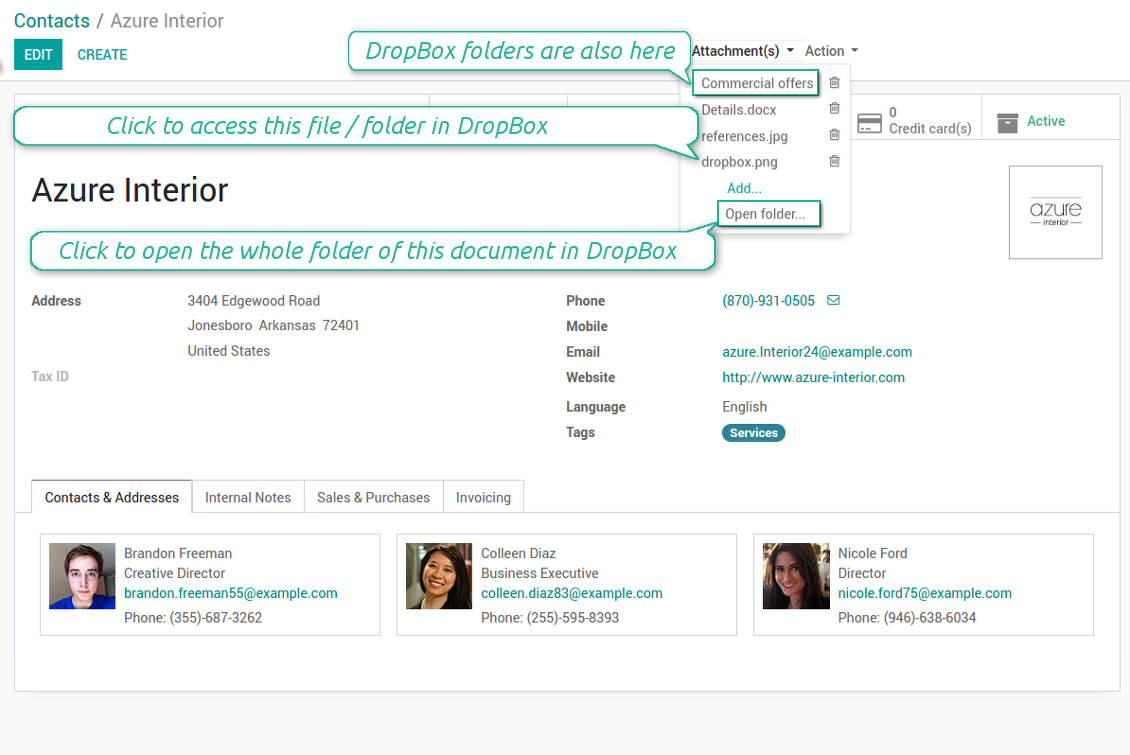
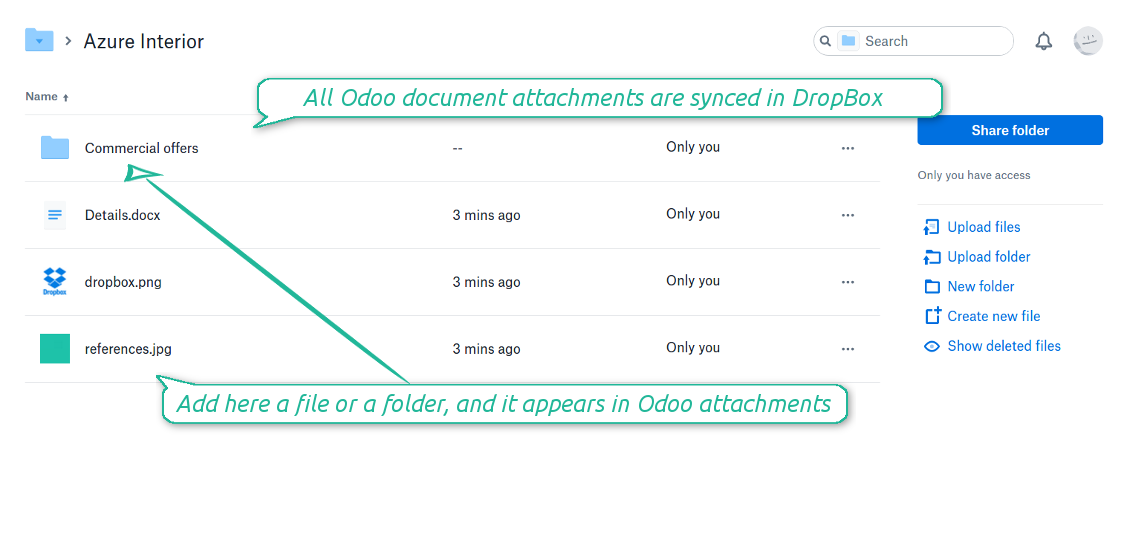
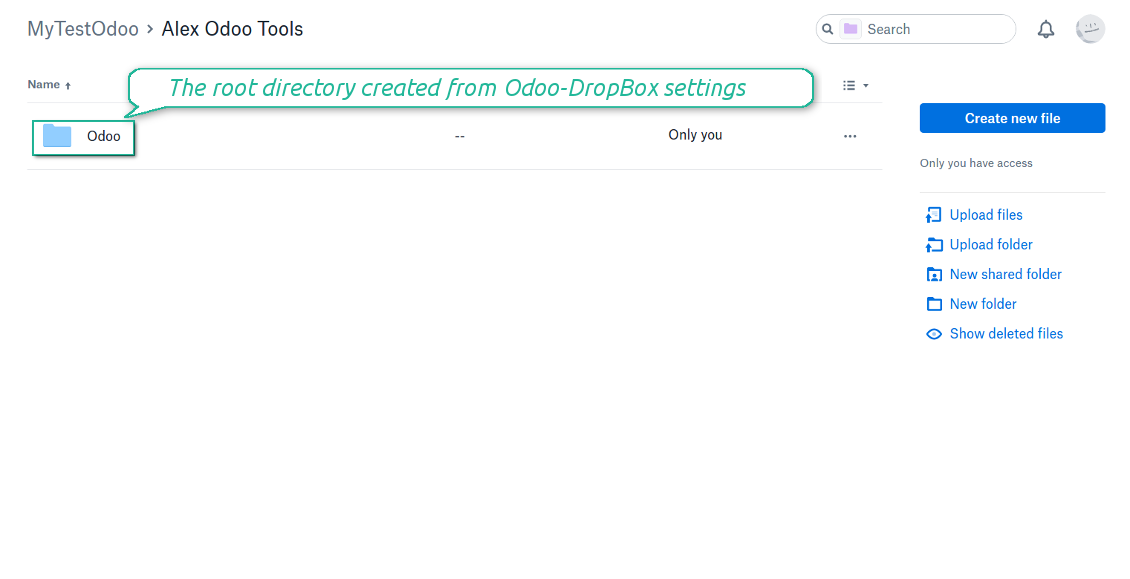
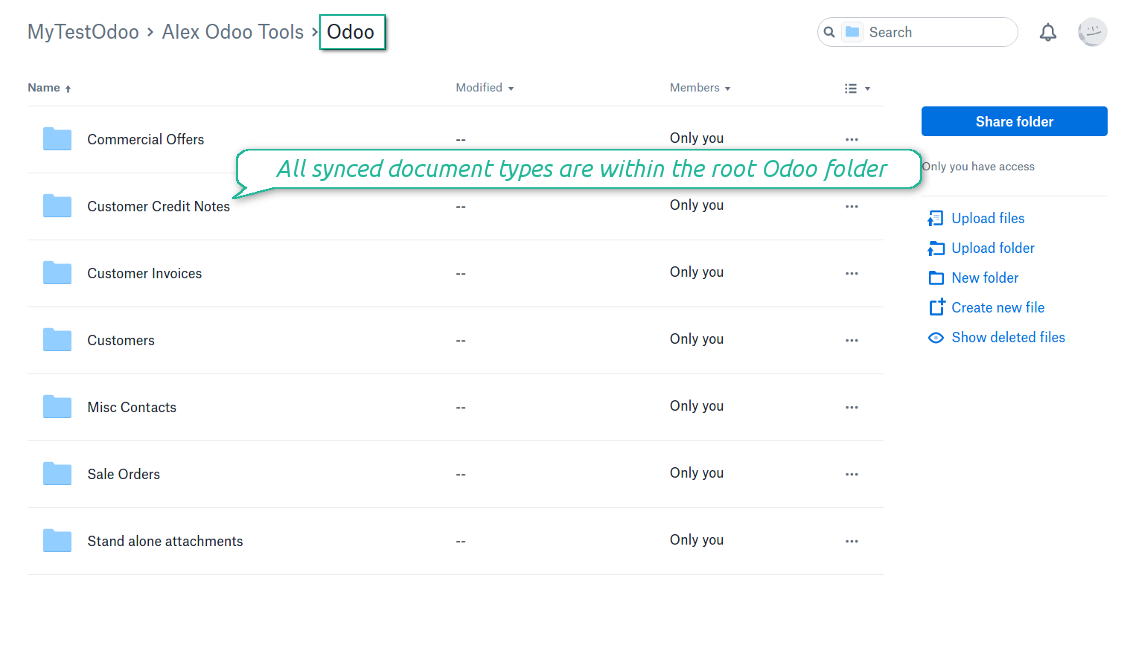
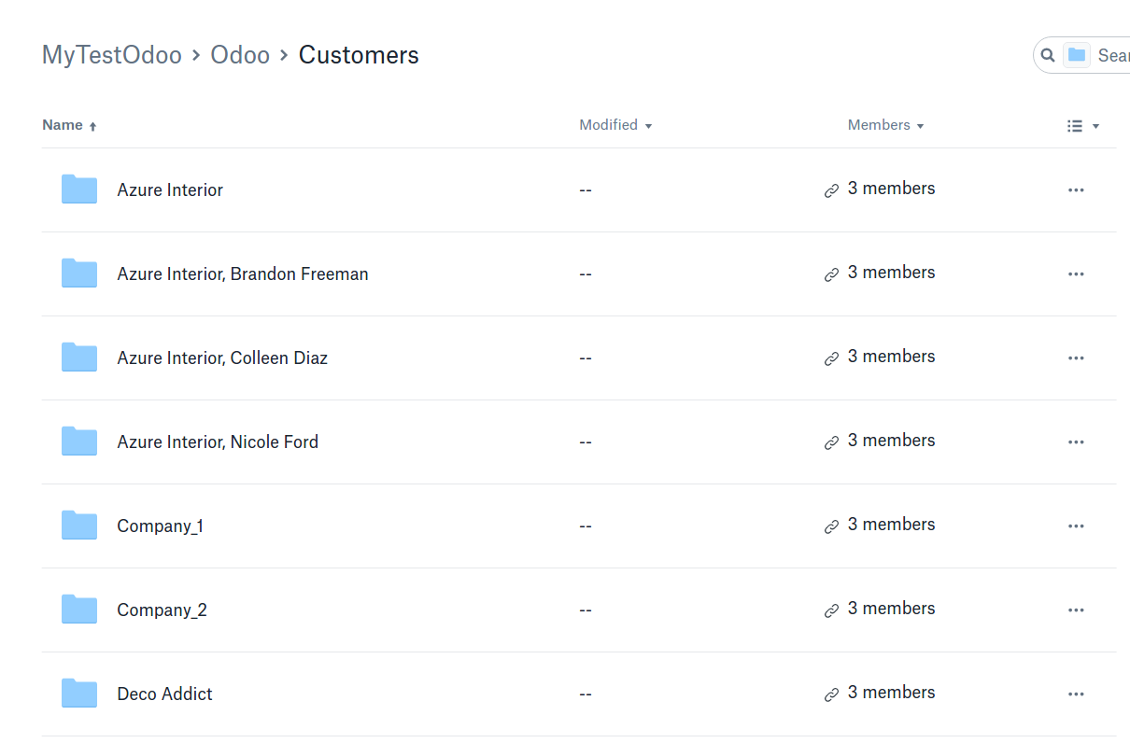
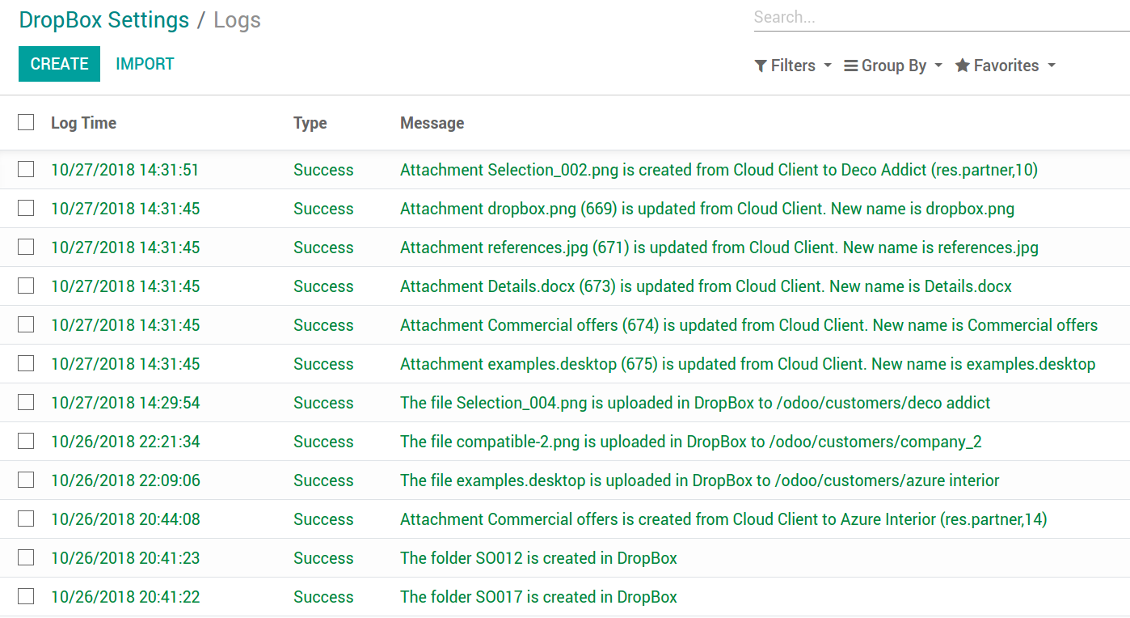
Synchronization is bilateral. All Odoo attachments are put in DropBox regularly. DropBox files create attachments in Odoo in case they are placed in a correct folder. Look at the sections From Odoo to DropBox and From DropBox to Odoo
Integration is automatic in both ways. Based on scheduled jobs, Odoo send attachments to DropBox and retrieve files from there
Any Odoo document might be synced: customers, opportunities, sale or purchase orders, tasks or issues, employees or users, etc. You decide by your own which records should be in DropBox, and which should be left in Odoo
Synchronization works for any DropBox tariff, including Personal DropBox (Basic, Plus, Family) and business DropBox (Professional, Standard, Advanced)
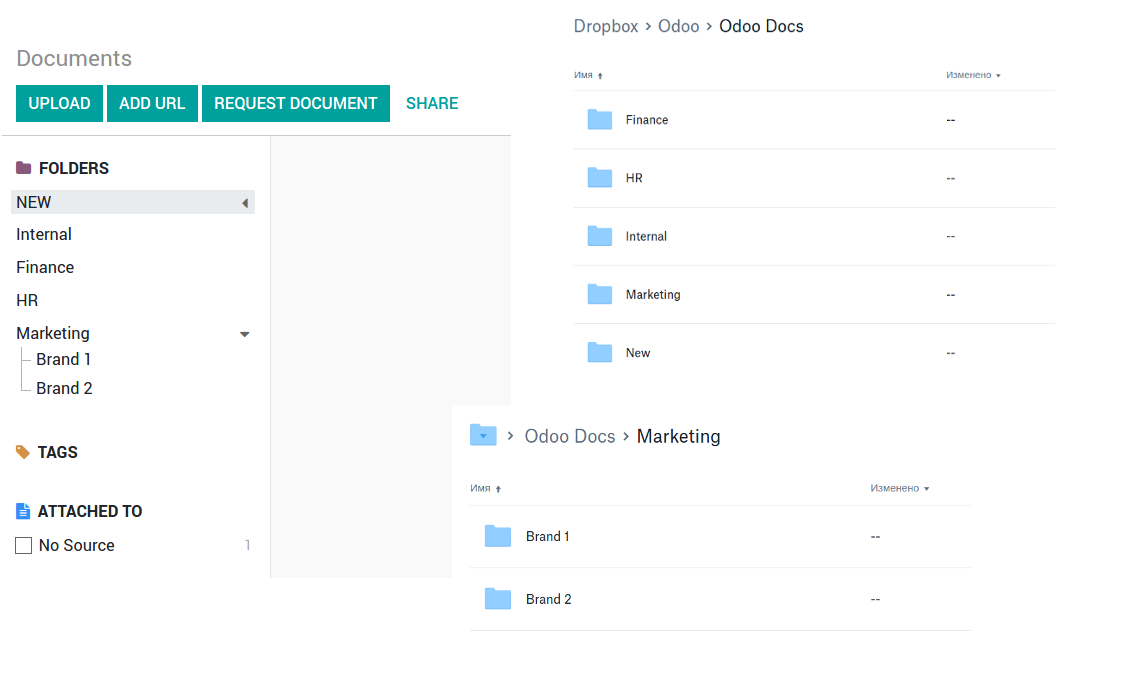
The tool works fine with the Odoo Enterprise Documents module. For full compatibility and to reflect new module directories structure use the app Cloud Sync for Enterprise Documents. Look also at the section Odoo Enterprise Documents
All synced files are easily accessible though clicking on an attachment. You might also open a whole document folder by clicking on 'Open folder' on the attachment widget. This feature migth be optionally turned off: look at the section DropBox URLs
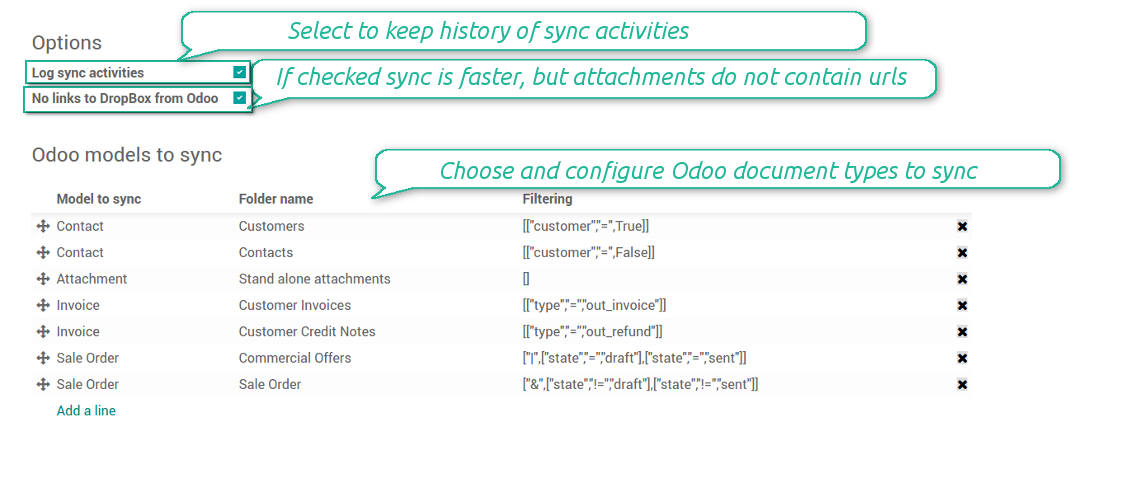
All sync activities might be logged. Control over files and folders creations, moves, name changes and removals. Just turn on the option 'Log sync activities' and access history through the button 'Sync logs'
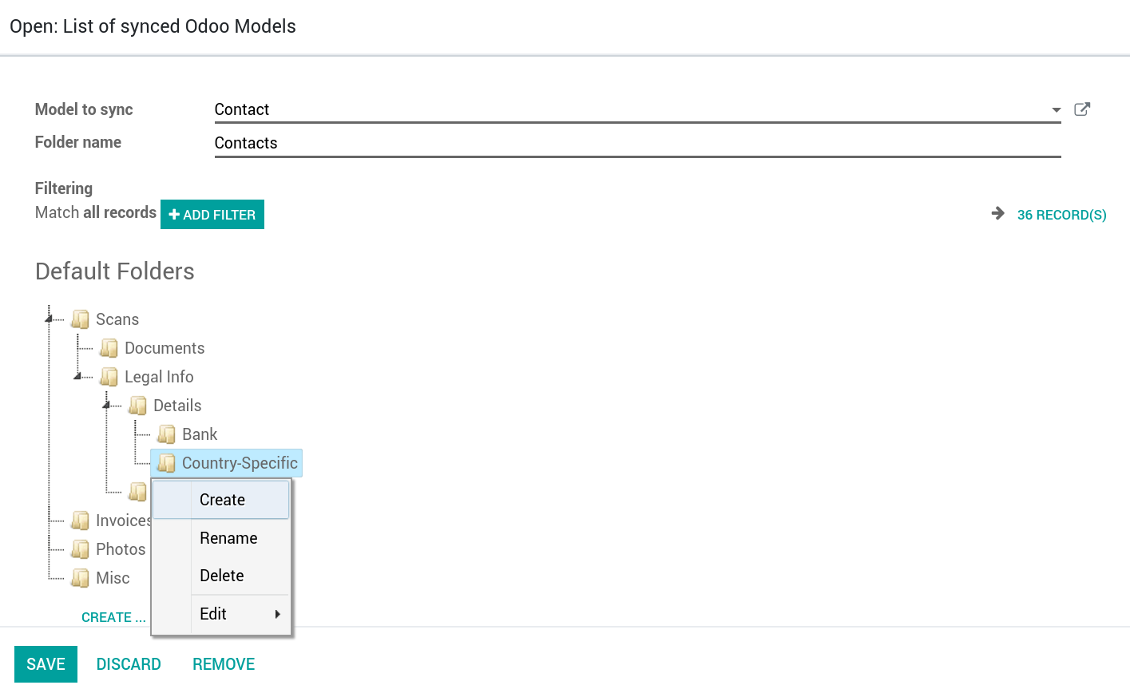
New For each document of this type you may create a default directories' structure. When this folder is firstly synced, Odoo would generate default folders. For example, for all employees you may have pre-defined folders 'Scans', 'Scans/Official', 'Photos', etc.
The tool is compatible with Odoo reporting and mailing apps. If such an app faces a synced file, it retrieves a real content from DropBox. In particular, the reports 'always reload' feature and messages & mass mailing attachments work properly
Integration is based on a single user endpoint. It means that a single user login/password of DropBox is used. Afterwards for integrations Odoo would use that credentials disregarding an actual Odoo user
- Prepare and keep updated folders' structure in DropBox
- Upload new attachments to a correct folder
Odoo creates a convenient directory structure in DropBox: Odoo / Document type name / Document name / Files, where:
- Odoo is a central directory for Odoo Sync in your cloud storage.
- Document type is a synced Odoo model, for example, 'Sale orders', 'Opportunities', 'Customers'
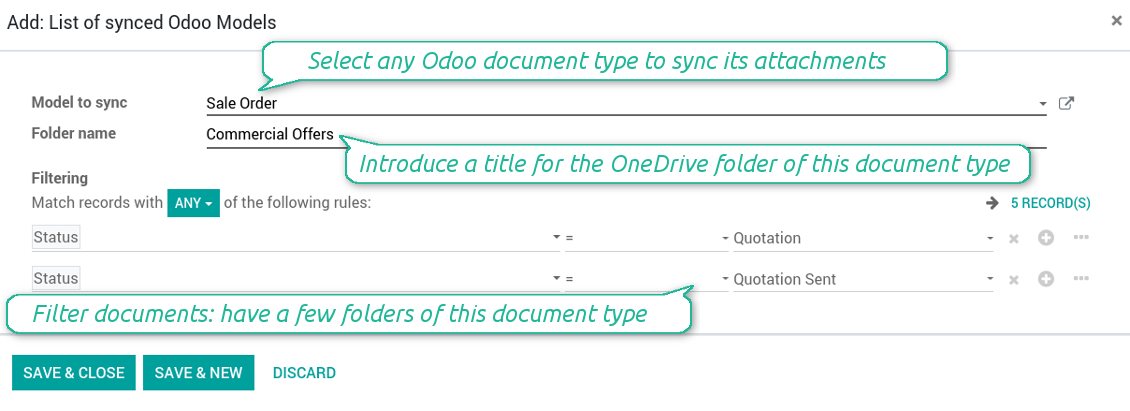
- You select document types by yourself. It might be any document type
- Moreover, you might have a few folders for a single document type. Use Odoo domains to have not global 'Partners, but 'Customers' and 'Suppliers', not just 'Sale orders' but 'Commercial offers', 'To deliver', and 'Done orders'
- With each sync Odoo would try to update document types' folders. Add a new document type at any moment. It will appear in DropBox with a next sync
- You are welcome to introduce or change document types folder names at any moment in Odoo. Take into account: renaming in DropBox will be recovered to Odoo names
- If you remove a model from integration, it will not be deleted from DropBox to keep already synced files safe. However, new documents of this type would not be synced
- In case you removed a directory in DropBox, but it is still configured in Odoo, with a next sync a folder structure is going to be recovered (not files, surely).
- Document is an exact object to sync. For instance, 'Agrolait' or 'SO019'
- Documents are synced in case they relate to a synced document type and satisfy its filters. For example, you are not obliged to sync all partners, you may integrate only 'Customers' and 'Vendors' or only 'Companies', not 'Contacts'
- Odoo would generate a folder in DropBox for each suitable document even for documents without attachments. It is needed for a backward sync to easily add new files
- DropBox folder name equals a real document name. It relies upon Odoo name_get method. Thus, Odoo 'Michael Fletcher' (a contact of 'Agrolait') would be DropBox 'Agrolait, Michael Fletcher'
- If an exact document changes its document type (e.g. a quotation is now confirmed), Odoo will automatically relocate its related folder to a proper parent directory (in the example: from 'Commercial offers' to 'To deliver')
- In case a document relates to a few types (for instance, you have 'Vendors' and 'Customers', while Agrolait is both), this document folder would be put into the most prioritized document type. A document type priority is higher as closer to the top in Odoo interfaces it is
- If an Odoo document is removed, the next sync will remove a corresponding DropBox directory
- In case you remove a directory in DropBox, but it still exists in Odoo, DropBox folder structure would be recovered (while files would be unlinked in both Odoo and DropBox)
- Folders renaming in DropBox will be replaced with Odoo names, Odoo document names are more important
- Files are real files taken from Odoo attachments
The resulted path would be, for example, 'Odoo / Quotations / SO019 / commercial offer.png'.
The only exclusion of the rule are stand alone attachments which do not relate to any Odoo documents (their document type is 'ir.attachment'). Such attachments' path is 'Odoo / Stand Alone Attachments / image.png'.
The direct sync might take quite a long, since a lot of folders should be created. It is not recommended to make sync too frequent: once an hour or two hours is fine.
FilesWith each direct sync, Odoo tries to find not yet synced attachments. If such attachments suit any document type to sync, a file will be uploaded to DropBox to a proper folder. In Odoo such attachments will become of 'url' type (look also at the section DropBox URLs). It means that a file is not any more kept in Odoo server space, but now it is in DropBox. Until sync is done, Odoo attachment remains binary and stores an actual file. Such approach helps Odoo to work faster.
If you unlinked an attachment from Odoo, it would be deleted in DropBox as well.
Take into account that file names should be managed in DropBox: each backward sync would recover DropBox names, Odoo is here less important.
- If a new file is added to a proper document folder (e.g. to 'Odoo / Customers / Agrolait'), the same attachment will be added to Odoo document (in the example - to 'Agrolait')
- In document folders you can put not only files but also child folders. In that case a link for this folder (not its content) is kept in attachments
- In case you rename a file in DropBox, it will be renamed in Odoo as well
- Files' removal from DropBox leads to related Odoo attachments' removal
- If you move a file to another document folder, in Odoo a related attachment would be re-attached to this new document. Take into account: if you move a file for a not document folder, this Odoo attachment will be deleted as it has been removed from DropBox
- If you deleted a document type or document folder, their child files are deleted as well. Thus, Odoo would remove related attachments. The folders, however, will be recovered with a next direct sync. Folders' move to another directory is also considered as a removal. Avoid such situations by following the simple rule: folders are managed mostly by Odoo, files - mostly by DropBox.
Backward DropBox might take quite much time, since each folder should be checked (the more folders, the more time the backward sync requires). It is recommended to make frequency oftener than once an hour or two hours.
DropBox has a specific way to generate links for existing files and folders. In particular, there are no concepts of internal or private URLs. Instead, each DropBox item might get so-called shared URLs. Such shared links are either public or team-only. Moreover, the latter feature is available only for DropBox business account.
This tool relies upon share links' mechanics. It means, that each attachment link is either public (all personal DropBox accounts) or team-only (all business DropBox accounts).
Sometimes it is considered to be not fully safe. Although website URLs will be hardly known by external users, there is a slight chance that they become available as a result of some user actions. Besides, sharing links generation is not super fast and might make a sync process slower. That is why the feature to switch off sharing urls is introduced.
If checked, all DropBox urls in Odoo will be of type https://www.dropbox.com/home/Odoo/[PATH]. Such links will not work in quite a many cases. Thus, if you need to open DropBox files / folders from Odoo, do not switch off the feature 'No links to DropBox from Odoo'.
- Try to avoid the following symbols in folders' and files' names: *, ?, ", ', :, <, >, |, +, %, !, @, \, /,. Direct sync will replace such symbols with '-'. It is done to avoid conflicts with file systems.
This tool is not in conflict with the 'documents' module provided by the Enterprise license. Attachments related to Enterprise folders would be synced as any other files: according to a document they relate to. In the most cases it means they would be linked to stand-alone attachments.
It is not always comfortable, and you might be interested in reflecting directories' structure introduced by the module 'Documents'. To this end the extension Cloud Sync for Enterprise Documents (its standard price is 44 Euros) is developed. This tool has the following features:
- The documents hierarchy is reflected within the folder 'Odoo / Odoo Docs'
- Each Odoo folder has a linked cloud folder. Take into account that folders created in the cloud storage will be synced as Odoo attachments. The key principle is: folders are managed by Odoo, files are managed by the cloud client
- All files are synced with the same logic as usual attachments. Files created in Odoo will be added to the cloud storage and will be replaced with links in Odoo. Files created in cloud storage will generate attachments within a paired directory
- Please do not name synced models as 'Odoo Docs'. This is the reserved name for Odoo Enterprise Documents
Configuration and Login
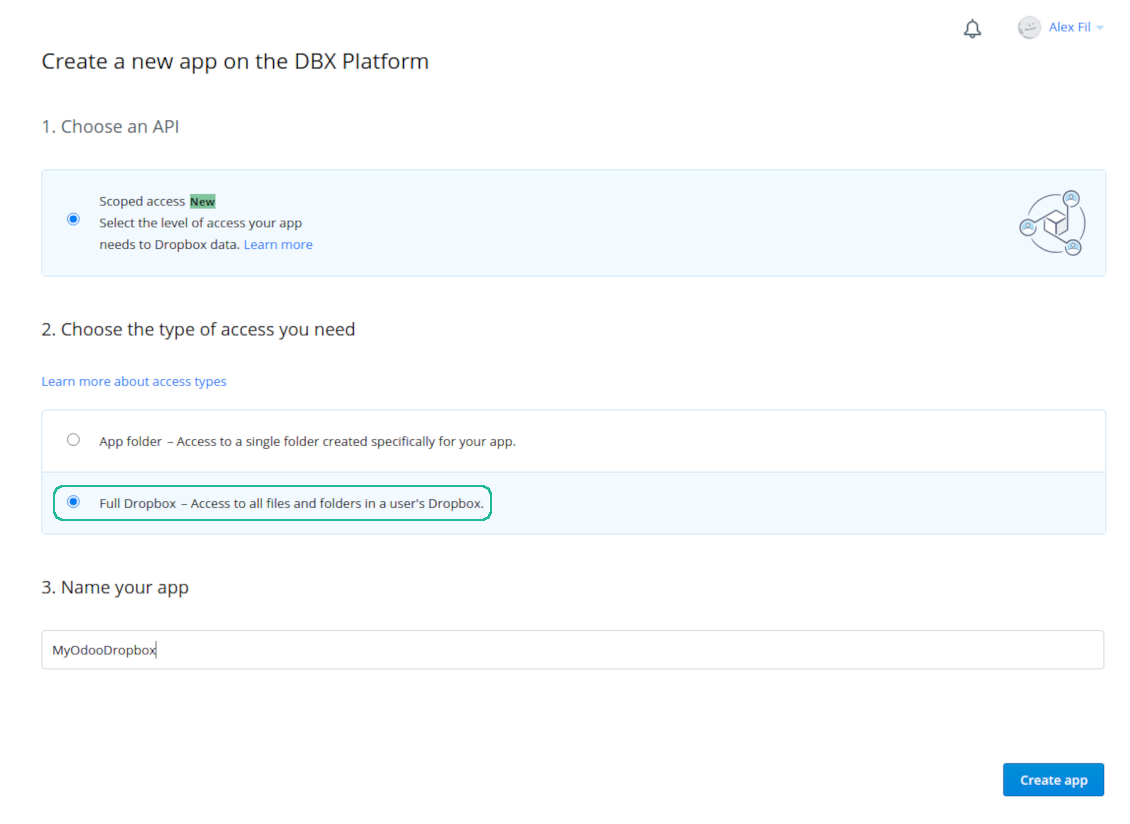
- Follow the url https://www.dropbox.com/developers/apps/create
- Choose an API as 'Scoped access'
- Choose the type of access as 'Full Dropbox'
- Select any suitable name for the app and push the button 'Create app'
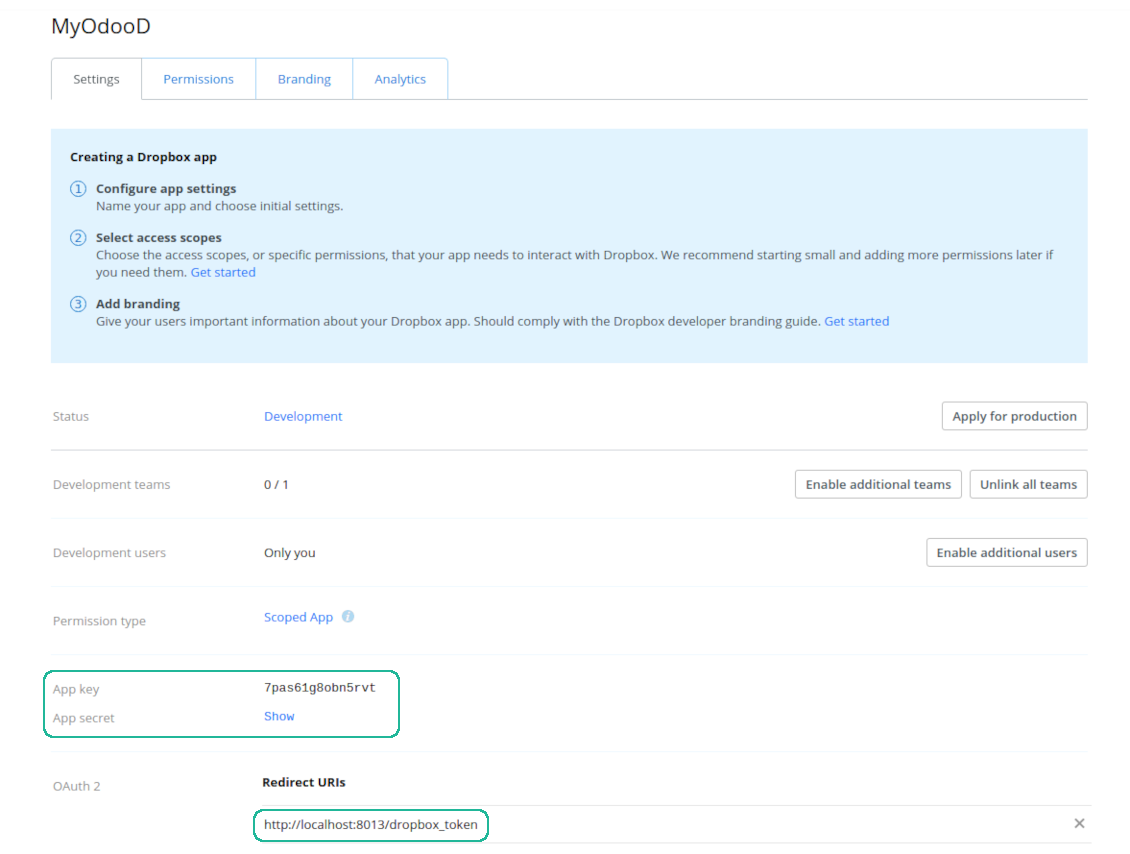
- Add the redirect URI as YOURODOOSITENAME]/dropbox_token (e.g. https://faotools.com/dropbox_token). A valid SSL certificate (https) is required
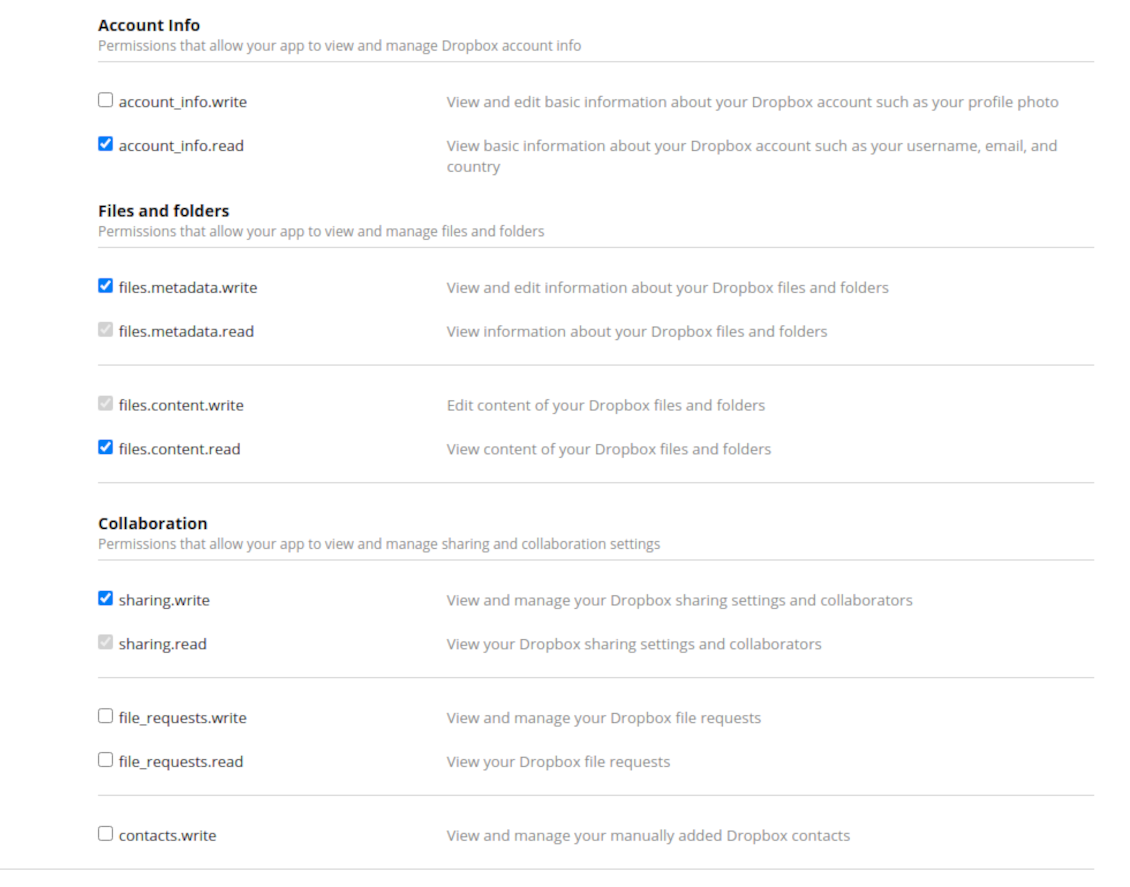
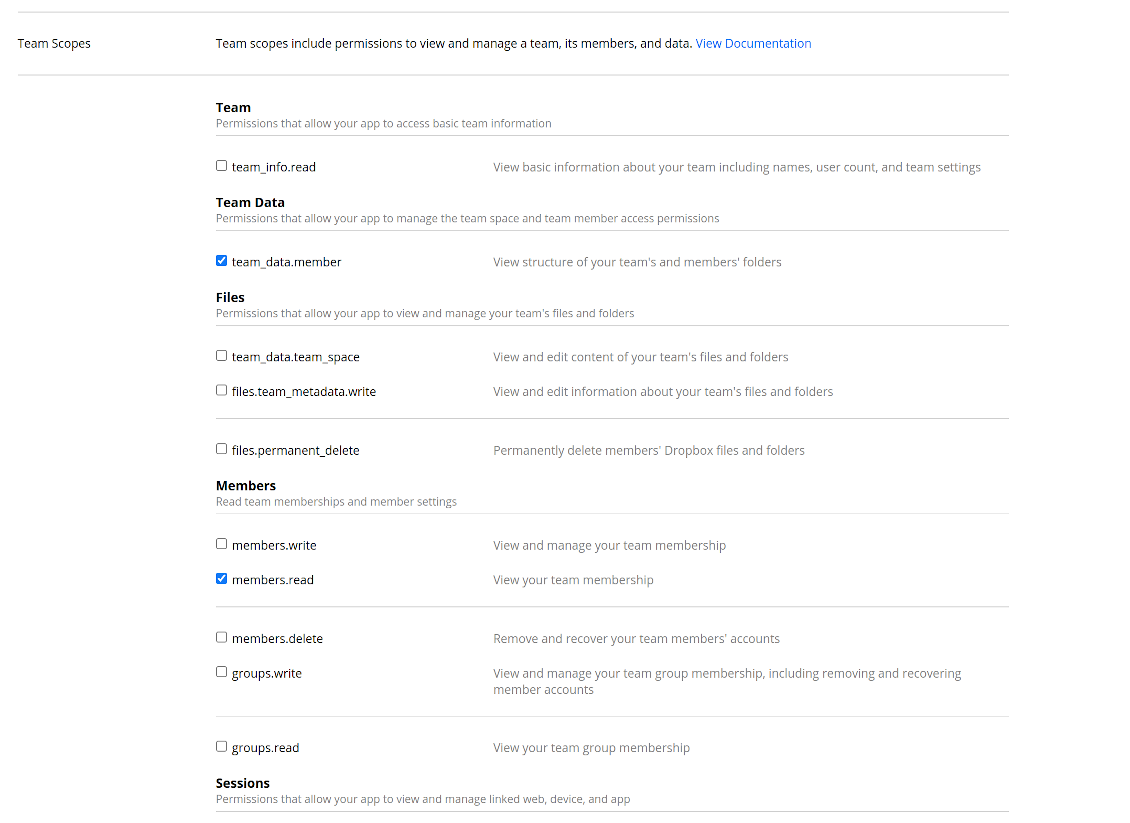
- Grant permissions to the app: 'Account Info (Read)', 'Files and folders Metadata (Write)', 'Files Content (Write)', 'Collaboration (Write)'. For team DropBox assign also 'Team Data Members', 'Members (Read)'. Make sure no other permissions are assigned.
- Submit App
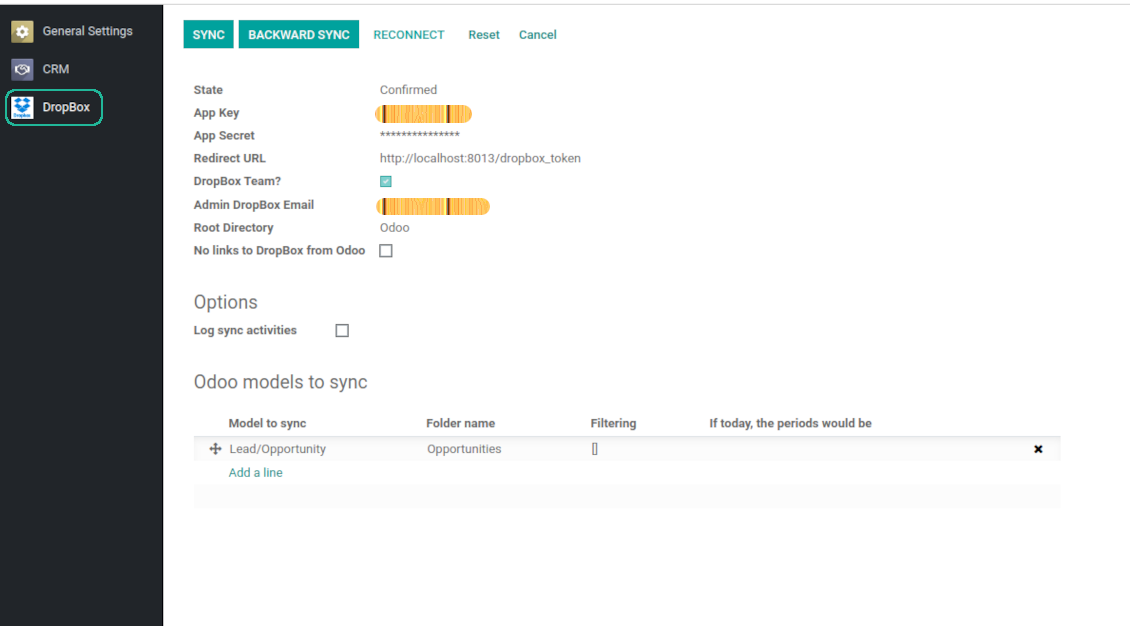
- Go to Odoo general settings - DropBox
- Copy App Key, App secret, and redirect URI to the Odoo configuration page
-
For team DropBoxes only
- Check the box 'DropBox Team'
- Set an email of DropBox user. Inside this user folder all Odoo related items would be created and only after that they are shared to all other users. Under this user all files and folders are created, changed, moved, and deleted
- Choose a suitable name for the root Odoo folder, e.g. 'Odoo' or 'ERP'
- Press Save
- Press 'Login and Confirm'
Create a DropBox app
Set up DropBox App: redirection URL
DropBox permissions for personal accounts
DropBox permissions for business accounts
Set up Odoo for DropBox integration
Odoo server configuration and cron job configuration
To make sure the synchronization works correctly apply proper timeouts to the Odoo configuration file: LIMIT_TIME_CPU, LIMIT_TIME_REAL should be more than 900 seconds.
For Odoo.sh this should not be done, since timeouts are predefined and are not configurable.
Then, timeout should be entered to your Odoo. To that goal find the section 'Settings' on the app configuration page and copy the number there.
Afterwards, it is needed to make the cron jobs suit the applied timeouts. In the debug mode go to the Settings > Technical > Automation > Scheduled Jobs:
- Set up the job 'Synchronize attachments with cloud' as (a) frequency - 2*timeout; (b) the next execution as the next hour +timeout. For example, for 900seconds timeout: frequency - as 30minutes; the next execution - at 08:15
- Set up the job 'Synchronize attachments from cloud' as (a) frequency - 2*timeout; (b) the next execution as the next hour + timeout*2. For example, for 900seconds timeout: frequency - as 30minutes; the next execution- at 08:30.
Často kladené otázky o DropBox Odoo Integration Odoo v.12
Mohu změnit frekvenci synchronizačních úloh?
Ano, můžete. Postup:
Zapněte režim ladění
Přejděte do technických nastavení > Automatizace > Naplánované akce
Najděte úlohy «Synchronize attachments with cloud» a «Update attachments from cloud».
Nedělejte je příliš časté. Úloha by měla skončit dřív, než začne další. Nastavení závisí na počtu položek k synchronizaci. Obvykle je frekvence mezi 15 minutami a 4 hodinami.
Nastavte také dostatečné časové limity v konfiguračním souborů Odoo. LIMIT_TIME_CPU a LIMIT_TIME_REAL musí být rovny nebo větší než plánovaný čas cronu. Od verze 13 zohledněte i LIMIT_TIME_REAL_CRON.
Důležitá poznámka pro klienty Odoo.sh: maximální čas cron úlohy může být jen 15 minut.
Mohu nastavit jinou strukturu synchronizovaných adresářů, než jakou předpokládá synchronizace?
Ne, tato funkce je až od verze 15. Předtím modul pracuje s předdefinovanou strukturou složek:
Odoo - kořenová složka synchronizace
Modely - složky pro každý typ dokumentu Odoo. Například «Projects», «Partners». Podle domény mohou být konkrétnější složky: «Customer 1 Projects», «Projects of the Customer 2», «Internal Projects» atd.
Objekty - složky pro každý dokument, např. «Project 1» nebo «Customer 1»
Soubory a složky související s tímto dokumentem Odoo k synchronizaci.
Můžete tak mít například:
Odoo / Projects / Project 1 / soubory a složky projektu 1
Odoo / Customer 1 Projects / Project 1; Odoo / Customer 2 Projects / Project 3, ...
Odoo / Customers / Customer 1 / soubory a složky zákazníka 1
Struktura je vždy plochá: jen tyto úrovně. Různé typy dokumentů nelze držet ve stejné větvi. Ve složce «Customer 1» nelze mít zároveň objednávky, faktury i projekty. Každý typ má vlastní složku (nebo více). Jinak by zpětná synchronizace neměla kritérium.
Mám v Odoo nastavit specifické uživatelské přístupy?
Ne, nástroj používá jeden uživatelský koncový bod. Všechny synchronizační procesy běží pod jedním cloudovým správcem (aplikací). Práva k vytvořeným složkám / souborům se neautomatizují. Spravujte je ve svém cloudovém úložišti.
Kde se ukládají synchronizované soubory? Jsou duplicitní v Odoo i v cloudech?
Aplikace předpokládá, že binární obsah příloh je uložen v Cloud Client, nikoli na serveru Odoo. Takové přílohy se v Odoo stanou typu URL a můžete k nim kdykoli přistoupit z pole příloh nebo z Cloud Client.
Po nastavení nejsou potřeba ruční akce: synchronizace je plně automatická. Rozhodněte, které typy dokumentů Odoo synchronizovat, a nastavte související model pro každý z nich (zákazníci, prodejní nebo nákupní objednávky, úkoly, projekty atd.).
Mohu mít několik složek pro stejný typ dokumentu? Například interní projekty a zákaznické projekty?
Ano, můžete. Připravte pravidlo pro každou variantu a použijte filtry: například podle typu projektu.
Filtry vzájemně vylučujte, aby byl dokument jednoznačně přiřazen. Například: «zákazník, ale ne dodavatel», «dodavatel, ale ne zákazník». Jinak by složka dokumentu skákala z jednoho modelu na druhý.
Stačí mi pouze aplikace Cloud Storage Solution?
Ne, nástroj je jen technické jádro. Potřebujete také konektor svého cloudového klienta.
Je v pořádku, pokud mám synchronizovat mnoho objektů, například 10000?
Ano, i když při mnoha složkách/přílohách může být proces pomalý. Klienti však hlásili prostředí s >10k partnery a ~5k variantami produktů a procesy byly přijatelné.
Několik bodů:
- Synchronizace je postavená tak, že každá položka se synchronizuje a neztratí se, i když to nemusí být rychlé. Zaručují to fronty FIFO a commit každé úlohy.
- Počet objektů lze logicky omezit. Konfigurace modelů umožňuje vyloučit zastaralé položky (např. archivované partnery nebo objednávky staré 2 roky).
Je možné synchronizaci provádět v reálném čase?
Ne. Máme silné důvody vyhnout se synchronizaci v reálném čase:
Výkon. Při synchronizaci v reálném čase každé nahrání souborů zobrazí načítací obrazovku.
Konflikty. Pokud 2 uživatelé změní položku současně, situace nemusí jít vyřešit. U běžných úloh to můžeme opravit později; v reálném čase by byla potřeba fronta, ještě matoucí.
Funkčnost. Zejména přejmenování a změna struktury. Zpětná synchronizace se striktně opírá o logiku adresářů a při každém běhu kontroluje 100 % položek. Po každé aktualizaci by to byly tisíce požadavků za sekundu. Jinak by se změny ztratily.
Mohu synchronizovat přílohy s několika cloudovými klienty
Ne, tato funkce je k dispozici až od verze 15.
V cloudech používáme speciální editor (např. OnlyOffice, Office 365). Otevřely by se soubory v tomto editoru?
Ano, podle konfigurace cloudového klienta.
Jaka jsou pravidla aktualizaci vašich nástrojů?
Podle aktuálních pravidel Odoo Apps Store:
- Modul koupeny pro verzi 12.0 nebo starší dává přístup ke všem verzim az do 12.0.
- Od verze 13.0 se každá verze modulu kupuje samostatné.
- Bez ohledu na verzi da nákup právo na všechny aktualizace a opravy v rámci hlavní verze.
Tym faOtools tato pravidla neridi. S otazkami se obratte přímo na zastupce Odoo Apps Store.
Jak nainstaluji aplikaci na Odoo.sh?
Nejprimejsi postup je vestaveny tok obchodu Odoo:
1. Otevřete stránku modulu a klikněte na Deploy on odoo.sh
2. Budete přesměrování na GitHub. Přihlaste se a klikněte na Create a new repo nebo použijte existující. Repozitar musí byt soukromý. Aplikace pod licenci OPL-1 nesmí byt veřejné. V případě potřeby vytvořte nové repo pro projekt Odoo.sh
3. Poté v odoo.sh klikněte na Deploy, potvrďte a klikněte na Continue. Instalace se spustí.
Tyto kroky nainstaluji aplikaci na production větev. Pro jiné vetve nebo aktualizaci:
1. Stáhněte zdrojový kod z obchodu Odoo
2. Commitnete modul do GitHub repozitare. Žádná složka/soubor aplikace nesmí byt v .gitignore. Repa vytvorena odoo.sh mohou ignorovat důležité cesty (např. /lib). Nahrajte všechny adresáře a soubory modulu
3. Deployujte cílovou větev projektu odoo.sh, nebo počkejte na automaticky build, pokud to nastavení předpokládá.
Jak nainstaluji aplikaci na vlastní server?
2. Restartujte server Odoo;
3. Zapněte vyvojovsky režim (technická nastavení);
4. Aktualizujte seznam aplikaci (nabídka Aplikace);
5. Najdete aplikaci a klikněte na Activate/Install;
6. Postupujte podle pokynů na stránce aplikace, pokud existují.
Aplikace ma další rozšíření. Mohu je koupit později?
Ano. Odoo automaticky přidá závislosti do kosiku: vylučte jiz zakoupene nástroje, abyste neplatili dvakrát.
Nasadil jsem aplikaci na Odoo.sh a v testech vidim varování/chybu
Červené/oranzove varování neovlivnuje funkce aplikace. Naše moduly obcas neprojdou standardními automatickými testy, protože ty predpokladaji chování, které je v rozporu s cíli aplikace. Například menime výpočet ceny, zatímco testy Odoo porovnavaji konecnou cenu se standardním algoritmem.
Nejprve zkontrolujte funkce nasazene databáze. Funguje vse?
Pokud se stále domnivate, ze varování ovlivnuje skutečné funkce, kontaktujte nas a pošlete kompletní instalacni protokoly a úplný seznam nasazenych modulu (jádro a třetí strany).
Mohu si aplikaci koupit přímo u vas?
Ne, nástroje siritime pouze přes oficialni obchod aplikaci Odoo.
Chtel bych slevu
Bohuzel nemáme technické prostredky na individualni ceny.
Mohu aplikaci nainstalovat na databázi Odoo Online (SaaS)?
Ne, aplikace třetích stran nelze použít na Odoo Online. Odoo SaaS tuto možnost blokuje.
Nástroj závisí na jiných aplikacich. Mam je koupit?
Ano, nástroj vyžaduje všechny moduly označené v zavislostech. Cena na stránce aplikace je jiz zahrnuje.
Jaka je cena modulu v americkych dolarech? Proč se zmenila?
Ceny našich modulu jsou v eurech. Obchod Odoo převádí ceny do jiných men podle vnitrniho kurzu. Proto se cena v americkych dolarech může změnit pri aktualizaci kurzu.
Znění aplikace a webu v jiných jazycích než angličtině je s pomocí AI a sladěné s oficiálními překlady Odoo. Pokud si všimnete chyby, odešlete tiket o správnosti překladů a opravíme to.
Hlášení chyb
Pokud narazíte na chyby nebo nekonzistentní chování, ozvěte se. Opravy do 60 dnů od nákupu garantujeme a nástroje vylepšujeme i poté.
Ke kontaktu nepotřebujete telefon ani kreditní kartu. Stačí krátká e-mailová registrace, která netrvá déle než 30 sekund.
Přiložte co nejvíc podrobností: snímky obrazovky, protokoly serveru Odoo a úplný popis reprodukce. Pracovní plán (je-li chyba potvrzena) nebo pokyny (jinak) obvykle trvají několik pracovních dní.
Veřejné požadavky na funkce a nápady na moduly (bezplatný vývoj)
Jsme silně motivováni zlepšovat nástroje a vděční za každou zpětnou vazbu. Pokud jsou požadavky veřejně užitečné a dají se efektivně implementovat, tým je zařadí na seznam úkolů.
Takový seznam úkolů se zpracovává pravidelně a nepředpokládá příplatky. I když nemůžeme slíbit termíny a finální návrh, může to být dobrý způsob, jak získat požadované funkce bez investic a rizik.
Ke kontaktu nepotřebujete telefon ani kreditní kartu. Stačí krátká e-mailová registrace, která netrvá déle než 30 sekund.

Nástroj pro bezpečné uložení hesel v Odoo ke sdílenému použití. Sdílené trezory

Nástroj pro vybudování hluboké a strukturované znalostní báze pro interní i externí použití. Knowledge Systém. KMS. Revize ve stylu wiki.
398€
Nástroj pro nastavení cílů KPI a kontrolu jejich plnění po obdobích. Přehledy KPI. Návrhář dashboardů. Grafy KPI

Nástroj pro časově vázané řízení služeb od rezervace schůzek po prodej a recenze
398€
Nástroj pro správu Odoo z oblíbených AI chatů přes MCP. Claude. Jakákoli AI s podporou MCP.

Nástroj pro flexibilní strukturu příloh Odoo ve složkách a synchronizaci adresářů s cloudovými klienty: Google Drive, OneDrive/SharePoint, Nextcloud/ownCloud, Dropbox, Amazon S3, Box a NAS. DMS. Správce souborů. Systém správy dokumentů
398€
Nástroj pro automatickou obousměrnou synchronizaci příloh Odoo se soubory OneDrive
487€
Nástroj pro automatickou obousměrnou synchronizaci příloh Odoo se soubory Google Drive
487€
Nástroj pro automatickou obousměrnou synchronizaci příloh Odoo se soubory ownCloud/Nextcloud
487€