DropBox Odoo Integration v.12
The tool to automatically synchronize Odoo attachments with DropBox files in both ways
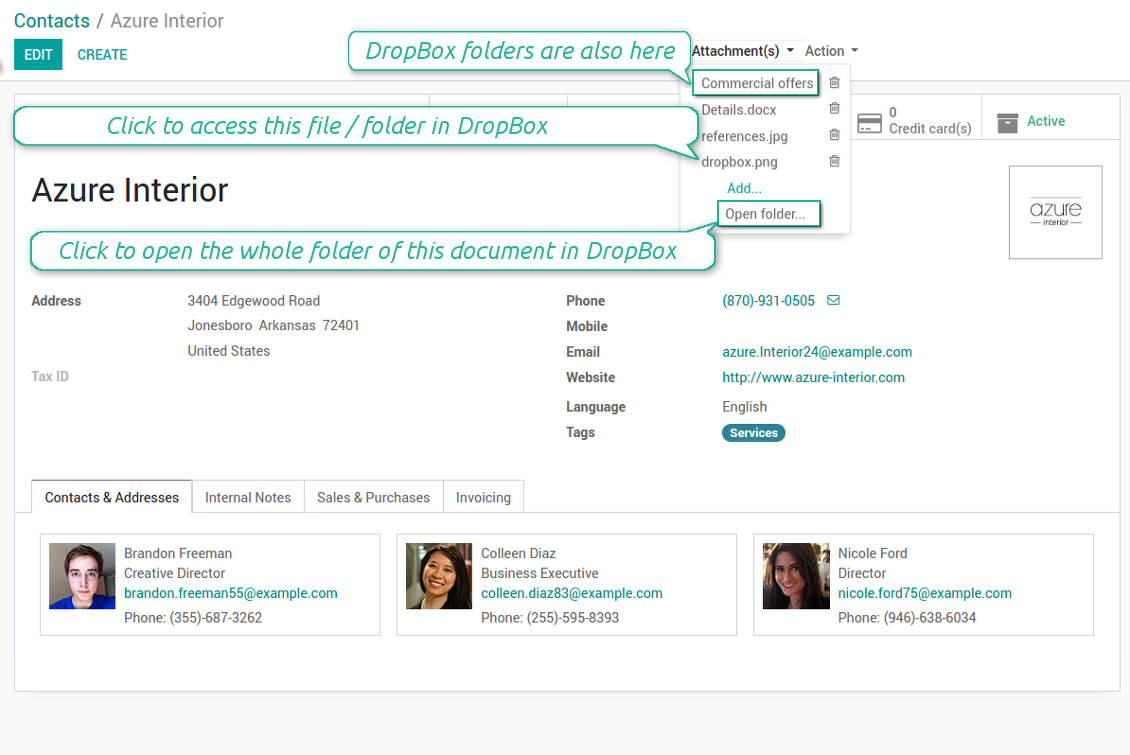
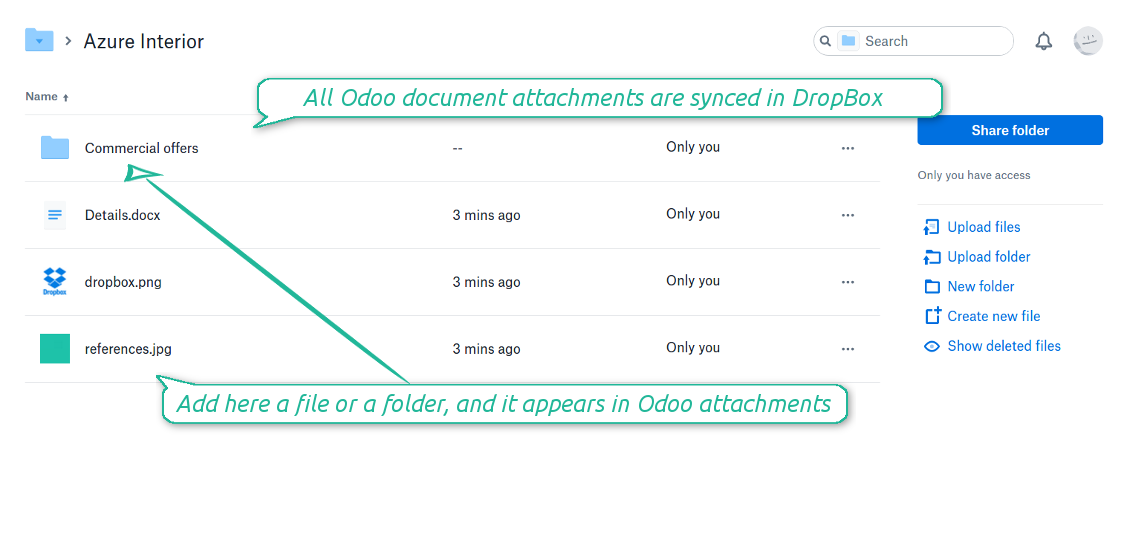
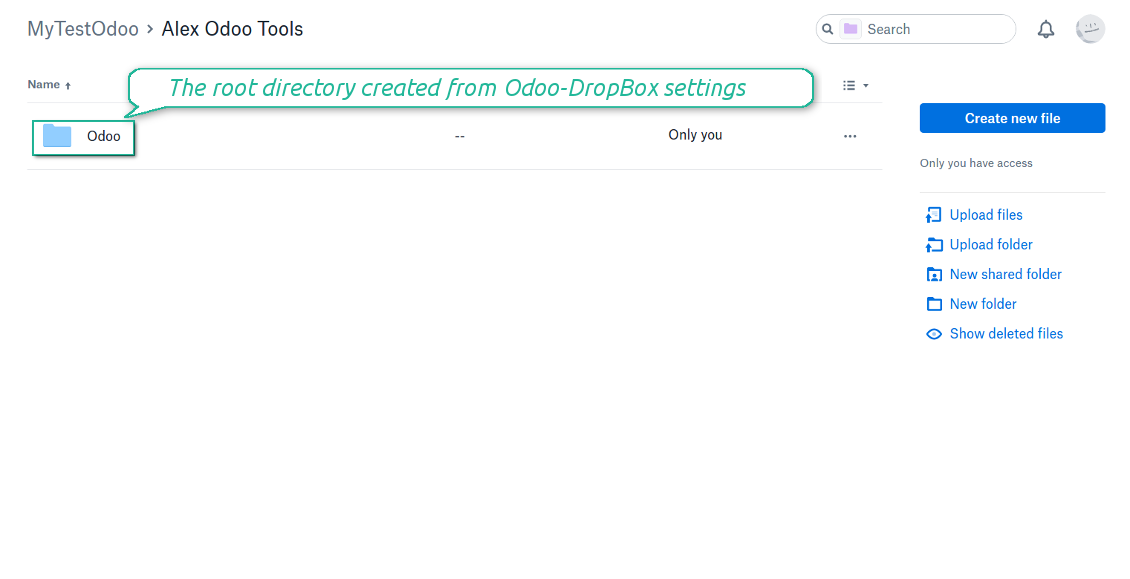
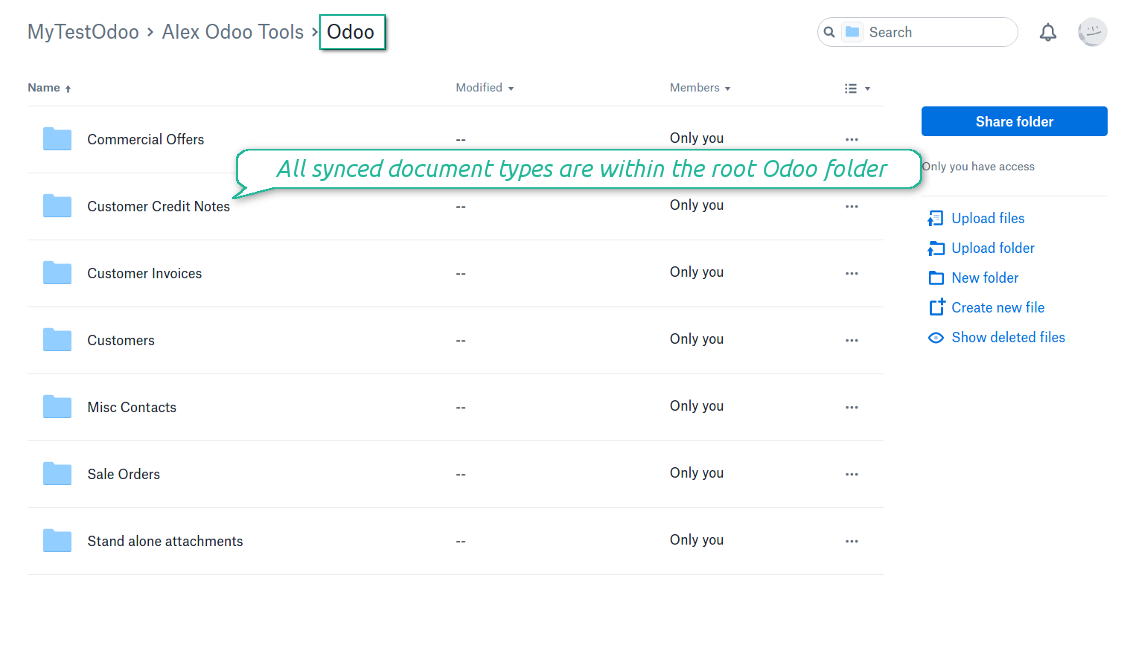
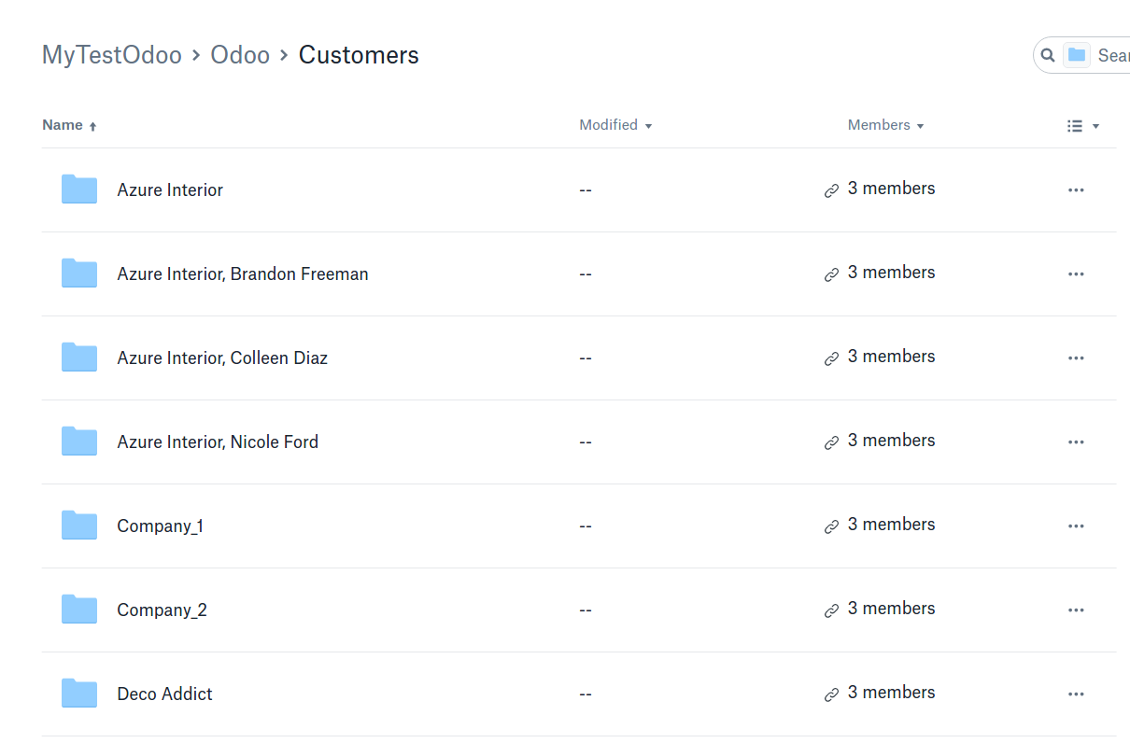
Synchronization is bilateral. All Odoo attachments are put in DropBox regularly. DropBox files create attachments in Odoo in case they are placed in a correct folder. Look at the sections From Odoo to DropBox and From DropBox to Odoo
Integration is automatic in both ways. Based on scheduled jobs, Odoo send attachments to DropBox and retrieve files from there
Any Odoo document might be synced: customers, opportunities, sale or purchase orders, tasks or issues, employees or users, etc. You decide by your own which records should be in DropBox, and which should be left in Odoo
Synchronization works for any DropBox tariff, including Personal DropBox (Basic, Plus, Family) and business DropBox (Professional, Standard, Advanced)
The tool works fine with the Odoo Enterprise Documents module. For full compatibility and to reflect new module directories structure use the app Cloud Sync for Enterprise Documents. Look also at the section Odoo Enterprise Documents
All synced files are easily accessible though clicking on an attachment. You might also open a whole document folder by clicking on 'Open folder' on the attachment widget. This feature migth be optionally turned off: look at the section DropBox URLs
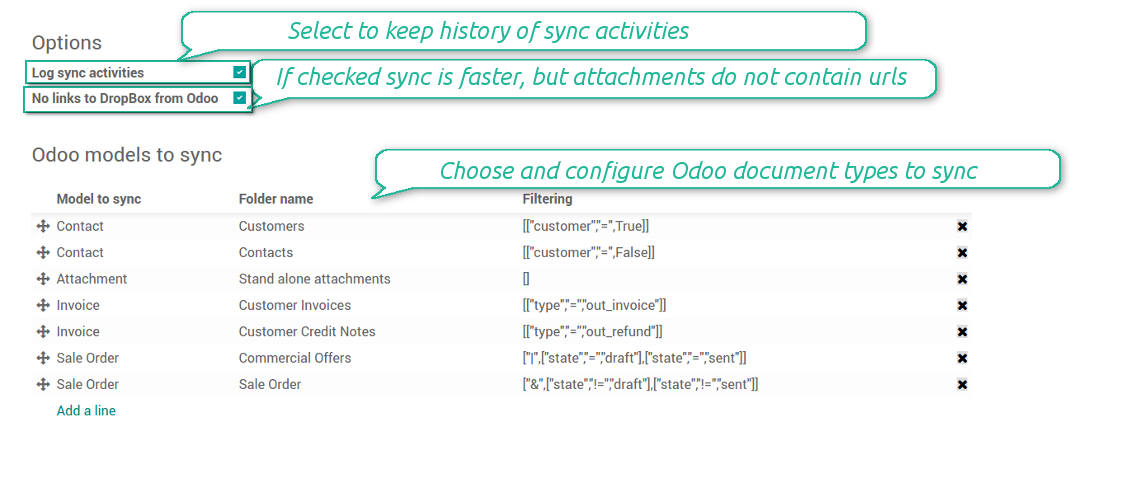
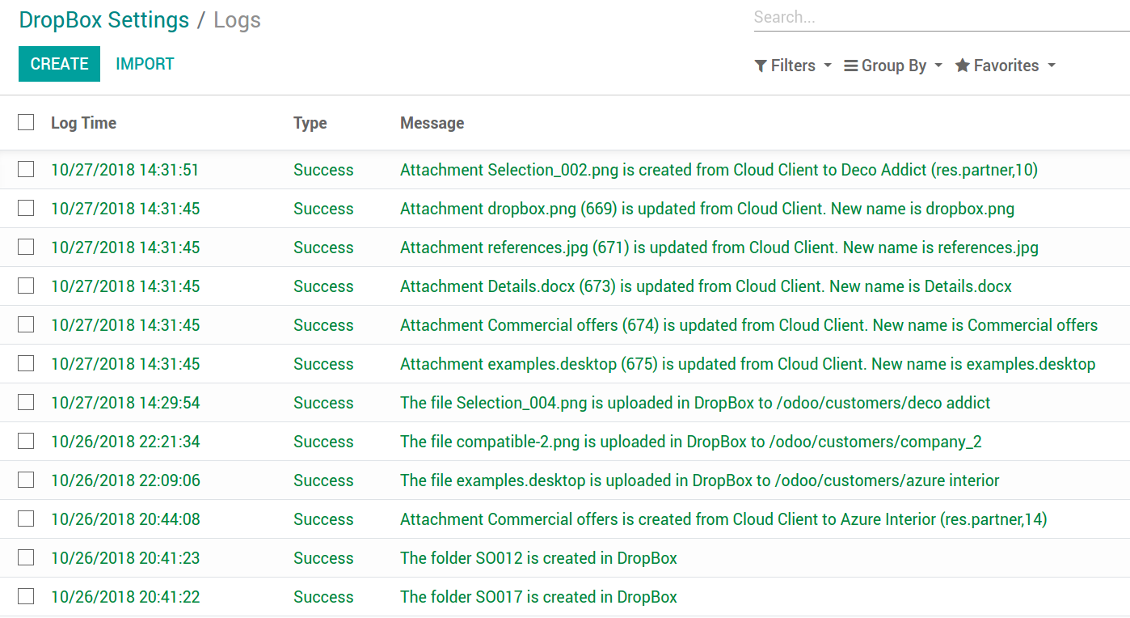
All sync activities might be logged. Control over files and folders creations, moves, name changes and removals. Just turn on the option 'Log sync activities' and access history through the button 'Sync logs'
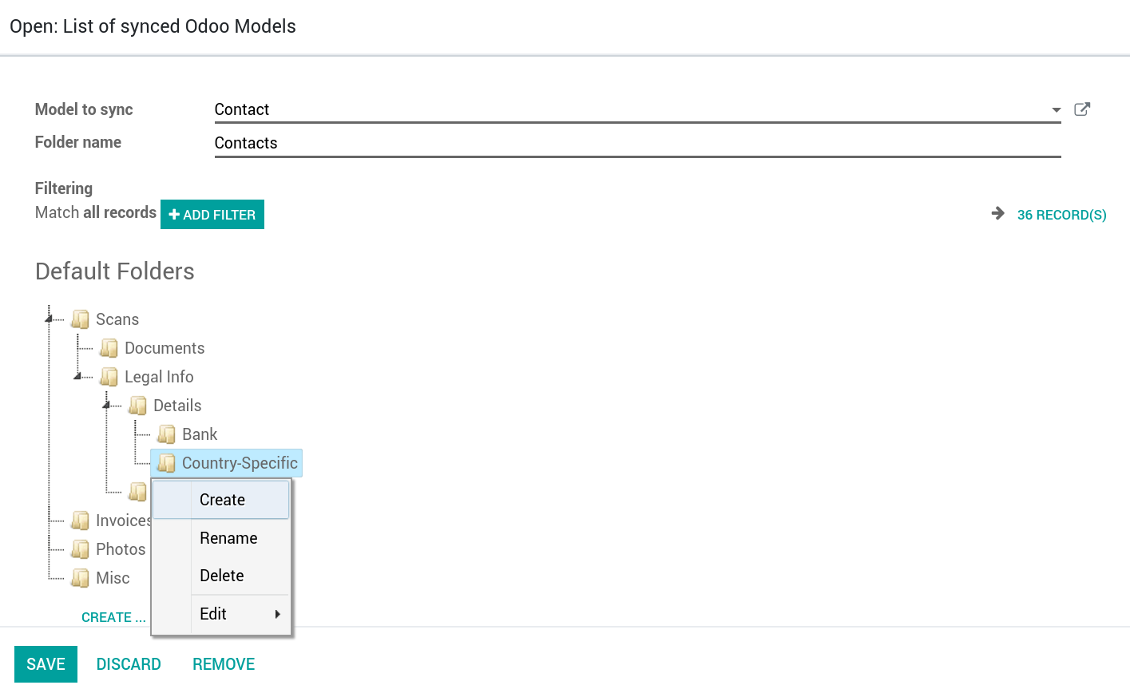
New For each document of this type you may create a default directories' structure. When this folder is firstly synced, Odoo would generate default folders. For example, for all employees you may have pre-defined folders 'Scans', 'Scans/Official', 'Photos', etc.
The tool is compatible with Odoo reporting and mailing apps. If such an app faces a synced file, it retrieves a real content from DropBox. In particular, the reports 'always reload' feature and messages & mass mailing attachments work properly
Integration is based on a single user endpoint. It means that a single user login/password of DropBox is used. Afterwards for integrations Odoo would use that credentials disregarding an actual Odoo user
- Prepare and keep updated folders' structure in DropBox
- Upload new attachments to a correct folder
Odoo creates a convenient directory structure in DropBox: Odoo / Document type name / Document name / Files, where:
- Odoo is a central directory for Odoo Sync in your cloud storage.
- Document type is a synced Odoo model, for example, 'Sale orders', 'Opportunities', 'Customers'
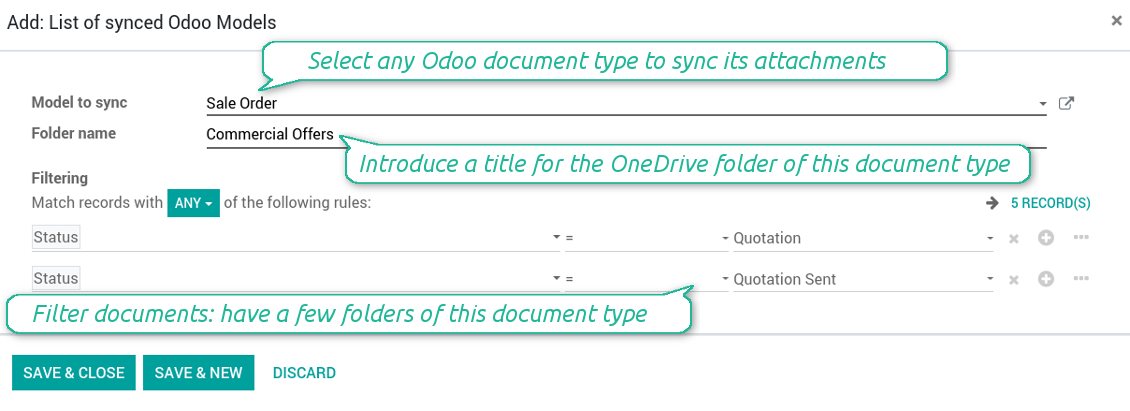
- You select document types by yourself. It might be any document type
- Moreover, you might have a few folders for a single document type. Use Odoo domains to have not global 'Partners, but 'Customers' and 'Suppliers', not just 'Sale orders' but 'Commercial offers', 'To deliver', and 'Done orders'
- With each sync Odoo would try to update document types' folders. Add a new document type at any moment. It will appear in DropBox with a next sync
- You are welcome to introduce or change document types folder names at any moment in Odoo. Take into account: renaming in DropBox will be recovered to Odoo names
- If you remove a model from integration, it will not be deleted from DropBox to keep already synced files safe. However, new documents of this type would not be synced
- In case you removed a directory in DropBox, but it is still configured in Odoo, with a next sync a folder structure is going to be recovered (not files, surely).
- Document is an exact object to sync. For instance, 'Agrolait' or 'SO019'
- Documents are synced in case they relate to a synced document type and satisfy its filters. For example, you are not obliged to sync all partners, you may integrate only 'Customers' and 'Vendors' or only 'Companies', not 'Contacts'
- Odoo would generate a folder in DropBox for each suitable document even for documents without attachments. It is needed for a backward sync to easily add new files
- DropBox folder name equals a real document name. It relies upon Odoo name_get method. Thus, Odoo 'Michael Fletcher' (a contact of 'Agrolait') would be DropBox 'Agrolait, Michael Fletcher'
- If an exact document changes its document type (e.g. a quotation is now confirmed), Odoo will automatically relocate its related folder to a proper parent directory (in the example: from 'Commercial offers' to 'To deliver')
- In case a document relates to a few types (for instance, you have 'Vendors' and 'Customers', while Agrolait is both), this document folder would be put into the most prioritized document type. A document type priority is higher as closer to the top in Odoo interfaces it is
- If an Odoo document is removed, the next sync will remove a corresponding DropBox directory
- In case you remove a directory in DropBox, but it still exists in Odoo, DropBox folder structure would be recovered (while files would be unlinked in both Odoo and DropBox)
- Folders renaming in DropBox will be replaced with Odoo names, Odoo document names are more important
- Files are real files taken from Odoo attachments
The resulted path would be, for example, 'Odoo / Quotations / SO019 / commercial offer.png'.
The only exclusion of the rule are stand alone attachments which do not relate to any Odoo documents (their document type is 'ir.attachment'). Such attachments' path is 'Odoo / Stand Alone Attachments / image.png'.
The direct sync might take quite a long, since a lot of folders should be created. It is not recommended to make sync too frequent: once an hour or two hours is fine.
FilesWith each direct sync, Odoo tries to find not yet synced attachments. If such attachments suit any document type to sync, a file will be uploaded to DropBox to a proper folder. In Odoo such attachments will become of 'url' type (look also at the section DropBox URLs). It means that a file is not any more kept in Odoo server space, but now it is in DropBox. Until sync is done, Odoo attachment remains binary and stores an actual file. Such approach helps Odoo to work faster.
If you unlinked an attachment from Odoo, it would be deleted in DropBox as well.
Take into account that file names should be managed in DropBox: each backward sync would recover DropBox names, Odoo is here less important.
- If a new file is added to a proper document folder (e.g. to 'Odoo / Customers / Agrolait'), the same attachment will be added to Odoo document (in the example - to 'Agrolait')
- In document folders you can put not only files but also child folders. In that case a link for this folder (not its content) is kept in attachments
- In case you rename a file in DropBox, it will be renamed in Odoo as well
- Files' removal from DropBox leads to related Odoo attachments' removal
- If you move a file to another document folder, in Odoo a related attachment would be re-attached to this new document. Take into account: if you move a file for a not document folder, this Odoo attachment will be deleted as it has been removed from DropBox
- If you deleted a document type or document folder, their child files are deleted as well. Thus, Odoo would remove related attachments. The folders, however, will be recovered with a next direct sync. Folders' move to another directory is also considered as a removal. Avoid such situations by following the simple rule: folders are managed mostly by Odoo, files - mostly by DropBox.
Backward DropBox might take quite much time, since each folder should be checked (the more folders, the more time the backward sync requires). It is recommended to make frequency oftener than once an hour or two hours.
DropBox has a specific way to generate links for existing files and folders. In particular, there are no concepts of internal or private URLs. Instead, each DropBox item might get so-called shared URLs. Such shared links are either public or team-only. Moreover, the latter feature is available only for DropBox business account.
This tool relies upon share links' mechanics. It means, that each attachment link is either public (all personal DropBox accounts) or team-only (all business DropBox accounts).
Sometimes it is considered to be not fully safe. Although website URLs will be hardly known by external users, there is a slight chance that they become available as a result of some user actions. Besides, sharing links generation is not super fast and might make a sync process slower. That is why the feature to switch off sharing urls is introduced.
If checked, all DropBox urls in Odoo will be of type https://www.dropbox.com/home/Odoo/[PATH]. Such links will not work in quite a many cases. Thus, if you need to open DropBox files / folders from Odoo, do not switch off the feature 'No links to DropBox from Odoo'.
- Try to avoid the following symbols in folders' and files' names: *, ?, ", ', :, <, >, |, +, %, !, @, \, /,. Direct sync will replace such symbols with '-'. It is done to avoid conflicts with file systems.
This tool is not in conflict with the 'documents' module provided by the Enterprise license. Attachments related to Enterprise folders would be synced as any other files: according to a document they relate to. In the most cases it means they would be linked to stand-alone attachments.
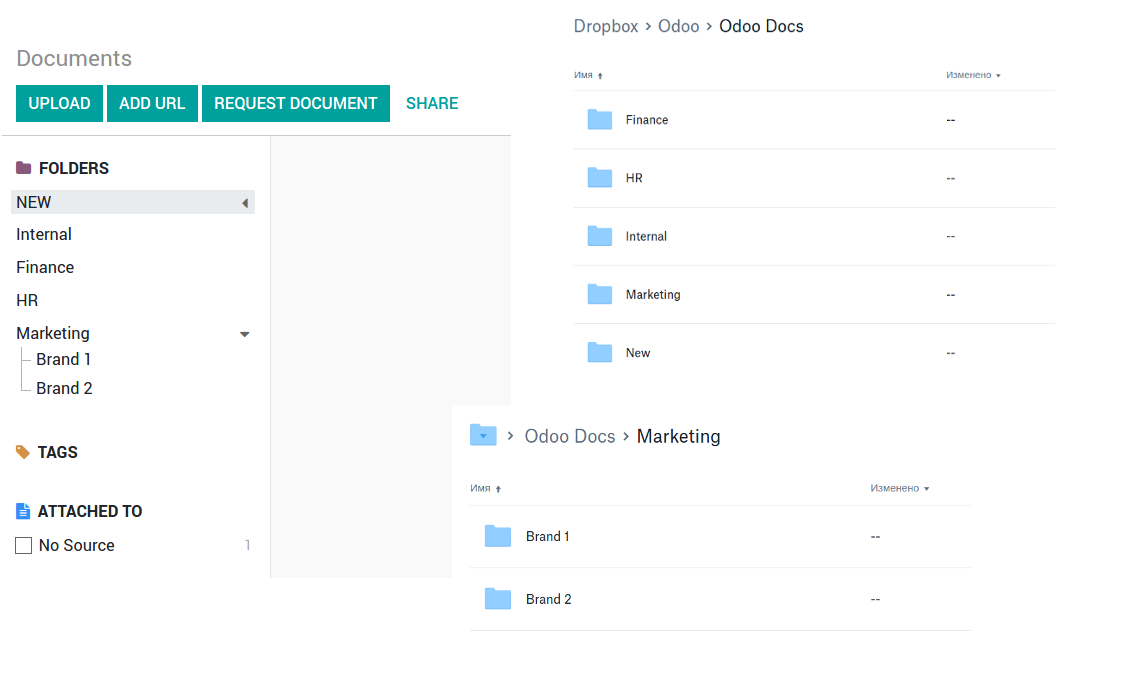
It is not always comfortable, and you might be interested in reflecting directories' structure introduced by the module 'Documents'. To this end the extension Cloud Sync for Enterprise Documents (its standard price is 44 Euros) is developed. This tool has the following features:
- The documents hierarchy is reflected within the folder 'Odoo / Odoo Docs'
- Each Odoo folder has a linked cloud folder. Take into account that folders created in the cloud storage will be synced as Odoo attachments. The key principle is: folders are managed by Odoo, files are managed by the cloud client
- All files are synced with the same logic as usual attachments. Files created in Odoo will be added to the cloud storage and will be replaced with links in Odoo. Files created in cloud storage will generate attachments within a paired directory
- Please do not name synced models as 'Odoo Docs'. This is the reserved name for Odoo Enterprise Documents
Configuration and Login
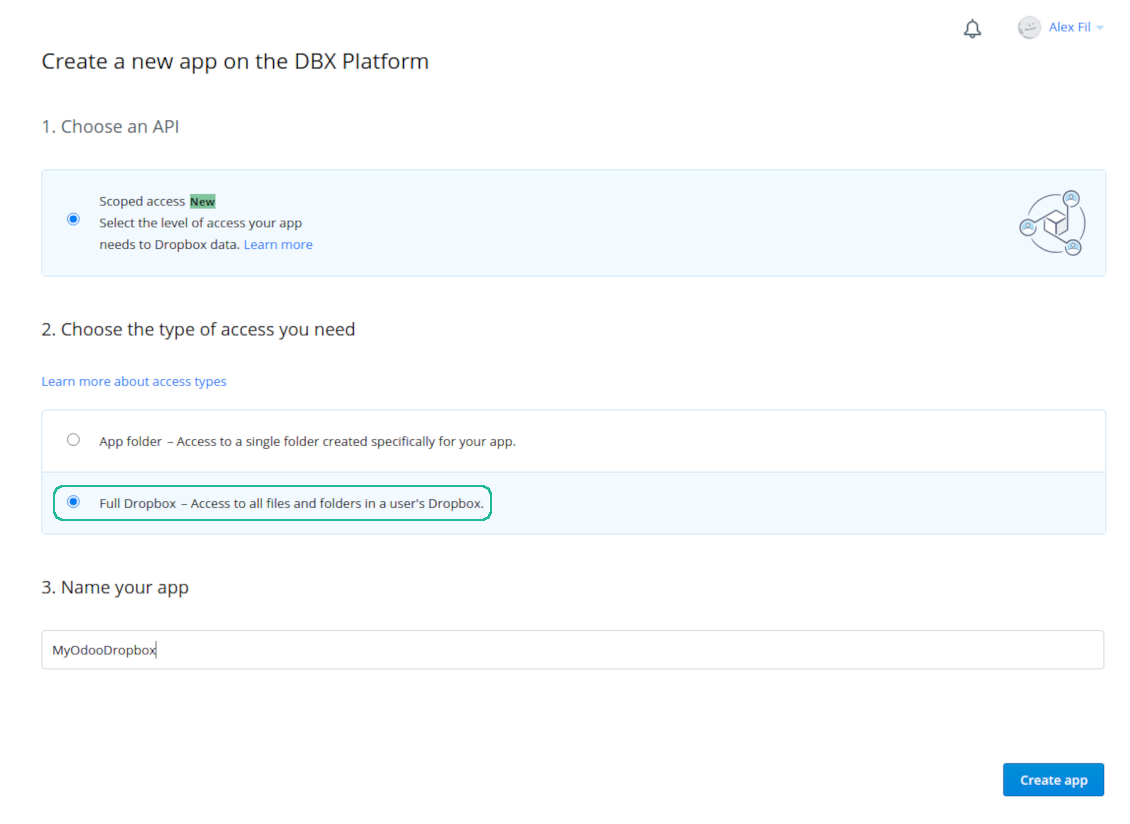
- Follow the url https://www.dropbox.com/developers/apps/create
- Choose an API as 'Scoped access'
- Choose the type of access as 'Full Dropbox'
- Select any suitable name for the app and push the button 'Create app'
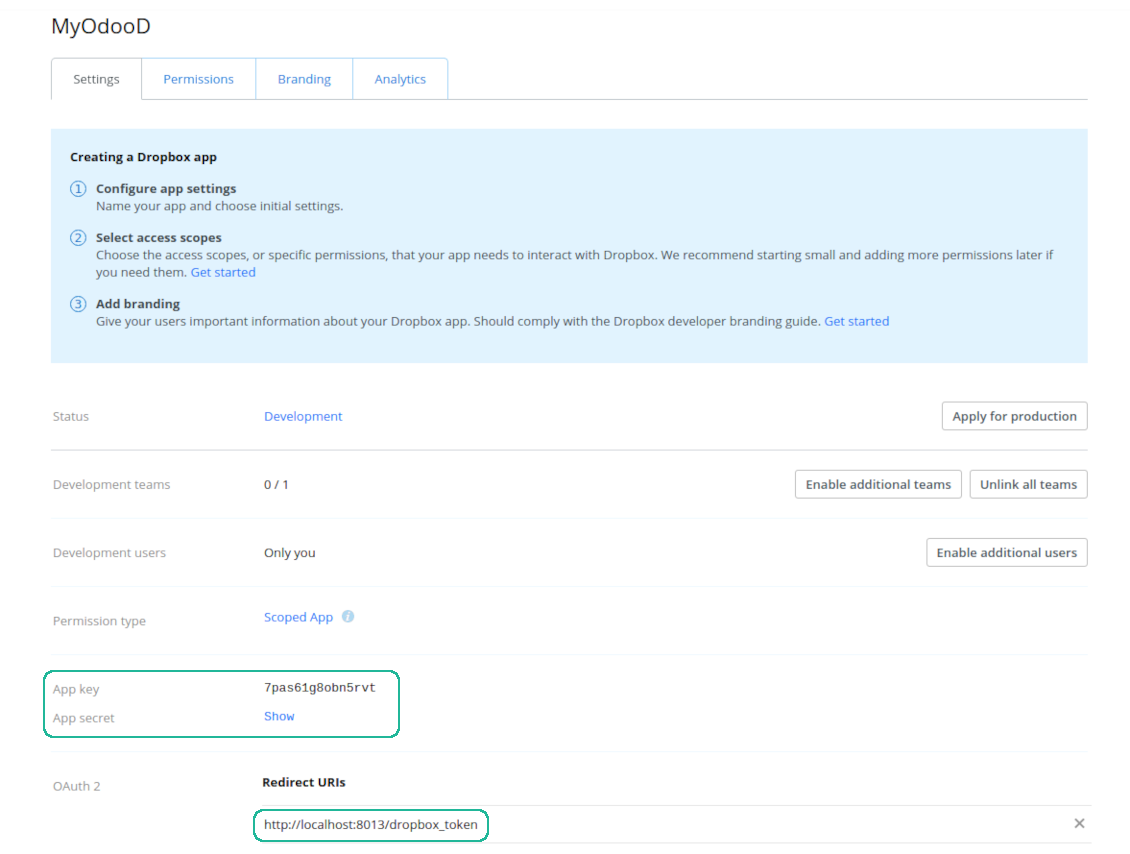
- Add the redirect URI as YOURODOOSITENAME]/dropbox_token (e.g. https://faotools.com/dropbox_token). A valid SSL certificate (https) is required
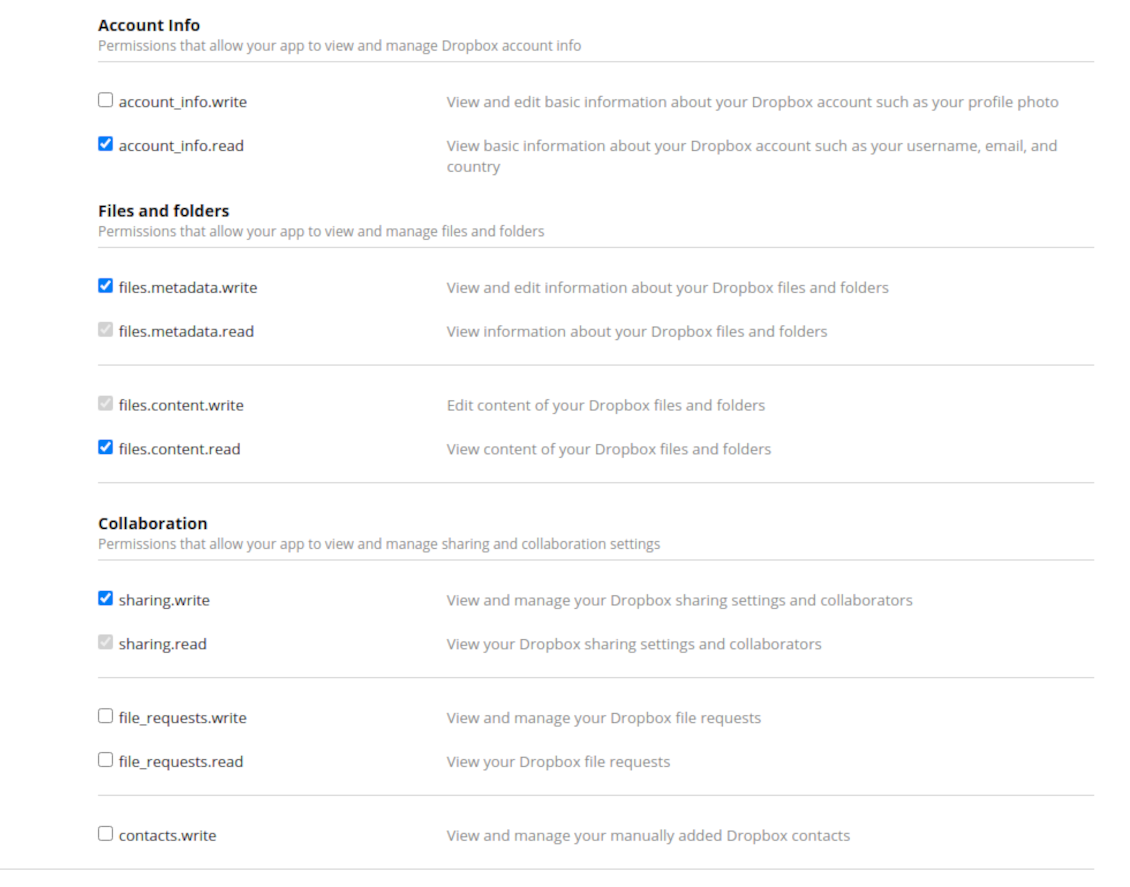
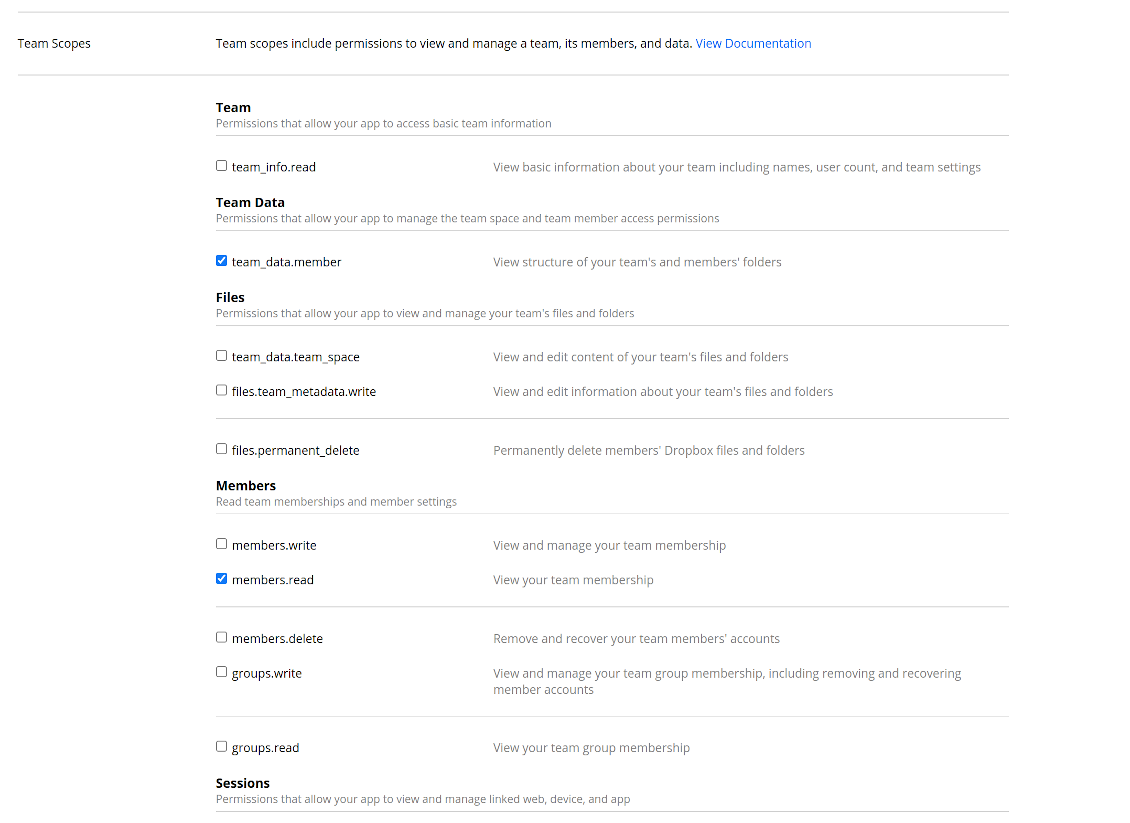
- Grant permissions to the app: 'Account Info (Read)', 'Files and folders Metadata (Write)', 'Files Content (Write)', 'Collaboration (Write)'. For team DropBox assign also 'Team Data Members', 'Members (Read)'. Make sure no other permissions are assigned.
- Submit App
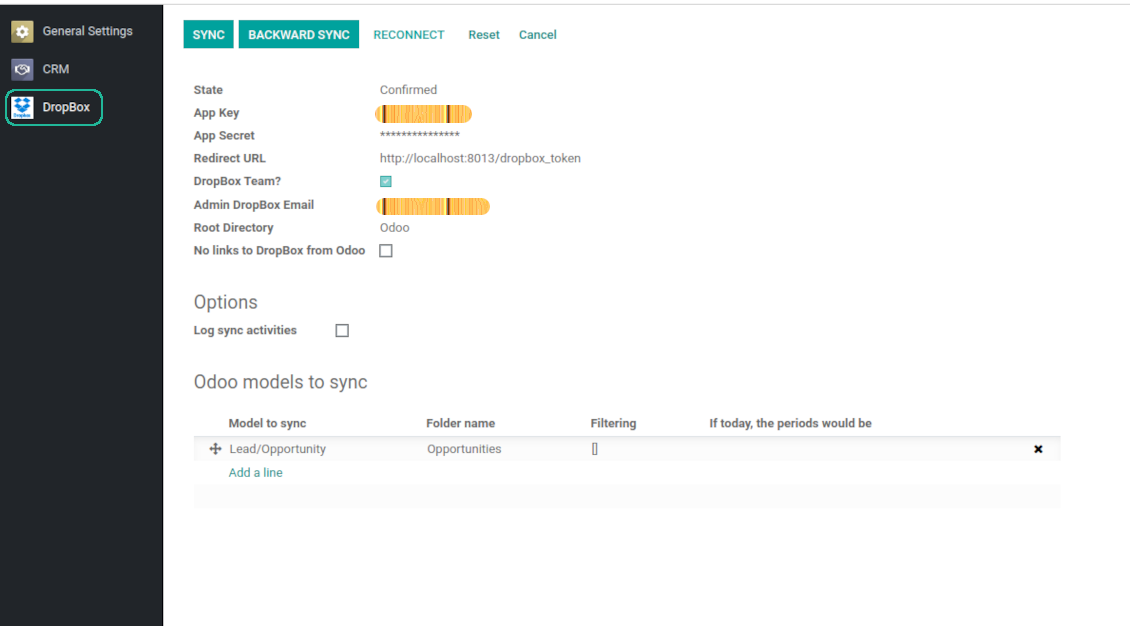
- Go to Odoo general settings - DropBox
- Copy App Key, App secret, and redirect URI to the Odoo configuration page
-
For team DropBoxes only
- Check the box 'DropBox Team'
- Set an email of DropBox user. Inside this user folder all Odoo related items would be created and only after that they are shared to all other users. Under this user all files and folders are created, changed, moved, and deleted
- Choose a suitable name for the root Odoo folder, e.g. 'Odoo' or 'ERP'
- Press Save
- Press 'Login and Confirm'
Create a DropBox app
Set up DropBox App: redirection URL
DropBox permissions for personal accounts
DropBox permissions for business accounts
Set up Odoo for DropBox integration
Odoo server configuration and cron job configuration
To make sure the synchronization works correctly apply proper timeouts to the Odoo configuration file: LIMIT_TIME_CPU, LIMIT_TIME_REAL should be more than 900 seconds.
For Odoo.sh this should not be done, since timeouts are predefined and are not configurable.
Then, timeout should be entered to your Odoo. To that goal find the section 'Settings' on the app configuration page and copy the number there.
Afterwards, it is needed to make the cron jobs suit the applied timeouts. In the debug mode go to the Settings > Technical > Automation > Scheduled Jobs:
- Set up the job 'Synchronize attachments with cloud' as (a) frequency - 2*timeout; (b) the next execution as the next hour +timeout. For example, for 900seconds timeout: frequency - as 30minutes; the next execution - at 08:15
- Set up the job 'Synchronize attachments from cloud' as (a) frequency - 2*timeout; (b) the next execution as the next hour + timeout*2. For example, for 900seconds timeout: frequency - as 30minutes; the next execution- at 08:30.
Често постављана питања о DropBox Odoo Integration Odoo v.12
Могу ли да променим учесталост послова синхронизације?
Да, можете. У ту сврху:
Укључите режим за отклањање грешака
Идите на техничка подешавања > Аутоматизација > Заказани послови
Пронађите послове 'Synchronize attachments with cloud' и 'Update attachments from cloud'.
Не постављајте их превише често. Пожељно је да посао заврши пре него што крене следећи. Подешавање зависи од тога колико ставки треба синхронизовати. Учесталост је обично између 15 минута и 4 сата.
Проверите и да сте у конфигурационом фајлу Odoo поставили довољна временска ограничења. Параметри LIMIT_TIME_CPU и LIMIT_TIME_REAL морају бити једнаки или већи од планираног времена cron посла. Од верзије 13 узмите у обзир и параметар LIMIT_TIME_REAL_CRON.
Важна напомена за клијенте Odoo.sh: максимално време cron посла може бити само 15 минута.
Могу ли да подесим другачију структуру синхронизованих директоријума од оне коју претпоставља синхронизација?
Не, ова функција је доступна тек од верзије 15. Пре те верзије модул ради са унапред дефинисаном структуром фасцикли:
Odoo - главна фасцикла за синхронизацију
Models - фасцикле за сваки тип документа Odoo. На пример, 'Projects', 'Partners'. По домену могу постојати специфичније фасцикле: нпр. 'Customer 1 Projects', 'Projects of the Customer 2', 'Internal Projects' итд.
Objects - фасцикле за сваки документ, нпр. 'Project 1' или 'Customer 1'
Датотеке и фасцикле повезане са овим Odoo документом које треба синхронизовати.
Као резултат можете имати на пример:
Odoo / Projects / Project 1 / датотеке и фасцикле повезане са project 1
Odoo / Customer 1 Projects / Project 1; Odoo / Customer 2 Projects / Project 3, ...
Odoo / Customers / Customer 1 / датотеке и фасцикле повезане са customer 1
Ова структура је увек равна, што значи да постоје само ти нивои хијерархије. Дакле, тачно је да се различити типови докумената не могу држати у истој структури. У фасцикли 'Customer 1' не можемо чувати датотеке повезане и са налозима продаје, и са рачунима, и са пројектима. Сваки од тих типова документа има сопствену фасциклу (или неколико сопствених). Иначе не бисмо могли да урадимо повратну синхронизацију, јер не би било критеријума на који да се ослонимо.
Да ли треба да подесим приступе одређених корисника у Odoo?
Не, алат се ослања на једну корисничку крајњу тачку. Сви процеси синхронизације се обављају под једним cloud администратором (апликацијом). Права приступа за креиране фасцикле / датотеке нису аутоматизована. Та права треба да администрирате у свом решењу за складиштење у облаку.
Где се чувају синхронизована поља? Да ли се дуплирају у Odoo и clouds?
Апликација претпоставља да се бинарни садржај прилога чува у Cloud Client уместо на Odoo серверу. Такви прилози у Odoo постају типа URL и можете им приступити у било ком тренутку из поља прилога или из Cloud Client.
Након подешавања нису потребне ручне радње, јер је синхронизација потпуно аутоматска. Одлучите које типове Odoo докумената треба синхронизовати и подесите повезани модел за сваки од њих (купци, налози за продају или набавку, задаци, пројекти итд.).
Могу ли имати неколико фасцикли за исти тип документа? На пример, интерни пројекти и пројекти купаца?
Да, можете. У ту сврху припремите правило за сваки, а затим примените филтере: на пример по типу пројекта.
Покушајте да филтери буду међусобно искључиви како би се документ могао једнозначно доделити. На пример, „купац али не добављач“, „добављач али не купац“. Иначе би фасцикла одређеног документа скакала с једног модела на други.
Да ли ми треба само апликација Cloud Storage Solution?
Не, алат је само техничко језгро. Потребан вам је и конектор за ваш cloud client.
Да ли је у реду ако имам много објеката за синхронизацију, на пример 10000?
Да, иако код много фасцикли/прилога које треба синхронизовати процес може бити спор. Истовремено, клијенти су пријавили окружења са >10k партнера и ~5k варијанти производа за синхронизацију, а процеси су били прихватљиви.
Неколико тачака за нагласити:
- Синхронизација је направљена тако да свака ставка буде синхронизована и да се не изгуби, иако можда није брза. То гарантују FIFO редови и сваки посао који се потврди.
- Број објеката може се логички ограничити. Конфигурација модела омогућава ограничење синхронизације застарелих ставки (нпр. нема смисла синхронизовати архивиране партнере или налоге од пре 2 године).
Да ли је могуће да синхронизација буде у реалном времену?
Не. Имамо озбиљне разлоге да избегавамо синхронизацију у реалном времену:
Проблеми перформанси. Ако је синхронизација у реалном времену, свако отпремање датотеке ће приказати екран учитавања.
Проблеми сукоба. Ако 2 корисника истовремено измене ставку, то може довести до нерешених ситуација. Код редовних послова то можемо исправити накнадно, а у реалном времену морали бисмо то чувати као ред, што би кориснике још више збуњивало.
Проблеми функционалности. Посебно преименовање и реструктурирање ставки. У повратној синхронизацији алат се строго ослања на логику директоријума и при свакој синхронизацији проверава се 100% ставки. Ако се то ради после сваког ажурирања, биће хиљаде захтева у секунди. Ако не: измене би биле изгубљене.
Могу ли да синхронизујем прилоге са неколико cloud клијената
Не, ова функција је доступна тек од верзије 15.
У нашим облацима користимо посебан уређивач (нпр. OnlyOffice, Office 365 итд.). Да ли би се датотеке отварале у том уређивачу?
Да, у зависности од конфигурације cloud client.
Које су политике ажурирања ваших алата?
Према важећим правилима Odoo Apps Store:
- Сваки модул купљен за верзију 12.0 и старију даје приступ свим верзијама до 12.0.
- Од верзије 13.0 свака верзија модула се купује засебно.
- Без обзира на верзију, куповина даје право на сва ажурирања и исправке у оквиру главне верзије.
Имајте у виду да тим faOtools не контролише та правила. За питања обратите се директно представницима Odoo Apps Store.
Како могу инсталирати вашу апликацију на Odoo.sh?
Најдиректнији приступ је да користите уграђени ток рада Odoo продавнице:
1. Отворите страницу модула и кликните дугме Deploy on odoo.sh
2. Након тога бићете преусмерени на GitHub страницу. Пријавите се на налог, затим кликните 'Create a new repo' или користите постојећи. Проверите да је спремиште приватно. Није дозвољено објављивати апликације под лиценцом OPL-1. Ако треба, направите нови repo за Odoo.sh пројекат
3. Затим идите на odoo.sh и кликните дугме Deploy. У искачућем прозору пошаљите одлуку и кликните 'Continue.' Ова радња покреће инсталацију.
Ови кораци ће инсталирати апликацију на продукциону грану пројекта. Ако желите да примените апликације на друге гране или да ажурирате модул, урадите следеће:
1. Отпремите изворни код апликације из Odoo продавнице
2. Урадите commit модула у потребно GitHub спремиште. Проверите да ниједна фасцикла/датотека апликације није игнорисана (тј. није у .gitignore репоа). Спремишта аутоматски прави odoo.sh и могу подразумевано садржати важне ставке (нпр. /lib). Отпремите све директоријуме, поддиректоријуме и датотеке модула без изузетака
3. Примените циљну грану odoo.sh пројекта или, ако то претпостављају подешавања, сачекајте да се аутоматски изгради.
Како да инсталирам вашу апликацију на сопствени сервер?
2. Поново покрените Odoo сервер;
3. Укључите режим програмера (техничка подешавања);
4. Ажурирајте листу апликација (мени апликација);
5. Пронађите апликацију и притисните „Activate“/„Install“;
6. Пратите смернице на страници апликације ако постоје.
Приметио сам да ваша апликација има додатне додатке. Могу ли их купити накнадно?
Да, наравно. Истовремено Odoo аутоматски додаје све зависности у корпу, па треба искључити већ купљене алате да не платите двапут.
Поставио сам вашу апликацију на Odoo.sh и у тестовима видим упозорење/грешку
Црвено/наранџасто упозорење не утиче на функције апликације. Нажалост, наши модули понекад не прођу стандардне аутоматске тестове јер они претпостављају понашање које је у сукобу са циљевима апликације. На пример, мењамо обрачун цене, а тестови стандардног Odoo модула упоређују коначну цену са стандардним алгоритмом.
Пре свега проверите функције постављене базе. Да ли све ради исправно?
Ако и даље сматрате да упозорење утиче на стварне функције, контактирајте нас и пошаљите потпуне дневнике инсталације и потпун списак постављених модула (укључујући језгро и треће стране).
Могу ли да купим апликацију директно од ваше компаније?
Не, алате дистрибуирамо само преко званичне продавнице апликација Odoo.
Желео бих да добијем попуст
Нажалост, немамо техничких средстава да понудимо појединачне цене.
Могу ли да инсталирам апликацију на своју Odoo Online (SaaS) базу?
Не, апликације трећих страна не могу се користити на Odoo Online. Нажалост Odoo SaaS то блокира.
Ваш алат зависи од других апликација. Треба ли да их купим?
Да, алату су потребни сви модули наведени у зависностима да би радио исправно. Цена на страници апликације већ укључује све потребне зависности.
Која је цена модула у америчким доларима? Зашто се променила?
Цена наших модула је у еврима. Odoo продавница прерачунава цене у друге валуте по свом интерном курсу. Зато се цена у америчким доларима може променити кад се курс ажурира.
Текстови апликације и сајта на језицима осим енглеског рађени су уз помоћ ВИ и усклађени са званичним Odoo преводима. Ако уочите грешку, пошаљите тикет о исправности превода и исправићемо.
Пријављивање грешака
Ако наиђете на грешке или недоследно понашање, слободно нас контактирајте. Гарантујемо исправке у року од 60 дана од куповине и веома смо заинтересовани да унапређујемо алате и после тог периода.
Да нас контактирате није потребан број телефона ни кредитна картица. Довољна је кратка регистрација е-поштом која не траје више од 30 секунди.
У захтев укључите што више детаља: снимке екрана, дневнике Odoo сервера, пун опис како поновити проблем и тако даље. Обично треба неколико радних дана да се припреми радни план (ако је грешка потврђена) или смернице шта треба урадити (у супротном).
Јавни захтеви за функције и идеје модула (бесплатан развој)
Снажно смо мотивисани да побољшамо своје алате и били бисмо захвални на свакој повратној информацији. Ако су ваши захтеви од јавне користи и могу се ефикасно спровести, тим ће их укључити у нашу листу задатака.
Таква листа задатака се обрађује редовно и не подразумева додатне накнаде. Иако не можемо обећати рокове и коначан дизајн, то може бити добар начин да добијете жељене функције без улагања и ризика.
Да нас контактирате није потребан број телефона ни кредитна картица. Довољна је кратка регистрација е-поштом која не траје више од 30 секунди.

Алат за безбедно чување лозинки у Odoo за заједничку употребу. Дељени трезори

Алат за изградњу дубоке и структурисане базе знања за интерну и екстерну употребу. Knowledge System. KMS. Ревизије као на викију.
398€
Алат за постављање KPI циљева и контролу њиховог испуњења по периодима. KPI контролне табле. Дизајнер табли. KPI графикони

Алат за управљање услугама засновано на времену, од резервације термина до продаје и рецензија
398€
Алат за управљање Odoo из омиљених AI ћаскања преко MCP. Claude. Било који AI који подржава MCP.

Алат за флексибилно слагање прилога Odoo у фасцикле и синхронизацију директоријума са cloud клијентима: Google Drive, OneDrive/SharePoint, Nextcloud/ownCloud, Dropbox, Amazon S3, Box и NAS. DMS. Менаџер датотека. Систем за управљање документима
398€
Алат за аутоматску двосмерну синхронизацију прилога Odoo са датотекама OneDrive
487€
Алат за аутоматску двосмерну синхронизацију прилога Odoo са датотекама Google Drive
487€
Алат за аутоматску двосмерну синхронизацију прилога Odoo са датотекама ownCloud/Nextcloud
487€