Pe scurt
Odoo Email From este o aplicație Odoo 18 Mesagerie. The tool to flexibly administer email From and Reply-To addresses. Custom email from.
Odoo Email From controls which From and Reply-To address is used for every outgoing email, without exposing addresses your outgoing mail server does not support. Maintain a managed address list, each locked to one outgoing server, pick those addresses in the composer and on email templates, and define metadata rules that choose the right sender for a given model and record. The module replaces Odoo's free-text Send From / Reply To controls with managed pickers and fills the native template and sending fields behind the scenes, so you do not configure the same metadata twice.
Ideal pentru
Multi-brand and multi-department companies
Perfect for organizations that need different From/Reply-To addresses per brand, department or sales team, without letting every user type in an arbitrary address.
Companies using several outgoing mail servers
Ideal when different SMTP relays or providers are configured in Odoo and each sender address must only ever go out through its matching server.
Teams wanting automated sender selection
Useful for automating which address is used for a given document type or business scenario, instead of relying on users to remember and pick the right one every time.
De ce îl aleg echipele
Beneficii cheie înainte de detalii
Managed address book
Maintain the allowed From and Reply-To addresses, each linked to the outgoing mail server that actually supports it.
From and Reply-To in the composer
Let users choose an approved sender straight in the full composer instead of free-typing an address.
Template sender addresses
Set a managed From/Reply-To on mail templates and apply it automatically whenever the template runs.
Metadata rules
Pick the sender automatically by document type and domain filter, with optional priority over template defaults.
Matching outgoing server
Every address is tied to one outgoing server, and the server field is hidden when a single server is configured.
Enforced consistency
An XML domain plus a Python check block mismatched address and server pairs, even when sending through the API.
Gata de evaluare?
Începeți cu o cerere de demonstrație gratuită sau cumpărați din Odoo Apps Store.
Bază demo personalizată gratuită. Nu este necesar număr de telefon sau card de credit. Actualizări gratuite pe viață și asistență de specialitate pe durata versiunii majore Odoo.
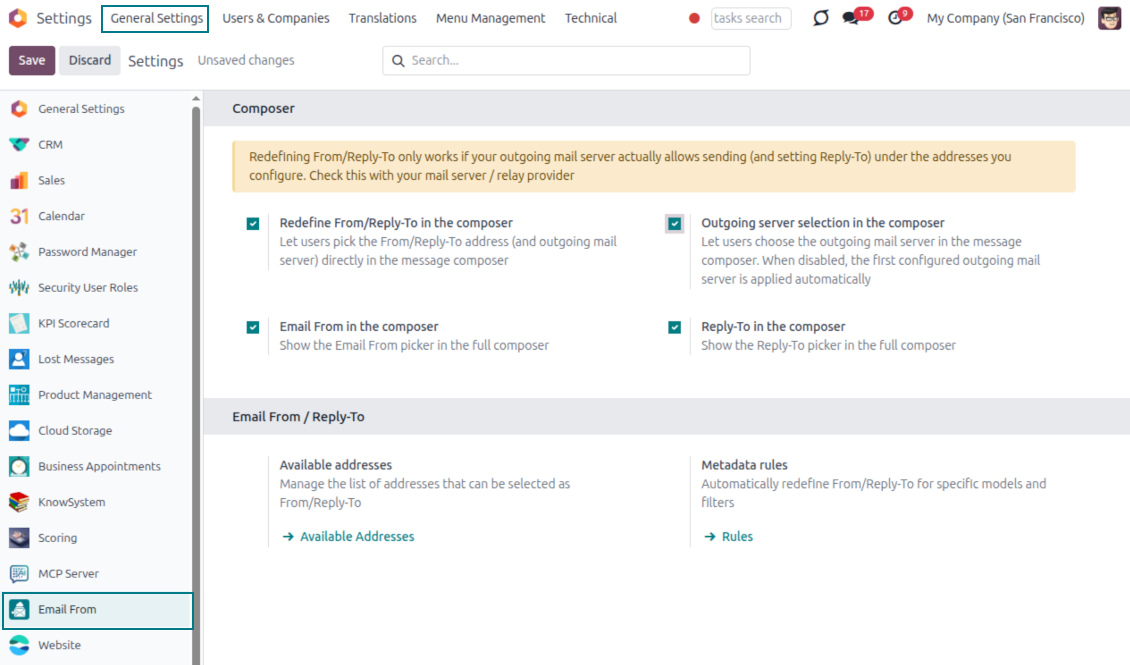
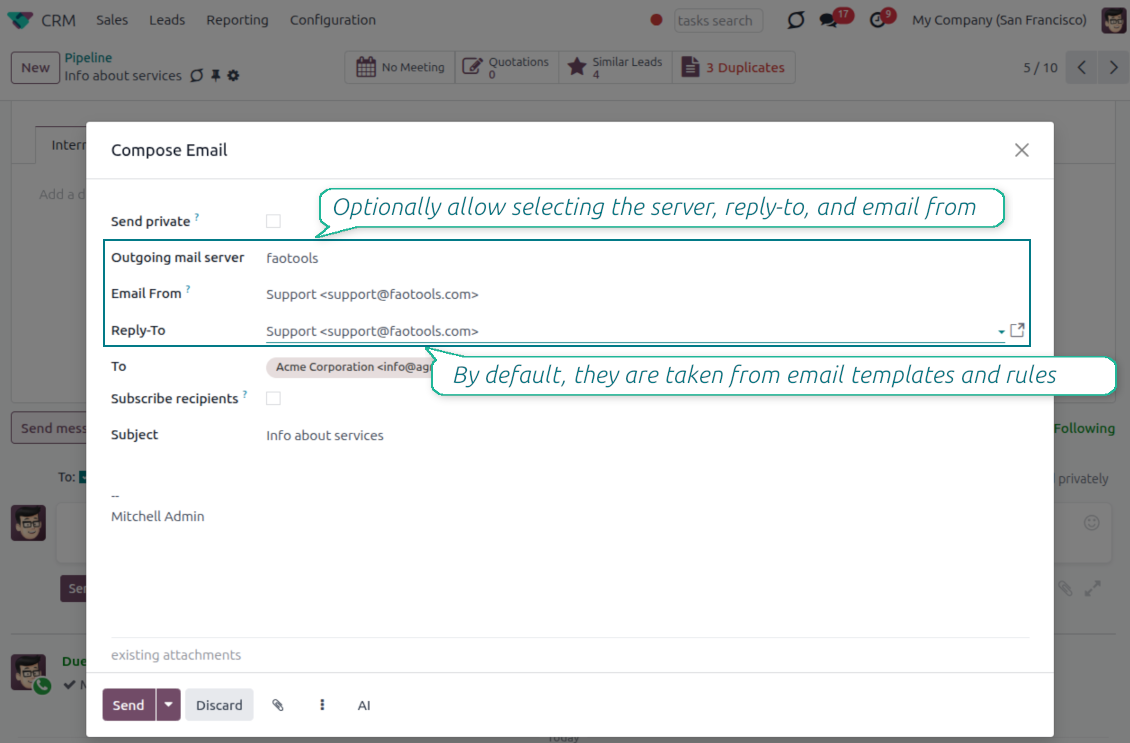
Pick the From and Reply-To in the composer
Managed address pickers instead of typing Send From / Reply To by hand
Choose, do not type
- Turn the pickers on from Settings. Enable the Email From and Reply-To pickers in the full composer from the Email From settings.
- Select an approved address. Users pick a From or Reply-To from the managed list, and the composer fills the real sender values for them.
- Force replies where you want them. Choosing a Reply-To also routes future replies to that address.
Smart outgoing-server handling
- Server set for you. The outgoing mail server matching the chosen address is selected automatically.
- Hidden when there is only one. With a single server configured, the server field is hidden and applied silently.
- Filtered when there are several. With multiple servers, the picker only offers addresses that match the selected server.
One managed address book behind every email
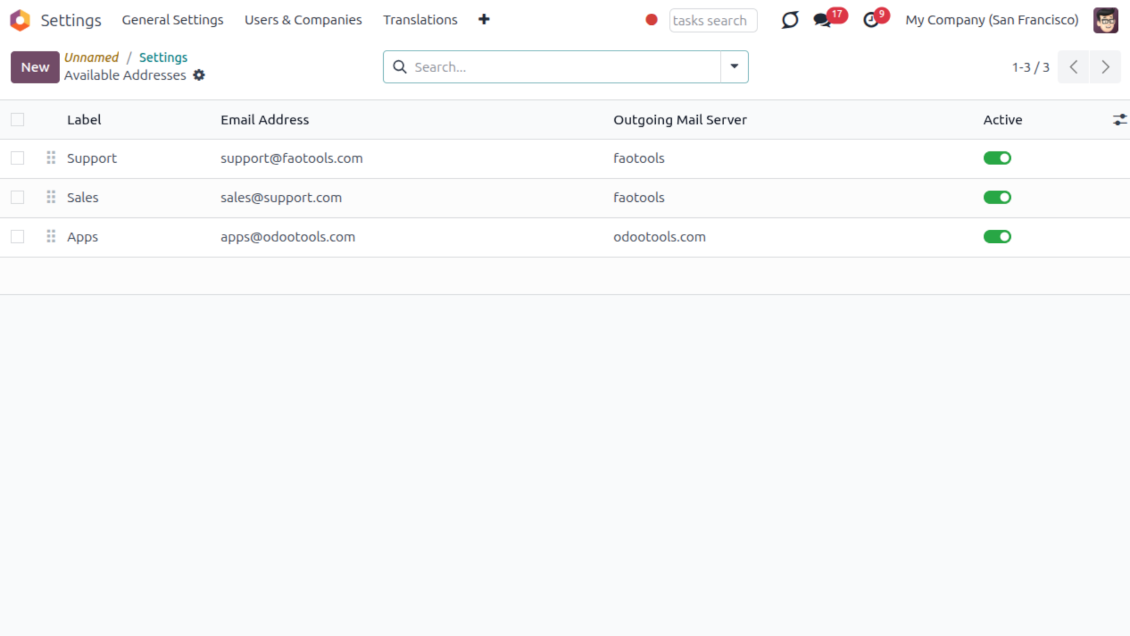
One address list for From and Reply-To; each address already knows its outgoing server
One place to define addresses
- Label every sender clearly. Give each address a name and email, for example Support or Sales, so users recognize it instantly.
- Order and scope the list. Sequence the addresses, archive the ones you retire, and keep them per company.
- Feed the whole module. The same list powers the composer, email templates and metadata rules, so nothing is ever free-typed.
Locked to the right server
- One address, one server. Each address is tied to exactly one outgoing mail server it is allowed to send through.
- No wrong pairings. An address can never be combined with, or sent through, another server by mistake.
- Provider support stays your job. Make sure your relay actually allows sending under each address you add; the module enforces the consistency inside Odoo.
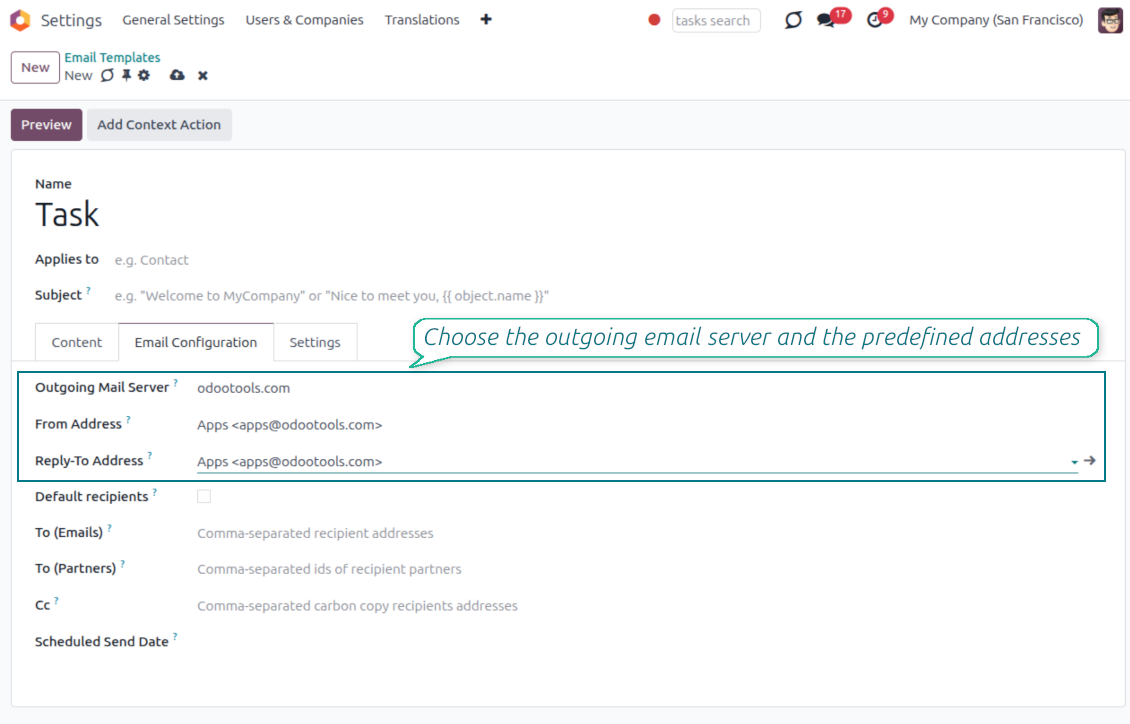
Managed Send From and Reply To on email templates
Replace Odoo's free-text template fields with the same managed address pickers
Set it once on the template
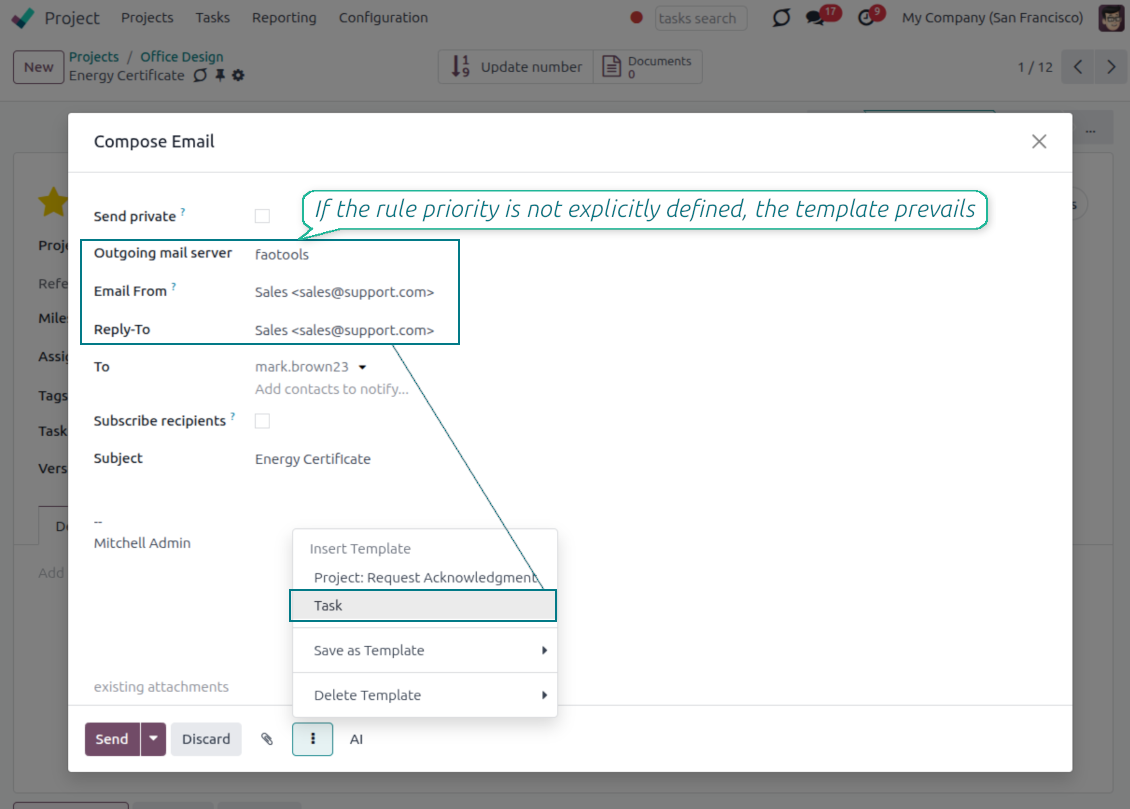
- Pick a managed address. Choose the From and Reply-To of any mail template from the same approved address list.
- Populate the native fields. Your selection fills the template Send From and Reply-To values, so no core behavior is bypassed.
- Keep the server tidy. The outgoing server field stays read-only when a single server is configured.
Applied everywhere the template runs
- Consistent across channels. The template address is used in the composer, automated actions and any flow that sends the template.
- No reselection needed. Once set on the template, the correct sender is applied every time without user input.
- Same safety guarantees. Template addresses obey the same address and outgoing-server matching as the composer.
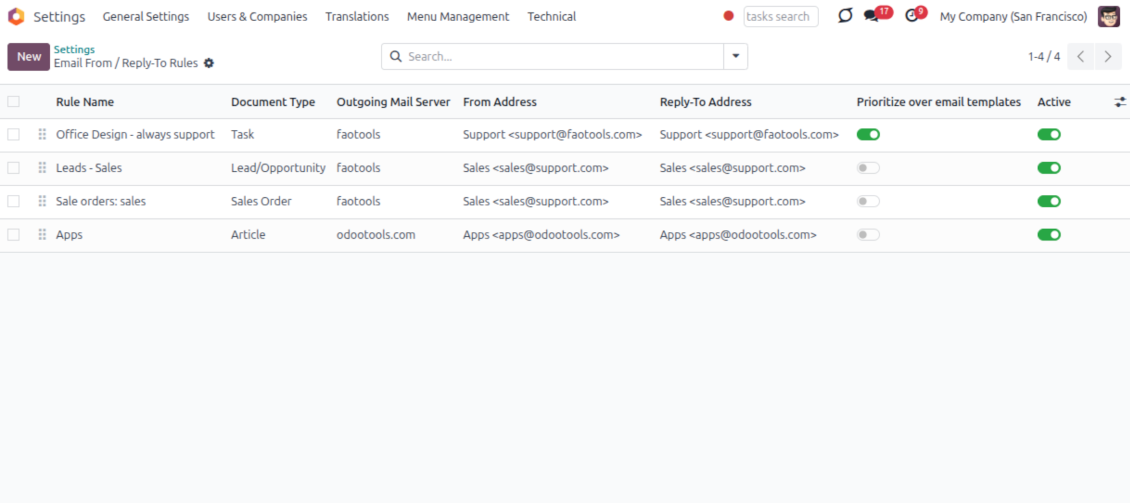
Automatic sender selection with metadata rules
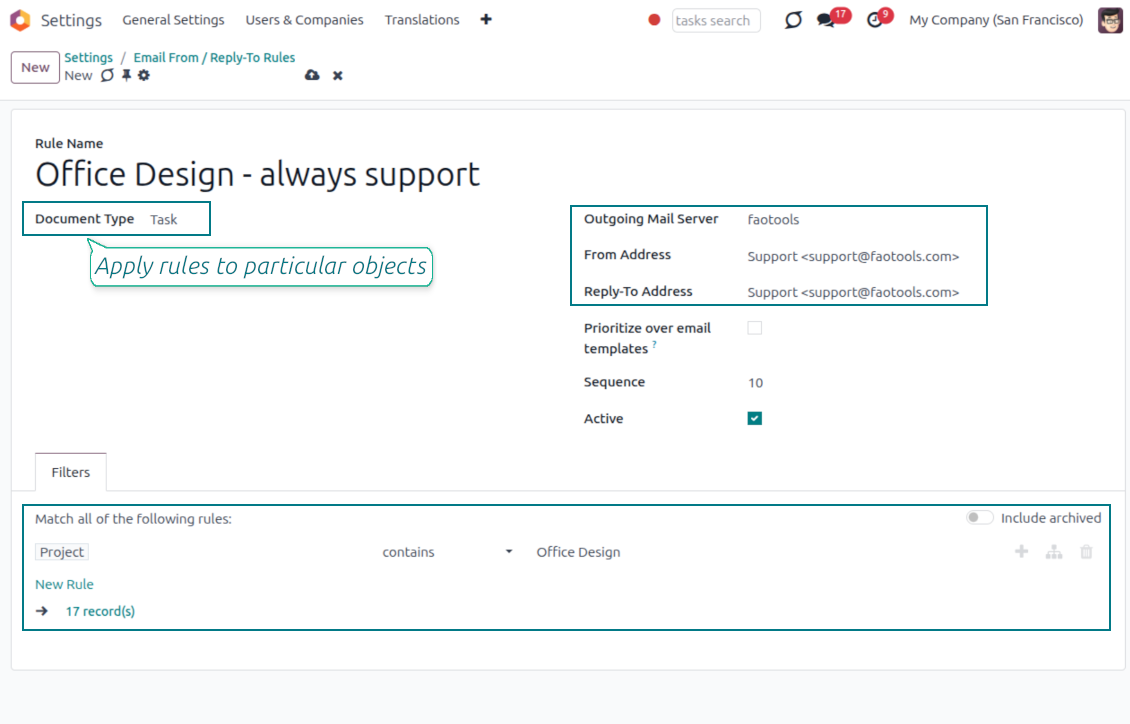
Choose the right From/Reply-To by document type and filter, with no manual step
Match by model and filter
- Rules per document type. Define which sender to use for a model, for example sales orders, invoices or leads.
- Narrow with a domain. Add a filter so a rule only fires for matching records, such as a given sales team or customer segment.
- First match resolves everything. The winning rule sets the From, the Reply-To and the matching outgoing server together.
You control the priority
- Templates win by default. When a mail template already defines a sender, the template value is kept.
- Flip it when you need to. Enable Prioritize over templates and the rule takes precedence over the template default.
- Hands-off in the composer. The resolved sender is applied automatically, so users never have to remember the right address.
Keep sending safe and deliverable
Why managed addresses matter and how mismatches are blocked
Why letting anyone type an address is risky
- Providers only trust known senders. Most mail providers reject or mark as spam any message sent from an address they do not recognize.
- Failures can happen quietly. If anyone can type any From or Reply-To address, a message can fail to arrive without a clear warning in Odoo.
- Only approved addresses are offered. The composer, templates and rules only let you choose from the addresses you have already configured.
Mismatches are caught automatically
- Wrong pairings stay out of view. You can only pick an address together with the outgoing mail server it is actually linked to.
- Sending is blocked if something doesn't match. Even automated emails or connected apps cannot bypass this check.
- You still confirm support with your provider. Make sure your outgoing mail server allows sending under each address you add, usually through a matching sender filter or verification step.
Întrebări frecvente despre Odoo Email From Odoo v.18
Care sunt politicile de actualizare ale instrumentelor dvs.?
Conform politicilor actuale Odoo Apps Store:
- Fiecare modul cumpărat pentru versiunea 12.0 și anterioară dă acces la toate versiunile până la 12.0.
- Începând cu versiunea 13.0, fiecare versiune de modul se cumpără separat.
- Indiferent de versiune, cumpărarea dă dreptul la toate actualizările și corecturile dintr-o versiune majoră.
Rețineți că echipa faOtools nu controlează aceste politici. Pentru întrebări contactați direct reprezentanții Odoo Apps Store.
Cum instalez aplicația dumneavoastră pe Odoo.sh?
Cea mai directă abordare este să folosiți fluxul încorporat al magazinului Odoo:
1. Deschideți pagina modulului și faceți clic pe butonul Deploy on odoo.sh
2. După aceea veți fi redirecționat la pagina GitHub. Conectați-vă la cont, apoi faceți clic pe 'Create a new repo' sau folosiți unul existent. Asigurați-vă că depozitul este privat. Nu este permisă publicarea aplicațiilor sub licența OPL-1. Dacă e necesar, creați un repo nou pentru proiectul Odoo.sh
3. Apoi mergeți la odoo.sh și faceți clic pe butonul Deploy. În fereastra pop-up trimiteți decizia și faceți clic pe 'Continue.' Această acțiune pornește instalarea.
Acești pași vor instala aplicația pe ramură de producție a proiectului. Dacă doriți să implementați aplicațiile pe alte ramuri sau să actualizați modulul, urmați acțiunile de mai jos:
1. Încărcați codul sursă al aplicației din magazinul Odoo
2. Faceți commit modulului în depozitul GitHub necesar. Asigurați-vă că niciun folder/fișier al aplicației nu este ignorat (adică nu este în .gitignore al repo-ului). Depozitele sunt create automat de odoo.sh și pot include implicit elemente esențiale (de ex. /lib). Încărcați toate directoarele, subdirectoarele și fișierele modulului, fără excepții
3. Implementați ramură țintă a proiectului odoo.sh sau, dacă setările presupun asta, așteptați până este construită automat.
Cum instalez aplicația dumneavoastră pe propriul server?
2. Reporniți serverul Odoo;
3. Activați modul dezvoltator (setări tehnice);
4. Actualizați lista de aplicații (meniul aplicațiilor);
5. Găsiți aplicația și apăsați „Activate”/„Install”;
6. Urmați ghidurile de pe pagina aplicației, dacă există.
Am observat că aplicația are extensii extra. Le pot cumpăra ulterior?
Da, desigur. Totodată Odoo adaugă automat toate dependențele în coș, deci trebuie să excludeți instrumentele deja cumpărate ca să evitați plată dublă.
Am implementat aplicația pe Odoo.sh și văd avertisment/eroare în teste
Un avertisment roșu/portocaliu nu influențează funcțiile aplicației. Din păcate, modulele noastre nu trec uneori testele automate standard, deoarece acestea presupun un comportament în conflict cu obiectivele aplicației. De exemplu, schimbăm calculul prețului, iar testele modulului Odoo standard compară prețul final cu un algoritm standard.
În primul rând, verificați funcțiile bazei implementate. Totul funcționează corect?
Dacă tot credeți că avertismentul afectează funcții reale, contactați-ne și trimiteți jurnalele complete de instalare și lista completă a modulelor implementate (inclusiv nucleu și terțe părți).
Pot cumpăra aplicația direct de la compania dvs.?
Nu, distribuim instrumentele doar prin magazinul oficial de aplicații Odoo.
Aș dori să primesc o reducere
Din păcate, nu avem mijloace tehnice pentru a oferi prețuri individuale.
Pot instala aplicația pe baza mea Odoo Online (SaaS)?
Nu, aplicațiile terțe nu pot fi folosite pe Odoo Online. Din păcate Odoo SaaS blochează această posibilitate.
Instrumentul dvs. are dependențe de alte aplicații. Trebuie să le cumpăr?
Da, instrumentul necesită toate modulele marcate în dependențe pentru a funcționa corect. Prețul de pe pagina aplicației include deja toate dependențele necesare.
Care este prețul modulului în dolari SUA? De ce s-a schimbat?
Prețul modulelor noastre este în euro. Magazinul Odoo convertește prețurile în alte monede după cursul intern. Astfel, prețul în dolari SUA se poate schimba când se actualizează cursul.
Textele aplicației și ale site-ului în alte limbi decât engleza sunt asistate de IA și aliniate cu traducerile oficiale Odoo. Dacă observați o greșeală, trimiteți un tichet de corectitudine a traducerilor și o vom corectă.
Baze de demonstrație Odoo (previzualizări live)
Pentru această aplicație putem oferi o bază demo personalizată gratuită.
Nu aveți nevoie de număr de telefon sau card de credit pentru a ne contacta. Este suficientă o înscriere scurtă prin e-mail, care nu durează mai mult de 30 de secunde.
La cererea dvs. pregătim o bază individuală de previzualizare live, unde puteți aplică teste și verifica ipoteze timp de aproximativ două săptămâni.
Raportarea erorilor
Dacă întâmpinați erori sau comportament inconsecvent, nu ezitați să ne contactați. Garantăm corecturi în 60 de zile de la cumpărare și suntem interesați să îmbunătățim instrumentele și după această perioadă.
Nu aveți nevoie de număr de telefon sau card de credit pentru a ne contacta. Este suficientă o înscriere scurtă prin e-mail, care nu durează mai mult de 30 de secunde.
Includeți cât mai multe detalii în cerere: capturi de ecran, jurnalele serverului Odoo, o descriere completă a reproducerii problemei și așa mai departe. De obicei, durează câteva zile lucrătoare pentru a pregăti un plan de lucru (dacă un defect este confirmat) sau pentru a vă oferi indicații despre ce trebuie făcut (în caz contrar).
Cereri publice de funcții și idei de module (dezvoltare gratuită)
Suntem puternic motivați să ne îmbunătățim instrumentele și am fi recunoscători pentru orice feedback. Dacă cerințele dvs. sunt de interes public și pot fi implementate eficient, echipa le va include în lista noastră de sarcini.
O astfel de listă de sarcini este prelucrată regulat și nu presupune taxe suplimentare. Deși nu putem promite termene și un design final, poate fi o cale bună de a obține funcțiile dorite fără investiții și riscuri.
Nu aveți nevoie de număr de telefon sau card de credit pentru a ne contacta. Este suficientă o înscriere scurtă prin e-mail, care nu durează mai mult de 30 de secunde.

Instrumentul pentru a structura flexibil atașamentele Odoo în foldere și a sincroniza directoarele cu clienți cloud: Google Drive, OneDrive/SharePoint, Nextcloud/ownCloud, Dropbox, Amazon S3, Box și NAS. DMS. Manager de fișiere. Sistem de gestiune a documentelor
398€

The tool to build a deep and structured knowledge base for internal and external use. Knowledge System. KMS. Wiki-like revisions.
398€
The tool to automatically synchronize Odoo attachments with OneDrive files in both ways
487€
The tool to set up KPI targets and control their fulfillment by periods. KPI dashboards. Dashboard designer. KPI charts

The tool to automatically synchronize Odoo attachments with Google Drive files in both ways
487€
The tool for time-based service management from booking appointments to sales and reviews
398€