Krótki
Odoo Email From to aplikacja Odoo 18 (Dyskusje). The tool to flexibly administer email From and Reply-To addresses. Custom email from.
Odoo Email From controls which From and Reply-To address is used for every outgoing email, without exposing addresses your outgoing mail server does not support. Maintain a managed address list, each locked to one outgoing server, pick those addresses in the composer and on email templates, and define metadata rules that choose the right sender for a given model and record. The module replaces Odoo's free-text Send From / Reply To controls with managed pickers and fills the native template and sending fields behind the scenes, so you do not configure the same metadata twice.
Doskonały
Multi-brand and multi-department companies
Perfect for organizations that need different From/Reply-To addresses per brand, department or sales team, without letting every user type in an arbitrary address.
Companies using several outgoing mail servers
Ideal when different SMTP relays or providers are configured in Odoo and each sender address must only ever go out through its matching server.
Teams wanting automated sender selection
Useful for automating which address is used for a given document type or business scenario, instead of relying on users to remember and pick the right one every time.
Dlaczego zespoły to wybierają
Kluczowe korzyści zanim zagłębisz się w szczegóły
Managed address book
Maintain the allowed From and Reply-To addresses, each linked to the outgoing mail server that actually supports it.
From and Reply-To in the composer
Let users choose an approved sender straight in the full composer instead of free-typing an address.
Template sender addresses
Set a managed From/Reply-To on mail templates and apply it automatically whenever the template runs.
Metadata rules
Pick the sender automatically by document type and domain filter, with optional priority over template defaults.
Matching outgoing server
Every address is tied to one outgoing server, and the server field is hidden when a single server is configured.
Enforced consistency
An XML domain plus a Python check block mismatched address and server pairs, even when sending through the API.
Gotowy do oceny?
Zacznij od bezpłatnego zgłoszenia demo lub kup w Odoo Apps Store.
Bezpłatna spersonalizowaną baza demo. Nie potrzeba telefonu ani karty. Bezpłatne aktualizacje dożywotnio i wsparcie ekspertów w ramach głównej wersji Odoo.
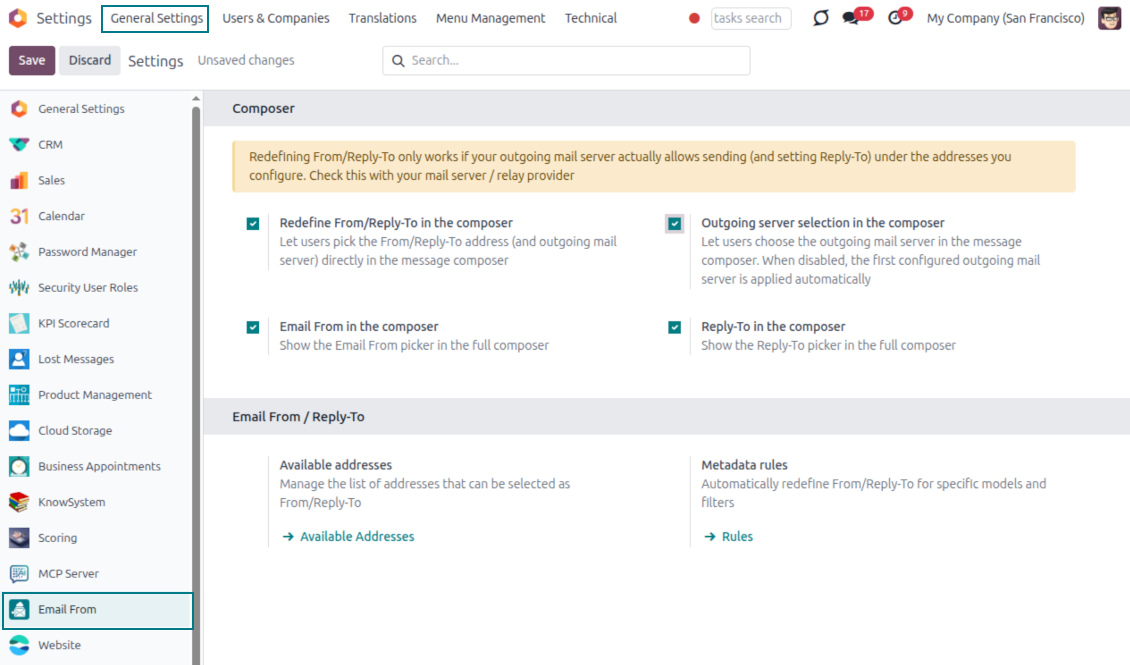
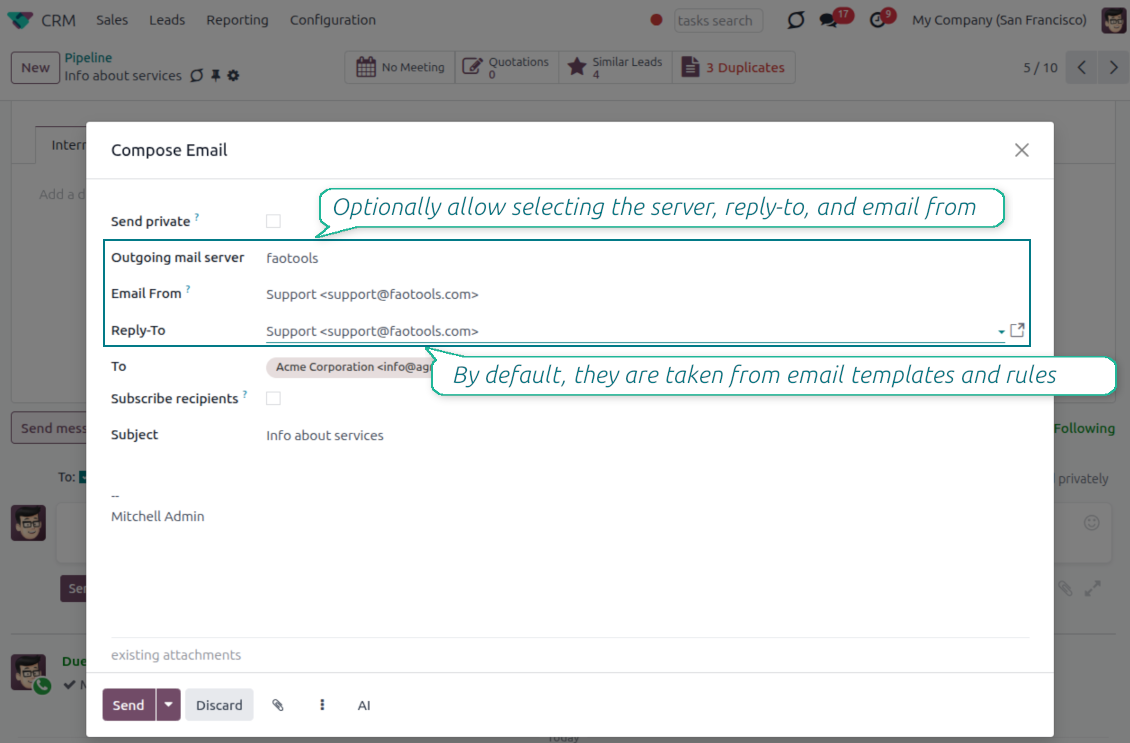
Pick the From and Reply-To in the composer
Managed address pickers instead of typing Send From / Reply To by hand
Choose, do not type
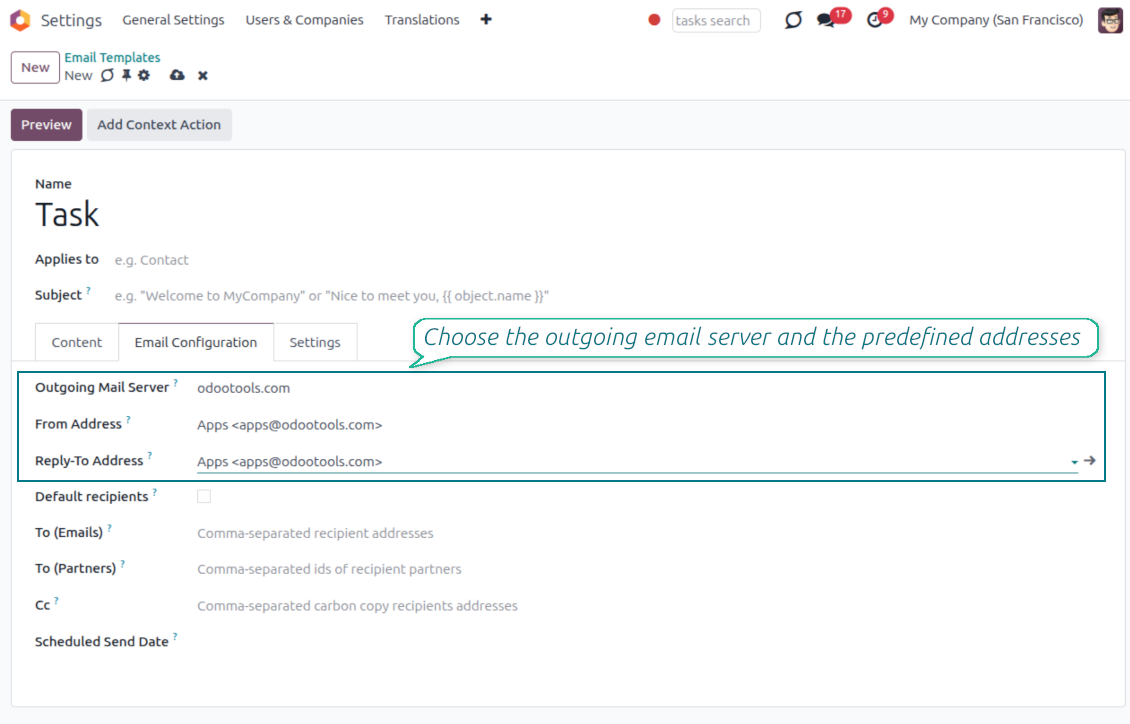
- Turn the pickers on from Settings. Enable the Email From and Reply-To pickers in the full composer from the Email From settings.
- Select an approved address. Users pick a From or Reply-To from the managed list, and the composer fills the real sender values for them.
- Force replies where you want them. Choosing a Reply-To also routes future replies to that address.
Smart outgoing-server handling
- Server set for you. The outgoing mail server matching the chosen address is selected automatically.
- Hidden when there is only one. With a single server configured, the server field is hidden and applied silently.
- Filtered when there are several. With multiple servers, the picker only offers addresses that match the selected server.
One managed address book behind every email
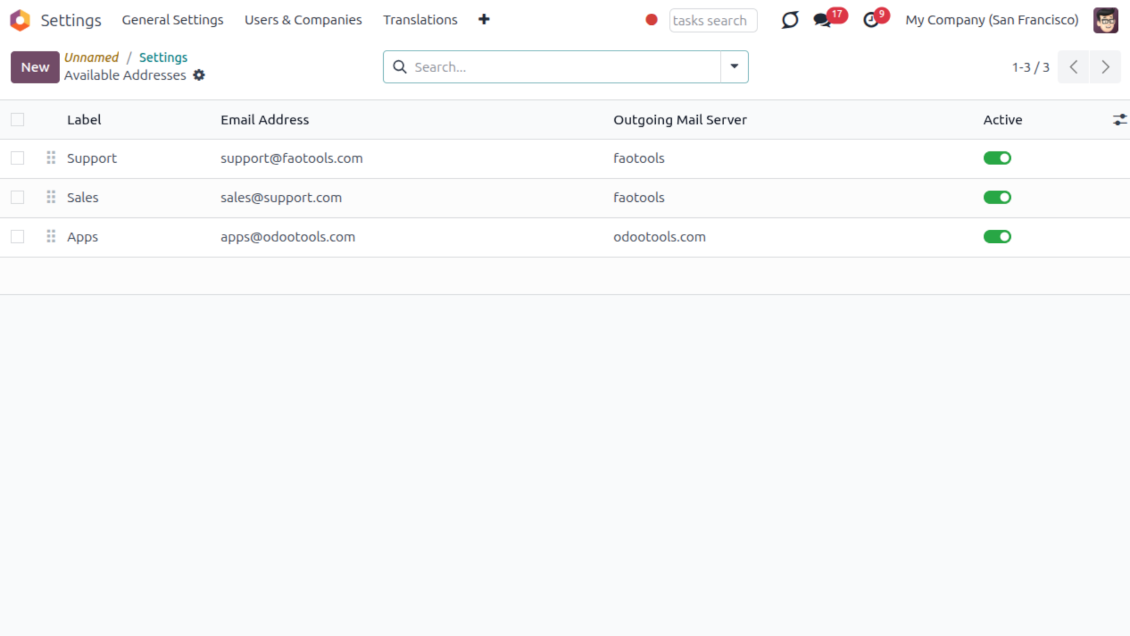
One address list for From and Reply-To; each address already knows its outgoing server
One place to define addresses
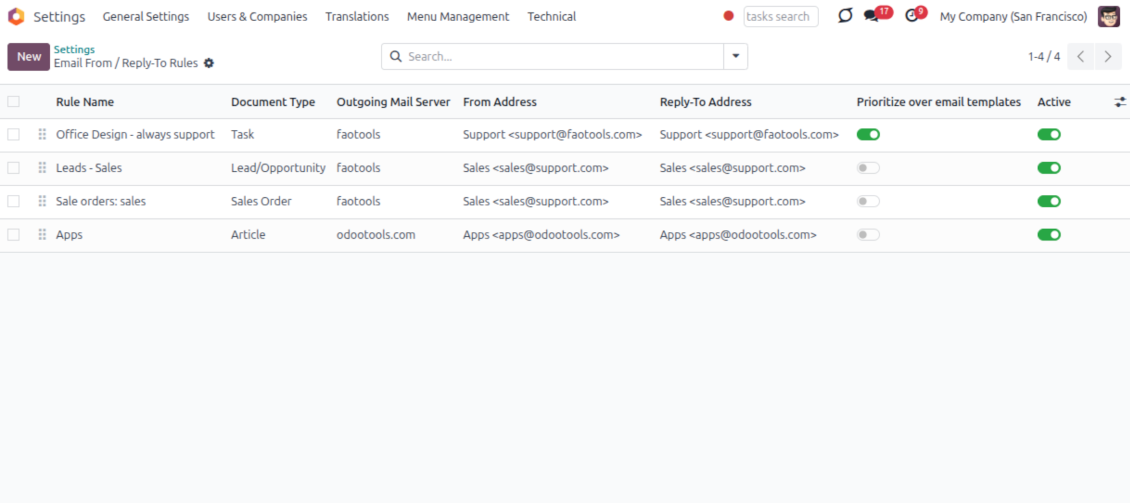
- Label every sender clearly. Give each address a name and email, for example Support or Sales, so users recognize it instantly.
- Order and scope the list. Sequence the addresses, archive the ones you retire, and keep them per company.
- Feed the whole module. The same list powers the composer, email templates and metadata rules, so nothing is ever free-typed.
Locked to the right server
- One address, one server. Each address is tied to exactly one outgoing mail server it is allowed to send through.
- No wrong pairings. An address can never be combined with, or sent through, another server by mistake.
- Provider support stays your job. Make sure your relay actually allows sending under each address you add; the module enforces the consistency inside Odoo.
Managed Send From and Reply To on email templates
Replace Odoo's free-text template fields with the same managed address pickers
Set it once on the template
- Pick a managed address. Choose the From and Reply-To of any mail template from the same approved address list.
- Populate the native fields. Your selection fills the template Send From and Reply-To values, so no core behavior is bypassed.
- Keep the server tidy. The outgoing server field stays read-only when a single server is configured.
Applied everywhere the template runs
- Consistent across channels. The template address is used in the composer, automated actions and any flow that sends the template.
- No reselection needed. Once set on the template, the correct sender is applied every time without user input.
- Same safety guarantees. Template addresses obey the same address and outgoing-server matching as the composer.
Automatic sender selection with metadata rules
Choose the right From/Reply-To by document type and filter, with no manual step
Match by model and filter
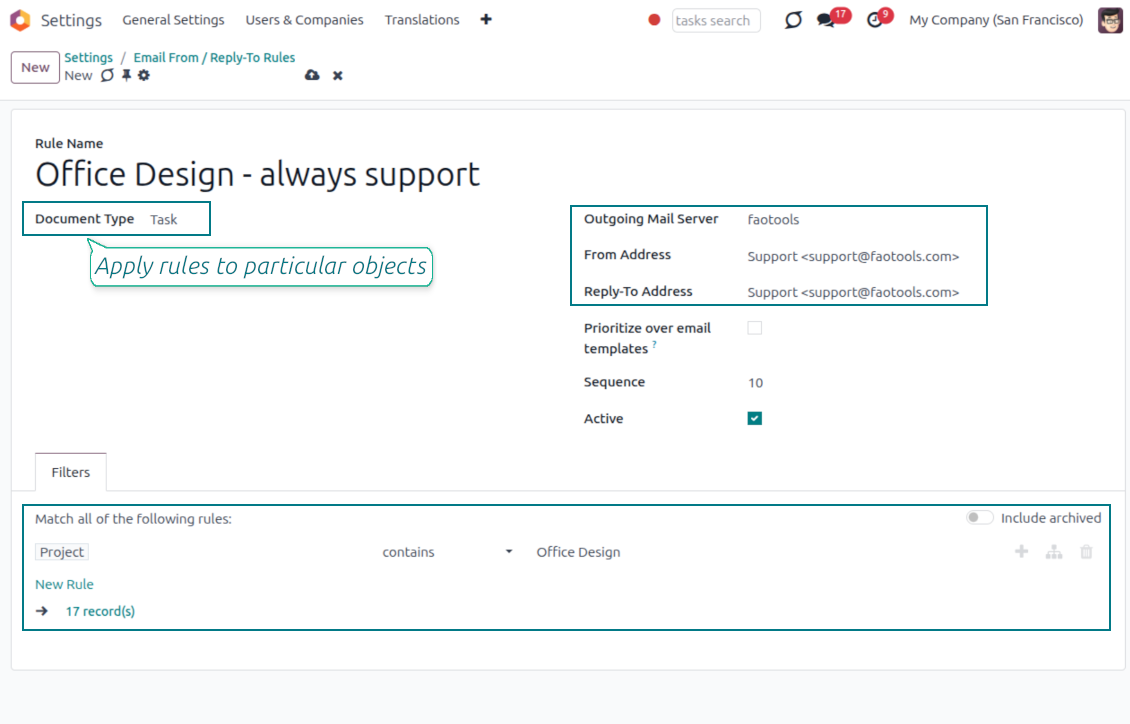
- Rules per document type. Define which sender to use for a model, for example sales orders, invoices or leads.
- Narrow with a domain. Add a filter so a rule only fires for matching records, such as a given sales team or customer segment.
- First match resolves everything. The winning rule sets the From, the Reply-To and the matching outgoing server together.
You control the priority
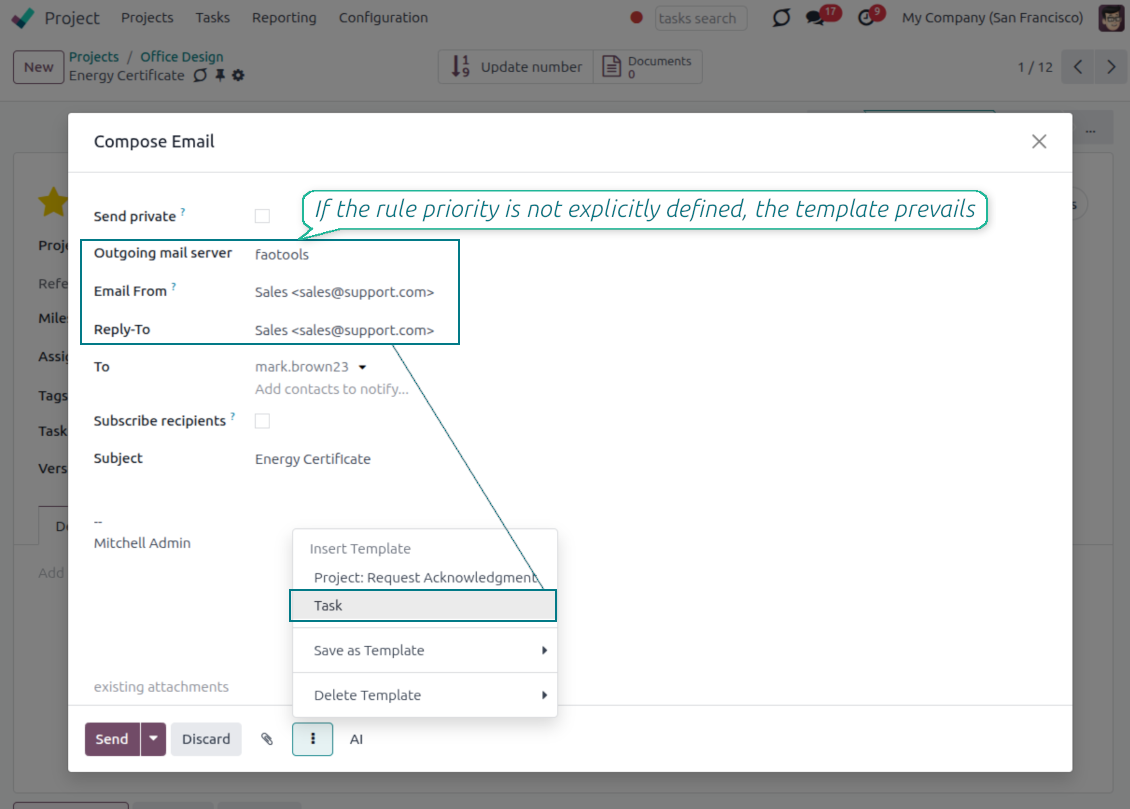
- Templates win by default. When a mail template already defines a sender, the template value is kept.
- Flip it when you need to. Enable Prioritize over templates and the rule takes precedence over the template default.
- Hands-off in the composer. The resolved sender is applied automatically, so users never have to remember the right address.
Keep sending safe and deliverable
Why managed addresses matter and how mismatches are blocked
Why letting anyone type an address is risky
- Providers only trust known senders. Most mail providers reject or mark as spam any message sent from an address they do not recognize.
- Failures can happen quietly. If anyone can type any From or Reply-To address, a message can fail to arrive without a clear warning in Odoo.
- Only approved addresses are offered. The composer, templates and rules only let you choose from the addresses you have already configured.
Mismatches are caught automatically
- Wrong pairings stay out of view. You can only pick an address together with the outgoing mail server it is actually linked to.
- Sending is blocked if something doesn't match. Even automated emails or connected apps cannot bypass this check.
- You still confirm support with your provider. Make sure your outgoing mail server allows sending under each address you add, usually through a matching sender filter or verification step.
Często zadawane pytania o Odoo Email From Odoo v.18
Jakie sa zasady aktualizacji Waszych narzędzi?
Zgodnie z biezacymi zasadami Odoo Apps Store:
- Modul kupiony dla wersji 12.0 lub starszej daje dostęp do wszystkich wersji do 12.0.
- Od wersji 13.0 każda wersja modulu musi byc kupiona osobno.
- Niezależnie od wersji zakup daje prawo do wszystkich aktualizacji i poprawek w ramach wersji glownej.
Zespol faOtools nie kontroluje tych zasad. Pytania kierujcie bezpośrednio do przedstawicieli Odoo Apps Store.
Jak zainstalowac aplikacje na Odoo.sh?
Najbardziej bezpośrednie podejscie to wbudowany przeplyw sklepu Odoo:
1. Otwórz stronę modulu i kliknij Deploy on odoo.sh
2. Zostaniesz przekierowany do GitHub. Zaloguj sie i kliknij Create a new repo lub użyj istniejącego. Repozytorium musi byc prywatne. Publikowanie aplikacji na licencji OPL-1 jest zabronione. W razie potrzeby utwórz nowe repo dla projektu Odoo.sh
3. Następnie w odoo.sh kliknij Deploy, potwierdź i kliknij Continue. Instalacja sie rozpoczyna.
Te kroki instaluja aplikacje na galezi production. Dla innych galezi lub aktualizacji:
1. Pobierz kod zrodlowy ze sklepu Odoo
2. Zrób commit modulu do repozytorium GitHub. Żaden folder/plik aplikacji nie może byc w .gitignore. Repo tworzone przez odoo.sh mogą ignorowac ważne ścieżki (np. /lib). Prześlij wszystkie katalogi i pliki modulu
3. Wdroz docelowa galaz projektu odoo.sh lub poczekaj na automatyczny build, jeśli tak ustawiono.
Jak zainstalowac aplikacje na wlasnym serwerze?
2. Uruchom ponownie serwer Odoo;
3. Wlacz tryb programisty (ustawienia techniczne);
4. Zaktualizuj liste aplikacji (menu Aplikacje);
5. Znajdź aplikacje i kliknij Activate/Install;
6. Postępuj zgodnie ze wskazowkami na stronie aplikacji, jeśli istnieją.
Aplikacja ma dodatkowe dodatki. Czy moge kupic je później?
Tak. Odoo automatycznie dodaje zależności do koszyka: wylacz juz zakupione narzędzia, aby nie zaplacic dwa razy.
Wdrozyłem aplikacje na Odoo.sh i widze ostrzeżenie/blad w testach
Czerwone/pomaranczowe ostrzeżenie nie wplywa na funkcje aplikacji. Czasem nasze moduly nie przechodzą standardowych testów automatycznych, bo te zakladaja zachowanie sprzeczne z celami aplikacji. Na przyklad zmieniamy obliczanie ceny, a testy Odoo porownuja cenę koncowa ze standardowym algorytmem.
Najpierw sprawdź funkcje wdroznej bazy. Czy wszystko dziala?
Jeśli nadal uwazasz, ze ostrzeżenie wplywa na rzeczywiste funkcje, skontaktuj sie z nami i prześlij pelne logi instalacji oraz pelna liste wdroznych modulow (rdzeń i firmy trzecie).
Czy moge kupic aplikacje bezpośrednio u Was?
Nie, dystrybuujemy narzędzia tylko przez oficjalny sklep aplikacji Odoo.
Chcialbym uzyskać znizke
Niestety nie mamy srodkow technicznych, by oferowac ceny indywidualne.
Czy moge zainstalowac aplikacje na bazie Odoo Online (SaaS)?
Nie, aplikacji innych firm nie można używać na Odoo Online. Odoo SaaS blokuje te mozliwosc.
Narzędzie zależy od innych aplikacji. Czy musze je kupic?
Tak, narzędzie wymaga wszystkich modulow oznaczonych jako zależności. Cena na stronie aplikacji juz je obejmuje.
Jaka jest cena modulu w dolarach amerykanskich? Dlaczego sie zmienila?
Ceny naszych modulow sa w euro. Sklep Odoo przelicza je na inne waluty wedlug wewnetrznego kursu. Dlatego cena w dolarach amerykanskich może sie zmienić po aktualizacji kursu.
Sformułowania aplikacji i witryny w językach innych niż angielski są wspomagane przez AI i zgodne z oficjalnymi tłumaczeniami Odoo. Jeśli zauważysz błąd, wyślij zgłoszenie o poprawność tłumaczeń a naprawimy to.
Bazy demonstracyjne Odoo (podglądy na żywo)
Dla tej aplikacji możemy zapewnić darmową spersonalizowaną bazę demo.
Nie potrzebujesz telefonu ani karty, by się z nami skontaktować. Wystarczy krótka rejestracja e-mail, która nie zajmuje więcej niż 30 sekund.
Na Twoją prośbę przygotujemy indywidualną bazę podglądu na żywo, w której przez około dwa tygodnie możesz testować i sprawdzać założenia.
Zgłaszanie błędów
Jeśli zauważysz błędy lub niespójne działanie, napisz do nas. Gwarantujemy poprawki w 60 dni od zakupu i dalej ulepszamy narzędzia.
Nie potrzebujesz telefonu ani karty, by się z nami skontaktować. Wystarczy krótka rejestracja e-mail, która nie zajmuje więcej niż 30 sekund.
Dołącz jak najwięcej szczegółów: zrzuty ekranu, logi serwera Odoo i pełny opis odtworzenia problemu. Zwykle kilka dni roboczych zajmuje plan (gdy błąd potwierdzono) albo wskazówki (w przeciwnym razie).
Publiczne zgłoszenia funkcji i pomysły na moduły (bezpłatny rozwój)
Jesteśmy mocno zmotywowani do ulepszania narzędzi i wdzięczni za każdą opinię. Jeśli wymagania są użyteczne publicznie i da się je sprawnie wdrożyć, zespół wpisze je na listę zadań.
Taka lista zadań jest przetwarzana regularnie i nie zakłada dodatkowych opłat. Choć nie możemy obiecać terminów i ostatecznego projektu, to dobry sposób na pożądane funkcje bez inwestycji i ryzyka.
Nie potrzebujesz telefonu ani karty, by się z nami skontaktować. Wystarczy krótka rejestracja e-mail, która nie zajmuje więcej niż 30 sekund.

Narzędzie do elastycznego układania załączników Odoo w folderach i synchronizacji katalogów z klientami chmury: Google Drive, OneDrive/SharePoint, Nextcloud/ownCloud, Dropbox, Amazon S3, Box i NAS. DMS. Menedżer plików. System zarządzania dokumentami
398€

The tool to build a deep and structured knowledge base for internal and external use. Knowledge System. KMS. Wiki-like revisions.
398€
The tool to automatically synchronize Odoo attachments with OneDrive files in both ways
487€
The tool to set up KPI targets and control their fulfillment by periods. KPI dashboards. Dashboard designer. KPI charts

The tool for time-based service management from booking appointments to sales and reviews
398€
The tool to automatically synchronize Odoo attachments with Google Drive files in both ways
487€