Sales Trends and Forecast v.17
The tool to calculate sales trends and make predictions for future sales statistically
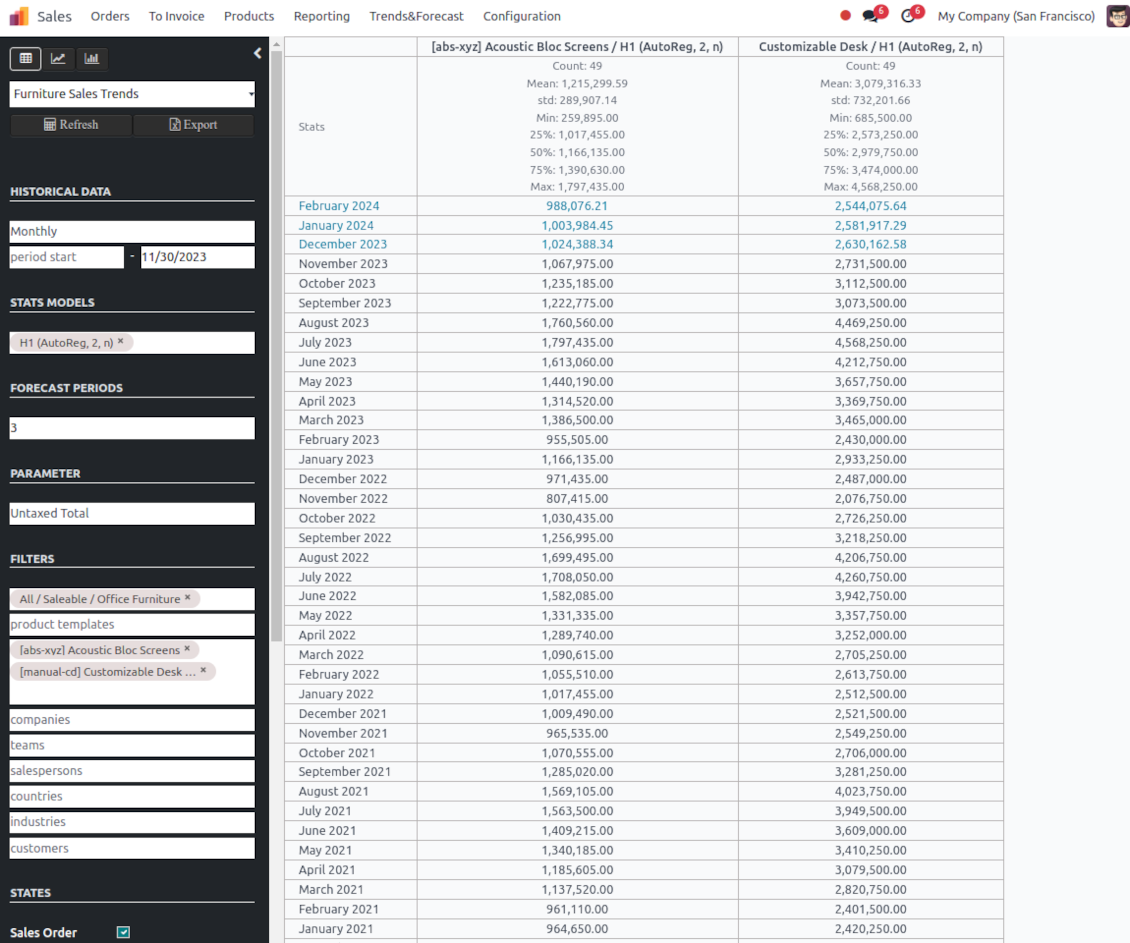
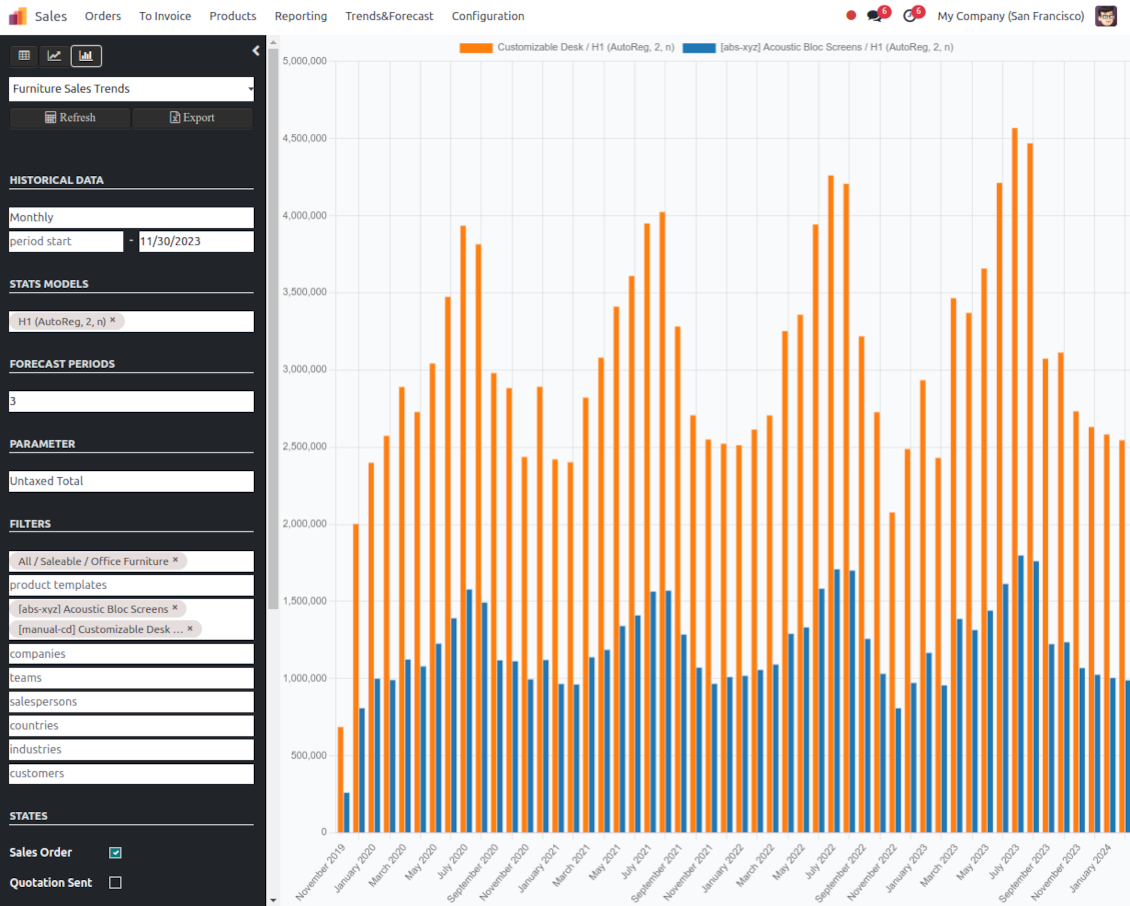
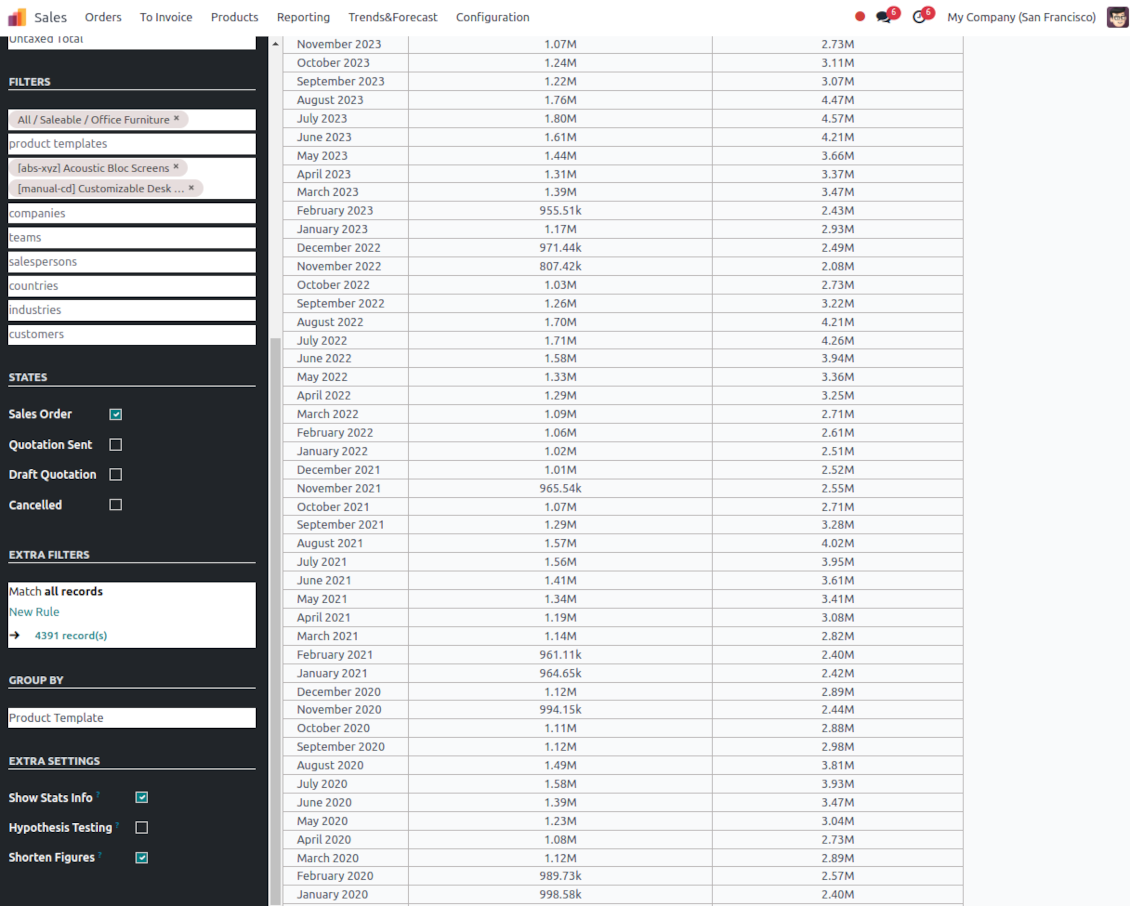
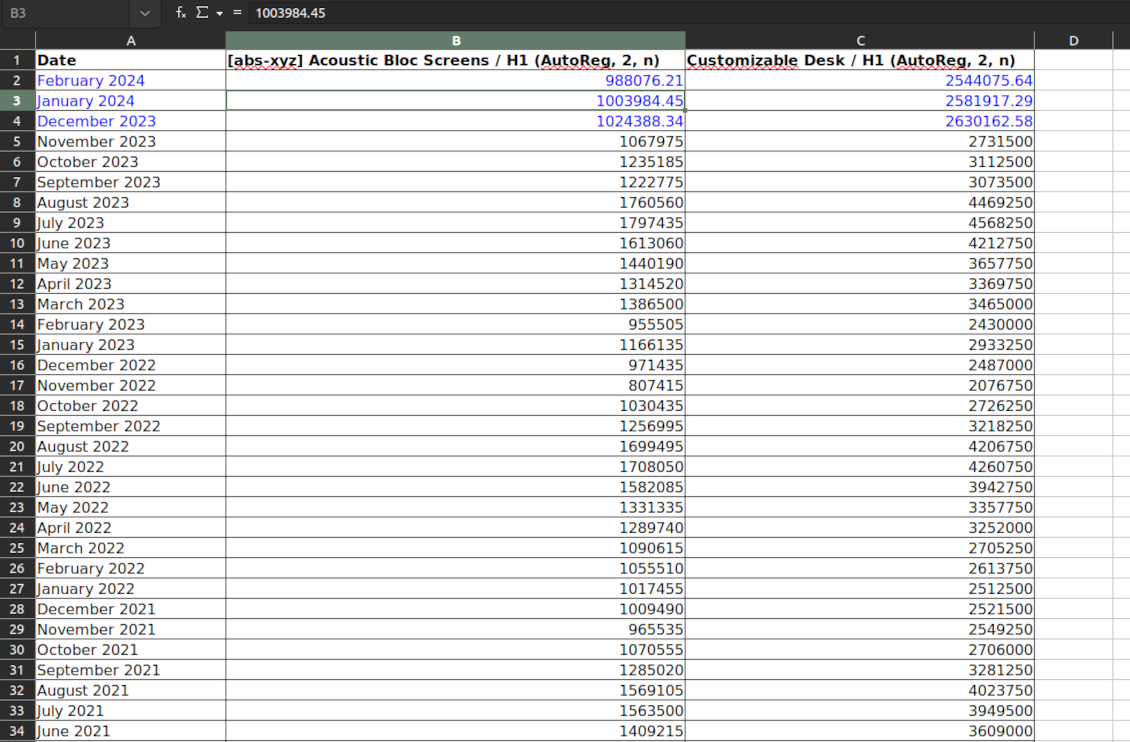
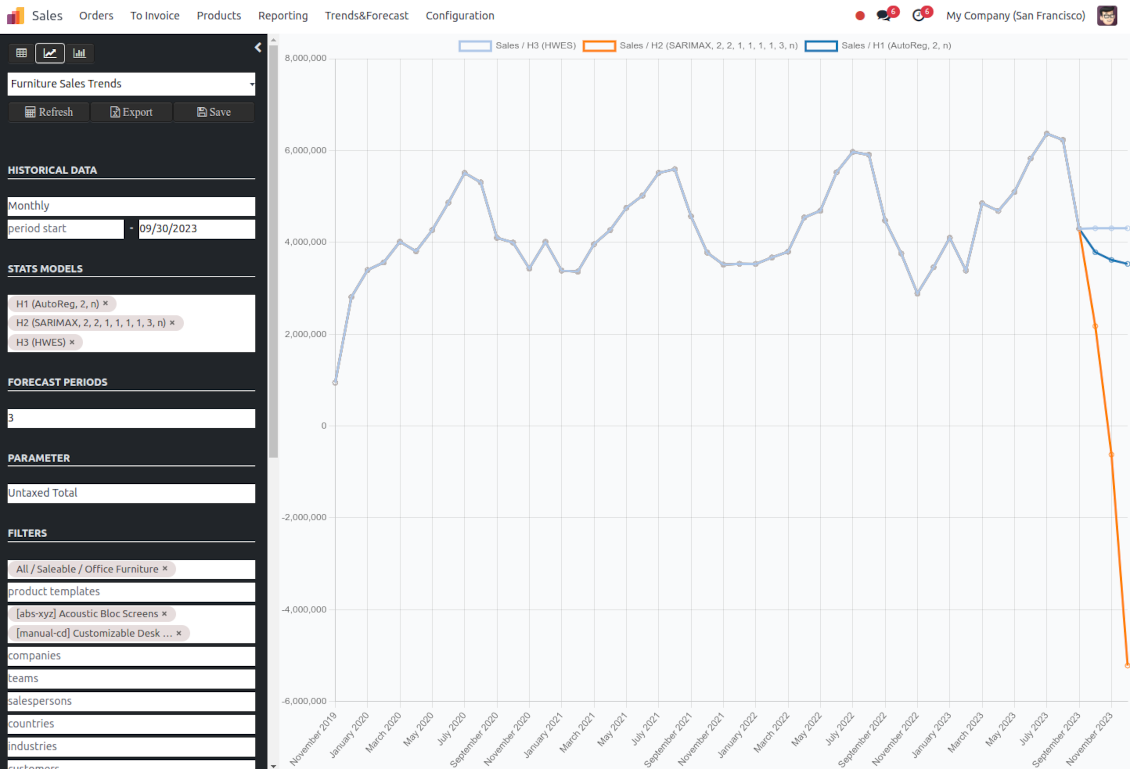
If future sales are a black box for you, you might hardly make profitable decisions right now. How many items to purchase? Which products require aggressive advertising? Where are the best markets for us for the next year? Luckily, statistics might help if you have enough historical data. This Odoo tool lets you generate sales by periods and apply statistical methods to scientifically forecast further periods.
The scientific approach to forecasting
The app assumes applying statistical methods to calculate historical sales trends and make a forecast. Experiment with statistical models and parameters to achieve the most reliable prediction. Leverage the proven statsmodels methods
Innovative data analysis interface
The tool introduces a special interface to instantly calculate sales series. Flexibly switch between different reports and update settings in a few clicks. Control data in pivot, graph, or chart views. Export series as an Excel tabled
Focused analysis
Shrink considered order/quotation lines flexibly or analyze global company sales. Group data into various series
Topical data
Apply time frames for historical data and work with intervals that are of interest to your industry. Work with past and future periods.
Flexible report configuration
-
Introduce as many analytic reports as you need. Each report is based on Odoo's sales lines' data
-
Keep reports to re-use them, instantly switch between reports, or experiment with real-time changes without saving those
-
Show historical and forecast series as a table, line graph, or bar chart, or export data as an Excel table
-
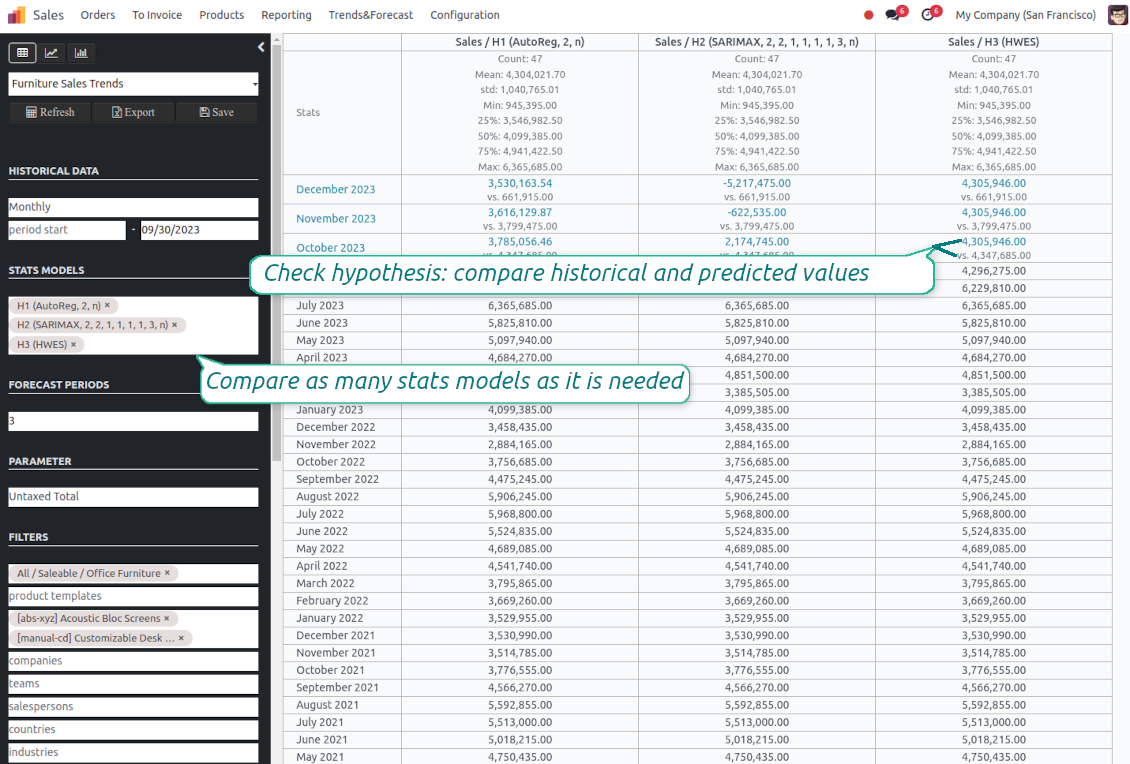
Apply as many and as different statistical models as you want to check. Each stats model will peer its own data series and prediction if the latter is possible. See also the section "Statistical models"
-
Define the data periods under analysis by entering a start and end. Only sales within this interval will be included in the series
-
Split data series into years, quarters, months, weeks, and days depending on seasons assumed in your industry or business area
-
Select an unlimited number of periods to predict future periods or check hypotheses
-
Grant the right to forecast tools for any salesperson (the group Sales > Sales Forecast)
-
Filter sales data by product categories, product templates, product variants, sales teams, salespersons, countries, industries, specific customers, and companies (for multi-company regimes). Introduce your own criteria based on Odoo's dynamic domain constructor, so shrink analysis by any sale line storable fields
-
Analyze a sales total, an untaxed total, an untaxed total to invoice, gross weight, or volume
-
Introduce a few data series simultaneously with grouping by a product category, a product template, a product variant, an order state, a team, a salesperson, a country, an industry, a customer, or a company
-
Hide/show general statistical measurement of series: count, mean, standard deviation, minimum, maximum, 25%, 50%, and 75% factors
-
Optionally compare predicted values to real historical data if any. See also the section "Hypothesis Testing"
-
Make figures human readable (e.g. 192,217 as 200k) or show them precisely.
Statistical models
-
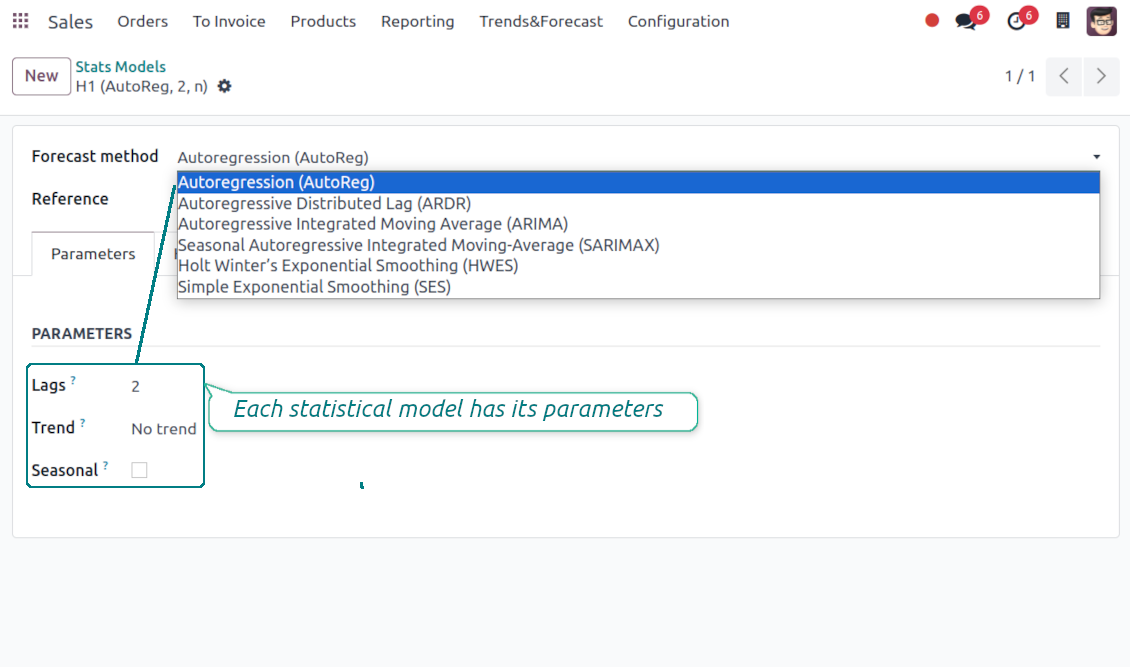
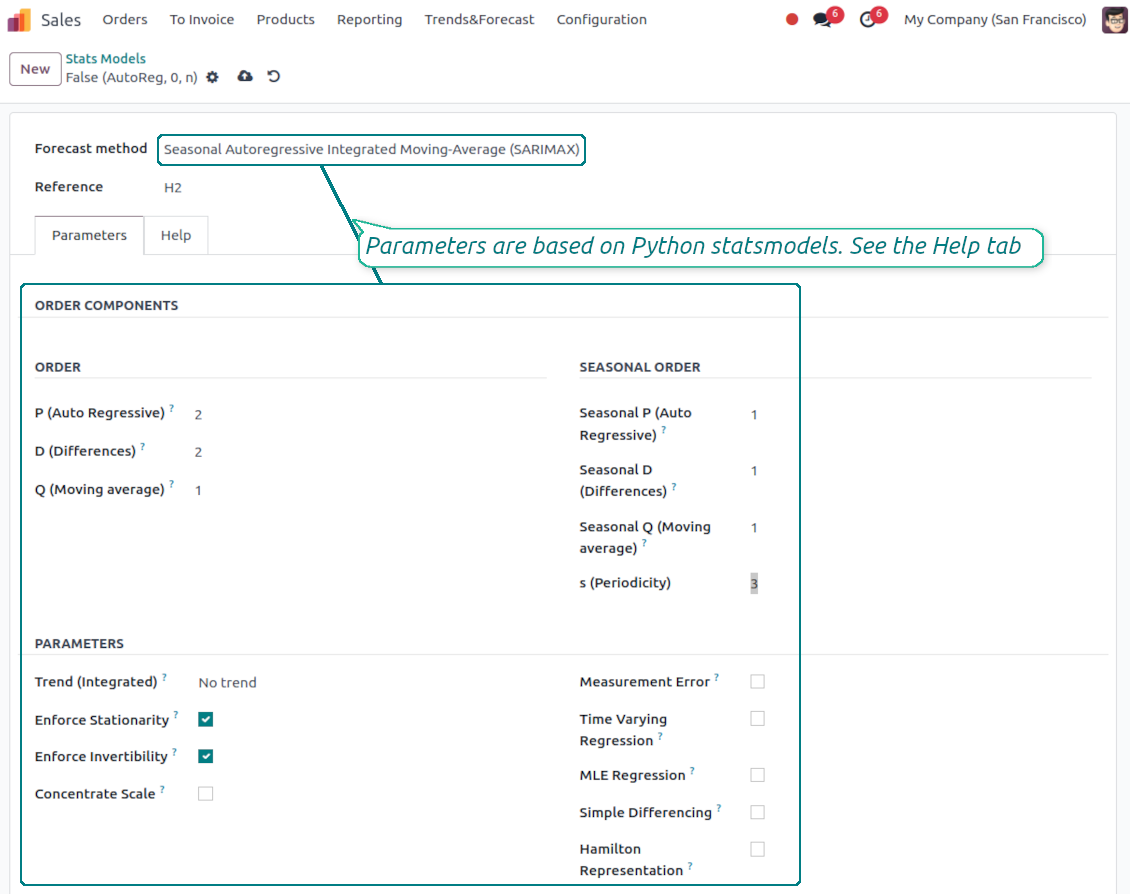
The tool allows calculating sales trends based on predefined statistical models introduced by the Python package statsmodels
-
Methods have different complexity, and their own unique parameters, and might be suitable for a definite market or a specific business. The final choice of the model and related statistical parameters is only up to you. Nobody except you can better understand tendencies in your company sales, and hence which methods and factors should be applied
-
Available statistical models are Autoregression (AutoReg), Autoregressive Distributed Lag (ARDR), Autoregressive Integrated Moving Average (ARIMA), Seasonal Autoregressive Integrated Moving-Average (SARIMAX), Holt Winter's Exponential Smoothing (HWES), Simple Exponential Smoothing (SES)
-
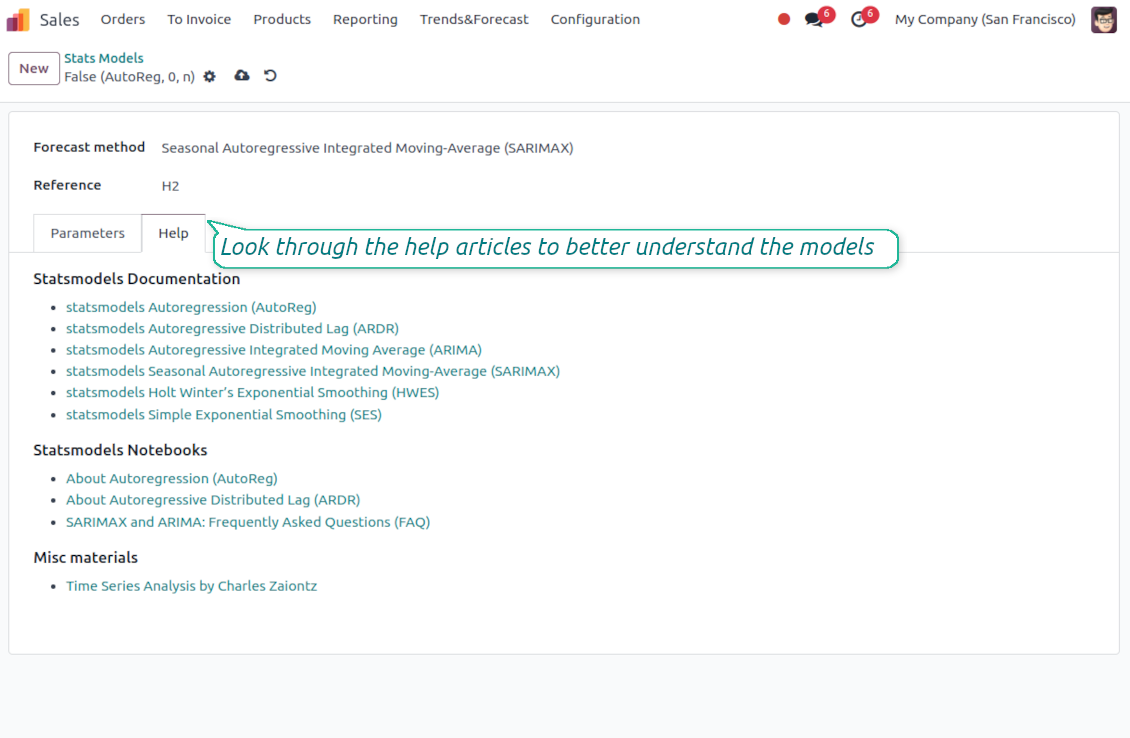
For deep details about what each stats model means and which parameters might be applied, look through the tab "Help" on the stats model form
-
Keep and use an unlimited number of stats models with various parameters. Check, compare, and update those flexibly through the forecast manager interface
-
Often models with specific parameters will not result in any prediction or the prediction will be unrealistic. This is normal, only a deep understating of trends and much experimenting might give a viable forecast for your specific case.
Hypothesis Testing
-
To get a proper prediction, it is usually needed to experiment a lot with statistical models and introduced parameters. To check the results, the app allows compare forecast data with real values
-
To check a certain assumption with historical values, you may make an analysis and prediction for some past periods, and turn on the setting "Hypothesis testing"
-
For example, you have sales orders from 2017 to 2022. Then, you can get report historical data for 2017-2021, and make the forecast for 12 months of 2022. In this way, you will get the prediction for the interval for which you already have actual values. By comparing forecast and actual values, you can decide whether a chosen model and factors are good enough
-
The app allows checking the hypotheses for a few stats models simultaneously. In this way, it is possible to reveal what is actually the most appropriate, or whether experimenting should be continued.
Usage requirements
-
To reveal trends, there should be enough historical sales data. It is senseless to make a forecast based on the last 5 days of sales since no trend cannot be retrieved. Take into account that data should be enough for the chosen filters and for each grouped series
-
There should be not only enough sales lines but also there should be some actual trends. Chaotic data will not result in reliable predictions. To use the app, you should understand which assumptions (e.g. seasonal changes) you check
-
To use the app, you either should have a clear understanding of how statistics works or a will to understand that. Regretfully, there is no way to make a "general" analysis, each specific case is unique and requires its own elaboration.
Konfigurācijas un instalācijas padomi Sales Trends and Forecast Odoo v.17
Python dependencies
To guarantee the tool works correctly, a number of Python libraries are required: pandas, numpy, statsmodels, scipy, xlsxwriter. To install those packages execute the command:
pip3 install pandas numpy statsmodels scipy xlsxwriter
If you run Odoo on Python prior to or equal to version 3.7, please install the following versions of the packages pandas==1.3.5, statsmodels==0.13.1
Server memory limits
Running the statistical analysis and making the forecast is quite a resource-demanding operation. If users face the hanging interface, make sure that server memory limits and timeouts are enough. Otherwise, increase those settings.
Bieži uzdotie jautājumi par Sales Trends and Forecast Odoo v.17
Kādas ir jūsu rīku atjaunināšanas politikas?
Saskaņā ar spēkā esošajiem Odoo Apps Store noteikumiem:
- Katrs 12.0 un vecākai versijai pirktais modulis dod piekļuvi visām versijām līdz 12.0.
- Sākot ar 13.0. versiju, katra moduļa versija jāpērk atsevišķi.
- Neatkarīgi no versijas pirkums dod tiesības uz visiem atjauninājumiem un labojumiem galvenās versijas ietvaros.
Ņemiet vērā, ka faOtools komanda šos noteikumus nekontrolē. Jautājumus adresējiet tieši Odoo Apps Store pārstāvjiem.
Kā instalēt jūsu lietotni Odoo.sh?
Visiešākā pieeja ir izmantot Odoo veikala iebūvēto darbplūsmu:
1. Atveriet moduļa lapu un noklikšķiniet pogu Deploy on odoo.sh
2. Pēc tam jūs novirzīs uz GitHub lapu. Pierakstieties kontā, pēc tam noklikšķiniet 'Create a new repo' vai izmantojiet esošu. Pārliecinieties, ka krātuve ir privāta. Lietotnes nedrīkst publicēt ar OPL-1 licenci. Ja vajag, izveidojiet jaunu repo Odoo.sh projektam
3. Pēc tam dodieties uz odoo.sh un noklikšķiniet pogu Deploy. Uznirstošajā logā iesniedziet lēmumu un noklikšķiniet 'Continue.' Šī darbība sāk instalēšanu.
Šīs darbības instalēs lietotni projekta produkcijas zarā. Ja vēlaties izvietot lietotnes citos zaros vai atjaunināt moduli, veiciet šīs darbības:
1. Augšupielādējiet lietotnes pirmkodu no Odoo veikala
2. Veiciet moduļa commit vajadzīgajā GitHub krātuvē. Pārliecinieties, ka neviens lietotnes mape/fails netiek ignorēts (t.i., nav repo .gitignore). Krātuves automātiski izveido odoo.sh, un pēc noklusējuma tajās var būt svarīgi elementi (piem., /lib). Augšupielādējiet visus moduļa katalogus, apakškatalogus un failus bez izņēmumiem
3. Izvietojiet odoo.sh projekta mērķa zaru vai, ja iestatījumi to paredz, gaidiet, līdz tas tiek automātiski būvēts.
Kā instalēt jūsu lietotni savā serverī?
2. Restartējiet Odoo serveri;
3. Ieslēdziet izstrādātāja režīmu (tehniskie iestatījumi);
4. Atjauniniet lietotņu sarakstu (lietotņu izvēlne);
5. Atrodiet lietotni un nospiediet „Activate“/„Install“;
6. Sekojiet lietotnes lapas vadlīnijām, ja tādas ir.
Pamanīju, ka jūsu lietotnei ir papildu papildinājumi. Vai varu tos iegādāties vēlāk?
Jā, protams. Vienlaikus Odoo automātiski pievieno visas atkarības grozam, tāpēc iepriekš iegādātie rīki jāizslēdz, lai izvairītos no dubultas samaksas.
Izvietoju jūsu lietotni Odoo.sh un testos redzu brīdinājumu/kļūdu
Sarkans/oranžs brīdinājums neietekmē lietotnes funkcijas. Diemžēl mūsu moduļi dažkārt neiztur standarta automātiskos testus, jo tie pieņem uzvedību, kas ir pretrunā ar lietotnes mērķiem. Piemēram, mēs mainām cenas aprēķinu, bet standarta Odoo moduļa testi salīdzina galīgo cenu ar standarta algoritmu.
Vispirms pārbaudiet izvietotās datubāzes funkcijas. Vai viss darbojas pareizi?
Ja joprojām uzskatāt, ka brīdinājums ietekmē īstas funkcijas, sazinieties ar mums un nosūtiet pilnus instalācijas žurnālus un pilnu izvietoto moduļu sarakstu (ieskaitot kodolu un trešo pušu).
Vai es varu iegādāties lietotni tieši no jūsu uzņēmuma?
Nē, rīkus izplatām tikai caur oficiālo Odoo lietotņu veikalu.
Es vēlētos saņemt atlaidi
Diemžēl mums nav tehnisku līdzekļu individuālu cenu piedāvāšanai.
Vai es varu instalēt lietotni savā Odoo Online (SaaS) datubāzē?
Nē, trešo pušu lietotnes nevar izmantot Odoo Online. Diemžēl Odoo SaaS to bloķē.
Jūsu rīkam ir atkarības no citām lietotnēm. Vai tās jāiegādājas?
Jā, rīkam ir nepieciešami visi atkarībās atzīmētie moduļi, lai darbotos pareizi. Lietotnes lapā norādītā cena jau ietver visas nepieciešamās atkarības.
Kāda ir moduļa cena ASV dolāros? Kāpēc tā mainījās?
Mūsu moduļu cena ir eiro. Odoo veikals konvertē cenas citās valūtās pēc iekšējā kursa. Tāpēc cena ASV dolāros var mainīties, kad kurss tiek atjaunināts.
Lietotnes un vietnes teksti valodās, kas nav angļu, ir sagatavoti ar MI palīdzību un saskaņoti ar oficiālajiem Odoo tulkojumiem. Ja pamanāt kļūdu, nosūtiet biļeti par tulkojumu pareizību un mēs to labosim.
Odoo demonstrācijas datubāzes (tiešie priekšskatījumi)
Šai lietotnei varam nodrošināt bezmaksas personalizētu demo datubāzi.
Lai sazinātos, nav vajadzīgs tālruņa numurs vai kredītkarte. Pietiek ar īsu e-pasta reģistrāciju, kas neaizņem vairāk par 30 sekundēm.
Pēc jūsu pieprasījuma sagatavosim individuālu tiešā priekšskatījuma datubāzi, kurā apmēram divas nedēļas varēsiet veikt testus un pārbaudīt pieņēmumus.
Kļūdu ziņošana
Ja sastopaties ar kļūdām vai nekonsekventu uzvedību, sazinieties ar mums. Garantējam labojumus 60 dienu laikā pēc pirkuma un esam ieinteresēti rīkus uzlabot arī pēc šī perioda.
Lai sazinātos, nav vajadzīgs tālruņa numurs vai kredītkarte. Pietiek ar īsu e-pasta reģistrāciju, kas neaizņem vairāk par 30 sekundēm.
Iekļaujiet pieprasījumā pēc iespējas vairāk informācijas: ekrānuzņēmumus, Odoo servera žurnālus, pilnu problēmas atkārtošanas aprakstu u. tml. Parasti darba plāna sagatavošana (ja kļūda ir apstiprināta) vai norādījumu sniegšana (citādi) prasa dažas darba dienas.
Publiski funkciju pieprasījumi un moduļu idejas (bezmaksas izstrāde)
Mēs esam stipri motivēti uzlabot savus rīkus un būsim pateicīgi par jebkuru atsauksmi. Ja jūsu prasības ir vispārīgi noderīgas un tās var efektīvi īstenot, komanda tās iekļaus mūsu uzdevumu sarakstā.
Šāds uzdevumu saraksts tiek apstrādāts regulāri un neparedz papildu maksas. Lai gan mēs nevaram solīt termiņus un galīgo dizainu, tas var būt labs veids, kā iegūt vēlamās funkcijas bez ieguldījumiem un riskiem.
Lai sazinātos, nav vajadzīgs tālruņa numurs vai kredītkarte. Pietiek ar īsu e-pasta reģistrāciju, kas neaizņem vairāk par 30 sekundēm.

The tool to flexibly structure Odoo attachments in folders and synchronize directories with cloud clients: Google Drive, OneDrive/SharePoint, Nextcloud/ownCloud, Dropbox, Amazon S3, Box, and NAS. DMS. File Manager. Document management system
398€

The tool to build a deep and structured knowledge base for internal and external use. Knowledge System. KMS. Wiki-like revisions.
398€
The tool to automatically synchronize Odoo attachments with OneDrive files in both ways
487€
The tool to set up KPI targets and control their fulfillment by periods. KPI dashboards. Dashboard designer. KPI charts

The tool to automatically synchronize Odoo attachments with Google Drive files in both ways
487€
The tool for time-based service management from booking appointments to sales and reviews
398€
The tool to make sure a sale order is ready for the next stage. Sale checklists. Sale approval. Multi quotation confirmation

The tool to make sure required jobs are carefully done on each CRM pipeline stage. CRM checklists