Sales Trends and Forecast v.17
The tool to calculate sales trends and make predictions for future sales statistically
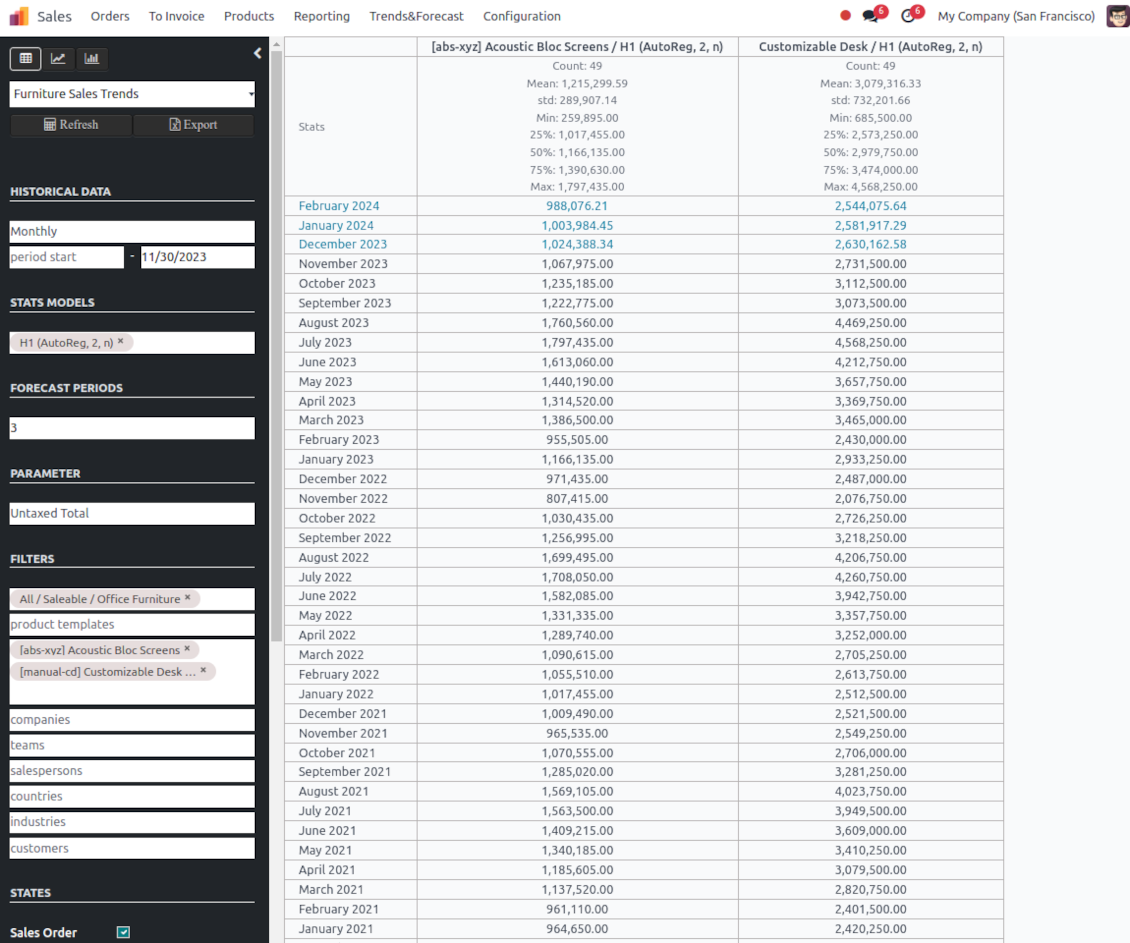
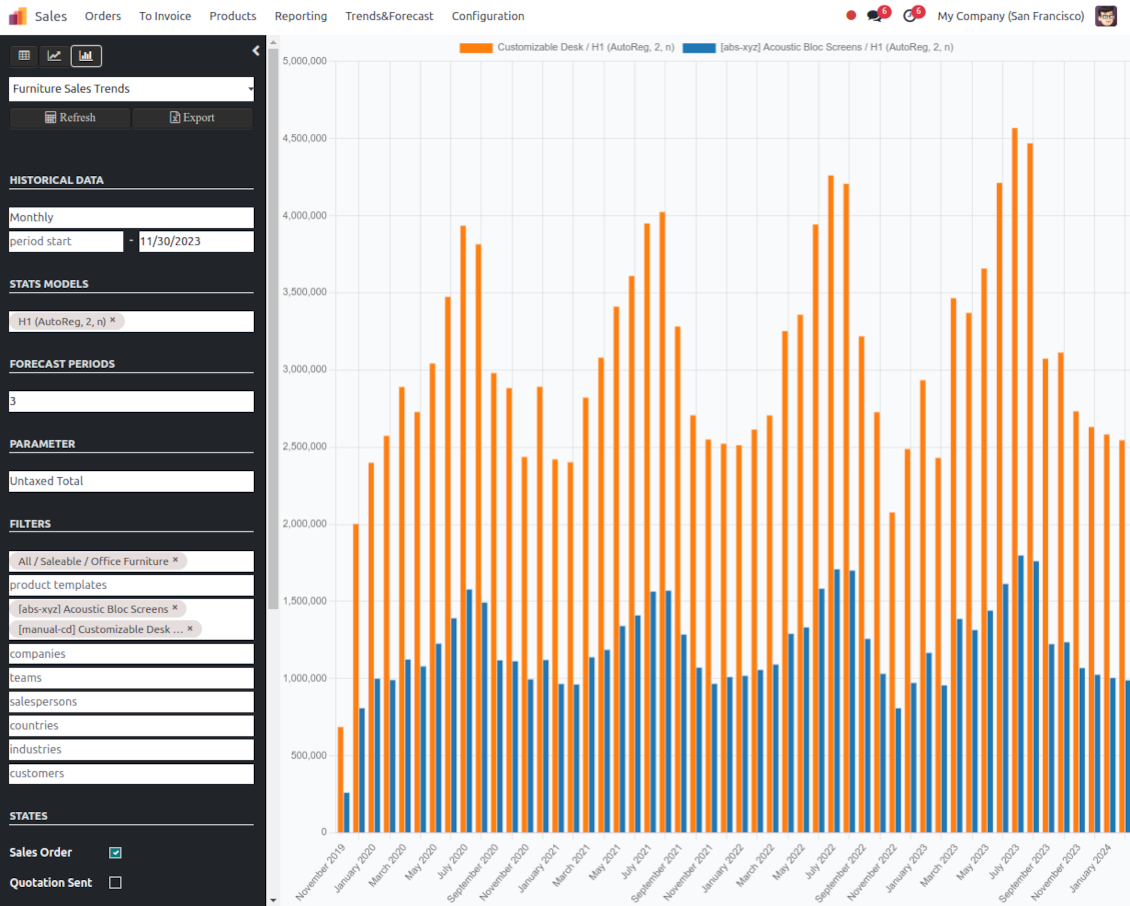
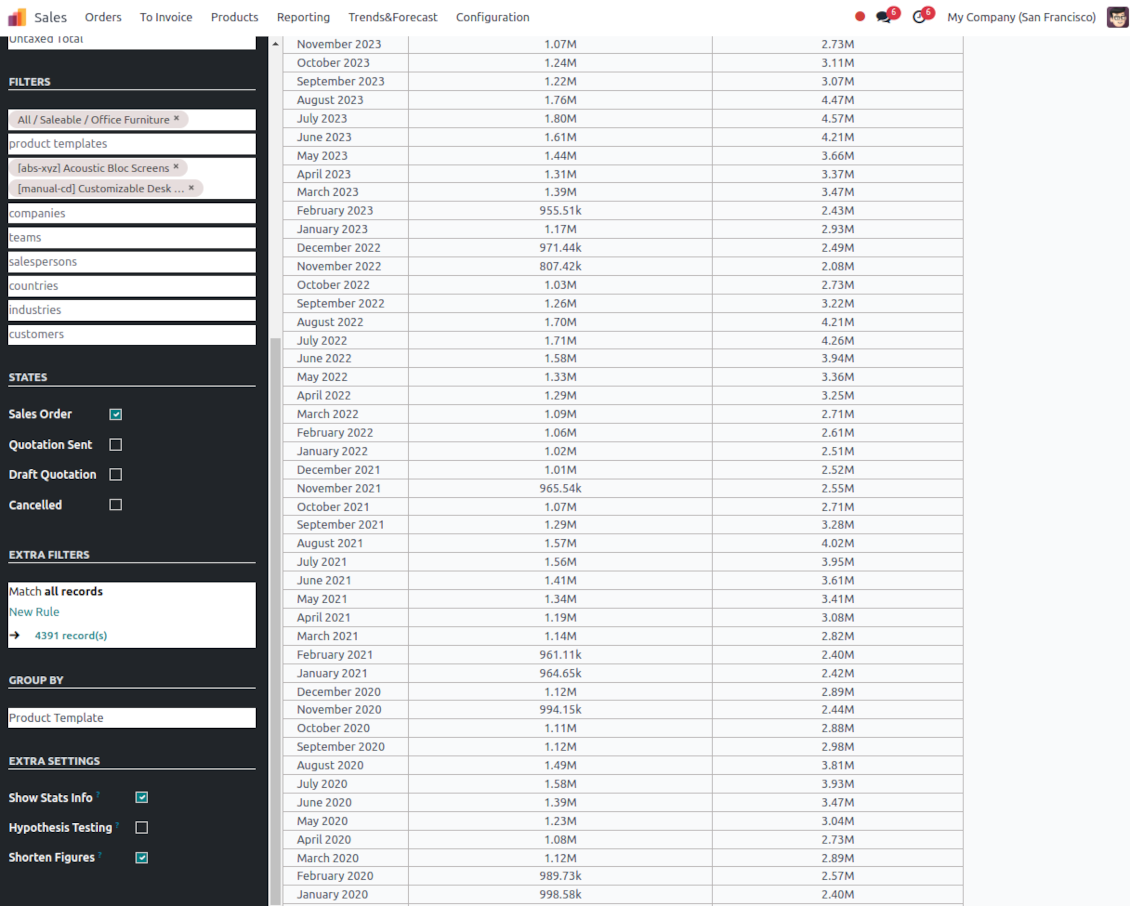
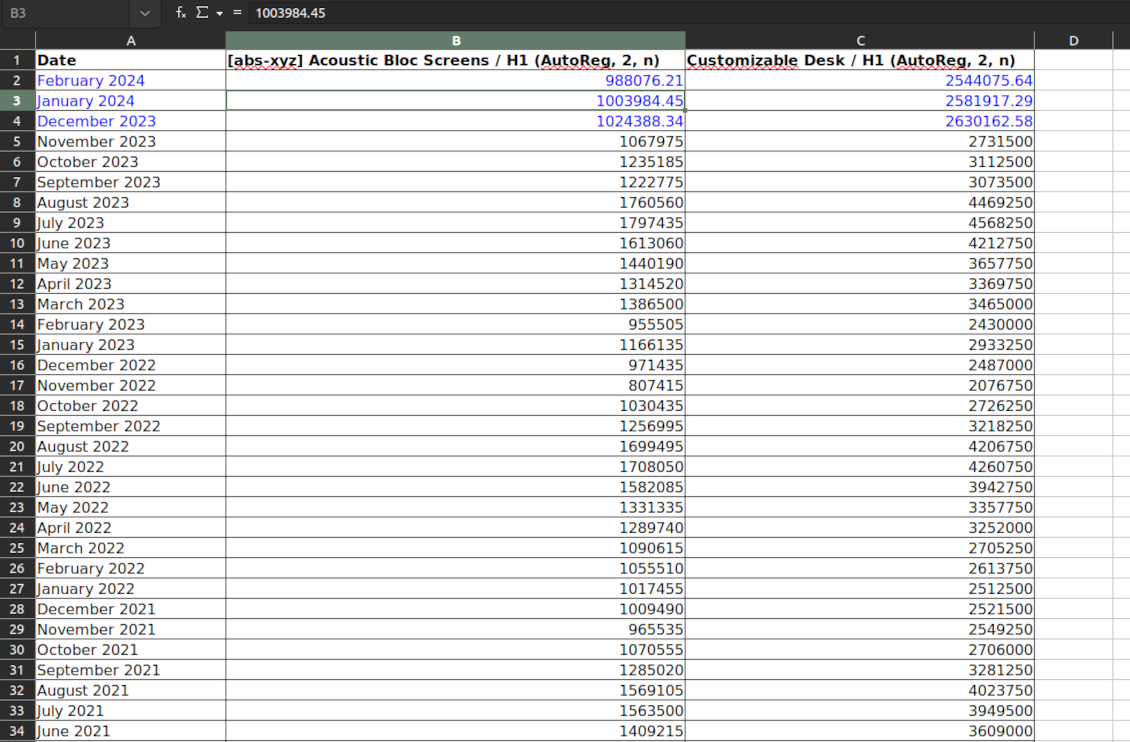
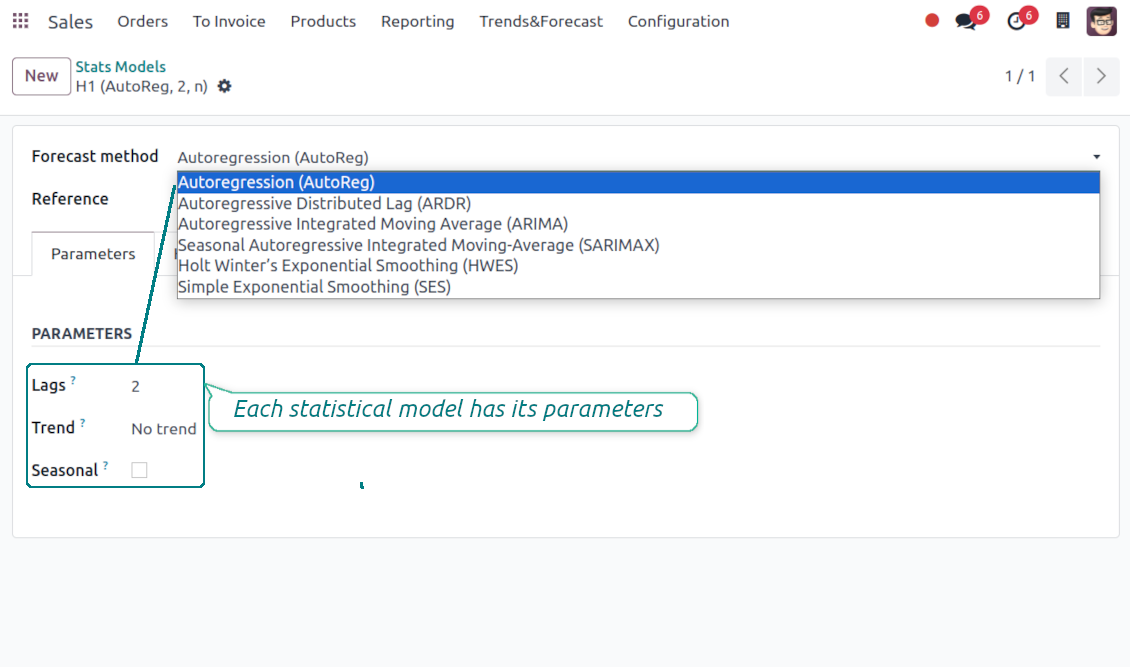
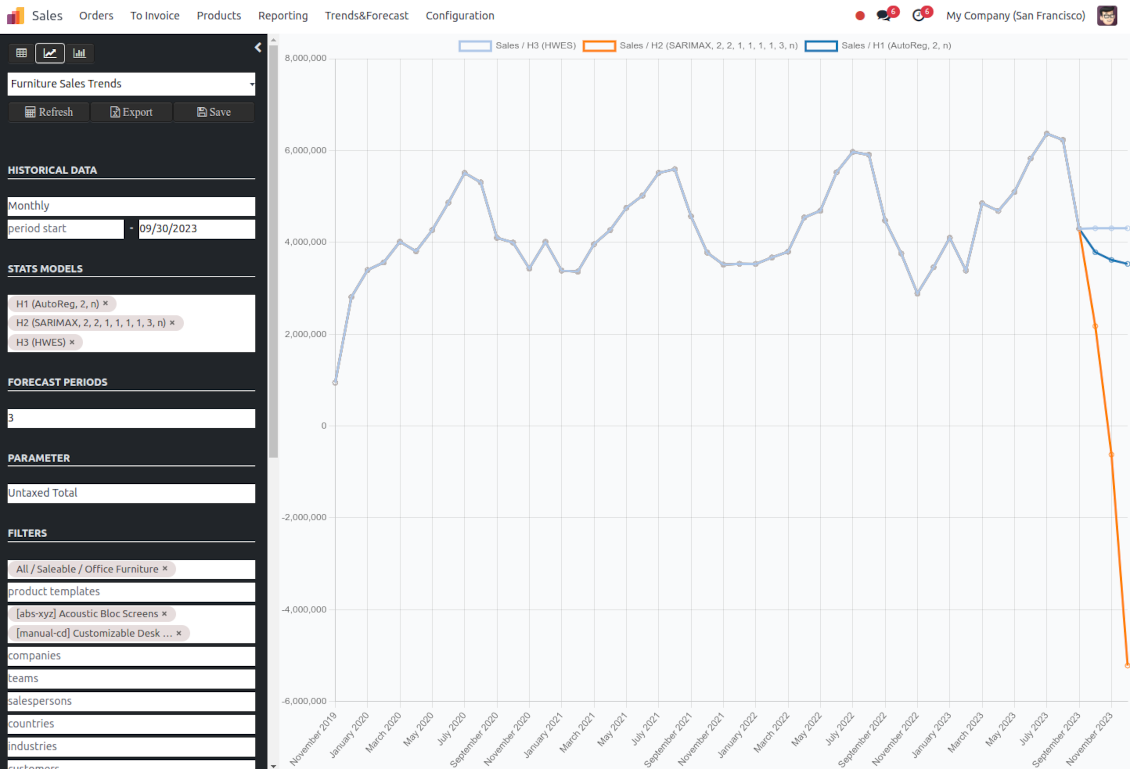
If future sales are a black box for you, you might hardly make profitable decisions right now. How many items to purchase? Which products require aggressive advertising? Where are the best markets for us for the next year? Luckily, statistics might help if you have enough historical data. This Odoo tool lets you generate sales by periods and apply statistical methods to scientifically forecast further periods.
The scientific approach to forecasting
The app assumes applying statistical methods to calculate historical sales trends and make a forecast. Experiment with statistical models and parameters to achieve the most reliable prediction. Leverage the proven statsmodels methods
Innovative data analysis interface
The tool introduces a special interface to instantly calculate sales series. Flexibly switch between different reports and update settings in a few clicks. Control data in pivot, graph, or chart views. Export series as an Excel tabled
Focused analysis
Shrink considered order/quotation lines flexibly or analyze global company sales. Group data into various series
Topical data
Apply time frames for historical data and work with intervals that are of interest to your industry. Work with past and future periods.
Flexible report configuration
-
Introduce as many analytic reports as you need. Each report is based on Odoo's sales lines' data
-
Keep reports to re-use them, instantly switch between reports, or experiment with real-time changes without saving those
-
Show historical and forecast series as a table, line graph, or bar chart, or export data as an Excel table
-
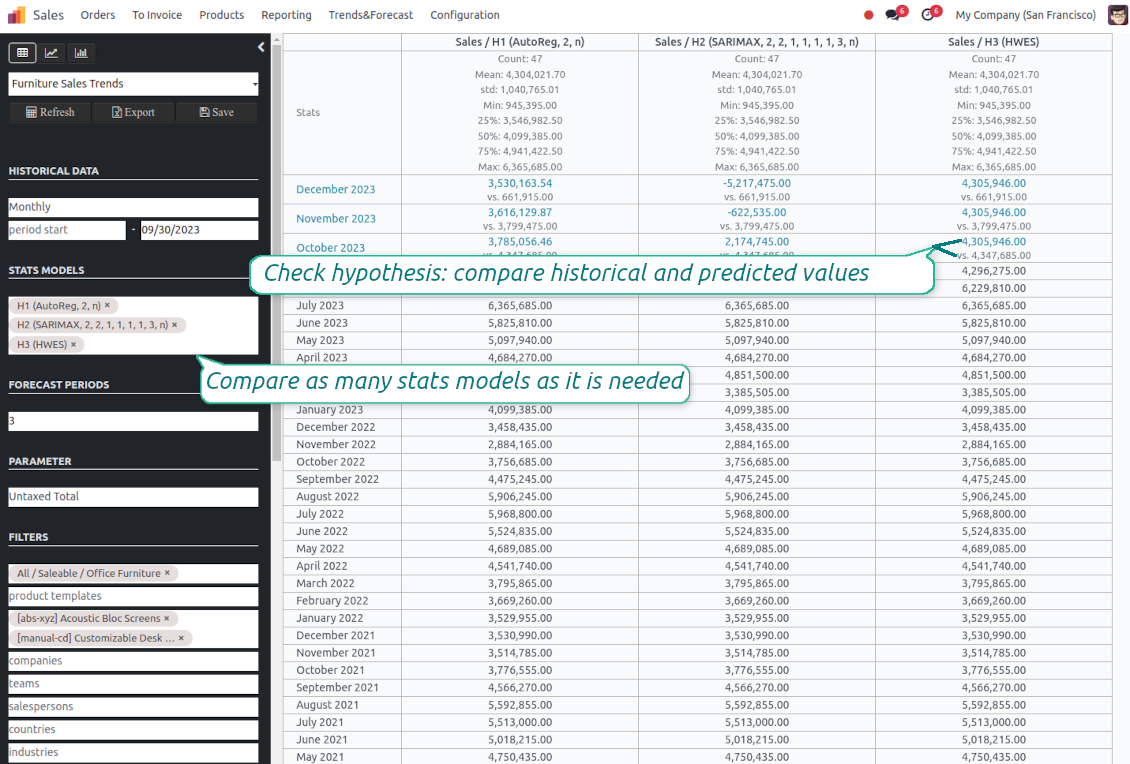
Apply as many and as different statistical models as you want to check. Each stats model will peer its own data series and prediction if the latter is possible. See also the section "Statistical models"
-
Define the data periods under analysis by entering a start and end. Only sales within this interval will be included in the series
-
Split data series into years, quarters, months, weeks, and days depending on seasons assumed in your industry or business area
-
Select an unlimited number of periods to predict future periods or check hypotheses
-
Grant the right to forecast tools for any salesperson (the group Sales > Sales Forecast)
-
Filter sales data by product categories, product templates, product variants, sales teams, salespersons, countries, industries, specific customers, and companies (for multi-company regimes). Introduce your own criteria based on Odoo's dynamic domain constructor, so shrink analysis by any sale line storable fields
-
Analyze a sales total, an untaxed total, an untaxed total to invoice, gross weight, or volume
-
Introduce a few data series simultaneously with grouping by a product category, a product template, a product variant, an order state, a team, a salesperson, a country, an industry, a customer, or a company
-
Hide/show general statistical measurement of series: count, mean, standard deviation, minimum, maximum, 25%, 50%, and 75% factors
-
Optionally compare predicted values to real historical data if any. See also the section "Hypothesis Testing"
-
Make figures human readable (e.g. 192,217 as 200k) or show them precisely.
Statistical models
-
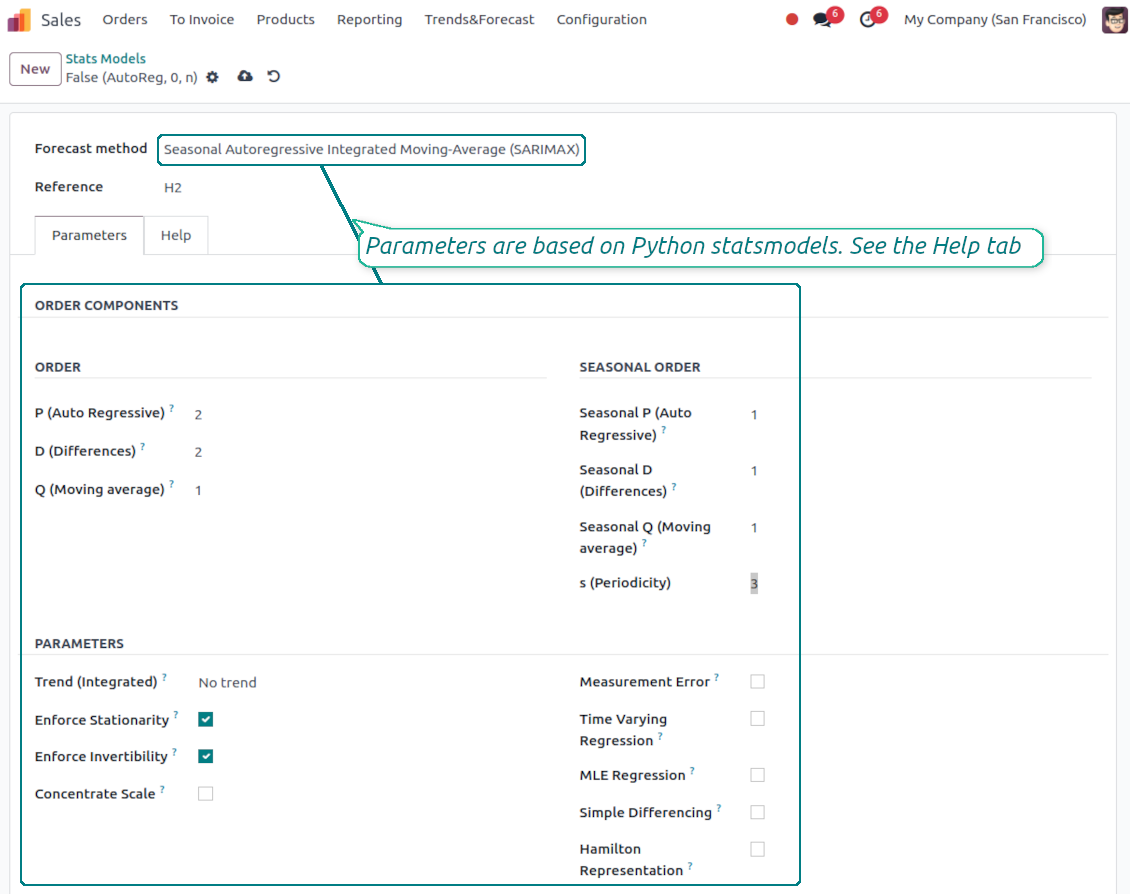
The tool allows calculating sales trends based on predefined statistical models introduced by the Python package statsmodels
-
Methods have different complexity, and their own unique parameters, and might be suitable for a definite market or a specific business. The final choice of the model and related statistical parameters is only up to you. Nobody except you can better understand tendencies in your company sales, and hence which methods and factors should be applied
-
Available statistical models are Autoregression (AutoReg), Autoregressive Distributed Lag (ARDR), Autoregressive Integrated Moving Average (ARIMA), Seasonal Autoregressive Integrated Moving-Average (SARIMAX), Holt Winter's Exponential Smoothing (HWES), Simple Exponential Smoothing (SES)
-
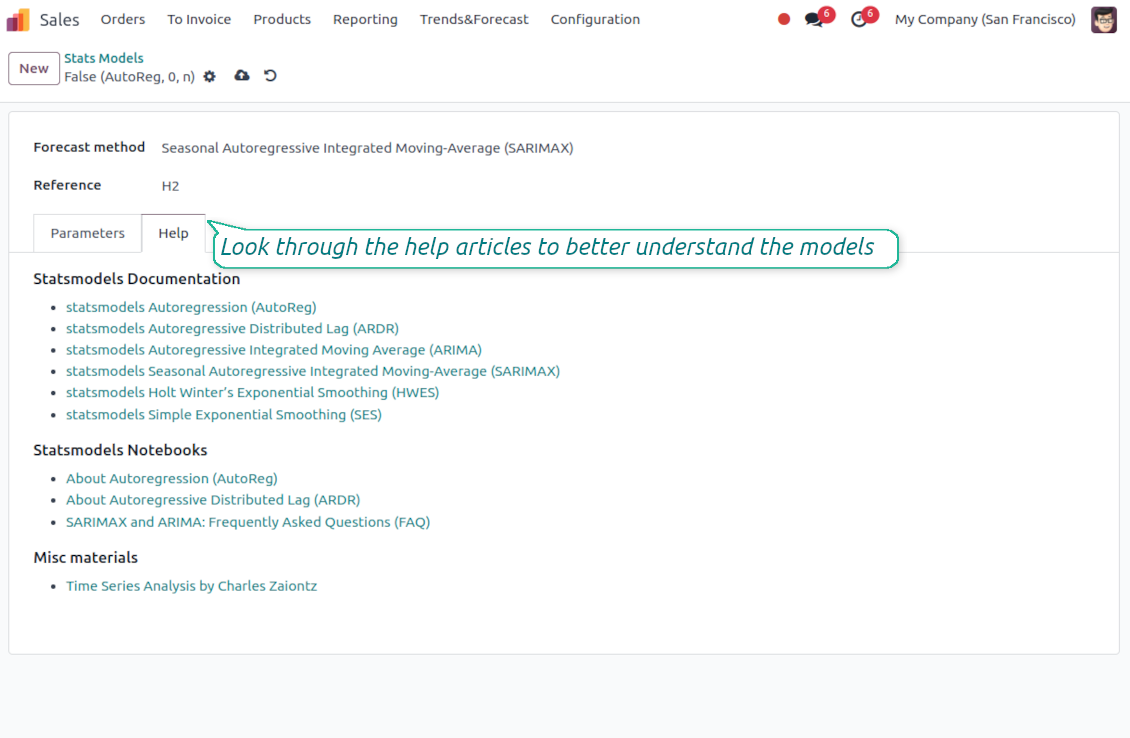
For deep details about what each stats model means and which parameters might be applied, look through the tab "Help" on the stats model form
-
Keep and use an unlimited number of stats models with various parameters. Check, compare, and update those flexibly through the forecast manager interface
-
Often models with specific parameters will not result in any prediction or the prediction will be unrealistic. This is normal, only a deep understating of trends and much experimenting might give a viable forecast for your specific case.
Hypothesis Testing
-
To get a proper prediction, it is usually needed to experiment a lot with statistical models and introduced parameters. To check the results, the app allows compare forecast data with real values
-
To check a certain assumption with historical values, you may make an analysis and prediction for some past periods, and turn on the setting "Hypothesis testing"
-
For example, you have sales orders from 2017 to 2022. Then, you can get report historical data for 2017-2021, and make the forecast for 12 months of 2022. In this way, you will get the prediction for the interval for which you already have actual values. By comparing forecast and actual values, you can decide whether a chosen model and factors are good enough
-
The app allows checking the hypotheses for a few stats models simultaneously. In this way, it is possible to reveal what is actually the most appropriate, or whether experimenting should be continued.
Usage requirements
-
To reveal trends, there should be enough historical sales data. It is senseless to make a forecast based on the last 5 days of sales since no trend cannot be retrieved. Take into account that data should be enough for the chosen filters and for each grouped series
-
There should be not only enough sales lines but also there should be some actual trends. Chaotic data will not result in reliable predictions. To use the app, you should understand which assumptions (e.g. seasonal changes) you check
-
To use the app, you either should have a clear understanding of how statistics works or a will to understand that. Regretfully, there is no way to make a "general" analysis, each specific case is unique and requires its own elaboration.
Савети за конфигурацију и инсталацију за Sales Trends and Forecast Odoo v.17
Python dependencies
To guarantee the tool works correctly, a number of Python libraries are required: pandas, numpy, statsmodels, scipy, xlsxwriter. To install those packages execute the command:
pip3 install pandas numpy statsmodels scipy xlsxwriter
If you run Odoo on Python prior to or equal to version 3.7, please install the following versions of the packages pandas==1.3.5, statsmodels==0.13.1
Server memory limits
Running the statistical analysis and making the forecast is quite a resource-demanding operation. If users face the hanging interface, make sure that server memory limits and timeouts are enough. Otherwise, increase those settings.
Често постављана питања о Sales Trends and Forecast Odoo v.17
Које су политике ажурирања ваших алата?
Према важећим правилима Odoo Apps Store:
- Сваки модул купљен за верзију 12.0 и старију даје приступ свим верзијама до 12.0.
- Од верзије 13.0 свака верзија модула се купује засебно.
- Без обзира на верзију, куповина даје право на сва ажурирања и исправке у оквиру главне верзије.
Имајте у виду да тим faOtools не контролише та правила. За питања обратите се директно представницима Odoo Apps Store.
Како могу инсталирати вашу апликацију на Odoo.sh?
Најдиректнији приступ је да користите уграђени ток рада Odoo продавнице:
1. Отворите страницу модула и кликните дугме Deploy on odoo.sh
2. Након тога бићете преусмерени на GitHub страницу. Пријавите се на налог, затим кликните 'Create a new repo' или користите постојећи. Проверите да је спремиште приватно. Није дозвољено објављивати апликације под лиценцом OPL-1. Ако треба, направите нови repo за Odoo.sh пројекат
3. Затим идите на odoo.sh и кликните дугме Deploy. У искачућем прозору пошаљите одлуку и кликните 'Continue.' Ова радња покреће инсталацију.
Ови кораци ће инсталирати апликацију на продукциону грану пројекта. Ако желите да примените апликације на друге гране или да ажурирате модул, урадите следеће:
1. Отпремите изворни код апликације из Odoo продавнице
2. Урадите commit модула у потребно GitHub спремиште. Проверите да ниједна фасцикла/датотека апликације није игнорисана (тј. није у .gitignore репоа). Спремишта аутоматски прави odoo.sh и могу подразумевано садржати важне ставке (нпр. /lib). Отпремите све директоријуме, поддиректоријуме и датотеке модула без изузетака
3. Примените циљну грану odoo.sh пројекта или, ако то претпостављају подешавања, сачекајте да се аутоматски изгради.
Како да инсталирам вашу апликацију на сопствени сервер?
2. Поново покрените Odoo сервер;
3. Укључите режим програмера (техничка подешавања);
4. Ажурирајте листу апликација (мени апликација);
5. Пронађите апликацију и притисните „Activate“/„Install“;
6. Пратите смернице на страници апликације ако постоје.
Приметио сам да ваша апликација има додатне додатке. Могу ли их купити накнадно?
Да, наравно. Истовремено Odoo аутоматски додаје све зависности у корпу, па треба искључити већ купљене алате да не платите двапут.
Поставио сам вашу апликацију на Odoo.sh и у тестовима видим упозорење/грешку
Црвено/наранџасто упозорење не утиче на функције апликације. Нажалост, наши модули понекад не прођу стандардне аутоматске тестове јер они претпостављају понашање које је у сукобу са циљевима апликације. На пример, мењамо обрачун цене, а тестови стандардног Odoo модула упоређују коначну цену са стандардним алгоритмом.
Пре свега проверите функције постављене базе. Да ли све ради исправно?
Ако и даље сматрате да упозорење утиче на стварне функције, контактирајте нас и пошаљите потпуне дневнике инсталације и потпун списак постављених модула (укључујући језгро и треће стране).
Могу ли да купим апликацију директно од ваше компаније?
Не, алате дистрибуирамо само преко званичне продавнице апликација Odoo.
Желео бих да добијем попуст
Нажалост, немамо техничких средстава да понудимо појединачне цене.
Могу ли да инсталирам апликацију на своју Odoo Online (SaaS) базу?
Не, апликације трећих страна не могу се користити на Odoo Online. Нажалост Odoo SaaS то блокира.
Ваш алат зависи од других апликација. Треба ли да их купим?
Да, алату су потребни сви модули наведени у зависностима да би радио исправно. Цена на страници апликације већ укључује све потребне зависности.
Која је цена модула у америчким доларима? Зашто се променила?
Цена наших модула је у еврима. Odoo продавница прерачунава цене у друге валуте по свом интерном курсу. Зато се цена у америчким доларима може променити кад се курс ажурира.
Текстови апликације и сајта на језицима осим енглеског рађени су уз помоћ ВИ и усклађени са званичним Odoo преводима. Ако уочите грешку, пошаљите тикет о исправности превода и исправићемо.
Odoo демонстрационе базе (прегледи уживо)
За ову апликацију можемо обезбедити бесплатну персонализовану демо базу.
Да нас контактирате није потребан број телефона ни кредитна картица. Довољна је кратка регистрација е-поштом која не траје више од 30 секунди.
На ваш захтев припремићемо појединачну базу за преглед уживо, где можете око две недеље радити тестове и проверавати претпоставке.
Пријављивање грешака
Ако наиђете на грешке или недоследно понашање, слободно нас контактирајте. Гарантујемо исправке у року од 60 дана од куповине и веома смо заинтересовани да унапређујемо алате и после тог периода.
Да нас контактирате није потребан број телефона ни кредитна картица. Довољна је кратка регистрација е-поштом која не траје више од 30 секунди.
У захтев укључите што више детаља: снимке екрана, дневнике Odoo сервера, пун опис како поновити проблем и тако даље. Обично треба неколико радних дана да се припреми радни план (ако је грешка потврђена) или смернице шта треба урадити (у супротном).
Јавни захтеви за функције и идеје модула (бесплатан развој)
Снажно смо мотивисани да побољшамо своје алате и били бисмо захвални на свакој повратној информацији. Ако су ваши захтеви од јавне користи и могу се ефикасно спровести, тим ће их укључити у нашу листу задатака.
Таква листа задатака се обрађује редовно и не подразумева додатне накнаде. Иако не можемо обећати рокове и коначан дизајн, то може бити добар начин да добијете жељене функције без улагања и ризика.
Да нас контактирате није потребан број телефона ни кредитна картица. Довољна је кратка регистрација е-поштом која не траје више од 30 секунди.

The tool to flexibly structure Odoo attachments in folders and synchronize directories with cloud clients: Google Drive, OneDrive/SharePoint, Nextcloud/ownCloud, Dropbox, Amazon S3, Box, and NAS. DMS. File Manager. Document management system
398€

The tool to build a deep and structured knowledge base for internal and external use. Knowledge System. KMS. Wiki-like revisions.
398€
The tool to automatically synchronize Odoo attachments with OneDrive files in both ways
487€
The tool to set up KPI targets and control their fulfillment by periods. KPI dashboards. Dashboard designer. KPI charts

The tool to automatically synchronize Odoo attachments with Google Drive files in both ways
487€
The tool for time-based service management from booking appointments to sales and reviews
398€
The tool to make sure a sale order is ready for the next stage. Sale checklists. Sale approval. Multi quotation confirmation

The tool to make sure required jobs are carefully done on each CRM pipeline stage. CRM checklists