Flexible Timetables and Shifts v.17
The tool to plan, share and control employees shifts in a form of weekly timetables. Work schedule. Work shift calendar
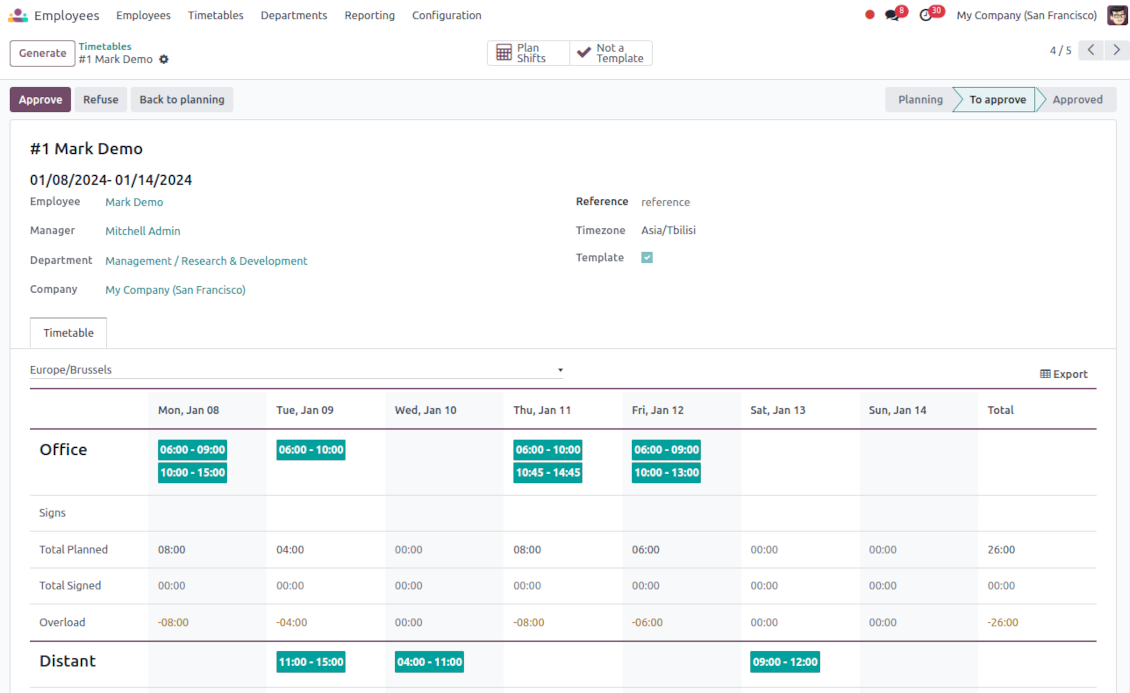
This is the Odoo app to organize teamwork when employees have flexible timetables. The tool allows and forces users to plan shifts in advance. Peers know their colleagues working time, while HR managers control attendance.
- the core app to plan shifts and control timetables. 가격은 98€.
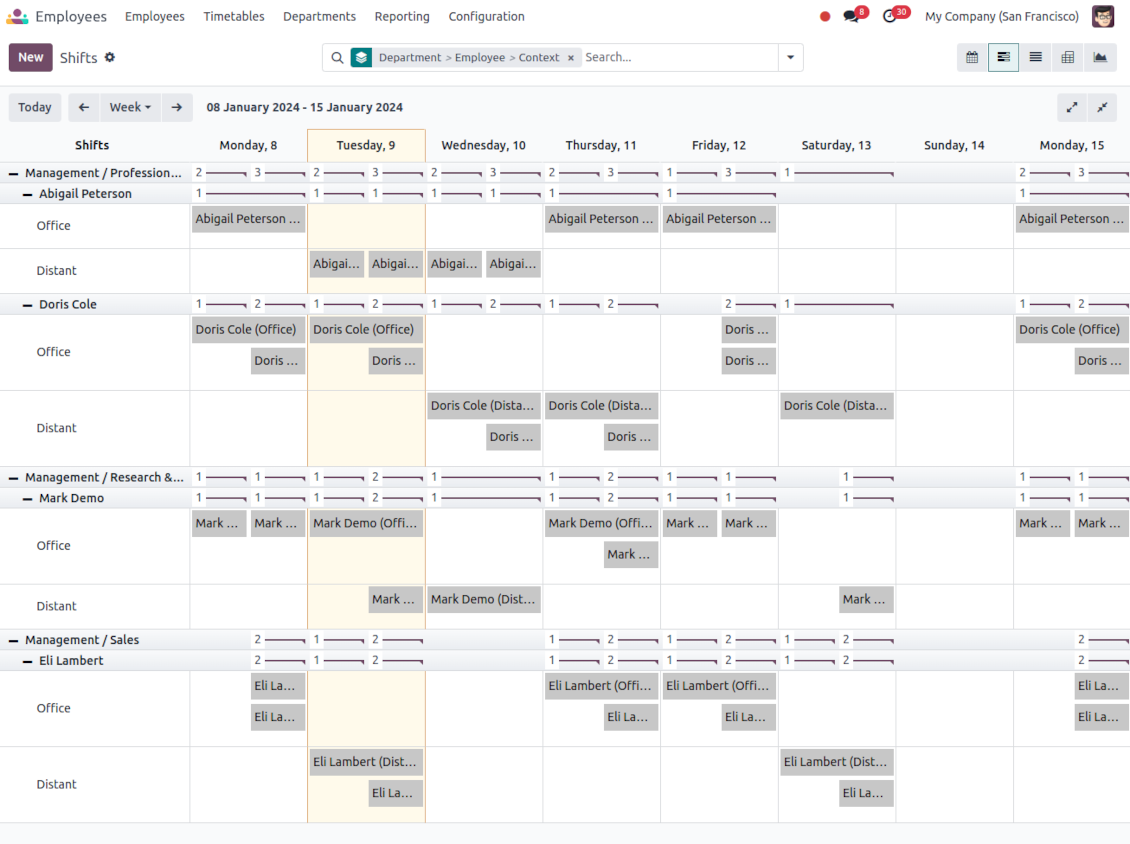
- the optional free extension that introduces the Odoo Enterprise Gantt view for shifts. The features assumed by this add-on are marked by the icon
Comfortable shifts planning
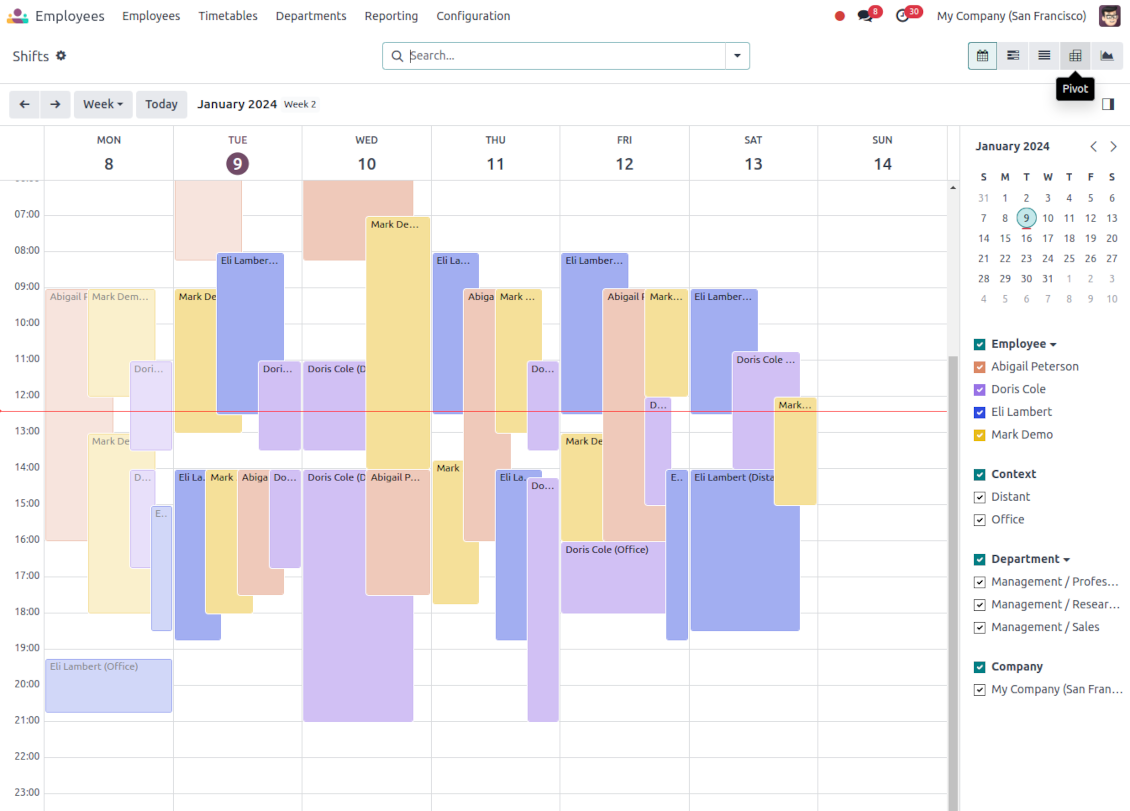
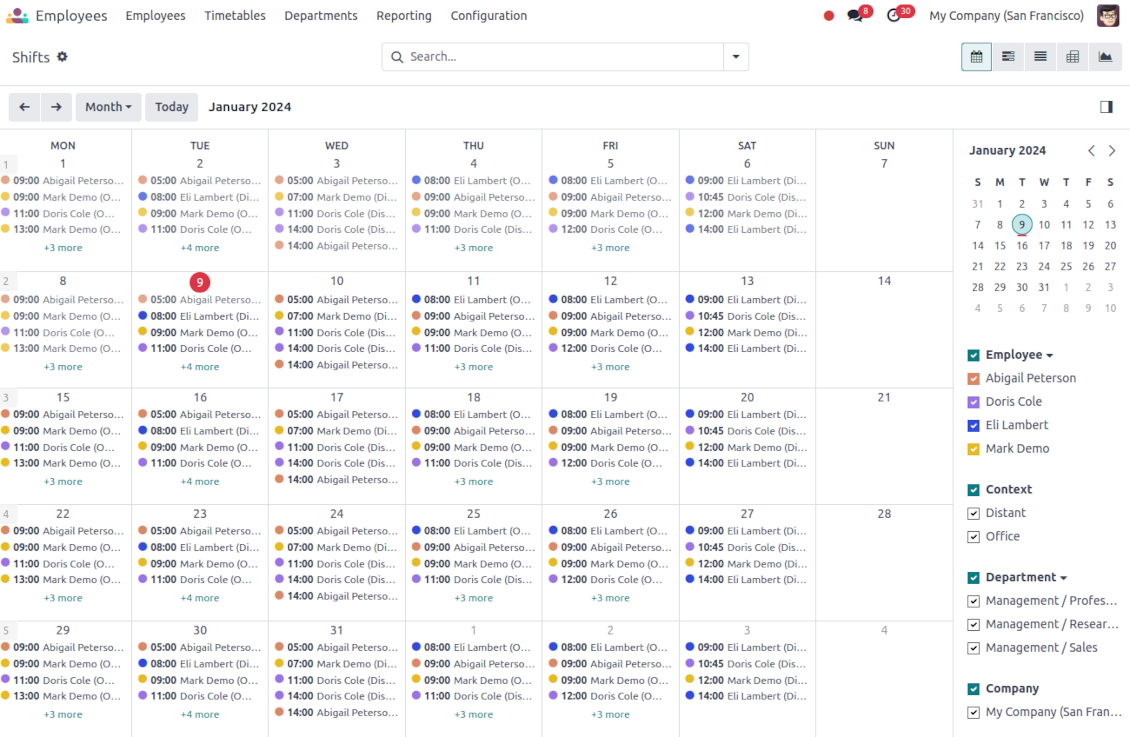
The app introduces the innovative work calendar where users create shifts just by choosing a period and update those by merely dragging a card. A minute to plan a whole week. As flexible as needed
Team collaboration
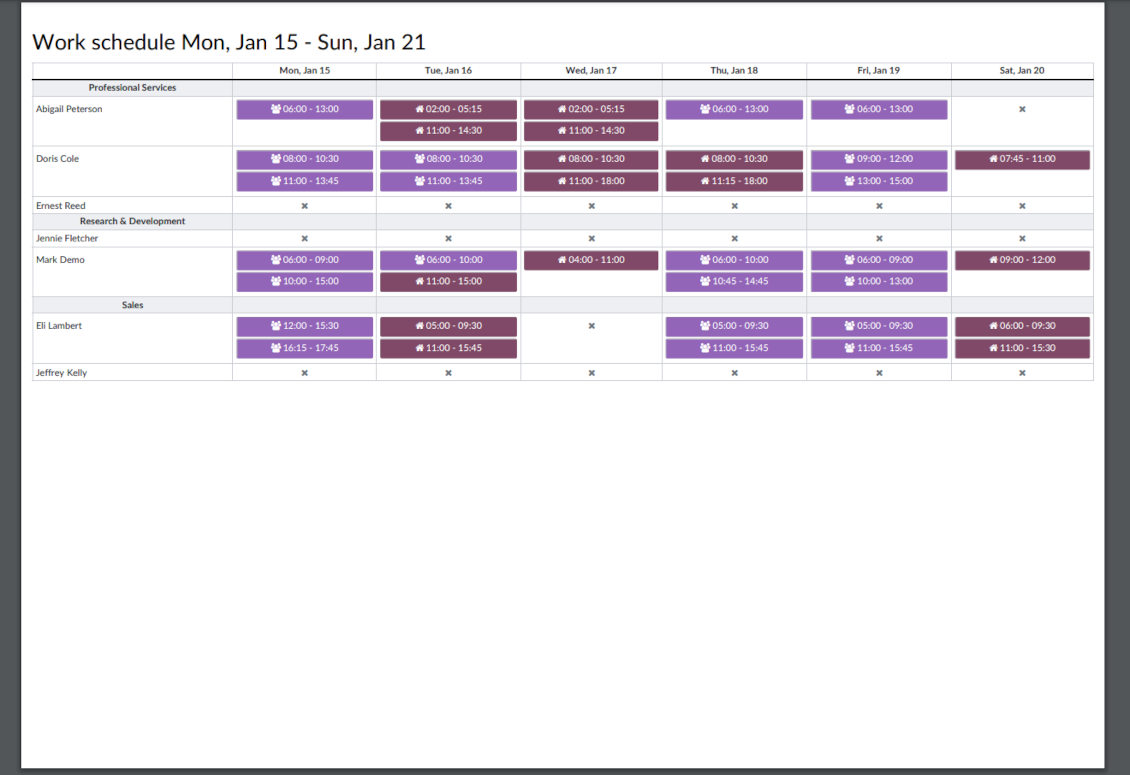
Employees can access each other shifts calendar. Work schedule can be also printed to be physically stuck in the office. Thus, users always know where and when their colleagues are available
Work calendar interface
Find a specific user shift using the built-in calendar filters by employee, department, context, or company. Analyze a single user or the whole team. Control shifts on the Odoo Enterprise Gantt view
Odoo weekly timetables
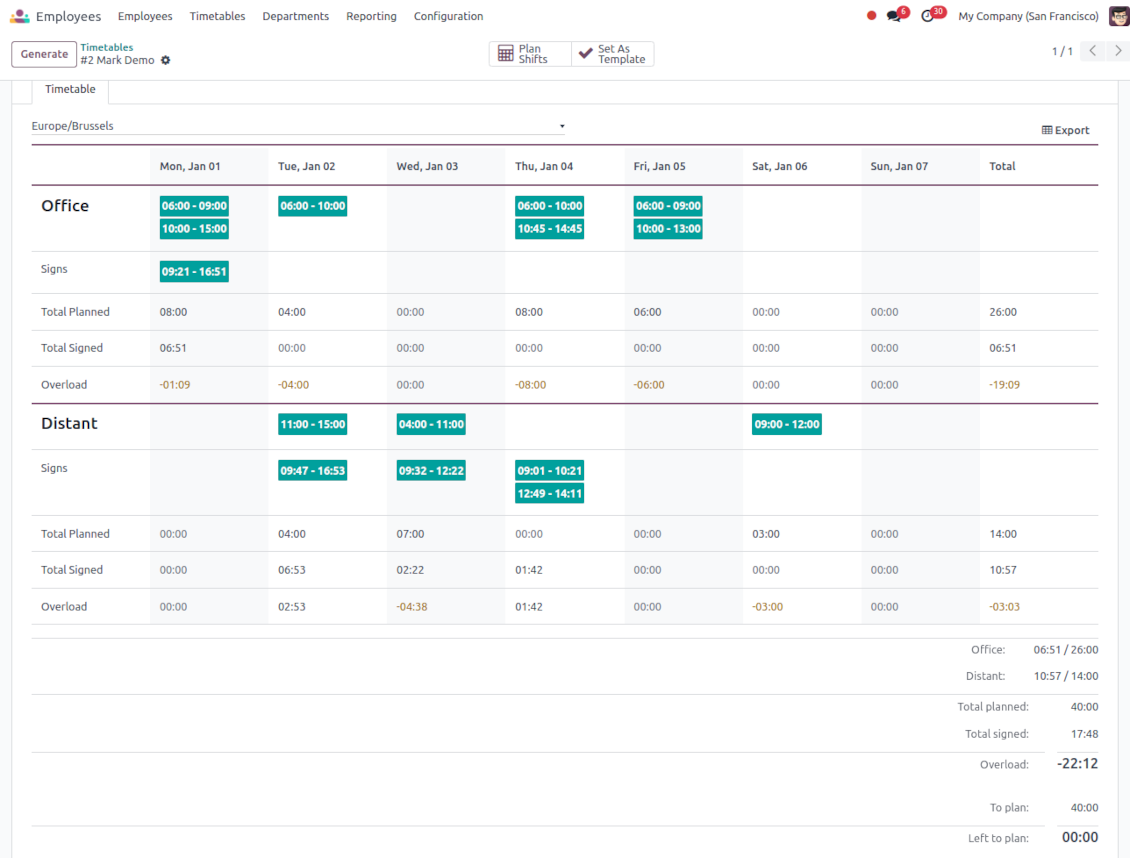
Shifts are auto-combined into weekly timetables from Monday to Sunday. There, employees check themselves while HR managers control the correctness and completeness of plans
HR control
Based on the Odoo attendance features, HR administrators supervise shift fulfillment right in employees' timetables. Turn on the approval option also to force users to get a confirmation for their shifts
Working context (reasons)
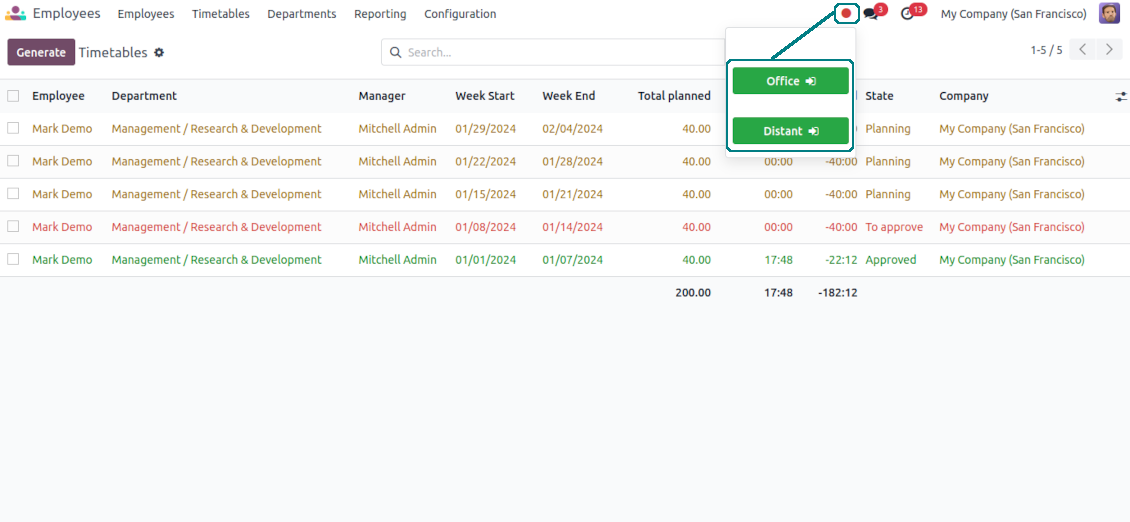
For both attendance and planned shifts, users may be asked to choose a context. The list is up to you: 'distant', 'office central', 'office west', and so on. The features let quickly understand where or why employees work
Timetable reminders
Configure Odoo to remind employees to plan shifts for the next week. Notify users of being late if they have not checked in but were previously planning to work
Multiple companies and timezones
The app fully supports multi-timezones and multi-companies environments. Perfect for geographically distributed teams where cooperation becomes really crucial.
Team Work Schedule
Shifts and working calendar
-
The app's key idea is that employees may independently and flexibly plan shifts for the next or a few next weeks
-
In this way, all team members always know when (time) and where (context) to find their colleagues. Ordinary users can access anybody else schedule but, surely, can change only their own
-
Shifts are organized in the Odoo calendar interface with instant filtering by employees, department, context, and company. To register a new shift, that's enough to choose a period and a reason. To update a shift just drag it and drop it to another time slot
-
The interface fully supports multiple timezones, so the module is perfect for geographically distributed teams
-
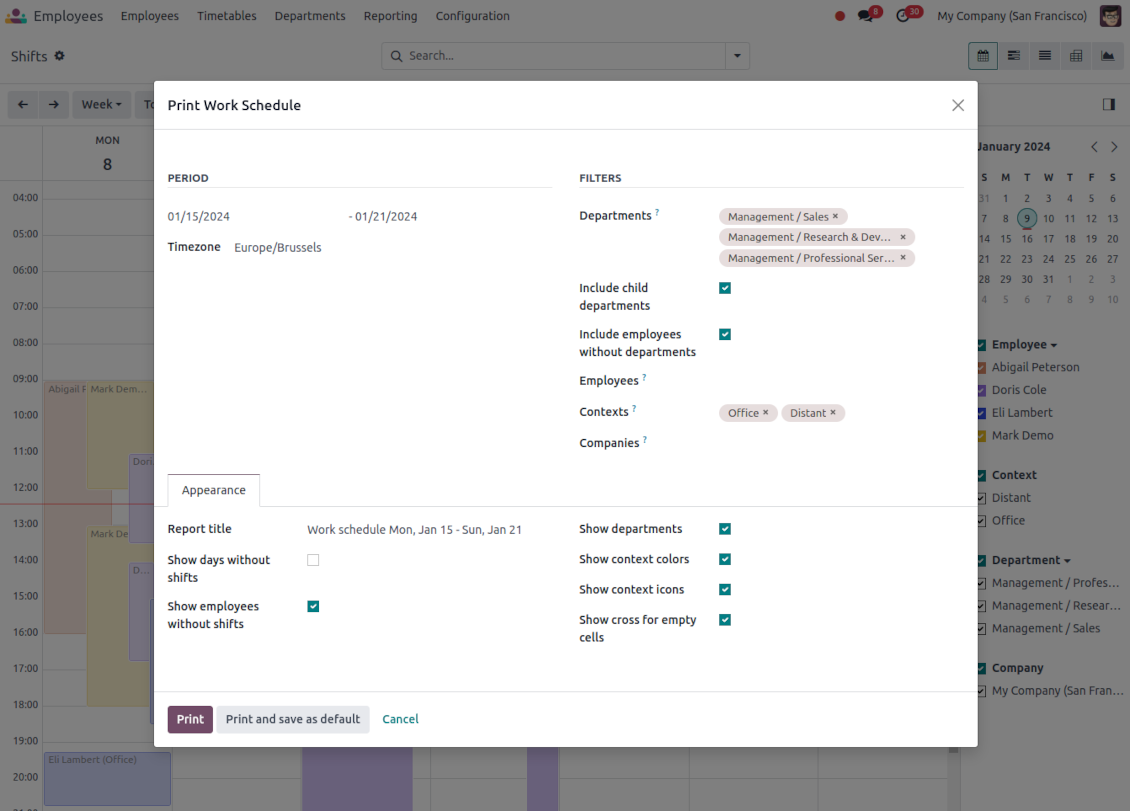
The tool allows printing a work schedule of a specified period (up to 31 days) to have a physical copy on a whiteboard, for instance. The layout is configurable: for example, make it A3 or A4, add or remove a company logo
Timetable interface
-
Planned shifts are automatically combined in weekly timetables from Monday to Sunday
-
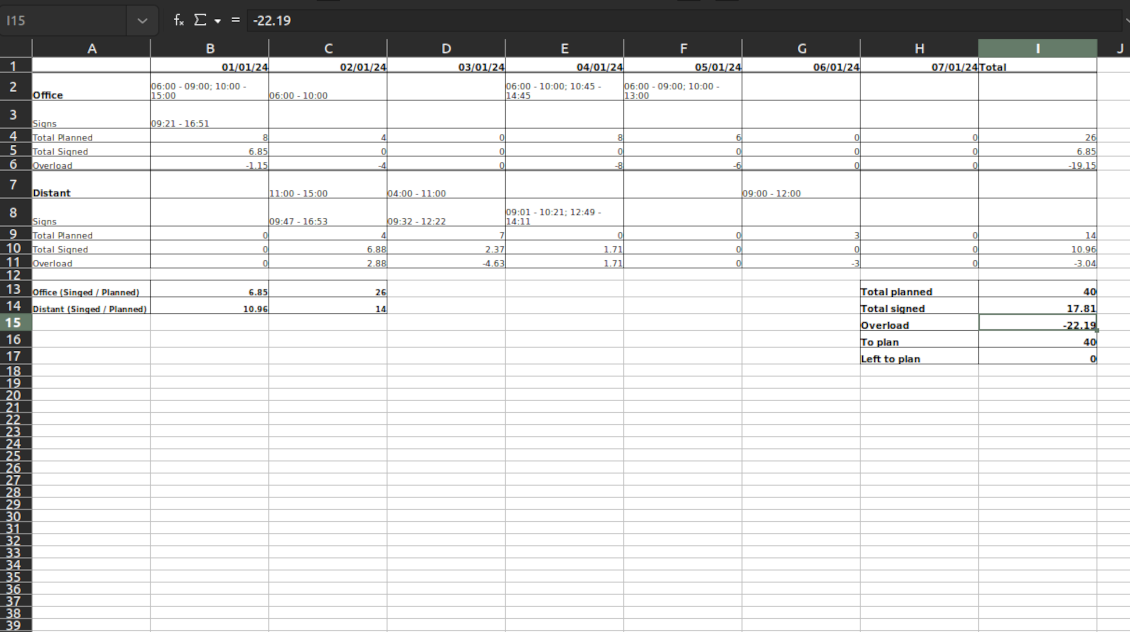
There, employees can control themselves on how much working time is planned in comparison to how much it should be according to the contract
-
The timetable interface groups shifts by working contexts. It makes analysis much more comfortable and lets make corrections in time. For example, if you had certain restrictions on the 'distant work', here it is under full control
-
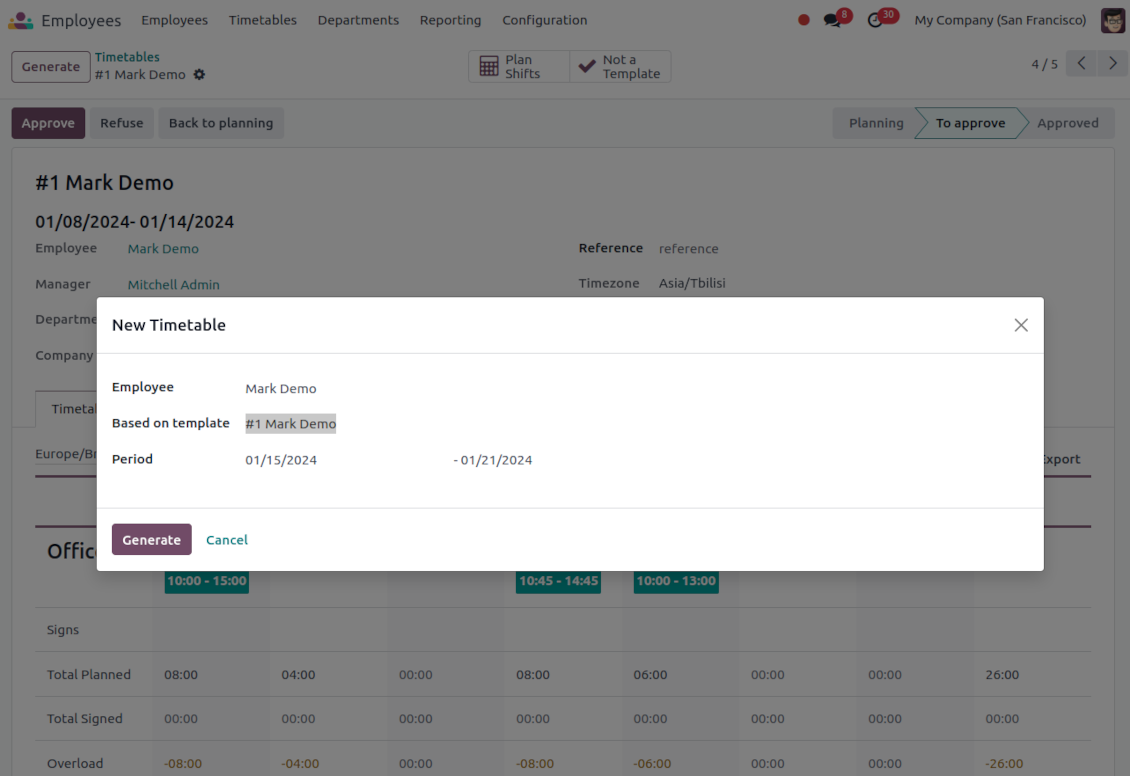
To simplify shifts planning, employees are allowed to save any timetable as a template, so they can re-use the same schedule for other weeks
-
It is possible to export a specific timetable as an Excel table to share or print out
Managerial control and attendance
-
Besides the owners, timetables are available only for this employee department manager and for all users with the access group 'HR administrators'
-
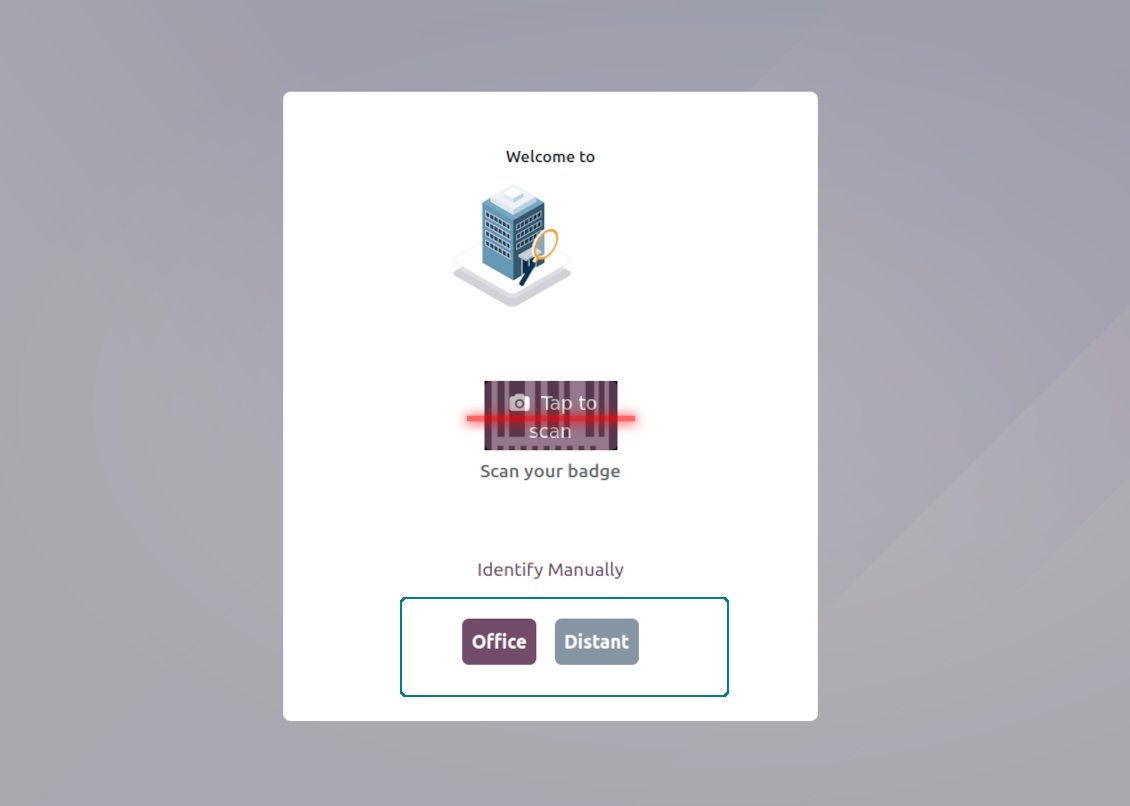
The app relies on the Odoo attendance functionality. When checked in, a user might be optionally forced to choose a working context (reason)
-
Thus, HR administrators not only see planned shifts but also control their fulfillment: when a user actually checked in and out, how much work time is planned, how much is actually spent, and what calculated overload is
-
Superiors and subordinates might discuss any scheduling issues and set up activities right under each specific weekly timetable
-
The app supports multi companies. Users can access only their real colleagues' shifts. If a user has an employee in a few companies, he/she controls timetables of all of those but the app makes sure there are no overlappings
Approval workflow
-
The tool lets optionally introduce the approval workflow for timetables based on the states update Planning > To approve > Approved
-
Then, after planning shifts, an employee should send a weekly timetable to their department manager for confirmation (the button 'Send for approval')
-
Department managers and any HR administrators subscribed for this employee 'Timetables and shifts' subtype would get a notification that a timetable state has been updated
-
Such managers or any user with the right 'HR Administrator' may confirm (the button 'Approve') or refuse (the button 'Refuse') the shift schedule. The decision principles are fully up to you
-
As a weekly timetable is sent for approval or has been already approved, ordinary employees cannot any more update shifts for that week. In this way, team collaboration becomes much more predictable and might be planned beforehand.
구성 및 설치 팁: Flexible Timetables and Shifts Odoo v.17
Contexts (reasons) for shifts and attendances
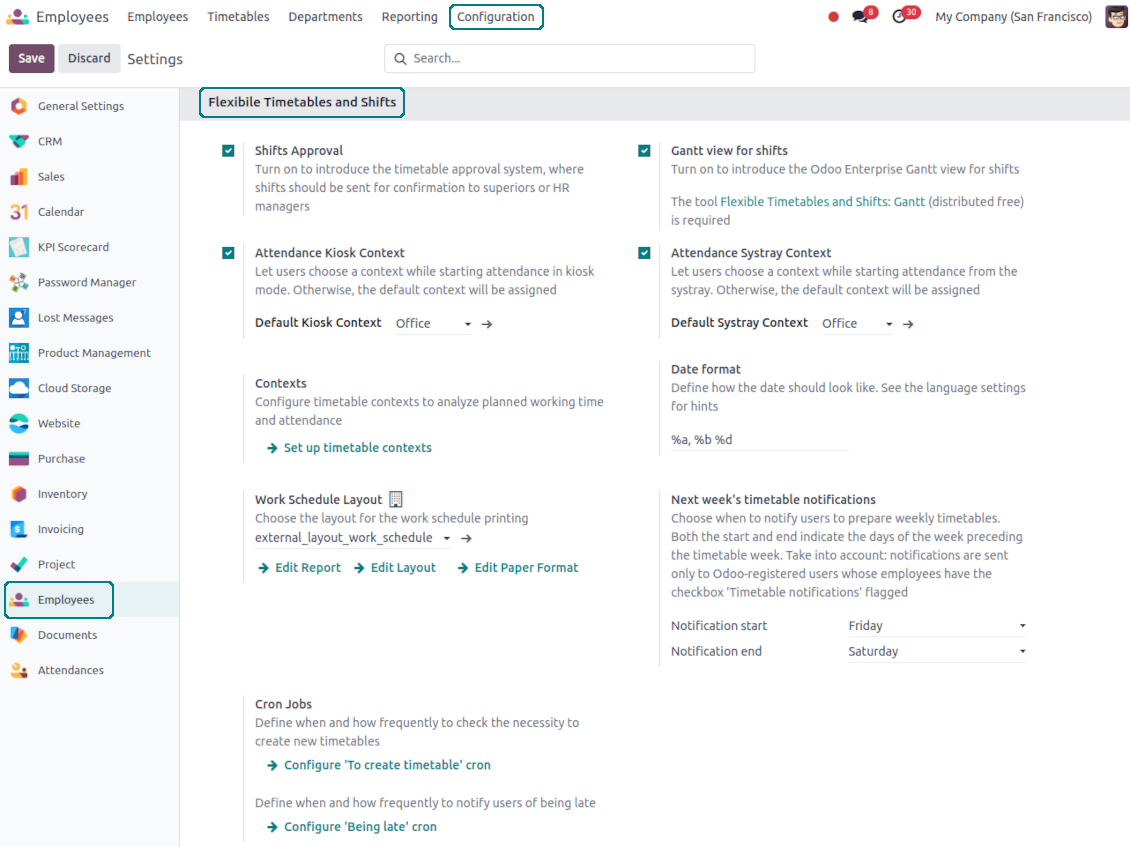
The app allows to configure an unlimited number of working contexts on the Odoo HR configuration page.
One of those contexts should be set as default. Then, it would be entered as the first choice for planned shifts and attendances.
When a user plans shifts, he/she would be asked to introduce a context.
It is possible to turn on context selection also when a user checks in Odoo. Otherwise, default context would be entered to attendances.
Timetable combines shifts and attendances by contexts. In case you have rarely used contexts, mark those as 'Do not show if empty' to avoid too many lines.
Notifications to plan shifts
Reminders to create timetables are sent for the next week. Configure days of the previous week when to notify employees on the configuration page.
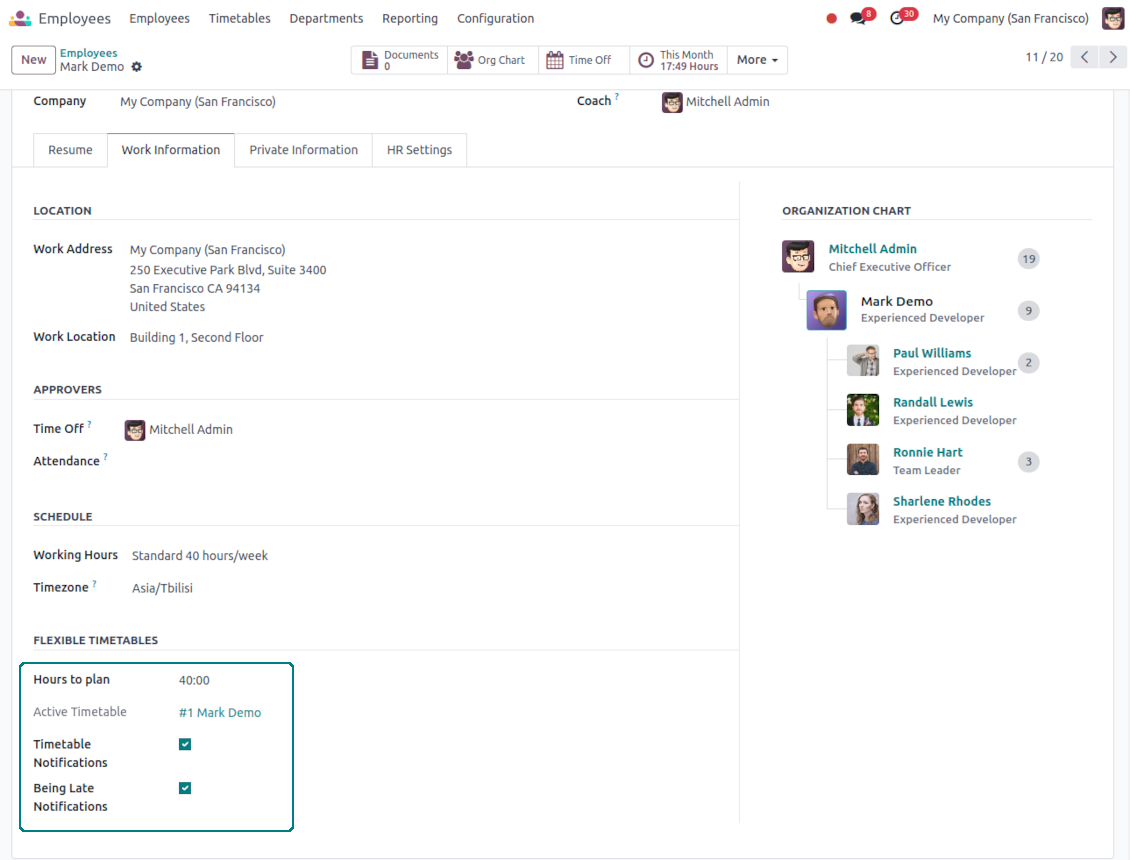
Only employees with the flagged setting "Timetable Notifications" would receive reminders.
To change the reminder email, go to the Odoo technical settings > Email > Templates. Find there 'Timetable for the next week'. You are welcome to introduce any changes to subject or body and to update translations.
Change time of the reminder through the Odoo technical settings > Automation > Scheduled jobs > 'Notify employees to plan working time for the next week'.
Notifications of being late
Reminders of being late is sent if a user at this particular moment has a planned shift, but he/she has not checked in.
Only employees with the flagged setting "Being Late Notifications" would receive reminders.
To change the reminder email, go to the Odoo technical settings > Email > Templates. Find there 'Timetable: you are late'. You are welcome to introduce any changes to subject or body and to update translations.
Set up frequency of the reminder through the Odoo technical settings > Automation > Scheduled jobs > 'Notify employees of being late'. By default check is done once an hour.
Hours to plan (contract hours)
How many hours should be planned for a week is defined per each user individually. Define contract hours on an employee form.
관련 자주 묻는 질문 Flexible Timetables and Shifts Odoo v.17
사용자가 아닌 직원용 캘린더를 만들 수 있나요.
이 도구는 사용자가 직접 교대를 계획하도록 설계되었습니다. 로그인하여 자신의 교대를 설정하면 다른 사용자가 볼 수 있습니다. 그러려면 계정이 필요합니다. 보안상 계정 없이는 그런 권한을 줄 수 없습니다.
도구의 업데이트 정책은 무엇입니까?
현재 Odoo Apps Store 정책에 따르면:
- 버전 12.0 이하용으로 구매한 모듈은 12.0까지의 모든 버전에 접근할 수 있습니다.
- 버전 13.0부터는 모듈 버전마다 따로 구매해야 합니다.
- 버전과 관계없이 구매하면 해당 메이저 버전 내의 모든 업데이트와 버그 수정 권한이 있습니다.
faOtools 팀은 해당 정책을 통제하지 않습니다. 문의는 Odoo Apps Store 담당자에게 직접 하세요.
앱을 Odoo.sh에 어떻게 설치하나요?
가장 단순한 방법은 Odoo 스토어의 기본 제공 워크플로를 사용하는 것입니다:
1. 모듈 페이지를 열고 Deploy on odoo.sh 버튼을 클릭합니다.
2. 그러면 GitHub 페이지로 이동합니다. 계정에 로그인한 뒤 'Create a new repo'를 클릭하거나 기존 저장소를 사용하세요. 저장소는 비공개여야 합니다. OPL-1 라이선스 앱을 공개하는 것은 허용되지 않습니다. 필요하면 Odoo.sh 프로젝트용 새 repo를 만드세요.
3. 그런 다음 odoo.sh로 가서 Deploy 버튼을 클릭합니다. 팝업에서 결정을 제출하고 'Continue.'를 클릭합니다. 그러면 설치가 시작됩니다.
이 단계로 프로젝트의 프로덕션 브랜치에 앱이 설치됩니다. 다른 브랜치에 앱을 배포하거나 모듈을 업데이트하려면 다음을 수행하세요:
1. Odoo 스토어에서 앱 소스 코드를 업로드합니다.
2. 모듈을 필요한 GitHub 저장소에 커밋합니다. 앱 폴더/파일이 무시되지 않는지 확인하세요(즉 repo의 .gitignore에 넣지 마세요). 저장소는 odoo.sh가 자동 생성하며 기본적으로 중요한 항목(예: /lib)이 포함될 수 있습니다. 모듈의 모든 디렉터리, 하위 디렉터리, 파일을 예외 없이 업로드하세요.
3. odoo.sh 프로젝트의 대상 브랜치를 Deploy하거나, 설정이 그렇게 되어 있으면 자동 빌드될 때까지 기다립니다.
자체 서버에 앱은 어떻게 설치하나요?
2. Odoo 서버를 다시 시작합니다;
3. 개발자 모드를 켭니다(기술 설정);
4. 앱 목록을 업데이트합니다(앱 메뉴);
5. 앱을 찾아 'Activate'/'Install'을 누릅니다;
6. 앱 페이지에 안내가 있으면 따릅니다.
앱에 추가 기능이 있는 것을 봤습니다. 나중에 구매해도 되나요?
네, 물론입니다. 동시에 Odoo가 모든 의존성을 장바구니에 자동 추가하므로, 이중 결제를 피하려면 이미 구매한 도구를 제외하십시오.
앱을 Odoo.sh에 배포했는데 테스트에서 경고/오류가 보입니다
빨강/주황 경고는 앱 기능에 영향을 주지 않습니다. 안타깝게도 표준 자동 테스트가 앱 목표와 충돌하는 동작을 가정해 모듈이 통과하지 못할 때가 있습니다. 예를 들어 우리는 가격 계산을 바꾸는데, 표준 Odoo 모듈 테스트는 최종 가격을 표준 알고리즘과 비교합니다.
먼저 배포된 데이터베이스 기능이 정상인지 확인하십시오. 모두 올바르게 동작합니까?
그래도 경고가 실제 기능에 영향을 준다고 생각되면 연락해 주시고 전체 설치 로그와 배포된 모듈 전체 목록(코어 및 서드파티 포함)을 보내 주십시오.
앱을 귀사에서 직접 구매할 수 있나요?
아니요, 도구는 오직 공식 Odoo 앱 스토어.
할인을 받고 싶습니다
유감스럽게도 개별 가격을 제공할 기술적 수단이 없습니다.
Odoo Online (SaaS) 데이터베이스에 앱을 설치할 수 있나요?
아니요, 서드파티 앱은 Odoo Online에서 사용할 수 없습니다. 유감스럽게도 Odoo SaaS가 이를 차단합니다.
도구가 다른 앱에 의존합니다. 그것도 구매해야 합니까?
예, 도구가 올바르게 동작하려면 의존성에 표시된 모든 모듈이 필요합니다. 앱 페이지의 가격에는 필요한 의존성이 이미 포함되어 있습니다.
모듈의 미국 달러 가격은 얼마입니까? 왜 바뀌었습니까?
모듈 가격은 유로로 책정됩니다. Odoo 스토어는 내부 환율에 따라 다른 통화로 변환합니다. 따라서 환율이 갱신되면 미국 달러 가격이 바뀔 수 있습니다.
영어 이외 언어의 앱·웹사이트 문구는 AI 지원으로 작성되며 공식 Odoo 번역과 맞춥니다. 오류를 발견하시면 번역 정확성 티켓을 보내 주세요 그러면 수정하겠습니다.
Odoo 데모 데이터베이스(라이브 미리보기)
이 앱에는 무료 맞춤 데모 데이터베이스를 제공할 수 있습니다.
문의에 전화번호나 신용카드가 필요 없습니다. 30초가 넘지 않는 짧은 이메일 가입만 하면 됩니다.
요청하시면 개별 라이브 미리보기 데이터베이스를 준비합니다. 약 2주 동안 테스트를 하고 가정을 확인할 수 있습니다.
버그 신고
버그나 일관되지 않은 동작을 발견하면 주저 말고 문의하세요. 구매 후 60일 이내 수정을 보장하며, 그 이후에도 도구를 개선하는 데 관심이 큽니다.
문의에 전화번호나 신용카드가 필요 없습니다. 30초가 넘지 않는 짧은 이메일 가입만 하면 됩니다.
요청에 가능한 한 많은 세부정보를 포함하세요: 스크린샷, Odoo 서버 로그, 문제 재현 방법의 전체 설명 등. 일반적으로 이슈에 대한 작업 계획 준비(버그가 확인된 경우) 또는 수행 지침 제공(그 외의 경우)에는 영업일 기준 며칠이 걸립니다.
공개 기능 요청 및 모듈 아이디어(무료 개발)
도구를 개선하려는 동기가 강하며 어떤 피드백이든 감사드립니다. 요구 사항이 공익에 맞고 효율적으로 구현될 수 있다면 팀이 할 일 목록에 넣습니다.
이런 할 일 목록은 정기적으로 처리되며 추가 요금이 없습니다. 기한과 최종 디자인을 약속할 수는 없지만, 투자와 위험 없이 원하는 기능을 얻는 좋은 방법이 될 수 있습니다.
문의에 전화번호나 신용카드가 필요 없습니다. 30초가 넘지 않는 짧은 이메일 가입만 하면 됩니다.

The tool to flexibly structure Odoo attachments in folders and synchronize directories with cloud clients: Google Drive, OneDrive/SharePoint, Nextcloud/ownCloud, Dropbox, Amazon S3, Box, and NAS. DMS. File Manager. Document management system
398€

The tool to build a deep and structured knowledge base for internal and external use. Knowledge System. KMS. Wiki-like revisions.
398€
The tool to automatically synchronize Odoo attachments with OneDrive files in both ways
487€
The tool to set up KPI targets and control their fulfillment by periods. KPI dashboards. Dashboard designer. KPI charts

The tool to automatically synchronize Odoo attachments with Google Drive files in both ways
487€
The tool for time-based service management from booking appointments to sales and reviews
398€
The tool combines users in roles and simplifies security group assigning. Access group management. Users mass updating

The app to evaluate, score, and rank Odoo customers and vendors