Flexible Timetables and Shifts v.17
The tool to plan, share and control employees shifts in a form of weekly timetables. Work schedule. Work shift calendar
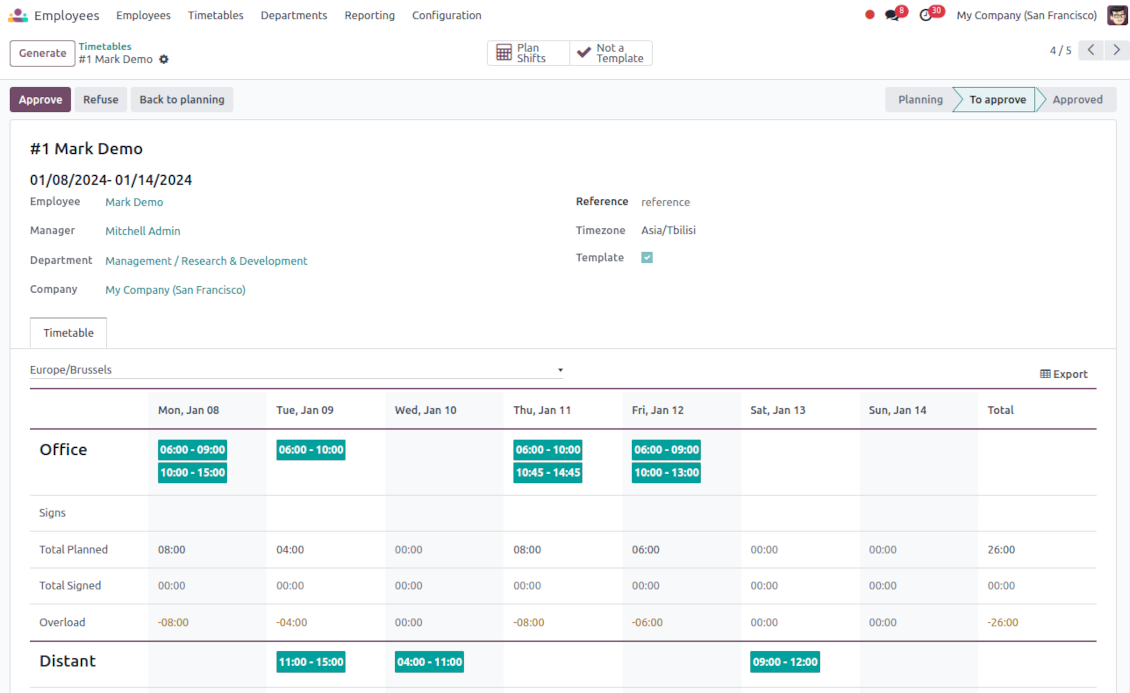
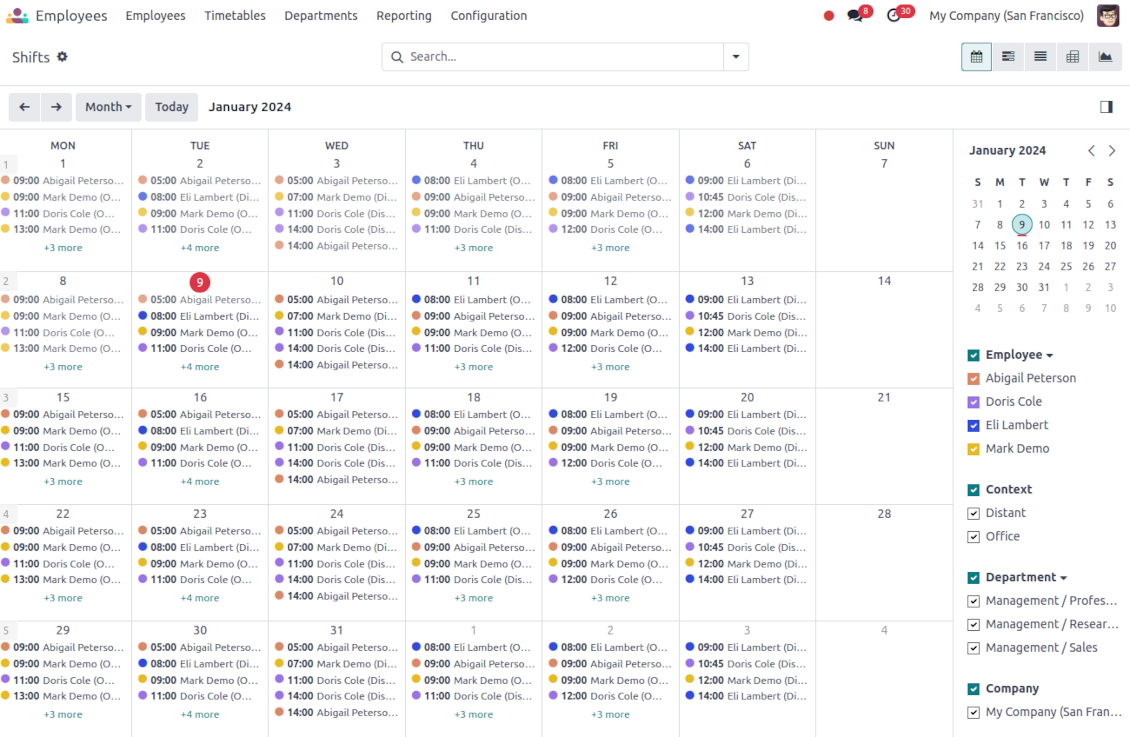
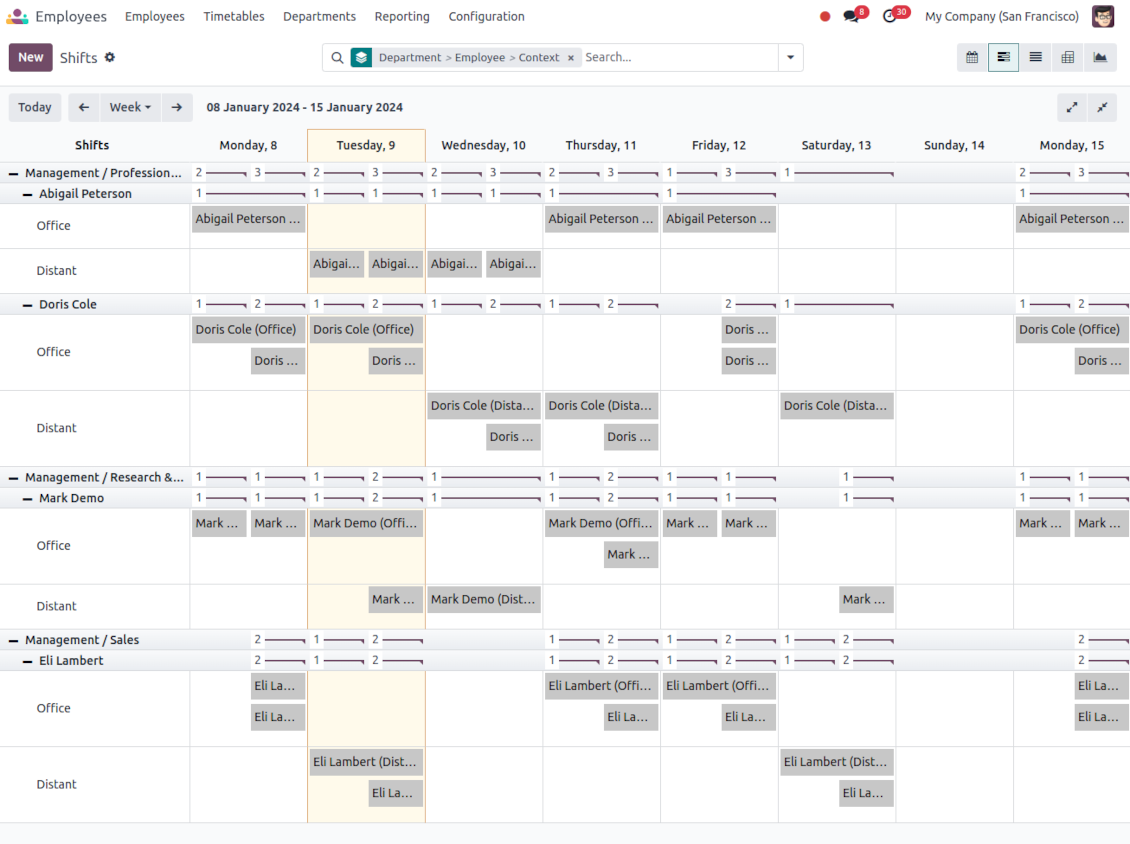
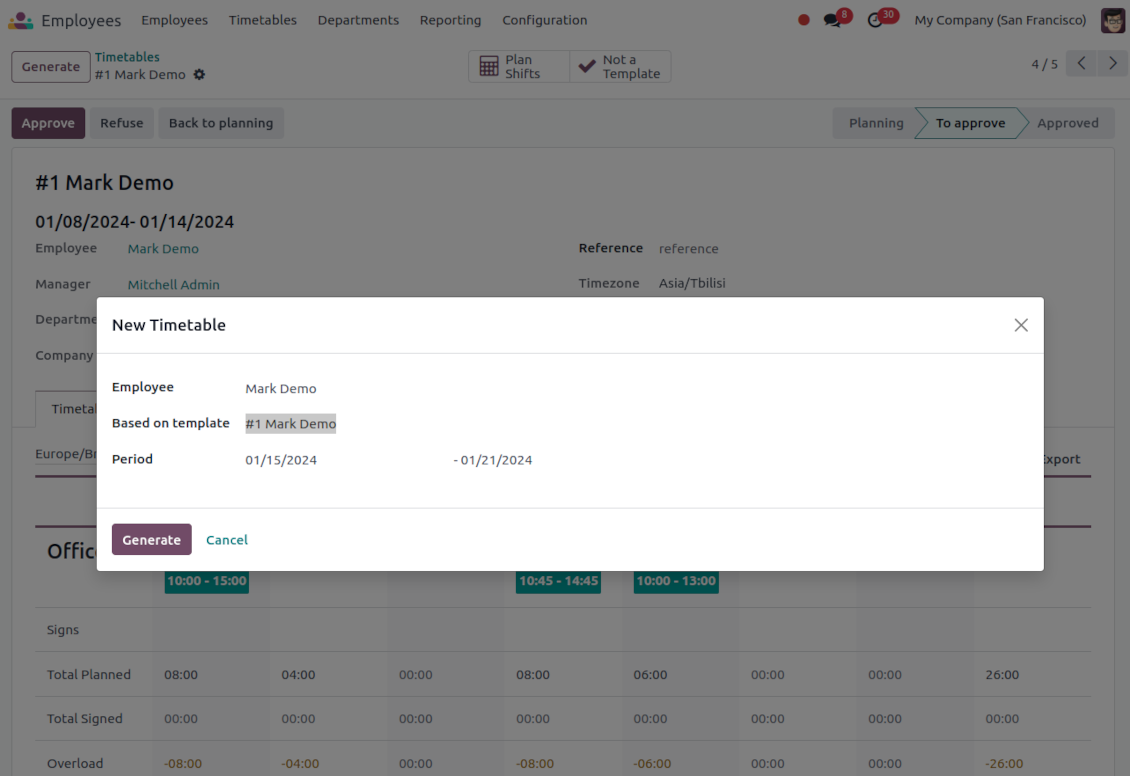
This is the Odoo app to organize teamwork when employees have flexible timetables. The tool allows and forces users to plan shifts in advance. Peers know their colleagues working time, while HR managers control attendance.
- the core app to plan shifts and control timetables. Su precio es 98€.
- the optional free extension that introduces the Odoo Enterprise Gantt view for shifts. The features assumed by this add-on are marked by the icon
Comfortable shifts planning
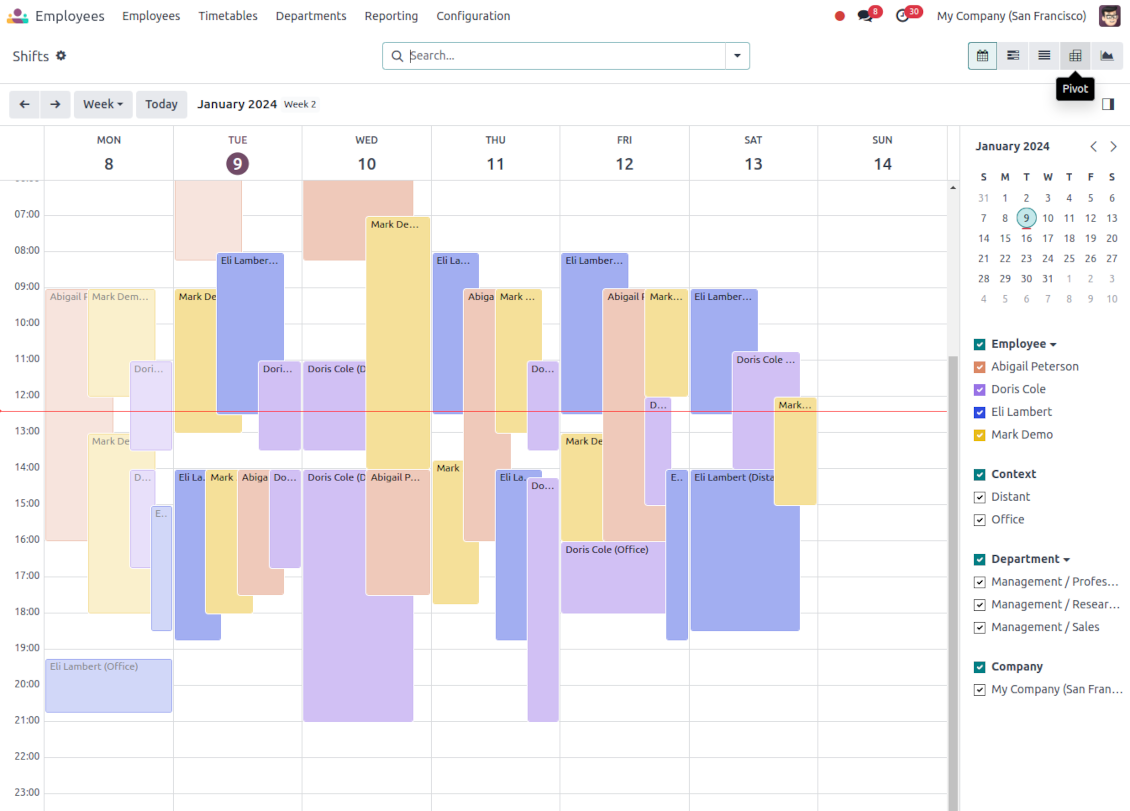
The app introduces the innovative work calendar where users create shifts just by choosing a period and update those by merely dragging a card. A minute to plan a whole week. As flexible as needed
Team collaboration
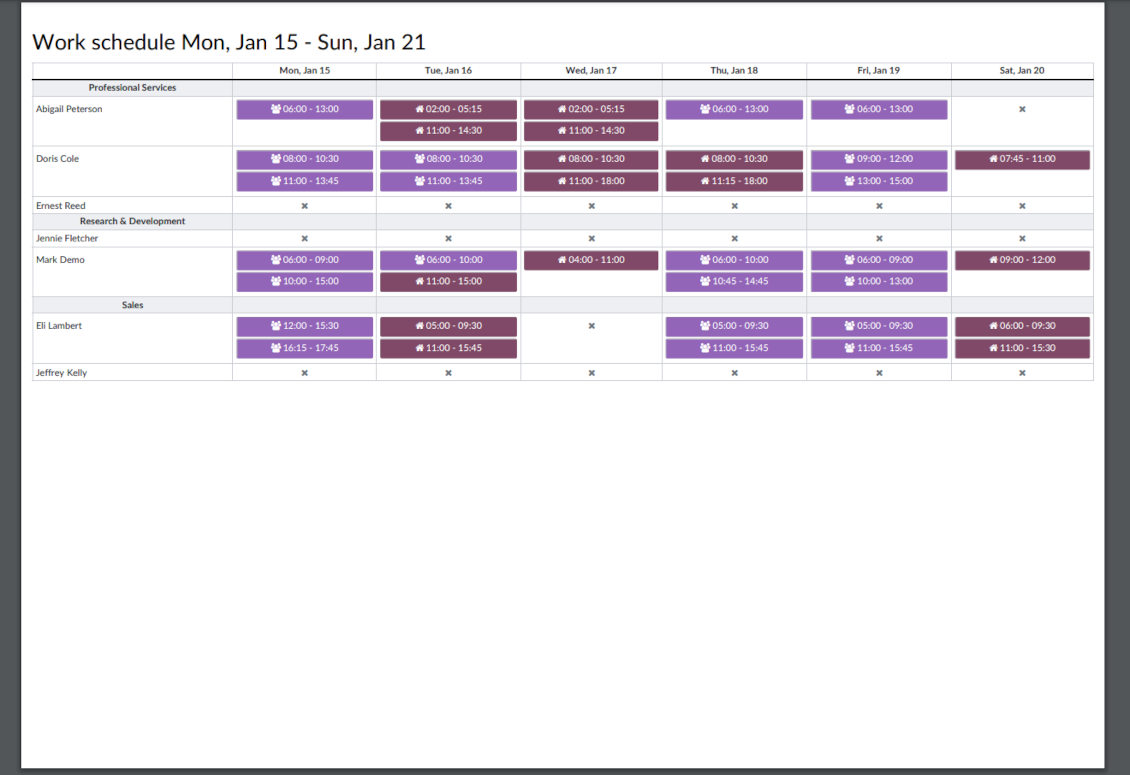
Employees can access each other shifts calendar. Work schedule can be also printed to be physically stuck in the office. Thus, users always know where and when their colleagues are available
Work calendar interface
Find a specific user shift using the built-in calendar filters by employee, department, context, or company. Analyze a single user or the whole team. Control shifts on the Odoo Enterprise Gantt view
Odoo weekly timetables
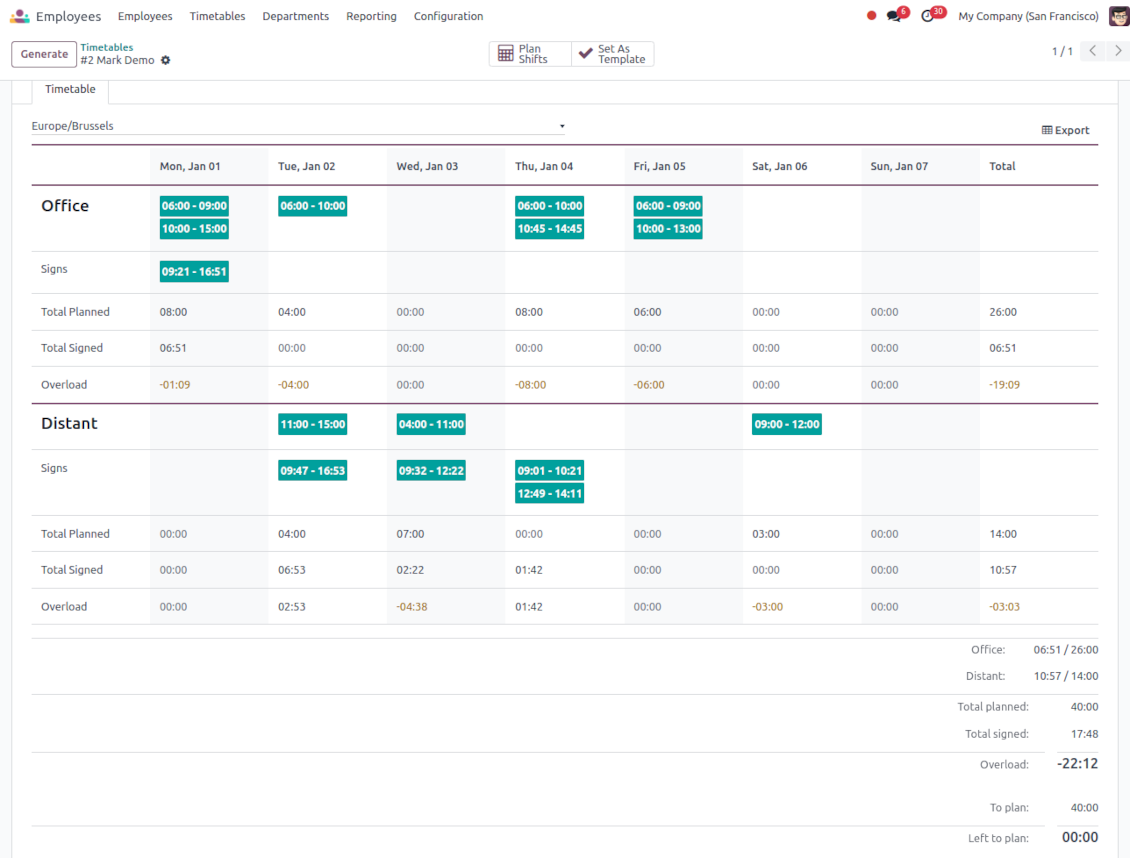
Shifts are auto-combined into weekly timetables from Monday to Sunday. There, employees check themselves while HR managers control the correctness and completeness of plans
HR control
Based on the Odoo attendance features, HR administrators supervise shift fulfillment right in employees' timetables. Turn on the approval option also to force users to get a confirmation for their shifts
Working context (reasons)
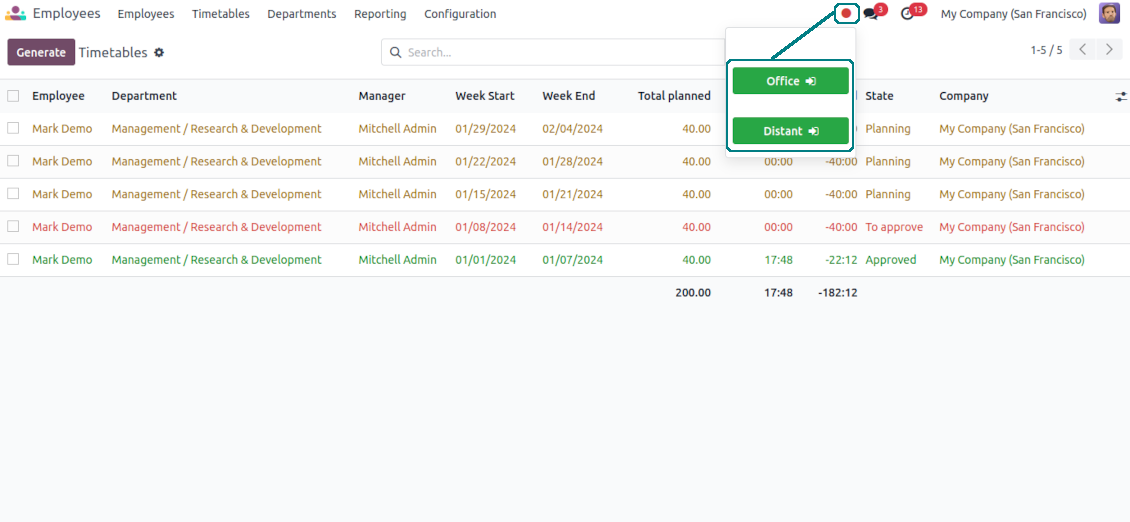
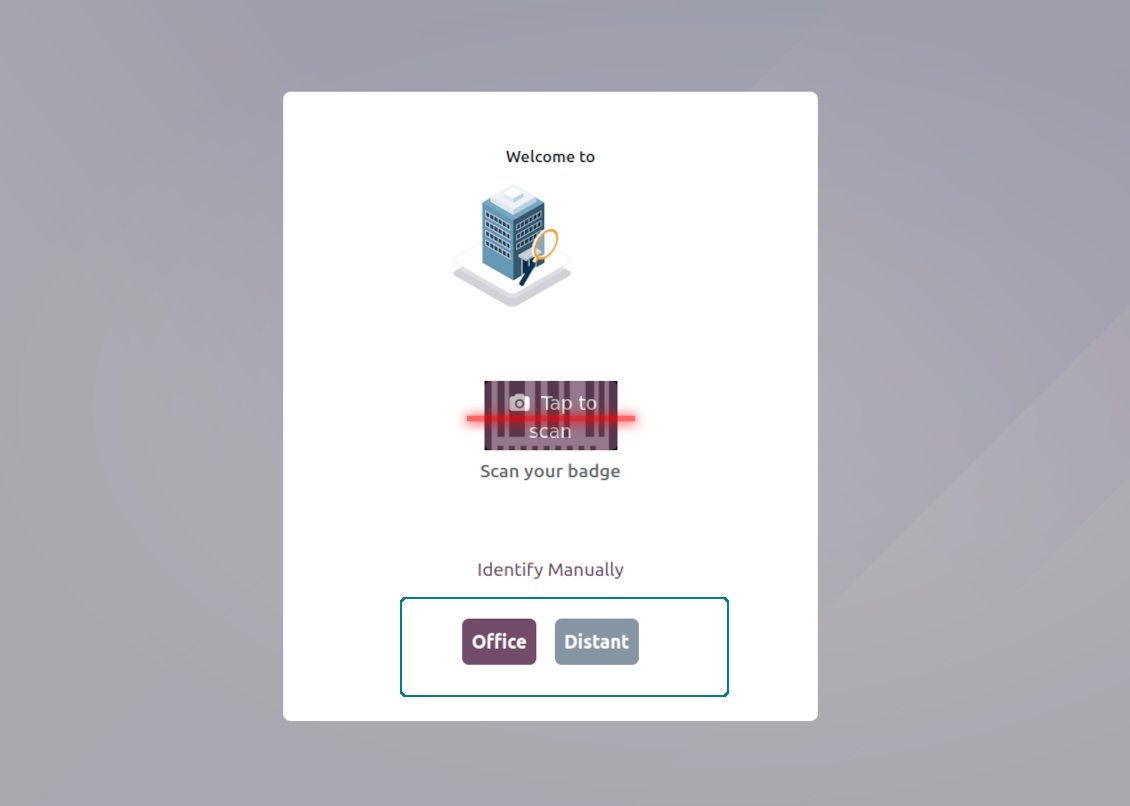
For both attendance and planned shifts, users may be asked to choose a context. The list is up to you: 'distant', 'office central', 'office west', and so on. The features let quickly understand where or why employees work
Timetable reminders
Configure Odoo to remind employees to plan shifts for the next week. Notify users of being late if they have not checked in but were previously planning to work
Multiple companies and timezones
The app fully supports multi-timezones and multi-companies environments. Perfect for geographically distributed teams where cooperation becomes really crucial.
Team Work Schedule
Shifts and working calendar
-
The app's key idea is that employees may independently and flexibly plan shifts for the next or a few next weeks
-
In this way, all team members always know when (time) and where (context) to find their colleagues. Ordinary users can access anybody else schedule but, surely, can change only their own
-
Shifts are organized in the Odoo calendar interface with instant filtering by employees, department, context, and company. To register a new shift, that's enough to choose a period and a reason. To update a shift just drag it and drop it to another time slot
-
The interface fully supports multiple timezones, so the module is perfect for geographically distributed teams
-
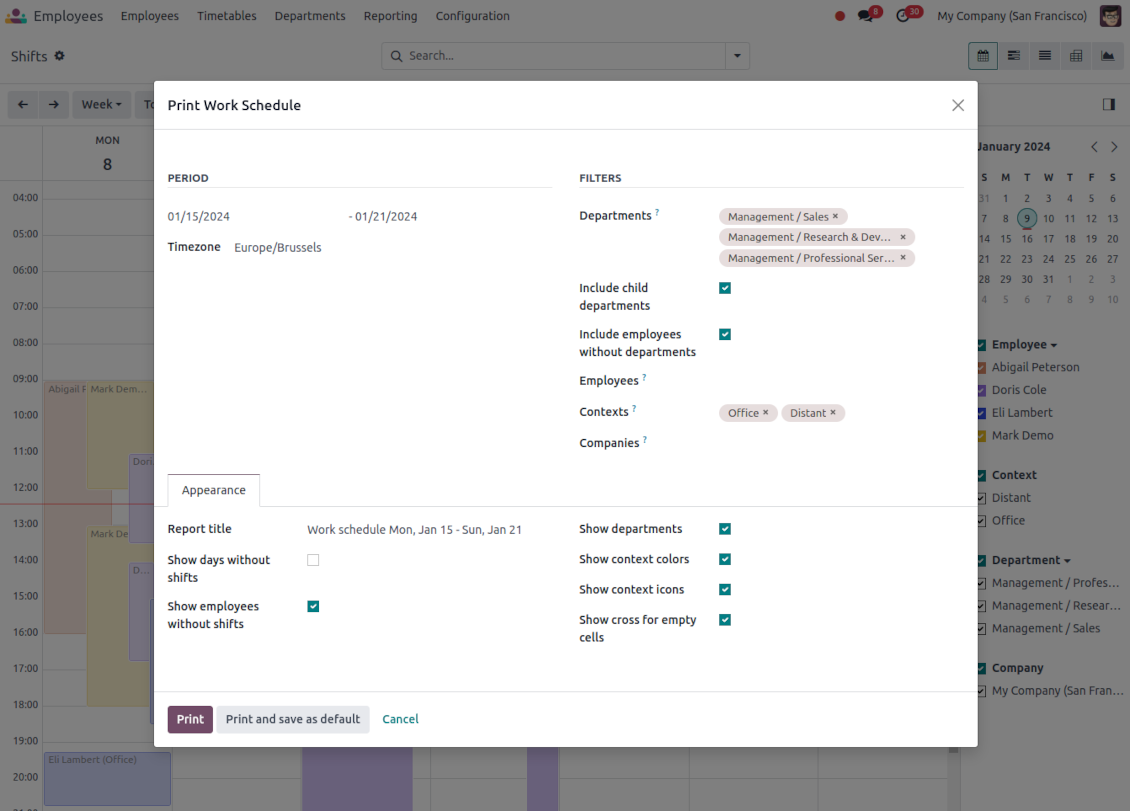
The tool allows printing a work schedule of a specified period (up to 31 days) to have a physical copy on a whiteboard, for instance. The layout is configurable: for example, make it A3 or A4, add or remove a company logo
Timetable interface
-
Planned shifts are automatically combined in weekly timetables from Monday to Sunday
-
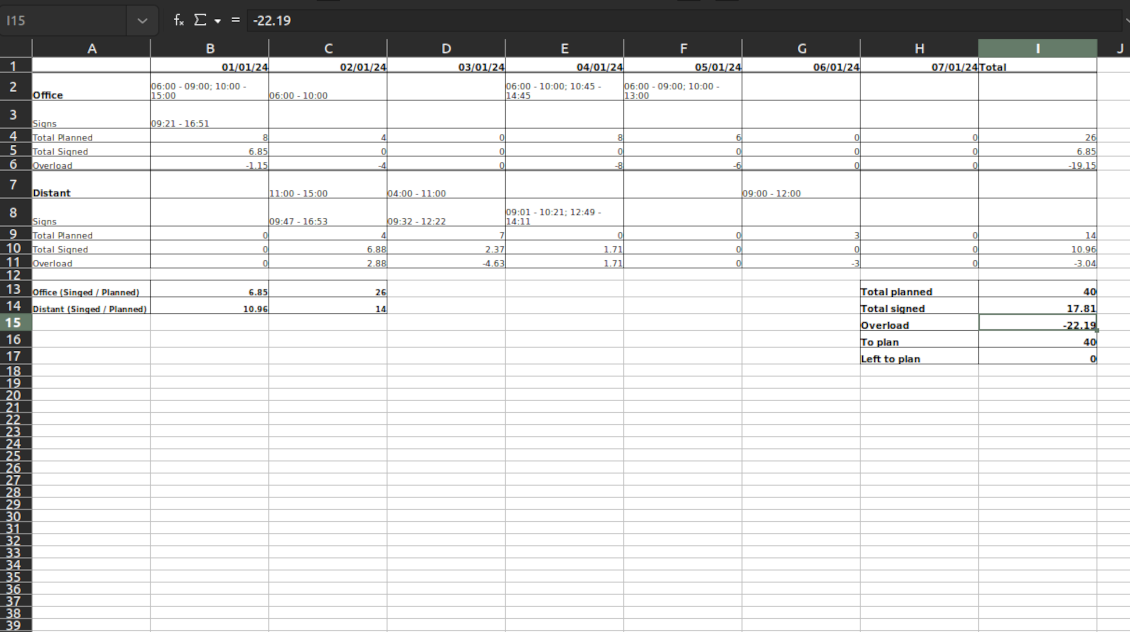
There, employees can control themselves on how much working time is planned in comparison to how much it should be according to the contract
-
The timetable interface groups shifts by working contexts. It makes analysis much more comfortable and lets make corrections in time. For example, if you had certain restrictions on the 'distant work', here it is under full control
-
To simplify shifts planning, employees are allowed to save any timetable as a template, so they can re-use the same schedule for other weeks
-
It is possible to export a specific timetable as an Excel table to share or print out
Managerial control and attendance
-
Besides the owners, timetables are available only for this employee department manager and for all users with the access group 'HR administrators'
-
The app relies on the Odoo attendance functionality. When checked in, a user might be optionally forced to choose a working context (reason)
-
Thus, HR administrators not only see planned shifts but also control their fulfillment: when a user actually checked in and out, how much work time is planned, how much is actually spent, and what calculated overload is
-
Superiors and subordinates might discuss any scheduling issues and set up activities right under each specific weekly timetable
-
The app supports multi companies. Users can access only their real colleagues' shifts. If a user has an employee in a few companies, he/she controls timetables of all of those but the app makes sure there are no overlappings
Approval workflow
-
The tool lets optionally introduce the approval workflow for timetables based on the states update Planning > To approve > Approved
-
Then, after planning shifts, an employee should send a weekly timetable to their department manager for confirmation (the button 'Send for approval')
-
Department managers and any HR administrators subscribed for this employee 'Timetables and shifts' subtype would get a notification that a timetable state has been updated
-
Such managers or any user with the right 'HR Administrator' may confirm (the button 'Approve') or refuse (the button 'Refuse') the shift schedule. The decision principles are fully up to you
-
As a weekly timetable is sent for approval or has been already approved, ordinary employees cannot any more update shifts for that week. In this way, team collaboration becomes much more predictable and might be planned beforehand.
Consejos de configuración e instalación para Flexible Timetables and Shifts Odoo v.17
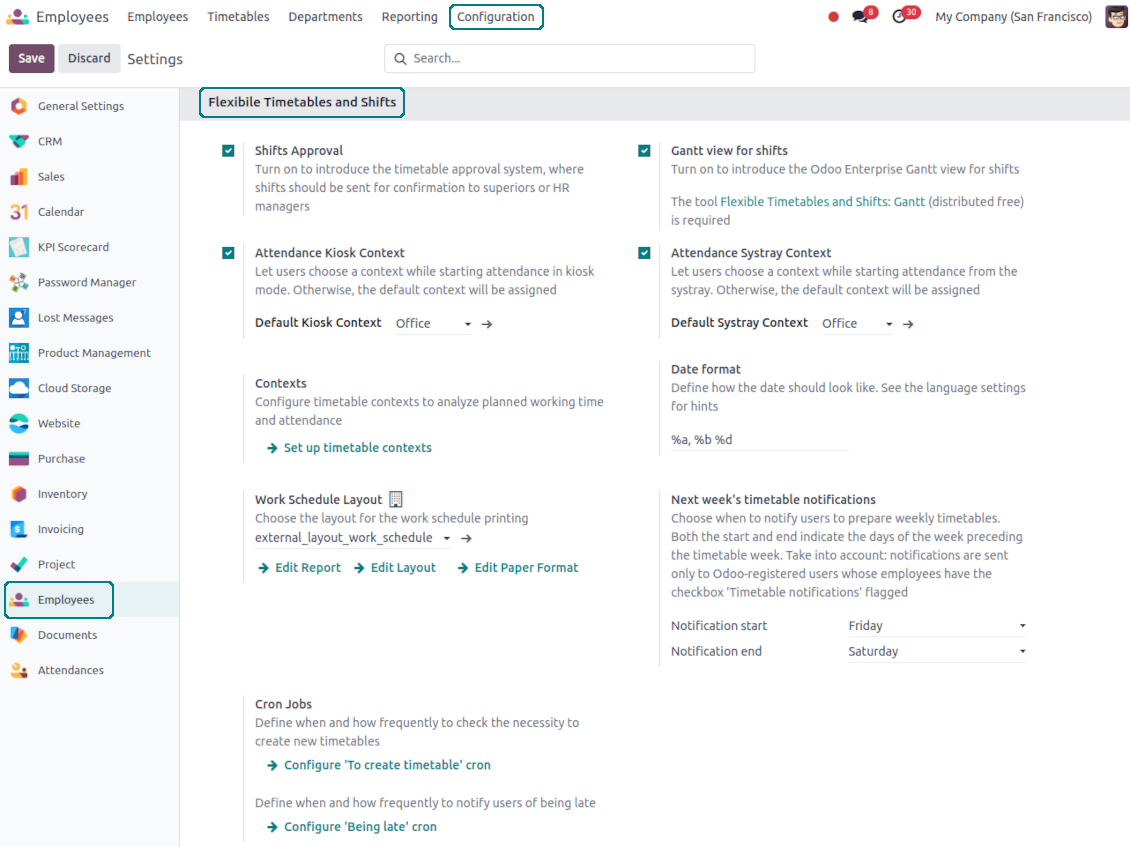
Contexts (reasons) for shifts and attendances
The app allows to configure an unlimited number of working contexts on the Odoo HR configuration page.
One of those contexts should be set as default. Then, it would be entered as the first choice for planned shifts and attendances.
When a user plans shifts, he/she would be asked to introduce a context.
It is possible to turn on context selection also when a user checks in Odoo. Otherwise, default context would be entered to attendances.
Timetable combines shifts and attendances by contexts. In case you have rarely used contexts, mark those as 'Do not show if empty' to avoid too many lines.
Notifications to plan shifts
Reminders to create timetables are sent for the next week. Configure days of the previous week when to notify employees on the configuration page.
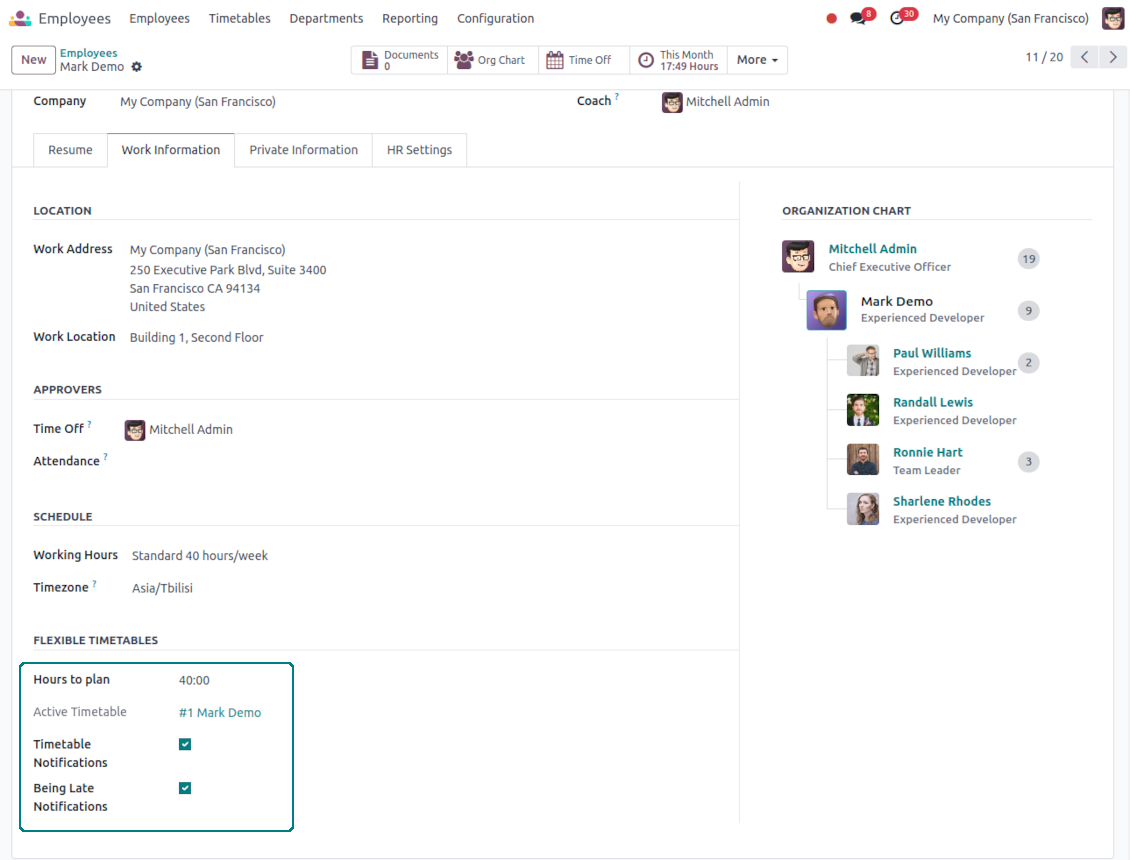
Only employees with the flagged setting "Timetable Notifications" would receive reminders.
To change the reminder email, go to the Odoo technical settings > Email > Templates. Find there 'Timetable for the next week'. You are welcome to introduce any changes to subject or body and to update translations.
Change time of the reminder through the Odoo technical settings > Automation > Scheduled jobs > 'Notify employees to plan working time for the next week'.
Notifications of being late
Reminders of being late is sent if a user at this particular moment has a planned shift, but he/she has not checked in.
Only employees with the flagged setting "Being Late Notifications" would receive reminders.
To change the reminder email, go to the Odoo technical settings > Email > Templates. Find there 'Timetable: you are late'. You are welcome to introduce any changes to subject or body and to update translations.
Set up frequency of the reminder through the Odoo technical settings > Automation > Scheduled jobs > 'Notify employees of being late'. By default check is done once an hour.
Hours to plan (contract hours)
How many hours should be planned for a week is defined per each user individually. Define contract hours on an employee form.
Preguntas frecuentes sobre Flexible Timetables and Shifts Odoo v.17
Puedo crear un calendario para empleados que no son usuarios?
La herramienta permite que los usuarios planifiquen turnos ellos mismos: la persona inicia sesión y fija sus turnos para que otros los vean. Hace falta una cuenta. Por seguridad, no es posible sin cuenta.
Cuales son las políticas de actualización de sus herramientas?
Según las políticas actuales de Odoo Apps Store:
- Cada módulo comprado para la versión 12.0 o anterior da acceso a todas las versiones hasta 12.0.
- A partir de la version 13.0, cada version del módulo se compra por separado.
- Sea cual sea la version, la compra da derecho a todas las actualizaciones y correcciones dentro de una version mayor.
El equipo de faOtools no controla esas políticas. Para cualquier duda, contacte directamente con los representantes de Odoo Apps Store.
Cómo instalo su aplicación en Odoo.sh?
La via mas directa es el flujo integrado de la tienda Odoo:
1. Abra la página del módulo y pulse Deploy on odoo.sh
2. Será redirigido a GitHub. Inicie sesión y pulse Create a new repo o use uno existente. El repositorio debe ser privado. No esta permitido publicar las apps con licencia OPL-1. Cree un repo nuevo para el proyecto Odoo.sh si hace falta
3. Luego, en odoo.sh, pulse Deploy, confirme y pulse Continue. Se inicia la instalación.
Estos pasos instalan la app en la rama de producción. Para otras ramas o para actualizar:
1. Descargue el código fuente de la tienda Odoo
2. Haga commit del módulo en el repositorio GitHub. Ninguna carpeta/archivo de la app debe estar en .gitignore. Los repos creados por odoo.sh a veces ignoran rutas importantes (p. ej. /lib). Suba todos los directorios y archivos del módulo
3. Despliegue la rama destino del proyecto odoo.sh o espere la compilacion automática si asi esta configurado.
Cómo instalo su aplicación en mi propio servidor?
2. Reinicie el servidor Odoo;
3. Active el modo desarrollador (ajustes tecnicos);
4. Actualice la lista de aplicaciones (menú Aplicaciones);
5. Encuentre la app y pulse Activate/Install;
6. Siga las pautas de la página de la app si existen.
Su app tiene complementos extra. Puedo comprarlos después?
Si. Odoo anade automáticamente las dependencias al carrito: excluya las herramientas ya compradas para no pagar dos veces.
Desplegue su app en Odoo.sh y veo un aviso/error en las pruebas
Un aviso rojo/naranja no afecta a las funciones de la app. A veces nuestros módulos no pasan las pruebas automáticas estándar porque estas asumen un comportamiento que choca con los objetivos de la app. Por ejemplo, cambiamos el cálculo del precio y las pruebas de Odoo comparan el precio final con el algoritmo estándar.
Compruebe primero las funciones de la base desplegada. Funciona todo correctamente?
Si aun cree que el aviso afecta a funciones reales, contáctenos y envíe los registros completos de instalación y la lista completa de módulos desplegados (nucleo y de terceros).
Puedo comprar su aplicación directamente a su empresa?
No, solo distribuimos las herramientas a través de la tienda oficial de aplicaciones Odoo.
Quiero un descuento
Lamentablemente, no tenemos medios tecnicos para ofrecer precios individuales.
Puedo instalar la app en mi base Odoo Online (SaaS)?
No, las apps de terceros no se pueden usar en Odoo Online. Odoo SaaS bloquea esa posibilidad.
Su herramienta depende de otras apps. Debo comprarlas?
Si, la herramienta necesita todos los módulos marcados como dependencias. El precio de la página de la app ya las incluye.
Cual es el precio del módulo en dolares estadounidenses? Por que cambio?
El precio de nuestros módulos esta en euros. La tienda Odoo convierte a otras monedas según su tipo de cambio interno. Por eso el precio en dolares estadounidenses puede cambiar cuando se actualiza el tipo.
La redacción de la aplicación y el sitio web en idiomas distintos del inglés cuenta con asistencia de IA y se ajusta a las traducciones oficiales de Odoo. Si detecta un error, enviar un ticket de traducción y lo corregiremos.
Bases de datos de demostración de Odoo (vistas previas)
Para esta aplicación, podemos proporcionar una base de datos de demostración personalizada gratuita.
No necesita un número de teléfono ni una tarjeta de crédito para contactarnos. Sólo debes pasar un breve registro por correo electrónico, que no lleva más de 30 segundos.
A petición suya, preparamos una base de datos de vista previa individual en la que puede realizar cualquier prueba y comprobar sus hipótesis durante unas dos semanas.
Notificación de errores
Si encuentra errores o comportamiento inconsistente, no dude en contactarnos. Garantizamos proporcionar correcciones dentro de los 60 días posteriores a la compra y estamos muy interesados en mejorar nuestras herramientas incluso después de este período.
No necesita un número de teléfono ni una tarjeta de crédito para contactarnos. Sólo debes pasar un breve registro por correo electrónico, que no lleva más de 30 segundos.
Incluya tantos detalles como sea posible en su solicitud: capturas de pantalla, registros del servidor Odoo, una descripción completa de como reproducir el problema, etc. Por lo general, se necesitan varios días laborables para preparar un plan de trabajo para un problema (si se confirma un error) o proporcionarle indicaciones sobre lo que se debe hacer (en caso contrario).
Solicitudes de funciones públicas e ideas de módulos (desarrollo gratuito)
Estamos muy motivados para mejorar nuestras herramientas y agradeceríamos cualquier comentario. Si sus requisitos son de uso público y podrían implementarse de manera eficiente, el equipo los incluirá en nuestra lista de tareas pendientes.
Esta lista de tareas pendientes se procesa periódicamente y no implica cargos adicionales. Aunque no podemos prometer plazos ni diseño final, podría ser una buena manera de conseguir las funciones deseadas sin inversiones ni riesgos.
No necesita un número de teléfono ni una tarjeta de crédito para contactarnos. Sólo debes pasar un breve registro por correo electrónico, que no lleva más de 30 segundos.

The tool to flexibly structure Odoo attachments in folders and synchronize directories with cloud clients: Google Drive, OneDrive/SharePoint, Nextcloud/ownCloud, Dropbox, Amazon S3, Box, and NAS. DMS. File Manager. Document management system
398€

The tool to build a deep and structured knowledge base for internal and external use. Knowledge System. KMS. Wiki-like revisions.
398€
The tool to automatically synchronize Odoo attachments with OneDrive files in both ways
487€
The tool to set up KPI targets and control their fulfillment by periods. KPI dashboards. Dashboard designer. KPI charts

The tool for time-based service management from booking appointments to sales and reviews
398€
The tool to automatically synchronize Odoo attachments with Google Drive files in both ways
487€
The tool combines users in roles and simplifies security group assigning. Access group management. Users mass updating

The app to evaluate, score, and rank Odoo customers and vendors