Flexible Timetables and Shifts v.17
The tool to plan, share and control employees shifts in a form of weekly timetables. Work schedule. Work shift calendar
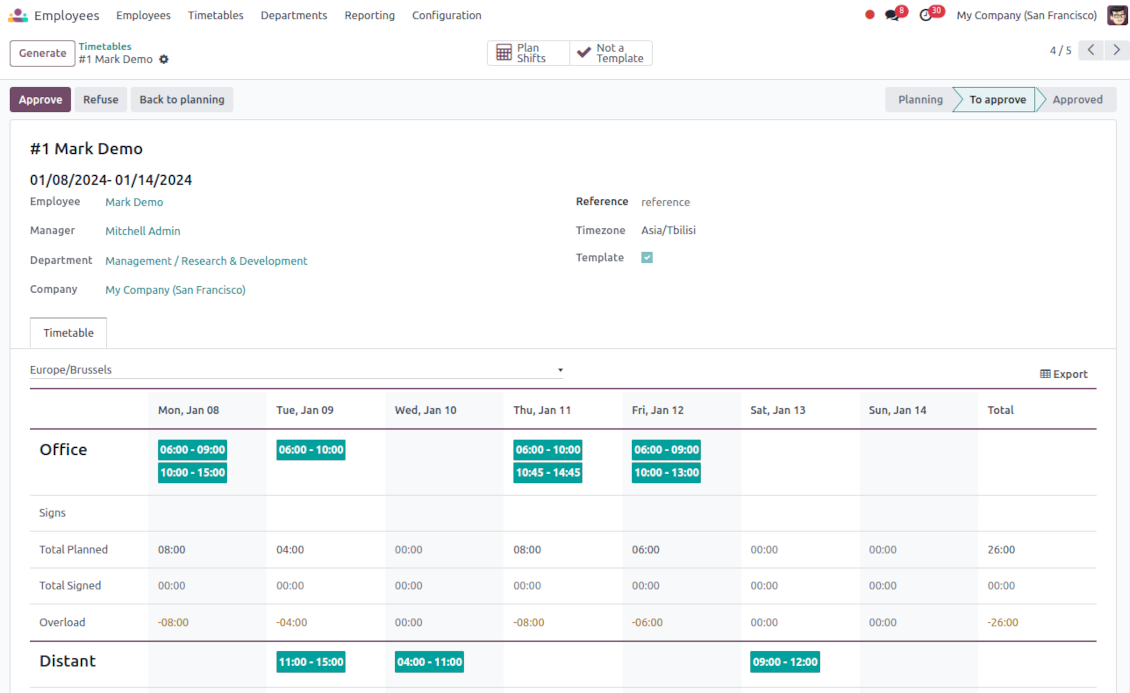
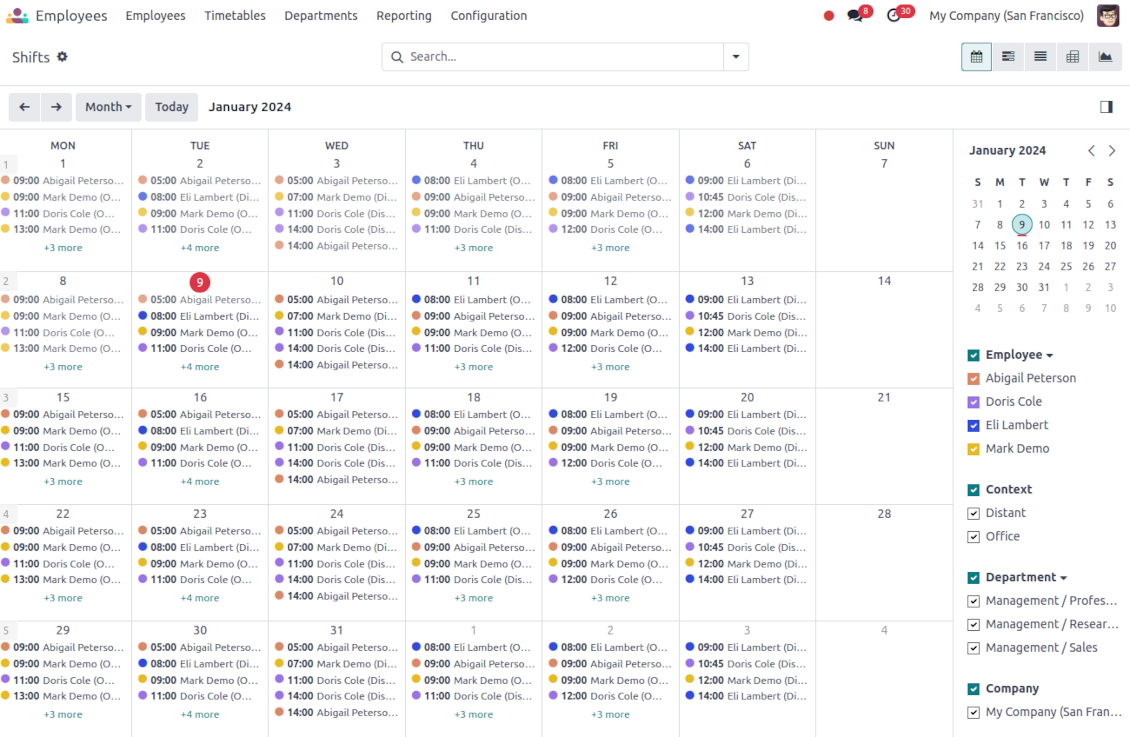
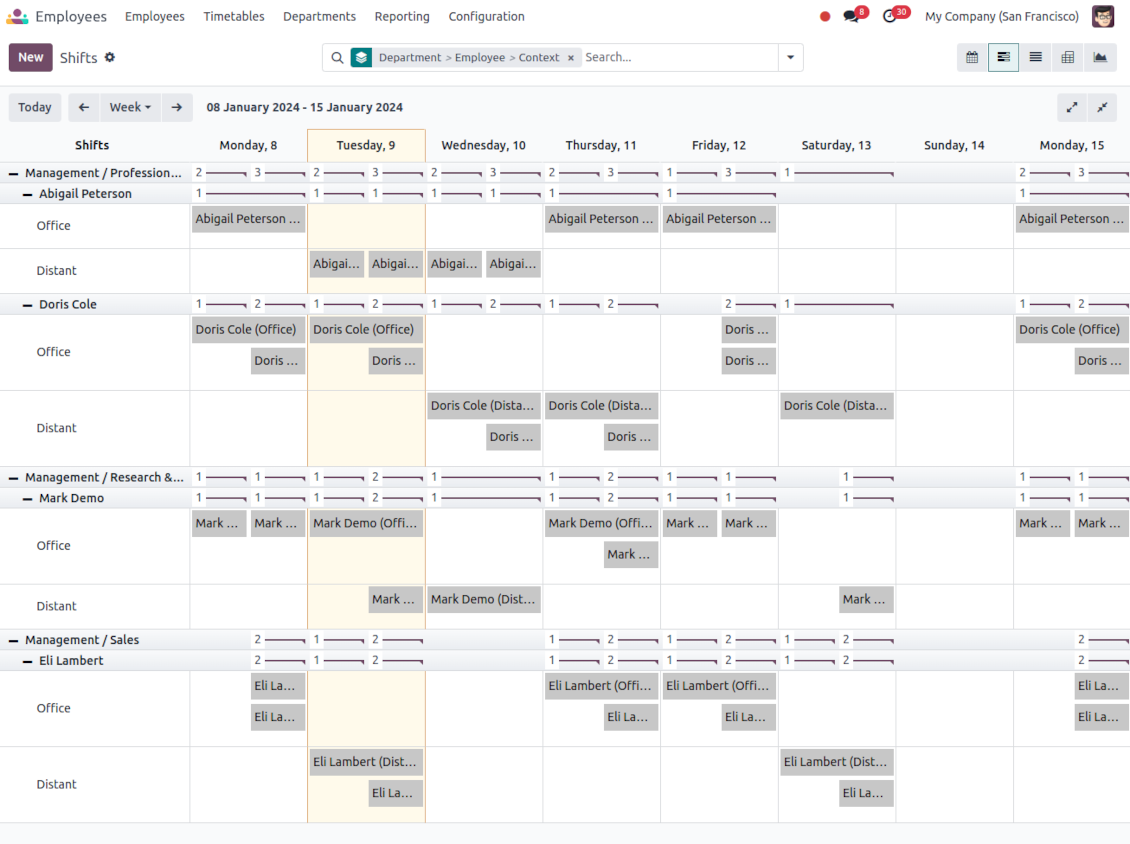
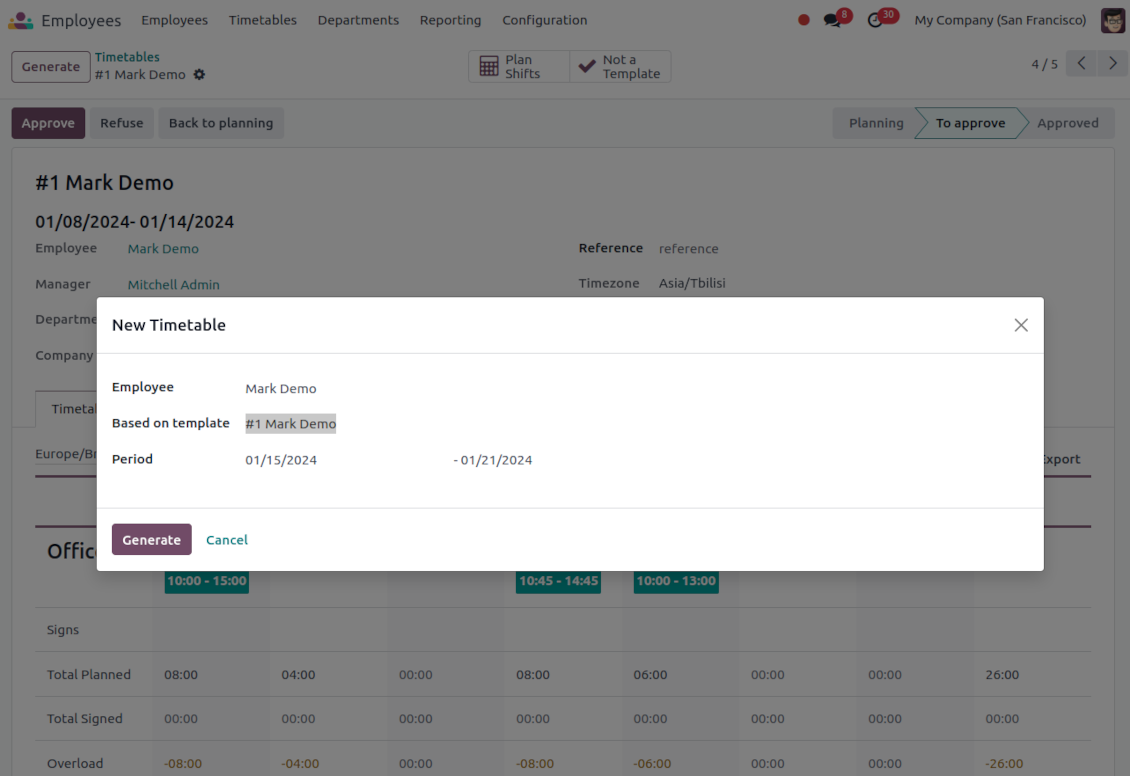
This is the Odoo app to organize teamwork when employees have flexible timetables. The tool allows and forces users to plan shifts in advance. Peers know their colleagues working time, while HR managers control attendance.
- the core app to plan shifts and control timetables. Η τιμή του είναι 98€.
- the optional free extension that introduces the Odoo Enterprise Gantt view for shifts. The features assumed by this add-on are marked by the icon
Comfortable shifts planning
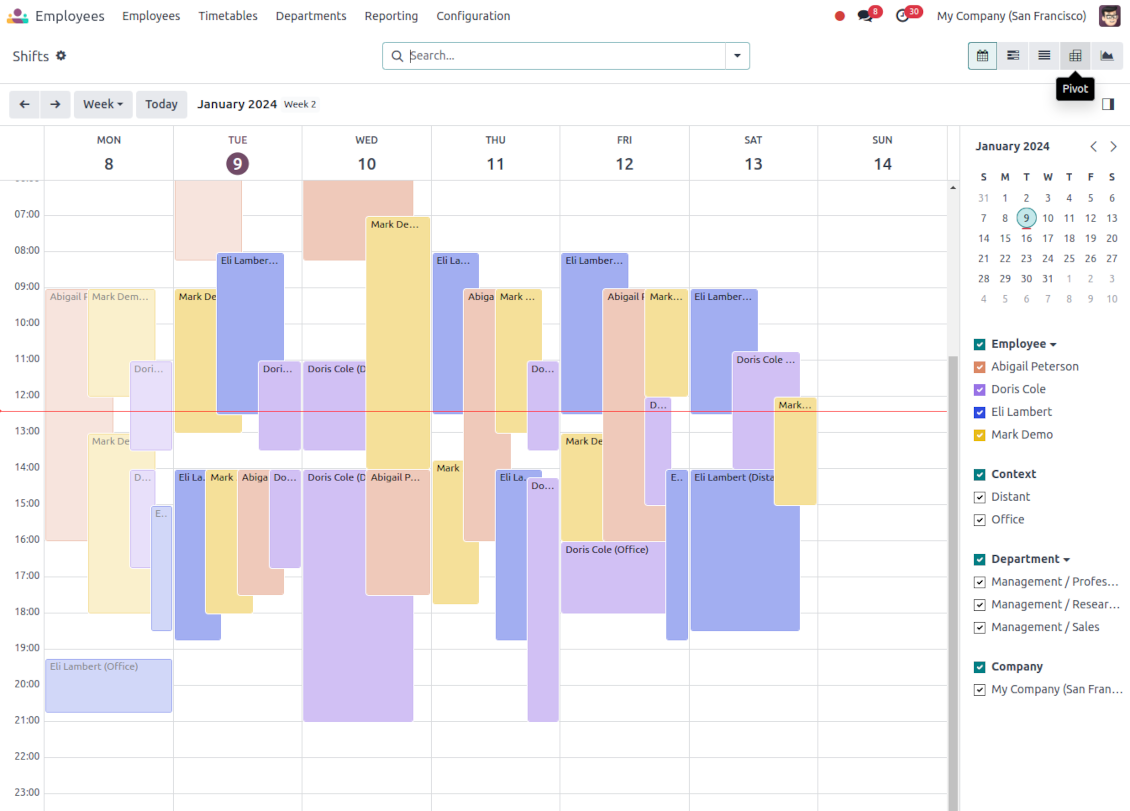
The app introduces the innovative work calendar where users create shifts just by choosing a period and update those by merely dragging a card. A minute to plan a whole week. As flexible as needed
Team collaboration
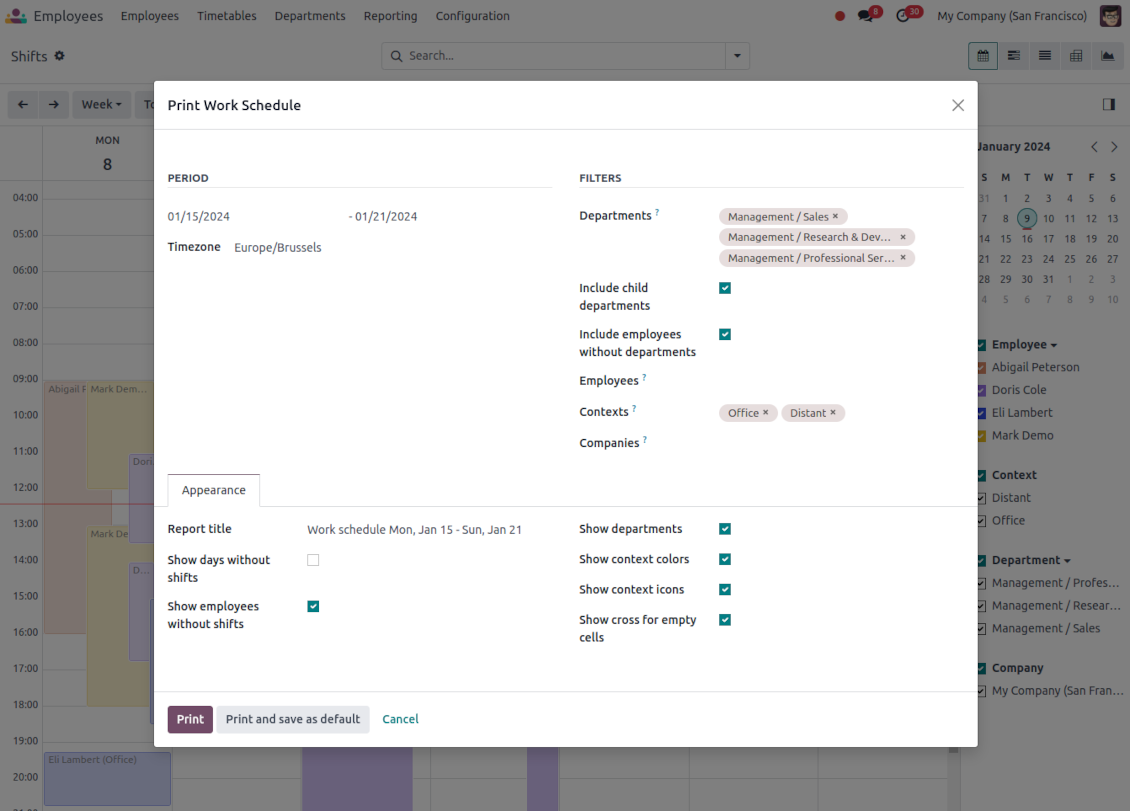
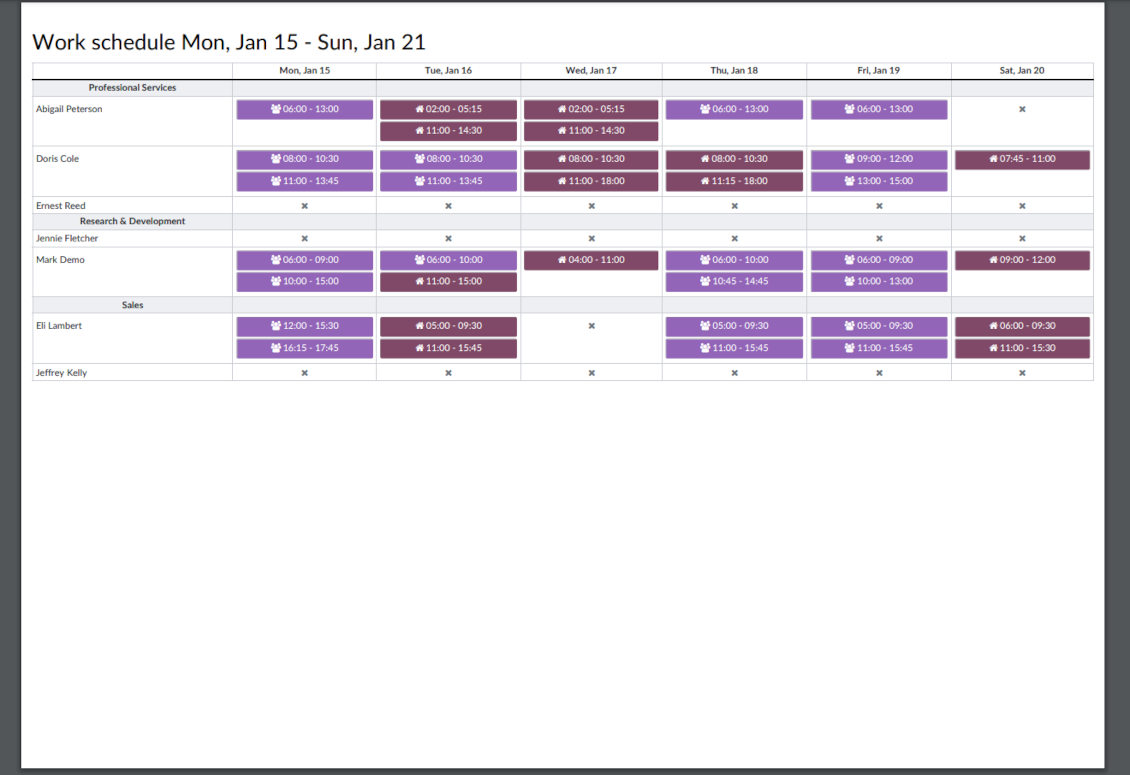
Employees can access each other shifts calendar. Work schedule can be also printed to be physically stuck in the office. Thus, users always know where and when their colleagues are available
Work calendar interface
Find a specific user shift using the built-in calendar filters by employee, department, context, or company. Analyze a single user or the whole team. Control shifts on the Odoo Enterprise Gantt view
Odoo weekly timetables
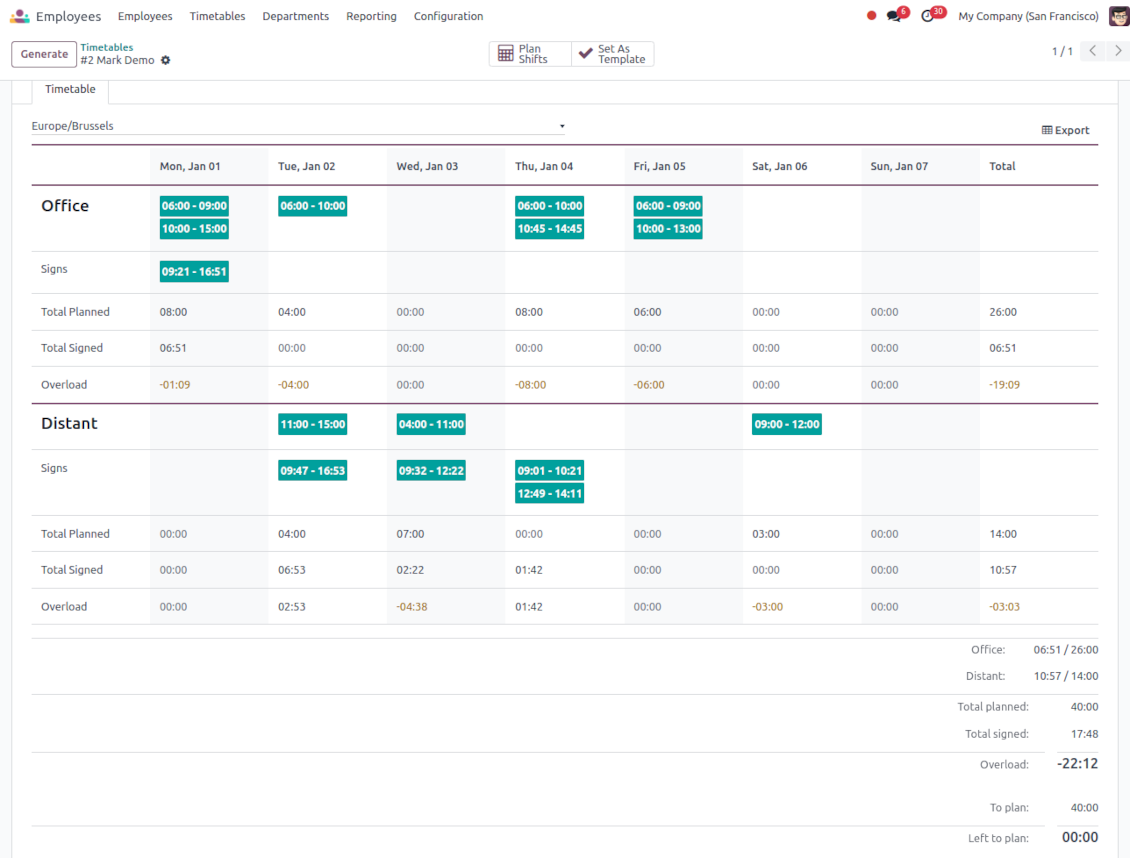
Shifts are auto-combined into weekly timetables from Monday to Sunday. There, employees check themselves while HR managers control the correctness and completeness of plans
HR control
Based on the Odoo attendance features, HR administrators supervise shift fulfillment right in employees' timetables. Turn on the approval option also to force users to get a confirmation for their shifts
Working context (reasons)
For both attendance and planned shifts, users may be asked to choose a context. The list is up to you: 'distant', 'office central', 'office west', and so on. The features let quickly understand where or why employees work
Timetable reminders
Configure Odoo to remind employees to plan shifts for the next week. Notify users of being late if they have not checked in but were previously planning to work
Multiple companies and timezones
The app fully supports multi-timezones and multi-companies environments. Perfect for geographically distributed teams where cooperation becomes really crucial.
Team Work Schedule
Shifts and working calendar
-
The app's key idea is that employees may independently and flexibly plan shifts for the next or a few next weeks
-
In this way, all team members always know when (time) and where (context) to find their colleagues. Ordinary users can access anybody else schedule but, surely, can change only their own
-
Shifts are organized in the Odoo calendar interface with instant filtering by employees, department, context, and company. To register a new shift, that's enough to choose a period and a reason. To update a shift just drag it and drop it to another time slot
-
The interface fully supports multiple timezones, so the module is perfect for geographically distributed teams
-
The tool allows printing a work schedule of a specified period (up to 31 days) to have a physical copy on a whiteboard, for instance. The layout is configurable: for example, make it A3 or A4, add or remove a company logo
Timetable interface
-
Planned shifts are automatically combined in weekly timetables from Monday to Sunday
-
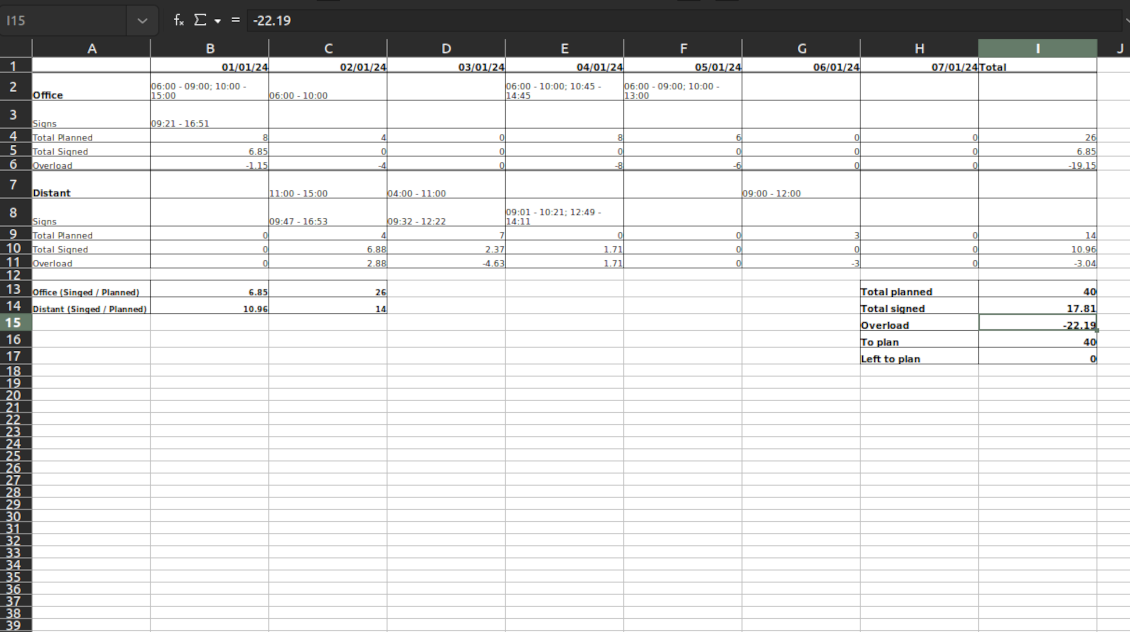
There, employees can control themselves on how much working time is planned in comparison to how much it should be according to the contract
-
The timetable interface groups shifts by working contexts. It makes analysis much more comfortable and lets make corrections in time. For example, if you had certain restrictions on the 'distant work', here it is under full control
-
To simplify shifts planning, employees are allowed to save any timetable as a template, so they can re-use the same schedule for other weeks
-
It is possible to export a specific timetable as an Excel table to share or print out
Managerial control and attendance
-
Besides the owners, timetables are available only for this employee department manager and for all users with the access group 'HR administrators'
-
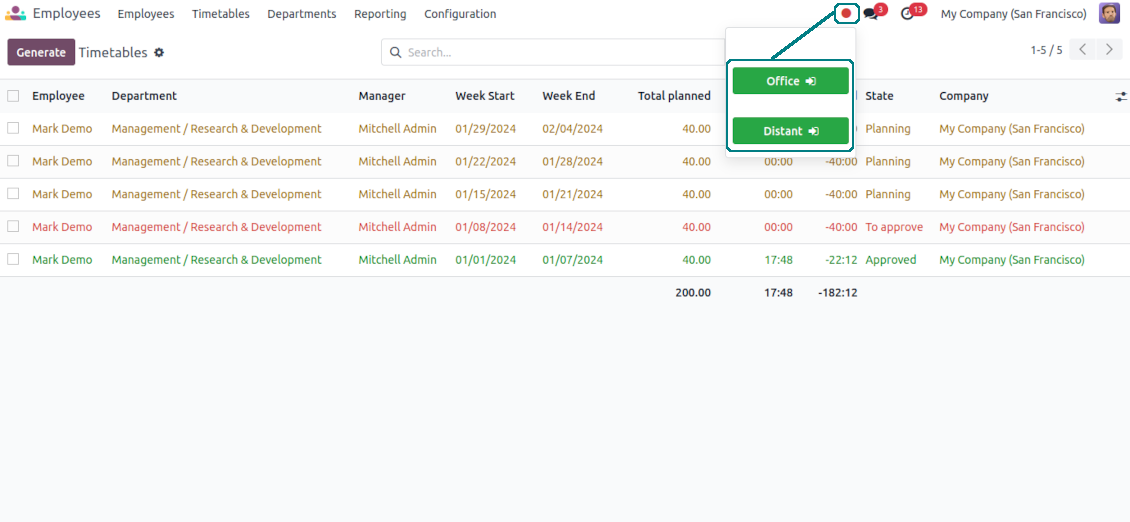
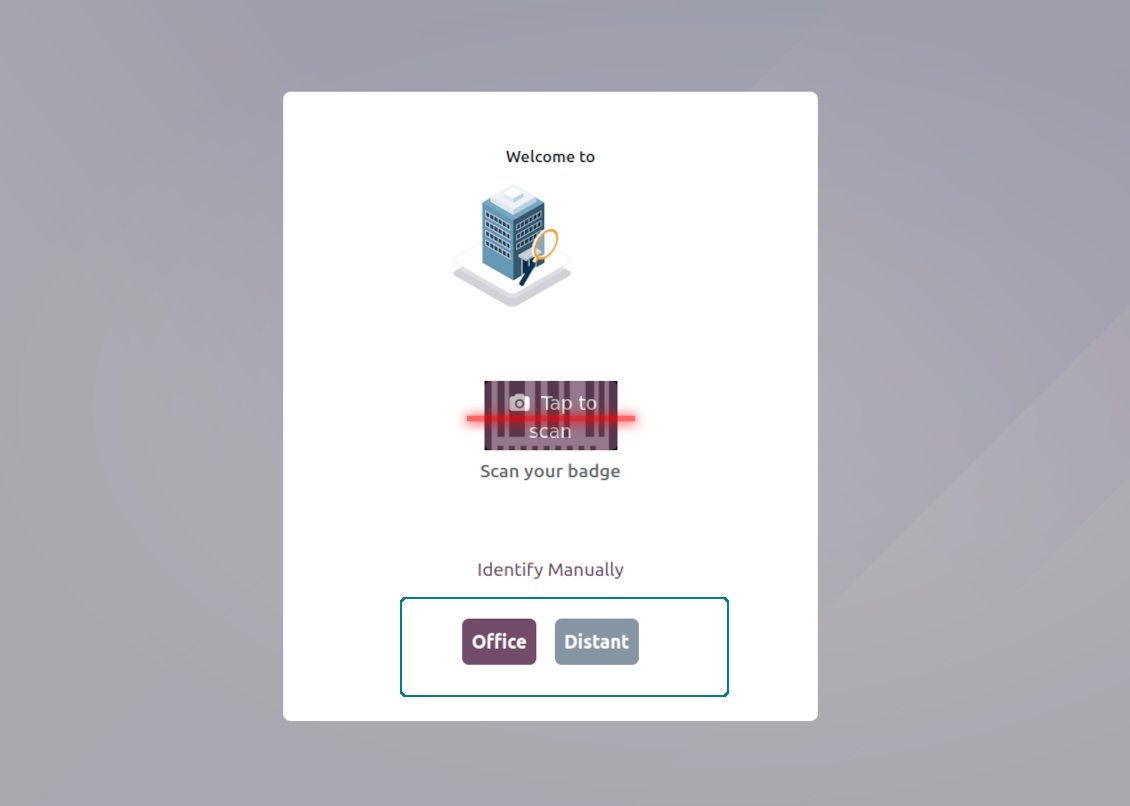
The app relies on the Odoo attendance functionality. When checked in, a user might be optionally forced to choose a working context (reason)
-
Thus, HR administrators not only see planned shifts but also control their fulfillment: when a user actually checked in and out, how much work time is planned, how much is actually spent, and what calculated overload is
-
Superiors and subordinates might discuss any scheduling issues and set up activities right under each specific weekly timetable
-
The app supports multi companies. Users can access only their real colleagues' shifts. If a user has an employee in a few companies, he/she controls timetables of all of those but the app makes sure there are no overlappings
Approval workflow
-
The tool lets optionally introduce the approval workflow for timetables based on the states update Planning > To approve > Approved
-
Then, after planning shifts, an employee should send a weekly timetable to their department manager for confirmation (the button 'Send for approval')
-
Department managers and any HR administrators subscribed for this employee 'Timetables and shifts' subtype would get a notification that a timetable state has been updated
-
Such managers or any user with the right 'HR Administrator' may confirm (the button 'Approve') or refuse (the button 'Refuse') the shift schedule. The decision principles are fully up to you
-
As a weekly timetable is sent for approval or has been already approved, ordinary employees cannot any more update shifts for that week. In this way, team collaboration becomes much more predictable and might be planned beforehand.
Συμβουλές διαμόρφωσης και εγκατάστασης για Flexible Timetables and Shifts Odoo v.17
Contexts (reasons) for shifts and attendances
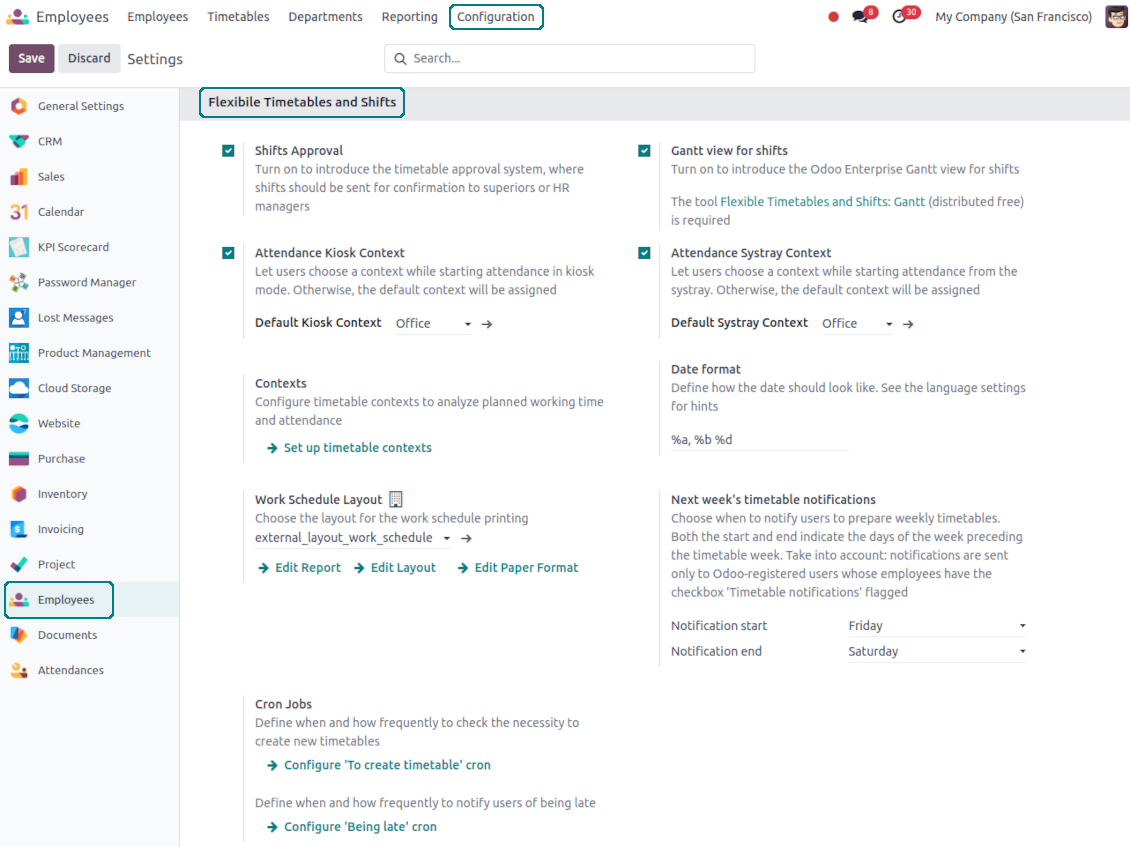
The app allows to configure an unlimited number of working contexts on the Odoo HR configuration page.
One of those contexts should be set as default. Then, it would be entered as the first choice for planned shifts and attendances.
When a user plans shifts, he/she would be asked to introduce a context.
It is possible to turn on context selection also when a user checks in Odoo. Otherwise, default context would be entered to attendances.
Timetable combines shifts and attendances by contexts. In case you have rarely used contexts, mark those as 'Do not show if empty' to avoid too many lines.
Notifications to plan shifts
Reminders to create timetables are sent for the next week. Configure days of the previous week when to notify employees on the configuration page.
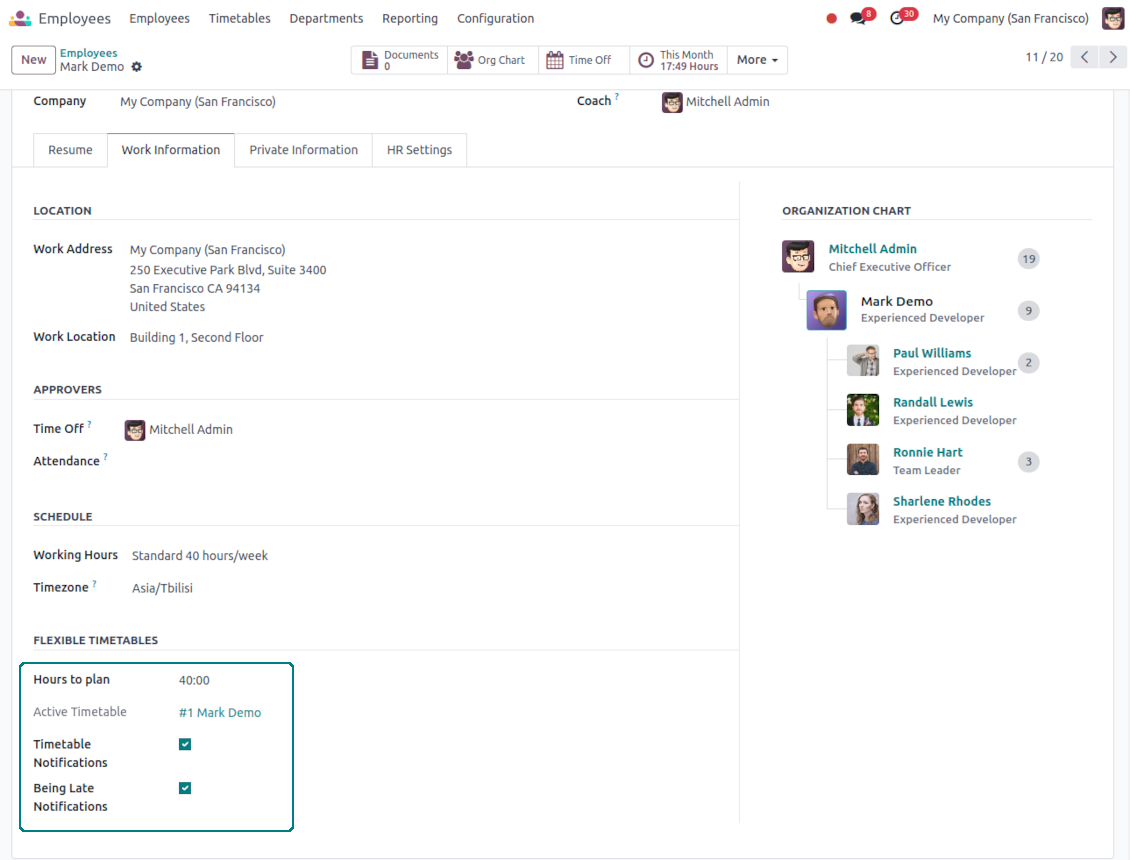
Only employees with the flagged setting "Timetable Notifications" would receive reminders.
To change the reminder email, go to the Odoo technical settings > Email > Templates. Find there 'Timetable for the next week'. You are welcome to introduce any changes to subject or body and to update translations.
Change time of the reminder through the Odoo technical settings > Automation > Scheduled jobs > 'Notify employees to plan working time for the next week'.
Notifications of being late
Reminders of being late is sent if a user at this particular moment has a planned shift, but he/she has not checked in.
Only employees with the flagged setting "Being Late Notifications" would receive reminders.
To change the reminder email, go to the Odoo technical settings > Email > Templates. Find there 'Timetable: you are late'. You are welcome to introduce any changes to subject or body and to update translations.
Set up frequency of the reminder through the Odoo technical settings > Automation > Scheduled jobs > 'Notify employees of being late'. By default check is done once an hour.
Hours to plan (contract hours)
How many hours should be planned for a week is defined per each user individually. Define contract hours on an employee form.
Συχνές ερωτήσεις για Flexible Timetables and Shifts Odoo v.17
Μπορώ να δημιουργήσω ημερολόγιο για υπαλλήλους που δεν είναι χρήστες.
Το εργαλείο επιτρέπει στους χρήστες να προγραμματίζουν μόνοι τους τις βάρδιες. Το άτομο συνδέεται και ορίζει τις βάρδιές του ώστε να τις βλέπουν οι άλλοι. Για αυτό απαιτείται λογαριασμός. Δυστυχώς, για λόγους ασφαλείας, δεν είναι δυνατό να δοθεί αυτή η δυνατότητα χωρίς λογαριασμό.
Ποιες είναι οι πολιτικές ενημέρωσης των εργαλείων σας;
Σύμφωνα με τις ισχύουσες πολιτικές του Odoo Apps Store:
- Κάθε άρθρωμα που αγοράστηκε για την έκδοση 12.0 και παλαιότερα δίνει πρόσβαση σε όλες τις εκδόσεις έως την 12.0.
- Από την έκδοση 13.0 κάθε έκδοση αρθρώματος αγοράζεται χωριστά.
- Ανεξάρτητα από την έκδοση, η αγορά δίνει δικαίωμα σε όλες τις ενημερώσεις και διορθώσεις εντός μιας μείζονος έκδοσης.
Σημειώστε ότι η ομάδα faOtools δεν ελέγχει αυτές τις πολιτικές. Για ερωτήσεις επικοινωνήστε απευθείας με τους εκπροσώπους του Odoo Apps Store.
Πώς μπορώ να εγκαταστήσω την εφαρμογή σας στο Odoo.sh;
Η πιο απλή προσέγγιση είναι να χρησιμοποιήσετε την ενσωματωμένη ροή εργασίας του καταστήματος Odoo:
1. Ανοίξτε τη σελίδα της μονάδας και πατήστε το κουμπί Deploy on odoo.sh
2. Έπειτα θα ανακατευθυνθείτε στη σελίδα του GitHub. Συνδεθείτε στον λογαριασμό σας και πατήστε 'Create a new repo' ή χρησιμοποιήστε υπάρχον. Βεβαιωθείτε ότι το αποθετήριο είναι ιδιωτικό. Δεν επιτρέπεται η δημοσίευση εφαρμογών με άδεια OPL-1. Αν χρειάζεται, δημιουργήστε νέο repo για το έργο Odoo.sh
3. Έπειτα πηγαίνετε στο odoo.sh και πατήστε το κουμπί Deploy. Στο αναδυόμενο παράθυρο υποβάλετε την απόφαση και πατήστε 'Continue.' Αυτή η ενέργεια ξεκινά την εγκατάσταση.
Αυτά τα βήματα εγκαθιστούν την εφαρμογή στον κλάδο παραγωγής του έργου. Αν θέλετε να αναπτύξετε τις εφαρμογές σε άλλους κλάδους ή να ενημερώσετε τη μονάδα, ακολουθήστε τις εξής ενέργειες:
1. Ανεβάστε τον πηγαίο κώδικα της εφαρμογής από το κατάστημα Odoo
2. Κάντε commit τη μονάδα στο απαιτούμενο αποθετήριο GitHub. Βεβαιωθείτε ότι κανένας φάκελος/αρχείο της εφαρμογής δεν αγνοείται (δηλαδή δεν περιλαμβάνεται στο .gitignore του repo). Τα αποθετήρια δημιουργούνται αυτόματα από το odoo.sh και μπορεί από προεπιλογή να περιλαμβάνουν κρίσιμα στοιχεία (π.χ. /lib). Ανεβάστε όλους τους καταλόγους, υποκαταλόγους και αρχεία της μονάδας χωρίς εξαιρέσεις
3. Κάντε Deploy τον στοχευμένο κλάδο του έργου odoo.sh ή, αν το προβλέπουν οι ρυθμίσεις σας, περιμένετε μέχρι να δημιουργηθεί αυτόματα.
Πώς να εγκαταστήσω την εφαρμογή σας στον δικό μου διακομιστή;
2. Επανεκκινήστε τον διακομιστή Odoo;
3. Ενεργοποιήστε τη λειτουργία προγραμματιστή (τεχνικές ρυθμίσεις);
4. Ενημερώστε τη λίστα εφαρμογών (μενού εφαρμογών);
5. Βρείτε την εφαρμογή και πατήστε «Activate»/«Install»;
6. Ακολουθήστε τις οδηγίες στη σελίδα της εφαρμογής, αν υπάρχουν.
Παρατήρησα ότι η εφαρμογή σας έχει επιπλέον πρόσθετα. Μπορώ να τα αγοράσω αργότερα;
Ναι, βεβαίως. Ταυτόχρονα το Odoo προσθέτει αυτόματα όλες τις εξαρτήσεις στο καλάθι, οπότε πρέπει να εξαιρέσετε εργαλεία που έχετε ήδη αγοράσει για να αποφύγετε διπλή πληρωμή.
Ανάπτυξα την εφαρμογή σας στο Odoo.sh και βλέπω προειδοποίηση/σφάλμα στις δοκιμές
Μια κόκκινη/πορτοκαλί προειδοποίηση δεν επηρεάζει τις λειτουργίες της εφαρμογής. Δυστυχώς, μερικές φορές τα module μας δεν περνούν τα τυπικά αυτόματα τεστ, γιατί αυτά υποθέτουν συμπεριφορά που συγκρούεται με τους στόχους της εφαρμογής. Π.χ. αλλάζουμε τον υπολογισμό τιμής, ενώ τα τεστ του τυπικού module Odoo συγκρίνουν την τελική τιμή με τον τυπικό αλγόριθμο.
Πρώτα απ' όλα, ελέγξτε τις λειτουργίες της αναπτυγμένης βάσης. Λειτουργούν όλα σωστά;
Αν εξακολουθείτε να θεωρείτε ότι η προειδοποίηση επηρεάζει πραγματικές λειτουργίες, επικοινωνήστε μαζί μας και στείλτε πλήρη αρχεία εγκατάστασης και την πλήρη λίστα αναπτυγμένων module (πυρήνα και τρίτων).
Μπορώ να αγοράσω την εφαρμογή απευθείας από την εταιρεία σας;
Όχι, διανέμουμε τα εργαλεία μόνο μέσω του επίσημου καταστήματος εφαρμογών Odoo.
Θα ήθελα να λάβω έκπτωση
Δυστυχώς, δεν έχουμε τα τεχνικά μέσα για να προσφέρουμε ατομικές τιμές.
Μπορώ να εγκαταστήσω την εφαρμογή στη βάση Odoo Online (SaaS);
Όχι, εφαρμογές τρίτων δεν μπορούν να χρησιμοποιηθούν στο Odoo Online. Δυστυχώς το Odoo SaaS αποκλείει αυτή τη δυνατότητα.
Το εργαλείο σας εξαρτάται από άλλες εφαρμογές. Πρέπει να τις αγοράσω;
Ναι, το εργαλείο απαιτεί όλα τα module που σημειώνονται στις εξαρτήσεις για να λειτουργεί σωστά. Η τιμή στη σελίδα της εφαρμογής περιλαμβάνει ήδη όλες τις απαραίτητες εξαρτήσεις.
Ποια είναι η τιμή του αρθρώματος σε δολάρια ΗΠΑ; Γιατί άλλαξε;
Η τιμή των module μας ορίζεται σε ευρώ. Το κατάστημα Odoo μετατρέπει τις τιμές σε άλλα νομίσματα σύμφωνα με την εσωτερική ισοτιμία του. Έτσι η τιμή σε δολάρια ΗΠΑ μπορεί να αλλάξει όταν ενημερώνεται η ισοτιμία.
Το κείμενο εφαρμογής και ιστότοπου σε άλλες γλώσσες πλην των αγγλικών γίνεται με βοήθεια ΤΝ και ευθυγραμμίζεται με τις επίσημες μεταφράσεις Odoo. Αν εντοπίσετε λάθος, στείλτε αίτημα για ορθότητα μεταφράσεων και θα το διορθώσουμε.
Βάσεις επίδειξης Odoo (ζωντανές προεπισκοπήσεις)
Για αυτή την εφαρμογή ενδέχεται να παρέχουμε δωρεάν εξατομικευμένη βάση επίδειξης.
Δεν χρειάζεστε αριθμό τηλεφώνου ή πιστωτική κάρτα για να επικοινωνήσετε. Αρκεί μια σύντομη εγγραφή με e-mail που δεν διαρκεί πάνω από 30 δευτερόλεπτα.
Κατόπιν αιτήματός σας, θα προετοιμάσουμε μια ατομική βάση ζωντανής προεπισκόπησης, όπου μπορείτε να κάνετε δοκιμές και να ελέγξετε υποθέσεις για περίπου δύο εβδομάδες.
Αναφορά σφαλμάτων
Αν αντιμετωπίσετε σφάλματα ή ασυνεπή συμπεριφορά, μη διστάσετε να επικοινωνήσετε μαζί μας. Εγγυόμαστε διορθώσεις εντός 60 ημερών από την αγορά και ενδιαφερόμαστε έντονα να βελτιώνουμε τα εργαλεία μας και μετά από αυτή την περίοδο.
Δεν χρειάζεστε αριθμό τηλεφώνου ή πιστωτική κάρτα για να επικοινωνήσετε. Αρκεί μια σύντομη εγγραφή με e-mail που δεν διαρκεί πάνω από 30 δευτερόλεπτα.
Συμπεριλάβετε όσο το δυνατόν περισσότερες λεπτομέρειες στο αίτημά σας: στιγμιότυπα οθόνης, αρχεία καταγραφής διακομιστή Odoo, πλήρη περιγραφή αναπαραγωγής του προβλήματος κ.λπ. Συνήθως χρειάζονται μερικές εργάσιμες ημέρες για να ετοιμαστεί σχέδιο εργασίας για ένα ζήτημα (αν επιβεβαιωθεί σφάλμα) ή να σας δοθούν οδηγίες για το τι πρέπει να γίνει (διαφορετικά).
Δημόσια αιτήματα λειτουργιών και ιδέες μονάδων (δωρεάν ανάπτυξη)
Έχουμε ισχυρό κίνητρο να βελτιώνουμε τα εργαλεία μας και θα εκτιμούσαμε κάθε σχόλιο. Αν οι απαιτήσεις σας είναι κοινής ωφέλειας και μπορούν να υλοποιηθούν αποδοτικά, η ομάδα θα τις εντάξει στη λίστα εργασιών μας.
Τέτοια λίστα εργασιών επεξεργάζεται τακτικά και δεν συνεπάγεται επιπλέον χρεώσεις. Αν και δεν μπορούμε να υποσχεθούμε προθεσμίες και τελικό σχεδιασμό, μπορεί να είναι καλός τρόπος να αποκτήσετε τις επιθυμητές λειτουργίες χωρίς επενδύσεις και κινδύνους.
Δεν χρειάζεστε αριθμό τηλεφώνου ή πιστωτική κάρτα για να επικοινωνήσετε. Αρκεί μια σύντομη εγγραφή με e-mail που δεν διαρκεί πάνω από 30 δευτερόλεπτα.

The tool to flexibly structure Odoo attachments in folders and synchronize directories with cloud clients: Google Drive, OneDrive/SharePoint, Nextcloud/ownCloud, Dropbox, Amazon S3, Box, and NAS. DMS. File Manager. Document management system
398€

The tool to build a deep and structured knowledge base for internal and external use. Knowledge System. KMS. Wiki-like revisions.
398€
The tool to automatically synchronize Odoo attachments with OneDrive files in both ways
487€
The tool to set up KPI targets and control their fulfillment by periods. KPI dashboards. Dashboard designer. KPI charts

The tool to automatically synchronize Odoo attachments with Google Drive files in both ways
487€
The tool for time-based service management from booking appointments to sales and reviews
398€
The tool combines users in roles and simplifies security group assigning. Access group management. Users mass updating

The app to evaluate, score, and rank Odoo customers and vendors