ownCloud / Nextcloud Odoo Integration v.18
The tool to automatically synchronize Odoo attachments with ownCloud/Nextcloud files in both ways
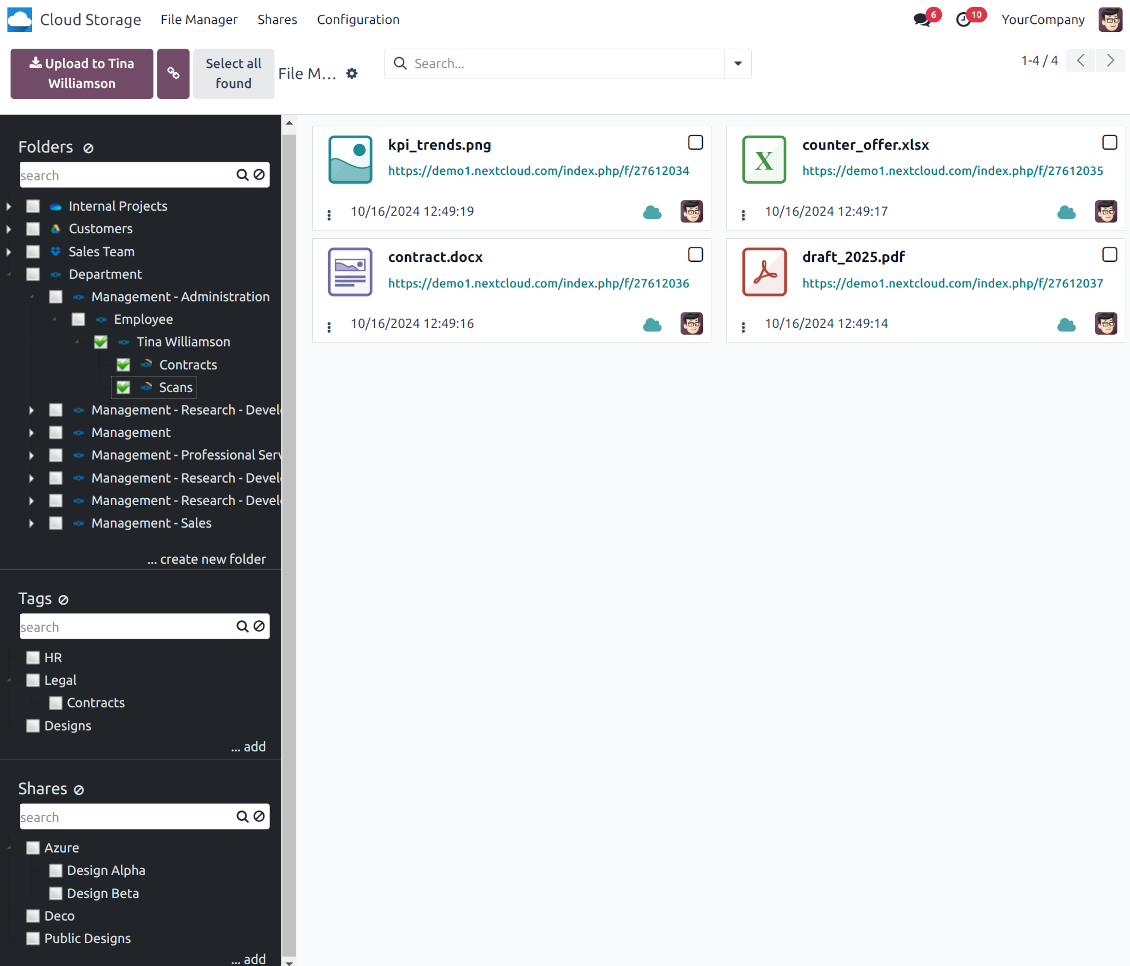
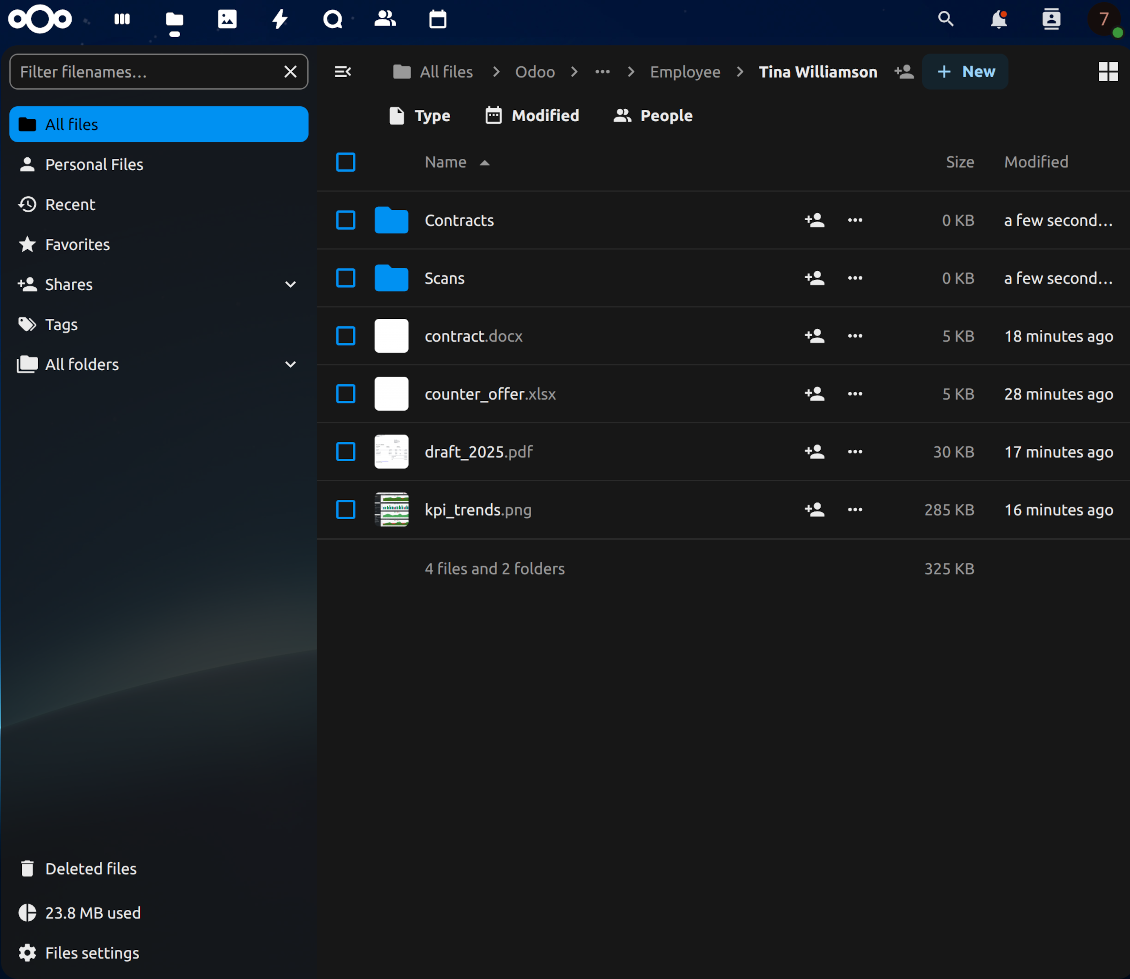
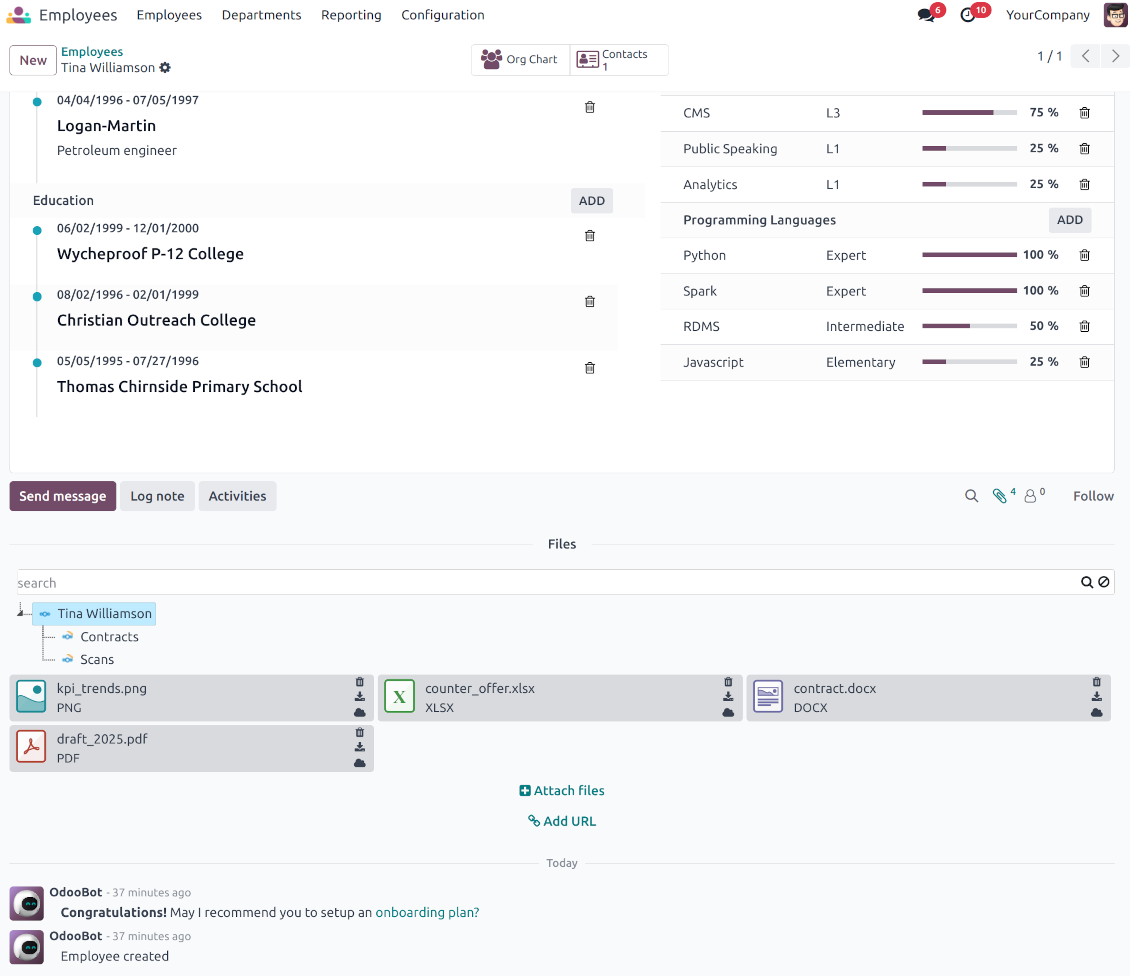
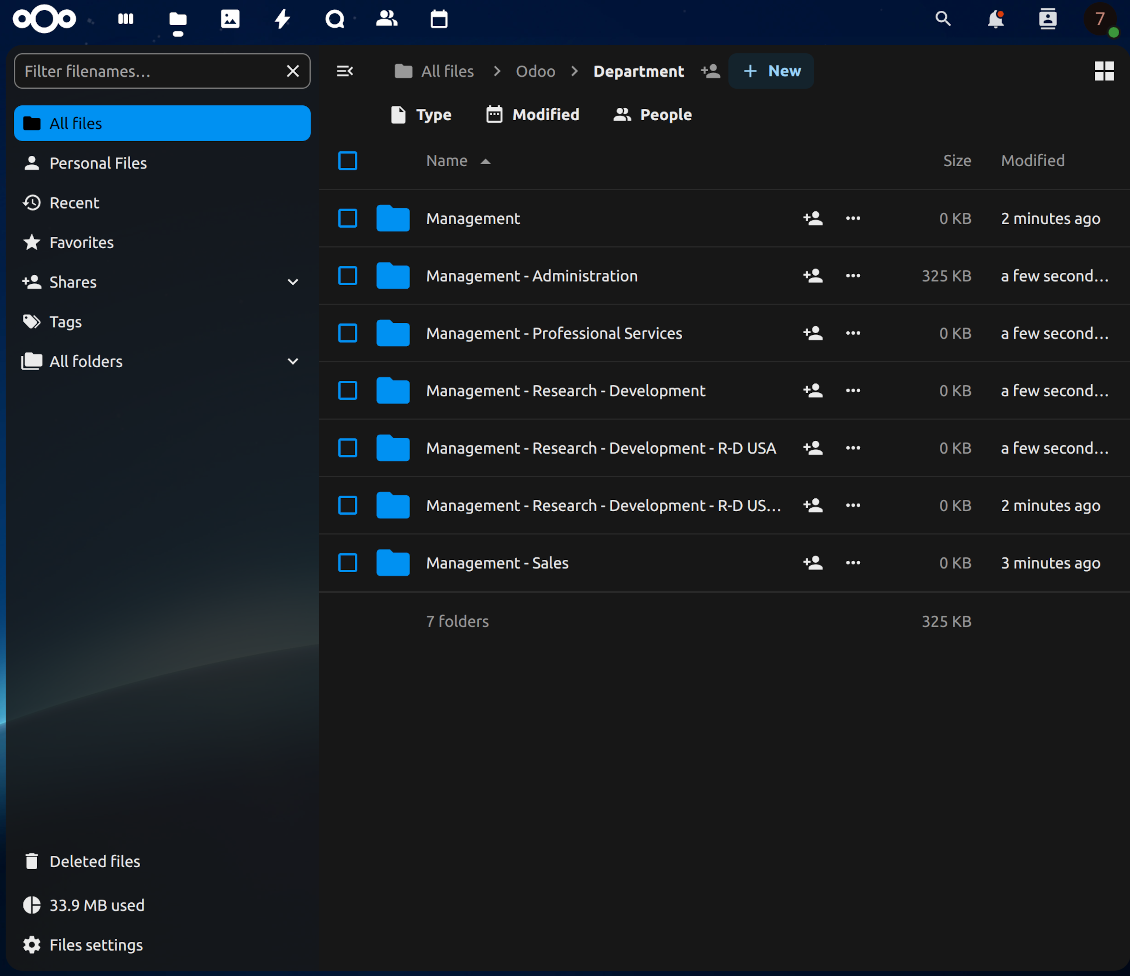
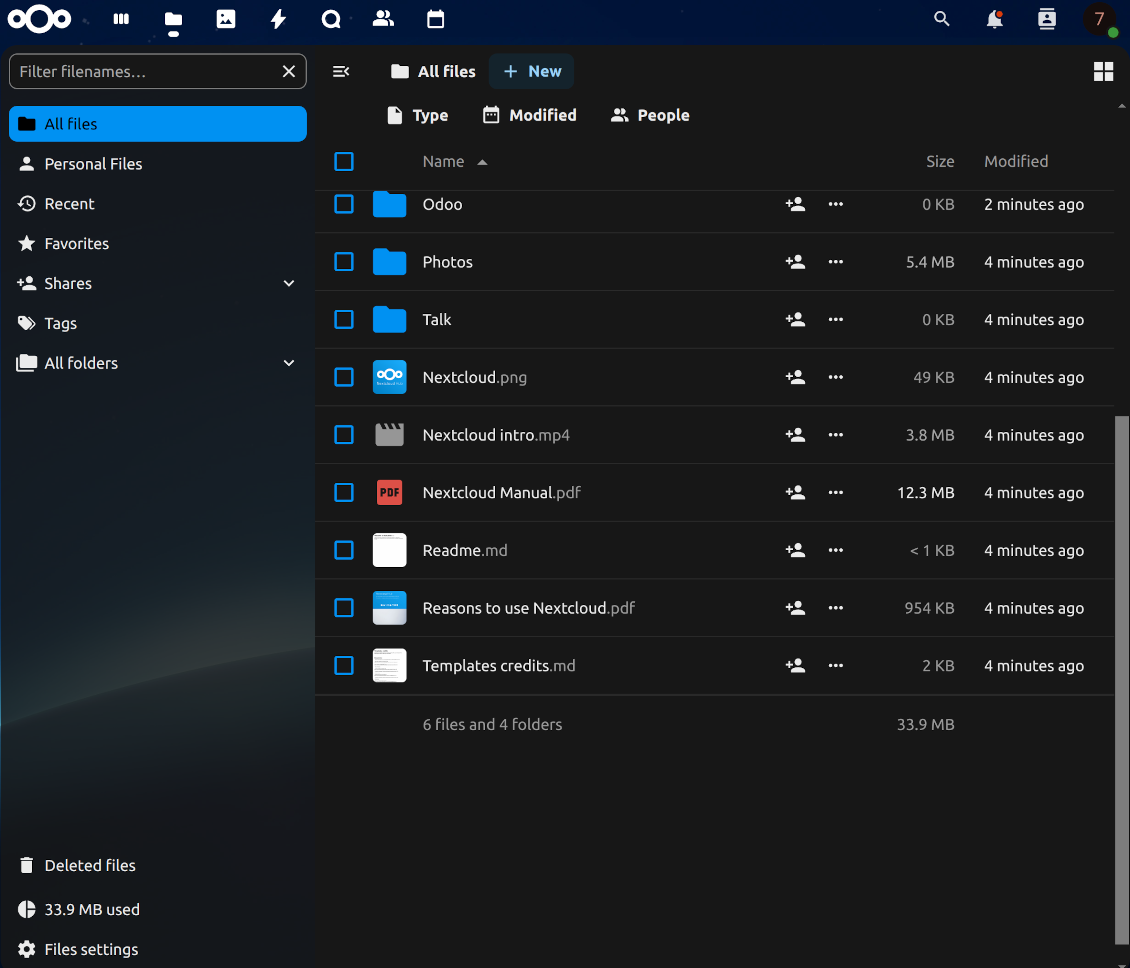
This is the tool to integrate Nextcloud/ownCloud features with Odoo folders and files. The app automatically stores Odoo attachments and directories in ownCloud/Nextcloud and provides instant access to them via web links.
Automatic folders' structure
Decide which Odoo document types should have their own folders trees and synchronize those to ownCloud/Nextcloud
Automatic regular sync
Rely on auto-synchronization between Odoo and ownCloud/Nextcloud based on scheduled jobs. No manual interaction is required
Bilateral sync
Odoo sends attachments to ownCloud/Nextcloud and retrieves files from there. Binary content is kept in clouds, while Odoo provides direct access to synced items
Cloud synchronization history
Control ownCloud/Nextcloud sync logs right in Odoo. Export and share those in case of any issues. Be notified of any client disconnections
File manager interface
Manage synced folders and attachments from a single Odoo view. Comfortably navigate by directories. Search and download files one by one or in batch. Upload and move attachments to folders
Attachment box
Organize files of any Odoo object in a set of subfolders. Instantly access folders and files in the attachment box and in ownCloud/Nextcloud.
Very good product
A perfect solution to integrate Owncloud with Odoo. We sync a high volume of objects across multiple Odoo models, which works seamless and stable. For us it is the perfect solution to have an external DMS instead of the Odoo native attachment handling, which also enables us to interchange files between systems in our best-of-breed setup.
The team behind this module is extremely professional and responsive. They helped us on a few occasions and provided clear answers and prompt support when required, and they even went out of their way to assist us with another requirement we had. Cannot recommend the product and team highly enough, try this if you're in the market to connect Odoo with an external document solution.
Works according to specs
I have used this app with Odoo 12 and Nextcloud 16 and it works as specified. Odoo Tools offers very responsive support which is really helpful. Of course 5 stars...!
This is Awesome
I have used Cloud Sync on Next/Own Cloud and works really great.
How synchronization works
Automatic two-sided sync
-
Configure sync for one or multiple ownCloud / Nextcloud instances
-
Integration is based on scheduled jobs and is fully automatized. The app regularly checks changes in systems and runs sync operations
-
Synchronization is bilateral. Updates in Odoo are reflected in ownCloud/Nextcloud (direct sync); changes in ownCloud/Nextcloud modify Odoo folders and attachments (backward sync)
-
Cloud connection with ownCloud / Nextcloud might be reset. In this way, the app assumes getting back all items back to Odoo (reverse sync)
-
Odoo folders and attachments might be re-attached to a new cloud client from ownCloud/Nextcloud. Hence, items will be first taken back to Odoo (reverse sync) and then will be put into the new cloud storage (direct sync)
Queue-based synchronization
-
Once in 15 minutes, the app examines updates in Odoo and ownCloud/Nextcloud to prepare a synchronization queue
-
Folders' checks follow the First-In-First-Out (FIFO) principle. So, directories that have not been examined for the longest will be processed first
-
Once in 15 minutes, the sync queue is run by the special scheduled job. Firstly, the most important (blocking) tasks would be done
-
Control planned jobs and their fulfillment in the special Odoo logs interface (Cloud Storage > Configuration > Sync Logs). Subscribe for particular cloud clients notifications
-
If the app faces sync failures, it will re-try operations afterward. Sync queue processing would not be stopped if there are items not blocked by such failures
Odoo attachments for ownCloud/Nextcloud: direct sync
-
Direct sync prepares the folders' hierarchy and uploads Odoo attachments for ownCloud/Nextcloud
-
Direct sync checks whether attachments are added or deleted for synced directories. If so, they would be created or removed in ownCloud/Nextcloud. In particular, it means that any file added to a folder-related Odoo object (e.g. Quotation), would be automatically moved to a linked cloud client
-
Direct sync makes all synced Odoo attachments change their type to a link (URL), while binary content is removed with one of the next Odoo cleaners. So, no actual files would be stored on your Odoo server
-
Direct sync checks whether a new folder is added. Disregarding whether it is done manually or automatically, the app would generate a peer directory in ownCloud/Nextcloud
-
Direct sync checks whether there are any updates in folders. If so, such changes are reflected in ownCloud/Nextcloud
ownCloud / Nextcloud files and folders for Odoo: backward sync
-
Backward sync checks whether any files or subfolders are added to ownCloud / Nextcloud folders. If so, the app would create URL attachments/subdirectories inside linked Odoo directories (and hence Odoo objects if any)
-
Backward sync checks whether there are any updates in folders or attachments. Such updates would be then reflected in Odoo
-
Backward sync checks whether any files are deleted/moved in an ownCloud / Nextcloud document folder. If so, a linked Odoo attachment would be also unlinked or moved
-
If you deleted an ownCloud / Nextcloud folder related to a folder rule / Odoo object, their child files would be deleted as well. Thus, Odoo would remove related attachments. The folders, however, will be recovered with a direct sync
-
In case of conflicts, direct sync changes are in general considered more important than backward updates.
Resetting or changing ownCloud / Nextcloud: reverse sync
-
In case you decided to reset the connection with ownCloud / Nextcloud, files would be moved back to Odoo
-
In case you decided to change the cloud client of a folder rule or a folder, files would be first taken back to Odoo, and then direct sync for a new client would be done
-
Reverse sync operations are prioritized to direct and backward sync operations
-
Not all items can be correctly reversed to Odoo due to cloud client peculiarities. For example, there are documents that may exist only in cloud storage environments. The app would try to convert such documents, but in some cases, it would require manual interactions.
Internal and public URLs
By default links from Odoo to ownCloud/Nextcloud are internal: only authorized users may access them. Optionally make links public (the setting 'Use Public URLs'). Then, URLs would be 'shared', and everybody would access items by a direct link.
Be cautious if you decide to use shared (public) URLs. Although the links would be hardly known by external users, there is a slight chance that they become available as a result of some user actions. Besides, sharing link generation is not fast and might make synchronization slower.
設定とインストールのヒント: ownCloud / Nextcloud Odoo Integration Odoo v.18
Configuration and log in
- Turn on the option 'ownCloud/Nextcloud Sync' (cloud Storage > Configuration > Configuration). The optional add-on ownCloud/Nextcloud Odoo Integration is required
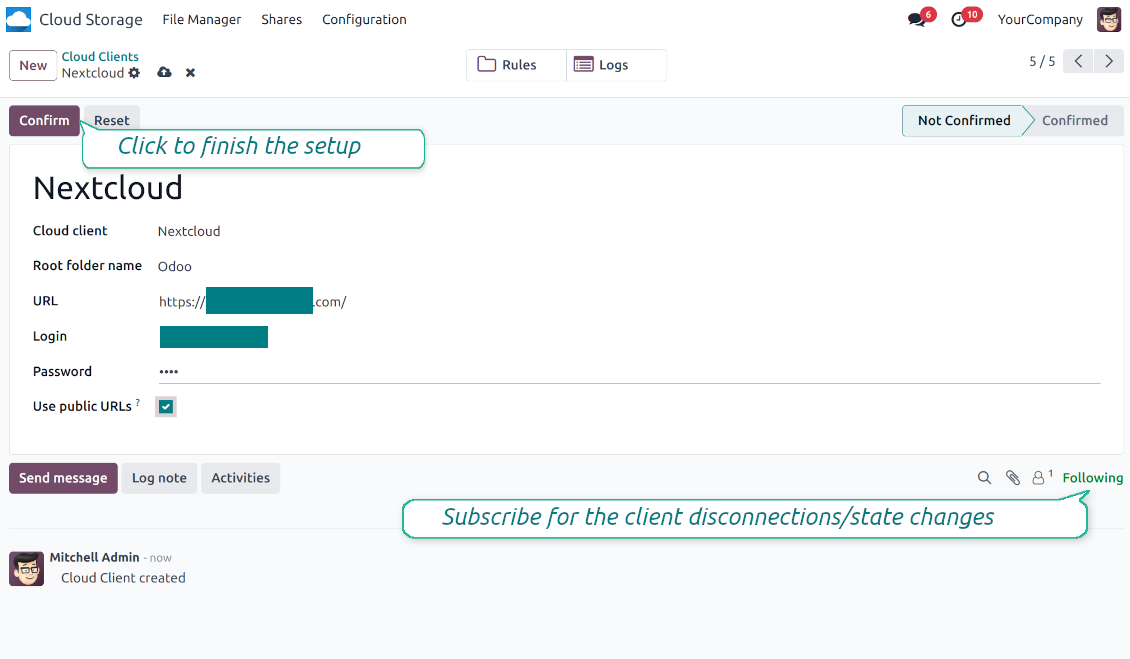
- Go to Odoo Cloud Storage > Configuration > Cloud Clients press 'Create'
- As a reference, introduce any name which would be clear to all users
- As a Cloud client, choose 'Nextcloud' or 'ownCloud' depending on the software you are using
- As a Root folder name, enter a title that will be used as the parent directory for all synced folders. For example, 'Odoo' or 'OdooERP'
- Enter your ownCloud/Nextcloud full URL
- Select an ownCloud/Nextcloud user, which has full rights to read, create, write and delete files and folders within a root directory
- Enter the login and password of this user to the fields 'Login' and 'Password'
- Choose whether you would like to apply public or internal URLs (see below)
- Press 'Confirm'. Odoo synchronization is ready to be done
- Apply the newly created cloud client to folder rules and/or manual folders which should be synced to that Nextcloud or ownCloud instance
- Await the sync scheduled job to be started. For testing purposes only: trigger integration manually from Cloud Storage > Configuration > Configuration > the button 'Launch sync'.
Watch also the configuration video
Enter ownCloud/Nextcloud credentials
に関するよくある質問 ownCloud / Nextcloud Odoo Integration Odoo v.18
同期フィールドはどこに保存されますか?Odooとクラウドに重複しますか?
本アプリは、添付のバイナリ内容が Odoo サーバーではなく Cloud Client に保管されることを前提とします。そのため、Odoo 上の該当添付は URL タイプになり、添付ボックスまたは Cloud Client からいつでもアクセスできます。
セットアップ後は同期が完全に自動のため、手動操作は不要です。同期する Odoo のドキュメントタイプを決め、それぞれに関連モデルを設定してください(顧客、販売オーダまたは購買オーダ、タスク、プロジェクトなど)。
同じ文書タイプに複数のフォルダを持てますか?例えば社内プロジェクトと顧客プロジェクトです。
はい。それぞれにルールを用意し、その後フィルタを適用します。例: プロジェクトの種類。
文書を確実に割り当てられるよう、フィルタは互いに排他的にしてください。例: 「顧客だが仕入先ではない」「仕入先だが顧客ではない」。そうしないと、特定文書のフォルダがモデル間を行き来します。
同期をリアルタイムにできますか?
いいえ。リアルタイム同期を避ける確かな理由があります:
パフォーマンスの問題。同期がリアルタイムだと、ファイルアップロードのたびに読み込み画面が出ます。
競合の問題。2 人のユーザーが同時に項目を変更すると、解決できない状況になり得ます。定期ジョブなら後から直せますが、リアルタイムではキューとして保存する必要があり、ユーザーにとってさらに分かりにくくなります。
機能上の問題。特に項目の名前変更と再構成です。逆方向同期ではディレクトリ論理に厳密に依存し、毎回 100% の項目を確認します。更新のたびに行うと毎秒数千リクエストになります。行わなければ変更は失われます。
クラウドの既定フォルダ名を変更できますか?
任意のドキュメントタイプについて、モデルのディレクトリ(販売オーダ、案件、仕入先など)に独自の名前を付けられます。
オブジェクトのフォルダ(SO-001、John Smith など)では、このドキュメントタイプの表示名を組み立てる Odoo のメソッドに依存します。ただし名前式を定義すれば変更できます。Odoo メールテンプレートと全く同じ構文を使います。
同期ジョブの頻度を変更できますか?
いいえ。バージョン 15 以降、スケジュール済ジョブは変更しないでください。最も安定して速い接続のため 15 分ごとに実行するよう最適化されています。
Odoo サーバーのタイムアウトを少なくとも 15 分(900 秒)に設定してください。
同期を一時停止する場合は、対象の cloud client フォームで行ってください。
添付をいくつかのクラウドクライアントと同期できますか
はい、バージョン 15 以降は複数接続を設定できます。一部のフォルダをある cloud client に、他を別のクライアントに同期できます。
同じフォルダを複数の cloud storages に同時同期することはできません。
クラウドでは専用エディタ(OnlyOffice、Office 365 など)を使っています。ファイルはそのエディタで開きますか?
はい、cloud client の設定によります。
Cloud Storage Solutionアプリだけが必要ですか?
バージョン 15 以降、アプリは単独で添付をフォルダ整理し、ファイルマネージャー画面を提供できます。
ただしクラウドクライアントとの接続が目的なら、関連するオプションアプリを 少なくとも 1 つインストールする必要があります。
フォルダルールを変えるとどうなりますか?
フォルダ規則が変わると、フォルダ一覧も変わります。規則の条件に合わなくなったフォルダは削除されます。ファイルが同期済みなら、逆同期で Odoo に戻し、Cloud Client から削除します。
文書オブジェクトがフォルダ規則の条件に合わない場合、そのフォルダは作られません。後で条件に合えば、関連フォルダが生成されます。
直接同期だけを残すか、クラウドからの同期を無効にできますか?
はい。クラウドクライアントで設定ページを開き、クラウドからの同期を無効にするをオンにします。
同期は一方向のままです。Odooで行った変更は引き続きクラウドストレージへ送られます。クラウドストレージで作成、名前変更、削除されたファイルとフォルダはOdooに反映されず、そこで削除されたフォルダは復元されません。
蓄積された変更(削除を含む)を次回の同期で適用するには、このオプションを再びオフにします。
この設定はバージョン18から使えます。クライアントの切り離し、リセット、無効化は、逆同期もオフにしない限り逆同期を実行します。
コネクタでOwnCloudタグを更新できますか?
いいえ。タグは同期されません。以前この機能を検討しましたが、いくつかの理由で導入しないことにしました:
コネクタライブラリは ownCloud タグの取得や更新をサポートしていません
Odoo の添付には属性「tags」がなく、それらのタグをいつユーザーに割り当てるかも明確ではありません。
アプリは双方向同期のため、同期中に解決が難しい重大な競合が起きる可能性があります。
ツールの更新ポリシーは何ですか?
現行の Odoo Apps Store ポリシーによると:
- バージョン 12.0 以前向けに購入したモジュールは、12.0 までの全バージョンにアクセスできます。
- バージョン 13.0 以降、各モジュールバージョンは個別に購入します。
- バージョンに関係なく、購入するとメジャーバージョン内の すべての更新と不具合修正の権利が得られます。
faOtools チームはこれらのポリシーを管理していません。ご質問は Odoo Apps Store の担当者へ直接お問い合わせください。
アプリを Odoo.sh にインストールする方法は?
最も単純な方法は、Odooストア組み込みのワークフローを使うことです:
1. モジュールのページを開き、Deploy on odoo.sh ボタンをクリックします。
2. その後 GitHub ページにリダイレクトされます。アカウントにログインし、'Create a new repo' をクリックするか既存のものを使います。リポジトリはプライベートにしてください。OPL-1 ライセンスのアプリを公開することは許可されていません。必要なら Odoo.sh プロジェクト用に新しい repo を作成します。
3. 次に odoo.sh に行き、Deploy ボタンをクリックします。ポップアップで決定を送信し、'Continue.' をクリックします。これでインストールが始まります。
これらの手順でプロジェクトの本番ブランチにアプリがインストールされます。他のブランチにデプロイする、またはモジュールを更新する場合は、次の操作を行います:
1. Odooストアからアプリのソースコードをアップロードします。
2. モジュールを必要な GitHub リポジトリにコミットします。アプリのフォルダ/ファイルが無視されていないこと(repo の .gitignore に含まれていないこと)を確認してください。リポジトリは odoo.sh が自動作成し、既定で重要な項目(例: /lib)が含まれることがあります。モジュールのディレクトリ、サブディレクトリ、ファイルを例外なくすべてアップロードしてください。
3. odoo.sh プロジェクトの対象ブランチを Deploy するか、 設定がそうなっている場合は自動ビルドされるまで待ちます。
自分のサーバーにアプリをインストールするには?
2. Odoo サーバーを再起動します;
3. 開発者モードをオンにします(技術設定);
4. アプリ一覧を更新します(アプリメニュー);
5. アプリを見つけて「Activate」/「Install」を押します;
6. アプリページにガイドラインがあれば従ってください。
アプリに追加アドオンがあるのに気づきました。後から購入できますか?
はい、もちろんです。同時に Odoo は依存関係をすべてカートに自動追加するので、二重払いを避けるには既に購入したツールを除外してください。
アプリを Odoo.sh にデプロイしたらテストで警告/エラーが出ます
赤/オレンジの警告はアプリの機能に影響しません。残念ながら、標準の自動テストがアプリの目的と衝突する動作を想定するため、モジュールが通らないことがあります。たとえば価格計算を変える一方、標準 Odoo モジュールのテストは最終価格を標準アルゴリズムと比較します。
まず、デプロイ済みデータベースの機能を確認してください。すべて正しく動いていますか?
それでも警告が実機能に影響すると考える場合はご連絡のうえ、インストールログ一式とデプロイ済みモジュールの全一覧(コアおよびサードパーティ含む)を送ってください。
アプリを御社から直接購入できますか?
いいえ、ツールは 公式の Odoo アプリストア.
割引をいただきたいです
残念ながら、個別価格を提示する技術的手段が ありません。
Odoo Online (SaaS)データベースにアプリをインストールできますか?
いいえ、サードパーティアプリは Odoo Online では使えません。残念ながら Odoo SaaS がその可能性をブロックします。
ツールは他のアプリに依存しています。それらも購入すべきですか?
はい、ツールが正しく動くには依存関係に記されたすべてのモジュールが必要です。アプリページの価格には必要な依存関係がすでに含まれています。
モジュールの米ドル価格はいくらですか?なぜ変わりましたか?
モジュールの価格はユーロ建てです。Odoo ストアは内部為替レートで他通貨に換算します。そのため為替が更新されると米ドル価格が変わることがあります。
英語以外のアプリ・サイト文言は AI 支援で作成され、 公式の Odoo 翻訳に揃えています。誤りを見つけたら、 翻訳の正確さについてチケットを送る 修正します。
Odoo デモデータベース(ライブプレビュー)
このアプリでは無料の個別デモデータベースをご用意できる場合があります。
ご連絡に電話番号やクレジットカードは不要です。30 秒以内の短いメール登録だけです。
ご依頼に応じて個別のライブプレビューデータベースを用意します。約2週間、テストや前提の確認ができます。
不具合報告
不具合や一貫しない動作があれば、遠慮なくご連絡ください。購入から60日以内の修正を保証し、その後もツール改善に力を入れています。
ご連絡に電話番号やクレジットカードは不要です。30 秒以内の短いメール登録だけです。
リクエストにはできるだけ多くの詳細を含めてください:スクリーンショット、Odoo サーバーログ、問題の再現手順の完全な説明など。通常、問題の作業計画の作成(不具合が確認された場合)または実施すべき内容の案内(それ以外)には数営業日かかります。
公開の機能リクエストとモジュールのアイデア(無償開発)
ツール改善への意欲は強く、フィードバックには感謝します。要件が広く役立ち、効率よく実装できる場合、チームは To-do リストに加えます。
このような To-do リストは定期的に処理され、追加料金は発生しません。期限や最終デザインは約束できませんが、投資とリスクなしで望む機能を得る良い方法になることがあります。
ご連絡に電話番号やクレジットカードは不要です。30 秒以内の短いメール登録だけです。
18.0.1.1.9
- Significantly improved sync performance for large OwnCloud / Nextcloud trees by optimizing parent folder resolution.
18.0.1.1.8
- The pyocclient Python package is replaced with direct WebDAV requests.
18.0.1.1.7
- The extra layer to check the existing parent has been added.
18.0.1.1.6
- Nextcloud への大きなファイルのアップロードの問題を修正しました。
18.0.1.1.5
- ownCloud への認証を修正しました。
- バックアップを作成する API メソッドを追加しました。
18.0.1.1.4
- cloud client が未選択の問題を修正しました。
18.0.1.1.3
- アプリはバージョン18向けに公開されました。


The tool to build a deep and structured knowledge base for internal and external use. Knowledge System. KMS. Wiki-like revisions.
398€
The tool to set up KPI targets and control their fulfillment by periods. KPI dashboards. Dashboard designer. KPI charts

The tool for time-based service management from booking appointments to sales and reviews
398€
The tool to manage your Odoo from your favorite AI chats through MCP. Claude. Any MCP-supporting AI.

Odoo の添付ファイルをフォルダに柔軟に整理し、Google Drive、OneDrive/SharePoint、Nextcloud/ownCloud、Dropbox、Amazon S3、Box、NAS とディレクトリを同期するツール。DMS。ファイルマネージャー。文書管理システム
398€
The tool to automatically synchronize Odoo attachments with OneDrive files in both ways
487€
The tool to automatically synchronize Odoo attachments with Google Drive files in both ways
487€
The tool to automatically synchronize Odoo attachments with NAS Solutions in both ways. Synology, QNAP, TrueNAS and any other WebDav-supporting NAS solutions
487€