Partner Scoring and Evaluation v.18
The app to evaluate, score, and rank Odoo customers and vendors
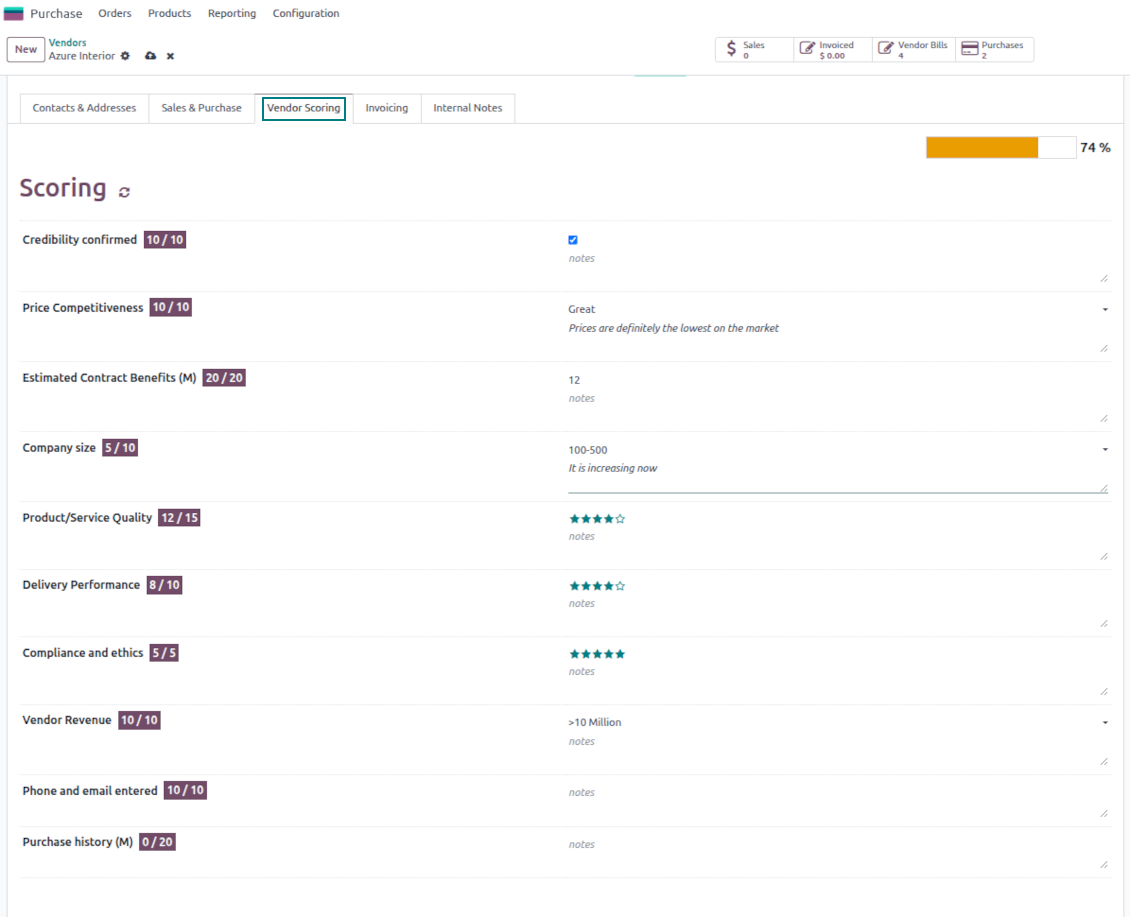
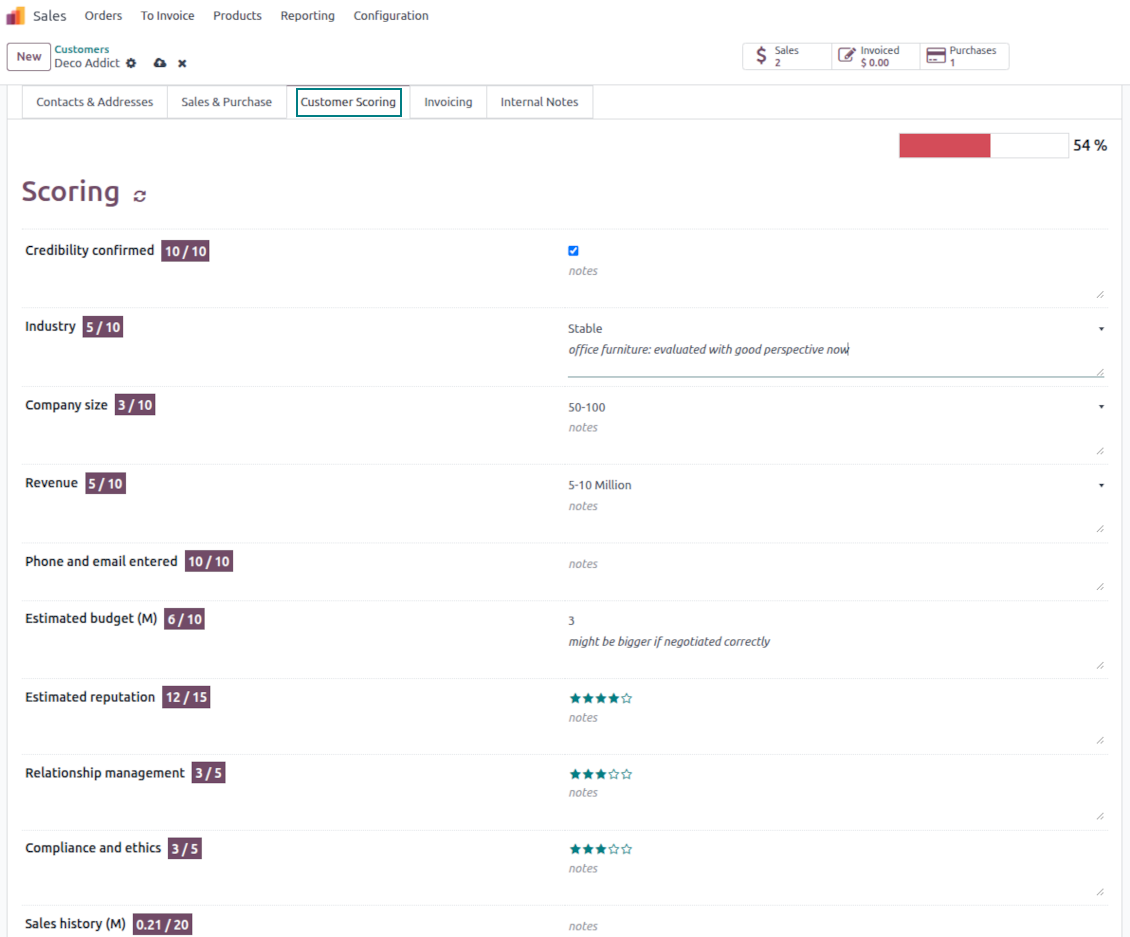
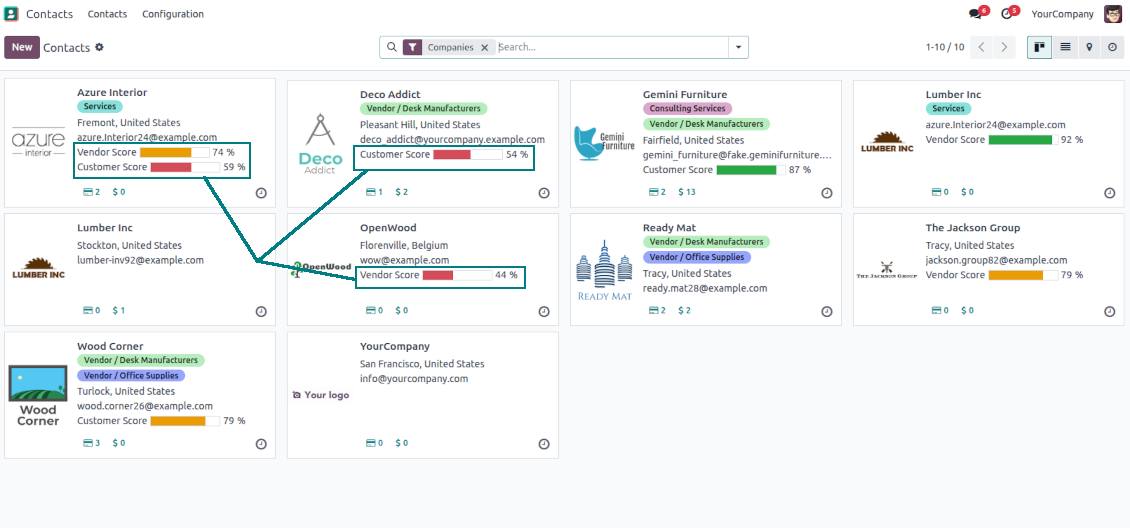
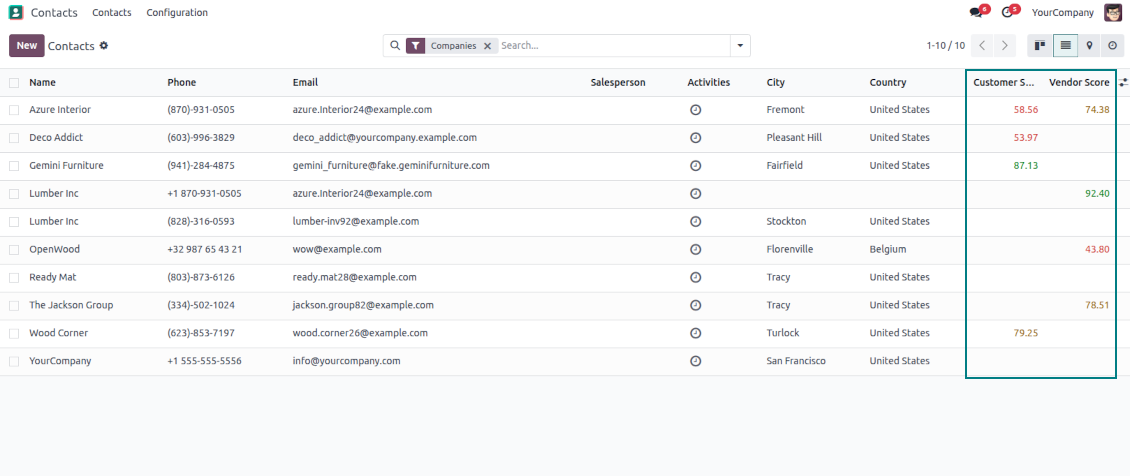
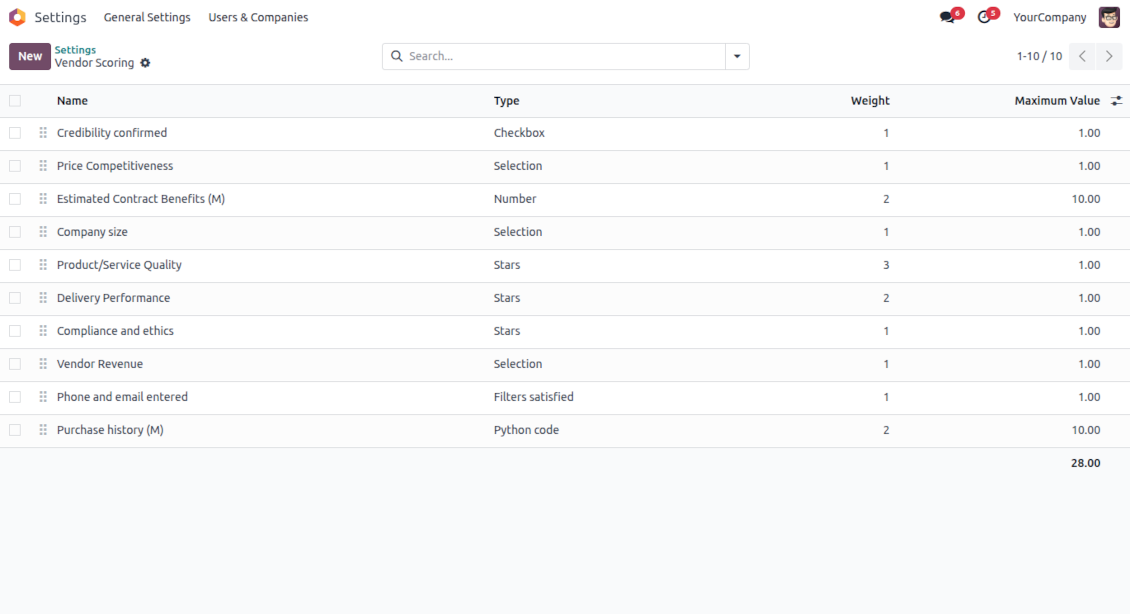
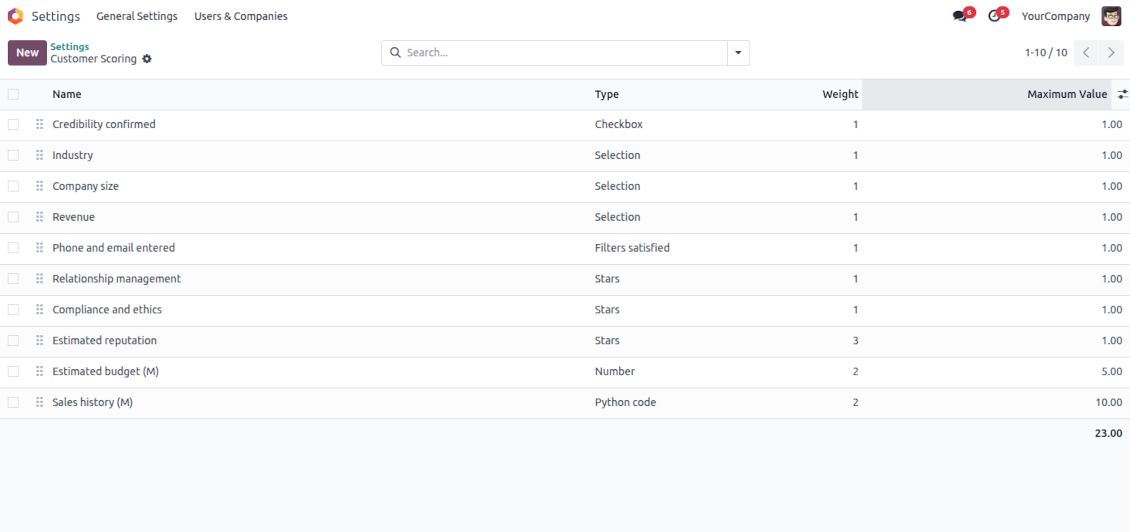
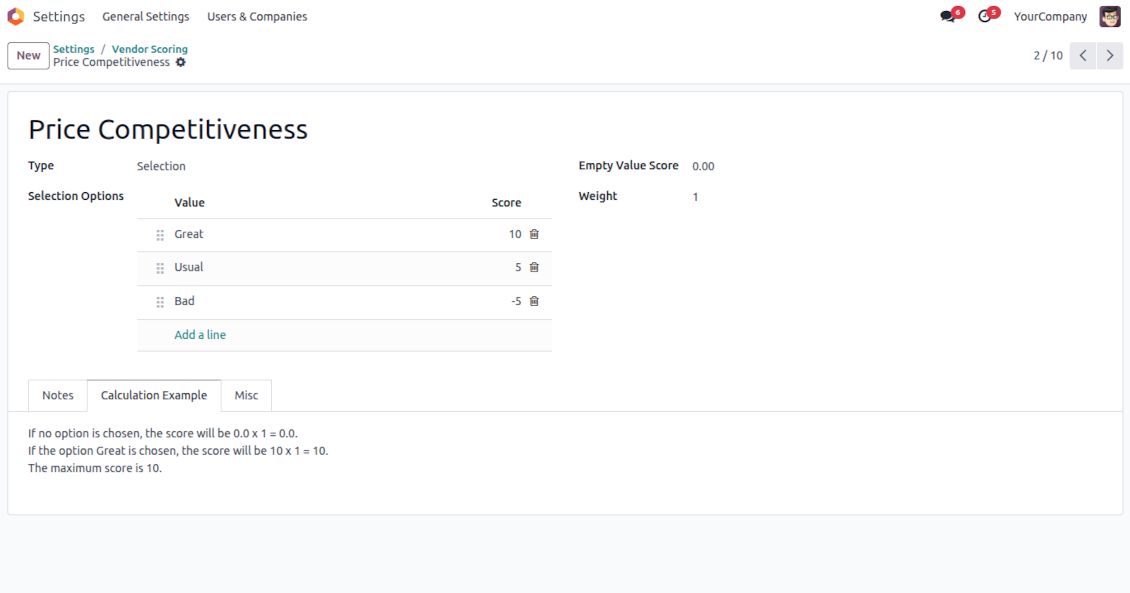
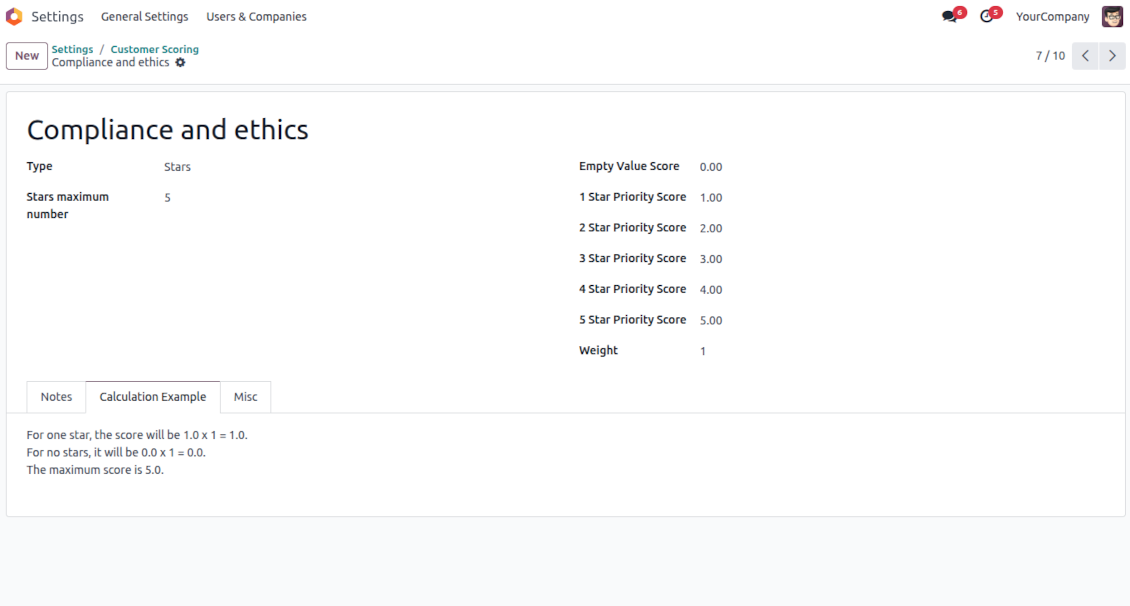
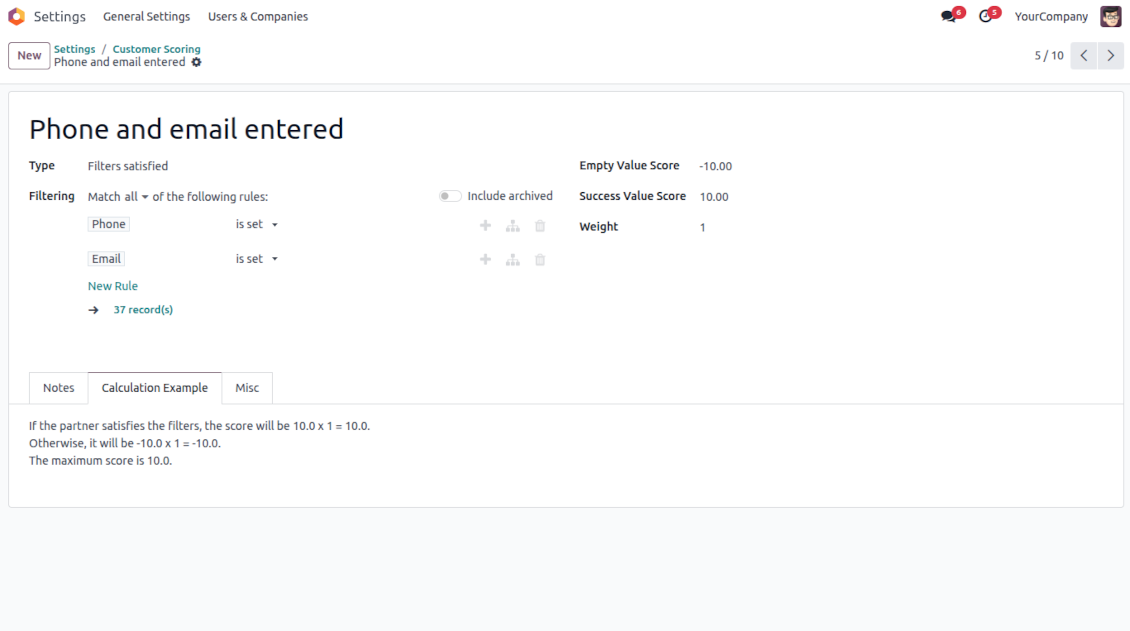
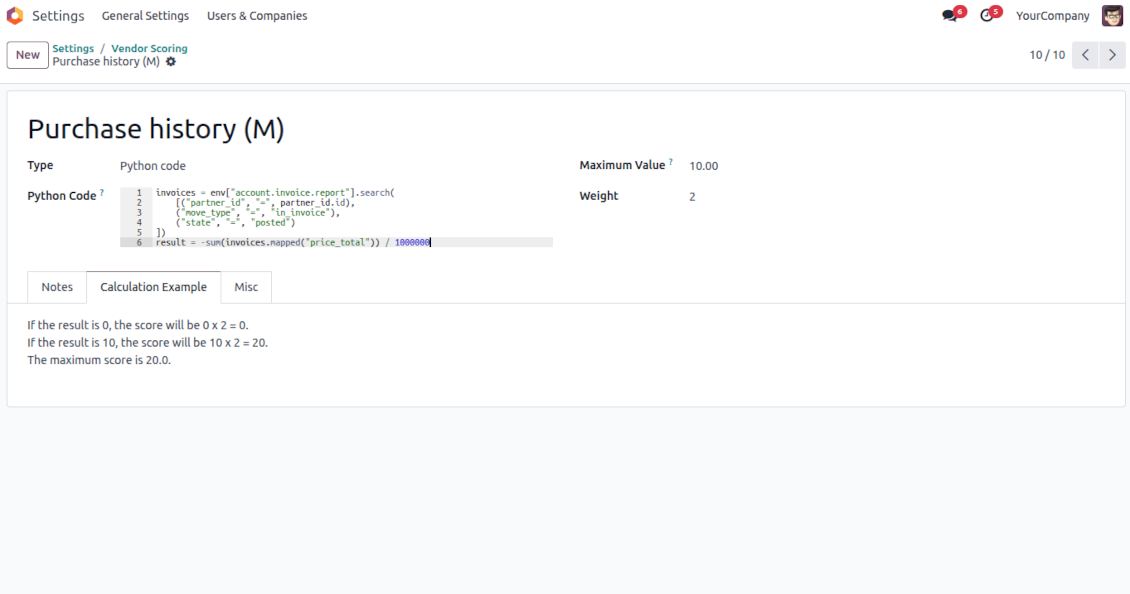
This is the tool to evaluate and rank Odoo partners based on the flexibly configured questionnaires. The app lets you introduce survey questions of different types and weights, based on which the final score is calculated and shown.
- Free extension to evaluate, score, and rank Odoo vendors.
- Free extension to evaluate, score, and rank Odoo customers.
Indicative rankings
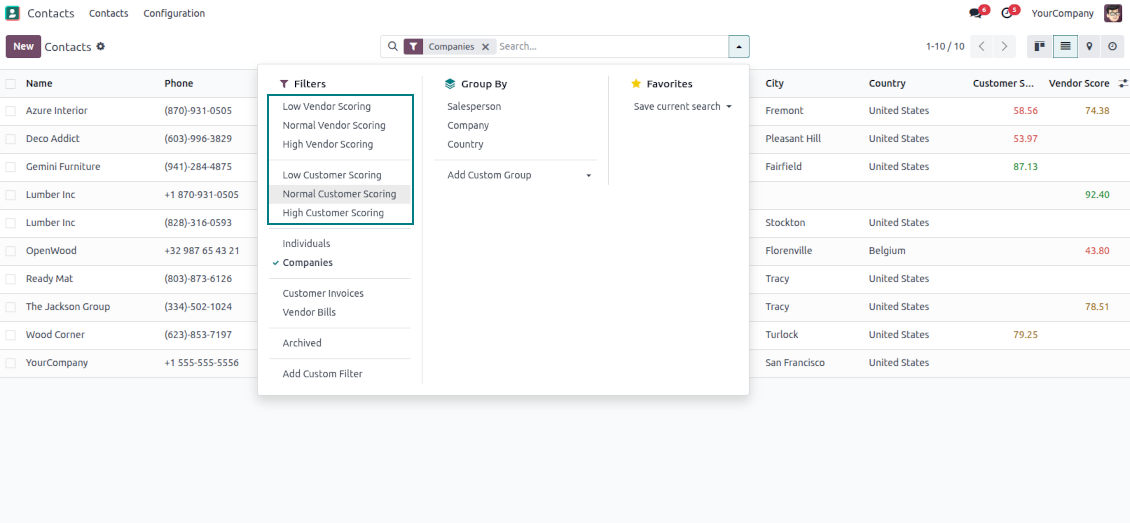
Show or hide rating progress bars on kanban, tree, and form views. Search low, normal, and high-ranked contacts using standard Odoo filters
Unlimited and specific questions
Introduce any number of evaluation points with various weights, answer bonuses, or answer penalties. Complete or change surveys right from a partner form
Flexible survey points
Apply suitable question types: checkboxes (e.g., True - plus 5 points, False - minus 2), drop-down selections (e.g., option 1 - plus 10 points, option 2 - plus 5 points, option 3 - minus 5 points), rankings (e.g., one star - 1 point, 3 stars - 5, no stars - minus 5 points), or numbers (e.g., each 5 - plust one point, but no more than 20)
Automatic evaluation types
Configure the rules to assign scores based on auto rules: when a partner suits specific filters (e.g., when a partner has a particular tag, add 3 points), when a partner has specific fields entered/not entered (e.g., no email or phone - minus 5 points), or calculate results based on complex and entirely flexible Python code
Your ranking levels
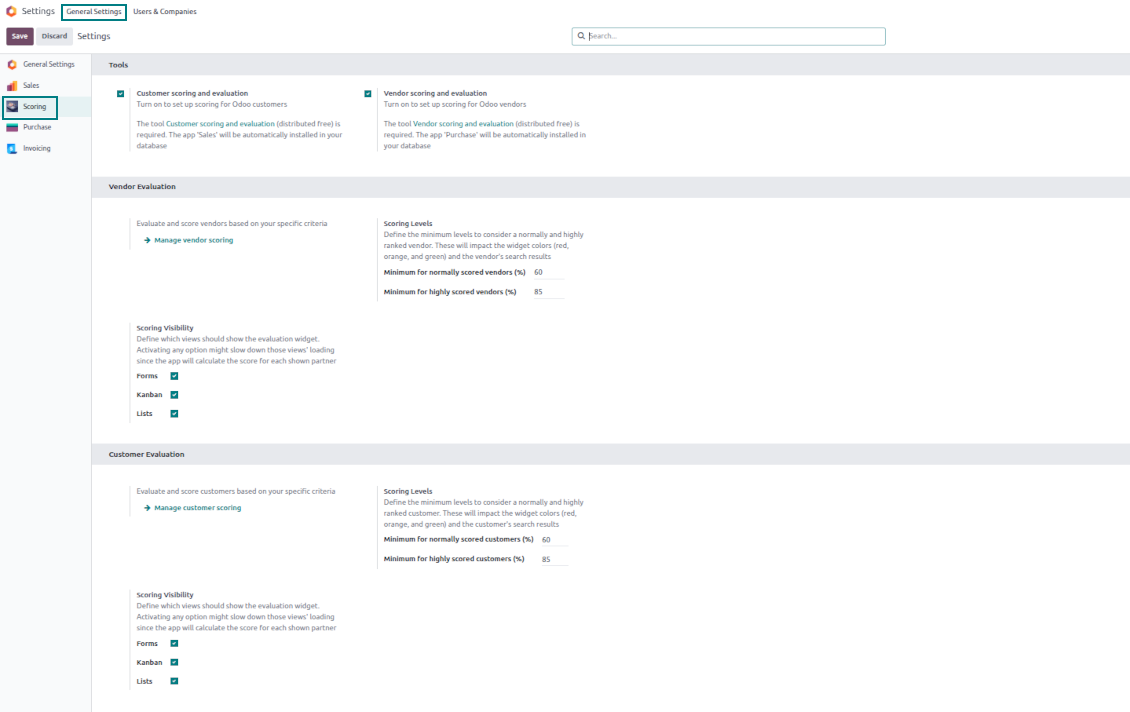
Define when a partner should be ranked high, normal, or low. For example, from 80% - highly scored; from 60% - normally scored
Topical quantitative analysis
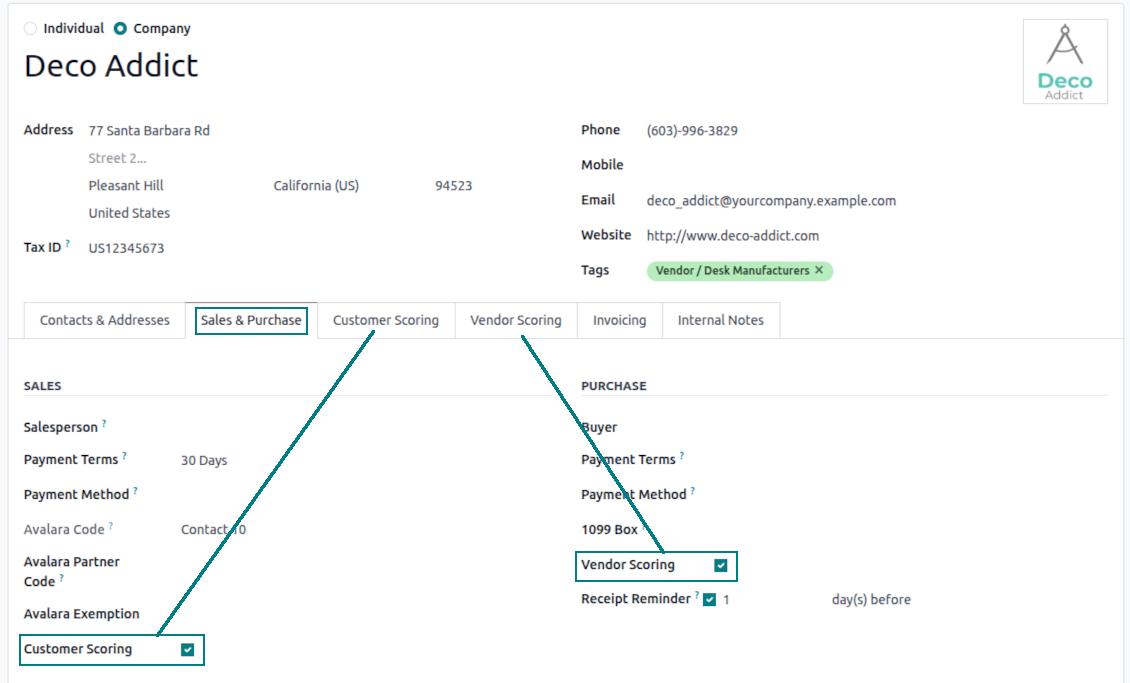
Optionally turn on evaluation for customers and/or vendors. Choose specific partners to evaluate: others will be excluded from surveys.
Flexibly configurable surveys scoring points
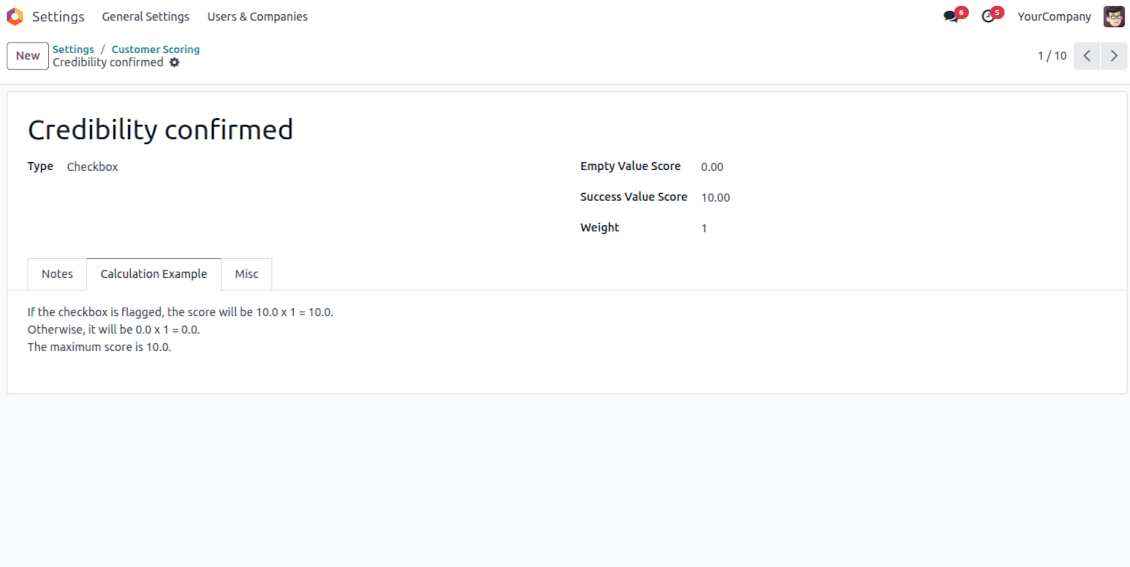
Checkboxes
-
Use this question type when the answer is True or False (default)
-
Assign the score for both options: True - "Success Value Score" (e.g., +10); False - "Empty Value Score" (e.g., -5)
-
Assign the weight for this evaluation point, e.g., 2. For example, the calculated result would be -5 x 2 = -10 for the contact with the unchecked flag
Dropdown selections
-
Use this question type when there are multiple options to select. For instance, the estimated reputation is chosen between three possible values
-
Assign the score for each option: Great (+10), Normal (+5), or Low (-5). The default value is empty (e.g., 0 points)
-
Assign the weight for this evaluation point, e.g., 3. For example, the calculated result would be 10 x 3 = 30 for a partner with the "Great reputation"
Stars/Ratings
-
Use this question type when evaluating a specific parameter from 0 to a particular number up to 10. For example, "Compliance and ethics" to be scored from zero to three stars
-
Assign the score for each option: 1 star (-1), 2 stars (1), 3 stars (2). The default value is 0 (e.g., 0 points)
-
Assign the weight for this evaluation point, e.g., 2. For example, the calculated result would be 3 x 2 = 6 for a partner with 3 stars
Numbers
-
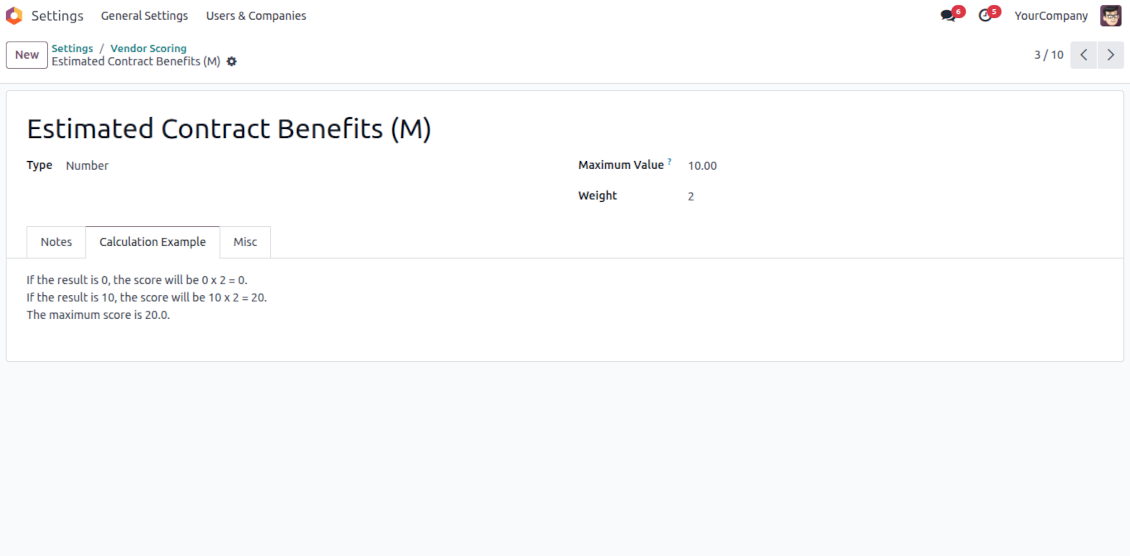
Use this question when users should enter an open-ended float number that is restricted only by a maximum. For example, the company revenue might be stated as any number in Millions, but the value for calculation is up to 10 Million
-
Assign the weight for this evaluation point, e.g., 2. For example, the calculated result would be 3.5 x 2 = 7 for a partner with 3 million revenue. However, if the revenue is 15, it will be 10 x 2, since 10 is the maximum for calculations
Filters
-
Use this question type to automatically assign a specific score based on whether a partner suits particular rules. For example, when a contact has a specific tag and/or fields entered
-
Assign the score for both possibilities: True - "Success Value Score" (e.g., +5); False - "Empty Value Score" (e.g., -5)
-
Assign the weight for this evaluation point, e.g., 1. For example, the calculated result would be -5 x 1 = -5 for the contact that doesn't satisfy the filters
Fields entered
-
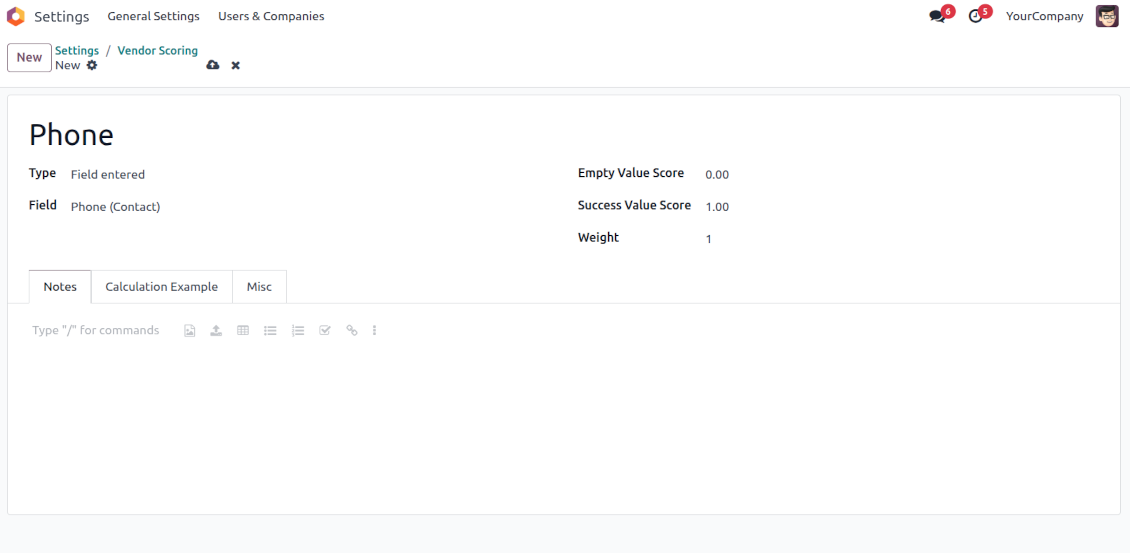
Use this question type to automatically assign a specific score based on whether a partner has a particular field entered. For example, when a contact has a phone in Odoo
-
Assign the score for both possibilities: True - "Success Value Score" (e.g., 0); False - "Empty Value Score" (e.g., -10)
-
Assign the weight for this evaluation point, e.g., 2. For example, the calculated result would be -10 x 2 = -20 for the contact that has an empty phone field
Python code
-
Use this question type to calculate a score point automatically based on any Odoo data. For example, to find all paid invoices of the current partner and get their untaxed total
-
Assign the weight for this evaluation point, e.g., 2. For example, the calculated result would be 2 x 2 = 4 for a partner with the calculated result 2
-
Assign the maximum possible result. For example, if it is set as 5, the calculated result "7" will be replaced with 5. So, the score will be 5 x 2 = 10 (instead of 7 x 2 = 14)
-
Feature description and details in short
-
In the code use the variable "partner_id" that contains the currently evaluated Odoo contact (res.partner instance). Also, Python date, datetime, and timedelta are available
-
Apply Odoo "env" to work with database data. For example, env["sale.order"] for quotations or env["account.move"] for invoices
-
Save the calculation total in your code to the special "result" variable
Score calculations
-
Each scoring point is summed up for a currently evaluated partner. For example, five existing questions led to the weighted scores: +10 - 5 + 2 + 7 + 5 = 19
-
All the scoring questions also have their maximum possible values. For instance, 10 + 10 + 10 + 20 + 5 = 55
-
Then, a specific customer score is calculated as total points divided by the maximum points. So, 19/55 = 34.55%
-
Based on the calculated score, the app lets you define the high (marked green, e.g., 75%) and normal (marked yellow, e.g., 30%) levels. Others are low (marked red). Then, in our calculation, a partner is "normally" evaluated since 34.55% is between 30% and 75%.
Usein kysytyt kysymykset aiheesta Partner Scoring and Evaluation Odoo v.18
Mitkä ovat tyokalujenne paivityskaytannot?
Odoo Apps Storen nykyisten kaytantojen mukaan:
- Versiolle 12.0 tai aiemmalle ostettu moduuli antaa pääsy kaikkiin versioihin 12.0 asti.
- Versiosta 13.0 alkaen jokainen moduuliversio ostetaan erikseen.
- Versiosta riippumatta osto antaa oikeuden kaikkiin paivityksiin ja korjauksiin paaversiossa.
faOtools-tiimi ei hallitse näitä kaytantoja. Kysymykset osoitetaan suoraan Odoo Apps Storen edustajille.
Miten asennan sovelluksen Odoo.sh-palveluun?
Suorin tapa on Odoo-kaupan sisaanrakennettu työnkulku:
1. Avaa moduulin sivu ja napsauta Deploy on odoo.sh
2. Sinut ohjataan GitHubiin. Kirjaudu sisään ja napsauta Create a new repo tai käytä olemassa olevaa. Repositorion on oltava yksityinen. OPL-1-lisenssin sovelluksia ei saa julkaista. Luo tarvittaessa uusi repo Odoo.sh-projektia varten
3. Siirry sitten odoo.sh:iin, napsauta Deploy, vahvista ja napsauta Continue. Asennus kaynnistyy.
Nämä vaiheet asentavat sovelluksen production-haaraan. Muille haaroille tai paivitykseen:
1. Lataa lahdekoodi Odoo-kaupasta
2. Commitoi moduuli GitHub-repositorioon. Mikään sovelluskansio/-tiedosto ei saa olla .gitignore-tiedostossa. odoo.sh:n luomat repositoriot voivat oletuksena ohittaa tarkeita polkuja (esim. /lib). Lataa kaikki moduulin hakemistot ja tiedostot
3. Deployaa odoo.sh-projektin kohdehaara tai odota automaattista koontia, jos asetukset niin maarittavat.
Miten asennan sovelluksen omalle palvelimelleni?
2. Käynnistä Odoo-palvelin uudelleen;
3. Ota kehittajatila kayttoon (tekniset asetukset);
4. Päivitä sovellusluettelo (Sovellukset-valikko);
5. Etsi sovellus ja paina Activate/Install;
6. Noudata sovellussivun ohjeita, jos niitä on.
Sovelluksella on lisaosia. Voinko ostaa ne myöhemmin?
Kyllä. Odoo lisää kaikki riippuvuudet ostoskoriin automaattisesti: jätä pois jo ostetut työkalut, jottet maksa kahdesti.
Asensin sovelluksen Odoo.sh-palveluun ja näin varoituksen/virheen testeissa
Punainen/oranssi varoitus ei vaikuta sovelluksen ominaisuuksiin. Joskus moduulimme eivät lapaise vakioautomaattitesteja, koska ne olettavat kayttaytymisen, joka on ristiriidassa sovelluksen tavoitteiden kanssa. Muutamme esimerkiksi hinnanlaskentaa, kun Odoo-testit vertaavat loppuhintaa vakioalgoritmiin.
Tarkista ensin kayttoon otetun tietokannan ominaisuudet. Toimiiko kaikki?
Jos oletat silti, että varoitus vaikuttaa todellisiin ominaisuuksiin, ota yhteyttä ja lähetä täydet asennuslokit sekä täydellinen luettelo kayttoon otetuista moduuleista (ydin ja kolmannet osapuolet).
Voinko ostaa sovelluksen suoraan teilta?
Ei, jaamme työkalut vain virallisen Odoo-sovelluskaupan kautta.
Haluan alennuksen
Valitettavasti meillä ei ole teknisia keinoja tarjota yksilöllisiä hintoja.
Voinko asentaa sovelluksen Odoo Online (SaaS) -tietokantaani?
Ei, kolmannen osapuolen sovelluksia ei voi käyttää Odoo Online -palvelussa. Odoo SaaS estää sen.
Tyokalulla on riippuvuuksia. Pitääko ne ostaa?
Kyllä, työkalu tarvitsee kaikki riippuvuuksissa merkittyt moduulit. Sovellussivun hinta sisältää jo nämä riippuvuudet.
Mikä on moduulin hinta Yhdysvaltain dollareina? Miksi se muuttui?
Moduuliemme hinta on euroissa. Odoo-kauppa muuntaa hinnat muihin valuuttoihin sisaisen kurssinsa mukaan. Siksi Yhdysvaltain dollarin hinta voi muuttua, kun kurssi paivittyy.
Sovellus- ja sivustotekstit muilla kielillä kuin englanniksi on tehty tekoälyn tuella ja linjattu virallisiin Odoo-käännöksiin. Jos huomaat virheen, lähetä käännösten oikeellisuutta koskeva tiketti niin korjaamme sen.
Odoo-demotietokannat (live-esikatselut)
Tälle sovellukselle voimme tarjota ilmaisen henkilökohtaisen demotietokannan.
Yhteydenottoon ei tarvita puhelinnumeroa eikä luottokorttia. Riittää lyhyt sähköpostirekisteröinti, joka kestää alle 30 sekuntia.
Pyynnöstäsi valmistelemme yksilöllisen live-esikatselutietokannan, jossa voit testata ja tarkistaa oletuksia noin kahden viikon ajan.
Virheiden ilmoittaminen
Jos kohtaat virheitä tai epäjohdonmukaista toimintaa, ota yhteyttä. Korjaamme 60 päivän kuluessa ostosta ja kehitämme työkaluja sen jälkeenkin.
Yhteydenottoon ei tarvita puhelinnumeroa eikä luottokorttia. Riittää lyhyt sähköpostirekisteröinti, joka kestää alle 30 sekuntia.
Liitä pyyntöön mahdollisimman paljon tietoja: kuvakaappaukset, Odoo-palvelinlokit ja täysi kuvaus ongelman toistamisesta. Työsuunnitelma (jos virhe vahvistetaan) tai ohjeet (muuten) valmistuvat yleensä muutamassa arkipäivässä.
Julkiset ominaisuuspyynnöt ja moduliehdotukset (ilmainen kehitys)
Olemme vahvasti motivoituneita kehittämään työkalujamme ja kiitollisia kaikesta palautteesta. Jos vaatimuksesi palvelevat yleisesti ja ne voidaan toteuttaa tehokkaasti, tiimi lisää ne tehtävälistaan.
Tällainen tehtävälista käsitellään säännöllisesti eikä siihen sisälly lisämaksuja. Emme voi luvata määräaikoja ja lopullista suunnittelua, mutta se voi olla hyvä tapa saada toivottuja ominaisuuksia ilman investointeja ja riskejä.
Yhteydenottoon ei tarvita puhelinnumeroa eikä luottokorttia. Riittää lyhyt sähköpostirekisteröinti, joka kestää alle 30 sekuntia.

Työkalu, jolla Odoo-liitteet järjestetään kansioihin ja hakemistot synkronoidaan pilviasiakkaisiin: Google Drive, OneDrive/SharePoint, Nextcloud/ownCloud, Dropbox, Amazon S3, Box ja NAS. DMS. Tiedostonhallinta. Asiakirjahallinta
398€

The tool to build a deep and structured knowledge base for internal and external use. Knowledge System. KMS. Wiki-like revisions.
398€
The tool to automatically synchronize Odoo attachments with OneDrive files in both ways
487€
The tool to set up KPI targets and control their fulfillment by periods. KPI dashboards. Dashboard designer. KPI charts

The tool for time-based service management from booking appointments to sales and reviews
398€
The tool to automatically synchronize Odoo attachments with Google Drive files in both ways
487€
The tool to plan, share and control employees shifts in a form of weekly timetables. Work schedule. Work shift calendar
98€
The tool combines users in roles and simplifies security group assigning. Access group management. Users mass updating