Partner Scoring and Evaluation v.18
The app to evaluate, score, and rank Odoo customers and vendors
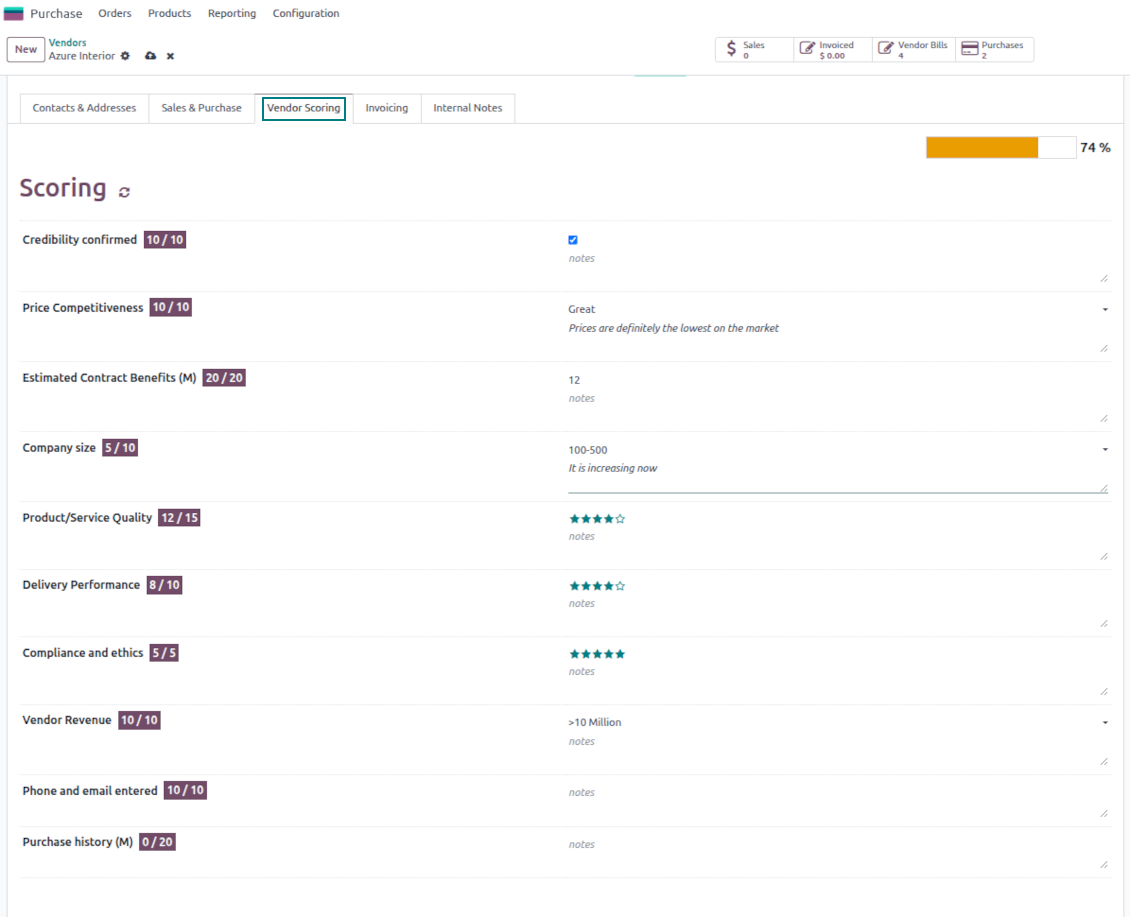
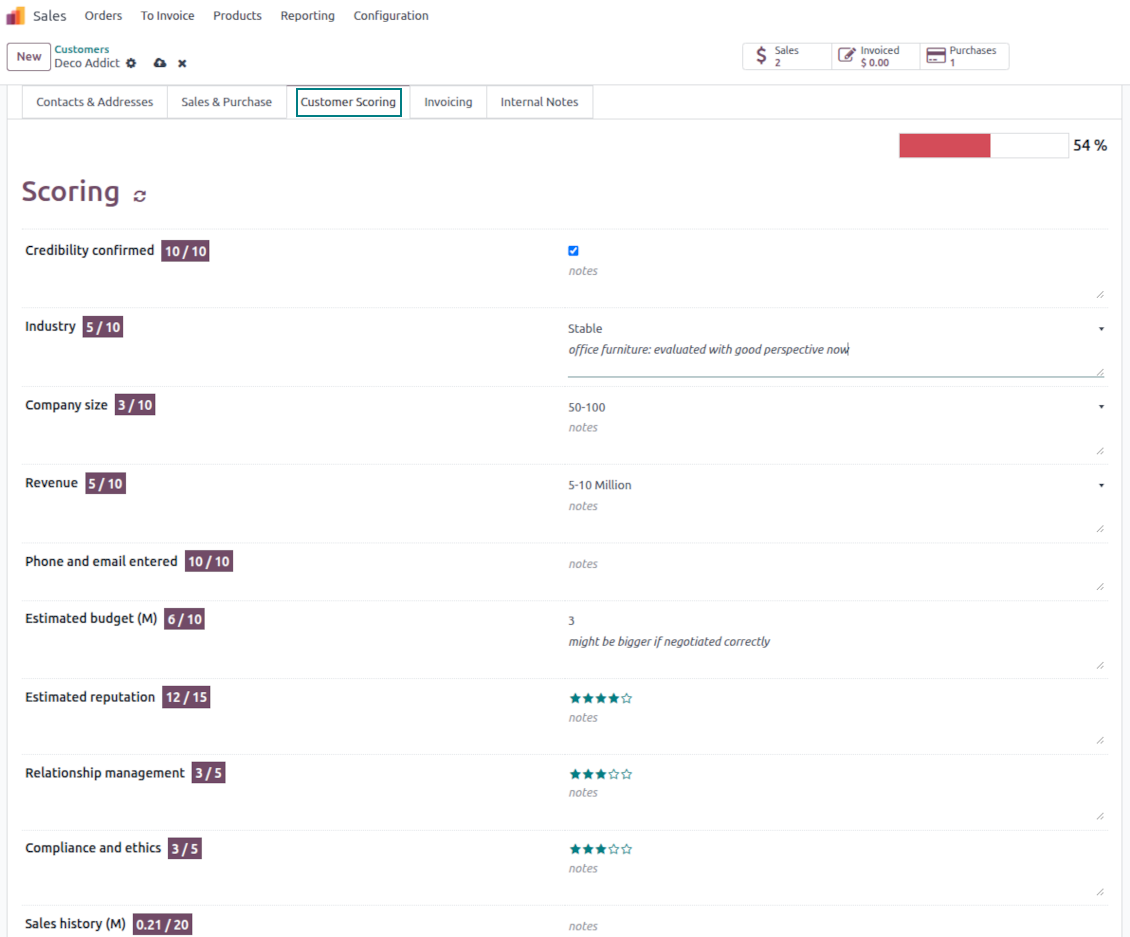
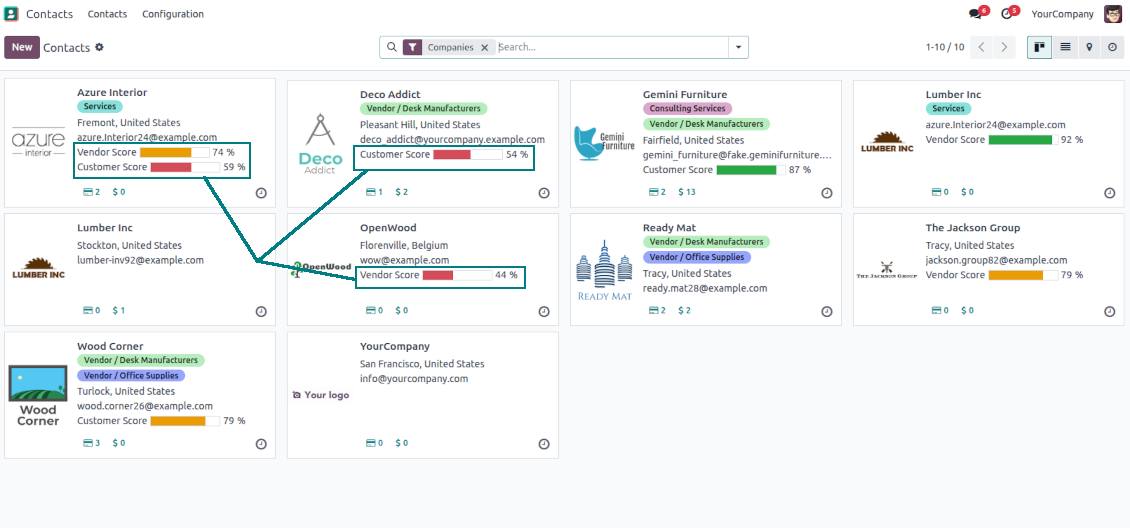
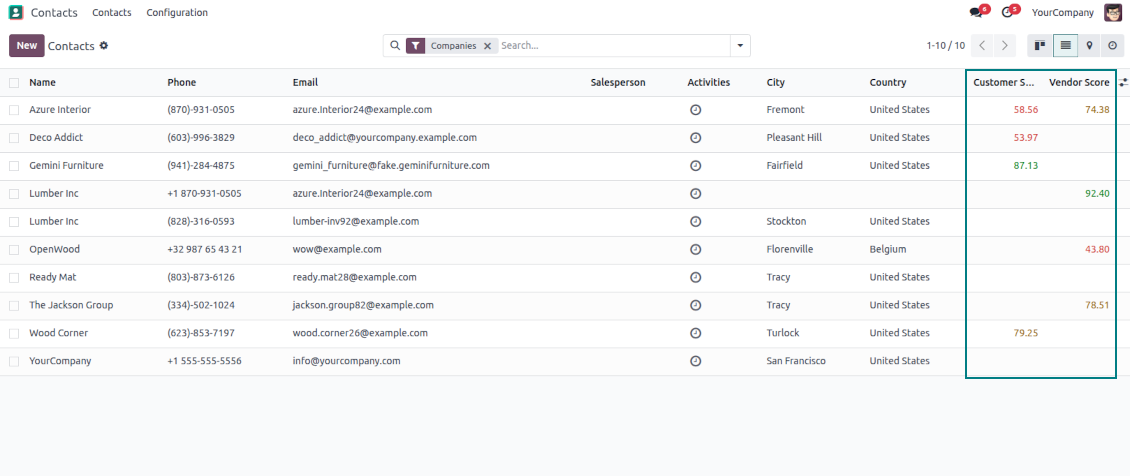
This is the tool to evaluate and rank Odoo partners based on the flexibly configured questionnaires. The app lets you introduce survey questions of different types and weights, based on which the final score is calculated and shown.
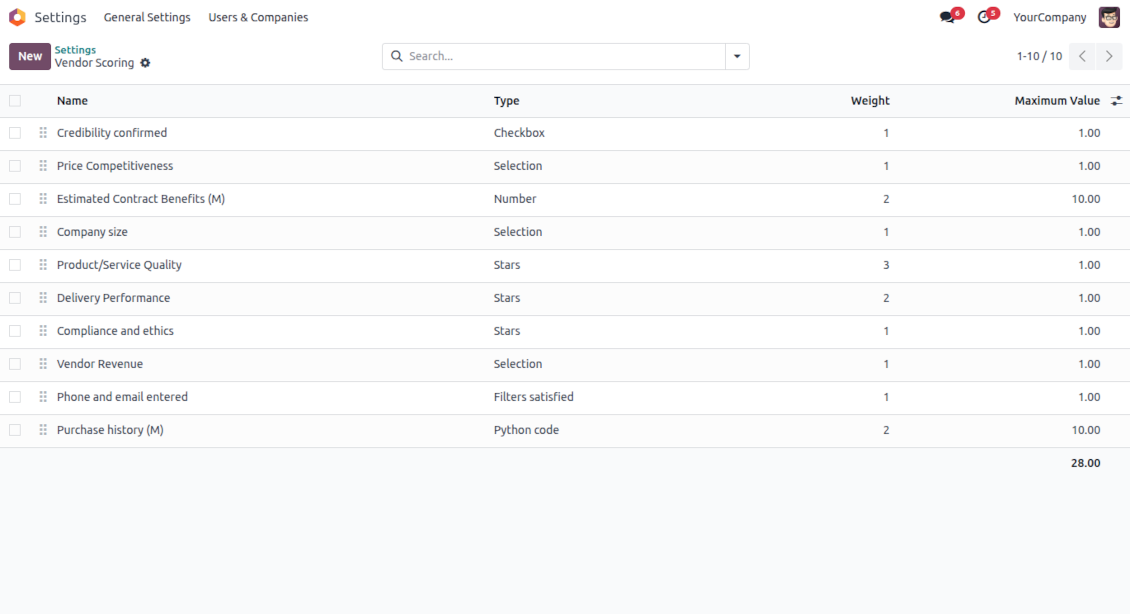
- Free extension to evaluate, score, and rank Odoo vendors.
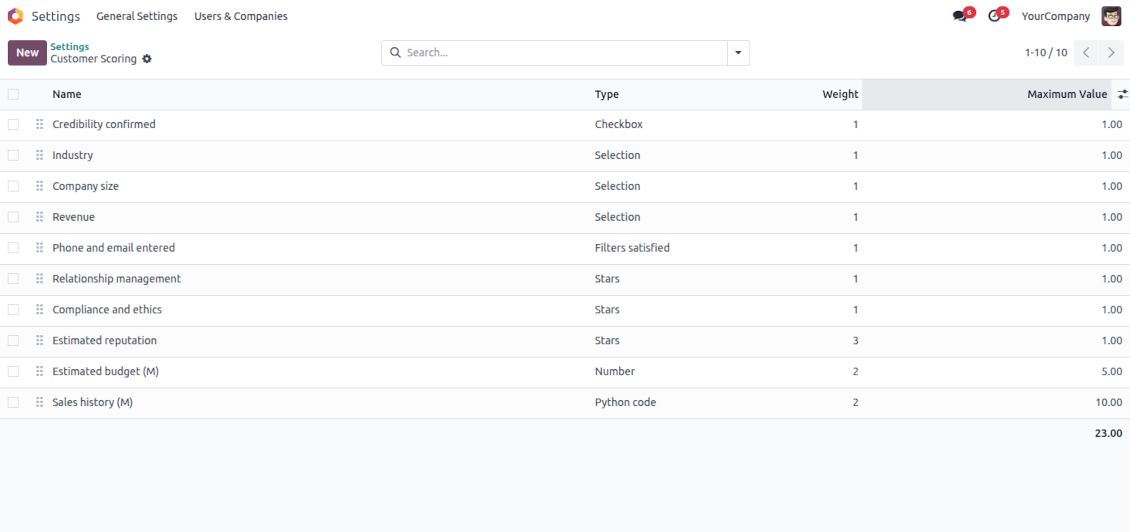
- Free extension to evaluate, score, and rank Odoo customers.
Indicative rankings
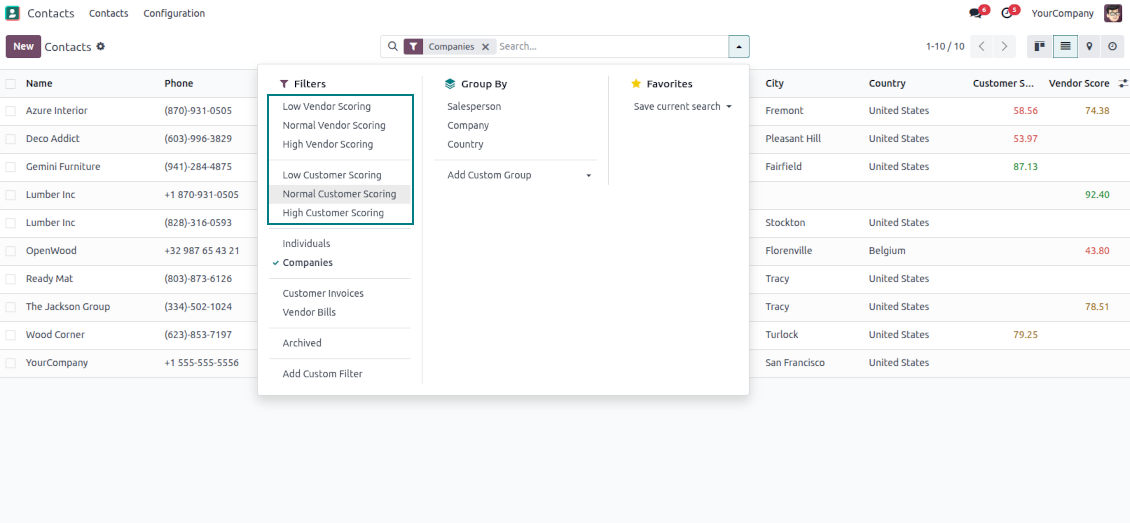
Show or hide rating progress bars on kanban, tree, and form views. Search low, normal, and high-ranked contacts using standard Odoo filters
Unlimited and specific questions
Introduce any number of evaluation points with various weights, answer bonuses, or answer penalties. Complete or change surveys right from a partner form
Flexible survey points
Apply suitable question types: checkboxes (e.g., True - plus 5 points, False - minus 2), drop-down selections (e.g., option 1 - plus 10 points, option 2 - plus 5 points, option 3 - minus 5 points), rankings (e.g., one star - 1 point, 3 stars - 5, no stars - minus 5 points), or numbers (e.g., each 5 - plust one point, but no more than 20)
Automatic evaluation types
Configure the rules to assign scores based on auto rules: when a partner suits specific filters (e.g., when a partner has a particular tag, add 3 points), when a partner has specific fields entered/not entered (e.g., no email or phone - minus 5 points), or calculate results based on complex and entirely flexible Python code
Your ranking levels
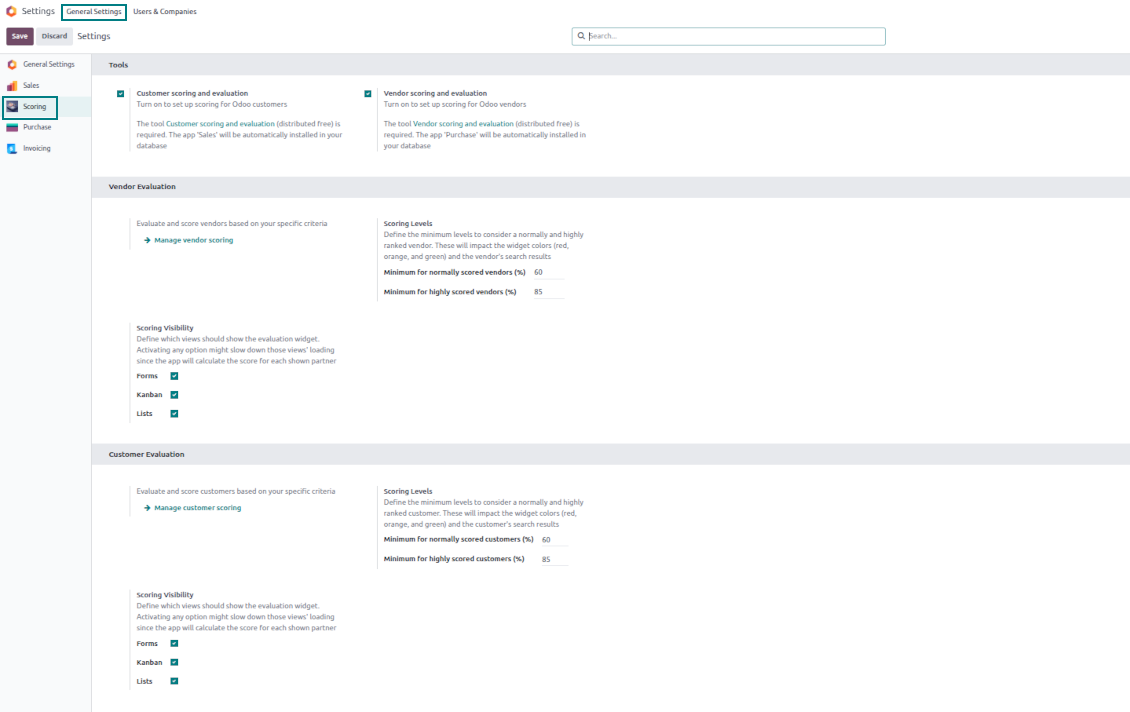
Define when a partner should be ranked high, normal, or low. For example, from 80% - highly scored; from 60% - normally scored
Topical quantitative analysis
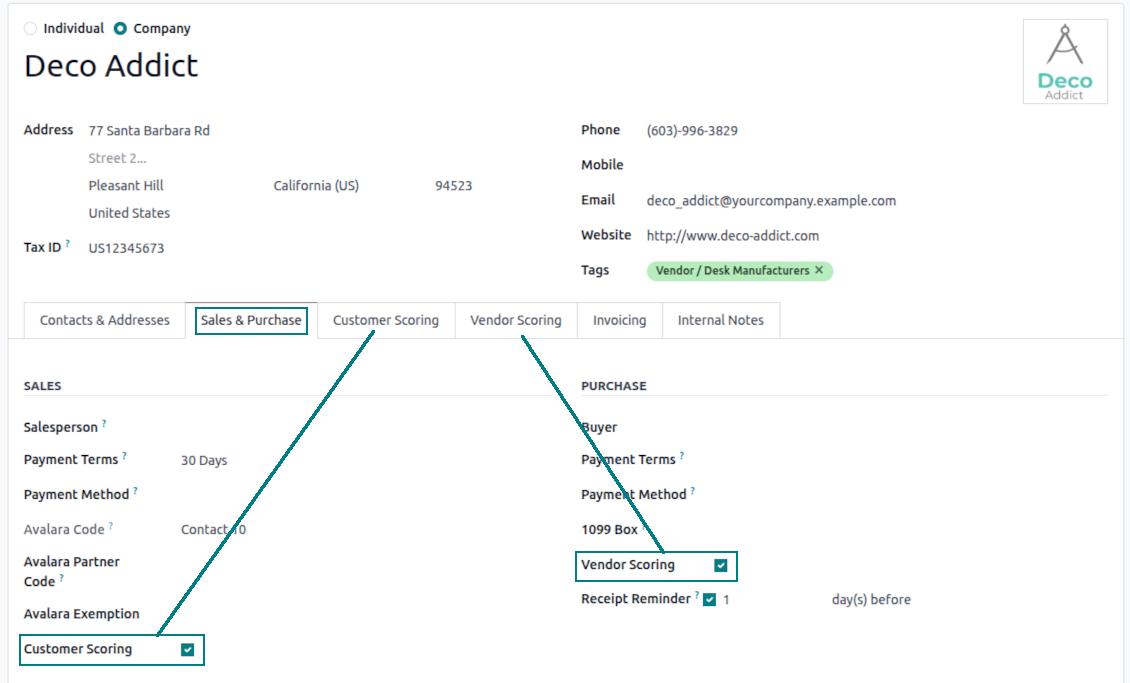
Optionally turn on evaluation for customers and/or vendors. Choose specific partners to evaluate: others will be excluded from surveys.
Flexibly configurable surveys scoring points
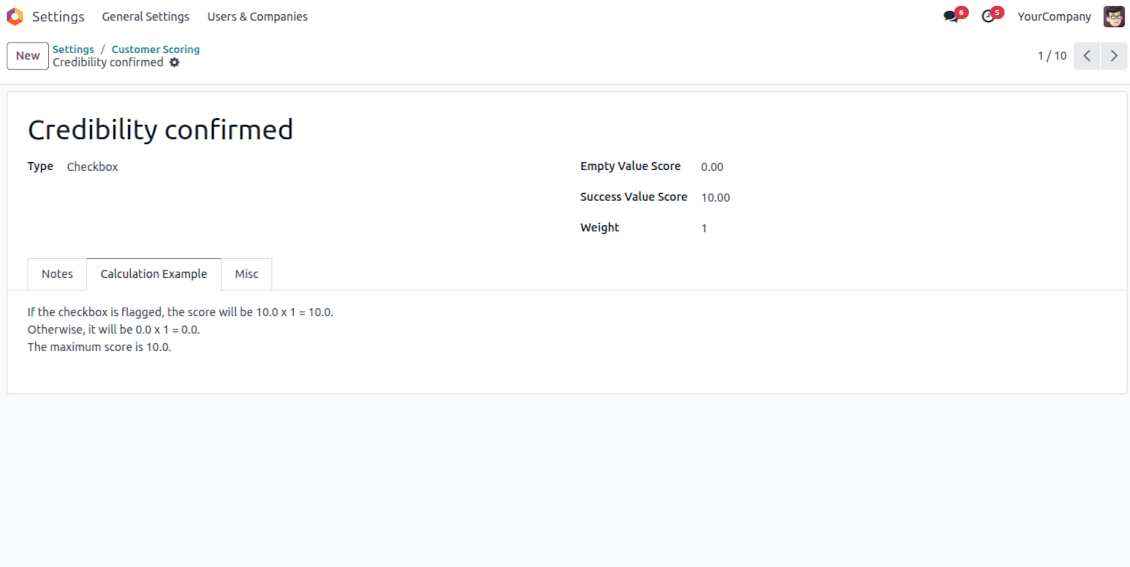
Checkboxes
-
Use this question type when the answer is True or False (default)
-
Assign the score for both options: True - "Success Value Score" (e.g., +10); False - "Empty Value Score" (e.g., -5)
-
Assign the weight for this evaluation point, e.g., 2. For example, the calculated result would be -5 x 2 = -10 for the contact with the unchecked flag
Dropdown selections
-
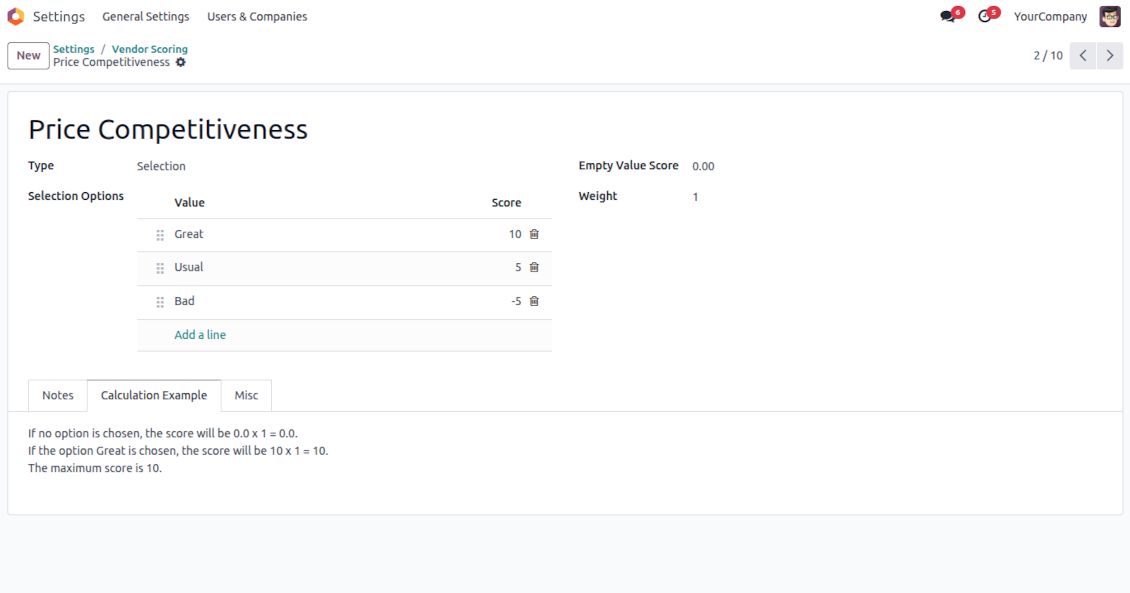
Use this question type when there are multiple options to select. For instance, the estimated reputation is chosen between three possible values
-
Assign the score for each option: Great (+10), Normal (+5), or Low (-5). The default value is empty (e.g., 0 points)
-
Assign the weight for this evaluation point, e.g., 3. For example, the calculated result would be 10 x 3 = 30 for a partner with the "Great reputation"
Stars/Ratings
-
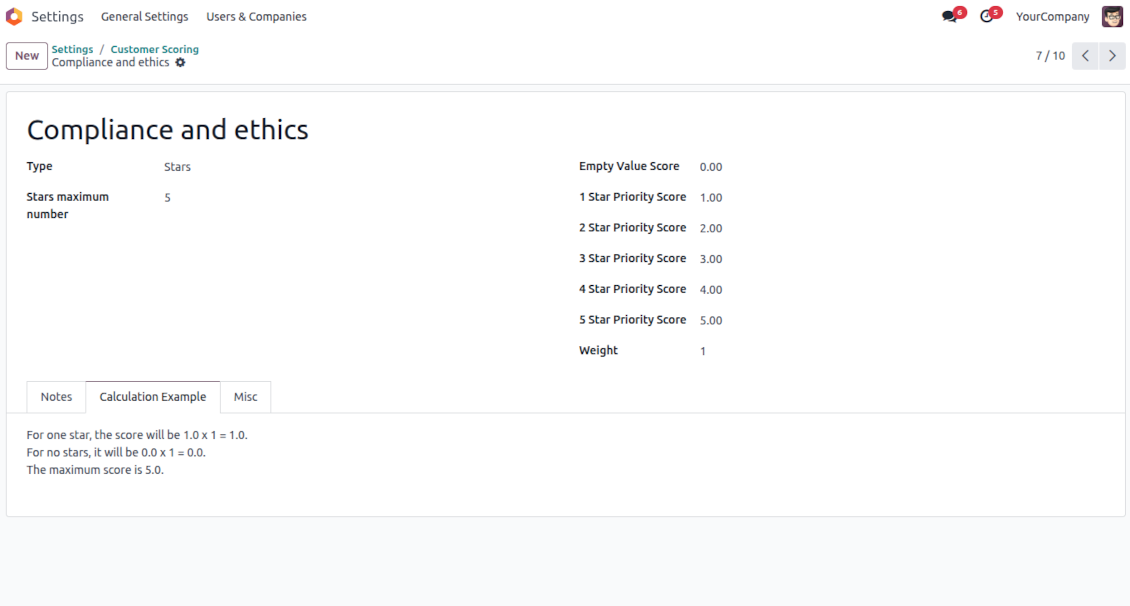
Use this question type when evaluating a specific parameter from 0 to a particular number up to 10. For example, "Compliance and ethics" to be scored from zero to three stars
-
Assign the score for each option: 1 star (-1), 2 stars (1), 3 stars (2). The default value is 0 (e.g., 0 points)
-
Assign the weight for this evaluation point, e.g., 2. For example, the calculated result would be 3 x 2 = 6 for a partner with 3 stars
Numbers
-
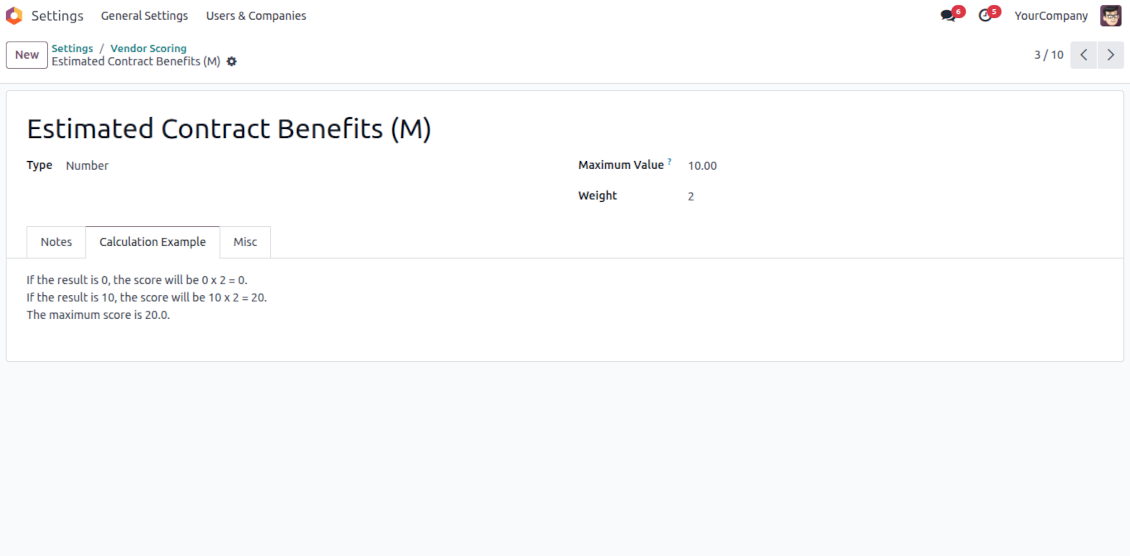
Use this question when users should enter an open-ended float number that is restricted only by a maximum. For example, the company revenue might be stated as any number in Millions, but the value for calculation is up to 10 Million
-
Assign the weight for this evaluation point, e.g., 2. For example, the calculated result would be 3.5 x 2 = 7 for a partner with 3 million revenue. However, if the revenue is 15, it will be 10 x 2, since 10 is the maximum for calculations
Filters
-
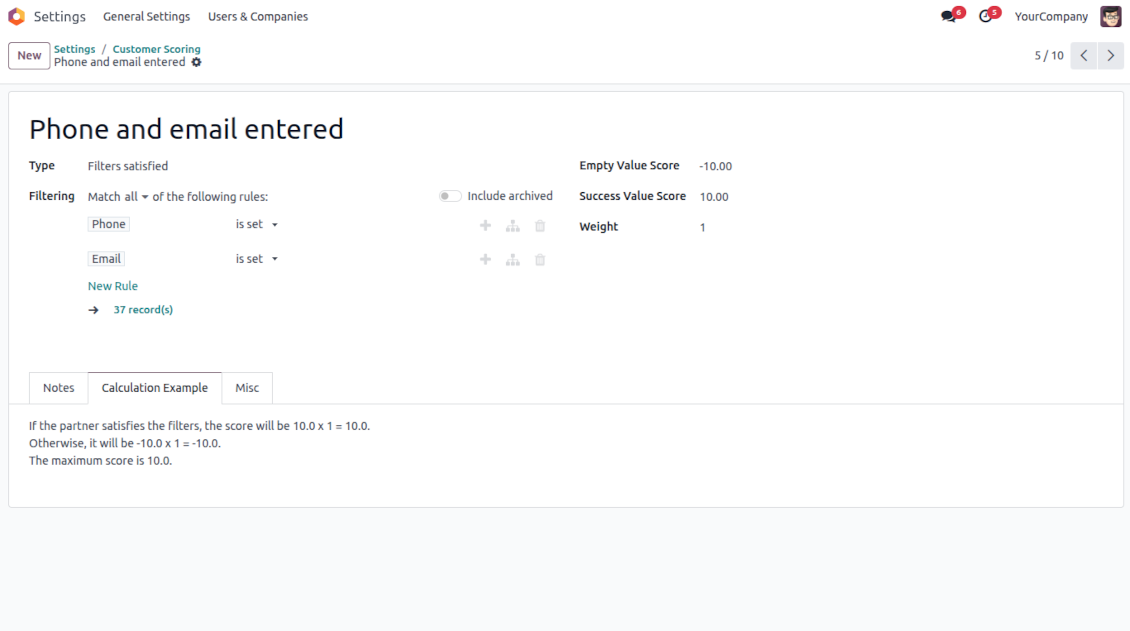
Use this question type to automatically assign a specific score based on whether a partner suits particular rules. For example, when a contact has a specific tag and/or fields entered
-
Assign the score for both possibilities: True - "Success Value Score" (e.g., +5); False - "Empty Value Score" (e.g., -5)
-
Assign the weight for this evaluation point, e.g., 1. For example, the calculated result would be -5 x 1 = -5 for the contact that doesn't satisfy the filters
Fields entered
-
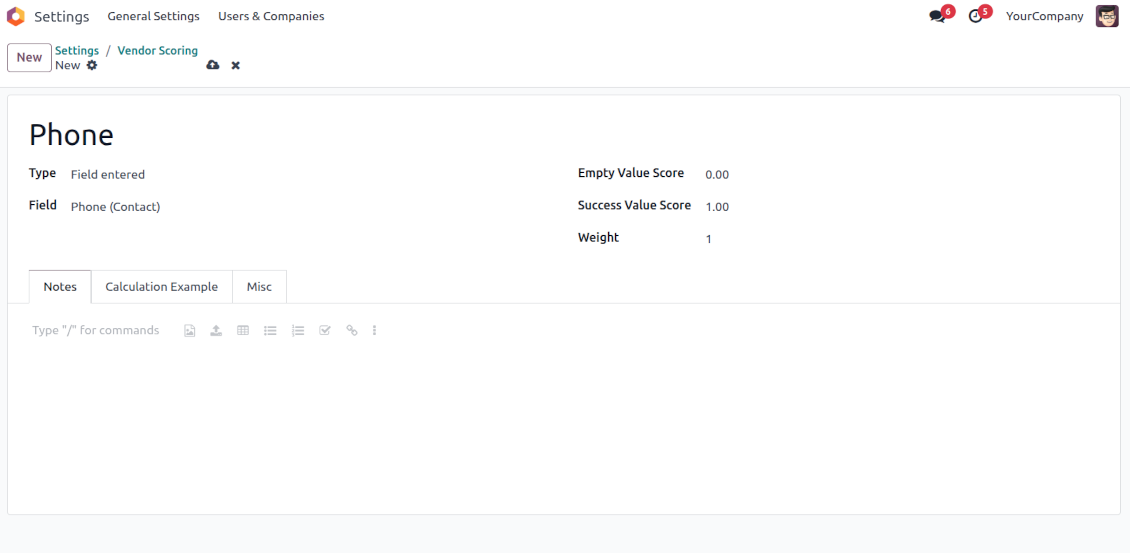
Use this question type to automatically assign a specific score based on whether a partner has a particular field entered. For example, when a contact has a phone in Odoo
-
Assign the score for both possibilities: True - "Success Value Score" (e.g., 0); False - "Empty Value Score" (e.g., -10)
-
Assign the weight for this evaluation point, e.g., 2. For example, the calculated result would be -10 x 2 = -20 for the contact that has an empty phone field
Python code
-
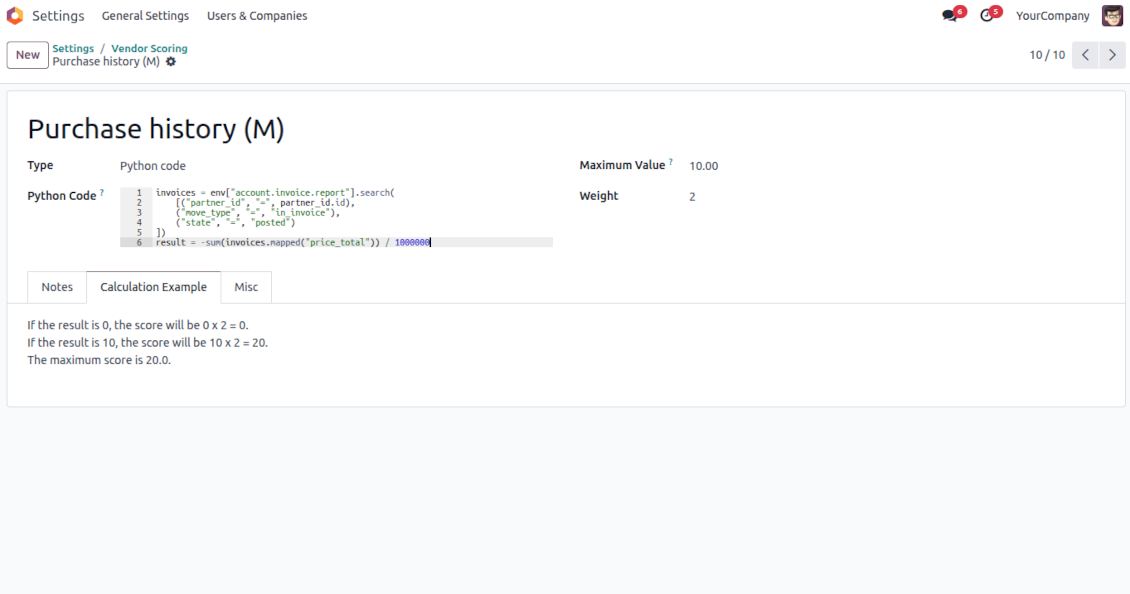
Use this question type to calculate a score point automatically based on any Odoo data. For example, to find all paid invoices of the current partner and get their untaxed total
-
Assign the weight for this evaluation point, e.g., 2. For example, the calculated result would be 2 x 2 = 4 for a partner with the calculated result 2
-
Assign the maximum possible result. For example, if it is set as 5, the calculated result "7" will be replaced with 5. So, the score will be 5 x 2 = 10 (instead of 7 x 2 = 14)
-
Feature description and details in short
-
In the code use the variable "partner_id" that contains the currently evaluated Odoo contact (res.partner instance). Also, Python date, datetime, and timedelta are available
-
Apply Odoo "env" to work with database data. For example, env["sale.order"] for quotations or env["account.move"] for invoices
-
Save the calculation total in your code to the special "result" variable
Score calculations
-
Each scoring point is summed up for a currently evaluated partner. For example, five existing questions led to the weighted scores: +10 - 5 + 2 + 7 + 5 = 19
-
All the scoring questions also have their maximum possible values. For instance, 10 + 10 + 10 + 20 + 5 = 55
-
Then, a specific customer score is calculated as total points divided by the maximum points. So, 19/55 = 34.55%
-
Based on the calculated score, the app lets you define the high (marked green, e.g., 75%) and normal (marked yellow, e.g., 30%) levels. Others are low (marked red). Then, in our calculation, a partner is "normally" evaluated since 34.55% is between 30% and 75%.
Domande frequenti su Partner Scoring and Evaluation Odoo v.18
Quali sono le politiche di aggiornamento dei vostri strumenti?
Secondo le politiche attuali dell'Odoo Apps Store:
- Ogni modulo acquistato per la versione 12.0 o precedente da accesso a tutte le versioni fino alla 12.0.
- Dalla versione 13.0 ogni versione del modulo va acquistata separatamente.
- Indipendentemente dalla versione, l'acquisto da diritto a tutti gli aggiornamenti e le correzioni entro una major version.
Il team faOtools non controlla queste politiche. Per qualsiasi domanda, contattate direttamente i rappresentanti dell'Odoo Apps Store.
Come installo l'app su Odoo.sh?
L'approccio piu diretto e il flusso integrato dello store Odoo:
1. Apri la pagina del modulo e fai clic su Deploy on odoo.sh
2. Verrai reindirizzato a GitHub. Accedi e fai clic su Create a new repo o usa uno esistente. Il repository deve essere privato. Non e consentito pubblicare le app con licenza OPL-1. Se serve, crea un nuovo repo per il progetto Odoo.sh
3. Poi, in odoo.sh, fai clic su Deploy, conferma e fai clic su Continue. Parte l'installazione.
Questi passaggi installano l'app sul branch di produzione. Per altri branch o per aggiornare:
1. Scarica il codice sorgente dallo store Odoo
2. Esegui il commit del modulo nel repository GitHub. Nessuna cartella/file dell'app deve essere in .gitignore. I repo creati da odoo.sh a volte ignorano percorsi importanti (es. /lib). Carica tutte le directory e i file del modulo
3. Esegui il deploy del branch di destinazione del progetto odoo.sh oppure attendi la build automatica se previsto.
Come installo l'app sul mio server?
2. Riavvia il server Odoo;
3. Attiva la modalità sviluppatore (impostazioni tecniche);
4. Aggiorna l'elenco delle app (menu Applicazioni);
5. Trova l'app e premi Activate/Install;
6. Segui le linee guida nella pagina dell'app, se ci sono.
L'app ha componenti extra. Posso acquistarli dopo?
Si. Odoo aggiunge automaticamente le dipendenze al carrello: escludi gli strumenti gia acquistati per non pagare due volte.
Ho distribuito l'app su Odoo.sh e vedo un avviso/errore nei test
Un avviso rosso/arancione non influisce sulle funzioni dell'app. A volte i nostri moduli non superano i test automatici standard perché questi assumono un comportamento in conflitto con gli obiettivi dell'app. Ad esempio cambiamo il calcolo del prezzo, mentre i test Odoo confrontano il prezzo finale con l'algoritmo standard.
Controllate prima le funzioni del database distribuito. Funziona tutto?
Se pensate ancora che l'avviso influisca sulle funzioni reali, contattateci e inviate i log di installazione completi e l'elenco completo dei moduli distribuiti (core e di terze parti).
Posso acquistare l'app direttamente da voi?
No, distribuiamo gli strumenti solo tramite lo store ufficiale delle app Odoo.
Vorrei uno sconto
Purtroppo non abbiamo i mezzi tecnici per prezzi individuali.
Posso installare l'app sul database Odoo Online (SaaS)?
No, le app di terze parti non si possono usare su Odoo Online. Odoo SaaS blocca questa possibilità.
Lo strumento dipende da altre app. Devo acquistarle?
Si, lo strumento richiede tutti i moduli indicati nelle dipendenze. Il prezzo sulla pagina dell'app le include gia.
Qual e il prezzo del modulo in dollari USA? Perché e cambiato?
Il prezzo dei nostri moduli e in euro. Lo store Odoo converte le valute secondo il proprio tasso interno. Quindi il prezzo in dollari USA puo cambiare quando il tasso viene aggiornato.
I testi dell'app e del sito web in lingue diverse dall'inglese sono realizzati con l'assistenza dell'IA e allineati alle traduzioni ufficiali di Odoo. Se noti un errore, invia un ticket di traduzione e lo correggeremo.
Database dimostrativi Odoo (anteprime)
Per questa app potremmo fornire un database demo personalizzato gratuito.
Non hai bisogno di un numero di telefono o di una carta di credito per contattarci. Dovresti solo effettuare una breve registrazione via e-mail, che non richiede più di 30 secondi.
Su richiesta prepariamo un database di anteprima dedicato, in cui puoi eseguire qualsiasi test e verificare le tue ipotesi per circa due settimane.
Segnalazione degli errori
Se riscontri bug o comportamenti incoerenti, non esitare a contattarci. Garantiamo di fornire soluzioni entro 60 giorni dall'acquisto e siamo fortemente interessati a migliorare i nostri strumenti anche dopo questo periodo.
Non hai bisogno di un numero di telefono o di una carta di credito per contattarci. Dovresti solo effettuare una breve registrazione via e-mail, che non richiede più di 30 secondi.
Includi nella richiesta il maggior numero possibile di dettagli: schermate, registri del server Odoo, una descrizione completa di come riprodurre il problema e così via. In genere sono necessari alcuni giorni lavorativi per preparare un piano operativo relativo a un problema (se viene confermato un bug) o fornire indicazioni su cosa fare (in caso contrario).
Richieste di funzionalità pubbliche e idee per moduli (sviluppo gratuito)
Siamo fortemente motivati a migliorare i nostri strumenti e saremmo grati per qualsiasi feedback. Se le tue esigenze sono di uso pubblico e possono essere implementate in modo efficiente, il team le includerà nella nostra lista di cose da fare.
Tale elenco di cose da fare viene elaborato regolarmente e non prevede costi aggiuntivi. Sebbene non possiamo garantire scadenze e progettazione finale, potrebbe essere un buon modo per ottenere le funzionalità desiderate senza investimenti e rischi.
Non hai bisogno di un numero di telefono o di una carta di credito per contattarci. Dovresti solo effettuare una breve registrazione via e-mail, che non richiede più di 30 secondi.

Lo strumento per strutturare gli allegati Odoo in cartelle e sincronizzare con Google Drive, OneDrive/SharePoint, Nextcloud/ownCloud, Dropbox, Amazon S3, Box e NAS. Gestione file. DMS
398€

The tool to build a deep and structured knowledge base for internal and external use. Knowledge System. KMS. Wiki-like revisions.
398€
The tool to automatically synchronize Odoo attachments with OneDrive files in both ways
487€
The tool to set up KPI targets and control their fulfillment by periods. KPI dashboards. Dashboard designer. KPI charts

The tool for time-based service management from booking appointments to sales and reviews
398€
The tool to automatically synchronize Odoo attachments with Google Drive files in both ways
487€
The tool to plan, share and control employees shifts in a form of weekly timetables. Work schedule. Work shift calendar
98€
The tool combines users in roles and simplifies security group assigning. Access group management. Users mass updating