KPI Balanced Scorecard v.17
The tool to set up KPI targets and control their fulfillment by periods. KPI dashboards. Dashboard designer. KPI charts

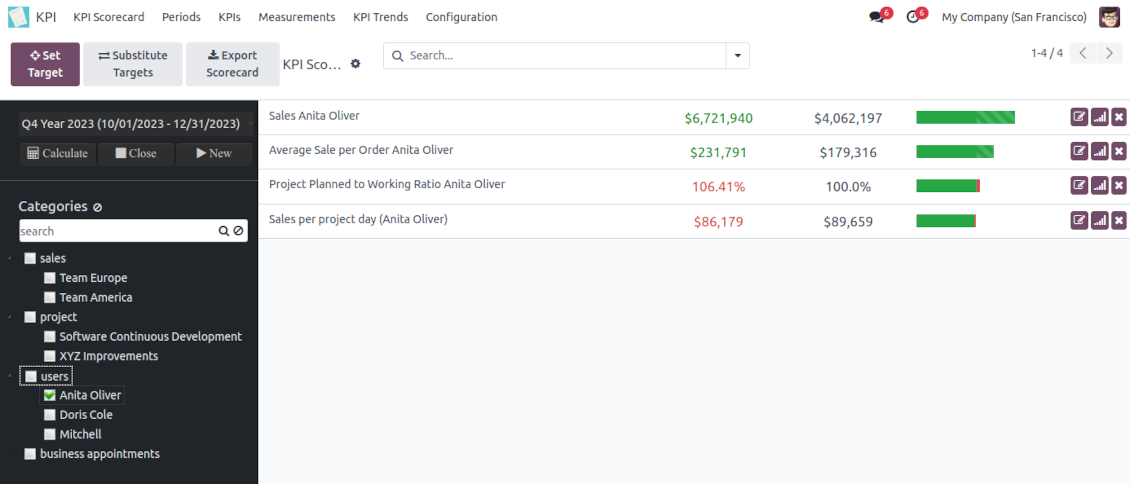


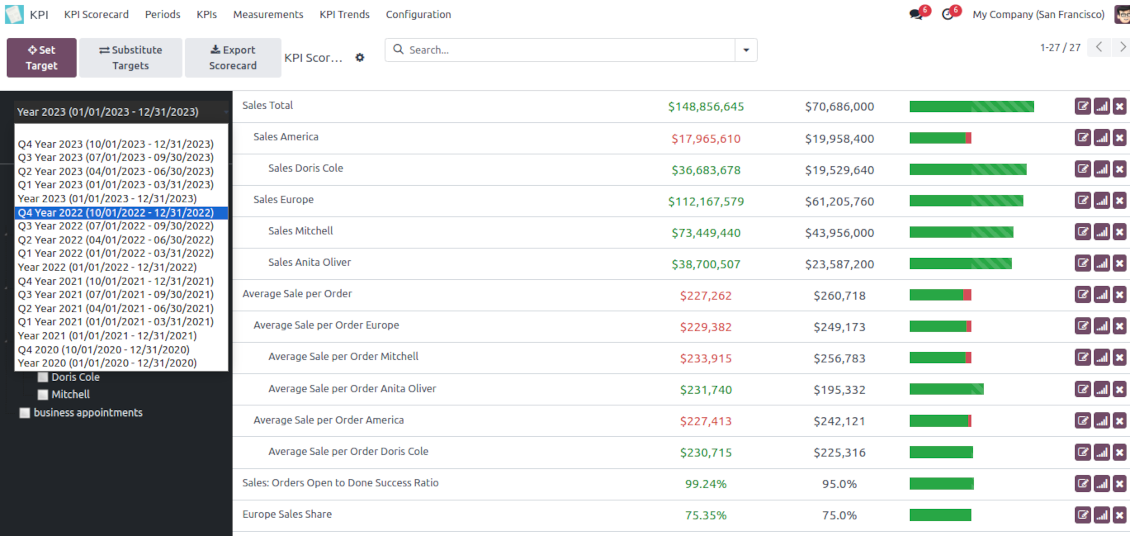




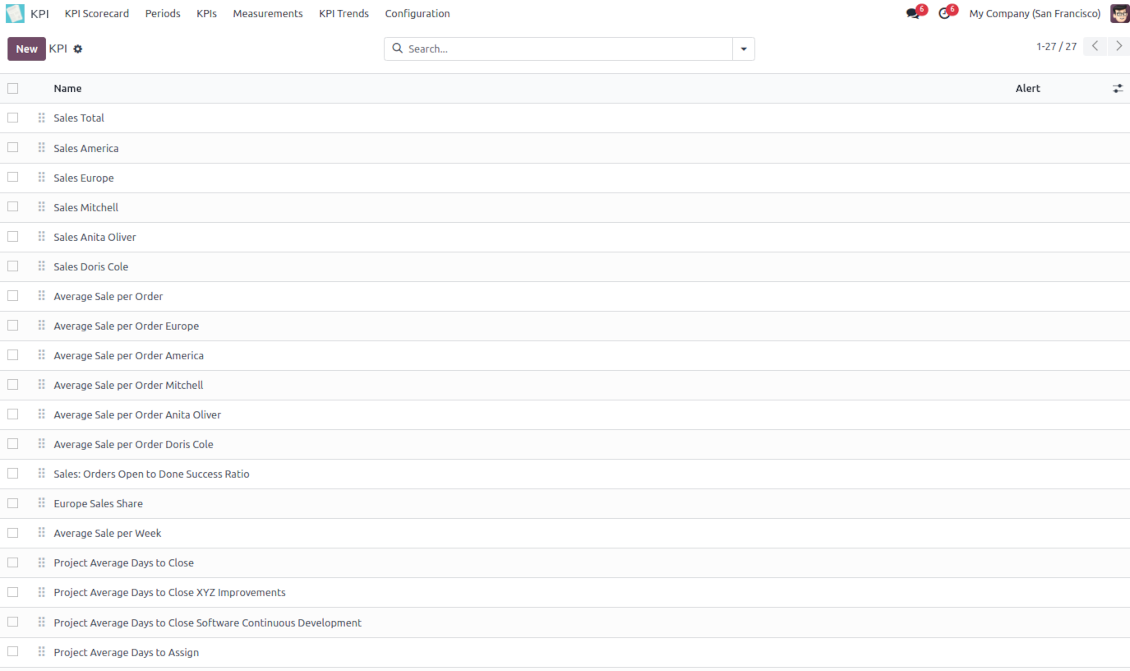


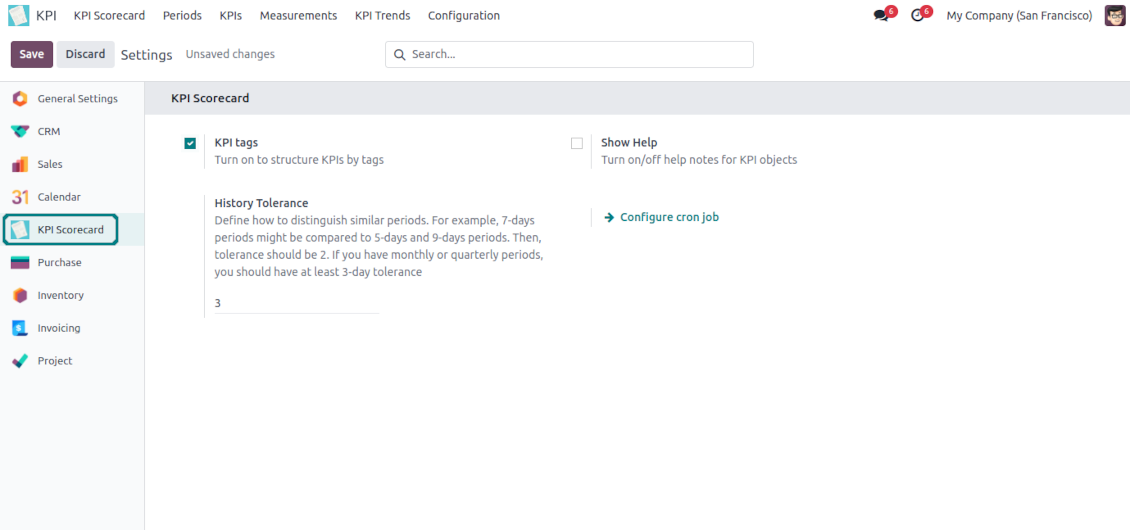
The app introduces a KPI dashboard to manage company and personal targets. The tool helps to organize work as a set of periodical goals and to control those goals in any business or functional area.
Set KPI targets by periods
The scorecard is not just a dashboard, but it is a tool to set and control measurable and time-constrained targets. Both company and individual
Use any Odoo data to calculate KPIs
The app introduces a clear system to get any Odoo storable details: a count of records, a sum or an average of numeric fields, pure Python code
Drag and Drop interface for KPI formulas
Construct advanced formulas to calculate derivative KPIs. The complexity of each scorecard is totally up to you!
Managerial and self-control
Share KPI targets with interested users to organize a transparent dashboard of goals: from global to very specific ones
Structured hierarchically, by categories, and by tags
Consider only those KPIs which are of interest: for example, only sales-related or of a definite user. Hierarchy allows highlighting targets with indicative padding for an instant overview of sub-KPIs
KPIs are auto and regularly updated
Actual values are re-calculated by the special Odoo cron job. It is always possible to understand which KPIs require more attention in real-time at a first glance.
Real-time control and historical trends
-
KPIs values are calculated for a specific period according to chosen date fields (e.g. quotations by 'order date')
-
Plan KPI periods of any duration: annual, quarterly, monthly, weekly, 10-days-long, etc. KPI periods might intersect and might be different for various business areas
-
By default, KPI targets of a current period are shown for an instant overview
-
Navigate between various KPI categories and future/past KPI periods in a few clicks from the same Odoo dashboard
-
Copy or substitute KPI targets from other periods to simplify goals setting
-
Close KPI periods as it is done for fiscal and accounting purposes. It not only holds the past values but also allows also speed calculations up
-
Control KPI historical values by periods. The graph and history table is available for each target line
-
KPI admins access the special KPI trends interface to analyze KPI targets by custom period types. Build bar and line charts. Filter by KPI categories or KPIs. Show only target or actual values
-
The app automatically calculates period types to compare in the report. Just define historical tolerance: e.g 2-days tolerance - for quarterly periods (90-92 days), 3-days - for months (28-31 days), etc.
-
Export scorecards as an Excel table if you need
-
KPI periods and KPI targets are set up for each company individually (multi companies environment).
Drag-and-drop formulas for KPIs
-
KPI construction is as simple as it is to write down a mathematical expression: just drag and drop the parts in the right order with the correct operators
-
Odoo would automatically retrieve data from a database according to a defined parts order for a specified period
-
Formulas might be as complex as you require. Merely make sure the operators (subtraction, addition, multiplication, division, exponentiation, brackets, any float number) comply with basic Math rules.
-
For each KPI configure a prefix and a suffix to make results nice looking
-
Define rounding rules from 0 to 4 decimal points (1 > 1.2 > 1.23 > 1.235 > 1.2346)
-
KPI variables indicate the rules of how to get data. For example, 'total number of sales orders' or 'number of quotations of sales team Europe'
-
Other KPIs - the parts used for derivative calculation. For example, 'Opportunity to sales success ratio' based on KPIs 'Sales count' and 'Opportunities count'
-
KPI constants - the parts which are frozen globally or for a specific time frame. Needed for figures which can't be retrieved from modules and/or which should remain the same during a period
-
'Period Days' is an interval length in days. 'Days Passed' is the length between the period start and today (if today is before the period end; otherwise period end). Those parameters let calculate per-time KPIs, such as, for example, 'Average sales per week'.
Shared KPIs and self-control
-
Full rights for scorecards, all KPIs, targets, and settings belong to users with the right 'KPI Management - KPI manager'. The group 'KPI Management - KPI Users' is allowed to observe the KPI interface and manage shared KPI settings
-
Categories of KPIs and/or individual KPI targets might be shared for specific users or user groups
-
It is possible to both grant read-only or editor rights
-
Read-only access for a target lets users only observe shared KPIs
-
The section 'Edit rights' on category or KPI forms will also allow us to set and change targets. The latter might be useful in case you ask your manager to manage goals within a department, for example
-
The security settings are additive - not restrictive. KPI managers will have full rights for all KPIs disregarding the settings, while KPI users will have rights only to KPIs which settings (or category settings) allow them so
-
The tool supports multi companies: so, make sure the user company correlates with a KPI dashboard company.
KPI settings to process Odoo data
Any storable data
-
Preparing the basis for KPIs' calculation is not a simple task. The good news is that such a job should be done only once, while results are used forever
-
KPI Settings assume 3 levels of precision: (1) basic measurements - (2) KPI variables and constants - (3) KPI drag and drop formulas
-
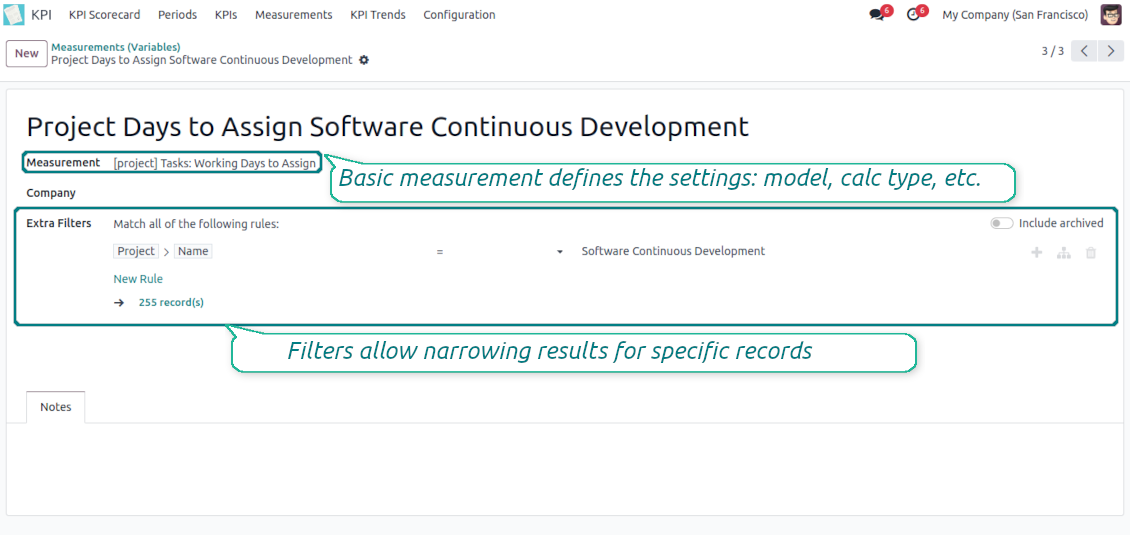
Basic measurement is the core object used for retrieving actual KPI values from the Odoo database, while KPI variables specify those. For example, 'total number of sales orders' should be a basic measurement, while narrower 'number of quotations of the sales team Europe' is recommended to be a precision of that basic measurement
-
Each basic measurement might have an unlimited number of linked KPI variables. KPI formulas might combine any number of variables, constants, and other KPIs with mathematical operators.
Python code measurements
-
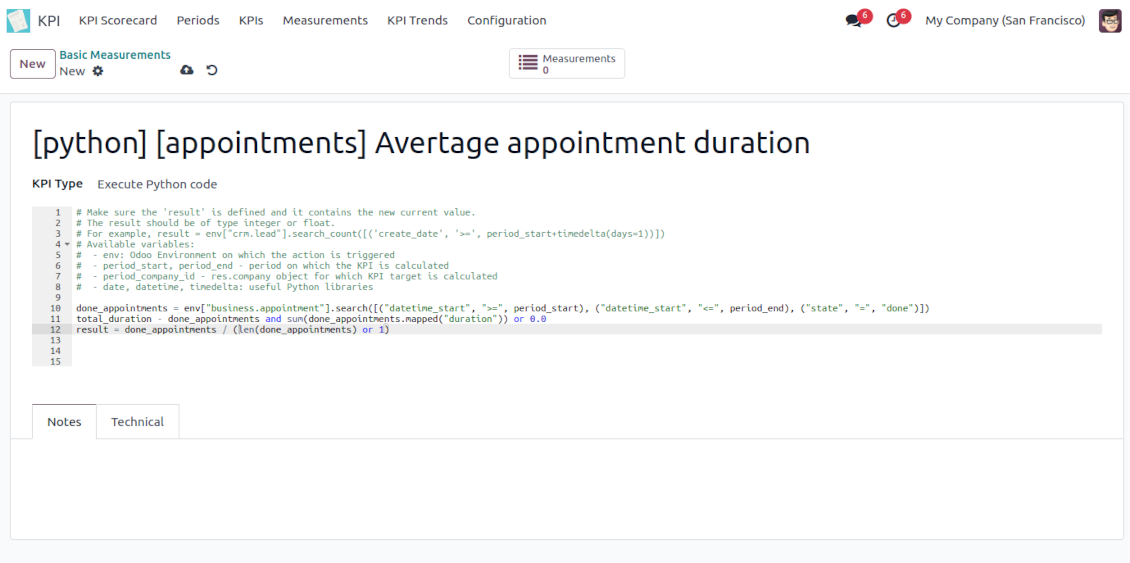
'Python code' is a special type of basic measurement. This type requires technical knowledge but lets you compute any sort of figures based on any Odoo data without restrictions
-
Such measurement might be any Python basic script with the possibility of SQL queries (through using 'env.cr')
-
In calculations you may rely upon the special variables: 'period_start' (the first date of the period), 'period_end' (the last date of the period), 'period_company_id' - res.company object for which Odoo makes calculations at the moment (according to a KPI period under consideration)
-
Correct Python code assumes saving the value into the special variable 'result'.
Basic measurements
-
Basic measurements are not used for formulas, but they define how Odoo data should be calculated: count of records, sum, average, and pure Python code. Basic measurements assume a number of settings
-
Model - an Odoo document type with which data set you to work ('Sales Order', 'Task', etc.). Here you can rely on standard or custom objects (including those created in the Odoo studio), Odoo reports
-
Date fields - define whether a document relates to a KPI period. For example, for tasks, you might use 'create date'. It is possible to apply a few date fields (e.g. 'Opportunities opened and won in January 2021') or no date fields at all for global calculations
-
Filters - allow restrict set of records. Used for low-level filtering and then specified in KPI variables
-
Measure field - is required for calculation types 'Average' and 'Sum'. It defines which figure you use for calculations. For example, 'total amount' of Sales Analysis Report or 'work hours of tasks'
-
Company field - would be used to restrict calculation for a KPI period target company. Take into account that records without a company will be used for all companies' KPI calculations.
KPI variables and constants
-
The key idea to distinguishing KPI variables from basic measurements is to simplify data preparation. You define 'total sales' once, and then unlimitedly use it for 'sales Europe', 'sales John Brown', 'website sales', etc.
-
Specify basic measurements through the Odoo built-in domain constructor, which lets filter by any storable attributes. For instance, filter sale orders by state (only 'done'), the salesperson ('John Brown or Mike Green'), sales team, etc.
-
KPI constants are the special type of KPI variables used when data can not be retrieved from modules and/or when figures remain the same during the whole period. For example, 'total investments' or 'number of employees' are often frozen for a specific period
-
In a multi-company environment, KPI variables are applied globally or for each company. In the former case, that variable is available for any company KPI formulas, while in the latter - only for a specific one
-
Basic measurements of the type 'Execute Python code' can't be any more specified, since they do not relate to any records. Such measurements should have a single KPI variable linked.
Tipy k konfiguraci a instalaci pro KPI Balanced Scorecard Odoo v.17
Scheduled jobs
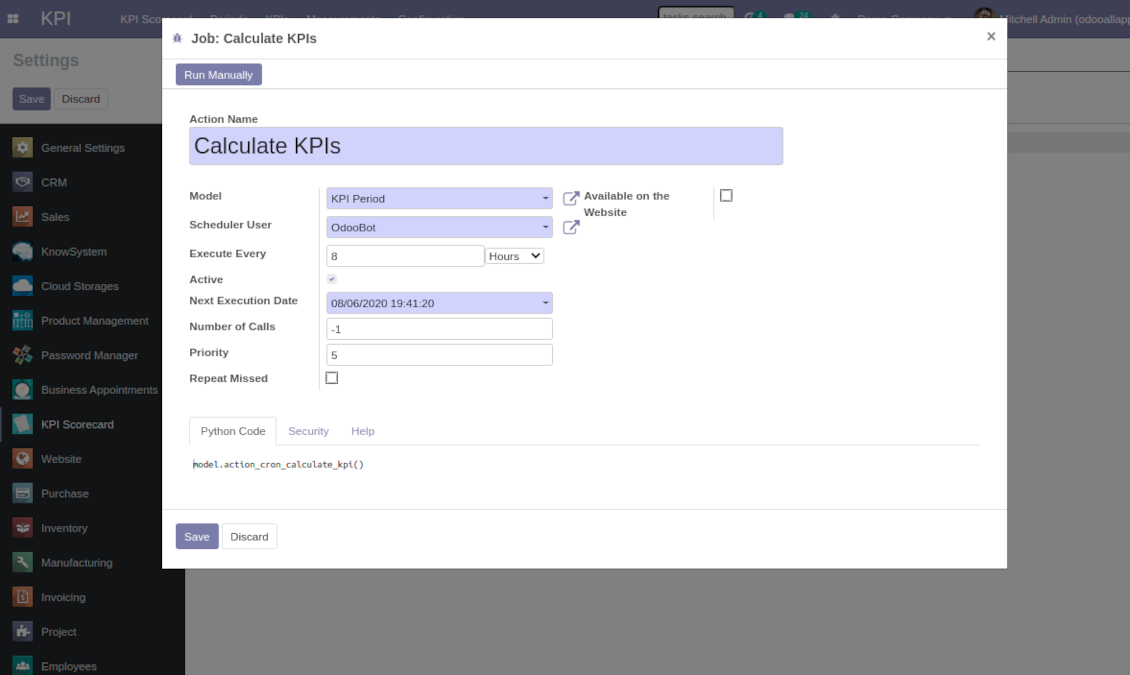
To change the frequency of KPI targets' recalculation:
- Turn on the debug mode
- Go to the menu KPI > Configuration > Settings
- Find the button 'Configure cron job'
- Feel free to update the settings 'Execute Every' and 'Next Execution Date'. However, please do not make it too frequent (e.g. once in 5 minutes). Since the job is resource demanding, it require at least a few minutes to be fully and correctly finished.
Change frequency of KPIs re-calculatinon
Často kladené otázky o KPI Balanced Scorecard Odoo v.17
Vytvoril jsem Basic Measurement, ale ve průvodci vzorcem ho nevidim.
Basic Measurements se do vzorce samy nepoužívají. I bez dalších filtru vytvořte propojenou Variable – pak se objeví v seznamu průvodce.
Jaka data lze použít pro KPI? Ma modul vlastní data?
Aplikace skoro nezavadi vlastní data (kromě konstant KPI právě pro chybějící hodnoty) ani integrace. Poccita a staví rozhraní z existujících dat Odoo. Příklad: počet prodejních objednávek za období z aplikace Prodej.
Modul je univerzální a cte jakýkoli modul Odoo včetně zustatku účtu. Příklad: měsíční zisk z faktur (účetní záznam).
Data mimo Odoo jdou, pokud jsou připojena přes modul Odoo. Příklad: data Google Analytics v PostgreSQL Odoo pro KPI.
Jaky je rozdíl mezi Basic Measurements a Measurements (Variables)?
Measurement (Variable) konkretizuje základní měření. 'Total Sales' definujete jednou a neomezené pouzijete pro 'Sales Europe', 'Sales John Brown', 'Website Sales' atd. s dalšími filtry.
Jaka jsou pravidla aktualizaci vašich nástrojů?
Podle aktuálních pravidel Odoo Apps Store:
- Modul koupeny pro verzi 12.0 nebo starší dává přístup ke všem verzim az do 12.0.
- Od verze 13.0 se každá verze modulu kupuje samostatné.
- Bez ohledu na verzi da nákup právo na všechny aktualizace a opravy v rámci hlavní verze.
Tym faOtools tato pravidla neridi. S otazkami se obratte přímo na zastupce Odoo Apps Store.
Jak nainstaluji aplikaci na Odoo.sh?
Nejprimejsi postup je vestaveny tok obchodu Odoo:
1. Otevřete stránku modulu a klikněte na Deploy on odoo.sh
2. Budete přesměrování na GitHub. Přihlaste se a klikněte na Create a new repo nebo použijte existující. Repozitar musí byt soukromý. Aplikace pod licenci OPL-1 nesmí byt veřejné. V případě potřeby vytvořte nové repo pro projekt Odoo.sh
3. Poté v odoo.sh klikněte na Deploy, potvrďte a klikněte na Continue. Instalace se spustí.
Tyto kroky nainstaluji aplikaci na production větev. Pro jiné vetve nebo aktualizaci:
1. Stáhněte zdrojový kod z obchodu Odoo
2. Commitnete modul do GitHub repozitare. Žádná složka/soubor aplikace nesmí byt v .gitignore. Repa vytvorena odoo.sh mohou ignorovat důležité cesty (např. /lib). Nahrajte všechny adresáře a soubory modulu
3. Deployujte cílovou větev projektu odoo.sh, nebo počkejte na automaticky build, pokud to nastavení předpokládá.
Jak nainstaluji aplikaci na vlastní server?
2. Restartujte server Odoo;
3. Zapněte vyvojovsky režim (technická nastavení);
4. Aktualizujte seznam aplikaci (nabídka Aplikace);
5. Najdete aplikaci a klikněte na Activate/Install;
6. Postupujte podle pokynů na stránce aplikace, pokud existují.
Aplikace ma další rozšíření. Mohu je koupit později?
Ano. Odoo automaticky přidá závislosti do kosiku: vylučte jiz zakoupene nástroje, abyste neplatili dvakrát.
Nasadil jsem aplikaci na Odoo.sh a v testech vidim varování/chybu
Červené/oranzove varování neovlivnuje funkce aplikace. Naše moduly obcas neprojdou standardními automatickými testy, protože ty predpokladaji chování, které je v rozporu s cíli aplikace. Například menime výpočet ceny, zatímco testy Odoo porovnavaji konecnou cenu se standardním algoritmem.
Nejprve zkontrolujte funkce nasazene databáze. Funguje vse?
Pokud se stále domnivate, ze varování ovlivnuje skutečné funkce, kontaktujte nas a pošlete kompletní instalacni protokoly a úplný seznam nasazenych modulu (jádro a třetí strany).
Mohu si aplikaci koupit přímo u vas?
Ne, nástroje siritime pouze přes oficialni obchod aplikaci Odoo.
Chtel bych slevu
Bohuzel nemáme technické prostredky na individualni ceny.
Mohu aplikaci nainstalovat na databázi Odoo Online (SaaS)?
Ne, aplikace třetích stran nelze použít na Odoo Online. Odoo SaaS tuto možnost blokuje.
Nástroj závisí na jiných aplikacich. Mam je koupit?
Ano, nástroj vyžaduje všechny moduly označené v zavislostech. Cena na stránce aplikace je jiz zahrnuje.
Jaka je cena modulu v americkych dolarech? Proč se zmenila?
Ceny našich modulu jsou v eurech. Obchod Odoo převádí ceny do jiných men podle vnitrniho kurzu. Proto se cena v americkych dolarech může změnit pri aktualizaci kurzu.
Znění aplikace a webu v jiných jazycích než angličtině je s pomocí AI a sladěné s oficiálními překlady Odoo. Pokud si všimnete chyby, odešlete tiket o správnosti překladů a opravíme to.
Demonstrační databáze Odoo (živá náhledy)
Pro tuto aplikaci můžeme poskytnout bezplatnou personalizovanou demodatabázi.
Ke kontaktu nepotřebujete telefon ani kreditní kartu. Stačí krátká e-mailová registrace, která netrvá déle než 30 sekund.
Na vaši žádost připravíme individuální databázi živého náhledu, kde můžete asi dva týdny testovat a ověřovat předpoklady.
Hlášení chyb
Pokud narazíte na chyby nebo nekonzistentní chování, ozvěte se. Opravy do 60 dnů od nákupu garantujeme a nástroje vylepšujeme i poté.
Ke kontaktu nepotřebujete telefon ani kreditní kartu. Stačí krátká e-mailová registrace, která netrvá déle než 30 sekund.
Přiložte co nejvíc podrobností: snímky obrazovky, protokoly serveru Odoo a úplný popis reprodukce. Pracovní plán (je-li chyba potvrzena) nebo pokyny (jinak) obvykle trvají několik pracovních dní.
Veřejné požadavky na funkce a nápady na moduly (bezplatný vývoj)
Jsme silně motivováni zlepšovat nástroje a vděční za každou zpětnou vazbu. Pokud jsou požadavky veřejně užitečné a dají se efektivně implementovat, tým je zařadí na seznam úkolů.
Takový seznam úkolů se zpracovává pravidelně a nepředpokládá příplatky. I když nemůžeme slíbit termíny a finální návrh, může to být dobrý způsob, jak získat požadované funkce bez investic a rizik.
Ke kontaktu nepotřebujete telefon ani kreditní kartu. Stačí krátká e-mailová registrace, která netrvá déle než 30 sekund.

The tool to flexibly structure Odoo attachments in folders and synchronize directories with cloud clients: Google Drive, OneDrive/SharePoint, Nextcloud/ownCloud, Dropbox, Amazon S3, Box, and NAS. DMS. File Manager. Document management system
398€
The tool to automatically synchronize Odoo attachments with OneDrive files in both ways
487€
The tool to automatically synchronize Odoo attachments with Google Drive files in both ways
487€

The tool to build a deep and structured knowledge base for internal and external use. Knowledge System. KMS. Wiki-like revisions.
398€
The tool for time-based service management from booking appointments to sales and reviews
398€
The tool to manage your Odoo from your favorite AI chats through MCP. Claude. Any MCP-supporting AI.

The tool to combine different Odoo events in a few configurable super calendars

The tool to translate URL addresses of Odoo website pages
38€