KPI Balanced Scorecard v.17
The tool to set up KPI targets and control their fulfillment by periods. KPI dashboards. Dashboard designer. KPI charts

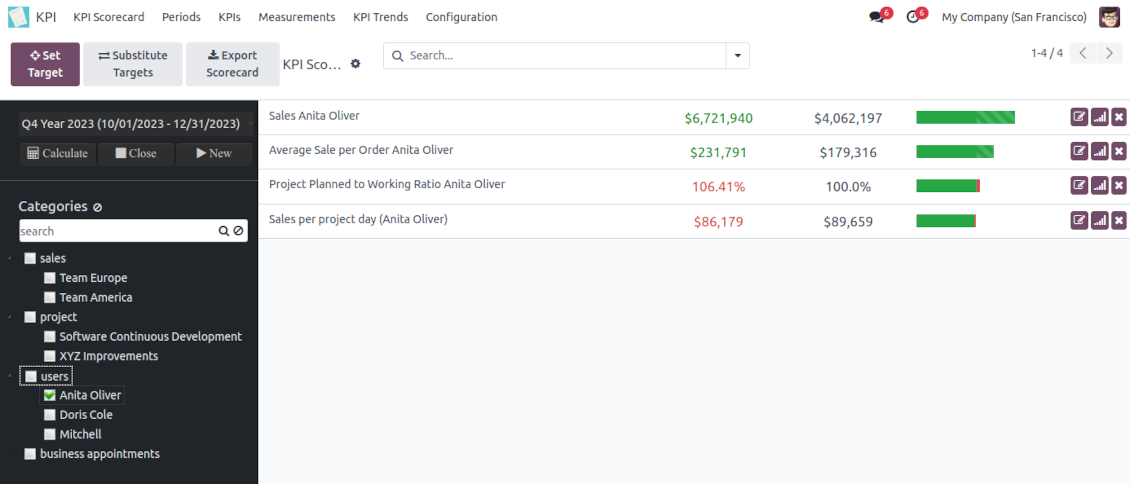


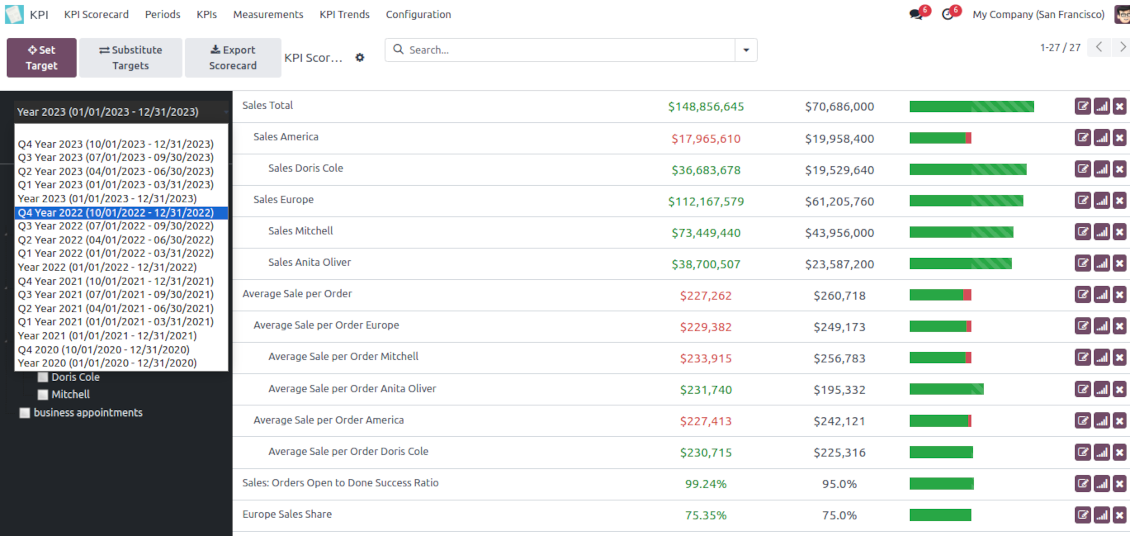




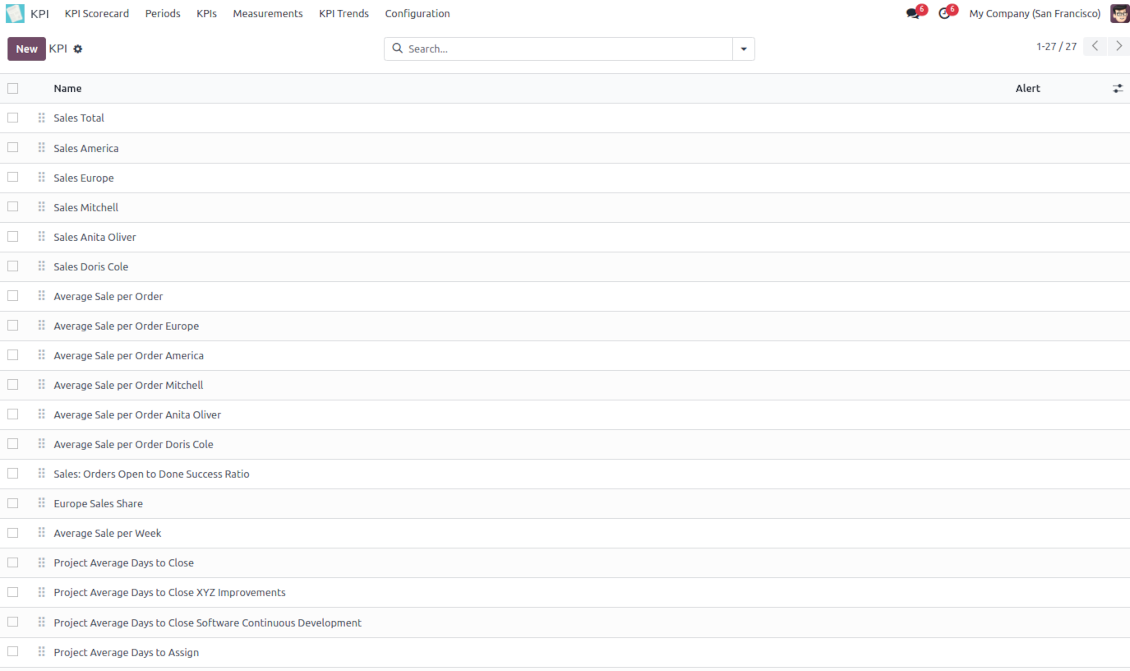


The app introduces a KPI dashboard to manage company and personal targets. The tool helps to organize work as a set of periodical goals and to control those goals in any business or functional area.
Set KPI targets by periods
The scorecard is not just a dashboard, but it is a tool to set and control measurable and time-constrained targets. Both company and individual
Use any Odoo data to calculate KPIs
The app introduces a clear system to get any Odoo storable details: a count of records, a sum or an average of numeric fields, pure Python code
Drag and Drop interface for KPI formulas
Construct advanced formulas to calculate derivative KPIs. The complexity of each scorecard is totally up to you!
Managerial and self-control
Share KPI targets with interested users to organize a transparent dashboard of goals: from global to very specific ones
Structured hierarchically, by categories, and by tags
Consider only those KPIs which are of interest: for example, only sales-related or of a definite user. Hierarchy allows highlighting targets with indicative padding for an instant overview of sub-KPIs
KPIs are auto and regularly updated
Actual values are re-calculated by the special Odoo cron job. It is always possible to understand which KPIs require more attention in real-time at a first glance.
Real-time control and historical trends
-
KPIs values are calculated for a specific period according to chosen date fields (e.g. quotations by 'order date')
-
Plan KPI periods of any duration: annual, quarterly, monthly, weekly, 10-days-long, etc. KPI periods might intersect and might be different for various business areas
-
By default, KPI targets of a current period are shown for an instant overview
-
Navigate between various KPI categories and future/past KPI periods in a few clicks from the same Odoo dashboard
-
Copy or substitute KPI targets from other periods to simplify goals setting
-
Close KPI periods as it is done for fiscal and accounting purposes. It not only holds the past values but also allows also speed calculations up
-
Control KPI historical values by periods. The graph and history table is available for each target line
-
KPI admins access the special KPI trends interface to analyze KPI targets by custom period types. Build bar and line charts. Filter by KPI categories or KPIs. Show only target or actual values
-
The app automatically calculates period types to compare in the report. Just define historical tolerance: e.g 2-days tolerance - for quarterly periods (90-92 days), 3-days - for months (28-31 days), etc.
-
Export scorecards as an Excel table if you need
-
KPI periods and KPI targets are set up for each company individually (multi companies environment).
Drag-and-drop formulas for KPIs
-
KPI construction is as simple as it is to write down a mathematical expression: just drag and drop the parts in the right order with the correct operators
-
Odoo would automatically retrieve data from a database according to a defined parts order for a specified period
-
Formulas might be as complex as you require. Merely make sure the operators (subtraction, addition, multiplication, division, exponentiation, brackets, any float number) comply with basic Math rules.
-
For each KPI configure a prefix and a suffix to make results nice looking
-
Define rounding rules from 0 to 4 decimal points (1 > 1.2 > 1.23 > 1.235 > 1.2346)
-
KPI variables indicate the rules of how to get data. For example, 'total number of sales orders' or 'number of quotations of sales team Europe'
-
Other KPIs - the parts used for derivative calculation. For example, 'Opportunity to sales success ratio' based on KPIs 'Sales count' and 'Opportunities count'
-
KPI constants - the parts which are frozen globally or for a specific time frame. Needed for figures which can't be retrieved from modules and/or which should remain the same during a period
-
'Period Days' is an interval length in days. 'Days Passed' is the length between the period start and today (if today is before the period end; otherwise period end). Those parameters let calculate per-time KPIs, such as, for example, 'Average sales per week'.
Shared KPIs and self-control
-
Full rights for scorecards, all KPIs, targets, and settings belong to users with the right 'KPI Management - KPI manager'. The group 'KPI Management - KPI Users' is allowed to observe the KPI interface and manage shared KPI settings
-
Categories of KPIs and/or individual KPI targets might be shared for specific users or user groups
-
It is possible to both grant read-only or editor rights
-
Read-only access for a target lets users only observe shared KPIs
-
The section 'Edit rights' on category or KPI forms will also allow us to set and change targets. The latter might be useful in case you ask your manager to manage goals within a department, for example
-
The security settings are additive - not restrictive. KPI managers will have full rights for all KPIs disregarding the settings, while KPI users will have rights only to KPIs which settings (or category settings) allow them so
-
The tool supports multi companies: so, make sure the user company correlates with a KPI dashboard company.
KPI settings to process Odoo data
Any storable data
-
Preparing the basis for KPIs' calculation is not a simple task. The good news is that such a job should be done only once, while results are used forever
-
KPI Settings assume 3 levels of precision: (1) basic measurements - (2) KPI variables and constants - (3) KPI drag and drop formulas
-
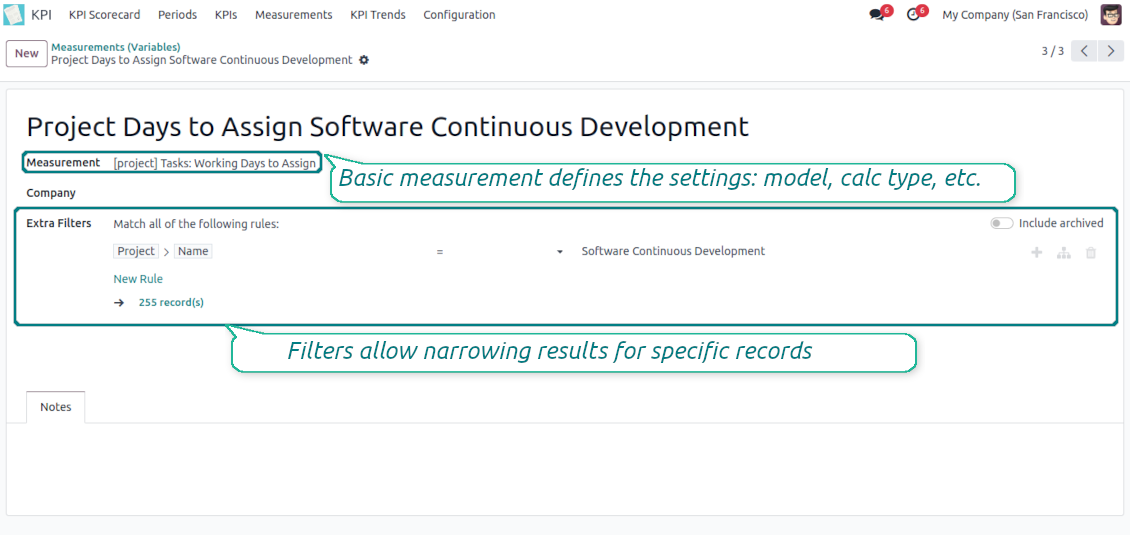
Basic measurement is the core object used for retrieving actual KPI values from the Odoo database, while KPI variables specify those. For example, 'total number of sales orders' should be a basic measurement, while narrower 'number of quotations of the sales team Europe' is recommended to be a precision of that basic measurement
-
Each basic measurement might have an unlimited number of linked KPI variables. KPI formulas might combine any number of variables, constants, and other KPIs with mathematical operators.
Python code measurements
-
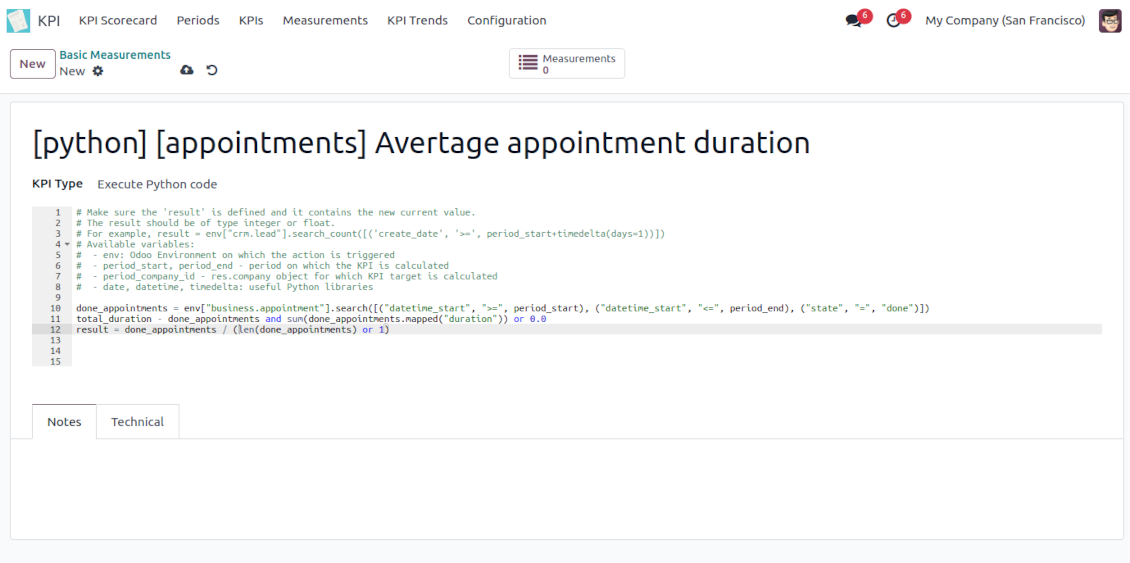
'Python code' is a special type of basic measurement. This type requires technical knowledge but lets you compute any sort of figures based on any Odoo data without restrictions
-
Such measurement might be any Python basic script with the possibility of SQL queries (through using 'env.cr')
-
In calculations you may rely upon the special variables: 'period_start' (the first date of the period), 'period_end' (the last date of the period), 'period_company_id' - res.company object for which Odoo makes calculations at the moment (according to a KPI period under consideration)
-
Correct Python code assumes saving the value into the special variable 'result'.
Basic measurements
-
Basic measurements are not used for formulas, but they define how Odoo data should be calculated: count of records, sum, average, and pure Python code. Basic measurements assume a number of settings
-
Model - an Odoo document type with which data set you to work ('Sales Order', 'Task', etc.). Here you can rely on standard or custom objects (including those created in the Odoo studio), Odoo reports
-
Date fields - define whether a document relates to a KPI period. For example, for tasks, you might use 'create date'. It is possible to apply a few date fields (e.g. 'Opportunities opened and won in January 2021') or no date fields at all for global calculations
-
Filters - allow restrict set of records. Used for low-level filtering and then specified in KPI variables
-
Measure field - is required for calculation types 'Average' and 'Sum'. It defines which figure you use for calculations. For example, 'total amount' of Sales Analysis Report or 'work hours of tasks'
-
Company field - would be used to restrict calculation for a KPI period target company. Take into account that records without a company will be used for all companies' KPI calculations.
KPI variables and constants
-
The key idea to distinguishing KPI variables from basic measurements is to simplify data preparation. You define 'total sales' once, and then unlimitedly use it for 'sales Europe', 'sales John Brown', 'website sales', etc.
-
Specify basic measurements through the Odoo built-in domain constructor, which lets filter by any storable attributes. For instance, filter sale orders by state (only 'done'), the salesperson ('John Brown or Mike Green'), sales team, etc.
-
KPI constants are the special type of KPI variables used when data can not be retrieved from modules and/or when figures remain the same during the whole period. For example, 'total investments' or 'number of employees' are often frozen for a specific period
-
In a multi-company environment, KPI variables are applied globally or for each company. In the former case, that variable is available for any company KPI formulas, while in the latter - only for a specific one
-
Basic measurements of the type 'Execute Python code' can't be any more specified, since they do not relate to any records. Such measurements should have a single KPI variable linked.
Nasveti za konfiguracijo in namestitev za KPI Balanced Scorecard Odoo v.17
Scheduled jobs
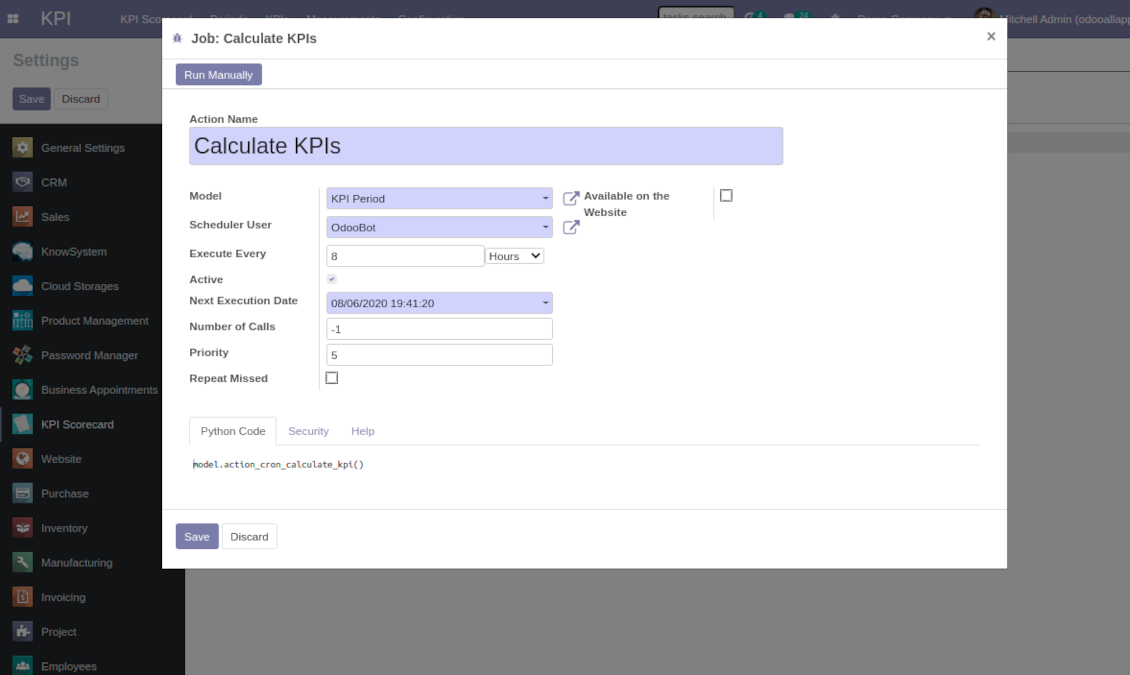
To change the frequency of KPI targets' recalculation:
- Turn on the debug mode
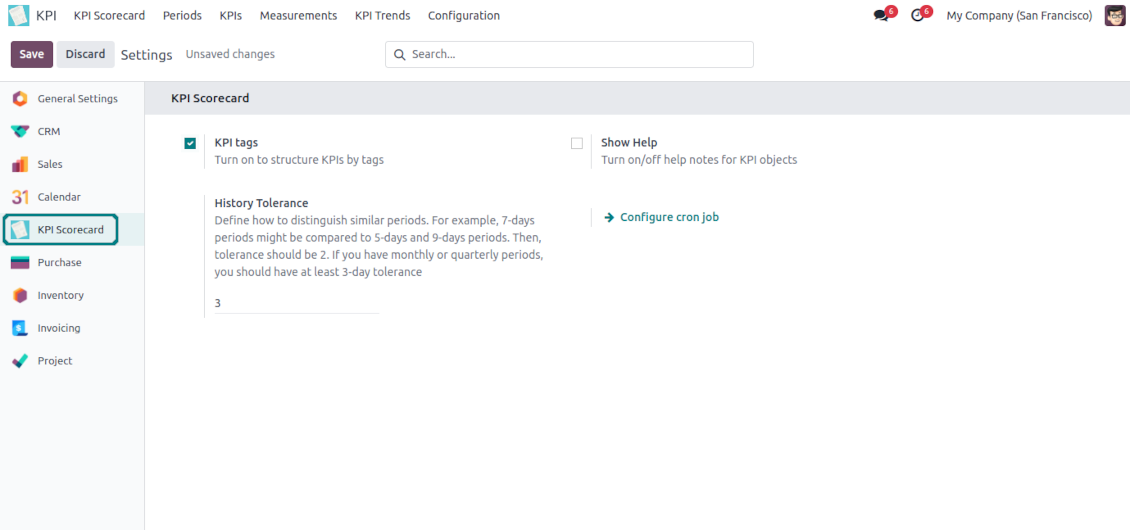
- Go to the menu KPI > Configuration > Settings
- Find the button 'Configure cron job'
- Feel free to update the settings 'Execute Every' and 'Next Execution Date'. However, please do not make it too frequent (e.g. once in 5 minutes). Since the job is resource demanding, it require at least a few minutes to be fully and correctly finished.
Change frequency of KPIs re-calculatinon
Pogosta vprašanja o KPI Balanced Scorecard Odoo v.17
Ustvaril sem Basic Measurement, vendar ga v čarovniku formul ne najdem.
Basic Measurements se sami ne uporabljajo za formulo. Tudi če Basic Measurementu ne želite dodati več filtrov, vseeno ustvarite z njim povezan Variable. Nato se ta Variable prikaže na seznamu razpoložljivih za formulo.
Katere podatke je mogoče uporabiti za KPI. Ali ima modul lastne podatke?
Aplikacija sama ne uvaja lastnih podatkov (razen KPI konstant, ki so namenjene prav uporabi manjkajočih podatkov) ali integracij. Aplikacija izračuna in pripravi vmesnike na podlagi obstoječih podatkov Odoo. Na primer, število prodajnih nalogov za določeno obdobje lahko dobite iz aplikacije Sales.
Modul je univerzalen in lahko pridobi podatke iz katerega koli modula Odoo, vključno s saldi kontov. Na primer, skupni dobiček za mesec lahko izračunate na podlagi računov (dnevniški vnos).
Podatke lahko dobite tudi iz vira zunaj Odoo, tako da ga povežete z modulom Odoo. Na primer, če imate v Odoo PostgreSQL podatke Google Analytics, jih lahko uporabite za KPI.
Kakšna je razlika med Basic Measurements in Measurements (Variables)?
Measurement (Variable) — natančnejša opredelitev osnovne meritve. Namen je poenostaviti pripravo podatkov. 'Total Sales' določite enkrat in ga neomejeno uporabljate za 'Sales Europe', 'Sales John Brown', 'Website Sales' itd. z dodatnimi filtri.
Kakšne so politike posodobitev vaših orodij?
Glede na veljavna pravila Odoo Apps Store:
- Vsak modul, kupljen za različico 12.0 in starejše, omogoča dostop do vseh različic do 12.0.
- Od različice 13.0 je treba vsako različico modula kupiti posebej.
- Ne glede na različico nakup daje pravico do vseh posodobitev in popravkov znotraj glavne različice.
Upoštevajte, da ekipa faOtools teh pravil ne nadzoruje. Za vprašanja se obrnite neposredno na predstavnike Odoo Apps Store.
Kako namestim vašo aplikacijo na Odoo.sh?
Najbolj neposreden pristop je uporaba vgrajenega poteka dela trgovine Odoo:
1. Odprite stran modula in kliknite gumb Deploy on odoo.sh
2. Nato boste preusmerjeni na stran GitHub. Prijavite se v račun, nato kliknite 'Create a new repo' ali uporabite obstoječega. Poskrbite, da je skladišče zasebno. Objavljanje aplikacij pod licenco OPL-1 ni dovoljeno. Po potrebi ustvarite nov repo za projekt Odoo.sh
3. Nato pojdite na odoo.sh in kliknite gumb Deploy. V pojavnem oknu potrdite odločitev in kliknite 'Continue.' To sproži namestitev.
Ti koraki namestijo aplikacijo na produkcijsko vejo projekta. Če želite aplikacije namestiti na druge veje ali posodobiti modul, opravite naslednje:
1. Naložite izvorno kodo aplikacije iz trgovine Odoo
2. Naredite commit modula v zahtevano skladišče GitHub. Poskrbite, da ni nobena mapa/datoteka aplikacije prezrta (tj. ni v .gitignore skladišča). Skladišča samodejno ustvari odoo.sh in lahko privzeto vsebujejo ključne elemente (npr. /lib). Naložite vse imenike, podimenike in datoteke modula brez izjem
3. Namestite ciljno vejo projekta odoo.sh ali, če to predvidevajo nastavitve, počakajte, da se samodejno izgradi.
Kako namestim vašo aplikacijo na lastnem strežniku?
2. Znova zaženite strežnik Odoo;
3. Vklopite način za razvijalce (tehnične nastavitve);
4. Posodobite seznam aplikacij (meni aplikacij);
5. Poiščite aplikacijo in pritisnite „Activate“/„Install“;
6. Sledite smernicam na strani aplikacije, če obstajajo.
Opazil sem, da ima vaša aplikacija dodatne dodatke. Jih smem kupiti pozneje?
Da, seveda. Hkrati Odoo samodejno doda vse odvisnosti v košarico, zato morate predhodno kupljena orodja izključiti, da se izognete dvojnemu plačilu.
Namestil sem vašo aplikacijo na Odoo.sh in v testih vidim opozorilo/napako
Rdeče/oranžno opozorilo ne vpliva na funkcije aplikacije. Žal naši moduli včasih ne opravijo standardnih samodejnih testov, ker ti predvidevajo vedenje, ki je v nasprotju s cilji aplikacije. Na primer spreminjamo izračun cene, medtem ko testi standardnega modula Odoo primerjajo končno ceno s standardnim algoritmom.
Najprej preverite funkcije nameščene zbirke. Ali vse deluje pravilno?
Če še vedno menite, da opozorilo vpliva na resnične funkcije, nas kontaktirajte in pošljite popolne dnevnike namestitve ter popoln seznam nameščenih modulov (vključno z jedrom in tretjimi).
Ali lahko kupim aplikacijo neposredno pri vašem podjetju?
Ne, orodja razširjamo samo prek uradne trgovine aplikacij Odoo.
Rad bi dobil popust
Žal nimamo tehničnih sredstev za individualne cene.
Ali lahko namestim aplikacijo v svojo zbirko Odoo Online (SaaS)?
Ne, aplikacij tretjih oseb ni mogoče uporabljati na Odoo Online. Žal Odoo SaaS to preprečuje.
Vaše orodje je odvisno od drugih aplikacij. Ali jih moram kupiti?
Da, orodje potrebuje vse module, označene v odvisnostih, da deluje pravilno. Cena na strani aplikacije že vključuje vse potrebne odvisnosti.
Kakšna je cena modula v ameriških dolarjih? Zakaj se je spremenila?
Cena naših modulov je v evrih. Trgovina Odoo pretvarja cene v druge valute po notranjem tečaju. Zato se lahko cena v ameriških dolarjih spremeni, ko se tečaj posodobi.
Besedila aplikacije in spletnega mesta v jezikih, ki niso angleščina, so pripravljena z UI in usklajena z uradnimi prevodi Odoo. Če opazite napako, pošljite zahtevek o pravilnosti prevodov in jo bomo popravili.
Predstavitvene zbirke Odoo (predogledi v živo)
Za to aplikacijo lahko zagotovimo brezplačno prilagojeno demo zbirko.
Za stik ne potrebujete telefonske številke niti kreditne kartice. Potrebna je le kratka prijava z e-pošto, ki ne traja več kot 30 sekund.
Na vašo zahtevo pripravimo individualno zbirko za predogled v živo, kjer lahko približno dva tedna izvajate teste in preverjate predpostavke.
Prijavljanje napak
Če naletite na napake ali nedosledno vedenje, nas ne oklevajte kontaktirati. Zagotavljamo popravke v 60 dneh od nakupa in tudi po tem obdobju želimo izboljševati orodja.
Za stik ne potrebujete telefonske številke niti kreditne kartice. Potrebna je le kratka prijava z e-pošto, ki ne traja več kot 30 sekund.
V zahtevo vključite čim več podrobnosti: posnetke zaslona, dnevnike strežnika Odoo, celoten opis ponovitve težave in podobno. Običajno traja nekaj delovnih dni, da pripravimo delovni načrt (če je napaka potrjena) ali smernice, kaj storiti (sicer).
Javne zahteve za funkcije in ideje modulov (brezplačen razvoj)
Močno nas žene izboljševanje orodij in hvaležni smo za vsako povratno informacijo. Če so vaše zahteve v splošno korist in jih je mogoče učinkovito uresničiti, jih bo ekipa vključila na naš seznam opravil.
Tak seznam opravil obdelujemo redno in ne predvideva dodatnih stroškov. Čeprav ne moremo obljubiti rokov in končne zasnove, je to lahko dober način, da dobite želene funkcije brez naložb in tveganj.
Za stik ne potrebujete telefonske številke niti kreditne kartice. Potrebna je le kratka prijava z e-pošto, ki ne traja več kot 30 sekund.

The tool to flexibly structure Odoo attachments in folders and synchronize directories with cloud clients: Google Drive, OneDrive/SharePoint, Nextcloud/ownCloud, Dropbox, Amazon S3, Box, and NAS. DMS. File Manager. Document management system
398€
The tool to automatically synchronize Odoo attachments with OneDrive files in both ways
487€
The tool to automatically synchronize Odoo attachments with Google Drive files in both ways
487€

The tool to build a deep and structured knowledge base for internal and external use. Knowledge System. KMS. Wiki-like revisions.
398€
The tool for time-based service management from booking appointments to sales and reviews
398€
The tool to manage your Odoo from your favorite AI chats through MCP. Claude. Any MCP-supporting AI.

The tool to translate URL addresses of Odoo website pages
38€
The tool to combine different Odoo events in a few configurable super calendars