Messages: Schedule Send Option v.17
The tool to schedule Odoo messages to be delivered at a later time not immediately

Universal scheduling
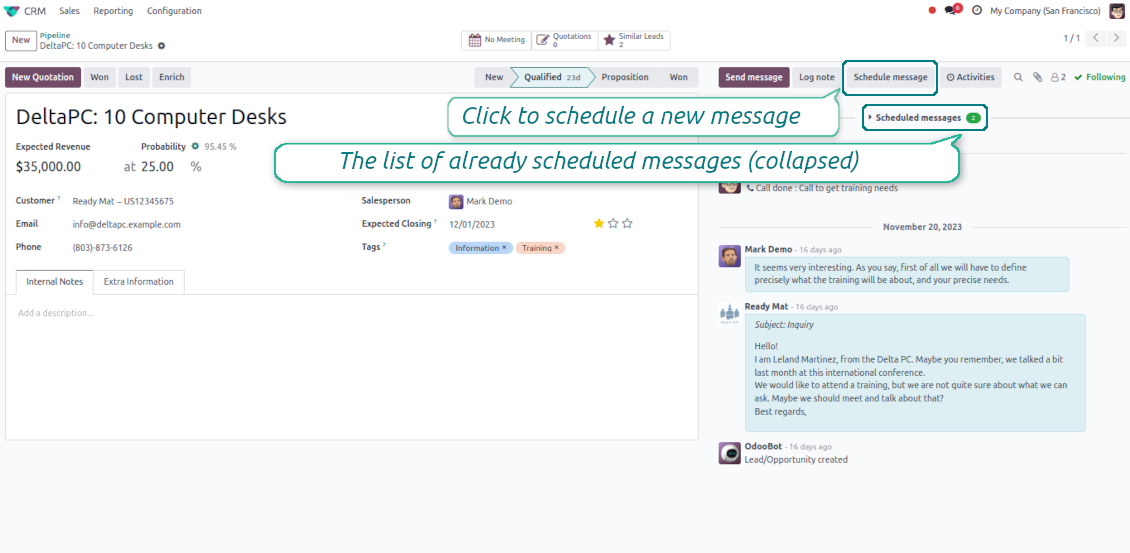
Plan messages for any Odoo documents that have a chatter: sale orders, opportunities, contacts, RFQs, etc.
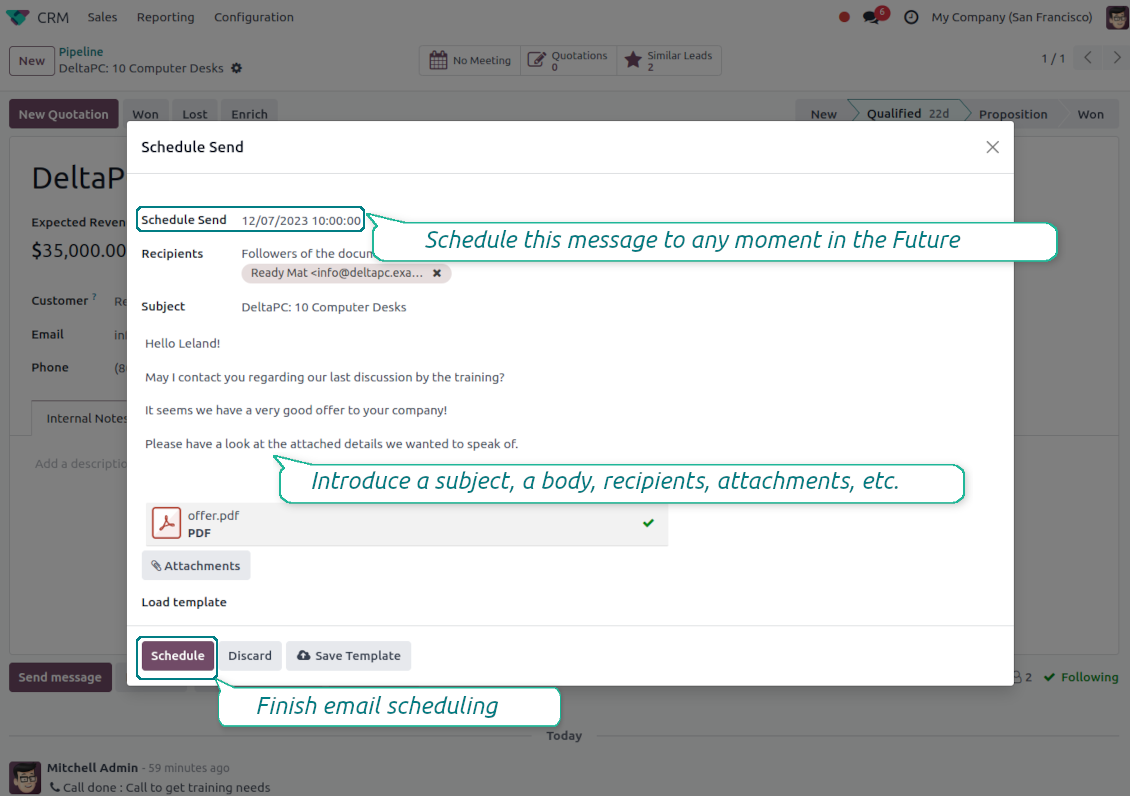
Schedule any message for any recipients for any date and any time in the Future. The feature is pretty much the same as you might be used to in your favorite email clients
Comfortable planning
Add postponed messages in a similar way you compose standard Odoo mails. To start planning just push the button 'Schedule messages' and write a new email.
Define also the default delay in hours on the configuration page, so a planned time is pre-filled when a user schedules a new message
Update or undo at any moment
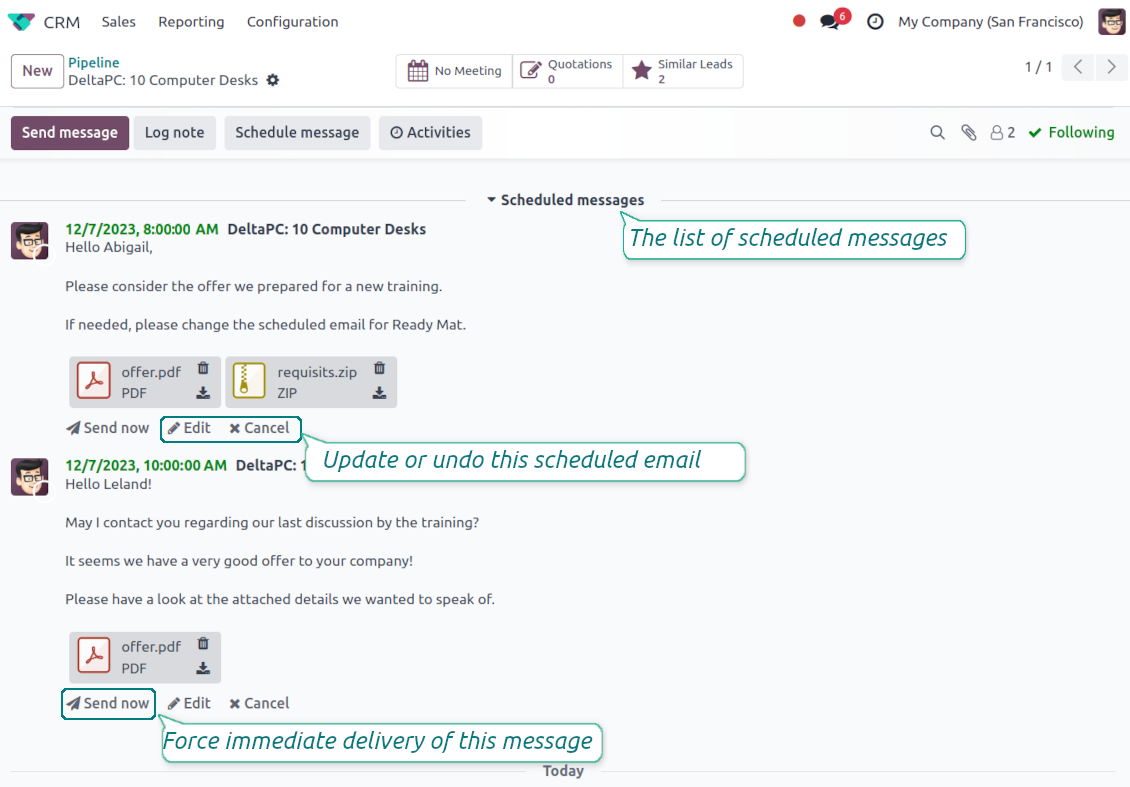
Update scheduled messages any time prior to actual delivery. Edit a subject, a body, attachments, and recipients.
Whenever you want, cancel sending or re-plan delivery to a more appropriate moment.
Force scheduled messages to be sent immediately if you decide so
Full control of delayed mails
Control delayed emails right in Odoo chatters. The list is fully available for managing before a planned time in a linked object thread.
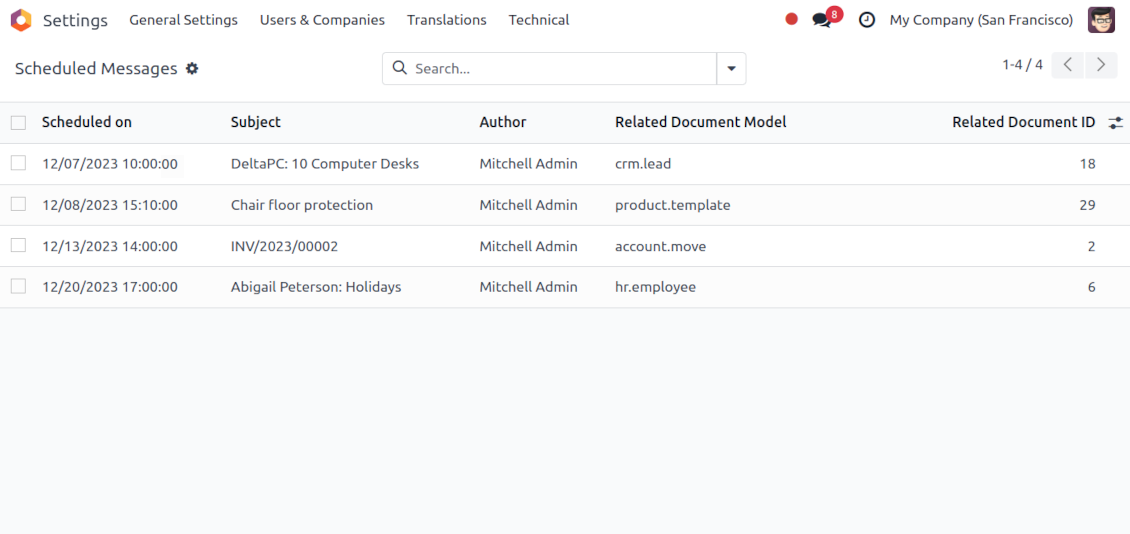
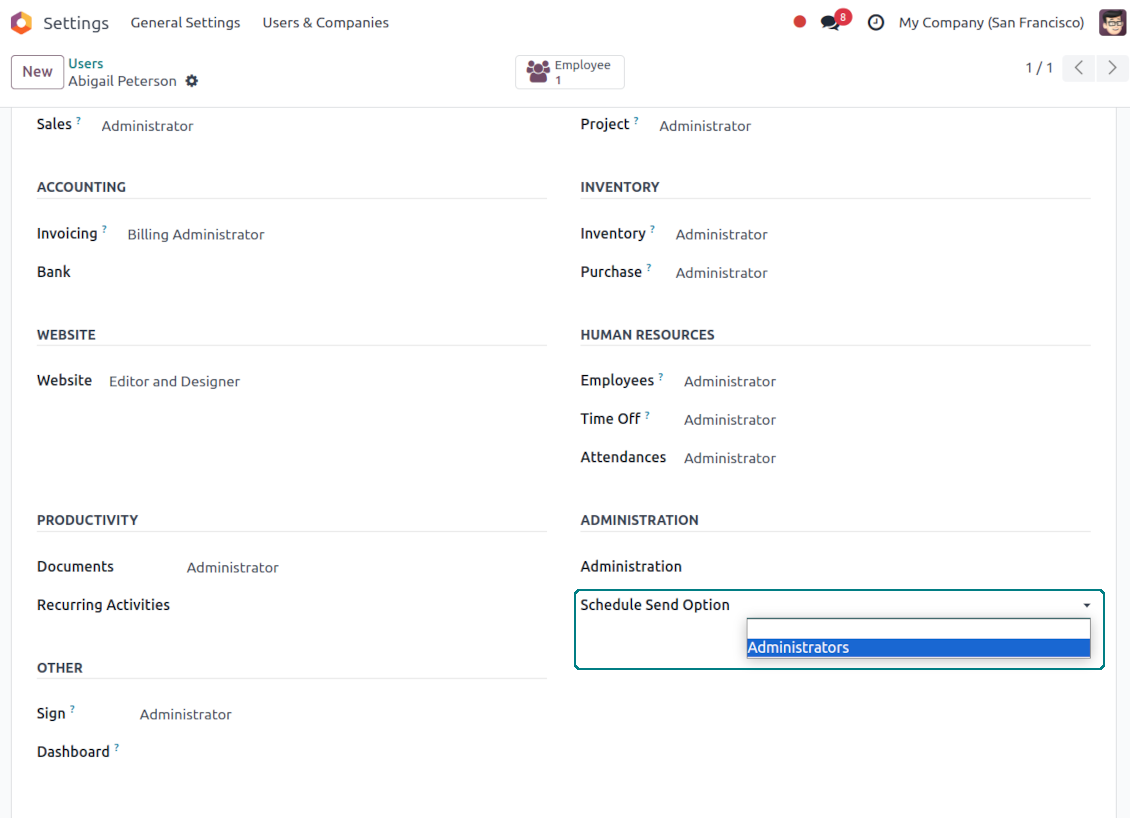
All scheduled messages are also combined under the menu Settings > Technical > Discuss > Schedule Send (the developer mode and the right 'Scheduled Send Option: Administrators' are needed)
Auto sending
Delayed messages are checked regularly and sent automatically based on the Odoo cron job.
Configure delivery time and frequency through the technical settings > Automation > Scheduled Actions > 'Send scheduled messages'
Like standard Odoo messages
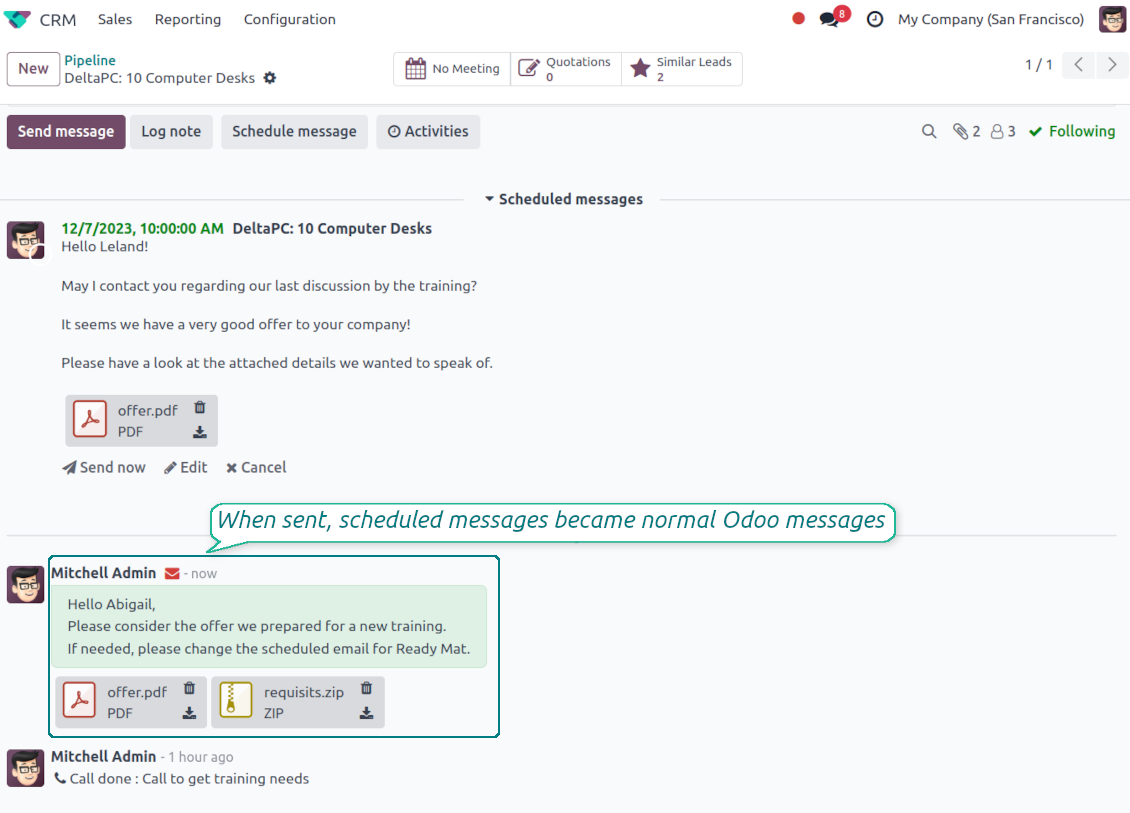
When sent, scheduled emails become normal Odoo messages linked to a target object thread.
Recipients will never know that a message was planned in advance and has not been just sent
Secure schedule
To add, edit, or manage a scheduled message, a user should have the right to edit a linked object.
Users with the right 'Scheduled Send Option: Administrators' might read, edit, or cancel any messages.
To see a list of document planned mails, a user should have read rights to a target Odoo document.
Текстовете на приложението и уебсайта на езици, различни от английски, са с помощта на ИИ и са съгласувани с официалните преводи на Odoo. Ако забележите грешка, изпратете тикет за коректност на преводите и ще го поправим.
Демонстрационни бази Odoo (прегледи наживо)
За това приложение можем да предоставим безплатна персонализирана демо база.
За да се свържете с нас не са нужни телефонен номер или кредитна карта. Достатъчна е кратка регистрация по имейл, която не отнема повече от 30 секунди.
По ваше искане ще подготвим индивидуална база за преглед наживо, където около две седмици можете да правите тестове и да проверявате предположения.
Докладване на грешки
Ако срещнете грешки или непоследователно поведение, свържете се с нас. Гарантираме поправки до 60 дни от покупката и сме силно заинтересовани да подобряваме инструментите и след този срок.
За да се свържете с нас не са нужни телефонен номер или кредитна карта. Достатъчна е кратка регистрация по имейл, която не отнема повече от 30 секунди.
Включете възможно най-много подробности в заявката: екранни снимки, дневници на Odoo сървъра, пълно описание как да възпроизведете проблема и т.н. Обикновено са нужни няколко работни дни, за да се подготви работен план (ако грешката е потвърдена) или насоки какво да се направи (в противен случай).
Публични заявки за функции и идеи за модули (безплатна разработка)
Силно сме мотивирани да подобряваме инструментите си и ще сме благодарни за всяка обратна връзка. Ако изискванията ви са от обществена полза и могат да се реализират ефективно, екипът ще ги включи в нашия списък със задачи.
Такъв списък със задачи се обработва редовно и не предполага допълнителни такси. Макар да не можем да обещаем срокове и окончателен дизайн, това може да е добър начин да получите желаните функции без инвестиции и рискове.
За да се свържете с нас не са нужни телефонен номер или кредитна карта. Достатъчна е кратка регистрация по имейл, която не отнема повече от 30 секунди.

The tool to flexibly structure Odoo attachments in folders and synchronize directories with cloud clients: Google Drive, OneDrive/SharePoint, Nextcloud/ownCloud, Dropbox, Amazon S3, Box, and NAS. DMS. File Manager. Document management system
398€

The tool to build a deep and structured knowledge base for internal and external use. Knowledge System. KMS. Wiki-like revisions.
398€
The tool to automatically synchronize Odoo attachments with OneDrive files in both ways
487€
The tool to set up KPI targets and control their fulfillment by periods. KPI dashboards. Dashboard designer. KPI charts

The tool for time-based service management from booking appointments to sales and reviews
398€
The tool to automatically synchronize Odoo attachments with Google Drive files in both ways
487€