Vendor Products Portal v.17
The tool to motivate vendors to prepare product catalogs in Odoo


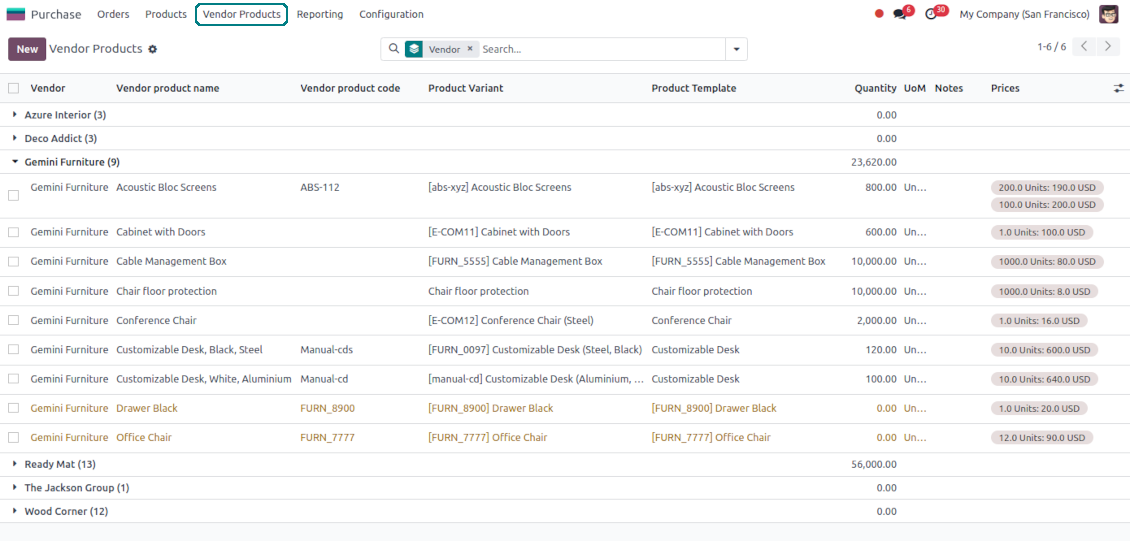


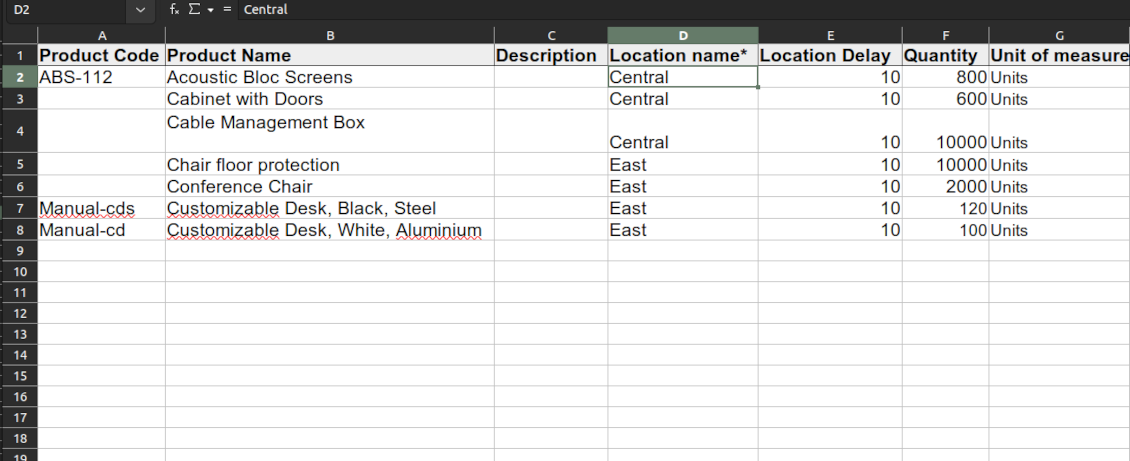


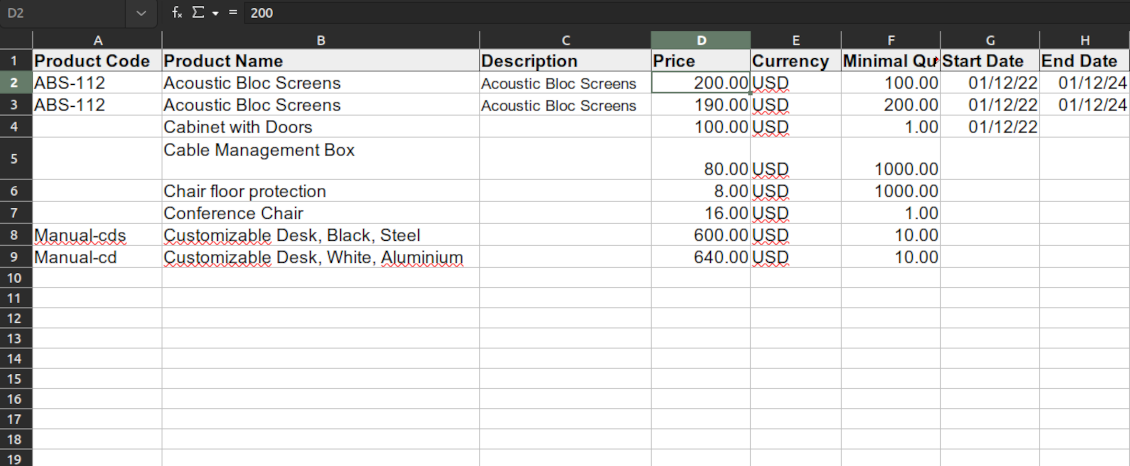


This Odoo tool aims to force suppliers to administrate their products in the Odoo portal. The app lets vendor contacts create, update, and import products they sell, related prices, and stock levels by their locations. Purchase managers might do the same and use that information for administrating procurement.
Vendor products catalog
The tool introduces a new stand-alone classifier of vendor products which is manageable either internally by purchase managers or in the Odoo portal by supplier representatives. As installed the app automatically creates vendor products based on existing Odoo products' supplier prices
Odoo sales based on supplies
Any vendor product might be linked to any Odoo product. In such a way, a purchase manager's goal becomes to match 'their' products with 'ours'. Each of our product variants might have a few linked vendor products
Supplier prices management
Portal users manage their company prices in the Odoo portal, while purchase managers might update them in the Odoo backend interface. Those prices are considered as standard Odoo 'supplier info' which correspondingly are used in purchase orders
Vendor stocks control
Both vendor representatives and purchase users register and update inventory levels for supplier locations. Vendor products' stocks data is available both in the Odoo portal and from the product variant, product template, and supplier backend form views
Vendor data import
The tool lets import vendor products, prices, and stock levels as Excel tables of predefined formats. In such a way, suppliers may quickly prepare commercial offers in the Odoo portal, while purchase managers - import those in the Odoo backend
Secured access and shared use
Any portal user may create, update, and archive products related to their company. Any Odoo user with access to products might rely upon vendor data for informational purposes. Any purchase manager may create, update, and archive vendor-related objects. Such managers might also get notifications of newly registered vendor products, their price changes, and inventory updates.
Odoo supplier portal
-
The Odoo portal allows searching and managing vendor products, locations, and stocks
-
Portal users may register, update, and import new items for their product catalog at any moment
-
Vendor representatives might manage their price lists, including registering new offers; modifying their validity period and minimum rules; deleting prices
-
Vendor users may import products and prices in a form of the predefined Excel table
-
Vendor representatives might manage their warehouses, including registering new locations; modifying their titles, descriptions, addresses, and delivery time; deleting warehouses
-
Suppliers can update inventory data, in particular register new and change stock levels per each location
-
Vendor users may import inventory levels in a form of the predefined Excel table
-
Suppliers can archive and restore products, prices, warehouses, and stocks.
Vendor inventories control
-
Each vendor stock level is provided per definite vendor location (warehouse). Vendors might create, edit, and archive their own warehouses
-
The tool allows an unlimited number of vendor locations per supplier. Locations are distinguished by name, address, and average delivery time
-
Keep stock levels in vendor units of measure, but purchase managers should make sure it has the same category as a linked Odoo product. The idea is to support conversion in order for internal users to work with habitual figures. For example, dozens and units are fine, while dozens and hours might lead to inconsistent procurement
-
Vendor stocks and locations might be switched off for portal users on the app configuration page
-
Stock levels are not used in Odoo operations, but they are provided for general information. Inventory levels are updated either manually by purchase managers/vendor representatives or through the import
-
Odoo warehouses' stocks are not linked to vendor stocks. Vendor stocks are absolutely independent since it is not possible to control supplier moves, and, hence, to support the double-entry system
-
Vendor inventories might be of special importance in the case of make-to-order logistics or drop shipping.
Vendor data import
Vendor products and prices
-
The tool lets vendor representatives and purchase users import vendor products and supplier prices as an Excel table in the predefined format. The table format is supplied with this tool source code and would be available on the configuration page as the 'Template for vendor products import' and in the import wizard under the section 'Help'
-
In the wizard, users can select whether previous products of this vendor should be archived. It lets fully replace this supplier product catalog with a new one
-
In the wizard, users can select whether previous prices should be marked as outdated. It lets remove misleading data.
Vendor products and stocks
-
The tool lets vendor representatives and purchase users import vendor products and stock levels as an Excel table in the predefined format. The table format is supplied with this tool source code and would be available on the configuration page as the 'Template for vendor stocks import' and in the import wizard under the section 'Help'
-
In the wizard, users can select whether previous products of this vendor should be archived. It lets fully replace this supplier product catalog with a new one
-
In the wizard, users can select whether previous stocks are not correct. It lets you have fully topical data after each import.
General import rules
-
Change the tables' content to provide more specific examples and labels. However, do not modify the columns' order and do not remove those: it will lead to inevitable mistakes
-
The import wizards offer useful tips to make a correct import. You may edit those recommendations on the configuration page, but make sure you do not remove critical advice
-
Each import finishes with a special popup of the results and the errors. It lets control of what has been actually done
-
In the wizards select which table lines should be imported. It is useful in case the number of lines is too big to import them all
-
While preparing the table for import be cautious with cell formats and make sure portal users know that. Dates should be dates, numbers should be numbers, currencies, and units of measure should be chosen among active in Odoo
-
In case import can't be fully finished until Odoo stops it, contact your system administrator to increase configured time-outs or split an imported table into a few ones.
Често задавани въпроси за Vendor Products Portal Odoo v.17
Каква е разликата между модулите Vendor Products Management и Vendors Product Portal?
Приложението Vendor Products Portal е добавка към Vendor Products Management. Второто управлява продукти, цени и наличности на доставчика само в бекенда на Odoo (вътрешни потребители). Първото разширява това, като позволява на портални потребители (доставчици) сами да въвеждат каталога и да обновяват/импортират свързани документи: цени, складове, нива на запас. Vendor Product Management е задължителна зависимост на модула Vendor Products Portal.
Какви са политиките за обновяване на вашите инструменти?
Според действащите правила на Odoo Apps Store:
- Всеки модул, купен за версия 12.0 и по-стара, дава достъп до всички версии до 12.0.
- От версия 13.0 всяка версия на модула се купува отделно.
- Независимо от версията покупката дава право на всички обновления и поправки в рамките на основната версия.
Имайте предвид, че екипът на faOtools не контролира тези правила. За въпроси се обръщайте директно към представителите на Odoo Apps Store.
Как да инсталирам вашето приложение в Odoo.sh?
Най-прекият подход е да използвате вградения работен поток на магазина Odoo:
1. Отворете страницата на модула и щракнете бутона Deploy on odoo.sh
2. След това ще бъдете пренасочени към страницата на GitHub. Влезте в профила си, след което щракнете 'Create a new repo' или използвайте съществуващо. Уверете се, че хранилището е частно. Не е позволено публикуването на приложения под лиценз OPL-1. Ако е нужно, създайте ново repo за проекта Odoo.sh
3. След това отидете в odoo.sh и щракнете бутона Deploy. В изскачащия прозорец потвърдете решението и щракнете 'Continue.' Това стартира инсталацията.
Тези стъпки ще инсталират приложението в продукционния клон на проекта. Ако искате да разположите приложенията в други клонове или да обновите модула, направете следното:
1. Качете изходния код на приложението от магазина Odoo
2. Направете commit на модула в необходимото GitHub хранилище. Уверете се, че никой папки/файлове на приложението не се игнорират (т.е. не са в .gitignore на repo). Хранилищата се създават автоматично от odoo.sh и по подразбиране може да включват важни елементи (напр. /lib). Качете всички директории, поддиректории и файлове на модула без изключения
3. Разположете целевия клон на проекта odoo.sh или, ако настройките предполагат това, изчакайте да се изгради автоматично.
Как да инсталирам вашето приложение на собствен сървър?
2. Рестартирайте сървъра на Odoo;
3. Включете режим за разработчици (технически настройки);
4. Обновете списъка с приложения (менюто с приложения);
5. Намерете приложението и натиснете „Activate“/„Install“;
6. Следвайте указанията на страницата на приложението, ако има такива.
Забелязах, че приложението ви има допълнителни добавки. Мога ли да ги купя по-късно?
Да, разбира се. Едновременно Odoo автоматично добавя всички зависимости в количката, затова трябва да изключите вече купените инструменти, за да избегнете двойно плащане.
Инсталирах приложението ви в Odoo.sh и в тестовете виждам предупреждение/грешка
Червено/оранжево предупреждение не влияе на функциите на приложението. За съжаление понякога модулите ни не минават стандартните автоматични тестове, защото те очакват поведение в конфликт с целите на приложението. Например променяме изчислението на цената, а тестовете на стандартния модул Odoo сравняват крайната цена със стандартен алгоритъм.
Първо проверете функциите на разгънатата база. Всичко работи ли коректно?
Ако все пак смятате, че предупреждението влияе на реални функции, свържете се с нас и изпратете пълните регистрационни файлове от инсталацията и пълния списък на разгънатите модули (включително ядро и трети страни).
Мога ли да купя приложението директно от вашата фирма?
Не, разпространяваме инструментите само чрез официалния магазин за приложения Odoo.
Бих искал да получа отстъпка
За съжаление нямаме техническа възможност да предложим индивидуални цени.
Мога ли да инсталирам приложението в моята база Odoo Online (SaaS)?
Не, приложения на трети страни не могат да се ползват в Odoo Online. За съжаление Odoo SaaS блокира тази възможност.
Вашият инструмент зависи от други приложения. Трябва ли да ги купя?
Да, инструментът изисква всички модули, посочени в зависимостите, за да работи правилно. Цената на страницата на приложението вече включва всички необходими зависимости.
Каква е цената на модула в щатски долари? Защо се промени?
Цената на нашите модули е в евро. Магазинът Odoo превалутира цените по вътрешния си курс. Затова цената в щатски долари може да се промени при обновяване на курса.
Текстовете на приложението и уебсайта на езици, различни от английски, са с помощта на ИИ и са съгласувани с официалните преводи на Odoo. Ако забележите грешка, изпратете тикет за коректност на преводите и ще го поправим.
Демонстрационни бази Odoo (прегледи наживо)
За това приложение можем да предоставим безплатна персонализирана демо база.
За да се свържете с нас не са нужни телефонен номер или кредитна карта. Достатъчна е кратка регистрация по имейл, която не отнема повече от 30 секунди.
По ваше искане ще подготвим индивидуална база за преглед наживо, където около две седмици можете да правите тестове и да проверявате предположения.
Докладване на грешки
Ако срещнете грешки или непоследователно поведение, свържете се с нас. Гарантираме поправки до 60 дни от покупката и сме силно заинтересовани да подобряваме инструментите и след този срок.
За да се свържете с нас не са нужни телефонен номер или кредитна карта. Достатъчна е кратка регистрация по имейл, която не отнема повече от 30 секунди.
Включете възможно най-много подробности в заявката: екранни снимки, дневници на Odoo сървъра, пълно описание как да възпроизведете проблема и т.н. Обикновено са нужни няколко работни дни, за да се подготви работен план (ако грешката е потвърдена) или насоки какво да се направи (в противен случай).
Публични заявки за функции и идеи за модули (безплатна разработка)
Силно сме мотивирани да подобряваме инструментите си и ще сме благодарни за всяка обратна връзка. Ако изискванията ви са от обществена полза и могат да се реализират ефективно, екипът ще ги включи в нашия списък със задачи.
Такъв списък със задачи се обработва редовно и не предполага допълнителни такси. Макар да не можем да обещаем срокове и окончателен дизайн, това може да е добър начин да получите желаните функции без инвестиции и рискове.
За да се свържете с нас не са нужни телефонен номер или кредитна карта. Достатъчна е кратка регистрация по имейл, която не отнема повече от 30 секунди.

The tool to flexibly structure Odoo attachments in folders and synchronize directories with cloud clients: Google Drive, OneDrive/SharePoint, Nextcloud/ownCloud, Dropbox, Amazon S3, Box, and NAS. DMS. File Manager. Document management system
398€

The tool to build a deep and structured knowledge base for internal and external use. Knowledge System. KMS. Wiki-like revisions.
398€
The tool to automatically synchronize Odoo attachments with OneDrive files in both ways
487€
The tool to set up KPI targets and control their fulfillment by periods. KPI dashboards. Dashboard designer. KPI charts

The tool to automatically synchronize Odoo attachments with Google Drive files in both ways
487€
The tool for time-based service management from booking appointments to sales and reviews
398€

The tool to make inventory data essential and comfortable for elaboration. Stocks analysis
38€