Stock Demand Trends and Forecast v.16
The tool to calculate stock demand trends and make predictions for future demand statistically


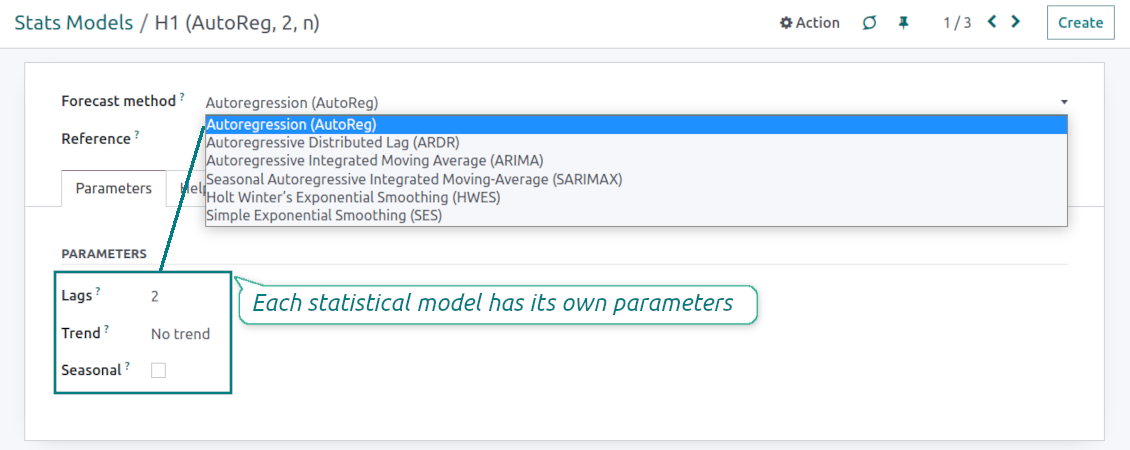



If you knew the stock demand trends of your warehouses, you would have a clue to decrease keeping costs and have a flawless supply chain. Regretfully, you can't know the future. However, you can predict it with a certain reliability. This is an Odoo tool for that goal. The app lets you construct stock demand by periods and forecast scientifically further demand based on the Python library statsmodels.
The scientific approach to forecasting
The app assumes applying statistical methods to calculate historical trends and make a forecast. Experiment with statistical models and parameters to achieve the most reliable prediction. Leverage the proven statsmodels methods
Innovative data analysis interface
The tool introduces a special interface to instantly calculate series. Flexibly switch between different reports and update settings in a few clicks. Control data in pivot, graph, or chart views. Export series as an Excel tabled
Focused analysis
Shrink considered stock operations flexibly or analyze global company inventory demand. Group data into various series
Topical data
Apply time frames for historical data and work with intervals that are of interest to your industry. Work with past and future periods.
Flexible report configuration
-
Introduce as many analytic reports as you need. Each report is based on Odoo's stock moves' data
-
Keep reports to re-use them, instantly switch between reports, or experiment with real-time changes without saving those
-
Show historical and forecast series as a table, line graph, or bar chart, or export data as an Excel table
-
Apply as many and as different statistical models as you want to check. Each stats model will peer its own data series and prediction if the latter is possible. See also the section "Statistical models"
-
Define the data periods under analysis by entering a start and end. Only inventory data within this interval will be included in the series
-
Split data series into years, quarters, months, weeks, and days depending on seasons assumed in your industry or business area
-
Select an unlimited number of periods to predict future periods or check hypotheses
-
Grant the right to forecast tools for any WMS user (the group Inventory > Stock Demand Forecast)
-
Filter stock data by product variants, product templates, product categories, units of measurement, source or destination locations, warehouses, operation/picking types, stock rules, and companies (for multi-company regimes). Introduce your own criteria based on Odoo's dynamic domain constructor, so shrink analysis by any stock move storable fields
-
Introduce a few data series simultaneously with grouping by a product variant, a unit of measurement, a source or destination location, a warehouse, a stock move state, an operation type, a stock rule, or a company. Take into that if the report assumes products with different units of measurement, the grouping will be possible only by the units or by variants
-
Hide/show general statistical measurement of series: count, mean, standard deviation, minimum, maximum, 25%, 50%, and 75% factors
-
Optionally compare predicted values to real historical data if any. See also the section "Hypothesis Testing"
-
Make figures human readable (e.g. 192,217 as 200k) or show them precisely.
Statistical models
-
The tool allows calculating inventory demand trends based on predefined statistical models introduced by the Python package statsmodels
-
Methods have different complexity, and their own unique parameters, and might be suitable for a definite market or a specific business. The final choice of the model and related statistical parameters is only up to you. Nobody except you can better understand tendencies in your company inventory demand, and hence which methods and factors should be applied
-
Available statistical models are Autoregression (AutoReg), Autoregressive Distributed Lag (ARDR), Autoregressive Integrated Moving Average (ARIMA), Seasonal Autoregressive Integrated Moving-Average (SARIMAX), Holt Winter's Exponential Smoothing (HWES), Simple Exponential Smoothing (SES)
-
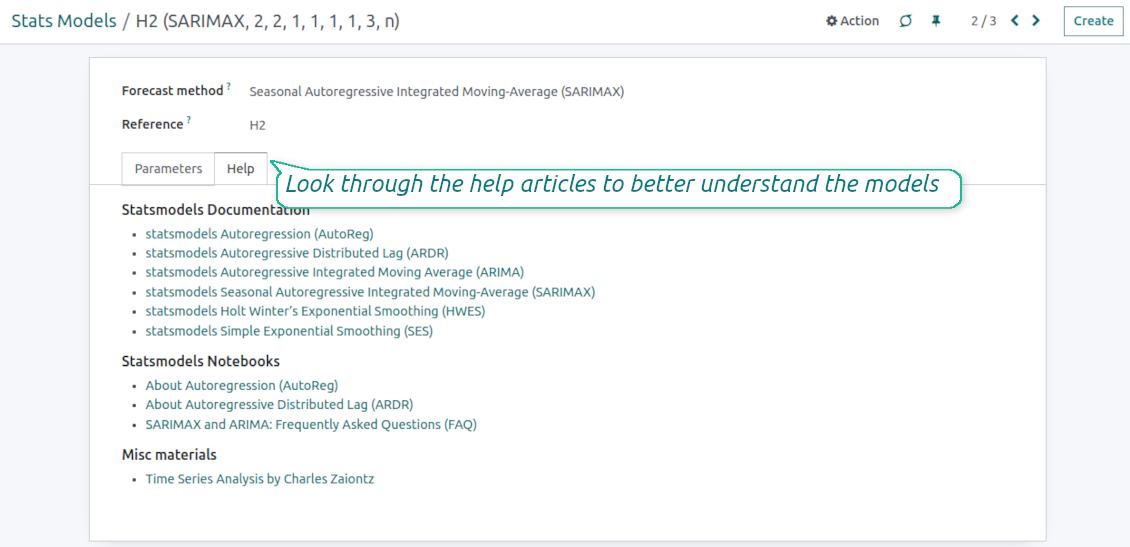
For deep details about what each stats model means and which parameters might be applied, look through the tab "Help" on the stats model form
-
Keep and use an unlimited number of stats models with various parameters. Check, compare, and update those flexibly through the forecast manager interface
-
Often models with specific parameters will not result in any prediction or the prediction will be unrealistic. This is normal, only a deep understating of trends and much experimenting might give a viable forecast for your specific case.
Hypothesis Testing
-
To get a proper prediction, it is usually needed to experiment a lot with statistical models and introduced parameters. To check the results, the app allows compare forecast data with real values
-
To check a certain assumption with historical values, you may make an analysis and prediction for some past periods, and turn on the setting "Hypothesis testing"
-
For example, you have stock moves from 2017 to 2022. Then, you can get report historical data for 2017-2021, and make the forecast for 12 months of 2022. In this way, you will get the prediction for the interval for which you already have actual values. By comparing forecast and actual values, you can decide whether a chosen model and factors are good enough
-
The app allows checking the hypotheses for a few stats models simultaneously. In this way, it is possible to reveal what is actually the most appropriate, or whether experimenting should be continued.
Usage requirements
-
To reveal trends, there should be enough historical stock moves data. It is senseless to make a forecast based on the last 5 days of operations since no trend cannot be retrieved. Take into account that data should be enough for the chosen filters and for each grouped series
-
There should be not only enough stock moves but also there should be some actual trends. Chaotic data will not result in reliable predictions. To use the app, you should understand which assumptions (e.g. seasonal changes) you check
-
To use the app, you either should have a clear understanding of how statistics works or a will to understand that. Regretfully, there is no way to make a "general" analysis, each specific case is unique and requires its own elaboration.
Съвети за конфигурация и инсталация за Stock Demand Trends and Forecast Odoo v.16
Python dependencies
To guarantee the tool works correctly, a number of Python libraries are required: pandas, numpy, statsmodels, scipy, xlsxwriter. To install those packages execute the command:
pip3 install pandas numpy statsmodels scipy xlsxwriter
If you run Odoo on Python prior to or equal to version 3.7, please install the following versions of the packages pandas==1.3.5, statsmodels==0.13.1
Server memory limits
Running the statistical analysis and making the forecast is quite a resource-demanding operation. If users face the hanging interface, make sure that server memory limits and timeouts are enough. Otherwise, increase those settings.
Често задавани въпроси за Stock Demand Trends and Forecast Odoo v.16
Какви са политиките за обновяване на вашите инструменти?
Според действащите правила на Odoo Apps Store:
- Всеки модул, купен за версия 12.0 и по-стара, дава достъп до всички версии до 12.0.
- От версия 13.0 всяка версия на модула се купува отделно.
- Независимо от версията покупката дава право на всички обновления и поправки в рамките на основната версия.
Имайте предвид, че екипът на faOtools не контролира тези правила. За въпроси се обръщайте директно към представителите на Odoo Apps Store.
Как да инсталирам вашето приложение в Odoo.sh?
Най-прекият подход е да използвате вградения работен поток на магазина Odoo:
1. Отворете страницата на модула и щракнете бутона Deploy on odoo.sh
2. След това ще бъдете пренасочени към страницата на GitHub. Влезте в профила си, след което щракнете 'Create a new repo' или използвайте съществуващо. Уверете се, че хранилището е частно. Не е позволено публикуването на приложения под лиценз OPL-1. Ако е нужно, създайте ново repo за проекта Odoo.sh
3. След това отидете в odoo.sh и щракнете бутона Deploy. В изскачащия прозорец потвърдете решението и щракнете 'Continue.' Това стартира инсталацията.
Тези стъпки ще инсталират приложението в продукционния клон на проекта. Ако искате да разположите приложенията в други клонове или да обновите модула, направете следното:
1. Качете изходния код на приложението от магазина Odoo
2. Направете commit на модула в необходимото GitHub хранилище. Уверете се, че никой папки/файлове на приложението не се игнорират (т.е. не са в .gitignore на repo). Хранилищата се създават автоматично от odoo.sh и по подразбиране може да включват важни елементи (напр. /lib). Качете всички директории, поддиректории и файлове на модула без изключения
3. Разположете целевия клон на проекта odoo.sh или, ако настройките предполагат това, изчакайте да се изгради автоматично.
Как да инсталирам вашето приложение на собствен сървър?
2. Рестартирайте сървъра на Odoo;
3. Включете режим за разработчици (технически настройки);
4. Обновете списъка с приложения (менюто с приложения);
5. Намерете приложението и натиснете „Activate“/„Install“;
6. Следвайте указанията на страницата на приложението, ако има такива.
Забелязах, че приложението ви има допълнителни добавки. Мога ли да ги купя по-късно?
Да, разбира се. Едновременно Odoo автоматично добавя всички зависимости в количката, затова трябва да изключите вече купените инструменти, за да избегнете двойно плащане.
Инсталирах приложението ви в Odoo.sh и в тестовете виждам предупреждение/грешка
Червено/оранжево предупреждение не влияе на функциите на приложението. За съжаление понякога модулите ни не минават стандартните автоматични тестове, защото те очакват поведение в конфликт с целите на приложението. Например променяме изчислението на цената, а тестовете на стандартния модул Odoo сравняват крайната цена със стандартен алгоритъм.
Първо проверете функциите на разгънатата база. Всичко работи ли коректно?
Ако все пак смятате, че предупреждението влияе на реални функции, свържете се с нас и изпратете пълните регистрационни файлове от инсталацията и пълния списък на разгънатите модули (включително ядро и трети страни).
Мога ли да купя приложението директно от вашата фирма?
Не, разпространяваме инструментите само чрез официалния магазин за приложения Odoo.
Бих искал да получа отстъпка
За съжаление нямаме техническа възможност да предложим индивидуални цени.
Мога ли да инсталирам приложението в моята база Odoo Online (SaaS)?
Не, приложения на трети страни не могат да се ползват в Odoo Online. За съжаление Odoo SaaS блокира тази възможност.
Вашият инструмент зависи от други приложения. Трябва ли да ги купя?
Да, инструментът изисква всички модули, посочени в зависимостите, за да работи правилно. Цената на страницата на приложението вече включва всички необходими зависимости.
Каква е цената на модула в щатски долари? Защо се промени?
Цената на нашите модули е в евро. Магазинът Odoo превалутира цените по вътрешния си курс. Затова цената в щатски долари може да се промени при обновяване на курса.
Текстовете на приложението и уебсайта на езици, различни от английски, са с помощта на ИИ и са съгласувани с официалните преводи на Odoo. Ако забележите грешка, изпратете тикет за коректност на преводите и ще го поправим.
Демонстрационни бази Odoo (прегледи наживо)
За това приложение можем да предоставим безплатна персонализирана демо база.
За да се свържете с нас не са нужни телефонен номер или кредитна карта. Достатъчна е кратка регистрация по имейл, която не отнема повече от 30 секунди.
По ваше искане ще подготвим индивидуална база за преглед наживо, където около две седмици можете да правите тестове и да проверявате предположения.
Докладване на грешки
Ако срещнете грешки или непоследователно поведение, свържете се с нас. Гарантираме поправки до 60 дни от покупката и сме силно заинтересовани да подобряваме инструментите и след този срок.
За да се свържете с нас не са нужни телефонен номер или кредитна карта. Достатъчна е кратка регистрация по имейл, която не отнема повече от 30 секунди.
Включете възможно най-много подробности в заявката: екранни снимки, дневници на Odoo сървъра, пълно описание как да възпроизведете проблема и т.н. Обикновено са нужни няколко работни дни, за да се подготви работен план (ако грешката е потвърдена) или насоки какво да се направи (в противен случай).
Публични заявки за функции и идеи за модули (безплатна разработка)
Силно сме мотивирани да подобряваме инструментите си и ще сме благодарни за всяка обратна връзка. Ако изискванията ви са от обществена полза и могат да се реализират ефективно, екипът ще ги включи в нашия списък със задачи.
Такъв списък със задачи се обработва редовно и не предполага допълнителни такси. Макар да не можем да обещаем срокове и окончателен дизайн, това може да е добър начин да получите желаните функции без инвестиции и рискове.
За да се свържете с нас не са нужни телефонен номер или кредитна карта. Достатъчна е кратка регистрация по имейл, която не отнема повече от 30 секунди.

The tool to flexibly structure Odoo attachments in folders and synchronize directories with cloud clients: Google Drive, OneDrive/SharePoint, Nextcloud/ownCloud, and Dropbox. DMS. File Manager. Document management system
398€

The tool to build a deep and structured knowledge base for internal and external use. Knowledge System. KMS. Wiki-like revisions.
398€
The tool to automatically synchronize Odoo attachments with OneDrive files in both ways
487€
The tool to set up KPI targets and control their fulfillment by periods. KPI dashboards. Dashboard designer. KPI charts

The tool to automatically synchronize Odoo attachments with Google Drive files in both ways
487€
The tool for time-based service management from booking appointments to sales and reviews
398€

The tool to make inventory data essential and comfortable for elaboration. Stocks analysis
38€