In Short
Security User Roles is an Odoo 19 Extra Tools app. The tool combines users in roles and simplifies security group assigning. Access group management. Users mass updating.
As an Odoo database grows, user access becomes harder to keep consistent: every new app, department, or employee adds more security groups to check. Security User Roles lets administrators manage access from a role perspective instead of configuring each person one by one. Define reusable roles, assign them to users in any combination, and update many users in seconds when policies, teams, or installed modules change.
Perfect for
Growing teams
For companies where new employees, departments, and apps make manual access setup slow and error-prone.
Temporary access cases
For vacation coverage, substitute employees, short-term projects, and seasonal roles that need access only for specific periods.
Multi-app Odoo databases
For administrators who need one consistent way to manage security groups from standard, third-party, and custom modules.
Ready to evaluate?
Start with a free demo request or purchase in the Odoo Apps Store.
Free personalized demo. No phone number or credit card required. Free life-time updates and expert support within the major Odoo version.
Why teams choose it
Key benefits before you dive into the details
2 clicks to apply user rights
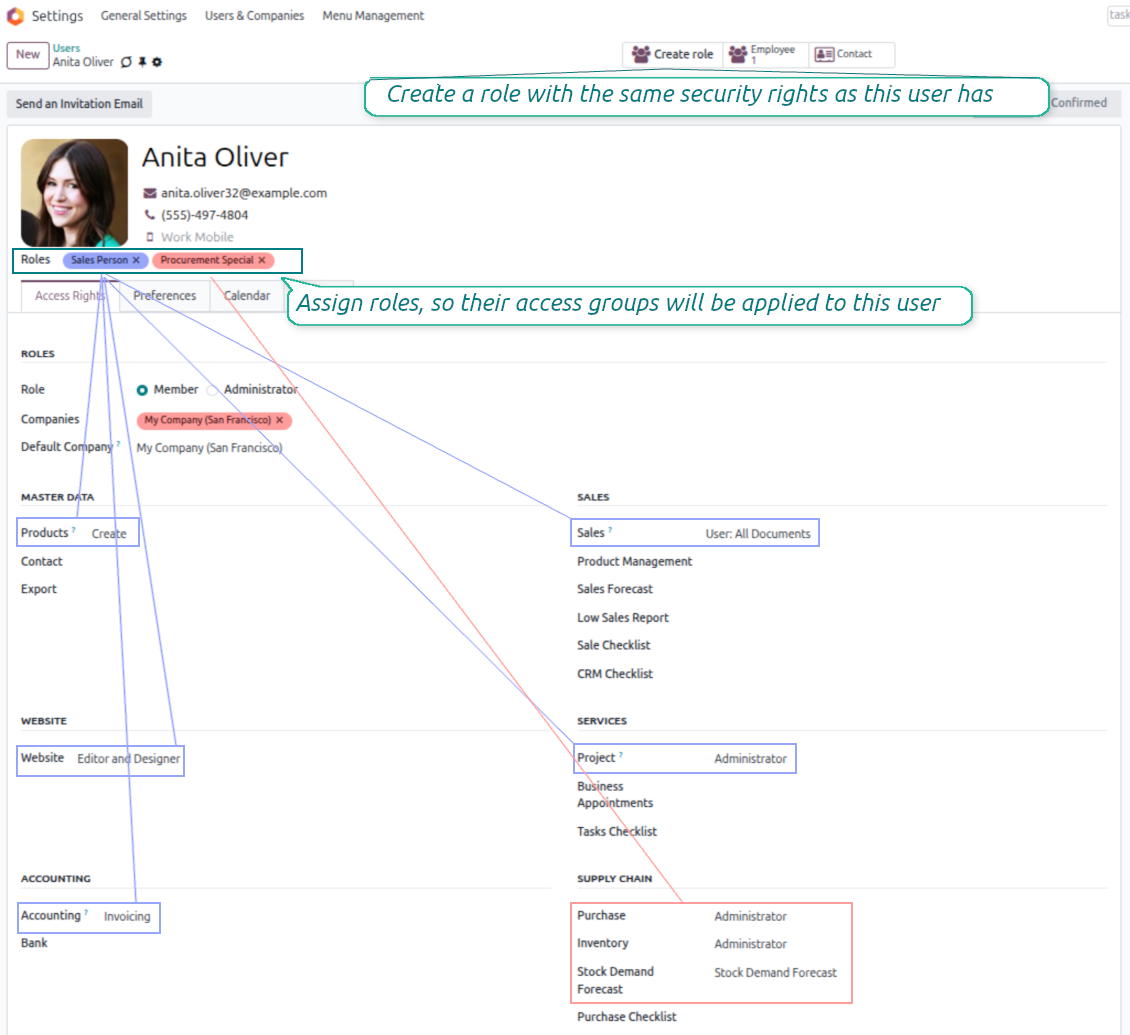
Assign a role to a user and Odoo adds the required security groups automatically. Administrators no longer need to remember every access checkbox for every employee.
Multiple roles per user
Combine roles to mirror real responsibilities: sales, projects, accounting, support, or custom apps. Users can still stay role-free when a specific manual setup is needed.
Safe in a changing environment
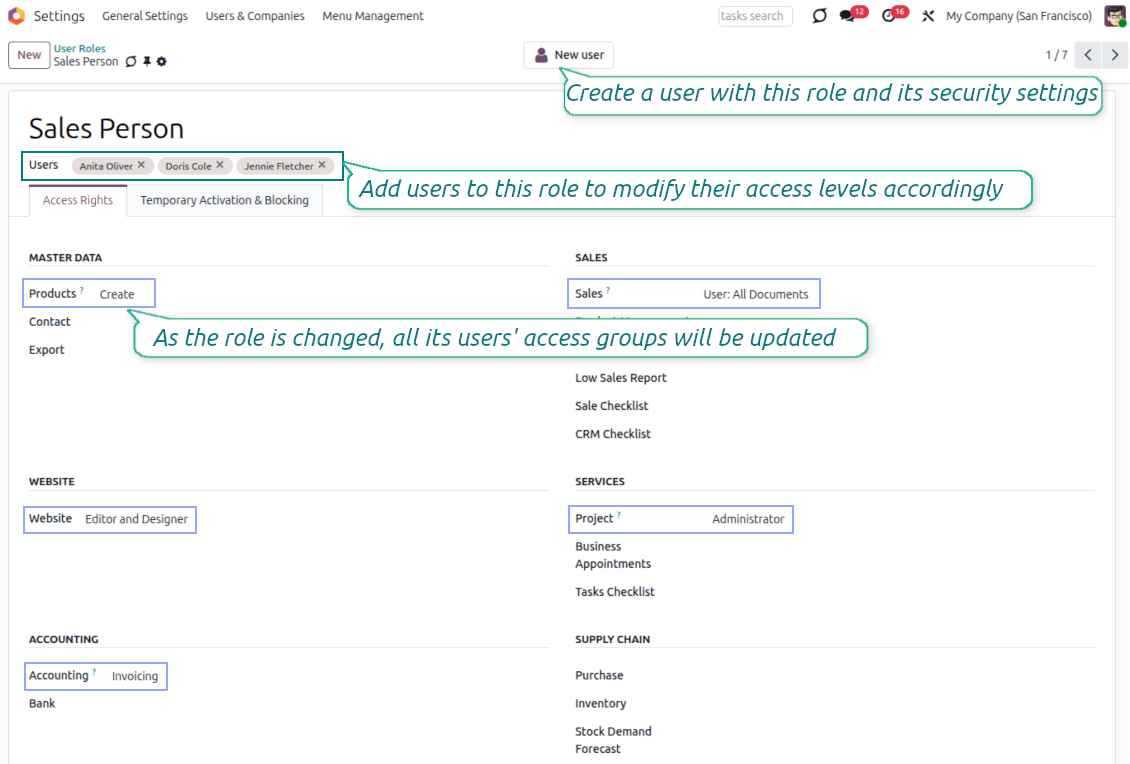
Update one security role to recalculate rights for all linked users. It takes only a few seconds to reflect policy changes or newly installed apps, with far fewer access mistakes.
Simple to start
Manage security roles with the same logic used for standard Odoo users. Build a role from an existing user, or create a new user directly from a prepared role.
Dynamic updates
Configure rules that temporarily add or remove users from roles. Grant a substitute employee short-term access or block a role during vacation time without manual follow-up.
All module access groups
Use roles with security groups from standard Odoo apps, third-party modules, and custom developments. The available access logic remains familiar to Odoo administrators.
Odoo Store feedback
What customers say about the app
Very powerful but simple
Provides excellent usability for a complicated topic.
Lars Weiler
Temporary user blocking and activation
Schedule short-term role access
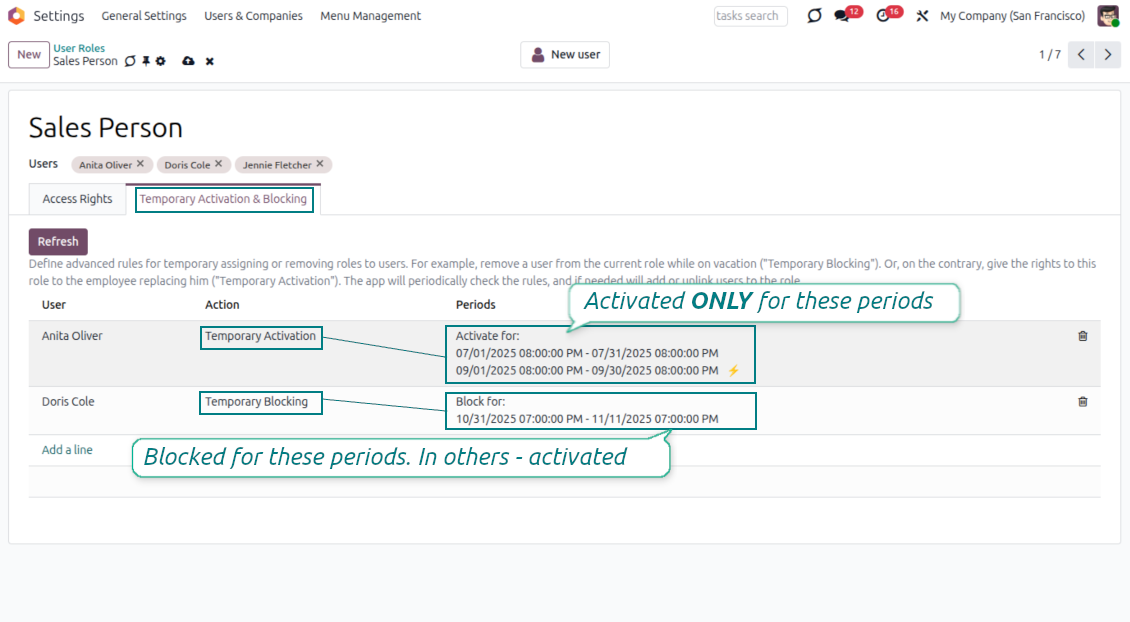
- Set advanced rules to assign a user to a role temporarily, or remove that role for a planned period.
- Add the rule from the Temporary Activation and Blocking tab on the role form.
- Keep one rule per user and role, then add as many periods as that rule needs.
Activate or block automatically
- Use blocking periods for vacations or time off: the user loses the role only during those intervals and is restored afterward.
- Use activation periods for substitutes, temporary employees, or short-term projects that need access only inside a defined window.
- The scheduled job [Security User Roles] Activate/Block Users for Roles checks the periods automatically; a role can also be refreshed manually.
Ready to evaluate?
Start with a free demo request or purchase in the Odoo Apps Store.
Free personalized demo. No phone number or credit card required. Free life-time updates and expert support within the major Odoo version.
Create roles from real users
Turn an existing access setup into a reusable security template
Start from an existing user
- Open a configured user and click Create Role to prepare a role with the same access groups.
- Adjust the role before saving, without changing the original user used as a template.
Create users from prepared roles
- Create a new user directly from a security role, with groups and the role already prefilled.
- Configure role access through the familiar Odoo user-rights interface, so administrators do not learn a separate security model.
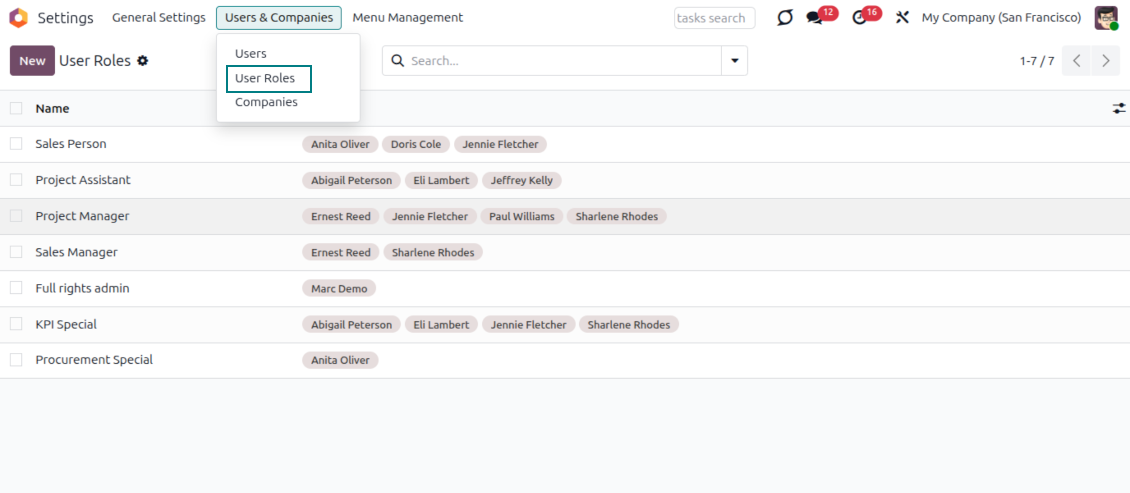
Control multi-role access at a glance
Combine role-based rights and keep user-role assignments visible
Combine roles without conflicts
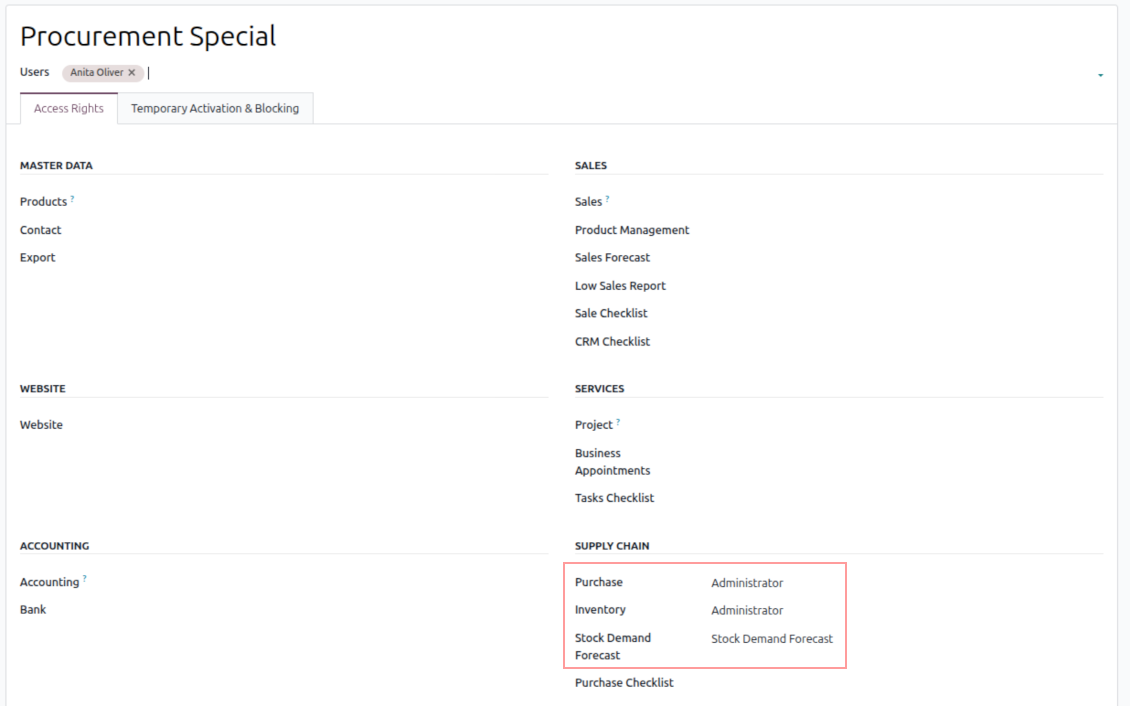
- Assign several roles to the same user when one job combines several responsibilities.
- When roles touch the same access area, Odoo applies the highest available right and recalculates the user groups automatically.
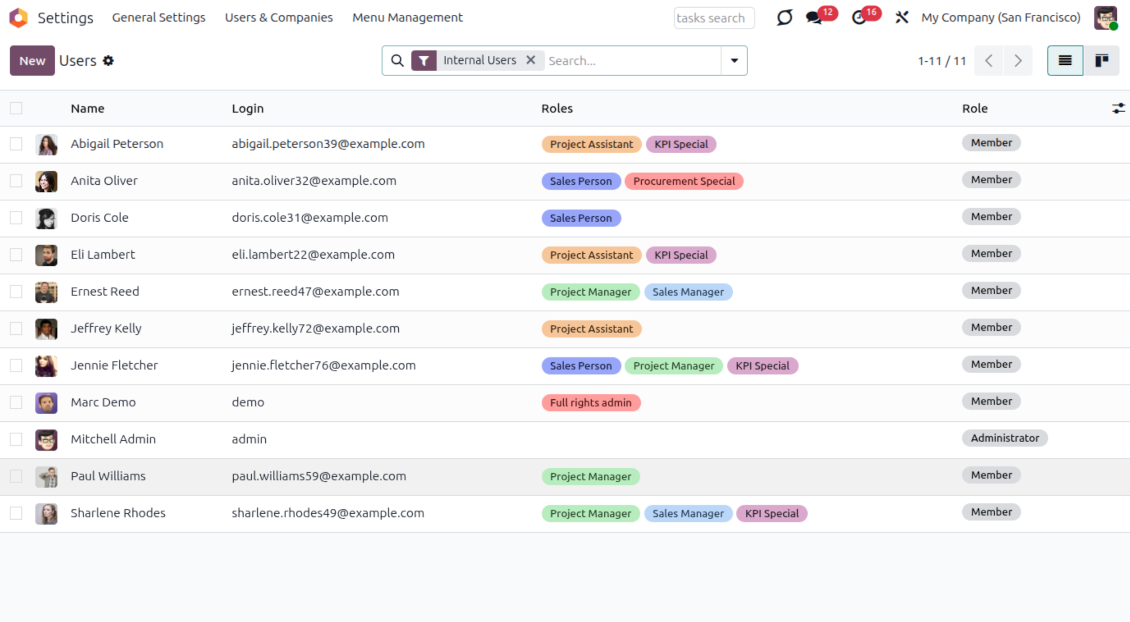
See roles directly on users
- The Users kanban displays assigned roles, so administrators can understand access sources faster.
- Role colors can highlight important assignments, or be hidden from kanban when a role should stay visually quiet.
Odoo demonstration databases (live previews)
For this app, we might provide a free personalized demo database.
You do not need a phone number or credit card to contact us. You should only pass a short email sign-up, which does not take more than 30 seconds.
By your request, we will prepare an individual live preview database, where you can apply any tests and check assumptions for about two weeks.
Bug reporting
If you encounter bugs or inconsistent behavior, do not hesitate to contact us. We guarantee to provide fixes within 60 days of purchase and are intensely interested in improving our tools even after this period.
You do not need a phone number or credit card to contact us. You should only pass a short email sign-up, which does not take more than 30 seconds.
Please include as many details as possible in your request: screenshots, Odoo server logs, a full description of how to reproduce your problem, and so on. Usually, it takes a few business days to prepare a working plan for an issue (if a bug is confirmed) or provide you with guidelines on what should be done (otherwise).
Public features requests and module ideas (free development)
We are strongly motivated to improve our tools and would be grateful for any feedback. If your requirements are of public use and might be efficiently implemented, the team will include those in our to-do list.
Such a to-do list is processed regularly and does not assume extra fees. Although we cannot promise deadlines and final design, it might be a good way to get desired features without investments and risks.
You do not need a phone number or credit card to contact us. You should only pass a short email sign-up, which does not take more than 30 seconds.
19.0.1.1.10
- Fixed the issue with passing invisible tests.
19.0.1.1.9
- The standard Odoo "Administrator" option has been reflected.
19.0.1.1.7
- The app is published to version 19.
18.0.1.1.7
- The issue with the untranslated warnings has been fixed.
18.0.1.1.5
- The archived ribbon for inactive records is added for the form view of user roles.
18.0.1.1.4
- The app is published to version 18.
17.0.1.1.4
- Let users handle their notification preferences without reassigning that after the roles' updates.
17.0.1.1.3
- The mechanic to update user groups based on roles is optimized to catch unexpected errors.
17.0.1.1.2
- The app gets its own configuration page.
- The feature to optionally show technical user groups on roles' forms without developer mode is added.
17.0.1.0.5
- The app is published to version 17.

The tool to flexibly structure Odoo attachments in folders and synchronize directories with cloud clients: Google Drive, OneDrive/SharePoint, Nextcloud/ownCloud, Dropbox, Amazon S3, Box, and NAS. DMS. File Manager. Document management system
398€
The tool to build a deep and structured knowledge base for internal and external use. Knowledge System. KMS. Wiki-like revisions.
398€

The tool to automatically synchronize Odoo attachments with OneDrive files in both ways
487€
The tool to manage your Odoo from your favorite AI chats through MCP. Claude. Any MCP-supporting AI.
198€
The tool to set up KPI targets and control their fulfillment by periods. KPI dashboards. Dashboard designer. KPI charts
198€
The tool for time-based service management from booking appointments to sales and reviews
398€

The tool to plan, share and control employees shifts in a form of weekly timetables. Work schedule. Work shift calendar
98€