Stock Demand Trends and Forecast v.12
The tool to calculate stock demand trends and make prediction for future demand statistically. Stock Forecast




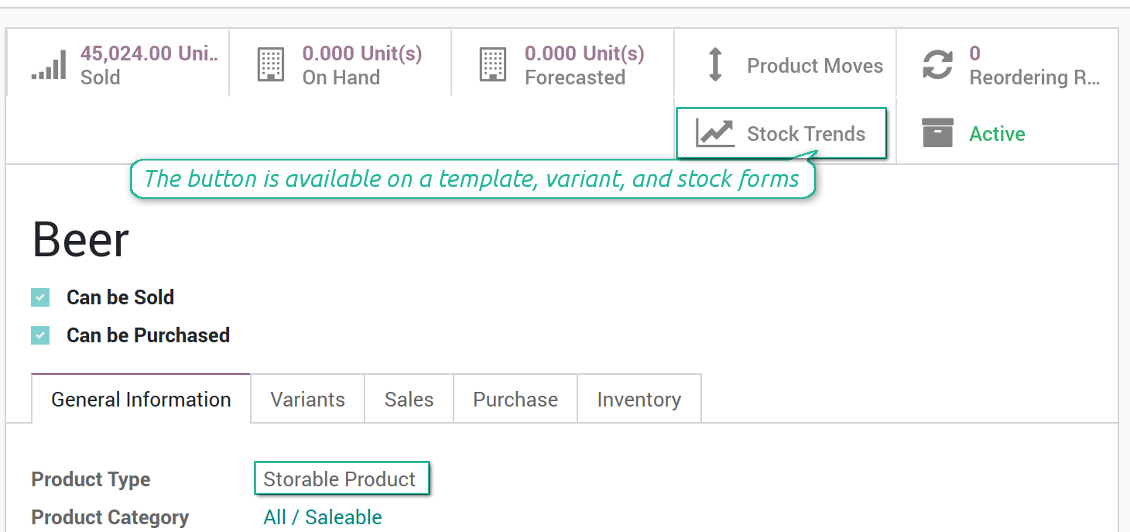

When this tool should be used
- You have enough historical stock demand data (per location or company), since it is senseless to make forecast based on last 5 days of operations.
- Stock demand is regular and is not chaotic, meaning that your decisions do not have 100% impact and there is at least some correlation between market demand and your WMS operations.
- You consider seasonal changes and/or trends, which you noticed but can't fully analyze. You understand which assumptions you try to check.
- You have clear understanding how statistics works.
Stock demand forecasting interface
The right for trends analysis might be granted to any WMS user, but be cautious: all stock moves of a current company will be under consideration.
Ekran Görüntüleri
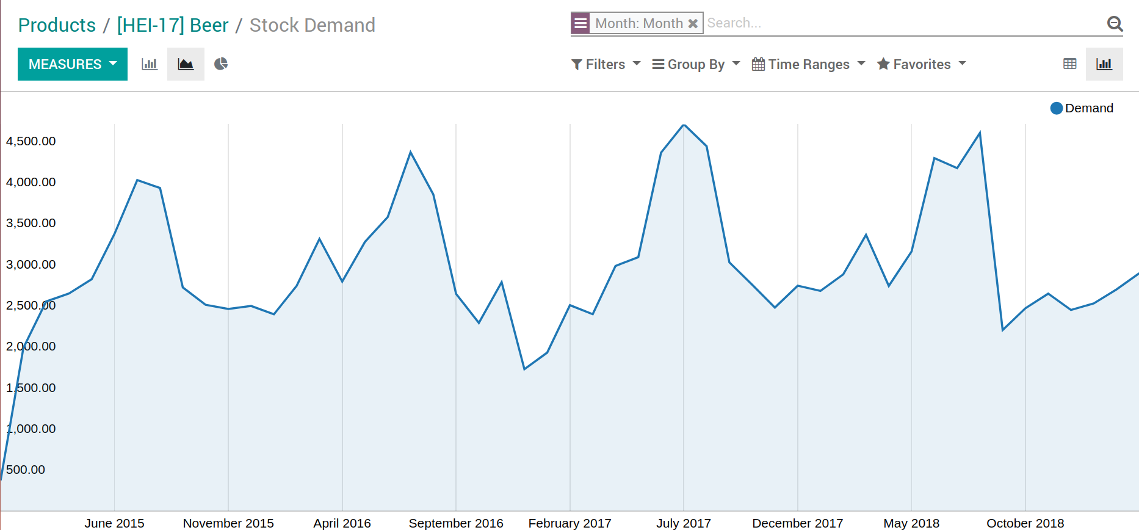
Stock demand trends and forecast chart
Stock demand trends and forecast as an xlsx table
Odoo pivot view of stock trends and forecast
Stock demand forecast in a few clicks
Grant the right for the forecast report
Scientific approach for forecasting
Forecast as many intervals as you like, but remember that prediction for the next 10 years would be hardly reliable.
Based on your historical data and applied coefficients, sometimes Odoo is not able to reveal trends and make forecasts. In that case only historical data would be shown in reports. But even historical trends might have analytical use.
Statistical methods for forecast
Autoregression (AutoReg)
It is the simplest but still widely used statistical method for time series forecast.
Autoregressive Distributed Lag (ARDR)
The moving average method takes into account 'errors' in previous observations.
The autoregressive moving average method is a combination of both AR and MA methods. To apply the ARMA method use the MA method with auto regression coefficient (P coefficient) as 2
Autoregressive Integrated Moving Average (ARIMA)
The method which also combines the methods AR and MA, but also tries to make data stationary. It is appropriate to use for historical data with pure trend but without seasonal changes.
Seasonal Autoregressive Integrated Moving-Average (SARIMA)
The SARIMA method enriches the ARIMA method with considering seasonal changes. It is one of the most complex and wide spread methods utilized for forecasting time series now
Simple Exponential Smoothing (SES)
The SES model usage is similar to the AR method, but instead of relying upon linear function, it exploits exponential one
Holt Winter's Exponential Smoothing (HWES)
The HWES method enriches the SES method to work with time series trends and seasonal effects.
Ekran Görüntüleri
Experiment with various statistical models
Topical data under consideration
Make analysis per the whole company or per a definite location. In the latter case optionally include or exclude child locations.
Apply time frames of historical data which is used as an analytic basis. Forecast periods are ones which follow after the end of defined frame. In such a way you make check statistical reliability 'predicting' actually passed intervals.
Stock demand is calculated as all done stock moves for this period which source location is one of internal location under consideration and which destination location is not of this range.
Ekran Görüntüleri
Target your analysis by locations
Yapılandırma ve kurulum ipuçları: Stock Demand Trends and Forecast Odoo v.12
Python dependencies
To guarantee tool correct work you would need a number of Python libraries: pandas, numpy, statsmodels, scipy, xlsxwriter. To install those packages execute the command:
pip3 install pandas numpy statsmodels scipy xlsxwriter
If you run Odoo on Python prior or equal to version 3.7, please install the following versions of the packages pandas==1.3.5, statsmodels==0.13.1
Default values
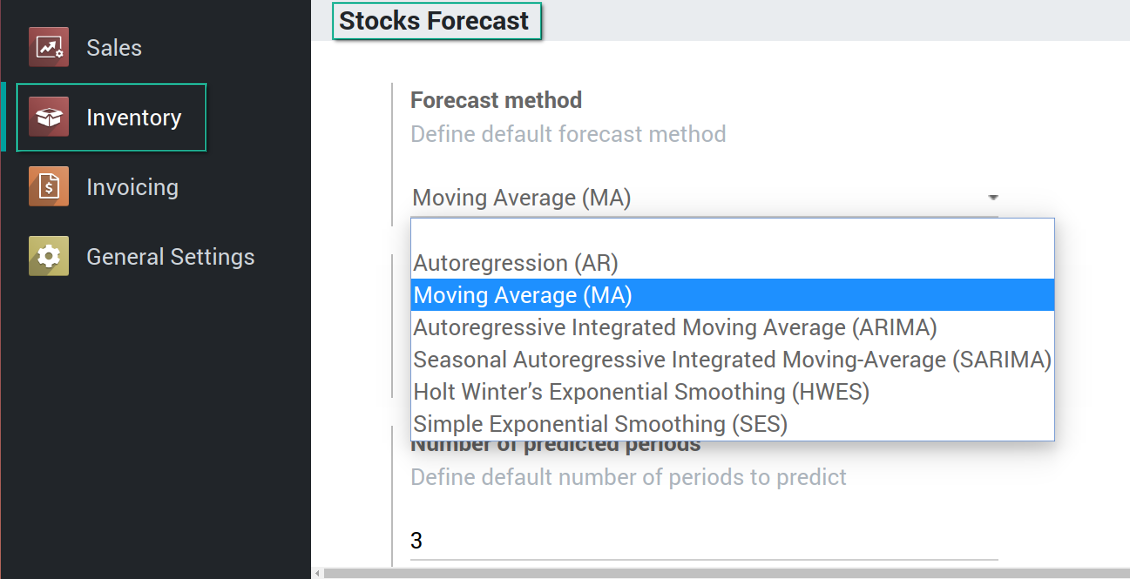
Demand trends and forecast configuration
Hakkında sık sorulan sorular Stock Demand Trends and Forecast Odoo v.12
Araclarinizin güncelleme politikalari nedir?
Güncel Odoo Apps Store politikalarina göre:
- 12.0 ve önceki sürüm için alinan her modül, 12.0'a kadar tum surumlere erişim verir.
- 13.0 surumunden itibaren her modül sürümü ayri satin alinmalidir.
- Surumden bagimsiz olarak satin alma, o ana sürüm içindeki tum güncelleme ve hata duzeltmelerine hak verir.
faOtools ekibi bu politikalari kontrol etmez. Sorulariniz için doğrudan Odoo Apps Store temsilcilerine ulasin.
Uygulamanizi Odoo.sh üzerine nasil kurarim?
En doğrudan yaklasim, Odoo magazasinin yerlesik is akisidir:
1. Modül sayfasini acin ve Deploy on odoo.sh düğmesine tiklayin
2. GitHub sayfasina yonlendirilirsiniz. Hesabiniza giriş yapin, ardindan Create a new repo'ya tiklayin veya mevcut birini kullanin. Depo özel olmalidir. OPL-1 lisansli uygulamalarin yayimlanmasi yasaktir. Gerekirse Odoo.sh projeniz için yeni bir depo oluşturun
3. Ardindan odoo.sh'e gidin, Deploy'a tiklayin, karari onaylayin ve Continue'ya tiklayin. Kurulum başlar.
Bu adimlar uygulamayi projenin production dalina kurar. Diğer dallar veya modül guncellemesi için:
1. Kaynak kodu Odoo magazasindan indirin
2. Modulu gerekli GitHub deposuna commit edin. Hiçbir uygulama klasörü/dosyasi .gitignore'da olmamalidir. odoo.sh'in oluşturduğu depolar varsayilan olarak önemli yollari (örneğin /lib) yok sayabilir. Tum modül dizinlerini ve dosyalarini istisnasiz yükleyin
3. odoo.sh projesinin hedef dalini deploy edin veya ayarlariniz otomatik derlemeyi ongoruyorsa bekleyin.
Uygulamayi kendi sunucuma nasil kurarim?
2. Odoo sunucusunu yeniden baslatin;
3. Gelistirici modunu acin (teknik ayarlar);
4. Uygulama listesini güncelleyin (Uygulamalar menusu);
5. Uygulamayi bulun ve Activate/Install düğmesine basin;
6. Varsa uygulama sayfasindaki yonergeyi izleyin.
Uygulamanizin ek eklentileri var. Sonradan alabilir miyim?
Evet. Odoo tum bagimliliklari sepete otomatik ekler: çift odemeyi onlemek için daha önce satin alinan araclari cikarin.
Uygulamayi Odoo.sh üzerine kurdum ve testlerde uyari/hata goruyorum
Kirmizi/turuncu uyari uygulamanin özelliklerini etkilemez. Bazen modüllerimiz standart otomatik testleri gecemez, çünkü bunlar uygulamamizin amaclarina aykiri davranis bekler. Örneğin fiyati farkli hesaplariz, Odoo testleri ise nihai fiyati standart algoritmayla karsilastirir.
Önce dagitilan veritabaninin özelliklerini kontrol edin. Her sey doğru calisiyor mu?
Uyarinin gerçek özellikleri etkiledigini dusunuyorsaniz bize yazin; tam kurulum günlüklerini ve dagitilan modüllerin tam listesini (çekirdek ve üçüncü taraf) gönderin.
Uygulamanizi doğrudan sizden satin alabilir miyim?
Hayir, araclari yalnizca resmi Odoo uygulama magazasi üzerinden dagitiyoruz.
Indirim almak istiyorum
Ne yazik ki bireysel fiyat sunacak teknik imkanimiz yok.
Uygulamayi Odoo Online (SaaS) veritabanima kurabilir miyim?
Hayir, üçüncü taraf uygulamalar Odoo Online'da kullanilamaz. Odoo SaaS bunu engeller.
Aracinizin başka uygulamalara bagimliligi var. Onlari da almali miyim?
Evet, aracimizin doğru calismasi için bagimliliklarda isaretlenen tum modullere ihtiyaci vardir. Uygulama sayfasindaki fiyat bu bagimliliklari zaten içerir.
Modulun ABD dolari fiyati nedir? Neden değişti?
Modullerimizin fiyati euro cinsinden belirlenir. Odoo magazasi fiyatlari kendi ic kuruna göre diğer para birimlerine çevirir. Bu yüzden ABD dolari fiyati kur guncellendiginde degisebilir.
İngilizce dışındaki dillerdeki uygulama ve web sitesi metinleri yapay zeka desteklidir ve resmi Odoo çevirileriyle hizalanır. Bir hata görürseniz, çeviri doğruluğu bileti gönderin ve düzeltiriz.
Hata bildirimi
Hata veya tutarsız davranış görürseniz bize yazın. Satın alımdan sonra 60 gün içinde düzeltme garantisi veririz; bu süreden sonra da araçları geliştirmeye devam ederiz.
Bize yazmak için telefon veya kredi kartı gerekmez. Yalnızca 30 saniyeyi aşmayan kısa e-posta kaydı yeter.
İstekte mümkün olduğunca ayrıntı verin: ekran görüntüleri, Odoo sunucu günlükleri, sorunu nasıl yeniden üreteceğinizin tam açıklaması. Genellikle birkaç iş günü içinde (hata doğrulanırsa) çalışma planı veya (değilse) yönergeler hazırlanır.
Genel özellik talepleri ve modül fikirleri (ücretsiz geliştirme)
Araçlarımızı geliştirmeye güçlü şekilde motiveyiz ve her geri bildirime minnettarız. Gereksinimleriniz kamuya yararlıysa ve verimli uygulanabilirse ekip bunları yapılacaklar listesine alır.
Böyle bir yapılacaklar listesi düzenli işlenir ve ek ücret varsaymaz. Son tarihler ve nihai tasarım sözü veremesek de istenen özellikleri yatırım ve risk olmadan almanın iyi bir yolu olabilir.
Bize yazmak için telefon veya kredi kartı gerekmez. Yalnızca 30 saniyeyi aşmayan kısa e-posta kaydı yeter.

Odoo eklerini klasörlerde esnek yapılandıran ve dizinleri bulut istemcileriyle senkronize eden araç: Google Drive, OneDrive/SharePoint, Nextcloud/ownCloud, Dropbox, Amazon S3, Box ve NAS. DMS. Dosya Yöneticisi. Belge yönetim sistemi
398€
Odoo'da paylaşarak kullanmak üzere parolaları güvenle saklama aracı. Paylaşılan kasalar

İç ve dış kullanım için derin ve yapılandırılmış bir bilgi bankası kurma aracı. Knowledge System. KMS. Wiki benzeri revizyonlar.
398€
otomatik olarak senkronize et Odoo ekler ile OneDrive dosyalar içinde her iki ways
487€
KPI hedeflerini kurmak ve dönemlere göre gerçekleşmeyi denetlemek için araç. KPI gösterge panelleri. Gösterge paneli tasarımcısı. KPI grafikleri

Randevu rezervasyonundan satış ve değerlendirmelere zaman tabanlı hizmet yönetimi aracı
398€
otomatik olarak senkronize et Odoo ekler ile Google Drive dosyalar içinde her iki ways
487€
Nitelik katsayıları ve ek ücretlere göre varyant fiyatlarını yapılandırma aracı
98€