KPI Balanced Scorecard v.16
The tool to set up KPI targets and control their fulfillment by periods. KPI dashboards. Dashboard designer. KPI charts

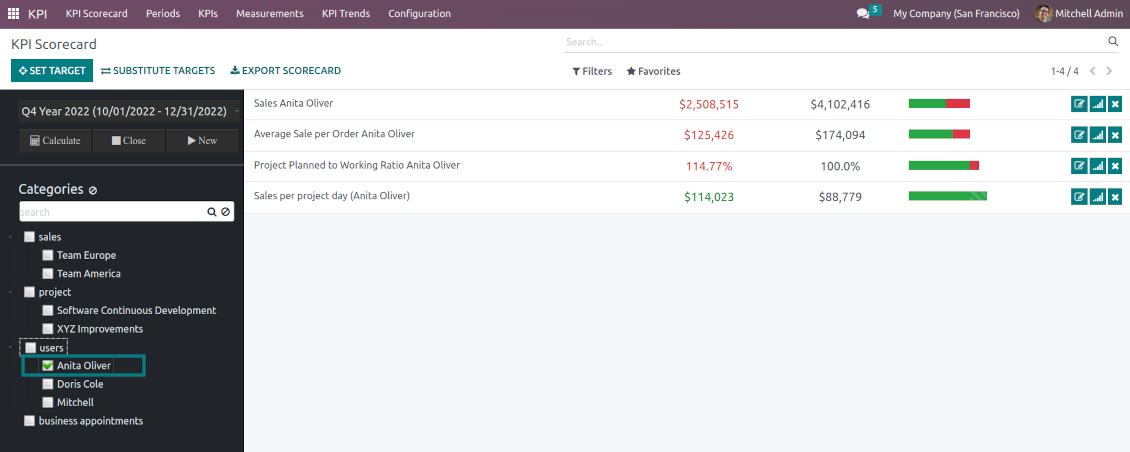

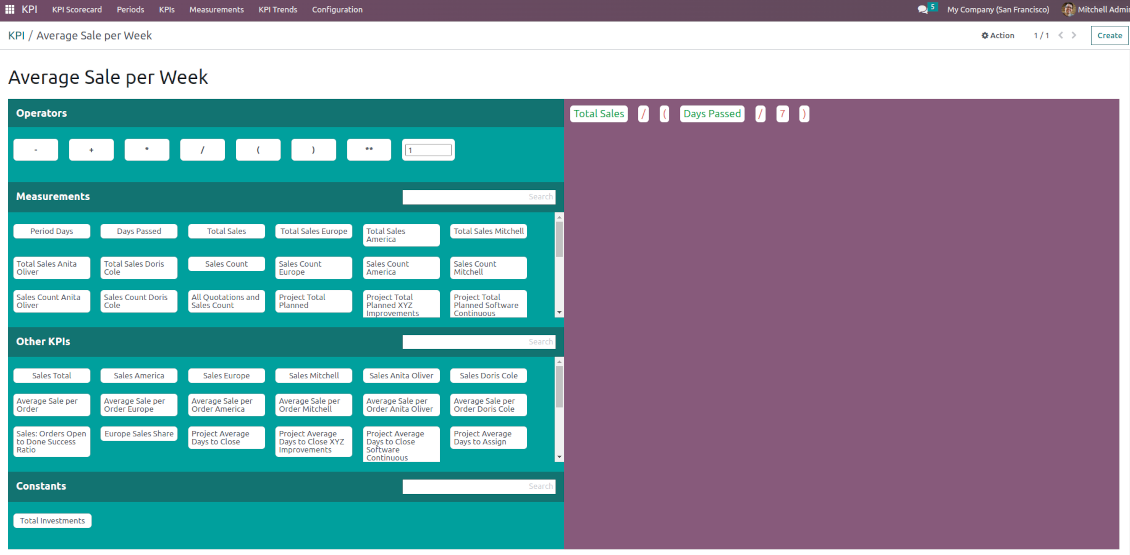
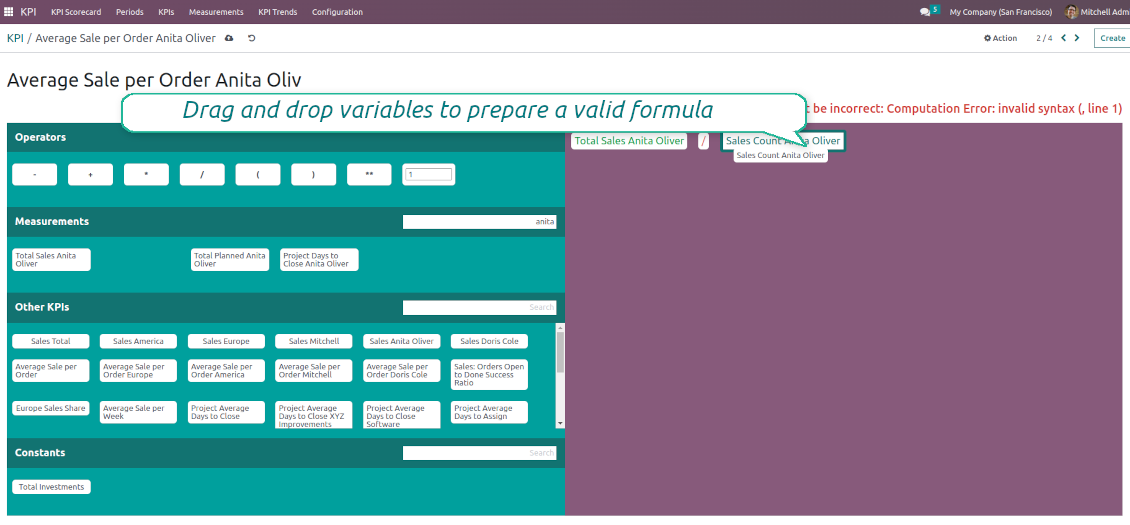
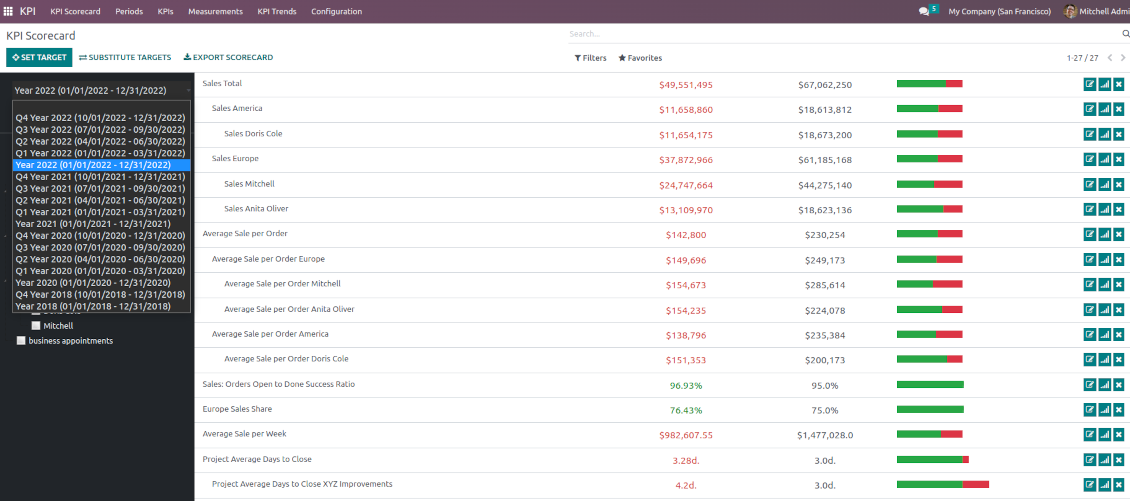
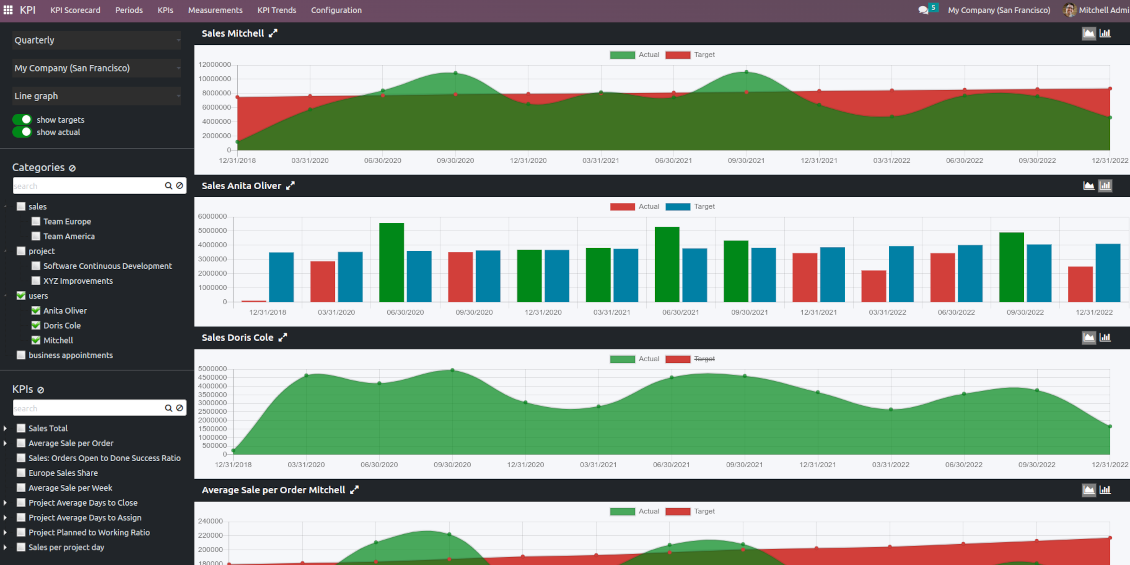




The app introduces a KPI dashboard to manage company and personal targets. The tool helps to organize work as a set of periodical goals and to control those goals in any business or functional area.
Set KPI targets by periods
The scorecard is not just a dashboard, but it is a tool to set and control measurable and time-constrained targets. Both company and individual
Use any Odoo data to calculate KPIs
The app introduces a clear system to get any Odoo storable details: a count of records, a sum or an average of numeric fields, pure Python code
Drag and Drop interface for KPI formulas
Construct advanced formulas to calculate derivative KPIs. The complexity of each scorecard is totally up to you!
Managerial and self-control
Share KPI targets with interested users to organize a transparent dashboard of goals: from global to very specific ones
Structured hierarchically, by categories, and by tags
Consider only those KPIs which are of interest: for example, only sales-related or of a definite user. Hierarchy allows highlighting targets with indicative padding for an instant overview of sub-KPIs
KPIs are auto and regularly updated
Actual values are re-calculated by the special Odoo cron job. It is always possible to understand which KPIs require more attention in real-time at a first glance.
Real-time control and historical trends
-
KPIs values are calculated for a specific period according to chosen date fields (e.g. quotations by 'order date')
-
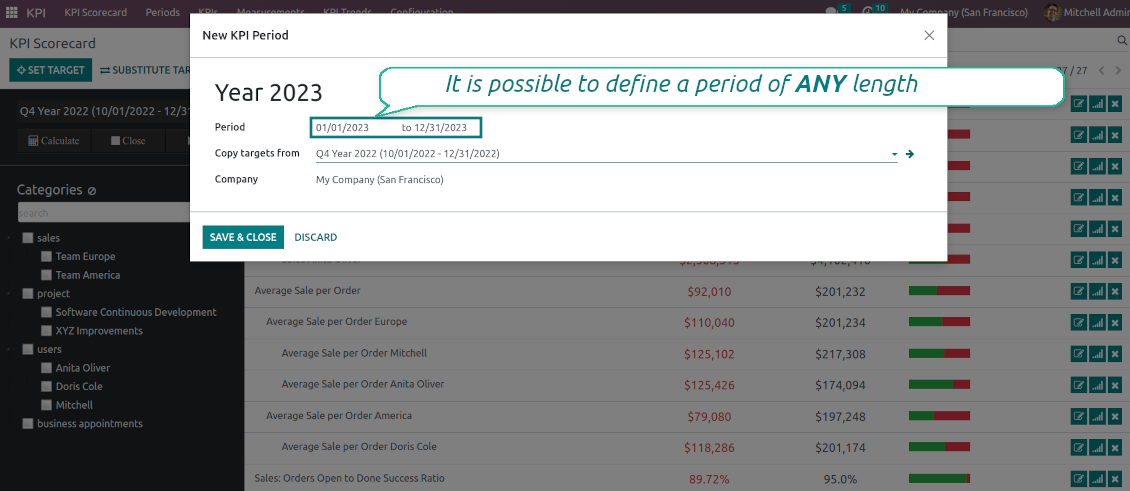
Plan KPI periods of any duration: annual, quarterly, monthly, weekly, 10-days-long, etc. KPI periods might intersect and might be different for various business areas
-
By default, KPI targets of a current period are shown for an instant overview
-
Navigate between various KPI categories and future/past KPI periods in a few clicks from the same Odoo dashboard
-
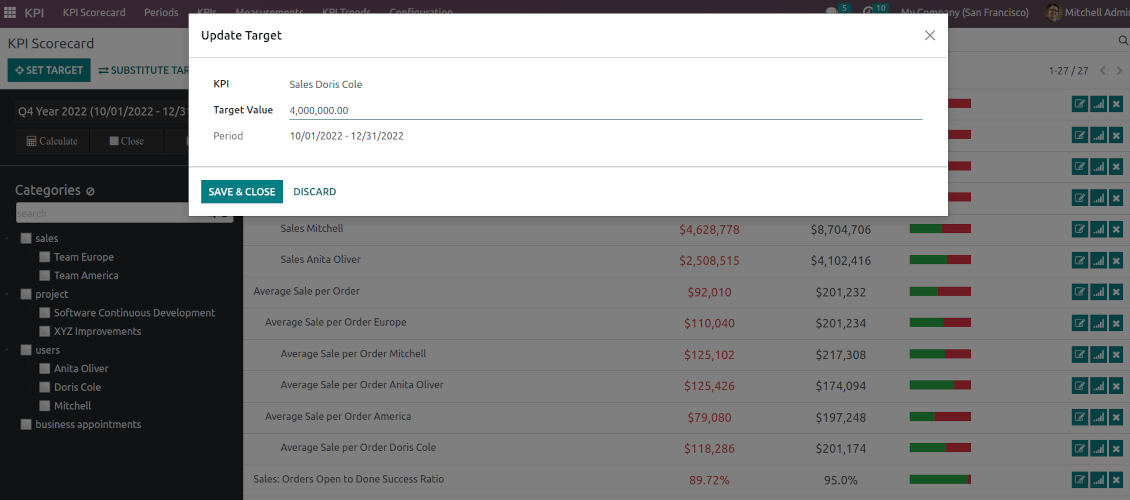
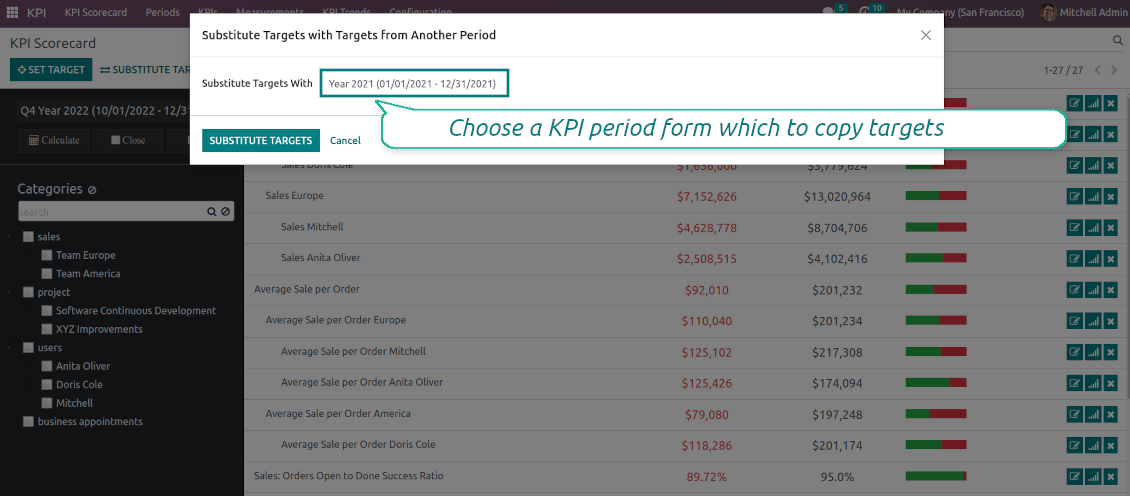
Copy or substitute KPI targets from other periods to simplify goals setting
-
Close KPI periods as it is done for fiscal and accounting purposes. It not only holds the past values but also allows also speed calculations up
-
Control KPI historical values by periods. The graph and history table is available for each target line
-
KPI admins access the special KPI trends interface to analyze KPI targets by custom period types. Build bar and line charts. Filter by KPI categories or KPIs. Show only target or actual values
-
The app automatically calculates period types to compare in the report. Just define historical tolerance: e.g 2-days tolerance - for quarterly periods (90-92 days), 3-days - for months (28-31 days), etc.
-
Export scorecards as an Excel table if you need
-
KPI periods and KPI targets are set up for each company individually (multi companies environment).
Drag-and-drop formulas for KPIs
-
KPI construction is as simple as it is to write down a mathematical expression: just drag and drop the parts in the right order with the correct operators
-
Odoo would automatically retrieve data from a database according to a defined parts order for a specified period
-
Formulas might be as complex as you require. Merely make sure the operators (subtraction, addition, multiplication, division, exponentiation, brackets, any float number) comply with basic Math rules.
-
For each KPI configure a prefix and a suffix to make results nice looking
-
Define rounding rules from 0 to 4 decimal points (1 > 1.2 > 1.23 > 1.235 > 1.2346)
-
KPI variables indicate the rules of how to get data. For example, 'total number of sales orders' or 'number of quotations of sales team Europe'
-
Other KPIs - the parts used for derivative calculation. For example, 'Opportunity to sales success ratio' based on KPIs 'Sales count' and 'Opportunities count'
-
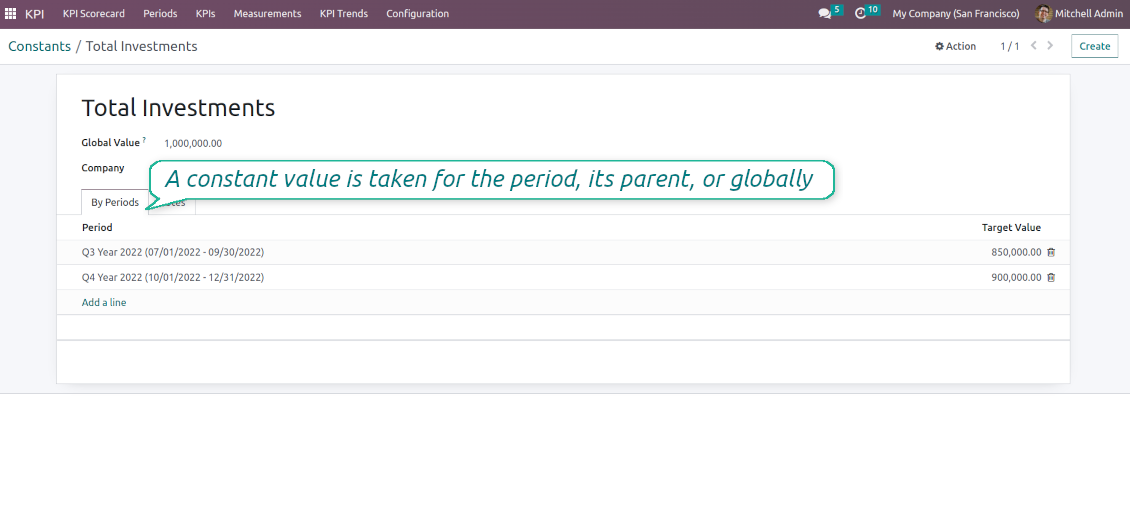
KPI constants - the parts which are frozen globally or for a specific time frame. Needed for figures which can't be retrieved from modules and/or which should remain the same during a period
-
'Period Days' is an interval length in days. 'Days Passed' is the length between the period start and today (if today is before the period end; otherwise period end). Those parameters let calculate per-time KPIs, such as, for example, 'Average sales per week'.
Shared KPIs and self-control
-
Full rights for scorecards, all KPIs, targets, and settings belong to users with the right 'KPI Management - KPI manager'. The group 'KPI Management - KPI Users' is allowed to observe the KPI interface and manage shared KPI settings
-
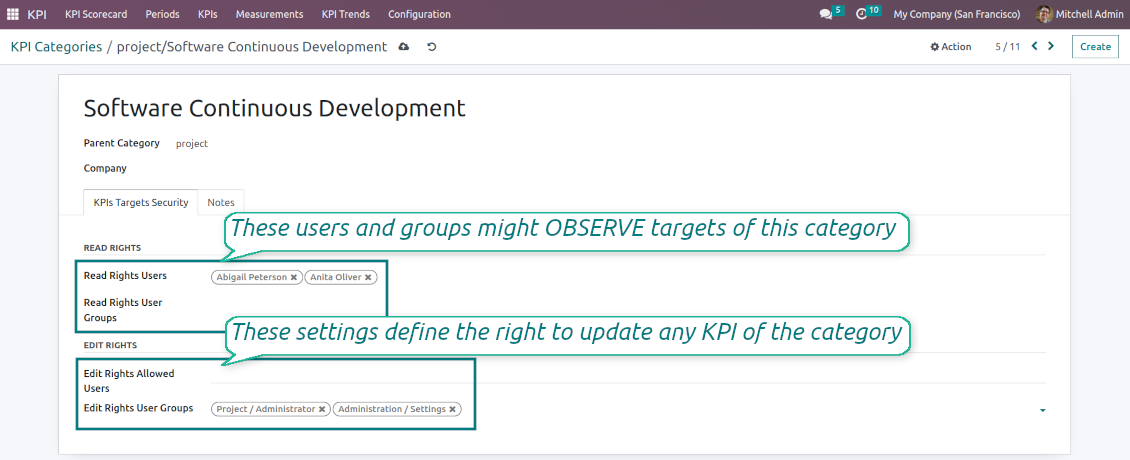
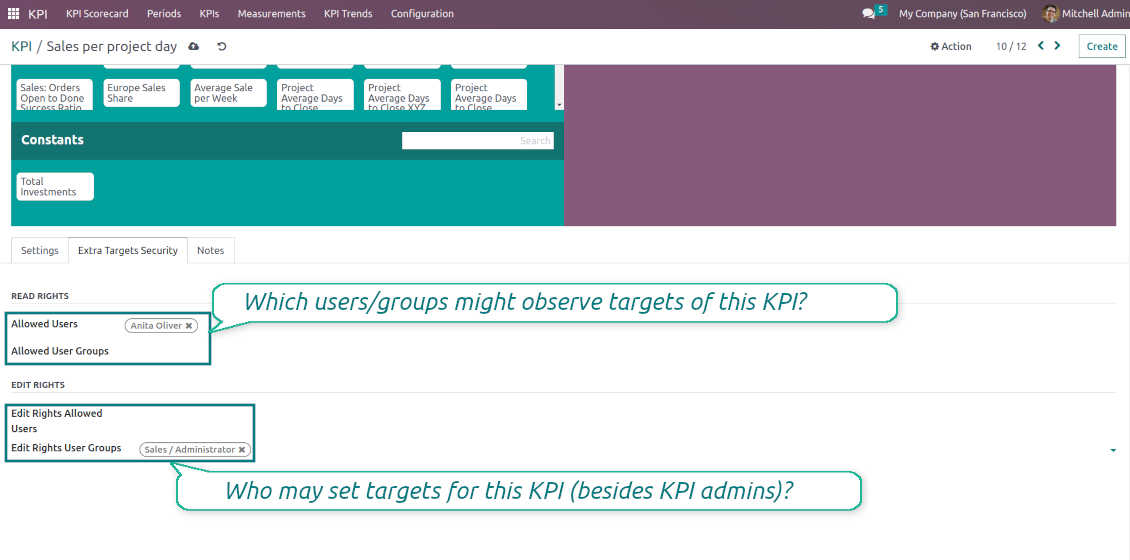
Categories of KPIs and/or individual KPI targets might be shared for specific users or user groups
-
It is possible to both grant read-only or editor rights
-
Read-only access for a target lets users only observe shared KPIs
-
The section 'Edit rights' on category or KPI forms will also allow us to set and change targets. The latter might be useful in case you ask your manager to manage goals within a department, for example
-
The security settings are additive - not restrictive. KPI managers will have full rights for all KPIs disregarding the settings, while KPI users will have rights only to KPIs which settings (or category settings) allow them so
-
The tool supports multi companies: so, make sure the user company correlates with a KPI dashboard company.
KPI settings to process Odoo data
Any storable data
-
Preparing the basis for KPIs' calculation is not a simple task. The good news is that such a job should be done only once, while results are used forever
-
KPI Settings assume 3 levels of precision: (1) basic measurements - (2) KPI variables and constants - (3) KPI drag and drop formulas
-
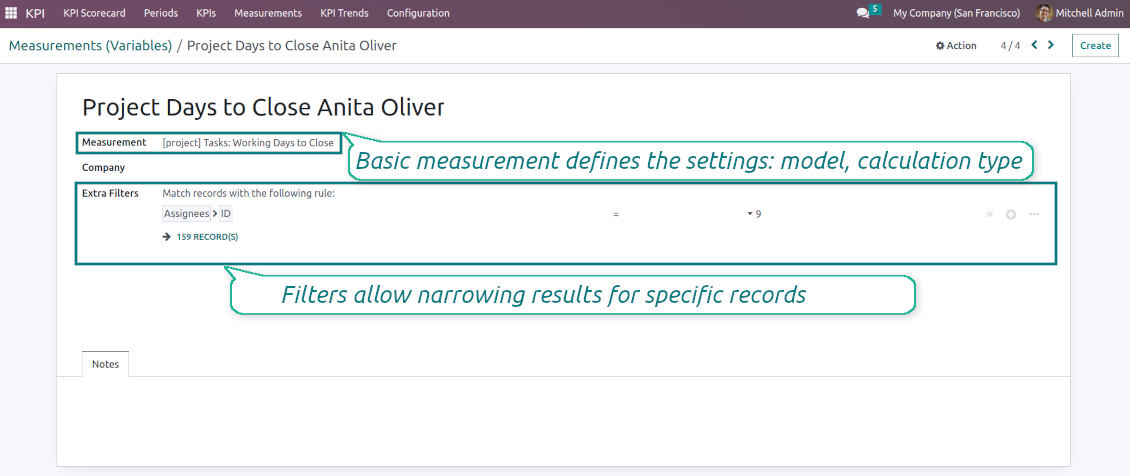
Basic measurement is the core object used for retrieving actual KPI values from the Odoo database, while KPI variables specify those. For example, 'total number of sales orders' should be a basic measurement, while narrower 'number of quotations of the sales team Europe' is recommended to be a precision of that basic measurement
-
Each basic measurement might have an unlimited number of linked KPI variables. KPI formulas might combine any number of variables, constants, and other KPIs with mathematical operators.
Python code measurements
-
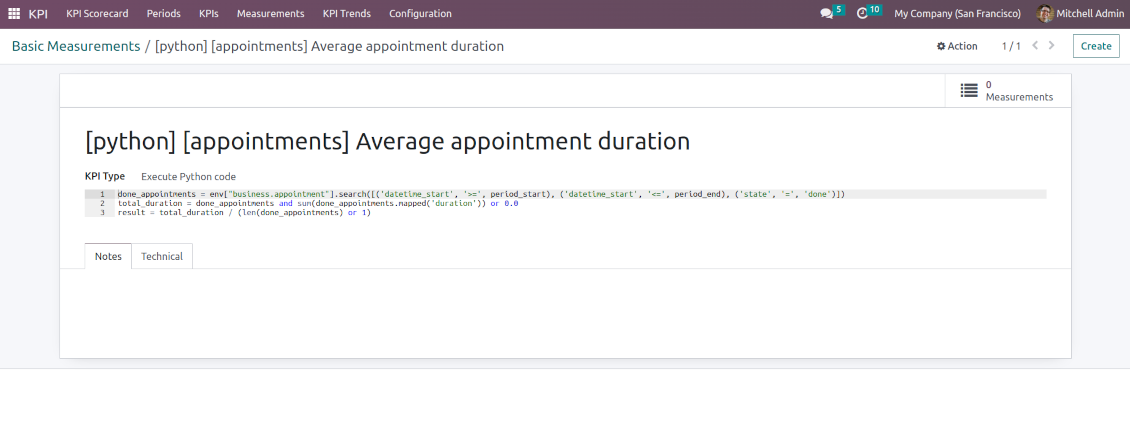
'Python code' is a special type of basic measurement. This type requires technical knowledge but lets you compute any sort of figures based on any Odoo data without restrictions
-
Such measurement might be any Python basic script with the possibility of SQL queries (through using 'env.cr')
-
In calculations you may rely upon the special variables: 'period_start' (the first date of the period), 'period_end' (the last date of the period), 'period_company_id' - res.company object for which Odoo makes calculations at the moment (according to a KPI period under consideration)
-
Correct Python code assumes saving the value into the special variable 'result'.
Basic measurements
-
Basic measurements are not used for formulas, but they define how Odoo data should be calculated: count of records, sum, average, and pure Python code. Basic measurements assume a number of settings
-
Model - an Odoo document type with which data set you to work ('Sales Order', 'Task', etc.). Here you can rely on standard or custom objects (including those created in the Odoo studio), Odoo reports
-
Date fields - define whether a document relates to a KPI period. For example, for tasks, you might use 'create date'. It is possible to apply a few date fields (e.g. 'Opportunities opened and won in January 2021') or no date fields at all for global calculations
-
Filters - allow restrict set of records. Used for low-level filtering and then specified in KPI variables
-
Measure field - is required for calculation types 'Average' and 'Sum'. It defines which figure you use for calculations. For example, 'total amount' of Sales Analysis Report or 'work hours of tasks'
-
Company field - would be used to restrict calculation for a KPI period target company. Take into account that records without a company will be used for all companies' KPI calculations.
KPI variables and constants
-
The key idea to distinguishing KPI variables from basic measurements is to simplify data preparation. You define 'total sales' once, and then unlimitedly use it for 'sales Europe', 'sales John Brown', 'website sales', etc.
-
Specify basic measurements through the Odoo built-in domain constructor, which lets filter by any storable attributes. For instance, filter sale orders by state (only 'done'), the salesperson ('John Brown or Mike Green'), sales team, etc.
-
KPI constants are the special type of KPI variables used when data can not be retrieved from modules and/or when figures remain the same during the whole period. For example, 'total investments' or 'number of employees' are often frozen for a specific period
-
In a multi-company environment, KPI variables are applied globally or for each company. In the former case, that variable is available for any company KPI formulas, while in the latter - only for a specific one
-
Basic measurements of the type 'Execute Python code' can't be any more specified, since they do not relate to any records. Such measurements should have a single KPI variable linked.
Советы по настройке и установке для KPI Balanced Scorecard Odoo v.16
Scheduled jobs
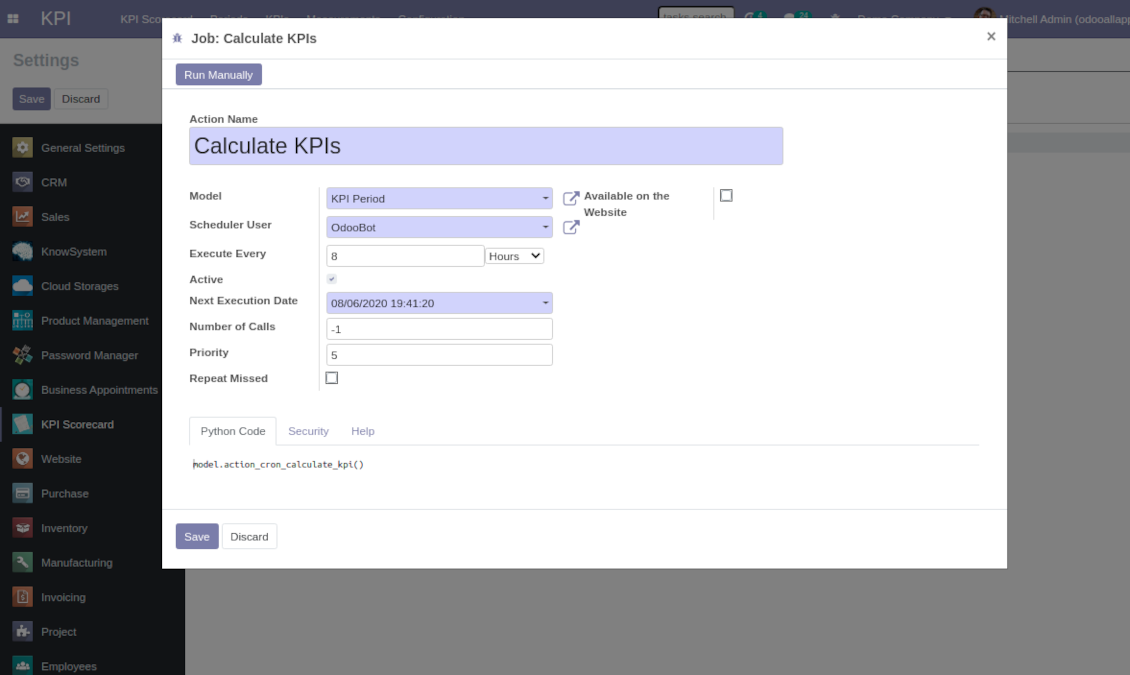
To change the frequency of KPI targets' recalculation:
- Turn on the debug mode
- Go to the menu KPI > Configuration > Settings
- Find the button 'Configure cron job'
- Feel free to update the settings 'Execute Every' and 'Next Execution Date'. However, please do not make it too frequent (e.g. once in 5 minutes). Since the job is resource demanding, it require at least a few minutes to be fully and correctly finished.
Change frequency of KPIs re-calculatinon
Часто задаваемые вопросы о KPI Balanced Scorecard Odoo v.16
Я создал Basic Measurement, но не вижу его в мастере формул.
Basic Measurements сами по себе в формулу не входят. Даже без дополнительных фильтров создайте связанную Variable — тогда она появится в списке для формулы.
Какие данные можно взять для KPI? Есть ли у модуля свои данные?
Само приложение почти не вводит свои данные (кроме констант KPI как раз для недостающих величин) и интеграций. Оно считает и строит интерфейсы по уже существующим данным Odoo. Например, число заказов на продажу за период берётся из приложения Продажи.
Модуль универсален и читает данные любого модуля Odoo, включая остатки по счетам. Например, прибыль за месяц по счетам (бухгалтерской проводке).
Данные извне Odoo тоже можно взять, если они подключены через модуль Odoo. Например, данные Google Analytics в PostgreSQL Odoo можно использовать для KPI.
Чем Basic Measurements отличаются от Measurements (Variables)?
Measurement (Variable) — уточнение базового измерения. Идея в том, чтобы один раз задать 'Total Sales' и многократно использовать его для 'Sales Europe', 'Sales John Brown', 'Website Sales' и т. д., добавляя фильтры.
Какова политика обновлений ваших инструментов?
По текущим правилам Odoo Apps Store:
- Модуль, купленный для версии 12.0 и ниже, даёт доступ ко всем версиям до 12.0 включительно.
- С версии 13.0 каждую версию модуля нужно покупать отдельно.
- Независимо от версии покупка даёт право на все обновления и исправления в рамках этой мажорной версии.
Команда faOtools эти правила не задаёт. Вопросы направляйте напрямую представителям Odoo Apps Store.
Как установить приложение на Odoo.sh?
Самый прямой способ - встроенный сценарий магазина Odoo:
1. Откройте страницу модуля и нажмите Deploy on odoo.sh
2. Вас перенаправит на GitHub. Войдите в аккаунт и нажмите Create a new repo или выберите существующий. Репозиторий должен быть закрытым: публиковать приложения по лицензии OPL-1 нельзя. При необходимости создайте новый репозиторий для проекта Odoo.sh
3. Затем в odoo.sh нажмите Deploy, подтвердите решение и нажмите Continue. Так запустится установка.
Эти шаги ставят приложение на production-ветку проекта. Для других веток или обновления модуля:
1. Скачайте исходный код из магазина Odoo
2. Закоммитьте модуль в нужный репозиторий GitHub. Ни одна папка или файл приложения не должны попасть в .gitignore. Репозитории, которые создаёт odoo.sh, по умолчанию могут игнорировать важные пути (например /lib). Загрузите все каталоги и файлы модуля без исключений
3. Разверните целевую ветку проекта odoo.sh или дождитесь автоматической сборки, если так настроено.
Как установить приложение на свой сервер?
2. Перезапустите сервер Odoo;
3. Включите режим разработчика (технические настройки);
4. Обновите список приложений (меню приложений);
5. Найдите приложение и нажмите Activate/Install;
6. Следуйте рекомендациям на странице приложения, если они есть.
У приложения есть дополнительные модули. Можно купить их позже?
Да. При этом Odoo сам кладёт все зависимости в корзину: исключите уже купленные инструменты, чтобы не заплатить дважды.
Я развернул приложение на Odoo.sh и вижу предупреждение или ошибку в тестах
Odoo Красное или оранжевое предупреждение не влияет на функции приложения. Иногда наши модули не проходят стандартные автотесты, потому что те ждут поведение, которое противоречит целям приложения. Например, мы меняем расчёт цены, а тесты ядра сравнивают итог со стандартным алгоритмом.
Сначала проверьте саму развёрнутую базу: всё ли работает?
Если всё же считаете, что предупреждение ломает функции, напишите нам и пришлите полные логи установки и полный список установленных модулей (ядро и сторонние).
Можно ли купить приложение напрямую у вас?
Нет, мы распространяем инструменты только через официальный магазин приложений Odoo.
Я хочу получить скидку
К сожалению, у нас нет технической возможности давать индивидуальные цены.
Можно ли поставить приложение на базу Odoo Online (SaaS)?
Нет, сторонние приложения нельзя использовать на Odoo Online. Odoo SaaS это блокирует.
У инструмента есть зависимости. Нужно ли их покупать?
Да, для корректной работы нужны все модули из зависимостей. Цена на странице приложения уже включает необходимые зависимости.
Какова цена модуля в долларах США? Почему она меняется?
Цены на наши модули заданы в евро. Магазин Odoo пересчитывает их в другие валюты по своему внутреннему курсу. Поэтому цена в долларах США может меняться при обновлении курса.
Тексты приложения и веб-сайта на языках, отличных от английского, переведены с помощью ИИ и согласованы с официальными переводами Odoo. Если вы заметили ошибку, отправьте тикет о переводе и мы исправим его.
Демонстрационные базы данных Odoo (предпросмотр)
Для этого приложения мы можем предоставить бесплатную персонализированную демонстрационную базу данных.
Чтобы связаться с нами, вам не нужен номер телефона или кредитная карта. Вам нужно всего лишь пройти короткую регистрацию по электронной почте, которая займет не более 30 секунд.
По вашему запросу мы подготовим отдельную демо базу для предпросмотра, где примерно две недели вы сможете проводить любые тесты и проверять свои предположения.
Отправка отчетов об ошибках
Если вы столкнулись с ошибками или непоследовательным поведением, не стесняйтесь обращаться к нам. Мы гарантируем предоставление исправлений в течение 60 дней с момента покупки и очень заинтересованы в улучшении наших инструментов даже по истечении этого периода.
Чтобы связаться с нами, вам не нужен номер телефона или кредитная карта. Вам нужно всего лишь пройти короткую регистрацию по электронной почте, которая займет не более 30 секунд.
Укажите в запросе как можно больше сведений: снимки экрана, журналы сервера Odoo, полное описание воспроизведения проблемы и так далее. Обычно подготовка рабочего плана по проблеме (если ошибка подтверждена) или рекомендаций по необходимым действиям (в противном случае) занимает несколько рабочих дней.
Запросы на публичные функции и идей модулей (бесплатная разработка)
Мы очень заинтересованы в улучшении наших инструментов и будем благодарны за любые отзывы. Если ваши требования общедоступны и могут быть эффективно реализованы, команда включит их в наш список дел.
Такой список дел обрабатывается регулярно и не предполагает дополнительных комиссий. Хотя мы не можем обещать сроки и окончательный дизайн, это может быть хорошим способом получить желаемые функции без вложений и рисков.
Чтобы связаться с нами, вам не нужен номер телефона или кредитная карта. Вам нужно всего лишь пройти короткую регистрацию по электронной почте, которая займет не более 30 секунд.

The tool to flexibly structure Odoo attachments in folders and synchronize directories with cloud clients: Google Drive, OneDrive/SharePoint, Nextcloud/ownCloud, and Dropbox. DMS. File Manager. Document management system
398€
The tool to automatically synchronize Odoo attachments with OneDrive files in both ways
487€
The tool to automatically synchronize Odoo attachments with Google Drive files in both ways
487€

The tool to build a deep and structured knowledge base for internal and external use. Knowledge System. KMS. Wiki-like revisions.
398€
The tool for time-based service management from booking appointments to sales and reviews
398€
Инструмент, чтобы управлять Odoo из любимых AI-чатов через MCP. Claude. Любой AI с MCP.

The tool to combine different Odoo events in a few configurable super calendars

The tool to translate URL addresses of Odoo website pages
38€