Password Manager v.15
The tool to safely keep passwords in Odoo for shared use. Shared vaults. Encryption






This app lets organize the safe passwords keeping system to structure, find and securely share password bundles.
- a core app to manage vaults and passwords.
Jo kaina yra
198€
178€.
- an extension to add custom fields for password keys. Features assumed by this app are marked by the icon .
Jo kaina yra
38€
37€.
Shared passwords vaults for team use
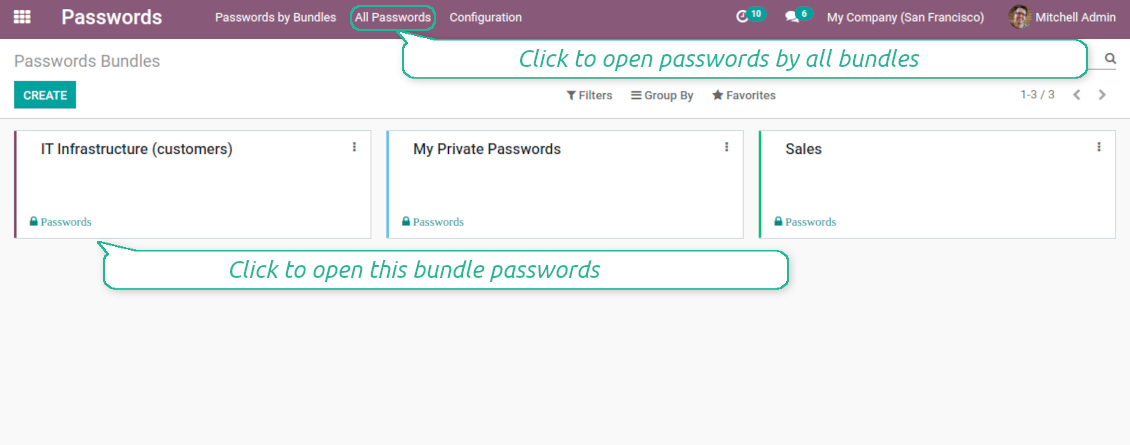
Passwords are combined in bundles: each might be shared with any user and any user group
Single view interface
Structure vault by tags, sort keys, proceed mass actions, copy credentials to buffer from the same interface
Encrypted and protected password manager
The tool introduces a few security layers to minimize the possibility of data leaks
Partners-related passwords
Link passwords with Odoo contacts for a quick access
Auto generation
Force Odoo and let users create passwords based on chosen length and requirements
Passwords quality check
Password strength is estimated in real-time to make sure no weak passwords are introduced. Potential duplicates are easily detected
Batch update, export, and import
Configure your mass actions: export, update tags or partner, archive or restore, import vaults from an electronic table, etc.
Custom fields
Define passwords' typology and add custom attributes.
Very good password management module
Easy installation and quick setup
Shared use, encryption, and protection of passwords
Sharing Policies
-
Have as many password vaults for any user group as you need
-
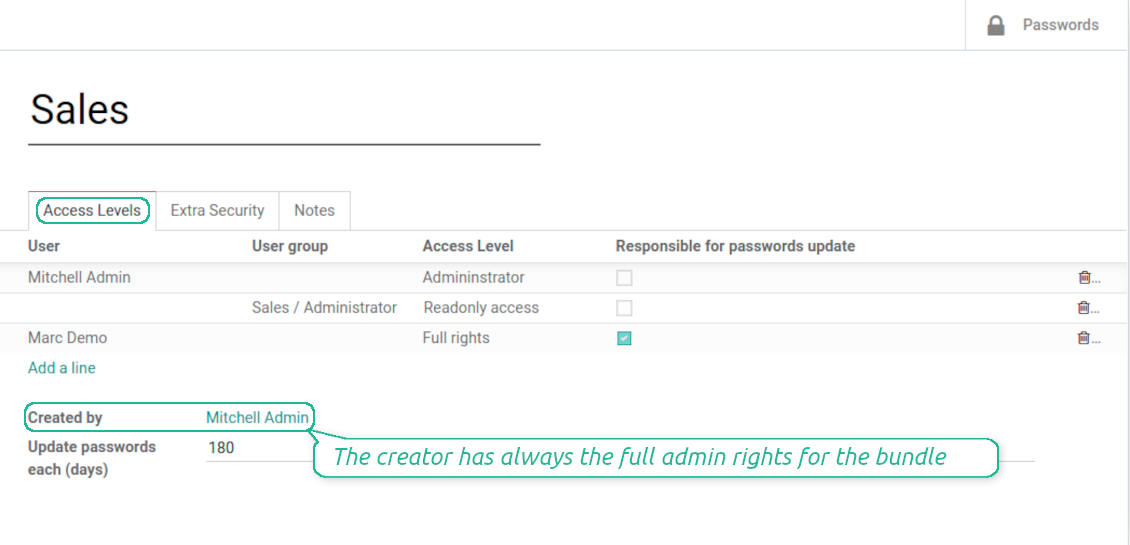
To grant access just indicate a user or a user group in the table of access levels
-
Bundle administrators may access, update or delete the bundle, its passwords, and its tags. Admins are assumed to manage access levels, modify update policies, and set extra passwords
-
Full rights users may access, update or delete passwords and tags related to the bundle, but they can't change the vault itself, its access levels, or settings
-
Readonly access users may observe and address passwords and tags of the bundle. Such users can't modify any objects
-
The bundle creator is always its administrator. The Odoo super admin (with id 1) has full rights to all bundles and passwords
Security Layers
-
All passwords are symmetrically encrypted. It means that to decrypt a password, plotters should know the exact decryption algorithm and a bundle decryption key/bundle salt and password
-
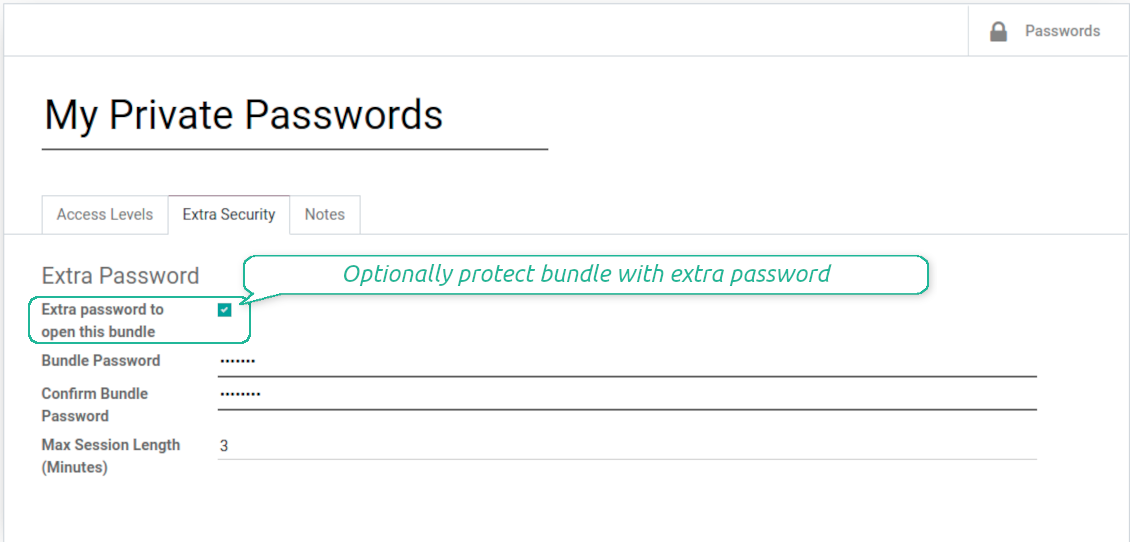
For each bundle, you can assign an extra password, which would be required to enter each time any user applies to that bundle or its passwords. The session period after successful login is set up in minutes
-
Vault extra password is also kept in the database decrypted, and might be changed by a bundle administrator (sure, if he/she enters a correct old paraphrase). If bundle password is set, keys are encrypted by that password hashed by an auto generated salt
-
For each bundle, it is possible to define password update policies in days. Then, the user who is set up as 'Responsible for password updates' would be assigned special activities to update keys.
Custom attributes for Odoo passwords
-
Custom attributes' creation does not require any technical knowledge. In order to show a new property for passwords, just add a new field and enter details
-
It is possible to add custom fields of the following types: single-line text (char), simple text without formatting (text), rich text (HTML-formatted text), integer or float numbers, drop-down choice with your own options (selection), checkbox (boolean), date or date and time, binary (a file to upload), reference to another Odoo document (e.g. for sale order, contact; many2one)
-
The tool lets you comfortably select an interface position of a custom field from a closed list of options
-
Distinguish passwords by types in order to show properties only for suitable ones. Thus set of columns for 'virtual servers' and 'email servers' might be different
-
Mark a custom field required to force users to enter values
-
Custom password fields might be imported and exported
-
The rights to create custom fields belong only to Odoo administrators.
Duplicates detection and passwords merging
-
The app introduces a configurable system to find passwords duplicates
-
Define on your own which fields should be used to search duplicates. Choose such fields on the app configuration page, the section 'Duplicates search'
-
As duplicate criteria use any stored field of the following types: char (reference, user name, email, phone, etc.), text (notes), many2one (linked partner, type, etc.), date and datetime, integer, and float. Duplicates detection is possible also based on custom fields of the same types
-
For all fields, a duplicate should have absolutely the same value. For example, '123' equals '123', but '123' is not equal '1234'. Only in the case of char fields, it is a comparison without taking into account capital letters ('Server' equals 'serVER')
-
Apply the filter 'Potential duplicates' in the passwords interface to observe candidates. You may search within a particular bundle or in all passwords simultaneously
-
When you register a new password, check also the red button on the top right corner. If it is shown, make sure you do not create a potential copy of an existing key
-
Found duplicates or just any password keys might be merged to a single record. To that end, do not forget to add the mass action 'Merge passwords' on the configuration page
-
To merge passwords, select required keys and push the mass action 'Merge passwords' on the right navigation panel
-
In the wizard, as the 'Password to merge', choose one that would be the prime source of the details. In case of conflicts, its value would be prioritized
-
In the wizard, as the 'Merged passwords', choose keys that would be used as a source of complementary details (for example, details which are missing in the main password)
-
Then, press the button 'Save'. As a result, the app would archive all the 'Merged passwords' and enrich the 'Password to merge'
-
Staring from the 'Password to merge' values, the tool would check the fields reference, bundle, user name, email, URL, phone, last password update date, and linked partner. The app would select the first found not null value
-
The app would also accumulate notes, attachments, and tags from all merged records
-
Values of custom fields would be chosen according to keys sequence starting from the 'Password to merge'. Take into account that tables (one2many and many2many fields) would be left as they are in the 'Password to merge'.
Konfigūravimo ir diegimo patarimai Password Manager Odoo v.15
Python dependencies
To guarantee tool correct work you would need a number of Python libraries: zxcvbn, cryptography:
pip3 install zxcvbn cryptography
Dažnai užduodami klausimai apie Password Manager Odoo v.15
Kaip peržiūrėti visus partnerio slaptažodžius?
Norėdami matyti visus partnerio slaptažodžius, eikite į Contacts, atidarykite partnerį ir spustelėkite išmanųjį mygtuką 'Passwords'. Po to būsite nukreipti į programą Password manager ir matysite visus šio partnerio slaptažodžius.
Kaip ištrinti slaptažodžių paketą (password manager)?
Mygtukas 'Delete' paslėptas iš pagrindinio rinkinių meniu saugumo sumetimais. Slaptažodžių rinkiniui ištrinti: 1. Spustelėkite trijų taškų mygtuką rinkinio viršutiniame dešiniajame kampe 2. Būsite nukreipti į rinkinio redagavimo režimą; ten spustelėkite 'Save' 3. Virš rinkinio matysite mygtuką 'Action'; spustelėkite ir pasirinkite 'Delete'.
Kokios jūsų įrankių naujinimo politikos?
Pagal dabartinės Odoo Apps Store taisykles:
- Kiekvienas 12.0 ir senesnės versijos modulis suteikia prieigą prie visų versijų iki 12.0.
- Nuo 13.0 versijos kiekviena modulio versija perkamą atskirai.
- Nepriklausomai nuo versijos, pirkimas suteikia teisę į visus atnaujinimus ir pataisas pagrindinės versijos ribose.
Atkreipkite dėmesį: komanda faOtools šių taisyklių nekontroliuoja. Klausimus kreipkite tiesiai Odoo Apps Store atstovams.
Kaip įdiegti jūsų programą Odoo.sh?
Tiesiausias būdas – naudoti įtaisytąją Odoo parduotuvės eigą:
1. Atidarykite modulio puslapį ir spustelėkite mygtuką Deploy on odoo.sh
2. Po to būsite nukreipti į GitHub puslapį. Prisijunkite prie paskyros ir spustelėkite 'Create a new repo' arba naudokite esamą. Įsitikinkite, kad saugykla privati. Programėlių skelbti pagal OPL-1 licenciją negalima. Prireikus sukurkite naują repo Odoo.sh projektui
3. Tada eikite į odoo.sh ir spustelėkite mygtuką Deploy. Iššokančiame lange pateikite sprendimą ir spustelėkite 'Continue.' Tai paleis diegimą.
Šie veiksmai įdiegs programėlę gamybinėje projekto šakoje. Jei norite diegti programėles kitose šakose arba atnaujinti modulį, atlikite šiuos veiksmus:
1. Įkelkite programėlės išeities kodą iš Odoo parduotuvės
2. Įrašykite modulį į reikiamą GitHub saugyklą. Įsitikinkite, kad jokie programėlės aplankai/failai nėra ignoruojami (t. y. nėra repo .gitignore). Saugyklas automatiškai sukuria odoo.sh ir pagal numatymą jose gali būti svarbių elementų (pvz., /lib). Įkelkite visus modulio katalogus, pakatalogius ir failus be išimčių
3. Įdiekite norimą odoo.sh projekto šaką arba, jei nustatymai tai numato, palaukite, kol ji bus sukurta automatiškai.
Kaip įdiegti jūsų programą savo serveryje?
2. Paleiskite Odoo serverį iš naujo;
3. Įjunkite kūrėjo režimą (techniniai nustatymai);
4. Atnaujinkite programų sąrašą (programų meniu);
5. Raskite programą ir spustelėkite „Activate“/„Install“;
6. Vadovaukitės programos puslapio gairėmis, jei jos yra.
Pastebėjau, kad jūsų programa turi papildomų priedų. Ar galiu juos įsigyti vėliau?
Taip, žinoma. Tuo pačiu Odoo automatiškai įdeda visas priklausomybes į krepšelį, todėl anksčiau pirktus įrankius reikia pašalinti, kad nemokėtumėte dukart.
Įdiegiau jūsų programą Odoo.sh ir testuose matau įspėjimą/klaidą
Raudonas/oranžinis įspėjimas nekeičia programos funkcijų. Deja, kartais mūsų moduliai neišlaiko standartinių automatinių testų, nes jie tikisi elgsenos, kuri prieštarauja programos tikslams. Pvz., keičiame kainos skaičiavimą, o standartiniai Odoo modulio testai lygina galutinę kainą su standartiniu algoritmu.
Pirmiausia patikrinkite diegtos duomenų bazės funkcijas. Ar viskas veikia teisingai?
Jei vis tiek manote, kad įspėjimas veikia tikras funkcijas, susisiekite ir atsiųskite visus diegimo žurnalus bei visą diegtų modulių sąrašą (įskaitant branduolį ir trečiųjų šalių).
Ar galiu nusipirkti programėlę tiesiogiai iš jūsų įmonės?
Ne, įrankius platiname tik per oficialią Odoo programų parduotuvę.
Norėčiau gauti nuolaidą
Deja, neturime techninių priemonių individualioms kainoms pateikti.
Ar galiu įdiegti programėlę savo Odoo Online (SaaS) duomenų bazėje?
Ne, trečiųjų šalių programų negalima naudoti Odoo Online. Deja, Odoo SaaS tai blokuoja.
Jūsų įrankis priklauso nuo kitų programų. Ar turiu jas pirkti?
Taip, įrankiui reikia visų priklausomybėse pažymėtų modulių, kad veiktų teisingai. Programos puslapyje nurodyta kaina jau apima visas būtinas priklausomybes.
Kokia modulio kaina JAV doleriais? Kodėl ji pasikeitė?
Mūsų modulių kaina nustatyta eurais. Odoo parduotuvė konvertuoja kainas į kitas valiutas pagal vidinį kursą. Todėl kaina JAV doleriais gali keistis atnaujinus kursą.
Programos ir svetainės tekstai kitomis kalbomis nei anglų parengti su DI ir suderinti su oficialiais Odoo vertimais. Jei pastebėjote klaidą, siųskite bilietą dėl vertimų teisingumo ir pataisysime.
Klaidų pranešimas
Jei susidursite su klaidomis ar nenuosekliu elgesiu, nedvejodami susisiekite. Garantuoame pataisymus per 60 dienų nuo pirkimo ir ir toliau stengiamės tobulinti įrankius po šio laikotarpio.
Norėdami susisiekti, jums nereikia telefono numerio ar kredito kortelės. Užtenka trumpos registracijos el. paštu, kuri trunka ne ilgiau kaip 30 sekundžių.
Į užklausą įtraukite kuo daugiau informacijos: ekrano nuotraukas, Odoo serverio žurnalus, išsamų problemos atkūrimo aprašymą ir pan. Paprastai darbo plano parengimas problemai (jei klaida patvirtinama) arba gairių, ką daryti (kitu atveju), pateikimas trunka kelias darbo dienas.
Vieši funkcijų prašymai ir modulių idėjos (nemokama plėtra)
Esame labai motyvuoti tobulinti savo įrankius ir būsime dėkingi už bet kokį atsiliepimą. Jei jūsų reikalavimai naudingi visiems ir gali būti efektyviai įgyvendinti, komanda įtrauks juos į mūsų darbų sąrašą.
Toks darbų sąrašas tvarkomas reguliariai ir nereiškia papildomų mokesčių. Nors negalime pažadėti terminų ir galutinio dizaino, tai gali būti geras būdas gauti norimas funkcijas be investicijų ir rizikos.
Norėdami susisiekti, jums nereikia telefono numerio ar kredito kortelės. Užtenka trumpos registracijos el. paštu, kuri trunka ne ilgiau kaip 30 sekundžių.

Įrankis Odoo priedams lanksčiai dėlioti į aplankus ir sinchronizuoti katalogus su debesijos klientais: Google Drive, OneDrive/SharePoint, Nextcloud/ownCloud, Dropbox, Amazon S3, Box ir NAS. DMS. Failų tvarkyklė. Dokumentų valdymo sistema
398€
Įrankis automatinei dvikryptei Odoo priedų sinchronizacijai su OneDrive failais
487€
Įrankis automatinei dvikryptei Odoo priedų sinchronizacijai su Google Drive failais
487€
Įrankis giliam ir struktūruotam žinių bazei kurti vidiniam ir išoriniam naudojimui. Knowledge System. KMS. Wiki tipo revizijos.
398€
Įrankis KPI tikslams nustatyti ir jų vykdymui pagal laikotarpius kontroliuoti. KPI ataskaitų lentos. Lentų konstruktorius. KPI diagramos

Įrankis laiku grįstam paslaugų valdymui – nuo susitikimų rezervavimo iki pardavimų ir atsiliepimų
398€
Įrankis valdyti Odoo iš mėgstamų AI pokalbių per MCP. Claude. Bet kuris AI su MCP.


Įrankis skirtingiems Odoo įvykiams sujungti keliuose konfigūruojamuose superkalendoriuose