Password Manager v.15
The tool to safely keep passwords in Odoo for shared use. Shared vaults. Encryption






This app lets organize the safe passwords keeping system to structure, find and securely share password bundles.
- a core app to manage vaults and passwords.
Fiyatı
198€
178€.
- an extension to add custom fields for password keys. Features assumed by this app are marked by the icon .
Fiyatı
38€
37€.
Shared passwords vaults for team use
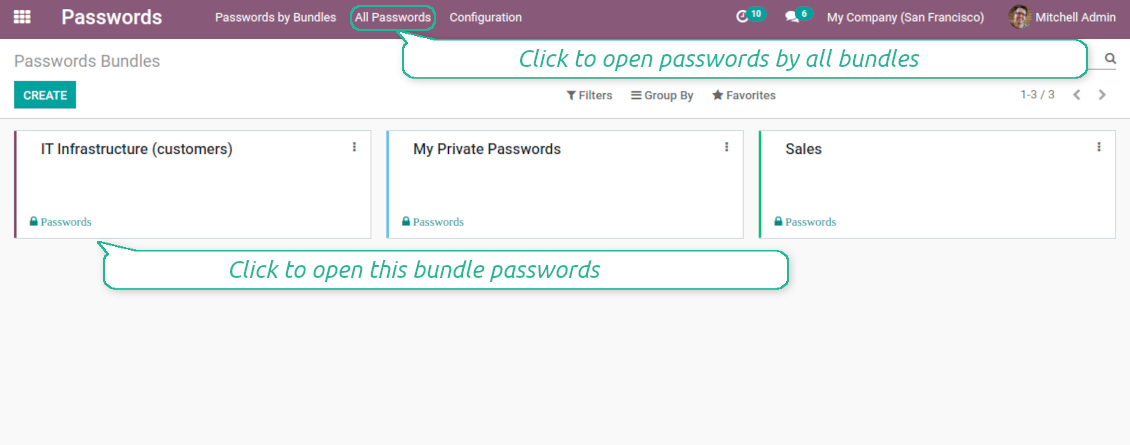
Passwords are combined in bundles: each might be shared with any user and any user group
Single view interface
Structure vault by tags, sort keys, proceed mass actions, copy credentials to buffer from the same interface
Encrypted and protected password manager
The tool introduces a few security layers to minimize the possibility of data leaks
Partners-related passwords
Link passwords with Odoo contacts for a quick access
Auto generation
Force Odoo and let users create passwords based on chosen length and requirements
Passwords quality check
Password strength is estimated in real-time to make sure no weak passwords are introduced. Potential duplicates are easily detected
Batch update, export, and import
Configure your mass actions: export, update tags or partner, archive or restore, import vaults from an electronic table, etc.
Custom fields
Define passwords' typology and add custom attributes.
Very good password management module
Easy installation and quick setup
Shared use, encryption, and protection of passwords
Sharing Policies
-
Have as many password vaults for any user group as you need
-
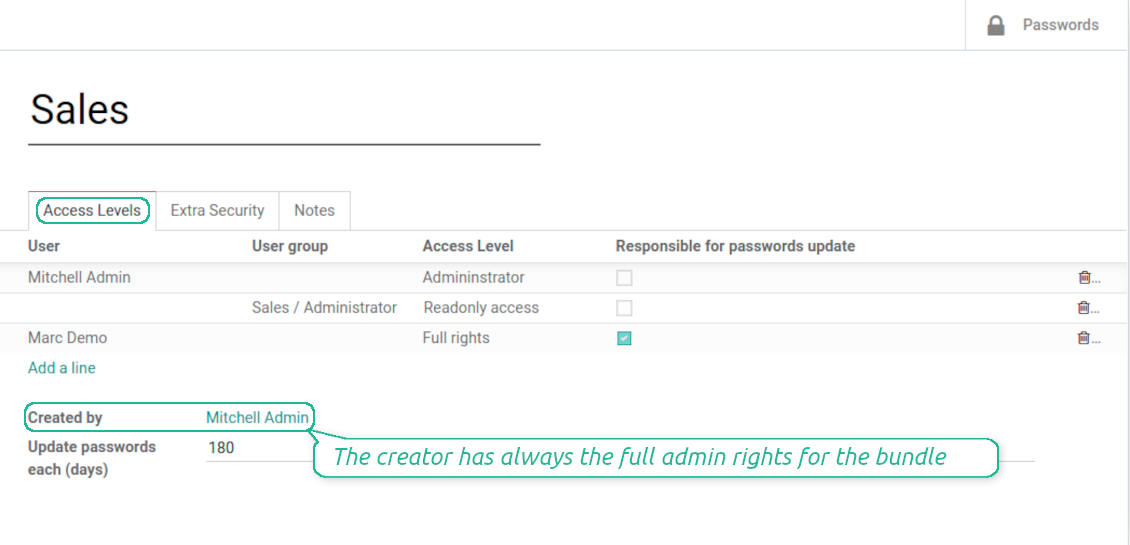
To grant access just indicate a user or a user group in the table of access levels
-
Bundle administrators may access, update or delete the bundle, its passwords, and its tags. Admins are assumed to manage access levels, modify update policies, and set extra passwords
-
Full rights users may access, update or delete passwords and tags related to the bundle, but they can't change the vault itself, its access levels, or settings
-
Readonly access users may observe and address passwords and tags of the bundle. Such users can't modify any objects
-
The bundle creator is always its administrator. The Odoo super admin (with id 1) has full rights to all bundles and passwords
Security Layers
-
All passwords are symmetrically encrypted. It means that to decrypt a password, plotters should know the exact decryption algorithm and a bundle decryption key/bundle salt and password
-
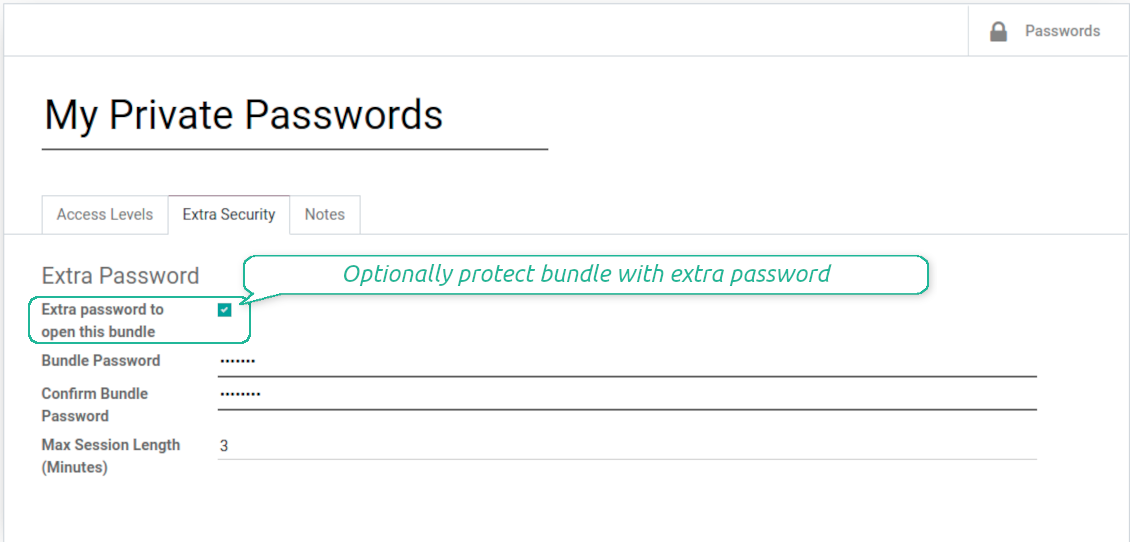
For each bundle, you can assign an extra password, which would be required to enter each time any user applies to that bundle or its passwords. The session period after successful login is set up in minutes
-
Vault extra password is also kept in the database decrypted, and might be changed by a bundle administrator (sure, if he/she enters a correct old paraphrase). If bundle password is set, keys are encrypted by that password hashed by an auto generated salt
-
For each bundle, it is possible to define password update policies in days. Then, the user who is set up as 'Responsible for password updates' would be assigned special activities to update keys.
Custom attributes for Odoo passwords
-
Custom attributes' creation does not require any technical knowledge. In order to show a new property for passwords, just add a new field and enter details
-
It is possible to add custom fields of the following types: single-line text (char), simple text without formatting (text), rich text (HTML-formatted text), integer or float numbers, drop-down choice with your own options (selection), checkbox (boolean), date or date and time, binary (a file to upload), reference to another Odoo document (e.g. for sale order, contact; many2one)
-
The tool lets you comfortably select an interface position of a custom field from a closed list of options
-
Distinguish passwords by types in order to show properties only for suitable ones. Thus set of columns for 'virtual servers' and 'email servers' might be different
-
Mark a custom field required to force users to enter values
-
Custom password fields might be imported and exported
-
The rights to create custom fields belong only to Odoo administrators.
Duplicates detection and passwords merging
-
The app introduces a configurable system to find passwords duplicates
-
Define on your own which fields should be used to search duplicates. Choose such fields on the app configuration page, the section 'Duplicates search'
-
As duplicate criteria use any stored field of the following types: char (reference, user name, email, phone, etc.), text (notes), many2one (linked partner, type, etc.), date and datetime, integer, and float. Duplicates detection is possible also based on custom fields of the same types
-
For all fields, a duplicate should have absolutely the same value. For example, '123' equals '123', but '123' is not equal '1234'. Only in the case of char fields, it is a comparison without taking into account capital letters ('Server' equals 'serVER')
-
Apply the filter 'Potential duplicates' in the passwords interface to observe candidates. You may search within a particular bundle or in all passwords simultaneously
-
When you register a new password, check also the red button on the top right corner. If it is shown, make sure you do not create a potential copy of an existing key
-
Found duplicates or just any password keys might be merged to a single record. To that end, do not forget to add the mass action 'Merge passwords' on the configuration page
-
To merge passwords, select required keys and push the mass action 'Merge passwords' on the right navigation panel
-
In the wizard, as the 'Password to merge', choose one that would be the prime source of the details. In case of conflicts, its value would be prioritized
-
In the wizard, as the 'Merged passwords', choose keys that would be used as a source of complementary details (for example, details which are missing in the main password)
-
Then, press the button 'Save'. As a result, the app would archive all the 'Merged passwords' and enrich the 'Password to merge'
-
Staring from the 'Password to merge' values, the tool would check the fields reference, bundle, user name, email, URL, phone, last password update date, and linked partner. The app would select the first found not null value
-
The app would also accumulate notes, attachments, and tags from all merged records
-
Values of custom fields would be chosen according to keys sequence starting from the 'Password to merge'. Take into account that tables (one2many and many2many fields) would be left as they are in the 'Password to merge'.
Yapılandırma ve kurulum ipuçları: Password Manager Odoo v.15
Python dependencies
To guarantee tool correct work you would need a number of Python libraries: zxcvbn, cryptography:
pip3 install zxcvbn cryptography
Hakkında sık sorulan sorular Password Manager Odoo v.15
Bir partnerin tum parolarini nasil gorurum?
Bir partnerin tum parolarini görmek için Kişiler'e gidin, partneri acin ve 'Passwords' akilli düğmesine tiklayin. Password Manager uygulamasina yonlendirilirsiniz.
Parola paketini (Password Manager) nasıl silerim?
Güvenlik için 'Delete' düğmesi ana paket menusunden gizlendi. Silmek için: 1. Paketin sag üstündeki uc nokta. 2. Düzenleme acilir, 'Save'. 3. Paketin üstünde 'Action' sonra 'Delete'.
Araclarinizin güncelleme politikalari nedir?
Güncel Odoo Apps Store politikalarina göre:
- 12.0 ve önceki sürüm için alinan her modül, 12.0'a kadar tum surumlere erişim verir.
- 13.0 surumunden itibaren her modül sürümü ayri satin alinmalidir.
- Surumden bagimsiz olarak satin alma, o ana sürüm içindeki tum güncelleme ve hata duzeltmelerine hak verir.
faOtools ekibi bu politikalari kontrol etmez. Sorulariniz için doğrudan Odoo Apps Store temsilcilerine ulasin.
Uygulamanizi Odoo.sh üzerine nasil kurarim?
En doğrudan yaklasim, Odoo magazasinin yerlesik is akisidir:
1. Modül sayfasini acin ve Deploy on odoo.sh düğmesine tiklayin
2. GitHub sayfasina yonlendirilirsiniz. Hesabiniza giriş yapin, ardindan Create a new repo'ya tiklayin veya mevcut birini kullanin. Depo özel olmalidir. OPL-1 lisansli uygulamalarin yayimlanmasi yasaktir. Gerekirse Odoo.sh projeniz için yeni bir depo oluşturun
3. Ardindan odoo.sh'e gidin, Deploy'a tiklayin, karari onaylayin ve Continue'ya tiklayin. Kurulum başlar.
Bu adimlar uygulamayi projenin production dalina kurar. Diğer dallar veya modül guncellemesi için:
1. Kaynak kodu Odoo magazasindan indirin
2. Modulu gerekli GitHub deposuna commit edin. Hiçbir uygulama klasörü/dosyasi .gitignore'da olmamalidir. odoo.sh'in oluşturduğu depolar varsayilan olarak önemli yollari (örneğin /lib) yok sayabilir. Tum modül dizinlerini ve dosyalarini istisnasiz yükleyin
3. odoo.sh projesinin hedef dalini deploy edin veya ayarlariniz otomatik derlemeyi ongoruyorsa bekleyin.
Uygulamayi kendi sunucuma nasil kurarim?
2. Odoo sunucusunu yeniden baslatin;
3. Gelistirici modunu acin (teknik ayarlar);
4. Uygulama listesini güncelleyin (Uygulamalar menusu);
5. Uygulamayi bulun ve Activate/Install düğmesine basin;
6. Varsa uygulama sayfasindaki yonergeyi izleyin.
Uygulamanizin ek eklentileri var. Sonradan alabilir miyim?
Evet. Odoo tum bagimliliklari sepete otomatik ekler: çift odemeyi onlemek için daha önce satin alinan araclari cikarin.
Uygulamayi Odoo.sh üzerine kurdum ve testlerde uyari/hata goruyorum
Kirmizi/turuncu uyari uygulamanin özelliklerini etkilemez. Bazen modüllerimiz standart otomatik testleri gecemez, çünkü bunlar uygulamamizin amaclarina aykiri davranis bekler. Örneğin fiyati farkli hesaplariz, Odoo testleri ise nihai fiyati standart algoritmayla karsilastirir.
Önce dagitilan veritabaninin özelliklerini kontrol edin. Her sey doğru calisiyor mu?
Uyarinin gerçek özellikleri etkiledigini dusunuyorsaniz bize yazin; tam kurulum günlüklerini ve dagitilan modüllerin tam listesini (çekirdek ve üçüncü taraf) gönderin.
Uygulamanizi doğrudan sizden satin alabilir miyim?
Hayir, araclari yalnizca resmi Odoo uygulama magazasi üzerinden dagitiyoruz.
Indirim almak istiyorum
Ne yazik ki bireysel fiyat sunacak teknik imkanimiz yok.
Uygulamayi Odoo Online (SaaS) veritabanima kurabilir miyim?
Hayir, üçüncü taraf uygulamalar Odoo Online'da kullanilamaz. Odoo SaaS bunu engeller.
Aracinizin başka uygulamalara bagimliligi var. Onlari da almali miyim?
Evet, aracimizin doğru calismasi için bagimliliklarda isaretlenen tum modullere ihtiyaci vardir. Uygulama sayfasindaki fiyat bu bagimliliklari zaten içerir.
Modulun ABD dolari fiyati nedir? Neden değişti?
Modullerimizin fiyati euro cinsinden belirlenir. Odoo magazasi fiyatlari kendi ic kuruna göre diğer para birimlerine çevirir. Bu yüzden ABD dolari fiyati kur guncellendiginde degisebilir.
İngilizce dışındaki dillerdeki uygulama ve web sitesi metinleri yapay zeka desteklidir ve resmi Odoo çevirileriyle hizalanır. Bir hata görürseniz, çeviri doğruluğu bileti gönderin ve düzeltiriz.
Hata bildirimi
Hata veya tutarsız davranış görürseniz bize yazın. Satın alımdan sonra 60 gün içinde düzeltme garantisi veririz; bu süreden sonra da araçları geliştirmeye devam ederiz.
Bize yazmak için telefon veya kredi kartı gerekmez. Yalnızca 30 saniyeyi aşmayan kısa e-posta kaydı yeter.
İstekte mümkün olduğunca ayrıntı verin: ekran görüntüleri, Odoo sunucu günlükleri, sorunu nasıl yeniden üreteceğinizin tam açıklaması. Genellikle birkaç iş günü içinde (hata doğrulanırsa) çalışma planı veya (değilse) yönergeler hazırlanır.
Genel özellik talepleri ve modül fikirleri (ücretsiz geliştirme)
Araçlarımızı geliştirmeye güçlü şekilde motiveyiz ve her geri bildirime minnettarız. Gereksinimleriniz kamuya yararlıysa ve verimli uygulanabilirse ekip bunları yapılacaklar listesine alır.
Böyle bir yapılacaklar listesi düzenli işlenir ve ek ücret varsaymaz. Son tarihler ve nihai tasarım sözü veremesek de istenen özellikleri yatırım ve risk olmadan almanın iyi bir yolu olabilir.
Bize yazmak için telefon veya kredi kartı gerekmez. Yalnızca 30 saniyeyi aşmayan kısa e-posta kaydı yeter.

Odoo eklerini klasörlerde esnek yapılandıran ve dizinleri bulut istemcileriyle senkronize eden araç: Google Drive, OneDrive/SharePoint, Nextcloud/ownCloud, Dropbox, Amazon S3, Box ve NAS. DMS. Dosya Yöneticisi. Belge yönetim sistemi
398€
otomatik olarak senkronize et Odoo ekler ile OneDrive dosyalar içinde her iki ways
487€
otomatik olarak senkronize et Odoo ekler ile Google Drive dosyalar içinde her iki ways
487€
İç ve dış kullanım için derin ve yapılandırılmış bir bilgi bankası kurma aracı. Knowledge System. KMS. Wiki benzeri revizyonlar.
398€
KPI hedeflerini kurmak ve dönemlere göre gerçekleşmeyi denetlemek için araç. KPI gösterge panelleri. Gösterge paneli tasarımcısı. KPI grafikleri

Randevu rezervasyonundan satış ve değerlendirmelere zaman tabanlı hizmet yönetimi aracı
398€
Odoo'nuzu MCP ile favori AI sohbetlerinizden yönetme aracı. Claude. MCP destekleyen her AI.

Farklı Odoo etkinliklerini birkaç yapılandırılabilir süper takvimde birleştirme aracı
