Password Manager v.15
The tool to safely keep passwords in Odoo for shared use. Shared vaults. Encryption






This app lets organize the safe passwords keeping system to structure, find and securely share password bundles.
- a core app to manage vaults and passwords.
कीमत है
198€
178€.
- an extension to add custom fields for password keys. Features assumed by this app are marked by the icon .
कीमत है
38€
37€.
Shared passwords vaults for team use
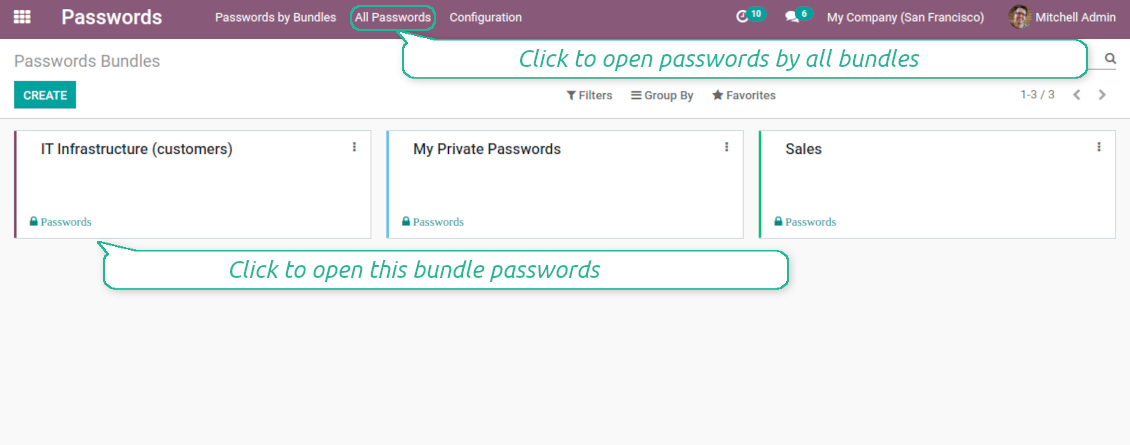
Passwords are combined in bundles: each might be shared with any user and any user group
Single view interface
Structure vault by tags, sort keys, proceed mass actions, copy credentials to buffer from the same interface
Encrypted and protected password manager
The tool introduces a few security layers to minimize the possibility of data leaks
Partners-related passwords
Link passwords with Odoo contacts for a quick access
Auto generation
Force Odoo and let users create passwords based on chosen length and requirements
Passwords quality check
Password strength is estimated in real-time to make sure no weak passwords are introduced. Potential duplicates are easily detected
Batch update, export, and import
Configure your mass actions: export, update tags or partner, archive or restore, import vaults from an electronic table, etc.
Custom fields
Define passwords' typology and add custom attributes.
Very good password management module
Easy installation and quick setup
Shared use, encryption, and protection of passwords
Sharing Policies
-
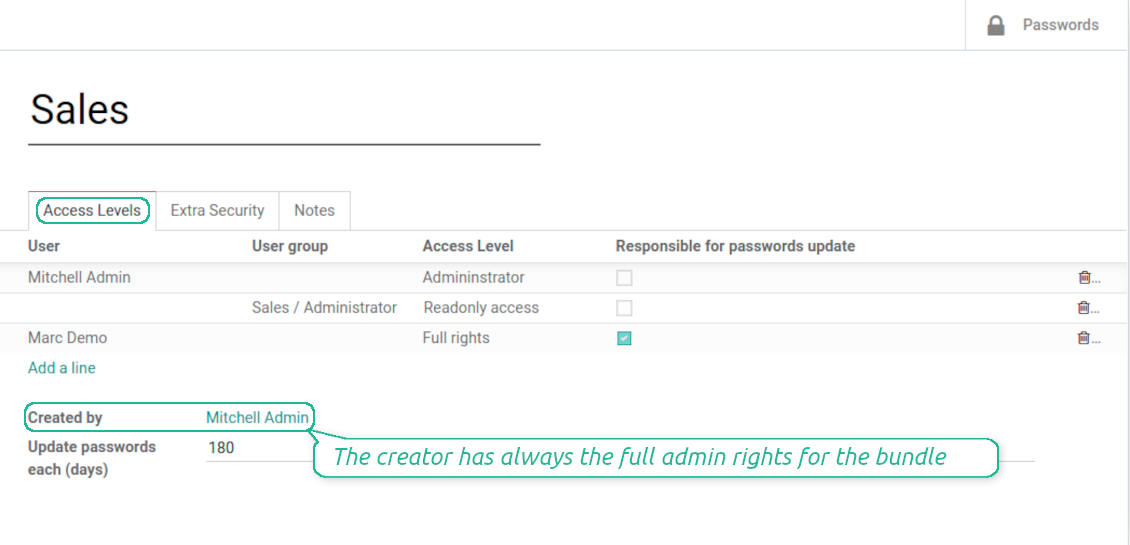
Have as many password vaults for any user group as you need
-
To grant access just indicate a user or a user group in the table of access levels
-
Bundle administrators may access, update or delete the bundle, its passwords, and its tags. Admins are assumed to manage access levels, modify update policies, and set extra passwords
-
Full rights users may access, update or delete passwords and tags related to the bundle, but they can't change the vault itself, its access levels, or settings
-
Readonly access users may observe and address passwords and tags of the bundle. Such users can't modify any objects
-
The bundle creator is always its administrator. The Odoo super admin (with id 1) has full rights to all bundles and passwords
Security Layers
-
All passwords are symmetrically encrypted. It means that to decrypt a password, plotters should know the exact decryption algorithm and a bundle decryption key/bundle salt and password
-
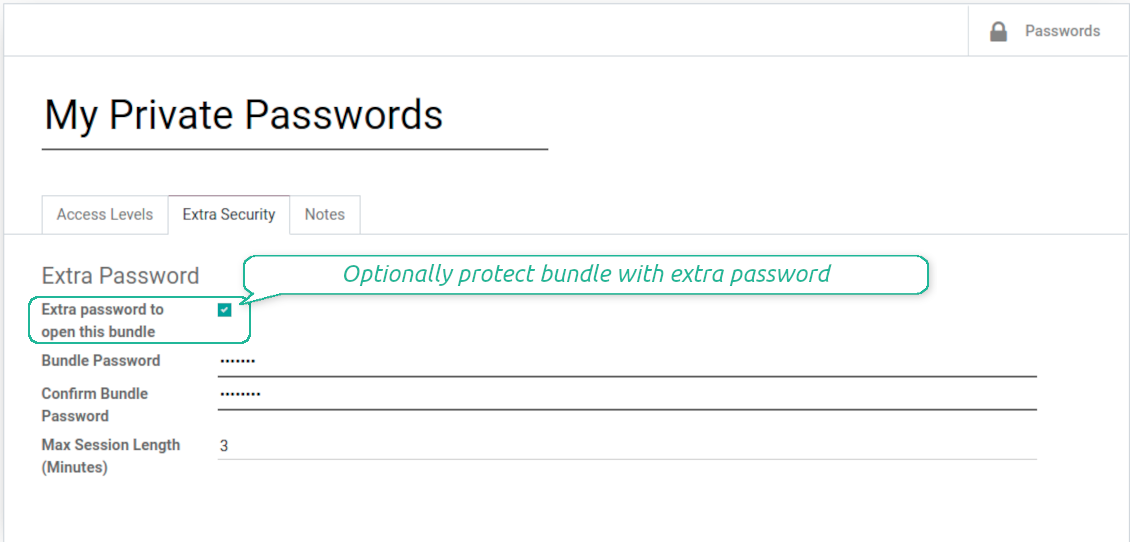
For each bundle, you can assign an extra password, which would be required to enter each time any user applies to that bundle or its passwords. The session period after successful login is set up in minutes
-
Vault extra password is also kept in the database decrypted, and might be changed by a bundle administrator (sure, if he/she enters a correct old paraphrase). If bundle password is set, keys are encrypted by that password hashed by an auto generated salt
-
For each bundle, it is possible to define password update policies in days. Then, the user who is set up as 'Responsible for password updates' would be assigned special activities to update keys.
Custom attributes for Odoo passwords
-
Custom attributes' creation does not require any technical knowledge. In order to show a new property for passwords, just add a new field and enter details
-
It is possible to add custom fields of the following types: single-line text (char), simple text without formatting (text), rich text (HTML-formatted text), integer or float numbers, drop-down choice with your own options (selection), checkbox (boolean), date or date and time, binary (a file to upload), reference to another Odoo document (e.g. for sale order, contact; many2one)
-
The tool lets you comfortably select an interface position of a custom field from a closed list of options
-
Distinguish passwords by types in order to show properties only for suitable ones. Thus set of columns for 'virtual servers' and 'email servers' might be different
-
Mark a custom field required to force users to enter values
-
Custom password fields might be imported and exported
-
The rights to create custom fields belong only to Odoo administrators.
Duplicates detection and passwords merging
-
The app introduces a configurable system to find passwords duplicates
-
Define on your own which fields should be used to search duplicates. Choose such fields on the app configuration page, the section 'Duplicates search'
-
As duplicate criteria use any stored field of the following types: char (reference, user name, email, phone, etc.), text (notes), many2one (linked partner, type, etc.), date and datetime, integer, and float. Duplicates detection is possible also based on custom fields of the same types
-
For all fields, a duplicate should have absolutely the same value. For example, '123' equals '123', but '123' is not equal '1234'. Only in the case of char fields, it is a comparison without taking into account capital letters ('Server' equals 'serVER')
-
Apply the filter 'Potential duplicates' in the passwords interface to observe candidates. You may search within a particular bundle or in all passwords simultaneously
-
When you register a new password, check also the red button on the top right corner. If it is shown, make sure you do not create a potential copy of an existing key
-
Found duplicates or just any password keys might be merged to a single record. To that end, do not forget to add the mass action 'Merge passwords' on the configuration page
-
To merge passwords, select required keys and push the mass action 'Merge passwords' on the right navigation panel
-
In the wizard, as the 'Password to merge', choose one that would be the prime source of the details. In case of conflicts, its value would be prioritized
-
In the wizard, as the 'Merged passwords', choose keys that would be used as a source of complementary details (for example, details which are missing in the main password)
-
Then, press the button 'Save'. As a result, the app would archive all the 'Merged passwords' and enrich the 'Password to merge'
-
Staring from the 'Password to merge' values, the tool would check the fields reference, bundle, user name, email, URL, phone, last password update date, and linked partner. The app would select the first found not null value
-
The app would also accumulate notes, attachments, and tags from all merged records
-
Values of custom fields would be chosen according to keys sequence starting from the 'Password to merge'. Take into account that tables (one2many and many2many fields) would be left as they are in the 'Password to merge'.
कॉन्फ़िगरेशन और इंस्टॉलेशन सुझाव: Password Manager Odoo v.15
Python dependencies
To guarantee tool correct work you would need a number of Python libraries: zxcvbn, cryptography:
pip3 install zxcvbn cryptography
के बारे में अक्सर पूछे जाने वाले प्रश्न Password Manager Odoo v.15
किसी साथी के सभी पासवर्ड कैसे देखूँ?
किसी पार्टनर के सभी पासवर्ड देखने के लिए Contacts पर जाएँ, पार्टनर खोलें और स्मार्ट बटन 'Passwords' क्लिक करें। उसके बाद आपको Password manager ऐप पर भेजा जाएगा और इस पार्टनर के सभी पासवर्ड दिखेंगे।
पासवर्ड बंडल (password manager) कैसे हटाएँ?
सुरक्षा के लिए मुख्य बंडल मेनू से 'Delete' बटन छिपाया गया है। पासवर्ड बंडल हटाने के लिए: 1. बंडल के ऊपरी दाएँ कोने में तीन बिंदु बटन क्लिक करें 2. आप संपादन मोड पर जाएँगे; वहाँ 'Save' क्लिक करें 3. पासवर्ड बंडल के ऊपर 'Action' बटन दिखेगा; उस पर क्लिक कर 'Delete' चुनें।
आपके टूल की अपडेट नीतियाँ क्या हैं?
वर्तमान Odoo Apps Store नीतियों के अनुसार:
- संस्करण 12.0 और उससे पहले के लिए खरीदा प्रत्येक मॉड्यूल 12.0 तक सभी संस्करणों तक पहुँच देता है।
- संस्करण 13.0 से प्रत्येक मॉड्यूल संस्करण अलग खरीदना होता है।
- संस्करण चाहे जो हो, खरीद से उस प्रमुख संस्करण के सभी अपडेट और बग ठीक करने का अधिकार मिलता है।
ध्यान दें कि faOtools टीम इन नीतियों को नियंत्रित नहीं करती। सभी प्रश्नों के लिए सीधे Odoo Apps Store प्रतिनिधियों से संपर्क करें।
आपका ऐप Odoo.sh पर कैसे इंस्टॉल करूँ?
सबसे सीधा तरीका Odoo स्टोर की अंतर्निहित वर्कफ़्लो का उपयोग करना है:
1. मॉड्यूल का पृष्ठ खोलें और Deploy on odoo.sh बटन पर क्लिक करें
2. उसके बाद आपको GitHub पृष्ठ पर भेजा जाएगा। अपने खाते में लॉग इन करें, फिर 'Create a new repo' पर क्लिक करें या मौजूदा का उपयोग करें। सुनिश्चित करें कि रिपॉज़िटरी निजी हो। OPL-1 लाइसेंस के तहत ऐप प्रकाशित करना अनुमति नहीं है। ज़रूरत हो तो Odoo.sh प्रोजेक्ट के लिए नया repo बनाएँ
3. फिर odoo.sh पर जाएँ और Deploy बटन पर क्लिक करें। पॉप-अप विंडो में निर्णय जमा करें और 'Continue.' पर क्लिक करें। इससे इंस्टॉलेशन शुरू होगा।
ये चरण प्रोजेक्ट की production शाखा पर ऐप इंस्टॉल करेंगे। अन्य शाखाओं पर ऐप तैनात करने या मॉड्यूल अपडेट करने के लिए ये क्रियाएँ करें:
1. Odoo स्टोर से ऐप का स्रोत कोड अपलोड करें
2. मॉड्यूल को आवश्यक GitHub रिपॉज़िटरी में commit करें। सुनिश्चित करें कि ऐप के कोई फ़ोल्डर/फ़ाइल अनदेखी न हों (यानी repo के .gitignore में न हों)। रिपॉज़िटरी odoo.sh अपने आप बनाता है और डिफ़ॉल्ट रूप से कुछ ज़रूरी चीजें शामिल हो सकती हैं (जैसे /lib)। मॉड्यूल की सभी निर्देशिकाएँ, उपनिर्देशिकाएँ और फ़ाइलें बिना अपवाद अपलोड करें
3. odoo.sh प्रोजेक्ट की लक्ष्य शाखा Deploy करें या, अगर सेटिंग्स ऐसा मानती हैं, स्वतः बनने तक प्रतीक्षा करें।
अपने सर्वर पर आपका ऐप कैसे इंस्टॉल करूँ?
2. Odoo सर्वर पुनः प्रारंभ करें;
3. डेवलपर मोड चालू करें (तकनीकी सेटिंग्स);
4. ऐप सूची अपडेट करें (ऐप्स मेनू);
5. ऐप खोजें और 'Activate'/'Install' दबाएँ;
6. ऐप पृष्ठ पर दिशानिर्देश हों तो उनका पालन करें।
आपके ऐप में अतिरिक्त ऐड-ऑन हैं। क्या बाद में खरीद सकता हूँ?
हाँ, ज़रूर। साथ ही Odoo सभी निर्भरताएँ कार्ट में अपने आप जोड़ता है, इसलिए दोहरी भुगतान से बचने के लिए पहले खरीदे टूल हटा दें।
मैंने आपका ऐप Odoo.sh पर डिप्लॉय किया और टेस्ट में चेतावनी/त्रुटि दिख रही है
लाल/नारंगी चेतावनी ऐप की सुविधाओं को प्रभावित नहीं करती। खेद है कि कभी-कभी हमारे मॉड्यूल मानक स्वचालित परीक्षण पास नहीं करते, क्योंकि वे ऐसा व्यवहार मानते हैं जो ऐप के लक्ष्यों से टकराता है। उदाहरण के लिए हम मूल्य गणना बदलते हैं, जबकि मानक Odoo मॉड्यूल परीक्षण अंतिम मूल्य की तुलना मानक एल्गोरिदम से करते हैं।
सबसे पहले तैनात डेटाबेस की सुविधाएँ जाँचें। क्या सब सही काम कर रहा है?
यदि फिर भी मानते हैं कि चेतावनी वास्तविक सुविधाओं को प्रभावित करती है, तो संपर्क करें और पूर्ण इंस्टॉलेशन लॉग तथा तैनात मॉड्यूलों की पूरी सूची (कोर और तृतीय-पक्ष सहित) भेजें।
क्या मैं ऐप आपकी कंपनी से सीधे खरीद सकता हूँ?
नहीं, हम उपकरण केवल आधिकारिक Odoo ऐप स्टोर.
मुझे छूट चाहिए
खेद है, हमारे पास व्यक्तिगत कीमतें देने के तकनीकी साधन नहीं हैं।
क्या मैं ऐप अपने Odoo Online (SaaS) डेटाबेस पर इंस्टॉल कर सकता हूँ?
नहीं, तृतीय-पक्ष ऐप Odoo Online पर नहीं चल सकते। दुर्भाग्य से Odoo SaaS यह संभावना रोकता है।
आपके टूल की अन्य ऐप पर निर्भरता है। क्या मुझे वे खरीदनी चाहिए?
हाँ, सही काम के लिए टूल को निर्भरता में चिह्नित सभी मॉड्यूल चाहिए। ऐप पृष्ठ पर दी गई कीमत में आवश्यक निर्भरताएँ पहले से शामिल हैं।
मॉड्यूल की कीमत अमेरिकी डॉलर में क्या है? यह क्यों बदली?
हमारे मॉड्यूल की कीमत यूरो में है। Odoo स्टोर आंतरिक विनिमय दर से अन्य मुद्राओं में बदलता है। इसलिए अमेरिकी डॉलर में कीमत दर अपडेट होने पर बदल सकती है।
अंग्रेज़ी के अलावा अन्य भाषाओं में ऐप और वेबसाइट का शब्द AI-सहायता से है और आधिकारिक Odoo अनुवादों से मेल खाता है। यदि आपको कोई गलती दिखे, अनुवाद शुद्धता का टिकट भेजें और हम इसे ठीक करेंगे।
बग रिपोर्टिंग
यदि आपको बग या असंगत व्यवहार मिले तो हमसे संपर्क करें। हम खरीद के 60 दिनों के भीतर सुधार देने की गारंटी देते हैं और इस अवधि के बाद भी टूल सुधारने में रुचि रखते हैं।
हमसे संपर्क करने के लिए फ़ोन नंबर या क्रेडिट कार्ड की आवश्यकता नहीं है। केवल एक छोटी ईमेल साइन-अप करनी है, जिसमें 30 सेकंड से अधिक नहीं लगता।
अपने अनुरोध में जितना संभव हो उतना विवरण शामिल करें: स्क्रीनशॉट, Odoo सर्वर लॉग, समस्या को दोहराने का पूरा वर्णन आदि। आमतौर पर किसी मुद्दे की कार्य योजना तैयार करने (यदि बग पुष्टि हो) या आगे क्या करना है इसके दिशानिर्देश देने (अन्यथा) में कुछ कार्यदिवस लगते हैं।
सार्वजनिक सुविधा अनुरोध और मॉड्यूल विचार (निःशुल्क विकास)
हम अपने टूल सुधारने के लिए दृढ़ता से प्रेरित हैं और किसी भी प्रतिक्रिया के आभारी होंगे। यदि आपकी आवश्यकताएँ सार्वजनिक उपयोग की हैं और कुशलता से लागू की जा सकती हैं, तो टीम उन्हें हमारी कार्य सूची में शामिल करेगी।
ऐसी कार्य सूची नियमित रूप से संसाधित होती है और अतिरिक्त शुल्क नहीं लगती। यद्यपि हम समय सीमा और अंतिम डिज़ाइन का वादा नहीं कर सकते, यह बिना निवेश और जोखिम के वांछित सुविधाएँ पाने का अच्छा तरीका हो सकता है।
हमसे संपर्क करने के लिए फ़ोन नंबर या क्रेडिट कार्ड की आवश्यकता नहीं है। केवल एक छोटी ईमेल साइन-अप करनी है, जिसमें 30 सेकंड से अधिक नहीं लगता।

Odoo अनुलग्नकों को फ़ोल्डरों में लचीले ढंग से व्यवस्थित करने और निर्देशिकाओं को क्लाउड क्लाइंट से सिंक करने का उपकरण: Google Drive, OneDrive/SharePoint, Nextcloud/ownCloud, Dropbox, Amazon S3, Box और NAS. DMS. फ़ाइल प्रबंधक. दस्तावेज़ प्रबंधन प्रणाली
398€
Odoo अनुलग्नकों को OneDrive फ़ाइलों के साथ स्वचालित रूप से दोनों दिशाओं में सिंक करने का उपकरण
487€
Odoo अनुलग्नकों को Google Drive फ़ाइलों के साथ स्वचालित रूप से दोनों दिशाओं में सिंक करने का उपकरण
487€
आंतरिक और बाहरी उपयोग के लिए गहरी और संरचित ज्ञान आधार बनाने का उपकरण। Knowledge System. KMS. विकि जैसी पुनरीक्षण।
398€
KPI लक्ष्य सेट करने और अवधियों के अनुसार पूर्ति नियंत्रित करने का उपकरण। KPI डैशबोर्ड। डैशबोर्ड डिज़ाइनर। KPI चार्ट

अपॉइंटमेंट बुकिंग से बिक्री और समीक्षा तक समय-आधारित सेवा प्रबंधन का उपकरण
398€
पसंदीदा AI चैट से MCP के ज़रिए Odoo प्रबंधित करने का उपकरण। Claude. कोई भी MCP-समर्थित AI.


विभिन्न Odoo इवेंट को कुछ कॉन्फ़िगर करने योग्य सुपर कैलेंडर में जोड़ने का उपकरण