Joint Calendar v.13
The tool to combine different Odoo events in a few configurable super calendars. Shared calendar. Common calendar.
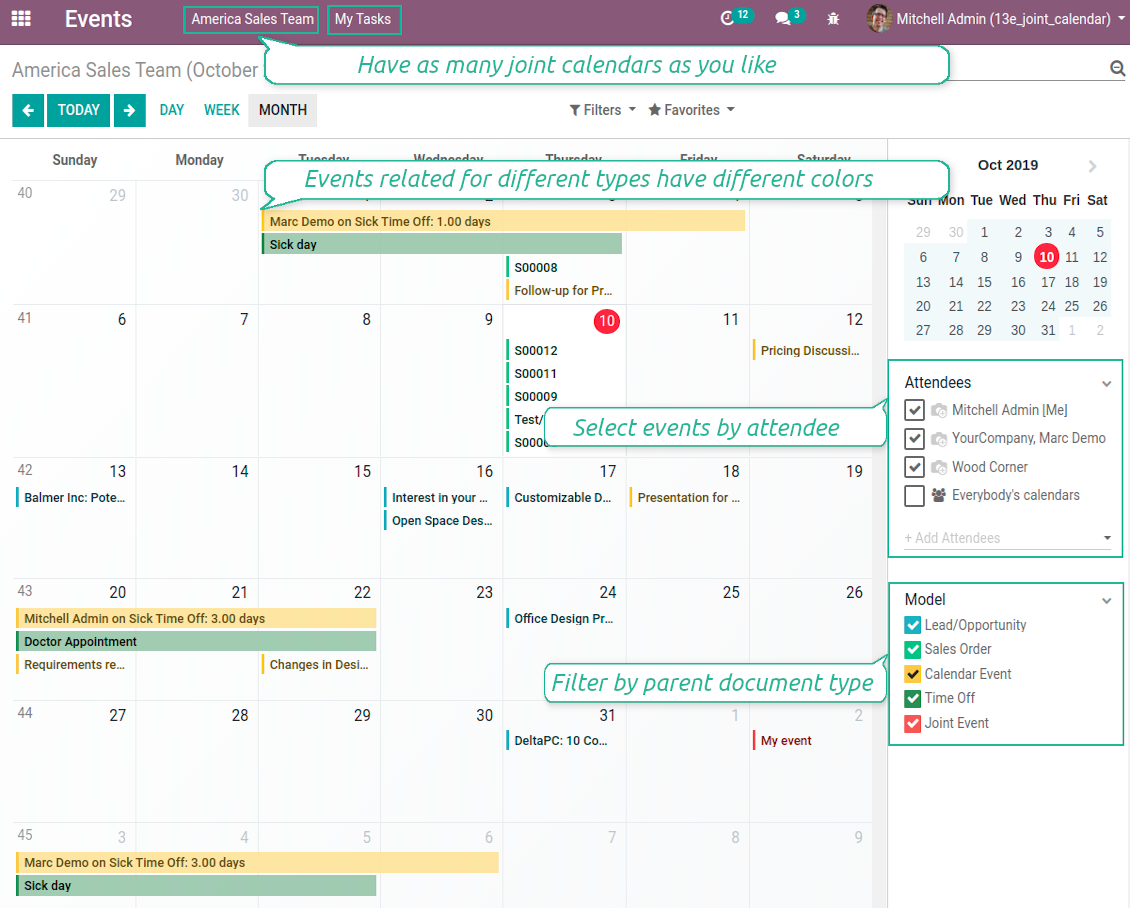
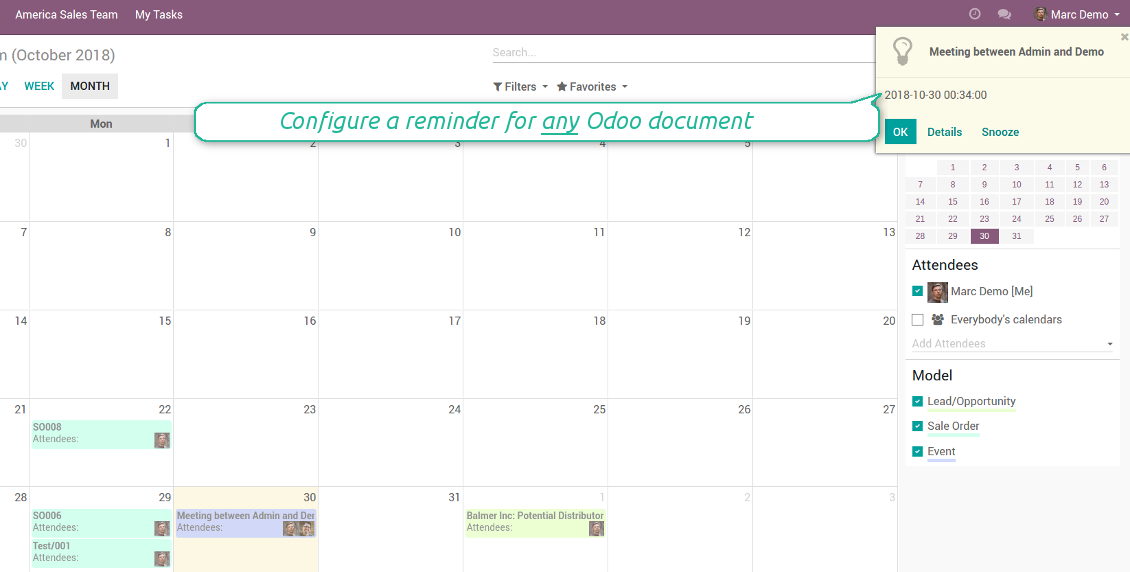
Multifarious events on a single calendar
Besides, you may have an unlimited number of joint calendars with various events, configurations and user groups included, divided by teams or functional areas. Each joint calendar has an own menu item.
Super calendars are updated automatically according to the scheduled jobs. It is fast, especially if you applied time frames.
Ekrano nuotraukos
Joint document types on a single calendar
Fast switching between functional areas
Topical and relevant information
You may also define which documents to show by setting up special filters. Show opportunities but not leads. Work with orders of this sales team but not of others. Merge only overdue activities but not future ones.
How to add a new document type for a joint calendar
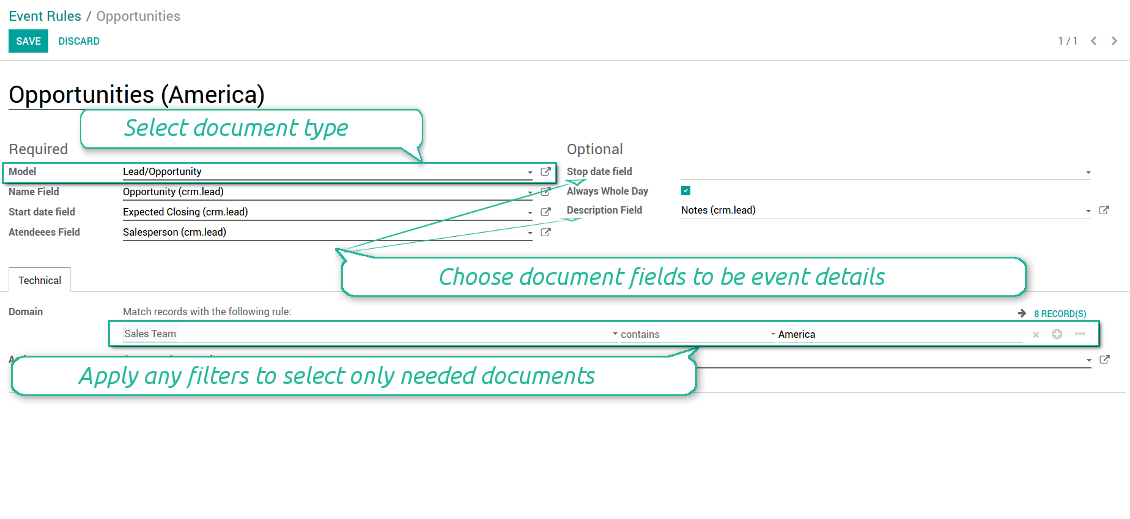
To add a new document type for a joint calendar you should set up a joint calendar rule. This rule defines which Odoo objects should create events, which fields of that object should be shown, and whether any filtering should take place. The app will try to add the most typical values by default, but you should think which data is required in your exact case.
- Model - which objects to scan: opportunities, tasks, orders, meetings, activities, and so on. You can choose your custom document type as well!
- Name - what to use as a joint event name (also used as calendar event title). Usually it is 'name', 'subject' or 'reference'.
- Start date - when an event starts. For example, 'expecting closing' for opportunities or 'order date' for quotations. It may be any date or date with time field of a source Odoo object.
- Attendees - who are participants (responsible persons, event owners). Usually, it is a field 'assigned to', 'a sales person' or 'attendees'. You may use even document 'followers'. It is possible to apply both users and partners as attendees
- Stop date - when an even is shown as finished on a calendar.
- Always Whole Day - means that all generated events would last the whole day disregarding whether start or stop are defined with hours and minutes. Such an event would be shown at a special place on a calendar (above the time line)
- Whole Day - a special boolean field of source object which indicates that a related joint event may lasts the whole day. This setting is usually applied to standard Odoo calendar events which both might have definite time indicated or might be planned for a whole day.
- Description - are there any notes important for joint events? Usually the fields like 'internal notes' or 'comments' are used
- Contact Link - is this event linked to a specific partner? Usually the fields like 'customer' or 'vendor' are used
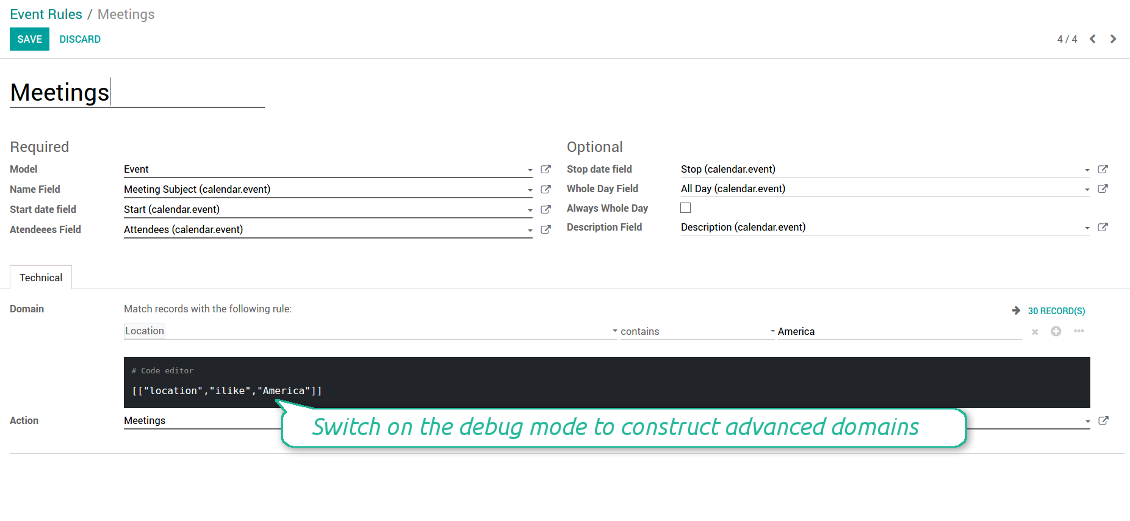
- Domain - the special filters' constructor to include only topical documents into a joint calendar. You might search almost by any criteria. For example, show only quotations without sales orders, or show opportunities only of this sales team or of this customer. If you are confident to make Reverse Polish Notations you may also turn on the debug mode to construct advanced filters.
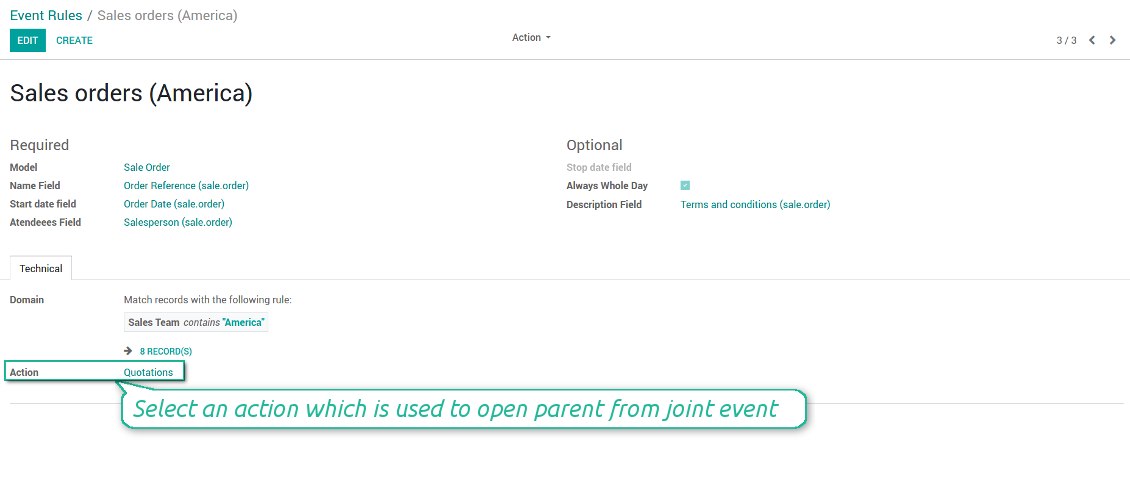
- Action - defines which form view should be shown when you open a source document from a joint event. It is a technical field which in the most cases should not be changed in comparison to a default value.
How to configure a new joint calendar based on rules
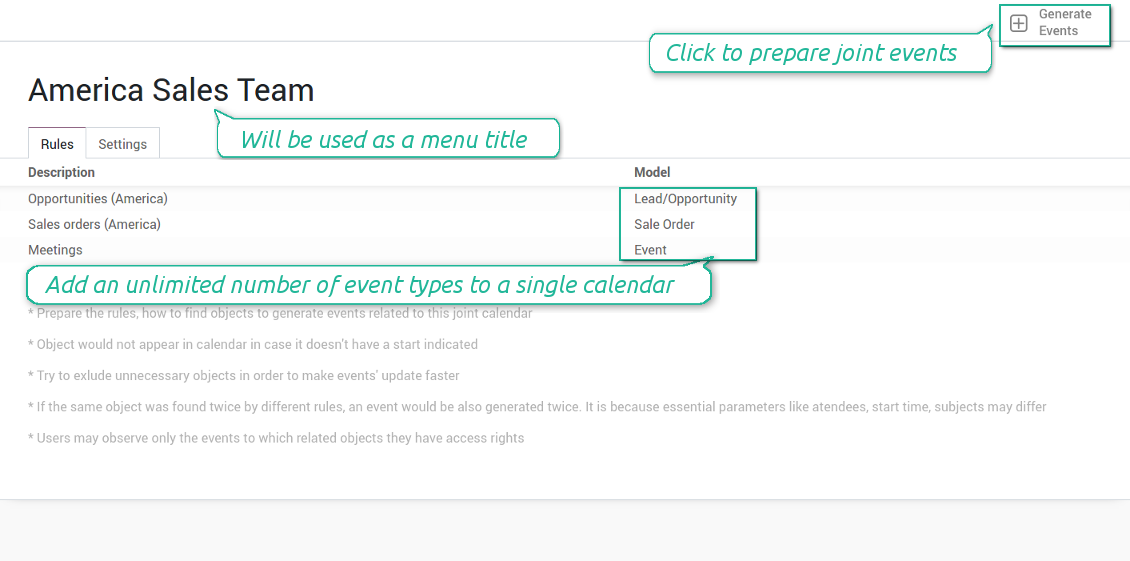
As soon as you prepare a few joint event rules, you are ready to configure a new joint calendar.
First of all, define a title. It would be used as a menu entry for all joint calendar users.
Second of all, choose document types (rules) which should be merged on this shared calendar.
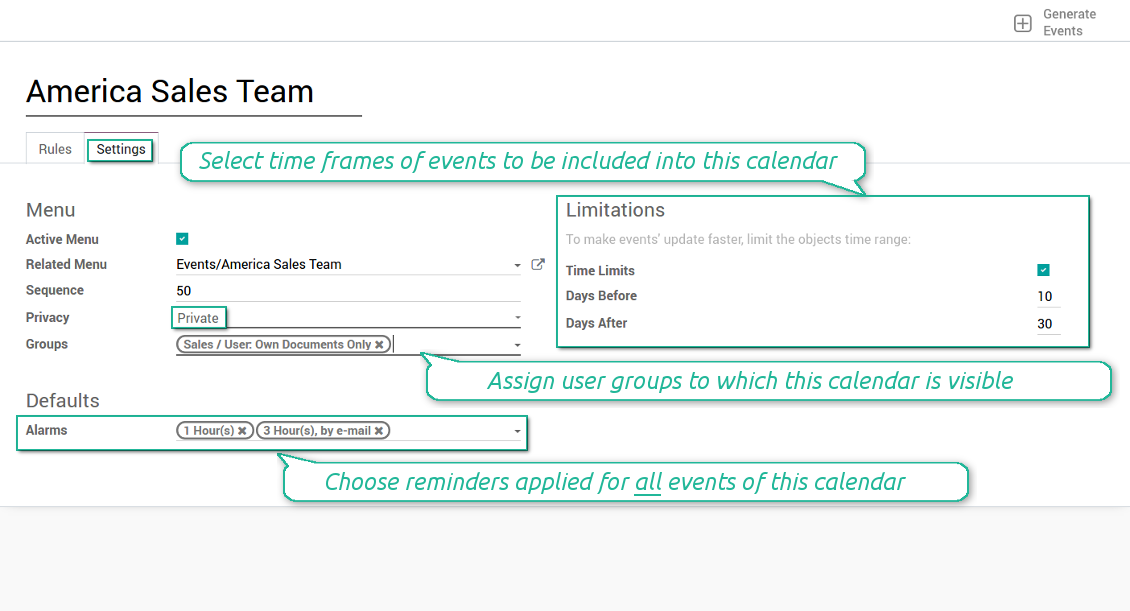
Then, switch to the advanced settings. Some of those might be useful:
- Sequence - in which order various joint calendars' entries are shown. Should it be before the previous super calendar? Then, make a sequence smaller.
- Privacy - let you make a calendar public or private (for predefined user groups only).
- Time limits - allow you optimizing performance of joint events' interfaces. Often there is no need to show the documents of the last year on a calendar.
Is this joint calendar is not any more of use, but it might be needed in the Future? Fine, just archive this calendar: you can activate it at any moment afterwards.
Ekrano nuotraukos
Multiple rules to search documents by types
Joint calendar settings
Joint event rule (example of opportunities)
Joint event rule (example of sale orders)
Joint event rule (example of meetings)
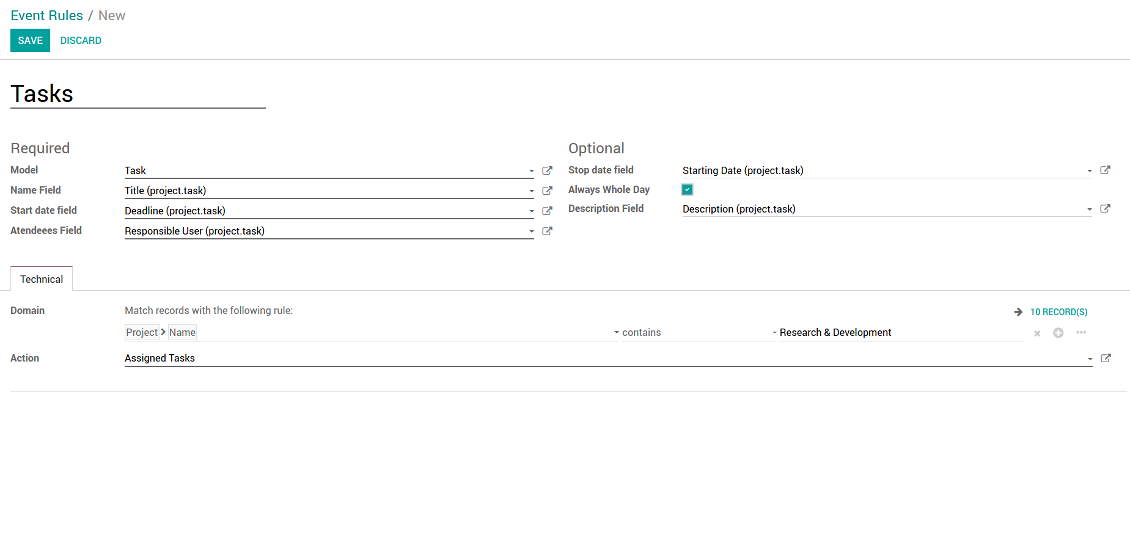
Joint event rule (example of tasks)
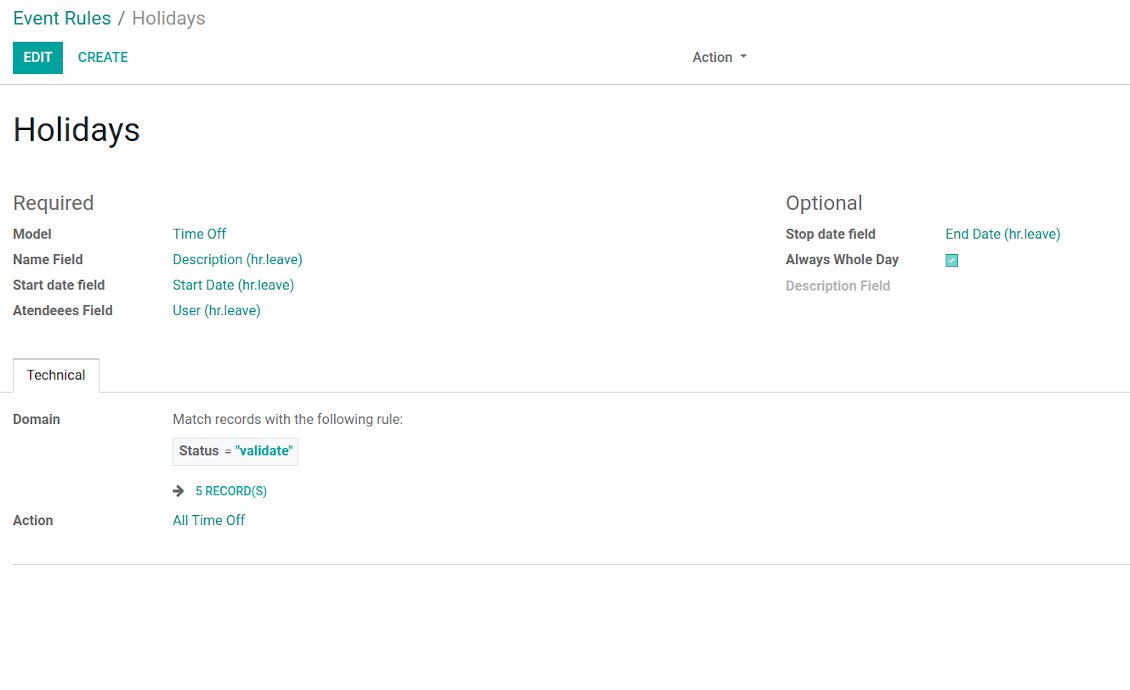
Joint event rule (example of time offs)
Automatic reminders for any Odoo document
How to introduce a warning system
All you need is to prepare a few reminders and indicate those as default on a shared calendar form. Once joint events are generated, each of those would have the same alarms. Afterwards, you may update the these alarms for certain items if you want.
Thus, you can make reminders for any Odoo document automatically. Remind sales persons about next actions in opportunities and calls. Warn workers about a new manufacturing order. Notify programmers about deadlines. So on and so on.
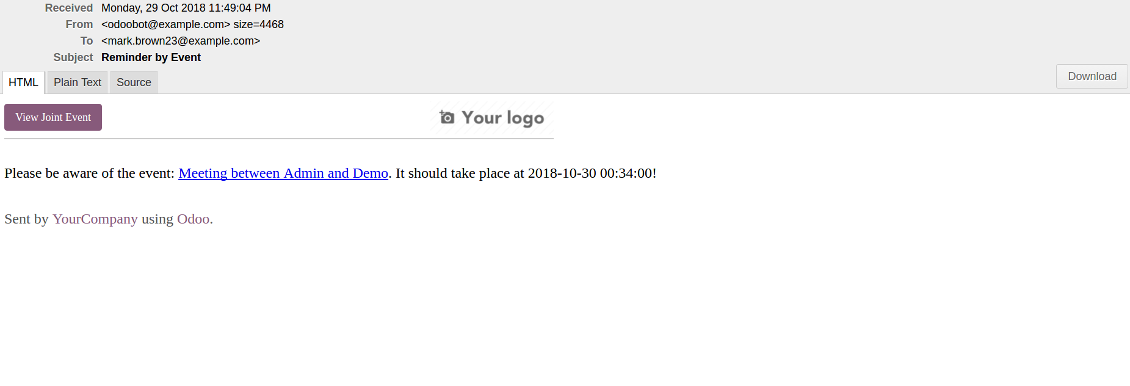
Use both email notifications or pop-up warnings. Warn attendees and responsible users at the moment you like to: from 5 minutes to hundreds of days before.
Ekrano nuotraukos
Configure pop-up alarm for any Odoo event
Email reminder by any Odoo object
Better then expected
The app does exactly what was needed. Combine all tasks from all calendars to one. And allows to manages all activities from all modules in one place.
This makes the Event Calendar so much more useful !
We bought this to combine certain project tasks with the schedules of our maintenance engineers. We now have a better overview which moments are overlapping the schedules of other events. The joining of multiple events in 1 event calendar is super easy, it should be a standard option in ODOO.
Excellent responsive team of programmers
Joint Calendar is the perfect addition to the standard Calendaring system that Odoo offers. It makes the job of setting up specific departmental calendars filled with any objects you wish very easy and Alex and the team provides fantastic after-sales support, responding in most cases within 24 hours to requests for help. Thanks for a great module.
Essential to have Activities, Tasks, Meetings etc all in one calendar and shared.
Great service support very quick and were right on with fixing the issue... I think the ability to see everything on one shared calendar is such an essential part of coordination and time management. Great product once you sort out the rules you need!
Quick access to source details
How are source documents and joint events interrelated
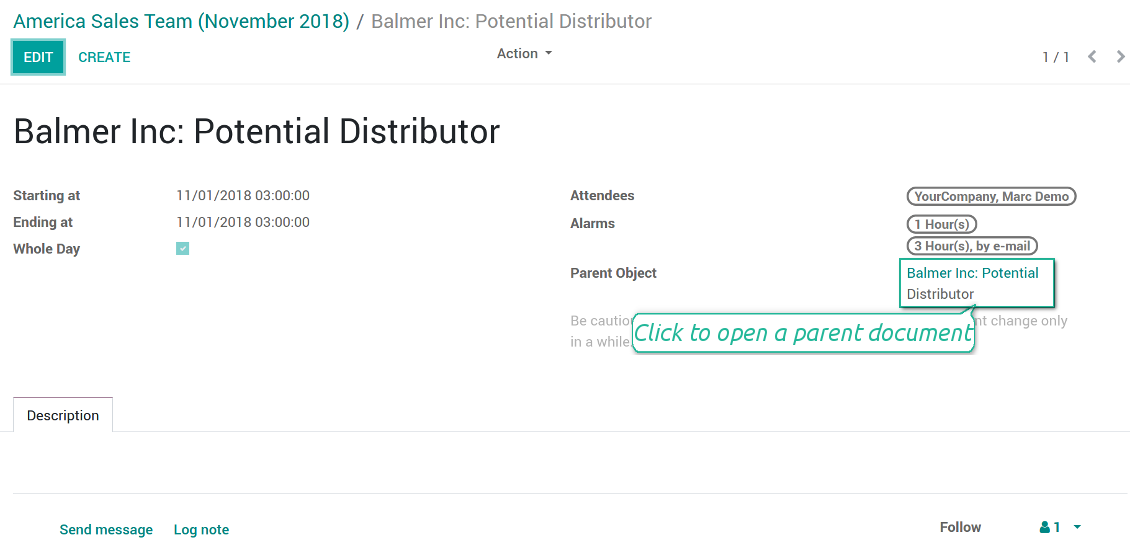
Users observes a link for a source document right on an event form. Thus, it is always possible to expand miscellaneous details.
If you changed a joint event, its parent object would be updated correspondingly in real time. For example, you drag a record and drop it to another date, then a source document would be also moved. Be cautious: it does not work for computed and readonly fields (e.g. a create date can not be modified logically).
If you changed a source object, a joint event would be updated with a next super calendar scheduled job.
Ekrano nuotraukos
Joint event form with simple access to parent document
Simple user rights administration
More details about joint calendar security
The right to create and configure joint calendars belongs only to Odoo administrators (users with the rights 'Administration - Access Rights').
Users may open joint events related to public joint calendars or private joint calendar with one of her/his group indicated. Configure private groups on a joint calendar form, the tab 'Settings', the fields 'Privacy' and 'Groups'. In such a way it is possible to make a joint calendar only for sales managers or only for accountants.
Take into account that in order a user may observe or update a joint event, she/he should have the same rights for a source document. For example, if a sales person doesn't have a right to observe an opportunity, she/he would not see a related joint event as well.
Manually created joint events (without a parent object) may be either public (for all employees) or private (visible for attendees only).
Used in any functional area
Have a look at typical use cases
Activities by all objects and responsibles on a single calendar
Activities are a great Odoo invention, which helps you organize daily routine as a set of well-reached and structured tasks. They are quite comfortable for use, but for team collaboration and efficient management, sometimes you want to have a calendar overview of planned and overdue activities.
Joint Calendar let you achieve that goal. Just add an activity rule as joint calendar rule:
- As a model use 'Activity'
- As a name use 'Display Name'
- As a start date field use 'Due Date'
- As attendees fields use 'Assigned to'
- As a domain apply 'Summary is set'
Opportunities on a super calendar
- As a model use 'Lead / Opportunity'
- As a name use 'Opportunity'
- As a start date field use 'Expecting Closing'
- As attendees fields use 'Salesperson'
- As a contact link use customer
- As a domain optionally restrict opportunities by sales teams.
Tasks on a joint calendar
- As a model use 'Task'
- As a name use 'Title'
- As a start date field use 'Deadline'
- As attendees fields use 'Assigned to'
- As a domain optionally you can set definite projects
Share employees time offs and leaves:
- As a model use 'Time Off'
- As a name use 'Description'
- As a start date field use 'Start Date'
- As attendees fields use 'User'
- As a stop date field use 'End Date'
- As a domain filter by status: show only approved leaves.
Konfigūravimo ir diegimo patarimai Joint Calendar Odoo v.13
Scheduled jobs
- Turn on the debug mode
- Go to technical settings > Automation > Scheduled jobs
- Find the job 'Refresh Joint Events' to change the frequency of calendars' update
- Find the job 'Notify About Joint Event' to change the frequency of email alarms.
Email alarm style
- Activate the developer mode
- Go to technical settings > Email > Templates
- Find the template 'Joint Event Notification'
- You are welcome to change here message body
- Email subject might be changed through the translated term 'Reminder by Event'.
Dažnai užduodami klausimai apie Joint Calendar Odoo v.13
Kas nutiks, kai parinktis „Always Whole Day“ įjungiama/išjungiama?
Kai parinktis "Always Whole Day" įjungta, visi taisyklės sukurti įvykiai trunka visą dieną, net jei pradžia ar pabaiga turi valandas ir minutes. Toks įvykis rodomas specialiame kalendoriaus vietoje.
Pavyzdžiui, jei sukuriate taisyklę modeliui "Sale Order" ir įjungiate "Always Whole Day", įvykis dieniniame ir savaitiniame super kalendoriuje bus virš laiko juostos.
Jei parinktį išjungsite ir pradžia ar pabaiga turi valandas/minutes, įvykis bus konkrečiu paros laiku, o laikas bus prieš pavadinimą.
Odoo sistemoje nematau kalendoriaus meniu. Ką daryti?
Įsitikinkite:
1. Yra bent vienas sukurtas, sukonfigūruotas ir atnaujintas bendras kalendorius. Sutvarkę bet kurį bendrą kalendorių atnaujinkite naršyklės puslapį
2. Turite prieigą bent prie vieno kalendoriaus
Sukūriau keletą kalendorių su taisyklėmis, bet meniu jų nematau.
Priežasčių gali būti kelios. Gali būti, kad susijęs planuotas darbas dar neįvyko. Tada cron paleiskite rankiniu būdu spustelėję atnaujinimo mygtuką dešiniajame bendro kalendoriaus stulpelyje.
Taip pat patikrinkite, ar kalendoriui nustatyti Time Limits, kitaip matomi tik tam tikro intervalo įvykiai. Pavyzdžiui, kalendorius 'Sale Orders' su ribomis 10 dienų prieš ir 30 po. Jei Sale Order sukurtas, tarkime, prieš 12 dienų, kalendoriuje jo nebus.
Įsitikinkite, kad taisyklėse nėra filtrų be atitikčių. Pavyzdžiui, taisyklė 'Sale Order' su filtru 'Customer = Deco Addict' susijusiame kalendoriuje rodys tik šio kliento užsakymus.
Kiek Odoo dokumentų (pvz. pardavimo užsakymų, projektų, veiklų) galiu sujungti viename bendrame kalendoriuje?
Į vieną kalendorių galite sujungti tiek Odoo dokumentų, kiek norite. Arba paskirstyti juos keliuose kalendoriuose (pvz. Sales Calendar ir Projects, Tasks and Activities Calendar) ir persijungti per systray.
Kas yra bendro kalendoriaus taisyklė?
Taisyklės nurodo, kurie Odoo objektai turi kurti įvykius, kurie to objekto laukai naudojami ir rodomi ir ar taikomas filtravimas.
Kurdami taisyklę galite patys nustatyti, kas laikoma bendro įvykio pavadinimu, pradžios ar pabaigos data, kas yra dalyviai ir t. t.
Kam skirtas laukas „Stop date“? Ar galiu jį palikti tuščią?
Stop date — tikslinio Odoo modelio laukas, nurodantis, kada įvykis kalendoriuje laikomas baigtu. Pavyzdžiui, taisyklė modeliui "Sale Order" su "Delivery Date" lauke Stop date rodys įvykį nuo pasiūlymo planavimo dienos (laukas Start Date - Order Date) iki prekės pristatymo dienos.
Laukas neprivalomas, galima palikti tuščią. Tada įvykis bus tik dieną, kurią nurodo Start Date.
Kalendoriuje turiu įvykių tipą „Undefined“. Ką tai reiškia?
Tai reiškia, kad įvykis sukurtas rankiniu būdu. Nėra tėvinio objekto ir jo nereguliuoja taisyklė. Tokie bendri įvykiai matomi filtre "Undefined", be spalvos.
Visi, kas turi prieigą matyti kalendorių, gali kurti ir matyti jo neapibrėžtus įvykius.
Kokios jūsų įrankių naujinimo politikos?
Pagal dabartinės Odoo Apps Store taisykles:
- Kiekvienas 12.0 ir senesnės versijos modulis suteikia prieigą prie visų versijų iki 12.0.
- Nuo 13.0 versijos kiekviena modulio versija perkamą atskirai.
- Nepriklausomai nuo versijos, pirkimas suteikia teisę į visus atnaujinimus ir pataisas pagrindinės versijos ribose.
Atkreipkite dėmesį: komanda faOtools šių taisyklių nekontroliuoja. Klausimus kreipkite tiesiai Odoo Apps Store atstovams.
Kaip įdiegti jūsų programą Odoo.sh?
Tiesiausias būdas – naudoti įtaisytąją Odoo parduotuvės eigą:
1. Atidarykite modulio puslapį ir spustelėkite mygtuką Deploy on odoo.sh
2. Po to būsite nukreipti į GitHub puslapį. Prisijunkite prie paskyros ir spustelėkite 'Create a new repo' arba naudokite esamą. Įsitikinkite, kad saugykla privati. Programėlių skelbti pagal OPL-1 licenciją negalima. Prireikus sukurkite naują repo Odoo.sh projektui
3. Tada eikite į odoo.sh ir spustelėkite mygtuką Deploy. Iššokančiame lange pateikite sprendimą ir spustelėkite 'Continue.' Tai paleis diegimą.
Šie veiksmai įdiegs programėlę gamybinėje projekto šakoje. Jei norite diegti programėles kitose šakose arba atnaujinti modulį, atlikite šiuos veiksmus:
1. Įkelkite programėlės išeities kodą iš Odoo parduotuvės
2. Įrašykite modulį į reikiamą GitHub saugyklą. Įsitikinkite, kad jokie programėlės aplankai/failai nėra ignoruojami (t. y. nėra repo .gitignore). Saugyklas automatiškai sukuria odoo.sh ir pagal numatymą jose gali būti svarbių elementų (pvz., /lib). Įkelkite visus modulio katalogus, pakatalogius ir failus be išimčių
3. Įdiekite norimą odoo.sh projekto šaką arba, jei nustatymai tai numato, palaukite, kol ji bus sukurta automatiškai.
Kaip įdiegti jūsų programą savo serveryje?
2. Paleiskite Odoo serverį iš naujo;
3. Įjunkite kūrėjo režimą (techniniai nustatymai);
4. Atnaujinkite programų sąrašą (programų meniu);
5. Raskite programą ir spustelėkite „Activate“/„Install“;
6. Vadovaukitės programos puslapio gairėmis, jei jos yra.
Pastebėjau, kad jūsų programa turi papildomų priedų. Ar galiu juos įsigyti vėliau?
Taip, žinoma. Tuo pačiu Odoo automatiškai įdeda visas priklausomybes į krepšelį, todėl anksčiau pirktus įrankius reikia pašalinti, kad nemokėtumėte dukart.
Įdiegiau jūsų programą Odoo.sh ir testuose matau įspėjimą/klaidą
Raudonas/oranžinis įspėjimas nekeičia programos funkcijų. Deja, kartais mūsų moduliai neišlaiko standartinių automatinių testų, nes jie tikisi elgsenos, kuri prieštarauja programos tikslams. Pvz., keičiame kainos skaičiavimą, o standartiniai Odoo modulio testai lygina galutinę kainą su standartiniu algoritmu.
Pirmiausia patikrinkite diegtos duomenų bazės funkcijas. Ar viskas veikia teisingai?
Jei vis tiek manote, kad įspėjimas veikia tikras funkcijas, susisiekite ir atsiųskite visus diegimo žurnalus bei visą diegtų modulių sąrašą (įskaitant branduolį ir trečiųjų šalių).
Ar galiu nusipirkti programėlę tiesiogiai iš jūsų įmonės?
Ne, įrankius platiname tik per oficialią Odoo programų parduotuvę.
Norėčiau gauti nuolaidą
Deja, neturime techninių priemonių individualioms kainoms pateikti.
Ar galiu įdiegti programėlę savo Odoo Online (SaaS) duomenų bazėje?
Ne, trečiųjų šalių programų negalima naudoti Odoo Online. Deja, Odoo SaaS tai blokuoja.
Jūsų įrankis priklauso nuo kitų programų. Ar turiu jas pirkti?
Taip, įrankiui reikia visų priklausomybėse pažymėtų modulių, kad veiktų teisingai. Programos puslapyje nurodyta kaina jau apima visas būtinas priklausomybes.
Kokia modulio kaina JAV doleriais? Kodėl ji pasikeitė?
Mūsų modulių kaina nustatyta eurais. Odoo parduotuvė konvertuoja kainas į kitas valiutas pagal vidinį kursą. Todėl kaina JAV doleriais gali keistis atnaujinus kursą.
Programos ir svetainės tekstai kitomis kalbomis nei anglų parengti su DI ir suderinti su oficialiais Odoo vertimais. Jei pastebėjote klaidą, siųskite bilietą dėl vertimų teisingumo ir pataisysime.
Klaidų pranešimas
Jei susidursite su klaidomis ar nenuosekliu elgesiu, nedvejodami susisiekite. Garantuoame pataisymus per 60 dienų nuo pirkimo ir ir toliau stengiamės tobulinti įrankius po šio laikotarpio.
Norėdami susisiekti, jums nereikia telefono numerio ar kredito kortelės. Užtenka trumpos registracijos el. paštu, kuri trunka ne ilgiau kaip 30 sekundžių.
Į užklausą įtraukite kuo daugiau informacijos: ekrano nuotraukas, Odoo serverio žurnalus, išsamų problemos atkūrimo aprašymą ir pan. Paprastai darbo plano parengimas problemai (jei klaida patvirtinama) arba gairių, ką daryti (kitu atveju), pateikimas trunka kelias darbo dienas.
Vieši funkcijų prašymai ir modulių idėjos (nemokama plėtra)
Esame labai motyvuoti tobulinti savo įrankius ir būsime dėkingi už bet kokį atsiliepimą. Jei jūsų reikalavimai naudingi visiems ir gali būti efektyviai įgyvendinti, komanda įtrauks juos į mūsų darbų sąrašą.
Toks darbų sąrašas tvarkomas reguliariai ir nereiškia papildomų mokesčių. Nors negalime pažadėti terminų ir galutinio dizaino, tai gali būti geras būdas gauti norimas funkcijas be investicijų ir rizikos.
Norėdami susisiekti, jums nereikia telefono numerio ar kredito kortelės. Užtenka trumpos registracijos el. paštu, kuri trunka ne ilgiau kaip 30 sekundžių.

Įrankis Odoo priedams lanksčiai dėlioti į aplankus ir sinchronizuoti katalogus su debesijos klientais: Google Drive, OneDrive/SharePoint, Nextcloud/ownCloud, Dropbox, Amazon S3, Box ir NAS. DMS. Failų tvarkyklė. Dokumentų valdymo sistema
398€
Įrankis automatinei dvikryptei Odoo priedų sinchronizacijai su OneDrive failais
487€
Įrankis automatinei dvikryptei Odoo priedų sinchronizacijai su Google Drive failais
487€
Įrankis slaptažodžiams saugiai laikyti Odoo bendram naudojimui. Bendros saugyklos

Įrankis giliam ir struktūruotam žinių bazei kurti vidiniam ir išoriniam naudojimui. Knowledge System. KMS. Wiki tipo revizijos.
398€
Įrankis KPI tikslams nustatyti ir jų vykdymui pagal laikotarpius kontroliuoti. KPI ataskaitų lentos. Lentų konstruktorius. KPI diagramos

Įrankis laiku grįstam paslaugų valdymui – nuo susitikimų rezervavimo iki pardavimų ir atsiliepimų
398€
Įrankis valdyti Odoo iš mėgstamų AI pokalbių per MCP. Claude. Bet kuris AI su MCP.
