Joint Calendar v.9
The tool to combine different Odoo events in a few configurable super calendars. Shared calendar. Common calendar.
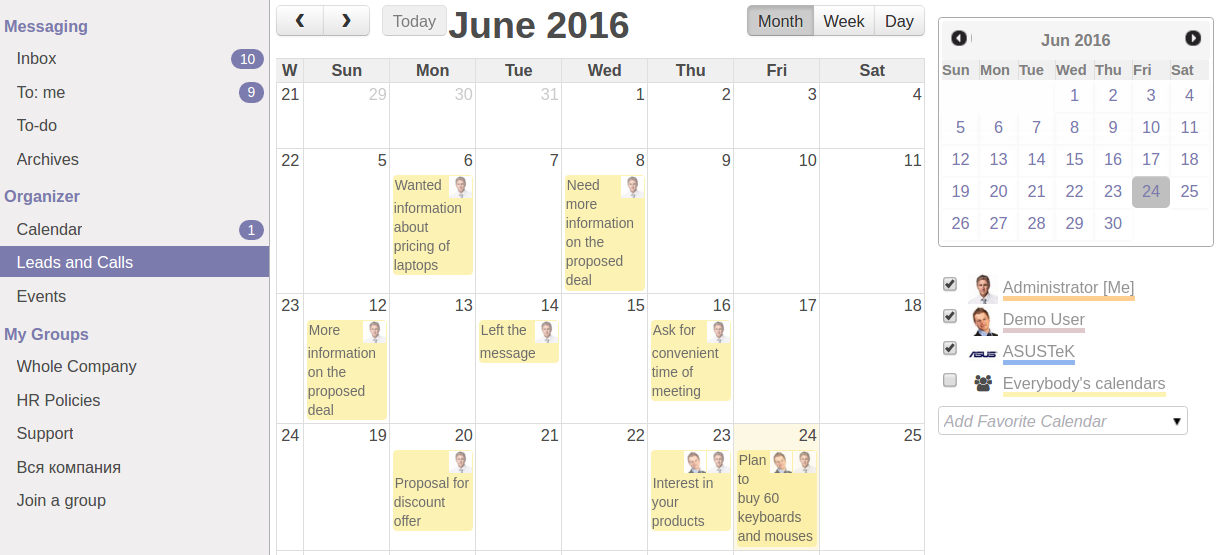



- Have an unlimited number of calendars with different events, configurations and user groups included. The menus are generated dynamically!
- All calendars are updated through a regular job
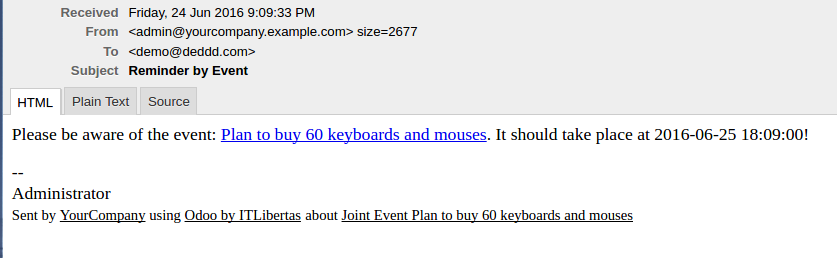
- Configure alarms for joint events and keep always informed, and inform others about required actions and events
Access parent object right from a joint event form. Click on a reference and open merged leads, opportunities, partners (e.g. to have the birthdays on a calendar), tasks, orders, quotations, calls, thus, absolutely any objects with at least one date indicated
Register a new joint event manually like any other Odoo objects. It would not disappear with a next update
Change frequency of the events' update. By default it happens once an hour, but you may change it through Settings > Technical > Automation > Scheduled Jobs > 'Refresh Joint Events'. Besides, you may update joint events just by clicking the button
As soon as you changed a joint event, its parent would be updated correspondingly (if a modified field was not read only or computed)
Show the same object twice but with different start, end or name
Flexible configuration
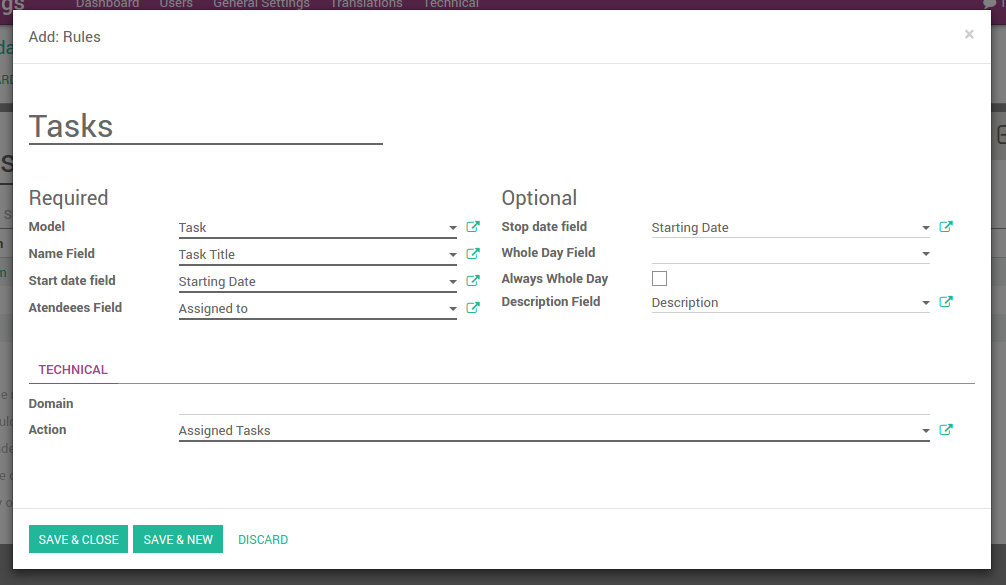
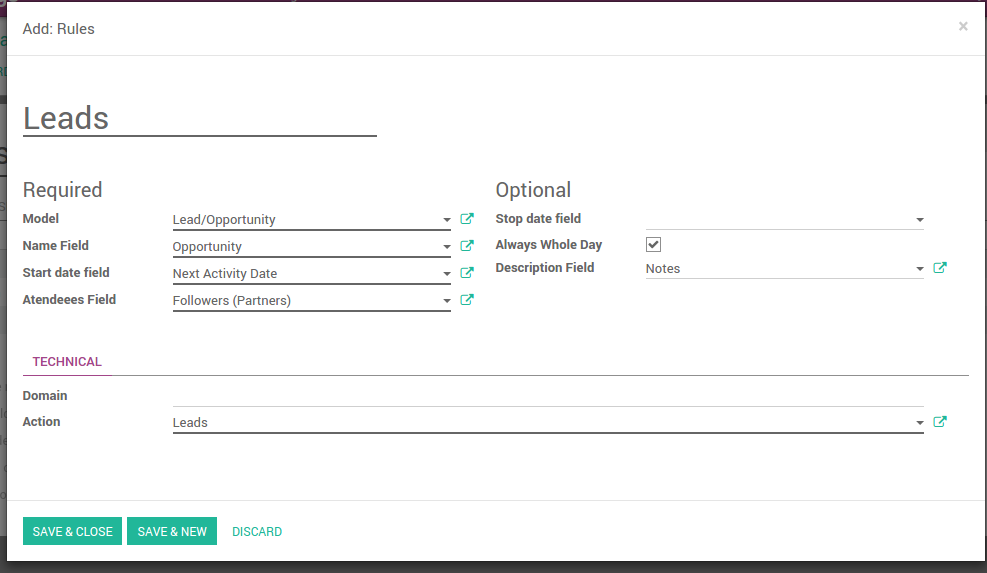
- Model - which object to find: leads, tasks, orders and so on
- Name field - which field of the object would be used as joint event name (would be shown on a calendar view). Usually it is Name, Subject or Reference
- Start date field - which field should be used a start of an event. For example, Next Action Date for opportunities or Order Date for quotations. It may be be both Date or Date and Time
- Attendees Fields - which field should be used to find participants. Usually, it is some Responsible or Sales Person. But you may use even Followers. In comparison to other similar modules you may use both users and partners as attendees
- Stop date field - which field to use to define when a joint event is going to be finished. It is also may be Date or Time
- Whole Day Field - a special boolean field, which indicates that a related joint event may lasts the whole day. Such an event would be shown at a special place on a calendar (above the time line)
- Always Whole Day means that all generated events would last the whole day (disregarding whether start or stop are defined with hours and minutes)
- Description Field - which field of a related object is used as notes for joint events. Usually the fields like Internal Notes or Comments are used
- Domain - a special setting, which require advance Odoo technical knowledge. Its goal is to limit a number of objects on a calendar (for example, to show only leads without opportunities: [('type','!=','opportunity')]; and the opposite: [('type','!=','lead')].)
- Action - what action (including views and defaults) to invoke, when you go to a parent object from this joint event.
-
Select rules for joint calendars:
- The configurations are provided with useful tips: just point a cursor on a field
- Optimize joint events' generation and modification by making time limits. There is no need to show the events of the last year on a calendar! You do not need to wait for ages until the events are created as it in other similar modules
- Define calendars' menus' sequences. Should it be before the previous Super Calendar? Then, make a sequence smaller
- Deactivate a joint calendar to hide menus and corresponding events
Alarms
- Configure alarms of 2 types: mails and notifications. The schema is the same as it is for Odoo standard calendar events. You may warn attendees and responsible users at the moment you like to: from 5 minutes to hundreds of days before
- Change email styles through Settings > Technical >Email > Templates > Joint Event Notification
- Be cautious: notifications would be shown for portal users, if they are attendees
- The very special feature: Use the app to make customized notifications for any required Odoo objects. Remind sales persons about next actions in leads and calls. Warn workers about a new manufacturing order. Notify programmers about deadlines. You may configure it by your own! Both emails and notifications. In order to do so, just indicate default alarms in required joint calendar settings.
Access rights
- Only users with administrator rights may configure new joint calendars and related rules to search objects
- Users may see only the public calendars or calendars, to which user groups they belong to. Configure it through the Joint Calendar: the tab Settings > Menu > Privacy
- Users may access only the joint events, to which parents (leads, tasks, orders, etc.) they have access rights. It is equally true for read, write, create and unlink permission. For example, if a sales person doesn't have a right to observe lead, he/she would not see a related joint event as well
- Manually created joint events may be either public (for all employees) or private (visible for attendees only)
に関するよくある質問 Joint Calendar Odoo v.9
オプション「Always Whole Day」をオン/オフするとどうなりますか?
オプション "Always Whole Day" がオンだと、規則で生成されるイベントは開始・終了に時分があっても終日になります。そのようなイベントはカレンダーの特別な位置に表示されます。
たとえばモデル "Sale Order" の規則を作り "Always Whole Day" をオンにすると、イベントは日次・週次スーパーカレンダーのタイムライン上に置かれます。
オプションをオフにし、開始または終了に時/分があれば、イベントはその日の特定時刻に置かれ、タイトルの前に時刻が表示されます。
自分の Odoo にカレンダーのメニューが見えません。どうすればよいですか?
次を確認してください:
1. 作成・設定・更新済みの共同カレンダーが少なくとも 1 つあること。共同カレンダーを設定したらブラウザのページを再読み込みしてください
2. いずれかのカレンダーにアクセスできること
ルール付きのカレンダーを作りましたが、メニューに表示されません。
理由はいくつか考えられます。関連するスケジュール済みジョブがまだ実行されていない可能性があります。その場合は、共同カレンダー画面の右列にある更新ボタンで cron を手動起動してください。
カレンダーに Time Limits がないかも確認してください。ないと特定期間のイベントだけが表示されます。例: 'Sale Orders' カレンダーが前 10 日・後 30 日なら、12 日前に作成した Sale Order は表示されません。
規則に一致しないフィルタがないかも確認してください。例: 規則 'Sale Order' とフィルタ 'Customer = Deco Addict' なら、関連カレンダーにはその顧客のオーダだけが表示されます。
1つの共同カレンダーに、いくつの Odoo 文書(例: 販売オーダ、プロジェクト、活動)をまとめられますか?
任意の数の Odoo 文書を 1 つのカレンダーにまとめられます。または複数カレンダー(例: Sales Calendar と Projects, Tasks and Activities Calendar)に分け、systray で切り替えます。
ジョイントカレンダー規則とは何ですか?
ルールは、どの Odoo オブジェクトが予定を作るか、そのオブジェクトのどのフィールドを使って表示するか、フィルタを行うかを定義します。
ルール作成時に、共同予定のタイトル、開始または終了日、対象出席者などを自分で定義できます。
フィールド「Stop date」は何用ですか?空のままでよいですか?
Stop date は対象 Odoo モデルのフィールドで、カレンダー上でイベントが終了と表示される時点を決めます。たとえばモデル "Sale Order" の規則で Stop date に "Delivery Date" を選ぶと、見積の予定日(Start Date フィールド - Order Date)から製品の納品日までイベントメニューに表示されます。
任意フィールドなので空のままで構いません。その場合、イベントは Start Date フィールドの日だけに置かれます。
カレンダーに「Undefined」タイプのイベントがあります。どういう意味ですか?
この予定は手動で作成されたことを意味します。親オブジェクトがなく、ルールにも従いません。こうした共同予定は色なしでフィルター "Undefined" に表示されます。
カレンダーを見る権限がある人は、その未定義の予定を作成・表示できます。
ツールの更新ポリシーは何ですか?
現行の Odoo Apps Store ポリシーによると:
- バージョン 12.0 以前向けに購入したモジュールは、12.0 までの全バージョンにアクセスできます。
- バージョン 13.0 以降、各モジュールバージョンは個別に購入します。
- バージョンに関係なく、購入するとメジャーバージョン内の すべての更新と不具合修正の権利が得られます。
faOtools チームはこれらのポリシーを管理していません。ご質問は Odoo Apps Store の担当者へ直接お問い合わせください。
アプリを Odoo.sh にインストールする方法は?
最も単純な方法は、Odooストア組み込みのワークフローを使うことです:
1. モジュールのページを開き、Deploy on odoo.sh ボタンをクリックします。
2. その後 GitHub ページにリダイレクトされます。アカウントにログインし、'Create a new repo' をクリックするか既存のものを使います。リポジトリはプライベートにしてください。OPL-1 ライセンスのアプリを公開することは許可されていません。必要なら Odoo.sh プロジェクト用に新しい repo を作成します。
3. 次に odoo.sh に行き、Deploy ボタンをクリックします。ポップアップで決定を送信し、'Continue.' をクリックします。これでインストールが始まります。
これらの手順でプロジェクトの本番ブランチにアプリがインストールされます。他のブランチにデプロイする、またはモジュールを更新する場合は、次の操作を行います:
1. Odooストアからアプリのソースコードをアップロードします。
2. モジュールを必要な GitHub リポジトリにコミットします。アプリのフォルダ/ファイルが無視されていないこと(repo の .gitignore に含まれていないこと)を確認してください。リポジトリは odoo.sh が自動作成し、既定で重要な項目(例: /lib)が含まれることがあります。モジュールのディレクトリ、サブディレクトリ、ファイルを例外なくすべてアップロードしてください。
3. odoo.sh プロジェクトの対象ブランチを Deploy するか、 設定がそうなっている場合は自動ビルドされるまで待ちます。
自分のサーバーにアプリをインストールするには?
2. Odoo サーバーを再起動します;
3. 開発者モードをオンにします(技術設定);
4. アプリ一覧を更新します(アプリメニュー);
5. アプリを見つけて「Activate」/「Install」を押します;
6. アプリページにガイドラインがあれば従ってください。
アプリに追加アドオンがあるのに気づきました。後から購入できますか?
はい、もちろんです。同時に Odoo は依存関係をすべてカートに自動追加するので、二重払いを避けるには既に購入したツールを除外してください。
アプリを Odoo.sh にデプロイしたらテストで警告/エラーが出ます
赤/オレンジの警告はアプリの機能に影響しません。残念ながら、標準の自動テストがアプリの目的と衝突する動作を想定するため、モジュールが通らないことがあります。たとえば価格計算を変える一方、標準 Odoo モジュールのテストは最終価格を標準アルゴリズムと比較します。
まず、デプロイ済みデータベースの機能を確認してください。すべて正しく動いていますか?
それでも警告が実機能に影響すると考える場合はご連絡のうえ、インストールログ一式とデプロイ済みモジュールの全一覧(コアおよびサードパーティ含む)を送ってください。
アプリを御社から直接購入できますか?
いいえ、ツールは 公式の Odoo アプリストア.
割引をいただきたいです
残念ながら、個別価格を提示する技術的手段が ありません。
Odoo Online (SaaS)データベースにアプリをインストールできますか?
いいえ、サードパーティアプリは Odoo Online では使えません。残念ながら Odoo SaaS がその可能性をブロックします。
ツールは他のアプリに依存しています。それらも購入すべきですか?
はい、ツールが正しく動くには依存関係に記されたすべてのモジュールが必要です。アプリページの価格には必要な依存関係がすでに含まれています。
モジュールの米ドル価格はいくらですか?なぜ変わりましたか?
モジュールの価格はユーロ建てです。Odoo ストアは内部為替レートで他通貨に換算します。そのため為替が更新されると米ドル価格が変わることがあります。
英語以外のアプリ・サイト文言は AI 支援で作成され、 公式の Odoo 翻訳に揃えています。誤りを見つけたら、 翻訳の正確さについてチケットを送る 修正します。
不具合報告
不具合や一貫しない動作があれば、遠慮なくご連絡ください。購入から60日以内の修正を保証し、その後もツール改善に力を入れています。
ご連絡に電話番号やクレジットカードは不要です。30 秒以内の短いメール登録だけです。
リクエストにはできるだけ多くの詳細を含めてください:スクリーンショット、Odoo サーバーログ、問題の再現手順の完全な説明など。通常、問題の作業計画の作成(不具合が確認された場合)または実施すべき内容の案内(それ以外)には数営業日かかります。
公開の機能リクエストとモジュールのアイデア(無償開発)
ツール改善への意欲は強く、フィードバックには感謝します。要件が広く役立ち、効率よく実装できる場合、チームは To-do リストに加えます。
このような To-do リストは定期的に処理され、追加料金は発生しません。期限や最終デザインは約束できませんが、投資とリスクなしで望む機能を得る良い方法になることがあります。
ご連絡に電話番号やクレジットカードは不要です。30 秒以内の短いメール登録だけです。

Odoo の添付ファイルをフォルダに柔軟に整理し、Google Drive、OneDrive/SharePoint、Nextcloud/ownCloud、Dropbox、Amazon S3、Box、NAS とディレクトリを同期するツール。DMS。ファイルマネージャー。文書管理システム
398€


社内・社外向けに深く構造化されたナレッジベースを構築するツール。Knowledge System。KMS。Wiki のような改訂。
398€


お気に入りの AI チャットから MCP 経由で Odoo を管理するツール。Claude。MCP 対応の任意の AI。
