Dropbox Odoo Integration v.18
The tool to automatically synchronize Odoo attachments with DropBox files in both ways
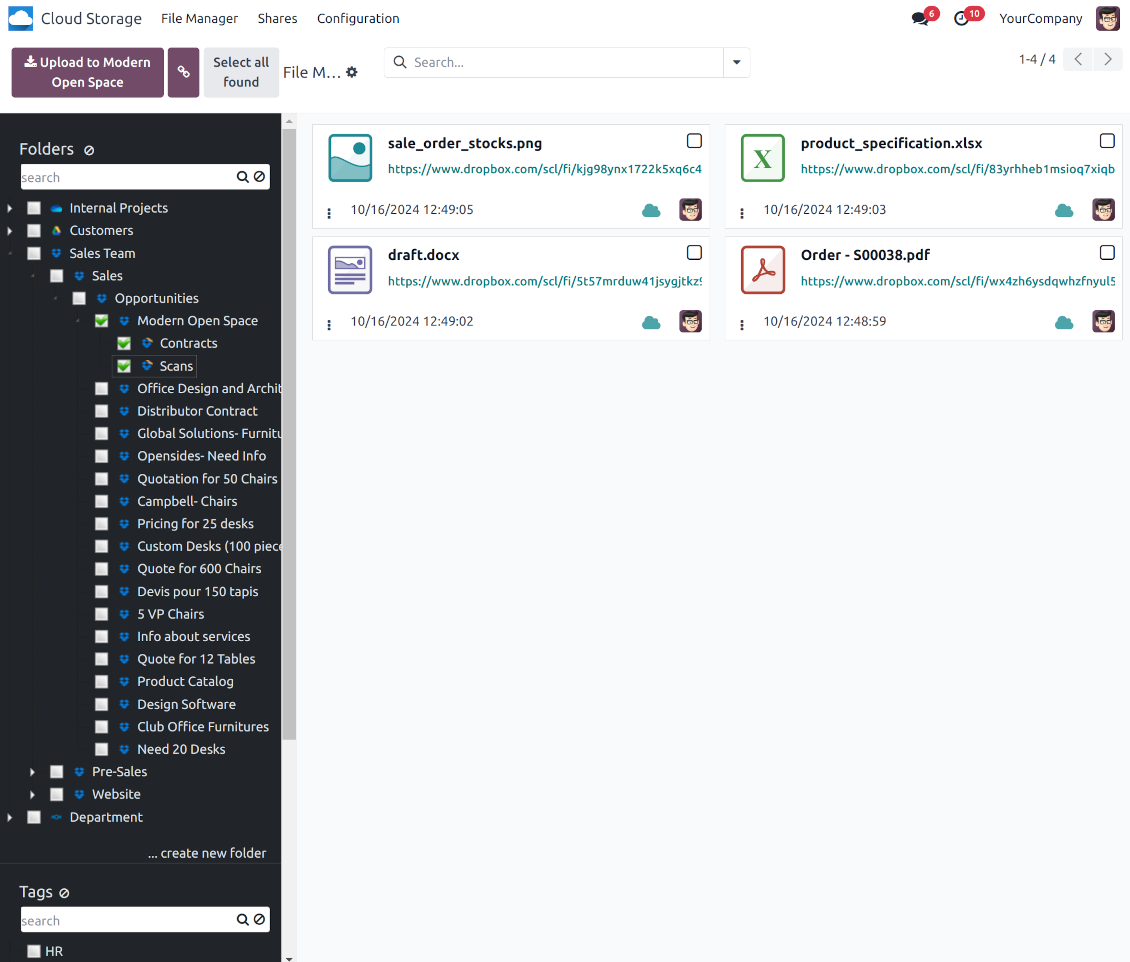
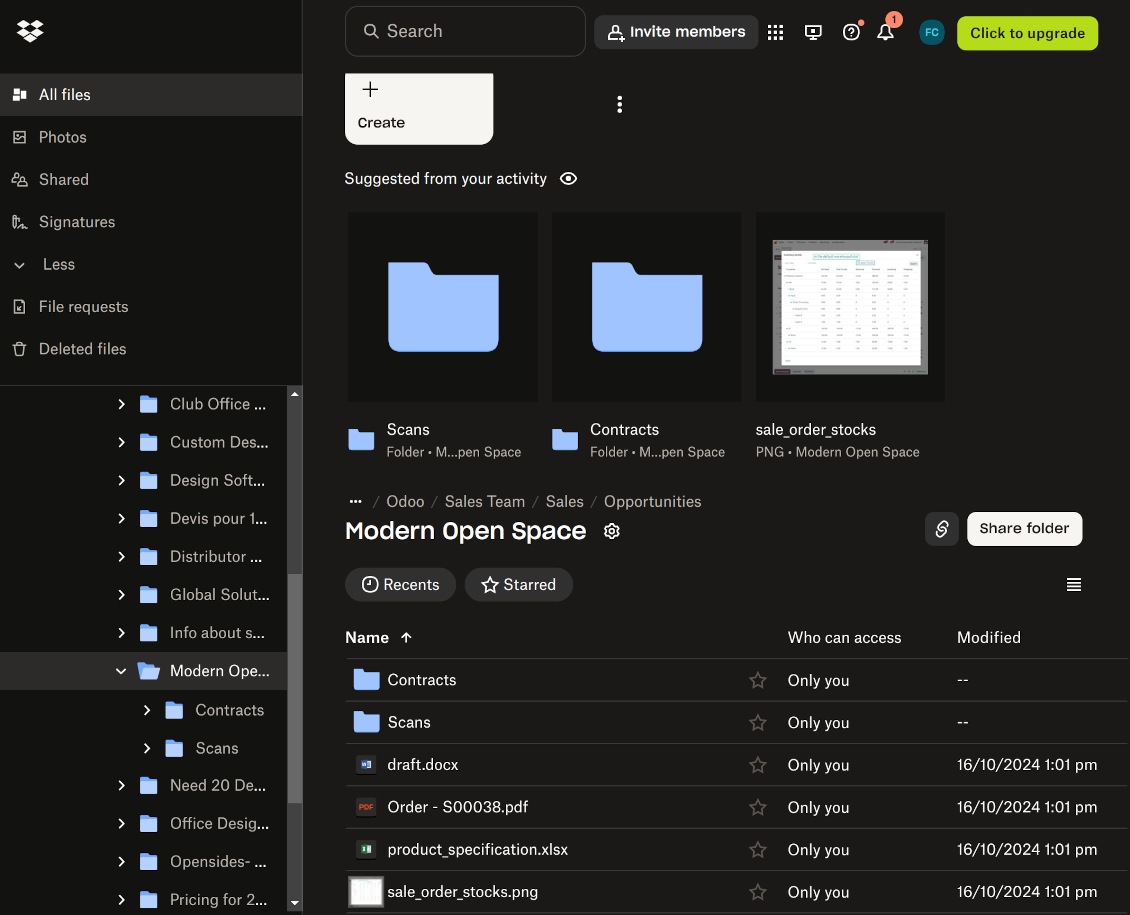
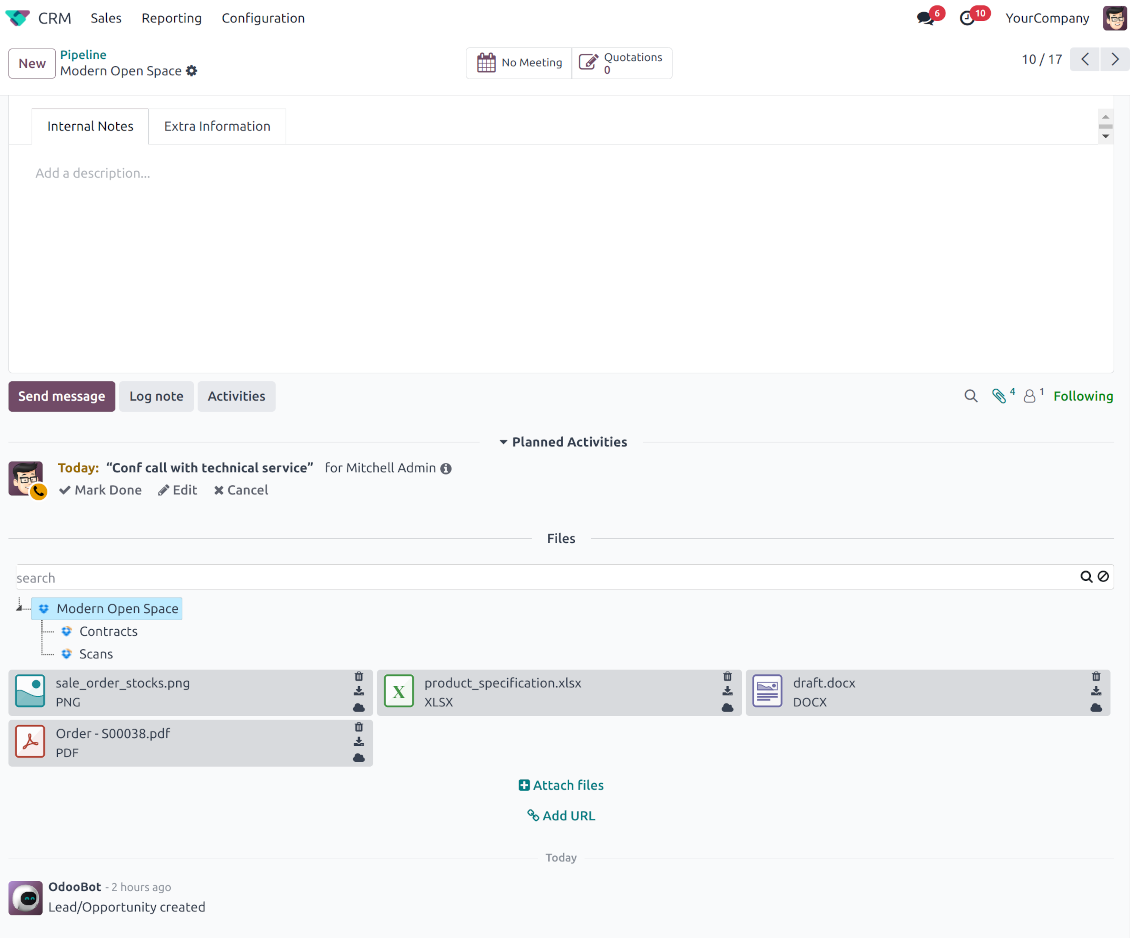
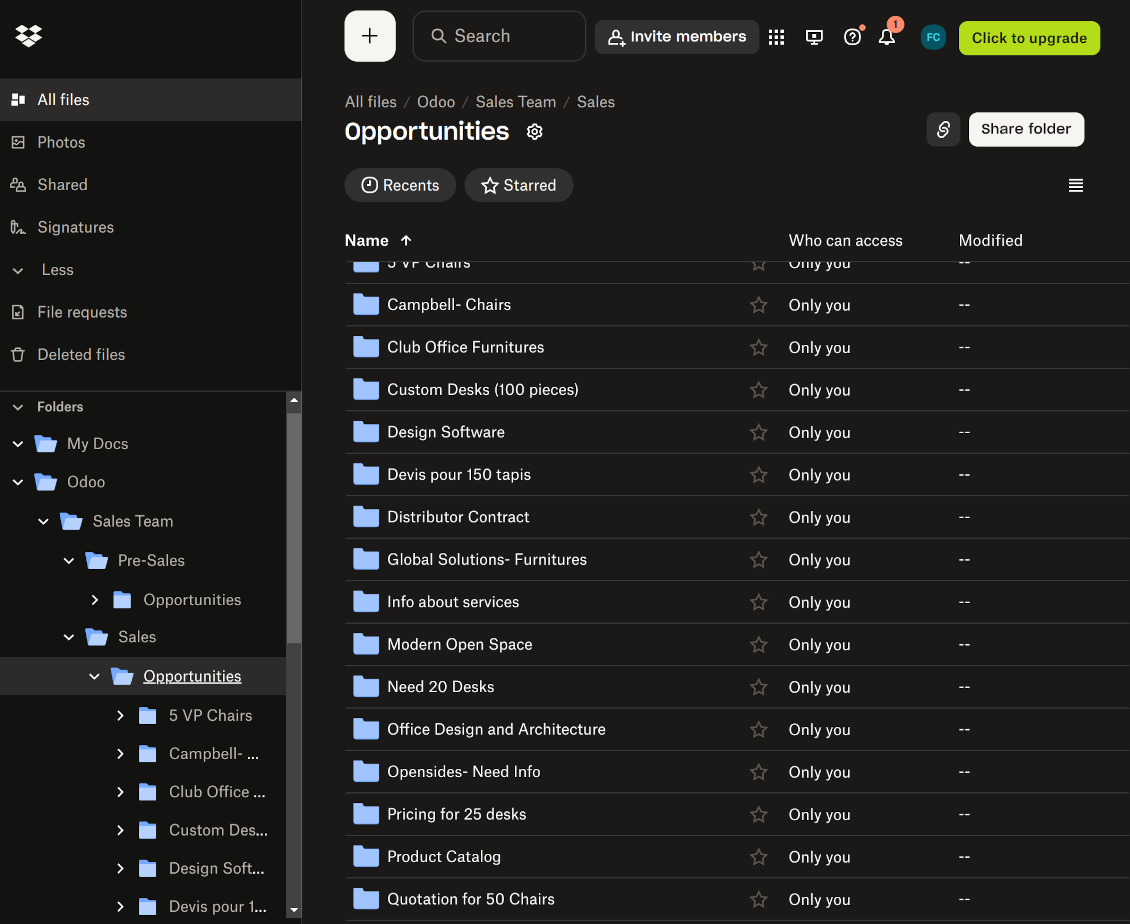
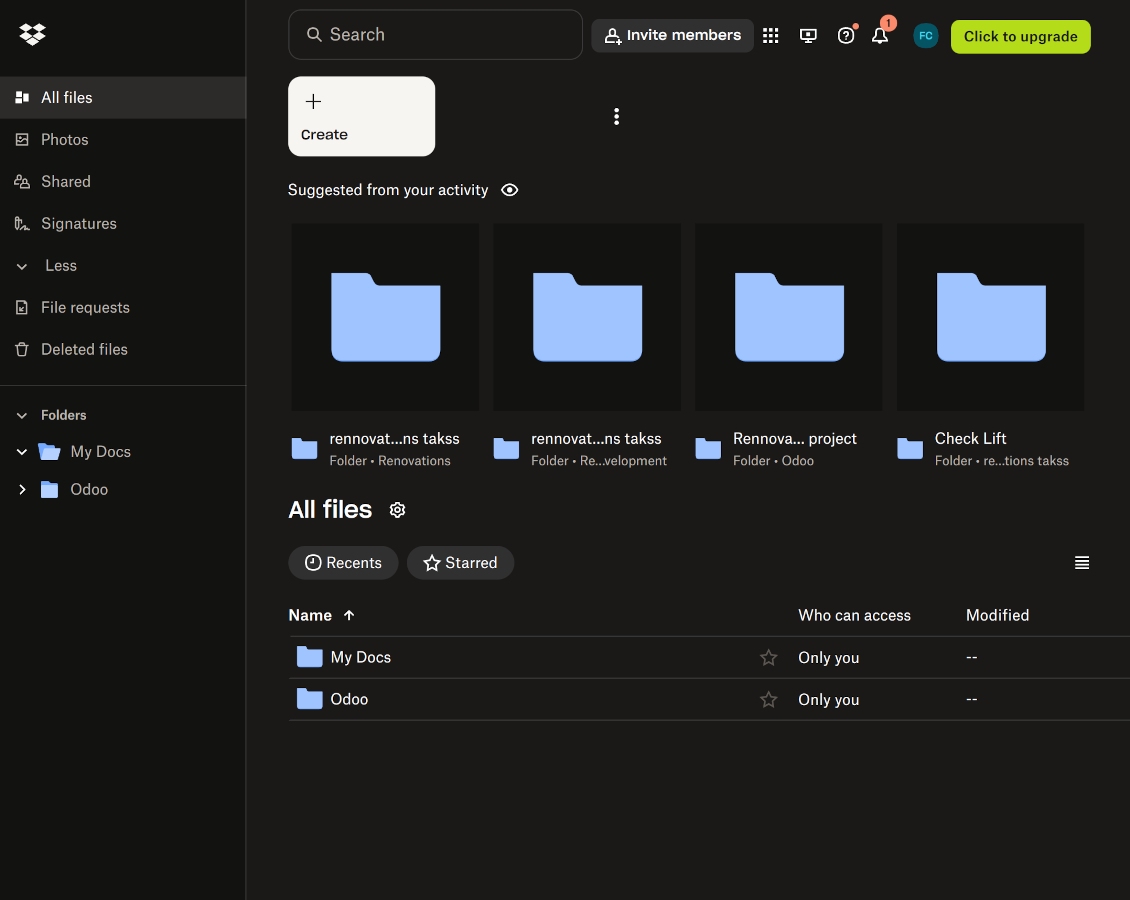
This is the tool to integrate Dropbox features with Odoo folders and files. The app automatically stores Odoo attachments and directories in Dropbox and provides instant access to them via web links.
Automatic folders' structure
Decide which Odoo document types should have their own folders trees and synchronize those to Dropbox
Automatic regular sync
Rely on auto-synchronization between Odoo and Dropbox based on scheduled jobs. No manual interaction is required
Bilateral sync
Odoo sends attachments to Dropbox and retrieves files from there. Binary content is kept in clouds, while Odoo provides direct access to synced items
Cloud synchronization history
Control Dropbox sync logs right in Odoo. Export and share those in case of any issues. Be notified of any client disconnections
File manager interface
Manage synced folders and attachments from a single Odoo view. Comfortably navigate by directories. Search and download files one by one or in batch. Upload and move attachments to folders
Attachment box
Organize files of any Odoo object in a set of subfolders. Instantly access folders and files in the attachment box and in Dropbox
How synchronization works
Automatic two-sided sync
-
Configure sync for one or multiple Dropbox instances
-
Integration is based on scheduled jobs and is fully automatized. The app regularly checks changes in systems and runs sync operations
-
Synchronization is bilateral. Updates in Odoo are reflected in Dropbox (direct sync); changes in Dropbox modify Odoo folders and attachments (backward sync)
-
Cloud connection with Dropbox might be reset. In this way, the app assumes getting back all items back to Odoo (reverse sync)
-
Odoo folders and attachments might be re-attached to a new cloud client from Dropbox. Hence, items will be first taken back to Odoo (reverse sync) and then put will be put into the new cloud storage (direct sync)
Queue-based synchronization
-
Once in 15 minutes, the app examines updates in Odoo and Dropbox to prepare a synchronization queue
-
Folders' checks follow the First-In-First-Out (FIFO) principle. So, directories that have not been examined for the longest will be processed first
-
Once in 15 minutes, the sync queue is run by the special scheduled job. Firstly, the most important (blocking) tasks would be done
-
Control planned jobs and their fulfillment in the special Odoo logs interface (Cloud Storage > Configuration > Sync Logs). Subscribe for particular cloud clients notifications
-
If the app faces sync failures, it will re-try operations afterward. Sync queue processing would not be stopped if there are items not blocked by such failures
Odoo attachments for Dropbox: direct sync
-
Direct sync prepares the folders' hierarchy and uploads Odoo attachments for Dropbox
-
Direct sync checks whether attachments are added or deleted for synced directories. If so, they would be created or removed in Dropbox. In particular, it means that any file added to a folder-related Odoo object (e.g. Quotation), would be automatically moved to a linked cloud client
-
Direct sync makes all synced Odoo attachments change their type to a link (URL), while binary content is removed with one of the next Odoo cleaners. So, no actual files would be stored on your Odoo server
-
Direct sync checks whether a new folder is added. Disregarding whether it is done manually or automatically, the app would generate a peer directory in Dropbox
-
Direct sync checks whether there are any updates in folders. If so, such changes are reflected in Dropbox
Dropbox files and folders for Odoo: backward sync
-
Backward sync checks whether any files or subfolders are added to Dropbox folders. If so, the app would create URL attachments/subdirectories inside linked Odoo directories (and hence Odoo objects if any)
-
Backward sync checks whether there are any updates in folders or attachments. Such updates would be then reflected in Odoo
-
Backward sync checks whether any files are deleted/moved in a Dropbox document folder. If so, a linked Odoo attachment would be also unlinked or moved
-
If you deleted a Dropbox folder related to a folder rule / Odoo object, their child files would be deleted as well. Thus, Odoo would remove related attachments. The folders, however, will be recovered with a direct sync
-
In case of conflicts, direct sync changes are in general considered more important than backward updates.
Resetting or changing Dropbox: reverse sync
-
In case you decided to reset the connection with Dropbox, files would be moved back to Odoo
-
In case you decided to change the cloud client of a folder rule or a folder, files would be first taken back to Odoo, and then direct sync for a new client would be done
-
Reverse sync operations are prioritized to direct and backward sync operations
-
Not all items can be correctly reversed to Odoo due to cloud client peculiarities. For example, there are documents that may exist only in cloud storage environments. The app would try to convert such documents, but in some cases, it would require manual interactions.
Dropbox URLs
Dropbox has a specific way to generate links for existing files and folders. In particular, there are no concepts of internal or private URLs. Instead, each Dropbox item might get so-called shared URLs. Such shared links are either public or team-only. Moreover, the latter feature is available only for the Dropbox business account.
This tool relies upon shared links' mechanics. It means, that each attachment link is either public (all personal Dropbox accounts) or team-only (all business Dropbox accounts).
Sometimes it is considered to be not fully safe. Although website URLs will be hardly known by external users, there is a slight chance that they become available as a result of some user actions. Besides, sharing link generation is not super fast and might make the sync process slower. That is why the feature to switch off sharing URLs is introduced.
If checked, all Dropbox URLs in Odoo will be of the type https://www.dropbox.com/home/Odoo/[PATH]. Such links will not work in many cases. Thus, if you need to open Dropbox files/folders from Odoo, be careful with the setting 'No links to Dropbox from Odoo'.
Suggerimenti di configurazione e installazione per Dropbox Odoo Integration Odoo v.18
Python dependency
The tool depends on the external library 'dropbox'. Install this library for your Odoo server through the command:
pip3 install dropboxConfiguration and log in
- Turn on the option 'Dropbox Sync' (cloud Storage > Configuration > Configuration). The optional add-on Dropbox Odoo Integration is required
- Follow the URL https://www.dropbox.com/developers/apps/create
- Choose an API as 'Scoped access'
- Choose the type of access as 'Full Dropbox'
- Select any suitable name for the app and push the button 'Create app'
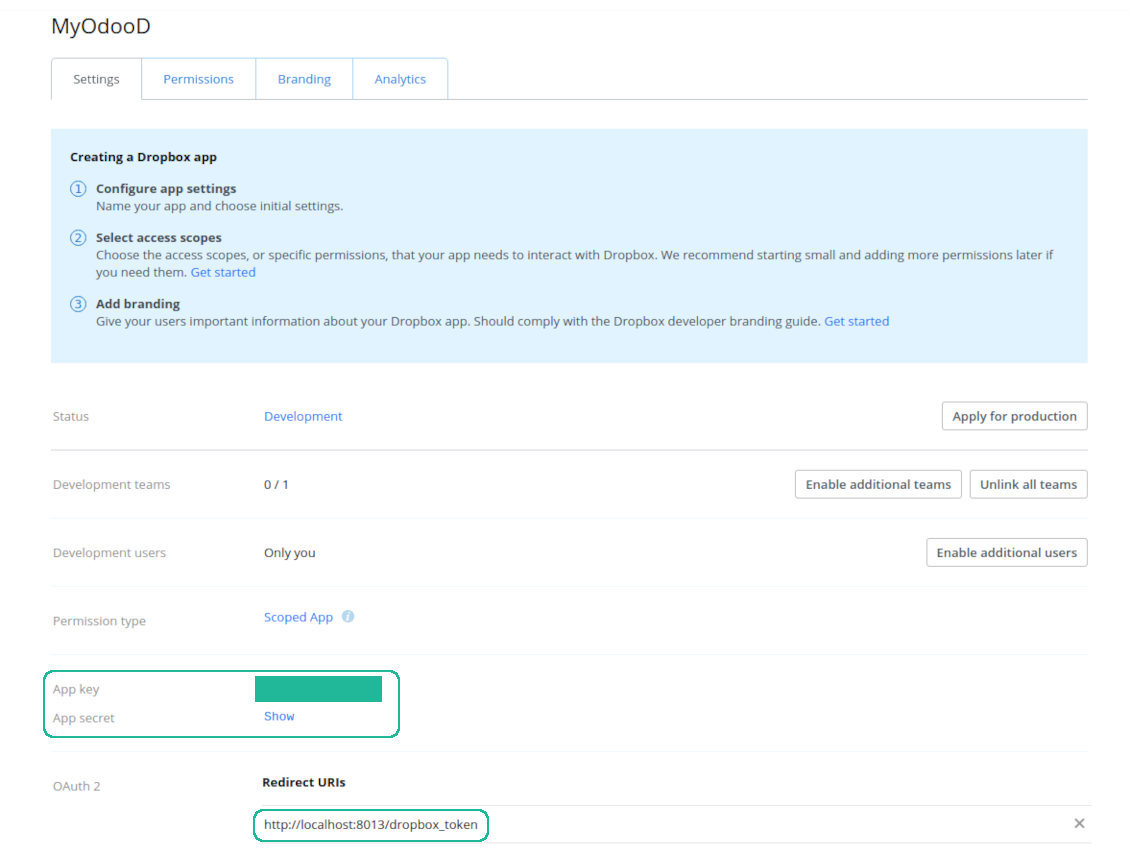
- Add the redirect URI as [YOURODOOSITENAME]/dropbox_token (e.g. https://faotools.com/dropbox_token). A valid SSL certificate (https) is required
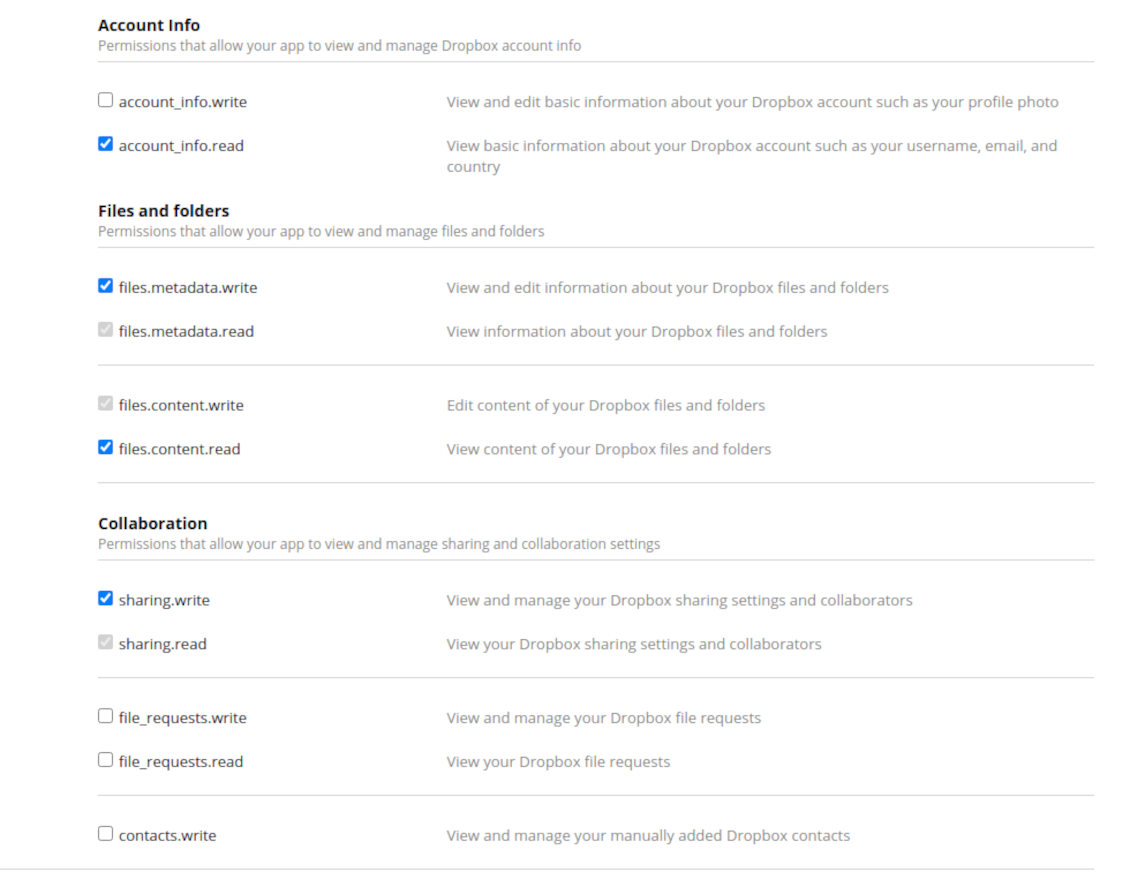
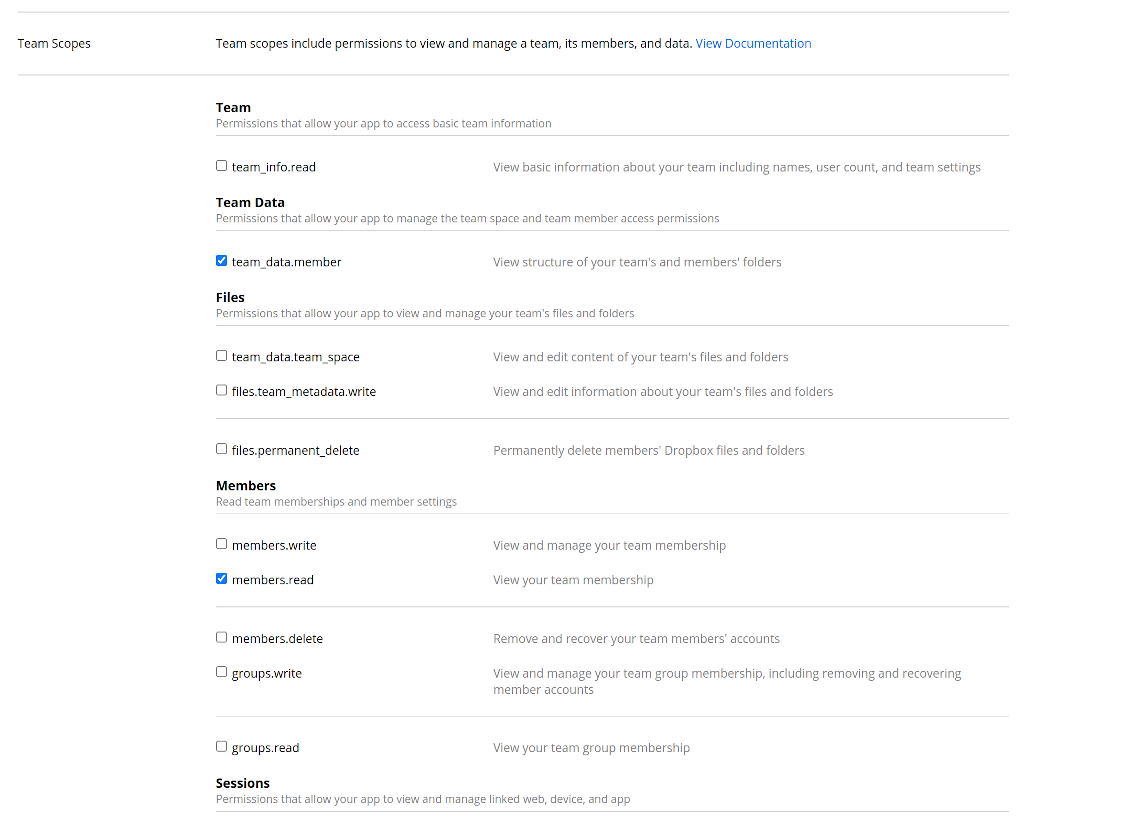
- Grant permissions to the app: 'Account Info (Read)', 'Files and folders Metadata (Write)', 'Files Content (Write)', 'Collaboration (Write)'. For team DropBox assign also 'Team Data Members', 'Members (Read)'. Make sure no other permissions are assigned.
- Submit App
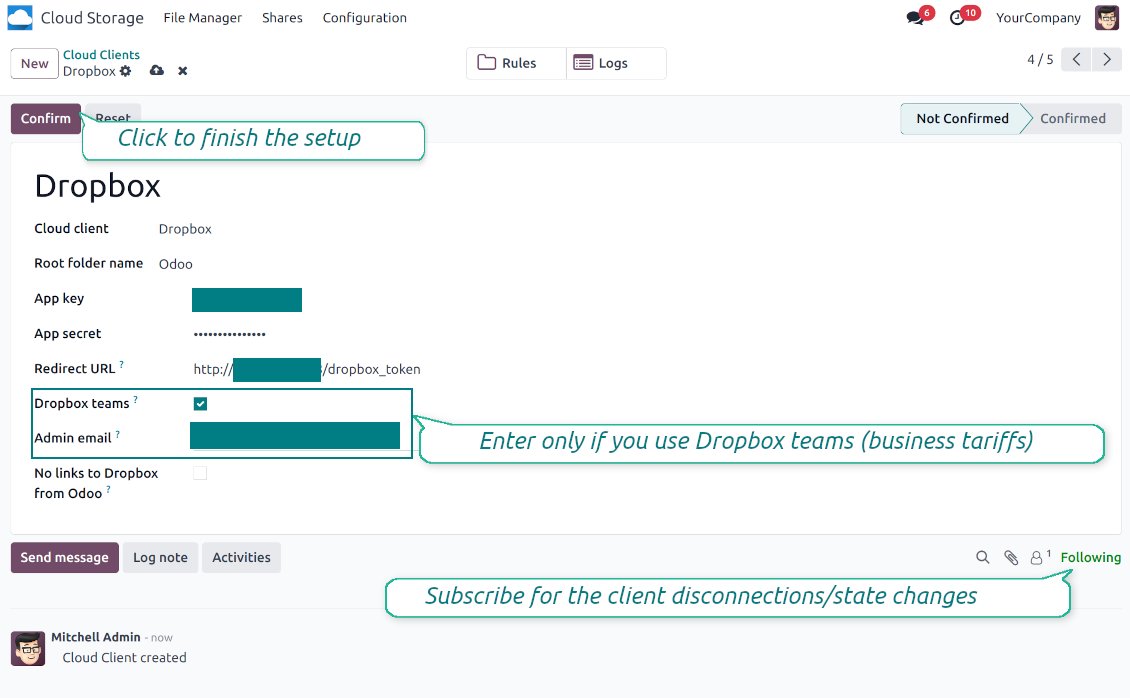
- Go to Odoo Cloud Storage > Configuration > Cloud Clients press 'Create'
- As a reference, introduce any name which would be clear to all users
- As a Cloud client, choose 'Dropbox'
- As a Root folder name, enter a title that will be used as the parent Dropbox directory for all synced folders. For example, 'Odoo' or 'OdooERP'
- Copy 'App key' to the 'App key'
- Copy 'App Secret' into the field 'App secret'
- Insert previously generated redirect URL
- If you use Dropbox team drives
- Check the related box
- Set an Dropbox user email. Inside this user folder, all Odoo-related items will be created, and only after that, they will be shared with all other users. Under this user, all files and folders are created, changed, moved, and deleted
- Press 'Confirm'. Odoo redirects you to the Dropbox login page. Check in the system, agree with all conditions, and grant all permissions asked
- After login, Dropbox redirects you back to Odoo. Dropbox - Odoo synchronization is ready to be done
- Apply the newly created cloud client to folder rules and/or manual folders which should be synced to that Dropbox instance
- Await the sync scheduled job to be started. For testing purposes only: trigger integration manually from Cloud Storage > Configuration > Configuration > the button 'Launch sync'.
Watch also the configuration video
Register a new Dropbox app
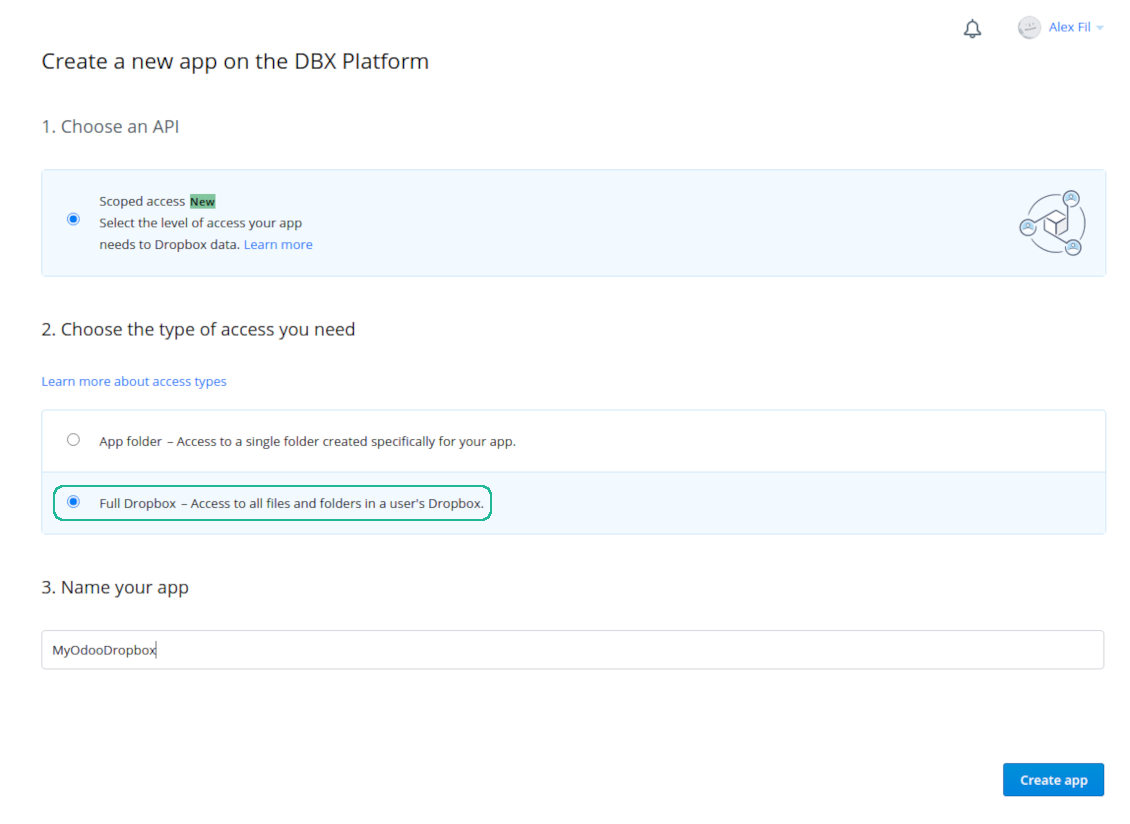
Set up Dropbox App: the redirection URLs
Dropbox permissions for personal accounts
Dropbox permissions for business accounts
Set up Odoo for the Dropbox integration
Domande frequenti su Dropbox Odoo Integration Odoo v.18
Dove vengono salvati i file sincronizzati? Sono duplicati in Odoo e nei cloud?
L'app presuppone che il contenuto binario degli allegati sia conservato nel Cloud Client e non sul server Odoo. Tali allegati in Odoo diventano di tipo URL e potete accedervi in qualsiasi momento dalla casella allegati o dal Cloud Client.
Dopo la configurazione non servono azioni manuali: la sincronizzazione è completamente automatica. Decidete quali tipi di documento Odoo sincronizzare e impostate un modello correlato per ciascuno (clienti, ordini di vendita o acquisto, attività, progetti, ecc.).
Posso avere più cartelle per lo stesso tipo di documento? Ad esempio, progetti interni e progetti cliente?
Sì, è possibile. Preparate una regola per ciascuna e applicate dei filtri: ad esempio per tipo di progetto.
Rendete i filtri mutuamente esclusivi così un documento viene assegnato in modo certo. Ad esempio: «cliente ma non fornitore», «fornitore ma non cliente». Altrimenti la cartella del documento passerebbe da un modello all'altro.
È possibile rendere la sincronizzazione in tempo reale?
No. Abbiamo ragioni solide per evitare la sincronizzazione in tempo reale:
Prestazioni. Se la sync è in tempo reale, ogni caricamento file mostra la schermata di attesa.
Conflitti. Se 2 utenti modificano un elemento insieme, la situazione può restare irrisolta. Con job regolari si può correggere dopo; in tempo reale servirebbe una coda, ancora più fuorviante.
Funzionalità. In particolare rinomina e ristrutturazione. La sync inversa si basa strettamente sulla logica delle directory e a ogni sync controlla il 100 % degli elementi. Dopo ogni aggiornamento sarebbero migliaia di richieste al secondo. Altrimenti le modifiche andrebbero perse.
Posso modificare il nome predefinito delle cartelle nei cloud?
Potete assegnare il vostro nome alle directory dei modelli (ordini di vendita, opportunità, fornitori, ecc.) per qualsiasi tipo di documento.
Per le cartelle degli oggetti (SO-001, John Smith, ecc.) lo strumento usa il metodo Odoo che costruisce il nome visualizzato. Potete cambiarlo con un'espressione nome. La sintassi è quella dei modelli e-mail Odoo.
Posso modificare la frequenza dei job di sincronizzazione?
No, dalla versione 15 non dovete modificare le azioni pianificate. Sono ottimizzate per partire ogni 15 minuti e garantire la connessione più stabile e veloce.
I timeout del server Odoo devono essere di almeno 15 minuti (900 secondi).
Per interrompere la sync per un po', fatelo sul form del client cloud interessato.
Posso sincronizzare gli allegati con più client cloud
Sì, dalla versione 15 potete impostare più connessioni. Così alcune cartelle si sincronizzano con un client cloud e altre con un altro.
Non è in alcun modo possibile sincronizzare la stessa cartella con più storage cloud contemporaneamente.
Usiamo un editor speciale nei nostri cloud (ad es. OnlyOffice, Office 365, ecc.). I file si aprirebbero in quell'editor?
Sì, in base alla configurazione del client cloud.
Mi basta solo l'app Cloud Storage Solution?
Dalla versione 15 l'app può essere usata da sola per strutturare gli allegati in cartelle e fornire un'interfaccia di gestione file.
Se l'obiettivo è collegarsi a uno dei client cloud, va installata almeno un'app opzionale del client.
Cosa succede quando modifico una regola cartella?
Quando una regola cartella cambia, cambia anche l'elenco delle cartelle. Se una cartella non soddisfa più le condizioni, viene rimossa. Se i file erano già sincronizzati, la sync inversa li riporta in Odoo e li elimina dal Cloud Client.
Se l'oggetto del documento non soddisfa la regola, la cartella non viene creata. Se in seguito la soddisfa, la cartella correlata verrà generata.
Posso tenere solo la sincronizzazione diretta o disattivare la sincronizzazione dal cloud?
Sì. Sul client cloud apri la pagina Impostazioni e attiva Disattiva la sincronizzazione dal cloud.
La sincronizzazione resta a senso unico. Le modifiche fatte in Odoo vengono comunque inviate allo storage cloud. I file e le cartelle creati, rinominati o eliminati nello storage cloud non compaiono in Odoo e le cartelle eliminate lì non vengono ripristinate.
Disattiva di nuovo l'opzione per applicare le modifiche accumulate, comprese le eliminazioni, alla sincronizzazione successiva.
Questa impostazione è disponibile dalla versione 18. Scollegare, reimpostare o disattivare il client esegue ancora la sincronizzazione inversa, a meno che non disattivi anche quella.
Quali sono le politiche di aggiornamento dei vostri strumenti?
Secondo le politiche attuali dell'Odoo Apps Store:
- Ogni modulo acquistato per la versione 12.0 o precedente da accesso a tutte le versioni fino alla 12.0.
- Dalla versione 13.0 ogni versione del modulo va acquistata separatamente.
- Indipendentemente dalla versione, l'acquisto da diritto a tutti gli aggiornamenti e le correzioni entro una major version.
Il team faOtools non controlla queste politiche. Per qualsiasi domanda, contattate direttamente i rappresentanti dell'Odoo Apps Store.
Come installo l'app su Odoo.sh?
L'approccio piu diretto e il flusso integrato dello store Odoo:
1. Apri la pagina del modulo e fai clic su Deploy on odoo.sh
2. Verrai reindirizzato a GitHub. Accedi e fai clic su Create a new repo o usa uno esistente. Il repository deve essere privato. Non e consentito pubblicare le app con licenza OPL-1. Se serve, crea un nuovo repo per il progetto Odoo.sh
3. Poi, in odoo.sh, fai clic su Deploy, conferma e fai clic su Continue. Parte l'installazione.
Questi passaggi installano l'app sul branch di produzione. Per altri branch o per aggiornare:
1. Scarica il codice sorgente dallo store Odoo
2. Esegui il commit del modulo nel repository GitHub. Nessuna cartella/file dell'app deve essere in .gitignore. I repo creati da odoo.sh a volte ignorano percorsi importanti (es. /lib). Carica tutte le directory e i file del modulo
3. Esegui il deploy del branch di destinazione del progetto odoo.sh oppure attendi la build automatica se previsto.
Come installo l'app sul mio server?
2. Riavvia il server Odoo;
3. Attiva la modalità sviluppatore (impostazioni tecniche);
4. Aggiorna l'elenco delle app (menu Applicazioni);
5. Trova l'app e premi Activate/Install;
6. Segui le linee guida nella pagina dell'app, se ci sono.
L'app ha componenti extra. Posso acquistarli dopo?
Si. Odoo aggiunge automaticamente le dipendenze al carrello: escludi gli strumenti gia acquistati per non pagare due volte.
Ho distribuito l'app su Odoo.sh e vedo un avviso/errore nei test
Un avviso rosso/arancione non influisce sulle funzioni dell'app. A volte i nostri moduli non superano i test automatici standard perché questi assumono un comportamento in conflitto con gli obiettivi dell'app. Ad esempio cambiamo il calcolo del prezzo, mentre i test Odoo confrontano il prezzo finale con l'algoritmo standard.
Controllate prima le funzioni del database distribuito. Funziona tutto?
Se pensate ancora che l'avviso influisca sulle funzioni reali, contattateci e inviate i log di installazione completi e l'elenco completo dei moduli distribuiti (core e di terze parti).
Posso acquistare l'app direttamente da voi?
No, distribuiamo gli strumenti solo tramite lo store ufficiale delle app Odoo.
Vorrei uno sconto
Purtroppo non abbiamo i mezzi tecnici per prezzi individuali.
Posso installare l'app sul database Odoo Online (SaaS)?
No, le app di terze parti non si possono usare su Odoo Online. Odoo SaaS blocca questa possibilità.
Lo strumento dipende da altre app. Devo acquistarle?
Si, lo strumento richiede tutti i moduli indicati nelle dipendenze. Il prezzo sulla pagina dell'app le include gia.
Qual e il prezzo del modulo in dollari USA? Perché e cambiato?
Il prezzo dei nostri moduli e in euro. Lo store Odoo converte le valute secondo il proprio tasso interno. Quindi il prezzo in dollari USA puo cambiare quando il tasso viene aggiornato.
I testi dell'app e del sito web in lingue diverse dall'inglese sono realizzati con l'assistenza dell'IA e allineati alle traduzioni ufficiali di Odoo. Se noti un errore, invia un ticket di traduzione e lo correggeremo.
Database dimostrativi Odoo (anteprime)
Per questa app potremmo fornire un database demo personalizzato gratuito.
Non hai bisogno di un numero di telefono o di una carta di credito per contattarci. Dovresti solo effettuare una breve registrazione via e-mail, che non richiede più di 30 secondi.
Su richiesta prepariamo un database di anteprima dedicato, in cui puoi eseguire qualsiasi test e verificare le tue ipotesi per circa due settimane.
Segnalazione degli errori
Se riscontri bug o comportamenti incoerenti, non esitare a contattarci. Garantiamo di fornire soluzioni entro 60 giorni dall'acquisto e siamo fortemente interessati a migliorare i nostri strumenti anche dopo questo periodo.
Non hai bisogno di un numero di telefono o di una carta di credito per contattarci. Dovresti solo effettuare una breve registrazione via e-mail, che non richiede più di 30 secondi.
Includi nella richiesta il maggior numero possibile di dettagli: schermate, registri del server Odoo, una descrizione completa di come riprodurre il problema e così via. In genere sono necessari alcuni giorni lavorativi per preparare un piano operativo relativo a un problema (se viene confermato un bug) o fornire indicazioni su cosa fare (in caso contrario).
Richieste di funzionalità pubbliche e idee per moduli (sviluppo gratuito)
Siamo fortemente motivati a migliorare i nostri strumenti e saremmo grati per qualsiasi feedback. Se le tue esigenze sono di uso pubblico e possono essere implementate in modo efficiente, il team le includerà nella nostra lista di cose da fare.
Tale elenco di cose da fare viene elaborato regolarmente e non prevede costi aggiuntivi. Sebbene non possiamo garantire scadenze e progettazione finale, potrebbe essere un buon modo per ottenere le funzionalità desiderate senza investimenti e rischi.
Non hai bisogno di un numero di telefono o di una carta di credito per contattarci. Dovresti solo effettuare una breve registrazione via e-mail, che non richiede più di 30 secondi.


The tool to build a deep and structured knowledge base for internal and external use. Knowledge System. KMS. Wiki-like revisions.
398€
The tool to set up KPI targets and control their fulfillment by periods. KPI dashboards. Dashboard designer. KPI charts

The tool for time-based service management from booking appointments to sales and reviews
398€
The tool to manage your Odoo from your favorite AI chats through MCP. Claude. Any MCP-supporting AI.

Lo strumento per strutturare gli allegati Odoo in cartelle e sincronizzare con Google Drive, OneDrive/SharePoint, Nextcloud/ownCloud, Dropbox, Amazon S3, Box e NAS. Gestione file. DMS
398€
The tool to automatically synchronize Odoo attachments with OneDrive files in both ways
487€
The tool to automatically synchronize Odoo attachments with Google Drive files in both ways
487€
The tool to automatically synchronize Odoo attachments with ownCloud/Nextcloud files in both ways
487€