KnowSystem: Knowledge Base System v.15
The tool to build deep and structured knowledge base for internal and external use. Knowledge System. KMS. Wiki-like revisions
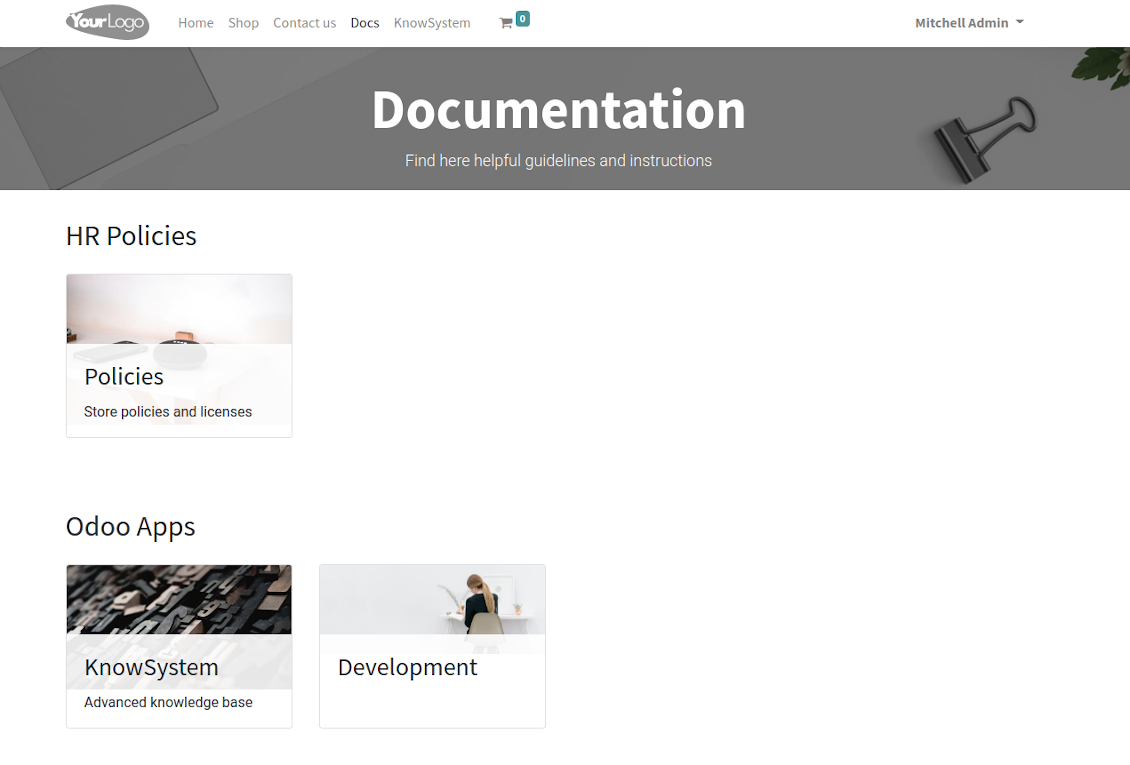
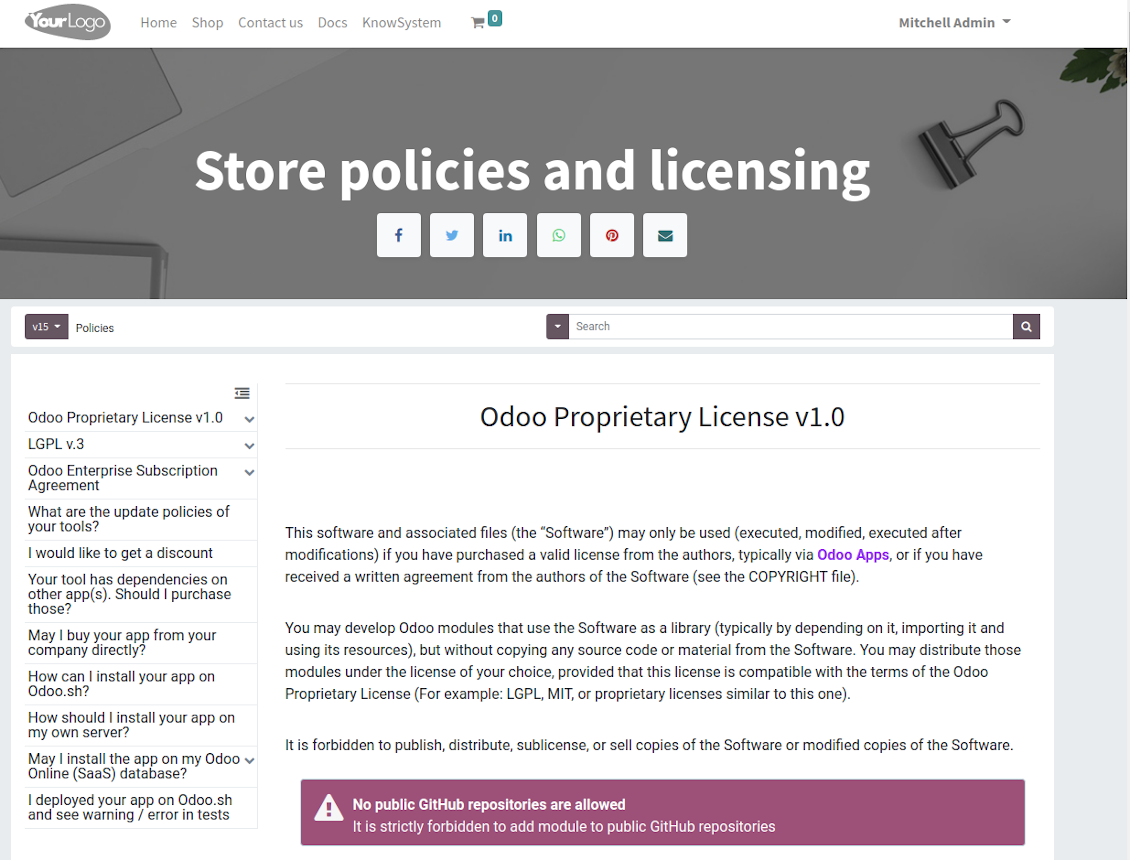
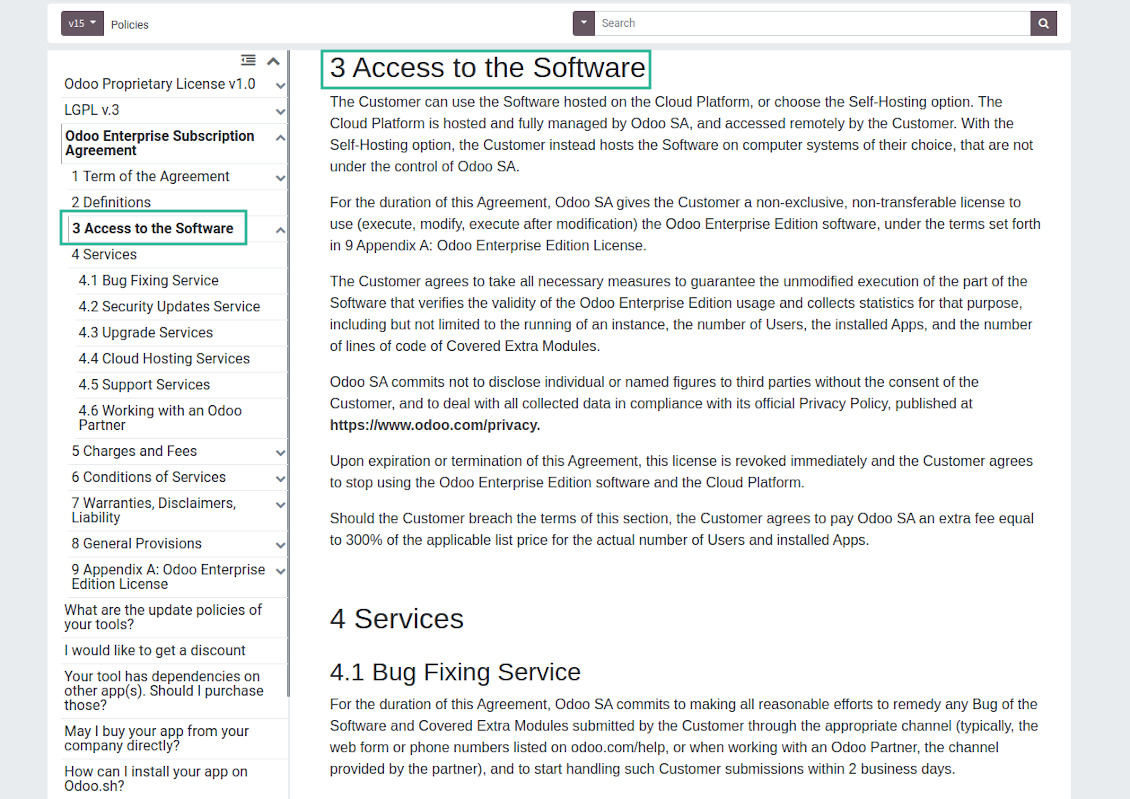
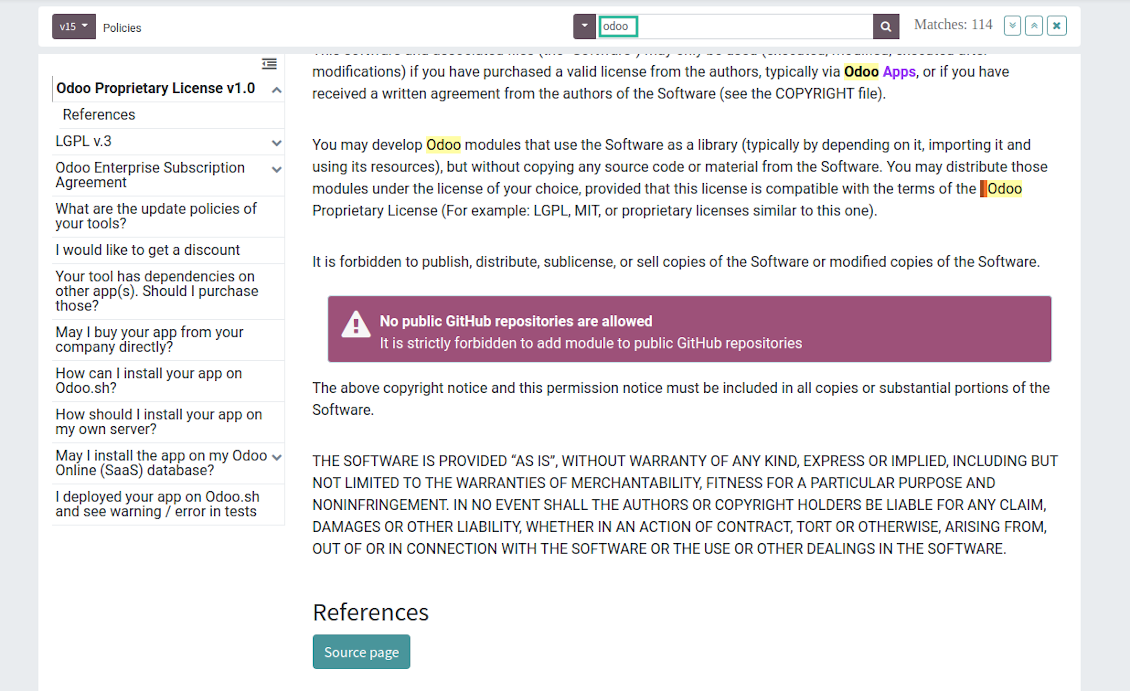
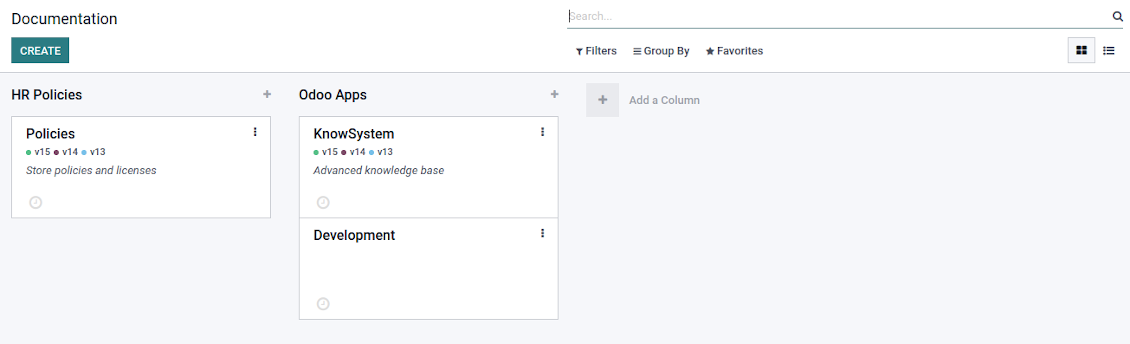
This is a full-featured Odoo knowledge management tool to be used in any industry and by any firm. The app serves to accumulate, curate, utilize, and share organizational knowledge within your company and outside it.
- a core of knowledge management. It might be used stand-alone as a complete internal knowledge base system. Az ára 398€.
- an optional module, which let you publish articles to website, share them with portal users, and use website builder to update articles. The features assumed by this add-on are marked by the icon . Az ára 40€.
- an optional extension to KnowSystem: Website and Portal to design website documentation pages based on knowledge base articles. The features assumed by this add-on are marked by the icon . Read the full description on the related page. Az ára 60€.
- an optional module, which let you add and show custom fields for articles (backend). The features assumed by this add-on are marked by the icon . Az ára 48€.
- an optional free module, which shows custom fields on website and portal pages (frontend). The features assumed by this add-on are also marked by the icon .
- an optional extension to KnowSystem: Website and Portal to prepare FAQ/documentation for Odoo eCommerce product pages. The features assumed by this add-on are marked by the icon . Read the full description on the related page. Az ára 28€.
- an optional module, which let you translate articles, sections and tags for installed in Odoo languages. The features assumed by this add-on are marked by the icon . Az ára 10€.
Fast and comfortable knowledge recording
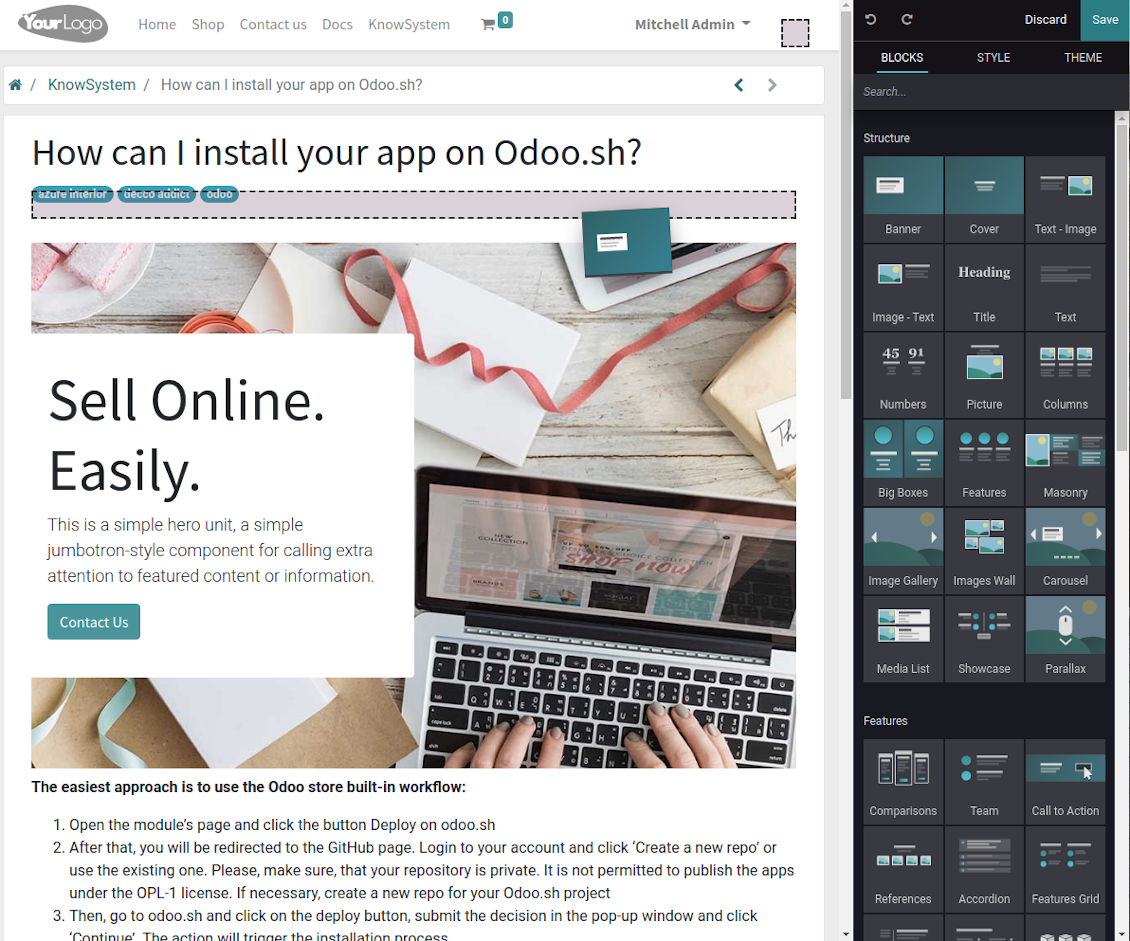
Drag and drop building blocks of the backend or website editors to construct professional-looking articles. Create and use knowledge templates. Switch to raw code editor if needed
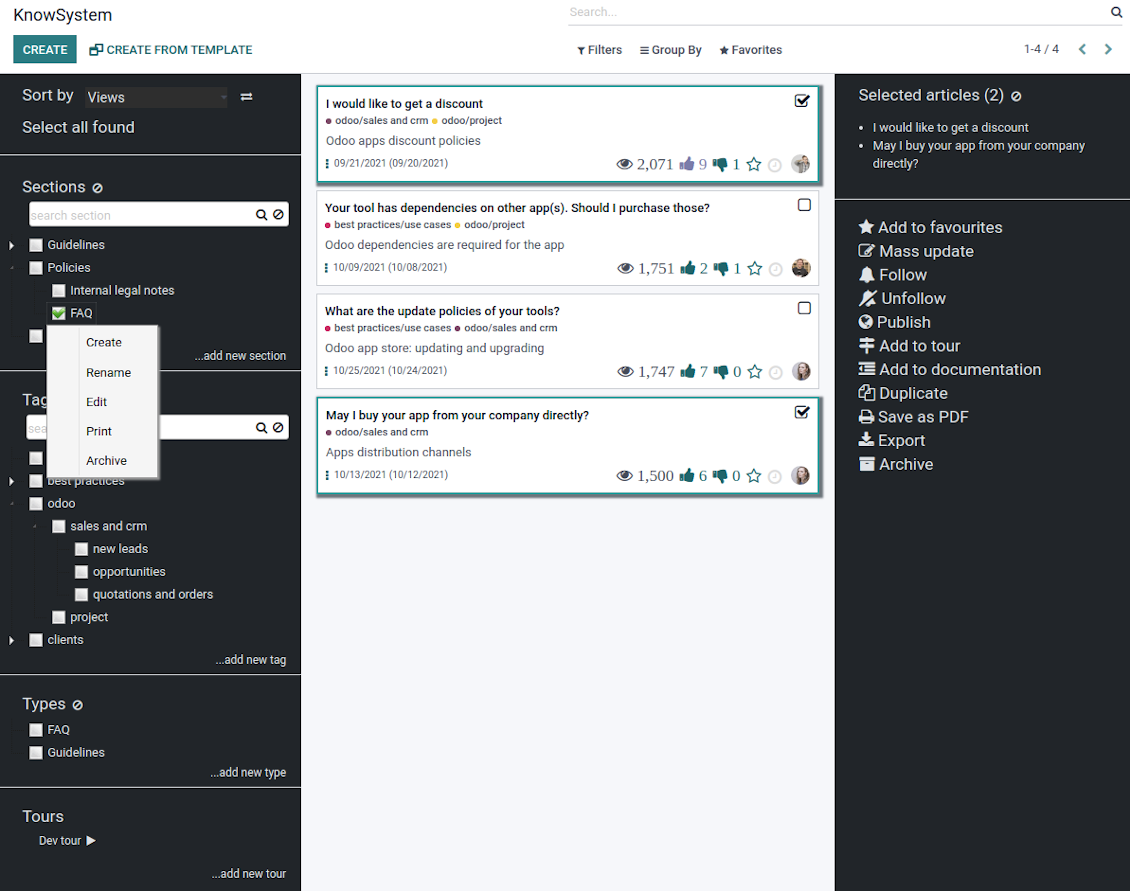
Single view KMS navigation
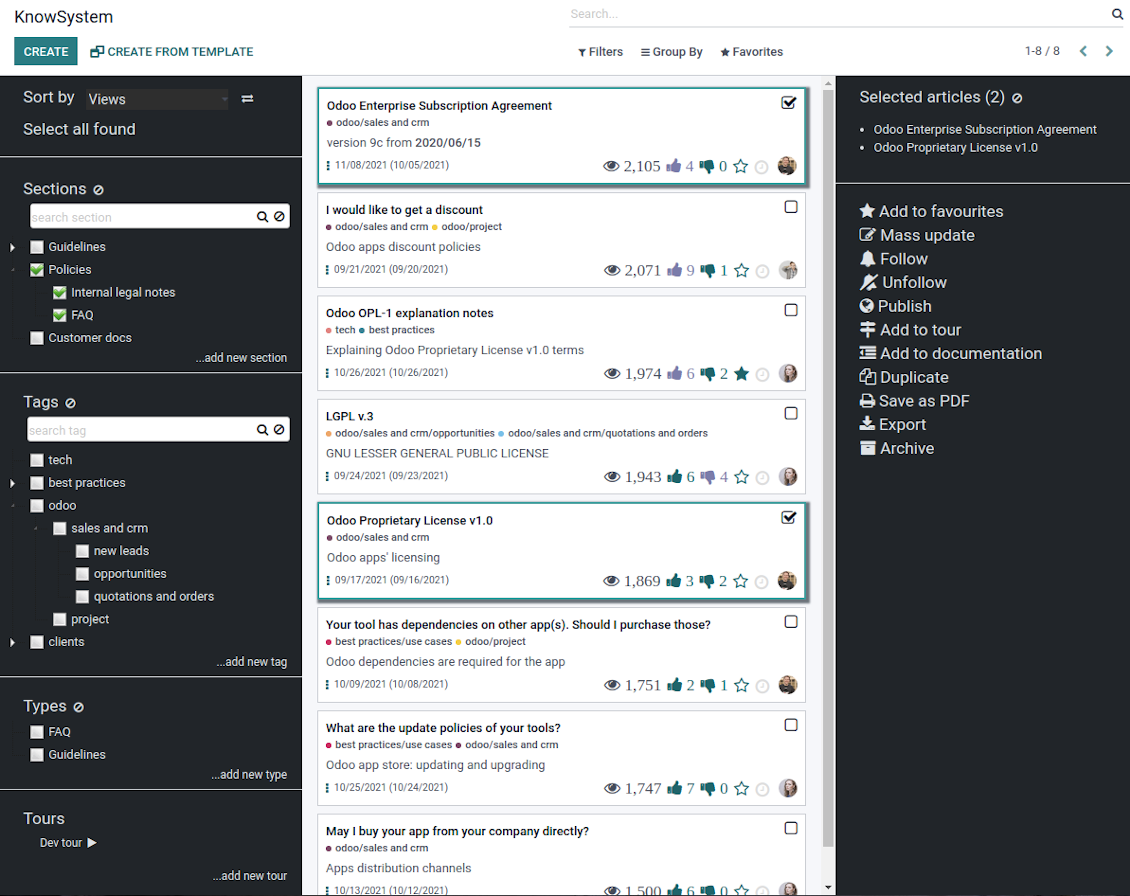
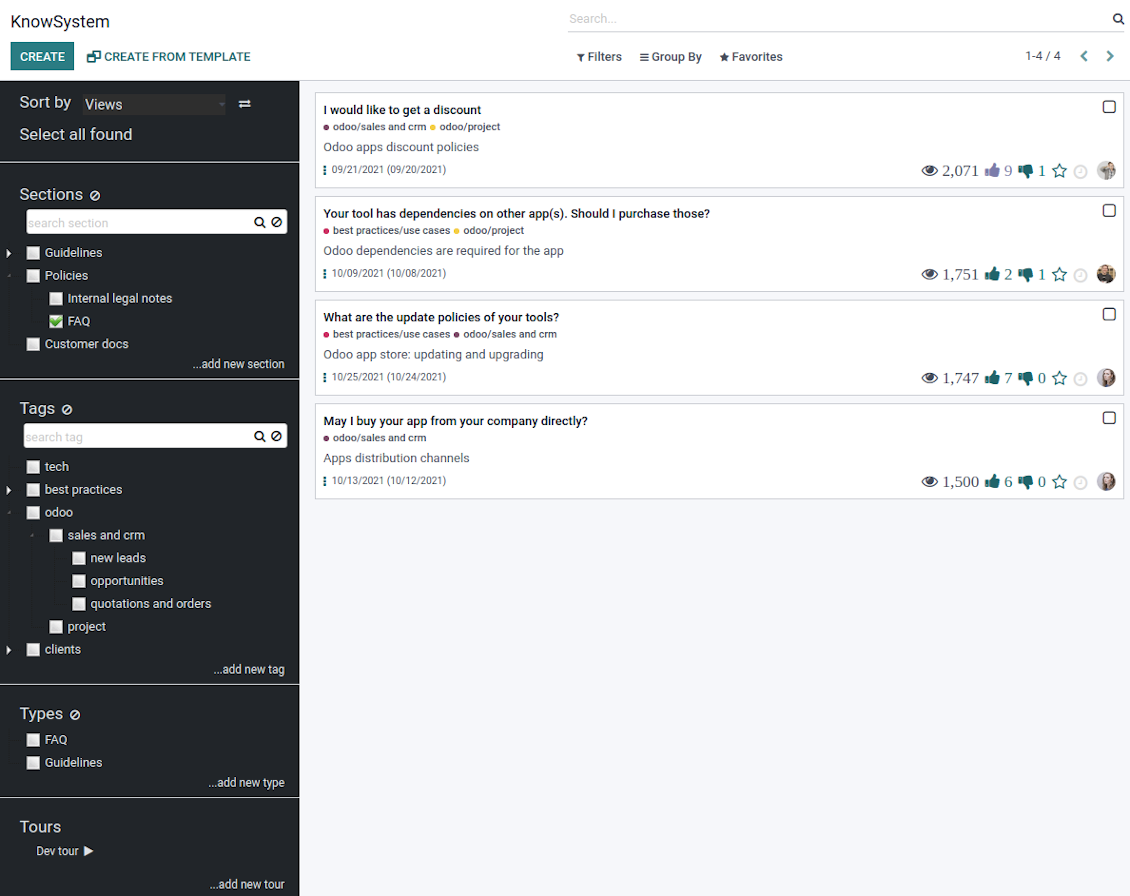
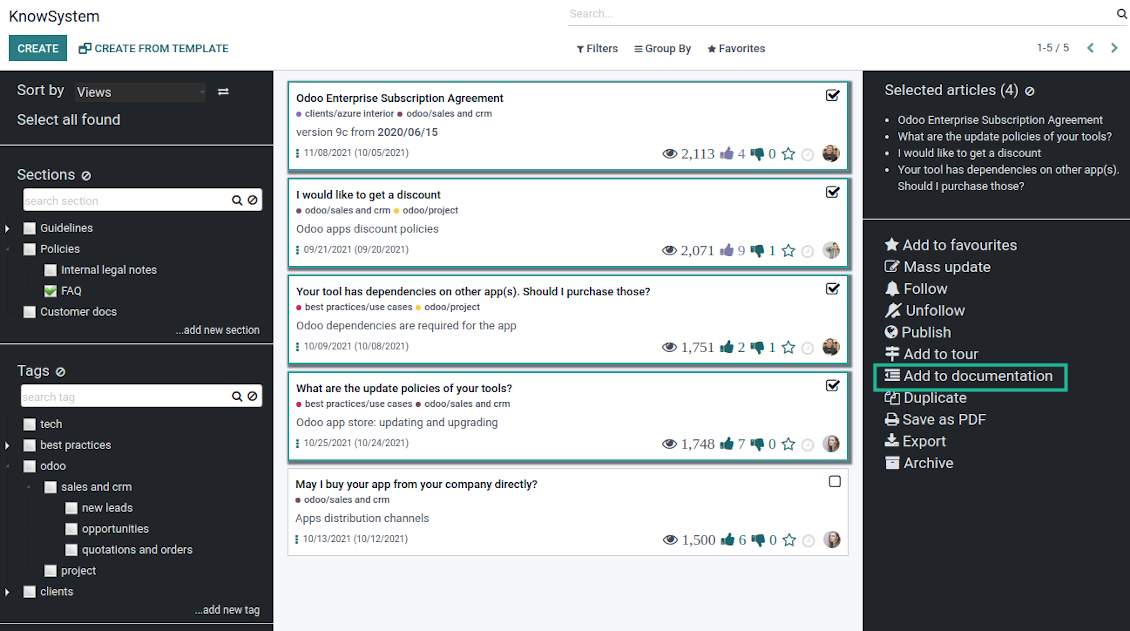
Filter articles by the hierarchy of sections, by the tree of tags, or by knowledge types. Select articles step by step and proceed with mass actions. Sort and search in seconds
Get benefit of knowledge
Instantly access knowledge base from any Odoo documents. Reference articles in messages and activities. Organize learning tours. Prepare instructions, guidelines, or eCommerce FAQs. Print or share knowledge
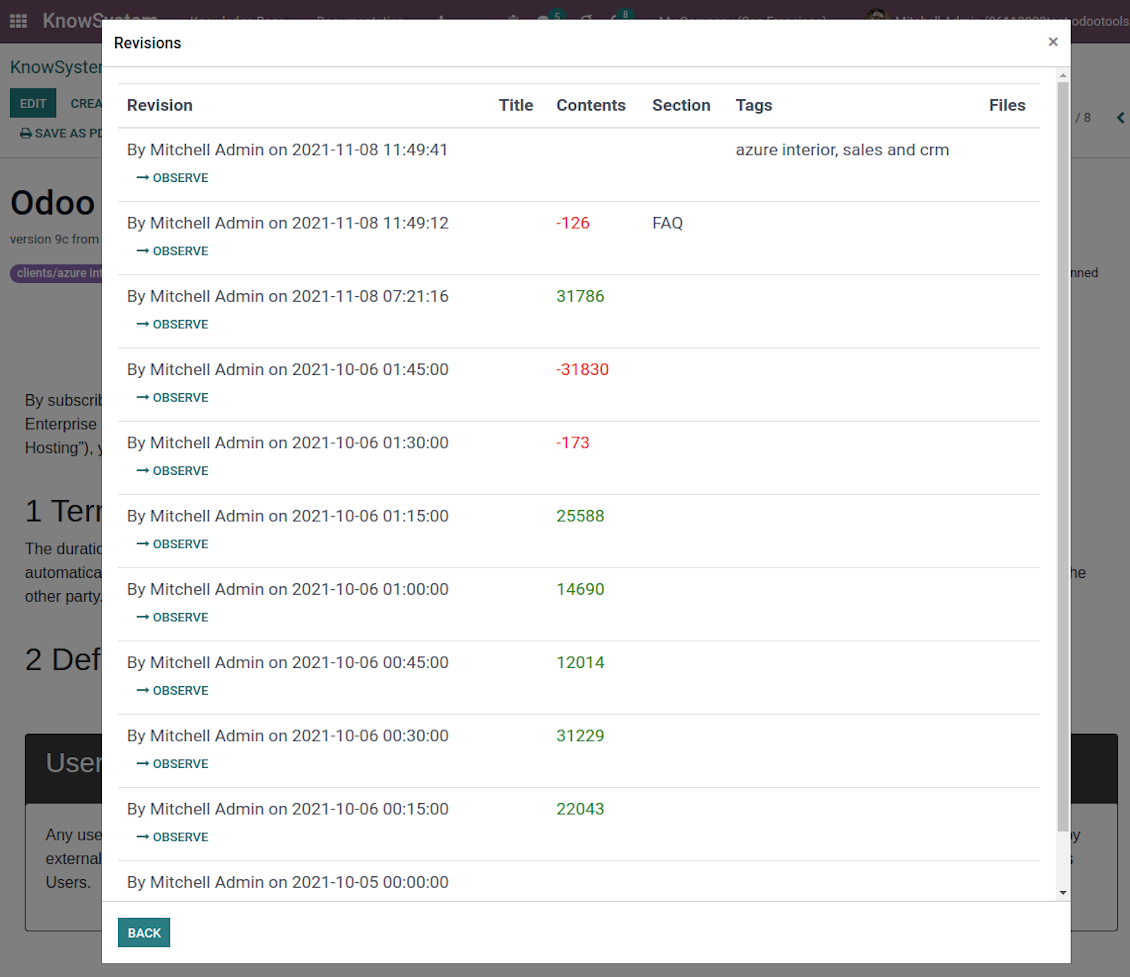
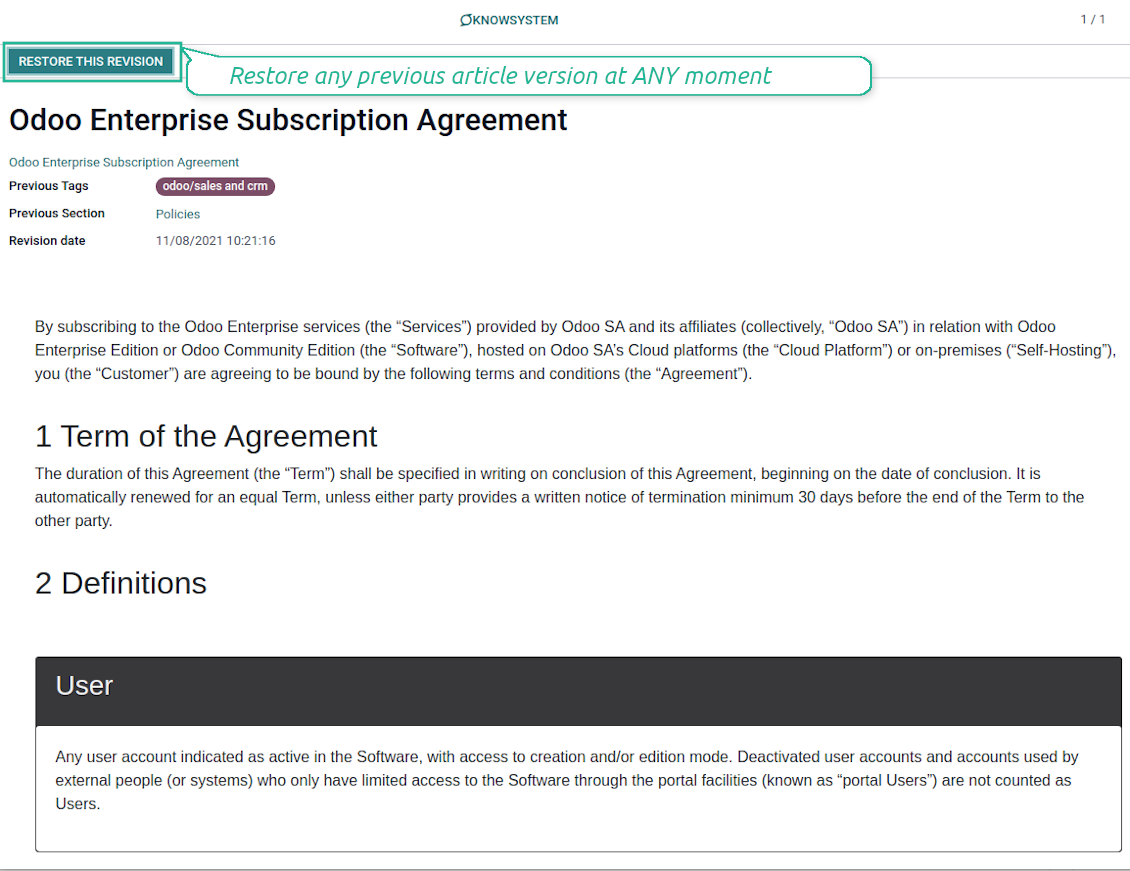
Wiki-like revisions
Restore any article version at any moment: the app keeps the history of knowledge updates. Breaking becomes harder than restoring
Portal or public knowledge base
Share articles with your partners or publish knowledge for any website visitor
Website documentation builder
Combine organizational knowledge into advanced documentation with comfortable navigation and search
Knowledge system statistics
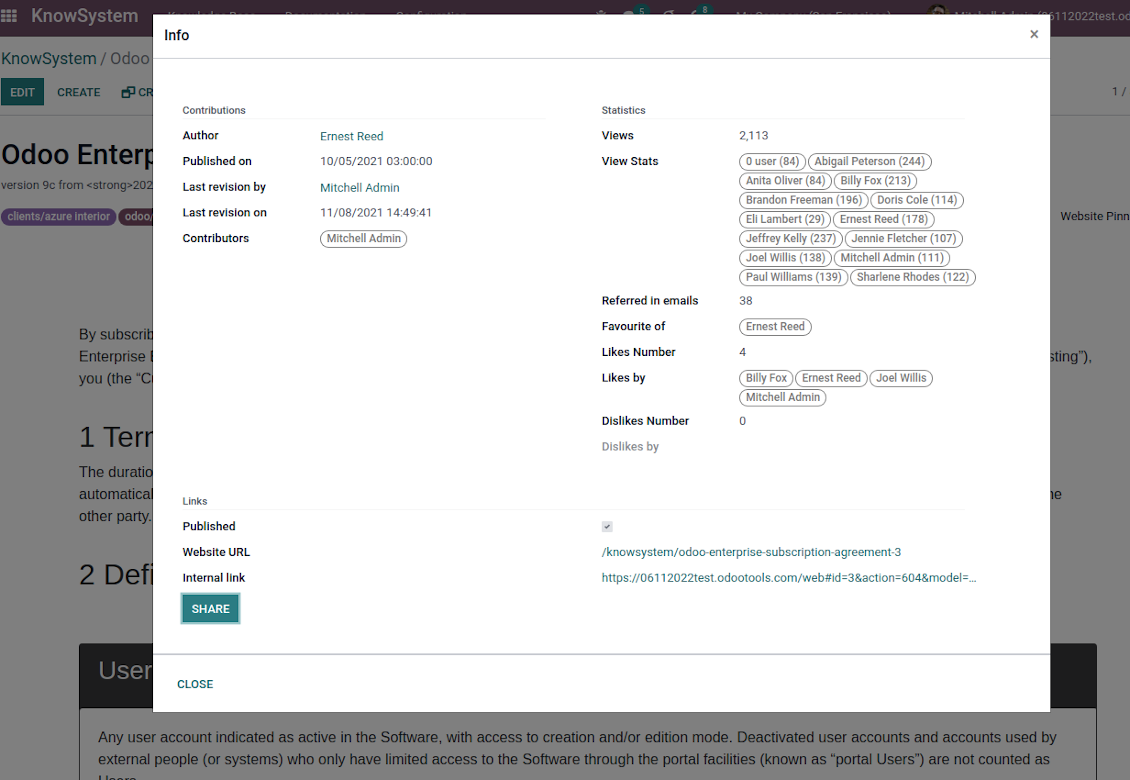
Control views of articles, likes, dislikes, contributions. Motivate discussions
Applied in any functional area
Use the app for any knowledge management business goal and for any set of Odoo apps.
Best knowledge base system for Odoo!
Excellent app and exceptional after-sales support.
Really well thought-out product and one of the best features is the contextual help by means of the tags. Really a game changer for us.
Keep up the great work FaOtools!
Outstanding app! Tremendous value for money, an absolute must have!
One of the features sorely lacking from Odoo has been a robust Wiki/documentation system. Using third party platforms is a massive headache: yet another system to maintain, users get distracted switching back-and-forth, and errors get made. Then you have to worry about training, additional logins, etc.
KnowSystem feels like a native/core app, is very well-polished, and extremely fast. It's accessible from any screen, and the search results are instant (none of the latency inherent with most apps).The interface is elegant yet powerful, with robust access control, rich editing features, and version control. It's simple to revert to previous entries, view audit trails, etc. It's very intuitive for anyone familiar with Odoo; onboarding takes just a few minutes. The user guides are excellent.
This is invaluable for any organisation with a lot of documented information, SOPs, ISO compliance, or similar. If you're using eLearning, it's great for creating a help system / reminders. For example, noting key takeaways or specific instructions. The user can be in MRP, Sales, or any other function, and instantly lookup a guide. Since it overlays whichever screen you're in, it doesn't interrupt the workflow.
This dramatically increases efficiency, minimises questions, and helps keep everyone on the same page.
Oh, and customer service is excellent, faOtools stands behind their product. Thank you!
KnowSystem is excellent - OdooTools offer great support, are very helpful and responsive
Our company needed the ability to add a Knowledge Base to our Odoo portal website for our customers to access article content on a membership-only basis. KnowSystem provided this and much more, along with ability to add search by section, set permissions to allow only certain partners access to articles by tag etc. OdooTools have been very helpful and implemented several features we suggested including automatic redirect upon login, customisable filters and a social sharing capability on articles. Overall a great app by a great company, something that massively adds to Odoo's capabilities and is something that everyone could benefit from using.
Very functional application and responsive support
Our company produces medical laser equipment and we use KnowSystem to streamline the knowledge base of our company. Convenient search system and classification of content, as well as access rules for groups and even for individual users.
Great app and professional team
The app is great the the team is very professional in both response timing and problem solving.
Highly recommended.
Marco from ALO.zone.
Excellent system
Excellent system.
A great tool from some very nice developers!
KnowSystem is a great tool and a game changer for us. Finally a place to put all our company know-how. I highly recommend it. And also important to us: We got great support from FaOtools too. A rare thing in this busy world. thx!
Excellent app and support.
Great app and a very helpfull support. Openess to improve their products is outstanding.
Single-view knowledge navigation
-
Prepare the hierarchy of knowledge sections to instantly switch between knowledge areas
-
Define the tree of tags for quick navigation and deeper knowledge structuring
-
Introduce knowledge base typology to distinguish kinds of articles in a single click
-
Create, update, and reorder tags, sections, or types right from the KnowSystem interface. Print all articles related to a certain tag or a section
-
Instantly search KMS sections and tags right on the navigation panel
-
Manage and launch learning tours
-
Sort knowledge articles by views, a score of likes, title, author, section, create and write dates
-
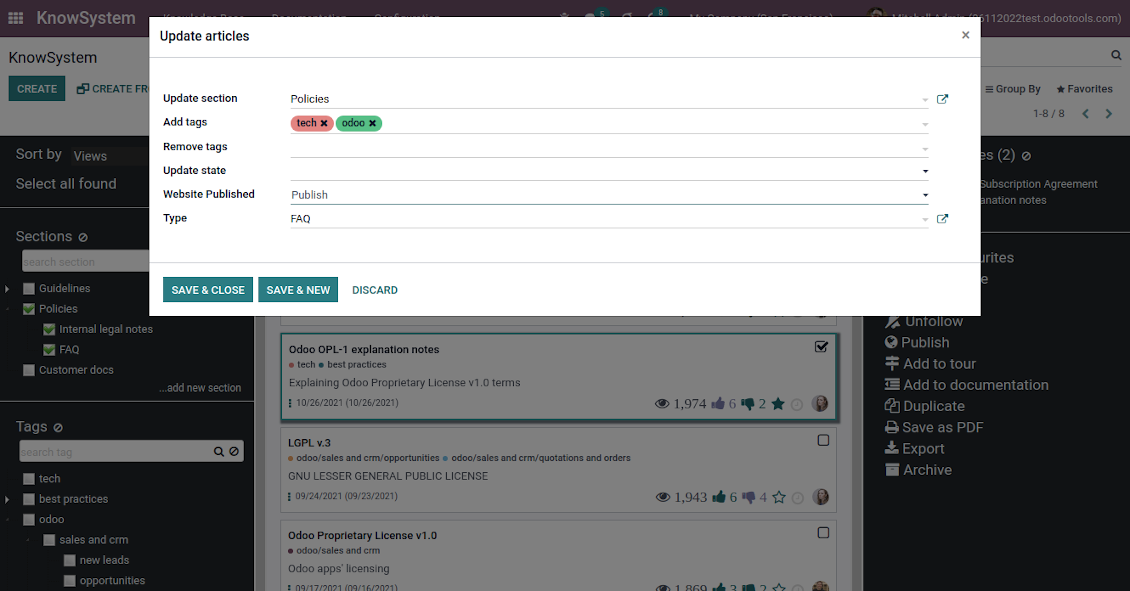
Pick articles up step by step: the selection is not cleared with a new search or when you opened a record. Proceed mass action(s) for all chosen items
-
Update knowledge in batch: assign new section, change or remove tags, print multiple articles as a single PDF, follow/unfollow discussions, publish/unpublish articles, export articles to an Excel table, archive or restore items, add articles to learning tours and documentations, mark knowledge records as favorite, duplicate articles
Fast, comfortable, and professional knowledge recording
Safe backend editor
-
Drag and drop building blocks to write a new article right in the Odoo backend interface. The process is simple while the result is professional looking
-
Edit blocks styles, re-order Knowledge elements, change the width and height of items
-
KnowSystem editor relies upon strict HTML structures which are in the most cases compatible with printing and messaging layouts
Advanced website builder
-
Apply advanced styles and complex widgets by using the Odoo's built-in website editor
-
Exploit Odoo website know-hows: numerous snippets and animations, style templates, and options
-
Rely upon the website editor to prepare nice-looking portal knowledge pages. Avoid using that for internal or printing purposes: advanced styles often contradict printing and composer layouts
Raw HTML interface
-
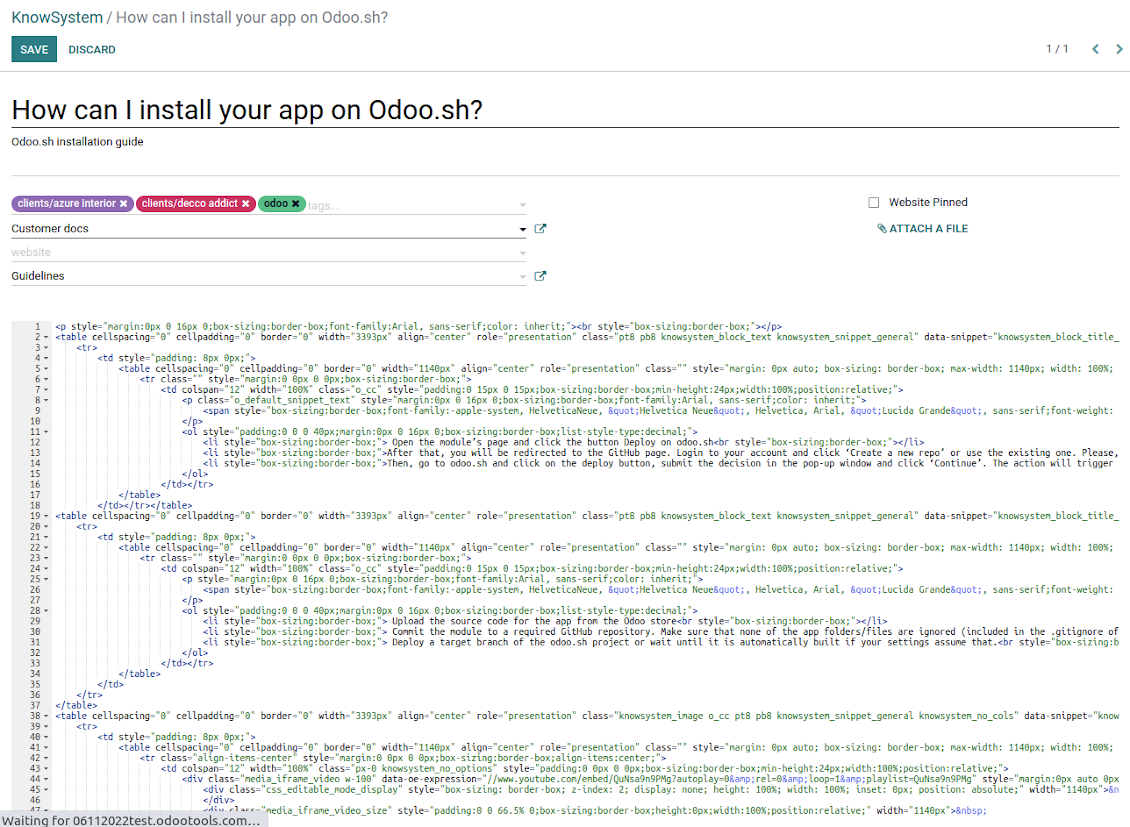
At any moment switch to raw code view to update articles' HTML
-
Optionally replace the backend editor with the XML editor to rely fully on the website builder and edit only raw code in the backed
-
Introduce any HTML tags and styles, including Bootstrap ready elements and iframes
Knowledge templates
-
Prepare new knowledge templates or save any existing article as a template
-
Use templates to create new articles to save time or keep uniform styles
Get benefit from your knowledge
Knowledge system for any Odoo document
-
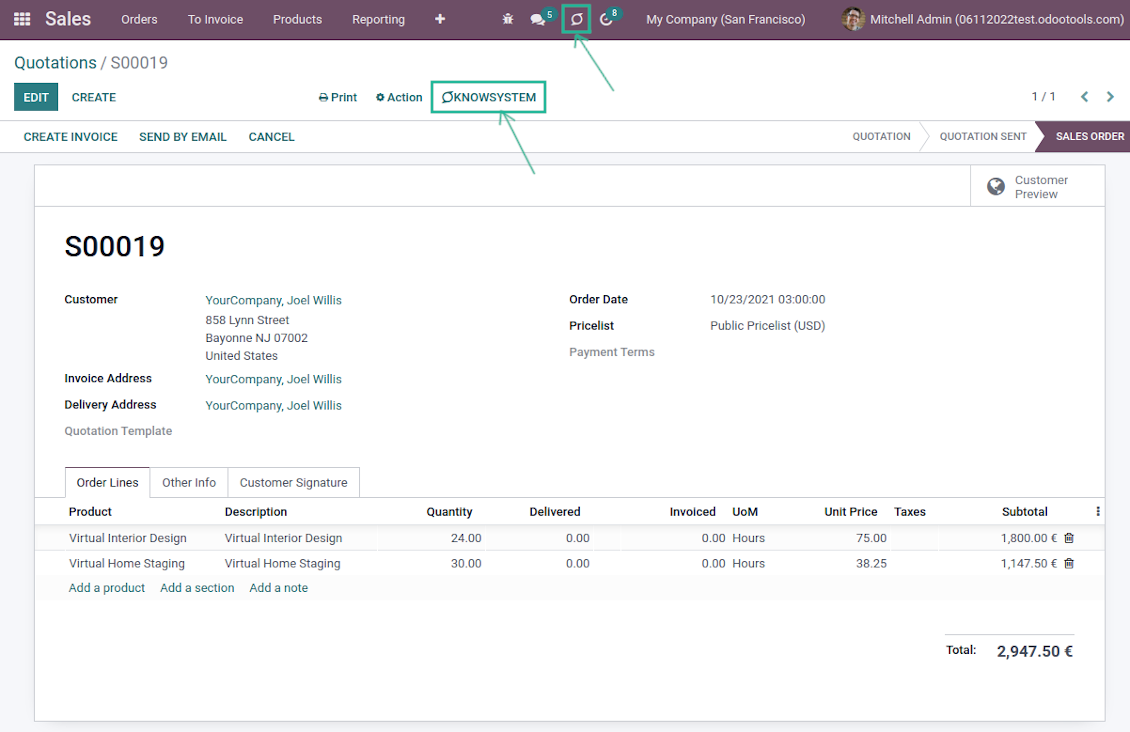
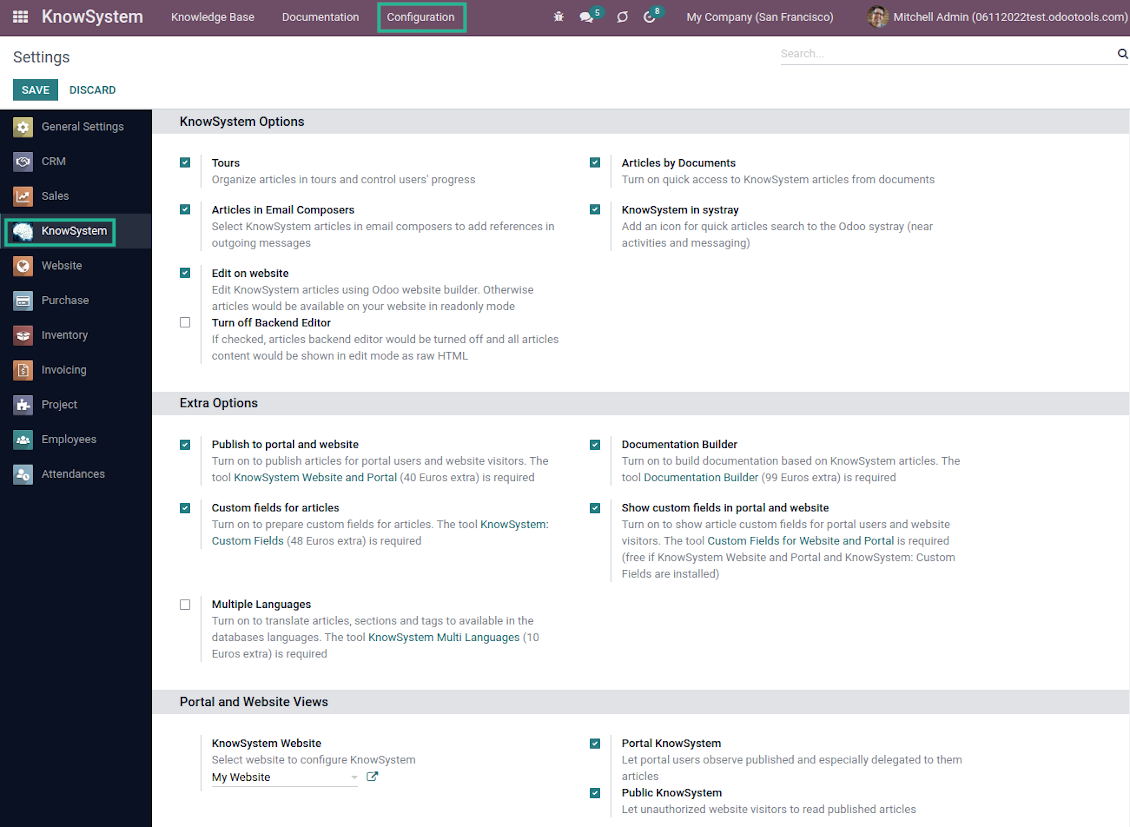
Turn on the setting 'Articles by Documents' to add the quick entry for Knowledge base from any Odoo form view
-
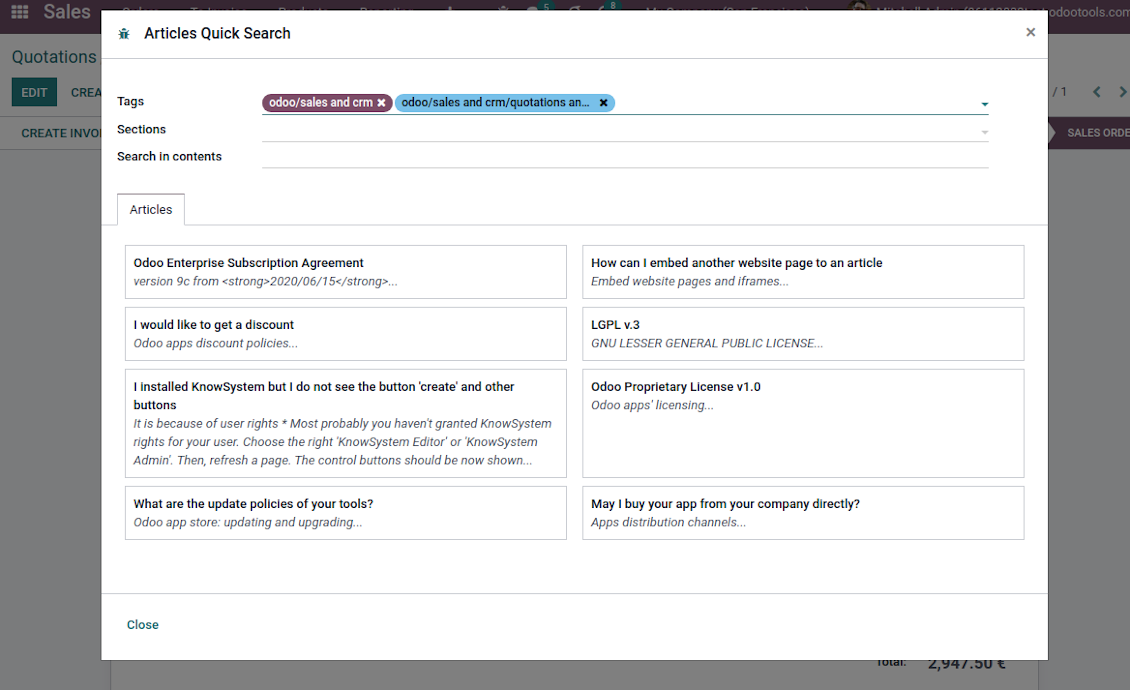
Search articles by tags, section, or content in a few clicks for a quick overview
-
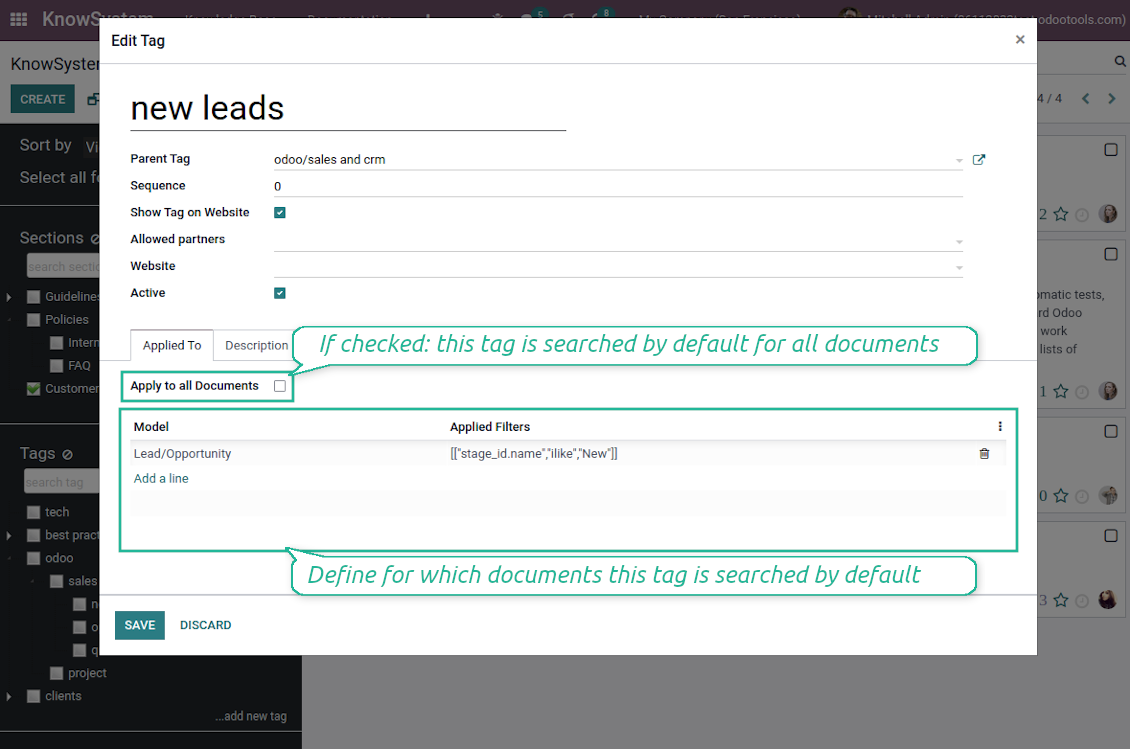
Link knowledge tags with Odoo document types to simplify the search of articles. For example, assign helpdesk tickets to the tag 'odoo/helpdesk': the latter would be entered by default for support requests objects
-
Observe article content right from any Odoo object: there is no need to always switch to the KnowSystem advanced interface
-
Turn on also the option 'KnowSystem in systray' to access knowledge from the Odoo systray disregarding the active interface
Apply knowledge in communication
-
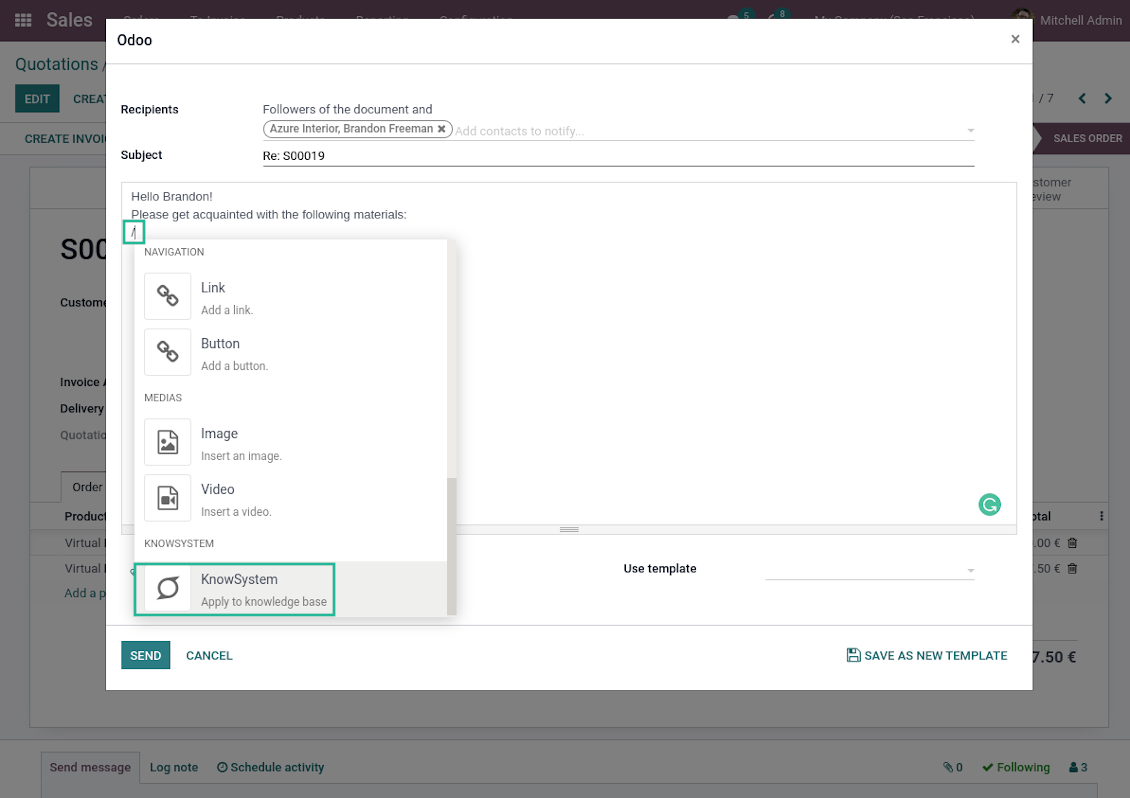
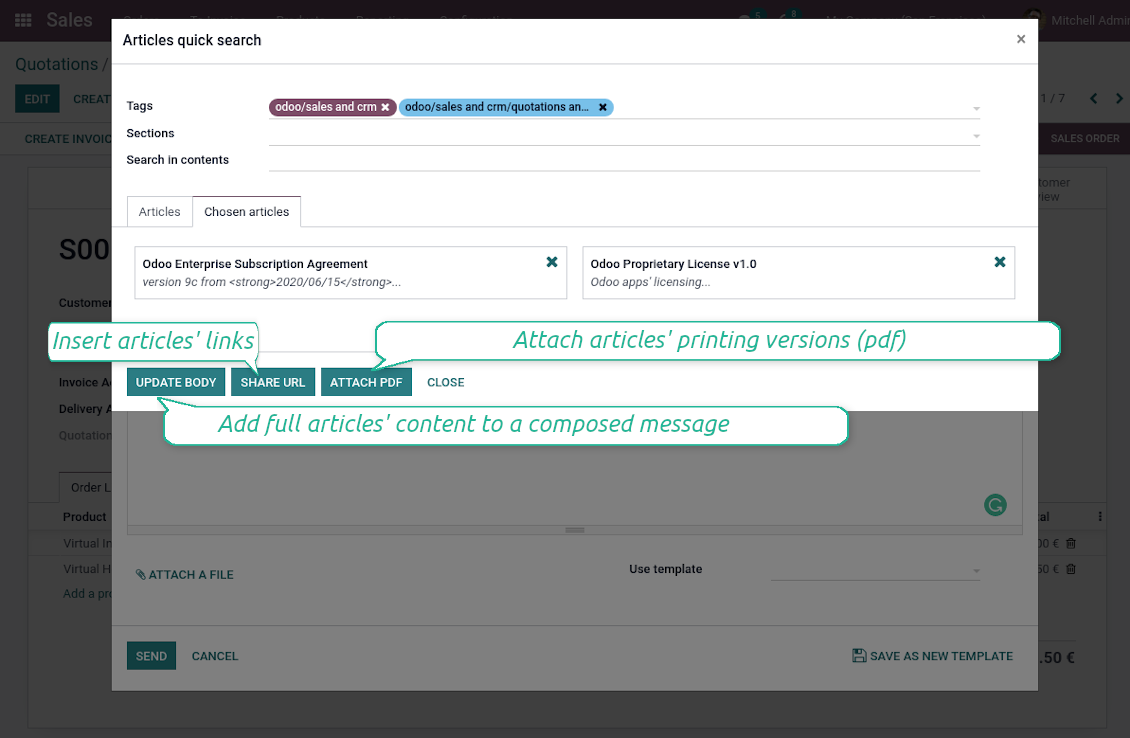
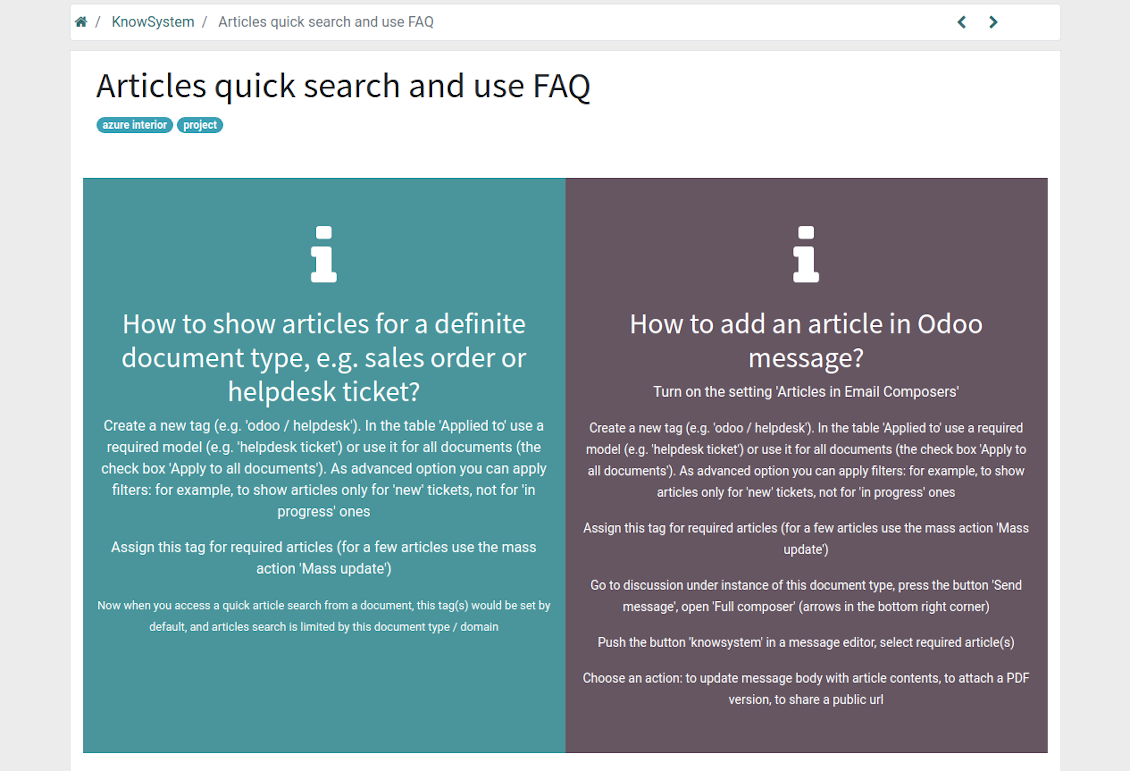
Turn on the option 'Articles in Email Composers' to let users reference or cite Knowledge records in Odoo messages
-
Quickly observe articles related to a current document discussion. Instantly reference those by applying the Odoo editor command '/' > KnowSystem
-
Update message body with knowledge content (it would be added to the end of a current message)
-
Attach a PDF version of referenced article or articles
-
Share knowledge links with your colleagues or partners. Configure the app to send backend, website/portal, or tokenized Odoo portal URLs
-
Turn on the setting 'Articles in Activities' to insert articles or their links also to Odoo activities
Organize learning tours
-
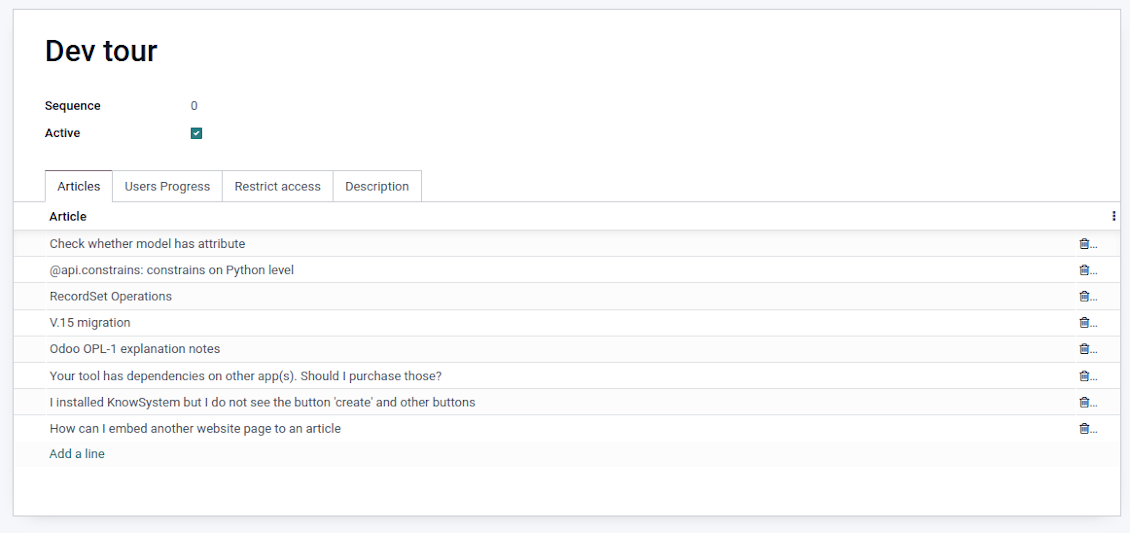
Turn on the option 'Tours' to be able to combine articles in a sequence of learning steps
-
Add any knowledge to a tour in any order
-
Launch a tour to follow certain steps of study one by one in the special interface
-
Share learning tours with everybody or specific user groups. Control employees' progress in getting familiar with instructions and guidelines
Share and publish knowledge
-
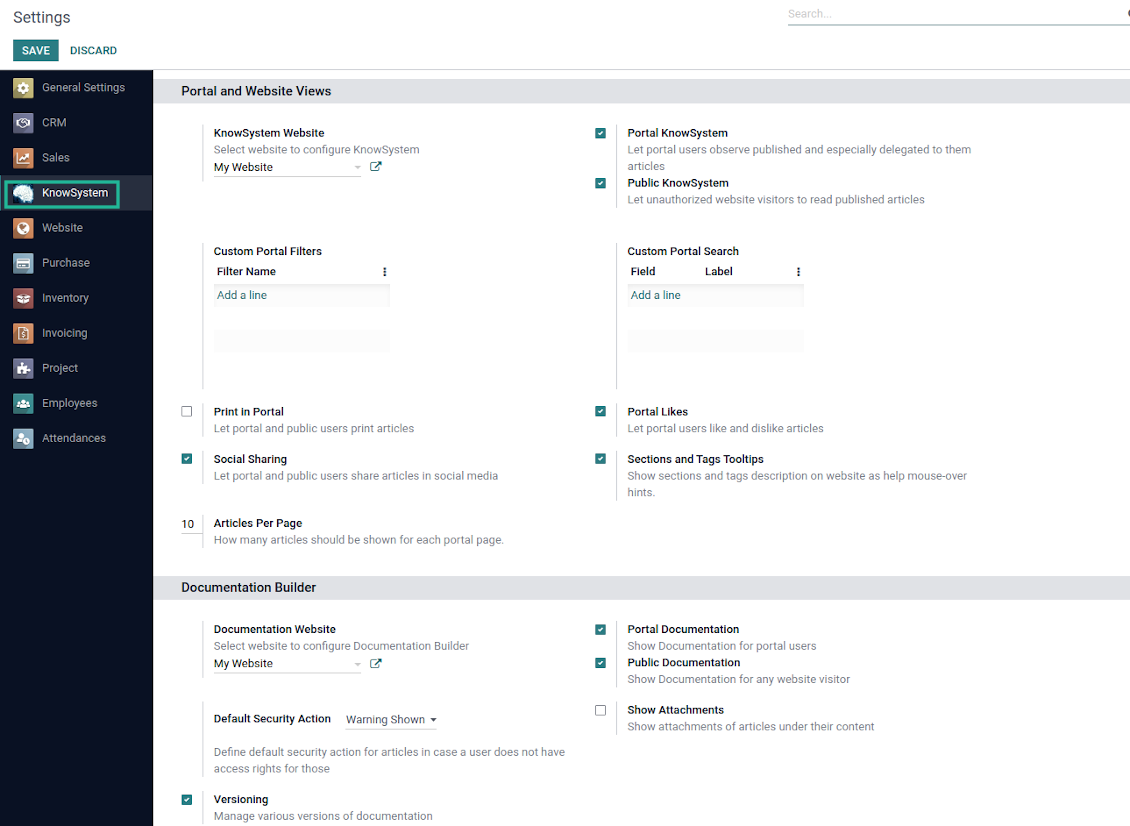
Turn on the setting 'Portal KnowSystem' to give KnowSystem access to external partners, and 'Public KnowSystem' - to website visitors
-
Configure KnowSystem tags or publish articles to share knowledge content
-
Combine articles in advanced documentation to cover a certain aspect of organizational or functional knowledge
-
Turn on the option 'Portal Documentation' and 'Public Documentation' to make that documentation available for portal and public users respectively.
Website documentation builder
-
Combine articles into advanced documentation sections to cover a certain business, organizational, or functional aspect
-
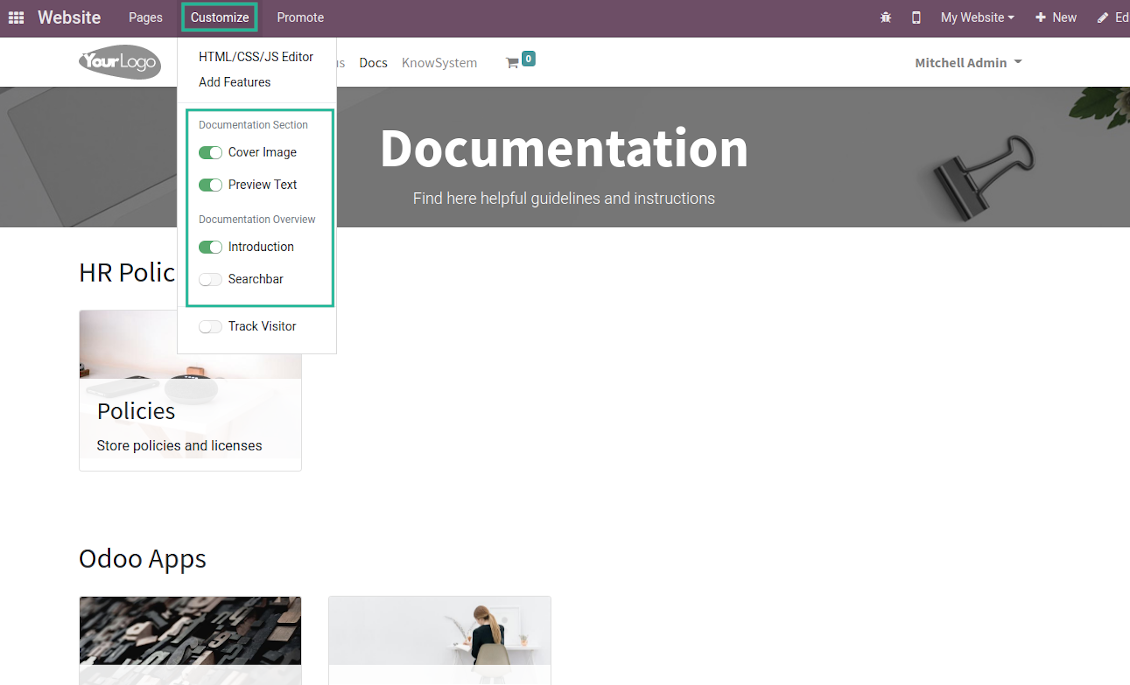
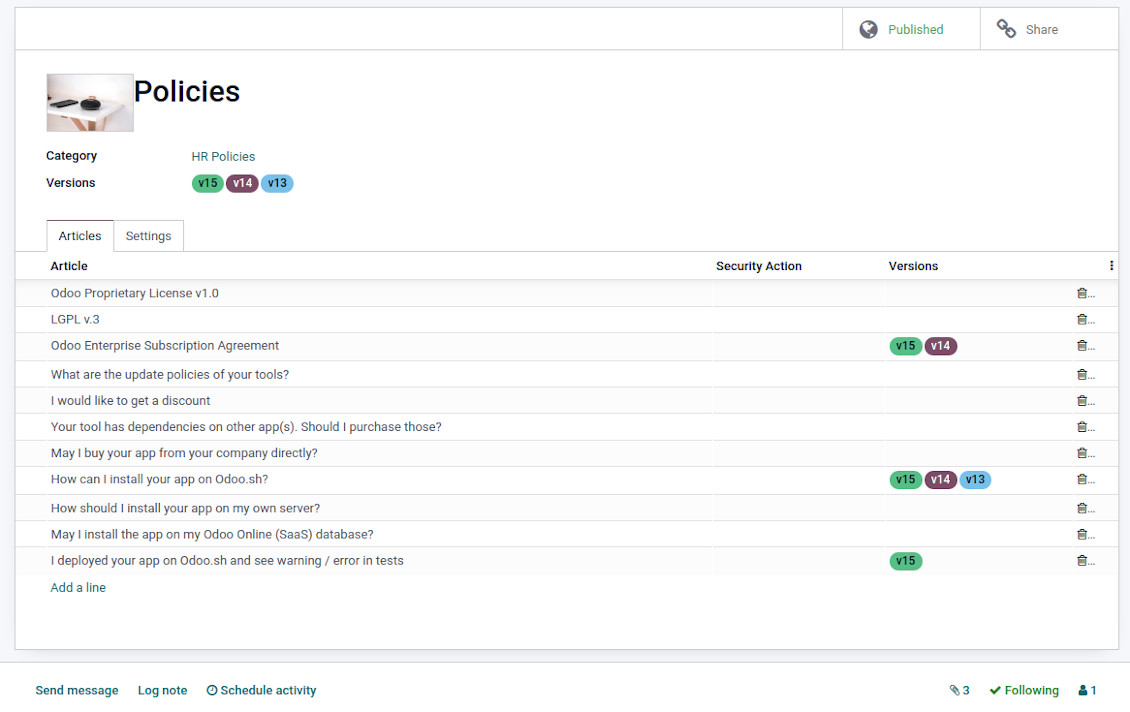
To create a new documentation section just select and order KnowSystem articles. The app would generate a website page automatically
-
Each KMS article might be used several times for different documentation sections
-
The tool allows preparing an unlimited number of documentation pages structured by categories
-
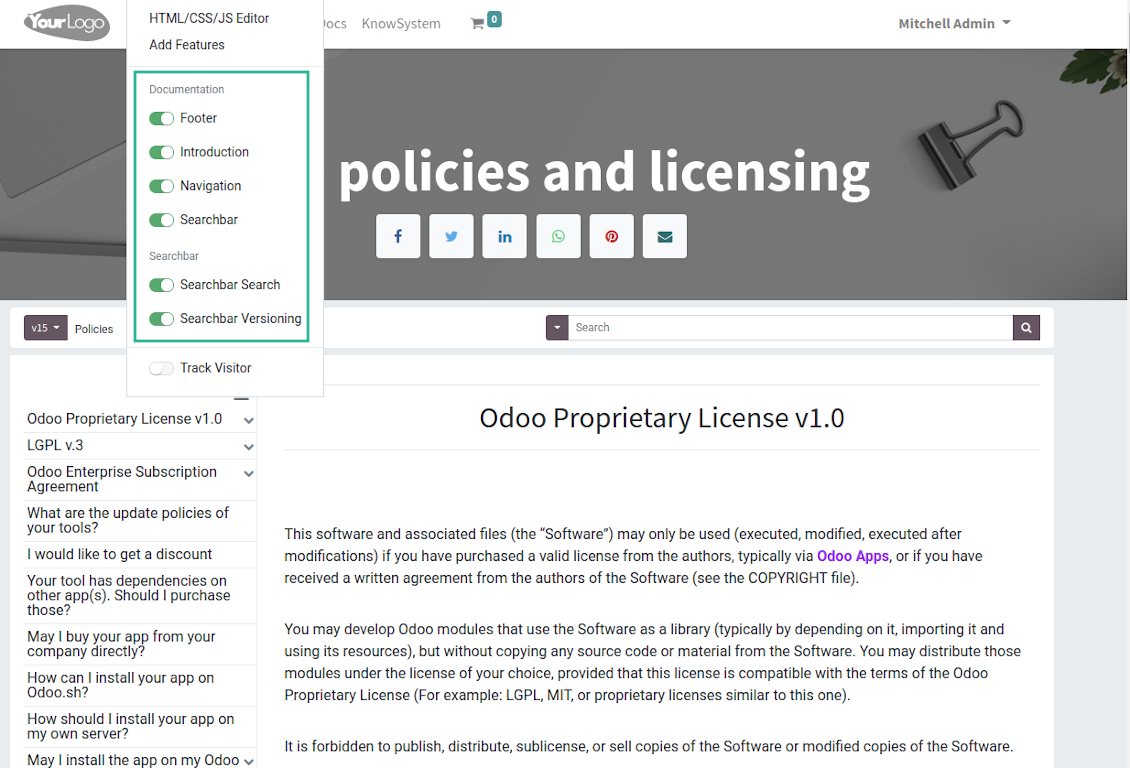
Flexibly customize documentation pages: show or hide introductions and footers, turn on/off the search bar and table of contents, add or remove preview images and texts
-
The app lets flexibly share documentation categories and sections. Publish required documents to make them available for everybody, assign KnowSystem tags - to grant access to chosen Odoo partners
-
Depending on user rights documentation might look different. Define what to do if a documentation user does not have access to included articles: to neglect restrictions, not show that knowledge pieces, or show a security warning
-
Optionally show a table of contents for comfortable and quick navigation. The table of contents is constructed automatically according to the headers of included articles
-
Turn on the search bar for documentation. It is possible to find matches in a whole text or only in headers, to make keywords case sensitive or insensitive
-
Apply versioning for documentation to avoid double work in preparing specifications, user manuals, or software guidelines.
Partner knowledge base portal and public knowledge system
Knowledge in Odoo portal
-
KnowSystem lets organize a web portal personally for each Odoo partner by selecting articles to be shared. To that end turn on the option 'Portal KnowSystem'
-
Design an article specially for a definite company, or use the same knowledge experience among multiple clients
-
Knowledge articles are available for portal users if: (a) the articles are published; (b) the articles have user-related tags
-
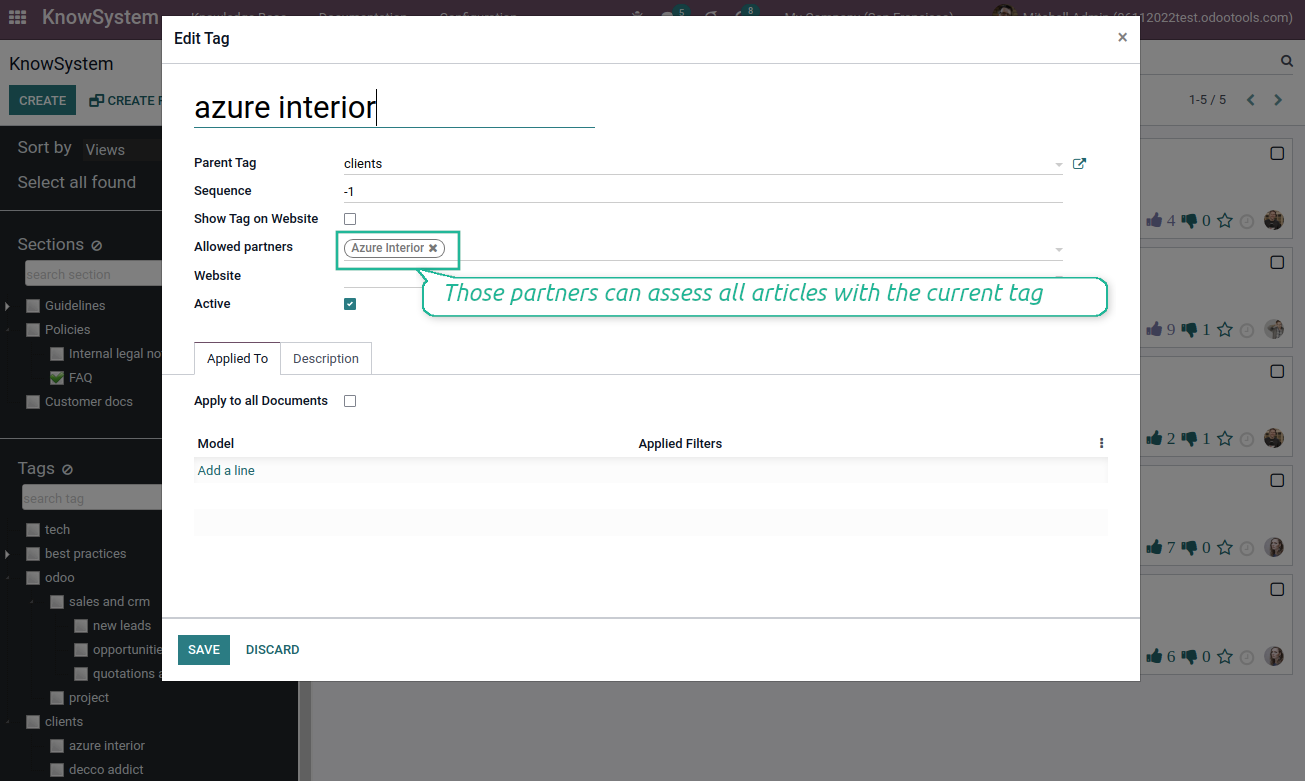
To assign a KnowSystem tag for a partner do one of the following: (a) go to a partner form and enter the field 'KnowSystem tags'; (b) on a tag form define 'Allowed partners'
-
Optionally allow partners to print knowledge pieces, like or share articles
Public KMS
-
To make self-service possible: make your knowledge base available also for unauthenticated users. To that end turn on the option 'Public KnowSystem'
-
Only articles which are published would be available for visitors
-
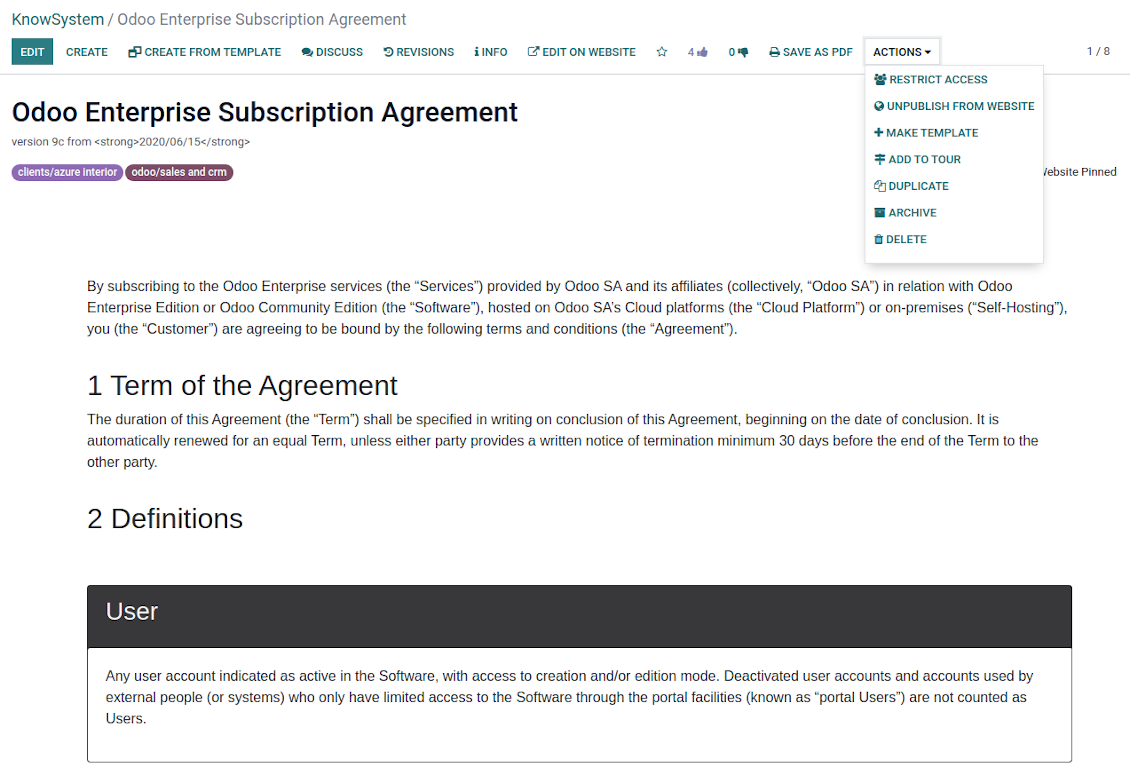
To publish specific knowledge parts: apply the mass action 'Publish' or push the button 'Actions > Publish on website' on an article form
-
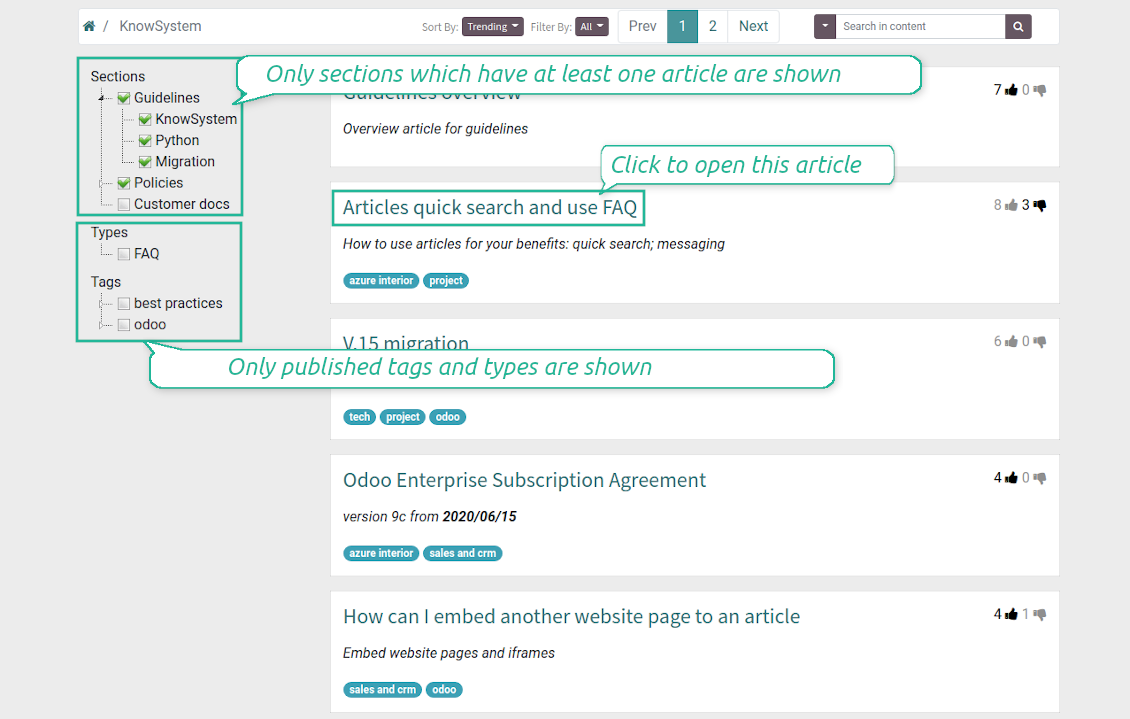
To show tags and article types in the portal and website do not forget to publish them. Knowledge sections would be shown only if they have articles for observation
-
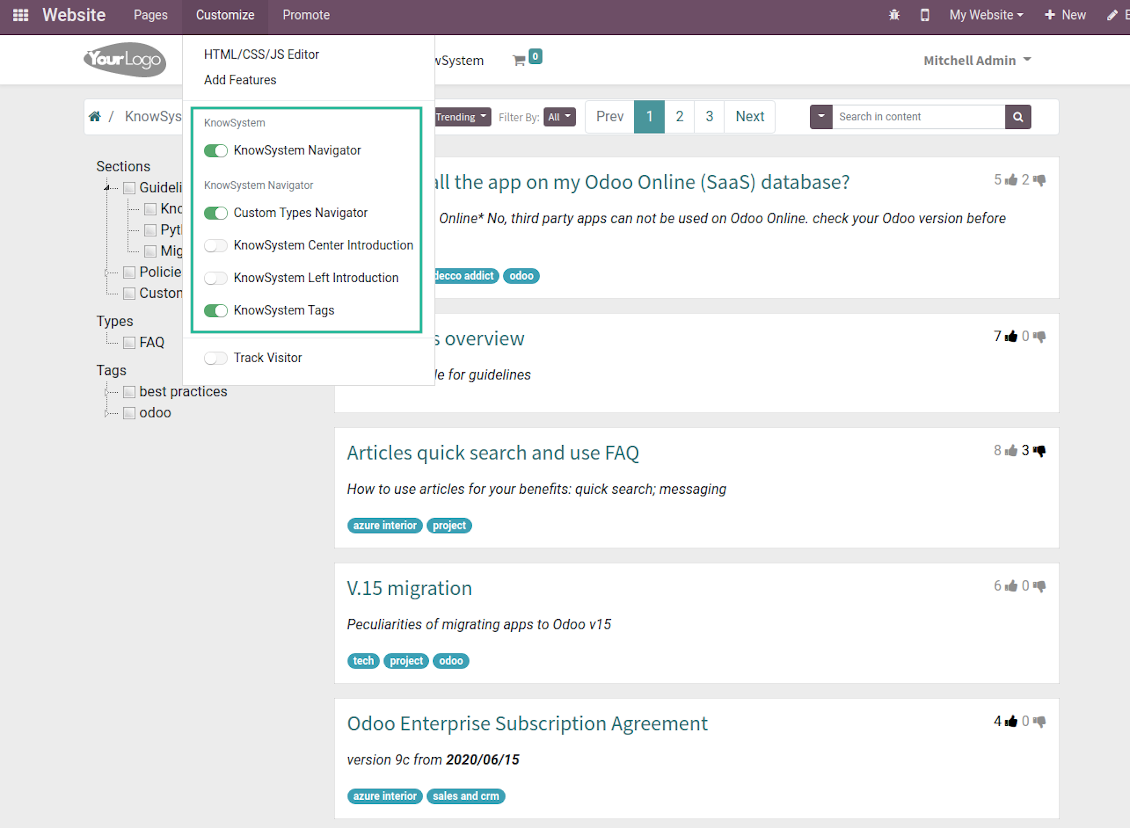
Customize the knowledge portal: hide/show the navigation by tags and types or the whole navigation, prepare introduction or navigation hints, and add section tooltips.
Interactive and evolving knowledge base
Teamwork and use
-
The history of article revisions is kept in Odoo in a similar way it's done in Wikipedia. If one of the Odoo users breaks something, it takes 2 clicks to recover a proper knowledge version
-
Users might take part in article discussions and be subscribed for updates
-
Control statistics by articles: contributors, number of views, likes, and dislikes, how frequently they are used in messaging, who marks them as favorite
-
Set activities to improve the knowledge base
Multi-lingual knowledge
-
KnowSystem lets you translate articles in the languages installed in Odoo. In such a way users might read and edit articles in a language of their preferences
-
To avoid double work, article content might be copied from another language (the button 'Copy from another translation' under the article content). Simultaneously, make sure you actually require multi-lingual regime: all articles should be anyway kept updated in all Odoo languages
-
To update knowledge translation you should change your user preferences to a required language. Then, go to an article and introduce changes as usual.
Design eCommerce FAQ or documentation
-
The tools allow adding the product knowledge entry to all eCommerce product pages
-
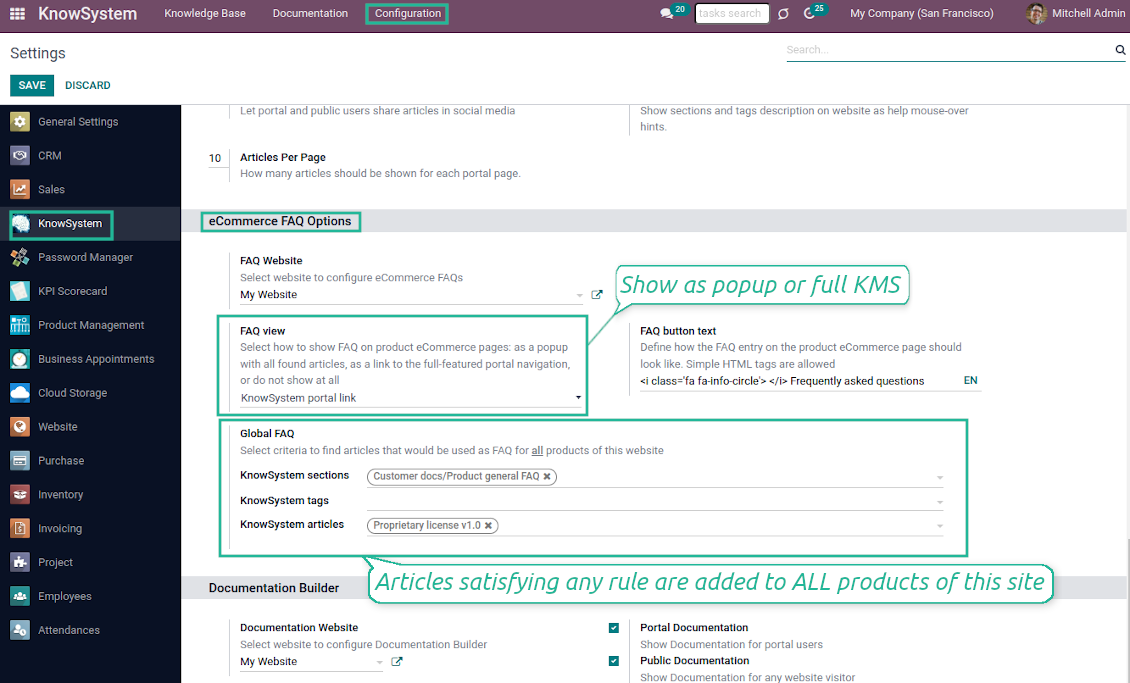
Optionally hide that for specific templates (the setting 'Do not show eCommerce FAQ') or for the whole eShop on a particular website (the configuration option 'FAQ view' - 'Do not show')
-
Introduce your own title for the button (the website setting 'FAQ button text'). By default, it is ' Frequently asked questions'. But you can change that to any, e.g. 'Product docs' or 'Instructions'. Simple HTML tags are allowed for that goal
-
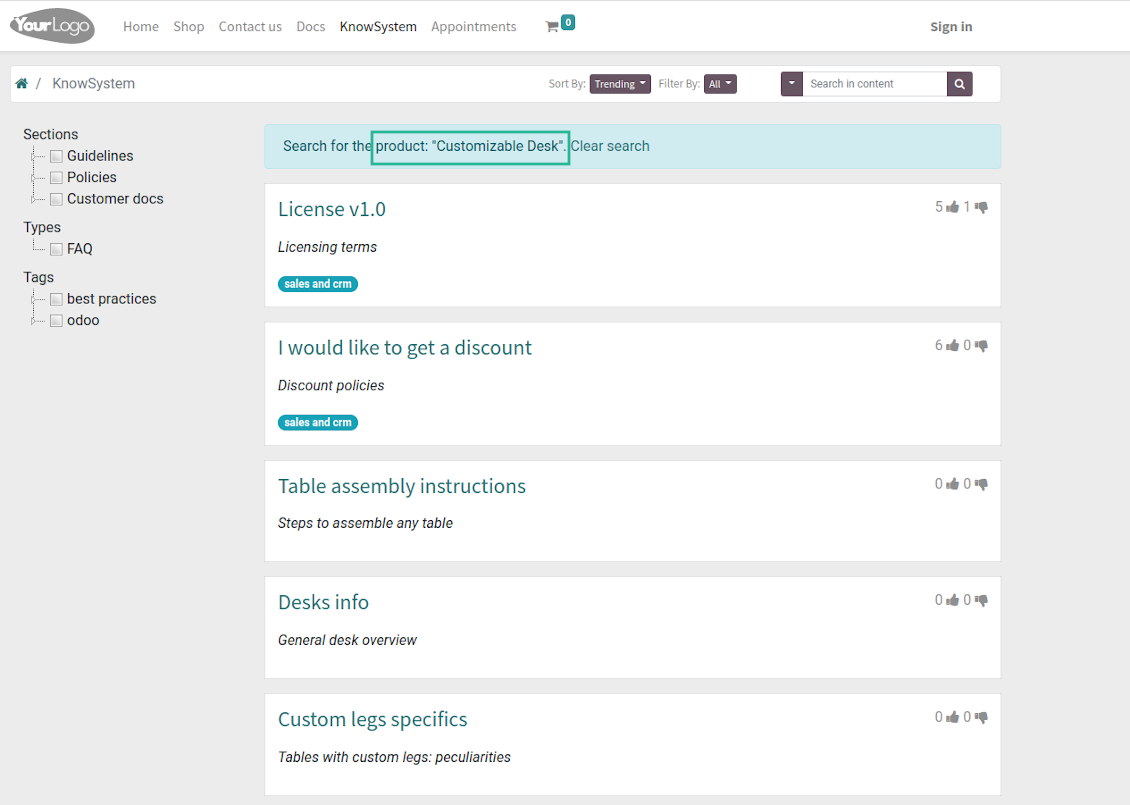
Show product knowledge as a link to the main knowledge portal interface (choose 'KnowSystem portal link' for the option 'FAQ view'). In this way, when clicked users are redirected to the full KnowSystem navigation but are restricted by articles linked to the current product
-
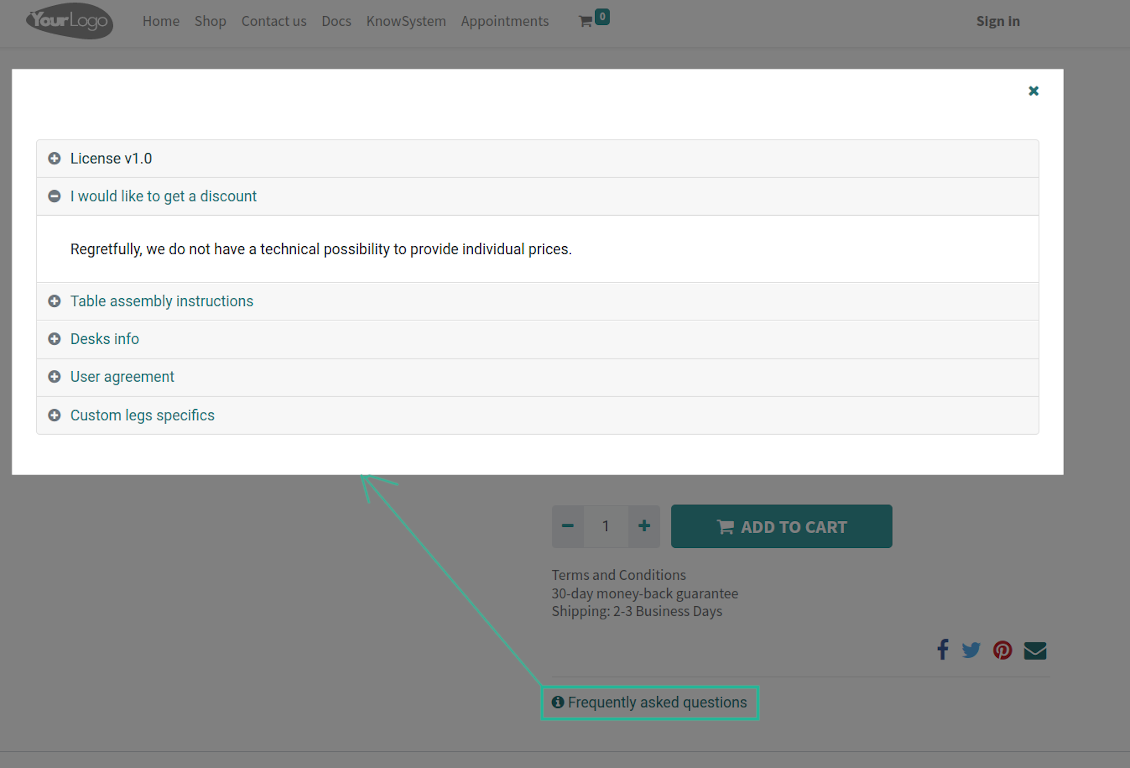
Alternatively, the tool allows triggering a popup with all found articles accordion (choose 'Popup accordion' for the option 'FAQ view'). Thus, users are able to check articles without leaving a product e-Shop page
-
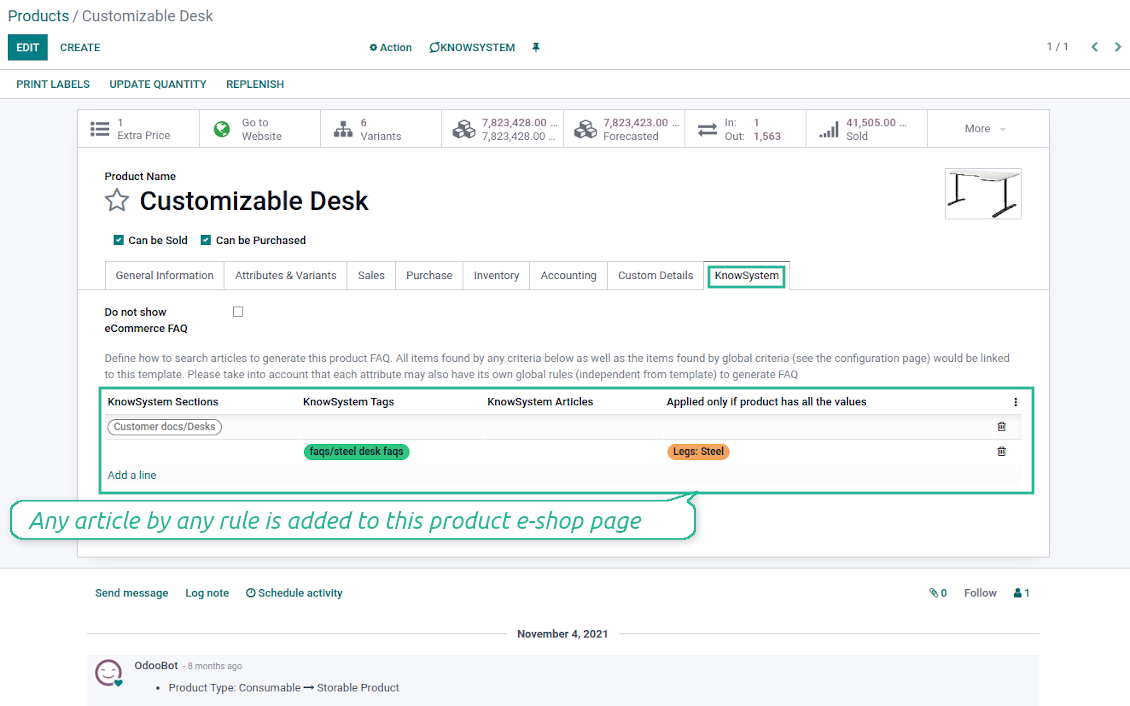
Establish links between product templates and KnowSystem to cumulate Odoo eShop knowledge. Show articles for specific sets of attribute values and hide them for others. For example, to have different FAQs for steel and aluminum tables
-
Define its own knowledge for Odoo attributes or attribute values disregarding actual products. For instance, complementary documentation for all variants that have 'legs' or 'custom legs'
-
Apply global settings of how to find articles for all eCommerce product pages. In this way, the app lets have the same FAQs basis for all sold items on a particular website
-
It is possible to define KnowSystem sections, tags, or specific articles on each layer. A knowledge piece would be selected if it satisfies any of the criteria. For sections and tags, child nodes would be also taken into account
-
Articles are shown on product pages only if a user can access those articles. Thus, website visitors would see only published ones.
Any business and functional area
KnowSystem is a universal knowledge management tool that might be configured to any business goal and any set of Odoo apps: helpdesk, marketing, IT, HR, project management, so on and so on. Typical use cases are:
-
Helpdesk - once faced a challenge, its solution might be recorded in KnowSystem for repeated usage by co-workers and for self-service by clients
-
Sales and CRM - salesperson helper to find information about products and offers, frequently asked customer questions
-
Project management - to keep and easily retrieve knowledge of existing solutions, tools, hints, and experiments
-
HR - to prepare instructions, guidelines, learning tours and training, and any codified knowledge of routine in your company
-
Marketing - to organize Odoo's online library of product use cases, expert knowledge, and well-structured documentation
-
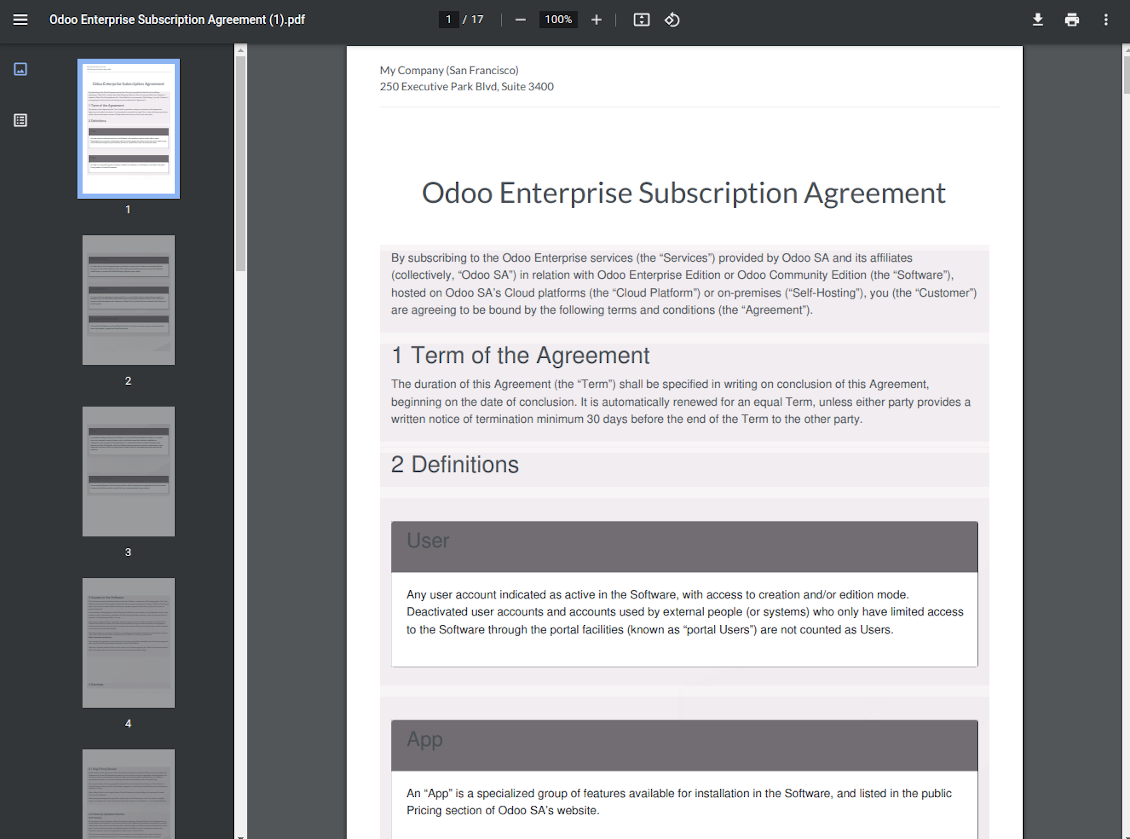
Legal issues - systematize your policies, contract/approval management, keep the full classifier of trademarks, licenses
-
Informational technologies - share easy-reached manuals and configuration guidelines.
Custom knowledge system attributes
-
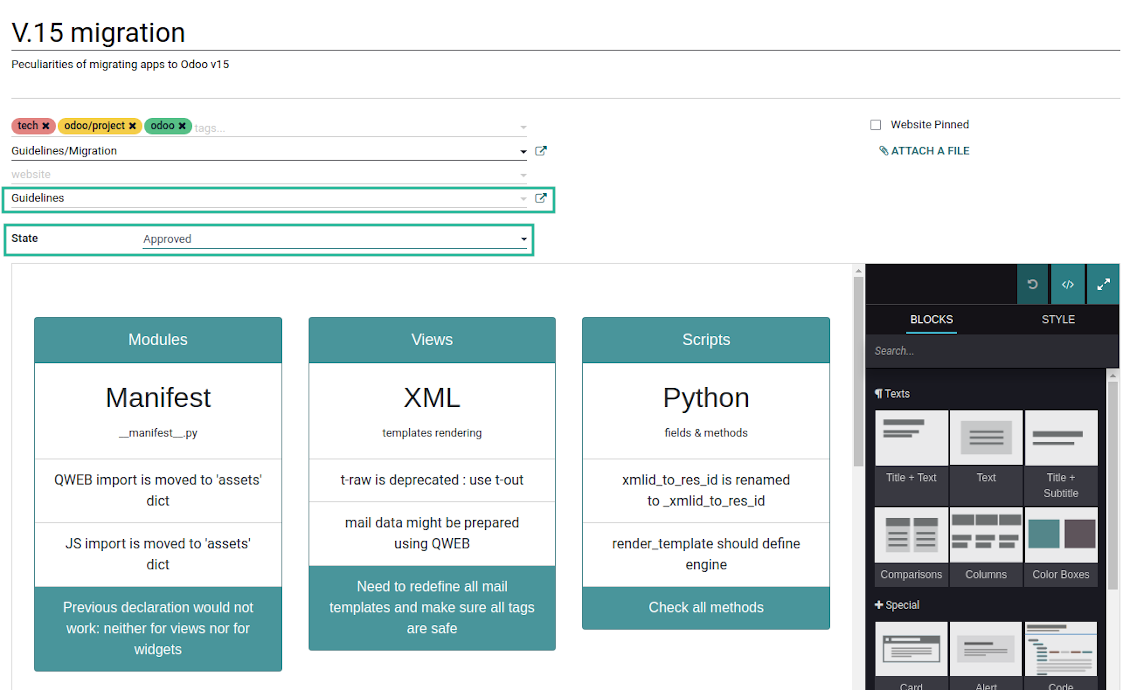
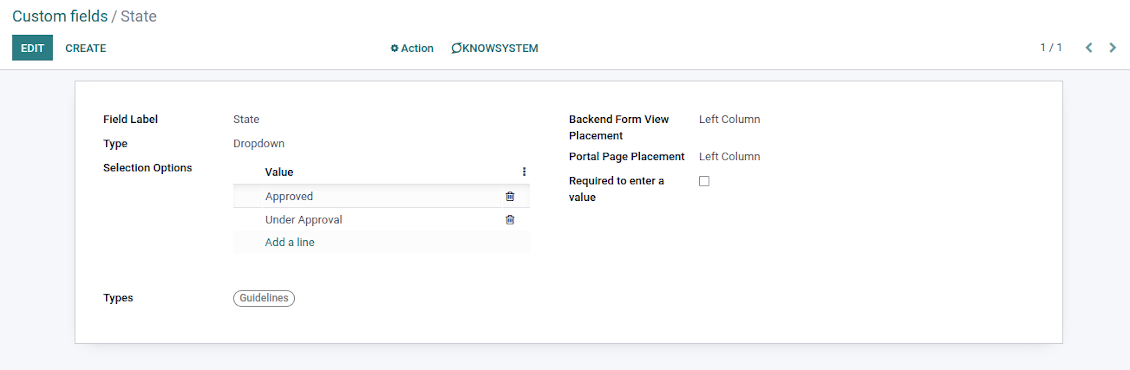
Custom attributes' creation does not require any technical knowledge. In order to show a new property for knowledge base articles, just add a new field and enter details
-
It is possible to add custom fields of the following types: single-line text (char), simple text without formatting (text), rich text (HTML-formatted text), integer or float numbers, drop-down choice with your own options (selection), checkbox (boolean), date or date and time, binary (a file to upload), reference to another Odoo document (e.g. for sale order, contact; many2one)
-
The tool lets you comfortably select an interface position of a custom field from a closed list of options
-
Distinguish knowledge articles by types in order to show properties only for suitable ones. Thus set of attributes for 'user guidelines' and 'technical specifications' might be different
-
Mark a custom field required to force users to enter values
-
The app might work for both the KnowSystem backend and the knowledge share portal
-
Custom knowledge system fields might be imported and exported
-
The rights to create custom fields belong only to KnowSystem administrators.
Secured and shared knowledge
-
Security for internal and for portal/public users differs
-
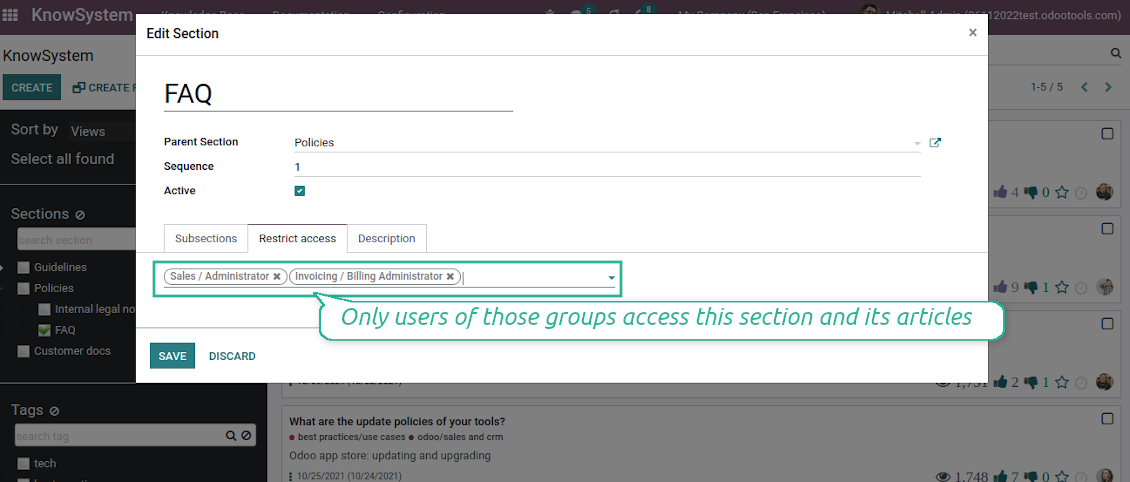
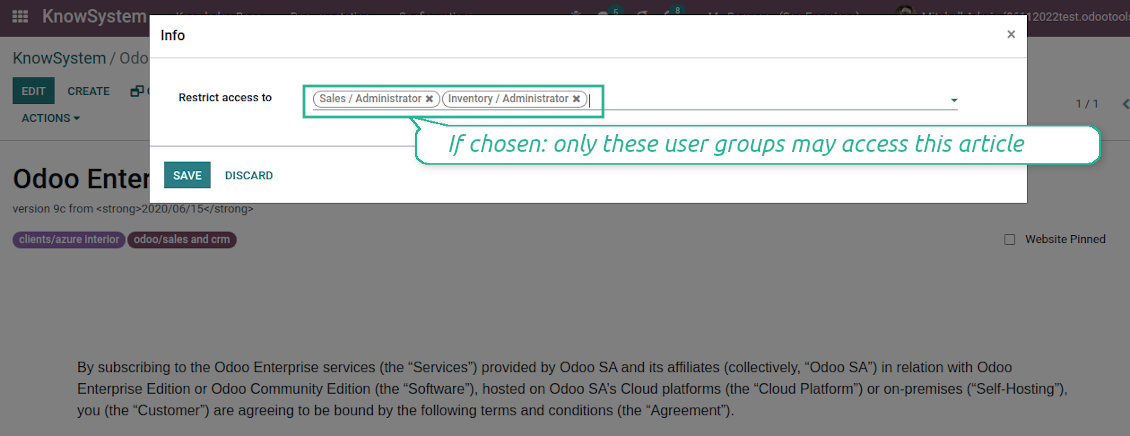
For the company employees: KnowSystem considers user groups which are defined per articles, sections, and tours. Look at the tab 'Restrict to' on forms of those objects. If that field is not defined, a document is considered 'global' and each internal user may read it
-
For portal / public users: KnowSystem takes into account tags and whether an article is website-published. A knowledge tag has a field 'Allowed partners', which may grant access to portal users for articles with this tag. Website published pages are available for any external visitor
-
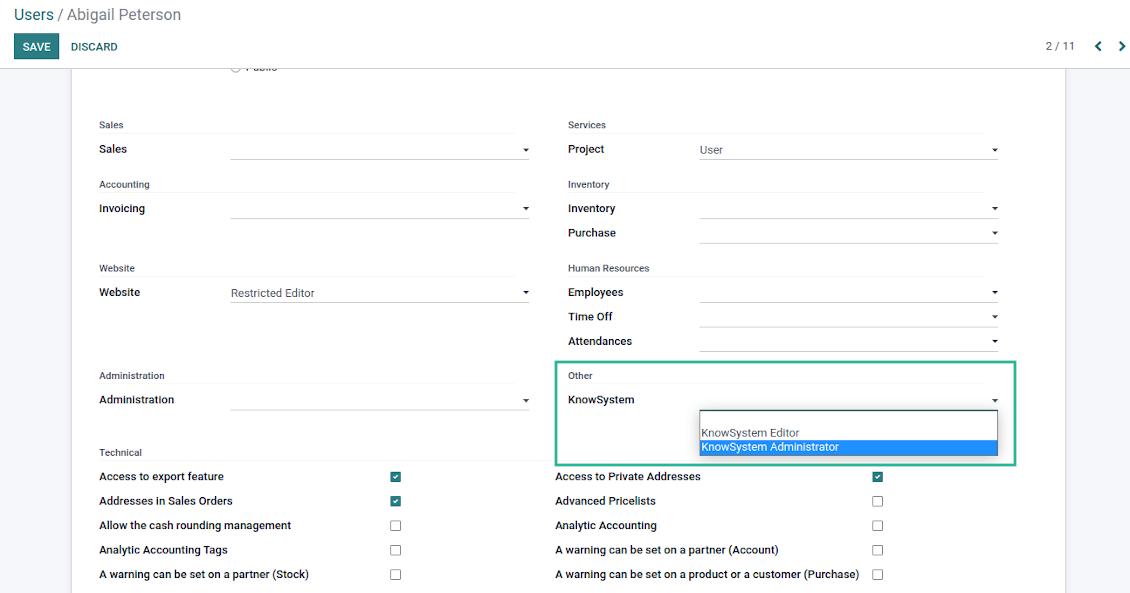
Rights to administrate Odoo knowledge management system belongs to 2 user roles: KnowSystem Editor and KnowSystem Administrator. If you want a user to create and edit articles, a user should belong to one of those groups
-
Odoo users always may access an article if he/she is an author of that article disregarding further restrictions
-
Rights for a knowledge section are defined not only according to this section but also according to all its parents. For example, if a user can't access 'sales', he/she would not be able to access 'sales/crm' disregarding whether 'crm' is available for his/her user group.
|
|
Odoo user |
KnowSystem Editor |
KnowSystem Admin |
Portal user |
Public user |
| Articles | read related to his/her user groups and sections | read, create, edit, archive related to his/her user groups and sections | read, create, edit, delete any | read published articles and articles related to partner-related tags | read published articles |
| Sections | read related to his/her user groups | read, create, edit, archive related to his/her user groups and sections | read, create, edit, delete any | read all sections of available articles | read all sections of published articles |
| Tags | read any | read, create, edit, archive any | read, create, edit, delete any | read published ones | read published ones |
| Article Types | read any | read any | read, create, edit, delete any | read published ones | read published ones |
| Tours | read related to his/her user groups | read, create, edit, delete related to his/her user groups | read, create, edit, delete any | no access | no access |
| Misc | may like/dislike, add to favorites, print, take part in discussions | may configure options | may like/dislike an article |
|
Gyakran ismételt kérdések: KnowSystem: Knowledge Base System Odoo v.15
Nem látok különbséget a revíziók szövegei között.
A revíziók nemcsak a szövegmódosításokat rögzítik, hanem a stílusok minden frissítését is (technikailag, amikor megváltoztatja a cikk HTML-forráskódját). Egyesek első ránézésre nem egyértelműek (pl. egyetlen szó betűmérete). Mások drasztikusak lehetnek. Bármely Edit > bármit módosít a cikkben > Save sorozat azonban új revíziót eredményez.
Hozzáadhatok YouTube-/ Vimeo- / Dailymotion- / Youku-videót egy cikkhez?
Igen, ezekről a szolgáltatásokról videót ágyazhat be a cikkekbe az Odoo backendből és a webhelyépítőből is. Adjon hozzá egy képes építőelemet > nyomjon a képre > válassza a ‘Videó’ lehetőséget > adja meg a média URL-jét.
Figyelem: ezek a videók iframe-ként kerülnek be, és egyes böngészők addig blokkolhatják a lejátszást, amíg a felhasználó azt kifejezetten nem engedélyezi.
Hogyan tehetek egy szakaszt láthatóvá a weboldalon?
A KnowSystemben egy szakasz akkor látható a weboldalon, ha közzétett és legalább egy cikket tartalmaz. Alszakaszok mellett sem jelenik meg, ha magában a szakaszban nincs egyetlen cikk sem. Így elkerülhetők az üres szakaszok, és a KnowSystem-portál áttekinthető marad. Ha a szakaszt meg akarja jeleníteni, adjon hozzá egy bevezető vagy általános cikket, amely röviden leírja vagy felsorolja az alszakaszok cikkeit.
Hogyan oszthatom meg a cikket egy külső partnerrel?
Kattintson jobb gombbal bármely címkére a bal oldali navigációs panelen - Create
Keresse meg az 'Allowed partners' mezőt. Például 'clients - azure interior' a 'Azure Interior' partner hozzáféréséhez. Fordítva is teheti: KnowSystem-címkéket a partner űrlapján rendelhet hozzá
Ezután nyissa meg a kívánt cikket (vagy ugyanezt az 'Mass update' művelettel több rekordra):
Ha közzétett: vonja vissza a közzétételt, ha nem akarja elérhetővé tenni minden portálfelhasználó és nyilvános látogató számára
Rendelje hozzá az újonnan létrehozott címkét (a példában 'clients - azure interior')
Most:
A 'Azure Interior' kereskedelmi partnerhez kapcsolódó összes portálfelhasználó hozzáfér a 'Azure Interior' címkéjű cikkekhez
Más portálfelhasználók (ha nincs más címke hozzárendelve) nem férnek hozzá ezekhez a cikkekhez
A belső felhasználókat ez nem érinti, a cikkeket a cikkek és szakaszok 'access to' logikája szerint látják.
Hozzáadhatjuk a nyelvválasztó gombot a cikk törzséhez?
A 'translate' gombot a választható 'KnowSystem: Multi Languages' kiegészítő szándékosan nem teszi a cikk törzsébe. A HTML-t nagyon nehéz lefordítani a gomb egyszerű felugró ablakában. Nagyon kevés szöveget kellene fordítani, és sok HTML-rész lenne (amit a fordító el is ronthat).
Ezért adott nyelvű cikkhez jelentkezzen be az adott nyelvű felhasználóval. Lehet másik felhasználó, vagy ideiglenesen módosíthatja a jelenlegi felhasználó beállításait. Ezután a cikktörzs minden frissítése azon a felhasználói nyelven történik.
A cikk törzse alatt a 'Copy from another translation' gombbal bármikor átveheti a tartalmat egy másik nyelvről (hasznos, ha a cikket az egyik nyelven jelentősen frissítették).
Hogyan ágyazhatok be egy másik weboldalt a cikkbe
Ehhez iframe-eket használhat. Kapcsolja a cikket a nyers HTML-kódszerkesztőre, és szúrja be például: <iframe src="https://faotools.com/" style="width:100%;min-height:600px;"> </iframe>.
Telepítettem a KnowSystemet, de nem látom a 'create' gombot és a többi gombot
Valószínűleg nem adott KnowSystem-jogosultságot a felhasználójának. Válassza a megfelelő szerepet: 'KnowSystem Editor' vagy 'KnowSystem Admin', majd frissítse az oldalt. A vezérlőgomboknak meg kell jelenniük.
Megjeleníthetek egy adott oktatótúrát csak kiválasztott felhasználóknak?
Igen, egy felhasználói csoport (pl. 'Sales Manager') hozzárendelésével, amelynek ezt a túrát kell teljesítenie. Ha a felhasználó a csoport tagja, látja a túrát. Ha nem, nem jelenik meg. Ugyanúgy működik, mint a KnowSystem-cikkek és -szakaszok hozzáférési jogai.
Ha egy túrának nincsenek hozzárendelt csoportjai, akkor 'global', és mindenki számára látható.
Hogyan változtatom meg a láblécet és a fejlécet a cikkek nyomtatásakor?
A cikk-PDF-ek fejlécét és láblécét a vállalati elrendezések adják. Nyissa meg: Settings > General Settings > a Business Documents szakaszt. Itt adhatja meg a vállalati sablont, amely minden dokumentumtípusra vonatkozik, ideértve a számlákat, vevői rendeléseket stb., és a cikkeket is. Ez az Odoo-megközelítés a láblécet és a fejlécet általános vállalati stílusnak tekinti, nem az egyes nyomtatványok tulajdonságának.
Hogyan kapcsolhatom össze a cikkeket?
Minden cikknek van belső (backend) és weboldal-URL-je (ha a 'KnowSystem: Website and Portál' opció telepítve van). A rekord webcímeinek megtekintéséhez kattintson a cikk űrlapján az 'Info' gombra. Bármelyiket beszúrhatja a cikk törzsébe hivatkozásként.
Megváltoztathatom egy cikk HTML-forráskódját?
Igen: kapcsolja be a debug assets funkciót (a beállítások áttekintő képernyőjén), majd térjen vissza az aktuális cikkhez. Szerkesztőmódban megjelenik a '</>' ikon. Kattintson rá a HTML és a stílusok megtekintéséhez és szerkesztéséhez.
Mik az eszkozeik frissítési szabalyai?
Az Odoo Apps Store aktuális szabalyai szerint:
- A 12.0-s vagy korábbi verzióhoz vásárolt modul hozzáférést ad minden 12.0-ig tarto verzióhoz.
- A 13.0-s verzitol minden modulverziot külön kell megvasarolni.
- A verzioszamtol függetlenül a vásárlás jogot ad az adott foverzion belüli összes frissitesre es hibajavitasra.
A faOtools csapat nem irányítja ezeket a szabályokat. Kerdesekkel közvetlenül az Odoo Apps Store kepviseloit keresse.
Hogyan telepitem az alkalmazást Odoo.sh-re?
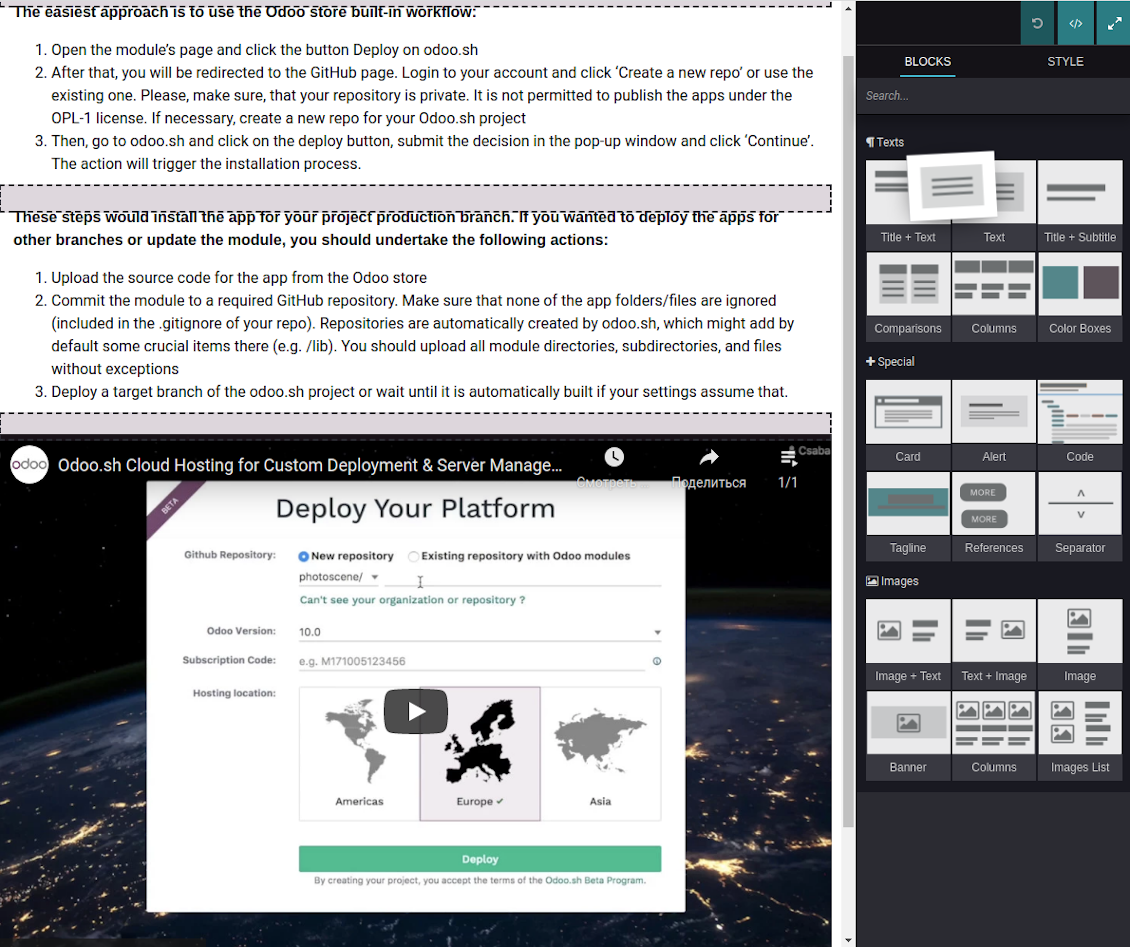
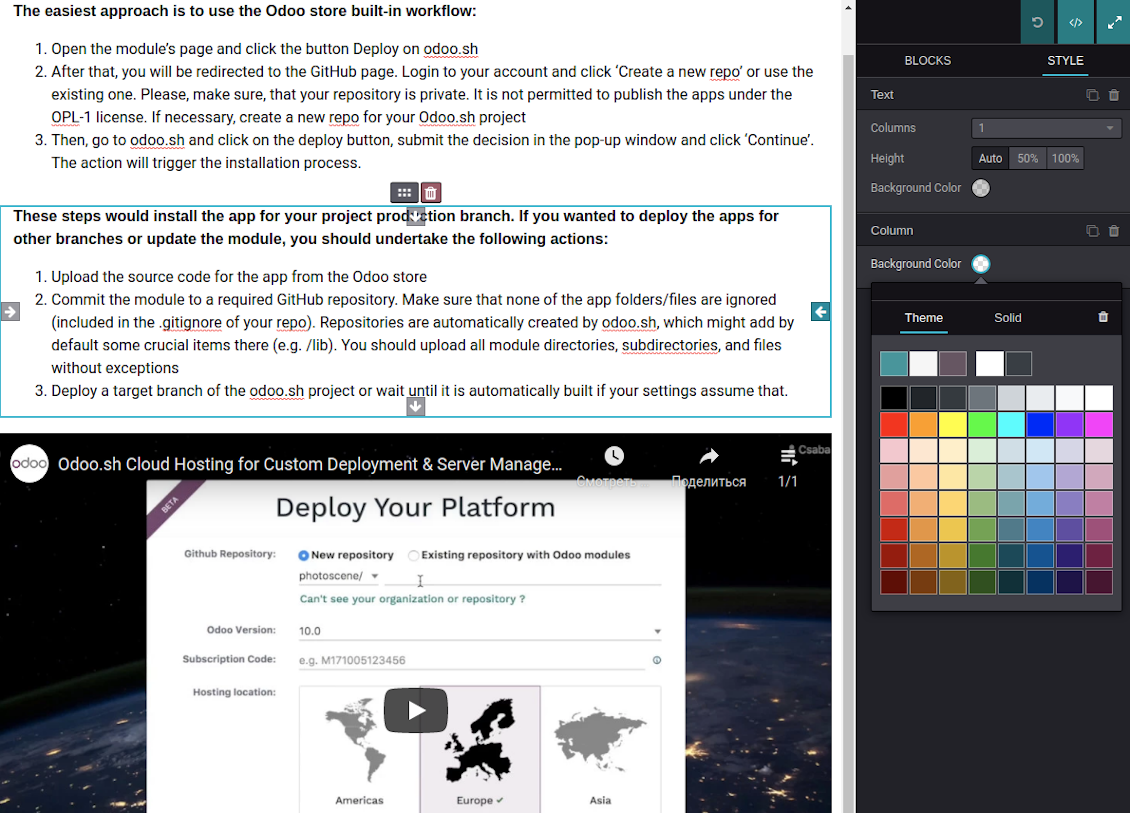
A legkozvetlenebb megkozelites az Odoo-aruhaz beépített munkafolyamata:
1. Nyissa meg a modul oldalat, es kattintson a Deploy on odoo.sh gombra
2. A GitHub oldalra kerül. Jelentkezzen be, majd kattintson a Create a new repo gombra, vagy használjon egy meglévőt. A tarhaznak privatnak kell lennie. OPL-1 licencu alkalmazások nem tehetok közzé. Szükség esetén hozzon létre uj repot az Odoo.sh-projekthez
3. Ezutan az odoo.sh-en kattintson a Deploy gombra, erősítse meg, majd kattintson a Continue gombra. Elindul a telepítés.
Ezek a lépések a production agra telepitik az alkalmazást. Mas agakhoz vagy frissiteshez:
1. Töltse le a forraskodot az Odoo-aruhazbol
2. Commitolja a modult a GitHub-tarhazba. Egyik alkalmazasmappa/-fájl sem kerulhet a .gitignore-ba. Az odoo.sh által létrehozott tarhazak fontos utvonalakat (pl. /lib) hagyhatnak figyelmen kívül. Töltse fel az összes modulkonyvtarat es fájlt
3. Deployolja az odoo.sh-projekt celagat, vagy várja meg az automatikus buildet, ha a beállítások igy szolnak.
Hogyan telepitem az alkalmazást a saját szerveremre?
2. Indítsa újra az Odoo-kiszolgálót;
3. Kapcsolja be a fejlesztői uzemmodot (technikai beállítások);
4. Frissítse az alkalmazaslistat (Alkalmazások menü);
5. Keresse meg az alkalmazást, es kattintson az Activate/Install gombra;
6. Kövesse az alkalmazasoldal utmutatasait, ha vannak.
Az alkalmazásnak extra kiegeszitoi vannak. Megvehetem őket később?
Igen. Az Odoo automatikusan a kosarba teszi a fuggosegeket: zárja ki a mar megvasarolt eszközöket, hogy ne fizessen kétszer.
Telepitettem az alkalmazást Odoo.sh-re, es figyelmeztetést/hibát latok a tesztekben
A piros/narancs figyelmeztetés nem befolyásolja az alkalmazás funkcióit. Néha a moduljaink nem mennek at a standard automatikus teszteken, mert azok az alkalmazás celjaival ellentetes viselkedést várnak. Például megvaltoztatjuk az arszamitast, miközben az Odoo-tesztek a végső árat a standard algoritmussal hasonlitjak össze.
Először ellenőrizze a telepített adatbázis funkciot. Minden működik?
Ha mégis ugy gondolja, hogy a figyelmeztetés valós funkciókat érint, írjon nekünk, es küldje el a teljes telepítési naplókat es a telepített modulok teljes listajat (mag es harmadik fel).
Megvehetem az alkalmazást közvetlenül onoktol?
Nem, az eszközöket csak a hivatalos Odoo alkalmazasboltban forgalmazzuk.
Kedvezmenyt szeretnék
Sajnos nincs technikai lehetosegunk egyedi árakat adni.
Telepithetem az alkalmazást az Odoo Online (SaaS) adatbazisomra?
Nem, harmadik feles alkalmazások nem használhatók az Odoo Online-on. Az Odoo SaaS ezt blokkolja.
Az eszköz mas alkalmazasoktol függ. Meg kell vennem őket?
Igen, az eszkoznek szüksége van minden függőségként jelölt modulra. Az alkalmazasoldal ara mar tartalmazza ezeket a fuggosegeket.
Mennyi a modul ara amerikai dollarban? Miért változott?
Moduljaink ara euroban van megadva. Az Odoo-aruhaz a belső arfolyama szerint vált mas penznemekre. Ezért az amerikai dollar ar valtozhat, amikor az arfolyam frissül.
Az alkalmazás és a webhely angolon kívüli nyelveken mesterséges intelligenciával készülnek és az hivatalos Odoo-fordításokhoz igazodnak. Ha hibát talál, küldjön fordításhelyességi jegyet és kijavítjuk.
Hibajelentés
Ha hibát vagy következetlen viselkedést lát, írjon nekünk. A vásárlástól 60 napon belül javítást vállalunk, és utána is fejlesztjük az eszközöket.
Nem kell telefonszám vagy bankkártya a kapcsolatfelvételhez. Elég egy rövid e-mailes regisztráció, ami 30 másodpercnél nem tart tovább.
Adjon meg minél több részletet: képernyőképek, Odoo-kiszolgálónaplók és a hiba reprodukálásának teljes leírása. Általában néhány munkanap kell a munkatervhez (ha a hiba megerősített) vagy az iránymutatáshoz (egyébként).
Nyilvános funkcióigények és modulötletek (ingyenes fejlesztés)
Erősen motiváltak vagyunk az eszközeink fejlesztésére, és hálásak minden visszajelzésért. Ha az igények közhasznúak és hatékonyan megvalósíthatók, a csapat felveszi őket a teendők listájára.
Az ilyen teendőlista rendszeresen feldolgozásra kerül, extra díj nélkül. Bár határidőt és végleges dizájnt nem ígérhetünk, jó módja lehet a kívánt funkciók befektetés és kockázat nélküli megszerzésének.
Nem kell telefonszám vagy bankkártya a kapcsolatfelvételhez. Elég egy rövid e-mailes regisztráció, ami 30 másodpercnél nem tart tovább.

Eszköz Odoo mellékletek mappákba rendezéséhez és könyvtárak szinkronizálásához felhőklientekkel: Google Drive, OneDrive/SharePoint, Nextcloud/ownCloud, Dropbox, Amazon S3, Box és NAS. DMS. Fájlkezelő. Dokumentumkezelő rendszer
398€
Eszköz Odoo-mellékletek automatikus kétirányú szinkronizálásához OneDrive-fájlokkal
487€
Eszköz Odoo-mellékletek automatikus kétirányú szinkronizálásához Google Drive-fájlokkal
487€
Eszköz jelszavak biztonságos, megosztott tárolására Odooban. Megosztott trezorok

Eszköz KPI-célok beállításához és teljesítésük időszakos ellenőrzéséhez. KPI-irányítópultok. Dashboard-tervező. KPI-diagramok

Eszköz időalapú szolgáltatáskezeléshez a foglalástól az értékesítésig és az értékelésekig
398€
Eszköz az Odoo kezeléséhez a kedvenc AI-csevegőkből MCP-n keresztül. Claude. Bármely MCP-t támogató AI.

Eszköz különböző Odoo-események egyesítéséhez néhány konfigurálható szupernaptárban
