Password Manager v.17
The tool to safely keep passwords in Odoo for shared use. Shared vaults
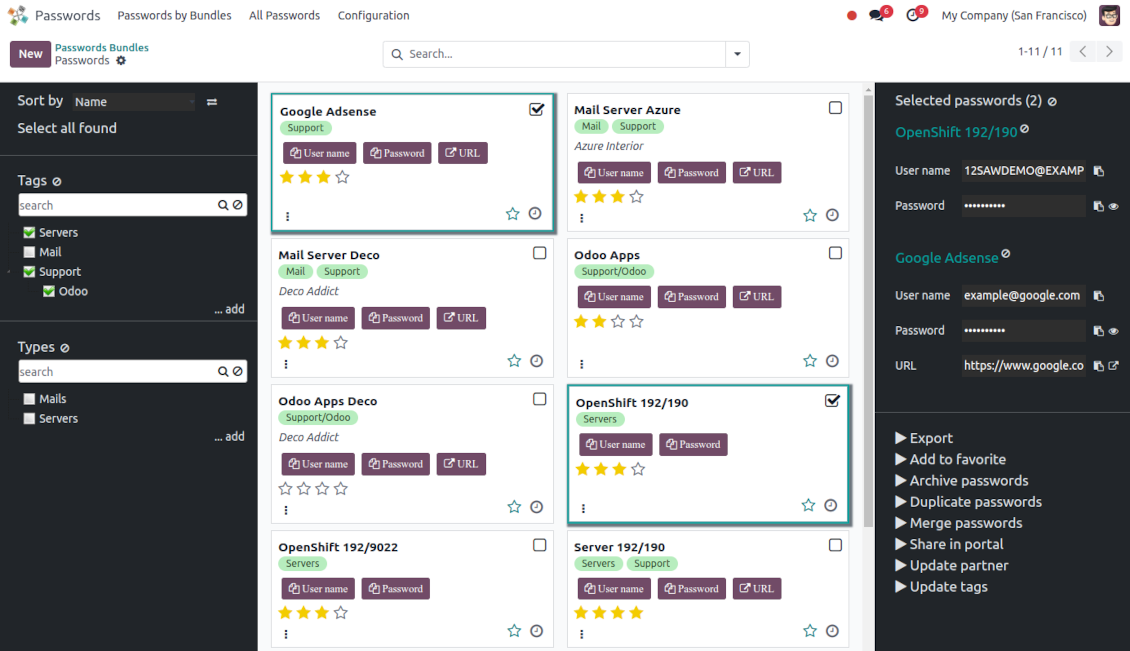
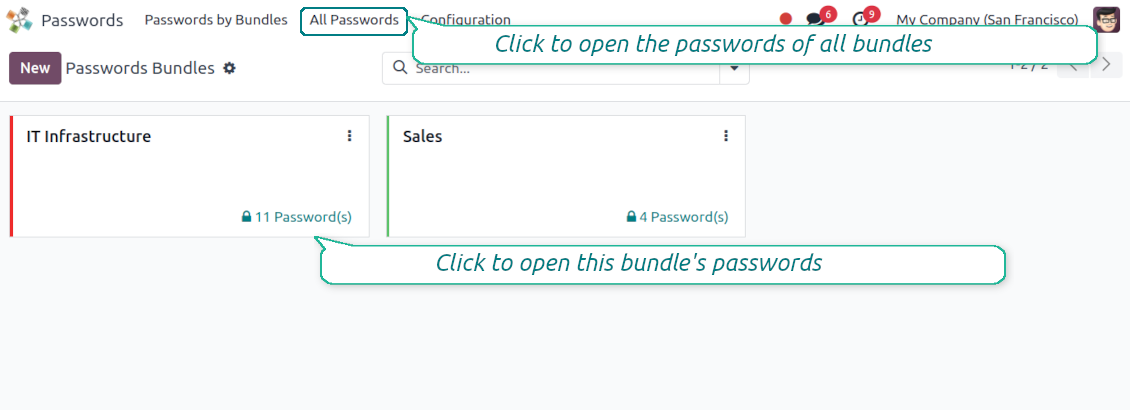
This app lets organize the safe passwords keeping system to structure, find and securely share password bundles.
- a core app to manage vaults and passwords. Cijena je 198€.
- an extension to add custom fields for password keys. Features assumed by this app are marked by the icon . Cijena je 38€.
Shared passwords vaults for team use
Passwords are combined in bundles: each might be shared with any user and any user group
Single view interface
Structure vault by tags and types, sort keys, proceed with mass actions, copy credentials to the clipboard from the same interface
Encrypted and protected password manager
The tool introduces a few security layers to minimize the possibility of data leaks
Portal sharing
Optionally share passwords with Odoo portal contacts
Auto generation
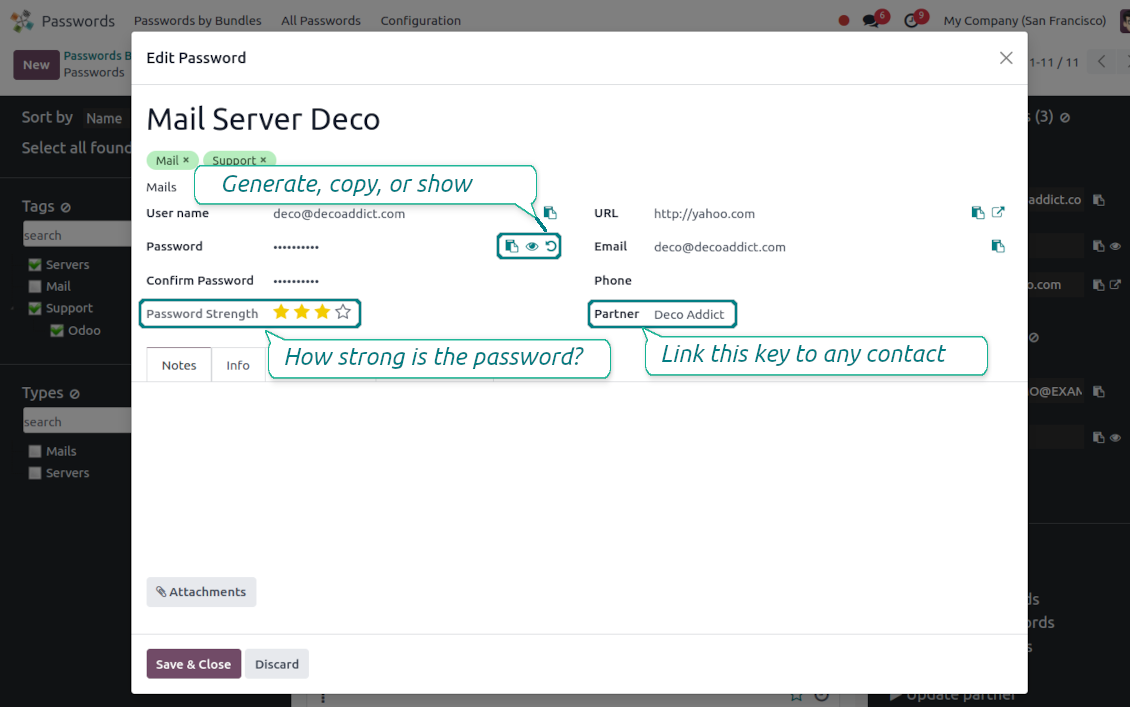
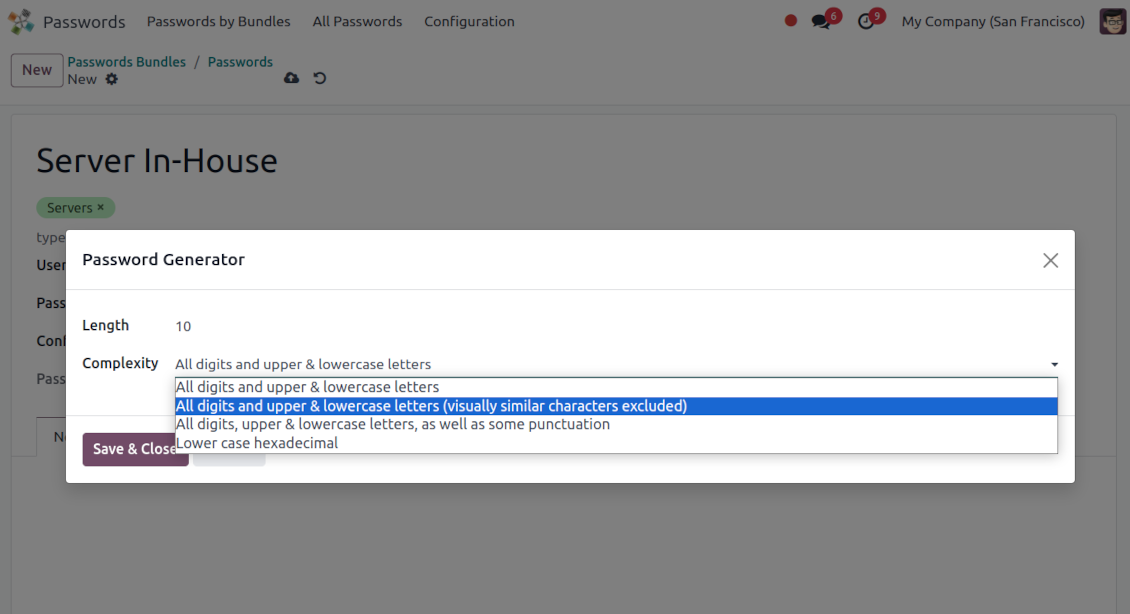
Force Odoo and let users create passwords based on chosen length and requirements
Passwords quality check
Password strength is estimated in real-time to make sure no weak passwords are introduced. Potential duplicates are easily detected
Batch update, export, and import
Configure the mass actions: export, update tags or linked partners, archive or restore, import vaults from an electronic table, etc.
Custom fields
Define passwords' typology and add custom attributes.
Very good password management module
Easy installation and quick setup
Shared use, encryption, and protection of passwords
Sharing Policies
-
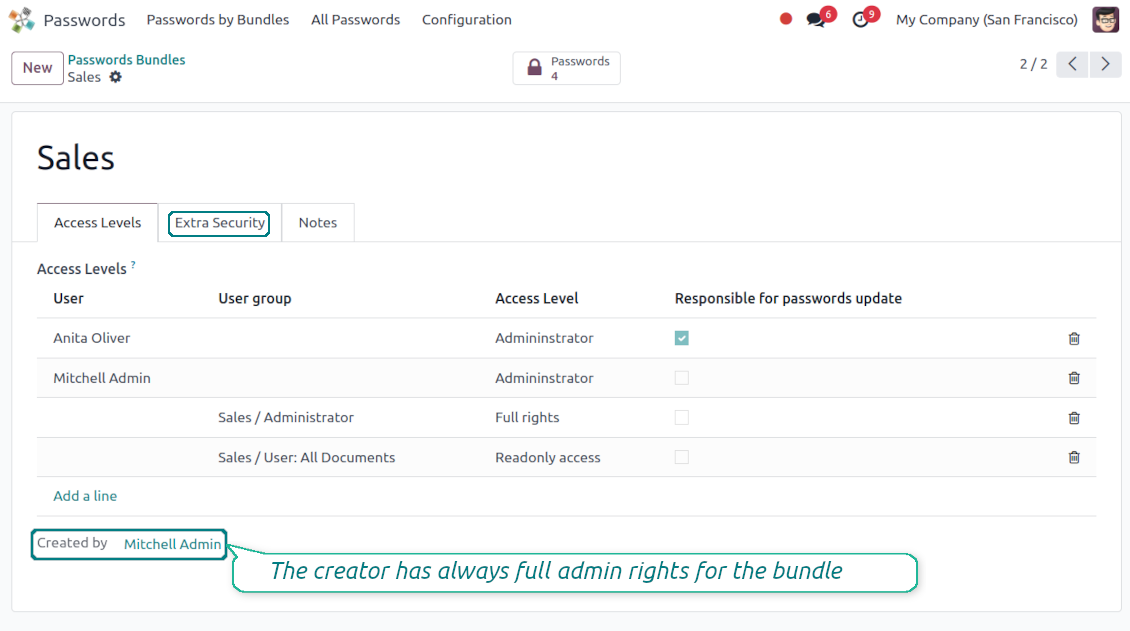
To grant access for a bundle just indicate a user or a user group in the table of access levels
-
Bundle administrators may access, update or delete the bundle, its passwords, and its tags. Admins are assumed to manage access levels, modify update policies, and set extra passwords
-
Full rights users may access, update or delete passwords and tags related to the bundle, but they can't change the vault itself, its access levels, or settings
-
Readonly access users may observe and address passwords and tags of the bundle. Such users can't modify any objects
-
The bundle creator is always its administrator. The Odoo super admin (with id 1) has full rights to all bundles and passwords
-
For bundle read-only users, it is possible to additionally restrict access to specific password keys. In particular, define the groups or/and users that may see a password. A read-only user should either have one of the mentioned groups or should be among the mentioned users. If none of the fields are defined, all bundle users can access a password
Security Layers
-
Have as many password vaults for any user group as you need
-
All passwords are symmetrically encrypted. It means that to decrypt a password, plotters should know the exact decryption algorithm and a bundle decryption key/bundle salt and password
-
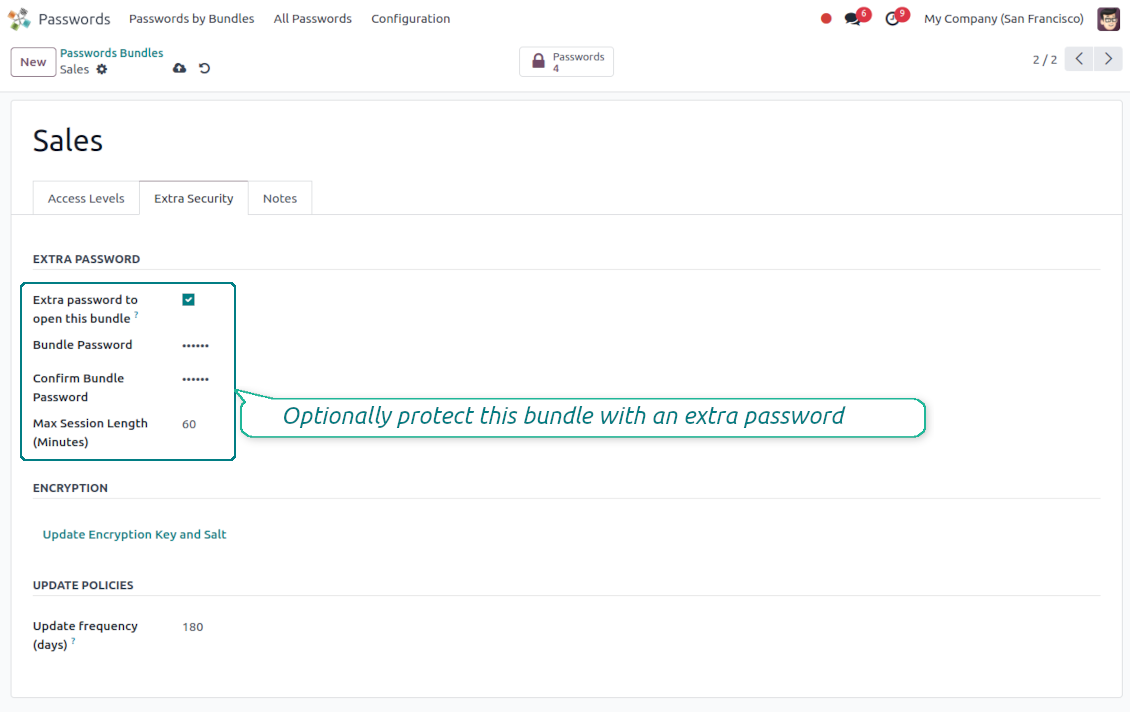
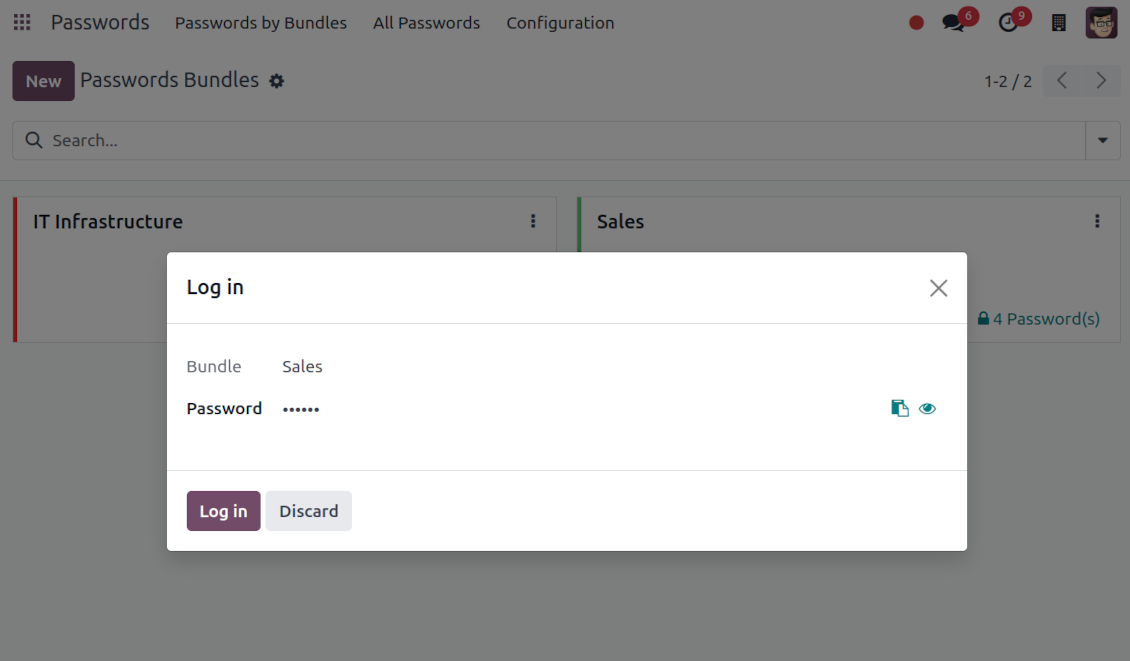
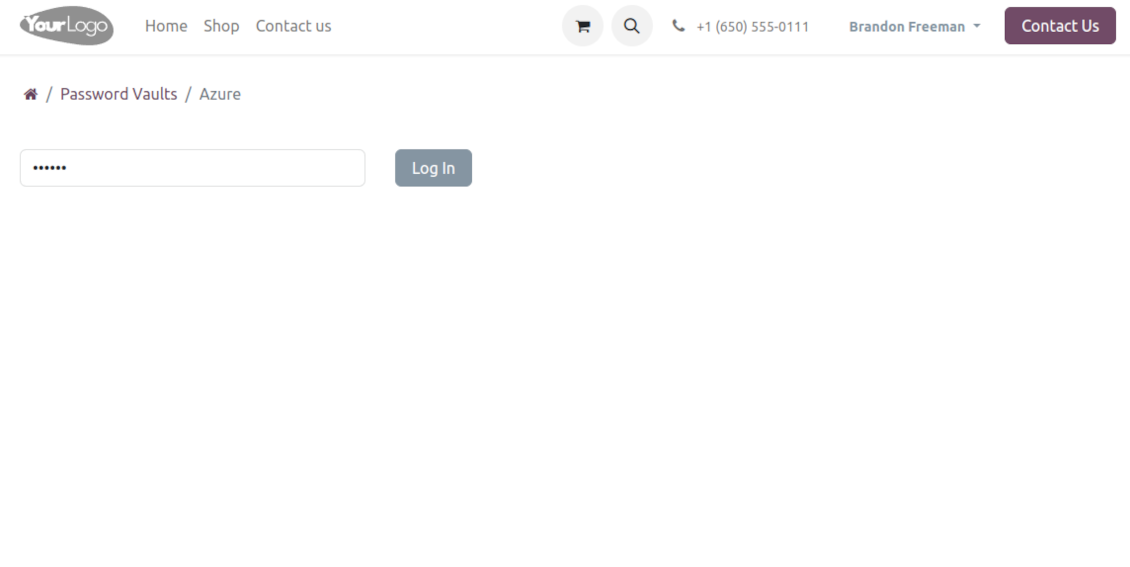
For each bundle, you can assign an extra password, which would be required to enter each time any user applies to that bundle or its passwords. The session period after successful login is set up in minutes
-
Vault extra password is also kept in the database decrypted, and might be changed by a bundle administrator (sure, if he/she enters a correct old paraphrase). If the bundle password is set, keys are encrypted by that password hashed by an auto-generated salt
-
For each bundle, it is possible to define password update policies in days. Then, the user who is set up as 'Responsible for password updates' would be assigned special activities to update keys.
Portal vaults
-
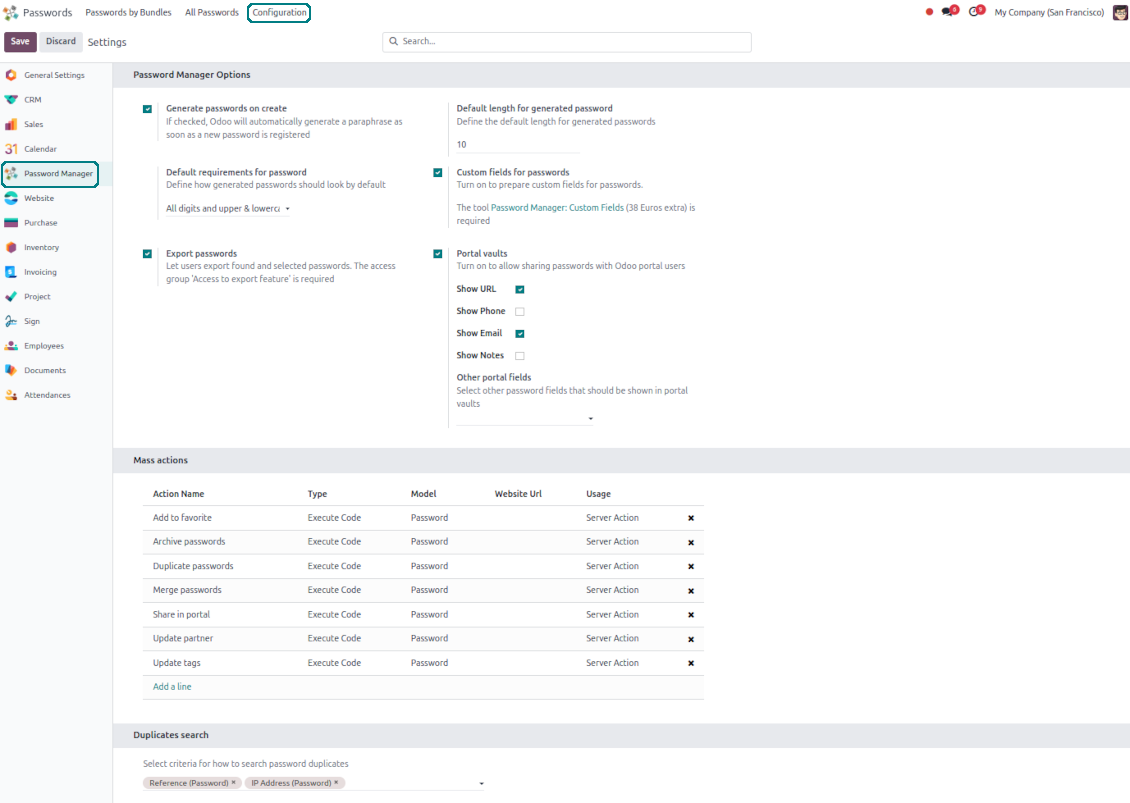
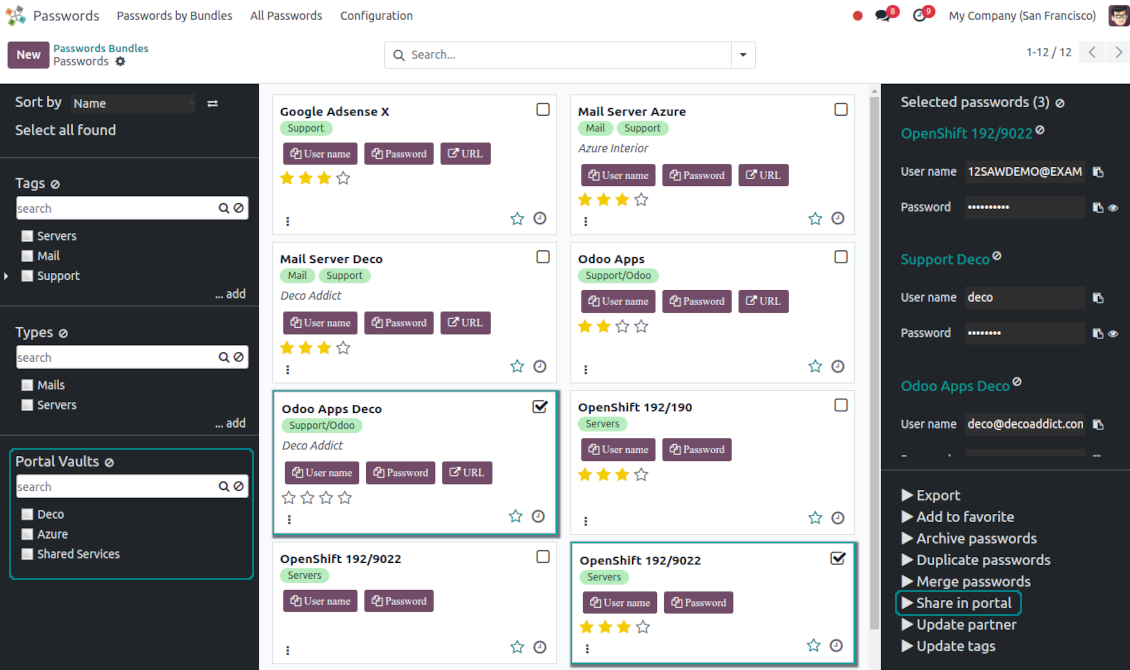
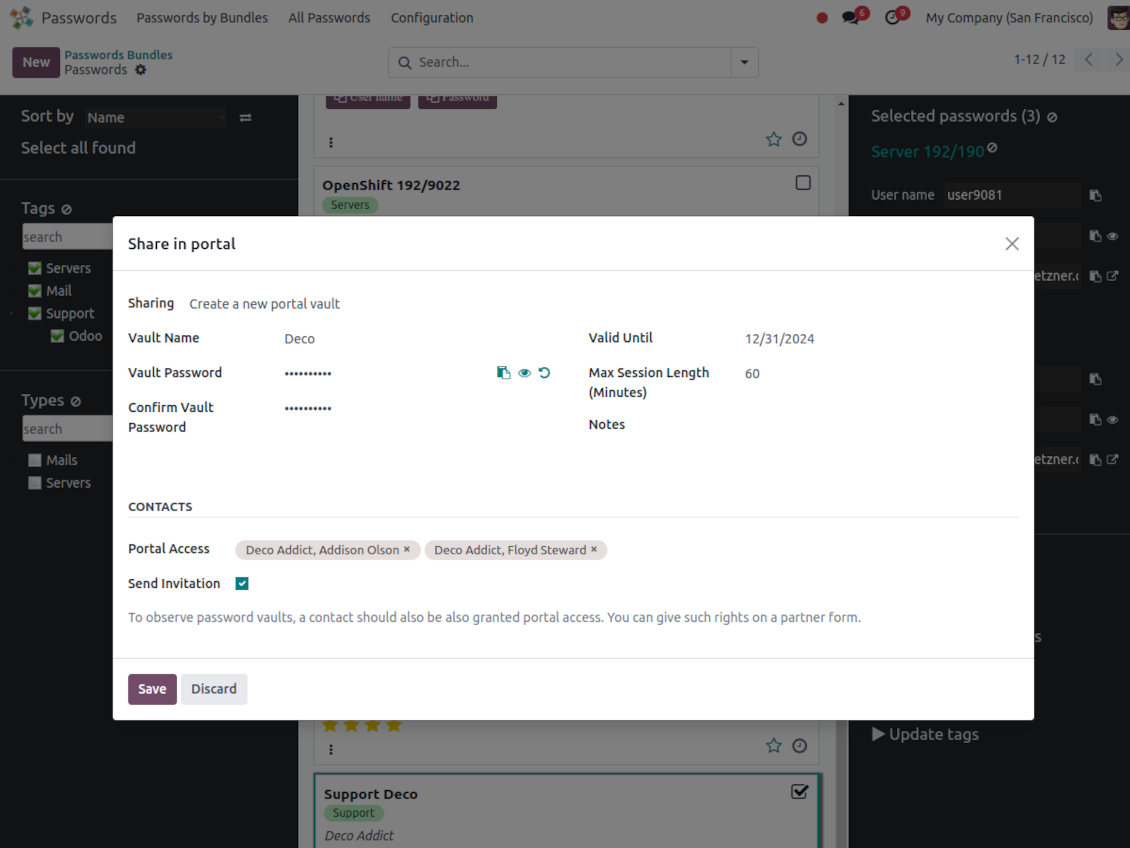
Optionally turn on password sharing with portal users. To that goal, on the configuration page tick the box "Portal vaults" and add the mass action "Share in portal"
-
Within a password bundle, create an unlimited number of portal password vaults shared with an unlimited number of Odoo partners
-
Each bundle internal user can create or update any portal vault linked to this bundle. To add a password for a vault, select the required keys and trigger the mass action "Share in portal". Optionally send an invitation during sharing
-
Navigate over and manage available vaults right from the backend navigation panel
-
Define a validity date to auto-archive password vaults for a temporary sharing
-
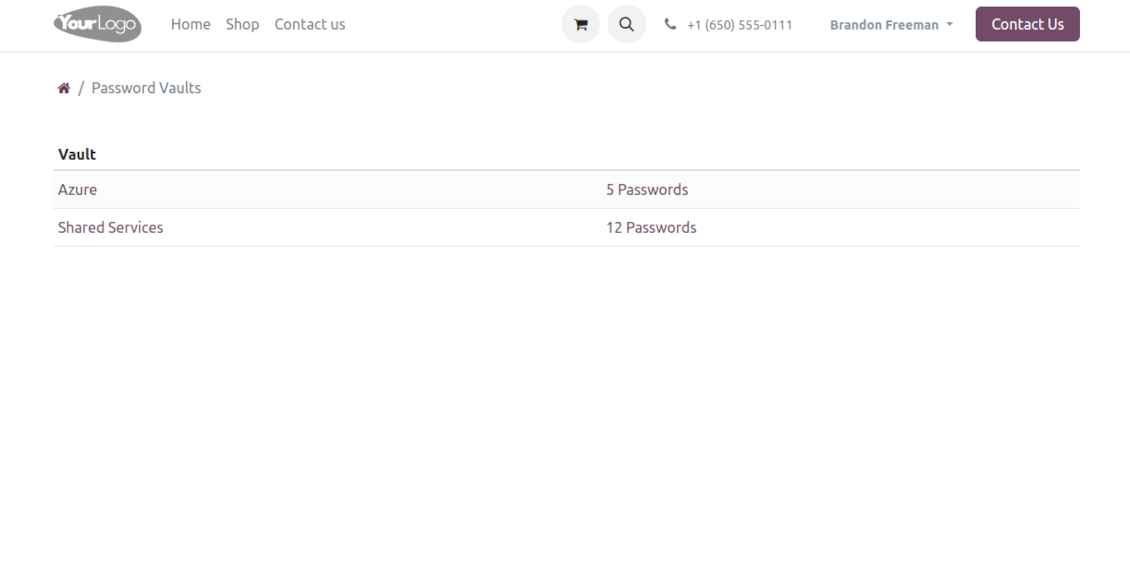
A contact may access all vaults where he/she or his/her company is indicated in the field "Portal Access". Take into account that a user should have portal rights that might be granted from a partner form view (Action > "Grant portal access")
-
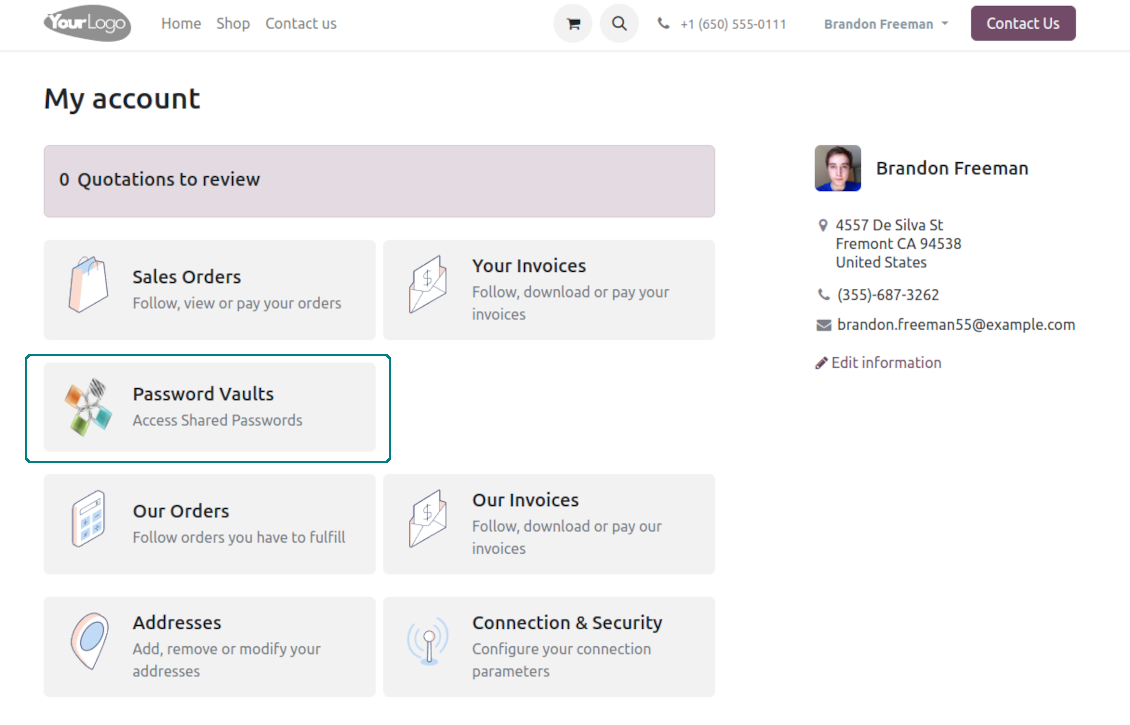
Portal users can open password vaults from the specially introduced entry in the home portal page
-
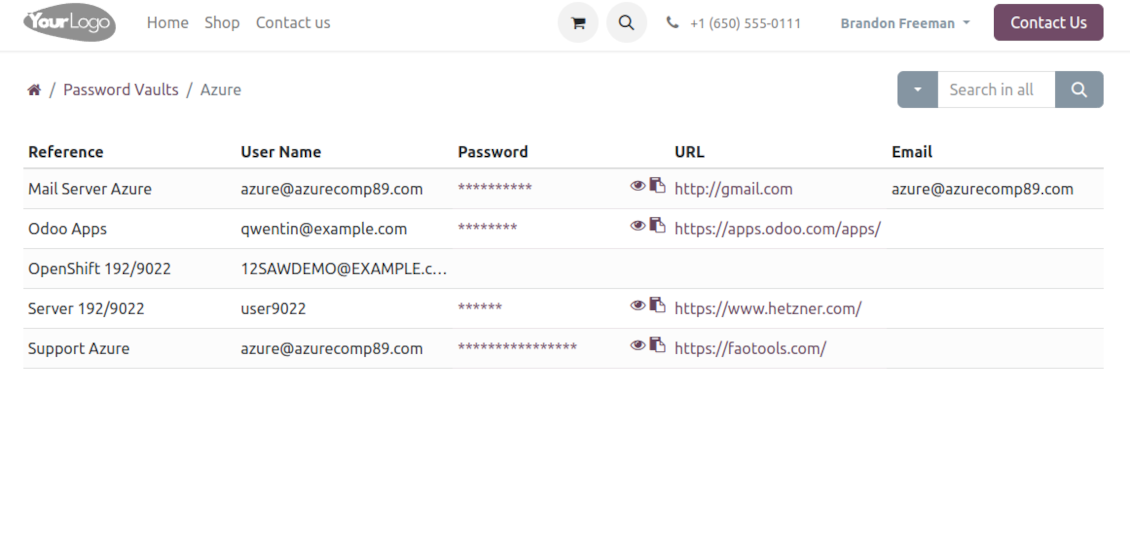
Each portal vault is obligatorily secured with a password. All keys are kept encrypted and might be decrypted only after entering the vault password. The portal session length is defined per each vault
-
By default, only a password reference, user name, and password key are shown. Optionally show an URL, phone, email, and notes
-
The tool lets portal users show/hide password keys, navigate and search by shown columns.
Custom attributes for Odoo passwords
-
Custom attributes creation does not require any technical knowledge. In order to show a new property for passwords, just add a new field and enter the details
-
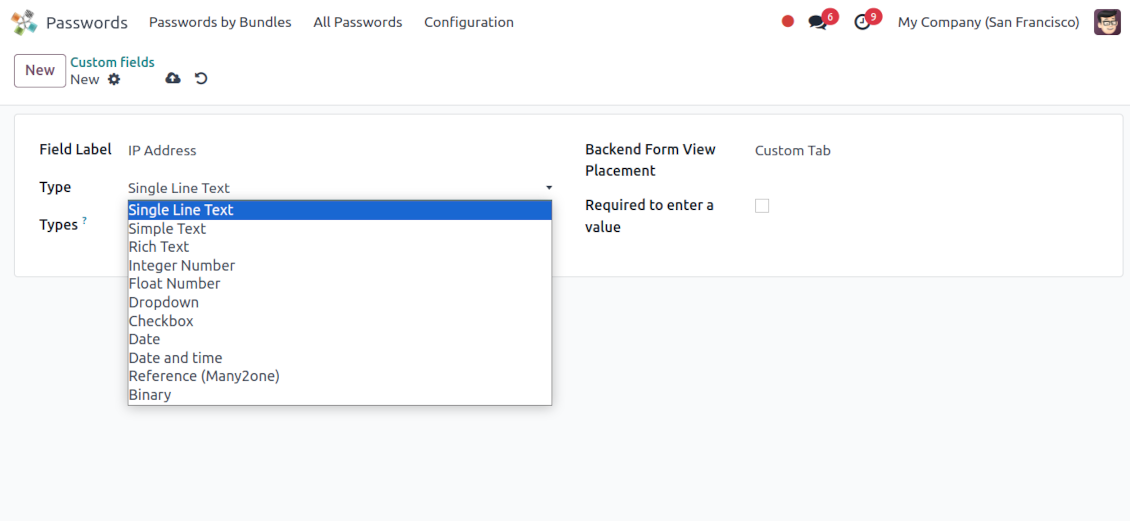
It is possible to add custom fields of the following types: single-line text (char), simple text without formatting (text), rich text (HTML-formatted text), integer or float numbers, drop-down choice with your own options (selection), checkbox (boolean), date or date and time, binary (a file to upload), reference to another Odoo document (e.g. for sale order, contact; many2one)
-
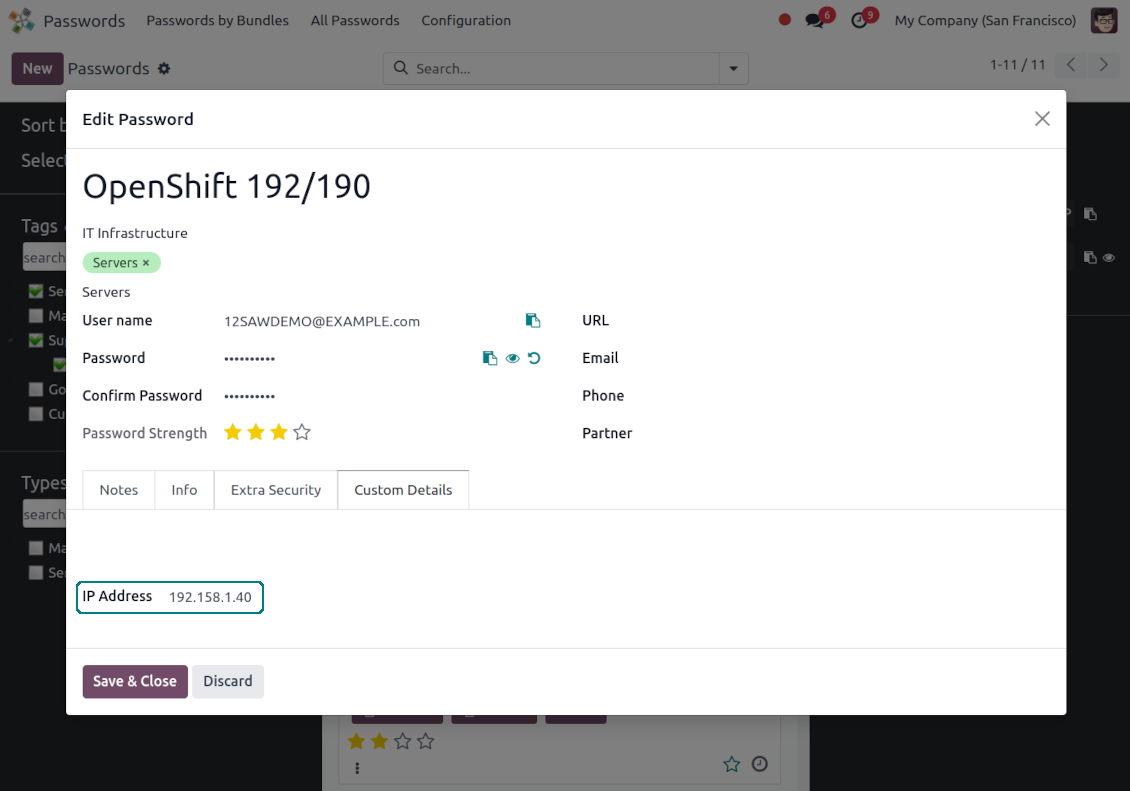
The tool lets you comfortably select an interface position of a custom field from a closed list of options
-
Distinguish passwords by type in order to show properties only for suitable ones. Thus, the set of columns for 'virtual servers' and 'email servers' might be different
-
Mark a custom field required to force users to enter values
-
Custom password fields might be imported and exported
-
The rights to create custom fields belong only to Odoo administrators.
Duplicates detection and passwords merging
-
The app introduces a configurable system to find passwords duplicates
-
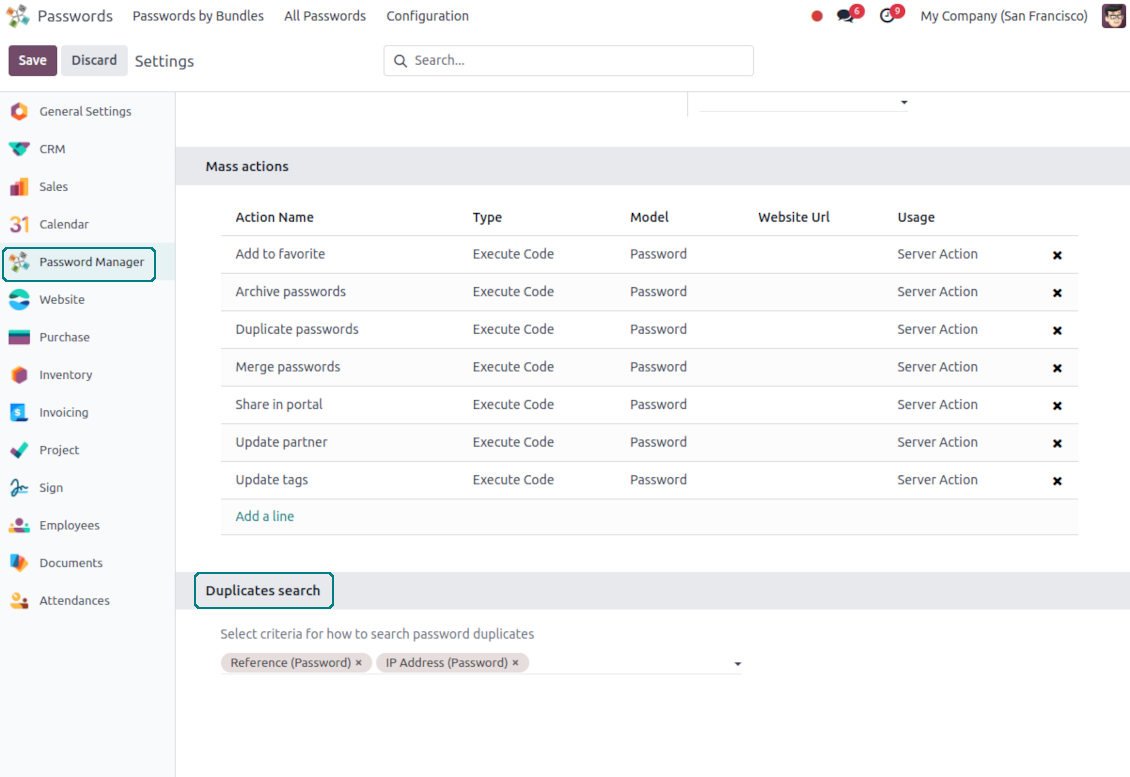
Define on your own which fields should be used to search for duplicates. Choose such fields on the app configuration page, the section 'Duplicates search'
-
As duplicate criteria use any stored field of the following types: char (reference, user name, email, phone, etc.), text (notes), many2one (linked partner, type, etc.), date and datetime, integer, and float. Duplicates detection is possible also based on custom fields of the same types
-
For all fields, a duplicate should have absolutely the same value. For example, '123' equals '123', but '123' is not equal to '1234'. Only in the case of char fields, it is a comparison without taking into account capital letters ('Server' equals 'serVER')
-
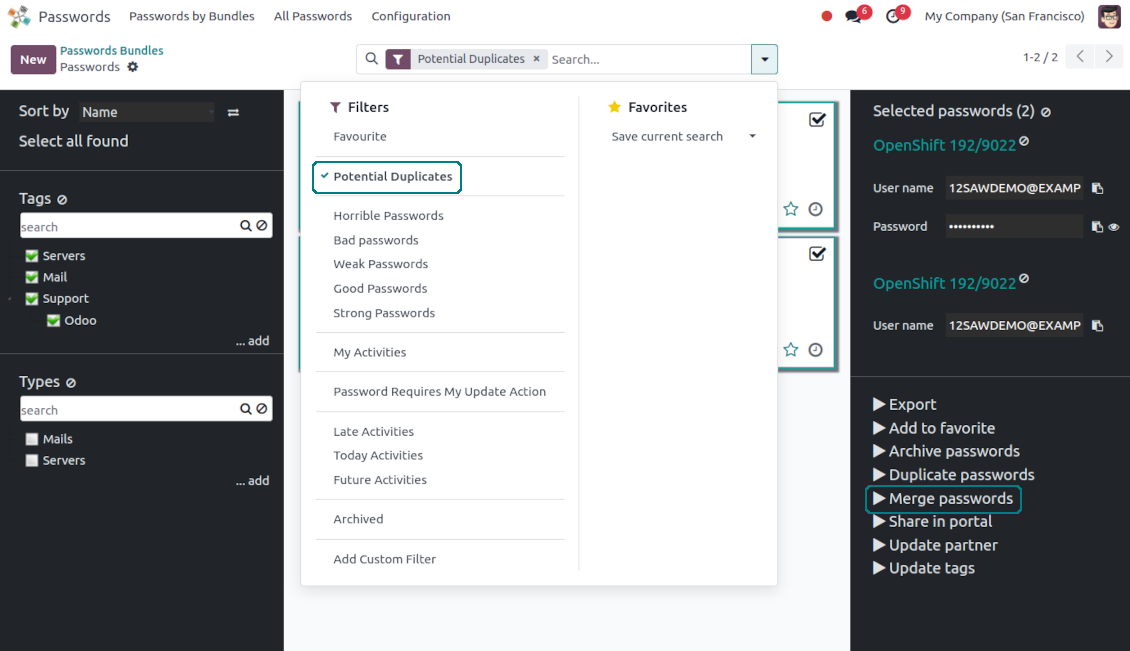
Apply the filter 'Potential duplicates' in the passwords interface to observe candidates. You may search within a particular bundle or in all passwords simultaneously
-
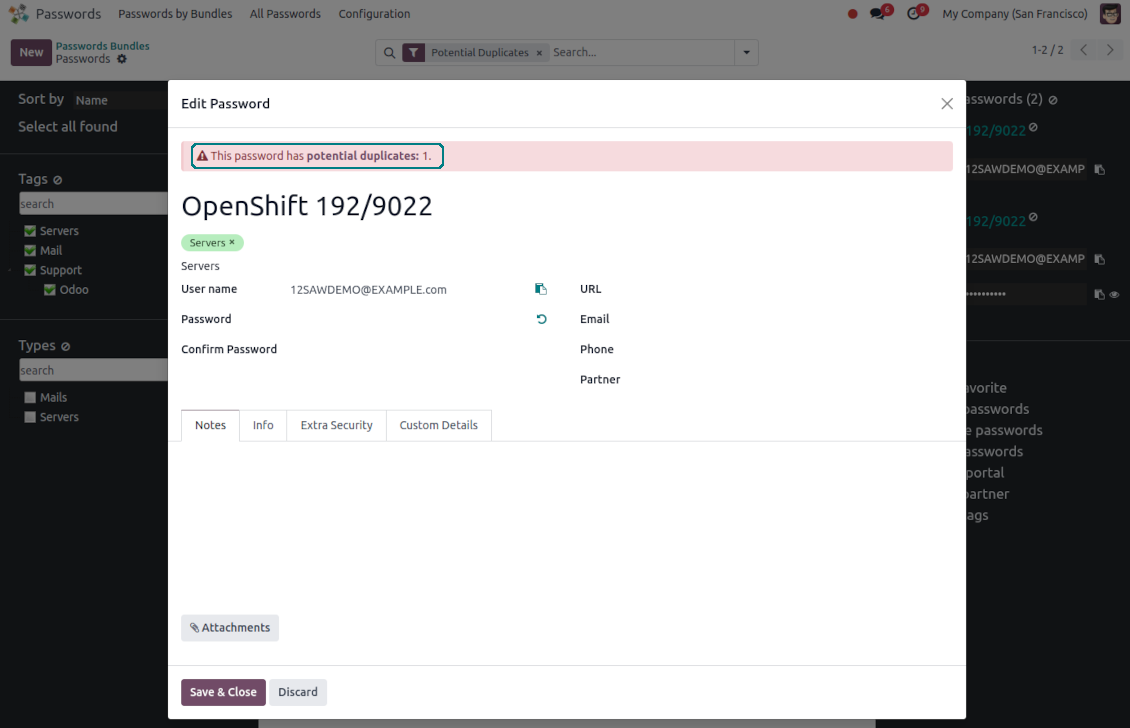
When you register a new password, check also the red button on the top right corner. If it is shown, make sure you do not create a potential copy of an existing key
-
Found duplicates or just any password keys might be merged into a single record. To that end, do not forget to add the mass action 'Merge passwords' on the configuration page
-
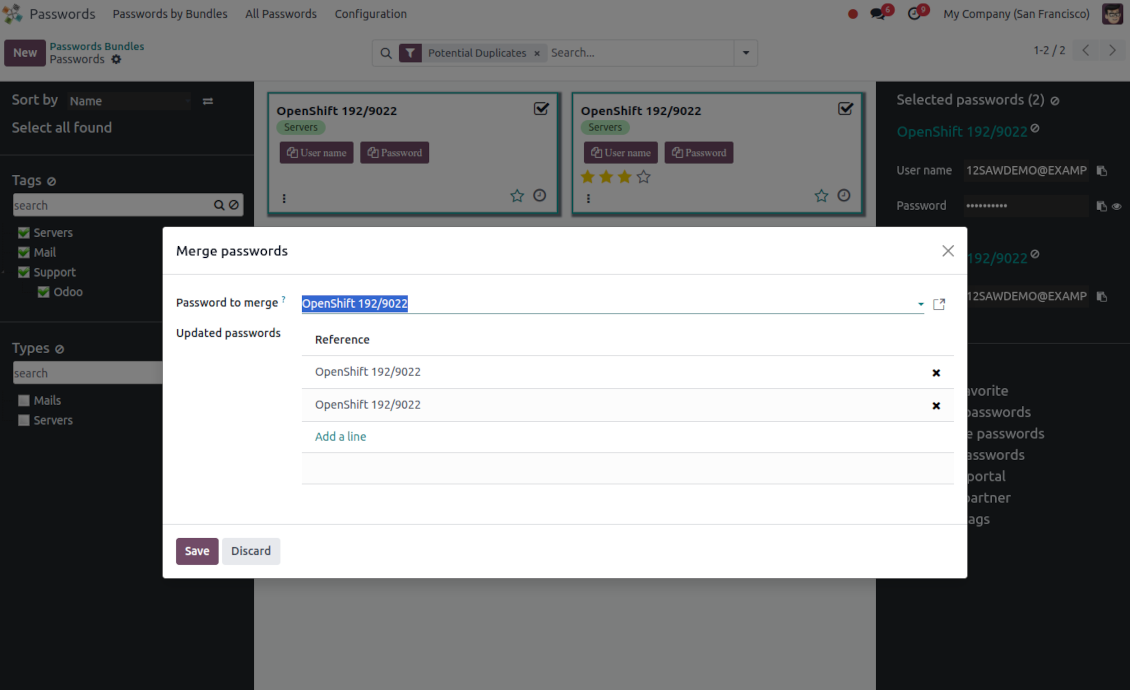
To merge passwords, select the required keys and push the mass action 'Merge passwords' on the right navigation panel
-
In the wizard, as the 'Password to merge', choose one that will be the prime source of the details. In case of conflicts, its value will be prioritized
-
In the wizard, as the 'Merged passwords', choose keys that will be used as a source of complementary details (for example, details that are missing in the main password)
-
Then, press the button 'Save'. As a result, the app will archive all the 'Merged passwords' and enrich the 'Password to merge'
-
Starting from the 'Password to merge' values, the tool will check the fields reference, bundle, user name, email, URL, phone, last password update date, and linked partner. The app will select the first found not null value
-
The app will also accumulate notes, attachments, and tags from all merged records
-
Values of custom fields will be chosen according to keys sequence starting from the 'Password to merge'. Take into account that tables (one2many and many2many fields) will be left as they are in the 'Password to merge'.
Savjeti za konfiguraciju i instalaciju za Password Manager Odoo v.17
Python dependencies
To guarantee tool correct work you would need a number of Python libraries: zxcvbn, cryptography:
pip3 install zxcvbn cryptography
Često postavljana pitanja o Password Manager Odoo v.17
Kako mogu vidjeti sve lozinke partnera?
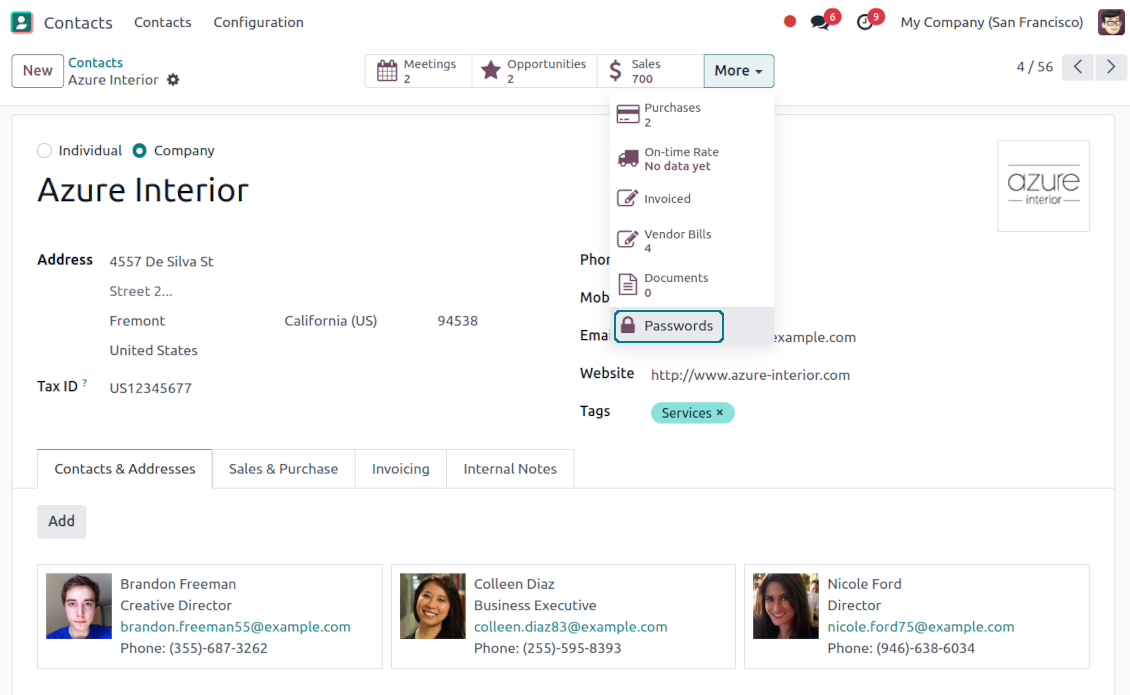
Da biste vidjeli sve lozinke partnera, idite u Contacts, otvorite partnera i kliknite pametni gumb 'Passwords'. Nakon toga bit ćete preusmjereni u aplikaciju Password manager i vidjet ćete sve lozinke tog partnera.
Kako obrisati paket lozinki (password manager)?
Gumb 'Delete' skriven je iz glavnog izbornika snopova zbog sigurnosti. Za brisanje snopa lozinki: 1. Kliknite gumb s tri točke u gornjem desnom kutu snopa 2. Bit ćete preusmjereni u način uređivanja; odatle kliknite 'Save' 3. Iznad snopa vidjet ćete gumb 'Action'; kliknite i odaberite 'Delete'.
Koje su politike ažuriranja vaših alata?
Prema važećim pravilima Odoo Apps Store:
- Svaki modul kupljen za verziju 12.0 i stariju daje pristup svim verzijama do 12.0.
- Od verzije 13.0 svaku verziju modula treba kupiti zasebno.
- Bez obzira na verziju, kupnja daje pravo na sva ažuriranja i ispravke unutar glavne verzije.
Imajte na umu da tim faOtools ne kontrolira ta pravila. Za pitanja obratite se izravno predstavnicima Odoo Apps Store.
Kako mogu instalirati vašu aplikaciju na Odoo.sh?
Najizravniji je pristup koristiti ugrađeni tijek rada Odoo trgovine:
1. Otvorite stranicu modula i kliknite gumb Deploy on odoo.sh
2. Nakon toga bit ćete preusmjereni na GitHub stranicu. Prijavite se na račun, zatim kliknite 'Create a new repo' ili upotrijebite postojeći. Provjerite da je spremište privatno. Nije dopušteno objavljivati aplikacije pod licencijom OPL-1. Ako treba, stvorite novi repo za Odoo.sh projekt
3. Zatim idite na odoo.sh i kliknite gumb Deploy. U skočnom prozoru potvrdite odluku i kliknite 'Continue.' Time se pokreće instalacija.
Ovi koraci instalirat će aplikaciju na produkcijsku granu projekta. Ako želite postaviti aplikacije na druge grane ili ažurirati modul, poduzmite sljedeće:
1. Prenesite izvorni kod aplikacije iz Odoo trgovine
2. Napravite commit modula u potrebni GitHub repozitorij. Provjerite da nijedna mapa/datoteka aplikacije nije ignorirana (tj. nije u .gitignore repozitorija). Repozitorije automatski stvara odoo.sh i po zadanim postavkama mogu sadržavati važne stavke (npr. /lib). Prenesite sve direktorije, poddirektorije i datoteke modula bez iznimaka
3. Postavite ciljnu granu odoo.sh projekta ili, ako to pretpostavljaju postavke, pričekajte dok se automatski izgradi.
Kako trebam instalirati vašu aplikaciju na vlastiti poslužitelj?
2. Ponovno pokrenite Odoo poslužitelj;
3. Uključite način za razvoj (tehničke postavke);
4. Ažurirajte popis aplikacija (izbornik aplikacija);
5. Pronađite aplikaciju i pritisnite „Activate“/„Install“;
6. Slijedite smjernice na stranici aplikacije ako postoje.
Primijetio sam da vaša aplikacija ima dodatne dodatke. Mogu li ih kupiti naknadno?
Da, naravno. Istodobno Odoo automatski dodaje sve ovisnosti u košaricu, pa prethodno kupljene alate treba isključiti da ne platite dvaput.
Postavio sam vašu aplikaciju na Odoo.sh i u testovima vidim upozorenje/pogrešku
Crveno/narančasto upozorenje ne utječe na značajke aplikacije. Nažalost, naši moduli ponekad ne prođu standardne automatske testove jer oni pretpostavljaju ponašanje koje je u sukobu s ciljevima aplikacije. Npr. mijenjamo izračun cijene, a testovi standardnog Odoo modula uspoređuju konačnu cijenu sa standardnim algoritmom.
Prije svega provjerite značajke postavljene baze. Radi li sve ispravno?
Ako i dalje smatrate da upozorenje utječe na stvarne značajke, javite nam i pošaljite potpune zapisnike instalacije i potpuni popis postavljenih modula (uključujući jezgru i treće strane).
Mogu li kupiti aplikaciju izravno od vaše tvrtke?
Ne, alate distribuiramo samo preko službene trgovine aplikacija Odoo.
Želio bih dobiti popust
Nažalost, nemamo tehničkih sredstava za individualne cijene.
Mogu li instalirati aplikaciju u svoju bazu Odoo Online (SaaS)?
Ne, aplikacije trećih strana ne mogu se koristiti na Odoo Online. Nažalost Odoo SaaS to blokira.
Vaš alat ovisi o drugim aplikacijama. Trebam li ih kupiti?
Da, alatu su potrebni svi moduli navedeni u ovisnostima da bi ispravno radio. Cijena na stranici aplikacije već uključuje sve potrebne ovisnosti.
Koja je cijena modula u američkim dolarima? Zašto se promijenila?
Cijena naših modula je u eurima. Odoo trgovina pretvara cijene u druge valute prema internom tečaju. Stoga se cijena u američkim dolarima može promijeniti kad se tečaj ažurira.
Tekstovi aplikacije i web stranice na jezicima osim engleskog izrađeni su uz pomoć UI i usklađeni sa službenim Odoo prijevodima. Ako uočite pogrešku, pošaljite prijavu o ispravnosti prijevoda i ispravit ćemo.
Odoo demonstracijske baze (pregledi uživo)
Za ovu aplikaciju možemo osigurati besplatnu personaliziranu demo bazu.
Za kontakt nije potreban broj telefona ni kreditna kartica. Potrebna je samo kratka prijava e-poštom koja ne traje više od 30 sekundi.
Na vaš zahtjev pripremit ćemo individualnu bazu za pregled uživo, gdje možete oko dva tjedna provoditi testove i provjeravati pretpostavke.
Prijava grešaka
Ako naiđete na greške ili nedosljedno ponašanje, slobodno nas kontaktirajte. Jamčimo ispravke unutar 60 dana od kupnje i i dalje želimo unapređivati alate nakon tog razdoblja.
Za kontakt nije potreban broj telefona ni kreditna kartica. Potrebna je samo kratka prijava e-poštom koja ne traje više od 30 sekundi.
U zahtjev uključite što više pojedinosti: snimke zaslona, zapisnike Odoo poslužitelja, potpuni opis kako reproducirati problem i slično. Obično treba nekoliko radnih dana za pripremu radnog plana (ako je greška potvrđena) ili smjernica što učiniti (inače).
Javni zahtjevi za značajke i ideje modula (besplatan razvoj)
Snažno smo motivirani poboljšati svoje alate i zahvalni smo na svakoj povratnoj informaciji. Ako su vaši zahtjevi od javne koristi i mogu se učinkovito provesti, tim će ih uvrstiti na naš popis zadataka.
Takav popis zadataka obrađuje se redovito i ne podrazumijeva dodatne naknade. Iako ne možemo obećati rokove i konačni dizajn, to može biti dobar način da dobijete željene značajke bez ulaganja i rizika.
Za kontakt nije potreban broj telefona ni kreditna kartica. Potrebna je samo kratka prijava e-poštom koja ne traje više od 30 sekundi.
17.0.1.3.16
- The issue with the untranslated warnings has been fixed.
17.0.1.3.15
- The issue with creating keys when passwords are opened from a contact is fixed.
17.0.1.3.14
- The issue with password copying in the iOS environment has been fixed.
17.0.1.3.13
- The optional feature to log user access has been added.
17.0.1.3.12
- The archived ribbon for inactive records is added keys kanban and form views, bundles kanban and form views, and form views of tags and shares.
17.0.1.3.11
- Focus the bundle login wizard automatically.
17.0.1.3.10
- The issue with cut portal password fields is fixed.
17.0.1.3.8
- Osvježavanje stranice zadržava trenutno odabrani paket.
- Broj duplikata računa se u kontekstu trenutnog paketa.
- Problem nedostajućih ključeva lozinki pri prvom učitavanju je ispravljen.
17.0.1.3.9
- Problem redoslijeda prilagođenih polja na portalu je ispravljen.
17.0.1.3.7
- Zadani prikaz aktivnosti za lozinke sada je Kanban.
17.0.1.3.6
- Ispravljen je neispravan escape niz tijekom ažuriranja aplikacije.
16.0.1.2.11
- The issue of the invalid escape sequence during app update is fixed.
17.0.1.3.5
- Pristup konfiguraciji aplikacije ograničen je na grupu Administration > Settings.
16.0.1.2.10
- Access to the app configuration is restricted to the group Administration > Settings.
17.0.1.3.4
- Obrasci ključa lozinke i portal paketa reorganiziraju se ovisno o tome je li odabran povezani paket.
16.0.1.2.9
- Password key and portal bundle forms are reorganized depending on whether a linked bundle is selected.
17.0.1.3.3
- Uvedeno je povuci-i-ispusti za masovno ažuriranje lozinki: dodaj oznaku, ažuriraj tip i podijeli u trezor portala sve trenutačno odabrane ključeve.
17.0.1.3.2
- Osnovne drag&drop značajke su optimizirane.
17.0.1.3.1
- Uvedene su osnovne drag&drop značajke.
- Odabrani roditelj navigacijskih stabala ispravno se ističe.
17.0.1.2.9
- Kanban prikaz ključeva lozinki prilagođen je najnovijim pristupima Odoo v.17.
17.0.1.2.8
- Sučelja lozinki portala i izračun portal ključeva su optimizirani.
16.0.1.2.8
- Portal password interfaces and portal keys' computation are optimized.
17.0.1.2.7
- Ispravljena je vidljivost prilagođenih polja.
- Ispravljeni su sortiranje, izvoz i odabir arhiviranih zapisa u backendu.
16.0.1.2.7
- Custom fields' visibility is fixed.
17.0.1.2.6
- Aplikacija je objavljena za verziju 17.

The tool to flexibly structure Odoo attachments in folders and synchronize directories with cloud clients: Google Drive, OneDrive/SharePoint, Nextcloud/ownCloud, Dropbox, Amazon S3, Box, and NAS. DMS. File Manager. Document management system

The tool to automatically synchronize Odoo attachments with OneDrive files in both ways

The tool to automatically synchronize Odoo attachments with Google Drive files in both ways

The tool to build a deep and structured knowledge base for internal and external use. Knowledge System. KMS. Wiki-like revisions.
398€
The tool for time-based service management from booking appointments to sales and reviews

The tool to set up KPI targets and control their fulfillment by periods. KPI dashboards. Dashboard designer. KPI charts
198€
The tool to manage your Odoo from your favorite AI chats through MCP. Claude. Any MCP-supporting AI.
198€
The tool to translate URL addresses of Odoo website pages
38€
The tool to combine different Odoo events in a few configurable super calendars