Google Drive Odoo Integration v.14
The tool to automatically synchronize Odoo attachments with Google Drive files in both ways
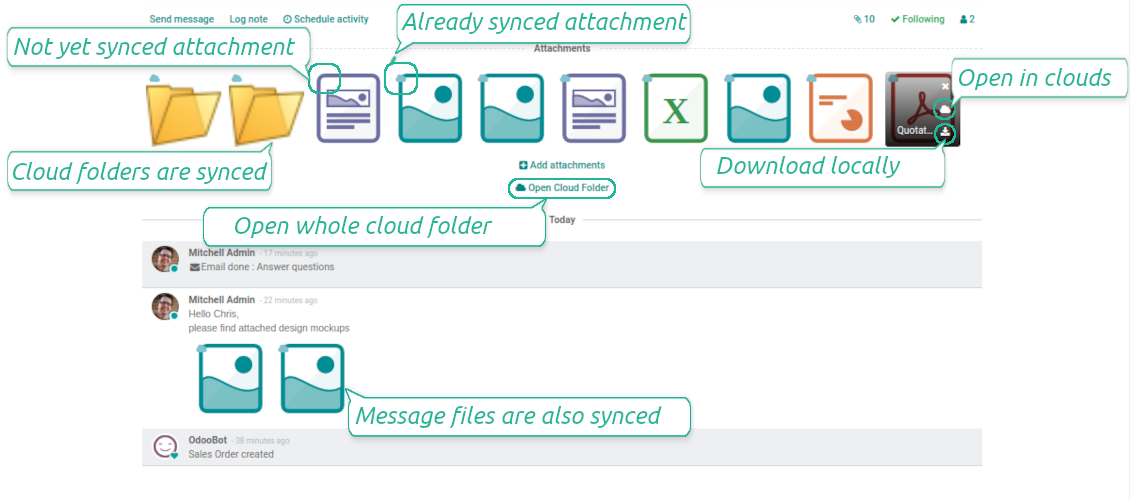
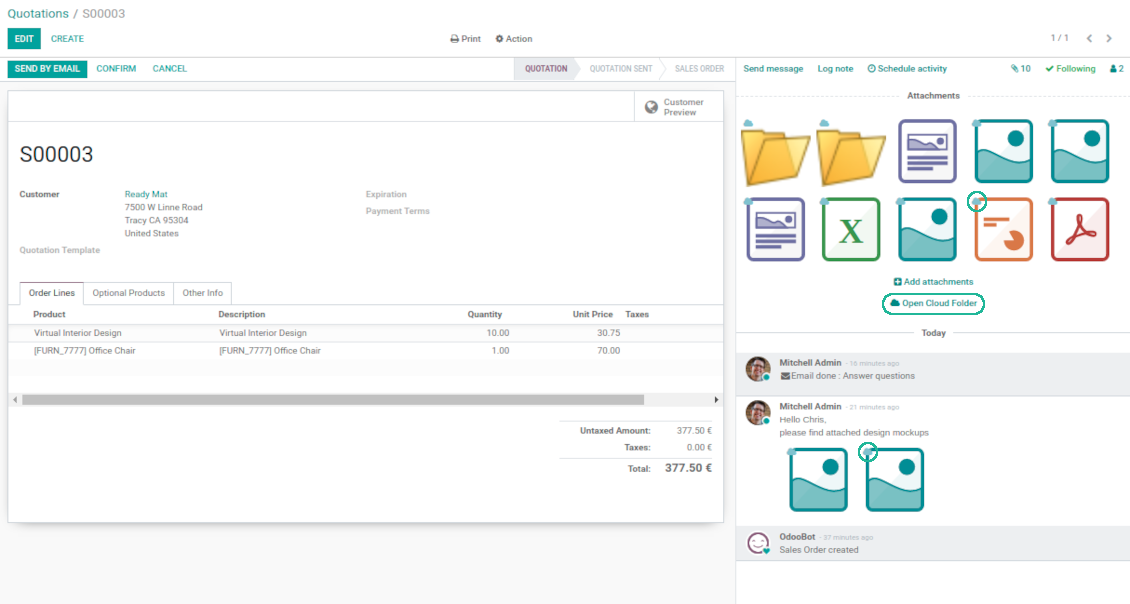
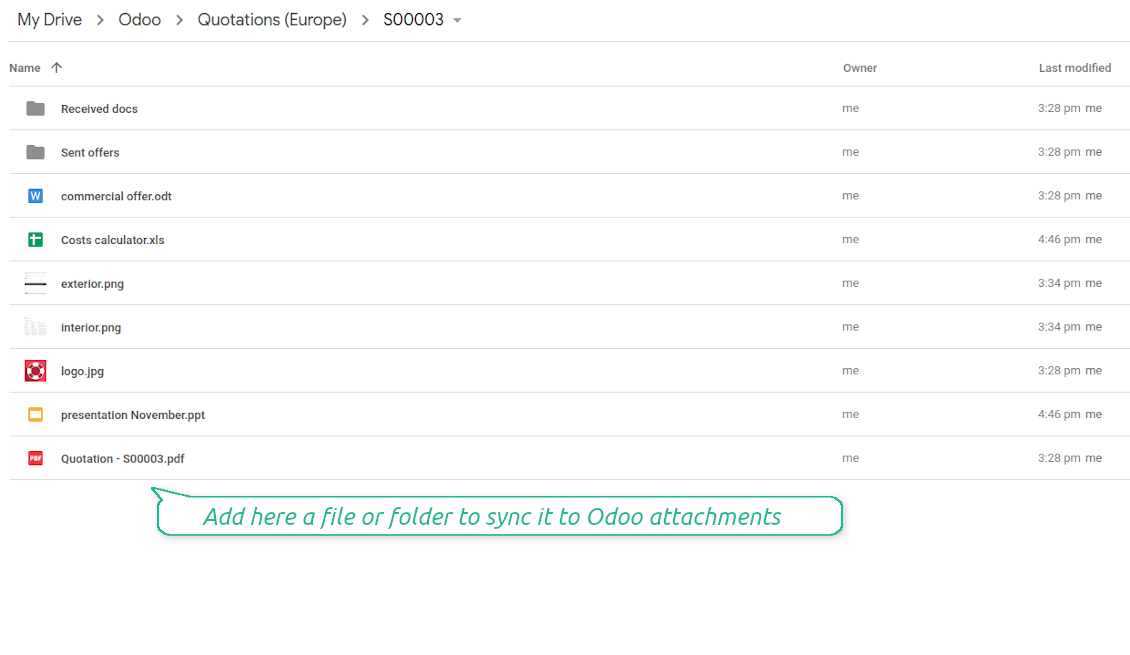
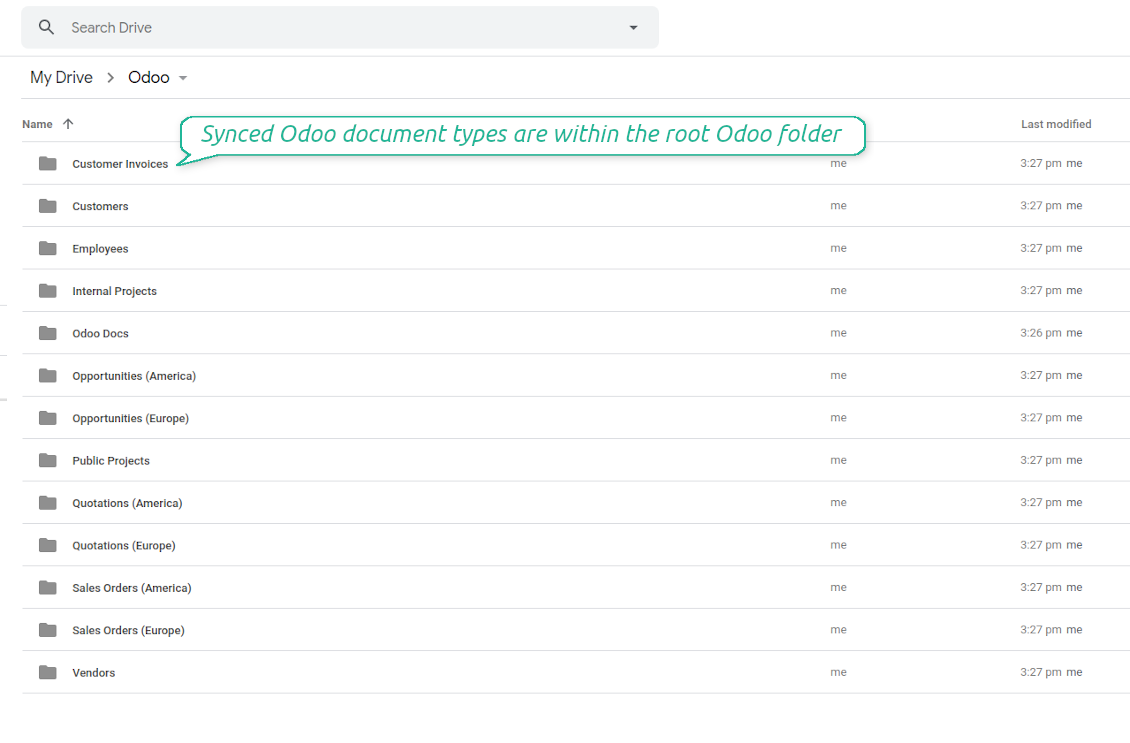
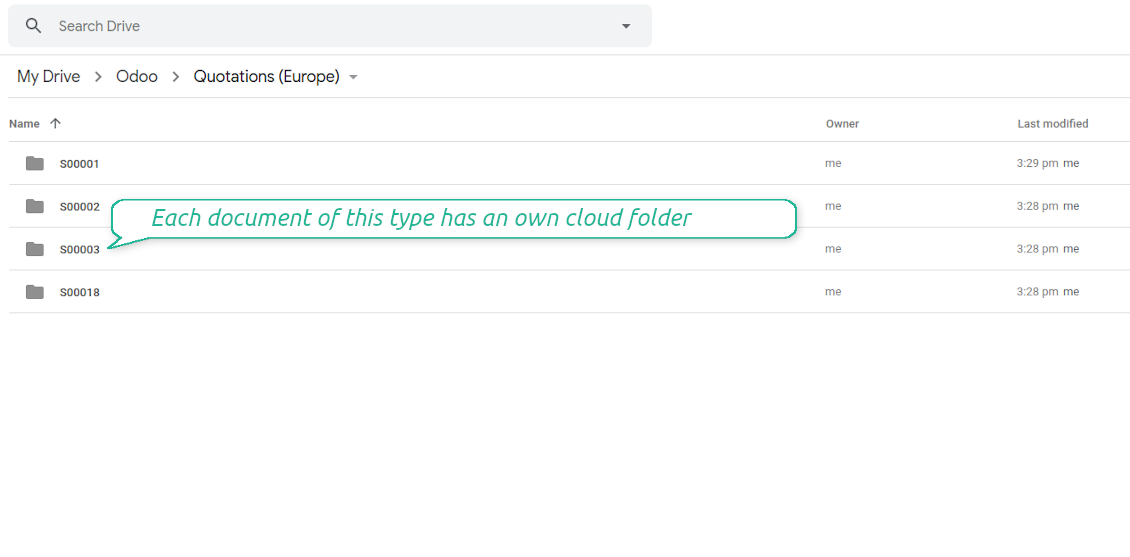

This is the tool to integrate Google Drive features into your Odoo business work flow. The app automatically stores Odoo attachments in Google Drive, and it provides an instant access to them via web links. In such a way users work with files comfortably in the cloud storage, while the results are fully available in Odoo.
- the technical core which provides basic mechanics of auto synchronization. This is a required module for integration. कीमत है 398€.
- the connector itself which introduces links between Odoo and Google Drive. कीमत है 89€.
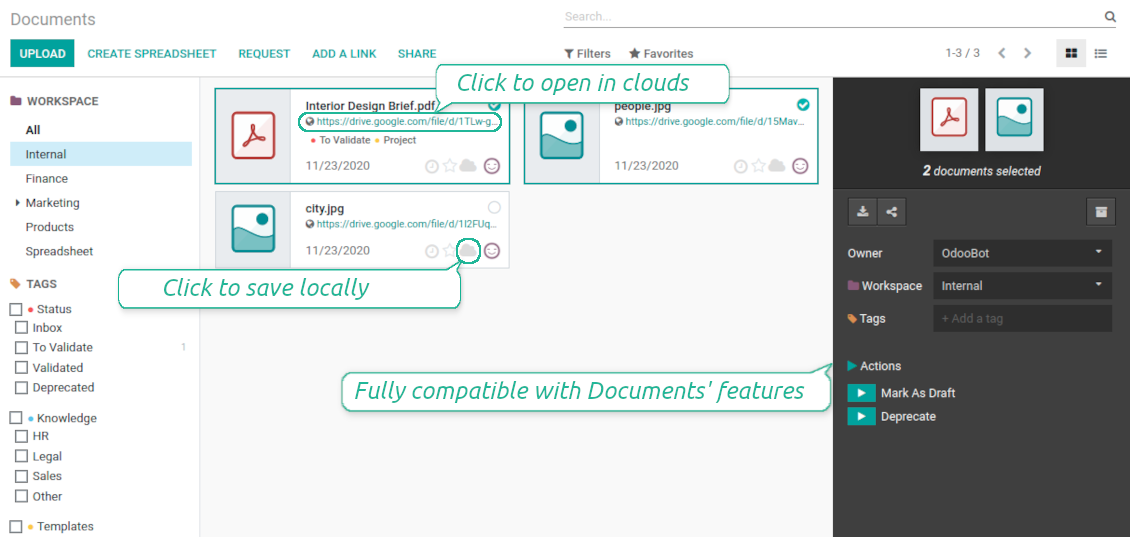
- an optional add-on to sync Odoo documents (introduced by the enterprise app 'Documents') with clouds. The features assumed by this add-on are marked by the icon . कीमत है 44€.
Automatic regular sync
Synchronization between Odoo and Google Drive is based on scheduled jobs. No manual interaction is required
Bilateral Google Drive sync
Odoo sends attachments to Google Drive and retrieves files from there. Binary content is kept in clouds, while Odoo provides direct access to synced items
Any Odoo document types for sync
Decide which Odoo document types should be synced. Customers, opportunities, sale or purchase orders, tasks or issues, employees or users, etc. Custom models are also supported
Instant access for Google Drive
The tool redefines Odoo attachments boxes to make work comfortable: download files locally without login, open files and folders in Google Drive (if possible, items would be opened in Google Drive editors and previewers), use standard Odoo previewers
Compatible with Odoo Enterprise documents
Reflect Odoo Enterprise Documents' structure and items in Google Drive. All features (including sharing, downloading, and signing) would anyway work
Google team and individual drives
Sync works both for individual and team drives (Google Suite business and enterprise tariffs). In the latter case the root folder Odoo is placed within a chosen team drive, in the former case - within a current user drive
Google Drive sync history
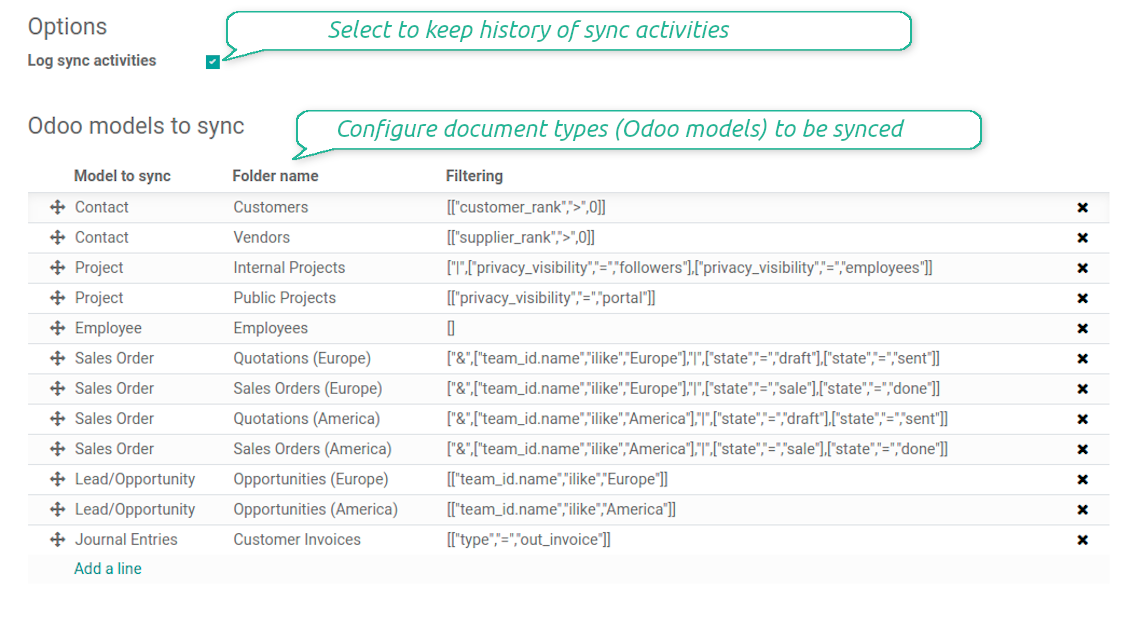
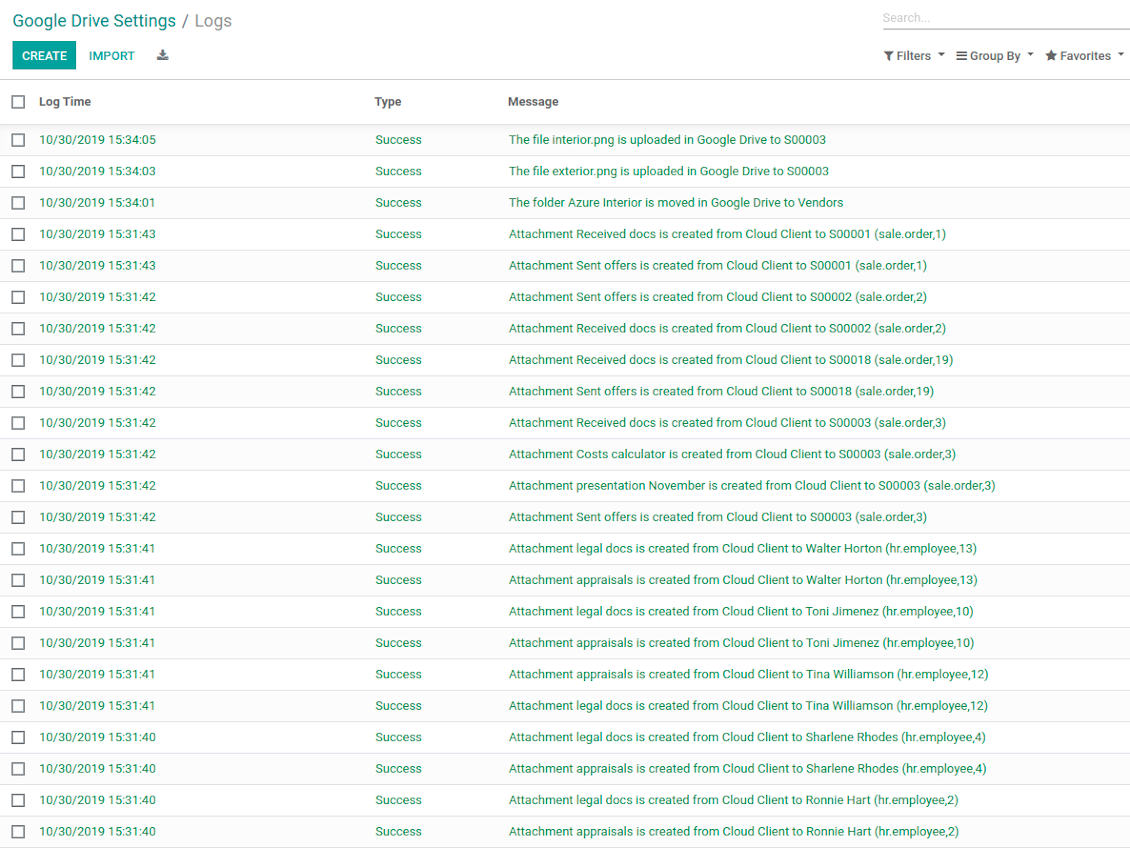
Sync activities might be logged. Control over files and folders creations, moves, name changes and removals. Just turn on the option 'Log sync activities', and you would be able to observe the history through the button 'Sync logs'
Default folders
The tool let generate default directories' structure for this document type during the very first sync of a related object. For example, for all employees you may have pre-defined folders 'Scans', 'Scans/Official', 'Photos', etc.
Tricky setup, but works perfectly now
Really solid module. We managed to get a very flexible folder structure (sorted by clients) and synced all our sales orders, invoices and tasks by projects to Google Drive.
Initial setup was a bit of a pain and kinda tricky to configure everything at first, but now it's running smoothly and works perfectly. The faotools team helped a lot. Def worth it if u need to keep your docs organized in Odoo and Google Drive.
Recommended!
Excellent !!!
Great App and great Service from faOtools.
Best module for integration with google drive
The module performs its function correctly and faOtools responds quickly to any problem and, in case of detecting any bug, quickly apply the changes. Its support is 10 stars.
Sync any documents you like
Configuring models to sync
-
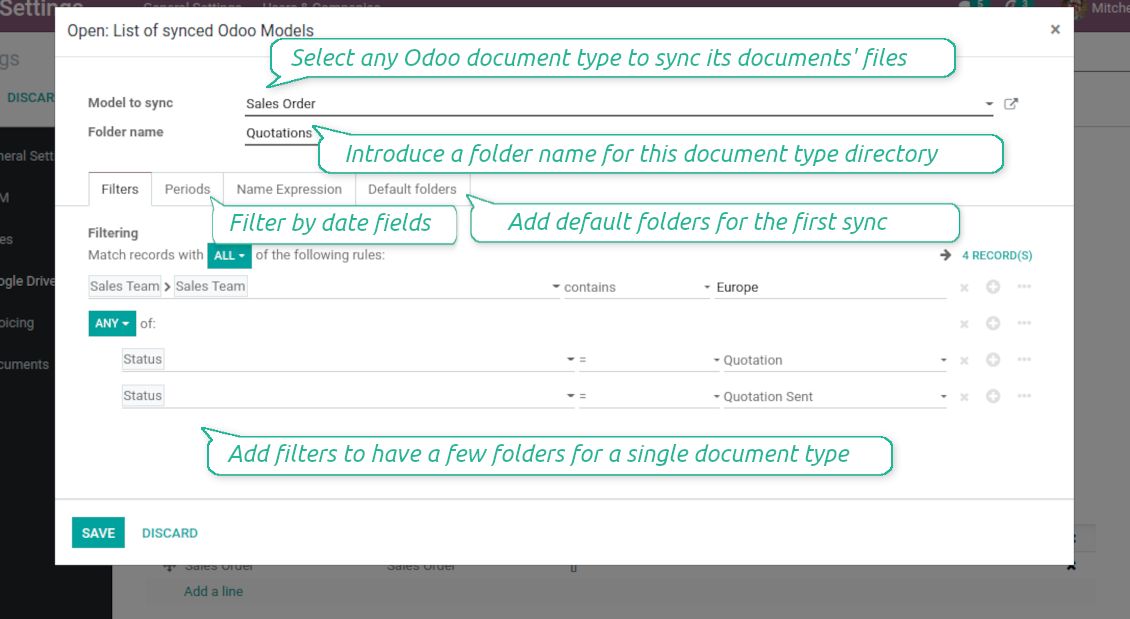
To sync a specific document type, you should add it as a model to sync. Any Odoo model might be chosen
-
The app let split models into a few folders based on selected filters. Use any document storable field to distinguish a directory. Have a separate folder for individuals and companies, for European and American opportunities, for quotations and confirmed orders, for each project, etc.
-
Limit also documents by relative periods through using date fields of linked documents. For example, leads registered in the last 3 months or invoices updated the last week
-
Define name expressions to specify titles of documents' Google Drive folders. For instance, to include project name to a task directory
-
Prepare hierarchy of default folders to be created when a document directory is synced to Google Drive for the first time
Typical use cases
-
Projects: have an own Google Drive folder for each customer project
-
Customers: add all partner files in a single directory available both from Odoo and from Google Drive. Modify those using default cloud editors and access them when working in Odoo
-
Employees: gather all files by this employee in a single cloud folder: photos, document scans, contracts. Access and upload those from Odoo and Google Drive alternatively
-
Opportunities: carefully store all specifications, requirements, any files which would let you make a good offer
-
Orders: keep all printings and contracts in Google Drive with instant availability from Odoo
-
Picking operations: save warehouse docs to Google Drive.
How synchronization works
Direct Sync
-
Direct synchronization is based on the scheduled job 'Synchronize attachments with cloud'
-
Direct sync make all synced Odoo attachments change their type to a link (URL), while binary content is removed with a next Odoo cleaner. So, no actual files would be stored on your Odoo server
-
Direct sync checks whether attachments are added or deleted for synced documents. If so, they would be created or removed in Google Drive
-
Direct sync checks whether a new document type (e.g. sale orders) is added / renamed / replaced in the to-sync-models configurations. If so, this should be reflected in Google Drive
-
Direct sync checks whether a new document (e.g. quotation SO-001) related to a synced document type is generated / updated / unlinked. If so, the connector would make the same changes in Google Drive
-
The final goal of direct Google Drive integration is to have the structure 'Odoo / Document Types / Documents / Files. For example, 'Odoo / Quotations / SO019 / commercial offer.pdf'
Backward Sync
-
Backward synchronization is based on the scheduled job 'Synchronize attachments from cloud'
-
Backward sync checks whether any items are added to a Google Drive document folder. If so, the app would create URL attachments for that items in a linked Odoo object
-
Backward sync checks whether any items are deleted / moved in a cloud document folder. If so, a linked Odoo attachment would be also unlinked or moved
-
Backward sync checks whether any item is renamed in Google Drive. If so, a chained Odoo attachment should be also renamed
-
In Google folders you can put not only files but also child folders. In that case a link for this folder (not its content) would be kept in Odoo attachments
-
If you deleted a folder related to this document type or this document, their child files would be deleted as well. Thus, Odoo would remove related attachments. The folders, however, will be recovered with a next direct sync
Misc notes
-
The connector works on a queue (first in - first out) principle: it tries to firstly reflect the oldest changes
-
Each sync, especially the very first one, might take quite a long. It is not recommended to make sync too frequent: once an hour seems reasonable frequency
-
File names and content should be managed in Google Drive: each backward sync would recover Google Drive names, Odoo is here less important
-
Take into account that files or folders deleted in Google Drive are really deleted only when you clean trash. Otherwise, such files still exist and would be reflected in Odoo
-
Try to avoid the following symbols in folders' and files' names: *, ?, ", ', :, <, >, /, +, %, !, @, \, /,. Direct sync will replace such symbols with '-'. It is done to avoid conflicts with file systems.
Odoo Enterprise Documents
-
The special add-on 'Cloud Sync for Enterprise documents' is introduced to synchronize Google Drive with the Odoo app 'Documents' (the latter is distributed under the Odoo Enterprise license)
-
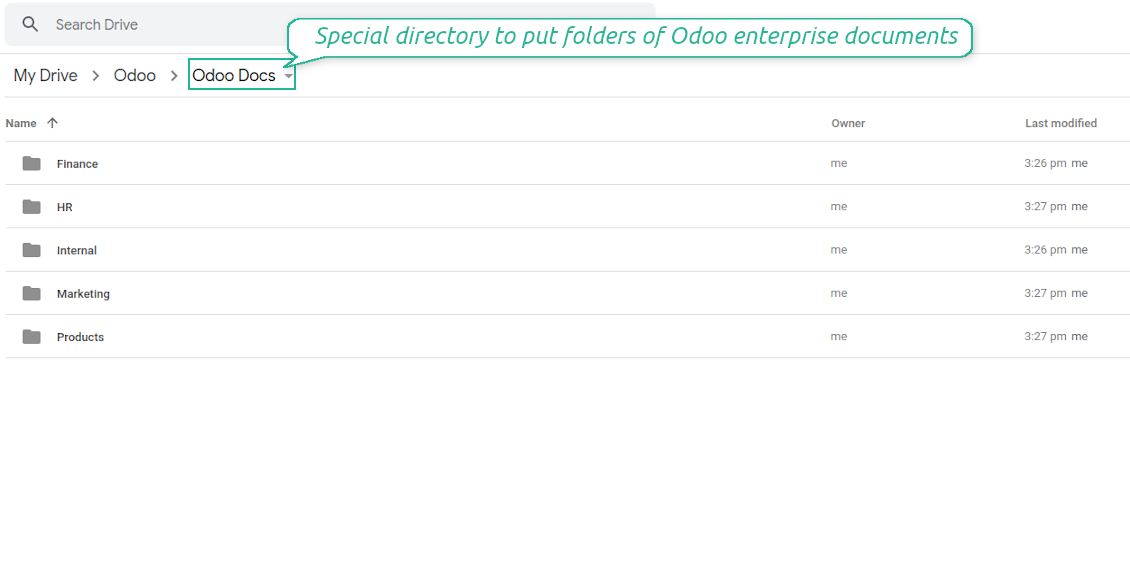
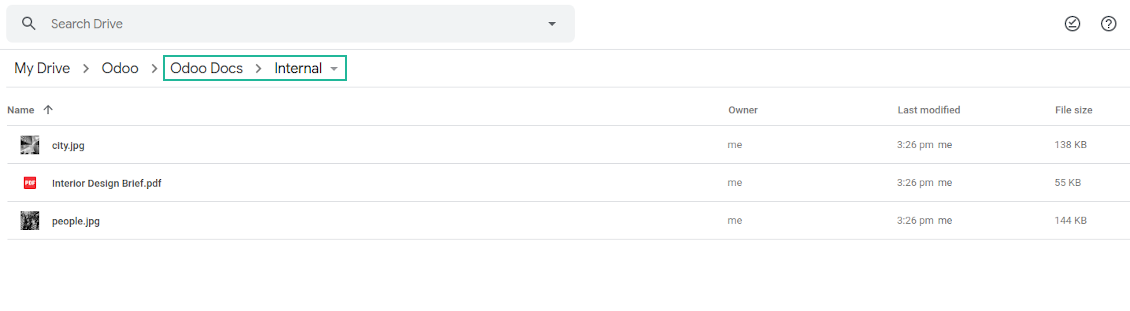
Based on that add-on the Odoo documents' hierarchy would be reflected within the folder 'Odoo / Odoo Docs'
-
Each Odoo folder would have a linked Google Drive folder. Take into account that folders created in the cloud storage will be synced as Odoo attachments. The key principle is: folders are managed by Odoo, files are managed by the cloud client
-
All files are synced with the same logic as usual attachments. Files created in Odoo will be added to the cloud storage and will be replaced with links in Odoo. Files created in cloud storage will generate URL attachments within a paired documents directory
-
Standard Google Drive sync and integration with Enterprise Documents are done within the same jobs. Avoid the scenarios when a single file is synced as a simple Odoo attachment and as an Odoo document simultaneously
-
Odoo spread sheet files are not synced by the connector: so, they are still manageable in Odoo
-
Please do not name synced models as 'Odoo Docs'. This is the reserved name for Odoo Enterprise Documents.
कॉन्फ़िगरेशन और इंस्टॉलेशन सुझाव: Google Drive Odoo Integration Odoo v.14
Login and Google Drive Credentials
- Go to the Google Cloud Console via the URL https://console.cloud.google.com
- Select or create a project
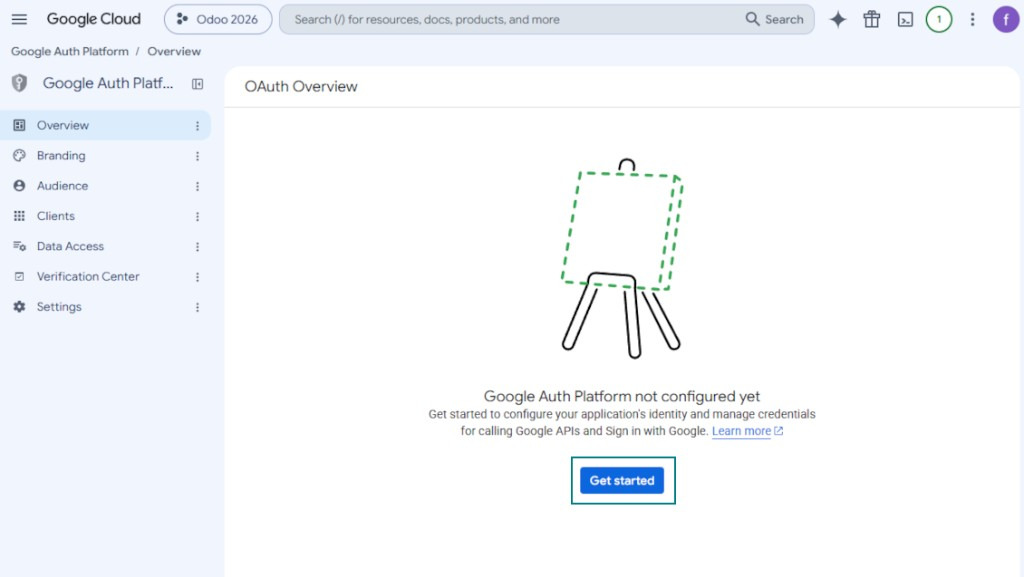
- After the project is selected, the console opens the Google Auth Platform. Press 'Get Started'
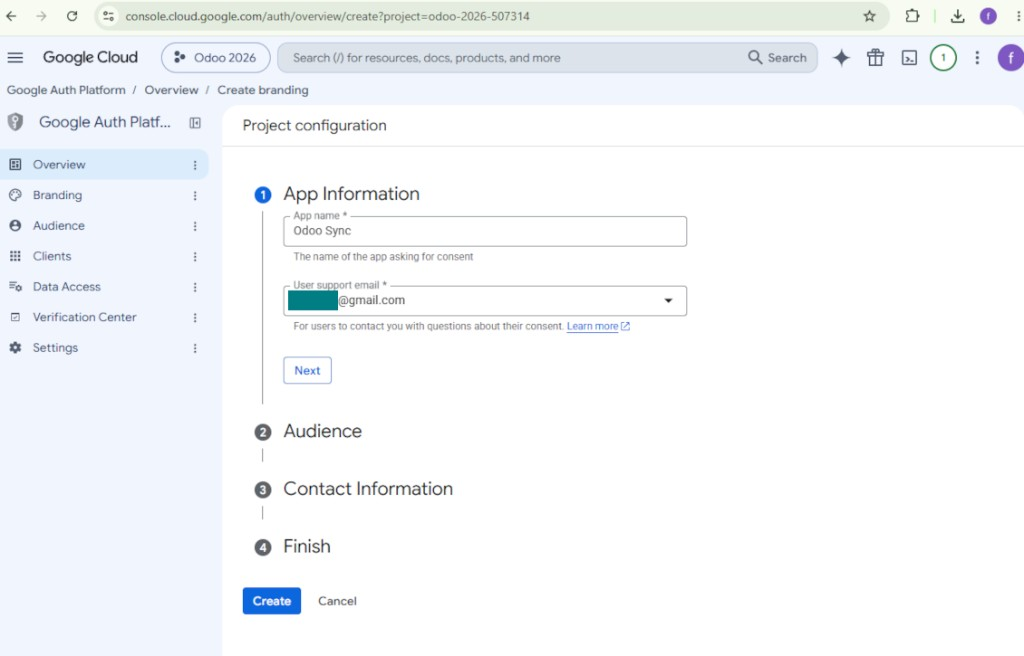
- Add app information
- As an app name select any suitable
- As a user support email select your email address
- Press 'Next'
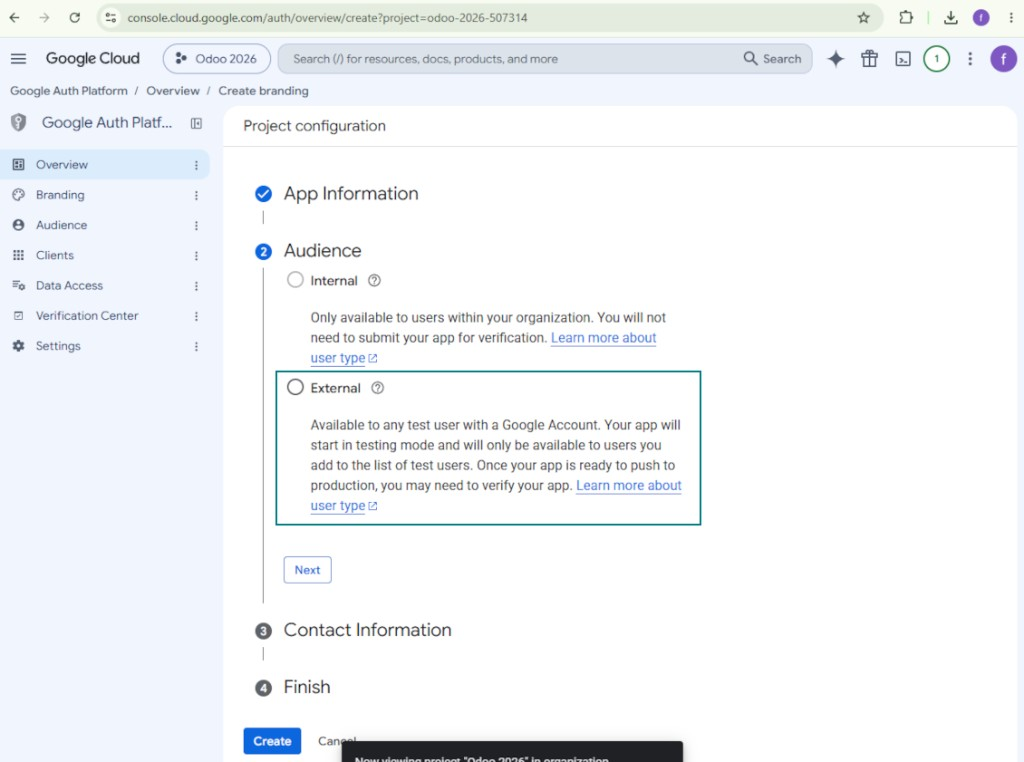
- As the audience select 'External' and press 'Next'. Note: you are anyway going to use this app only for your own Odoo connection
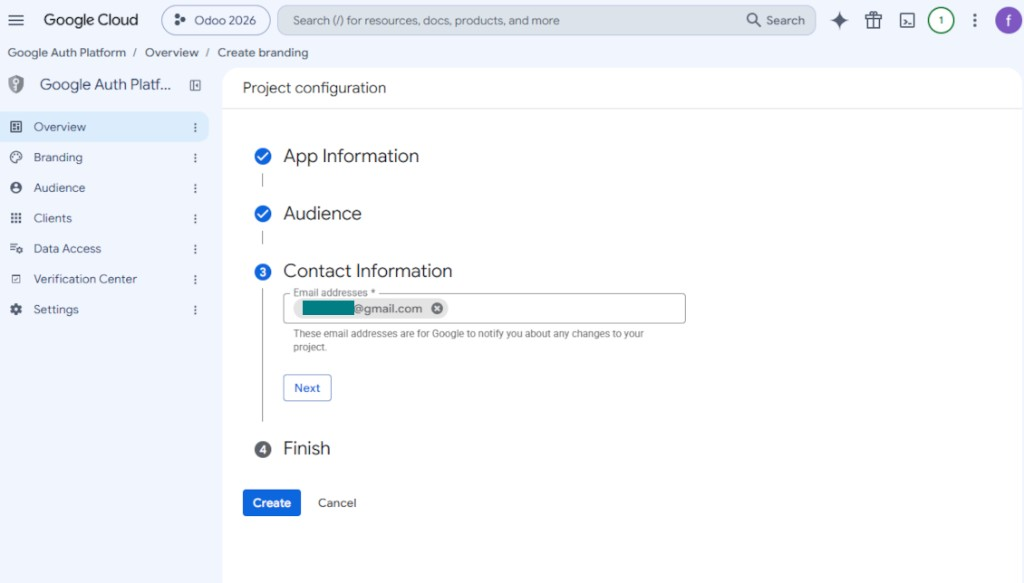
- As the contact information enter your Google or Google Workspace email address and press 'Next'
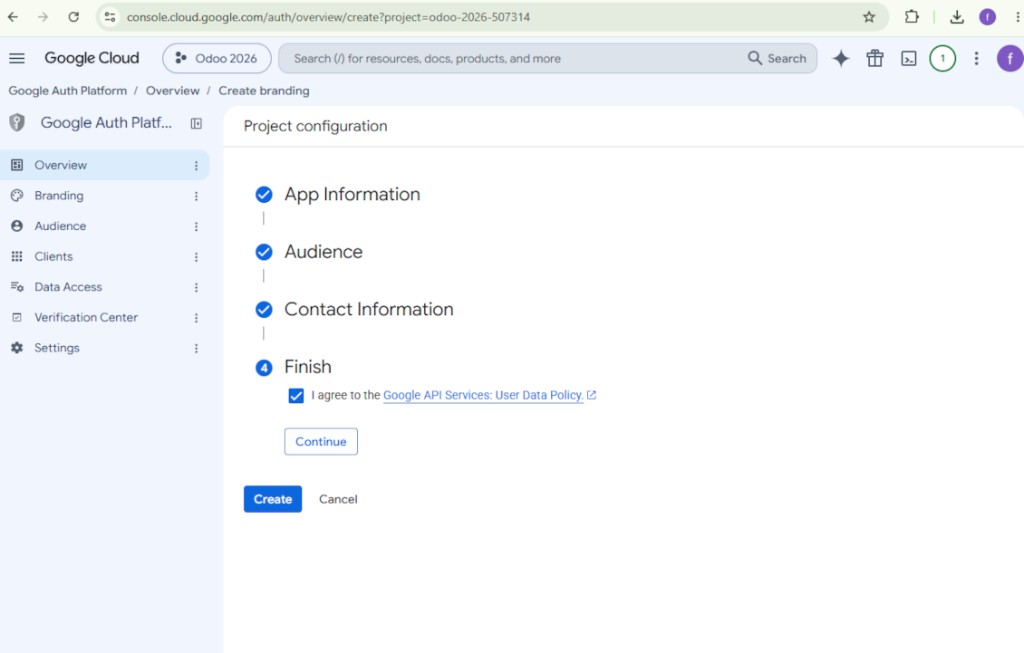
- Agree with the Google API Services User Data Policy, press 'Continue', and then press 'Create'
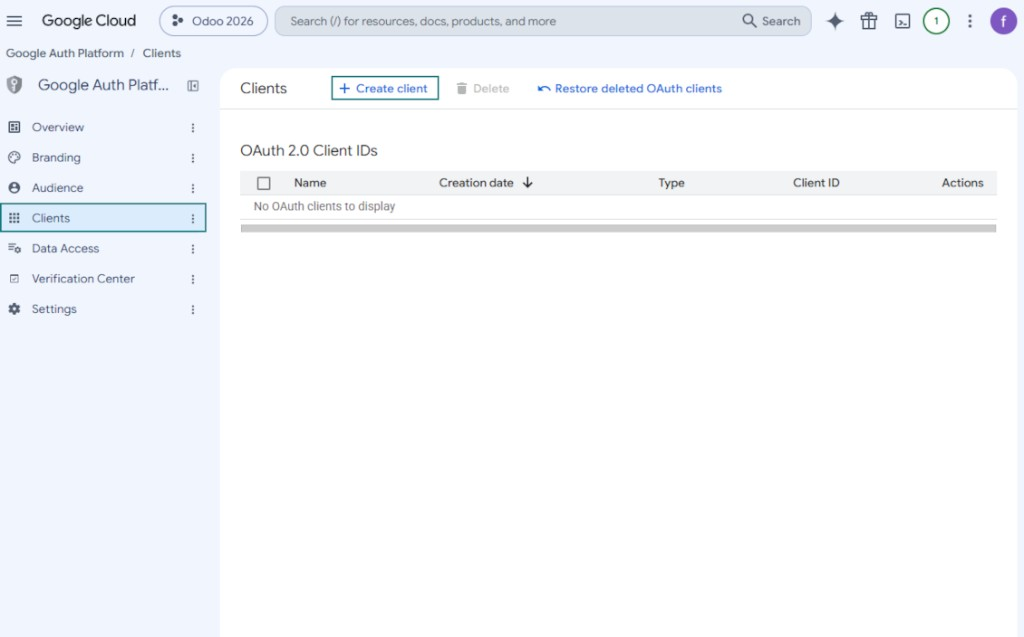
- Go to 'Clients' and press 'Create client'
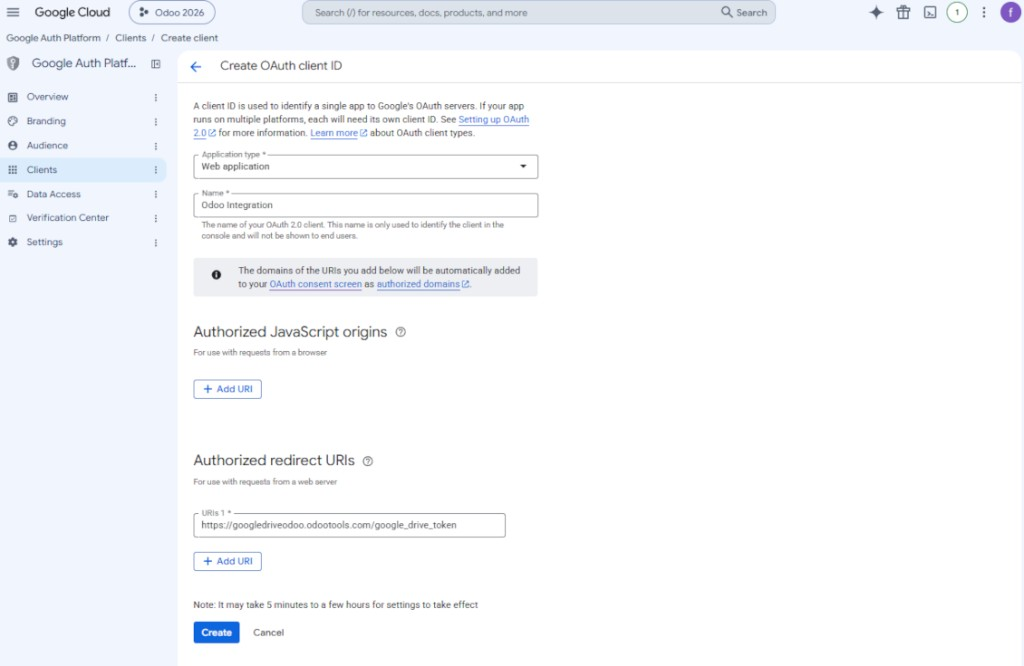
- As the application type select 'Web application'
- As a name select any suitable
- As the authorized redirect URI, add the link in a format [YOURODOOSITENAME]/google_drive_token (e.g. https://odootools.com/google_drive_token).
- Press 'Create'
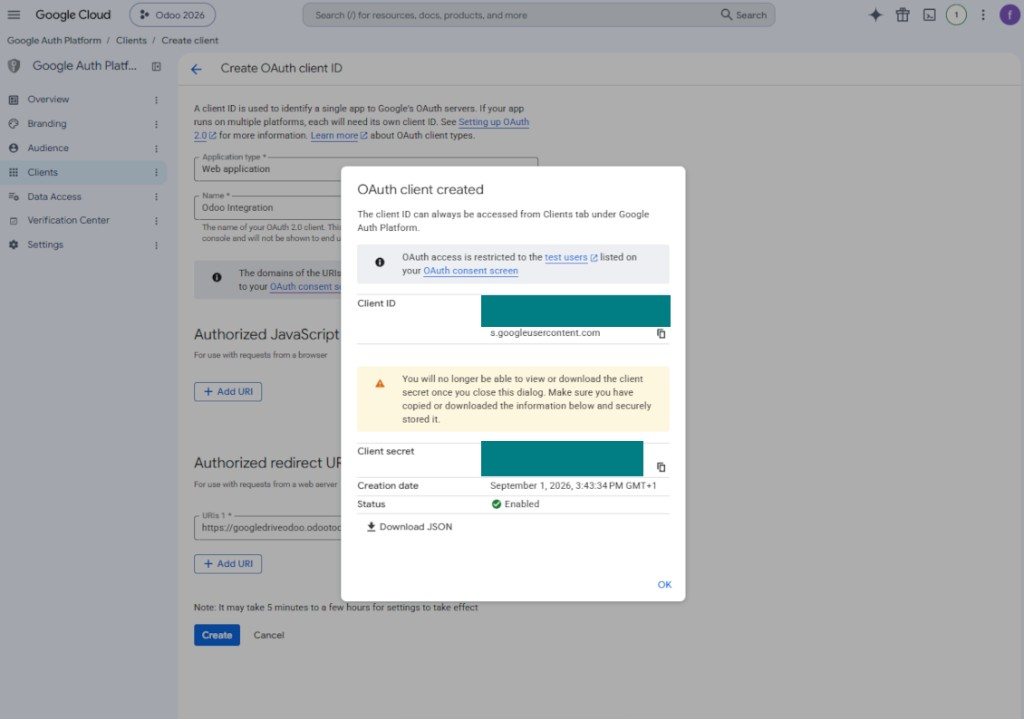
- Copy and safely store 'Client ID' and 'Client secret'. The client secret is shown only once
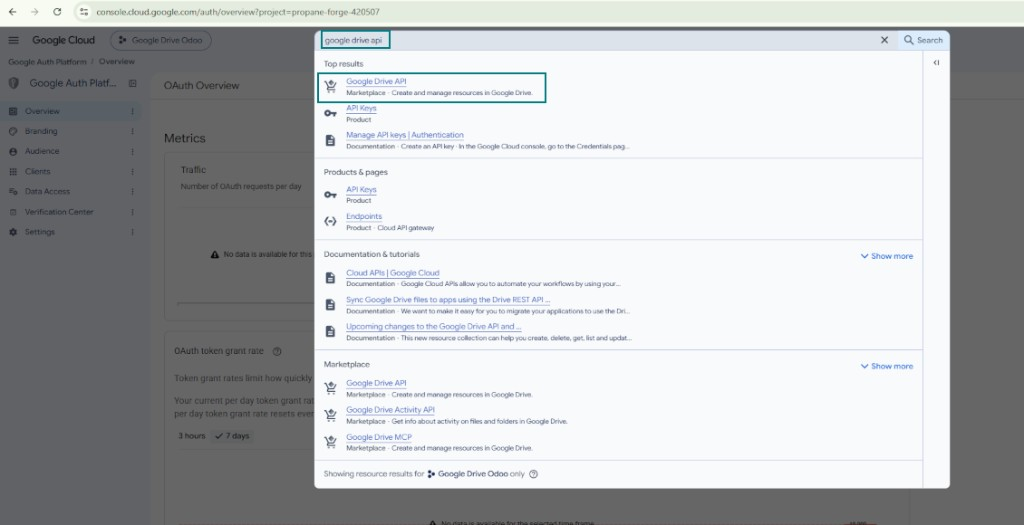
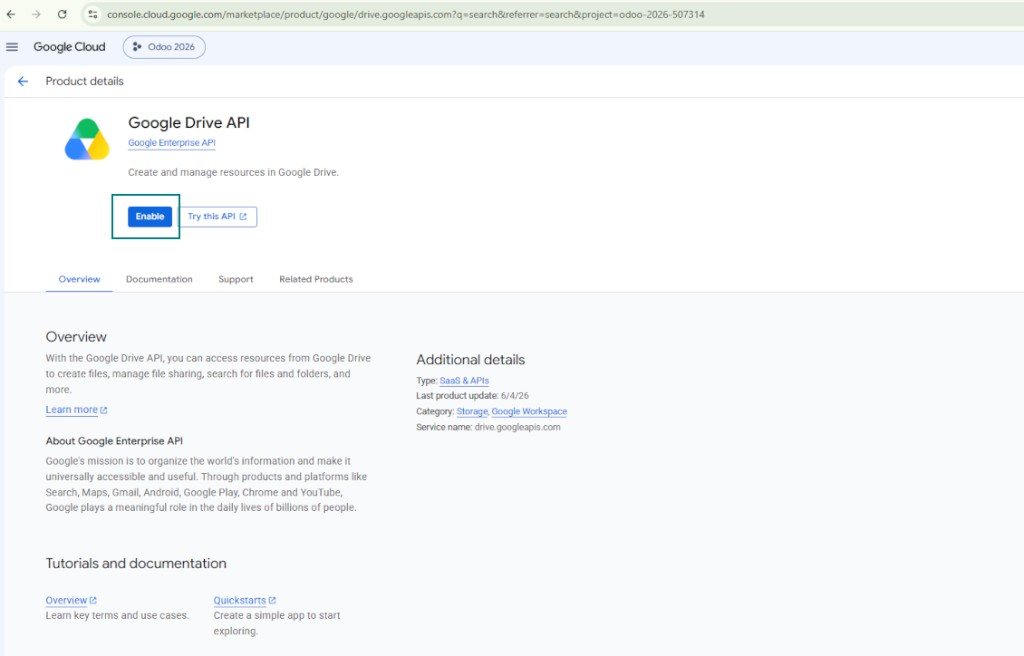
- Enable the Google Drive API for this project: type 'Google Drive API' in the top search box, open the found product, and press 'Enable'
- Go to 'Audience' and add your email address as a test user
- Publish the app. Otherwise, the app stays in the testing state and its token expires every 7 days
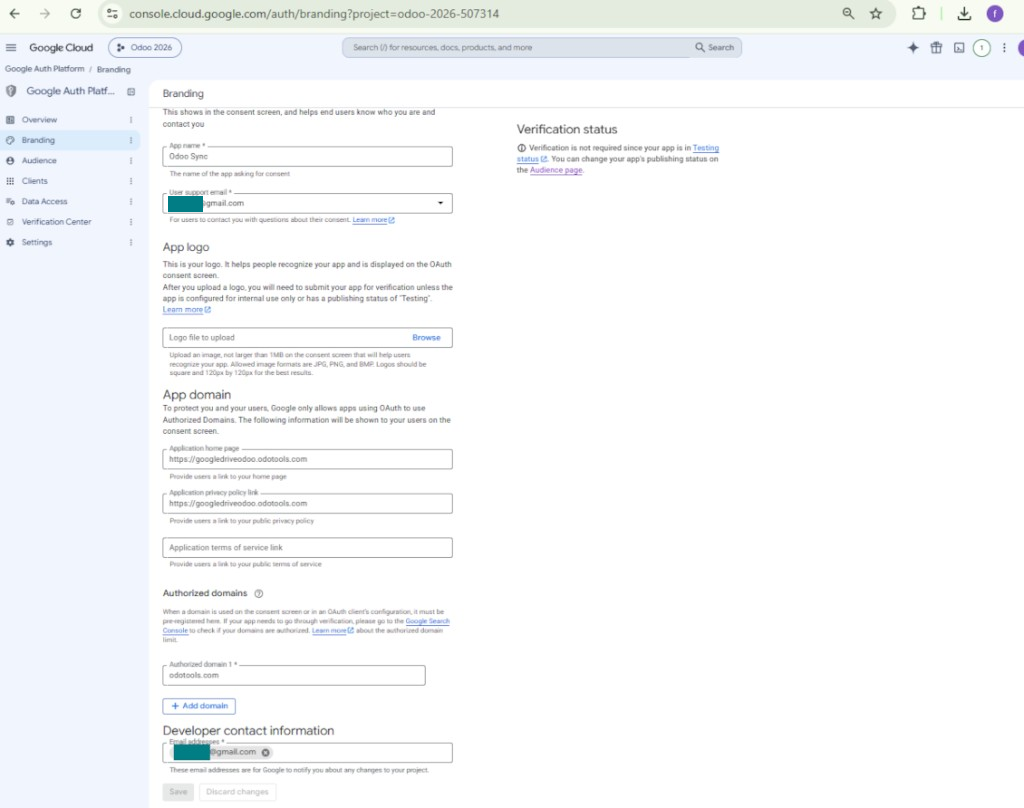
- Open 'Branding' and fill in the application home page and the application privacy policy link (for example, the links to your Odoo website). Add the domains of those links as the authorized domains
- Open 'Audience' and press 'Publish app'
- Do not upload an app logo. This would invoke a long and complex Google verification process that is of no actual need to you
- Go to the Odoo Google Drive Settings
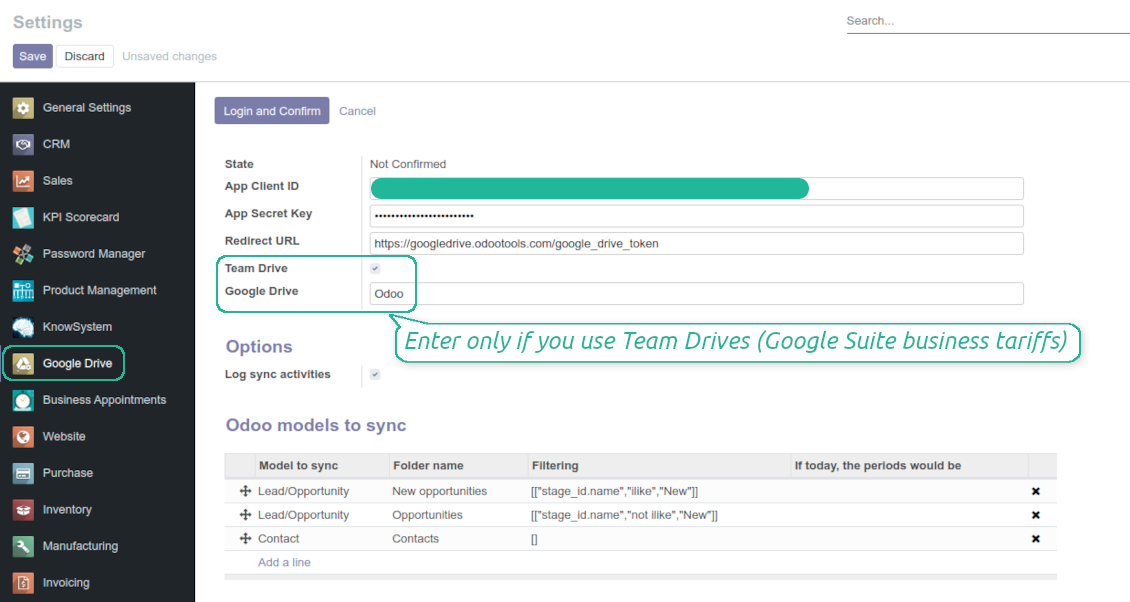
- Copy 'Client ID' from step 8 into the field 'App Client ID'
- Copy 'Client secret' from step 8 into the field 'App Secret Key'
- Insert the redirect URL you entered in step 8
- If you use team drives, check the related box. Make sure you really use team drives. In you Google Drive you should find the item 'Team Drives' in the left sidebar. This feature is available only for business and enterprise tariffs
- If the option 'Team Drive' is enabled, introduce its name. It should be absolutely the same as you see it in your Google Drive. Make sure that your user has full rights for this team drive
- Press 'Save'
- Press 'Login and Confirm'. Odoo redirects you to Google login page. Check in, agree with all conditions, and grant permissions asked
- After login, Google redirects you back to Odoo. Google Drive - Odoo synchronization is ready to be done.
Open the Google Auth Platform
Add app information
Select the external audience
Add contact information
Agree with the policies and create the app
Create an OAuth client
Configure the web application client
Copy the client ID and client secret
Find the Google Drive API
Enable the Google Drive API
Fill in branding to publish the app
Add test users and publish the app
Enter Google app credentials to Odoo
Odoo server configuration and cron job configuration
To make sure the synchronization works correctly apply proper timeouts to the Odoo configuration file: LIMIT_TIME_CPU, LIMIT_TIME_REAL, LIMIT_TIME_REAL_CRON should be more than 900 seconds.
For Odoo.sh this should not be done, since timeouts are predefined and are not configurable.
Then, timeout should be entered to your Odoo. To that goal find the section 'Settings' on the app configuration page and copy the number there.
Afterwards, it is needed to make the cron jobs suit the applied timeouts. In the debug mode go to the Settings > Technical > Automation > Scheduled Jobs:
- Set up the job 'Synchronize attachments with cloud' as (a) frequency - 2*timeout; (b) the next execution as the next hour +timeout. For example, for 900seconds timeout: frequency - as 30minutes; the next execution - at 08:15
- Set up the job 'Synchronize attachments from cloud' as (a) frequency - 2*timeout; (b) the next execution as the next hour + timeout*2. For example, for 900seconds timeout: frequency - as 30minutes; the next execution- at 08:30.
के बारे में अक्सर पूछे जाने वाले प्रश्न Google Drive Odoo Integration Odoo v.14
क्या जनरेट किए गए Google Drive फ़ोल्डर Odoo उपयोगकर्ताओं में स्वतः साझा होते हैं?
ऐप स्वयं Google Drive पक्ष पर पहुँच अधिकार नहीं नियंत्रित करता। यह वहाँ हाथ से करना होता है। Odoo, Google Drive में लक्ष्य फ़ोल्डर बनाता है, जो डिफ़ॉल्ट रूप से साझा नहीं होते; किसी भी फ़ोल्डर की अनुमतियाँ बदल सकते हैं। उदाहरण: 'Odoo' निर्देशिका या किसी 'Odoo > Sale Orders' या 'Odoo > Sale Orders > SO-001' को पूर्ण अधिकार देना।
ऐप एक ही उपयोगकर्ता एंडपॉइंट सिद्धांत पर चलता है। इसलिए सभी सिंक उसी Google Drive उपयोगकर्ता के तहत होते हैं (आपके द्वारा कॉन्फ़िगर किए Google API ऐप के अनुसार)।
मैंने Google Drive में फ़ाइल हटा दी, लेकिन वह अभी भी Odoo में है
फ़ाइल पूरी तरह हटाने के लिए Google Drive का बिन भी साफ़ करें।
यह भी याद रखें कि फ़ाइल अभी Odoo में हो सकती है, क्योंकि पिछली सिंक ने अटैचमेंट अभी प्रोसेस नहीं किया। यह निर्धारित प्रक्रिया है, समय लगता है।
क्या Google API अनुरोध के आधार पर शुल्क लेगा?
मॉड्यूल केवल मुफ़्त API का उपयोग करता है, इसलिए Google आपसे शुल्क नहीं लेगा।
क्या मैं सिंक जॉब की आवृत्ति बदल सकता हूँ?
हाँ, आप कर सकते हैं। इसके लिए:
डीबग मोड चालू करें
तकनीकी सेटिंग > ऑटोमेशन > शेड्यूल्ड जॉब पर जाएँ
जॉब 'Synchronize attachments with cloud' और 'Update attachments from cloud' खोजें।
उन्हें बहुत बार न चलाएँ। बेहतर है कि नया जॉब शुरू होने से पहले यह जॉब पूरा हो जाए। सेटिंग इस बात पर निर्भर करती है कि कितनी वस्तुएँ सिंक करनी हैं। आमतौर पर आवृत्ति 15 मिनट से 4 घंटे के बीच होती है।
यह भी सुनिश्चित करें कि Odoo कॉन्फ़िगरेशन फ़ाइल में पर्याप्त समय सीमाएँ सेट की गई हैं। LIMIT_TIME_CPU और LIMIT_TIME_REAL पैरामीटर नियोजित cron जॉब समय के बराबर या उससे बड़े होने चाहिए। संस्करण 13 से पैरामीटर LIMIT_TIME_REAL_CRON को भी ध्यान में रखें।
Odoo.sh ग्राहकों के लिए महत्वपूर्ण सूचना: cron जॉब का अधिकतम समय केवल 15 मिनट हो सकता है।
क्या मैं सिंक द्वारा मानी गई के बजाय सिंक की गई निर्देशिकाओं की अलग संरचना कॉन्फ़िगर कर सकता हूँ?
नहीं, यह सुविधा केवल संस्करण 15 से उपलब्ध है। उससे पहले मॉड्यूल पूर्व-निर्धारित फ़ोल्डर संरचना के साथ काम करता है:
Odoo - सिंक के लिए मुख्य फ़ोल्डर
Models - प्रत्येक Odoo दस्तावेज़ प्रकार के फ़ोल्डर। उदाहरण, 'Projects', 'Partners'। domain से अलग करके अधिक विशिष्ट फ़ोल्डर हो सकते हैं: जैसे 'Customer 1 Projects', 'Projects of the Customer 2', 'Internal Projects' आदि।
Objects - प्रत्येक दस्तावेज़ के फ़ोल्डर, जैसे 'Project 1' या 'Customer 1'
इस Odoo दस्तावेज़ से जुड़े वे फ़ाइलें और फ़ोल्डर जिन्हें सिंक करना है।
परिणामस्वरूप आपके पास उदाहरण के लिए हो सकता है:
Odoo / Projects / Project 1 / project 1 से संबंधित फ़ाइलें और फ़ोल्डर
Odoo / Customer 1 Projects / Project 1; Odoo / Customer 2 Projects / Project 3, ...
Odoo / Customers / Customer 1 / customer 1 से संबंधित फ़ाइलें और फ़ोल्डर
यह संरचना हमेशा सपाट होती है, यानी पदानुक्रम के केवल वही स्तर होते हैं। इसलिए यह सही है कि विभिन्न दस्तावेज़ प्रकार एक ही संरचना में नहीं रखे जा सकते। फ़ोल्डर 'Customer 1' में हम बिक्री आदेश, चालान और परियोजना—तीनों से जुड़ी फ़ाइलें नहीं रख सकते। उन दस्तावेज़ प्रकारों में से प्रत्येक का अपना (या कुछ अपने) फ़ोल्डर होता है। वरना पिछली सिंक करने का मौका नहीं मिलेगा, क्योंकि कोई मानदंड नहीं होगा जिस पर भरोसा किया जाए।
क्या मुझे Odoo में विशिष्ट उपयोगकर्ता पहुँच सेट अप करनी चाहिए?
नहीं, टूल एक ही उपयोगकर्ता एंडपॉइंट पर निर्भर करता है। सभी सिंक प्रक्रियाएँ एक cloud व्यवस्थापक (ऐप) के अंतर्गत होती हैं। बनाए गए फ़ोल्डर / फ़ाइलों के अधिकार स्वचालित नहीं होते। वे अधिकार आपको अपने क्लाउड स्टोरेज समाधान में प्रशासित करने चाहिए।
सिंक किए गए फ़ील्ड कहाँ संग्रहीत होते हैं? क्या वे Odoo और क्लाउड में डुप्लिकेट होते हैं?
ऐप मानता है कि अटैचमेंट की बाइनरी सामग्री Odoo सर्वर के बजाय Cloud Client में रखी जाती है। इसलिए Odoo में ऐसे अटैचमेंट URL प्रकार के हो जाते हैं, और आप उन्हें किसी भी समय अटैचमेंट बॉक्स या Cloud Client से खोल सकते हैं।
सेटअप के बाद कोई मैन्युअल कार्रवाई नहीं चाहिए, क्योंकि सिंक पूरी तरह स्वचालित है। तय करें कि कौन से Odoo दस्तावेज़ प्रकार सिंक हों और प्रत्येक के लिए संबंधित मॉडल सेट करें (ग्राहक, विक्रय या खरीद आदेश, टास्क, प्रोजेक्ट आदि)।
क्या मैं एक ही दस्तावेज़ प्रकार के लिए कुछ फ़ोल्डर रख सकता हूँ? उदाहरण के लिए, आंतरिक प्रोजेक्ट और ग्राहक प्रोजेक्ट?
हाँ, आप कर सकते हैं। इसके लिए प्रत्येक के लिए नियम बनाएँ, फिर फ़िल्टर लागू करें: उदाहरण के लिए प्रोजेक्ट के प्रकार से।
फ़िल्टर परस्पर-अनन्य रखें ताकि दस्तावेज़ निश्चित रूप से असाइन हो। उदाहरण: 'ग्राहक पर आपूर्तिकर्ता नहीं', 'आपूर्तिकर्ता पर ग्राहक नहीं'। वरना किसी खास दस्तावेज़ का फ़ोल्डर एक मॉडल से दूसरे पर कूदेगा।
क्या मुझे केवल Cloud Storage Solution ऐप चाहिए?
नहीं, यह टूल केवल तकनीकी कोर है। आपको अपने cloud client का कनेक्टर भी चाहिए।
क्या यह ठीक है अगर सिंक करने के लिए बहुत सारी वस्तुएँ हों, उदाहरण के लिए 10000?
हाँ, हालांकि कई फ़ोल्डर/अटैचमेंट सिंक करने पर प्रक्रिया धीमी हो सकती है। साथ ही ग्राहकों ने >10k साथी और ~5k उत्पाद वेरिएंट सिंक वाले वातावरण बताए, और प्रक्रियाएँ स्वीकार्य थीं।
कुछ बातें ज़ोर देने योग्य:
- सिंक ऐसा बनाया गया है कि कोई भी आइटम सिंक होगा और खोएगा नहीं, हालांकि तेज़ नहीं भी हो सकता। FIFO कतारें और प्रत्येक जॉब का कमिट यह गारंटी देते हैं।
- वस्तुओं की संख्या तार्किक रूप से सीमित की जा सकती है। मॉडल कॉन्फ़िगरेशन पुराने आइटम का सिंक रोकने देती है (जैसे संग्रहीत साथी या 2 वर्ष पुराने आदेश सिंक करने का अर्थ नहीं)।
क्या सिंक को रीयल-टाइम बनाना संभव है?
नहीं। रीयल-टाइम सिंक से बचने के हमारे ठोस कारण हैं:
प्रदर्शन संबंधी समस्याएँ। यदि सिंक रीयल-टाइम हो, तो हर फ़ाइल अपलोड पर लोडिंग स्क्रीन आएगी।
संघर्ष संबंधी समस्याएँ। यदि 2 उपयोगकर्ता एक साथ किसी आइटम को बदलें, तो अनसुलझी स्थितियाँ हो सकती हैं। नियमित जॉब में हम बाद में ठीक कर सकते हैं; रीयल-टाइम में इसे कतार के रूप में सहेजना पड़ेगा, जो उपयोगकर्ताओं के लिए और भ्रमित करने वाला होगा।
कार्यक्षमता संबंधी समस्याएँ। खासकर आइटम का नाम बदलना और पुनर्गठन। बैकवर्ड सिंक में टूल निर्देशिका तर्क पर सख्ती से निर्भर करता है, और हर सिंक में 100% आइटम जाँचे जाते हैं। यदि हर अपडेट के बाद हो, तो प्रति सेकंड हज़ारों अनुरोध होंगे। नहीं तो: बदलाव खो जाएँगे।
क्या मैं क्लाउड में डिफ़ॉल्ट फ़ोल्डर के नाम बदल सकता हूँ?
किसी भी दस्तावेज़ प्रकार के लिए मॉडलों की निर्देशिकाओं (बिक्री आदेश, अवसर, आपूर्तिकर्ता आदि) को अपना नाम दे सकते हैं।
ऑब्जेक्ट फ़ोल्डरों (SO-001, John Smith आदि) के लिए टूल इस दस्तावेज़ प्रकार का प्रदर्शन नाम बनाने की Odoo विधि पर निर्भर करता है। फिर भी नाम अभिव्यक्ति परिभाषित करके बदल सकते हैं। Odoo ईमेल टेम्पलेट वाली ही वाक्य रचना उपयोग होती है।
क्या मैं अटैचमेंट कुछ क्लाउड क्लाइंट से सिंक कर सकता हूँ
नहीं, यह सुविधा केवल संस्करण 15 से उपलब्ध है।
हम अपने क्लाउड में विशेष संपादक उपयोग करते हैं (जैसे OnlyOffice, Office 365 आदि)। क्या फ़ाइलें उसी संपादक में खुलेंगी?
हाँ, आपके cloud client कॉन्फ़िगरेशन पर निर्भर करता है।
आपके टूल की अपडेट नीतियाँ क्या हैं?
वर्तमान Odoo Apps Store नीतियों के अनुसार:
- संस्करण 12.0 और उससे पहले के लिए खरीदा प्रत्येक मॉड्यूल 12.0 तक सभी संस्करणों तक पहुँच देता है।
- संस्करण 13.0 से प्रत्येक मॉड्यूल संस्करण अलग खरीदना होता है।
- संस्करण चाहे जो हो, खरीद से उस प्रमुख संस्करण के सभी अपडेट और बग ठीक करने का अधिकार मिलता है।
ध्यान दें कि faOtools टीम इन नीतियों को नियंत्रित नहीं करती। सभी प्रश्नों के लिए सीधे Odoo Apps Store प्रतिनिधियों से संपर्क करें।
आपका ऐप Odoo.sh पर कैसे इंस्टॉल करूँ?
सबसे सीधा तरीका Odoo स्टोर की अंतर्निहित वर्कफ़्लो का उपयोग करना है:
1. मॉड्यूल का पृष्ठ खोलें और Deploy on odoo.sh बटन पर क्लिक करें
2. उसके बाद आपको GitHub पृष्ठ पर भेजा जाएगा। अपने खाते में लॉग इन करें, फिर 'Create a new repo' पर क्लिक करें या मौजूदा का उपयोग करें। सुनिश्चित करें कि रिपॉज़िटरी निजी हो। OPL-1 लाइसेंस के तहत ऐप प्रकाशित करना अनुमति नहीं है। ज़रूरत हो तो Odoo.sh प्रोजेक्ट के लिए नया repo बनाएँ
3. फिर odoo.sh पर जाएँ और Deploy बटन पर क्लिक करें। पॉप-अप विंडो में निर्णय जमा करें और 'Continue.' पर क्लिक करें। इससे इंस्टॉलेशन शुरू होगा।
ये चरण प्रोजेक्ट की production शाखा पर ऐप इंस्टॉल करेंगे। अन्य शाखाओं पर ऐप तैनात करने या मॉड्यूल अपडेट करने के लिए ये क्रियाएँ करें:
1. Odoo स्टोर से ऐप का स्रोत कोड अपलोड करें
2. मॉड्यूल को आवश्यक GitHub रिपॉज़िटरी में commit करें। सुनिश्चित करें कि ऐप के कोई फ़ोल्डर/फ़ाइल अनदेखी न हों (यानी repo के .gitignore में न हों)। रिपॉज़िटरी odoo.sh अपने आप बनाता है और डिफ़ॉल्ट रूप से कुछ ज़रूरी चीजें शामिल हो सकती हैं (जैसे /lib)। मॉड्यूल की सभी निर्देशिकाएँ, उपनिर्देशिकाएँ और फ़ाइलें बिना अपवाद अपलोड करें
3. odoo.sh प्रोजेक्ट की लक्ष्य शाखा Deploy करें या, अगर सेटिंग्स ऐसा मानती हैं, स्वतः बनने तक प्रतीक्षा करें।
अपने सर्वर पर आपका ऐप कैसे इंस्टॉल करूँ?
2. Odoo सर्वर पुनः प्रारंभ करें;
3. डेवलपर मोड चालू करें (तकनीकी सेटिंग्स);
4. ऐप सूची अपडेट करें (ऐप्स मेनू);
5. ऐप खोजें और 'Activate'/'Install' दबाएँ;
6. ऐप पृष्ठ पर दिशानिर्देश हों तो उनका पालन करें।
आपके ऐप में अतिरिक्त ऐड-ऑन हैं। क्या बाद में खरीद सकता हूँ?
हाँ, ज़रूर। साथ ही Odoo सभी निर्भरताएँ कार्ट में अपने आप जोड़ता है, इसलिए दोहरी भुगतान से बचने के लिए पहले खरीदे टूल हटा दें।
मैंने आपका ऐप Odoo.sh पर डिप्लॉय किया और टेस्ट में चेतावनी/त्रुटि दिख रही है
लाल/नारंगी चेतावनी ऐप की सुविधाओं को प्रभावित नहीं करती। खेद है कि कभी-कभी हमारे मॉड्यूल मानक स्वचालित परीक्षण पास नहीं करते, क्योंकि वे ऐसा व्यवहार मानते हैं जो ऐप के लक्ष्यों से टकराता है। उदाहरण के लिए हम मूल्य गणना बदलते हैं, जबकि मानक Odoo मॉड्यूल परीक्षण अंतिम मूल्य की तुलना मानक एल्गोरिदम से करते हैं।
सबसे पहले तैनात डेटाबेस की सुविधाएँ जाँचें। क्या सब सही काम कर रहा है?
यदि फिर भी मानते हैं कि चेतावनी वास्तविक सुविधाओं को प्रभावित करती है, तो संपर्क करें और पूर्ण इंस्टॉलेशन लॉग तथा तैनात मॉड्यूलों की पूरी सूची (कोर और तृतीय-पक्ष सहित) भेजें।
क्या मैं ऐप आपकी कंपनी से सीधे खरीद सकता हूँ?
नहीं, हम उपकरण केवल आधिकारिक Odoo ऐप स्टोर.
मुझे छूट चाहिए
खेद है, हमारे पास व्यक्तिगत कीमतें देने के तकनीकी साधन नहीं हैं।
क्या मैं ऐप अपने Odoo Online (SaaS) डेटाबेस पर इंस्टॉल कर सकता हूँ?
नहीं, तृतीय-पक्ष ऐप Odoo Online पर नहीं चल सकते। दुर्भाग्य से Odoo SaaS यह संभावना रोकता है।
आपके टूल की अन्य ऐप पर निर्भरता है। क्या मुझे वे खरीदनी चाहिए?
हाँ, सही काम के लिए टूल को निर्भरता में चिह्नित सभी मॉड्यूल चाहिए। ऐप पृष्ठ पर दी गई कीमत में आवश्यक निर्भरताएँ पहले से शामिल हैं।
मॉड्यूल की कीमत अमेरिकी डॉलर में क्या है? यह क्यों बदली?
हमारे मॉड्यूल की कीमत यूरो में है। Odoo स्टोर आंतरिक विनिमय दर से अन्य मुद्राओं में बदलता है। इसलिए अमेरिकी डॉलर में कीमत दर अपडेट होने पर बदल सकती है।
अंग्रेज़ी के अलावा अन्य भाषाओं में ऐप और वेबसाइट का शब्द AI-सहायता से है और आधिकारिक Odoo अनुवादों से मेल खाता है। यदि आपको कोई गलती दिखे, अनुवाद शुद्धता का टिकट भेजें और हम इसे ठीक करेंगे।
बग रिपोर्टिंग
यदि आपको बग या असंगत व्यवहार मिले तो हमसे संपर्क करें। हम खरीद के 60 दिनों के भीतर सुधार देने की गारंटी देते हैं और इस अवधि के बाद भी टूल सुधारने में रुचि रखते हैं।
हमसे संपर्क करने के लिए फ़ोन नंबर या क्रेडिट कार्ड की आवश्यकता नहीं है। केवल एक छोटी ईमेल साइन-अप करनी है, जिसमें 30 सेकंड से अधिक नहीं लगता।
अपने अनुरोध में जितना संभव हो उतना विवरण शामिल करें: स्क्रीनशॉट, Odoo सर्वर लॉग, समस्या को दोहराने का पूरा वर्णन आदि। आमतौर पर किसी मुद्दे की कार्य योजना तैयार करने (यदि बग पुष्टि हो) या आगे क्या करना है इसके दिशानिर्देश देने (अन्यथा) में कुछ कार्यदिवस लगते हैं।
सार्वजनिक सुविधा अनुरोध और मॉड्यूल विचार (निःशुल्क विकास)
हम अपने टूल सुधारने के लिए दृढ़ता से प्रेरित हैं और किसी भी प्रतिक्रिया के आभारी होंगे। यदि आपकी आवश्यकताएँ सार्वजनिक उपयोग की हैं और कुशलता से लागू की जा सकती हैं, तो टीम उन्हें हमारी कार्य सूची में शामिल करेगी।
ऐसी कार्य सूची नियमित रूप से संसाधित होती है और अतिरिक्त शुल्क नहीं लगती। यद्यपि हम समय सीमा और अंतिम डिज़ाइन का वादा नहीं कर सकते, यह बिना निवेश और जोखिम के वांछित सुविधाएँ पाने का अच्छा तरीका हो सकता है।
हमसे संपर्क करने के लिए फ़ोन नंबर या क्रेडिट कार्ड की आवश्यकता नहीं है। केवल एक छोटी ईमेल साइन-अप करनी है, जिसमें 30 सेकंड से अधिक नहीं लगता।


आंतरिक और बाहरी उपयोग के लिए गहरी और संरचित ज्ञान आधार बनाने का उपकरण। Knowledge System. KMS. विकि जैसी पुनरीक्षण।
398€
KPI लक्ष्य सेट करने और अवधियों के अनुसार पूर्ति नियंत्रित करने का उपकरण। KPI डैशबोर्ड। डैशबोर्ड डिज़ाइनर। KPI चार्ट

अपॉइंटमेंट बुकिंग से बिक्री और समीक्षा तक समय-आधारित सेवा प्रबंधन का उपकरण
398€
पसंदीदा AI चैट से MCP के ज़रिए Odoo प्रबंधित करने का उपकरण। Claude. कोई भी MCP-समर्थित AI.

Odoo अनुलग्नकों को फ़ोल्डरों में लचीले ढंग से व्यवस्थित करने और निर्देशिकाओं को क्लाउड क्लाइंट से सिंक करने का उपकरण: Google Drive, OneDrive/SharePoint, Nextcloud/ownCloud, Dropbox, Amazon S3, Box और NAS. DMS. फ़ाइल प्रबंधक. दस्तावेज़ प्रबंधन प्रणाली
398€
Odoo अनुलग्नकों को OneDrive फ़ाइलों के साथ स्वचालित रूप से दोनों दिशाओं में सिंक करने का उपकरण
487€
Odoo अनुलग्नकों को ownCloud/Nextcloud फ़ाइलों के साथ स्वचालित रूप से दोनों दिशाओं में सिंक करने का उपकरण
487€
Odoo अनुलग्नकों को NAS समाधानों के साथ स्वचालित रूप से दोनों दिशाओं में सिंक करने का उपकरण। Synology, QNAP, TrueNAS और कोई भी अन्य WebDav-समर्थित NAS
487€