Universal Appointments: Sales v.15
The extension to the Universal Appointments app to link appointments and sale orders
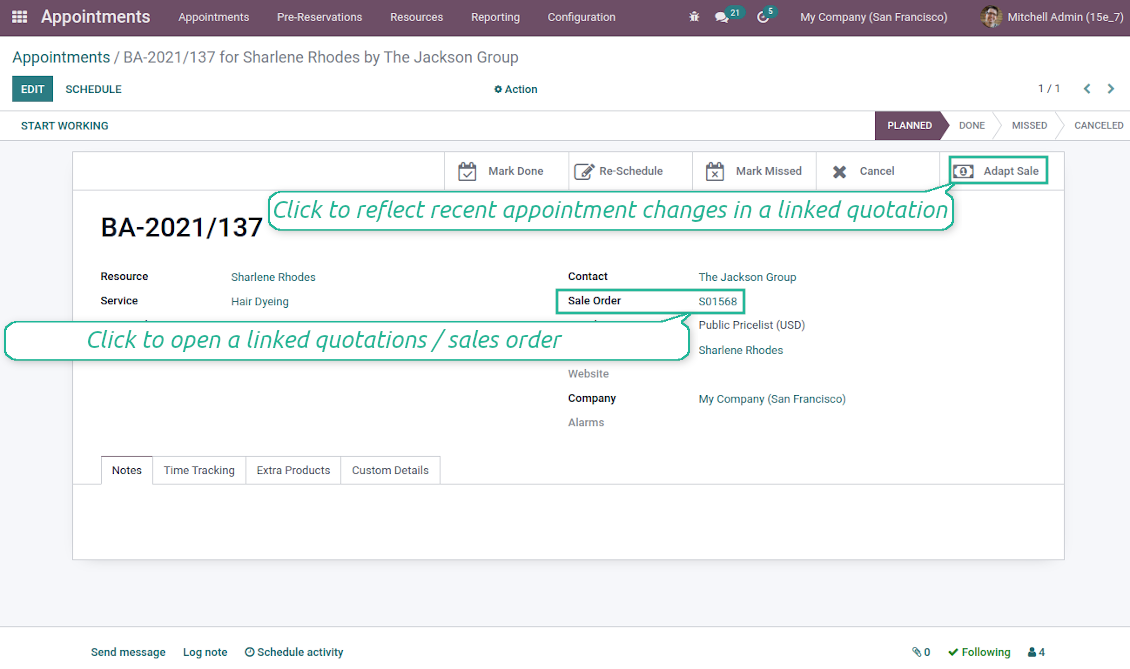
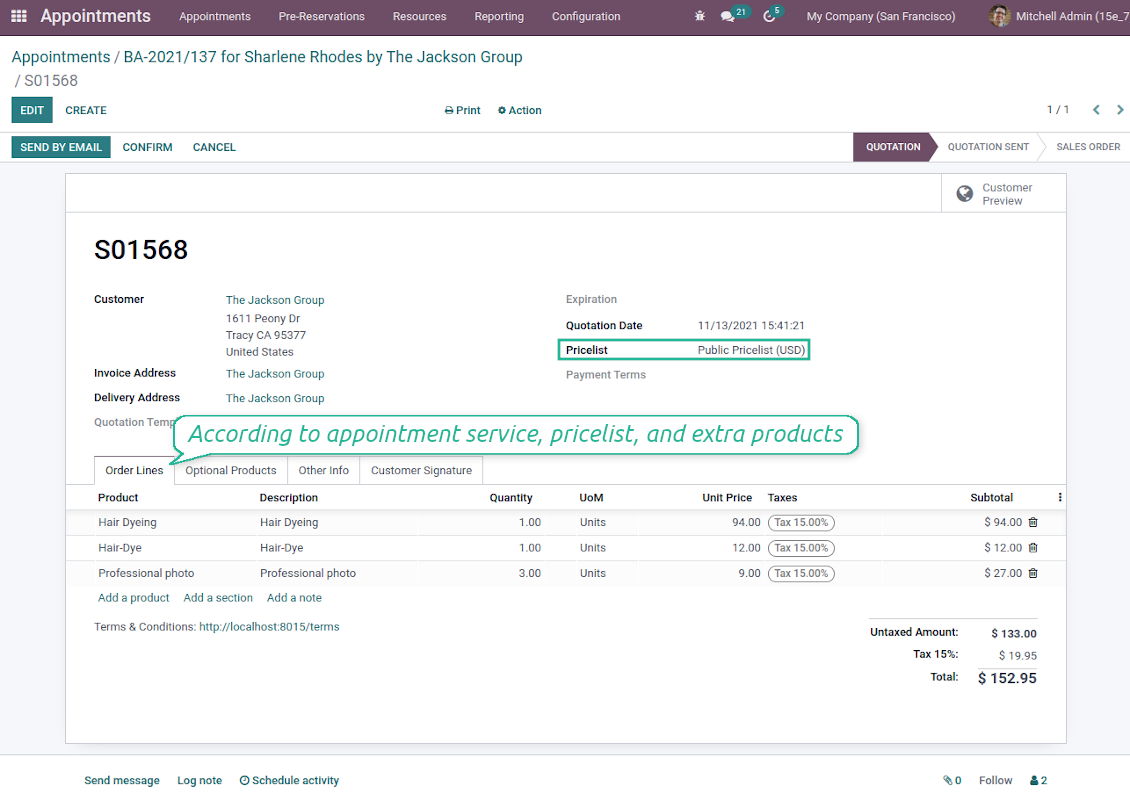
Sale orders and appointments
-
The app lets you link appointments and sale orders. There are 4 configuration options
-
Sent sale orders: if chosen, a sent quotation would be prepared based on the reservation
-
Confirmed sale orders: if chosen, an Odoo sale order would be created as soon as a reservation is scheduled. The method is suitable if your service is standard, while final sale positions and details would hardly be modified after the appointment. For example, fixed-price hair cutting
-
Draft quotations: if chosen, only a quotation in the state 'Draft' would be prepared. In this way, you have more flexibility in updating an order during service provision or beforehand. For example, if you wanted to add extra complementaries or to provide individual discounts
-
Manual orders: if chosen, managers have to create quotations while providing service. The method might be applicable when actual sale lines become clear only during the visit itself. For example, a mobile phone repair business assumes initial diagnostics and only after the price is offered
-
Until an appointment sale order is not confirmed, you can update that from a reservation form. Both service, quantity, and complementary products are re-calculated in this case
Service pricing
-
The tool allows configuring the pricing method per each resource type
-
Per planned duration: Odoo quotations are created based on initial reservation plans. For example, it might be suitable for car rent or massage
-
Per units: sale orders consider appointments for the same price disregarding their duration. For example, standard haircutting or tire mounting is invoiced the same disregarding how much time they actually take
-
Per tracked (real) duration (the extension Universal Appointments: Time Tracking is required): invoice actual time spent on service. For example, the approach is suitable for consultation or legal services
-
Prices are price list dependent. Thus, an Odoo manager might select individual conditions during scheduling. In this way, it is possible to apply various currencies, discounts, promos
Complementaries and upselling
-
When a customer finishes scheduling, it is a good moment to increase a bill by offering complementary products. The tool has built-in features for that
-
Odoo may show the popup wist suggested products for backend managers immediately after reserving a time slot
-
The popup allows both adding one or a few complementaries or merely missing the step if suggested products are not required
-
The feature might be turned on/off on the configuration page. The popup would be shown only in case there are complementaries defined for a booked service
-
Chosen complementaries would be added to a quotation/sales order during its automatic creation or adaptation from the reservation page.
Lời ứng dụng và trang web ở ngôn ngữ khác tiếng Anh được hỗ trợ bởi AI và khớp với bản dịch Odoo chính thức. Nếu bạn thấy sai, gửi phiếu hỗ trợ về đúng bản dịch và chúng tôi sẽ sửa.
Báo lỗi
Nếu gặp lỗi hoặc hành vi không nhất quán, hãy liên hệ. Chúng tôi cam kết sửa trong 60 ngày kể từ khi mua và vẫn muốn cải thiện công cụ sau giai đoạn đó.
Bạn không cần số điện thoại hay thẻ tín dụng để liên hệ. Chỉ cần đăng ký email ngắn, không quá 30 giây.
Hãy nêu càng nhiều chi tiết càng tốt trong yêu cầu: ảnh chụp màn hình, nhật ký máy chủ Odoo, mô tả đầy đủ cách tái hiện sự cố, v.v. Thường mất vài ngày làm việc để chuẩn bị kế hoạch xử lý (nếu xác nhận lỗi) hoặc hướng dẫn việc cần làm (nếu không).
Yêu cầu tính năng công khai và ý tưởng module (phát triển miễn phí)
Chúng tôi rất muốn cải thiện công cụ và biết ơn mọi phản hồi. Nếu yêu cầu của bạn hữu ích cho mọi người và có thể triển khai hiệu quả, nhóm sẽ đưa vào danh sách việc cần làm.
Danh sách việc cần làm như vậy được xử lý đều đặn và không phát sinh phí thêm. Dù chúng tôi không hứa hạn chót và thiết kế cuối, đây có thể là cách tốt để có tính năng mong muốn mà không đầu tư và rủi ro.
Bạn không cần số điện thoại hay thẻ tín dụng để liên hệ. Chỉ cần đăng ký email ngắn, không quá 30 giây.

Công cụ sắp xếp linh hoạt tệp đính kèm Odoo vào thư mục và đồng bộ thư mục với máy khách đám mây: Google Drive, OneDrive/SharePoint, Nextcloud/ownCloud, Dropbox, Amazon S3, Box và NAS. DMS. Trình quản lý tệp. Hệ thống quản lý tài liệu
398€
Công cụ đồng bộ hai chiều tự động tệp đính kèm Odoo với tệp OneDrive
487€
Công cụ đồng bộ hai chiều tự động tệp đính kèm Odoo với tệp Google Drive
487€
Công cụ để lưu mật khẩu an toàn trong Odoo cho dùng chung. Kho dùng chung

Công cụ xây dựng cơ sở tri thức sâu và có cấu trúc cho nội bộ và bên ngoài. Knowledge System. KMS. Bản sửa kiểu wiki.
398€
Công cụ đặt mục tiêu KPI và kiểm soát hoàn thành theo kỳ. Bảng điều khiển KPI. Trình thiết kế bảng. Biểu đồ KPI

Công cụ quản lý dịch vụ theo thời gian, từ đặt lịch đến bán hàng và đánh giá
398€
Công cụ quản lý Odoo từ các chat AI yêu thích qua MCP. Claude. Mọi AI hỗ trợ MCP.
