Universal Appointments: Sales v.16
The extension to the Universal Appointments app to link appointments and sale orders
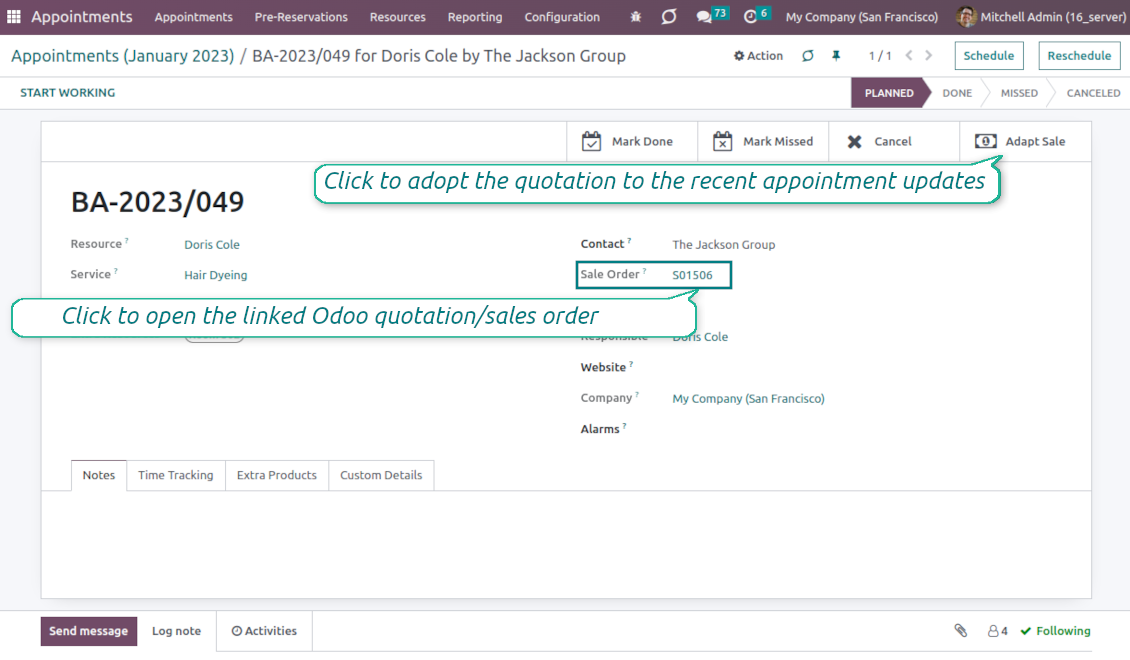
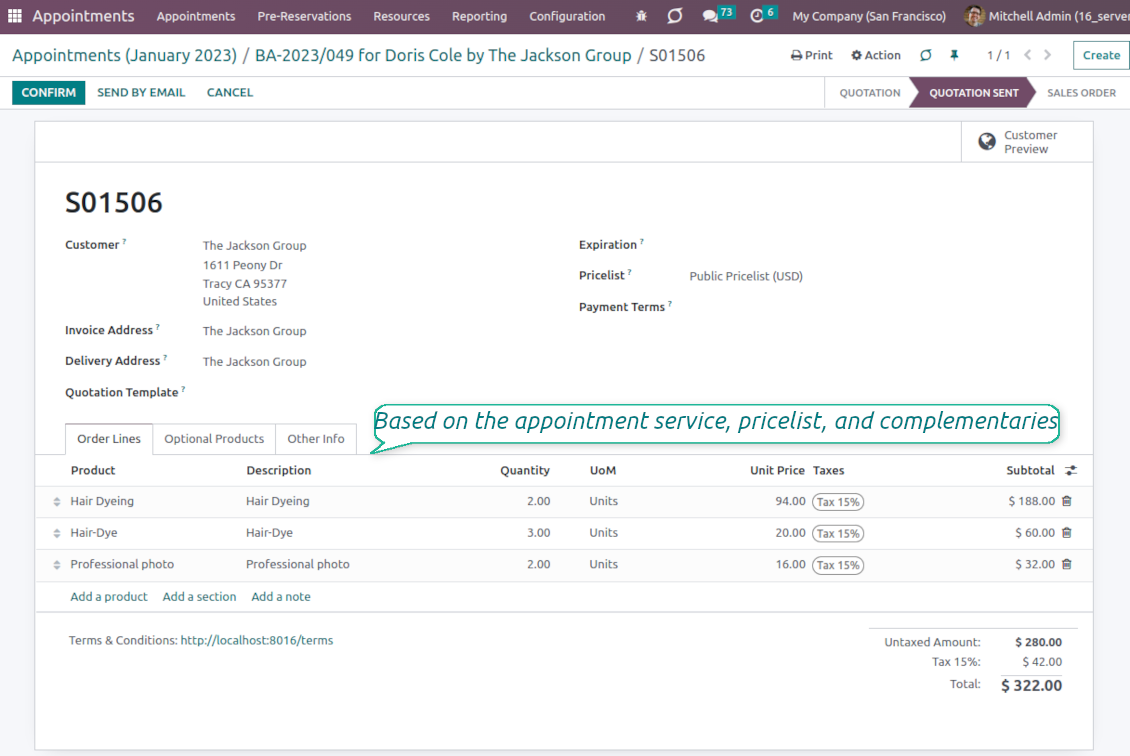
Sale orders and appointments
-
The app lets you link appointments and sale orders. There are 4 configuration options
-
Sent sale orders: if chosen, a sent quotation would be prepared based on the reservation
-
Confirmed sale orders: if chosen, an Odoo sale order would be created as soon as a reservation is scheduled. The method is suitable if your service is standard, while final sale positions and details would hardly be modified after the appointment. For example, fixed-price hair cutting
-
Draft quotations: if chosen, only a quotation in the state 'Draft' would be prepared. In this way, you have more flexibility in updating an order during service provision or beforehand. For example, if you wanted to add extra complementaries or provide individual discounts
-
Manual orders: if chosen, managers have to create quotations while providing service. The method might be applicable when actual sale lines become clear only during the visit itself. For example, a mobile phone repair business assumes initial diagnostics and only after the price is offered
-
Until an appointment sale order is not confirmed, you can update that from a reservation form. Both service, quantity, and complementary products are re-calculated in this case
Service pricing
-
The tool allows configuring the pricing method per each resource type
-
Per planned duration: Odoo quotations are created based on initial reservation plans. For example, it might be suitable for car rental or massage
-
Per units: sale orders consider appointments for the same price disregarding their duration. For example, standard haircutting or tire mounting is invoiced the same disregarding how much time they actually take
-
Per tracked (real) duration (the extension Universal Appointments: Time Tracking is required): invoice actual time spent on service. For example, the approach is suitable for consultation or legal services
-
Prices are price list dependent. Thus, an Odoo manager might select individual conditions during scheduling. In this way, it is possible to apply various currencies, discounts, promos
Complementaries and upselling
-
When a customer finishes scheduling, it is a good moment to increase a bill by offering complementary products. The tool has built-in features for that
-
Odoo may show the popup wist suggested products for backend managers immediately after reserving a time slot
-
The popup allows both adding one or a few complementaries or merely missing the step if suggested products are not required
-
The feature might be turned on/off on the configuration page. The popup would be shown only in case there are complementaries defined for a booked service
-
Chosen complementaries would be added to a quotation/sales order during its automatic creation or adaptation from the reservation page.
Тексты приложения и веб-сайта на языках, отличных от английского, переведены с помощью ИИ и согласованы с официальными переводами Odoo. Если вы заметили ошибку, отправьте тикет о переводе и мы исправим его.
Демонстрационные базы данных Odoo (предпросмотр)
Для этого приложения мы можем предоставить бесплатную персонализированную демонстрационную базу данных.
Чтобы связаться с нами, вам не нужен номер телефона или кредитная карта. Вам нужно всего лишь пройти короткую регистрацию по электронной почте, которая займет не более 30 секунд.
По вашему запросу мы подготовим отдельную демо базу для предпросмотра, где примерно две недели вы сможете проводить любые тесты и проверять свои предположения.
Отправка отчетов об ошибках
Если вы столкнулись с ошибками или непоследовательным поведением, не стесняйтесь обращаться к нам. Мы гарантируем предоставление исправлений в течение 60 дней с момента покупки и очень заинтересованы в улучшении наших инструментов даже по истечении этого периода.
Чтобы связаться с нами, вам не нужен номер телефона или кредитная карта. Вам нужно всего лишь пройти короткую регистрацию по электронной почте, которая займет не более 30 секунд.
Укажите в запросе как можно больше сведений: снимки экрана, журналы сервера Odoo, полное описание воспроизведения проблемы и так далее. Обычно подготовка рабочего плана по проблеме (если ошибка подтверждена) или рекомендаций по необходимым действиям (в противном случае) занимает несколько рабочих дней.
Запросы на публичные функции и идей модулей (бесплатная разработка)
Мы очень заинтересованы в улучшении наших инструментов и будем благодарны за любые отзывы. Если ваши требования общедоступны и могут быть эффективно реализованы, команда включит их в наш список дел.
Такой список дел обрабатывается регулярно и не предполагает дополнительных комиссий. Хотя мы не можем обещать сроки и окончательный дизайн, это может быть хорошим способом получить желаемые функции без вложений и рисков.
Чтобы связаться с нами, вам не нужен номер телефона или кредитная карта. Вам нужно всего лишь пройти короткую регистрацию по электронной почте, которая займет не более 30 секунд.

The tool to flexibly structure Odoo attachments in folders and synchronize directories with cloud clients: Google Drive, OneDrive/SharePoint, Nextcloud/ownCloud, and Dropbox. DMS. File Manager. Document management system
398€
The tool to automatically synchronize Odoo attachments with OneDrive files in both ways
487€
The tool to automatically synchronize Odoo attachments with Google Drive files in both ways
487€

The tool to build a deep and structured knowledge base for internal and external use. Knowledge System. KMS. Wiki-like revisions.
398€
The tool to set up KPI targets and control their fulfillment by periods. KPI dashboards. Dashboard designer. KPI charts

The tool for time-based service management from booking appointments to sales and reviews
398€
Инструмент, чтобы управлять Odoo из любимых AI-чатов через MCP. Claude. Любой AI с MCP.

The tool to combine different Odoo events in a few configurable super calendars