Password Manager v.11
The tool to safely keep passwords for shared use







Nowadays team work assumes a shared access to multiple IT services. Such collaboration is not simple, since definite users should know some passwords and not others. Besides, such passwords should be frequently updated, and team members should learn topical authentication parameters. Often this business process becomes a total mess and results in time losses and leak of important data. The situation is especially crucial in case you administrate customers-related services.
This is the tool to solve the trouble. The app let you organize the system of safe passwords keeping with multiple security layers to efficiently structure, find, and share password bundles.
- a core app to manage vaults and passwords.
Его цена
198€
178€.
- an extension to add custom fields for password keys. Features assumed by this app are marked by the icon .
Его цена
38€
37€.
Shared password vaults for team use
Passwords Sharing Policies
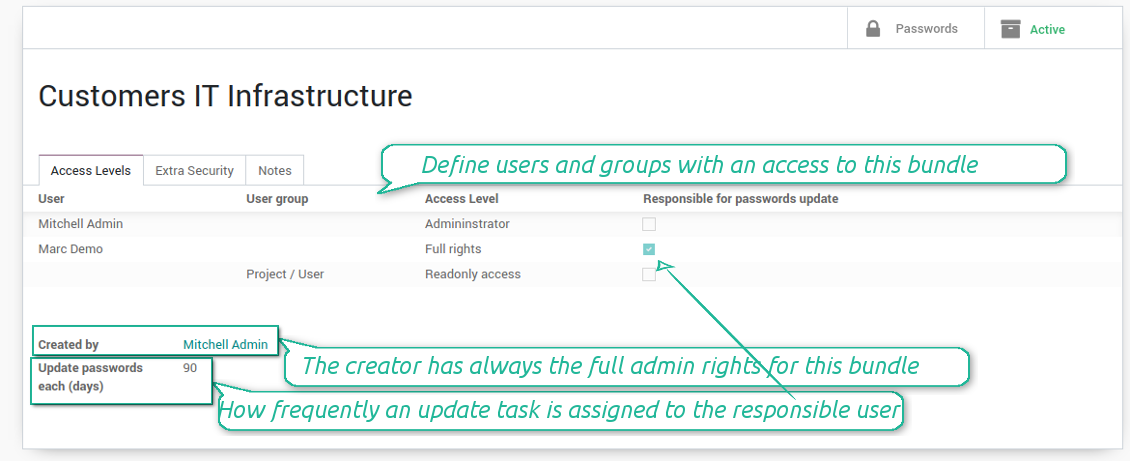
An access to a specific password is regulated on a bundle level. You may have as many bundles as you want. To share a bundle with a definite user, you should specify that user in the access levels' table. Alternatively you can assign a user group in the same table. For example, you can have a 'sales team' bundle and share it with all users with the right 'Sales Manager', or you can have a global bundle by sharing it with a user group 'Internal user'.
3 access levels to bundles, passwords, and tags are distinguished:
- Administrator may access, update or delete this bundle, its passwords, and its tags. This user is assumed to manage access levels for this bundle, to modify update policies, and set the extra password. The bundle creator is always its administrator.
- Full rights user may access, update or delete passwords and tags related to this bundle, but he/she can't change bundle itself and can't change bundle access levels or settings
- Readonly access user may observe and address passwords and tags of this bundle. Such users cannot modify any objects.
Take into account that the rules are not applied for the Odoo super user. The Odoo super admin (with id 1) has full rights for all passwords and bundles, although he is also required to enter the extra paraphrase to open a bundle.
The setting 'Responsible for password updates' allows to assign a user who should regularly change the paraphrase in passwords according to the bundle update policies. For such a user the special activity is automatically and regularly created to make sure passwords are secure. There might be only a single responsible for a bundle, and such responsible should have either the 'Administrator' or the 'Full rights' access level.
Innovative single-view interface
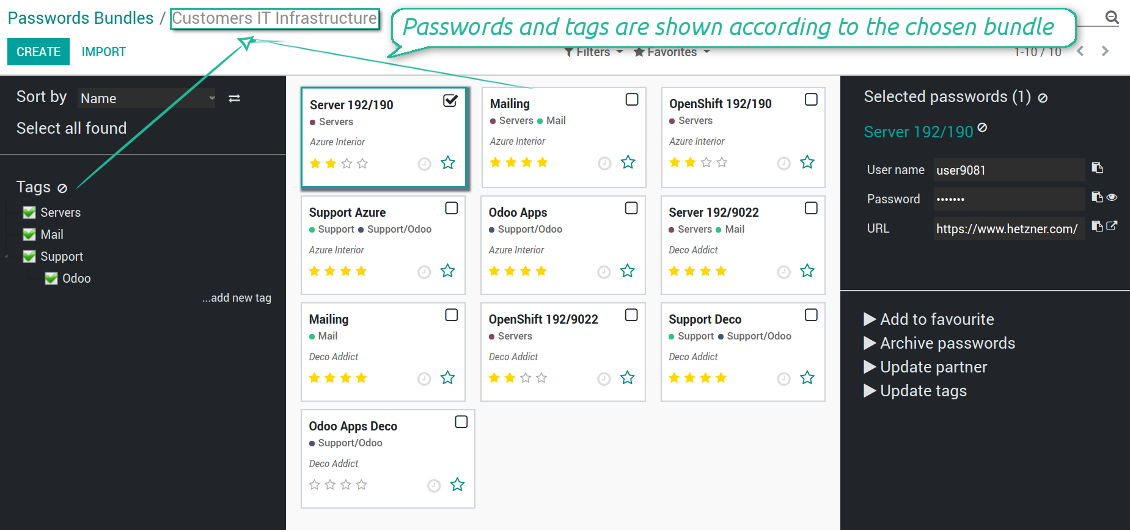
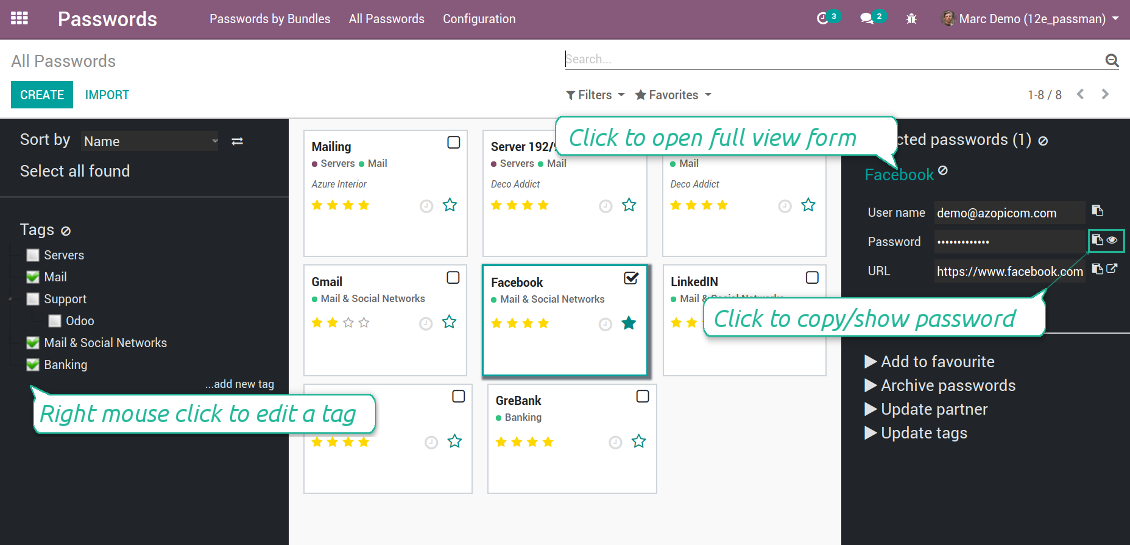
The password manager let you work with a few passwords simultaneously. Click on a password kanban card to add the key to the selection, and then address any or proceed a mass action. Possible mass actions are defined by an Odoo admin on the configuration page.
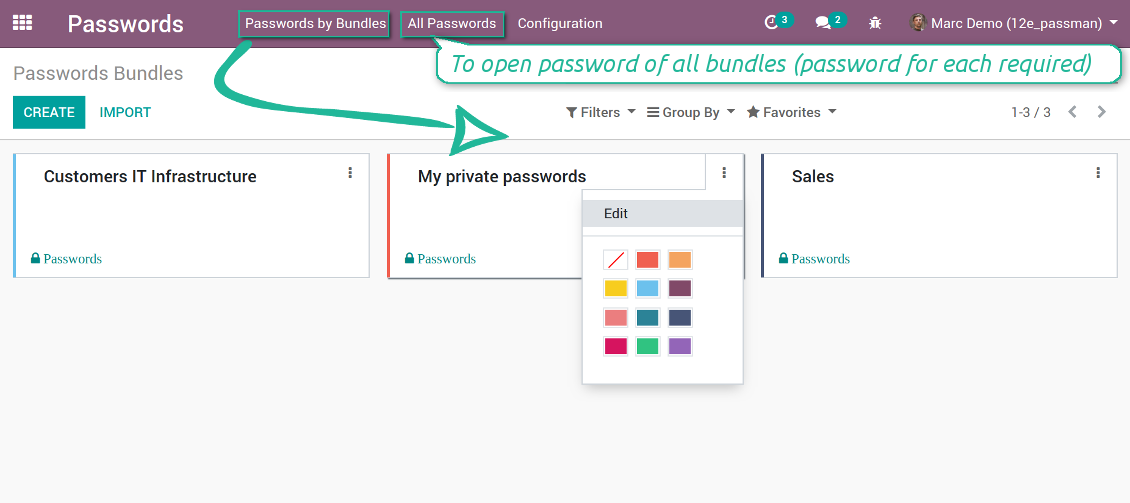
There are 2 menus to simplify working with passwords. The first - 'Passwords by bundles' - let users open keys of an exact vault. The second - 'All passwords' - let users simultaneously open all available for him/her keys. In the latter case an extra paraphrase for each bundle should be entered.
Скриншоты
Passwords are combined in bundles
Passwords single-view interface
Password form view
Password Manager configuration page
Passwords by all available for this user bundles
Passwords auto generation and check
Password strength is estimated in real-time to make sure users do not introduce too week keys.
The app also let you import passwords from electronic tables using the standard Odoo import tools.
Скриншоты
Password generator wizard
Import passwords from tables
Encryption and protection of passwords
For each vault you can define update policies in days. If the password has not been changed during the specified period, Odoo will generate an activity for responsible users. To maximize security, change you passwords regularly!
Passwords Security Layers
Although, there is no way to provide 100% security in the Internet, this password manager tries to minimize potential risks.
First of all, the tool symmetrically encrypt all passwords. It means that to decrypt a password, plotters should know the exact decryption algorithm and a bundle decryption key.
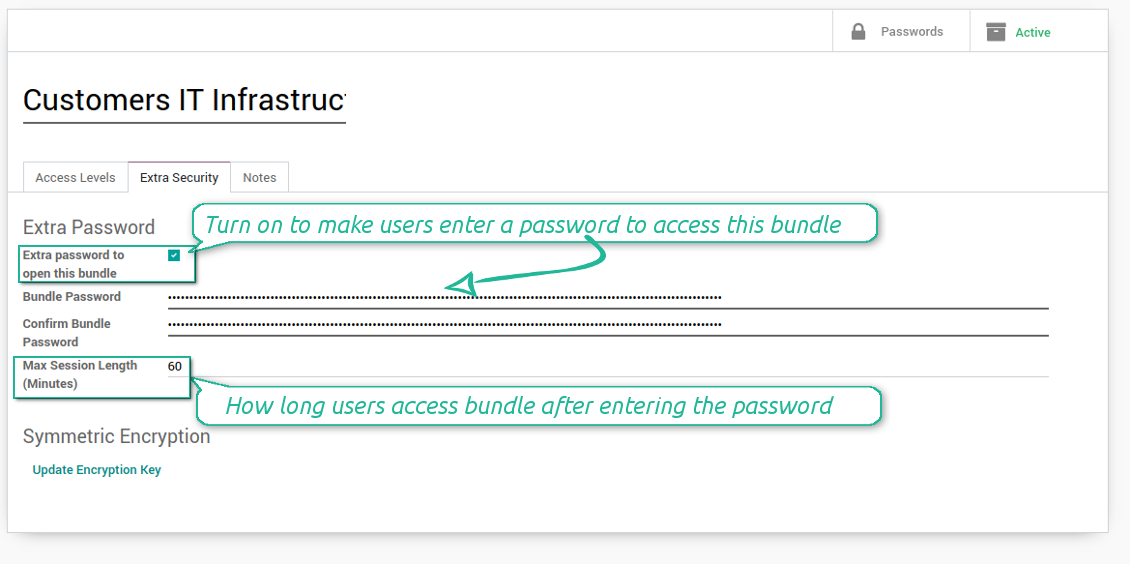
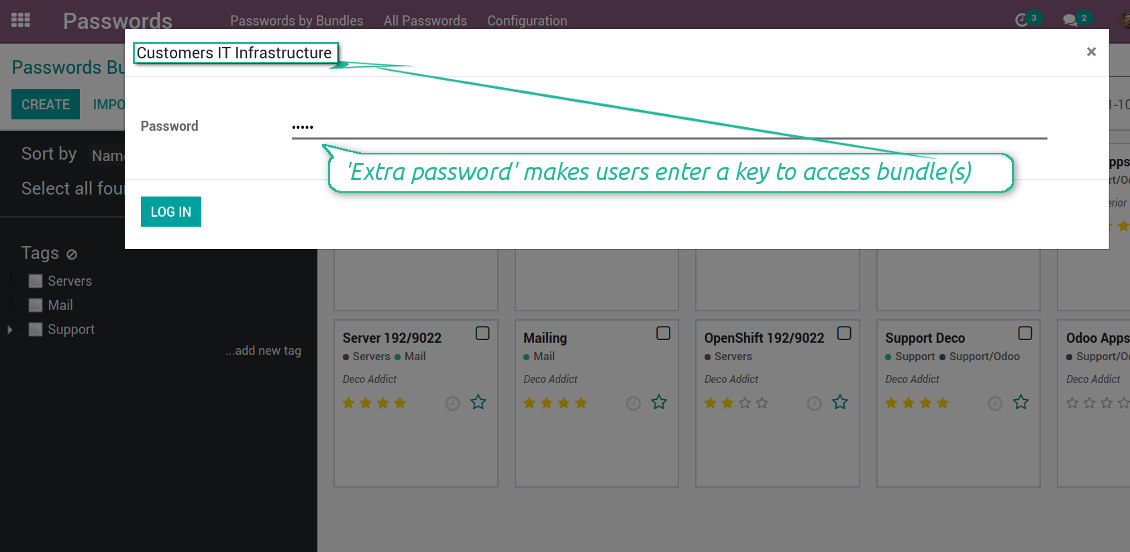
Second of all, you can assign the extra security password for any bundle. In such a case to access passwords in the interface, any user should enter a paraphrase. Even if a user has full rights for a bundle, he/she should always know that password. Besides, that paraphrase might be changed at any moment by the bundle admin (if that admin himself knows that paraphrase). Be cautious: do not forget the password. It is hashed and even the PostreSQL super user can't recover it.
Third of all, the security rights are programmed in such a way they can't be changed without the tool source code modification. Even the Odoo super user is not able to change policies.
Скриншоты
Passwords access levels
Extra password to open a bundle
Bundle extra paraphrase required
Custom fields and types for password keys
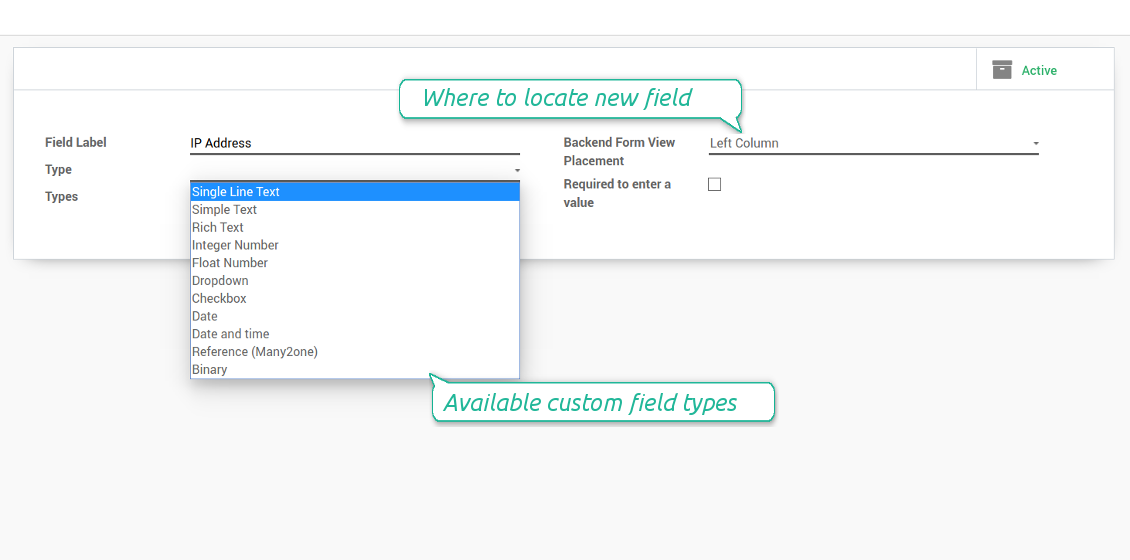
Structure passwords by special types and choose fields for each types individually. Thus, set of columns for 'virtual servers' and 'email servers' might be different.
Скриншоты
Passwords' custom fields
Custom fields on password form
Custom fields for password: add any data required
Linked to Odoo contacts
Скриншоты
Passwords by partners
Very good password management module
Easy installation and quick setup
Советы по настройке и установке для Password Manager Odoo v.11
Python dependencies
To guarantee tool correct work you would need a number of Python libraries: zxcvbn, cryptography:
pip install zxcvbn cryptography
Часто задаваемые вопросы о Password Manager Odoo v.11
Как посмотреть все пароли партнёра?
Чтобы увидеть все пароли партнёра, откройте Контакты, карточку партнёра и нажмите смарт-кнопку 'Passwords'. Откроется приложение Password Manager со всеми паролями этого партнёра.
Как удалить пакет паролей (Password Manager)?
Кнопка 'Delete' скрыта в главном меню пакетов из соображений безопасности. Чтобы удалить пакет: 1. Три точки в правом верхнем углу пакета. 2. Откроется режим правки — нажмите 'Save'. 3. Над пакетом появится 'Action' — выберите 'Delete'.
Какова политика обновлений ваших инструментов?
По текущим правилам Odoo Apps Store:
- Модуль, купленный для версии 12.0 и ниже, даёт доступ ко всем версиям до 12.0 включительно.
- С версии 13.0 каждую версию модуля нужно покупать отдельно.
- Независимо от версии покупка даёт право на все обновления и исправления в рамках этой мажорной версии.
Команда faOtools эти правила не задаёт. Вопросы направляйте напрямую представителям Odoo Apps Store.
Как установить приложение на Odoo.sh?
Самый прямой способ - встроенный сценарий магазина Odoo:
1. Откройте страницу модуля и нажмите Deploy on odoo.sh
2. Вас перенаправит на GitHub. Войдите в аккаунт и нажмите Create a new repo или выберите существующий. Репозиторий должен быть закрытым: публиковать приложения по лицензии OPL-1 нельзя. При необходимости создайте новый репозиторий для проекта Odoo.sh
3. Затем в odoo.sh нажмите Deploy, подтвердите решение и нажмите Continue. Так запустится установка.
Эти шаги ставят приложение на production-ветку проекта. Для других веток или обновления модуля:
1. Скачайте исходный код из магазина Odoo
2. Закоммитьте модуль в нужный репозиторий GitHub. Ни одна папка или файл приложения не должны попасть в .gitignore. Репозитории, которые создаёт odoo.sh, по умолчанию могут игнорировать важные пути (например /lib). Загрузите все каталоги и файлы модуля без исключений
3. Разверните целевую ветку проекта odoo.sh или дождитесь автоматической сборки, если так настроено.
Как установить приложение на свой сервер?
2. Перезапустите сервер Odoo;
3. Включите режим разработчика (технические настройки);
4. Обновите список приложений (меню приложений);
5. Найдите приложение и нажмите Activate/Install;
6. Следуйте рекомендациям на странице приложения, если они есть.
У приложения есть дополнительные модули. Можно купить их позже?
Да. При этом Odoo сам кладёт все зависимости в корзину: исключите уже купленные инструменты, чтобы не заплатить дважды.
Я развернул приложение на Odoo.sh и вижу предупреждение или ошибку в тестах
Odoo Красное или оранжевое предупреждение не влияет на функции приложения. Иногда наши модули не проходят стандартные автотесты, потому что те ждут поведение, которое противоречит целям приложения. Например, мы меняем расчёт цены, а тесты ядра сравнивают итог со стандартным алгоритмом.
Сначала проверьте саму развёрнутую базу: всё ли работает?
Если всё же считаете, что предупреждение ломает функции, напишите нам и пришлите полные логи установки и полный список установленных модулей (ядро и сторонние).
Можно ли купить приложение напрямую у вас?
Нет, мы распространяем инструменты только через официальный магазин приложений Odoo.
Я хочу получить скидку
К сожалению, у нас нет технической возможности давать индивидуальные цены.
Можно ли поставить приложение на базу Odoo Online (SaaS)?
Нет, сторонние приложения нельзя использовать на Odoo Online. Odoo SaaS это блокирует.
У инструмента есть зависимости. Нужно ли их покупать?
Да, для корректной работы нужны все модули из зависимостей. Цена на странице приложения уже включает необходимые зависимости.
Какова цена модуля в долларах США? Почему она меняется?
Цены на наши модули заданы в евро. Магазин Odoo пересчитывает их в другие валюты по своему внутреннему курсу. Поэтому цена в долларах США может меняться при обновлении курса.
Тексты приложения и веб-сайта на языках, отличных от английского, переведены с помощью ИИ и согласованы с официальными переводами Odoo. Если вы заметили ошибку, отправьте тикет о переводе и мы исправим его.
Отправка отчетов об ошибках
Если вы столкнулись с ошибками или непоследовательным поведением, не стесняйтесь обращаться к нам. Мы гарантируем предоставление исправлений в течение 60 дней с момента покупки и очень заинтересованы в улучшении наших инструментов даже по истечении этого периода.
Чтобы связаться с нами, вам не нужен номер телефона или кредитная карта. Вам нужно всего лишь пройти короткую регистрацию по электронной почте, которая займет не более 30 секунд.
Укажите в запросе как можно больше сведений: снимки экрана, журналы сервера Odoo, полное описание воспроизведения проблемы и так далее. Обычно подготовка рабочего плана по проблеме (если ошибка подтверждена) или рекомендаций по необходимым действиям (в противном случае) занимает несколько рабочих дней.
Запросы на публичные функции и идей модулей (бесплатная разработка)
Мы очень заинтересованы в улучшении наших инструментов и будем благодарны за любые отзывы. Если ваши требования общедоступны и могут быть эффективно реализованы, команда включит их в наш список дел.
Такой список дел обрабатывается регулярно и не предполагает дополнительных комиссий. Хотя мы не можем обещать сроки и окончательный дизайн, это может быть хорошим способом получить желаемые функции без вложений и рисков.
Чтобы связаться с нами, вам не нужен номер телефона или кредитная карта. Вам нужно всего лишь пройти короткую регистрацию по электронной почте, которая займет не более 30 секунд.

Инструмент, чтобы раскладывать вложения Odoo по папкам и синхронизировать каталоги с Google Drive, OneDrive/SharePoint, Nextcloud/ownCloud, Dropbox, Amazon S3, Box и NAS. Файловый менеджер. DMS
398€
Инструмент для двусторонней синхронизации вложений Odoo с OneDrive
487€
Инструмент для двусторонней синхронизации вложений Odoo с Google Drive
487€
Инструмент, чтобы строить глубокую базу знаний для своих и внешних. Knowledge System. KMS. Правки как в вики
398€
Инструмент, чтобы задавать цели KPI и контролировать выполнение по периодам. Дашборды KPI. Конструктор. Графики

Инструмент для услуг по записи: от бронирования до продаж и отзывов
398€
Инструмент, чтобы управлять Odoo из любимых AI-чатов через MCP. Claude. Любой AI с MCP.

Инструмент, чтобы собрать разные события Odoo в несколько настраиваемых суперкалендарей
