Password Manager v.11
The tool to safely keep passwords for shared use







Nowadays team work assumes a shared access to multiple IT services. Such collaboration is not simple, since definite users should know some passwords and not others. Besides, such passwords should be frequently updated, and team members should learn topical authentication parameters. Often this business process becomes a total mess and results in time losses and leak of important data. The situation is especially crucial in case you administrate customers-related services.
This is the tool to solve the trouble. The app let you organize the system of safe passwords keeping with multiple security layers to efficiently structure, find, and share password bundles.
- a core app to manage vaults and passwords.
Jego cena to
198€
178€.
- an extension to add custom fields for password keys. Features assumed by this app are marked by the icon .
Jego cena to
38€
37€.
Shared password vaults for team use
Passwords Sharing Policies
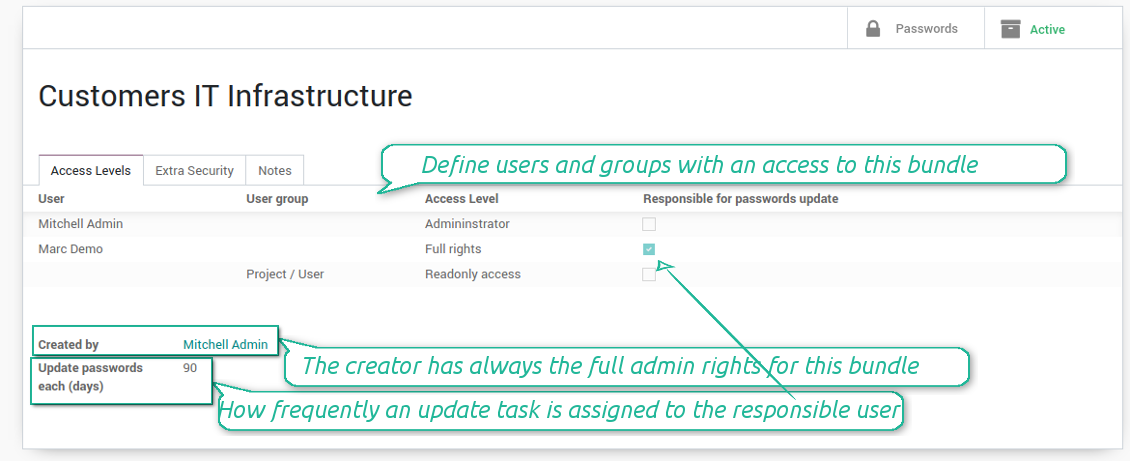
An access to a specific password is regulated on a bundle level. You may have as many bundles as you want. To share a bundle with a definite user, you should specify that user in the access levels' table. Alternatively you can assign a user group in the same table. For example, you can have a 'sales team' bundle and share it with all users with the right 'Sales Manager', or you can have a global bundle by sharing it with a user group 'Internal user'.
3 access levels to bundles, passwords, and tags are distinguished:
- Administrator may access, update or delete this bundle, its passwords, and its tags. This user is assumed to manage access levels for this bundle, to modify update policies, and set the extra password. The bundle creator is always its administrator.
- Full rights user may access, update or delete passwords and tags related to this bundle, but he/she can't change bundle itself and can't change bundle access levels or settings
- Readonly access user may observe and address passwords and tags of this bundle. Such users cannot modify any objects.
Take into account that the rules are not applied for the Odoo super user. The Odoo super admin (with id 1) has full rights for all passwords and bundles, although he is also required to enter the extra paraphrase to open a bundle.
The setting 'Responsible for password updates' allows to assign a user who should regularly change the paraphrase in passwords according to the bundle update policies. For such a user the special activity is automatically and regularly created to make sure passwords are secure. There might be only a single responsible for a bundle, and such responsible should have either the 'Administrator' or the 'Full rights' access level.
Innovative single-view interface
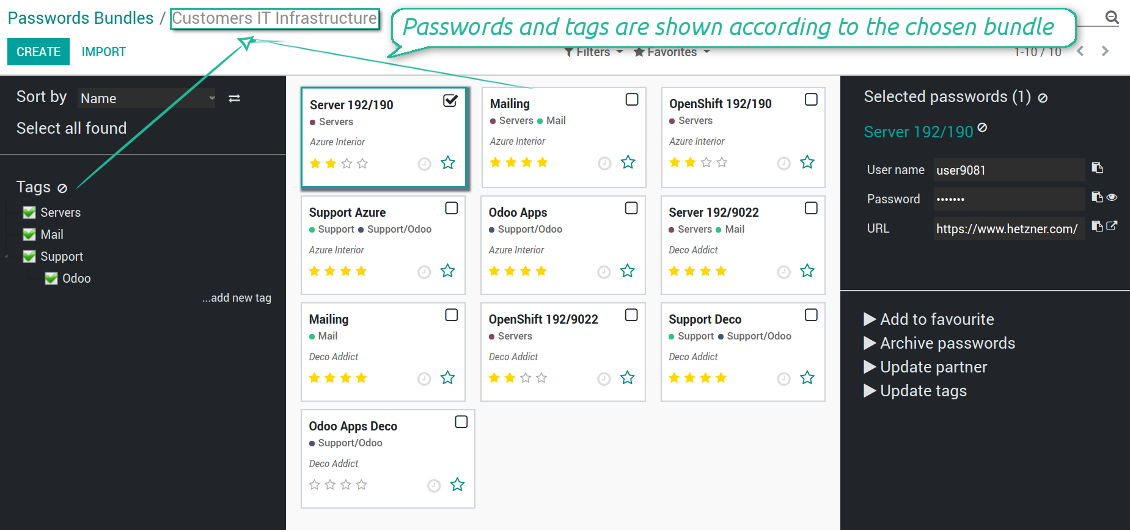
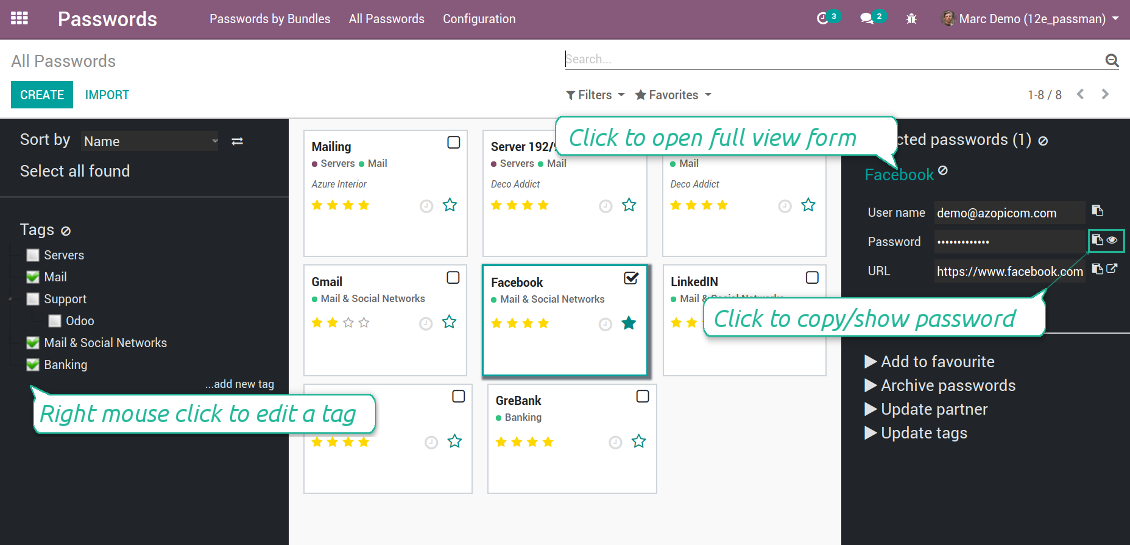
The password manager let you work with a few passwords simultaneously. Click on a password kanban card to add the key to the selection, and then address any or proceed a mass action. Possible mass actions are defined by an Odoo admin on the configuration page.
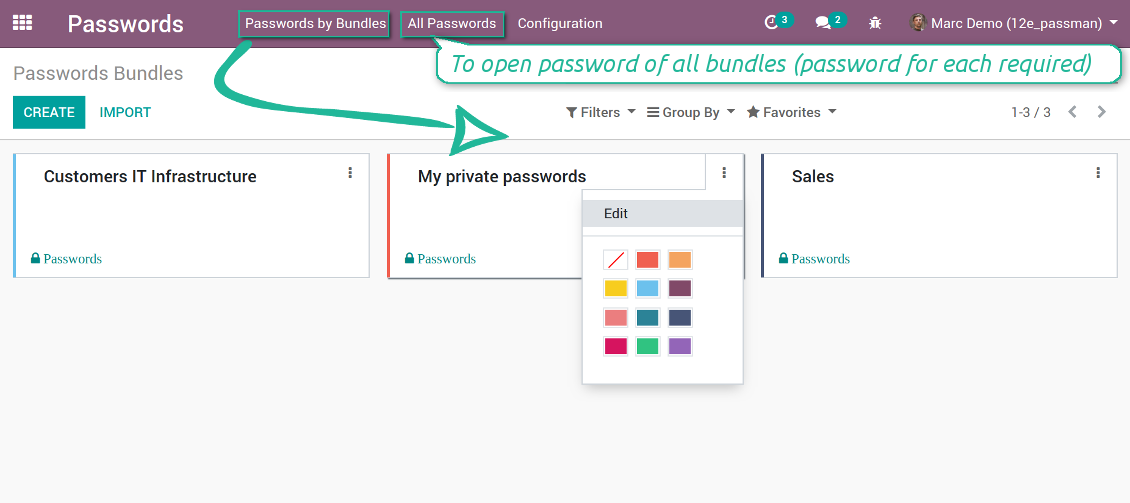
There are 2 menus to simplify working with passwords. The first - 'Passwords by bundles' - let users open keys of an exact vault. The second - 'All passwords' - let users simultaneously open all available for him/her keys. In the latter case an extra paraphrase for each bundle should be entered.
Zdjęcia ekranu
Passwords are combined in bundles
Passwords single-view interface
Password form view
Password Manager configuration page
Passwords by all available for this user bundles
Passwords auto generation and check
Password strength is estimated in real-time to make sure users do not introduce too week keys.
The app also let you import passwords from electronic tables using the standard Odoo import tools.
Zdjęcia ekranu
Password generator wizard
Import passwords from tables
Encryption and protection of passwords
For each vault you can define update policies in days. If the password has not been changed during the specified period, Odoo will generate an activity for responsible users. To maximize security, change you passwords regularly!
Passwords Security Layers
Although, there is no way to provide 100% security in the Internet, this password manager tries to minimize potential risks.
First of all, the tool symmetrically encrypt all passwords. It means that to decrypt a password, plotters should know the exact decryption algorithm and a bundle decryption key.
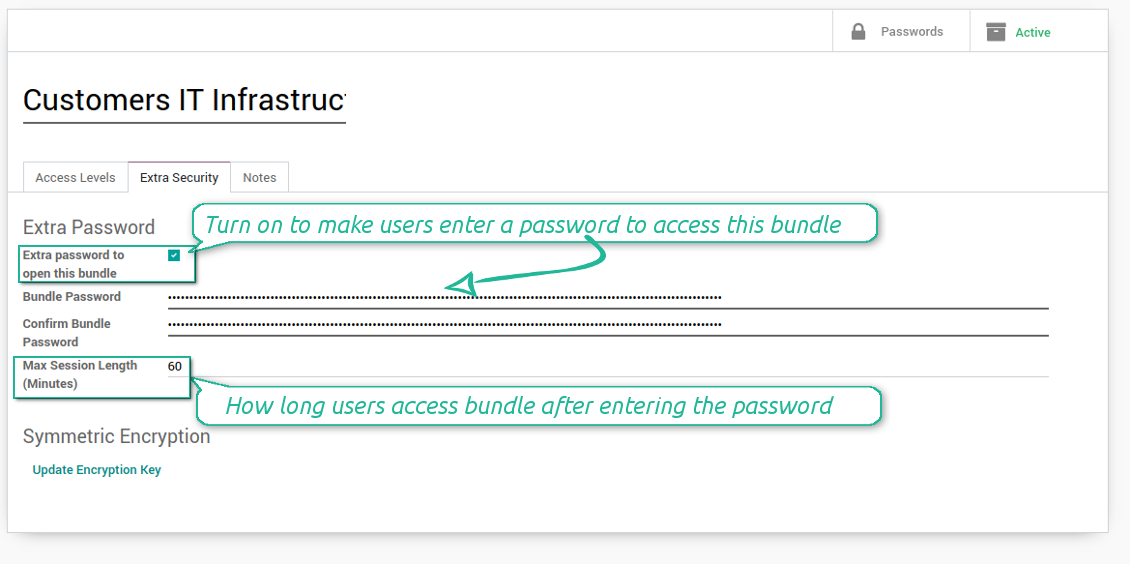
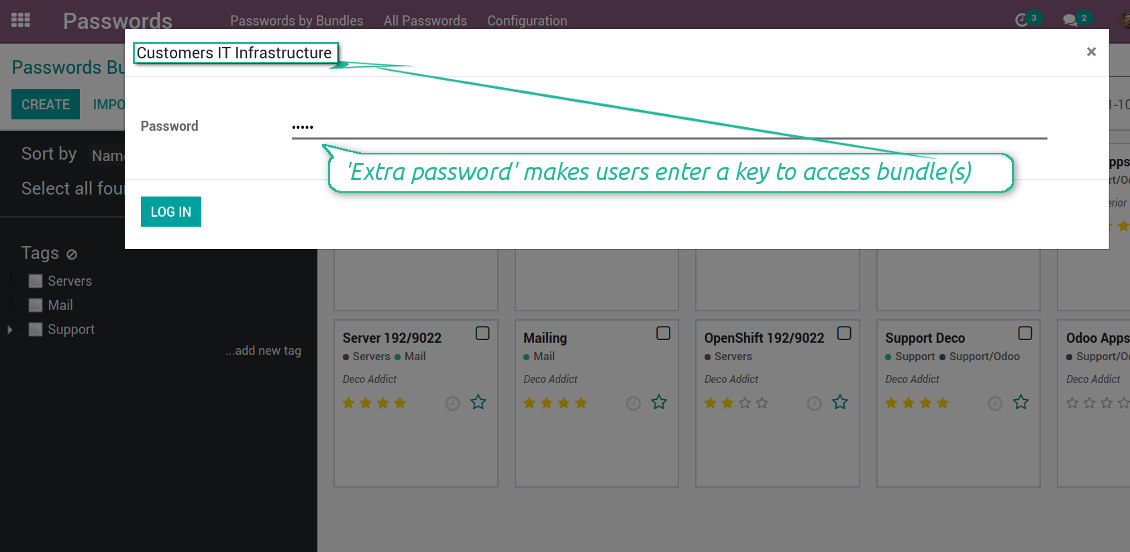
Second of all, you can assign the extra security password for any bundle. In such a case to access passwords in the interface, any user should enter a paraphrase. Even if a user has full rights for a bundle, he/she should always know that password. Besides, that paraphrase might be changed at any moment by the bundle admin (if that admin himself knows that paraphrase). Be cautious: do not forget the password. It is hashed and even the PostreSQL super user can't recover it.
Third of all, the security rights are programmed in such a way they can't be changed without the tool source code modification. Even the Odoo super user is not able to change policies.
Zdjęcia ekranu
Passwords access levels
Extra password to open a bundle
Bundle extra paraphrase required
Custom fields and types for password keys
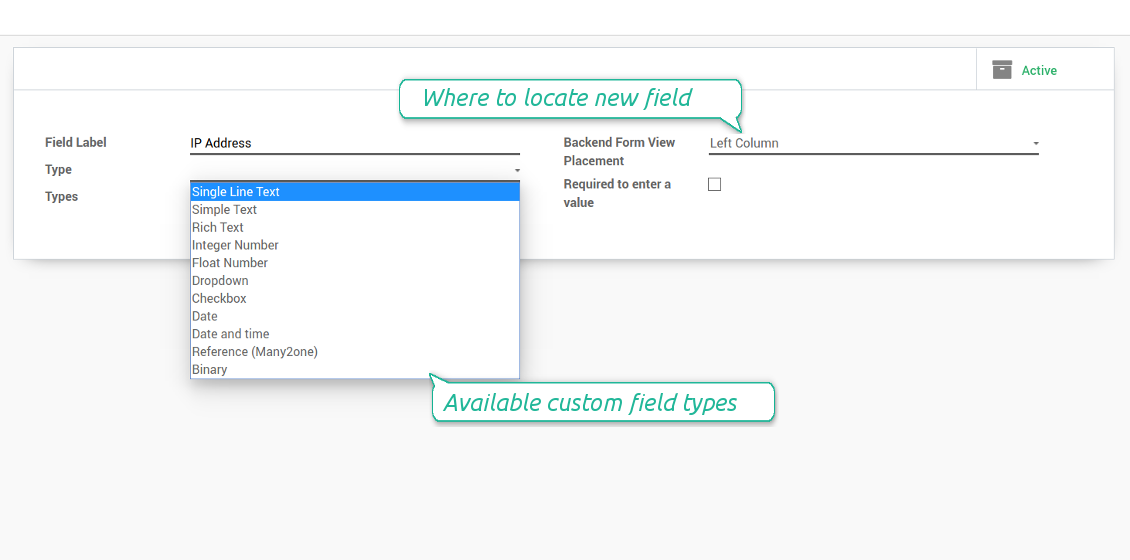
Structure passwords by special types and choose fields for each types individually. Thus, set of columns for 'virtual servers' and 'email servers' might be different.
Zdjęcia ekranu
Passwords' custom fields
Custom fields on password form
Custom fields for password: add any data required
Linked to Odoo contacts
Zdjęcia ekranu
Passwords by partners
Very good password management module
Easy installation and quick setup
Wskazówki konfiguracji i instalacji dla Password Manager Odoo v.11
Python dependencies
To guarantee tool correct work you would need a number of Python libraries: zxcvbn, cryptography:
pip install zxcvbn cryptography
Często zadawane pytania o Password Manager Odoo v.11
Jak zobaczyć wszystkie hasla partnera?
Aby zobaczyć wszystkie hasla, wejdz w Kontakty, otwórz partnera i kliknij przycisk 'Passwords'. Przejdziesz do Password Manager i zobaczysz wszystkie hasla tego partnera.
Jak usunąć pakiet haseł (Password Manager)?
Przycisk 'Delete' jest ukryty w glownym menu pakietów ze wzgledow bezpieczeństwa. Usuwanie: 1. Trzy kropki w prawym gornym rogu. 2. Tryb edycji, 'Save'. 3. Nad pakietem 'Action' i 'Delete'.
Jakie sa zasady aktualizacji Waszych narzędzi?
Zgodnie z biezacymi zasadami Odoo Apps Store:
- Modul kupiony dla wersji 12.0 lub starszej daje dostęp do wszystkich wersji do 12.0.
- Od wersji 13.0 każda wersja modulu musi byc kupiona osobno.
- Niezależnie od wersji zakup daje prawo do wszystkich aktualizacji i poprawek w ramach wersji glownej.
Zespol faOtools nie kontroluje tych zasad. Pytania kierujcie bezpośrednio do przedstawicieli Odoo Apps Store.
Jak zainstalowac aplikacje na Odoo.sh?
Najbardziej bezpośrednie podejscie to wbudowany przeplyw sklepu Odoo:
1. Otwórz stronę modulu i kliknij Deploy on odoo.sh
2. Zostaniesz przekierowany do GitHub. Zaloguj sie i kliknij Create a new repo lub użyj istniejącego. Repozytorium musi byc prywatne. Publikowanie aplikacji na licencji OPL-1 jest zabronione. W razie potrzeby utwórz nowe repo dla projektu Odoo.sh
3. Następnie w odoo.sh kliknij Deploy, potwierdź i kliknij Continue. Instalacja sie rozpoczyna.
Te kroki instaluja aplikacje na galezi production. Dla innych galezi lub aktualizacji:
1. Pobierz kod zrodlowy ze sklepu Odoo
2. Zrób commit modulu do repozytorium GitHub. Żaden folder/plik aplikacji nie może byc w .gitignore. Repo tworzone przez odoo.sh mogą ignorowac ważne ścieżki (np. /lib). Prześlij wszystkie katalogi i pliki modulu
3. Wdroz docelowa galaz projektu odoo.sh lub poczekaj na automatyczny build, jeśli tak ustawiono.
Jak zainstalowac aplikacje na wlasnym serwerze?
2. Uruchom ponownie serwer Odoo;
3. Wlacz tryb programisty (ustawienia techniczne);
4. Zaktualizuj liste aplikacji (menu Aplikacje);
5. Znajdź aplikacje i kliknij Activate/Install;
6. Postępuj zgodnie ze wskazowkami na stronie aplikacji, jeśli istnieją.
Aplikacja ma dodatkowe dodatki. Czy moge kupic je później?
Tak. Odoo automatycznie dodaje zależności do koszyka: wylacz juz zakupione narzędzia, aby nie zaplacic dwa razy.
Wdrozyłem aplikacje na Odoo.sh i widze ostrzeżenie/blad w testach
Czerwone/pomaranczowe ostrzeżenie nie wplywa na funkcje aplikacji. Czasem nasze moduly nie przechodzą standardowych testów automatycznych, bo te zakladaja zachowanie sprzeczne z celami aplikacji. Na przyklad zmieniamy obliczanie ceny, a testy Odoo porownuja cenę koncowa ze standardowym algorytmem.
Najpierw sprawdź funkcje wdroznej bazy. Czy wszystko dziala?
Jeśli nadal uwazasz, ze ostrzeżenie wplywa na rzeczywiste funkcje, skontaktuj sie z nami i prześlij pelne logi instalacji oraz pelna liste wdroznych modulow (rdzeń i firmy trzecie).
Czy moge kupic aplikacje bezpośrednio u Was?
Nie, dystrybuujemy narzędzia tylko przez oficjalny sklep aplikacji Odoo.
Chcialbym uzyskać znizke
Niestety nie mamy srodkow technicznych, by oferowac ceny indywidualne.
Czy moge zainstalowac aplikacje na bazie Odoo Online (SaaS)?
Nie, aplikacji innych firm nie można używać na Odoo Online. Odoo SaaS blokuje te mozliwosc.
Narzędzie zależy od innych aplikacji. Czy musze je kupic?
Tak, narzędzie wymaga wszystkich modulow oznaczonych jako zależności. Cena na stronie aplikacji juz je obejmuje.
Jaka jest cena modulu w dolarach amerykanskich? Dlaczego sie zmienila?
Ceny naszych modulow sa w euro. Sklep Odoo przelicza je na inne waluty wedlug wewnetrznego kursu. Dlatego cena w dolarach amerykanskich może sie zmienić po aktualizacji kursu.
Sformułowania aplikacji i witryny w językach innych niż angielski są wspomagane przez AI i zgodne z oficjalnymi tłumaczeniami Odoo. Jeśli zauważysz błąd, wyślij zgłoszenie o poprawność tłumaczeń a naprawimy to.
Zgłaszanie błędów
Jeśli zauważysz błędy lub niespójne działanie, napisz do nas. Gwarantujemy poprawki w 60 dni od zakupu i dalej ulepszamy narzędzia.
Nie potrzebujesz telefonu ani karty, by się z nami skontaktować. Wystarczy krótka rejestracja e-mail, która nie zajmuje więcej niż 30 sekund.
Dołącz jak najwięcej szczegółów: zrzuty ekranu, logi serwera Odoo i pełny opis odtworzenia problemu. Zwykle kilka dni roboczych zajmuje plan (gdy błąd potwierdzono) albo wskazówki (w przeciwnym razie).
Publiczne zgłoszenia funkcji i pomysły na moduły (bezpłatny rozwój)
Jesteśmy mocno zmotywowani do ulepszania narzędzi i wdzięczni za każdą opinię. Jeśli wymagania są użyteczne publicznie i da się je sprawnie wdrożyć, zespół wpisze je na listę zadań.
Taka lista zadań jest przetwarzana regularnie i nie zakłada dodatkowych opłat. Choć nie możemy obiecać terminów i ostatecznego projektu, to dobry sposób na pożądane funkcje bez inwestycji i ryzyka.
Nie potrzebujesz telefonu ani karty, by się z nami skontaktować. Wystarczy krótka rejestracja e-mail, która nie zajmuje więcej niż 30 sekund.

Narzędzie do elastycznego układania załączników Odoo w folderach i synchronizacji katalogów z klientami chmury: Google Drive, OneDrive/SharePoint, Nextcloud/ownCloud, Dropbox, Amazon S3, Box i NAS. DMS. Menedżer plików. System zarządzania dokumentami
398€
Narzędzie do: automatycznie synchronizuj Odoo załączniki z OneDrive pliki w oba ways
487€
Narzędzie do: automatycznie synchronizuj Odoo załączniki z Google Drive pliki w oba ways
487€
Narzędzie do budowy głębokiej i uporządkowanej bazy wiedzy do użytku wewnętrznego i zewnętrznego. Knowledge System. KMS. Rewizje w stylu wiki.
398€
Narzędzie do ustawiania celów KPI i kontroli ich realizacji według okresów. Pulpity KPI. Projektant pulpitów. Wykresy KPI

Narzędzie do zarządzania usługami czasowymi od rezerwacji po sprzedaż i opinie
398€
Narzędzie do zarządzania Odoo z ulubionych czatów AI przez MCP. Claude. Każde AI z MCP.

Narzędzie do łączenia różnych zdarzeń Odoo w kilka konfigurowalnych superkalendarzy
