Flexible Timetables and Shifts v.16
The tool to plan, share and control employees shifts in a form of weekly timetables. Work schedule. Work shift calendar




This is the Odoo app to organize teamwork when employees have flexible timetables. The tool allows and forces users to plan shifts in advance. Peers know their colleagues working time, while HR managers control attendance.
- the core app to plan shifts and control timetables. Seu preço é 98€.
- the optional free extension that introduces the Odoo Enterprise Gantt view for shifts. The features assumed by this add-on are marked by the icon
Comfortable shifts planning
The app introduces the innovative work calendar where users create shifts just by choosing a period and update those by merely dragging a card. A minute to plan a whole week. As flexible as needed
Team collaboration
Employees can access each other shifts calendar. Work schedule can be also printed to be physically stuck in the office. Thus, users always know where and when their colleagues are available
Work calendar interface
Find a specific user shift using the built-in calendar filters by employee, department, context, or company. Analyze a single user or the whole team. Control shifts on the Odoo Enterprise Gantt view
Odoo weekly timetables
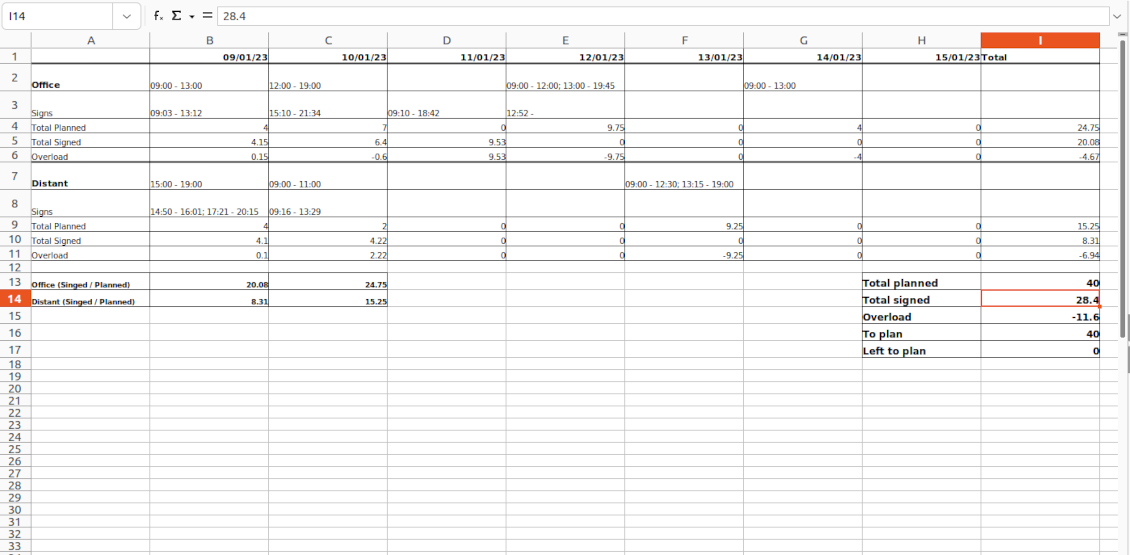
Shifts are auto-combined into weekly timetables from Monday to Sunday. There, employees check themselves while HR managers control the correctness and completeness of plans
HR control
Based on the Odoo attendance features, HR administrators supervise shift fulfillment right in employees' timetables. Turn on the approval option also to force users to get a confirmation for their shifts
Working context (reasons)
For both attendance and planned shifts, users may be asked to choose a context. The list is up to you: 'distant', 'office central', 'office west', and so on. The features let quickly understand where or why employees work
Timetable reminders
Configure Odoo to remind employees to plan shifts for the next week. Notify users of being late if they have not checked in but were previously planning to work
Multiple companies and timezones
The app fully supports multi-timezones and multi-companies environments. Perfect for geographically distributed teams where cooperation becomes really crucial.
Team Work Schedule
Shifts and working calendar
-
The app's key idea is that employees may independently and flexibly plan shifts for the next or a few next weeks
-
In this way, all team members always know when (time) and where (context) to find their colleagues. Ordinary users can access anybody else schedule but, surely, can change only their own
-
Shifts are organized in the Odoo calendar interface with instant filtering by employees, department, context, and company. To register a new shift, that's enough to choose a period and a reason. To update a shift just drag it and drop it to another time slot
-
The interface fully supports multiple timezones, so the module is perfect for geographically distributed teams
-
The tool allows printing a work schedule of a specified period (up to 31 days) to have a physical copy on a whiteboard, for instance. The layout is configurable: for example, make it A3 or A4, add or remove a company logo
Timetable interface
-
Planned shifts are automatically combined in weekly timetables from Monday to Sunday
-
There, employees can control themselves on how much working time is planned in comparison to how much it should be according to the contract
-
The timetable interface groups shifts by working contexts. It makes analysis much more comfortable and lets make corrections in time. For example, if you had certain restrictions on the 'distant work', here it is under full control
-
To simplify shifts planning, employees are allowed to save any timetable as a template, so they can re-use the same schedule for other weeks
-
It is possible to export a specific timetable as an Excel table to share or print out
Managerial control and attendance
-
Besides the owners, timetables are available only for this employee department manager and for all users with the access group 'HR administrators'
-
The app relies on the Odoo attendance functionality. When checked in, a user might be optionally forced to choose a working context (reason)
-
Thus, HR administrators not only see planned shifts but also control their fulfillment: when a user actually checked in and out, how much work time is planned, how much is actually spent, and what calculated overload is
-
Superiors and subordinates might discuss any scheduling issues and set up activities right under each specific weekly timetable
-
The app supports multi companies. Users can access only their real colleagues' shifts. If a user has an employee in a few companies, he/she controls timetables of all of those but the app makes sure there are no overlappings
Approval workflow
-
The tool lets optionally introduce the approval workflow for timetables based on the states update Planning > To approve > Approved
-
Then, after planning shifts, an employee should send a weekly timetable to their department manager for confirmation (the button 'Send for approval')
-
Department managers and any HR administrators subscribed for this employee 'Timetables and shifts' subtype would get a notification that a timetable state has been updated
-
Such managers or any user with the right 'HR Administrator' may confirm (the button 'Approve') or refuse (the button 'Refuse') the shift schedule. The decision principles are fully up to you
-
As a weekly timetable is sent for approval or has been already approved, ordinary employees cannot any more update shifts for that week. In this way, team collaboration becomes much more predictable and might be planned beforehand.
Sugestões de configuração e instalação para Flexible Timetables and Shifts Odoo v.16
Contexts (reasons) for shifts and attendances
The app allows to configure an unlimited number of working contexts on the Odoo HR configuration page.
One of those contexts should be set as default. Then, it would be entered as the first choice for planned shifts and attendances.
When a user plans shifts, he/she would be asked to introduce a context.
It is possible to turn on context selection also when a user checks in Odoo. Otherwise, default context would be entered to attendances.
Timetable combines shifts and attendances by contexts. In case you have rarely used contexts, mark those as 'Do not show if empty' to avoid too many lines.
Notifications to plan shifts
Reminders to create timetables are sent for the next week. Configure days of the previous week when to notify employees on the configuration page.
Only employees with the flagged setting "Timetable Notifications" would receive reminders.
To change the reminder email, go to the Odoo technical settings > Email > Templates. Find there 'Timetable for the next week'. You are welcome to introduce any changes to subject or body and to update translations.
Change time of the reminder through the Odoo technical settings > Automation > Scheduled jobs > 'Notify employees to plan working time for the next week'.
Notifications of being late
Reminders of being late is sent if a user at this particular moment has a planned shift, but he/she has not checked in.
Only employees with the flagged setting "Being Late Notifications" would receive reminders.
To change the reminder email, go to the Odoo technical settings > Email > Templates. Find there 'Timetable: you are late'. You are welcome to introduce any changes to subject or body and to update translations.
Set up frequency of the reminder through the Odoo technical settings > Automation > Scheduled jobs > 'Notify employees of being late'. By default check is done once an hour.
Hours to plan (contract hours)
How many hours should be planned for a week is defined per each user individually. Define contract hours on an employee form.
Perguntas frequentes sobre Flexible Timetables and Shifts Odoo v.16
Posso criar um calendário para colaboradores que nao sao utilizadores?
A ferramenta serve para os utilizadores planearem turnos: a pessoa inicia sessão e define os turnos para os outros verem. E preciso uma conta. Por segurança, nao e possível sem conta.
Quais sao as políticas de atualização das vossas ferramentas?
Segundo as políticas atuais da Odoo Apps Store:
- Cada módulo comprado para a versao 12.0 ou anterior da acesso a todas as versões ate 12.0.
- A partir da versao 13.0, cada versao do módulo deve ser comprada em separado.
- Independentemente da versao, a compra da direito a todas as atualizações e correcoes dentro de uma versao major.
A equipa faOtools nao controla essas políticas. Para questões, contacte diretamente os representantes da Odoo Apps Store.
Como posso instalar a aplicacao no Odoo.sh?
A forma mais direta e usar o fluxo da loja Odoo:
1. Abra a página do módulo e clique em Deploy on odoo.sh
2. Será redirecionado para o GitHub. Inicie sessão e clique em Create a new repo ou use um existente. O repositorio deve ser privado. Nao e permitido publicar as apps com licença OPL-1. Se necessário, crie um repo novo para o projeto Odoo.sh
3. Depois, no odoo.sh, clique em Deploy, confirme e clique em Continue. A instalação começa.
Estes passos instalam a app no ramo de produção. Para outros ramos ou para atualizar:
1. Transferir o código-fonte da loja Odoo
2. Fazer commit do módulo no repositorio GitHub. Nenhuma pasta/ficheiro da app deve estar no .gitignore. Os repos criados pelo odoo.sh podem ignorar caminhos importantes (p. ex. /lib). Envie todos os diretórios e ficheiros do módulo
3. Fazer deploy do ramo alvo do projeto odoo.sh ou esperar pela compilacao automática se as definições o assumirem.
Como devo instalar a aplicacao no meu próprio servidor?
2. Reinicie o servidor Odoo;
3. Ative o modo programador (definições técnicas);
4. Atualize a lista de aplicações (menu Aplicações);
5. Encontre a app e clique em Activate/Install;
6. Siga as indicações na página da app, se existirem.
A app tem extras. Posso compra-los mais tarde?
Sim. O Odoo adiciona automaticamente as dependências ao carrinho: exclua as ferramentas ja compradas para nao pagar duas vezes.
Instalei a app no Odoo.sh e vejo um aviso/erro nos testes
Um aviso vermelho/laranja nao afeta as funções da app. Por vezes os nossos módulos nao passam os testes automáticos padrão, porque estes assumem um comportamento que conflitua com os objetivos da app. Por exemplo, alteramos o cálculo do preço e os testes Odoo comparam o preço final com o algoritmo padrão.
Primeiro, verifique as funções da base implantada. Esta tudo a funcionar?
Se ainda achar que o aviso afeta funções reais, contacte-nos e envie os registos completos de instalação e a lista completa de módulos implantados (nucleo e de terceiros).
Posso comprar a aplicacao diretamente junto de vos?
Nao, so distribuimos as ferramentas através da loja oficial de aplicações Odoo.
Gostaria de ter um desconto
Infelizmente, nao temos meios tecnicos para oferecer preços individuais.
Posso instalar a app na minha base Odoo Online (SaaS)?
Nao, as apps de terceiros nao podem ser usadas no Odoo Online. O Odoo SaaS bloqueia essa possibilidade.
A ferramenta depende de outras apps. Devo compra-las?
Sim, a ferramenta precisa de todos os módulos assinalados nas dependências. O preço na página da app ja as inclui.
Qual e o preço do módulo em dolares americanos? Porque mudou?
O preço dos nossos módulos e definido em euros. A loja Odoo converte para outras moedas segundo a taxa interna. Assim, o preço em dolares americanos pode mudar quando a taxa e atualizada.
Os textos da aplicação e do site em idiomas diferentes do inglês são assistidos por IA e estão alinhados com as traduções oficiais do Odoo. Se detetar um erro, enviar um pedido de tradução e nos corrigimos.
Bases de dados de demonstração Odoo (pré-visualizações)
Para esta aplicação, podemos fornecer uma base de dados de demonstração personalizada gratuita.
Não precisa de um número de telefone ou cartão de crédito para entrar em contacto connosco. Deve apenas passar por um breve registo de e-mail, que não demora mais de 30 segundos.
A seu pedido, preparamos uma base de dados de pré-visualização individual onde pode fazer qualquer teste e validar as suas hipóteses durante cerca de duas semanas.
Comunicação de erros
Se encontrar bugs ou comportamento inconsistente, não hesite em nos contactar. Garantimos o fornecimento de correções em até 60 dias após a compra e estamos intensamente interessados em melhorar nossas ferramentas mesmo após esse período.
Não precisa de um número de telefone ou cartão de crédito para entrar em contacto connosco. Deve apenas passar por um breve registo de e-mail, que não demora mais de 30 segundos.
Inclua o máximo de detalhes possível no seu pedido: capturas de ecrã, registos do servidor Odoo, uma descrição completa de como reproduzir o problema, entre outros. Normalmente, sao necessários alguns dias úteis para preparar um plano de trabalho para um problema (se for confirmado um erro) ou fornecer orientacoes sobre o que deve ser feito (caso contrário).
Pedidos de recursos públicos e ideias de módulos (desenvolvimento gratuito)
Estamos fortemente motivados para melhorar as nossas ferramentas e ficaríamos gratos por qualquer feedback. Se os seus requisitos forem de utilização pública e puderem ser implementados de forma eficiente, a equipa irá incluí-los na nossa lista de tarefas.
Esta lista de tarefas é processada regularmente e não envolve taxas extra. Embora não possamos prometer prazos e design final, pode ser uma boa forma de obter as características desejadas sem investimentos e riscos.
Não precisa de um número de telefone ou cartão de crédito para entrar em contacto connosco. Deve apenas passar por um breve registo de e-mail, que não demora mais de 30 segundos.

The tool to flexibly structure Odoo attachments in folders and synchronize directories with cloud clients: Google Drive, OneDrive/SharePoint, Nextcloud/ownCloud, and Dropbox. DMS. File Manager. Document management system
398€

The tool to build a deep and structured knowledge base for internal and external use. Knowledge System. KMS. Wiki-like revisions.
398€
The tool to automatically synchronize Odoo attachments with OneDrive files in both ways
487€
The tool to set up KPI targets and control their fulfillment by periods. KPI dashboards. Dashboard designer. KPI charts

The tool to automatically synchronize Odoo attachments with Google Drive files in both ways
487€
The tool for time-based service management from booking appointments to sales and reviews
398€
The tool combines users in roles and simplifies security group assigning. Access group management. Users mass updating

A app para avaliar, pontuar e classificar clientes e fornecedores Odoo