OwnCloud / NextCloud Odoo Integration v.12
The tool to automatically synchronize Odoo attachments with OwnCloud / NextCloud files in both ways
Both OwnCloud and NextCloud don't have such disadvantages. This is the tool to integrate their features into your Odoo business work flow. The app automatically stores all Odoo attachments in OwnCloud or NextCloud, and it provides an instant access to them via web links. In such a way users work with files comfortably in the cloud storage, while the results are fully available in Odoo.
Automatic integration
Bilateral sync
How files and folders are synced from Odoo to OwnCloud / NextCloud
- Prepare and keep updated folders' structure in OwnCloud / NextCloud
- Upload new attachments to a correct folder
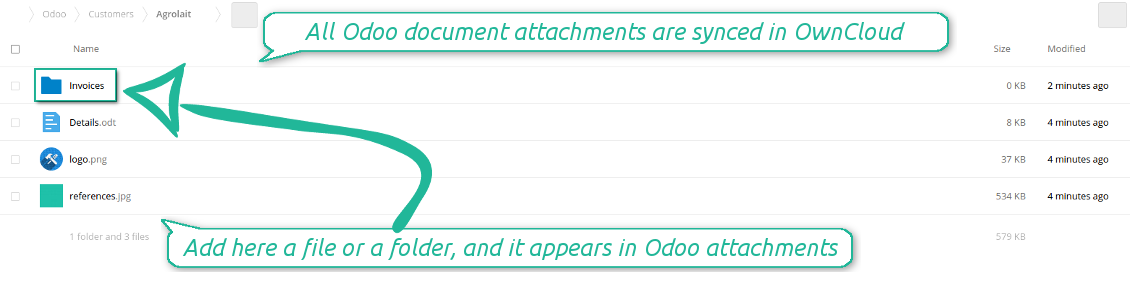
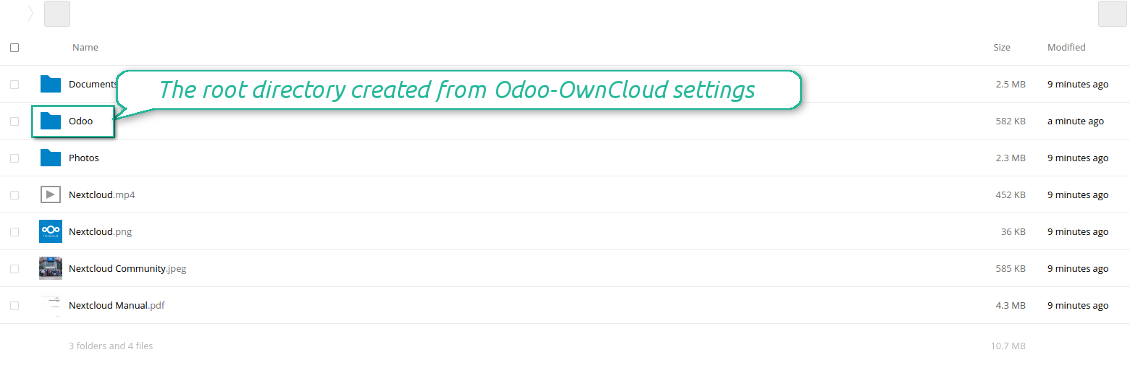
Odoo creates a convenient directory structure in OwnCloud / NextCloud: Odoo / Document type name / Document name / Files, where:
- Odoo is a central directory for Odoo Sync in your cloud storage.
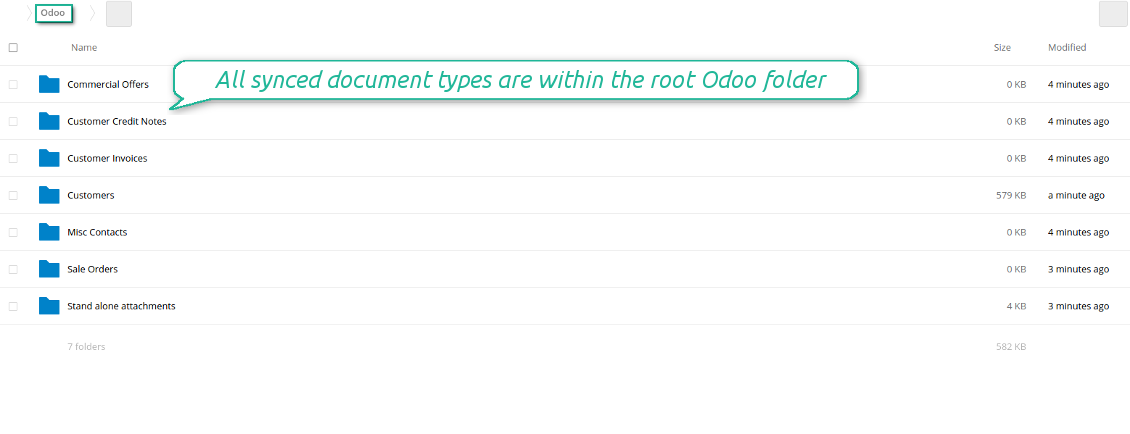
- Document type is a synced Odoo model, for example, 'Sale orders', 'Opportunities', 'Customers'
- You select document types by yourself. It might be any document type
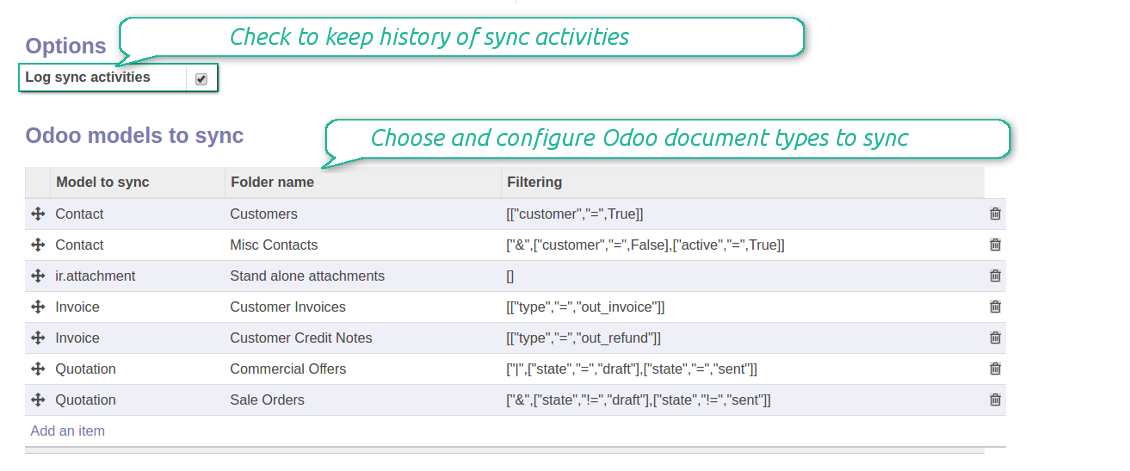
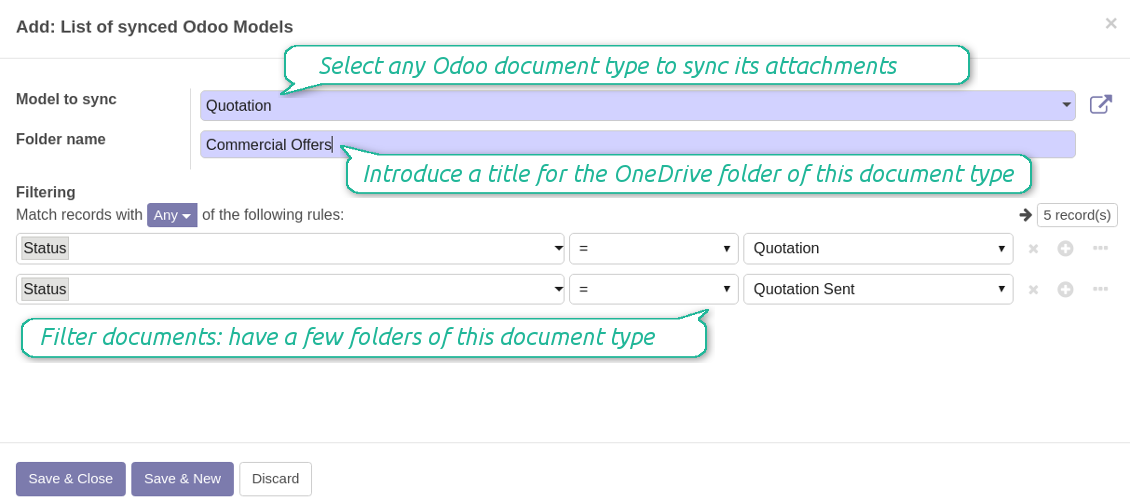
- Moreover, you might have a few folders for a single document type. Use Odoo domains to have not global 'Partners, but 'Customers' and 'Suppliers', not just 'Sale orders' but 'Commercial offers', 'To deliver', and 'Done orders'
- With each sync Odoo would try to update document types' folders. Add a new document type at any moment. It will appear in OwnCloud / NextCloud with a next sync
- You are welcome to introduce or change document types folder names at any moment in Odoo. Take into account: renaming in OwnCloud / NextCloud will be recovered to Odoo names
- If you remove a model from integration, it will not be deleted from OwnCloud / NextCloud to keep already synced files safe. However, new documents of this type would not be synced
- In case you removed a directory in OwnCloud / NextCloud, but it is still configured in Odoo, with a next sync a folder structure is going to be recovered (not files, surely).
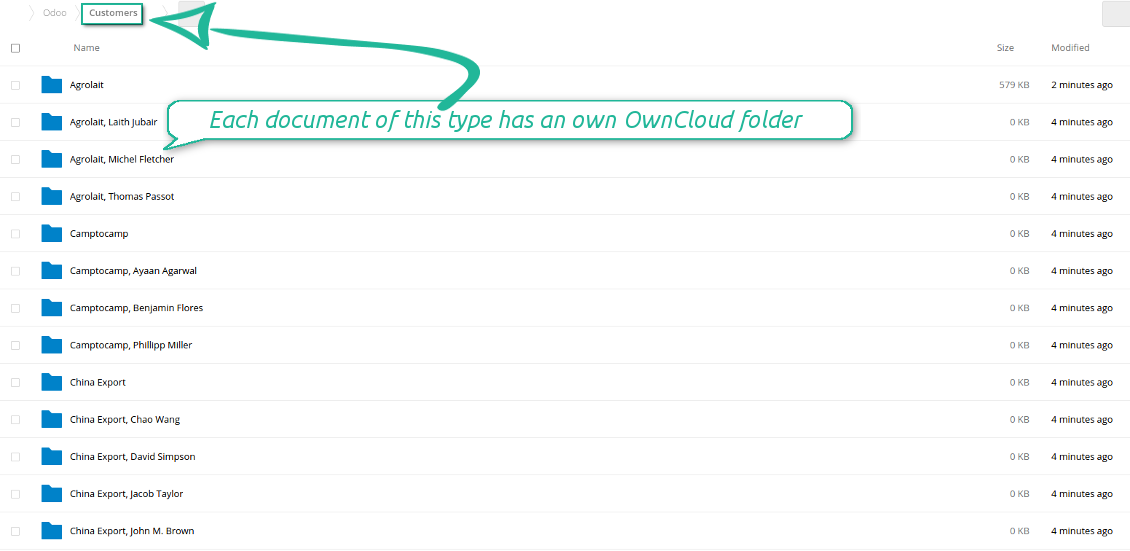
- Document is an exact object to sync. For instance, 'Agrolait' or 'SO019'
- Documents are synced in case they relate to a synced document type and satisfy its filters. For example, you are not obliged to sync all partners, you may integrate only 'Customers' and 'Vendors' or only 'Companies', not 'Contacts'
- Odoo would generate a folder in OwnCloud / NextCloud for each suitable document even for documents without attachments. It is needed for a backward sync to easily add new files
- OwnCloud / NextCloud folder name equals a real document name. It relies upon Odoo name_get method. Thus, Odoo 'Michael Fletcher' (a contact of 'Agrolait') would be OwnCloud / NextCloud 'Agrolait, Michael Fletcher'
- If an exact document changes its document type (e.g. a quotation is now confirmed), Odoo will automatically relocate its related folder to a proper parent directory (in the example: from 'Commercial offers' to 'To deliver')
- In case a document relates to a few types (for instance, you have 'Vendors' and 'Customers', while Agrolait is both), this document folder would be put into the most prioritized document type. A document type priority is higher as closer to the top in Odoo interfaces it is
- If an Odoo document is removed, the next sync will remove a corresponding OwnCloud / NextCloud directory
- In case you remove a directory in OwnCloud / NextCloud, but it still exists in Odoo, OwnCloud / NextCloud folder structure would be recovered (while files would be unlinked in both Odoo and OwnCloud / NextCloud)
- Folders renaming in OwnCloud / NextCloud will be replaced with Odoo names, Odoo document names are more important
- Files are real files taken from Odoo attachments
The resulted path would be, for example, 'Odoo / Quotations / SO019 / commercial offer.png'.
The only exclusion of the rule are stand alone attachments which do not relate to any Odoo documents (their document type is 'ir.attachment'). Such attachments' path is 'Odoo / Stand Alone Attachments / image.png'.
The direct sync might take quite a long, since a lot of folders should be created. It is not recommended to make sync too frequent: once an hour or two hours is fine.
FilesWith each direct sync, Odoo tries to find not yet synced attachments. If such attachments suit any document type to sync, a file will be uploaded to OwnCloud / NextCloud to a proper folder. In Odoo such attachments will become of 'url' type. It means that a file is not any more kept in Odoo server space, but now it is in OwnCloud / NextCloud. Until sync is done, Odoo attachment remains binary and stores an actual file. Such approach helps Odoo to work faster.
If you unlinked an attachment from Odoo, it would be deleted in OwnCloud / NextCloud as well.
Take into account that file names should be managed in OwnCloud / NextCloud: each backward sync would recover OwnCloud / NextCloud names, Odoo is here less important.
How items are retrieved from OwnCloud / NextCloud to Odoo
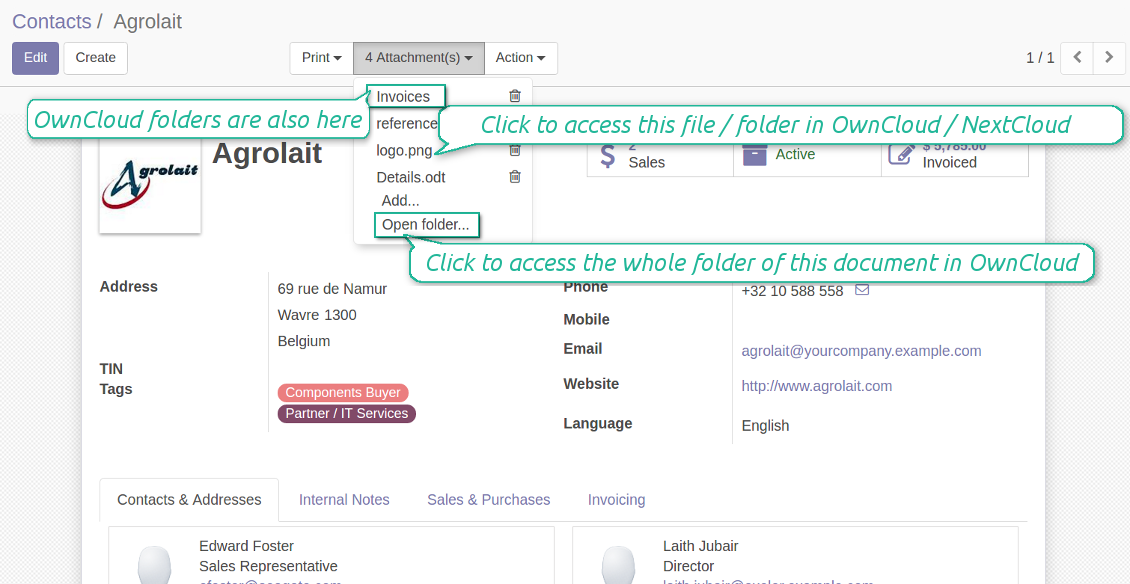
- If a new file is added to a proper document folder (e.g. to 'Odoo / Customers / Agrolait'), the same attachment will be added to Odoo document (in the example - to 'Agrolait')
- In document folders you can put not only files but also child folders. In that case a link for this folder (not its content) is kept in attachments
- In case you rename a file in OwnCloud / NextCloud, it will be renamed in Odoo as well
- Files' removal from OwnCloud / NextCloud leads to related Odoo attachments' removal
- If you move a file to another document folder, in Odoo a related attachment would be re-attached to this new document. Take into account: if you move a file for a not document folder, in Odoo attachment will be deleted as it has been removed from OwnCloud / NextCloud
- If you deleted a document type or document folder, their child files are deleted as well. Thus, Odoo would remove related attachments. The folders, however, will be recovered with a next direct sync. Folders' move to another directory is also considered as a removal. Avoid such situations by following the simple rule: folders are managed mostly by Odoo, files - mostly by OwnCloud / NextCloud.
Backward OwnCloud / NextCloud might take quite much time, since each folder should be checked (the more folders, the more time the backward sync requires). It is recommended to make frequency oftener than once an hour or two hours.
Zdjęcia ekranu
All document types are in the root directory 'Odoo'
Document types' folders
All document of this type has an own folder
Sync any documents you like
The tool let you split any business model into a few directories. Have a separate folder for individuals and companies, for European and American opportunities, for each project, etc.
Moreover, it is possible to guarantee that only topical documents are synced by using relative periods: leads registered in the last 3 months, invoices updated the last week, and so on.
Typical use cases
- Projects: automatically forward all project-related documents to OwnCloud / NextCloud to share those with a customer as a cloud link.
- Customers: add all partner files in a single directory available both from Odoo and from OwnCloud / NextCloud. Modify those using default cloud editors and access them when working in Odoo.
- Employees: gather all files by this employee in a single cloud folder: photos, document scans, contracts. Access and upload those from Odoo and OwnCloud / NextCloud alternatively.
- Opportunities: carefully store all specifications, requirements and any file which would let you make a good offer.
- Orders: keep all printings and contracts in OwnCloud / NextCloud with simple availability from Odoo.
Zdjęcia ekranu
Choose document types to be synced
Document type might have a few folders based on filters
Easy accessible files
Internal and public URLs
By default all links from Odoo to OwnCloud / NextCloud are internal. It means that only authorized users may access them and, after that, generate shared URLs for others.
It is possible to make them public using the option 'Use Public URLs'. In that case links will become 'shared', meaning that everybody may access those files by links. Although the links would be hardly known by external users, there is a slight chance that they become available as a result of some user actions. Besides, sharing links generation is not fast and might make the synchronization slower. Thus, be cautious if you decide to use shared links.
Zdjęcia ekranu
Fast access to OwnCloud / NextCloud files and folders
Synced files are simply found in OwnCloud / NextCloud. Add unlimited number of files or folders here
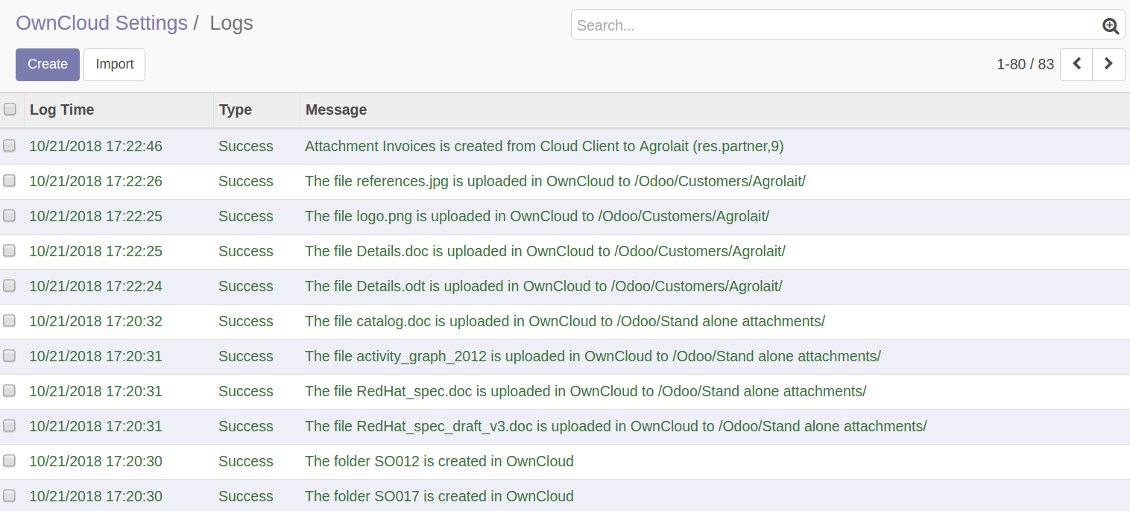
Sync logs in Odoo
Zdjęcia ekranu
Logged synchronisation activities
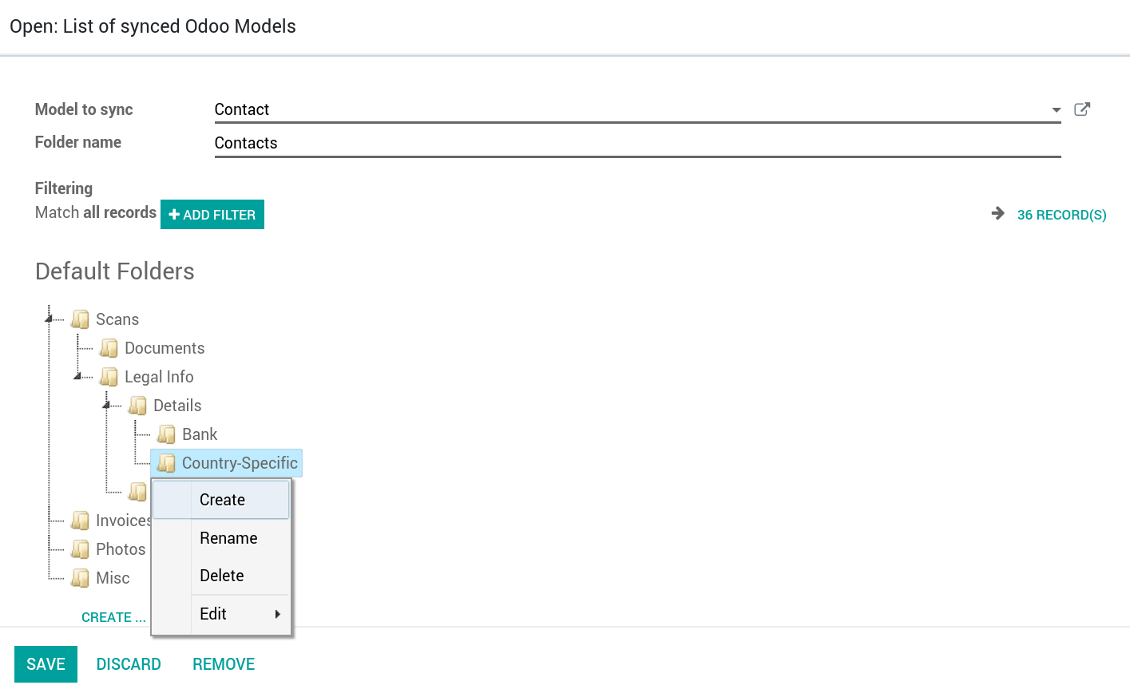
Default folders for documents
Zdjęcia ekranu
Default folders for this document types to be created while firstly synced
Applicable to all Odoo apps
A few important peculiarities to take into account
- Do not add folders inside root or document types' folders. If they have the same name as newly synced folders, the latter would not be uploaded
- Make sure your database has a proper SSL certificate required to use OwnCloud API
- Try to avoid the following symbols in folders' and files' names: *, ?, ", ', :, <, >, |, +, %, !, @, \, /,. Direct sync will replace such symbols with '-'. It is done to avoid conflicts with file systems.
Compatible with Odoo Enterprise Documents
How Odoo Enterprise Documents are synced
This tool is not in conflict with the 'documents' module provided by the Enterprise license. Attachments related to Enterprise folders would be synced as any other files: according to a document they relate to. In the most cases it means they would be linked to stand-alone attachments.
It is not always comfortable, and you might be interested in reflecting directories' structure introduced by the module 'Documents'. To this end the extension Cloud Sync for Enterprise Documents (its standard price is 44 Euros) is developed. This tool has the following features:
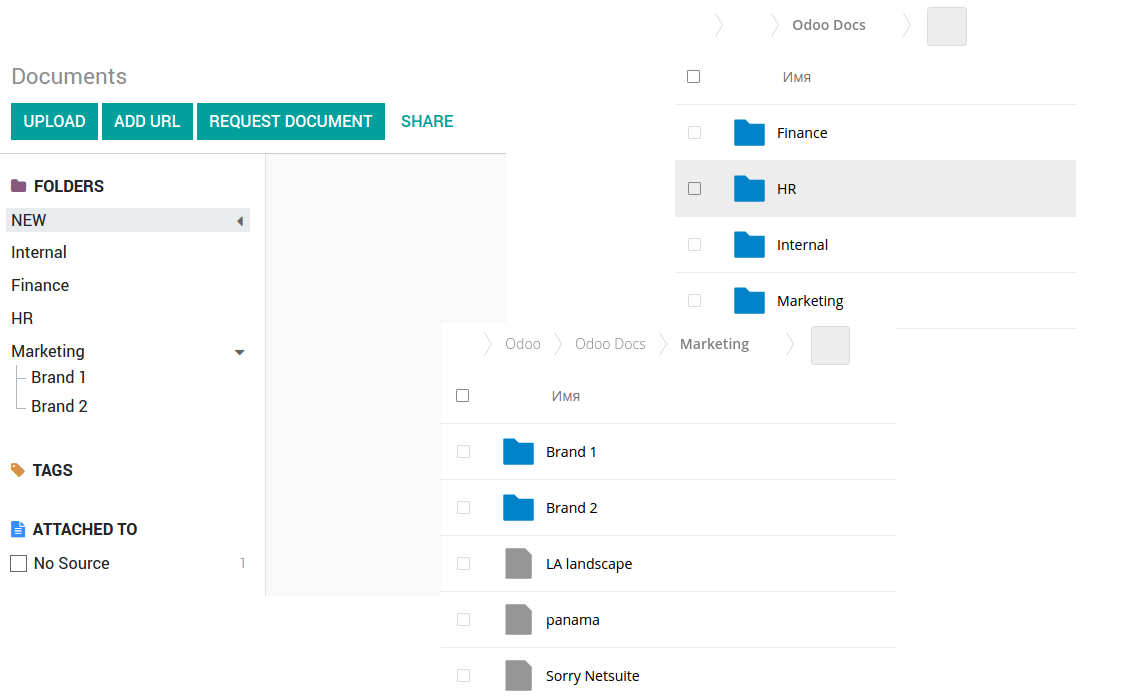
- The documents hierarchy is reflected within the folder 'Odoo / Odoo Docs'
- Each Odoo folder has a linked cloud folder. Take into account that folders created in the cloud storage will be synced as Odoo attachments. The key principle is: folders are managed by Odoo, files are managed by the cloud client
- All files are synced with the same logic as usual attachments. Files created in Odoo will be added to the cloud storage and will be replaced with links in Odoo. Files created in cloud storage will generate attachments within a paired directory
- Please do not name synced models as 'Odoo Docs'. This is the reserved name for Odoo Enterprise Documents
Zdjęcia ekranu
Odoo Enterprise documents synchronize
Very good product
A perfect solution to integrate Owncloud with Odoo. We sync a high volume of objects across multiple Odoo models, which works seamless and stable. For us it is the perfect solution to have an external DMS instead of the Odoo native attachment handling, which also enables us to interchange files between systems in our best-of-breed setup.
The team behind this module is extremely professional and responsive. They helped us on a few occasions and provided clear answers and prompt support when required, and they even went out of their way to assist us with another requirement we had. Cannot recommend the product and team highly enough, try this if you're in the market to connect Odoo with an external document solution.
Works according to specs
I have used this app with Odoo 12 and Nextcloud 16 and it works as specified. Odoo Tools offers very responsive support which is really helpful. Of course 5 stars...!
This is Awesome
I have used Cloud Sync on Next/Own Cloud and works really great.
Wskazówki konfiguracji i instalacji dla OwnCloud / NextCloud Odoo Integration Odoo v.12
Python dependency
pip install pyocclientConfiguration and log in
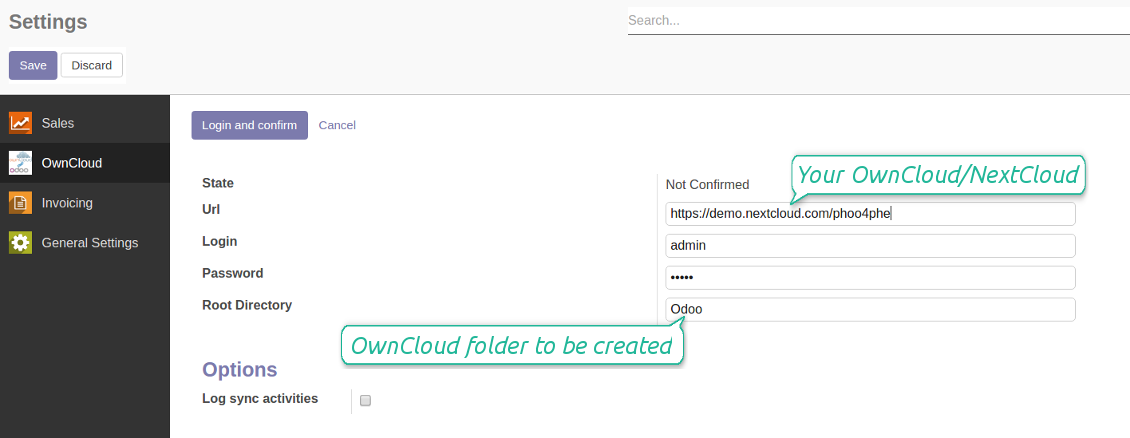
- Enter your cloud storage full url
- Select an OwnCloud / NextCloud, which has full rights to read, create, write and delete files and folders within a root directory
- Enter login and password of this user
- Introduce the title for OwnCloud / NextCloud folder, e.g. Odoo
- Push the button 'Save', and then - the button 'Login and Confirm'
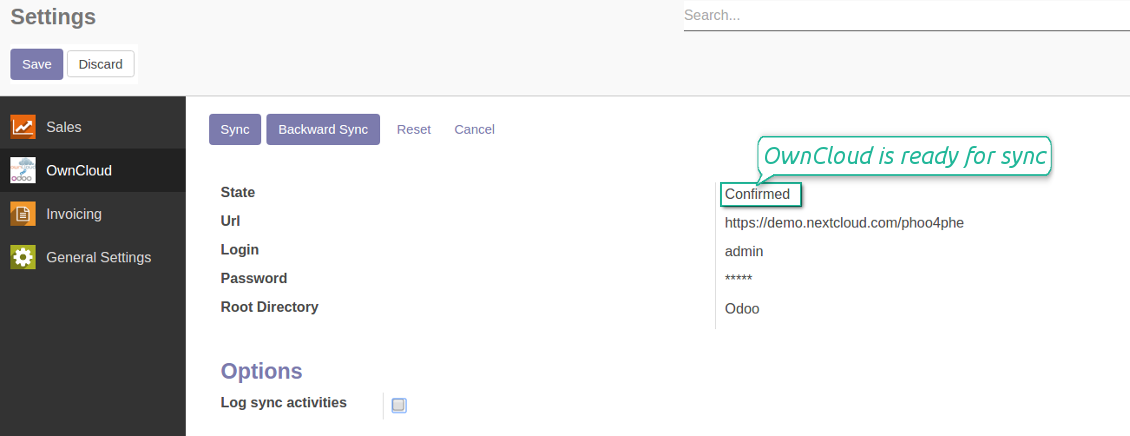
- If everything is fine, push the button 'Sync'
- Make sure that the root directory or its children are shared with your colleagues
Enter OwnCloud / NextCloud credentials
Confirmed credentials to start sync
Odoo server configuration and cron job configuration
To make sure the synchronization works correctly apply proper timeouts to the Odoo configuration file: LIMIT_TIME_CPU, LIMIT_TIME_REAL should be more than 900 seconds.
For Odoo.sh this should not be done, since timeouts are predefined and are not configurable.
Then, timeout should be entered to your Odoo. To that goal find the section 'Settings' on the app configuration page and copy the number there.
Afterwards, it is needed to make the cron jobs suit the applied timeouts. In the debug mode go to the Settings > Technical > Automation > Scheduled Jobs:
- Set up the job 'Synchronize attachments with cloud' as (a) frequency - 2*timeout; (b) the next execution as the next hour +timeout. For example, for 900seconds timeout: frequency - as 30minutes; the next execution - at 08:15
- Set up the job 'Synchronize attachments from cloud' as (a) frequency - 2*timeout; (b) the next execution as the next hour + timeout*2. For example, for 900seconds timeout: frequency - as 30minutes; the next execution- at 08:30.
Często zadawane pytania o OwnCloud / NextCloud Odoo Integration Odoo v.12
Czy mogę zmienić częstotliwość zadań synchronizacji?
Tak, możesz. W tym celu:
Włącz tryb debugowania
Przejdź do ustawień technicznych > Automatyzacja > Zaplanowane działania
Znajdź zadania «Synchronize attachments with cloud» i «Update attachments from cloud».
Nie ustawiaj ich zbyt często. Zadanie powinno skończyć się, zanim zacznie się kolejne. Konfiguracja zależy od liczby elementów do synchronizacji. Zazwyczaj częstotliwość to od 15 minut do 4 godzin.
Ustaw też wystarczające limity czasu w pliku konfiguracyjnym Odoo. LIMIT_TIME_CPU i LIMIT_TIME_REAL powinny być równe lub większe niż planowany czas crona. Od wersji 13 uwzględnij także LIMIT_TIME_REAL_CRON.
Ważna uwaga dla klientów Odoo.sh: maksymalny czas zadania cron może wynosić tylko 15 minut.
Czy mogę skonfigurować inną strukturę synchronizowanych katalogów niż przyjmowana przez synchronizację?
Nie, ta funkcja jest dopiero od wersji 15. Wcześniej moduł działa ze zdefiniowaną strukturą folderów:
Odoo - folder główny synchronizacji
Modele - foldery dla każdego typu dokumentu Odoo. Na przykład «Projects», «Partners». Według domeny mogą być węższe foldery: «Customer 1 Projects», «Projects of the Customer 2», «Internal Projects» itd.
Obiekty - foldery dla każdego dokumentu, np. «Project 1» lub «Customer 1»
Pliki i foldery powiązane z tym dokumentem Odoo do synchronizacji.
W efekcie możesz mieć na przykład:
Odoo / Projects / Project 1 / pliki i foldery projektu 1
Odoo / Customer 1 Projects / Project 1; Odoo / Customer 2 Projects / Project 3, ...
Odoo / Customers / Customer 1 / pliki i foldery klienta 1
Struktura jest zawsze płaska: tylko te poziomy. Różnych typów dokumentów nie trzyma się w tej samej gałęzi. W folderze «Customer 1» nie można trzymać jednocześnie zamówień, faktur i projektów. Każdy typ ma własny folder (lub kilka). Inaczej synchronizacja wsteczna nie miałaby kryterium.
Czy powinienem skonfigurować konkretne dostępy użytkowników w Odoo?
Nie, narzędzie opiera się na jednym punkcie końcowym użytkownika. Wszystkie procesy synchronizacji idą pod jednym administratorem chmury (aplikacją). Prawa do utworzonych folderów / plików nie są automatyzowane. Zarządzaj nimi w swoim magazynie w chmurze.
Gdzie przechowywane są zsynchronizowane pliki? Czy są duplikowane w Odoo i w chmurach?
Aplikacja zakłada, że treść binarna załączników jest przechowywana w Cloud Client, a nie na serwerze Odoo. Dlatego takie załączniki w Odoo stają się typu URL i można do nich w każdej chwili wejść z pola załączników albo z Cloud Client.
Po konfiguracji nie są potrzebne działania ręczne, bo synchronizacja jest w pełni automatyczna. Zdecyduj, które typy dokumentów Odoo synchronizować, i ustaw powiązany model do synchronizacji dla każdego z nich (klienci, zamówienia sprzedaży lub zakupu, zadania, projekty itd.).
Czy mogę mieć kilka folderów dla tego samego typu dokumentu? Na przykład projekty wewnętrzne i projekty klientów?
Tak, możesz. Przygotuj regułę dla każdej i zastosuj filtry: na przykład według typu projektu.
Uczyń filtry wzajemnie wykluczającymi, aby dokument był jednoznacznie przypisany. Na przykład: «klient, ale nie dostawca», «dostawca, ale nie klient». W przeciwnym razie folder dokumentu przeskakiwałby z jednego modelu na inny.
Czy wystarczy sama aplikacja Cloud Storage Solution?
Nie, narzędzie to tylko rdzeń techniczny. Potrzebujesz też konektora swojego klienta chmury.
Czy to w porządku, jeśli mam dużo obiektów do synchronizacji, na przykład 10000?
Tak, choć przy wielu folderach/załącznikach proces może być wolny. Klienci zgłaszali jednak środowiska z >10k partnerów i ~5k wariantów produktu, a procesy były akceptowalne.
Kilka punktów:
- Synchronizacja jest tak zbudowana, że każdy element zostanie zsynchronizowany i nie zginie, choć może to nie być szybkie. Gwarantują to kolejki FIFO i commit każdego zadania.
- Liczbę obiektów można ograniczyć logicznie. Konfiguracja modeli pozwala wykluczyć przestarzałe pozycje (np. zarchiwizowani partnerzy lub zamówienia sprzed 2 lat).
Czy można włączyć synchronizację w czasie rzeczywistym?
Nie. Mamy mocne powody, by unikać synchronizacji w czasie rzeczywistym:
Wydajność. Przy synchronicznym czasie rzeczywistym każde wysłanie pliku pokazuje ekran ładowania.
Konflikty. Jeśli 2 użytkowników jednocześnie zmieni element, sytuacja może być nierozwiązywalna. Przy zwykłych zadaniach poprawimy to później; w czasie rzeczywistym potrzebna byłaby kolejka, jeszcze bardziej myląca.
Funkcjonalność. Zwłaszcza zmiana nazwy i przebudowa. Synchronizacja wsteczna ściśle opiera się na logice katalogów i przy każdym uruchomieniu sprawdza 100 % elementów. Po każdej aktualizacji byłyby to tysiące żądań na sekundę. W przeciwnym razie zmiany zostałyby utracone.
Czy mogę synchronizować załączniki z kilkoma klientami chmury
Nie, ta funkcja jest dostępna dopiero od wersji 15.
Używamy specjalnego edytora w naszych chmurach (np. OnlyOffice, Office 365 itd.). Czy pliki otworzą się w tym edytorze?
Tak, w zależności od konfiguracji klienta chmury.
Czy mogę aktualizować tagi OwnCloud za pomocą konektora?
Nie, tagi nie są synchronizowane. Rozważaliśmy tę funkcję, ale z kilku powodów jej nie wprowadziliśmy:
Biblioteka konektora nie obsługuje pobierania ani aktualizacji tagów OwnCloud
Załączniki Odoo nie mają atrybutu «tags» i nie jest jasne, kiedy takie tagi byłyby przypisywane użytkownikom.
Ponieważ aplikacja daje synchronizację dwustronną, mogłyby pojawić się krytyczne konflikty trudne do rozwiązania.
Jakie sa zasady aktualizacji Waszych narzędzi?
Zgodnie z biezacymi zasadami Odoo Apps Store:
- Modul kupiony dla wersji 12.0 lub starszej daje dostęp do wszystkich wersji do 12.0.
- Od wersji 13.0 każda wersja modulu musi byc kupiona osobno.
- Niezależnie od wersji zakup daje prawo do wszystkich aktualizacji i poprawek w ramach wersji glownej.
Zespol faOtools nie kontroluje tych zasad. Pytania kierujcie bezpośrednio do przedstawicieli Odoo Apps Store.
Jak zainstalowac aplikacje na Odoo.sh?
Najbardziej bezpośrednie podejscie to wbudowany przeplyw sklepu Odoo:
1. Otwórz stronę modulu i kliknij Deploy on odoo.sh
2. Zostaniesz przekierowany do GitHub. Zaloguj sie i kliknij Create a new repo lub użyj istniejącego. Repozytorium musi byc prywatne. Publikowanie aplikacji na licencji OPL-1 jest zabronione. W razie potrzeby utwórz nowe repo dla projektu Odoo.sh
3. Następnie w odoo.sh kliknij Deploy, potwierdź i kliknij Continue. Instalacja sie rozpoczyna.
Te kroki instaluja aplikacje na galezi production. Dla innych galezi lub aktualizacji:
1. Pobierz kod zrodlowy ze sklepu Odoo
2. Zrób commit modulu do repozytorium GitHub. Żaden folder/plik aplikacji nie może byc w .gitignore. Repo tworzone przez odoo.sh mogą ignorowac ważne ścieżki (np. /lib). Prześlij wszystkie katalogi i pliki modulu
3. Wdroz docelowa galaz projektu odoo.sh lub poczekaj na automatyczny build, jeśli tak ustawiono.
Jak zainstalowac aplikacje na wlasnym serwerze?
2. Uruchom ponownie serwer Odoo;
3. Wlacz tryb programisty (ustawienia techniczne);
4. Zaktualizuj liste aplikacji (menu Aplikacje);
5. Znajdź aplikacje i kliknij Activate/Install;
6. Postępuj zgodnie ze wskazowkami na stronie aplikacji, jeśli istnieją.
Aplikacja ma dodatkowe dodatki. Czy moge kupic je później?
Tak. Odoo automatycznie dodaje zależności do koszyka: wylacz juz zakupione narzędzia, aby nie zaplacic dwa razy.
Wdrozyłem aplikacje na Odoo.sh i widze ostrzeżenie/blad w testach
Czerwone/pomaranczowe ostrzeżenie nie wplywa na funkcje aplikacji. Czasem nasze moduly nie przechodzą standardowych testów automatycznych, bo te zakladaja zachowanie sprzeczne z celami aplikacji. Na przyklad zmieniamy obliczanie ceny, a testy Odoo porownuja cenę koncowa ze standardowym algorytmem.
Najpierw sprawdź funkcje wdroznej bazy. Czy wszystko dziala?
Jeśli nadal uwazasz, ze ostrzeżenie wplywa na rzeczywiste funkcje, skontaktuj sie z nami i prześlij pelne logi instalacji oraz pelna liste wdroznych modulow (rdzeń i firmy trzecie).
Czy moge kupic aplikacje bezpośrednio u Was?
Nie, dystrybuujemy narzędzia tylko przez oficjalny sklep aplikacji Odoo.
Chcialbym uzyskać znizke
Niestety nie mamy srodkow technicznych, by oferowac ceny indywidualne.
Czy moge zainstalowac aplikacje na bazie Odoo Online (SaaS)?
Nie, aplikacji innych firm nie można używać na Odoo Online. Odoo SaaS blokuje te mozliwosc.
Narzędzie zależy od innych aplikacji. Czy musze je kupic?
Tak, narzędzie wymaga wszystkich modulow oznaczonych jako zależności. Cena na stronie aplikacji juz je obejmuje.
Jaka jest cena modulu w dolarach amerykanskich? Dlaczego sie zmienila?
Ceny naszych modulow sa w euro. Sklep Odoo przelicza je na inne waluty wedlug wewnetrznego kursu. Dlatego cena w dolarach amerykanskich może sie zmienić po aktualizacji kursu.
Sformułowania aplikacji i witryny w językach innych niż angielski są wspomagane przez AI i zgodne z oficjalnymi tłumaczeniami Odoo. Jeśli zauważysz błąd, wyślij zgłoszenie o poprawność tłumaczeń a naprawimy to.
Zgłaszanie błędów
Jeśli zauważysz błędy lub niespójne działanie, napisz do nas. Gwarantujemy poprawki w 60 dni od zakupu i dalej ulepszamy narzędzia.
Nie potrzebujesz telefonu ani karty, by się z nami skontaktować. Wystarczy krótka rejestracja e-mail, która nie zajmuje więcej niż 30 sekund.
Dołącz jak najwięcej szczegółów: zrzuty ekranu, logi serwera Odoo i pełny opis odtworzenia problemu. Zwykle kilka dni roboczych zajmuje plan (gdy błąd potwierdzono) albo wskazówki (w przeciwnym razie).
Publiczne zgłoszenia funkcji i pomysły na moduły (bezpłatny rozwój)
Jesteśmy mocno zmotywowani do ulepszania narzędzi i wdzięczni za każdą opinię. Jeśli wymagania są użyteczne publicznie i da się je sprawnie wdrożyć, zespół wpisze je na listę zadań.
Taka lista zadań jest przetwarzana regularnie i nie zakłada dodatkowych opłat. Choć nie możemy obiecać terminów i ostatecznego projektu, to dobry sposób na pożądane funkcje bez inwestycji i ryzyka.
Nie potrzebujesz telefonu ani karty, by się z nami skontaktować. Wystarczy krótka rejestracja e-mail, która nie zajmuje więcej niż 30 sekund.

Narzędzie do bezpiecznego przechowywania haseł w Odoo do użytku wspólnego. Współdzielone sejfy

Narzędzie do budowy głębokiej i uporządkowanej bazy wiedzy do użytku wewnętrznego i zewnętrznego. Knowledge System. KMS. Rewizje w stylu wiki.
398€
Narzędzie do ustawiania celów KPI i kontroli ich realizacji według okresów. Pulpity KPI. Projektant pulpitów. Wykresy KPI

Narzędzie do zarządzania usługami czasowymi od rezerwacji po sprzedaż i opinie
398€
Narzędzie do zarządzania Odoo z ulubionych czatów AI przez MCP. Claude. Każde AI z MCP.

Narzędzie do elastycznego układania załączników Odoo w folderach i synchronizacji katalogów z klientami chmury: Google Drive, OneDrive/SharePoint, Nextcloud/ownCloud, Dropbox, Amazon S3, Box i NAS. DMS. Menedżer plików. System zarządzania dokumentami
398€
Narzędzie do: automatycznie synchronizuj Odoo załączniki z OneDrive pliki w oba ways
487€
Narzędzie do: automatycznie synchronizuj Odoo załączniki z Google Drive pliki w oba ways
487€
Narzędzie do: automatycznie synchronizuj Odoo załączniki z NAS Solutions w oba ways. Synology, QNAP, TrueNAS i dowolny inne WebDav-supporting NAS solutions
487€