OwnCloud / NextCloud Odoo Integration v.12
The tool to automatically synchronize Odoo attachments with OwnCloud / NextCloud files in both ways
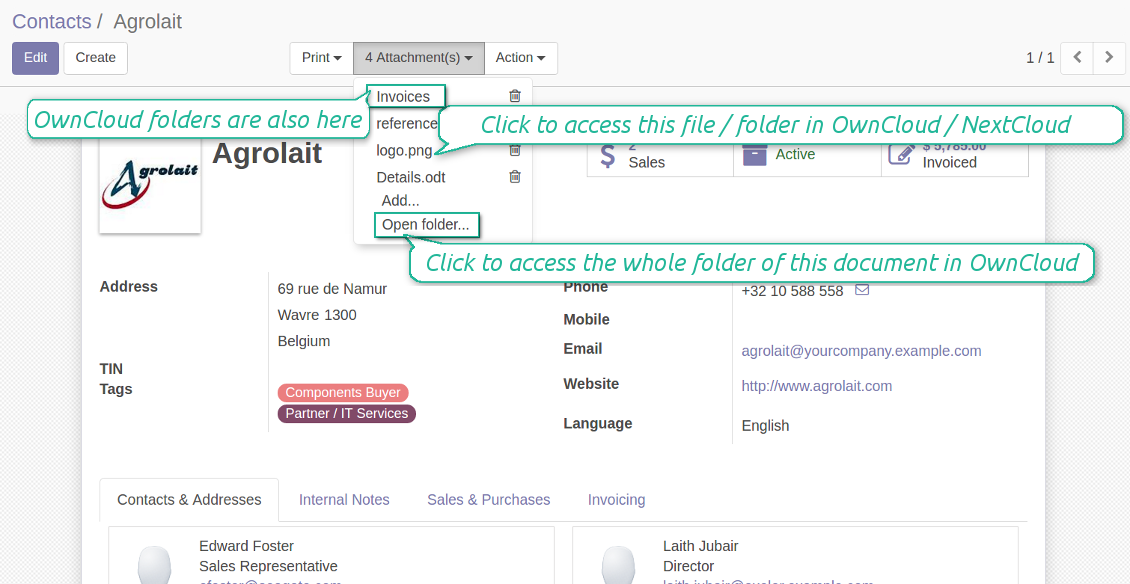
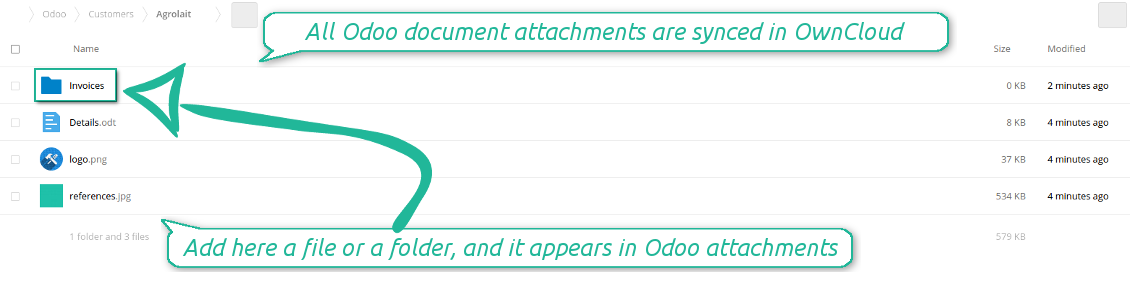
Both OwnCloud and NextCloud don't have such disadvantages. This is the tool to integrate their features into your Odoo business work flow. The app automatically stores all Odoo attachments in OwnCloud or NextCloud, and it provides an instant access to them via web links. In such a way users work with files comfortably in the cloud storage, while the results are fully available in Odoo.
Automatic integration
Bilateral sync
How files and folders are synced from Odoo to OwnCloud / NextCloud
- Prepare and keep updated folders' structure in OwnCloud / NextCloud
- Upload new attachments to a correct folder
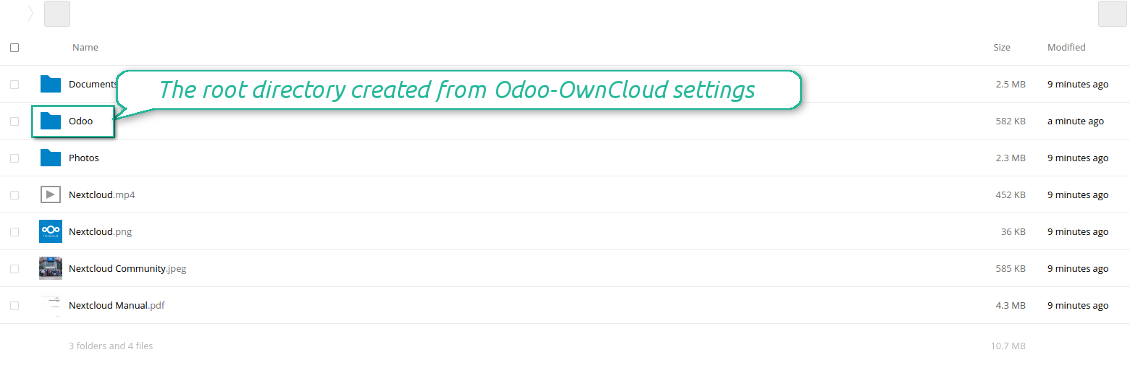
Odoo creates a convenient directory structure in OwnCloud / NextCloud: Odoo / Document type name / Document name / Files, where:
- Odoo is a central directory for Odoo Sync in your cloud storage.
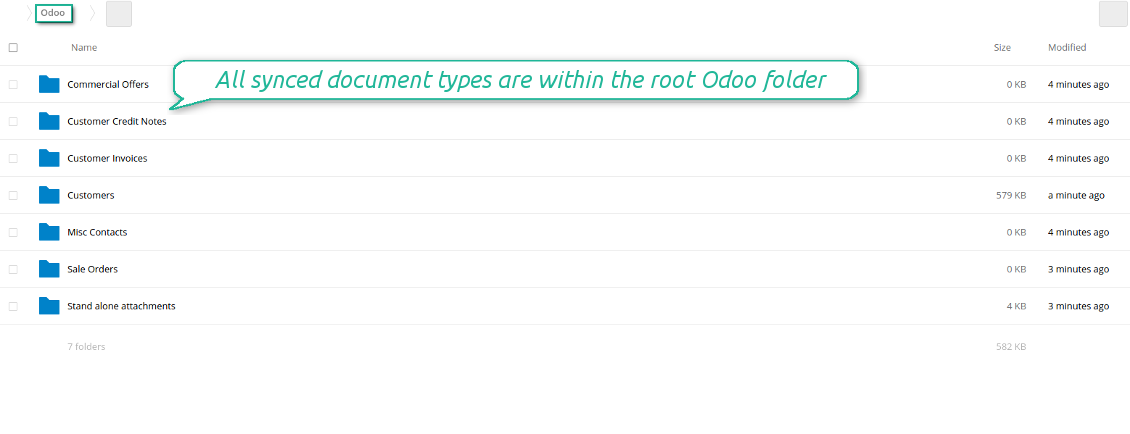
- Document type is a synced Odoo model, for example, 'Sale orders', 'Opportunities', 'Customers'
- You select document types by yourself. It might be any document type
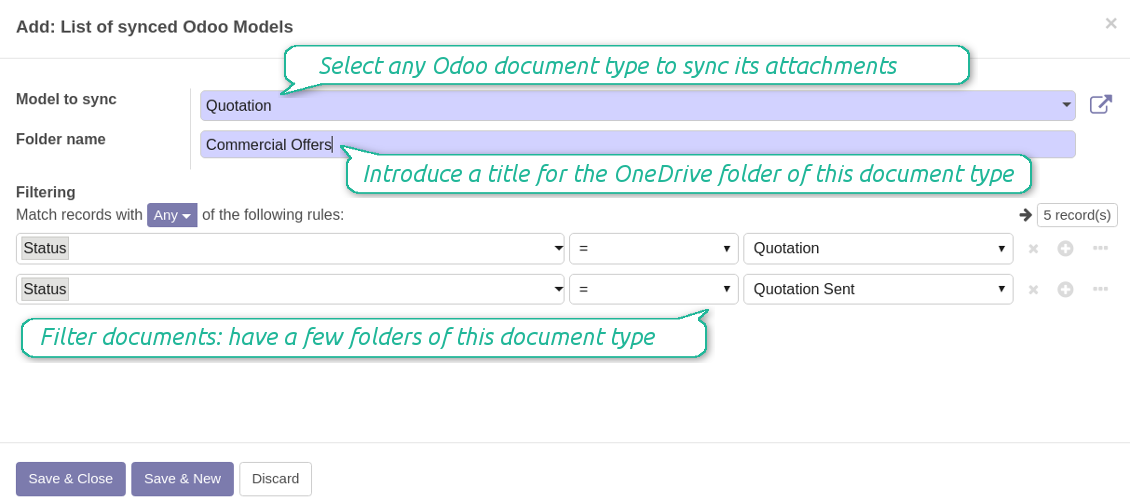
- Moreover, you might have a few folders for a single document type. Use Odoo domains to have not global 'Partners, but 'Customers' and 'Suppliers', not just 'Sale orders' but 'Commercial offers', 'To deliver', and 'Done orders'
- With each sync Odoo would try to update document types' folders. Add a new document type at any moment. It will appear in OwnCloud / NextCloud with a next sync
- You are welcome to introduce or change document types folder names at any moment in Odoo. Take into account: renaming in OwnCloud / NextCloud will be recovered to Odoo names
- If you remove a model from integration, it will not be deleted from OwnCloud / NextCloud to keep already synced files safe. However, new documents of this type would not be synced
- In case you removed a directory in OwnCloud / NextCloud, but it is still configured in Odoo, with a next sync a folder structure is going to be recovered (not files, surely).
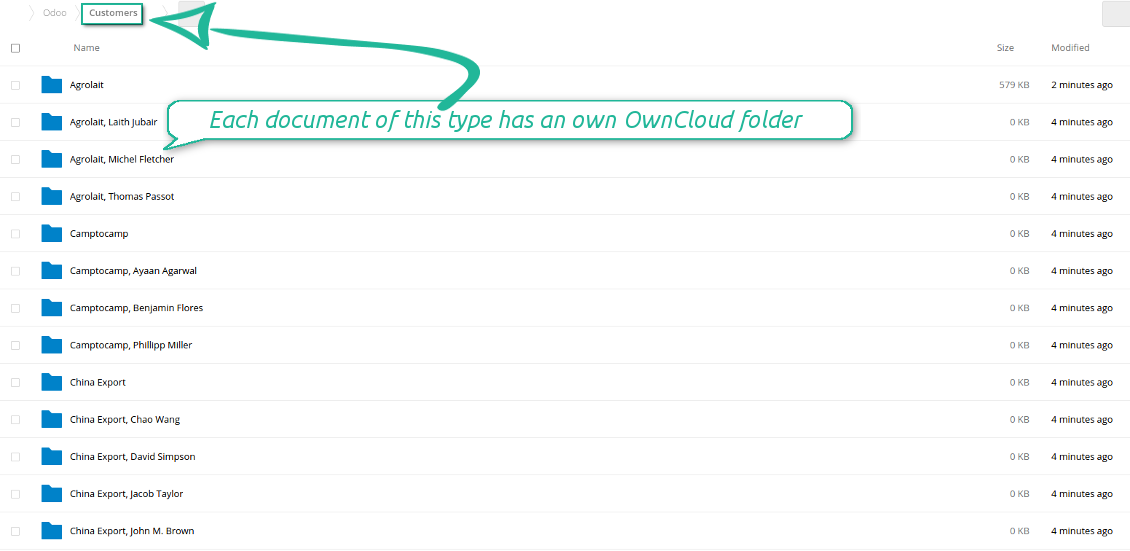
- Document is an exact object to sync. For instance, 'Agrolait' or 'SO019'
- Documents are synced in case they relate to a synced document type and satisfy its filters. For example, you are not obliged to sync all partners, you may integrate only 'Customers' and 'Vendors' or only 'Companies', not 'Contacts'
- Odoo would generate a folder in OwnCloud / NextCloud for each suitable document even for documents without attachments. It is needed for a backward sync to easily add new files
- OwnCloud / NextCloud folder name equals a real document name. It relies upon Odoo name_get method. Thus, Odoo 'Michael Fletcher' (a contact of 'Agrolait') would be OwnCloud / NextCloud 'Agrolait, Michael Fletcher'
- If an exact document changes its document type (e.g. a quotation is now confirmed), Odoo will automatically relocate its related folder to a proper parent directory (in the example: from 'Commercial offers' to 'To deliver')
- In case a document relates to a few types (for instance, you have 'Vendors' and 'Customers', while Agrolait is both), this document folder would be put into the most prioritized document type. A document type priority is higher as closer to the top in Odoo interfaces it is
- If an Odoo document is removed, the next sync will remove a corresponding OwnCloud / NextCloud directory
- In case you remove a directory in OwnCloud / NextCloud, but it still exists in Odoo, OwnCloud / NextCloud folder structure would be recovered (while files would be unlinked in both Odoo and OwnCloud / NextCloud)
- Folders renaming in OwnCloud / NextCloud will be replaced with Odoo names, Odoo document names are more important
- Files are real files taken from Odoo attachments
The resulted path would be, for example, 'Odoo / Quotations / SO019 / commercial offer.png'.
The only exclusion of the rule are stand alone attachments which do not relate to any Odoo documents (their document type is 'ir.attachment'). Such attachments' path is 'Odoo / Stand Alone Attachments / image.png'.
The direct sync might take quite a long, since a lot of folders should be created. It is not recommended to make sync too frequent: once an hour or two hours is fine.
FilesWith each direct sync, Odoo tries to find not yet synced attachments. If such attachments suit any document type to sync, a file will be uploaded to OwnCloud / NextCloud to a proper folder. In Odoo such attachments will become of 'url' type. It means that a file is not any more kept in Odoo server space, but now it is in OwnCloud / NextCloud. Until sync is done, Odoo attachment remains binary and stores an actual file. Such approach helps Odoo to work faster.
If you unlinked an attachment from Odoo, it would be deleted in OwnCloud / NextCloud as well.
Take into account that file names should be managed in OwnCloud / NextCloud: each backward sync would recover OwnCloud / NextCloud names, Odoo is here less important.
How items are retrieved from OwnCloud / NextCloud to Odoo
- If a new file is added to a proper document folder (e.g. to 'Odoo / Customers / Agrolait'), the same attachment will be added to Odoo document (in the example - to 'Agrolait')
- In document folders you can put not only files but also child folders. In that case a link for this folder (not its content) is kept in attachments
- In case you rename a file in OwnCloud / NextCloud, it will be renamed in Odoo as well
- Files' removal from OwnCloud / NextCloud leads to related Odoo attachments' removal
- If you move a file to another document folder, in Odoo a related attachment would be re-attached to this new document. Take into account: if you move a file for a not document folder, in Odoo attachment will be deleted as it has been removed from OwnCloud / NextCloud
- If you deleted a document type or document folder, their child files are deleted as well. Thus, Odoo would remove related attachments. The folders, however, will be recovered with a next direct sync. Folders' move to another directory is also considered as a removal. Avoid such situations by following the simple rule: folders are managed mostly by Odoo, files - mostly by OwnCloud / NextCloud.
Backward OwnCloud / NextCloud might take quite much time, since each folder should be checked (the more folders, the more time the backward sync requires). It is recommended to make frequency oftener than once an hour or two hours.
Skjermbilder
All document types are in the root directory 'Odoo'
Document types' folders
All document of this type has an own folder
Sync any documents you like
The tool let you split any business model into a few directories. Have a separate folder for individuals and companies, for European and American opportunities, for each project, etc.
Moreover, it is possible to guarantee that only topical documents are synced by using relative periods: leads registered in the last 3 months, invoices updated the last week, and so on.
Typical use cases
- Projects: automatically forward all project-related documents to OwnCloud / NextCloud to share those with a customer as a cloud link.
- Customers: add all partner files in a single directory available both from Odoo and from OwnCloud / NextCloud. Modify those using default cloud editors and access them when working in Odoo.
- Employees: gather all files by this employee in a single cloud folder: photos, document scans, contracts. Access and upload those from Odoo and OwnCloud / NextCloud alternatively.
- Opportunities: carefully store all specifications, requirements and any file which would let you make a good offer.
- Orders: keep all printings and contracts in OwnCloud / NextCloud with simple availability from Odoo.
Skjermbilder
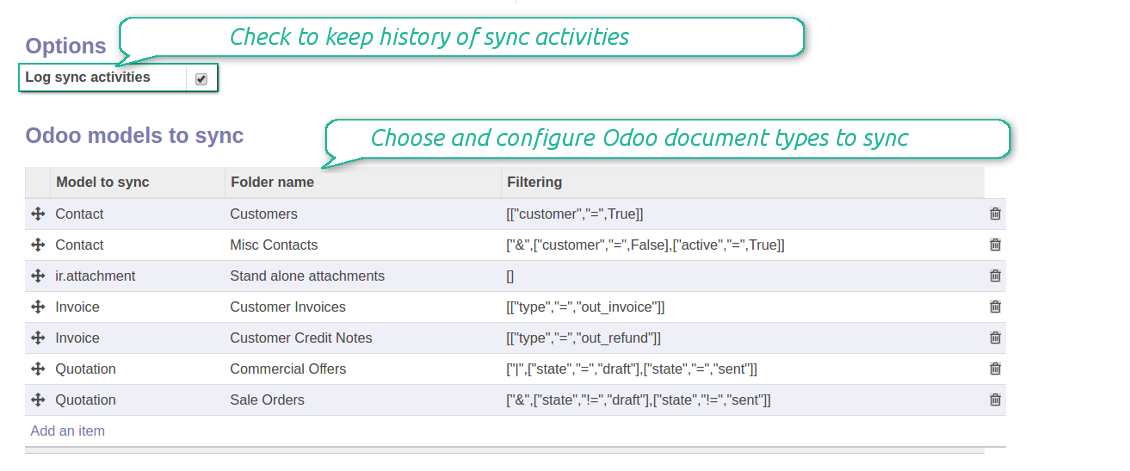
Choose document types to be synced
Document type might have a few folders based on filters
Easy accessible files
Internal and public URLs
By default all links from Odoo to OwnCloud / NextCloud are internal. It means that only authorized users may access them and, after that, generate shared URLs for others.
It is possible to make them public using the option 'Use Public URLs'. In that case links will become 'shared', meaning that everybody may access those files by links. Although the links would be hardly known by external users, there is a slight chance that they become available as a result of some user actions. Besides, sharing links generation is not fast and might make the synchronization slower. Thus, be cautious if you decide to use shared links.
Skjermbilder
Fast access to OwnCloud / NextCloud files and folders
Synced files are simply found in OwnCloud / NextCloud. Add unlimited number of files or folders here
Sync logs in Odoo
Skjermbilder
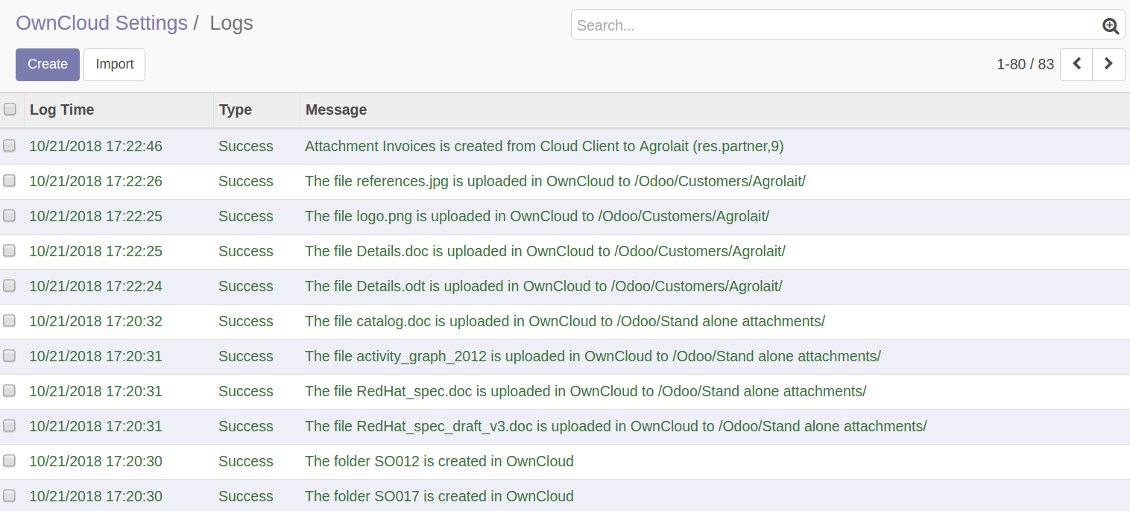
Logged synchronisation activities
Default folders for documents
Skjermbilder
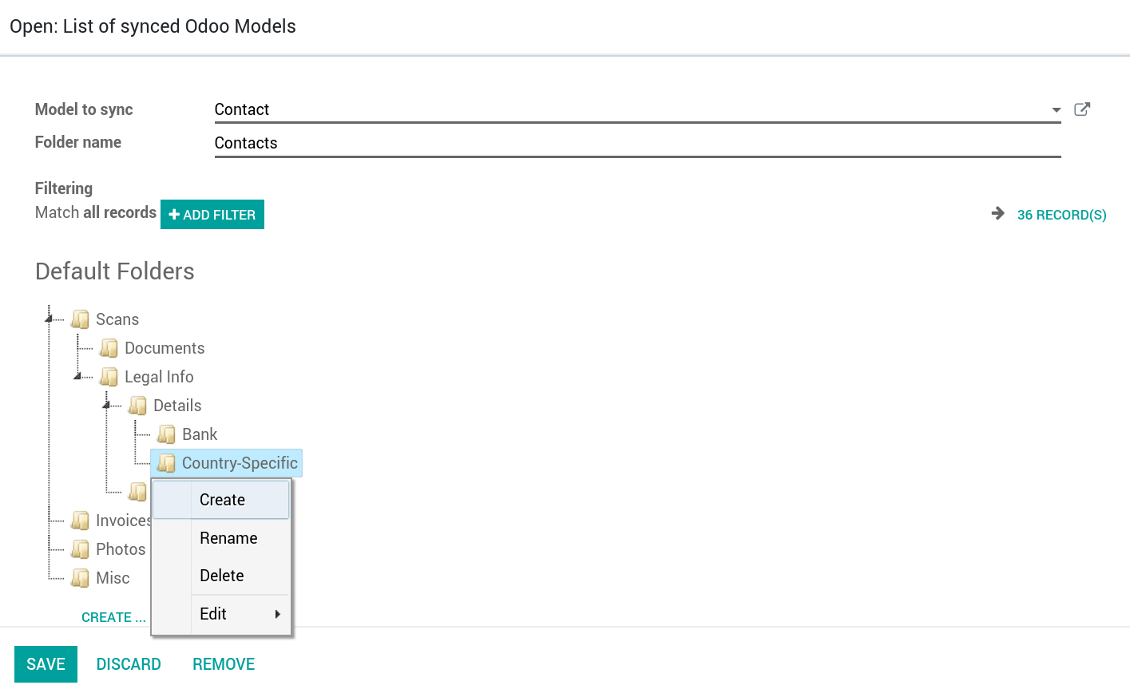
Default folders for this document types to be created while firstly synced
Applicable to all Odoo apps
A few important peculiarities to take into account
- Do not add folders inside root or document types' folders. If they have the same name as newly synced folders, the latter would not be uploaded
- Make sure your database has a proper SSL certificate required to use OwnCloud API
- Try to avoid the following symbols in folders' and files' names: *, ?, ", ', :, <, >, |, +, %, !, @, \, /,. Direct sync will replace such symbols with '-'. It is done to avoid conflicts with file systems.
Compatible with Odoo Enterprise Documents
How Odoo Enterprise Documents are synced
This tool is not in conflict with the 'documents' module provided by the Enterprise license. Attachments related to Enterprise folders would be synced as any other files: according to a document they relate to. In the most cases it means they would be linked to stand-alone attachments.
It is not always comfortable, and you might be interested in reflecting directories' structure introduced by the module 'Documents'. To this end the extension Cloud Sync for Enterprise Documents (its standard price is 44 Euros) is developed. This tool has the following features:
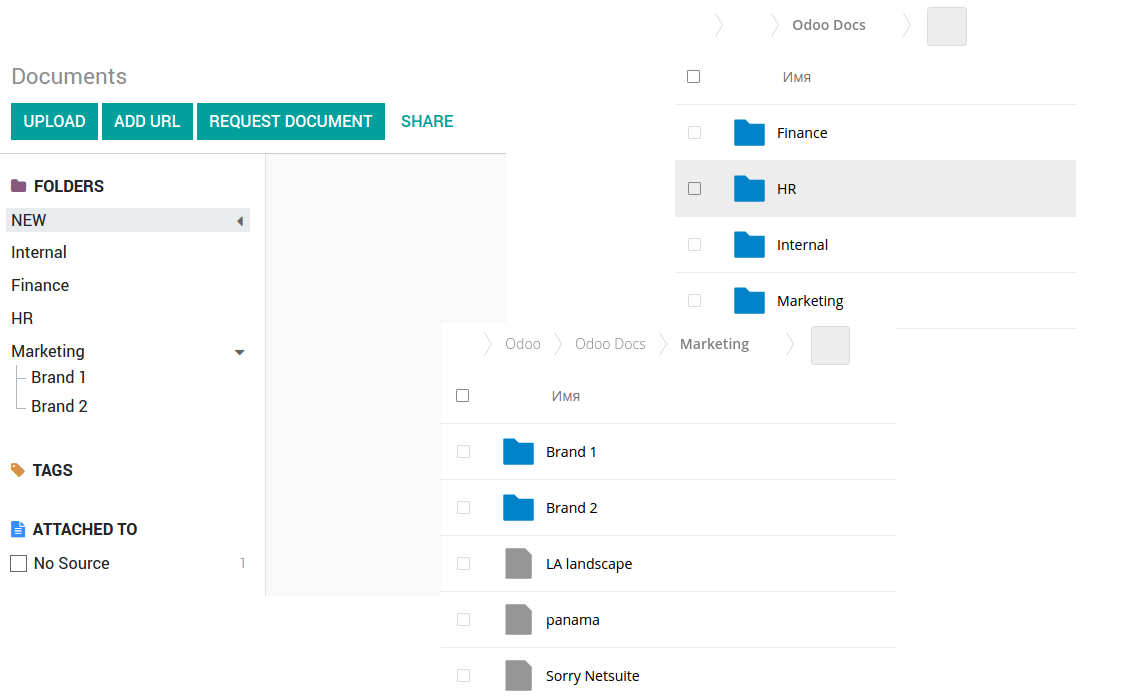
- The documents hierarchy is reflected within the folder 'Odoo / Odoo Docs'
- Each Odoo folder has a linked cloud folder. Take into account that folders created in the cloud storage will be synced as Odoo attachments. The key principle is: folders are managed by Odoo, files are managed by the cloud client
- All files are synced with the same logic as usual attachments. Files created in Odoo will be added to the cloud storage and will be replaced with links in Odoo. Files created in cloud storage will generate attachments within a paired directory
- Please do not name synced models as 'Odoo Docs'. This is the reserved name for Odoo Enterprise Documents
Skjermbilder
Odoo Enterprise documents synchronize
Very good product
A perfect solution to integrate Owncloud with Odoo. We sync a high volume of objects across multiple Odoo models, which works seamless and stable. For us it is the perfect solution to have an external DMS instead of the Odoo native attachment handling, which also enables us to interchange files between systems in our best-of-breed setup.
The team behind this module is extremely professional and responsive. They helped us on a few occasions and provided clear answers and prompt support when required, and they even went out of their way to assist us with another requirement we had. Cannot recommend the product and team highly enough, try this if you're in the market to connect Odoo with an external document solution.
Works according to specs
I have used this app with Odoo 12 and Nextcloud 16 and it works as specified. Odoo Tools offers very responsive support which is really helpful. Of course 5 stars...!
This is Awesome
I have used Cloud Sync on Next/Own Cloud and works really great.
Konfigurasjons- og installasjonstips for OwnCloud / NextCloud Odoo Integration Odoo v.12
Python dependency
pip install pyocclientConfiguration and log in
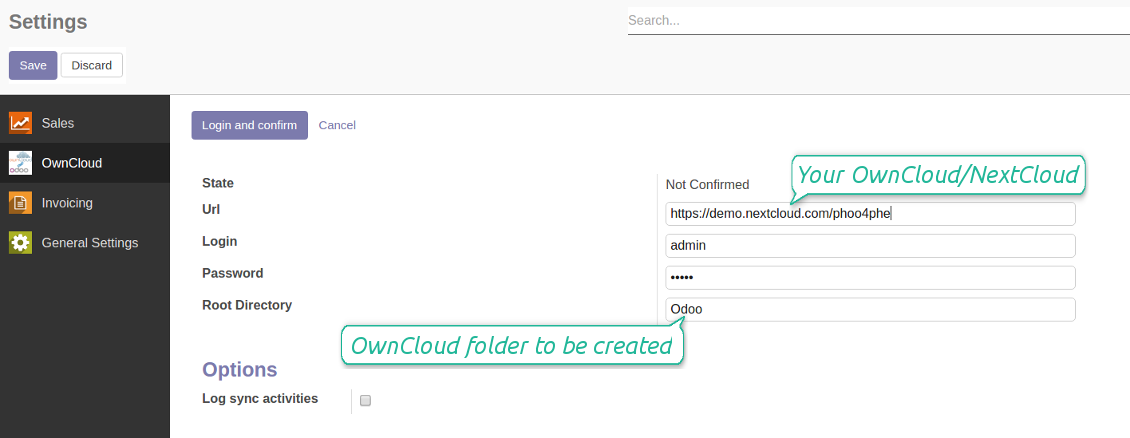
- Enter your cloud storage full url
- Select an OwnCloud / NextCloud, which has full rights to read, create, write and delete files and folders within a root directory
- Enter login and password of this user
- Introduce the title for OwnCloud / NextCloud folder, e.g. Odoo
- Push the button 'Save', and then - the button 'Login and Confirm'
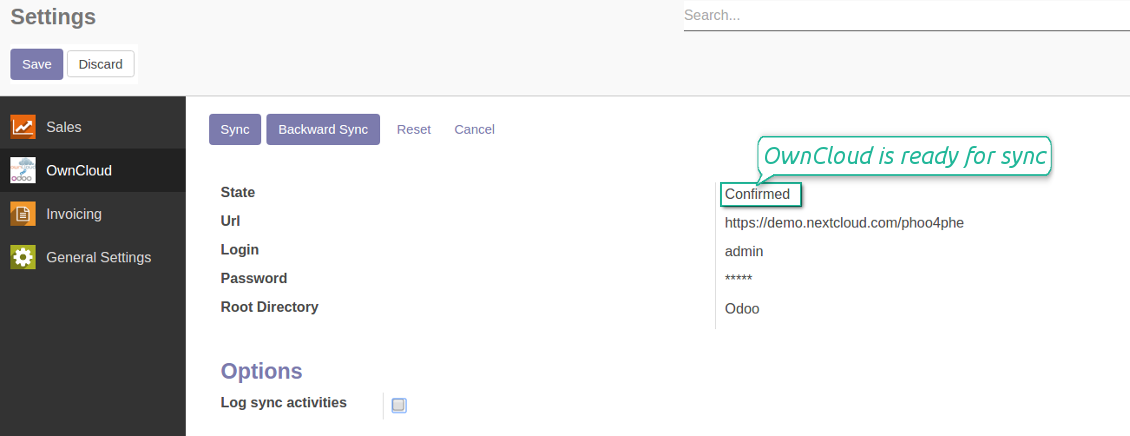
- If everything is fine, push the button 'Sync'
- Make sure that the root directory or its children are shared with your colleagues
Enter OwnCloud / NextCloud credentials
Confirmed credentials to start sync
Odoo server configuration and cron job configuration
To make sure the synchronization works correctly apply proper timeouts to the Odoo configuration file: LIMIT_TIME_CPU, LIMIT_TIME_REAL should be more than 900 seconds.
For Odoo.sh this should not be done, since timeouts are predefined and are not configurable.
Then, timeout should be entered to your Odoo. To that goal find the section 'Settings' on the app configuration page and copy the number there.
Afterwards, it is needed to make the cron jobs suit the applied timeouts. In the debug mode go to the Settings > Technical > Automation > Scheduled Jobs:
- Set up the job 'Synchronize attachments with cloud' as (a) frequency - 2*timeout; (b) the next execution as the next hour +timeout. For example, for 900seconds timeout: frequency - as 30minutes; the next execution - at 08:15
- Set up the job 'Synchronize attachments from cloud' as (a) frequency - 2*timeout; (b) the next execution as the next hour + timeout*2. For example, for 900seconds timeout: frequency - as 30minutes; the next execution- at 08:30.
Ofte stilte spørsmål om OwnCloud / NextCloud Odoo Integration Odoo v.12
Kan jeg endre frekvensen på synkroniseringsjobber?
Ja, det kan du. Gjør slik:
Slå på feilsøkingsmodus
Gå til tekniske innstillinger > Automatisering > Planlagte handlinger
Finn jobbene «Synchronize attachments with cloud» og «Update attachments from cloud».
Ikke gjør dem for hyppige. En jobb bør være ferdig før neste starter. Oppsettet avhenger av hvor mange elementer som skal synkroniseres. Vanligvis er frekvensen mellom 15 minutter og 4 timer.
Sett også nok tidsgrenser i Odoo-konfigurasjonsfilen. LIMIT_TIME_CPU og LIMIT_TIME_REAL må være lik eller større enn planlagt crontid. Fra versjon 13 gjelder også LIMIT_TIME_REAL_CRON.
Viktig merknad for Odoo.sh-kunder: maksimal tid for en cronjobb kan være begrenset til 15 minutter.
Kan jeg konfigurere en annen struktur på synkroniserte kataloger enn den synken forutsetter?
Nei, denne funksjonen finnes først fra versjon 15. Før det bruker modulen en forhåndsdefinert mappestruktur:
Odoo - rotmappe for synken
Modeller - mapper for hver Odoo-dokumenttype. For eksempel «Projects», «Partners». Etter domene kan det finnes mer spesifikke mapper: «Customer 1 Projects», «Projects of the Customer 2», «Internal Projects» osv.
Objekter - mapper for hvert dokument, f.eks. «Project 1» eller «Customer 1»
Filer og mapper knyttet til dette Odoo-dokumentet som skal synkroniseres.
Da kan du for eksempel ha:
Odoo / Projects / Project 1 / filer og mapper for prosjekt 1
Odoo / Customer 1 Projects / Project 1; Odoo / Customer 2 Projects / Project 3, ...
Odoo / Customers / Customer 1 / filer og mapper for kunde 1
Strukturen er alltid flat: bare disse nivåene. Ulike dokumenttyper kan ikke ligge i samme gren. I mappen «Customer 1» kan man ikke holde både ordrer, fakturaer og prosjekter. Hver type har egen/egne mappe(r). Ellers har bakover-synken ingen kriterium.
Bør jeg sette opp bestemte brukertilganger i Odoo?
Nei, verktøyet bruker ett brukerendepunkt. Alle synkprosesser kjøres under én skyadministrator (app). Rettigheter for opprettede mapper / filer automatiseres ikke. Administrer dem i skylagringen din.
Hvor lagres synkroniserte filer? Dupliseres de til Odoo og skyene?
Appen forutsetter at det binære innholdet i vedlegg lagres i Cloud Client i stedet for på Odoo-serveren. Slike vedlegg i Odoo blir av typen URL, og du kan når som helst åpne dem fra vedleggsboksen eller fra Cloud Client.
Etter oppsettet trengs ingen manuelle handlinger: synkroniseringen er helautomatisk. Bestem hvilke Odoo-dokumenttyper som skal synkroniseres, og sett opp en relatert modell for hver (kunder, salgs- eller innkjøpsordrer, oppgaver, prosjekter osv.).
Kan jeg ha flere mapper for samme dokumenttype? For eksempel interne prosjekter og kundeprosjekter?
Ja, det kan du. Lag en regel for hver og bruk filtre: for eksempel etter prosjekttype.
Gjør filtrene gjensidig utelukkende slik at et dokument kan tildeles entydig. For eksempel: «kunde men ikke leverandør», «leverandør men ikke kunde». Ellers hopper dokumentmappen fra én modell til en annen.
Trenger jeg bare appen Cloud Storage Solution?
Nei, verktøyet er bare en teknisk kjerne. Du trenger også koblingen for skyklienten din.
Er det greit om jeg har mange objekter å synkronisere, for eksempel 10000?
Ja, selv om prosessen kan være treg med mange mapper/vedlegg. Kunder har likevel rapportert miljøer med >10k partnere og ~5k produktvarianter, og prosessene var akseptable.
Noen punkter:
- Synken er bygget slik at hvert element synkroniseres og ikke går tapt, selv om det ikke er raskt. FIFO-køer og commit av hver jobb garanterer det.
- Antall objekter kan begrenses logisk. Modellkonfigurasjonen lar deg utelate foreldede elementer (f.eks. arkiverte partnere eller ordrer fra 2 år siden).
Er det mulig å gjøre synkroniseringen sanntid?
Nei. Vi har sterke grunner til å unngå sanntidssynk:
Ytelse. Ved sanntidssynk gir hver filopplasting en lasteskjerm.
Konflikter. Hvis 2 brukere endrer et element samtidig, kan det bli uløselig. Med vanlige jobber kan vi rette etterpå; i sanntid trengs en kø, enda mer forvirrende.
Funksjonalitet. Særlig omdøping og omstrukturering. Bakover-synken bygger strengt på kataloglogikken og sjekker 100 % av elementene ved hver synk. Etter hver oppdatering ville det bli tusenvis av forespørsler per sekund. Hvis ikke, går endringer tapt.
Kan jeg synkronisere vedlegg til flere skyklienter
Nei, denne funksjonen er tilgjengelig først fra versjon 15.
Vi bruker en spesiell redigerer i skyene våre (f.eks. OnlyOffice, Office 365). Ville filer åpnes i den redigereren?
Ja, avhengig av konfigurasjonen til skyklienten.
Kan jeg oppdatere OwnCloud-tagger med koblingen?
Nei, tagger synkroniseres ikke. Vi vurderte funksjonen tidligere, men besluttet å ikke innføre den av flere grunner:
Koblingsbiblioteket støtter ikke henting eller oppdatering av OwnCloud-tagger
Odoo-vedlegg har ikke attributtet «tags», og det er uklart når slike tagger ville blitt tildelt brukere.
Siden appen gir toveis synk, kan det oppstå kritiske konflikter som er vanskelige å løse.
Hva er oppdateringsreglene for verktoyene deres?
Ifolge gjeldende retningslinjer for Odoo Apps Store:
- Hver modul kjopt for versjon 12.0 eller tidligere gir tilgang til alle versjoner opp til 12.0.
- Fra versjon 13.0 ma hver modulversjon kjopes separat.
- Uavhengig av versjon gir kjop rett til alle oppdateringer og feilrettinger innen en hovedversjon.
faOtools-teamet styrer ikke disse retningslinjene. Ved sporsmal, kontakt Odoo Apps Store-representantene direkte.
Hvordan installerer jeg appen pa Odoo.sh?
Den mest direkte fremgangsmaten er den innebygde arbeidsflyten i Odoo-butikken:
1. Åpne modulens side og klikk pa Deploy on odoo.sh
2. Du blir omdirigert til GitHub. Logg inn og klikk Create a new repo eller bruk et eksisterende. Repet ma vaere privat. Apper under OPL-1 far ikke publiseres. Opprett et nytt repo for Odoo.sh-prosjektet om nodvendig
3. Ga deretter til odoo.sh, klikk Deploy, bekreft og klikk Continue. Installasjonen starter.
Disse trinnene installerer appen pa production-grenen. For andre grener eller oppdatering:
1. Last ned kildekoden fra Odoo-butikken
2. Commit modulen til GitHub-repot. Ingen app-mapper/filer ma sta i .gitignore. Repoer opprettet av odoo.sh kan ignorere viktige stier (f.eks. /lib). Last opp alle modulmapper og -filer
3. Deploy malgrenen i odoo.sh-prosjektet, eller vent pa automatisk bygg hvis innstillingene tilsier det.
Hvordan installerer jeg appen pa min egen server?
2. Start Odoo-serveren pa nytt;
3. Sla pa utviklermodus (tekniske innstillinger);
4. Oppdater applisten (Apper-menyen);
5. Finn appen og trykk pa Activate/Install;
6. Folg retningslinjene pa appsiden hvis de finnes.
Appen har ekstra tillegg. Kan jeg kjope dem senere?
Ja. Odoo legger automatisk alle avhengigheter i handlekurven: utelat allerede kjopte verktoy for a unngå dobbel betaling.
Jeg deployet appen pa Odoo.sh og ser advarsel/feil i testene
En rod/oransje advarsel pavirker ikke appens funksjoner. Noen ganger består ikke modulene vare de vanlige automatiske testene, fordi de forventer atferd som er i konflikt med appens mal. Vi endrer for eksempel prisberegningen, mens Odoo-testene sammenligner sluttprisen med standardalgoritmen.
Sjekk forst funksjonene i den deployede databasen. Fungerer alt?
Hvis du likevel tror at advarselen pavirker reelle funksjoner, kontakt oss og send de fulle installasjonsloggene og den fulle listen over deployede moduler (kjerne og tredjepart).
Kan jeg kjope appen direkte fra dere?
Nei, vi distribuerer verktoyene bare via den offisielle Odoo-appbutikken.
Jeg onsker rabatt
Dessverre har vi ikke teknisk mulighet til a gi individuelle priser.
Kan jeg installere appen pa Odoo Online (SaaS)-databasen min?
Nei, tredjepartsapper kan ikke brukes pa Odoo Online. Odoo SaaS blokkerer den muligheten.
Verktoyet avhenger av andre apper. Ma jeg kjope dem?
Ja, verktoyet trenger alle modulene merket som avhengigheter. Prisen pa appsiden inkluderer allerede disse avhengighetene.
Hva koster modulen i amerikanske dollar? Hvorfor endret den seg?
Prisen pa modulene vare er satt i euro. Odoo-butikken konverterer til andre valutaer etter intern vekslingskurs. Derfor kan prisen i amerikanske dollar endre seg nar kursen oppdateres.
App- og nettstedstekster på andre språk enn engelsk er AI-assisterte og tilpasset offisielle Odoo-oversettelser. Hvis du oppdager en feil, send en sak om oversettelseskorrekthet så fikser vi det.
Feilrapportering
Hvis du møter feil eller inkonsekvent oppførsel, kontakt oss. Vi garanterer rettelser innen 60 dager etter kjøp og forbedrer verktøyene også etter det.
Du trenger verken telefonnummer eller kredittkort for å kontakte oss. Det holder med en kort e-postregistrering som tar under 30 sekunder.
Ta med så mange detaljer som mulig: skjermbilder, Odoo-serverlogger og en full beskrivelse av hvordan problemet gjenskapes. Det tar vanligvis noen virkedager å lage en arbeidsplan (hvis feilen bekreftes) eller retningslinjer (ellers).
Offentlige funksjonsønsker og modulidéer (gratis utvikling)
Vi er sterkt motiverte til å forbedre verktøyene og takknemlige for all tilbakemelding. Hvis kravene er til offentlig nytte og kan implementeres effektivt, tar teamet dem med på oppgavelisten.
En slik gjøremålsliste behandles jevnlig og innebærer ingen ekstraavgifter. Selv om vi ikke kan love frister og endelig design, kan det være en god måte å få ønskede funksjoner uten investeringer og risiko.
Du trenger verken telefonnummer eller kredittkort for å kontakte oss. Det holder med en kort e-postregistrering som tar under 30 sekunder.

Verktøyet for å oppbevare passord trygt i Odoo for felles bruk. Delte hvelv

Verktøyet for å bygge en dyp og strukturert kunnskapsbase til intern og ekstern bruk. Knowledge System. KMS. Wiki-lignende revisjoner.
398€
Verktøyet for å sette KPI-mål og styre oppfyllelsen deres etter perioder. KPI-dashbord. Dashboard-designer. KPI-diagrammer

Verktøyet for tidsbasert tjenestestyring, fra booking av avtaler til salg og anmeldelser
398€
Verktøyet for å styre Odoo fra favoritt-AI-chattene via MCP. Claude. Enhver AI som støtter MCP.

Verktøyet for å strukturere Odoo-vedlegg i mapper og synkronisere kataloger med skyklienter: Google Drive, OneDrive/SharePoint, Nextcloud/ownCloud, Dropbox, Amazon S3, Box og NAS. DMS. Filbehandler. Dokumenthåndteringssystem
398€
Verktøyet for å synkronisere Odoo-vedlegg automatisk med OneDrive-filer begge veier
487€
Verktøyet for å synkronisere Odoo-vedlegg automatisk med Google Drive-filer begge veier
487€
Verktøyet for automatisk toveis synkronisering av Odoo-vedlegg med NAS-løsninger. Synology, QNAP, TrueNAS og andre NAS-løsninger som støtter WebDav
487€