Reminder Designer and Periodic Reporting v.16
The tool to design, generate, and periodically send reports and reminders. Report designer. List generator. Auto reminders


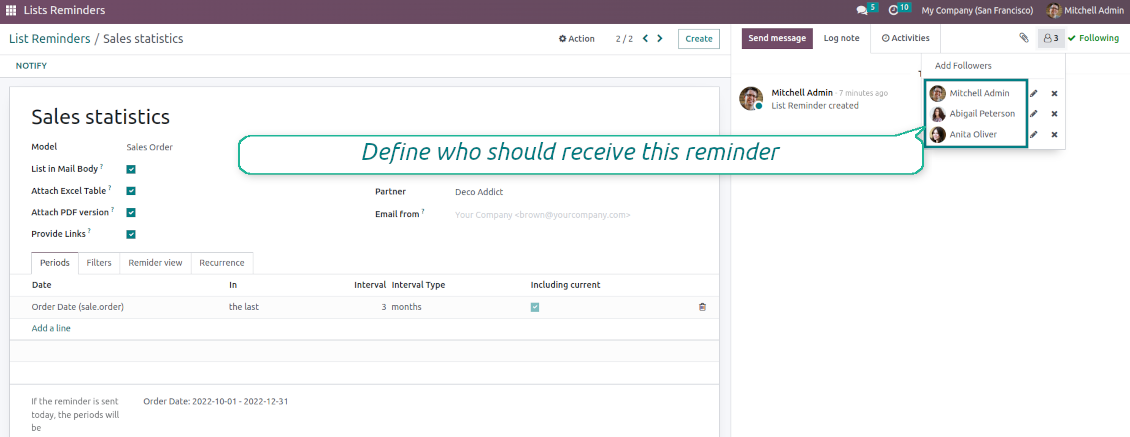

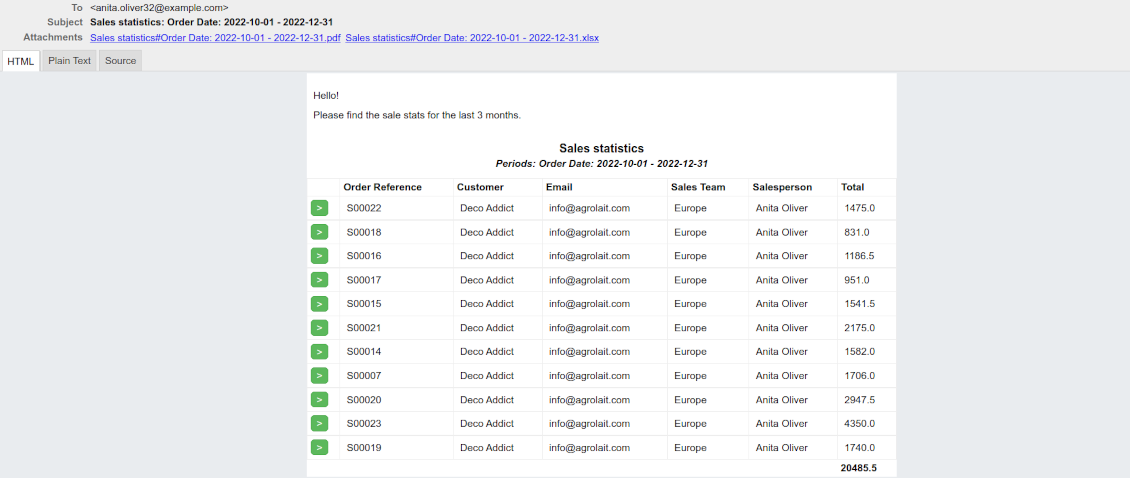
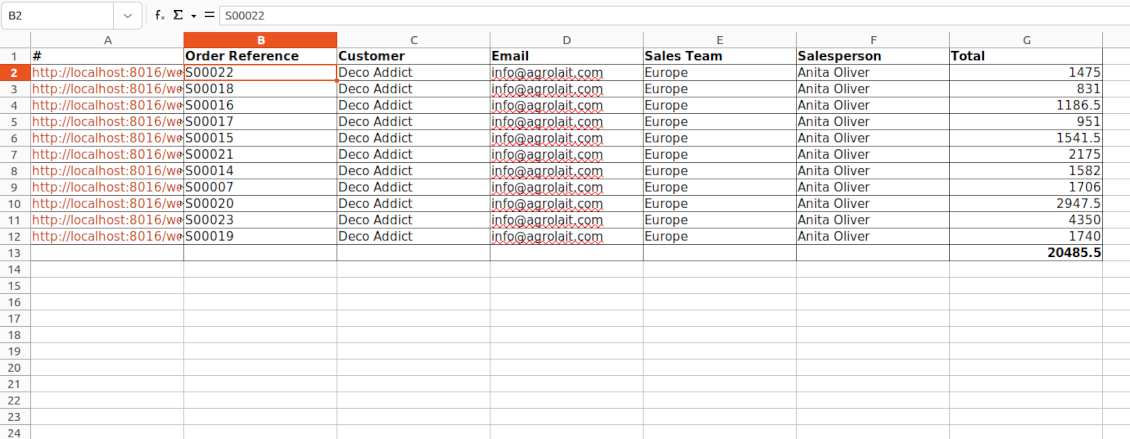


Often it is truly comfortable to open a set of documents and process them one by one without extra clicks. It is even better if the system prepares such a list regularly. For such situations this tool serves. It lets configure automatic reports for any Odoo document type in a form of lists, where each record will satisfy the criteria you have chosen, will suit pre-defined time frames, and will contain only the data you would like to share.
Reports by any Odoo object
Configure the tool to send periodic reports and reminders for any Odoo documents including custom ones: sale orders, opportunities, warehouse transfers, requests for quotations, tasks, MRP operations, etc.
Configurable statistics
Choose data columns to include. Attach the report as an electronic table (xlsx), or/and as a PDF file, or/and as a table right in the email body. Apply aggregation (average, sum) for numeric columns. Introduce email greetings. Show or hide links
Up-to-date data under analysis
Include in reporting only those objects which suit your period requirements. It is possible to filter by any date and datetime fields of a target Odoo model
Suitable information
Apply any kind of filters by stored fields to include only documents which are of interest. Filter by a chosen partner or responsible user. Sort and group table lines
Flexible recurrence
Send lists with any periodicity: every day, each last Friday of a month, on a definite date of the year, and so on. Make reports reflect company calendars
Periodic reports for external and internal use
Any partner might be one of the reminder recipients: internal or portal users, customers, suppliers, and even Odoo mail channels
Assigned statistics managers
The groups Lists Reminder 'Manager' and 'Only Own' (according to 'Responsible') allow to manage reports. Make sure you trust such users: they may send certain documents without permission for those
Reports without restrictions
Have as many periodic reports as you wish. In any system language. For any interested internal group or third-party contacts.
Great and very useful app
First of all, the team behind this app is great, support is immediate, and response is fast. The application is very useful in managing any type of notification to keep you updated with all what's happening within your company.
Topical and up-to-date reports
Filtering by relative periods
-
Restrict report time frames by any kept date or datetime fields of a target document type: deadline, create or close date, next activity day, etc. As intervals select days, weeks, months, or years
-
Apply a few periods based on different dates: e.g. select this month's closed leads that have been opened the last year. Records should satisfy each criterion, but if you selected the same date twice, records should be within any of those periods. For example, a deadline should be within the last 2 months OR the next month AND a close date should be within the last year
-
Intervals may both define previous time frames ('the last') and forthcoming periods ('the next'). Periods are relative, so they are compared to today. E.g., 'this month', 'the last year', 'the next 5 weeks'
-
Exclude or include a current period. For example, you might send a reminder on the first day of a month for a previous one. Vice versa, forward a list on the last day of this month for a current one
-
Test your settings according to a real-time-shown result below the table
-
Take into account that if a related date is not set for a document, such a document is considered as always outside periods
Filtering by any document detail
-
Filters are organized as a domain constructor: you may use the most of storable fields with any level of precision. The latter means, for example, you can filter sales orders by a related partner country or even by a state of a company of a related partner
-
Use both 'AND' ('all') and 'OR' ('any') operators to achieve the desired result
-
Check yourself by pressing the button 'Records': it will show all documents which at the moment satisfy your search criteria (and you have an access to)
-
If you feel confident to prepare Reverse Polish Notation domains: turn on the developer mode, and apply more complex expressions such as, for instance, 'category is child_of all'
-
Introduce the special filters by a chosen partner or a responsible user. In this way, the app lets quickly limit analysis for documents' owners. For example, to find all quotations of a particular customer or a salesperson
-
Apply filters thoroughly: make sure you are not forwarding confidential data to the wrong partners. Be especially cautious in case of reminders for external contacts: make sure you filter documents by a related customer/vendor.
Configurable report appearance
-
Choose an unlimited number of columns for this document. It might be any field of the following types: char, text, html, integer, float, selection, boolean, date, datetime, and relations to other documents (many2one, one2many, many2many). The set includes even computed fields
-
For the relational fields, you might choose the second level of precision. For example, you might show a phone of a customer for a sales orders reminder or tags colors for tasks
-
By default, the field description is used as a column name, but you can introduce any other
-
Define grouping for table lines. For instance, send a list of opportunities divided by a city, a salesperson, a customer, etc.
-
Set up table sorting for any document storable field. For instance, send a sales list ordered by a sales team, a country, a salesperson, etc.
-
Apply aggregation operators for columns: the app lets calculate the sum or average per records' column (applicable for integer, float, and monetary fields)
-
Optionally attach an Excel table for reports. It will have the same columns as a reminder itself. It is also possible to exclude a list from the email and leave only an XLSX table
-
Optionally attach a PDF version of the reminder table. Thus, send just an email, a PDF file, an electronic table, or altogether
-
Include or exclude links to Odoo objects. References are great in case of internal reminders, but they might be harmful in case of external ones
-
Introduce any greeting text for reminders. This introduction might be edited in a standard Odoo HTML editor
-
Define the report language to make sure the correct translation is applied
-
Enter the email address which will be shown for reminder recipients. Otherwise, it will be the user who sends the report.
Flexible periodicity of reports
-
Configure frequency of sending reports to fully reflect business calendars: by days, by weeks, by months, by years
-
By days: prepare a reminder every day, every 5 days, every 181 days
-
By weeks: send statistics on definite weekdays (e.g. on Mondays and Thursdays) each week or each 2,3,7,... weeks
-
By months: for the first or the last month day, for the exact date (e.g. the 16th), for a definite weekday (for instance, the first Monday, the last Friday, or the third Tuesday)
-
By years: on an exact year day, e.g. on the first of September each year
-
Be cautious with a month/year exact date: if it didn't exist, the last month's day will be applied: 31/09 -- 30/09
List reminders for any business purpose
The app is used to aggregate information by any Odoo document type: sale or purchase orders, leads or tasks, activities or meetings, deliveries or manufacturing operations, thus, generally all models which exist in the system. Typical goals of such reminders are:
-
To send periodical statistics for managers
-
To forward to-do lists for certain actions
-
To plan forthcoming events and actions
-
To notify customers or suppliers of done jobs
Typical use case: pipeline results
-
The goal: to get leads closed the previous month for a team manager
-
Choose Lead/Opportunity as a model
-
Define a period as Closed Date in the last month
-
Make a filter by Sales Team (e.g. to contain 'Europe')
-
As columns define Display Name, Salesperson - name, Salesperson - phone, Tags, Expected Revenue (as a total operator - use average, for example)
-
Subscribe a sales team manager for this reminder
-
Send a list each month, on the first Monday.
-
Similar lists might be configured for sale orders, deliveries, purchase orders, manufacturing operations, etc.
Typical use case: daily to-do list
-
The goal: to get activities that should be done today or previously
-
Choose Activity as a document type
-
Define a period as Due Date in the last 10000 days including this (to get even the eldest activities)
-
Make a filter Assigned to - Name contains 'John Brown', where 'John Brown' is a user to notify
-
As columns apply Display name, Category, Due Date, Note
-
Subscribe a John Brown for this reminder
-
Send a list every day
-
Similar reminders are usually prepared for project tasks, opportunities, planned deliveries or incoming shipments, etc.
-
To prepare the same reminder for another user: duplicate this one, update the filter to a new employee and subscribe him/her
Typical use case: planned events
-
The goal: to get events that will happen in forthcoming periods
-
Choose Event as an object for this reminder
-
Define a period as Start Date the last week, including this (it would be 'this week'), or the next 3 weeks
-
As columns apply Event name, Location, Start Date, End Date
-
Subscribe a John Brown for this reminder, where John Brown is an event department head
-
Send a list on Mondays
-
Similar reminders are Okay for activities, tasks, leads, deliveries, incoming shipments, etc.
Typical use case: customer project statistics
-
The goal: to notify customers about their project tasks
-
Define a period as Create Date in the last year
-
Make 2 filters: Customer - Parent name is 'Agrolait' or Customer name is 'Agrolait', where 'Agrolait' is an Odoo project customer
-
As columns apply Display name, Deadline, Description, Last Stage Update, Stage - display name
-
Subscribe a John Brown for this reminder, where John Brown is a managing partner of Agrolait
-
Send a list on the 10th of January each year
-
Similar statistics is frequently forwarded by support tickets, paid invoices, done sale orders, etc.
Configuratie- en installatietips voor Reminder Designer and Periodic Reporting Odoo v.16
Python dependency
To provide the feature of dynamic Excel table generation, install the Python library xlsxwriter:
pip3 install xlsxwriter
Email template
The basic reminder appearance should not be updated through Odoo email templates. In the debug mode go to:
- Settings > Users Interface > Views > 'total_notify_template'
Do not change this template! Otherwise, its styles would be broken, and you would receive blank emails.
Have you broken everything? Not a problem, remove this template and update the module. The email appearance would be recovered.
Scheduled job (cron)
By default, Odoo checks whether any reminder should be sent on a daily basis. You can change the frequency or time of the check. In the debug mode go to
- Settings > Technical > Automation > Scheduled Actions > '[Periodic Reporting and Reminders] Prepare and Send Reminders'
The situation for a higher frequency is when you have many reminders with a lot of records to search. In that case, the cron job might be not ready with all actions in time, and it is better to repeat the check. However, be cautious: do not make it too frequent. Otherwise, one job would not be fulfilled until another one, and Odoo would collapse until a reminder is sent.
The cron job interval should be bigger than your Odoo configured timeout. Sometimes it is required to increase a timeout if the number of documents in a list accounts for a few thousand records.
The module is not aimed to export data from Odoo. Do not try to send every day your whole database.
Veelgestelde vragen over Reminder Designer and Periodic Reporting Odoo v.16
Wat is het updatebeleid van uw tools?
Volgens het huidige beleid van de Odoo Apps Store:
- Elke module gekocht voor versie 12.0 of eerder geeft toegang tot alle versies tot 12.0.
- Vanaf versie 13.0 moet elke moduleversie apart worden gekocht.
- Ongeacht de versie geeft aankoop recht op alle updates en bugfixes binnen een hoofdversie.
Het faOtools-team bepaalt dit beleid niet. Neem voor vragen rechtstreeks contact op met vertegenwoordigers van de Odoo Apps Store.
Hoe installeer ik uw app op Odoo.sh?
De meest directe aanpak is de ingebouwde workflow van de Odoo-store:
1. Open de modulepagina en klik op Deploy on odoo.sh
2. U gaat naar GitHub. Log in en klik op Create a new repo of gebruik een bestaande. De repository moet privé zijn. Apps onder OPL-1 mogen niet openbaar. Maak zo nodig een nieuwe repo voor het Odoo.sh-project
3. Ga daarna naar odoo.sh, klik op Deploy, bevestig en klik op Continue. De installatie start.
Zo installeert u de app op de productiebranch. Voor andere branches of een update:
1. Download de broncode uit de Odoo-store
2. Commit de module naar de GitHub-repository. Geen app-mappen/bestanden in .gitignore. Repo's van odoo.sh negeren soms belangrijke paden (bijv. /lib). Upload alle modulemappen en -bestanden
3. Deploy de doelbranch van het odoo.sh-project of wacht op de automatische build.
Hoe installeer ik uw app op mijn eigen server?
2. Herstart de Odoo-server;
3. Zet de ontwikkelaarsmodus aan (technische instellingen);
4. Werk de applijst bij (Apps-menu);
5. Zoek de app en klik op Activate/Install;
6. Volg de richtlijnen op de app-pagina als die er zijn.
Uw app heeft extra add-ons. Kan ik die later kopen?
Ja. Odoo zet automatisch alle afhankelijkheden in de winkelwagen: sluit eerder gekochte tools uit om dubbel betalen te voorkomen.
Ik heb uw app op Odoo.sh gezet en zie een waarschuwing/fout in de tests
Een rode/oranje waarschuwing beinvloedt de functies van de app niet. Soms halen onze modules de standaard automatische tests niet, omdat die gedrag verwachten dat indruist tegen het doel van de app. We wijzigen bijvoorbeeld de prijscalculatie, terwijl de Odoo-tests de eindprijs met het standaardalgoritme vergelijken.
Controleer eerst de functies van de gedeployde database. Werkt alles?
Als u toch denkt dat de waarschuwing echte functies raakt, neem contact op en stuur de volledige installatielogs en de volledige lijst gedeployde modules (kern en derden).
Kan ik uw app rechtstreeks bij u kopen?
Nee, we verspreiden de tools alleen via de officiele Odoo-appwinkel.
Ik wil graag korting
Helaas hebben we geen technische mogelijkheid voor individuele prijzen.
Kan ik de app installeren op mijn Odoo Online (SaaS)-database?
Nee, apps van derden kunnen niet op Odoo Online. Odoo SaaS blokkeert die mogelijkheid.
Uw tool hangt van andere apps af. Moet ik die kopen?
Ja, de tool heeft alle modules in de afhankelijkheden nodig. De prijs op de app-pagina is inclusief die afhankelijkheden.
Wat is de prijs van de module in Amerikaanse dollars? Waarom is die veranderd?
De prijs van onze modules staat in euro. De Odoo-store rekent om volgens de interne wisselkoers. De prijs in Amerikaanse dollars kan dus wijzigen als die koers wordt bijgewerkt.
De teksten van de app en website in andere talen dan het Engels zijn met AI ondersteund en afgestemd op de officiële Odoo-vertalingen. Als u een fout ziet, een vertaalticket sturen en we corrigeren het.
Odoo-demodatabases (voorbeelden)
Voor deze app kunnen we een gratis gepersonaliseerde demodatabase aanbieden.
U heeft geen telefoonnummer of creditcard nodig om contact met ons op te nemen. U hoeft slechts een korte e-mailaanmelding door te geven, die niet langer dan 30 seconden duurt.
Op verzoek richten wij een eigen voorbeelddatabase in waarin u ongeveer twee weken lang naar wens kunt testen en aannames kunt controleren.
Fouten melden
Als u bugs of inconsistent gedrag tegenkomt, aarzel dan niet om contact met ons op te nemen. We garanderen dat we binnen 60 dagen na aankoop oplossingen bieden en zijn zeer geïnteresseerd in het verbeteren van onze tools, zelfs na deze periode.
U heeft geen telefoonnummer of creditcard nodig om contact met ons op te nemen. U hoeft slechts een korte e-mailaanmelding door te geven, die niet langer dan 30 seconden duurt.
Vermeld zo veel mogelijk details in uw verzoek: schermafbeeldingen, Odoo-serverlogboeken, een volledige beschrijving om uw probleem te reproduceren enzovoort. Gewoonlijk kost het enkele werkdagen om een werkplan voor een probleem op te stellen (als een bug is bevestigd) of u richtlijnen te geven over wat er moet gebeuren (anders).
Aanvragen voor openbare functies en module-ideeën (gratis ontwikkeling)
We zijn sterk gemotiveerd om onze tools te verbeteren en zijn dankbaar voor alle feedback. Als uw vereisten van openbaar nut zijn en efficiënt kunnen worden geïmplementeerd, zal het team deze opnemen in onze takenlijst.
Zo'n to-dolijst wordt regelmatig verwerkt en er zijn geen extra kosten aan verbonden. Hoewel we geen deadlines en definitief ontwerp kunnen beloven, kan het een goede manier zijn om de gewenste functies te verkrijgen zonder investeringen en risico's.
U heeft geen telefoonnummer of creditcard nodig om contact met ons op te nemen. U hoeft slechts een korte e-mailaanmelding door te geven, die niet langer dan 30 seconden duurt.

The tool to flexibly structure Odoo attachments in folders and synchronize directories with cloud clients: Google Drive, OneDrive/SharePoint, Nextcloud/ownCloud, and Dropbox. DMS. File Manager. Document management system
398€

The tool to build a deep and structured knowledge base for internal and external use. Knowledge System. KMS. Wiki-like revisions.
398€
The tool to automatically synchronize Odoo attachments with OneDrive files in both ways
487€
The tool to set up KPI targets and control their fulfillment by periods. KPI dashboards. Dashboard designer. KPI charts

The tool for time-based service management from booking appointments to sales and reviews
398€
The tool to automatically synchronize Odoo attachments with Google Drive files in both ways
487€
