Product Management Interface v.18
The tool to search, select and mass update product templates
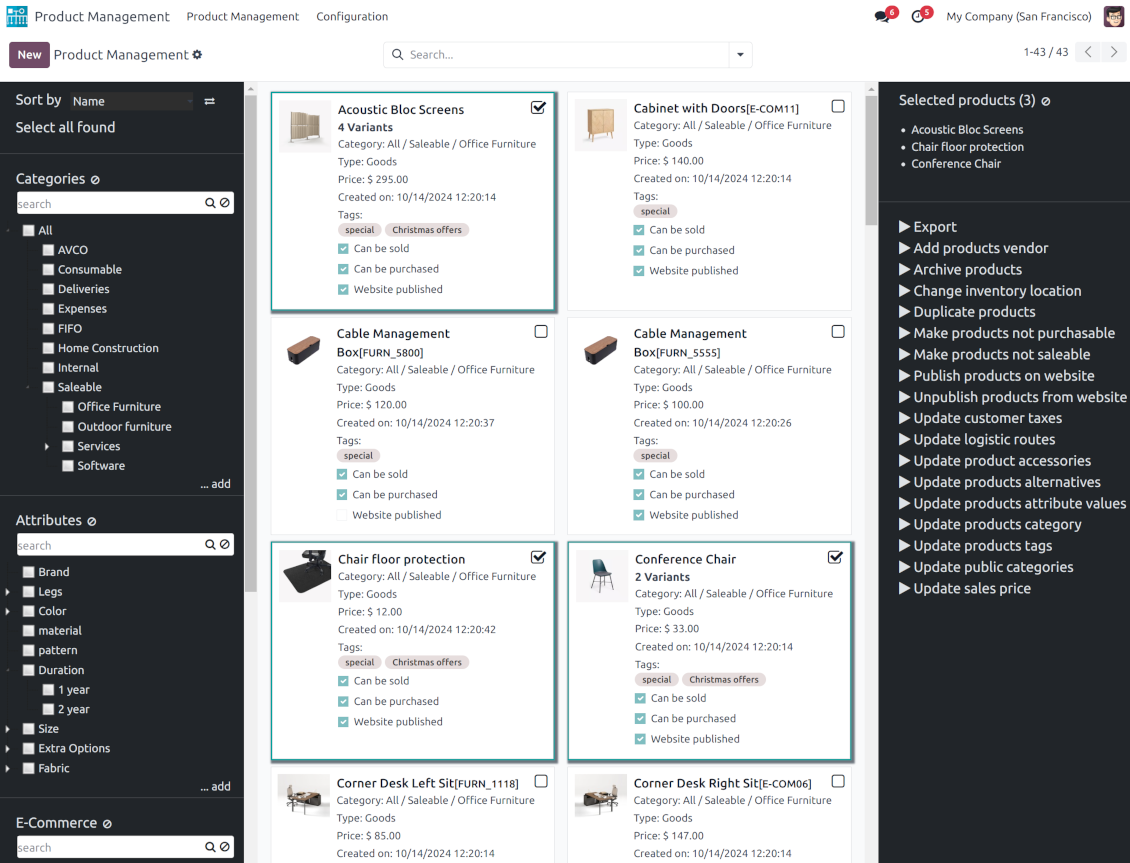
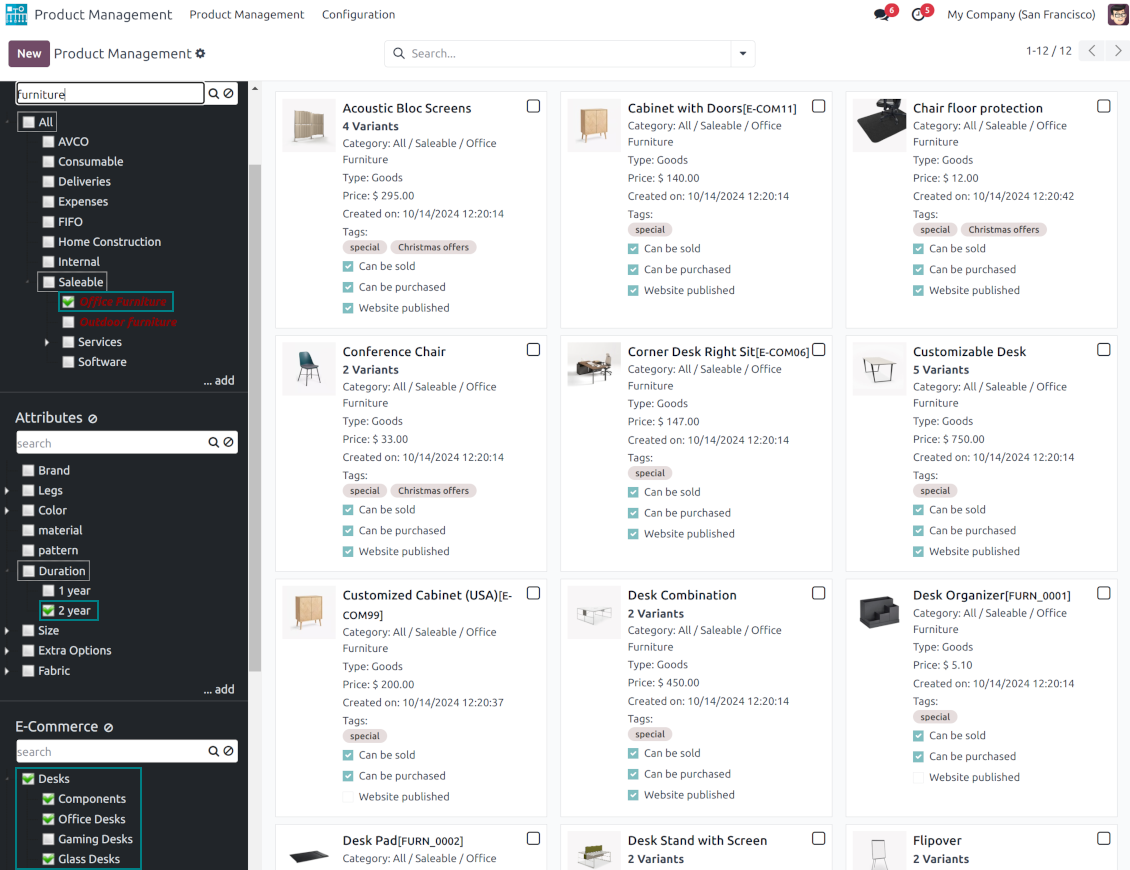
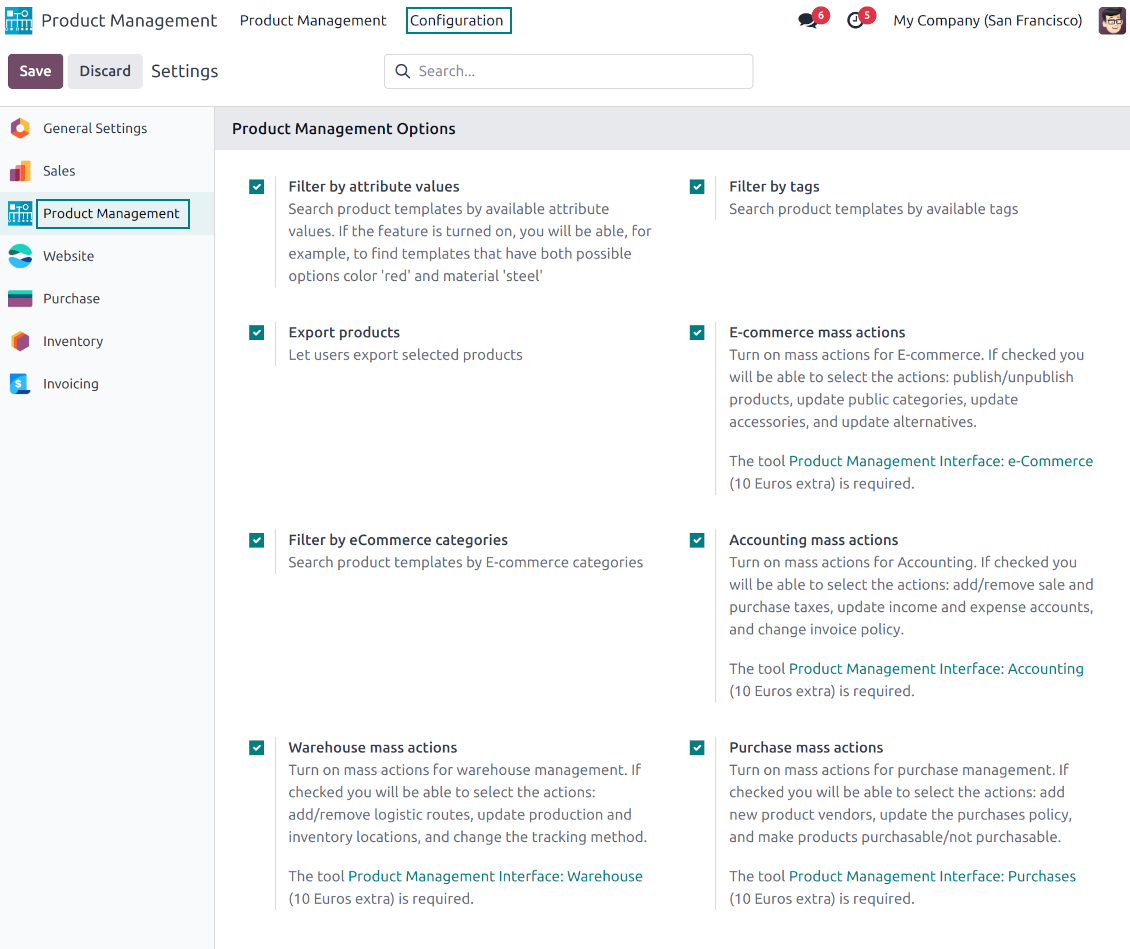
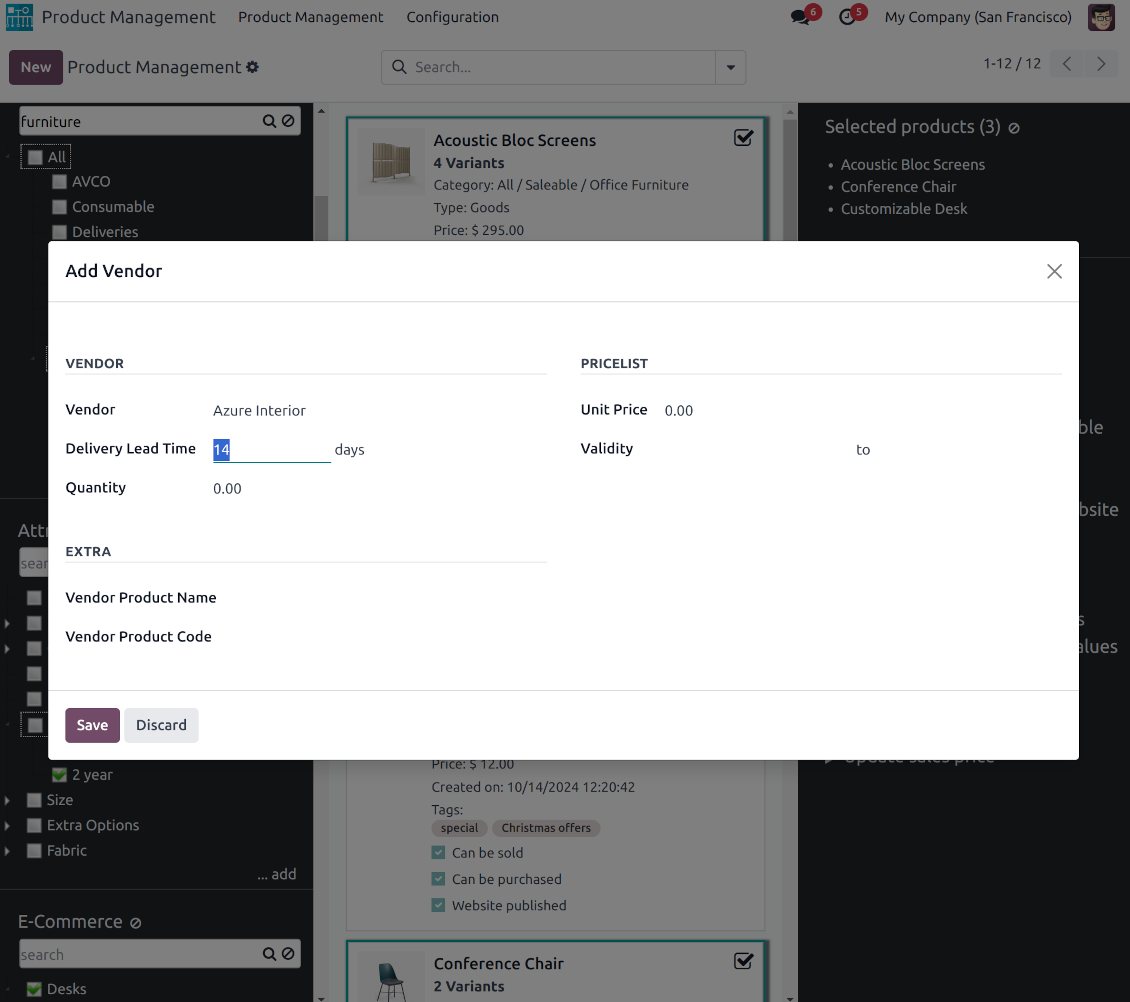
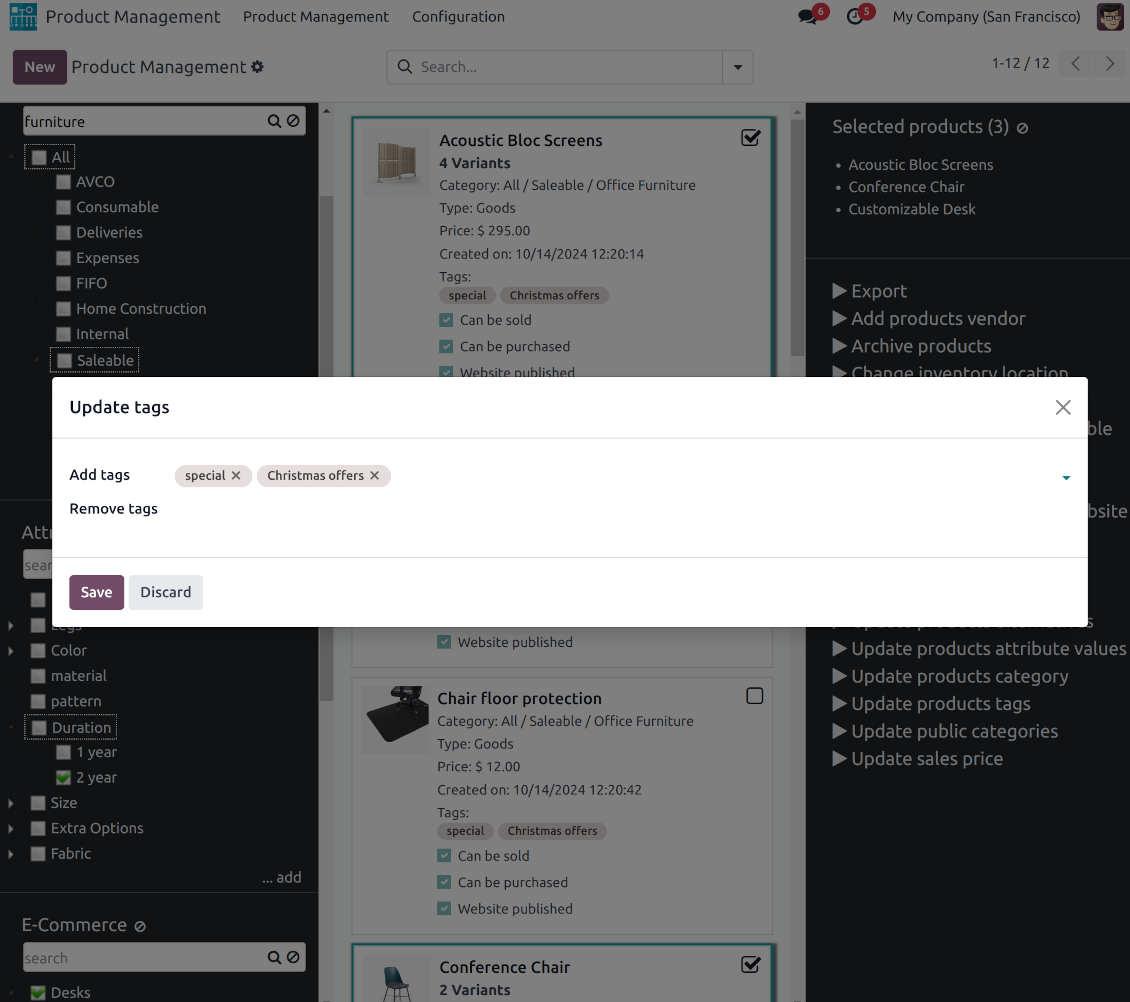
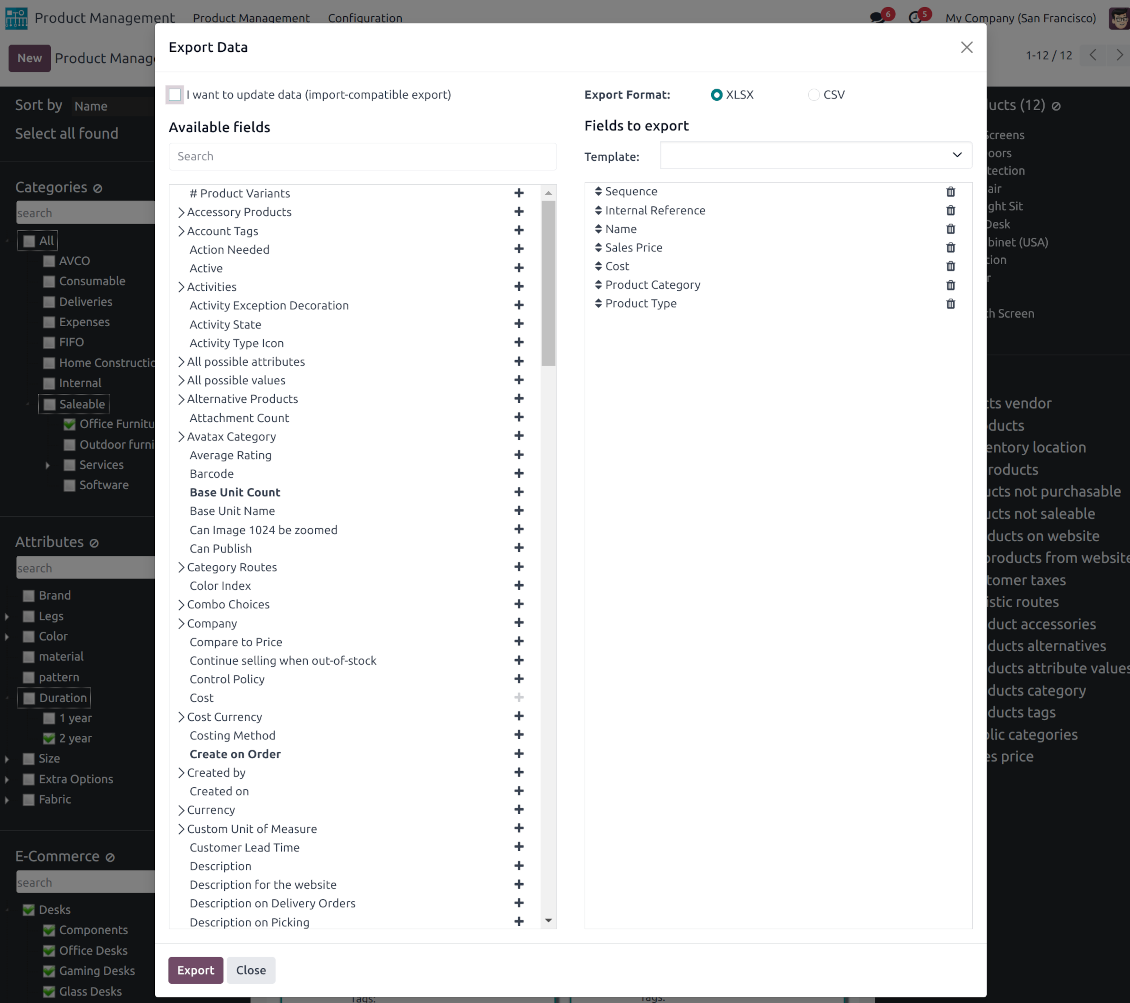
This is an Odoo product management tool that aims to improve catalog administration and simplify the implementation of changes. The app introduces an innovative interface to search, analyze, select, and mass edit Odoo product templates.
- the core app. It might be used stand-alone as a system to find, pick up, and update basic product fields.
Jo kaina yra
198€
178€.
- the optional module, which introduces mass product actions to change E-shop-related attributes. The features assumed by this add-on are marked by the icon .
Jo kaina yra
10€
9€.
- the optional module to update batch warehouse characteristics of product templates. The features assumed by this add-on are marked by the icon .
Jo kaina yra
10€
9€.
- the optional module to manage accounting traits of products in bulk. The features assumed by this add-on are marked by the icon .
Jo kaina yra
10€
9€.
- the optional module offering mass actions on purchase columns of products. The features assumed by this add-on are marked by the icon .
Jo kaina yra
10€
9€.
Comfortable navigation
Filter products by the hierarchy of categories: select one or a few ones.
Systematize products by attributes: e.g. find both white and metal templates.
Navigate by e-commerce categories
Structure catalog by Odoo product tags.
Single view interface
Sort product templates by name, reference, category, type, and price.
Apply to standard Odoo search.
Click on an image to open a product form; on a card - to add it for selection
Efficient multi-selection and mass update
Pick products up step by step: the selection is not cleared with a new search or when you opened a record. Proceed mass action(s) for all chosen templates
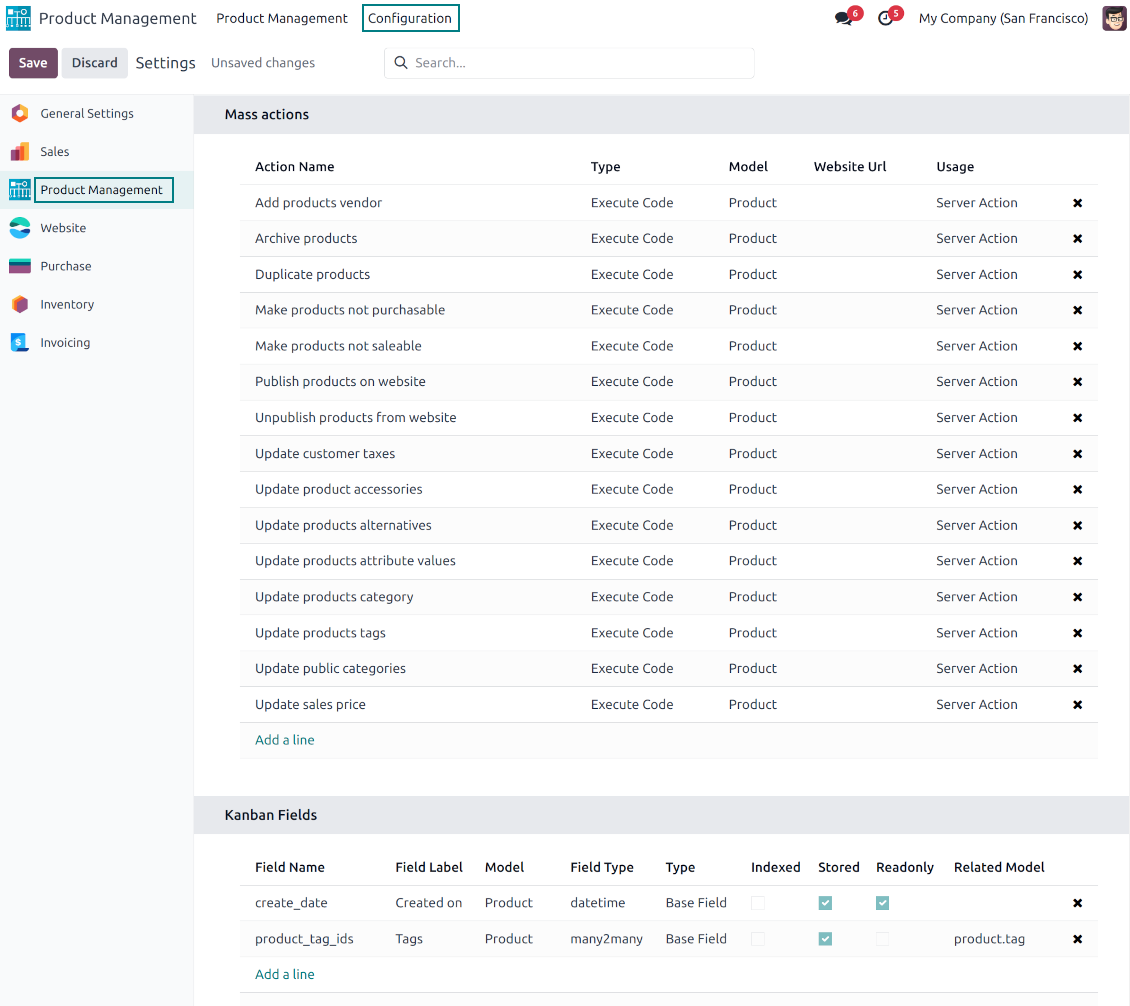
Configurable list of mass actions
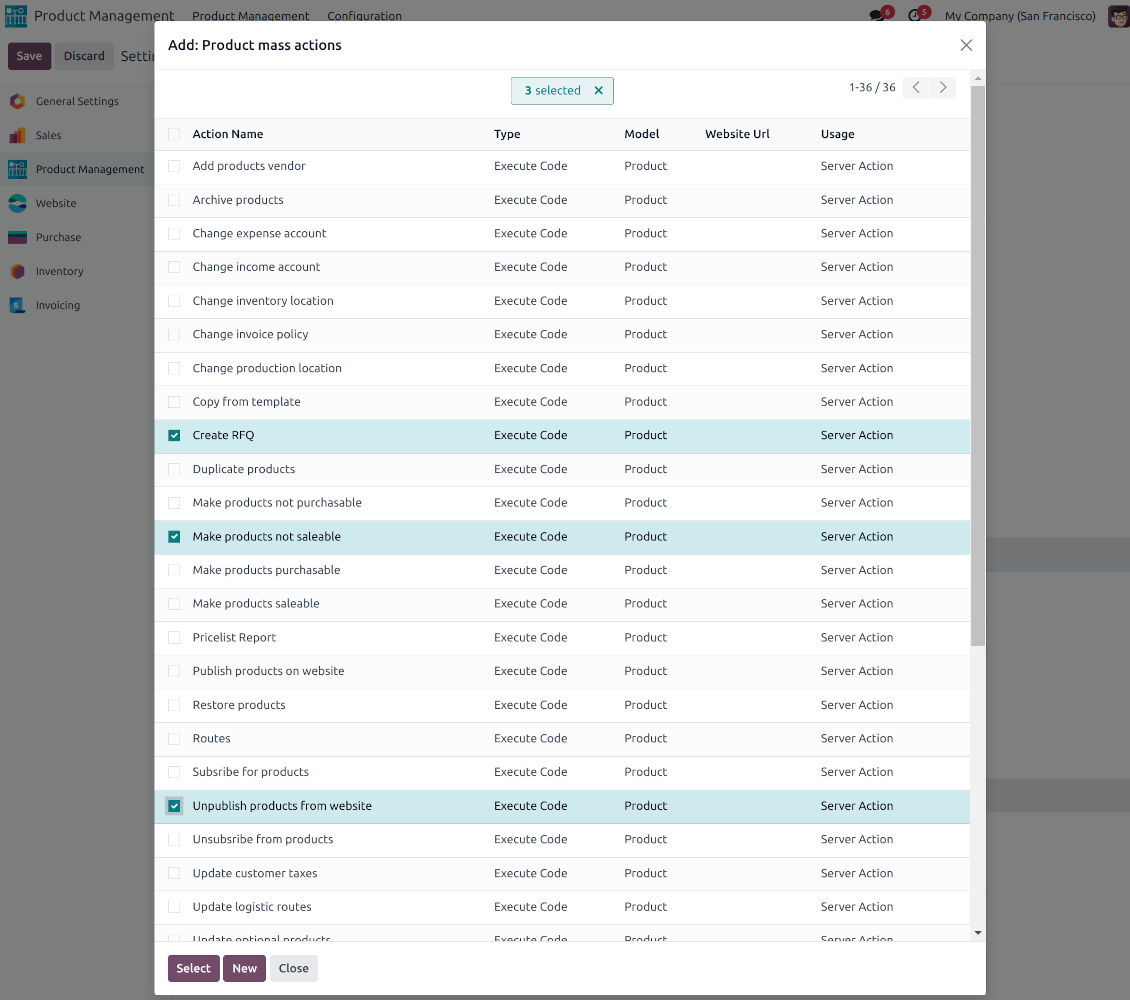
Define which mass operations are available from a predefined list or prepare your own server actions. Just a few clicks to update the category, add attribute values, withdraw from sales, change price ...
Drag and drop to update
Drop selected products to the left navigation panel to change their internal category, assign new attribute values, and add tags and public categories
Customizable kanban view
Add any product template fields for kanban cards for an instant overview.
Secured interface and actions
The interface is restricted for the user group Product Management > Product Manager. A user must also have rights for product management (e.g. sales, warehouse, or purchase manager).
Fantastic module
This module earned itself back in the first day, a must have when working with lots of products. A minor issue with product attributes was solved within 12h, great service.
A life-changer ... and a massive time saver!
Fantastic app ... Provides a whole new view of your product database, nicely presented in editable kanban view, with the ability to filter and sort in various ways and combinations, I guess depending on the $10 add-ons you buy, and then perform mass updates and product changes, all controlled through a very simple and self-explanatory configuration. I only just installed the app but it immediately highlighted to me that I had some products that had somehow been duplicated - even though I thought I had changed the code to prevent that. But more importantly, from here you can get a nice quick overview of your products, their attributes, pricing, etc. You can easily add and delete fields to the kanban overview. And then you can easily select which records your want to update, amend or export, either individually or using 'select all' and then perform your changes in bulk at the click of a couple of buttons. Possibly you can do all these things in standard Odoo (although I'm not so sure you can) but it would take you ten times as long and involve many more steps - most probably with data export and re-import. This app cuts out all the messing around and makes life quick simple. I feel sure this app is going to make my product management so much quicker and simpler in future ! Highly recommended.
Works nice
I find it quite nice module for product management. After the enhancement of not requiring to click exactly on the checkbox it became convenient and fast to use for standard intended functions. Thanks guys!
Configurable mass actions for product templates
Mass actions are operations that might be proceeded for a number of product templates in batch. The tool offers multiple default actions, among which you can select the required ones.
-
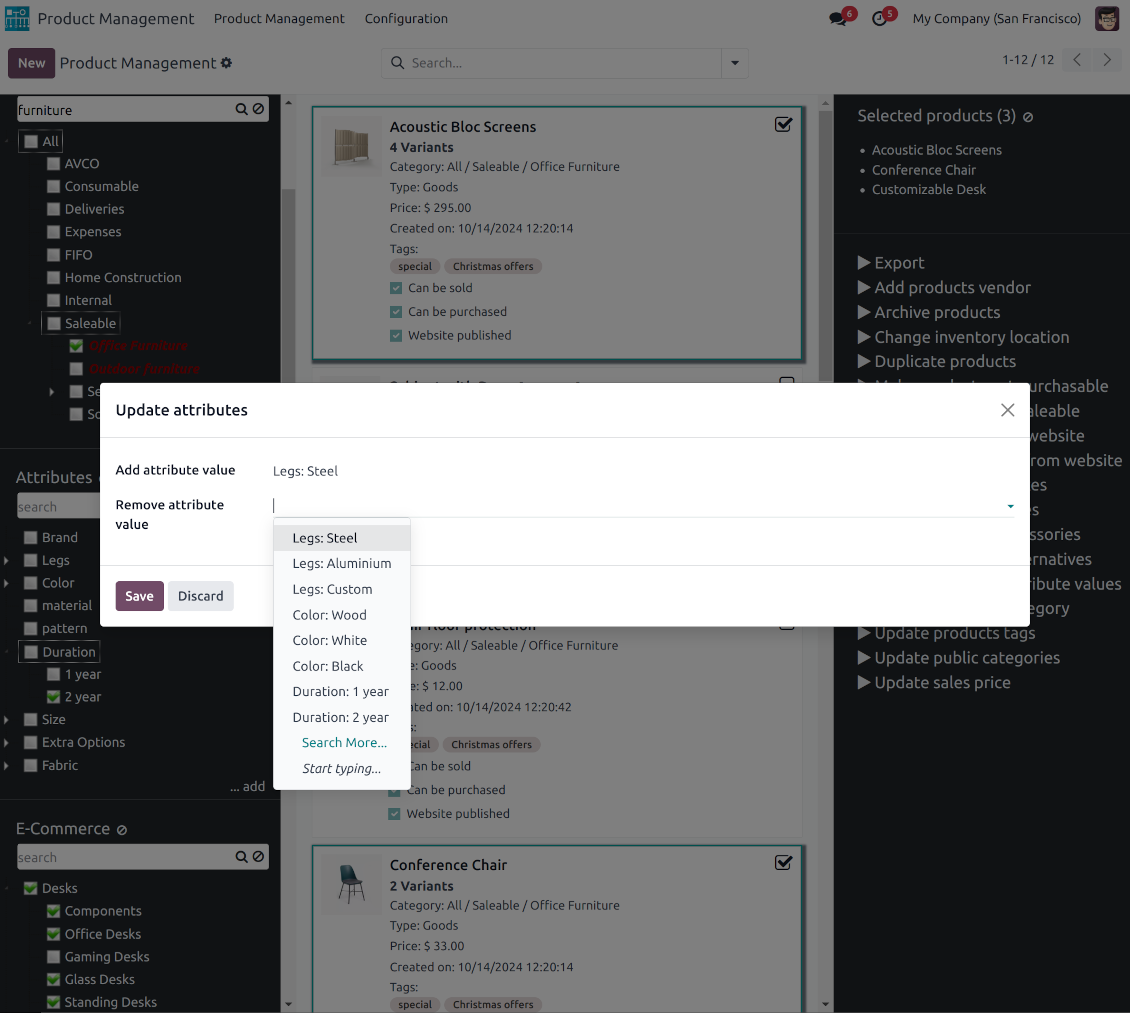
Add/remove an attribute value to all found templates
-
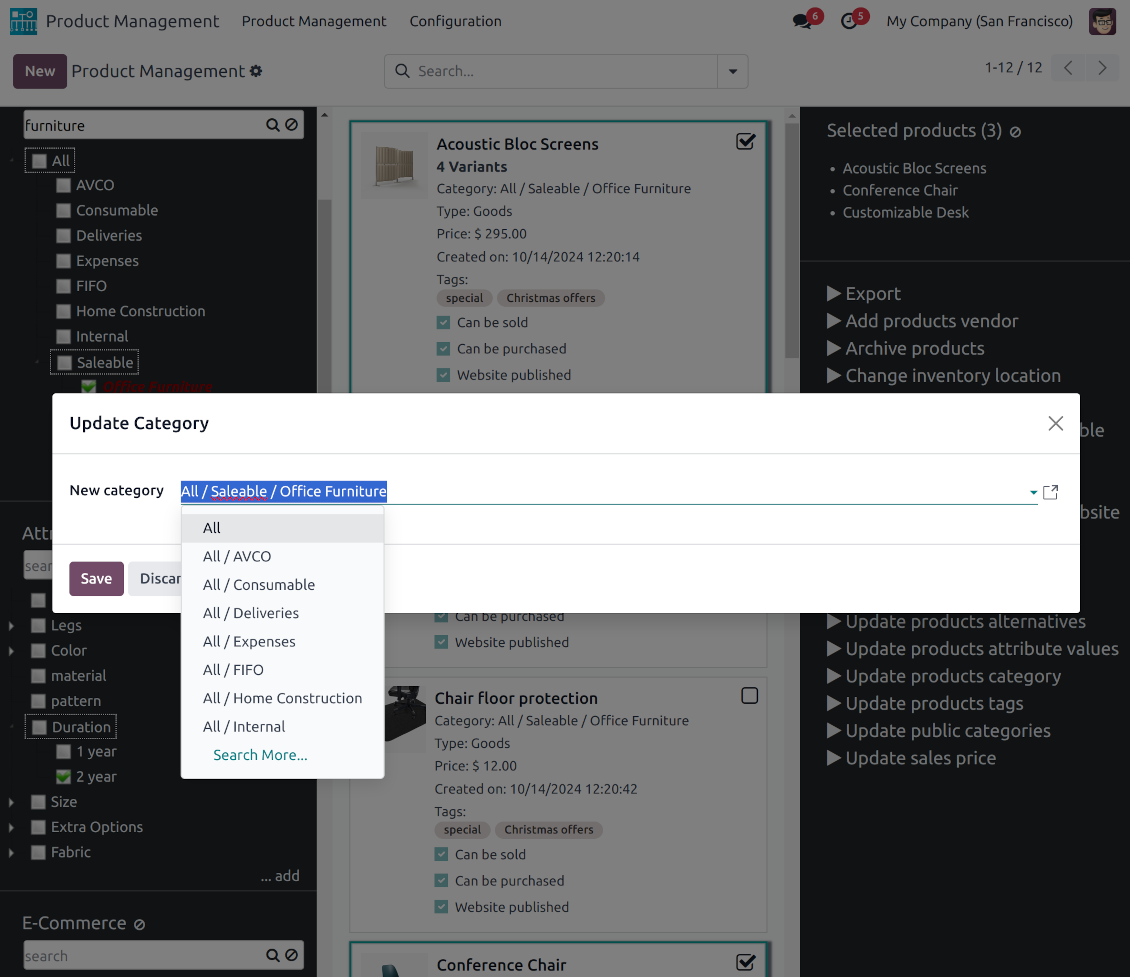
Change the Odoo product category of all selected items
-
Copy any values from the master product template
-
Add/remove tags of multiple products
-
Archive products in bulk / Restore selected products that have been previously archived
-
Export chosen items (the setting 'Export products' should be turned on)
-
Mass update sales price of Odoo product templates
-
Mass edit product type (consumable, service, storable)
-
Publish or unpublish products in batch
-
Update products to be salable / not salable
-
Update products to be purchasable / not purchasable
-
Add/remove public E-shop categories of selected templates
-
Add/remove products' alternatives
-
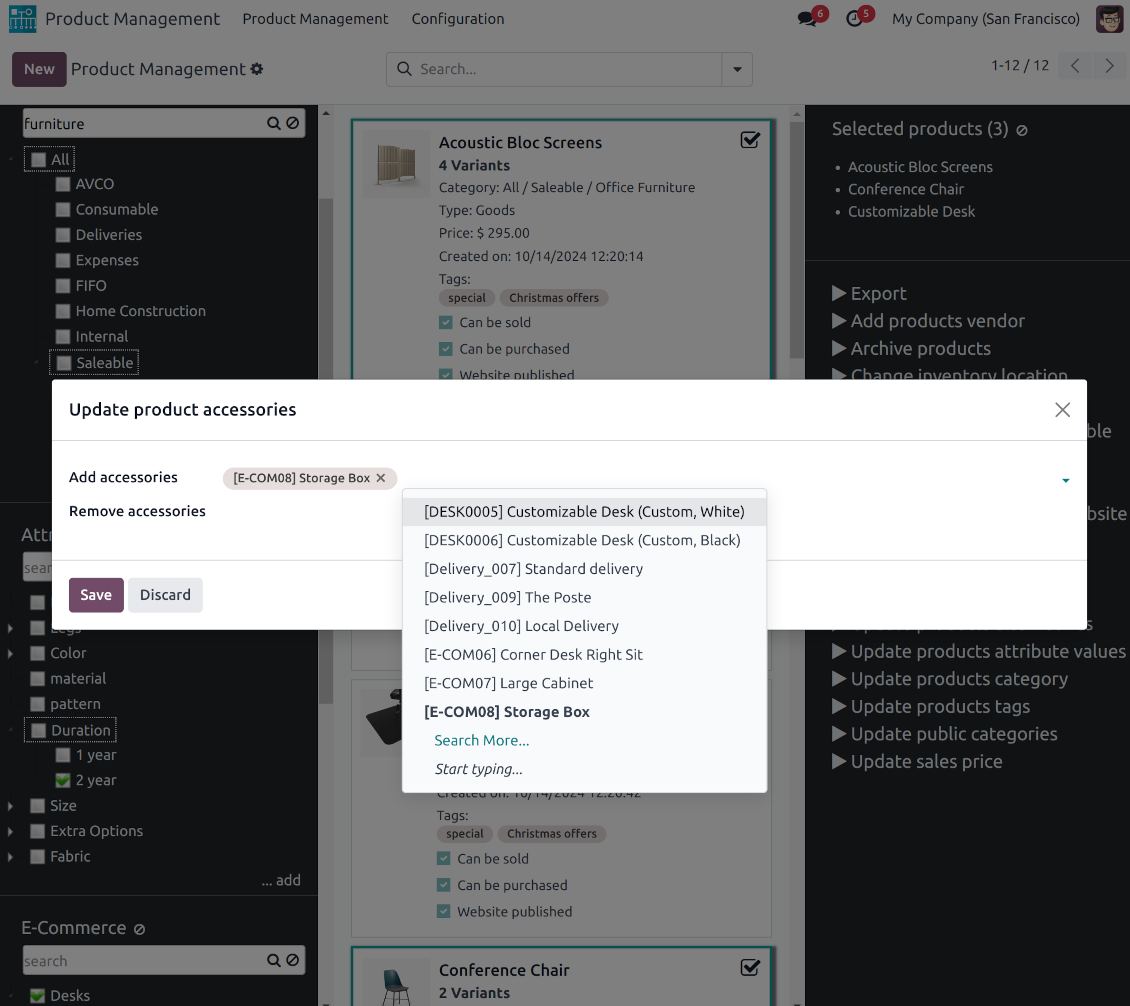
Add/remove products' accessories
-
Add/remove optional products (the Sales Product Configurator module should be installed)
-
Assign a new vendor to product templates in bulk and make this supplier the most prioritized
-
Add products (the first possible purchaseable combination if exists) to a new RFQ
-
Add/remove logistic routes
-
Modify invoice policy ('Ordered quantities', 'Delivered quantities')
-
Duplicate a few product templates simultaneously
-
Add/remove customer taxes
-
Add/remove vendor taxes
-
Subscribe to / unsubscribe from products discussions
-
Add/remove product templates' followers
-
Update website for product templates
-
Update purchase method ('On ordered quantities', 'On received quantities')
-
Update tracking method ('By Unique Serial Number', 'By Lots', 'No Tracking')
-
Change income account of product templates
-
Change expense account of product templates
-
Change inventory location
-
Change production location
Besides the list above you can also prepare your own mass actions. Look at the 'Guidelines' tab.
Konfigūravimo ir diegimo patarimai Product Management Interface Odoo v.18
Mass actions for product templates
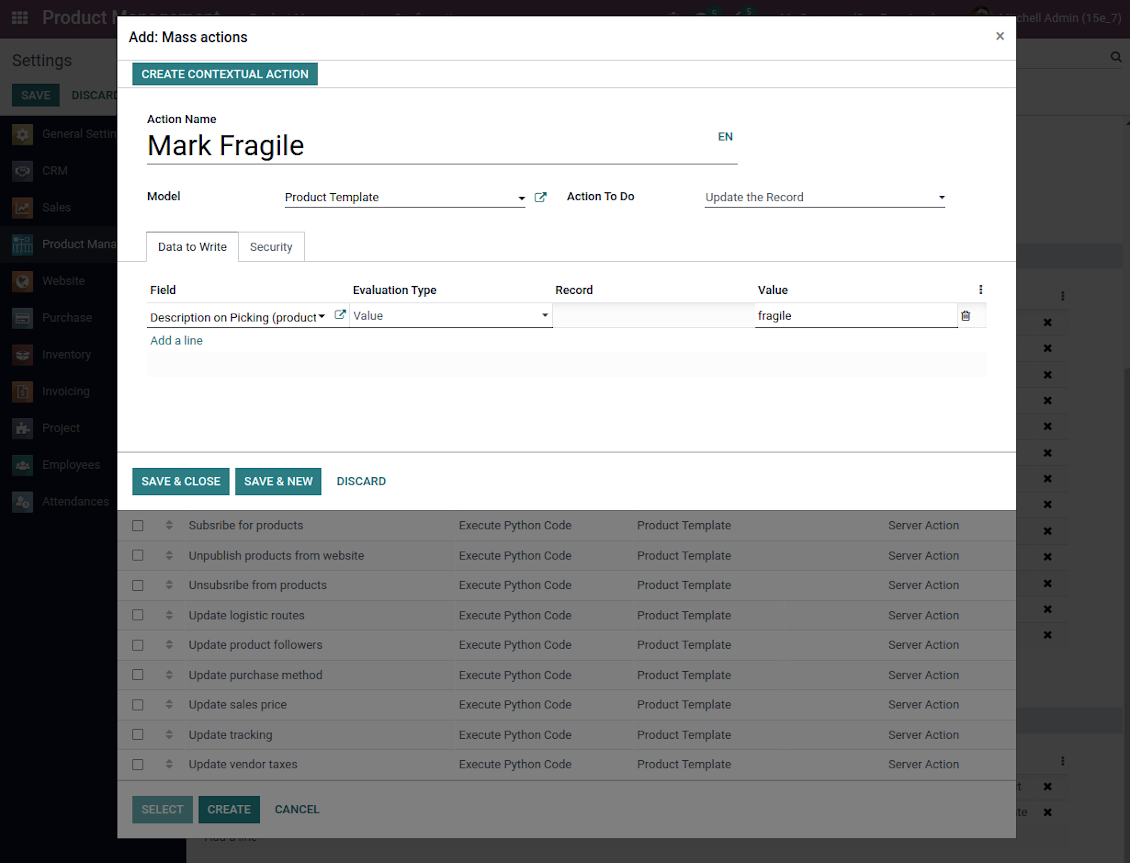
Batch actions for product templates are based on Odoo server actions. It means that you may add custom mass editing operations. Take into account the following peculiarities:
- As a model always use 'Product Template'. Otherwise your action will not be displayed in the list of operations
- In case you want to return a wizard, such a wizard should not have a footer (only standard buttons) and should have an explicitly specified view_id. Look for examples in any module of the Product Management Bundle
Example of custom mass action
Dažnai užduodami klausimai apie Product Management Interface Odoo v.18
Pasirinkus produktus, pasirinkimas išlieka keičiant puslapius. Kaip greitai jį atstatyti?
Dešinėje funkcinėje srityje spustelėkite produkto pavadinimą, kad pašalintumėte jį iš sąrašo. Visus produktus pašalinkite piktograma 'Reset' dešinėje nuo 'Selected products'.
Kokios jūsų įrankių naujinimo politikos?
Pagal dabartinės Odoo Apps Store taisykles:
- Kiekvienas 12.0 ir senesnės versijos modulis suteikia prieigą prie visų versijų iki 12.0.
- Nuo 13.0 versijos kiekviena modulio versija perkamą atskirai.
- Nepriklausomai nuo versijos, pirkimas suteikia teisę į visus atnaujinimus ir pataisas pagrindinės versijos ribose.
Atkreipkite dėmesį: komanda faOtools šių taisyklių nekontroliuoja. Klausimus kreipkite tiesiai Odoo Apps Store atstovams.
Kaip įdiegti jūsų programą Odoo.sh?
Tiesiausias būdas – naudoti įtaisytąją Odoo parduotuvės eigą:
1. Atidarykite modulio puslapį ir spustelėkite mygtuką Deploy on odoo.sh
2. Po to būsite nukreipti į GitHub puslapį. Prisijunkite prie paskyros ir spustelėkite 'Create a new repo' arba naudokite esamą. Įsitikinkite, kad saugykla privati. Programėlių skelbti pagal OPL-1 licenciją negalima. Prireikus sukurkite naują repo Odoo.sh projektui
3. Tada eikite į odoo.sh ir spustelėkite mygtuką Deploy. Iššokančiame lange pateikite sprendimą ir spustelėkite 'Continue.' Tai paleis diegimą.
Šie veiksmai įdiegs programėlę gamybinėje projekto šakoje. Jei norite diegti programėles kitose šakose arba atnaujinti modulį, atlikite šiuos veiksmus:
1. Įkelkite programėlės išeities kodą iš Odoo parduotuvės
2. Įrašykite modulį į reikiamą GitHub saugyklą. Įsitikinkite, kad jokie programėlės aplankai/failai nėra ignoruojami (t. y. nėra repo .gitignore). Saugyklas automatiškai sukuria odoo.sh ir pagal numatymą jose gali būti svarbių elementų (pvz., /lib). Įkelkite visus modulio katalogus, pakatalogius ir failus be išimčių
3. Įdiekite norimą odoo.sh projekto šaką arba, jei nustatymai tai numato, palaukite, kol ji bus sukurta automatiškai.
Kaip įdiegti jūsų programą savo serveryje?
2. Paleiskite Odoo serverį iš naujo;
3. Įjunkite kūrėjo režimą (techniniai nustatymai);
4. Atnaujinkite programų sąrašą (programų meniu);
5. Raskite programą ir spustelėkite „Activate“/„Install“;
6. Vadovaukitės programos puslapio gairėmis, jei jos yra.
Pastebėjau, kad jūsų programa turi papildomų priedų. Ar galiu juos įsigyti vėliau?
Taip, žinoma. Tuo pačiu Odoo automatiškai įdeda visas priklausomybes į krepšelį, todėl anksčiau pirktus įrankius reikia pašalinti, kad nemokėtumėte dukart.
Įdiegiau jūsų programą Odoo.sh ir testuose matau įspėjimą/klaidą
Raudonas/oranžinis įspėjimas nekeičia programos funkcijų. Deja, kartais mūsų moduliai neišlaiko standartinių automatinių testų, nes jie tikisi elgsenos, kuri prieštarauja programos tikslams. Pvz., keičiame kainos skaičiavimą, o standartiniai Odoo modulio testai lygina galutinę kainą su standartiniu algoritmu.
Pirmiausia patikrinkite diegtos duomenų bazės funkcijas. Ar viskas veikia teisingai?
Jei vis tiek manote, kad įspėjimas veikia tikras funkcijas, susisiekite ir atsiųskite visus diegimo žurnalus bei visą diegtų modulių sąrašą (įskaitant branduolį ir trečiųjų šalių).
Ar galiu nusipirkti programėlę tiesiogiai iš jūsų įmonės?
Ne, įrankius platiname tik per oficialią Odoo programų parduotuvę.
Norėčiau gauti nuolaidą
Deja, neturime techninių priemonių individualioms kainoms pateikti.
Ar galiu įdiegti programėlę savo Odoo Online (SaaS) duomenų bazėje?
Ne, trečiųjų šalių programų negalima naudoti Odoo Online. Deja, Odoo SaaS tai blokuoja.
Jūsų įrankis priklauso nuo kitų programų. Ar turiu jas pirkti?
Taip, įrankiui reikia visų priklausomybėse pažymėtų modulių, kad veiktų teisingai. Programos puslapyje nurodyta kaina jau apima visas būtinas priklausomybes.
Kokia modulio kaina JAV doleriais? Kodėl ji pasikeitė?
Mūsų modulių kaina nustatyta eurais. Odoo parduotuvė konvertuoja kainas į kitas valiutas pagal vidinį kursą. Todėl kaina JAV doleriais gali keistis atnaujinus kursą.
Programos ir svetainės tekstai kitomis kalbomis nei anglų parengti su DI ir suderinti su oficialiais Odoo vertimais. Jei pastebėjote klaidą, siųskite bilietą dėl vertimų teisingumo ir pataisysime.
Odoo demonstracinės duomenų bazės (gyvos peržiūros)
Šiai programai galime suteikti nemokamą individualią demo duomenų bazę.
Norėdami susisiekti, jums nereikia telefono numerio ar kredito kortelės. Užtenka trumpos registracijos el. paštu, kuri trunka ne ilgiau kaip 30 sekundžių.
Jūsų prašymu paruošime individualią gyvos peržiūros duomenų bazę, kurioje apie dvi savaitės galėsite atlikti bet kokius testus ir tikrinti prielaidas.
Klaidų pranešimas
Jei susidursite su klaidomis ar nenuosekliu elgesiu, nedvejodami susisiekite. Garantuoame pataisymus per 60 dienų nuo pirkimo ir ir toliau stengiamės tobulinti įrankius po šio laikotarpio.
Norėdami susisiekti, jums nereikia telefono numerio ar kredito kortelės. Užtenka trumpos registracijos el. paštu, kuri trunka ne ilgiau kaip 30 sekundžių.
Į užklausą įtraukite kuo daugiau informacijos: ekrano nuotraukas, Odoo serverio žurnalus, išsamų problemos atkūrimo aprašymą ir pan. Paprastai darbo plano parengimas problemai (jei klaida patvirtinama) arba gairių, ką daryti (kitu atveju), pateikimas trunka kelias darbo dienas.
Vieši funkcijų prašymai ir modulių idėjos (nemokama plėtra)
Esame labai motyvuoti tobulinti savo įrankius ir būsime dėkingi už bet kokį atsiliepimą. Jei jūsų reikalavimai naudingi visiems ir gali būti efektyviai įgyvendinti, komanda įtrauks juos į mūsų darbų sąrašą.
Toks darbų sąrašas tvarkomas reguliariai ir nereiškia papildomų mokesčių. Nors negalime pažadėti terminų ir galutinio dizaino, tai gali būti geras būdas gauti norimas funkcijas be investicijų ir rizikos.
Norėdami susisiekti, jums nereikia telefono numerio ar kredito kortelės. Užtenka trumpos registracijos el. paštu, kuri trunka ne ilgiau kaip 30 sekundžių.
18.0.1.0.13
- Masinis veiksmas reikšmėms pridėti ir šalinti dabar leidžia pasirinkti kelis elementus.
18.0.1.0.12
- Kanban vaizdai pritaikyti naujiems Odoo 18 XML principams.
- Neaktyvių įrašų juosta Archived pridėta produktų valdymo Kanban sąsajoje.
18.0.1.0.11
- Programa paskelbta 18 versijai.
17.0.1.0.11
- Ištaisyta situacija, kai hierarchijos elementų (žymų, atributų, kategorijų) negalima pridėti, jei jų dar nėra.
17.0.1.0.10
- Ištaisyta neteisinga produkto atributų reikšmių atnaujinimo klaida velkant.
17.0.1.0.9
- Įvestas vilkimas ir numetimas masiniam produktų naujinimui: pridėti žymą, atnaujinti kategoriją ir pridėti atributo reikšmę.
- Produktų kategorijas, žymas, atributus ir atributų reikšmes dabar galima kurti tiesiai kairiajame naršymo skydelyje.
- Pasirinktas naršymo medžių tėvinis elementas paryškinamas teisingai.
17.0.1.0.8
- Programa paskelbta 17 versijai.

Įrankis Odoo priedams lanksčiai dėlioti į aplankus ir sinchronizuoti katalogus su debesijos klientais: Google Drive, OneDrive/SharePoint, Nextcloud/ownCloud, Dropbox, Amazon S3, Box ir NAS. DMS. Failų tvarkyklė. Dokumentų valdymo sistema
398€

The tool to build a deep and structured knowledge base for internal and external use. Knowledge System. KMS. Wiki-like revisions.
398€
The tool to automatically synchronize Odoo attachments with OneDrive files in both ways
487€
The tool to set up KPI targets and control their fulfillment by periods. KPI dashboards. Dashboard designer. KPI charts

The tool to automatically synchronize Odoo attachments with Google Drive files in both ways
487€
The tool for time-based service management from booking appointments to sales and reviews
398€

The tool to make inventory data essential and comfortable for elaboration. Stocks analysis
38€