KPI Balanced Scorecard v.14
The tool to set up KPI targets and control their fulfillment by periods
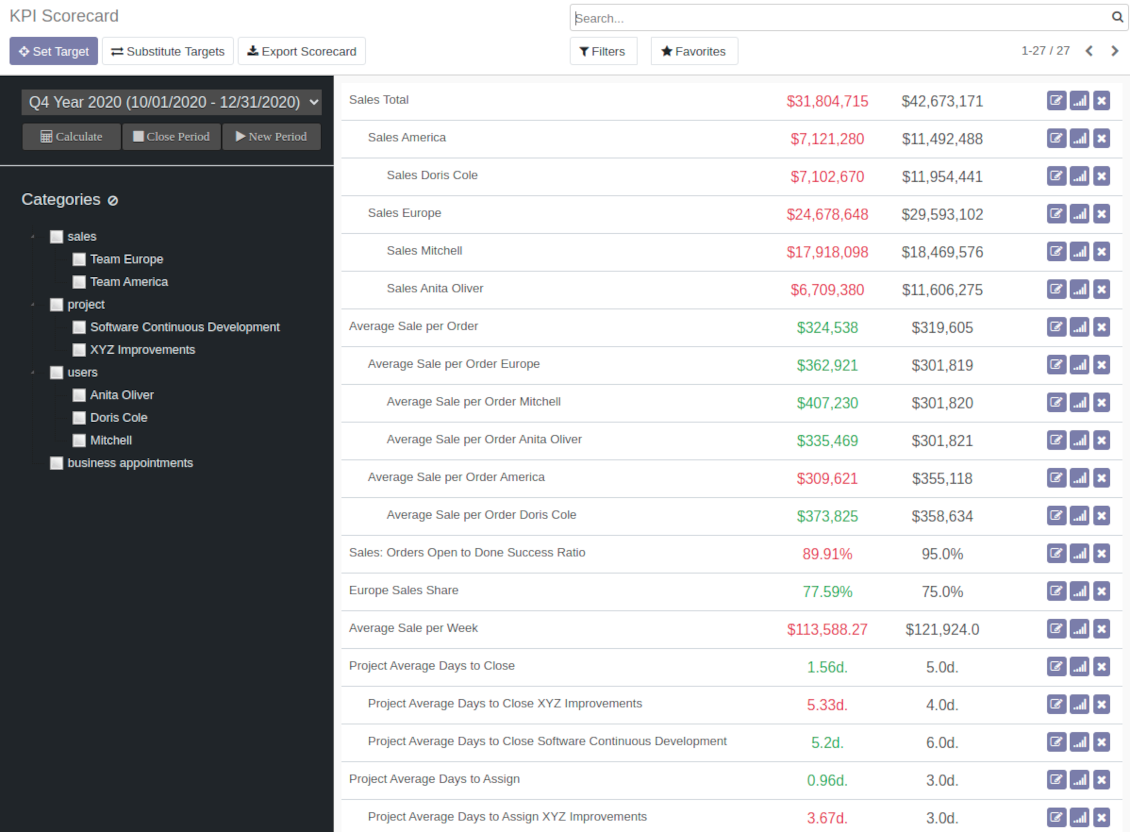
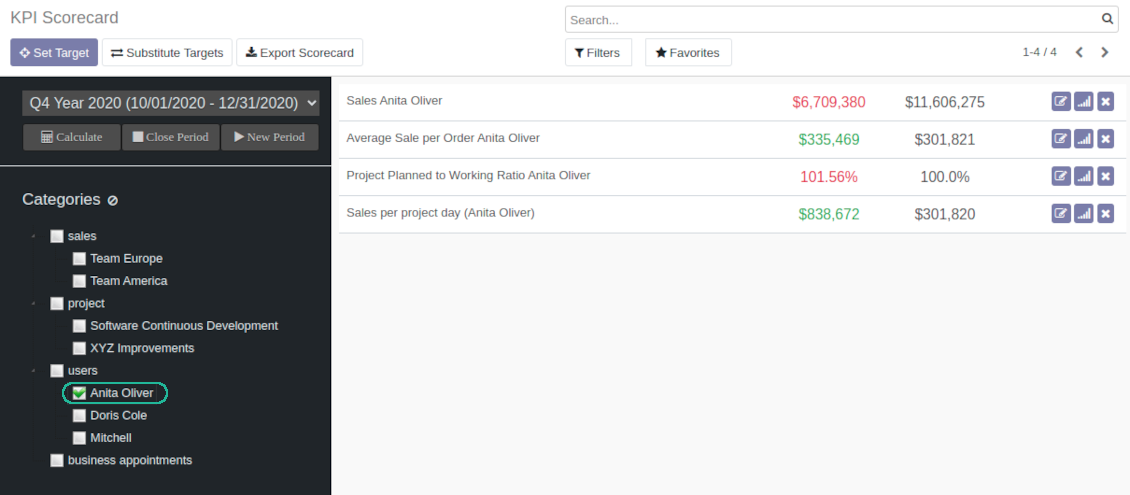




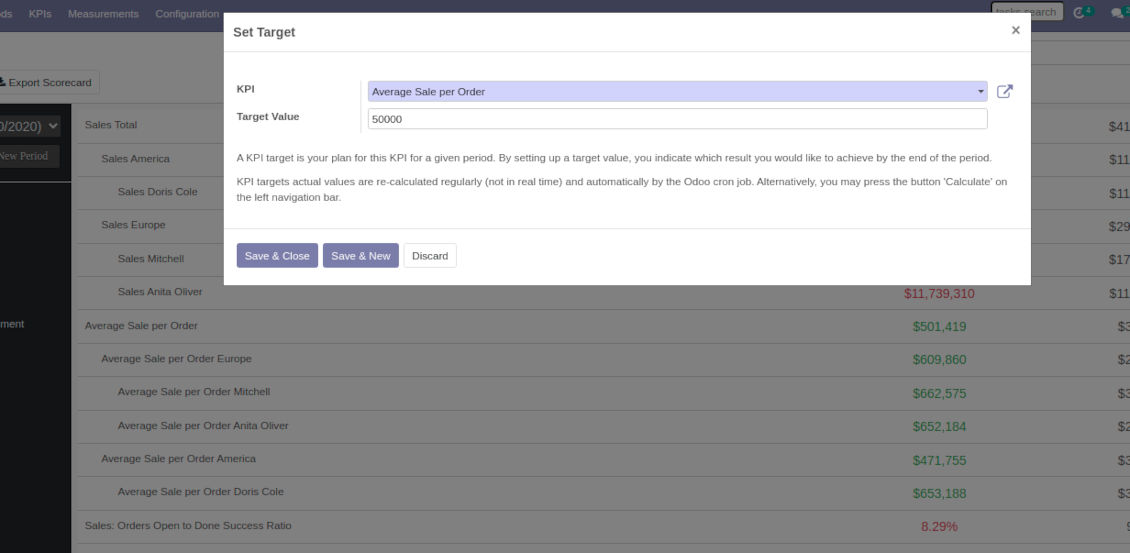



The app introduces KPI dashboard to manage company and personal targets. The tool helps to organize work as a set of periodical goals and to control those goals in any business or functional area.
Set KPI targets by periods
Scorecard is not just a dashboard, but it is the tool to set and control measurable and time-constrained targets. Both company and individual
Use any Odoo data to calculate KPIs
The app introduces a clear system to get any Odoo storable details: a count of records, a sum or an average of numeric fields, pure Python code
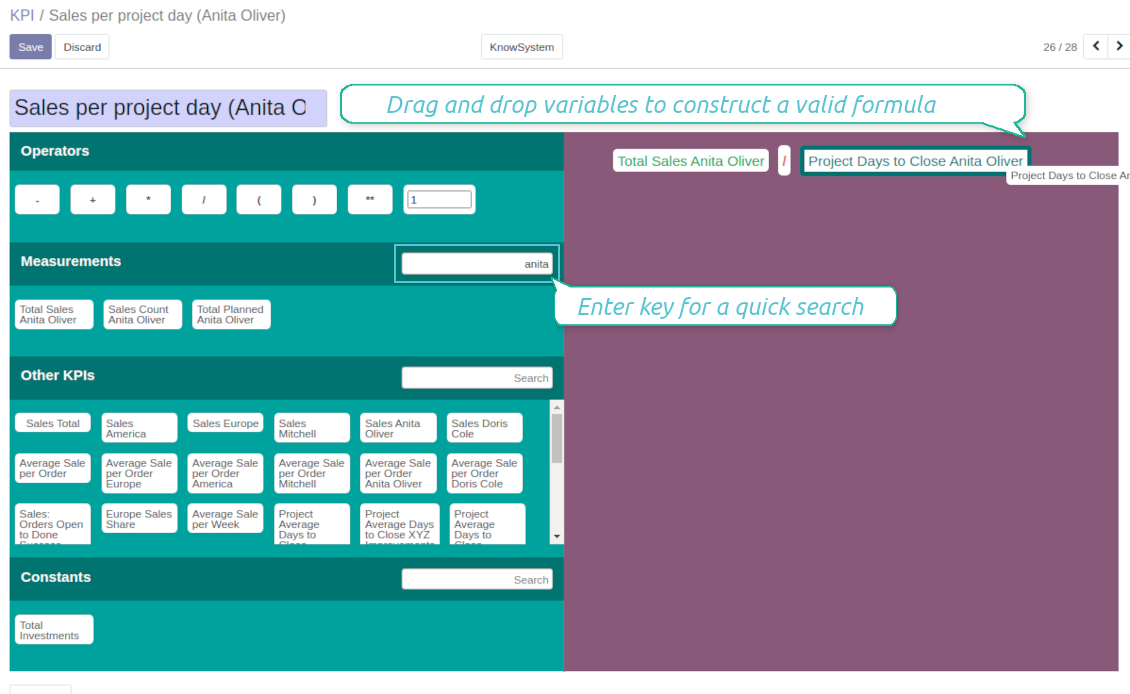
Drag and Drop interface for KPI formulas
Construct advanced formulas to calculate derivative KPIs. Complexity of each scorecard is totally up to you!
Managerial and self control
Share KPI targets with interested users to organize a transparent dashboard of goals: from global to very specific ones
Structured hierarchically and by categories
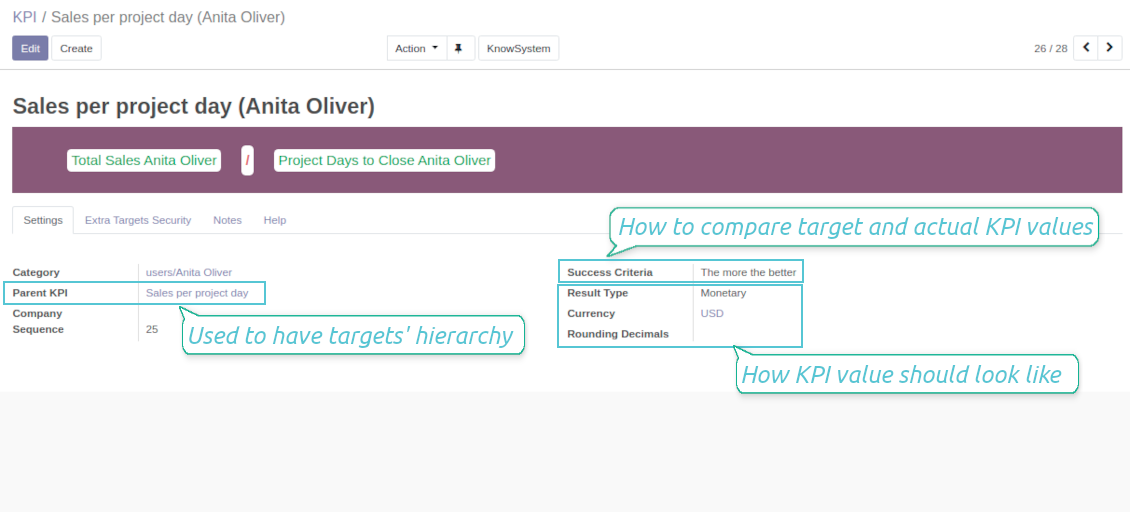
Consider only those KPIs which are of interest: for example, only sales-related or of a definite user. Hierarchy allows to highlight targets with indicative padding for instant overview of sub-KPIs
KPIs are auto and regularly updated
Actual values are re-calculated by the special Odoo cron job. It is always possible to understand which KPIs require more attention in real time at a first glance
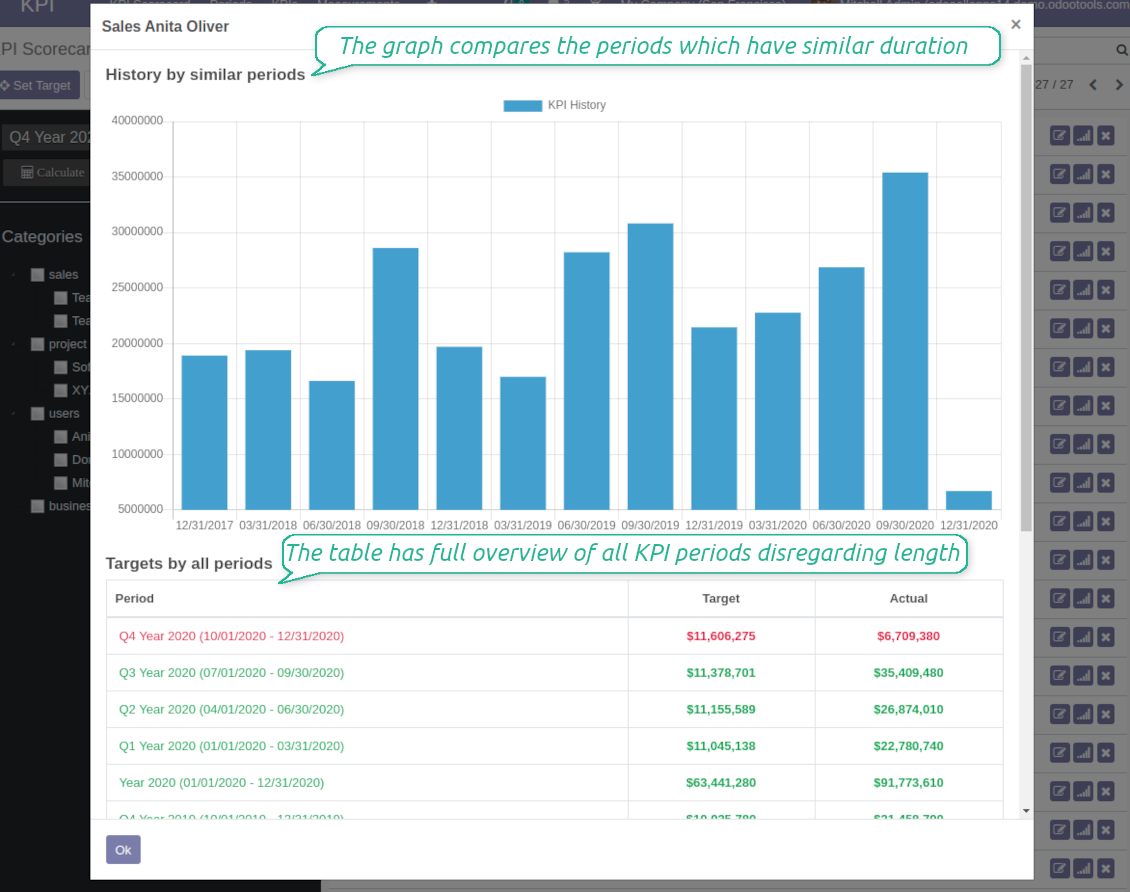
Real-time control and historical trends
-
KPIs values are calculated for a specific period according to chosen date fields (e.g. quotations by 'order date')
-
Plan KPI periods of any duration: annual, quarterly, monthly, weekly, 10-days-long, etc. KPI periods might intersect and might be different for various business areas
-
By default KPI targets of a current period are shown for an instant overview
-
For each KPI target you may observe trends by other periods. Define also tolerance to picture graph (e.g 2-days tolerance - for quarterly periods - 90-92 days, 3-days - for months - 28-31 days)
-
Navigate between various KPI categories and KPI periods in a few clicks from the same Odoo dashboard
-
Export scorecard to an Excel table if you need
-
Copy or substitute KPI targets from other periods to simplify goals' setting
-
Close KPI periods as it is done for fiscal and accounting purposes. It not only holds the Past values, but let speed calculations up
-
KPI periods and KPI targets are set up for each company individually (multi companies' environment)
Drag-and-drop formulas for KPIs
-
KPI construction is as simple as it is to write down a mathematical expression: just drag and drop the parts in a right order with correct operators
-
Odoo would automatically retrieve data from a database according to a defined parts' order for a specified period
-
Formula might be as complex as you require. Merely make sure the operators (subtraction, addition, multiplication, division, exponentiation, brackets, any float number) comply with basic Math rules.
-
For each KPI configure prefix and suffix to make results nice looking
-
Define rounding rules from 0 to 4 decimal points (1 > 1.2 > 1.23 > 1.235 > 1.2346).
-
KPI variables indicate the rules of how to get data. For example, 'total number of sales orders' or 'number of quotations of sales team Europe'
-
Other KPIs - the parts used for derivative calculation. For example, 'Opportunity to sales success ratio' based on KPIs 'Sales count' and 'Opportunities count'
-
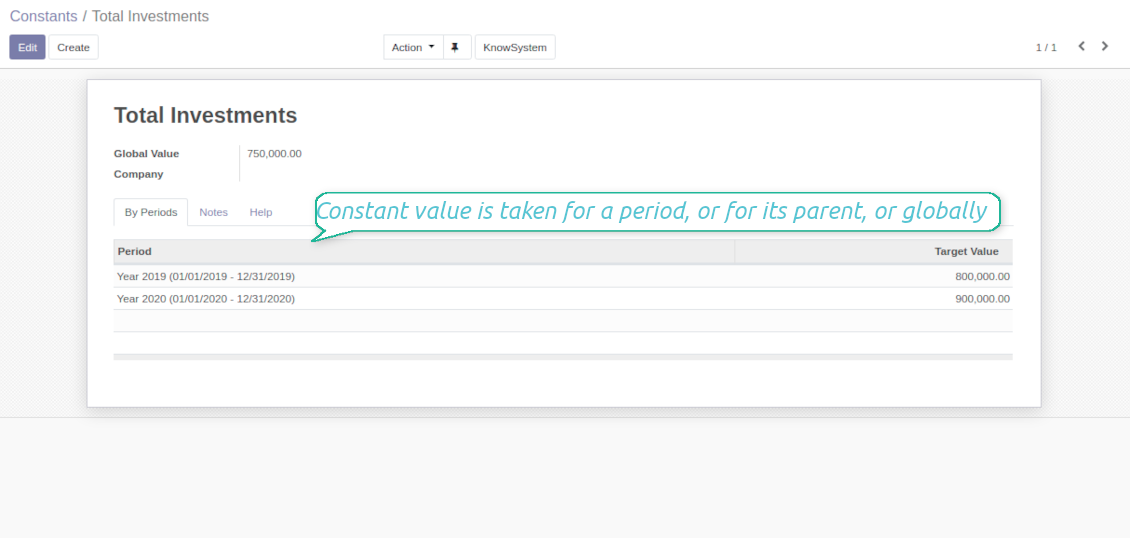
KPI constants - the parts which are frozen globally or for a specific time frame. Needed for figures which can't be retrieved from modules and/or which should remain the same during a period
-
'Period Days' is an interval length in days. 'Days Passed' is a length between period start and today (if today is before period end; otherwise period end). Those parameters let calculate per-time KPIs, such as, for example, 'Average sales per week'
Shared KPIs and self-control
-
Full rights for scorecards, all KPIs, targets, and settings belong to users with the right 'KPI Management - KPI manager'
-
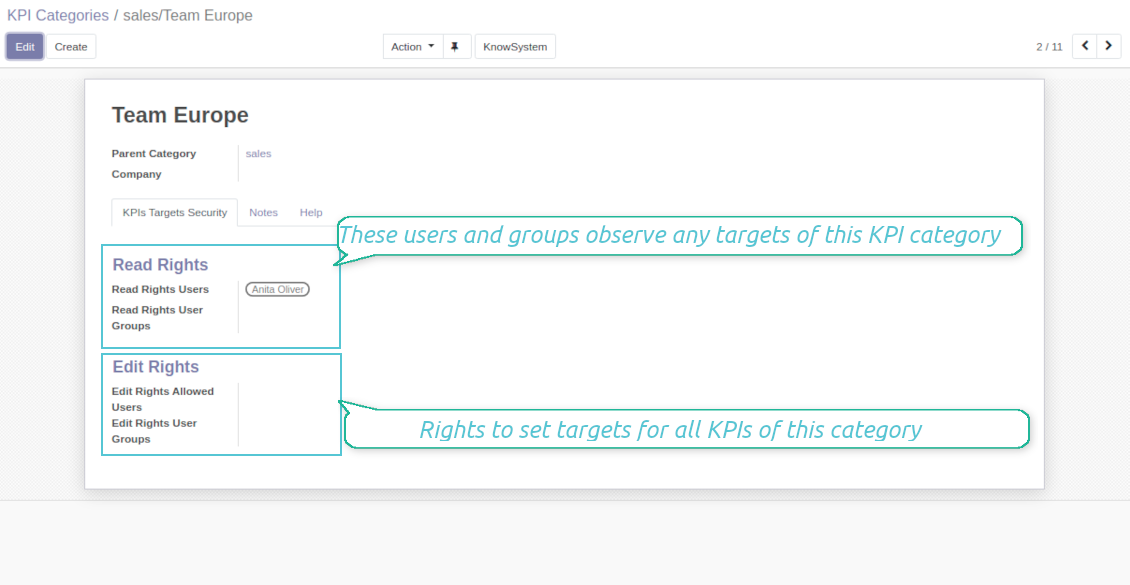
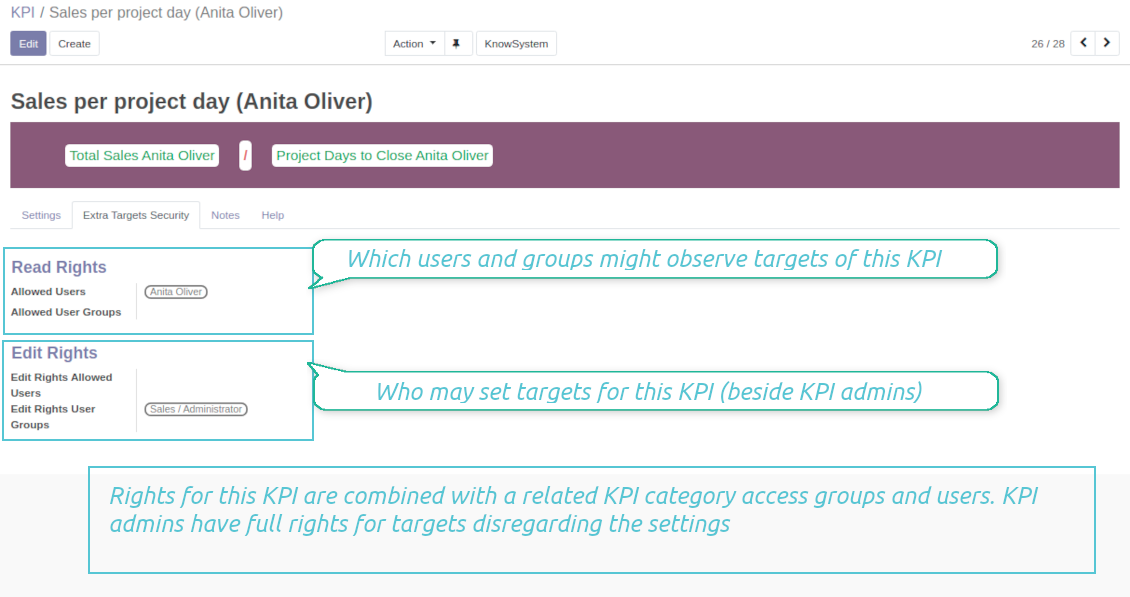
Categories of KPIs and/or individual KPI targets might be shared for specific users or user groups
-
It is possible to both grant read-only or editor rights
-
Read-only access for a target let users only observe shared KPIs
-
The section 'Edit rights' on category or KPI forms would also allow to set and change targets. The latter might be useful in case you ask your manager to manage goals within a department, for example
-
The security settings are additive - not restrictive. KPI managers would have full rights for all KPIs disregarding the settings, while other users would have rights only to KPIs which settings (or category settings) allow them so
-
The tool supports multi companies: so, make sure user company correlates with a KPI dashboard company.
KPI settings to process Odoo data
Any storable data
-
Preparing basis for KPIs' calculation is not a simple task. The good news is that such job should be done only once, while results are used forever
-
KPI Settings assume 3 levels of precision: (1) basic measurements - (2) KPI variables and constants - (3) KPI drag and drop formulas
-
A basic measurement is the core object used for retrieving actual KPI value from Odoo database, while KPI variables specify those. For example, 'total number of sales orders' should be a basic measurement, while narrower 'number of quotations of the sales team Europe' is recommended to be a precision of that basic measurement
-
Each basic measurement might have an unlimited number of linked KPI variables. KPI formulas might combine any number of variables, constants, and other KPIs with mathematical operators.
Python code measurements
-
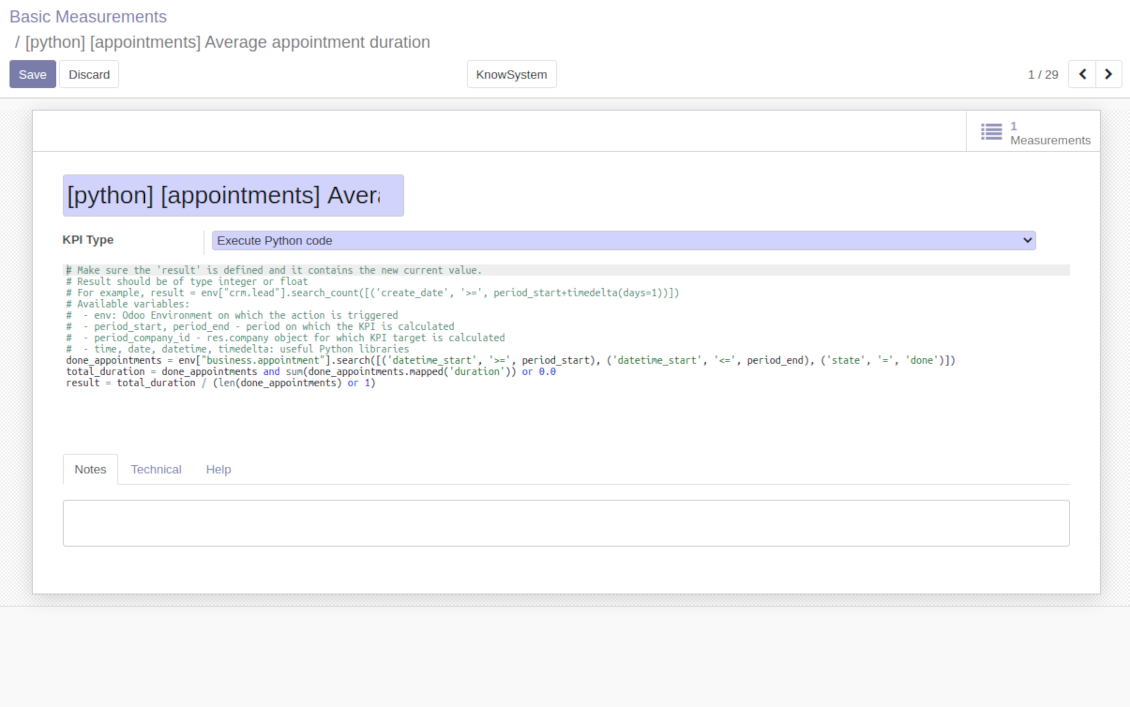
'Python code' is the special type of basic measurements. This type requires technical knowledge but let you compute any sort of figures based on any Odoo data without restrictions
-
Such measurement might be any Python basic script with possibility of SQL queries (through using 'env.cr')
-
In calculations you may rely upon the special variables: 'period_start' (the first date of the period), 'period_end' (the last date of the period), 'period_company_id' - res.company object for which Odoo makes calculations at the moment (according to a KPI period under consideration)
-
Correct Python code assumes saving the value into the special variable 'result'.
Basic measurements
-
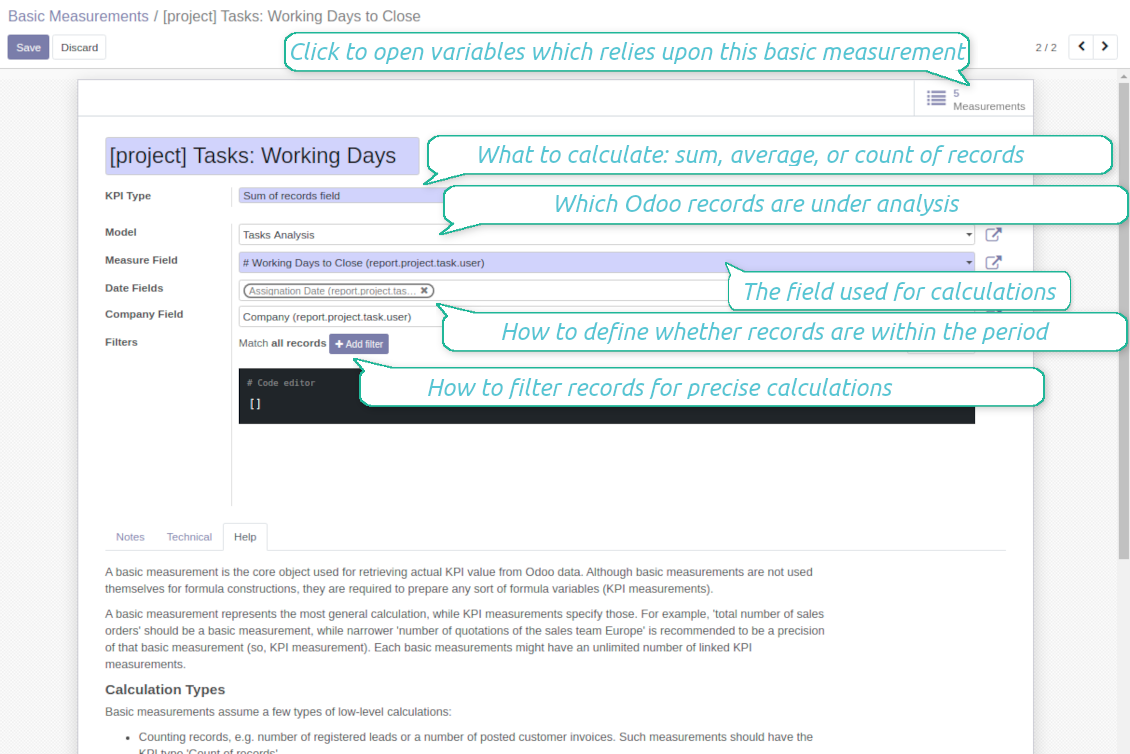
Basic measurements are not used for formulas, but they define how Odoo data should be calculated: count of records, sum, average, pure Python code. Basic measurements assume a number of settings
-
Model - an Odoo document type with which data set you work ('Sales Order', 'Task', etc.). Here you can rely on standard or custom objects (including created in the Odoo studio), Odoo reports
-
Date fields - define whether a document relates to a KPI period. For example, for tasks you might use 'create date'. It is possible to apply a few date fields (e.g. 'Opportunities opened and won in January 2021') or no date fields at all for global calculations
-
Filters - allow restrict set of records. Used for low-level filtering and then specified in KPI variables
-
Measure field - is required for calculation types 'Average' and 'Sum'. It defines which figure you use for calculations. For example, 'total amount' of Sales Analysis Report or 'work hours of tasks'
-
Company field - would be used to restrict calculation for a KPI period target company. Take into account that records without company stated would be used for all companies' KPI calculations.
KPI variables and constants
-
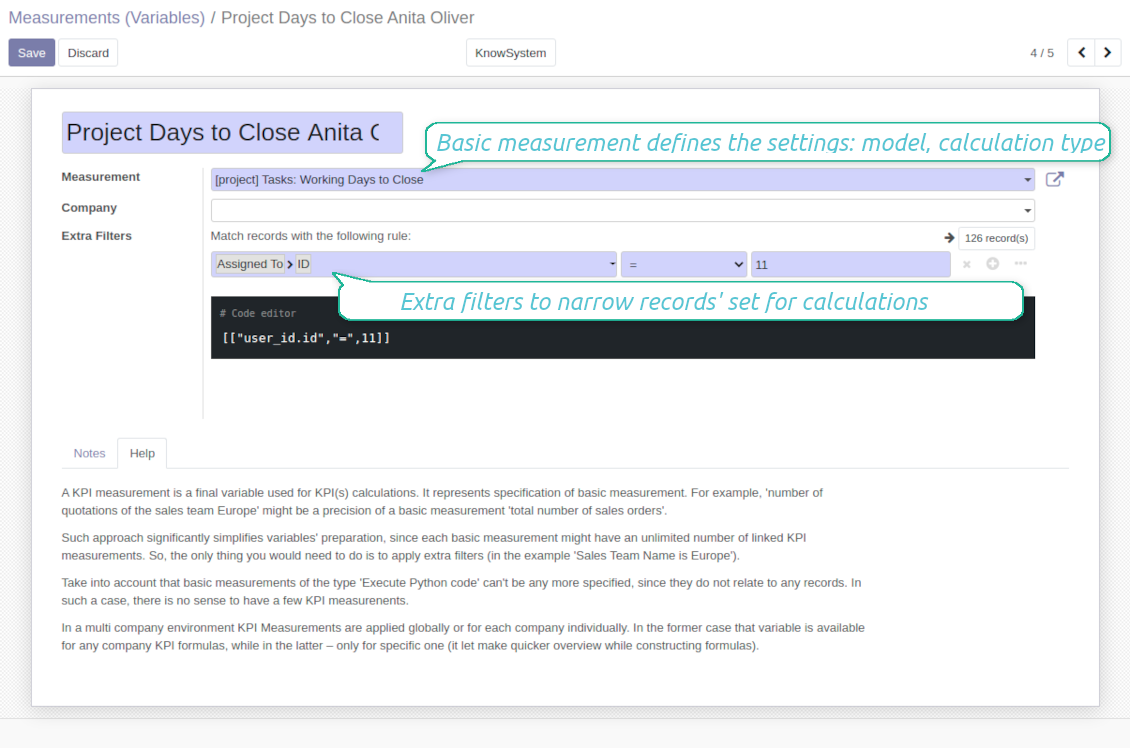
The key idea to distinct KPI variables from basic measurements is to simplify data preparation. You define 'total sales' once, and then unlimitedly use it for 'sales Europe', 'sales John Brown', 'website sales', etc.
-
Specify basic measurements through the Odoo built-in domain constructor, which let filter by any storable attributes. For instance, filter sale orders by state (only 'done'), sales person ('John Brown or Mike Green'), sales team, etc.
-
KPI constants are the special type of KPI variables used when data can not be retrieved from modules and/or when figures remain the same during the whole period. For example, 'total investments' or 'number of employees' are often frozen for a specific period
-
In a multi company environment KPI variables are applied globally or for each company. In the former case that variable is available for any company KPI formulas, while in the latter - only for specific one
-
Basic measurements of the type 'Execute Python code' can't be any more specified, since they do not relate to any records. Such measurements should have a single KPI variable linked.
設定とインストールのヒント: KPI Balanced Scorecard Odoo v.14
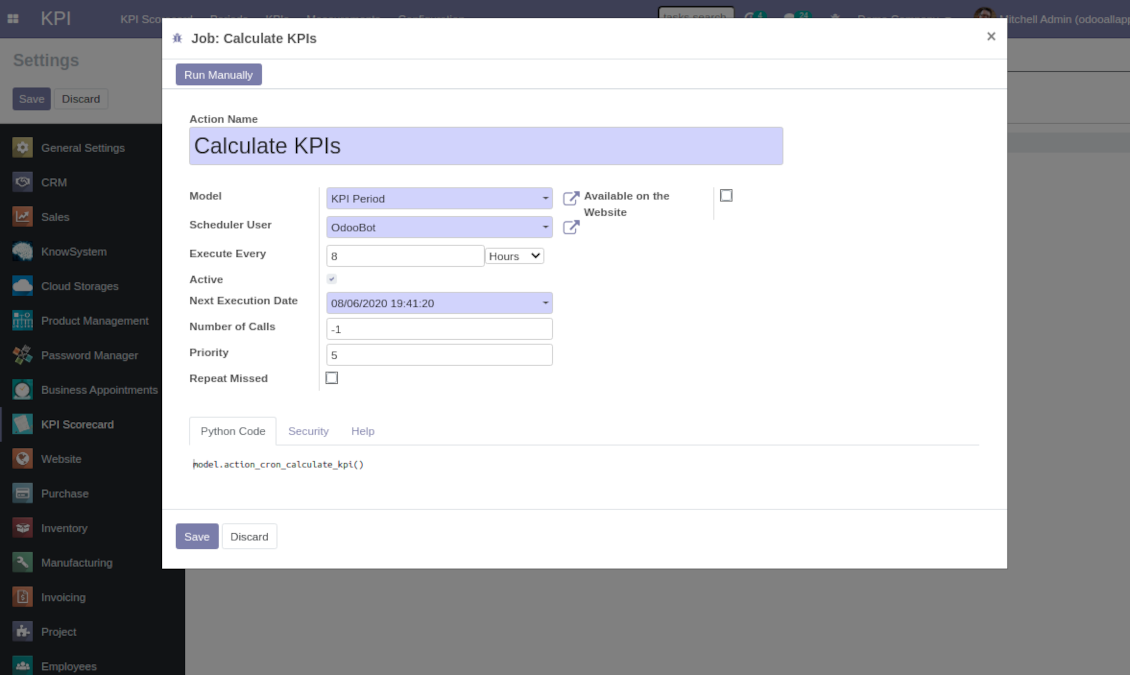
Scheduled jobs
To change the frequency of KPI targets' recalculation:
- Turn on the debug mode
- Go to the menu KPI > Configuration > Settings
- Find the button 'Configure cron job'
- Feel free to update the settings 'Execute Every' and 'Next Execution Date'. However, please do not make it too frequent (e.g. once in 5 minutes). Since the job is resource demanding, it require at least a few minutes to be fully and correctly finished.
Change frequency of KPIs re-calculatinon
に関するよくある質問 KPI Balanced Scorecard Odoo v.14
Basic Measurement を作成しましたが、数式ウィザードに見つかりません。
Basic Measurements だけでは数式を作りません。Basic Measurement にフィルタを足さなくても、それにリンクした Variable を作成してください。するとその Variable が数式作成の候補一覧に出ます。
KPI作成に使えるデータは何ですか。モジュール独自のデータはありますか?
アプリ自体は独自データ(欠落データを適用するための KPI 定数は例外)や連携を導入しません。既存の Odoo データに基づいて計算し、インタフェースを準備します。たとえば特定期間の販売オーダ数は Sales アプリから取得できます。
モジュールは汎用で、勘定残高を含め任意の Odoo モジュールからデータを取得できます。たとえば請求書(仕訳)に基づいて月の総利益を計算できます。
Odoo モジュールと接続すれば、Odoo 外のソースからもデータを取得できます。たとえば Odoo PostgreSQL に Google Analytics のデータがあれば、KPI の作成に使えます。
Basic Measurements と Measurements (Variables) の違いは何ですか?
Measurement (Variable) は基本測定の詳細指定です。データの準備を簡単にするのが狙いです。'Total Sales' を一度定義し、追加フィルタで 'Sales Europe'、'Sales John Brown'、'Website Sales' などに何度でも使えます。
ツールの更新ポリシーは何ですか?
現行の Odoo Apps Store ポリシーによると:
- バージョン 12.0 以前向けに購入したモジュールは、12.0 までの全バージョンにアクセスできます。
- バージョン 13.0 以降、各モジュールバージョンは個別に購入します。
- バージョンに関係なく、購入するとメジャーバージョン内の すべての更新と不具合修正の権利が得られます。
faOtools チームはこれらのポリシーを管理していません。ご質問は Odoo Apps Store の担当者へ直接お問い合わせください。
アプリを Odoo.sh にインストールする方法は?
最も単純な方法は、Odooストア組み込みのワークフローを使うことです:
1. モジュールのページを開き、Deploy on odoo.sh ボタンをクリックします。
2. その後 GitHub ページにリダイレクトされます。アカウントにログインし、'Create a new repo' をクリックするか既存のものを使います。リポジトリはプライベートにしてください。OPL-1 ライセンスのアプリを公開することは許可されていません。必要なら Odoo.sh プロジェクト用に新しい repo を作成します。
3. 次に odoo.sh に行き、Deploy ボタンをクリックします。ポップアップで決定を送信し、'Continue.' をクリックします。これでインストールが始まります。
これらの手順でプロジェクトの本番ブランチにアプリがインストールされます。他のブランチにデプロイする、またはモジュールを更新する場合は、次の操作を行います:
1. Odooストアからアプリのソースコードをアップロードします。
2. モジュールを必要な GitHub リポジトリにコミットします。アプリのフォルダ/ファイルが無視されていないこと(repo の .gitignore に含まれていないこと)を確認してください。リポジトリは odoo.sh が自動作成し、既定で重要な項目(例: /lib)が含まれることがあります。モジュールのディレクトリ、サブディレクトリ、ファイルを例外なくすべてアップロードしてください。
3. odoo.sh プロジェクトの対象ブランチを Deploy するか、 設定がそうなっている場合は自動ビルドされるまで待ちます。
自分のサーバーにアプリをインストールするには?
2. Odoo サーバーを再起動します;
3. 開発者モードをオンにします(技術設定);
4. アプリ一覧を更新します(アプリメニュー);
5. アプリを見つけて「Activate」/「Install」を押します;
6. アプリページにガイドラインがあれば従ってください。
アプリに追加アドオンがあるのに気づきました。後から購入できますか?
はい、もちろんです。同時に Odoo は依存関係をすべてカートに自動追加するので、二重払いを避けるには既に購入したツールを除外してください。
アプリを Odoo.sh にデプロイしたらテストで警告/エラーが出ます
赤/オレンジの警告はアプリの機能に影響しません。残念ながら、標準の自動テストがアプリの目的と衝突する動作を想定するため、モジュールが通らないことがあります。たとえば価格計算を変える一方、標準 Odoo モジュールのテストは最終価格を標準アルゴリズムと比較します。
まず、デプロイ済みデータベースの機能を確認してください。すべて正しく動いていますか?
それでも警告が実機能に影響すると考える場合はご連絡のうえ、インストールログ一式とデプロイ済みモジュールの全一覧(コアおよびサードパーティ含む)を送ってください。
アプリを御社から直接購入できますか?
いいえ、ツールは 公式の Odoo アプリストア.
割引をいただきたいです
残念ながら、個別価格を提示する技術的手段が ありません。
Odoo Online (SaaS)データベースにアプリをインストールできますか?
いいえ、サードパーティアプリは Odoo Online では使えません。残念ながら Odoo SaaS がその可能性をブロックします。
ツールは他のアプリに依存しています。それらも購入すべきですか?
はい、ツールが正しく動くには依存関係に記されたすべてのモジュールが必要です。アプリページの価格には必要な依存関係がすでに含まれています。
モジュールの米ドル価格はいくらですか?なぜ変わりましたか?
モジュールの価格はユーロ建てです。Odoo ストアは内部為替レートで他通貨に換算します。そのため為替が更新されると米ドル価格が変わることがあります。
英語以外のアプリ・サイト文言は AI 支援で作成され、 公式の Odoo 翻訳に揃えています。誤りを見つけたら、 翻訳の正確さについてチケットを送る 修正します。
不具合報告
不具合や一貫しない動作があれば、遠慮なくご連絡ください。購入から60日以内の修正を保証し、その後もツール改善に力を入れています。
ご連絡に電話番号やクレジットカードは不要です。30 秒以内の短いメール登録だけです。
リクエストにはできるだけ多くの詳細を含めてください:スクリーンショット、Odoo サーバーログ、問題の再現手順の完全な説明など。通常、問題の作業計画の作成(不具合が確認された場合)または実施すべき内容の案内(それ以外)には数営業日かかります。
公開の機能リクエストとモジュールのアイデア(無償開発)
ツール改善への意欲は強く、フィードバックには感謝します。要件が広く役立ち、効率よく実装できる場合、チームは To-do リストに加えます。
このような To-do リストは定期的に処理され、追加料金は発生しません。期限や最終デザインは約束できませんが、投資とリスクなしで望む機能を得る良い方法になることがあります。
ご連絡に電話番号やクレジットカードは不要です。30 秒以内の短いメール登録だけです。

Odoo の添付ファイルをフォルダに柔軟に整理し、Google Drive、OneDrive/SharePoint、Nextcloud/ownCloud、Dropbox、Amazon S3、Box、NAS とディレクトリを同期するツール。DMS。ファイルマネージャー。文書管理システム
398€


社内・社外向けに深く構造化されたナレッジベースを構築するツール。Knowledge System。KMS。Wiki のような改訂。
398€

お気に入りの AI チャットから MCP 経由で Odoo を管理するツール。Claude。MCP 対応の任意の AI。

