Product Management Interface v.11
The tool to search, select and mass update product templates
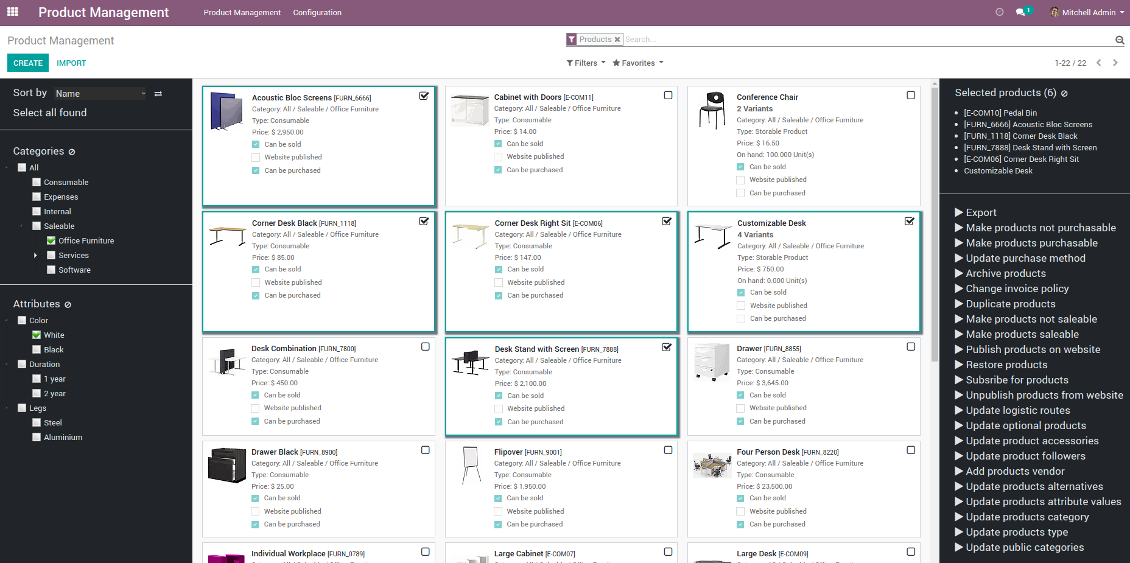
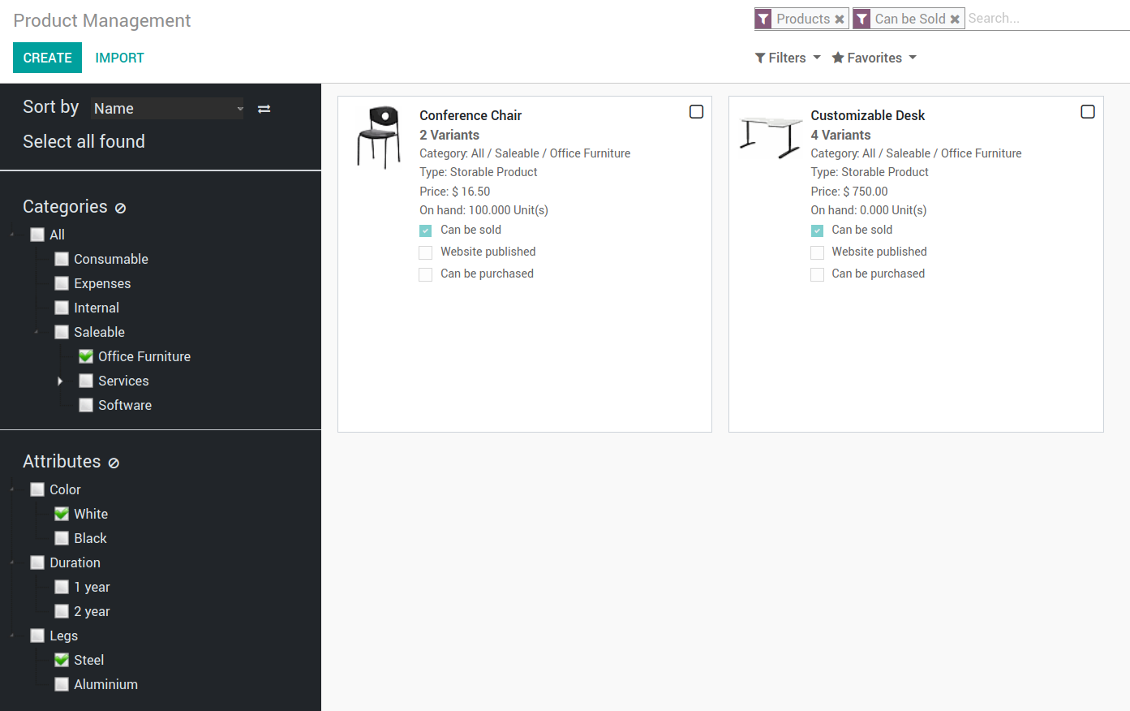
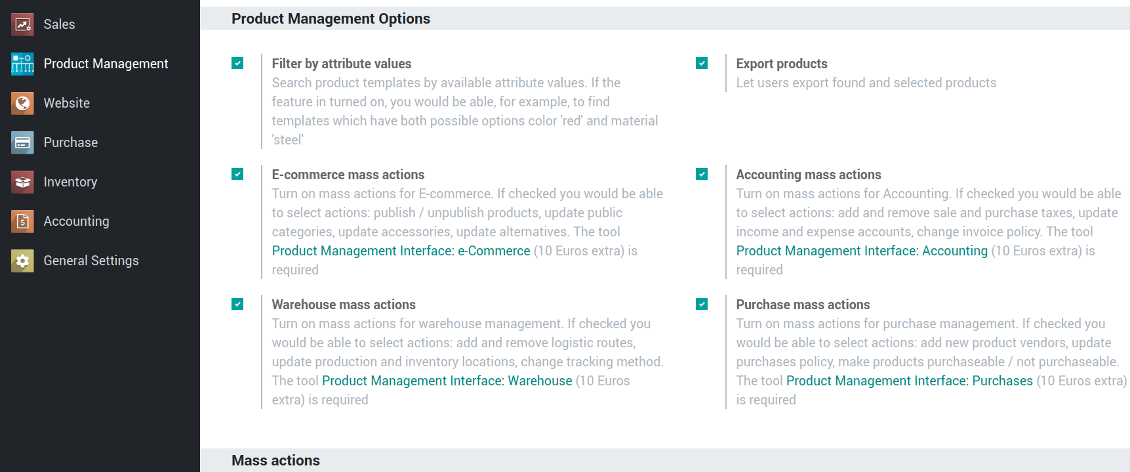
- Product Management Interface - the core app. It might be used stand-alone as a system to find, pick up, and update basic product fields. The price is 92 Euro
- Product Management Interface: e-Commerce - the optional module, which introduces mass products actions to change E-shop related attributes. The features assumed by this add-on are marked by the icon . The price is 10 Euro
- Product Management Interface: Warehouse - the optional module to update in batch warehouse characteristics of product templates. The features assumed by this add-on are marked by the icon . The price is 10 Euro
- Product Management Interface: Accounting - the optional module to manage accounting traits of products in bulk. The features assumed by this add-on are marked by the icon . The price is 10 Euro
- Product Management Interface: Purchases - the optional module offering mass actions on purchase columns of products. The features assumed by this add-on are marked by the icon . The price is 10 Euro
Structure products by categories just through ticking check boxes. The tool let you select one or multiple ones, choose only parent category or all children recursively
Systematize product templates by available attributes values. Now it is not a trouble to select all templates which might be both white and metal
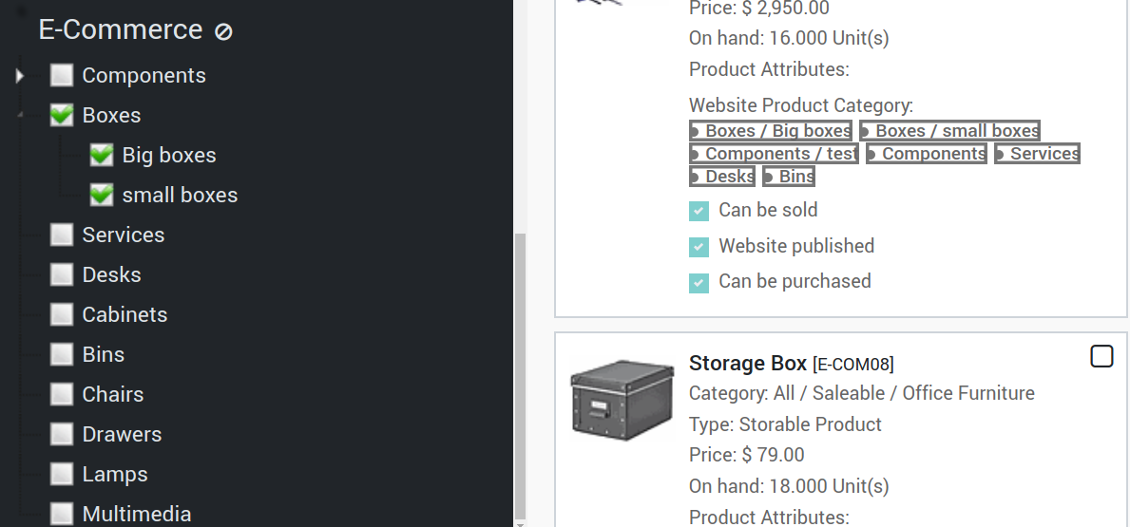
New Navigate by E-commerce categories to search products from E-shop perspective
Apply standard product filters using Odoo regular search to narrow results
Choose an unlimited number of products step by step. A current selection is not spoilt with a new search or when you opened a record. You may also select all products found by you criteria (not only ones displayed on a current page)
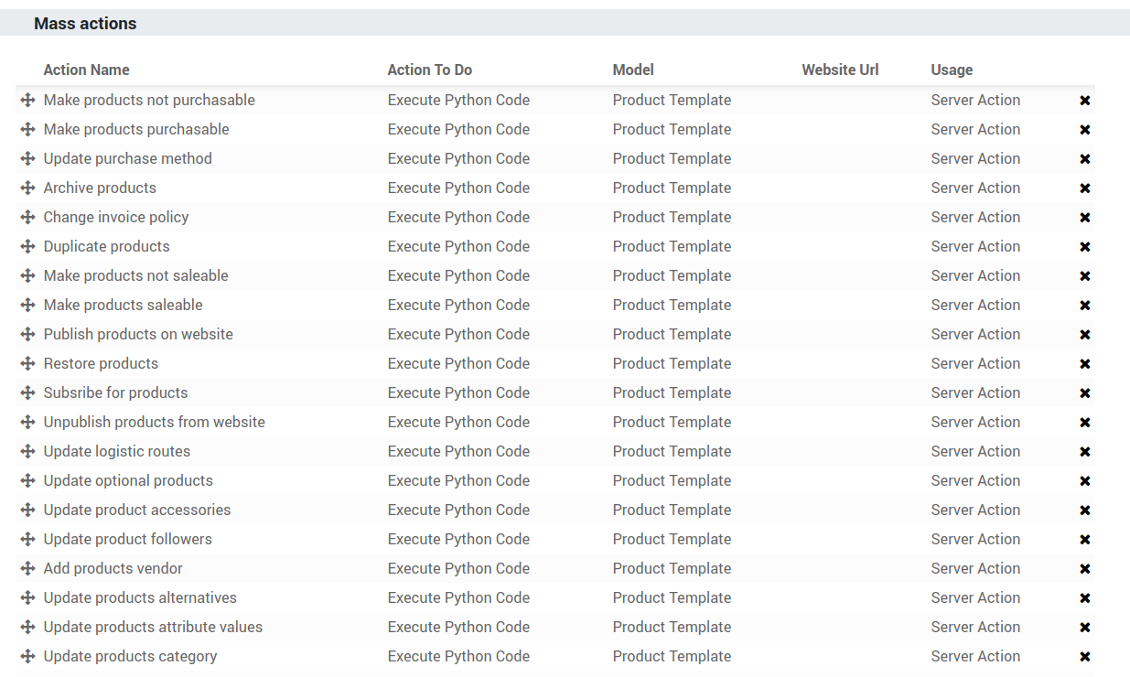
Configure the list of mass actions through selecting among multiple ones offered by the tool. Look for the whole list at the section Mass Actions List
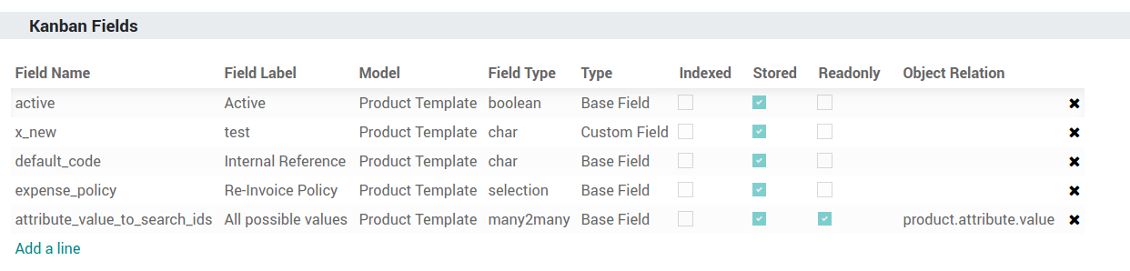
Execute any of chosen multiple mass actions and observe results in real-time. New you might define by your own which product fields should be shown on a kanban card in addition to standard columns
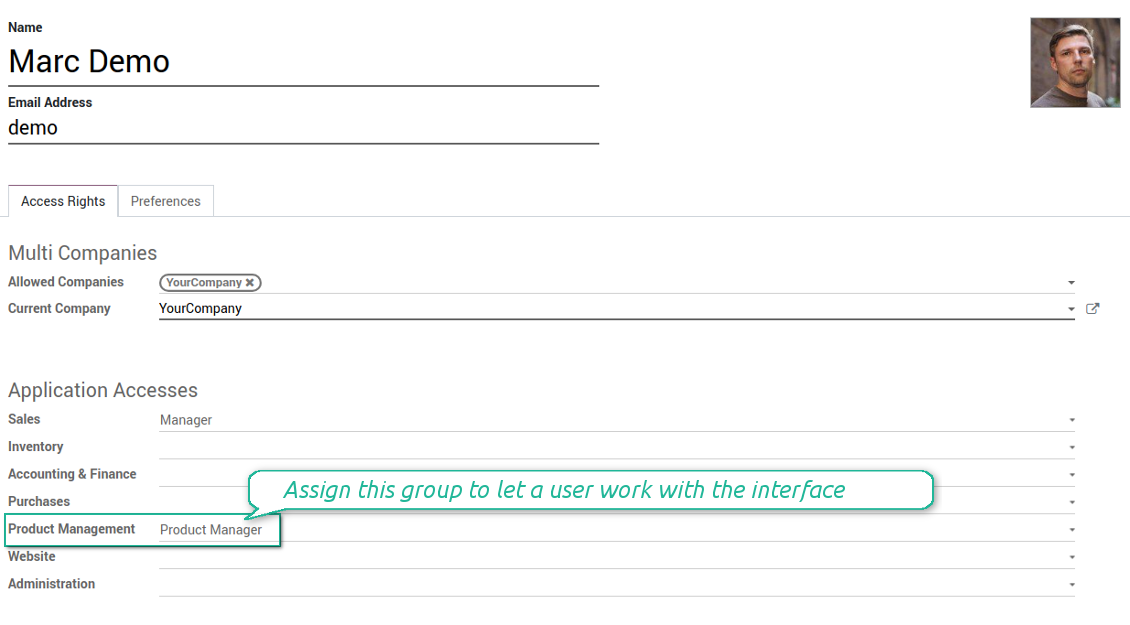
The interface is available for any user which has rights for products (e.g. sales, warehouse or purchase manager) and who has the group 'Product manager' assigned. Configuration might be done only by the group Administration / Settings
The tool supports multiple click events. To open a product form - click on a image area, to select an item for mass update - click on any other area of this Kanban card
Mass Actions List
- Archive products in bulk
- Restore selected products which have been previously archived
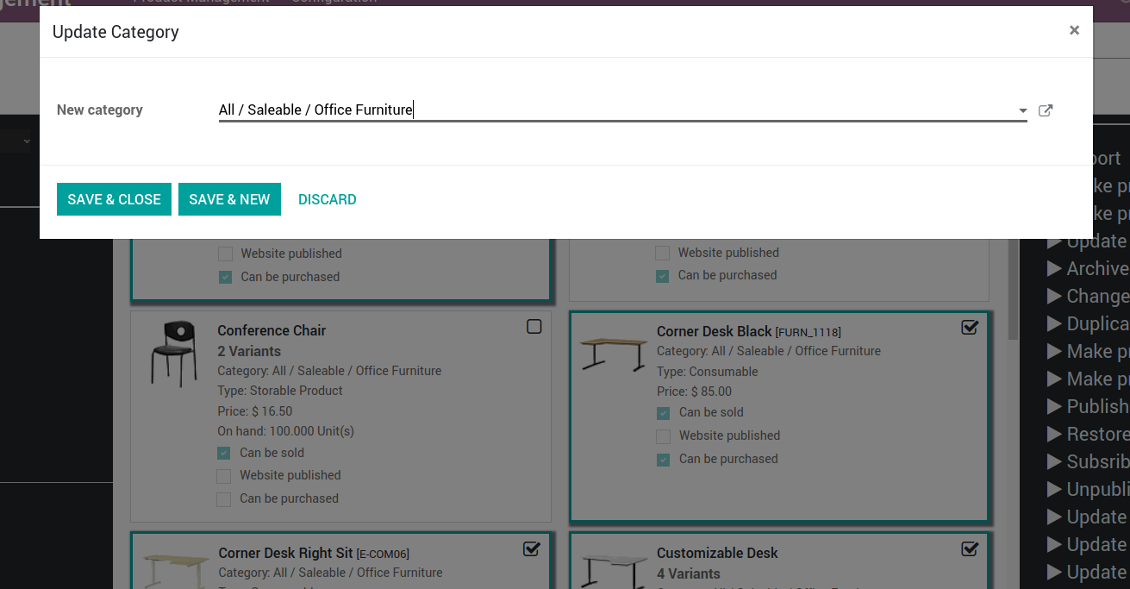
- Change product category of all selected items
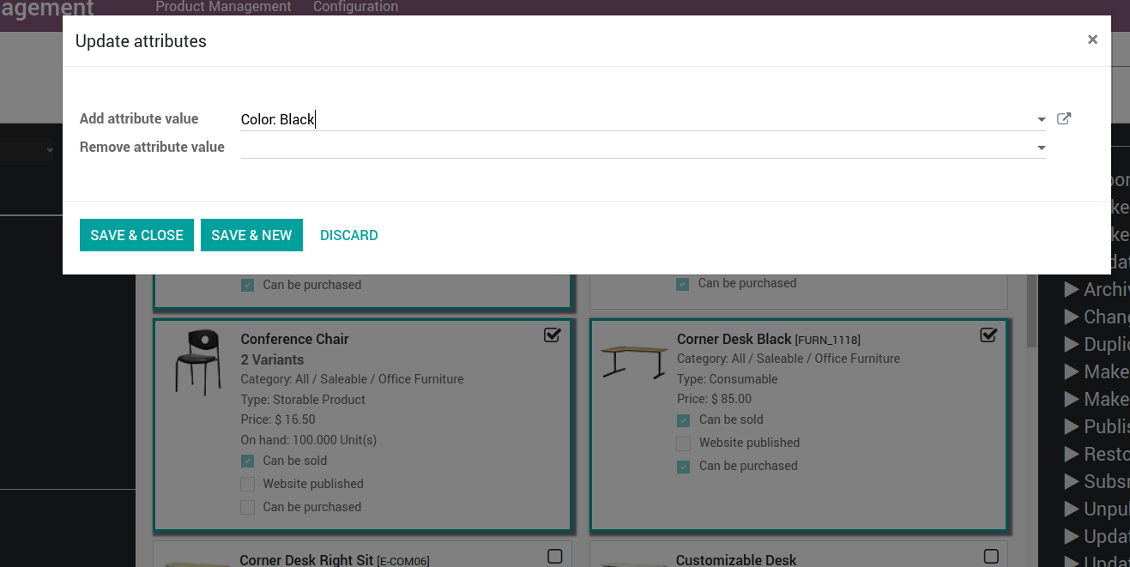
- Add / remove an attribute value to all found templates
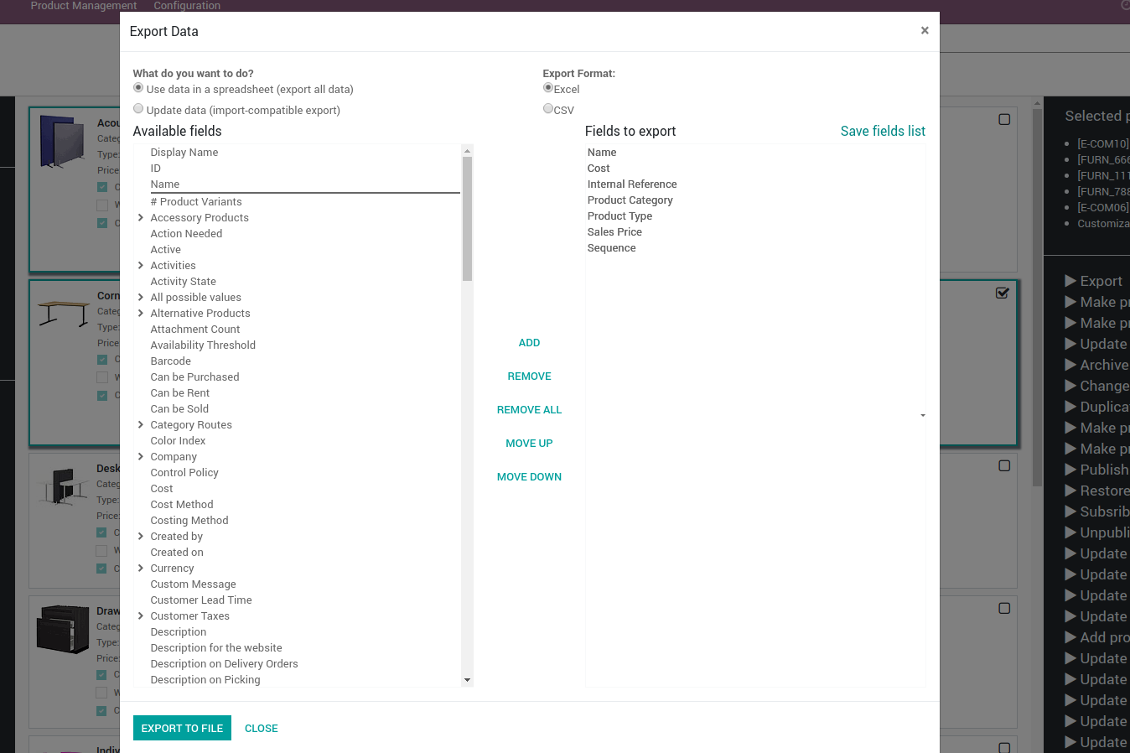
- Export chosen items (the setting 'Export products' should be turned on)
- Mass edit product type (consumable, service, storable)
- Publish or unpublish products in batch
- Update products to be saleable / not saleable
- Update products to be purchasable / not purchasable
- Add / remove public E-shop categories of selected templates
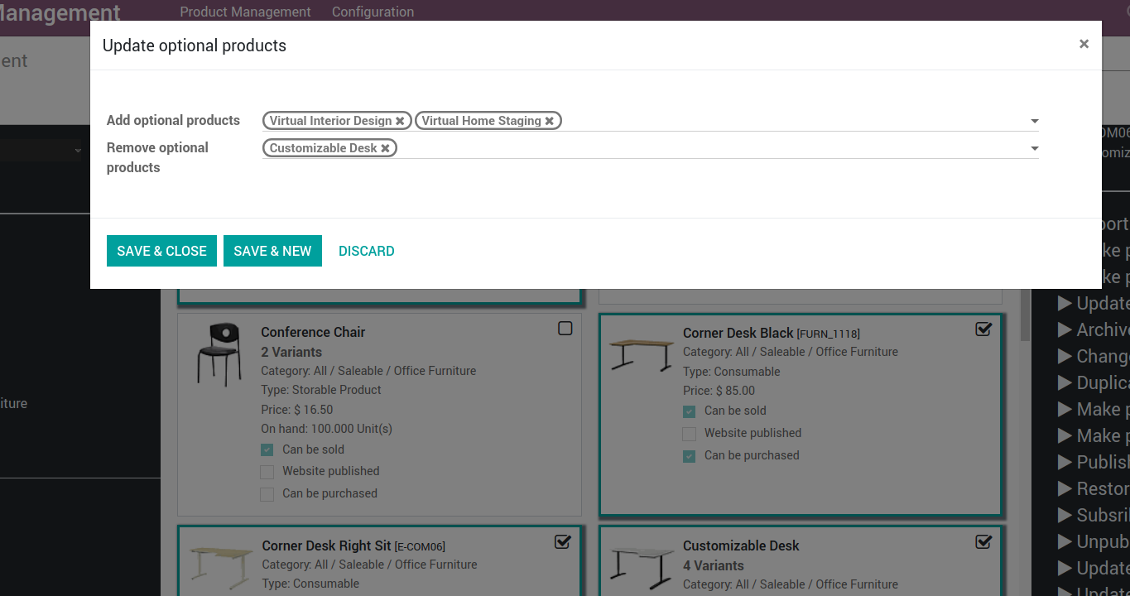
- Add / remove products' alternatives
- Add / remove products' accessories
- Assign a new vendor to product templates in bulk and make this supplier the most prioritized
- Add / remove logistic routes
- Modify invoice policy ('Ordered quantities', 'Delivered quantities')
- Duplicate a few product templates simultaneously
- Add / remove customer taxes
- Add / remove vendor taxes
- Subscribe to / unsubscribe from products' discussions
- Add / remove templates' followers
- Update purchase method ('On ordered quantities', 'On received quantities')
- Update tracking method
- Change price difference account
- Change income account of products
- Change expense account of templates
- Change inventory location
- Change production location
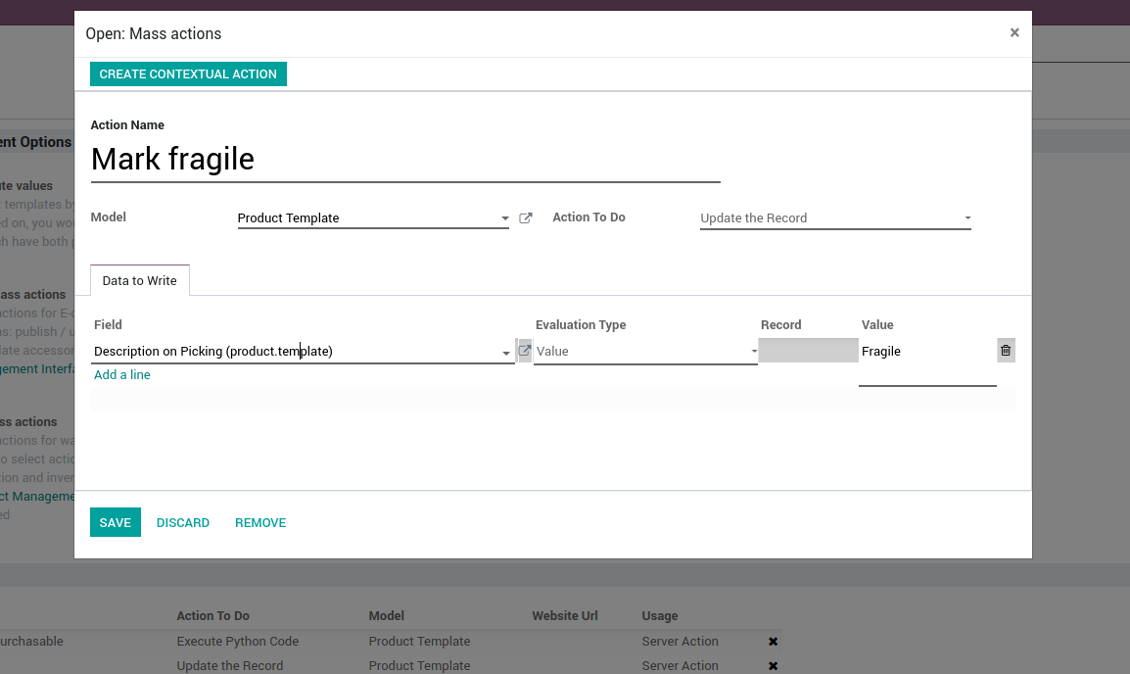
Beside the list above you can also prepare your own mass actions. Look at the configuration tab.
Mass actions
- As the model always use 'Product Template'. Otherwise you action would not be displayed in the list of operations
- In case you want to return a wizard, such a wizard should not have a footer (only standard buttons) and should have an explicitly specified view_id. Look for examples in any module of the Product Management Bundle
Example of custom mass action
Installation Tips
に関するよくある質問 Product Management Interface Odoo v.11
プロダクトを選んだ後、ページを切り替えても選択が残ります。すばやくリセットするには?
右側の機能エリアで製品タイトルをクリックするとリストから外れます。'Selected products' 右側の 'Reset' アイコンですべての製品を外します。
ツールの更新ポリシーは何ですか?
現行の Odoo Apps Store ポリシーによると:
- バージョン 12.0 以前向けに購入したモジュールは、12.0 までの全バージョンにアクセスできます。
- バージョン 13.0 以降、各モジュールバージョンは個別に購入します。
- バージョンに関係なく、購入するとメジャーバージョン内の すべての更新と不具合修正の権利が得られます。
faOtools チームはこれらのポリシーを管理していません。ご質問は Odoo Apps Store の担当者へ直接お問い合わせください。
アプリを Odoo.sh にインストールする方法は?
最も単純な方法は、Odooストア組み込みのワークフローを使うことです:
1. モジュールのページを開き、Deploy on odoo.sh ボタンをクリックします。
2. その後 GitHub ページにリダイレクトされます。アカウントにログインし、'Create a new repo' をクリックするか既存のものを使います。リポジトリはプライベートにしてください。OPL-1 ライセンスのアプリを公開することは許可されていません。必要なら Odoo.sh プロジェクト用に新しい repo を作成します。
3. 次に odoo.sh に行き、Deploy ボタンをクリックします。ポップアップで決定を送信し、'Continue.' をクリックします。これでインストールが始まります。
これらの手順でプロジェクトの本番ブランチにアプリがインストールされます。他のブランチにデプロイする、またはモジュールを更新する場合は、次の操作を行います:
1. Odooストアからアプリのソースコードをアップロードします。
2. モジュールを必要な GitHub リポジトリにコミットします。アプリのフォルダ/ファイルが無視されていないこと(repo の .gitignore に含まれていないこと)を確認してください。リポジトリは odoo.sh が自動作成し、既定で重要な項目(例: /lib)が含まれることがあります。モジュールのディレクトリ、サブディレクトリ、ファイルを例外なくすべてアップロードしてください。
3. odoo.sh プロジェクトの対象ブランチを Deploy するか、 設定がそうなっている場合は自動ビルドされるまで待ちます。
自分のサーバーにアプリをインストールするには?
2. Odoo サーバーを再起動します;
3. 開発者モードをオンにします(技術設定);
4. アプリ一覧を更新します(アプリメニュー);
5. アプリを見つけて「Activate」/「Install」を押します;
6. アプリページにガイドラインがあれば従ってください。
アプリに追加アドオンがあるのに気づきました。後から購入できますか?
はい、もちろんです。同時に Odoo は依存関係をすべてカートに自動追加するので、二重払いを避けるには既に購入したツールを除外してください。
アプリを Odoo.sh にデプロイしたらテストで警告/エラーが出ます
赤/オレンジの警告はアプリの機能に影響しません。残念ながら、標準の自動テストがアプリの目的と衝突する動作を想定するため、モジュールが通らないことがあります。たとえば価格計算を変える一方、標準 Odoo モジュールのテストは最終価格を標準アルゴリズムと比較します。
まず、デプロイ済みデータベースの機能を確認してください。すべて正しく動いていますか?
それでも警告が実機能に影響すると考える場合はご連絡のうえ、インストールログ一式とデプロイ済みモジュールの全一覧(コアおよびサードパーティ含む)を送ってください。
アプリを御社から直接購入できますか?
いいえ、ツールは 公式の Odoo アプリストア.
割引をいただきたいです
残念ながら、個別価格を提示する技術的手段が ありません。
Odoo Online (SaaS)データベースにアプリをインストールできますか?
いいえ、サードパーティアプリは Odoo Online では使えません。残念ながら Odoo SaaS がその可能性をブロックします。
ツールは他のアプリに依存しています。それらも購入すべきですか?
はい、ツールが正しく動くには依存関係に記されたすべてのモジュールが必要です。アプリページの価格には必要な依存関係がすでに含まれています。
モジュールの米ドル価格はいくらですか?なぜ変わりましたか?
モジュールの価格はユーロ建てです。Odoo ストアは内部為替レートで他通貨に換算します。そのため為替が更新されると米ドル価格が変わることがあります。
英語以外のアプリ・サイト文言は AI 支援で作成され、 公式の Odoo 翻訳に揃えています。誤りを見つけたら、 翻訳の正確さについてチケットを送る 修正します。
不具合報告
不具合や一貫しない動作があれば、遠慮なくご連絡ください。購入から60日以内の修正を保証し、その後もツール改善に力を入れています。
ご連絡に電話番号やクレジットカードは不要です。30 秒以内の短いメール登録だけです。
リクエストにはできるだけ多くの詳細を含めてください:スクリーンショット、Odoo サーバーログ、問題の再現手順の完全な説明など。通常、問題の作業計画の作成(不具合が確認された場合)または実施すべき内容の案内(それ以外)には数営業日かかります。
公開の機能リクエストとモジュールのアイデア(無償開発)
ツール改善への意欲は強く、フィードバックには感謝します。要件が広く役立ち、効率よく実装できる場合、チームは To-do リストに加えます。
このような To-do リストは定期的に処理され、追加料金は発生しません。期限や最終デザインは約束できませんが、投資とリスクなしで望む機能を得る良い方法になることがあります。
ご連絡に電話番号やクレジットカードは不要です。30 秒以内の短いメール登録だけです。

Odoo の添付ファイルをフォルダに柔軟に整理し、Google Drive、OneDrive/SharePoint、Nextcloud/ownCloud、Dropbox、Amazon S3、Box、NAS とディレクトリを同期するツール。DMS。ファイルマネージャー。文書管理システム
398€

社内・社外向けに深く構造化されたナレッジベースを構築するツール。Knowledge System。KMS。Wiki のような改訂。
398€




