Advanced Variant Prices v.17
The tool to configure variant prices based on attributes coefficients and surpluses


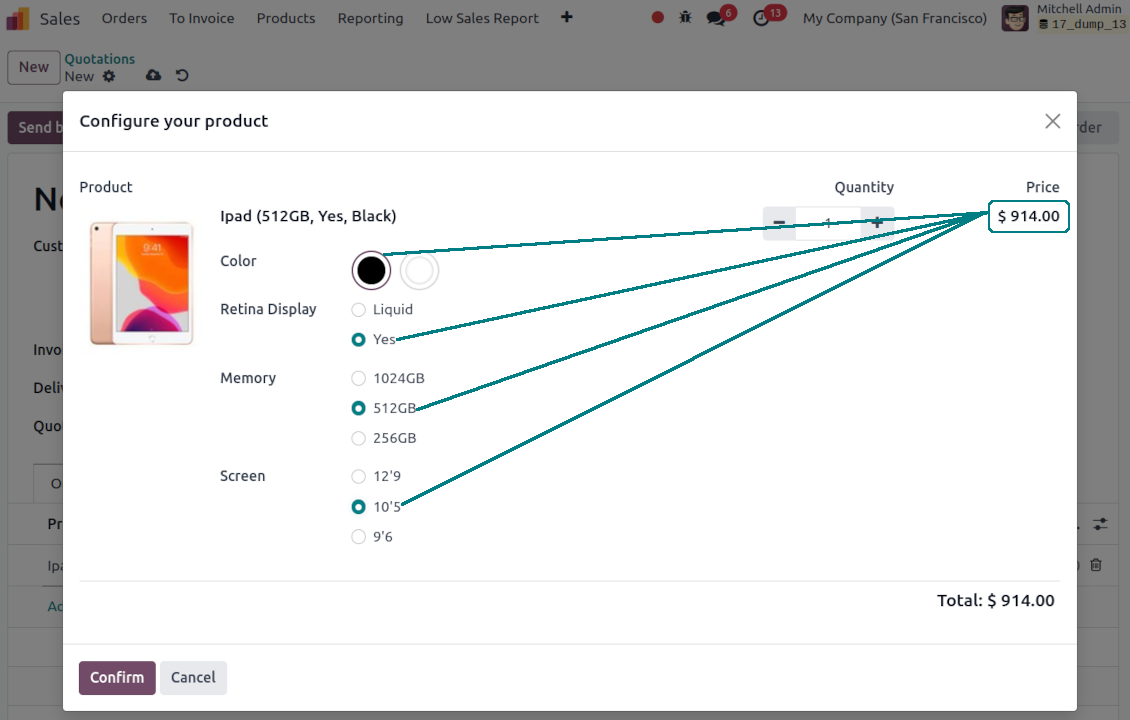
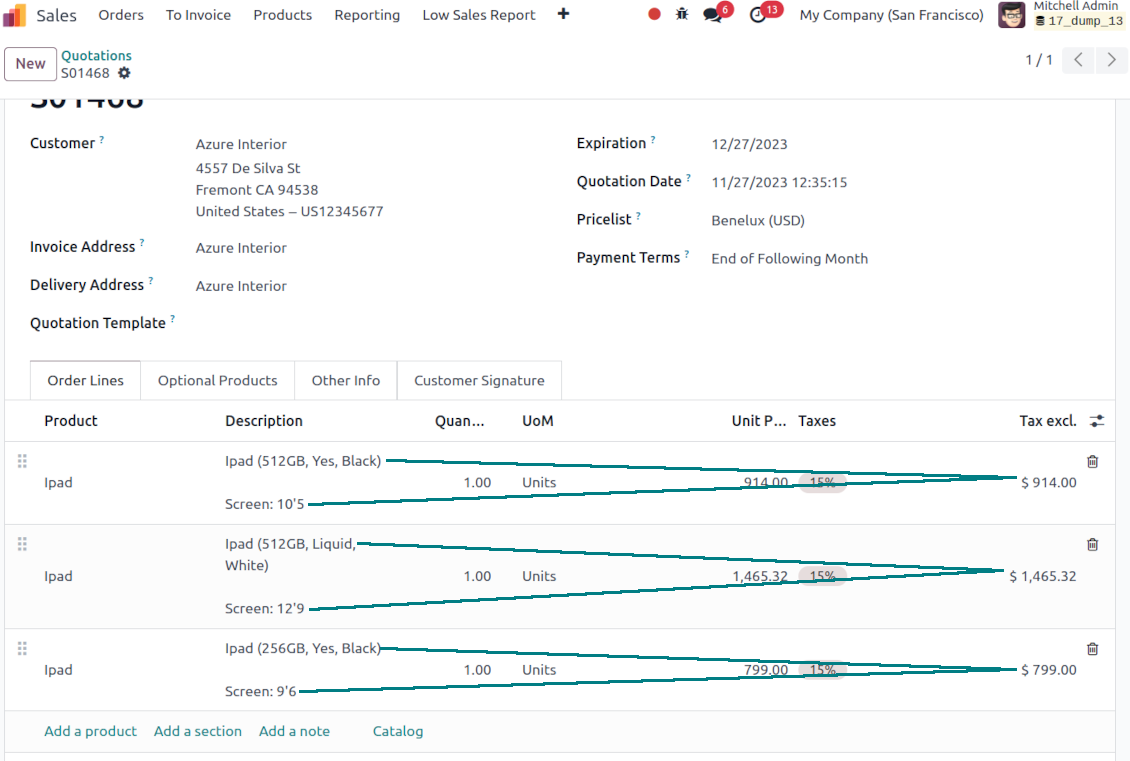


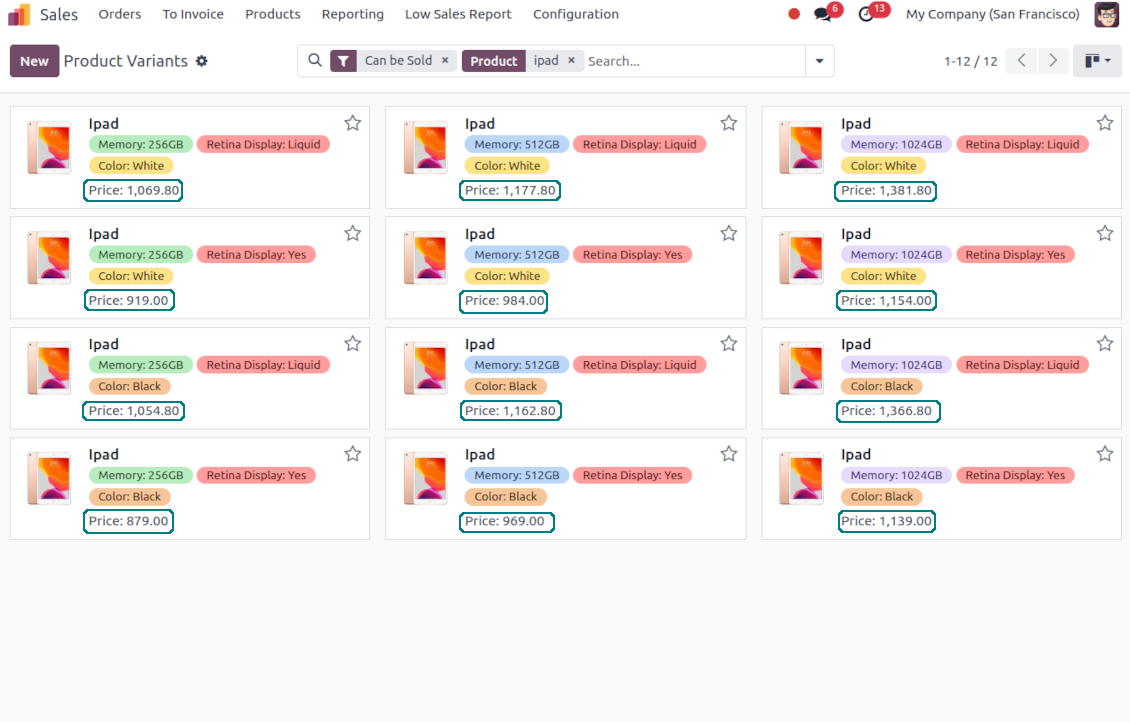
In many industries, product variant price strictly depends on its attribute values. Such dependency might be both cumulative (adds/subtracts some sum) and multiplicative (adds/subtracts a certain percentage). This is an Odoo tool that lets you quickly configure pricing in that way.
Pricing based on Odoo attribute values
Assign a multiplier for a template attribute value: e.g. 10% extra if the screen size is 12.9'. Add an extra price for any attribute value of this product template: e.g. plus 5 Euro if the color is red. Drag and drop the value to apply coefficients priorities: firstly screen size impact, then memory, and finally color
Independent variant surplus
Define an extra price for an Odoo product variant. For example, iPad 12.9', 64GB needs an extra 100 Euro in addition to attributes coefficients. In this way, it is also possible to make the product price independent from the template price, if the latter is set as zero
Real-time pricing in any sale
The price is updated in real-time and is immediately visible on any product variant view. The advanced calculation would be applied in quotations, on E-shop pages, in point of sale (POS), etc.
Odoo product configurator advanced pricing
The app fully supports the Odoo product configurator. Variant price is defined disregarding whether this product actually exists: attributes with the creation mode 'never create' and 'dynamically create' would anyway influence calculations
Price lists compatible
Calculated variant price is influenced by Odoo pricelists formulas. Thus, a final product price might be further amended by a special discount or converted to another currency
Own template attributes coefficients
The tool assumes different coefficients and surpluses for the same attributes of different templates. In this way, the red color of the iPad might add 10% to the price, while the same color of the fridge would not have an impact at all.
Super support team
This module is awesome, had a few minor things to fix and the dev team fixed it and update their modules within 2hours. Super service!
Quick response, helpful team. Just what I needed.
I'm very happy for finding this module. And also the support team is very prompt. Super satisfied with customer support. Will definitely check out for more modules from this reputable company. Cheers!
Odoo advanced pricing formula
[[(PRODUCT TEMPLATE PRICELIST PRICE + ATTRIBUTE 1 EXTRA PRICE) * (100+ATTRIBUTE 1 MULTIPLIER)/100 + ATTRIBUTE 2 EXTRA PRICE] * [100+ATTRIBUTE 2 MULTIPLIER]/100 + ATTRIBUTE 3 EXTRA PRICE ] * .... + OWN VARIANT SURPLUS
Price calculation example
-
The product is "Ice Cream", which sale price is $5. It has 2 attributes - "Flavor" and "Mode"
-
The flavor may be "Chocolate", "Vanilla" or "Strawberry". While the first 2 do not influence costs, the latter makes you put fresh fruits. That's why you decide to make a price extra of $1
-
You have 2 ice cream modes: "Standard" and "Premium". The latter assumes premium milk usage, which costs 20% more than the ordinary one. Hence, you assign a 20% multiplier to this attribute
-
Since flavor doesn't influence mode at all, you decide to order attributes as "Mode, Flavor"
-
Then, the price of "Ice Crem, Premium, Strawberry" will be calculated as [($5 + 20%) + $1] = $7
-
Be cautious: if you decided to order attributes in the opposite way the price of "Ice Crem, Premium, Strawberry" will be [($5 + $1) * (1+20%)] = $7,2
-
Add a special extra for the product "Ice Cream, Premium, Strawberry" on its form - $2. Thus, the price would be $9.
Special case: Odoo independent variant prices
-
Sometimes, variant prices don't have a strict correlation with template prices. In such a case there is a need to assign an own product price disregarding attributes and template core settings
-
Define a product template price as zero
-
Do not assign coefficients for attributes, but you may define surpluses (e.g. a product has 2 attribute values, one of which has 5 Euro extra)
-
Make a variant surplus as a final variant price (e.g. 100 Euro)
-
The tool will calculate a final variant price as 0 + 5 + 0 + 100 = 105 Euro. It is fully independent of a template price.
Pertanyaan umum tentang Advanced Variant Prices Odoo v.17
Bagaimana modul Advanced Variant Prices berinteraksi dengan daftar harga standar? Apakah bisa mengatur extra harga dan koefisien berbeda untuk daftar harga berbeda?
Modul sepenuhnya kompatibel dengan daftar harga standar. Harga akhir disesuaikan dengan diskon/modifikasi itu. Pertama harga varian dihitung, baru rumus daftar harga diterapkan. Contoh 1) harga dasar templat $10, 2) atribut membuat varian $12, 3) daftar harga pelanggan memberi diskon 10%: harga akhir $12 -10% = $10,8. Surplus dan koefisien atribut independen dari daftar harga. Tidak bisa dibuat berbeda karena dihitung sebelum daftar harga.
Apa kebijakan pembaruan alat Anda?
Menurut kebijakan Odoo Apps Store saat ini:
- Setiap modul yang dibeli untuk versi 12.0 dan sebelumnya memberi akses ke semua versi hingga 12.0.
- Mulai versi 13.0, setiap versi modul harus dibeli terpisah.
- Terlepas dari versi, pembelian memberi hak atas semua pembaruan dan perbaikan bug dalam versi mayor.
Perhatikan bahwa tim faOtools tidak mengontrol kebijakan tersebut. Untuk pertanyaan, hubungi langsung perwakilan Odoo Apps Store.
Bagaimana memasang aplikasi Anda di Odoo.sh?
Pendekatan paling langsung adalah memakai alur bawaan toko Odoo:
1. Buka halaman modul dan klik tombol Deploy on odoo.sh
2. Setelah itu Anda akan diarahkan ke halaman GitHub. Masuk ke akun, lalu klik 'Create a new repo' atau pakai yang sudah ada. Pastikan repositori bersifat privat. Tidak diizinkan memublikasikan aplikasi di bawah lisensi OPL-1. Jika perlu, buat repo baru untuk proyek Odoo.sh
3. Lalu buka odoo.sh dan klik tombol Deploy. Di jendela pop-up, kirim keputusan dan klik 'Continue.' Tindakan ini memicu proses pemasangan.
Langkah ini akan memasang aplikasi di cabang produksi proyek. Jika ingin men-deploy aplikasi ke cabang lain atau memperbarui modul, lakukan tindakan berikut:
1. Unggah kode sumber aplikasi dari toko Odoo
2. Commit modul ke repositori GitHub yang diperlukan. Pastikan tidak ada folder/file aplikasi yang diabaikan (yaitu tidak ada di .gitignore repo). Repositori dibuat otomatis oleh odoo.sh dan secara default dapat berisi item penting (mis., /lib). Unggah semua direktori, subdirektori, dan file modul tanpa kecuali
3. Deploy cabang target proyek odoo.sh atau, jika pengaturan Anda mengasumsikan itu, tunggu hingga dibangun otomatis.
Bagaimana memasang aplikasi Anda di server saya sendiri?
2. Mulai ulang server Odoo;
3. Aktifkan mode pengembang (pengaturan teknis);
4. Perbarui daftar aplikasi (menu aplikasi);
5. Temukan aplikasi dan tekan 'Activate'/'Install';
6. Ikuti panduan di halaman aplikasi jika ada.
Saya melihat aplikasi Anda punya add-on tambahan. Boleh beli belakangan?
Ya, tentu. Pada saat yang sama Odoo otomatis menambahkan semua dependensi ke keranjang, jadi Anda harus mengecualikan alat yang sudah dibeli agar tidak membayar dua kali.
Saya men-deploy aplikasi Anda di Odoo.sh dan melihat peringatan/kesalahan di tes
Peringatan merah/oranye tidak memengaruhi fitur aplikasi. Sayangnya, modul kami kadang tidak lulus uji otomatis standar karena uji itu mengasumsikan perilaku yang bertentangan dengan tujuan aplikasi. Misalnya kami mengubah penghitungan harga, sementara uji modul Odoo standar membandingkan harga akhir dengan algoritma standar.
Pertama-tama, periksa fitur basis data yang diterapkan. Apakah semuanya berjalan benar?
Jika Anda masih menganggap peringatan memengaruhi fitur nyata, hubungi kami dan kirim log instalasi lengkap serta daftar lengkap modul yang diterapkan (termasuk inti dan pihak ketiga).
Bolehkah saya membeli aplikasi langsung dari perusahaan Anda?
Tidak, kami hanya mendistribusikan alat melalui toko aplikasi Odoo resmi.
Saya ingin mendapat diskon
Sayangnya, kami tidak punya sarana teknis untuk memberi harga individual.
Bolehkah saya memasang aplikasi di database Odoo Online (SaaS) saya?
Tidak, aplikasi pihak ketiga tidak dapat dipakai di Odoo Online. Sayangnya Odoo SaaS memblokir kemungkinan itu.
Alat Anda bergantung pada aplikasi lain. Haruskah saya membelinya?
Ya, alat memerlukan semua modul yang ditandai di dependensi agar bekerja dengan benar. Harga di halaman aplikasi sudah mencakup semua dependensi yang diperlukan.
Berapa harga modul dalam dolar AS? Mengapa berubah?
Harga modul kami ditetapkan dalam euro. Toko Odoo mengonversi harga ke mata uang lain menurut kurs internalnya. Jadi harga dalam dolar AS dapat berubah saat kurs diperbarui.
Teks aplikasi dan situs dalam bahasa selain Inggris dibantu AI dan diselaraskan dengan terjemahan resmi Odoo. Jika Anda melihat kesalahan, kirim tiket kebenaran terjemahan dan kami akan memperbaikinya.
Database demonstrasi Odoo (pratinjau langsung)
Untuk aplikasi ini, kami dapat menyediakan database demo personal gratis.
Anda tidak perlu nomor telepon atau kartu kredit untuk menghubungi kami. Cukup pendaftaran email singkat yang tidak lebih dari 30 detik.
Atas permintaan Anda, kami siapkan database pratinjau langsung individu, tempat Anda dapat menguji dan memeriksa asumsi selama sekitar dua minggu.
Pelaporan bug
Jika Anda menemukan bug atau perilaku tidak konsisten, jangan ragu menghubungi kami. Kami jamin perbaikan dalam 60 hari setelah pembelian dan tetap ingin meningkatkan alat setelah periode itu.
Anda tidak perlu nomor telepon atau kartu kredit untuk menghubungi kami. Cukup pendaftaran email singkat yang tidak lebih dari 30 detik.
Sertakan sebanyak mungkin detail dalam permintaan: tangkapan layar, log server Odoo, deskripsi lengkap cara mereproduksi masalah, dan sebagainya. Biasanya butuh beberapa hari kerja untuk menyiapkan rencana kerja (jika bug dikonfirmasi) atau memberi panduan apa yang harus dilakukan (jika tidak).
Permintaan fitur publik dan ide modul (pengembangan gratis)
Kami sangat termotivasi untuk meningkatkan alat kami dan berterima kasih atas masukan apa pun. Jika kebutuhan Anda bermanfaat bagi publik dan dapat diimplementasikan secara efisien, tim akan memasukkannya ke daftar tugas kami.
Daftar tugas semacam ini diproses secara berkala dan tidak dikenai biaya tambahan. Meski kami tidak dapat menjanjikan tenggat dan desain akhir, ini bisa jadi cara baik untuk mendapatkan fitur yang diinginkan tanpa investasi dan risiko.
Anda tidak perlu nomor telepon atau kartu kredit untuk menghubungi kami. Cukup pendaftaran email singkat yang tidak lebih dari 30 detik.

The tool to flexibly structure Odoo attachments in folders and synchronize directories with cloud clients: Google Drive, OneDrive/SharePoint, Nextcloud/ownCloud, Dropbox, Amazon S3, Box, and NAS. DMS. File Manager. Document management system
398€

The tool to build a deep and structured knowledge base for internal and external use. Knowledge System. KMS. Wiki-like revisions.
398€
The tool to automatically synchronize Odoo attachments with OneDrive files in both ways
487€
The tool to set up KPI targets and control their fulfillment by periods. KPI dashboards. Dashboard designer. KPI charts

The tool to automatically synchronize Odoo attachments with Google Drive files in both ways
487€
The tool for time-based service management from booking appointments to sales and reviews
398€

The tool to make inventory data essential and comfortable for elaboration. Stocks analysis
38€