Password Manager v.15
The tool to safely keep passwords in Odoo for shared use. Shared vaults. Encryption






This app lets organize the safe passwords keeping system to structure, find and securely share password bundles.
- a core app to manage vaults and passwords.
Az ára
198€
178€.
- an extension to add custom fields for password keys. Features assumed by this app are marked by the icon .
Az ára
38€
37€.
Shared passwords vaults for team use
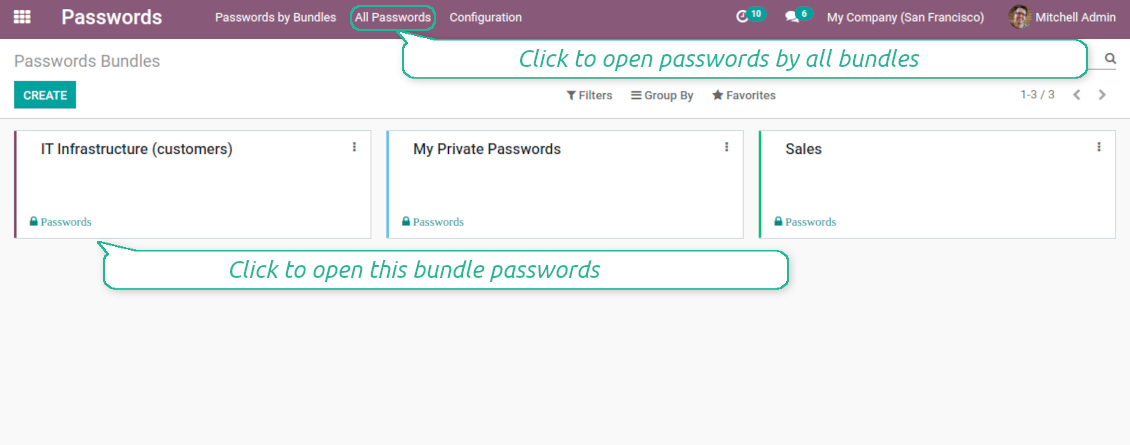
Passwords are combined in bundles: each might be shared with any user and any user group
Single view interface
Structure vault by tags, sort keys, proceed mass actions, copy credentials to buffer from the same interface
Encrypted and protected password manager
The tool introduces a few security layers to minimize the possibility of data leaks
Partners-related passwords
Link passwords with Odoo contacts for a quick access
Auto generation
Force Odoo and let users create passwords based on chosen length and requirements
Passwords quality check
Password strength is estimated in real-time to make sure no weak passwords are introduced. Potential duplicates are easily detected
Batch update, export, and import
Configure your mass actions: export, update tags or partner, archive or restore, import vaults from an electronic table, etc.
Custom fields
Define passwords' typology and add custom attributes.
Very good password management module
Easy installation and quick setup
Shared use, encryption, and protection of passwords
Sharing Policies
-
Have as many password vaults for any user group as you need
-
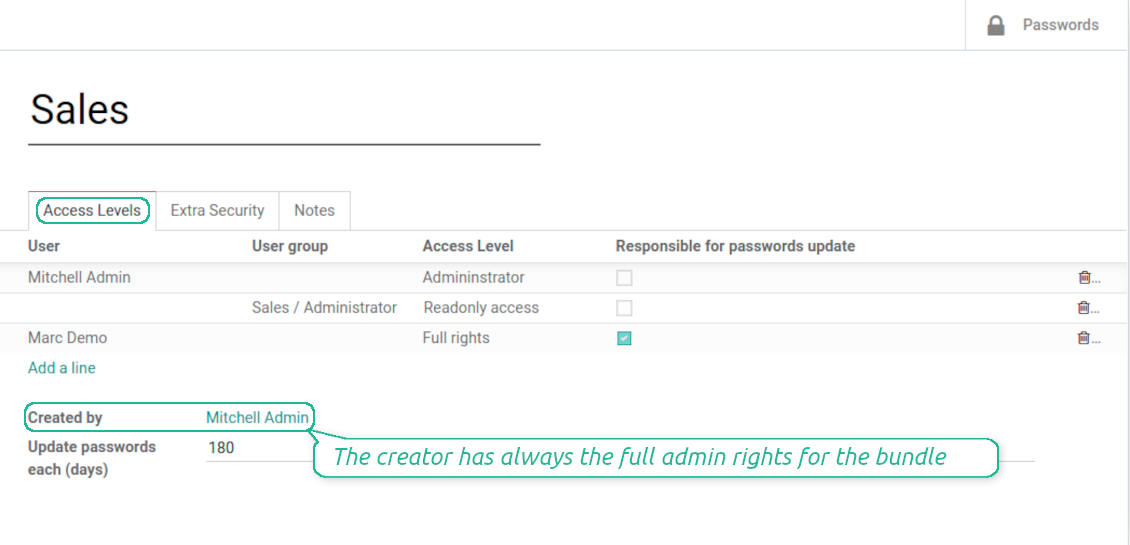
To grant access just indicate a user or a user group in the table of access levels
-
Bundle administrators may access, update or delete the bundle, its passwords, and its tags. Admins are assumed to manage access levels, modify update policies, and set extra passwords
-
Full rights users may access, update or delete passwords and tags related to the bundle, but they can't change the vault itself, its access levels, or settings
-
Readonly access users may observe and address passwords and tags of the bundle. Such users can't modify any objects
-
The bundle creator is always its administrator. The Odoo super admin (with id 1) has full rights to all bundles and passwords
Security Layers
-
All passwords are symmetrically encrypted. It means that to decrypt a password, plotters should know the exact decryption algorithm and a bundle decryption key/bundle salt and password
-
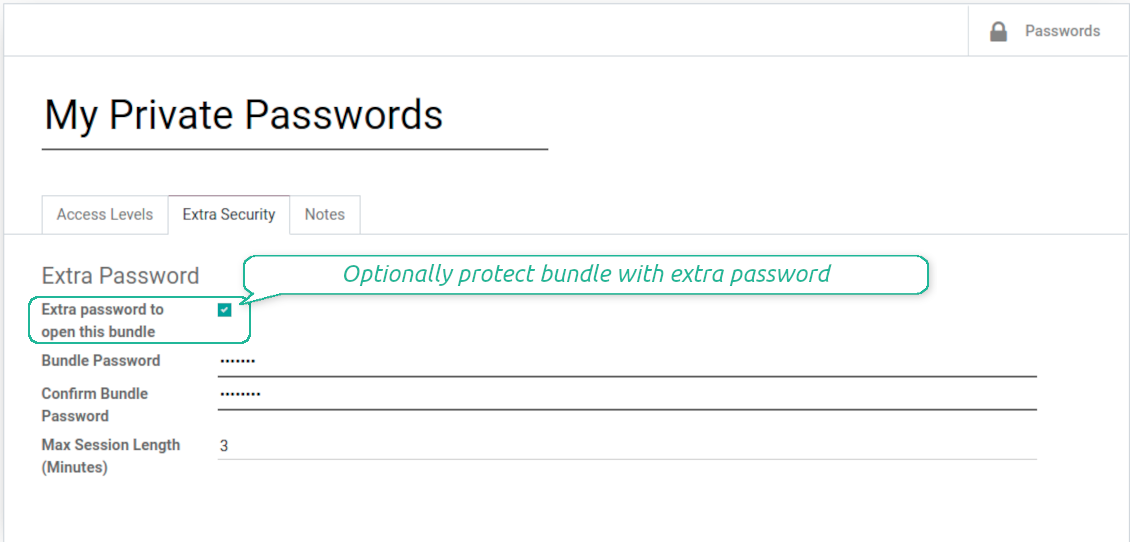
For each bundle, you can assign an extra password, which would be required to enter each time any user applies to that bundle or its passwords. The session period after successful login is set up in minutes
-
Vault extra password is also kept in the database decrypted, and might be changed by a bundle administrator (sure, if he/she enters a correct old paraphrase). If bundle password is set, keys are encrypted by that password hashed by an auto generated salt
-
For each bundle, it is possible to define password update policies in days. Then, the user who is set up as 'Responsible for password updates' would be assigned special activities to update keys.
Custom attributes for Odoo passwords
-
Custom attributes' creation does not require any technical knowledge. In order to show a new property for passwords, just add a new field and enter details
-
It is possible to add custom fields of the following types: single-line text (char), simple text without formatting (text), rich text (HTML-formatted text), integer or float numbers, drop-down choice with your own options (selection), checkbox (boolean), date or date and time, binary (a file to upload), reference to another Odoo document (e.g. for sale order, contact; many2one)
-
The tool lets you comfortably select an interface position of a custom field from a closed list of options
-
Distinguish passwords by types in order to show properties only for suitable ones. Thus set of columns for 'virtual servers' and 'email servers' might be different
-
Mark a custom field required to force users to enter values
-
Custom password fields might be imported and exported
-
The rights to create custom fields belong only to Odoo administrators.
Duplicates detection and passwords merging
-
The app introduces a configurable system to find passwords duplicates
-
Define on your own which fields should be used to search duplicates. Choose such fields on the app configuration page, the section 'Duplicates search'
-
As duplicate criteria use any stored field of the following types: char (reference, user name, email, phone, etc.), text (notes), many2one (linked partner, type, etc.), date and datetime, integer, and float. Duplicates detection is possible also based on custom fields of the same types
-
For all fields, a duplicate should have absolutely the same value. For example, '123' equals '123', but '123' is not equal '1234'. Only in the case of char fields, it is a comparison without taking into account capital letters ('Server' equals 'serVER')
-
Apply the filter 'Potential duplicates' in the passwords interface to observe candidates. You may search within a particular bundle or in all passwords simultaneously
-
When you register a new password, check also the red button on the top right corner. If it is shown, make sure you do not create a potential copy of an existing key
-
Found duplicates or just any password keys might be merged to a single record. To that end, do not forget to add the mass action 'Merge passwords' on the configuration page
-
To merge passwords, select required keys and push the mass action 'Merge passwords' on the right navigation panel
-
In the wizard, as the 'Password to merge', choose one that would be the prime source of the details. In case of conflicts, its value would be prioritized
-
In the wizard, as the 'Merged passwords', choose keys that would be used as a source of complementary details (for example, details which are missing in the main password)
-
Then, press the button 'Save'. As a result, the app would archive all the 'Merged passwords' and enrich the 'Password to merge'
-
Staring from the 'Password to merge' values, the tool would check the fields reference, bundle, user name, email, URL, phone, last password update date, and linked partner. The app would select the first found not null value
-
The app would also accumulate notes, attachments, and tags from all merged records
-
Values of custom fields would be chosen according to keys sequence starting from the 'Password to merge'. Take into account that tables (one2many and many2many fields) would be left as they are in the 'Password to merge'.
Konfigurációs és telepítési tippek: Password Manager Odoo v.15
Python dependencies
To guarantee tool correct work you would need a number of Python libraries: zxcvbn, cryptography:
pip3 install zxcvbn cryptography
Gyakran ismételt kérdések: Password Manager Odoo v.15
Hogyan nezem meg egy partner összes jelszavát?
A partner összes jelszavahoz nyissa meg a Kapcsolatokat, a partnert, majd a 'Passwords' okosgombot. A Password Managerben látja a partner összes jelszavát.
Hogyan torlok egy jelszócsomagot (Password Manager)?
A 'Delete' gomb biztonsági okbol rejtett a csomagok fomenujeeben. Törlés: 1. Három pont a csomag jobb felső sarkan. 2. Szerkesztés, 'Save'. 3. A csomag felett 'Action', majd 'Delete'.
Mik az eszkozeik frissítési szabalyai?
Az Odoo Apps Store aktuális szabalyai szerint:
- A 12.0-s vagy korábbi verzióhoz vásárolt modul hozzáférést ad minden 12.0-ig tarto verzióhoz.
- A 13.0-s verzitol minden modulverziot külön kell megvasarolni.
- A verzioszamtol függetlenül a vásárlás jogot ad az adott foverzion belüli összes frissitesre es hibajavitasra.
A faOtools csapat nem irányítja ezeket a szabályokat. Kerdesekkel közvetlenül az Odoo Apps Store kepviseloit keresse.
Hogyan telepitem az alkalmazást Odoo.sh-re?
A legkozvetlenebb megkozelites az Odoo-aruhaz beépített munkafolyamata:
1. Nyissa meg a modul oldalat, es kattintson a Deploy on odoo.sh gombra
2. A GitHub oldalra kerül. Jelentkezzen be, majd kattintson a Create a new repo gombra, vagy használjon egy meglévőt. A tarhaznak privatnak kell lennie. OPL-1 licencu alkalmazások nem tehetok közzé. Szükség esetén hozzon létre uj repot az Odoo.sh-projekthez
3. Ezutan az odoo.sh-en kattintson a Deploy gombra, erősítse meg, majd kattintson a Continue gombra. Elindul a telepítés.
Ezek a lépések a production agra telepitik az alkalmazást. Mas agakhoz vagy frissiteshez:
1. Töltse le a forraskodot az Odoo-aruhazbol
2. Commitolja a modult a GitHub-tarhazba. Egyik alkalmazasmappa/-fájl sem kerulhet a .gitignore-ba. Az odoo.sh által létrehozott tarhazak fontos utvonalakat (pl. /lib) hagyhatnak figyelmen kívül. Töltse fel az összes modulkonyvtarat es fájlt
3. Deployolja az odoo.sh-projekt celagat, vagy várja meg az automatikus buildet, ha a beállítások igy szolnak.
Hogyan telepitem az alkalmazást a saját szerveremre?
2. Indítsa újra az Odoo-kiszolgálót;
3. Kapcsolja be a fejlesztői uzemmodot (technikai beállítások);
4. Frissítse az alkalmazaslistat (Alkalmazások menü);
5. Keresse meg az alkalmazást, es kattintson az Activate/Install gombra;
6. Kövesse az alkalmazasoldal utmutatasait, ha vannak.
Az alkalmazásnak extra kiegeszitoi vannak. Megvehetem őket később?
Igen. Az Odoo automatikusan a kosarba teszi a fuggosegeket: zárja ki a mar megvasarolt eszközöket, hogy ne fizessen kétszer.
Telepitettem az alkalmazást Odoo.sh-re, es figyelmeztetést/hibát latok a tesztekben
A piros/narancs figyelmeztetés nem befolyásolja az alkalmazás funkcióit. Néha a moduljaink nem mennek at a standard automatikus teszteken, mert azok az alkalmazás celjaival ellentetes viselkedést várnak. Például megvaltoztatjuk az arszamitast, miközben az Odoo-tesztek a végső árat a standard algoritmussal hasonlitjak össze.
Először ellenőrizze a telepített adatbázis funkciot. Minden működik?
Ha mégis ugy gondolja, hogy a figyelmeztetés valós funkciókat érint, írjon nekünk, es küldje el a teljes telepítési naplókat es a telepített modulok teljes listajat (mag es harmadik fel).
Megvehetem az alkalmazást közvetlenül onoktol?
Nem, az eszközöket csak a hivatalos Odoo alkalmazasboltban forgalmazzuk.
Kedvezmenyt szeretnék
Sajnos nincs technikai lehetosegunk egyedi árakat adni.
Telepithetem az alkalmazást az Odoo Online (SaaS) adatbazisomra?
Nem, harmadik feles alkalmazások nem használhatók az Odoo Online-on. Az Odoo SaaS ezt blokkolja.
Az eszköz mas alkalmazasoktol függ. Meg kell vennem őket?
Igen, az eszkoznek szüksége van minden függőségként jelölt modulra. Az alkalmazasoldal ara mar tartalmazza ezeket a fuggosegeket.
Mennyi a modul ara amerikai dollarban? Miért változott?
Moduljaink ara euroban van megadva. Az Odoo-aruhaz a belső arfolyama szerint vált mas penznemekre. Ezért az amerikai dollar ar valtozhat, amikor az arfolyam frissül.
Az alkalmazás és a webhely angolon kívüli nyelveken mesterséges intelligenciával készülnek és az hivatalos Odoo-fordításokhoz igazodnak. Ha hibát talál, küldjön fordításhelyességi jegyet és kijavítjuk.
Hibajelentés
Ha hibát vagy következetlen viselkedést lát, írjon nekünk. A vásárlástól 60 napon belül javítást vállalunk, és utána is fejlesztjük az eszközöket.
Nem kell telefonszám vagy bankkártya a kapcsolatfelvételhez. Elég egy rövid e-mailes regisztráció, ami 30 másodpercnél nem tart tovább.
Adjon meg minél több részletet: képernyőképek, Odoo-kiszolgálónaplók és a hiba reprodukálásának teljes leírása. Általában néhány munkanap kell a munkatervhez (ha a hiba megerősített) vagy az iránymutatáshoz (egyébként).
Nyilvános funkcióigények és modulötletek (ingyenes fejlesztés)
Erősen motiváltak vagyunk az eszközeink fejlesztésére, és hálásak minden visszajelzésért. Ha az igények közhasznúak és hatékonyan megvalósíthatók, a csapat felveszi őket a teendők listájára.
Az ilyen teendőlista rendszeresen feldolgozásra kerül, extra díj nélkül. Bár határidőt és végleges dizájnt nem ígérhetünk, jó módja lehet a kívánt funkciók befektetés és kockázat nélküli megszerzésének.
Nem kell telefonszám vagy bankkártya a kapcsolatfelvételhez. Elég egy rövid e-mailes regisztráció, ami 30 másodpercnél nem tart tovább.

Eszköz Odoo mellékletek mappákba rendezéséhez és könyvtárak szinkronizálásához felhőklientekkel: Google Drive, OneDrive/SharePoint, Nextcloud/ownCloud, Dropbox, Amazon S3, Box és NAS. DMS. Fájlkezelő. Dokumentumkezelő rendszer
398€
Eszköz Odoo-mellékletek automatikus kétirányú szinkronizálásához OneDrive-fájlokkal
487€
Eszköz Odoo-mellékletek automatikus kétirányú szinkronizálásához Google Drive-fájlokkal
487€
Eszköz mély és strukturált tudásbázis építéséhez belső és külső használatra. Knowledge System. KMS. Wiki-szerű revíziók.
398€
Eszköz KPI-célok beállításához és teljesítésük időszakos ellenőrzéséhez. KPI-irányítópultok. Dashboard-tervező. KPI-diagramok

Eszköz időalapú szolgáltatáskezeléshez a foglalástól az értékesítésig és az értékelésekig
398€
Eszköz az Odoo kezeléséhez a kedvenc AI-csevegőkből MCP-n keresztül. Claude. Bármely MCP-t támogató AI.


Eszköz különböző Odoo-események egyesítéséhez néhány konfigurálható szupernaptárban