Customer Scoring and Evaluation v.17
The app to evaluate, score, and rank Odoo customers
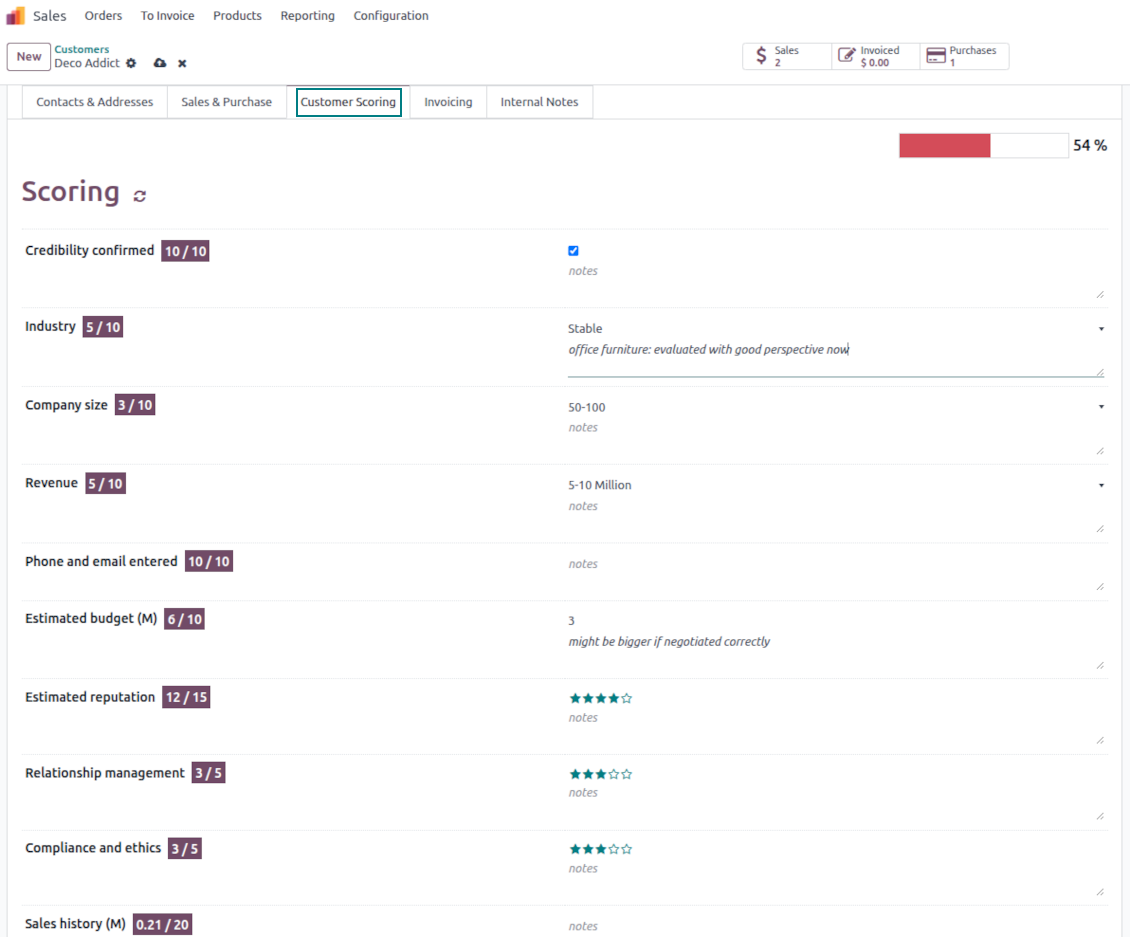
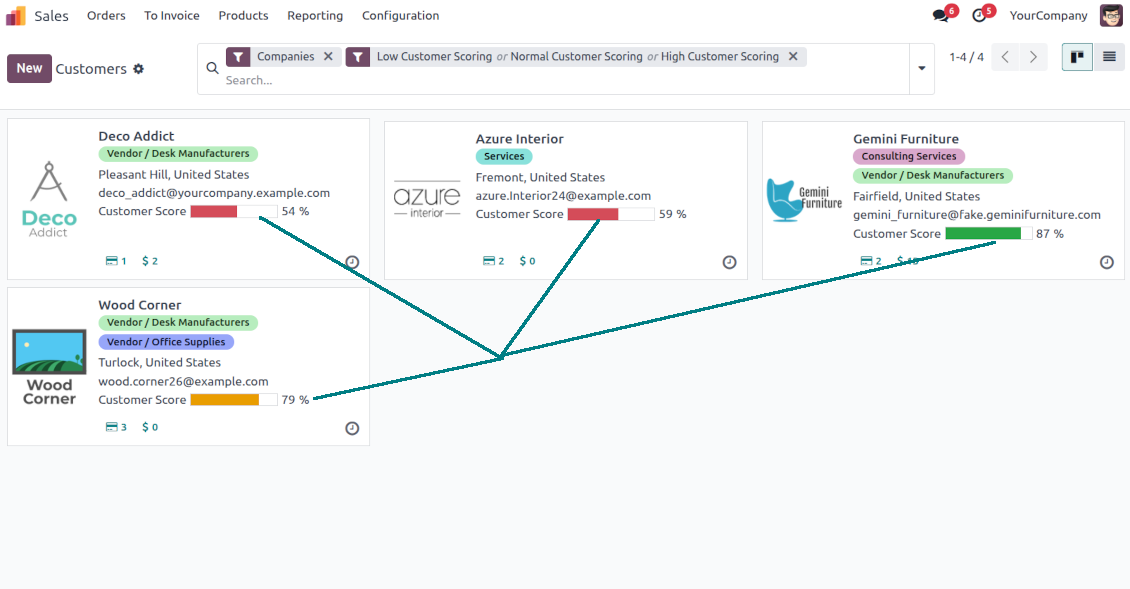
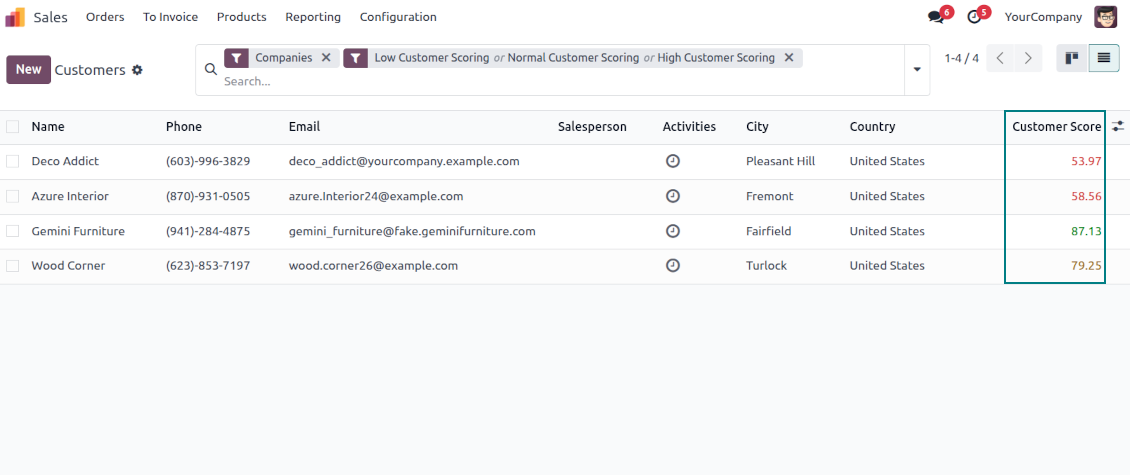
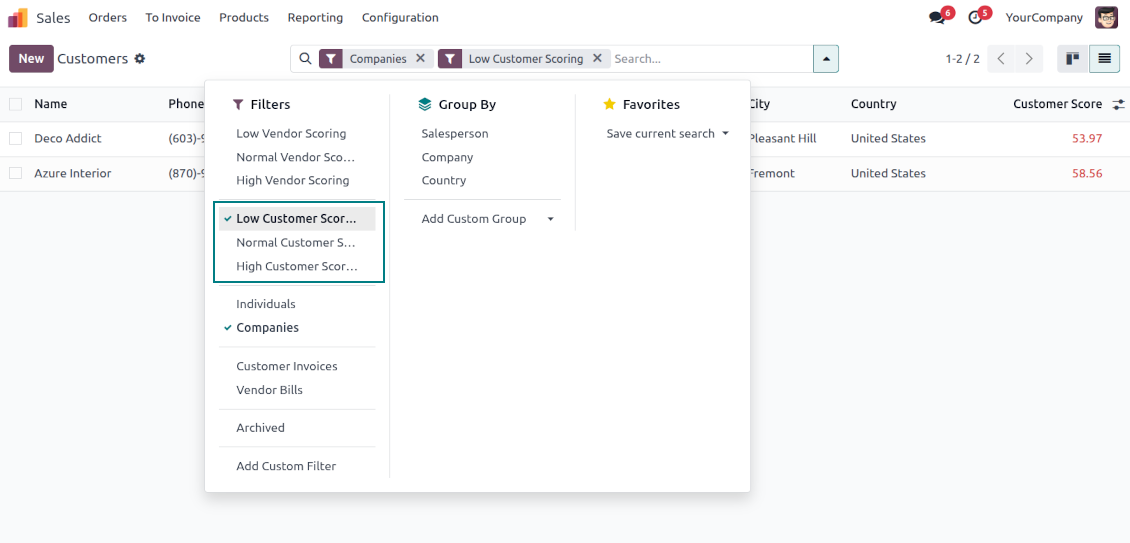
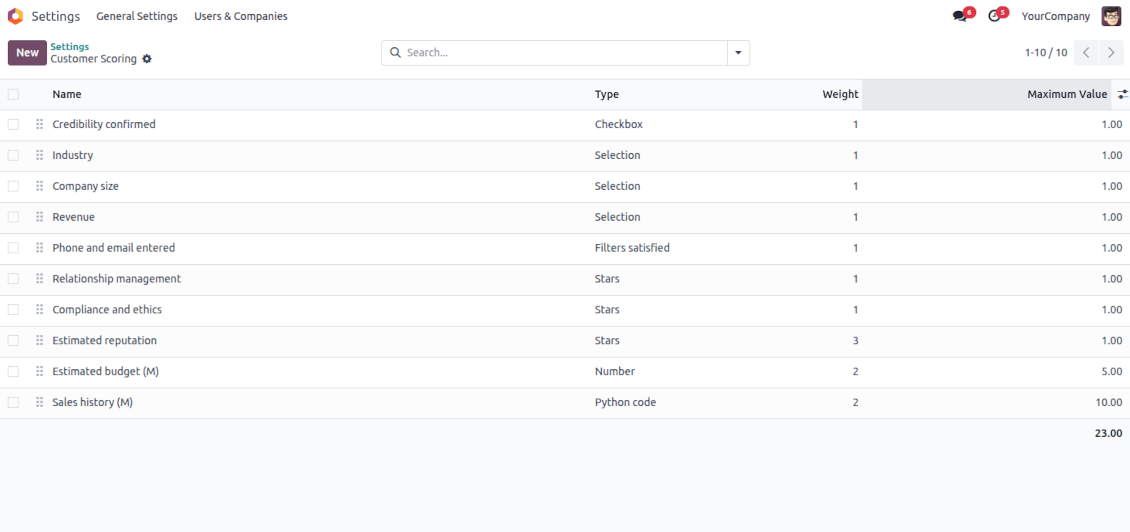
Indicative rankings
Show or hide rating progress bars on kanban, tree, and form views. Search low, normal, and high-ranked clients using standard Odoo filters
Unlimited and specific questions
Introduce any number of evaluation points with various weights, answer bonuses, or answer penalties. Complete or change surveys right from a customer form
Flexible survey points
Apply suitable question types: checkboxes (e.g., True - plus 5 points, False - minus 2), drop-down selections (e.g., option 1 - plus 10 points, option 2 - plus 5 points, option 3 - minus 5 points), rankings (e.g., one star - 1 point, 3 stars - 5, no stars - minus 5 points), or numbers (e.g., each 5 - plust one point, but no more than 20)
Automatic evaluation types
Configure the rules to assign scores based on auto rules: when a customer suits specific filters (e.g., when a customer has a particular tag, add 3 points), when a customer has specific fields entered/not entered (e.g., no email or phone - minus 5 points), or calculate results based on complex and entirely flexible Python code
Your ranking levels
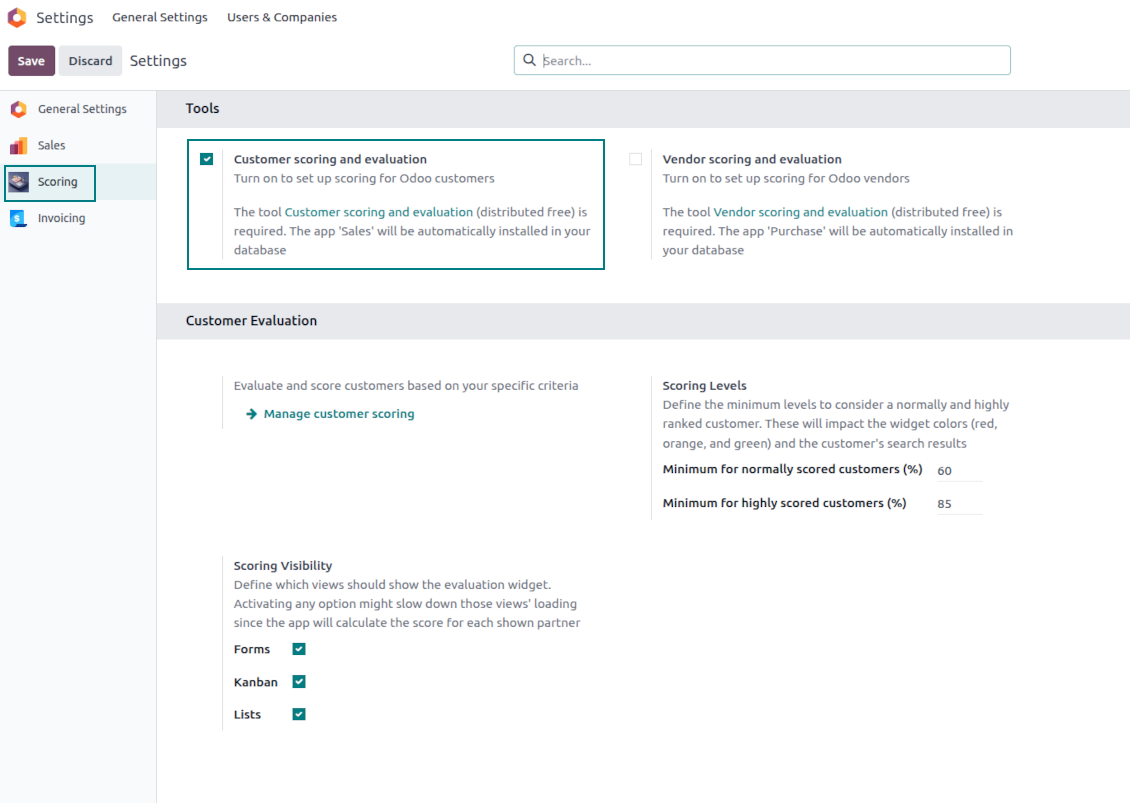
Define when a customer should be ranked high, normal, or low. For example, from 80% - highly scored; from 60% - normally scored
Topical quantitative analysis
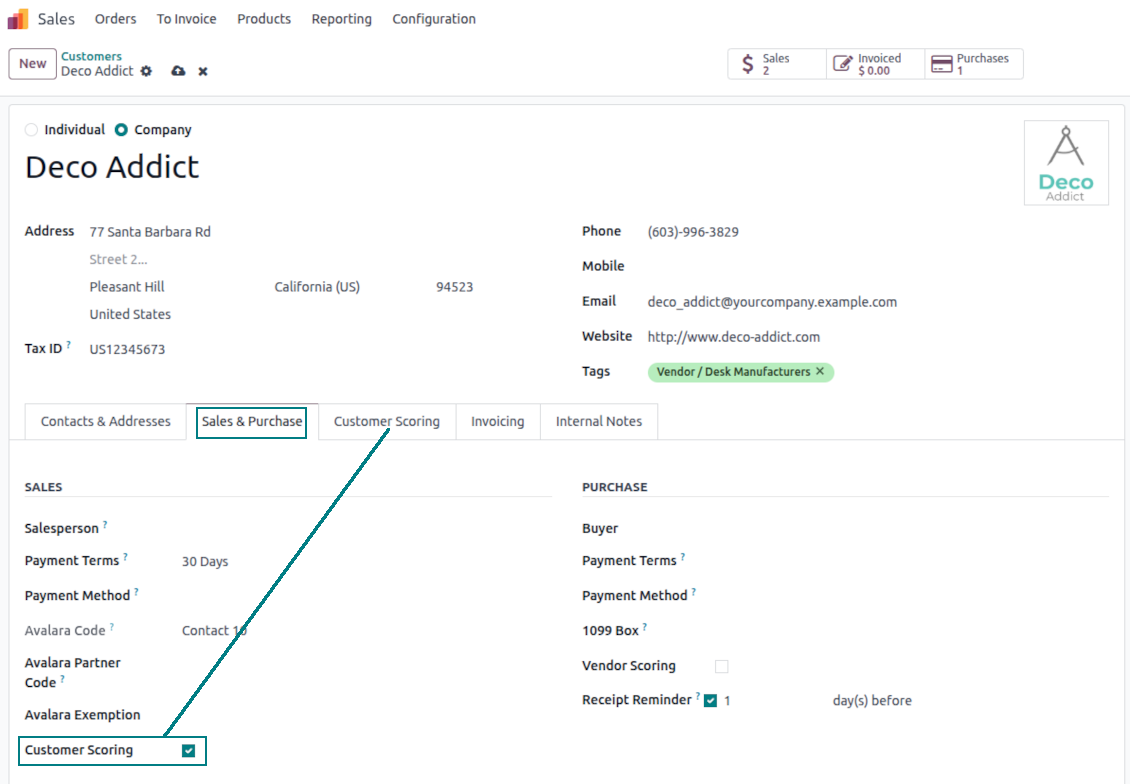
Optionally turn on evaluation for customers and/or vendors. Choose specific customers to evaluate: others will be excluded from surveys.
Flexibly configurable surveys scoring points
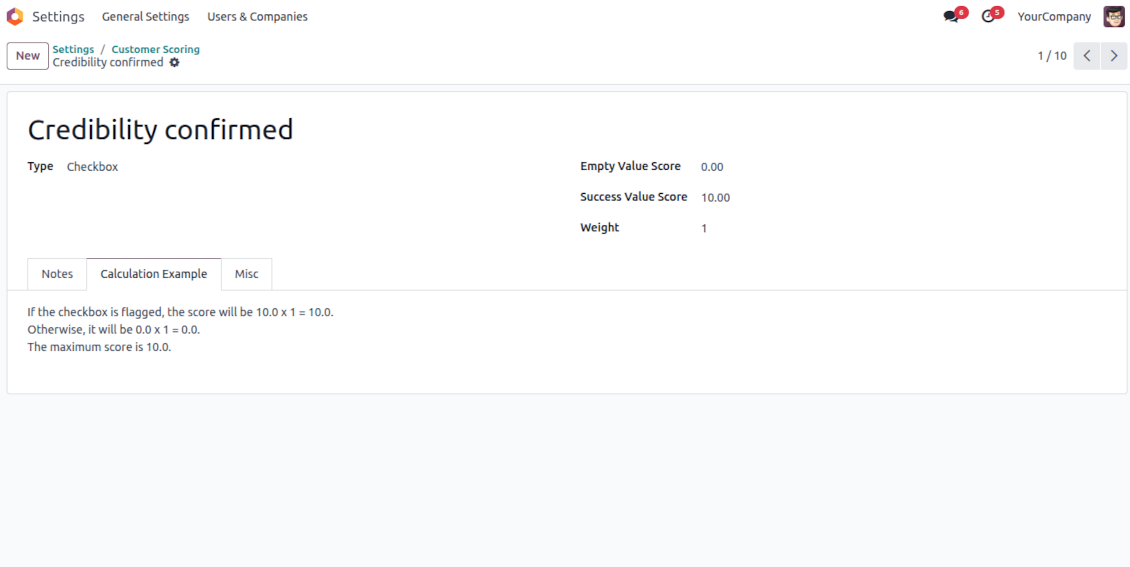
Checkboxes
-
Use this question type when the answer is True or False (default)
-
Assign the score for both options: True - "Success Value Score" (e.g., +10); False - "Empty Value Score" (e.g., -5)
-
Assign the weight for this evaluation point, e.g., 2. For example, the calculated result would be -5 x 2 = -10 for the client with the unchecked flag
Dropdown selections
-
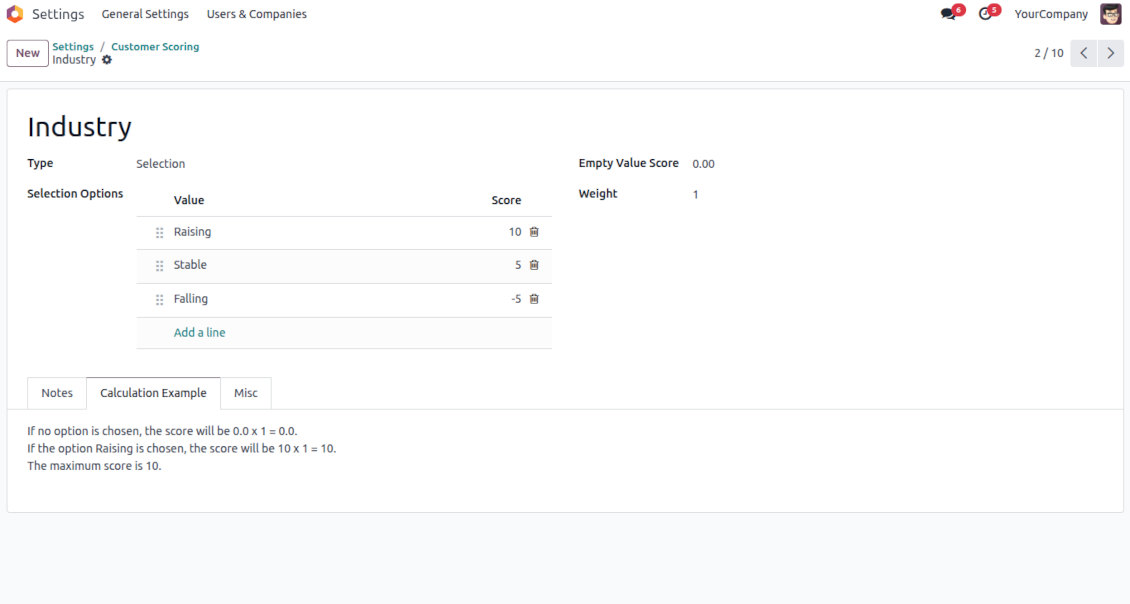
Use this question type when there are multiple options to select. For instance, the estimated reputation is chosen between three possible values
-
Assign the score for each option: Great (+10), Normal (+5), or Low (-5). The default value is empty (e.g., 0 points)
-
Assign the weight for this evaluation point, e.g., 3. For example, the calculated result would be 10 x 3 = 30 for a customer with the "Great reputation"
Stars/Ratings
-
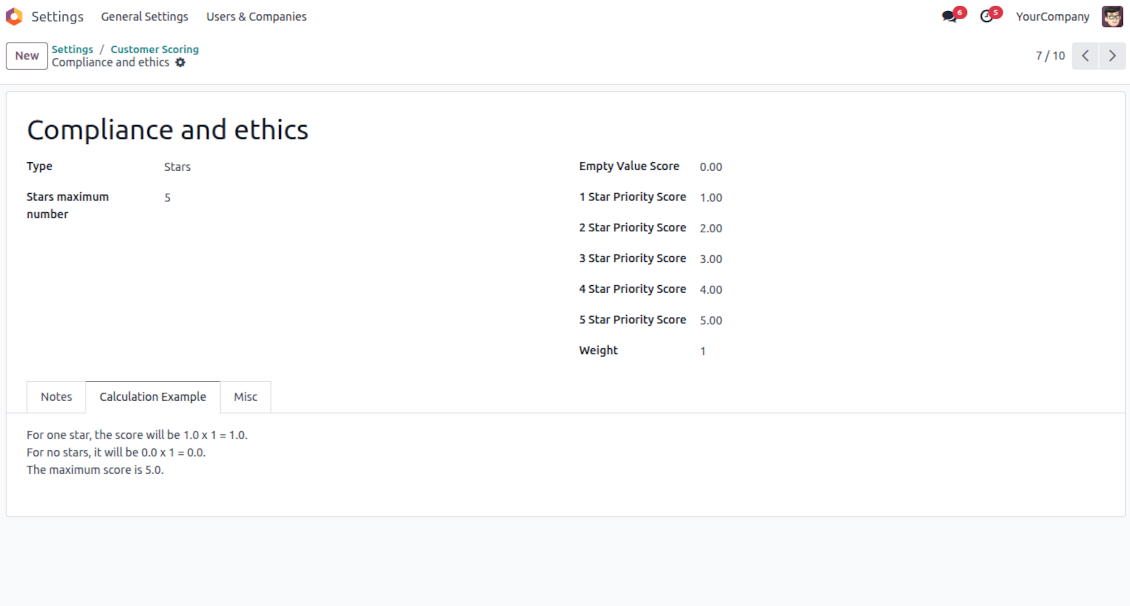
Use this question type when evaluating a specific parameter from 0 to a particular number up to 10. For example, "Compliance and ethics" to be scored from zero to three stars
-
Assign the score for each option: 1 star (-1), 2 stars (1), 3 stars (2). The default value is 0 (e.g., 0 points)
-
Assign the weight for this evaluation point, e.g., 2. For example, the calculated result would be 3 x 2 = 6 for a customer with 3 stars
Numbers
-
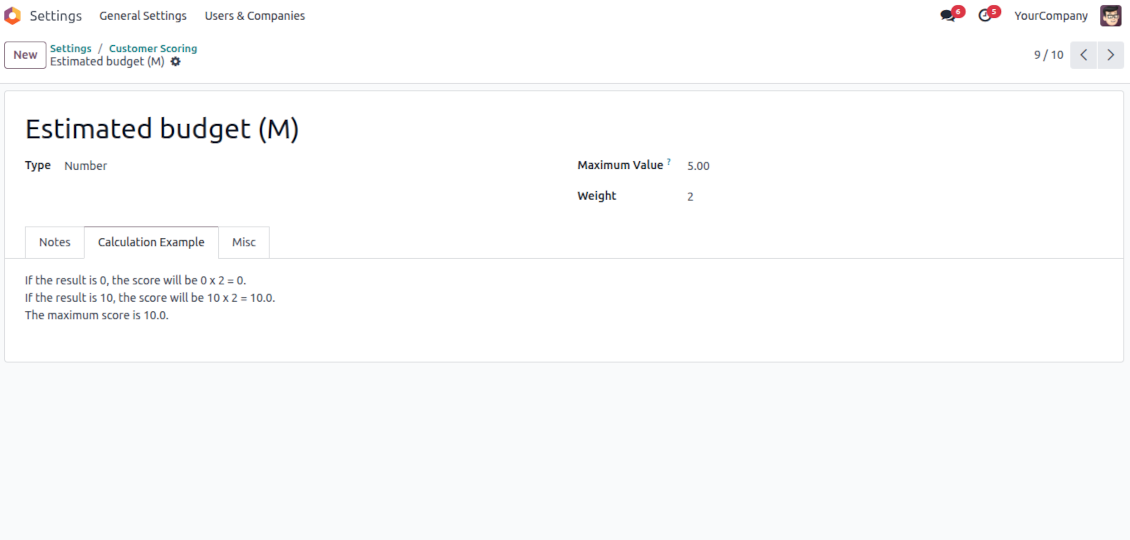
Use this question when users should enter an open-ended float number that is restricted only by a maximum. For example, the company revenue might be stated as any number in Millions, but the value for calculation is up to 10 Million
-
Assign the weight for this evaluation point, e.g., 2. For example, the calculated result would be 3.5 x 2 = 7 for a customer with 3 million revenue. However, if the revenue is 15, it will be 10 x 2, since 10 is the maximum for calculations
Filters
-
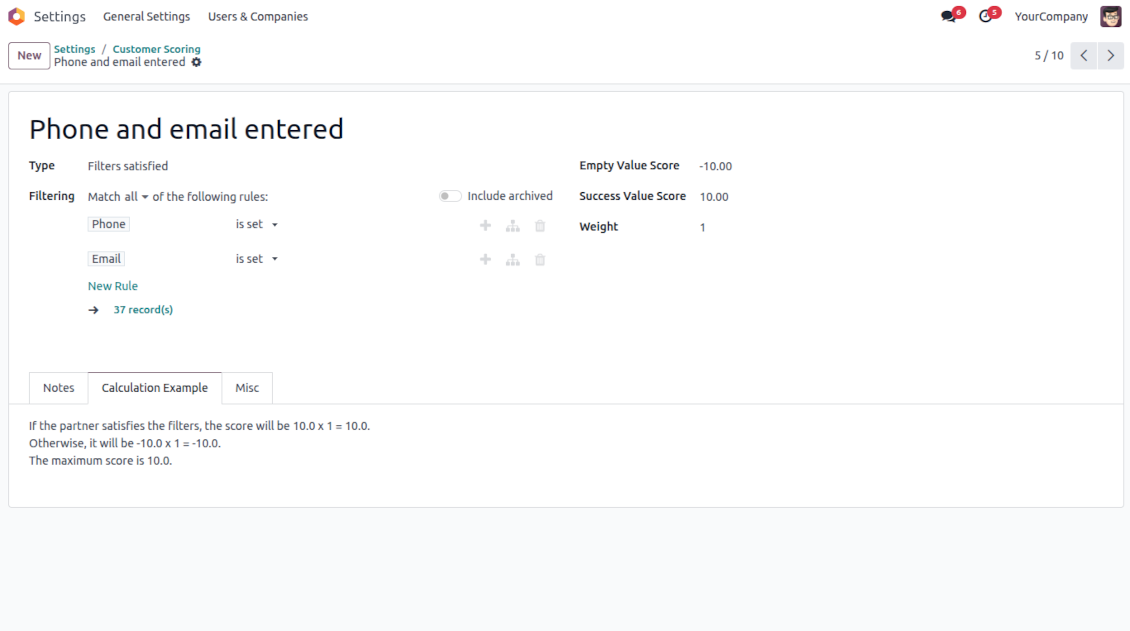
Use this question type to automatically assign a specific score based on whether a customer suits particular rules. For example, when a client has a specific tag and/or fields entered
-
Assign the score for both possibilities: True - "Success Value Score" (e.g., +5); False - "Empty Value Score" (e.g., -5)
-
Assign the weight for this evaluation point, e.g., 1. For example, the calculated result would be -5 x 1 = -5 for the client that doesn't satisfy the filters
Fields entered
-
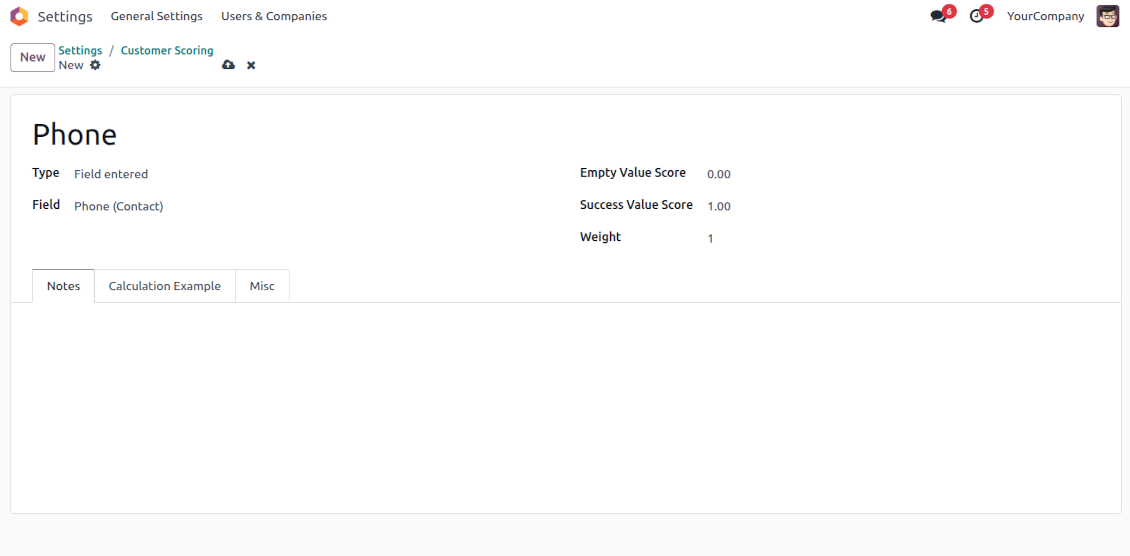
Use this question type to automatically assign a specific score based on whether a customer has a particular field entered. For example, when a client has a phone in Odoo
-
Assign the score for both possibilities: True - "Success Value Score" (e.g., 0); False - "Empty Value Score" (e.g., -10)
-
Assign the weight for this evaluation point, e.g., 2. For example, the calculated result would be -10 x 2 = -20 for the client that has an empty phone field
Python code
-
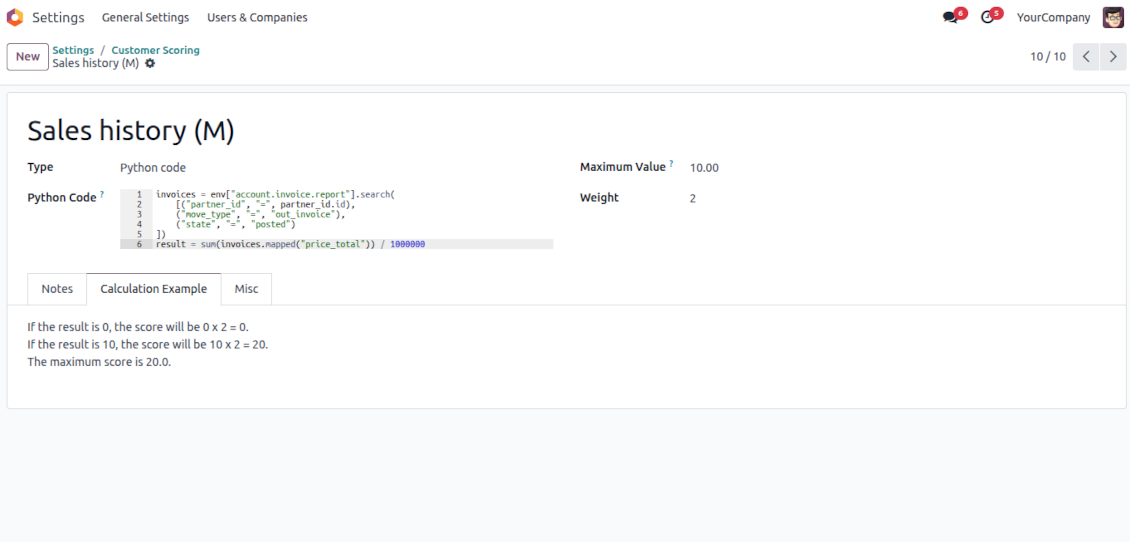
Use this question type to calculate a score point automatically based on any Odoo data. For example, to find all paid invoices of the current customer and get their untaxed total
-
Assign the weight for this evaluation point, e.g., 2. For example, the calculated result would be 2 x 2 = 4 for a customer with the calculated result 2
-
Assign the maximum possible result. For example, if it is set as 5, the calculated result "7" will be replaced with 5. So, the score will be 5 x 2 = 10 (instead of 7 x 2 = 14)
-
Feature description and details in short
-
In the code use the variable "partner_id" that contains the currently evaluated Odoo client (res.partner instance). Also, Python date, datetime, and timedelta are available
-
Apply Odoo "env" to work with database data. For example, env["sale.order"] for quotations or env["account.move"] for invoices
-
Save the calculation total in your code to the special "result" variable
Score calculations
-
Each scoring point is summed up for a currently evaluated customer. For example, five existing questions led to the weighted scores: +10 - 5 + 2 + 7 + 5 = 19
-
All the scoring questions also have their maximum possible values. For instance, 10 + 10 + 10 + 20 + 5 = 55
-
Then, a specific customer score is calculated as total points divided by the maximum points. So, 19/55 = 34.55%
-
Based on the calculated score, the app lets you define the high (marked green, e.g., 75%) and normal (marked yellow, e.g., 30%) levels. Others are low (marked red). Then, in our calculation, a customer is "normally" evaluated since 34.55% is between 30% and 75%.
के बारे में अक्सर पूछे जाने वाले प्रश्न Customer Scoring and Evaluation Odoo v.17
आपके टूल की अपडेट नीतियाँ क्या हैं?
वर्तमान Odoo Apps Store नीतियों के अनुसार:
- संस्करण 12.0 और उससे पहले के लिए खरीदा प्रत्येक मॉड्यूल 12.0 तक सभी संस्करणों तक पहुँच देता है।
- संस्करण 13.0 से प्रत्येक मॉड्यूल संस्करण अलग खरीदना होता है।
- संस्करण चाहे जो हो, खरीद से उस प्रमुख संस्करण के सभी अपडेट और बग ठीक करने का अधिकार मिलता है।
ध्यान दें कि faOtools टीम इन नीतियों को नियंत्रित नहीं करती। सभी प्रश्नों के लिए सीधे Odoo Apps Store प्रतिनिधियों से संपर्क करें।
आपका ऐप Odoo.sh पर कैसे इंस्टॉल करूँ?
सबसे सीधा तरीका Odoo स्टोर की अंतर्निहित वर्कफ़्लो का उपयोग करना है:
1. मॉड्यूल का पृष्ठ खोलें और Deploy on odoo.sh बटन पर क्लिक करें
2. उसके बाद आपको GitHub पृष्ठ पर भेजा जाएगा। अपने खाते में लॉग इन करें, फिर 'Create a new repo' पर क्लिक करें या मौजूदा का उपयोग करें। सुनिश्चित करें कि रिपॉज़िटरी निजी हो। OPL-1 लाइसेंस के तहत ऐप प्रकाशित करना अनुमति नहीं है। ज़रूरत हो तो Odoo.sh प्रोजेक्ट के लिए नया repo बनाएँ
3. फिर odoo.sh पर जाएँ और Deploy बटन पर क्लिक करें। पॉप-अप विंडो में निर्णय जमा करें और 'Continue.' पर क्लिक करें। इससे इंस्टॉलेशन शुरू होगा।
ये चरण प्रोजेक्ट की production शाखा पर ऐप इंस्टॉल करेंगे। अन्य शाखाओं पर ऐप तैनात करने या मॉड्यूल अपडेट करने के लिए ये क्रियाएँ करें:
1. Odoo स्टोर से ऐप का स्रोत कोड अपलोड करें
2. मॉड्यूल को आवश्यक GitHub रिपॉज़िटरी में commit करें। सुनिश्चित करें कि ऐप के कोई फ़ोल्डर/फ़ाइल अनदेखी न हों (यानी repo के .gitignore में न हों)। रिपॉज़िटरी odoo.sh अपने आप बनाता है और डिफ़ॉल्ट रूप से कुछ ज़रूरी चीजें शामिल हो सकती हैं (जैसे /lib)। मॉड्यूल की सभी निर्देशिकाएँ, उपनिर्देशिकाएँ और फ़ाइलें बिना अपवाद अपलोड करें
3. odoo.sh प्रोजेक्ट की लक्ष्य शाखा Deploy करें या, अगर सेटिंग्स ऐसा मानती हैं, स्वतः बनने तक प्रतीक्षा करें।
अपने सर्वर पर आपका ऐप कैसे इंस्टॉल करूँ?
2. Odoo सर्वर पुनः प्रारंभ करें;
3. डेवलपर मोड चालू करें (तकनीकी सेटिंग्स);
4. ऐप सूची अपडेट करें (ऐप्स मेनू);
5. ऐप खोजें और 'Activate'/'Install' दबाएँ;
6. ऐप पृष्ठ पर दिशानिर्देश हों तो उनका पालन करें।
आपके ऐप में अतिरिक्त ऐड-ऑन हैं। क्या बाद में खरीद सकता हूँ?
हाँ, ज़रूर। साथ ही Odoo सभी निर्भरताएँ कार्ट में अपने आप जोड़ता है, इसलिए दोहरी भुगतान से बचने के लिए पहले खरीदे टूल हटा दें।
मैंने आपका ऐप Odoo.sh पर डिप्लॉय किया और टेस्ट में चेतावनी/त्रुटि दिख रही है
लाल/नारंगी चेतावनी ऐप की सुविधाओं को प्रभावित नहीं करती। खेद है कि कभी-कभी हमारे मॉड्यूल मानक स्वचालित परीक्षण पास नहीं करते, क्योंकि वे ऐसा व्यवहार मानते हैं जो ऐप के लक्ष्यों से टकराता है। उदाहरण के लिए हम मूल्य गणना बदलते हैं, जबकि मानक Odoo मॉड्यूल परीक्षण अंतिम मूल्य की तुलना मानक एल्गोरिदम से करते हैं।
सबसे पहले तैनात डेटाबेस की सुविधाएँ जाँचें। क्या सब सही काम कर रहा है?
यदि फिर भी मानते हैं कि चेतावनी वास्तविक सुविधाओं को प्रभावित करती है, तो संपर्क करें और पूर्ण इंस्टॉलेशन लॉग तथा तैनात मॉड्यूलों की पूरी सूची (कोर और तृतीय-पक्ष सहित) भेजें।
क्या मैं ऐप आपकी कंपनी से सीधे खरीद सकता हूँ?
नहीं, हम उपकरण केवल आधिकारिक Odoo ऐप स्टोर.
मुझे छूट चाहिए
खेद है, हमारे पास व्यक्तिगत कीमतें देने के तकनीकी साधन नहीं हैं।
क्या मैं ऐप अपने Odoo Online (SaaS) डेटाबेस पर इंस्टॉल कर सकता हूँ?
नहीं, तृतीय-पक्ष ऐप Odoo Online पर नहीं चल सकते। दुर्भाग्य से Odoo SaaS यह संभावना रोकता है।
आपके टूल की अन्य ऐप पर निर्भरता है। क्या मुझे वे खरीदनी चाहिए?
हाँ, सही काम के लिए टूल को निर्भरता में चिह्नित सभी मॉड्यूल चाहिए। ऐप पृष्ठ पर दी गई कीमत में आवश्यक निर्भरताएँ पहले से शामिल हैं।
मॉड्यूल की कीमत अमेरिकी डॉलर में क्या है? यह क्यों बदली?
हमारे मॉड्यूल की कीमत यूरो में है। Odoo स्टोर आंतरिक विनिमय दर से अन्य मुद्राओं में बदलता है। इसलिए अमेरिकी डॉलर में कीमत दर अपडेट होने पर बदल सकती है।
अंग्रेज़ी के अलावा अन्य भाषाओं में ऐप और वेबसाइट का शब्द AI-सहायता से है और आधिकारिक Odoo अनुवादों से मेल खाता है। यदि आपको कोई गलती दिखे, अनुवाद शुद्धता का टिकट भेजें और हम इसे ठीक करेंगे।
Odoo डेमो डेटाबेस (लाइव पूर्वावलोकन)
इस ऐप के लिए हम मुफ़्त व्यक्तिगत डेमो डेटाबेस दे सकते हैं।
हमसे संपर्क करने के लिए फ़ोन नंबर या क्रेडिट कार्ड की आवश्यकता नहीं है। केवल एक छोटी ईमेल साइन-अप करनी है, जिसमें 30 सेकंड से अधिक नहीं लगता।
आपके अनुरोध पर हम एक व्यक्तिगत लाइव पूर्वावलोकन डेटाबेस तैयार करेंगे, जहाँ आप लगभग दो सप्ताह परीक्षण और धारणाएँ जाँच सकते हैं।
बग रिपोर्टिंग
यदि आपको बग या असंगत व्यवहार मिले तो हमसे संपर्क करें। हम खरीद के 60 दिनों के भीतर सुधार देने की गारंटी देते हैं और इस अवधि के बाद भी टूल सुधारने में रुचि रखते हैं।
हमसे संपर्क करने के लिए फ़ोन नंबर या क्रेडिट कार्ड की आवश्यकता नहीं है। केवल एक छोटी ईमेल साइन-अप करनी है, जिसमें 30 सेकंड से अधिक नहीं लगता।
अपने अनुरोध में जितना संभव हो उतना विवरण शामिल करें: स्क्रीनशॉट, Odoo सर्वर लॉग, समस्या को दोहराने का पूरा वर्णन आदि। आमतौर पर किसी मुद्दे की कार्य योजना तैयार करने (यदि बग पुष्टि हो) या आगे क्या करना है इसके दिशानिर्देश देने (अन्यथा) में कुछ कार्यदिवस लगते हैं।
सार्वजनिक सुविधा अनुरोध और मॉड्यूल विचार (निःशुल्क विकास)
हम अपने टूल सुधारने के लिए दृढ़ता से प्रेरित हैं और किसी भी प्रतिक्रिया के आभारी होंगे। यदि आपकी आवश्यकताएँ सार्वजनिक उपयोग की हैं और कुशलता से लागू की जा सकती हैं, तो टीम उन्हें हमारी कार्य सूची में शामिल करेगी।
ऐसी कार्य सूची नियमित रूप से संसाधित होती है और अतिरिक्त शुल्क नहीं लगती। यद्यपि हम समय सीमा और अंतिम डिज़ाइन का वादा नहीं कर सकते, यह बिना निवेश और जोखिम के वांछित सुविधाएँ पाने का अच्छा तरीका हो सकता है।
हमसे संपर्क करने के लिए फ़ोन नंबर या क्रेडिट कार्ड की आवश्यकता नहीं है। केवल एक छोटी ईमेल साइन-अप करनी है, जिसमें 30 सेकंड से अधिक नहीं लगता।

The tool to flexibly structure Odoo attachments in folders and synchronize directories with cloud clients: Google Drive, OneDrive/SharePoint, Nextcloud/ownCloud, Dropbox, Amazon S3, Box, and NAS. DMS. File Manager. Document management system
398€

The tool to build a deep and structured knowledge base for internal and external use. Knowledge System. KMS. Wiki-like revisions.
398€
The tool to automatically synchronize Odoo attachments with OneDrive files in both ways
487€
The tool to set up KPI targets and control their fulfillment by periods. KPI dashboards. Dashboard designer. KPI charts

The tool to automatically synchronize Odoo attachments with Google Drive files in both ways
487€
The tool for time-based service management from booking appointments to sales and reviews
398€
The tool to make sure a sale order is ready for the next stage. Sale checklists. Sale approval. Multi quotation confirmation

The tool to make sure required jobs are carefully done on each CRM pipeline stage. CRM checklists