Periodic Reporting and Reminders v.13
The tool to generate and periodically send reports and reminders
Any Odoo documents' reporting
Look at popular use cases
- To send periodical statistics for managers
- To forward to-do lists for certain actions
- To plan forthcoming events and actions
- To notify customers or suppliers of done jobs.
Pipeline results --> to get leads closed the previous month for a team manager
- Choose Lead/Opportunity as a model
- Define a period as Closed Date in the last month
- Make a filter Sales Channel > Sales Channel contains 'Europe', where 'Europe' is your sales team
- As columns define Display Name, Salesperson > name, Salesperson > phone, Tags, Expected Revenue
- Subscribe a sales team manager for this reminder
- Send a list each month, on the first Monday.
Similar lists might be configured for sale orders, deliveries, purchase orders, manufacturing operations, etc.
Daily to-do list --> to get activities which should be done today or previously
- Choose Activity as a document type
- Define a period as Due Date in the last 10000 days including this (to get even the eldest activities)
- Make a filter Assigned to > Name contains 'John Brown', where 'John Brown' is a user to notify
- As columns apply Display name, Category, Due Date, Note
- Subscribe a John Brown for this reminder
- Send a list everyday.
Similar reminders are usually prepared for project tasks, opportunities, planned deliveries or incoming shipments, etc.
Planned events --> to get events which will happen in forthcoming periods
- Choose Event as an object for this reminder
- Define a period as Start Date the last week, including this (it would be 'this week'), or the next 3 weeks
- Make no filters
- As columns apply Event name, Location, Start Date, End Date
- Subscribe a John Brown for this reminder, where John Brown is an event department head
- Send a list on Mondays.
Similar reminders are Okay for activities, tasks, leads, deliveries, incoming shipments, etc.
Customer project statistics --> to notify customers about their tasks
- Choose Task as a target model
- Define a period as Create Date in the last year
- Make 2 filters: Customer > Parent name is 'Agrolait' or Customer name is 'Agrolait', where 'Agrolait' is project customer
- As columns apply Display name, Deadline, Description, Last Stage Update, Stage > display name
- Subscribe a John Brown for this reminder, where John Brown is a managing partner of Agrolait
- Send a list on the 10th of January each year.
Similar statistics is frequently forwarded by support tickets, paid invoices, done sale orders, etc.
Configurable statistic and appearance
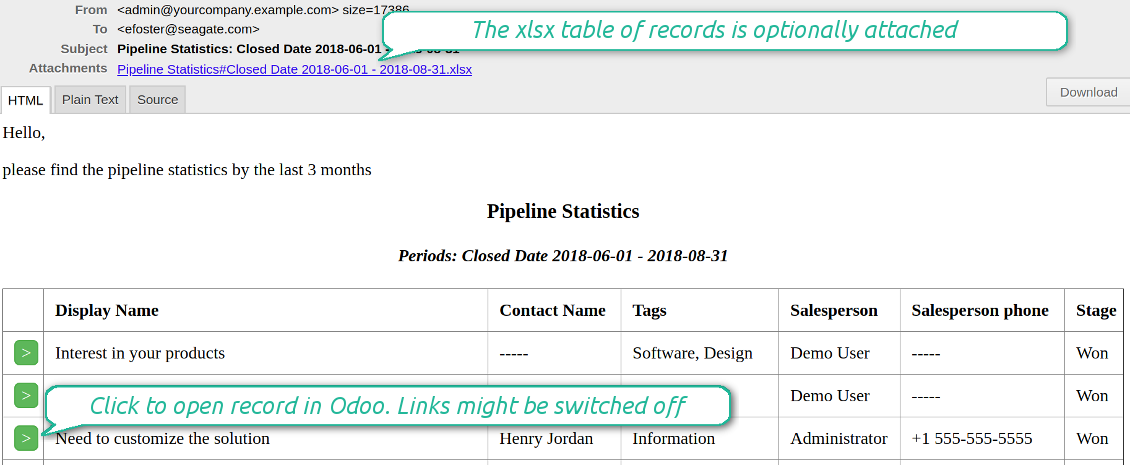
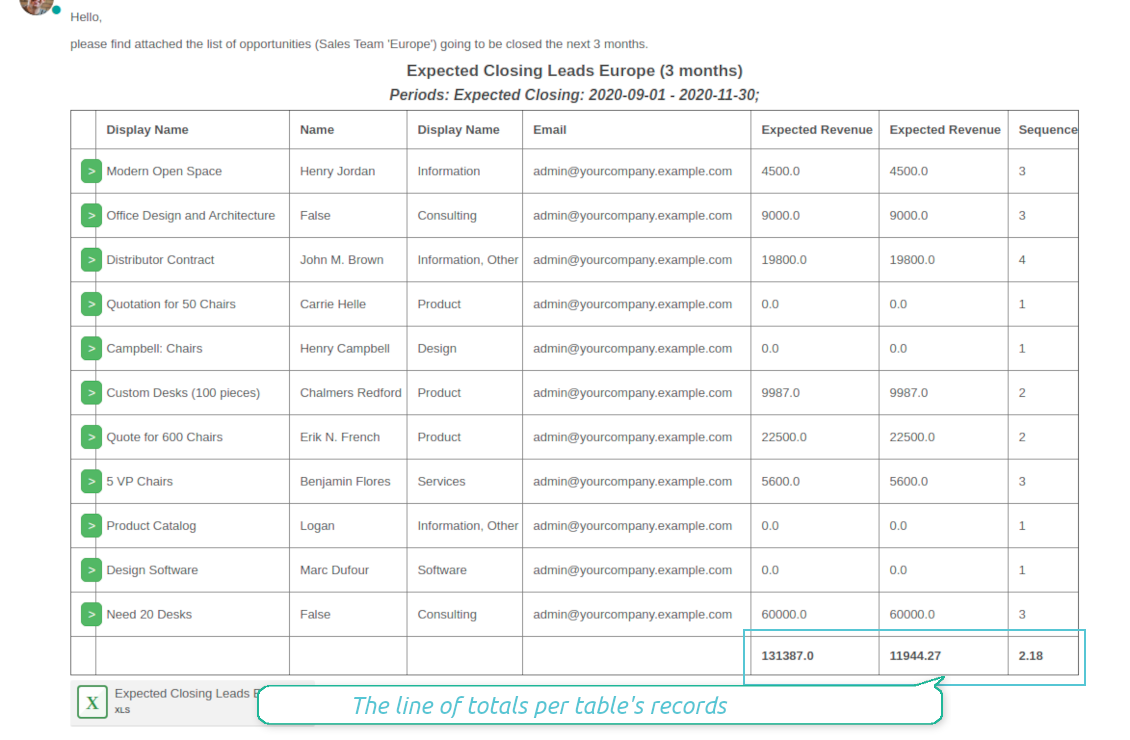
Send a table right in an email or/and as Excel (xlsx) table.
Reminder view features
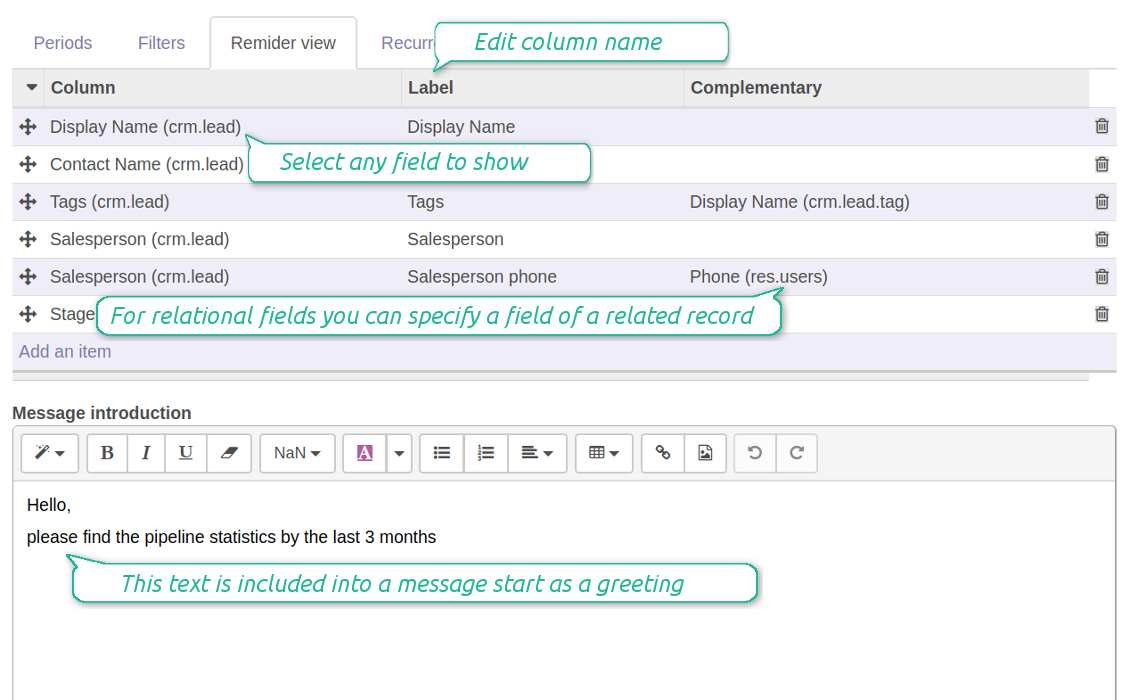
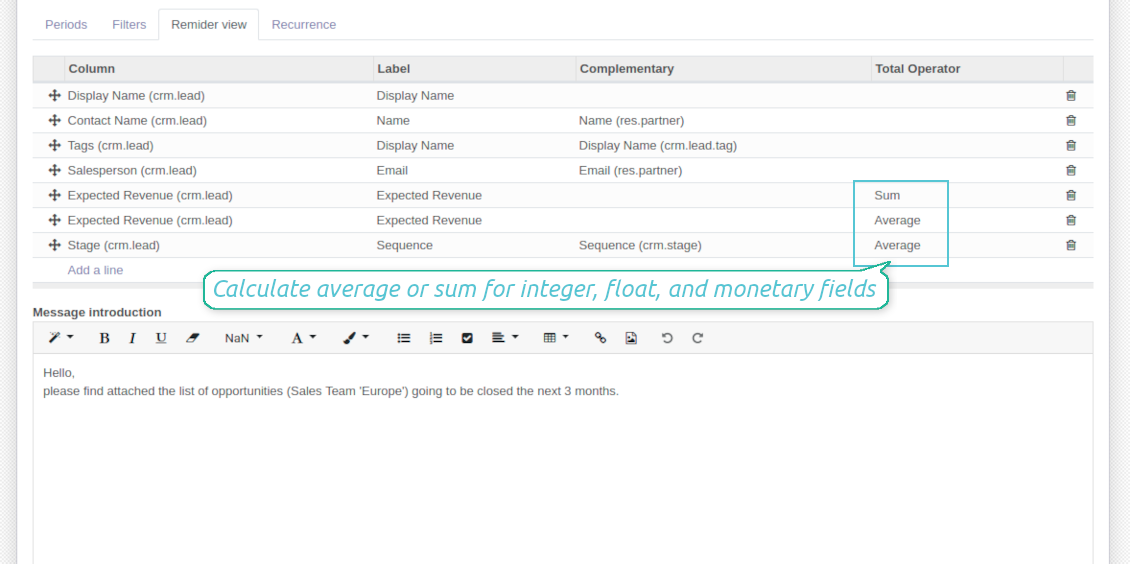
- The tool allows choosing an unlimited number of columns for this document. It might be any field of a target model of the following types: char, text, html, integer, float, selection, boolean, date, datetime and relations to other documents (many2one, one2many, many2many). The set includes even computed fields
- For relational fields you might choose the second level precision. For example, you might show a phone of a customer for a sales orders' reminder or tags' colors for tasks
- It is possible to adapt column names. By default a field description is stated (on the language of this reminder), but users are allowed to change them
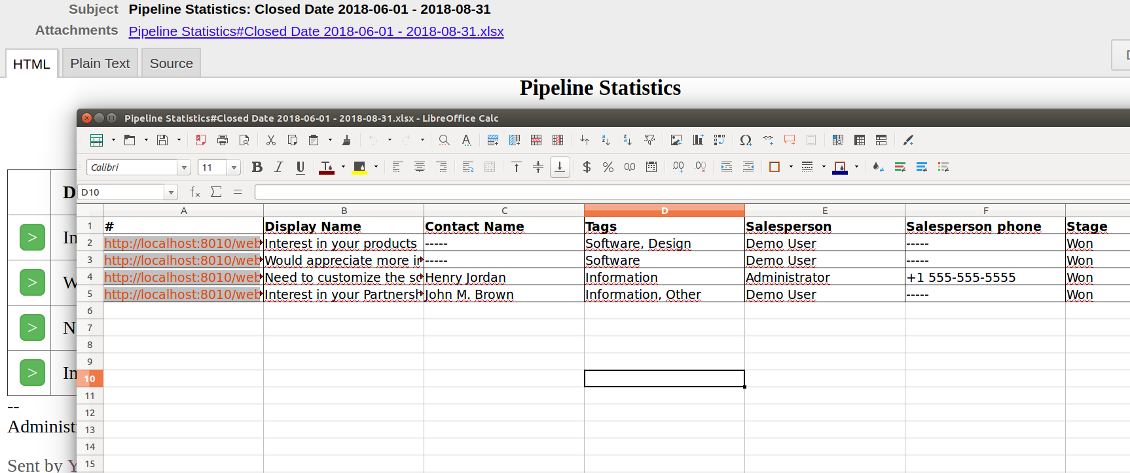
- Optionally attach an xlsx table for reminders. It would have the same columns as a reminder itself. It is also possible to exclude a list from email and leave only an xlsx table
- Include or exclude links to Odoo objects. References are great in case of internal reminders, but they are harmful in case of external ones
- Introduce any greeting text for a notification
- Choose reminders' language
- Do not change email template manually. It will break all styles. Look at the Configuration tab
Στιγμιότυπα οθόνης
Configure list columns and reminder appearance
Followers regularly receive lists on their email
The Excel (xlsx) table is optionally attached
Filtering and periods for analysis
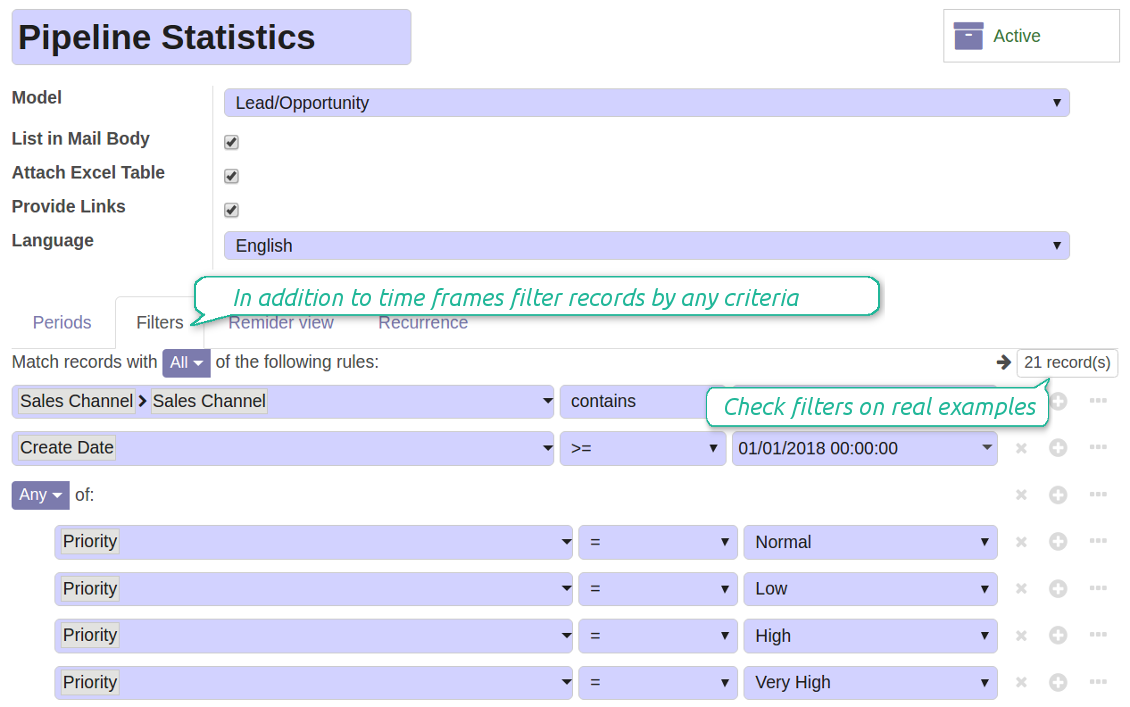
Apply any sort of filters to include only required documents
How to limit documents by relative periods
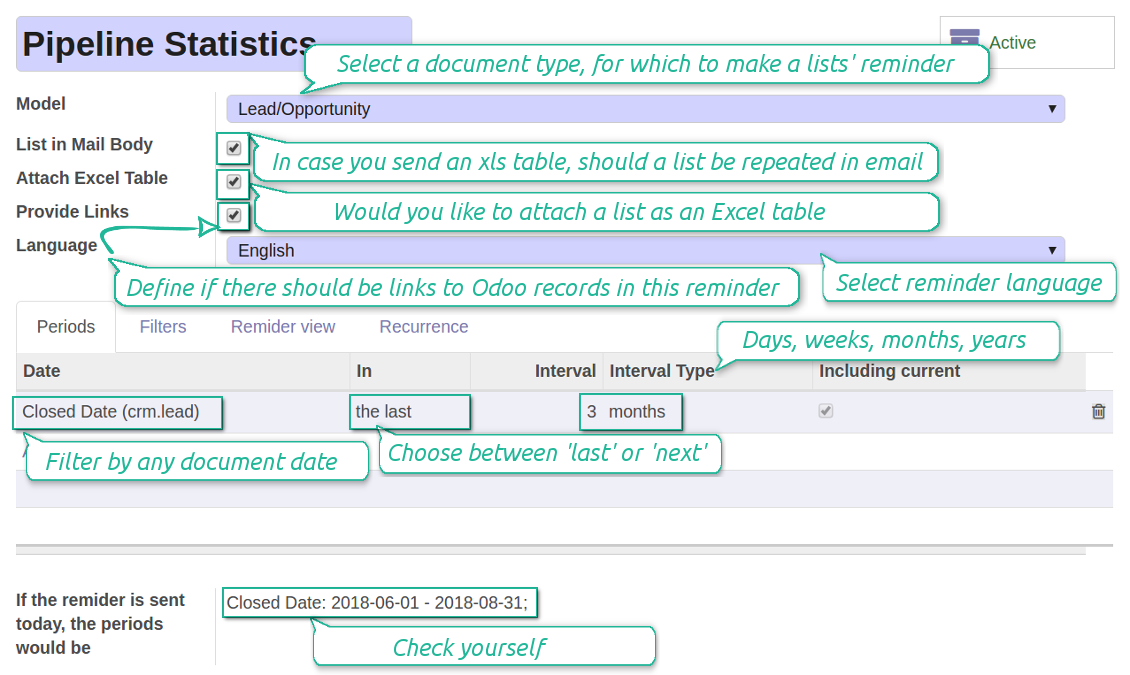
- Restrict time frames by any date or datetime of a target document type. It might be deadline, create or close date, next activity day, etc.
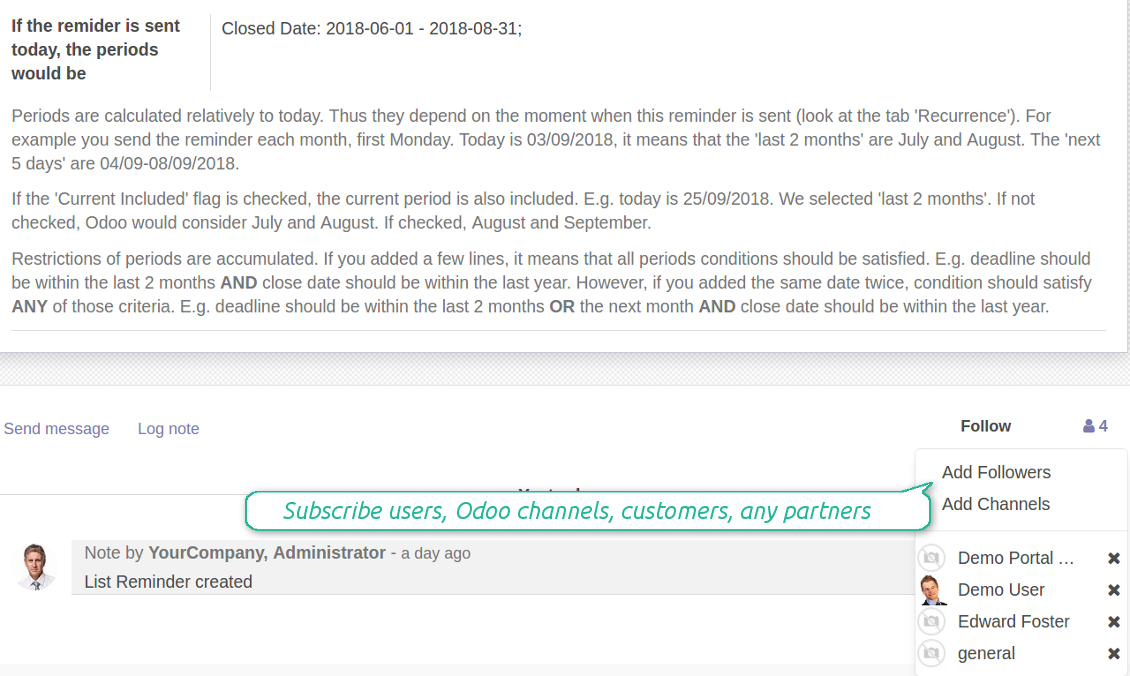
- If you wish, apply a few periods based on different dates. For instance, select this month closed leads which have been opened the last year. Records should satisfy all of the criteria, however if you selected the same date twice, records should be within any of those periods. For example, a deadline should be within the last 2 months OR the next month AND a close date should be within the last year
- Periods are relative, so they are periods in comparison to today. E.g., 'this month', 'the last year', 'the next 5 weeks'
- Intervals may both define previous time frames ('the last') and forthcoming periods ('the next')
- As intervals select days, weeks, months, or years
- Exclude or include a current period. For example, you might send a reminder on the first day of a month for a previous one. Vice versa, forward a list on the last day of this month for a current one
- Test your settings according to a real-time-shown result below the table
How to filter documents under analysis
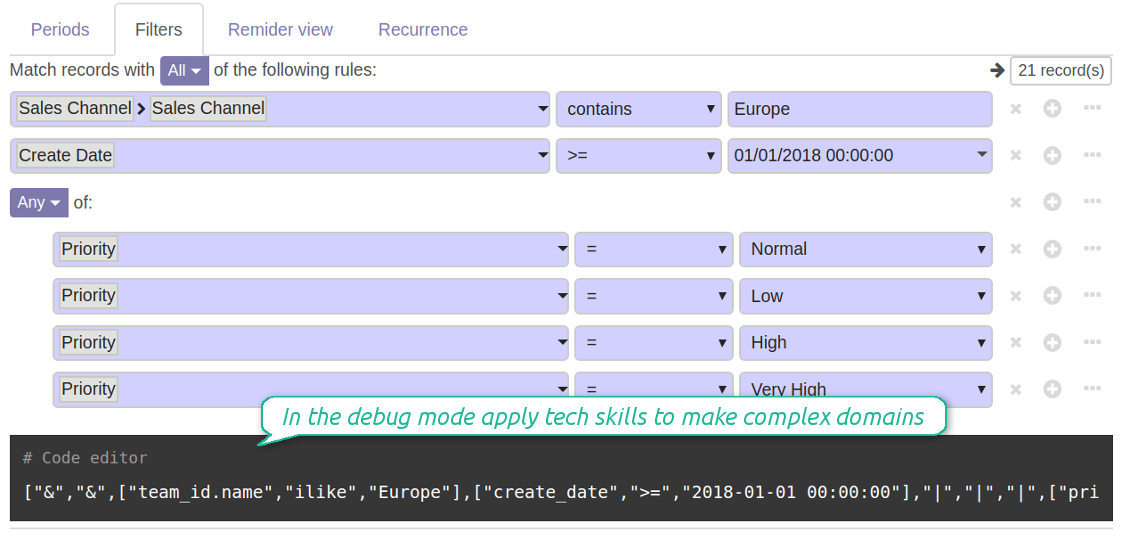
- Filters are organized as a domain constructor: you may use the most of storable fields with any level of precision. The latter means, for example, you can filter sales orders by a related partner country or even by a state of a company of a related partner
- Use both 'AND' ('all') and 'OR' ('any') operators to achieve a desired result
- Check yourself by pressing the button 'Records': it would show all documents which at the moment satisfy your search criteria (and you have an access to)
- If you feel confident to prepare Reverse Polish Notation domains, turn on the debug mode, and apply more complex expressions such as, for instance, ' category is child_of all'
Στιγμιότυπα οθόνης
Configure lists of records to be sent according to chosen periods
Filter Odoo records to be included into a list
Good at Odoo domains? Turn on the debug mode
Flexible recurrence
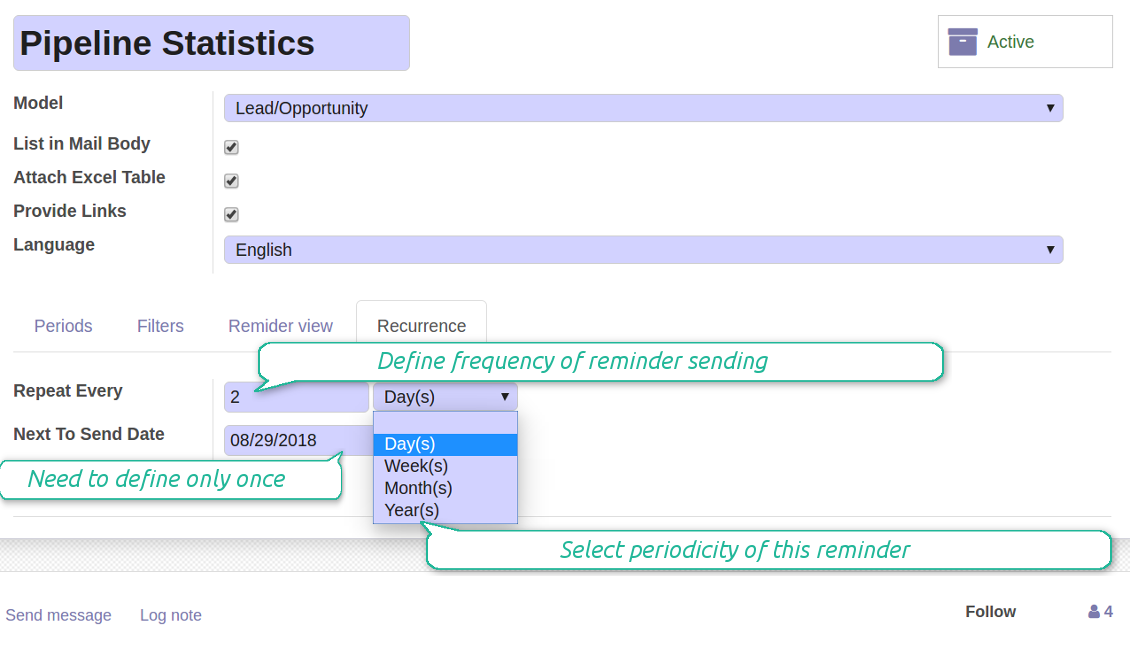
Which periodicity I may apply
- Send a reminder every day, each 5 days, each 181 days
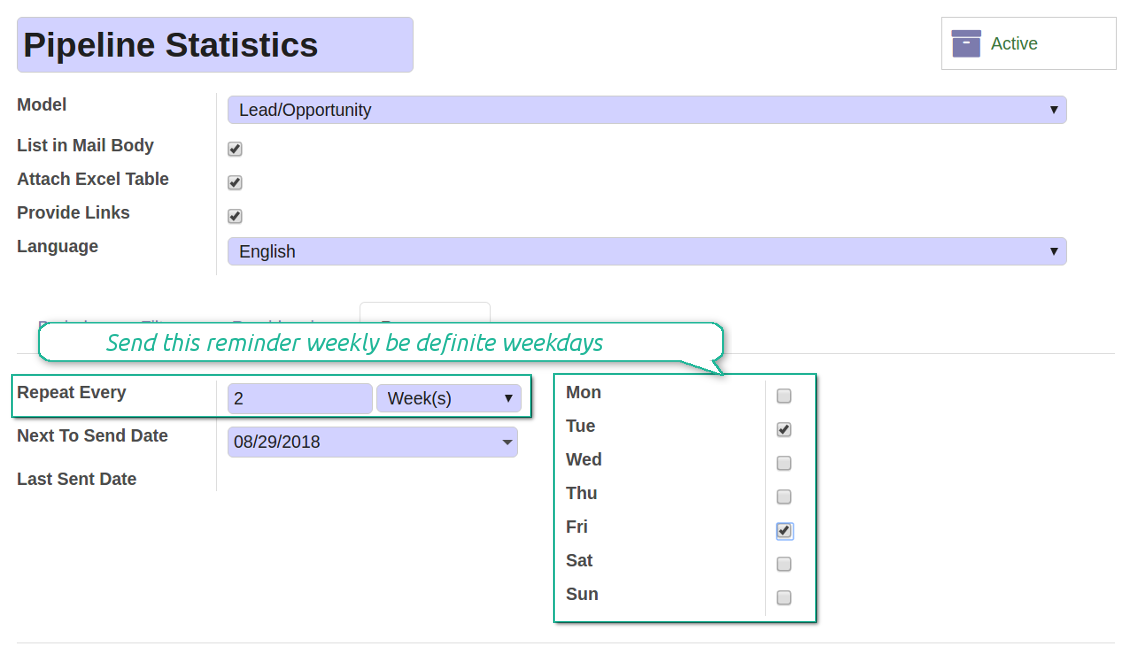
- Notify by exact weekdays, e.g. on Mondays and Thursdays
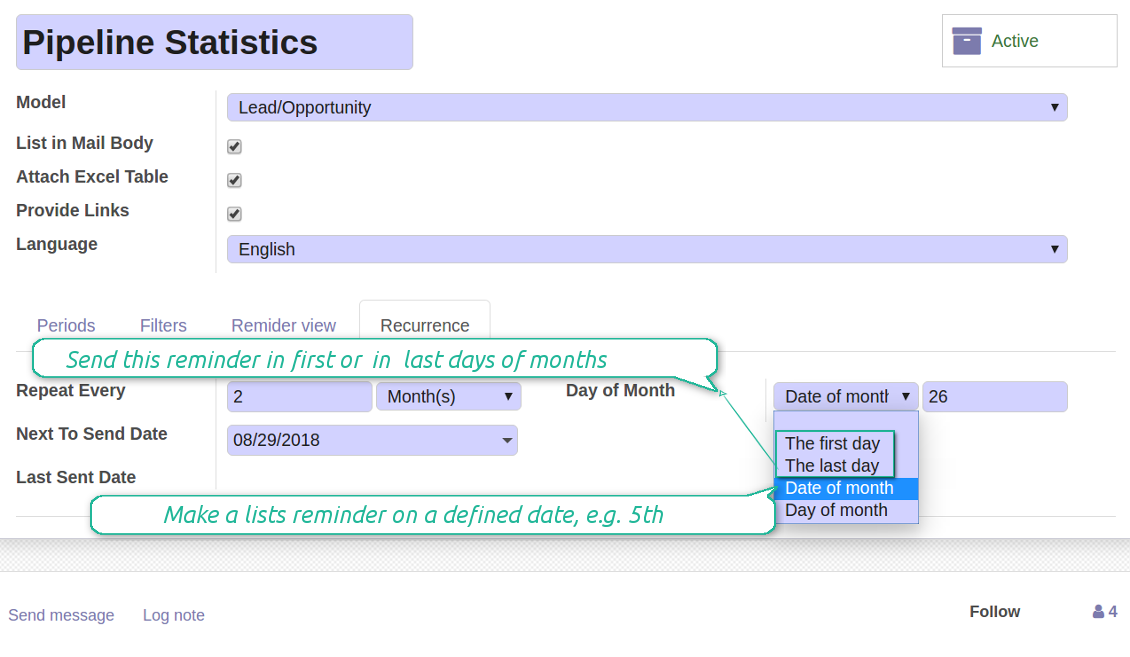
- For monthly reminders use:
- The first month day
- The last month day
- The exact date, e.g. the 16th
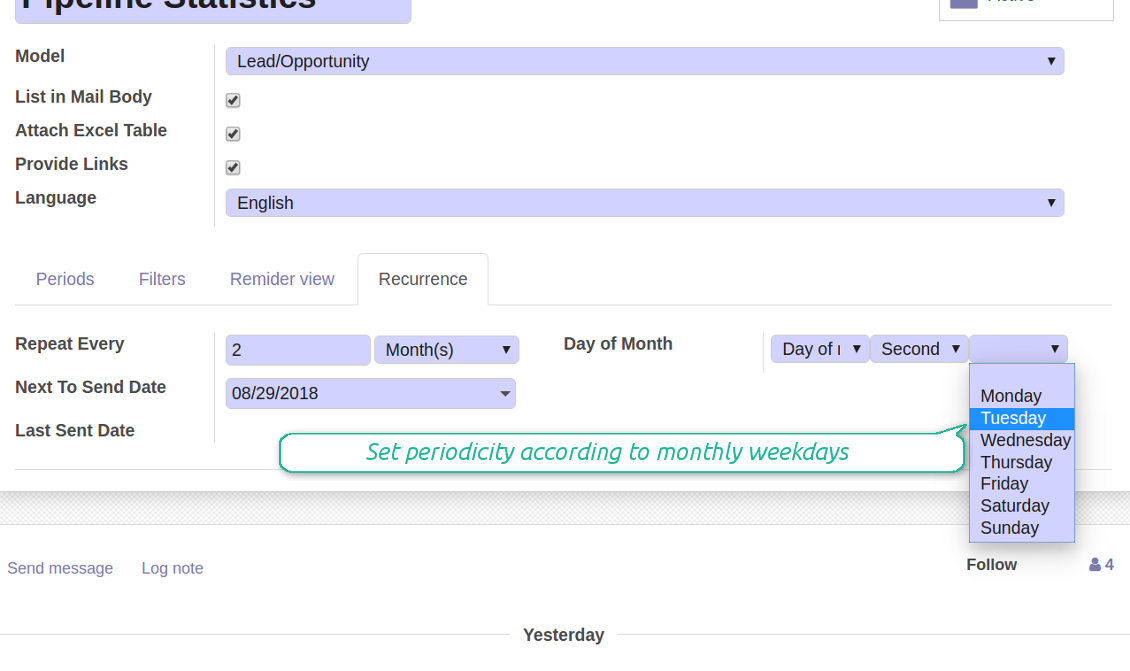
- A weekday, for instance, the first Monday, the last Friday, or the third Tuesday
- Prepare a yearly statistics on an exact year day, e.g. on the first of September
Στιγμιότυπα οθόνης
Flexibly configure reminders frequency
Send reminders weekly on predefined weekdays
Define a month day for lists notifications
Make reminder monthly on predefined weekdays
Great and very useful app
First of all, the team behind this app is great, support is immediate, and response is fast. The application is very useful in managing any type of notification to keep you updated with all what's happening within your company.
Aggregated figures
Στιγμιότυπα οθόνης
Calculate sum or average of records
Aggregated figures per report
Reminder for any Odoo partner
Στιγμιότυπα οθόνης
Remind to any user, customer, supplier or send lists to Odoo channels
Periodic reporting manager
User rights peculiarities
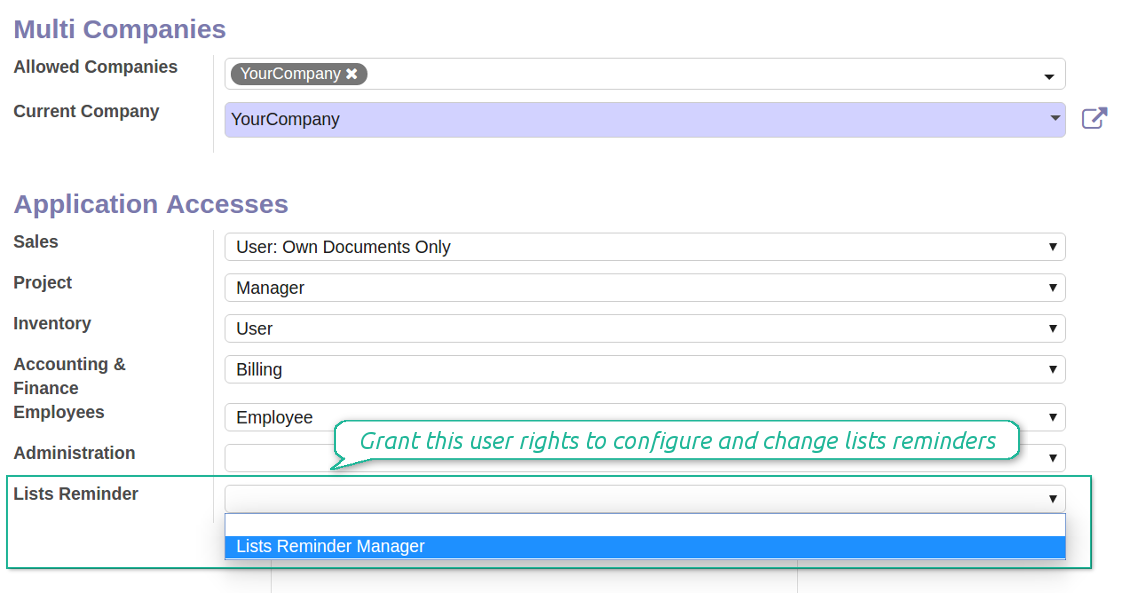
- To observe the reminders' menu and configure new notifications, select the right Lists Reminder 'Manager' or 'Only Own' in this user settings. 'Only Own' groups would allow to manage reminders which 'Responsible' is a current user
- Make sure you trust such a person. This user would be able to send any data by a document type to which he/she has a read access. It means, that if a user might read leads in general, but do not have rights to read the exact lead 'XXX', he/she would be able to send the data by the lead 'XXX' using the reminder
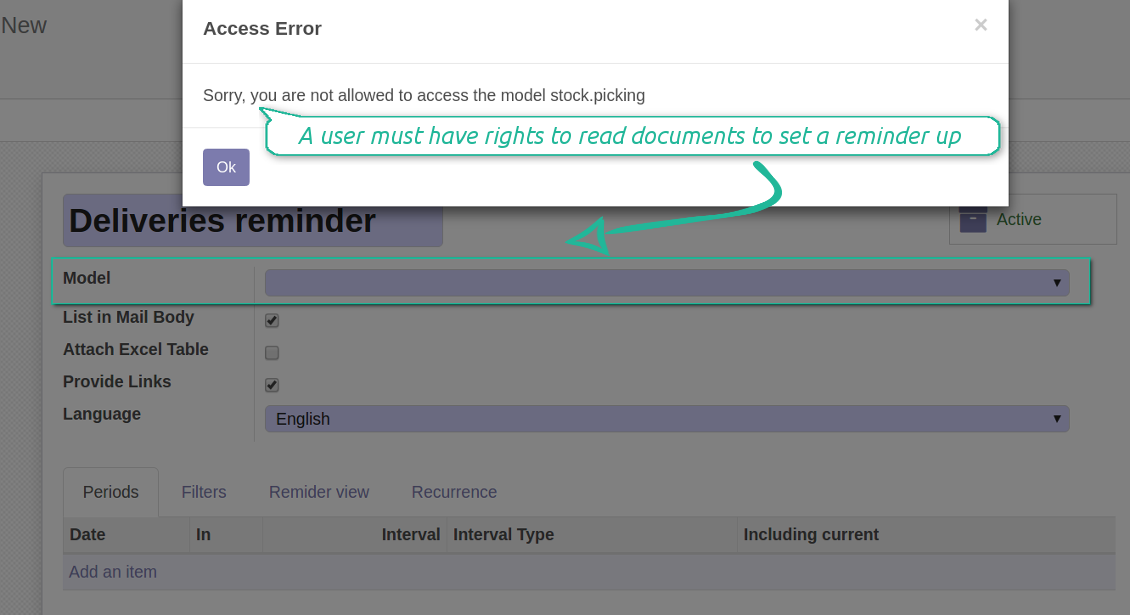
- To configure a reminder by this document type, a user should have a read access to such a model. For example, an employee without the right 'Warehouse user' might not prepare a reminder by deliveries
Στιγμιότυπα οθόνης
Make any user prepare lists reminders
Reminder managers may configure lists only for documents they can read
Συμβουλές διαμόρφωσης και εγκατάστασης για Periodic Reporting and Reminders Odoo v.13
Python dependency
To provide the feature of dynamic Excel table generation, install the Python library xlsxwriter:
pip3 install xlsxwriter
Email template
The basic reminder appearance should not be configured through Odoo email templates. In the debug mode go to:
- Settings > Technical > Email > Templates > Reminder
Do not change this template! Otherwise, its styles would be broken, and you would receive blank emails.
Have you broken everything? Not a problem, remove this template and update the module. The email appearance will be recovered.
Scheduled job (cron)
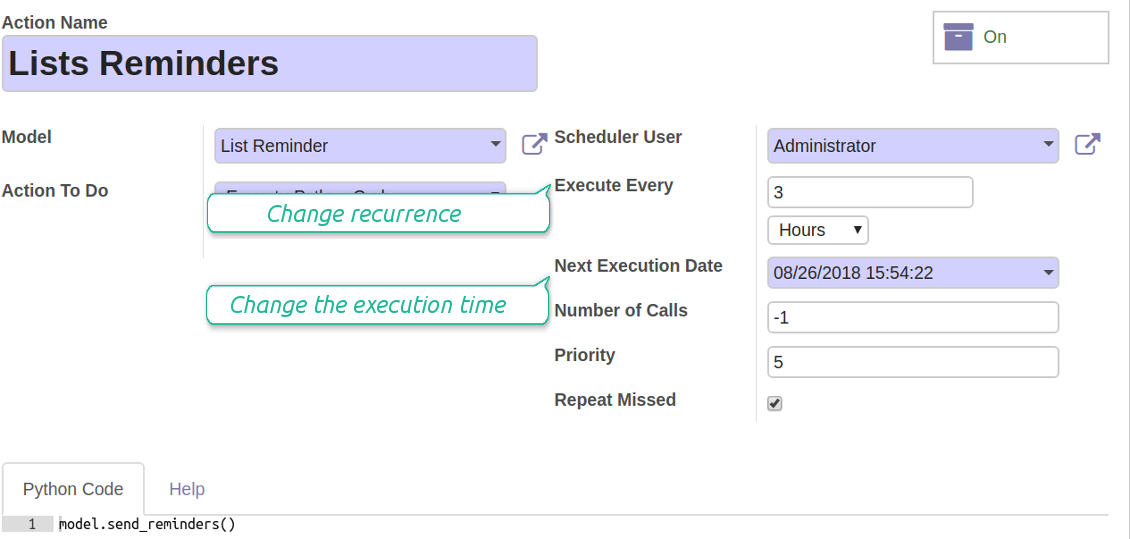
By default Odoo checks whether any reminder should be sent on a daily basis. You can change a frequency or time of check. In the debug mode go to:
- Settings > Technical > Automation > Scheduled Actions > Lists Reminders
The situation for a higher frequency is when you have many reminders with a lot records to search. In that case the cron job might be not ready with all actions in time, and it is better to repeat the check. However, be cautious: do not make it too frequent. Otherwise, one job would not be fulfilled until another one, and Odoo would collapse until a reminder is sent.
The cron job interval should be bigger than your Odoo configured timeout. Sometimes it is required to increase a timeout, if a number of documents in a list accounts for a few thousands records.
The module is not aimed to export data from Odoo. Do not try to send everyday your whole database.
Configure the planned job for reminders
Συχνές ερωτήσεις για Periodic Reporting and Reminders Odoo v.13
Ποιες είναι οι πολιτικές ενημέρωσης των εργαλείων σας;
Σύμφωνα με τις ισχύουσες πολιτικές του Odoo Apps Store:
- Κάθε άρθρωμα που αγοράστηκε για την έκδοση 12.0 και παλαιότερα δίνει πρόσβαση σε όλες τις εκδόσεις έως την 12.0.
- Από την έκδοση 13.0 κάθε έκδοση αρθρώματος αγοράζεται χωριστά.
- Ανεξάρτητα από την έκδοση, η αγορά δίνει δικαίωμα σε όλες τις ενημερώσεις και διορθώσεις εντός μιας μείζονος έκδοσης.
Σημειώστε ότι η ομάδα faOtools δεν ελέγχει αυτές τις πολιτικές. Για ερωτήσεις επικοινωνήστε απευθείας με τους εκπροσώπους του Odoo Apps Store.
Πώς μπορώ να εγκαταστήσω την εφαρμογή σας στο Odoo.sh;
Η πιο απλή προσέγγιση είναι να χρησιμοποιήσετε την ενσωματωμένη ροή εργασίας του καταστήματος Odoo:
1. Ανοίξτε τη σελίδα της μονάδας και πατήστε το κουμπί Deploy on odoo.sh
2. Έπειτα θα ανακατευθυνθείτε στη σελίδα του GitHub. Συνδεθείτε στον λογαριασμό σας και πατήστε 'Create a new repo' ή χρησιμοποιήστε υπάρχον. Βεβαιωθείτε ότι το αποθετήριο είναι ιδιωτικό. Δεν επιτρέπεται η δημοσίευση εφαρμογών με άδεια OPL-1. Αν χρειάζεται, δημιουργήστε νέο repo για το έργο Odoo.sh
3. Έπειτα πηγαίνετε στο odoo.sh και πατήστε το κουμπί Deploy. Στο αναδυόμενο παράθυρο υποβάλετε την απόφαση και πατήστε 'Continue.' Αυτή η ενέργεια ξεκινά την εγκατάσταση.
Αυτά τα βήματα εγκαθιστούν την εφαρμογή στον κλάδο παραγωγής του έργου. Αν θέλετε να αναπτύξετε τις εφαρμογές σε άλλους κλάδους ή να ενημερώσετε τη μονάδα, ακολουθήστε τις εξής ενέργειες:
1. Ανεβάστε τον πηγαίο κώδικα της εφαρμογής από το κατάστημα Odoo
2. Κάντε commit τη μονάδα στο απαιτούμενο αποθετήριο GitHub. Βεβαιωθείτε ότι κανένας φάκελος/αρχείο της εφαρμογής δεν αγνοείται (δηλαδή δεν περιλαμβάνεται στο .gitignore του repo). Τα αποθετήρια δημιουργούνται αυτόματα από το odoo.sh και μπορεί από προεπιλογή να περιλαμβάνουν κρίσιμα στοιχεία (π.χ. /lib). Ανεβάστε όλους τους καταλόγους, υποκαταλόγους και αρχεία της μονάδας χωρίς εξαιρέσεις
3. Κάντε Deploy τον στοχευμένο κλάδο του έργου odoo.sh ή, αν το προβλέπουν οι ρυθμίσεις σας, περιμένετε μέχρι να δημιουργηθεί αυτόματα.
Πώς να εγκαταστήσω την εφαρμογή σας στον δικό μου διακομιστή;
2. Επανεκκινήστε τον διακομιστή Odoo;
3. Ενεργοποιήστε τη λειτουργία προγραμματιστή (τεχνικές ρυθμίσεις);
4. Ενημερώστε τη λίστα εφαρμογών (μενού εφαρμογών);
5. Βρείτε την εφαρμογή και πατήστε «Activate»/«Install»;
6. Ακολουθήστε τις οδηγίες στη σελίδα της εφαρμογής, αν υπάρχουν.
Παρατήρησα ότι η εφαρμογή σας έχει επιπλέον πρόσθετα. Μπορώ να τα αγοράσω αργότερα;
Ναι, βεβαίως. Ταυτόχρονα το Odoo προσθέτει αυτόματα όλες τις εξαρτήσεις στο καλάθι, οπότε πρέπει να εξαιρέσετε εργαλεία που έχετε ήδη αγοράσει για να αποφύγετε διπλή πληρωμή.
Ανάπτυξα την εφαρμογή σας στο Odoo.sh και βλέπω προειδοποίηση/σφάλμα στις δοκιμές
Μια κόκκινη/πορτοκαλί προειδοποίηση δεν επηρεάζει τις λειτουργίες της εφαρμογής. Δυστυχώς, μερικές φορές τα module μας δεν περνούν τα τυπικά αυτόματα τεστ, γιατί αυτά υποθέτουν συμπεριφορά που συγκρούεται με τους στόχους της εφαρμογής. Π.χ. αλλάζουμε τον υπολογισμό τιμής, ενώ τα τεστ του τυπικού module Odoo συγκρίνουν την τελική τιμή με τον τυπικό αλγόριθμο.
Πρώτα απ' όλα, ελέγξτε τις λειτουργίες της αναπτυγμένης βάσης. Λειτουργούν όλα σωστά;
Αν εξακολουθείτε να θεωρείτε ότι η προειδοποίηση επηρεάζει πραγματικές λειτουργίες, επικοινωνήστε μαζί μας και στείλτε πλήρη αρχεία εγκατάστασης και την πλήρη λίστα αναπτυγμένων module (πυρήνα και τρίτων).
Μπορώ να αγοράσω την εφαρμογή απευθείας από την εταιρεία σας;
Όχι, διανέμουμε τα εργαλεία μόνο μέσω του επίσημου καταστήματος εφαρμογών Odoo.
Θα ήθελα να λάβω έκπτωση
Δυστυχώς, δεν έχουμε τα τεχνικά μέσα για να προσφέρουμε ατομικές τιμές.
Μπορώ να εγκαταστήσω την εφαρμογή στη βάση Odoo Online (SaaS);
Όχι, εφαρμογές τρίτων δεν μπορούν να χρησιμοποιηθούν στο Odoo Online. Δυστυχώς το Odoo SaaS αποκλείει αυτή τη δυνατότητα.
Το εργαλείο σας εξαρτάται από άλλες εφαρμογές. Πρέπει να τις αγοράσω;
Ναι, το εργαλείο απαιτεί όλα τα module που σημειώνονται στις εξαρτήσεις για να λειτουργεί σωστά. Η τιμή στη σελίδα της εφαρμογής περιλαμβάνει ήδη όλες τις απαραίτητες εξαρτήσεις.
Ποια είναι η τιμή του αρθρώματος σε δολάρια ΗΠΑ; Γιατί άλλαξε;
Η τιμή των module μας ορίζεται σε ευρώ. Το κατάστημα Odoo μετατρέπει τις τιμές σε άλλα νομίσματα σύμφωνα με την εσωτερική ισοτιμία του. Έτσι η τιμή σε δολάρια ΗΠΑ μπορεί να αλλάξει όταν ενημερώνεται η ισοτιμία.
Το κείμενο εφαρμογής και ιστότοπου σε άλλες γλώσσες πλην των αγγλικών γίνεται με βοήθεια ΤΝ και ευθυγραμμίζεται με τις επίσημες μεταφράσεις Odoo. Αν εντοπίσετε λάθος, στείλτε αίτημα για ορθότητα μεταφράσεων και θα το διορθώσουμε.
Αναφορά σφαλμάτων
Αν αντιμετωπίσετε σφάλματα ή ασυνεπή συμπεριφορά, μη διστάσετε να επικοινωνήσετε μαζί μας. Εγγυόμαστε διορθώσεις εντός 60 ημερών από την αγορά και ενδιαφερόμαστε έντονα να βελτιώνουμε τα εργαλεία μας και μετά από αυτή την περίοδο.
Δεν χρειάζεστε αριθμό τηλεφώνου ή πιστωτική κάρτα για να επικοινωνήσετε. Αρκεί μια σύντομη εγγραφή με e-mail που δεν διαρκεί πάνω από 30 δευτερόλεπτα.
Συμπεριλάβετε όσο το δυνατόν περισσότερες λεπτομέρειες στο αίτημά σας: στιγμιότυπα οθόνης, αρχεία καταγραφής διακομιστή Odoo, πλήρη περιγραφή αναπαραγωγής του προβλήματος κ.λπ. Συνήθως χρειάζονται μερικές εργάσιμες ημέρες για να ετοιμαστεί σχέδιο εργασίας για ένα ζήτημα (αν επιβεβαιωθεί σφάλμα) ή να σας δοθούν οδηγίες για το τι πρέπει να γίνει (διαφορετικά).
Δημόσια αιτήματα λειτουργιών και ιδέες μονάδων (δωρεάν ανάπτυξη)
Έχουμε ισχυρό κίνητρο να βελτιώνουμε τα εργαλεία μας και θα εκτιμούσαμε κάθε σχόλιο. Αν οι απαιτήσεις σας είναι κοινής ωφέλειας και μπορούν να υλοποιηθούν αποδοτικά, η ομάδα θα τις εντάξει στη λίστα εργασιών μας.
Τέτοια λίστα εργασιών επεξεργάζεται τακτικά και δεν συνεπάγεται επιπλέον χρεώσεις. Αν και δεν μπορούμε να υποσχεθούμε προθεσμίες και τελικό σχεδιασμό, μπορεί να είναι καλός τρόπος να αποκτήσετε τις επιθυμητές λειτουργίες χωρίς επενδύσεις και κινδύνους.
Δεν χρειάζεστε αριθμό τηλεφώνου ή πιστωτική κάρτα για να επικοινωνήσετε. Αρκεί μια σύντομη εγγραφή με e-mail που δεν διαρκεί πάνω από 30 δευτερόλεπτα.

Το εργαλείο για να οργανώνετε ευέλικτα τα συνημμένα του Odoo σε φακέλους και να συγχρονίζετε καταλόγους με πελάτες cloud: Google Drive, OneDrive/SharePoint, Nextcloud/ownCloud, Dropbox, Amazon S3, Box και NAS. DMS. Διαχειριστής αρχείων. Σύστημα διαχείρισης εγγράφων
398€
Το εργαλείο για ασφαλή φύλαξη κωδικών στο Odoo για κοινή χρήση. Κοινά θησαυροφυλάκια

Το εργαλείο για να χτίσετε μια βαθιά και δομημένη βάση γνώσης για εσωτερική και εξωτερική χρήση. Knowledge System. KMS. Αναθεωρήσεις τύπου wiki.
398€
Το εργαλείο για αυτόματο αμφίδρομο συγχρονισμό των συνημμένων του Odoo με αρχεία OneDrive
487€
Το εργαλείο για να ορίζετε στόχους KPI και να ελέγχετε την εκπλήρωσή τους ανά περιόδους. Πίνακες KPI. Σχεδιαστής πινάκων. Γραφήματα KPI

Το εργαλείο για διαχείριση υπηρεσιών βάσει χρόνου, από κράτηση ραντεβού έως πωλήσεις και αξιολογήσεις
398€
Το εργαλείο για αυτόματο αμφίδρομο συγχρονισμό των συνημμένων του Odoo με αρχεία Google Drive
487€
