Password Manager v.12
The tool to safely keep passwords for shared use







Nowadays team work assumes a shared access to multiple IT services. Such collaboration is not simple, since definite users should know some passwords and not others. Besides, such passwords should be frequently updated, and team members should learn topical authentication parameters. Often this business process becomes a total mess and results in time losses and leak of important data. The situation is especially crucial in case you administrate customers-related services.
This is the tool to solve the trouble. The app let you organize the system of safe passwords keeping with multiple security layers to efficiently structure, find, and share password bundles.
- a core app to manage vaults and passwords.
Sein Preis ist
198€
178€.
- an extension to add custom fields for password keys. Features assumed by this app are marked by the icon .
Sein Preis ist
38€
37€.
Shared password vaults for team use
Passwords Sharing Policies
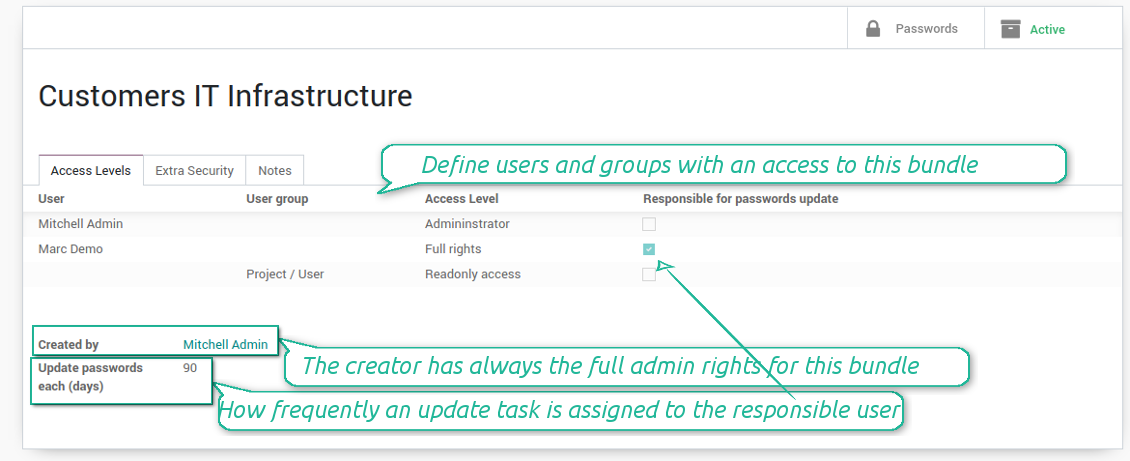
An access to a specific password is regulated on a bundle level. You may have as many bundles as you want. To share a bundle with a definite user, you should specify that user in the access levels' table. Alternatively you can assign a user group in the same table. For example, you can have a 'sales team' bundle and share it with all users with the right 'Sales Manager', or you can have a global bundle by sharing it with a user group 'Internal user'.
3 access levels to bundles, passwords, and tags are distinguished:
- Administrator may access, update or delete this bundle, its passwords, and its tags. This user is assumed to manage access levels for this bundle, to modify update policies, and set the extra password. The bundle creator is always its administrator.
- Full rights user may access, update or delete passwords and tags related to this bundle, but he/she can't change bundle itself and can't change bundle access levels or settings
- Readonly access user may observe and address passwords and tags of this bundle. Such users can not modify any objects.
Take into account that the rules are not applied for the Odoo super user. The Odoo super admin (with id 1) has full rights for all passwords and bundles, although he is also required to enter the extra paraphrase to open a bundle.
The setting 'Responsible for password updates' allows to assign a user who should regularly change the paraphrase in passwords according to the bundle update policies. For such a user the special activity is automatically and regularly created to make sure passwords are secure. There might be only a single responsible for a bundle, and such responsible should have either the 'Administrator' or the 'Full rights' access level.
Innovative single-view interface
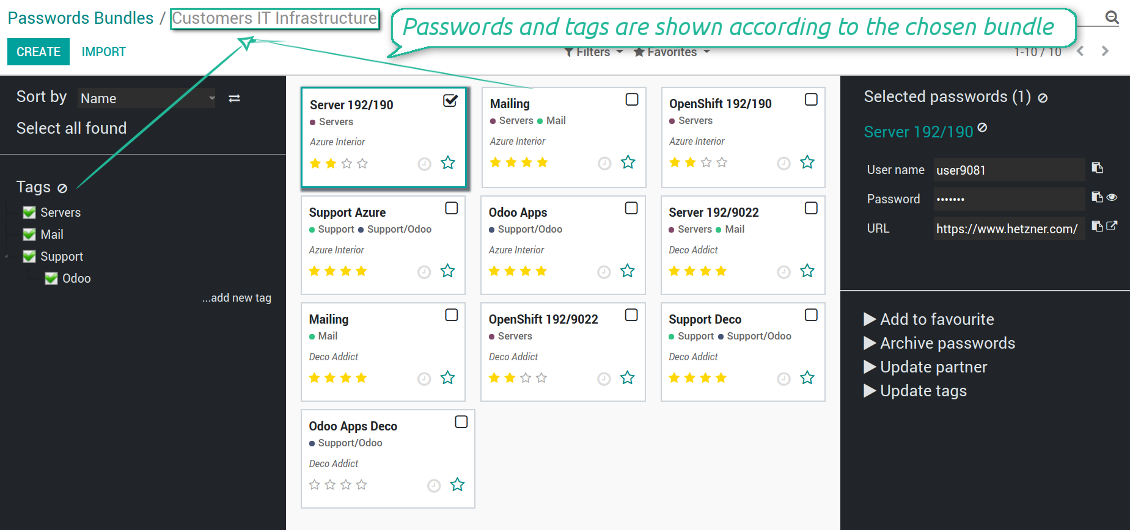
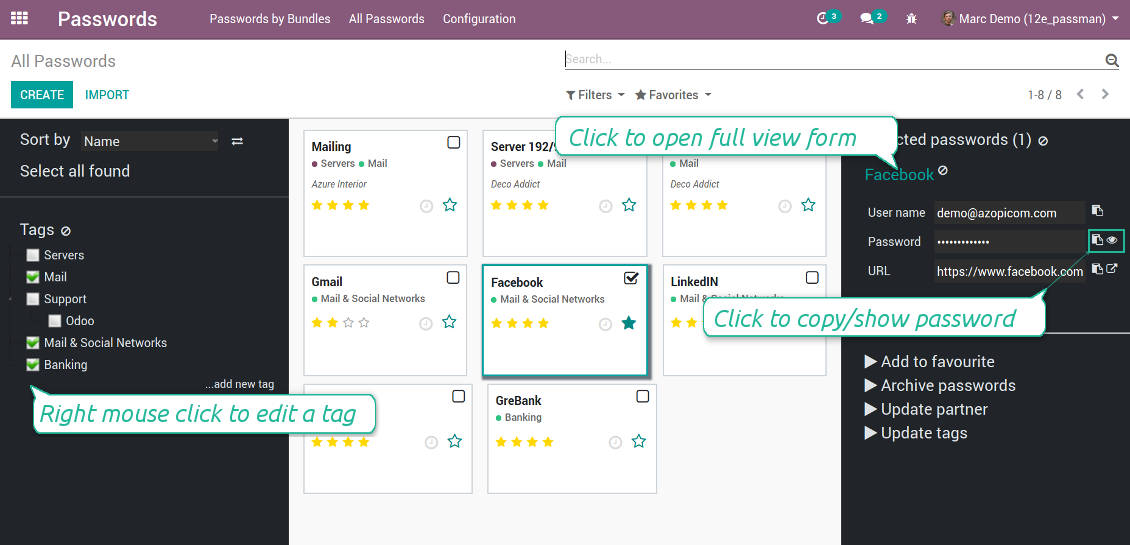
The password manager let you work with a few passwords simultaneously. Click on a password kanban card to add the key to the selection, and then address any or proceed a mass action. Possible mass actions are defined by an Odoo admin on the configuration page.
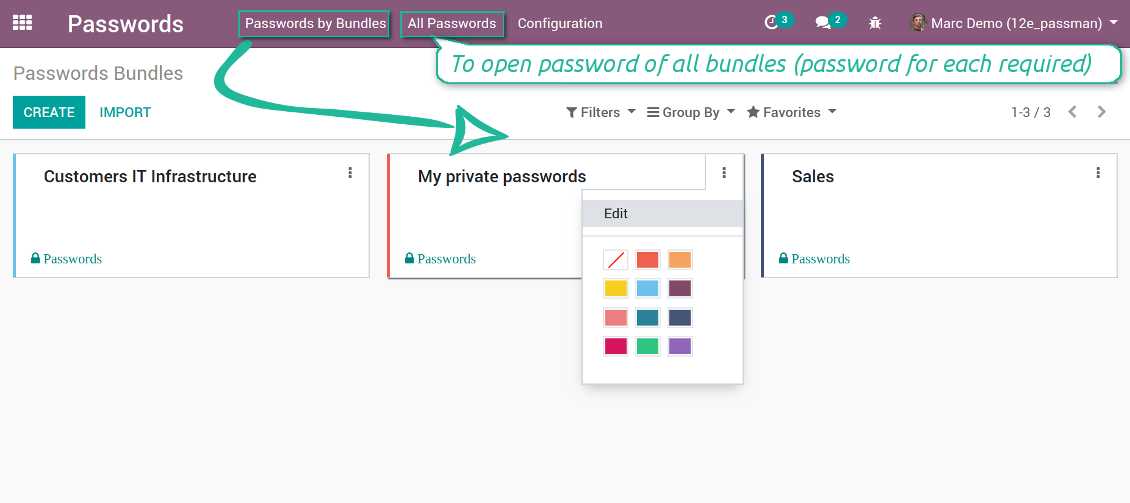
There are 2 menus to simplify working with passwords. The first - 'Passwords by bundles' - let users open keys of an exact vault. The second - 'All passwords' - let users simultaneously open all available for him/her keys. In the latter case an extra paraphrase for each bundle should be entered.
Screenshots
Passwords are combined in bundles
Passwords single-view interface
Password form view
Password Manager configuration page
Passwords by all available for this user bundles
Passwords auto generation and check
Password strength is estimated in real-time to make sure users do not introduce too week keys.
The app also let you import passwords from electronic tables using the standard Odoo import tools.
Screenshots
Password generator wizard
Import passwords from tables
Encryption and protection of passwords
For each vault you can define update policies in days. If the password has not been changed during the specified period, Odoo will generate an activity for responsible users. To maximize security, change you passwords regularly!
Passwords Security Layers
Although, there is no way to provide 100% security in the Internet, this password manager tries to minimize potential risks.
First of all, the tool symmetrically encrypt all passwords. It means that to decrypt a password, plotters should know the exact decryption algorithm and a bundle decryption key.
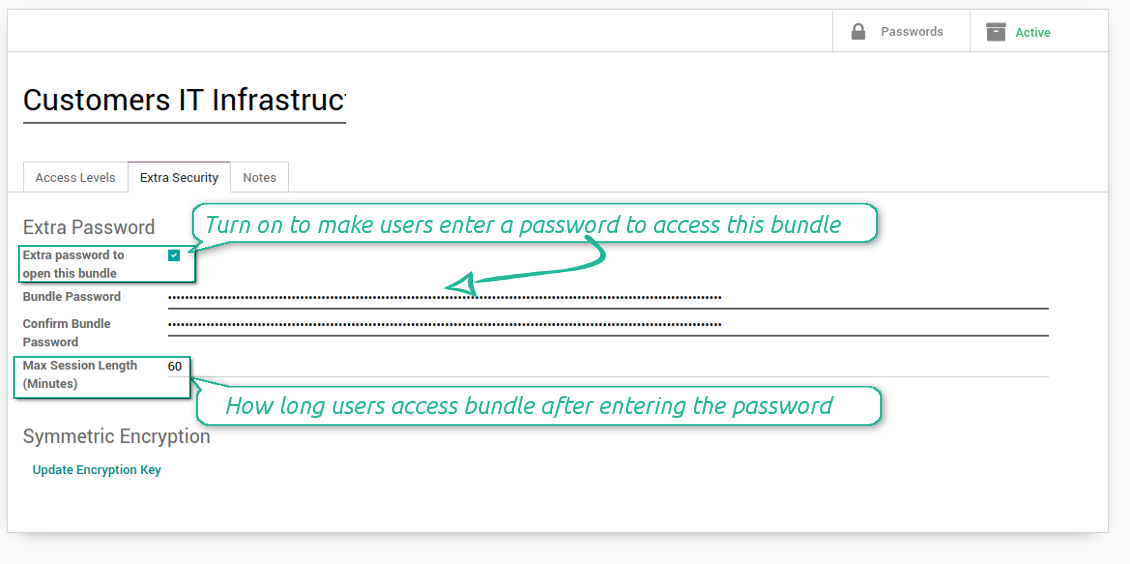
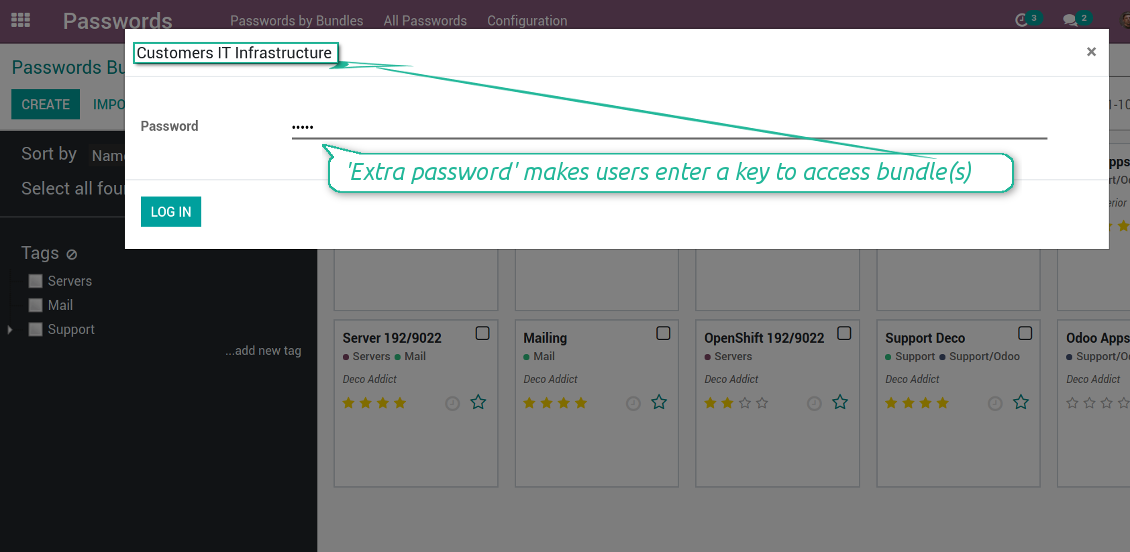
Second of all, you can assign the extra security password for any bundle. In such a case to access passwords in the interface, any user should enter a paraphrase. Even if a user has full rights for a bundle, he/she should always know that password. Besides, that paraphrase might be changed at any moment by the bundle admin (if that admin himself knows that paraphrase). Be cautious: do not forget the password. It is hashed and even the PostreSQL super user can't recover it.
Third of all, the security rights are programmed in such a way they can't be changed without the tool source code modification. Even the Odoo super user is not able to change policies.
Screenshots
Passwords access levels
Extra password to open a bundle
Bundle extra paraphrase required
Custom fields and types for password keys
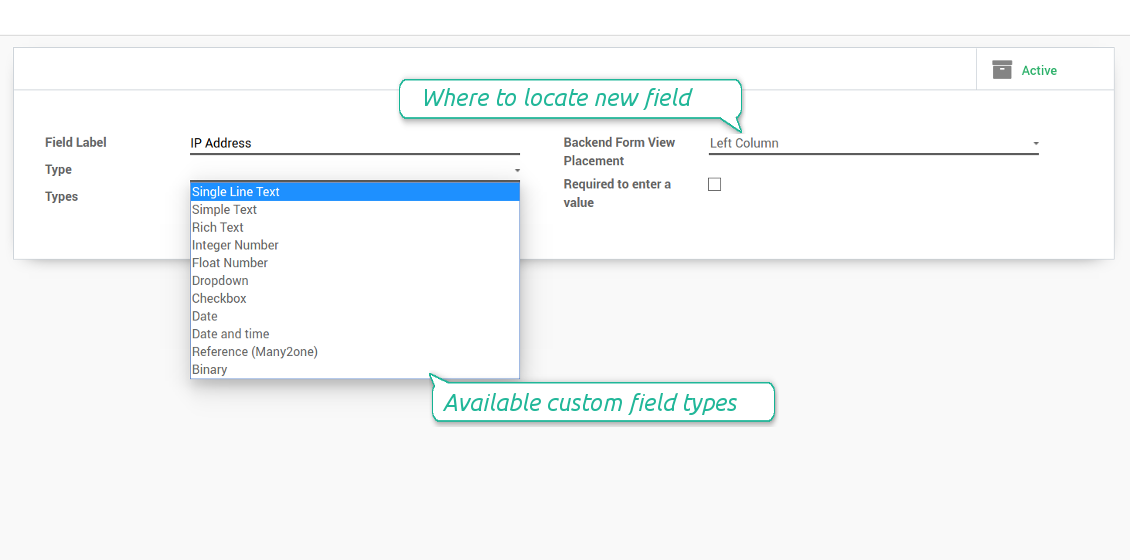
Structure passwords by special types and choose fields for each types individually. Thus, set of columns for 'virtual servers' and 'email servers' might be different.
Screenshots
Passwords' custom fields
Custom fields on password form
Custom fields for password: add any data required
Linked to Odoo contacts
Screenshots
Passwords by partners
Very good password management module
Easy installation and quick setup
Konfigurations- und Installationstipps für Password Manager Odoo v.12
Python dependencies
To guarantee tool correct work you would need a number of Python libraries: zxcvbn, cryptography:
pip install zxcvbn cryptography
Häufig gestellte Fragen zu Password Manager Odoo v.12
Wie sehe ich alle Passwörter eines Partners?
Alle Passwörter eines Partners: Kontakte öffnen, Partner öffnen, Smart-Button 'Passwords'. Sie landen in Password Manager und sehen alle Passwörter dieses Partners.
Wie losche ich ein Passwort-Bundle (Password Manager)?
Die Schaltfläche 'Delete' ist im Hauptmenü der Bundles aus Sicherheitsgrunden verborgen. Löschen: 1. Drei Punkte oben rechts am Bundle. 2. Bearbeitenoffnen, 'Save'. 3. Oberhalb 'Action' und 'Delete'.
Wie sind die Update-Richtlinien Ihrer Tools?
Laut den aktuellen Richtlinien des Odoo Apps Store:
- Ein fur Version 12.0 oder früher gekauftes Modul gibt Zugang zu allen Versionen bis 12.0.
- Ab Version 13.0 muss jede Modulversion separat gekauft werden.
- Unabhängig von der Version berechtigt der Kauf zu allen Updates und Fehlerbehebungen innerhalb einer Hauptversion.
Das faOtools-Team steuert diese Richtlinien nicht. Fragen richten Sie bitte direkt an die Vertreter des Odoo Apps Store.
Wie installiere ich Ihre App auf Odoo.sh?
Der direkteste Weg ist der integrierte Ablauf des Odoo Stores:
1. Öffnen Sie die Modulseite und klicken Sie auf Deploy on odoo.sh
2. Sie werden zu GitHub weitergeleitet. Melden Sie sich an und klicken Sie auf Create a new repo oder nutzen Sie ein vorhandenes. Das Repository muss privat sein. Apps unter OPL-1 dürfen nicht öffentlich gemacht werden. Legen Sie bei Bedarf ein neues Repo fur das Odoo.sh-Projekt an
3. Gehen Sie zu odoo.sh, klicken Sie auf Deploy, bestätigen Sie und klicken Sie auf Continue. Die Installation startet.
Damit wird die App auf dem Production-Branch installiert. Fur andere Branches oder Updates:
1. Laden Sie den Quellcode aus dem Odoo Store
2. Committen Sie das Modul in das GitHub-Repository. Keine App-Ordner/Dateien dürfen in .gitignore stehen. Von odoo.sh erzeugte Repos ignorieren oft wichtige Pfade (z. B. /lib). Laden Sie alle Modulverzeichnisse und Dateien hoch
3. Deployen Sie den Ziel-Branch des odoo.sh-Projekts oder warten Sie auf den automatischen Build.
Wie installiere ich Ihre App auf meinem eigenen Server?
2. Starten Sie den Odoo-Server neu;
3. Schalten Sie den Entwicklermodus ein (technische Einstellungen);
4. Aktualisieren Sie die App-Liste (Apps-Menü);
5. Finden Sie die App und klicken Sie auf Activate/Install;
6. Folgen Sie den Hinweisen auf der App-Seite, falls vorhanden.
Ihre App hat Zusatzmodule. Kann ich sie später kaufen?
Ja. Odoo legt alle Abhängigkeiten automatisch in den Warenkorb. SchlieBen Sie bereits gekaufte Tools aus, um nicht doppelt zu zahlen.
Ich habe Ihre App auf Odoo.sh bereitgestellt und sehe eine Warnung/einen Fehler in den Tests
Eine rote/orange Warnung beeinflusst die Funktionen der App nicht. Manchmal bestehen unsere Module die Standard-Automatiktests nicht, weil diese ein Verhalten erwarten, das unseren Zielen widerspricht. Zum Beispiel ändern wir die Preisberechnung, während die Odoo-Tests den Endpreis mit dem Standardalgorithmus vergleichen.
Prüfen Sie zuerst die Funktionen der bereitgestellten Datenbank. Funktioniert alles?
Wenn Sie dennoch annehmen, dass die Warnung echte Funktionen betrifft, senden Sie uns die vollständigen Installationsprotokolle und die vollständige Liste der bereitgestellten Module (Kern und Drittanbieter).
Kann ich Ihre App direkt bei Ihnen kaufen?
Nein, wir vertreiben die Tools nur über den offiziellen Odoo Apps Store.
Ich mochte einen Rabatt
Leider haben wir keine technischen Mittel fur individuelle Preise.
Kann ich die App auf meiner Odoo Online (SaaS)-Datenbank installieren?
Nein, Drittanbieter-Apps können nicht auf Odoo Online genutzt werden. Odoo SaaS blockiert das.
Ihr Tool hängt von anderen Apps ab. Muss ich diese kaufen?
Ja, das Tool benötigt alle als Abhängigkeit markierten Module. Der Preis auf der App-Seite enthält bereits alle noetigen Abhängigkeiten.
Was kostet das Modul in US-Dollar? Warum hat sich der Preis geändert?
Die Preise unserer Module sind in Euro festgelegt. Der Odoo Store rechnet nach seinem internen Wechselkurs um. Der Preis in US-Dollar kann sich ändern, wenn der Kurs aktualisiert wird.
Die Texte der App und Website in anderen Sprachen als Englisch werden KI-gestützt erstellt und an die offiziellen Odoo-Übersetzungen angeglichen. Wenn Sie einen Fehler entdecken, ein Uebersetzungs-Ticket senden und wir korrigieren es.
Fehlermeldung
Wenn Sie auf Fehler oder inkonsistentes Verhalten stossen, zögern Sie nicht, uns zu kontaktieren. Wir garantieren eine Reparatur innerhalb von 60 Tagen nach dem Kauf und sind auch nach diesem Zeitraum stark daran interessiert, unsere Werkzeuge zu verbessern.
Sie benötigen keine Telefonnummer oder Kreditkarte, um mit uns Kontakt aufzunehmen. Sie sollten nur eine kurze E-Mail-Anmeldung durchführen, die nicht länger als 30 Sekunden dauert.
Bitte nehmen Sie moglichst viele Details in Ihre Anfrage auf: Screenshots, Odoo-Serverprotokolle, eine vollständige Beschreibung zur Reproduktion Ihres Problems usw. Normalerweise dauert es einige Werktage, einen Arbeitsplan fur ein Problem zu erstellen (wenn ein Fehler bestätigt wird) oder Ihnen Hinweise zum weiteren Vorgehen zu geben (andernfalls).
Öffentliche Funktionsanfragen und Modulideen (kostenlose Entwicklung)
Wir sind stark motiviert, unsere Tools zu verbessern und wären für jedes Feedback dankbar. Wenn Ihre Anforderungen von öffentlichem Nutzen sind und effizient umgesetzt werden könnten, nimmt das Team diese in unsere To-Do-Liste auf.
Eine solche To-Do-Liste wird regelmässig bearbeitet und erfordert keine zusätzlichen Gebühren. Obwohl wir keine Fristen und keinen endgültigen Entwurf versprechen können, könnte dies eine gute Möglichkeit sein, die gewünschten Funktionen ohne Investitionen und Risiken zu erhalten.
Sie benötigen keine Telefonnummer oder Kreditkarte, um mit uns Kontakt aufzunehmen. Sie sollten nur eine kurze E-Mail-Anmeldung durchführen, die nicht länger als 30 Sekunden dauert.

Das Werkzeug, um Odoo-Anhänge in Ordnern zu strukturieren und mit Google Drive, OneDrive/SharePoint, Nextcloud/ownCloud, Dropbox, Amazon S3, Box und NAS zu synchronisieren. Dateimanager. DMS
398€
Das Werkzeug zum bidirektionalen Sync von Odoo-Anhängen mit OneDrive
487€
Das Werkzeug zum bidirektionalen Sync von Odoo-Anhängen mit Google Drive
487€
Das Werkzeug fur eine tiefe Wissensdatenbank intern und extern. KMS. Wiki-Revisionen
398€
Das Werkzeug, um KPI-Ziele zu setzen und die Erfullung je Periode zu kontrollieren. Dashboards. Diagramme

Das Werkzeug fur terminbasierte Dienste von der Buchung bis Verkauf und Bewertungen
398€
Das Werkzeug, um Odoo aus Ihren KI-Chats per MCP zu steuern. Claude. Jede MCP-KI.

Das Werkzeug, um verschiedene Odoo-Ereignisse in konfigurierbaren Super-Kalendern zu vereinen

Das Werkzeug, um URL-Adressen von Odoo-Website-Seiten zu übersetzen
38€