Periodic Reporting and Reminders v.15
The tool to design, generate, and periodically send reports and reminders. Report designer. List generator. Auto reminders
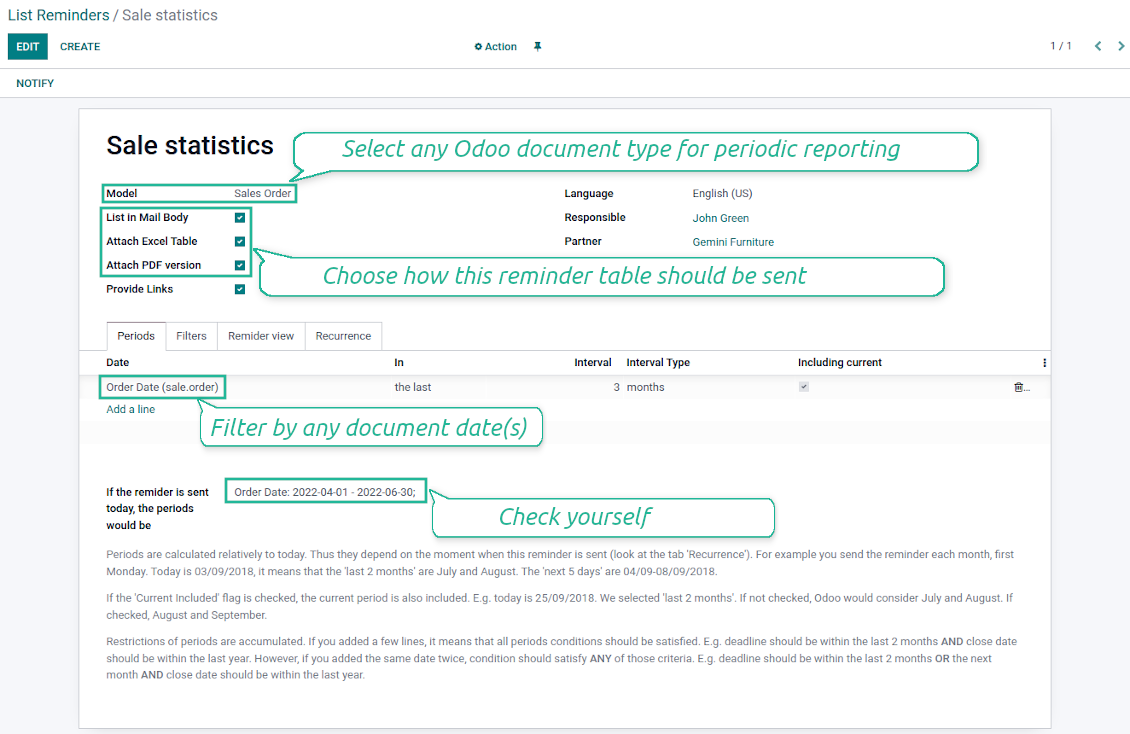

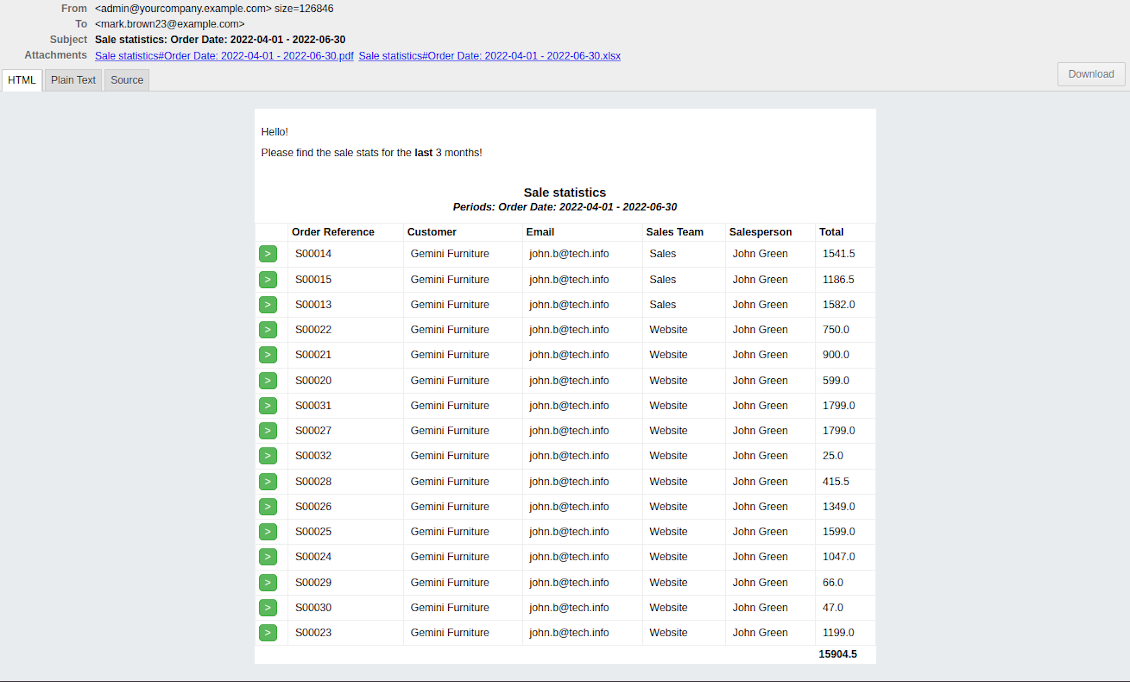
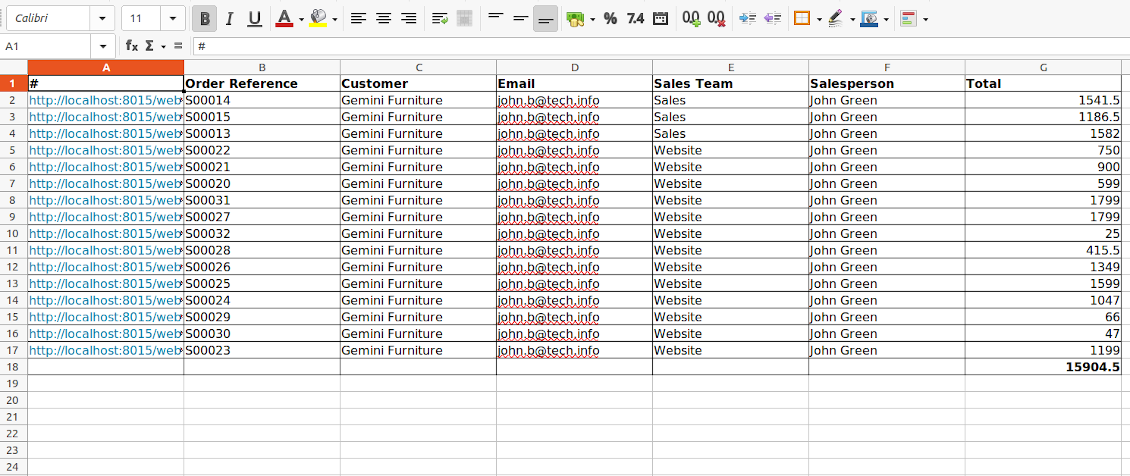



Often it is truly comfortable to open a set of documents and process them one by one without extra clicks. It is even better if the system prepares such a list regularly. For such situations this tool serves. It lets configure automatic report for any Odoo document type in a form of lists, where each record will satisfy criteria you have chosen, will suit pre-defined time frames, and will contain only the data you would like to share.
Reports by any Odoo object
Configure the tool to send periodic reports and reminders for any Odoo documents including custom ones: sale orders, opportunities, warehouse transfers, request for quotations, tasks, MRP operations, etc.
Configurable statistics
Choose data columns to include. Attach the report as an electronic table (xlsx), or/and as a PDF file, or/and as table right in email body. Apply aggregation (average, sum) for numeric columns. Introduce email greetings. Show or hide links
Up-to-date data under analysis
Include into reporting only those objects which suit your period requirements. It is possible to filter by any date and datetime fields of a target Odoo model
Suitable information
Apply any kind of filters by stored fields to include only documents which are of interest. Filter by a chosen partner or responsible user. Sort table lines by any searchable model field
Flexible recurrence
Send lists with any periodicity: everyday, each last Friday of a month, on a definite date of the year, and so on. Make reports reflect company calendars
Periodic reports for external and internal use
Any partner might be one of reminder recipients: internal or portal users, customers, suppliers, and even Odoo mail channels
Assigned statistics managers
The groups Lists Reminder 'Manager' and 'Only Own' (according to 'Responsible') allow to manage reports. Make sure you trust such users: they may send certain documents without a permission for those
Reports without restrictions
Have as many periodic reports as you wish. In any system language. For any interested internal group of third party contacts.
Great and very useful app
First of all, the team behind this app is great, support is immediate, and response is fast. The application is very useful in managing any type of notification to keep you updated with all what's happening within your company.
Topical and up-to-date reports
Filtering by relative periods
-
Restrict report time frames by any kept date or datetime fields of a target document type: deadline, create or close date, next activity day, etc. As intervals select days, weeks, months, or years
-
Apply a few periods based on different dates: e.g. select this month closed leads which have been opened the last year. Records should satisfy each criteria, but if you selected the same date twice, records should be within any of those periods. For example, a deadline should be within the last 2 months OR the next month AND a close date should be within the last year
-
Intervals may both define previous time frames ('the last') and forthcoming periods ('the next'). Periods are relative, so they are compared to today. E.g., 'this month', 'the last year', 'the next 5 weeks'
-
Exclude or include a current period. For example, you might send a reminder on the first day of a month for a previous one. Vice versa, forward a list on the last day of this month for a current one
-
Test your settings according to a real-time-shown result below the table
-
Take into account that if a related date is not set for a document, such a document is considered as always outside periods
Filtering by any document detail
-
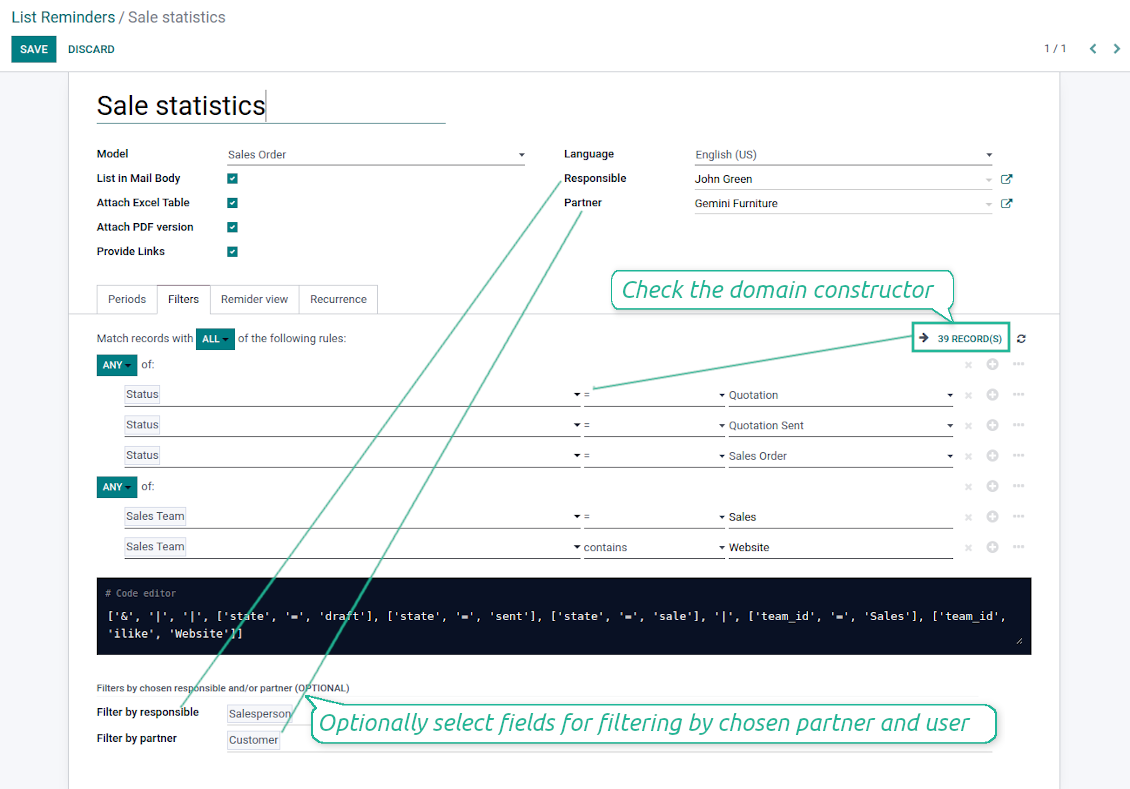
Filters are organized as a domain constructor: you may use the most of storable fields with any level of precision. The latter means, for example, you can filter sales orders by a related partner country or even by a state of a company of a related partner
-
Use both 'AND' ('all') and 'OR' ('any') operators to achieve a desired result
-
Check yourself by pressing the button 'Records': it would show all documents which at the moment satisfy your search criteria (and you have an access to)
-
If you feel confident to prepare Reverse Polish Notation domains: turn on the developer mode, and apply more complex expressions such as, for instance, 'category is child_of all'
-
Introduce the special filters by a chosen partner or a responsible user. In this way, the app lets quickly limit analysis for documents' owners. For example, to find all quotations of a particular customer or a salesperson
-
Apply filters thoroughly: make sure you are not forwarding confidential data to wrong partners. Be especially cautious in case of reminders for external contacts: make sure you filter documents by a related customer / vendor.
Configurable report appearance
-
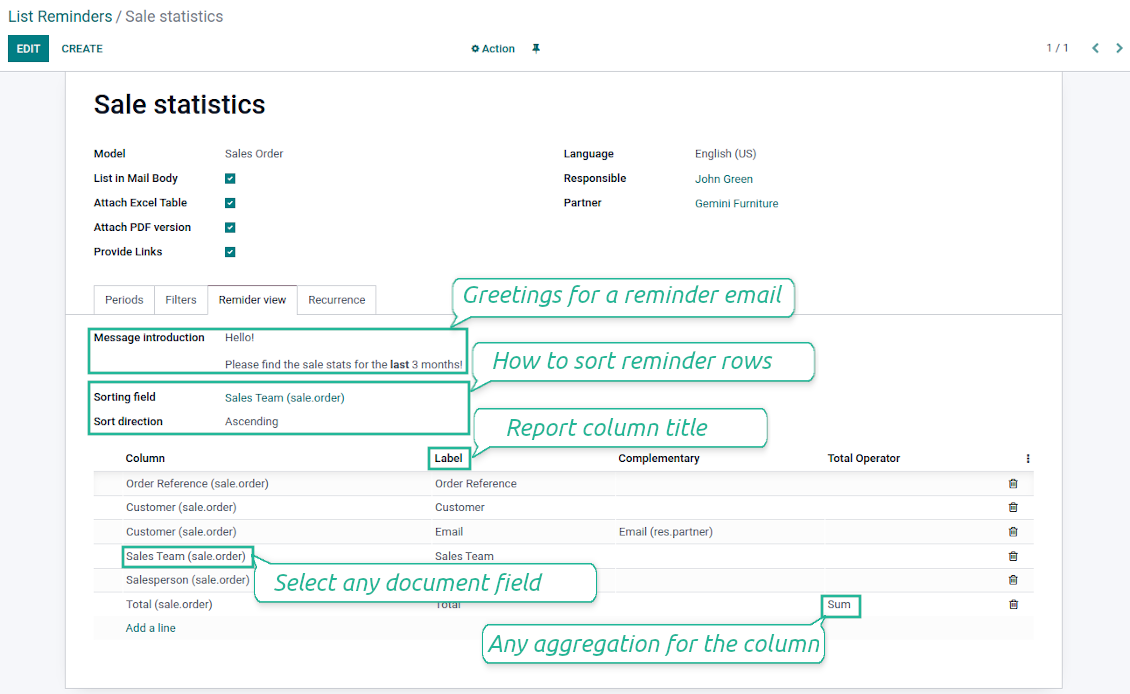
Choose an unlimited number of columns for this document. It might be any field of the following types: char, text, html, integer, float, selection, boolean, date, datetime and relations to other documents (many2one, one2many, many2many). The set includes even computed fields
-
For relational fields you might choose the second level precision. For example, you might show a phone of a customer for a sales orders' reminder or tags' colors for tasks
-
By default a field description is used as a column name, but you can introduce any other
-
Set up table sorting for any document storable field. For instance, send a sales list ordered by a sales team, a country, a salesperson, etc.
-
Apply aggregation operators for columns: the app lets calculate sum or average per records' column (applicable for integer, float, and monetary fields)
-
Optionally attach an Excel table for reports. It would have the same columns as a reminder itself. It is also possible to exclude a list from email and leave only an xlsx table
-
Optionally attach a PDF version of the reminder table. Thus, send just an email, a PDF file, an electronic table, or all together
-
Include or exclude links to Odoo objects. References are great in case of internal reminders, but they might be harmful in case of external ones
-
Introduce any greeting text for reminders. Such introduction is edited in a standard Odoo HTML editor
-
Define report language to make sure correct translation is applied
-
Enter the email address which would be shown for reminder recipients. Otherwise, it would be the user who sends the report.
Flexible periodicity of reports
-
Configure frequency of sending reports to fully reflect business calendars: by days, by weeks, by months, by years
-
By days: prepare a reminder every day, each 5 days, each 181 days
-
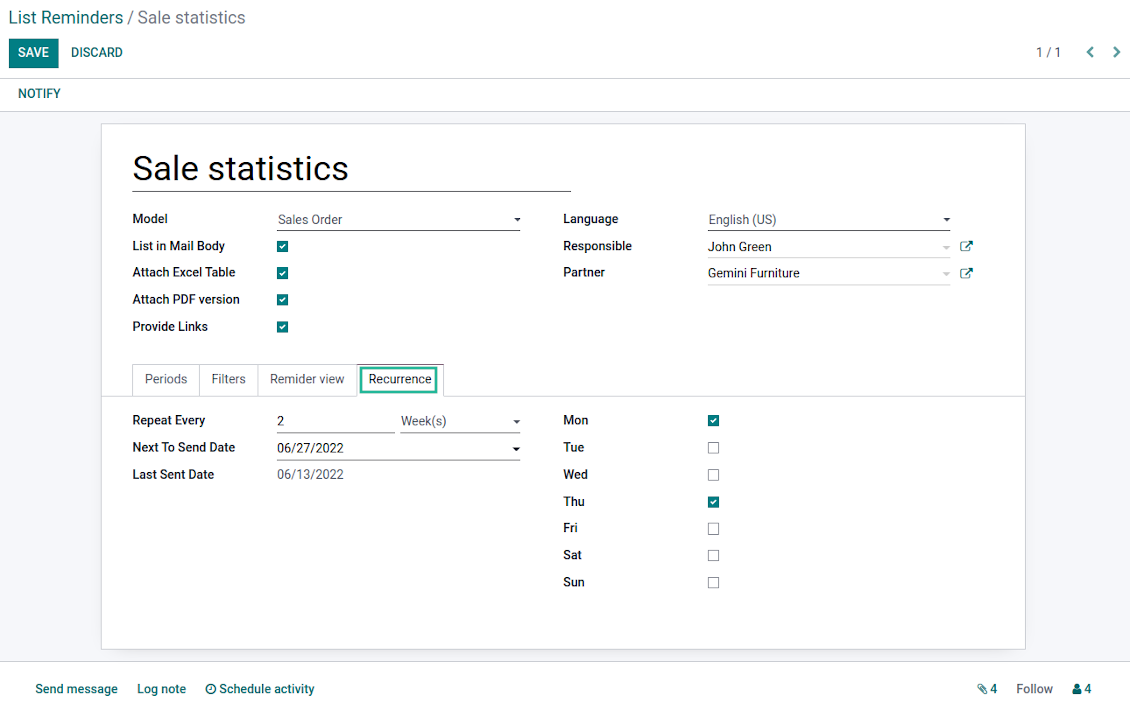
By weeks: send statistics on definite week days (e.g. on Mondays and Thursdays) each week or each 2,3,7,... weeks
-
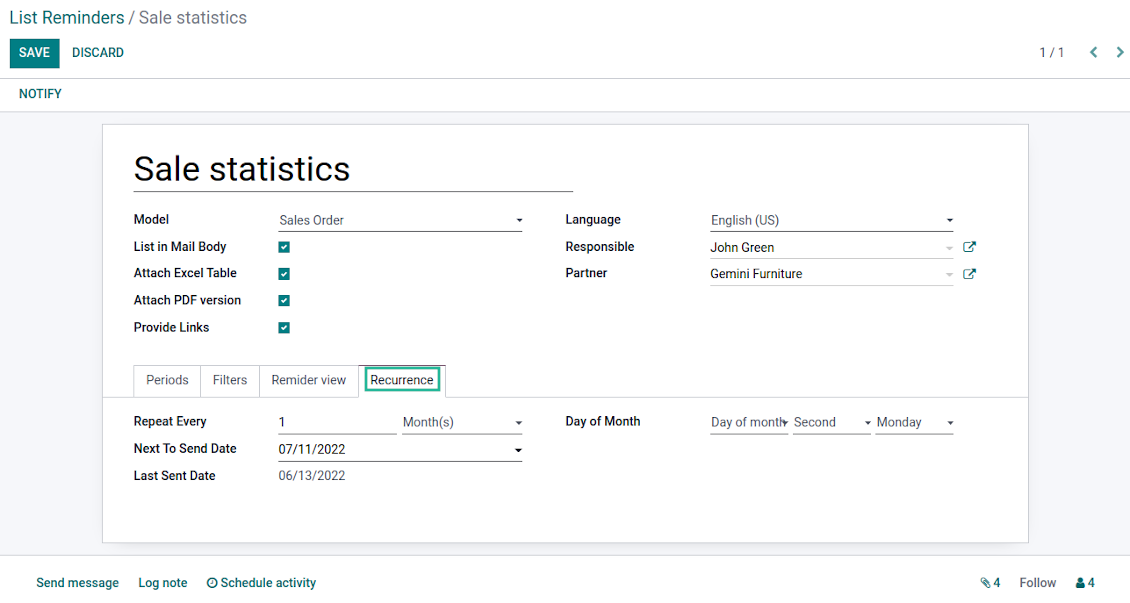
By months: for the first or the last month day, for the exact date (e.g. the 16th), for a definite weekday (for instance, the first Monday, the last Friday, or the third Tuesday)
-
By years: on an exact year day, e.g. on the first of September each year
-
Be cautious with a month / year exact date: if it didn't exist, a last month day would be applied: 31/09 -- 30/09
List reminders for any business purpose
The app is used to aggregate information by any Odoo document type: sale or purchase orders, leads or tasks, activities or meetings, deliveries or manufacturing operations, thus, generally all models which exist in the system. Typical goals of such reminders are:
-
To send periodical statistics for managers
-
To forward to-do lists for certain actions
-
To plan forthcoming events and actions
-
To notify customers or suppliers of done jobs
Typical use case: pipeline results
-
The goal: to get leads closed the previous month for a team manager
-
Choose Lead/Opportunity as a model
-
Define a period as Closed Date in the last month
-
Make a filter by Sales Team (e.g. to contain 'Europe')
-
As columns define Display Name, Salesperson - name, Salesperson - phone, Tags, Expected Revenue (as total operator - use average, for example)
-
Subscribe a sales team manager for this reminder
-
Send a list each month, on the first Monday.
-
Similar lists might be configured for sale orders, deliveries, purchase orders, manufacturing operations, etc.
Typical use case: daily to-do list
-
The goal: to get activities which should be done today or previously
-
Choose Activity as a document type
-
Define a period as Due Date in the last 10000 days including this (to get even the eldest activities)
-
Make a filter Assigned to - Name contains 'John Brown', where 'John Brown' is a user to notify
-
As columns apply Display name, Category, Due Date, Note
-
Subscribe a John Brown for this reminder
-
Send a list everyday
-
Similar reminders are usually prepared for project tasks, opportunities, planned deliveries or incoming shipments, etc.
-
To prepare the same reminder for another user: duplicate this one, update the filter to a new employee and subscribe him/her
Typical use case: planned events
-
The goal: to get events which will happen in forthcoming periods
-
Choose Event as an object for this reminder
-
Define a period as Start Date the last week, including this (it would be 'this week'), or the next 3 weeks
-
As columns apply Event name, Location, Start Date, End Date
-
Subscribe a John Brown for this reminder, where John Brown is an event department head
-
Send a list on Mondays
-
Similar reminders are Okay for activities, tasks, leads, deliveries, incoming shipments, etc.
Typical use case: customer project statistics
-
The goal: to notify customers about their project tasks
-
Define a period as Create Date in the last year
-
Make 2 filters: Customer - Parent name is 'Agrolait' or Customer name is 'Agrolait', where 'Agrolait' is an Odoo project customer
-
As columns apply Display name, Deadline, Description, Last Stage Update, Stage - display name
-
Subscribe a John Brown for this reminder, where John Brown is a managing partner of Agrolait
-
Send a list on the 10th of January each year
-
Similar statistics is frequently forwarded by support tickets, paid invoices, done sale orders, etc.
Съвети за конфигурация и инсталация за Periodic Reporting and Reminders Odoo v.15
Python dependency
To provide the feature of dynamic Excel table generation, install the Python library xlsxwriter:
pip3 install xlsxwriter
Email template
The basic reminder appearance should not be updated through Odoo email templates. In the debug mode go to:
- Settings > Users Interface > Views > 'total_notify_template'
Do not change this template! Otherwise, its styles would be broken, and you would receive blank emails.
Have you broken everything? Not a problem, remove this template and update the module. The email appearance would be recovered.
Scheduled job (cron)
By default Odoo checks whether any reminder should be sent on a daily basis. You can change a frequency or time of check. In the debug mode go to:
- Settings > Technical > Automation > Scheduled Actions > Lists Reminders
The situation for a higher frequency is when you have many reminders with a lot records to search. In that case the cron job might be not ready with all actions in time, and it is better to repeat the check. However, be cautious: do not make it too frequent. Otherwise, one job would not be fulfilled until another one, and Odoo would collapse until a reminder is sent.
The cron job interval should be bigger than your Odoo configured timeout. Sometimes it is required to increase a timeout, if a number of documents in a list accounts for a few thousands records.
The module is not aimed to export data from Odoo. Do not try to send everyday your whole database.
Често задавани въпроси за Periodic Reporting and Reminders Odoo v.15
Какви са политиките за обновяване на вашите инструменти?
Според действащите правила на Odoo Apps Store:
- Всеки модул, купен за версия 12.0 и по-стара, дава достъп до всички версии до 12.0.
- От версия 13.0 всяка версия на модула се купува отделно.
- Независимо от версията покупката дава право на всички обновления и поправки в рамките на основната версия.
Имайте предвид, че екипът на faOtools не контролира тези правила. За въпроси се обръщайте директно към представителите на Odoo Apps Store.
Как да инсталирам вашето приложение в Odoo.sh?
Най-прекият подход е да използвате вградения работен поток на магазина Odoo:
1. Отворете страницата на модула и щракнете бутона Deploy on odoo.sh
2. След това ще бъдете пренасочени към страницата на GitHub. Влезте в профила си, след което щракнете 'Create a new repo' или използвайте съществуващо. Уверете се, че хранилището е частно. Не е позволено публикуването на приложения под лиценз OPL-1. Ако е нужно, създайте ново repo за проекта Odoo.sh
3. След това отидете в odoo.sh и щракнете бутона Deploy. В изскачащия прозорец потвърдете решението и щракнете 'Continue.' Това стартира инсталацията.
Тези стъпки ще инсталират приложението в продукционния клон на проекта. Ако искате да разположите приложенията в други клонове или да обновите модула, направете следното:
1. Качете изходния код на приложението от магазина Odoo
2. Направете commit на модула в необходимото GitHub хранилище. Уверете се, че никой папки/файлове на приложението не се игнорират (т.е. не са в .gitignore на repo). Хранилищата се създават автоматично от odoo.sh и по подразбиране може да включват важни елементи (напр. /lib). Качете всички директории, поддиректории и файлове на модула без изключения
3. Разположете целевия клон на проекта odoo.sh или, ако настройките предполагат това, изчакайте да се изгради автоматично.
Как да инсталирам вашето приложение на собствен сървър?
2. Рестартирайте сървъра на Odoo;
3. Включете режим за разработчици (технически настройки);
4. Обновете списъка с приложения (менюто с приложения);
5. Намерете приложението и натиснете „Activate“/„Install“;
6. Следвайте указанията на страницата на приложението, ако има такива.
Забелязах, че приложението ви има допълнителни добавки. Мога ли да ги купя по-късно?
Да, разбира се. Едновременно Odoo автоматично добавя всички зависимости в количката, затова трябва да изключите вече купените инструменти, за да избегнете двойно плащане.
Инсталирах приложението ви в Odoo.sh и в тестовете виждам предупреждение/грешка
Червено/оранжево предупреждение не влияе на функциите на приложението. За съжаление понякога модулите ни не минават стандартните автоматични тестове, защото те очакват поведение в конфликт с целите на приложението. Например променяме изчислението на цената, а тестовете на стандартния модул Odoo сравняват крайната цена със стандартен алгоритъм.
Първо проверете функциите на разгънатата база. Всичко работи ли коректно?
Ако все пак смятате, че предупреждението влияе на реални функции, свържете се с нас и изпратете пълните регистрационни файлове от инсталацията и пълния списък на разгънатите модули (включително ядро и трети страни).
Мога ли да купя приложението директно от вашата фирма?
Не, разпространяваме инструментите само чрез официалния магазин за приложения Odoo.
Бих искал да получа отстъпка
За съжаление нямаме техническа възможност да предложим индивидуални цени.
Мога ли да инсталирам приложението в моята база Odoo Online (SaaS)?
Не, приложения на трети страни не могат да се ползват в Odoo Online. За съжаление Odoo SaaS блокира тази възможност.
Вашият инструмент зависи от други приложения. Трябва ли да ги купя?
Да, инструментът изисква всички модули, посочени в зависимостите, за да работи правилно. Цената на страницата на приложението вече включва всички необходими зависимости.
Каква е цената на модула в щатски долари? Защо се промени?
Цената на нашите модули е в евро. Магазинът Odoo превалутира цените по вътрешния си курс. Затова цената в щатски долари може да се промени при обновяване на курса.
Текстовете на приложението и уебсайта на езици, различни от английски, са с помощта на ИИ и са съгласувани с официалните преводи на Odoo. Ако забележите грешка, изпратете тикет за коректност на преводите и ще го поправим.
Докладване на грешки
Ако срещнете грешки или непоследователно поведение, свържете се с нас. Гарантираме поправки до 60 дни от покупката и сме силно заинтересовани да подобряваме инструментите и след този срок.
За да се свържете с нас не са нужни телефонен номер или кредитна карта. Достатъчна е кратка регистрация по имейл, която не отнема повече от 30 секунди.
Включете възможно най-много подробности в заявката: екранни снимки, дневници на Odoo сървъра, пълно описание как да възпроизведете проблема и т.н. Обикновено са нужни няколко работни дни, за да се подготви работен план (ако грешката е потвърдена) или насоки какво да се направи (в противен случай).
Публични заявки за функции и идеи за модули (безплатна разработка)
Силно сме мотивирани да подобряваме инструментите си и ще сме благодарни за всяка обратна връзка. Ако изискванията ви са от обществена полза и могат да се реализират ефективно, екипът ще ги включи в нашия списък със задачи.
Такъв списък със задачи се обработва редовно и не предполага допълнителни такси. Макар да не можем да обещаем срокове и окончателен дизайн, това може да е добър начин да получите желаните функции без инвестиции и рискове.
За да се свържете с нас не са нужни телефонен номер или кредитна карта. Достатъчна е кратка регистрация по имейл, която не отнема повече от 30 секунди.

Инструмент за гъвкаво подреждане на прикачените файлове на Odoo в папки и синхронизация на директории с облачни клиенти: Google Drive, OneDrive/SharePoint, Nextcloud/ownCloud, Dropbox, Amazon S3, Box и NAS. DMS. Файлов мениджър. Система за управление на документи
398€
Инструментът за безопасно съхранение на пароли в Odoo за споделена употреба. Споделени трезори
198€
Инструмент за автоматична двупосочна синхронизация на прикачените файлове в Odoo с файлове в OneDrive
487€
Инструмент за изграждане на дълбока и структурирана база знания за вътрешна и външна употреба. Knowledge System. KMS. Ревизии като в уики.
398€
Инструмент за задаване на KPI цели и контрол на изпълнението по периоди. KPI табла. Дизайнер на табла. KPI графики
198€
Инструментът за управление на услуги по време – от резервация на срещи до продажби и отзиви
398€
Инструмент за управление на Odoo от любимите ви AI чатове чрез MCP. Claude. Всеки AI с MCP.
198€